DEMYST IFYING OAK SEARCH 
P R E S E N T E D 
B Y 
Justin Edelson & Darin Kuntze | Adobe
2
3 
AGENDA 
• Oak Query Implementation 
• Cost Calculation 
• Oak Index Implementations
4 
CAVEAT 
Covers Oak 1.0.5 (AEM 6.0 SP1)
5 
WHY SHOULD YOU CARE? 
• Search is the most significant change for AEM developers between CRX2 and 
Oak.
6 
WHY SHOULD YOU CARE? 
CRX2 Search – Limited Optimization Opportunities 
Baseline Search Performance – OK 
No “Plan” Output 
Single Index 
Minimal Configuration
7 
WHY SHOULD YOU CARE? 
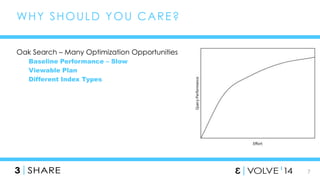
Oak Search – Many Optimization Opportunities 
Baseline Performance – Slow 
Viewable Plan 
Different Index Types
8 
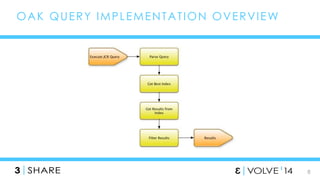
OAK QUERY IMPLEMENTAT ION OVERVIEW
9 
EXAMPLE 
/jcr:root/content/geometrixx/en/products//element(*, 
nt:unstructured)[@sling:resourceType = 'geometrixx/components/title' and 
@jcr:title = 'Triangle']
10 
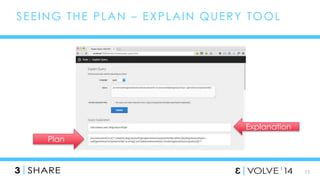
SEEING THE PLAN 
Oak supports an “explain” query prefix, similar to what many RDMBS’s support. 
explain /jcr:root/content/geometrixx/en/products//element(*, 
nt:unstructured)[@sling:resourceType = 'geometrixx/components/title’] 
Shows you which index was used. 
queryResult.getRows().nextRow().getValue("plan")
11 
SEEING THE PLAN – EXPLAIN QUERY TOOL 
Plan 
Explanation
12 
INDEX DEFINI T IONS 
Stored in the repository as nodes under /oak:index 
Node Type is oak:QueryIndexDefinition 
Single mandatory property – “type” 
Optional generic properties: 
async – set to “async” to do index updates asynchronously 
reindex – set to true to trigger a reindex 
declaringNodeTypes – one or more node types to restrict indexing 
entryCount – used to weight indexes
13 
SYNC VS. ASYNC INDEX 
Sync indexes (the default) update in the context of a save() call 
Async indexes do not. 
Every 5 seconds, the diff between the last successful indexed state and the 
HEAD state is read and used to update the index 
CONSEQUENCE - async indexes may not return up-to-date returns 
The OOTB ordered and Lucene indexes are defined as async. 
All external indexes (e.g. Solr) should also be async.
14 
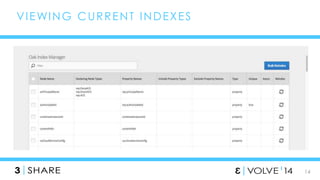
VIEWING CURRENT INDEXES
15 
VIEWING INDEX CONTENT 
Many indexes store their content in the repository, but hidden. 
Cannot be viewed using CRXDE Lite. 
Must use oak-run 
TarMK – use either “explore” (GUI) or “console” (CLI) command 
MongoMK – use “console” command 
• Vote for OAK-2096 to get “explore” support working for MongoMK
16 
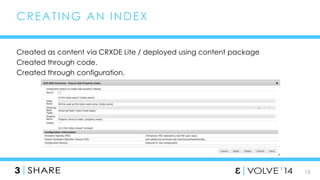
CREAT ING AN INDEX 
Created as content via CRXDE Lite / deployed using content package 
Created through code. 
Created through configuration.
17 
WHEN SHOULD YOU REINDEX? 
When the configuration changes 
For example, changing the declaringNodeTypes 
But not the entryCount 
(Sometimes) After updating Oak 
Check the Release Notes, this should be prominently indicated. 
But not arbitrarily… 
Reindexing is a resource intensive process. 
Reindexing will NOT help query performance.
18 
COST CALCULAT ION 
Each Index calculates a relative cost for the query 
Number between 0 and Infinity 
0 = “Pick me!” 
Infinity = “Don’t Pick Me!”
19 
DEBUGGING COST CALCULAT ION 
Enable DEBUG logging on org.apache.jackrabbit.oak.query.QueryImpl 
Per Index Type Cost 
Enable DEBUG logging on 
org.apache.jackrabbit.oak.plugins.index.property.PropertyIndex 
Detailed Property Cost 
Enable DEBUG logging on 
org.apache.jackrabbit.oak.plugins.index.property.OrderedPropertyIndex 
Detailed Ordered Property Cost 
Enable DEBUG logging on org.apache.jackrabbit.oak.plugins.index.lucene 
Detailed Lucene Cost
20 
SAMPLE DEBUG OUTPUT 
Query = /jcr:root/content/geometrixx/en/products//element(*, 
nt:unstructured)[@sling:resourceType = 'geometrixx/components/title' and @jcr:title 
= 'Triangle'] 
cost for aggregate lucene is Infinity 
cost for reference is Infinity 
cost for ordered is Infinity 
cost for nodeType is Infinity 
property cost for sling:resourceType is 10003.0 
property cost for jcr:title is Infinity 
Cheapest property cost is 10003.0 for property sling:resourceType 
cost for property is 10003.0 
cost for traverse is 199996.0
21 
SAMPLE DEBUG OUTPUT 
Query = /jcr:root/content/geometrixx/en/products//element(*, 
nt:unstructured)[@sling:resourceType = 'geometrixx/components/title' and 
@type='large'] 
cost for aggregate lucene is Infinity 
cost for reference is Infinity 
cost for ordered is Infinity 
cost for nodeType is Infinity 
property cost for sling:resourceType is 10003.0 
property cost for type is 21.0 
Cheapest property cost is 21.0 for property type 
cost for property is 21.0 
cost for traverse is 199996.0
22 
INDEX IMPLEMENTAT IONS 
These indexes you can create new ones of 
Property 
Ordered Property 
Solr 
Lucene 
These you shouldn’t 
Reference 
Node Type 
And then there is a special one 
Traversing
23 
PROPERTY INDEX 
Stores node paths indexed by a particular property value 
Example: /oak:index/slingResourceType 
Can be unique (unique = true) 
Examples: rep:principalName & jcr:uuid 
Only usable with sync indexes
24 
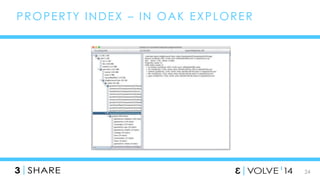
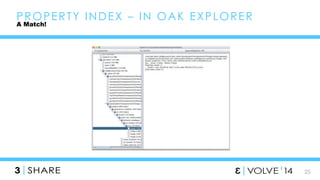
PROPERTY INDEX – IN OAK EXPLORER
25 
PROPERTY INDEX – IN OAK EXPLORER 
A Match!
26 
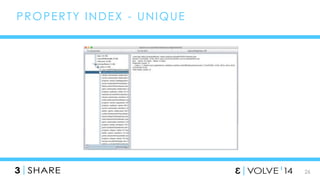
PROPERTY INDEX - UNIQUE
27 
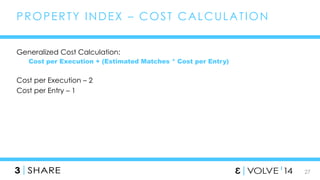
PROPERTY INDEX – COST CALCULAT ION 
Generalized Cost Calculation: 
Cost per Execution + (Estimated Matches * Cost per Entry) 
Cost per Execution – 2 
Cost per Entry – 1
28 
PROPERTY INDEX – EST IMAT ING MATCHES 
For name=value queries (e.g. 
[@sling:resourceType=‘foundation/components/text’], including lists 
If entry count provided, the estimated cost is entry count / key count + number 
of values in the query 
• Key count defaults to entry count / 10000, but can be manually specified 
Otherwise, counts up to 100 matches across the first three values. 
If > 100 matches, estimated matches are 1.1 ^ (the average depth of matches) 
If > 3 values, estimated matches are extrapolated from the first three values. 
For exists queries (e.g. [@sling:resourceType] 
If entry count provided, it is the estimated count. 
Otherwise, counts up to 100 matches across all values. 
If > 100 matches, estimated matches are 1.1 ^ (the average depth of matches)
29 
ORDERED INDEX 
Stores node paths indexed by a particular property value 
Has extra :next property on each value node to handle ordering 
Example: /oak:index/cqLastModified 
WARNING – only supports lexigraphic sorting
30 
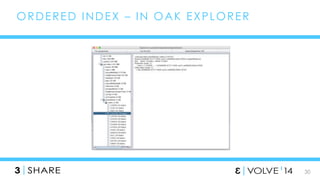
ORDERED INDEX – IN OAK EXPLORER
31 
ORDERED INDEX - COST CALCULAT ION 
1 + (Estimated Matches * 1.3) 
Similar to Property Index 
Doesn’t support entryCount
32 
REFERENCE INDEX 
Flat list of UUIDs. 
Each node points to a path. 
Cost is always 1 if a match is available
33 
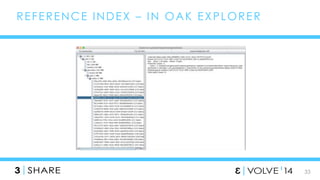
REFERENCE INDEX – IN OAK EXPLORER
34 
NODE TYPE INDEX 
Special type of Property Index 
Note that not all node types are indexed by default 
Has a default entryCount of a very high value
35 
LUCENE 
Oak Index Implementation:
36 
LUCENE 
What Oak Lucene is (and is not)
37 
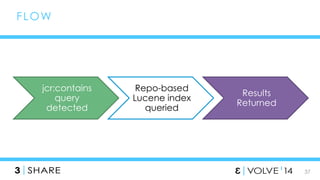
FLOW 
jcr:contains 
query 
detected 
Repo-based 
Lucene index 
queried 
Results 
Returned
38 
FUL L TEXT QUERIES 
//*[jcr:contains(., ‘Experience Manager’)] 
Any query that includes a full text condition 
Native queries
39 
LUCENE DEFINI T ION 
oak:QueryIndexDefintion 
type = lucene 
async = async 
includePropertyTypes[] = String, Binary 
excludePropertyNames[] = … 
reindex = true
40 
What can’t you do? 
LUCENE
41 
LUCENE 
Customize the tika configuration 
Configurable analyzers (OAK-2177) 
Synonyms 
Boost Terms at index time (OAK-2178)
42 
SOLR 
Based on Lucene 
Fault Tolerant 
Rich Document Handlers 
Geospatial Search 
Load Balancing 
AEM 6.0 Configurable: 
Full Text Search 
Indexing 
Native Queries
43 
SOLR CONFIGURAT ION 
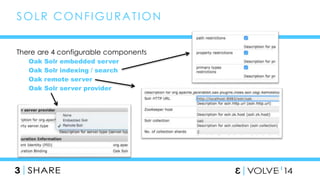
There are 4 configurable components 
Oak Solr embedded server 
Oak Solr indexing / search 
Oak remote server 
Oak Solr server provider
44 
SOLR DEFINI T ION 
oak:QueryIndexDefintion 
type = solr 
async = async 
reindex = true
SOLR FUL L TEXT QUERIES 
//*[jcr:contains(., ‘Experience 
45 
Manager’)] 
Solr enables restrictions based on: 
• Path 
• Property 
• Primary Type
46 
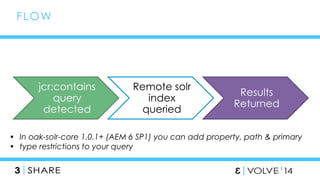
jcr:contains 
query 
detected 
Remote solr 
index 
queried 
Results 
Returned 
FLOW 
• In oak-solr-core 1.0.1+ (AEM 6 SP1) you can add property, path & primary 
• type restrictions to your query
47 
SOLR TYPES 
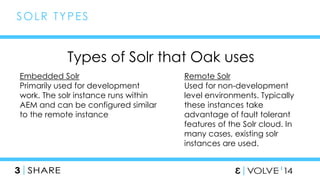
Types of Solr that Oak uses 
Embedded Solr 
Primarily used for development 
work. The solr instance runs within 
AEM and can be configured similar 
to the remote instance 
Remote Solr 
Used for non-development 
level environments. Typically 
these instances take 
advantage of fault tolerant 
features of the Solr cloud. In 
many cases, existing solr 
instances are used.
48 
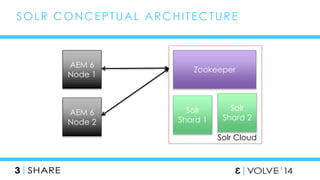
SOLR CONCEPTUAL ARCHI TECTURE 
AEM 6 
Node 1 
AEM 6 
Node 2 
Zookeeper 
Solr 
Shard 1 
Solr 
Shard 2 
Solr Cloud
49 
LUCENE VS. SOLR 
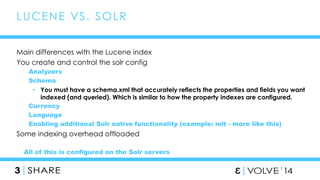
Main differences with the Lucene index 
You create and control the solr config 
Analyzers 
Schema 
• You must have a schema.xml that accurately reflects the properties and fields you want 
indexed (and queried). Which is similar to how the property indexes are configured. 
Currency 
Language 
Enabling additional Solr native functionality (example: mlt - more like this) 
Some indexing overhead offloaded 
All of this is configured on the Solr servers
//*[rep:native('lucene', 'wine OR beer')] 
50 
NAT IVE QUERIES 
native 
function 
query type 
solr or 
lucene 
query 
select [jcr:path] from [nt:base] 
where native('solr', 'mlt?q=Wine&mlt.fl=text&mlt.mindf=1&mlt.mintf=1')
51 
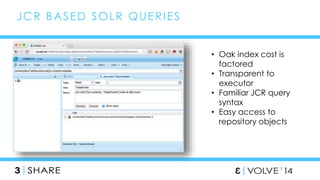
JCR BASED SOLR QUERIES 
• Oak index cost is 
factored 
• Transparent to 
executor 
• Familiar JCR query 
syntax 
• Easy access to 
repository objects
52 
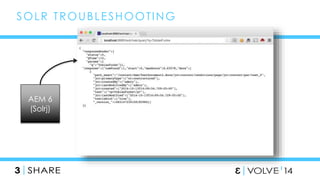
SOLR TROUBLESHOOT ING 
AEM 6 
(Solrj)
53 
O N E M O R E T H I N G… 
Oak 1.0.8 
Lucene Property Indexes 
Copy on Write for Lucene Indexes
54 
AND ONE MORE T H I N G… 
XPath still works.
55 
QUERY RESOURCES 
ACS AEM Commons & ACS AEM Tools - http://adobe-consulting-services.github.io/ 
AEM Docs - http://docs.adobe.com/docs/en/aem/6-0/deploy/upgrade/queries-and- 
indexing.html 
Oak Docs - http://jackrabbit.apache.org/oak/docs/query/query.html
56 
Training http://bit.ly/AEMTraining 
Documentation http://bit.ly/AEM5Docs & 
http://bit.ly/AEM6Docs 
GEMs Webinar Knowledge Exchange 
www.adobe.com/go/gems 
Mobile Dev: Get started with Adobe PhoneGap 
https://github.com/blefebvre/aem-phonegap-kitchen-sink 
https://github.com/blefebvre/aem-phonegap-starter-kit 
Community 
Meet with your peers on-line and in-person, get technical 
help from the community, access community articles 
• AEM Technologist Community: http://adobe.ly/Qe5BBw 
• Evolve for AEM Technologists: http://bit.ly/EvolveDev 
• AEM Help Forum: http://adobe.ly/OYdtY0 
 PackageShare 
Sign in to the Adobe 
Marketing Cloud to 
access packages 
http://bit.ly/AMCPKGSHARE 
 Marketing Cloud 
Exchange 
http://bit.ly/MCXChange 
ADOBE EXPERIENCE MANAGER 
Developer Resources
Demystifying Oak Search

Demystifying Oak Search

  • 1.
    DEMYST IFYING OAKSEARCH P R E S E N T E D B Y Justin Edelson & Darin Kuntze | Adobe
  • 2.
  • 3.
    3 AGENDA •Oak Query Implementation • Cost Calculation • Oak Index Implementations
  • 4.
    4 CAVEAT CoversOak 1.0.5 (AEM 6.0 SP1)
  • 5.
    5 WHY SHOULDYOU CARE? • Search is the most significant change for AEM developers between CRX2 and Oak.
  • 6.
    6 WHY SHOULDYOU CARE? CRX2 Search – Limited Optimization Opportunities Baseline Search Performance – OK No “Plan” Output Single Index Minimal Configuration
  • 7.
    7 WHY SHOULDYOU CARE? Oak Search – Many Optimization Opportunities Baseline Performance – Slow Viewable Plan Different Index Types
  • 8.
    8 OAK QUERYIMPLEMENTAT ION OVERVIEW
  • 9.
    9 EXAMPLE /jcr:root/content/geometrixx/en/products//element(*, nt:unstructured)[@sling:resourceType = 'geometrixx/components/title' and @jcr:title = 'Triangle']
  • 10.
    10 SEEING THEPLAN Oak supports an “explain” query prefix, similar to what many RDMBS’s support. explain /jcr:root/content/geometrixx/en/products//element(*, nt:unstructured)[@sling:resourceType = 'geometrixx/components/title’] Shows you which index was used. queryResult.getRows().nextRow().getValue("plan")
  • 11.
    11 SEEING THEPLAN – EXPLAIN QUERY TOOL Plan Explanation
  • 12.
    12 INDEX DEFINIT IONS Stored in the repository as nodes under /oak:index Node Type is oak:QueryIndexDefinition Single mandatory property – “type” Optional generic properties: async – set to “async” to do index updates asynchronously reindex – set to true to trigger a reindex declaringNodeTypes – one or more node types to restrict indexing entryCount – used to weight indexes
  • 13.
    13 SYNC VS.ASYNC INDEX Sync indexes (the default) update in the context of a save() call Async indexes do not. Every 5 seconds, the diff between the last successful indexed state and the HEAD state is read and used to update the index CONSEQUENCE - async indexes may not return up-to-date returns The OOTB ordered and Lucene indexes are defined as async. All external indexes (e.g. Solr) should also be async.
  • 14.
  • 15.
    15 VIEWING INDEXCONTENT Many indexes store their content in the repository, but hidden. Cannot be viewed using CRXDE Lite. Must use oak-run TarMK – use either “explore” (GUI) or “console” (CLI) command MongoMK – use “console” command • Vote for OAK-2096 to get “explore” support working for MongoMK
  • 16.
    16 CREAT INGAN INDEX Created as content via CRXDE Lite / deployed using content package Created through code. Created through configuration.
  • 17.
    17 WHEN SHOULDYOU REINDEX? When the configuration changes For example, changing the declaringNodeTypes But not the entryCount (Sometimes) After updating Oak Check the Release Notes, this should be prominently indicated. But not arbitrarily… Reindexing is a resource intensive process. Reindexing will NOT help query performance.
  • 18.
    18 COST CALCULATION Each Index calculates a relative cost for the query Number between 0 and Infinity 0 = “Pick me!” Infinity = “Don’t Pick Me!”
  • 19.
    19 DEBUGGING COSTCALCULAT ION Enable DEBUG logging on org.apache.jackrabbit.oak.query.QueryImpl Per Index Type Cost Enable DEBUG logging on org.apache.jackrabbit.oak.plugins.index.property.PropertyIndex Detailed Property Cost Enable DEBUG logging on org.apache.jackrabbit.oak.plugins.index.property.OrderedPropertyIndex Detailed Ordered Property Cost Enable DEBUG logging on org.apache.jackrabbit.oak.plugins.index.lucene Detailed Lucene Cost
  • 20.
    20 SAMPLE DEBUGOUTPUT Query = /jcr:root/content/geometrixx/en/products//element(*, nt:unstructured)[@sling:resourceType = 'geometrixx/components/title' and @jcr:title = 'Triangle'] cost for aggregate lucene is Infinity cost for reference is Infinity cost for ordered is Infinity cost for nodeType is Infinity property cost for sling:resourceType is 10003.0 property cost for jcr:title is Infinity Cheapest property cost is 10003.0 for property sling:resourceType cost for property is 10003.0 cost for traverse is 199996.0
  • 21.
    21 SAMPLE DEBUGOUTPUT Query = /jcr:root/content/geometrixx/en/products//element(*, nt:unstructured)[@sling:resourceType = 'geometrixx/components/title' and @type='large'] cost for aggregate lucene is Infinity cost for reference is Infinity cost for ordered is Infinity cost for nodeType is Infinity property cost for sling:resourceType is 10003.0 property cost for type is 21.0 Cheapest property cost is 21.0 for property type cost for property is 21.0 cost for traverse is 199996.0
  • 22.
    22 INDEX IMPLEMENTATIONS These indexes you can create new ones of Property Ordered Property Solr Lucene These you shouldn’t Reference Node Type And then there is a special one Traversing
  • 23.
    23 PROPERTY INDEX Stores node paths indexed by a particular property value Example: /oak:index/slingResourceType Can be unique (unique = true) Examples: rep:principalName & jcr:uuid Only usable with sync indexes
  • 24.
    24 PROPERTY INDEX– IN OAK EXPLORER
  • 25.
    25 PROPERTY INDEX– IN OAK EXPLORER A Match!
  • 26.
  • 27.
    27 PROPERTY INDEX– COST CALCULAT ION Generalized Cost Calculation: Cost per Execution + (Estimated Matches * Cost per Entry) Cost per Execution – 2 Cost per Entry – 1
  • 28.
    28 PROPERTY INDEX– EST IMAT ING MATCHES For name=value queries (e.g. [@sling:resourceType=‘foundation/components/text’], including lists If entry count provided, the estimated cost is entry count / key count + number of values in the query • Key count defaults to entry count / 10000, but can be manually specified Otherwise, counts up to 100 matches across the first three values. If > 100 matches, estimated matches are 1.1 ^ (the average depth of matches) If > 3 values, estimated matches are extrapolated from the first three values. For exists queries (e.g. [@sling:resourceType] If entry count provided, it is the estimated count. Otherwise, counts up to 100 matches across all values. If > 100 matches, estimated matches are 1.1 ^ (the average depth of matches)
  • 29.
    29 ORDERED INDEX Stores node paths indexed by a particular property value Has extra :next property on each value node to handle ordering Example: /oak:index/cqLastModified WARNING – only supports lexigraphic sorting
  • 30.
    30 ORDERED INDEX– IN OAK EXPLORER
  • 31.
    31 ORDERED INDEX- COST CALCULAT ION 1 + (Estimated Matches * 1.3) Similar to Property Index Doesn’t support entryCount
  • 32.
    32 REFERENCE INDEX Flat list of UUIDs. Each node points to a path. Cost is always 1 if a match is available
  • 33.
    33 REFERENCE INDEX– IN OAK EXPLORER
  • 34.
    34 NODE TYPEINDEX Special type of Property Index Note that not all node types are indexed by default Has a default entryCount of a very high value
  • 35.
    35 LUCENE OakIndex Implementation:
  • 36.
    36 LUCENE WhatOak Lucene is (and is not)
  • 37.
    37 FLOW jcr:contains query detected Repo-based Lucene index queried Results Returned
  • 38.
    38 FUL LTEXT QUERIES //*[jcr:contains(., ‘Experience Manager’)] Any query that includes a full text condition Native queries
  • 39.
    39 LUCENE DEFINIT ION oak:QueryIndexDefintion type = lucene async = async includePropertyTypes[] = String, Binary excludePropertyNames[] = … reindex = true
  • 40.
    40 What can’tyou do? LUCENE
  • 41.
    41 LUCENE Customizethe tika configuration Configurable analyzers (OAK-2177) Synonyms Boost Terms at index time (OAK-2178)
  • 42.
    42 SOLR Basedon Lucene Fault Tolerant Rich Document Handlers Geospatial Search Load Balancing AEM 6.0 Configurable: Full Text Search Indexing Native Queries
  • 43.
    43 SOLR CONFIGURATION There are 4 configurable components Oak Solr embedded server Oak Solr indexing / search Oak remote server Oak Solr server provider
  • 44.
    44 SOLR DEFINIT ION oak:QueryIndexDefintion type = solr async = async reindex = true
  • 45.
    SOLR FUL LTEXT QUERIES //*[jcr:contains(., ‘Experience 45 Manager’)] Solr enables restrictions based on: • Path • Property • Primary Type
  • 46.
    46 jcr:contains query detected Remote solr index queried Results Returned FLOW • In oak-solr-core 1.0.1+ (AEM 6 SP1) you can add property, path & primary • type restrictions to your query
  • 47.
    47 SOLR TYPES Types of Solr that Oak uses Embedded Solr Primarily used for development work. The solr instance runs within AEM and can be configured similar to the remote instance Remote Solr Used for non-development level environments. Typically these instances take advantage of fault tolerant features of the Solr cloud. In many cases, existing solr instances are used.
  • 48.
    48 SOLR CONCEPTUALARCHI TECTURE AEM 6 Node 1 AEM 6 Node 2 Zookeeper Solr Shard 1 Solr Shard 2 Solr Cloud
  • 49.
    49 LUCENE VS.SOLR Main differences with the Lucene index You create and control the solr config Analyzers Schema • You must have a schema.xml that accurately reflects the properties and fields you want indexed (and queried). Which is similar to how the property indexes are configured. Currency Language Enabling additional Solr native functionality (example: mlt - more like this) Some indexing overhead offloaded All of this is configured on the Solr servers
  • 50.
    //*[rep:native('lucene', 'wine ORbeer')] 50 NAT IVE QUERIES native function query type solr or lucene query select [jcr:path] from [nt:base] where native('solr', 'mlt?q=Wine&mlt.fl=text&mlt.mindf=1&mlt.mintf=1')
  • 51.
    51 JCR BASEDSOLR QUERIES • Oak index cost is factored • Transparent to executor • Familiar JCR query syntax • Easy access to repository objects
  • 52.
    52 SOLR TROUBLESHOOTING AEM 6 (Solrj)
  • 53.
    53 O NE M O R E T H I N G… Oak 1.0.8 Lucene Property Indexes Copy on Write for Lucene Indexes
  • 54.
    54 AND ONEMORE T H I N G… XPath still works.
  • 55.
    55 QUERY RESOURCES ACS AEM Commons & ACS AEM Tools - http://adobe-consulting-services.github.io/ AEM Docs - http://docs.adobe.com/docs/en/aem/6-0/deploy/upgrade/queries-and- indexing.html Oak Docs - http://jackrabbit.apache.org/oak/docs/query/query.html
  • 56.
    56 Training http://bit.ly/AEMTraining Documentation http://bit.ly/AEM5Docs & http://bit.ly/AEM6Docs GEMs Webinar Knowledge Exchange www.adobe.com/go/gems Mobile Dev: Get started with Adobe PhoneGap https://github.com/blefebvre/aem-phonegap-kitchen-sink https://github.com/blefebvre/aem-phonegap-starter-kit Community Meet with your peers on-line and in-person, get technical help from the community, access community articles • AEM Technologist Community: http://adobe.ly/Qe5BBw • Evolve for AEM Technologists: http://bit.ly/EvolveDev • AEM Help Forum: http://adobe.ly/OYdtY0  PackageShare Sign in to the Adobe Marketing Cloud to access packages http://bit.ly/AMCPKGSHARE  Marketing Cloud Exchange http://bit.ly/MCXChange ADOBE EXPERIENCE MANAGER Developer Resources

Editor's Notes

  • #6 This is a bold statement, but the facts back it up. Changes to clustering and Mongo mostly impact operations Support for flat node structures is limited.
  • #9 At a high level, this is how a query is processed. Keep in mind that this is actually split into two separate JCR API calls – execute() and getRows() or getNodes(). First the query is parsed into an Abstract Syntax Tree. If the query is an Xpath query, it is first transformed to SQL-2. Then each index is consulted to estimate the cost for the query. Then the results from cheapest index are retrieved. Finally, these results are filtered, both to ensure that the current user has read access to the result and that the result matches the complete query.
  • #10 Let’s look at a simple query. Here we are doing two property matches, a node type match, and a path restriction. The cheapest index is the index on sling resource type. We’ll talk shortly about how this is determined. In the sling resource type index, there are 100 nodes with the selected value. This then gets filtered down to just a single result.
  • #11 To determine what index is used, you can run an explain query. This is the query prefixed with explain The tricky part is that you have to look for this specific plan value and neither CRXDE Lite nor CRX Explorer can do that, at least not yet.
  • #12 ACS AEM Tools, however, comes with this Explain Query tool which allows you to provide a query and get the plan. It will also attempt to decode the plan into a simple explanation. This doesn’t always work as the plan syntax is evolving. But if you see a plan which isn’t properly explained, please let us know. One known issue is that the plan output doesn’t differentiate between property and ordered property indexes.
  • #13 Index definitions are stored in the repository. There is a special node type, oak Query Index Definition and you will hear these referred to as QIDs in some parts. There is just a single mandatory property named type which governs what type of index it is. Note that the node name of an index isn’t particularly relevant, although you should keep it reasonable. There are also some generic properties which are useable across several different index types.
  • #15 If you want to view the current indexes, one option is the Oak Index Manager from ACS AEM Commons. This lists the current indexes in a table and allow for easy-access to reindexing.
  • #16 The index content for several index types is stored in the repository, but as hidden nodes. So you can’t just view them with CRXDE Lite or CRX Explorer. You have to use oak-run. For TarMK, this means shutting down AEM and using either the explore or console command. For MongoMK, you don’t have to shut anything down, but you can only use the console command. Later in the presentations, we’ll see some screenshots of what the index content looks like. For Solr, you can view the raw index content in the Solr HTTP interface
  • #17 There’s several different ways of creating an index definition. You can create it as content using CRX DE Lite and deployed in a content package You can also write code which creates the appropriate nodes And in ACS AEM Commons, we have a configuration based utility for creating indexes. This only supports property indexes for now.
  • #18 As in CRX2, reindexing requires traversing the entire repository. Unlike, CRX2, however, since there are multiple indexes, you can reindex one index at a time. You need to reindex when a configuration changes which impacts the indexed content, for example changing the declaring node types. Sometimes, especially before Service Pack 1, some Oak updates required reindexing. This hopefully won’t be the case in the future, but it is worth checking the release notes. You should not reindex for fun. It is a resource intensive process.
  • #19 For each query, the indexes are asked to estimate the cost. This is a relative value between 0 and Infinity. The index with the lowest cost wins and will be asked to actually execute the query. The index’s cost should in theory represent the number of reads it will take to execute the query.
  • #21 Here’s some sample debug output. I’ve removed the logger names so the text is legible. Purple text is the output from QueryImpl Orange text is the output from PropertyIndex If you look at the orange text, you can see that the cost for the jcr:title property is Infinity. This is because there is no index on this property. We also see in this output the first mention of ‘traverse’. This is the worst-case scenario where no index is usable and some portion of the repository needs to be
  • #22 Here’s another example, this time with two indexed properties. Purple text is the output from QueryImpl Orange text is the output from PropertyIndex
  • #23 There’s a number of OOTB index types and in fact you can write your own index type, although we won’t go into that in this presentation. The Traversing index isn’t configured – it is hardcoded in the Oak index implementation. It is basically the worst case scenario – where a repository tree needs to be traversed node by node in order to find matches.
  • #24 Property indexes index property values. They store node paths in a tree structure under each property value. Property indexes can be defined as unique in which case they are a way to enforce a property’s uniqueness.
  • #25 You can see the index data using the Oak Explorer. Here we are looking at the sling resource type index for the value foundation/components/image.
  • #26 The nodes which match the property value have a match property set to true.
  • #30 The Ordered Property Index is similar to the Property Index. The key difference is that each index value node has a special next property indicating the next value. This index, at present, is basically broken for any non-string type as it only supports lexigraphic sorting.
  • #49 Point AEM to Zookeeper, Zookeeper directs the query request to a “live” Shard.
  • #53 Troubleshooting purposes
  • #55 I would be remiss if I didn’t take this opportunity to mention one other thing – XPath still works. The reasons it is deprecated in the spec are complex and not worth going into here. But it isn’t going away in AEM. And in fact, the XPath query parser will in many cases, specially with or clauses, handle some optimizations.