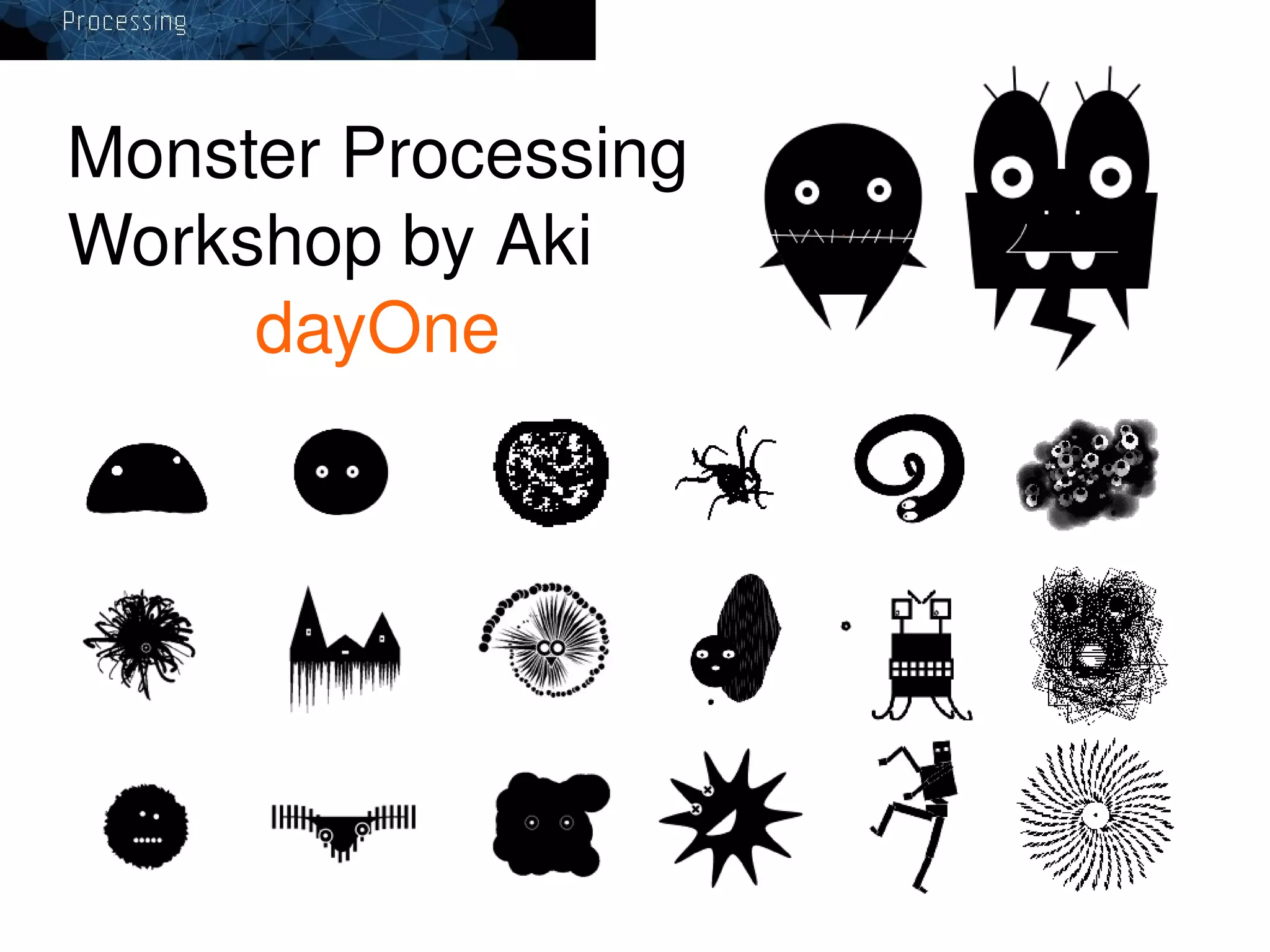
Monster Processing
Workshop by Aki
dayOne

v


Processing ( 程式語言 ) 是一種 IDE (Integrated Development Environment)
整合開發環境。它可以稱為增加圖形工能的 Java 程式語言的簡易版。
Processing 可以使用在 ...
●
●
●
●

開發中小型程式
當作開發程式的草圖 Rough Draft
創作數位藝術,視覺設計,互動裝置,等
對非程式設計員的教材工具

下載 Processing
http://processing.org/
Download
● Linux
● Mac OSX
● Windows
 

http://processing.org/download/processing­1.0.9.tgz
http://processing.org/download/processing­1.0.9.dmg
http://processing.org/download/processing­1.0.9.zip
 
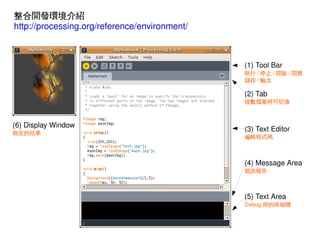
整合開發環境介紹
http://processing.org/reference/environment/

(1) Tool Bar
執行 / 停止 / 開新 / 開舊
儲存 / 輸出

(2) Tab

複數檔案時可切換

(6) Display Window

(3) Text Editor

跑完的結果

編輯程式碼

(4) Message Area
錯誤報告

(5) Text Area
Debug 用的終端機


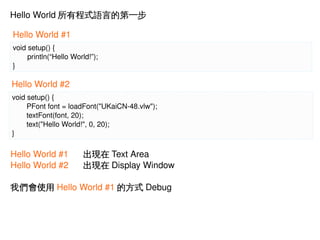
Hello World 所有程式語言的第一步
Hello World #1
void setup() {
println(“Hello World!”);
}

Hello World #2
void setup() {
PFont font = loadFont("UKaiCN­48.vlw");
 
textFont(font, 20);
 
text("Hello World!", 0, 20);
}

Hello World #1
Hello World #2

出現在 Text Area
出現在 Display Window

我們會使用 Hello World #1 的方式 Debug


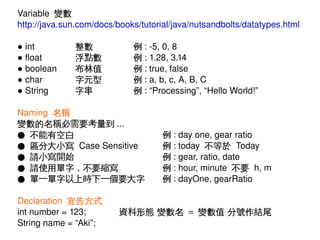
Variable  變數
http://java.sun.com/docs/books/tutorial/java/nutsandbolts/datatypes.html
● int
● float
● boolean
● char
● String

整數
浮點數
布林值
字元型
字串

例 : ­5, 0, 8
例 : 1.28, 3.14
例 : true, false
例 : a, b, c, A, B, C
例 : “Processing”, “Hello World!”

Naming  名稱
變數的名稱必需要考量到 ...
● 不能有空白
● 區分大小寫 Case Sensitive
● 請小寫開始
● 請使用單字,不要縮寫
● 單一單字以上時下一個要大字
Declaration  宣告方式
int number = 123;
 String name = “Aki”;

例 : day one, gear ratio
例 : today  不等於 Today
例 : gear, ratio, date
例 : hour, minute  不要 h, m
例 : dayOne, gearRatio

資料形態 變數名 = 變數值 分號作結尾
 
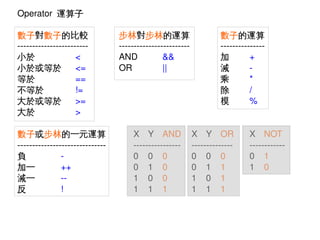
Operator  運算子
數子對數子的比較
­­­­­­­­­­­­­­­­­­­­­­­­
小於
<
小於或等於
<=
等於
==
不等於
!=
大於或等於
>=
大於
>
數子或步林的一元運算
­­­­­­­­­­­­­­­­­­­­­­­­­­­­­­
負
­
加一
++
減一
­­
反
!


步林對步林的運算
­­­­­­­­­­­­­­­­­­­­­­­­
AND
&&
OR
||

X Y AND
­­­­­­­­­­­­­­­­
0 0 0
0 1 0
1 0 0
1 1 1


數子的運算
­­­­­­­­­­­­­­­
加
+
減
­
乘
*
除
/
模
%
X Y OR
­­­­­­­­­­­­­­
0 0 0
0 1 1
1 0 1
1 1 1

X NOT
­­­­­­­­­­­­
0 1
1 0
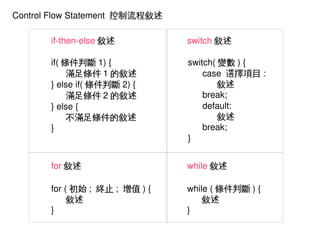
Control Flow Statement  控制流程敘述
if­then­else 敘述
if( 條件判斷 1) {
滿足條件 1 的敘述
} else if( 條件判斷 2) {
滿足條件 2 的敘述
} else {
不滿足條件的敘述
}

switch( 變數 ) {
case  選擇項目 :
敘述
break;
default:
敘述
break;
}

for 敘述

while 敘述

for ( 初始 ;  終止 ;  增值 ) {
敘述
}
 

switch 敘述

while ( 條件判斷 ) {
敘述
}
 
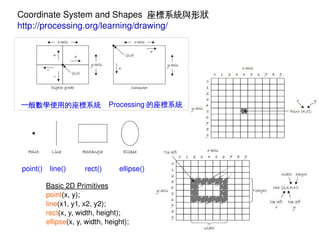
Coordinate System and Shapes  座標系統與形狀
http://processing.org/learning/drawing/

一般數學使用的座標系統

point()


line()

rect()

Processing 的座標系統

ellipse()

Basic 2D Primitives
point(x, y);
line(x1, y1, x2, y2);
rect(x, y, width, height);
ellipse(x, y, width, height);

 
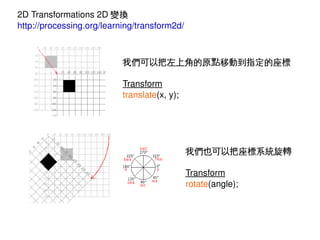
2D Transformations 2D 變換
http://processing.org/learning/transform2d/

我們可以把左上角的原點移動到指定的座標
Transform
translate(x, y);

我們也可以把座標系統旋轉
Transform
rotate(angle);


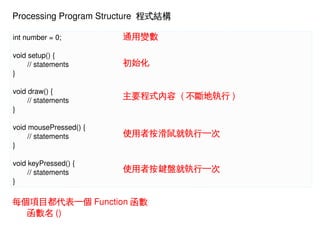
Processing Program Structure  程式結構
int number = 0;

通用變數

void setup() {
// statements
}

初始化

void draw() {
// statements
}
void mousePressed() {
// statements
}
void keyPressed() {
// statements
}

主要程式內容 ( 不斷地執行 )

使用者按滑鼠就執行一次

使用者按鍵盤就執行一次

每個項目都代表一個 Function 函數
函數名 ()


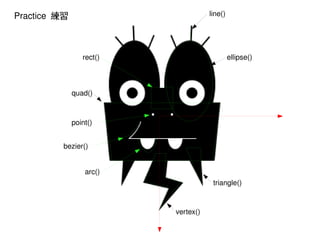
line()

Practice  練習

rect()

ellipse()

quad()

point()
bezier()
arc()
triangle()

vertex()


Monster Processing Workshop (dayOne)