DEPARTMENT OF COMPUTER SCIENCE
& ENGINEERING
Domain Winning Camp 2022
Subject Name: NETWORK & SECURITY
Day: 3
Topics Covered: Network Topologies and Router
Configuration
DISCOVER . LEARN . EMPOWER
1
• Prerequisite of topic: Basics of Computer Network.
• Objective : To understand the basic and hybrid LAN physical
topologies, and introduction to the configuration of the static and
dynamic routes.
• Outcome: The students will be able to apply their knowledge to
answer questions about network topologies and determine which one
to use in different work environments.
2
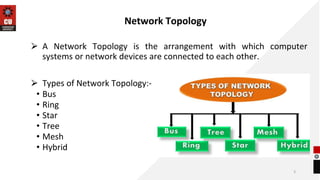
Network Topology
⮚ A Network Topology is the arrangement with which computer
systems or network devices are connected to each other.
⮚ Types of Network Topology:-
• Bus
• Ring
• Star
• Tree
• Mesh
• Hybrid
3
Bus Topology
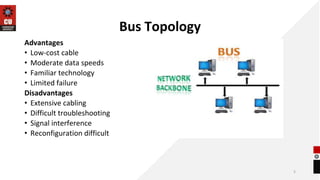
• All devices share single communication line or cable.
• Both ends of the shared channel have line terminator.
• It is one of the simple forms of networking where a failure of a device
does not affect the other devices.
• But the failure of the shared communication line can make all other
devices stop functioning.
4
Bus Topology
Advantages
• Low-cost cable
• Moderate data speeds
• Familiar technology
• Limited failure
Disadvantages
• Extensive cabling
• Difficult troubleshooting
• Signal interference
• Reconfiguration difficult
5
Ring Topology
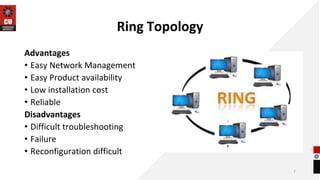
• Ring topology is like a bus topology, but with connected ends.
• The node that receives the message from the previous computer will
retransmit to the next node.
• The most common access method of the ring topology is token
passing.
Token passing: It is a network access method in which token is
passed from one node to another node.
Token: It is a frame that circulates around the network.
6
Ring Topology
Advantages
• Easy Network Management
• Easy Product availability
• Low installation cost
• Reliable
Disadvantages
• Difficult troubleshooting
• Failure
• Reconfiguration difficult
7
Star Topology
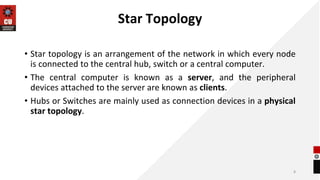
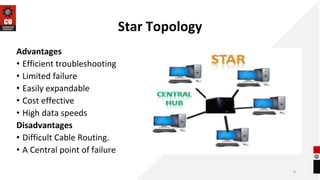
• Star topology is an arrangement of the network in which every node
is connected to the central hub, switch or a central computer.
• The central computer is known as a server, and the peripheral
devices attached to the server are known as clients.
• Hubs or Switches are mainly used as connection devices in a physical
star topology.
8
Star Topology
Advantages
• Efficient troubleshooting
• Limited failure
• Easily expandable
• Cost effective
• High data speeds
Disadvantages
• Difficult Cable Routing.
• A Central point of failure
9
Tree topology
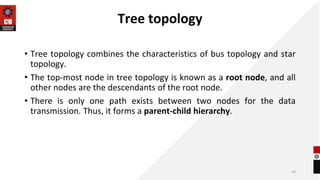
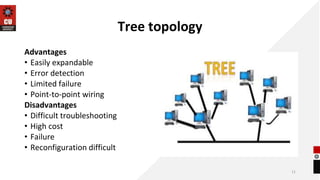
• Tree topology combines the characteristics of bus topology and star
topology.
• The top-most node in tree topology is known as a root node, and all
other nodes are the descendants of the root node.
• There is only one path exists between two nodes for the data
transmission. Thus, it forms a parent-child hierarchy.
10
Tree topology
Advantages
• Easily expandable
• Error detection
• Limited failure
• Point-to-point wiring
Disadvantages
• Difficult troubleshooting
• High cost
• Failure
• Reconfiguration difficult
11
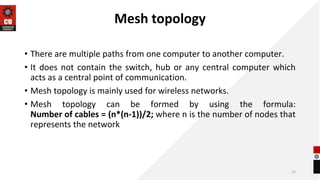
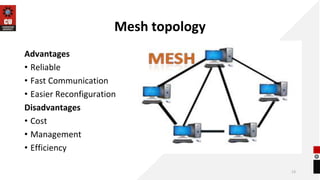
Mesh topology
• There are multiple paths from one computer to another computer.
• It does not contain the switch, hub or any central computer which
acts as a central point of communication.
• Mesh topology is mainly used for wireless networks.
• Mesh topology can be formed by using the formula:
Number of cables = (n*(n-1))/2; where n is the number of nodes that
represents the network
12
Mesh topology
Advantages
• Reliable
• Fast Communication
• Easier Reconfiguration
Disadvantages
• Cost
• Management
• Efficiency
13
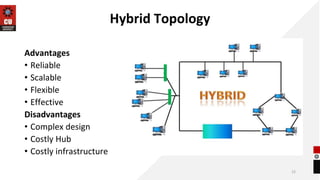
Hybrid Topology
• The combination of various different topologies is known as Hybrid
topology.
• A Hybrid topology is a connection between different links and nodes
to transfer the data.
• When two or more different topologies are combined together is
termed as Hybrid topology and if similar topologies are connected
with each other will not result in Hybrid topology.
14
Hybrid Topology
Advantages
• Reliable
• Scalable
• Flexible
• Effective
Disadvantages
• Complex design
• Costly Hub
• Costly infrastructure
15
Router Configuration
• A router is a layer 3 or network layer device.
• A router can be used both in LAN and WAN.
• It transfers data in the form of IP packets.
• It connects different networks together and sends data packets from
one network to another.
• Routers are manufactured by some popular companies like Cisco, D-
Link, HP, 3Com, Juniper and Nortel.
16
Static Routing
17
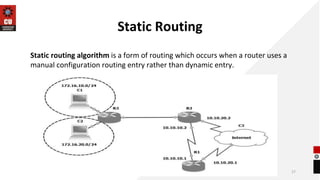
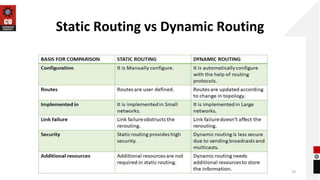
Static routing algorithm is a form of routing which occurs when a router uses a
manual configuration routing entry rather than dynamic entry.
Dynamic Routing
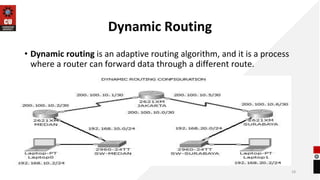
• Dynamic routing is an adaptive routing algorithm, and it is a process
where a router can forward data through a different route.
18
Static Routing vs Dynamic Routing
19
References
Text Books:
• Data Communications and Networking by B. Forouzan.
• Computer Networking With Internet Protocols and Technology by Stallings.
Reference Books:
• Fundamentals of Communication Networks by Wiley.
Web Links:
• www.tutorialspoint.com
• https://www.softwaretestinghelp.com/router-setup-configuration/
• www.geekforgeeks.org
• https://www.computernetworkingnotes.com/ccna-study-guide/static-routing-configuration-guide-with-
examples.html
20
FAQ
1. Applications of Ring Topology
1. Design a Start topology for UMS system
21
22
Thank you

DAY 3.pptx

  • 1.
    DEPARTMENT OF COMPUTERSCIENCE & ENGINEERING Domain Winning Camp 2022 Subject Name: NETWORK & SECURITY Day: 3 Topics Covered: Network Topologies and Router Configuration DISCOVER . LEARN . EMPOWER 1
  • 2.
    • Prerequisite oftopic: Basics of Computer Network. • Objective : To understand the basic and hybrid LAN physical topologies, and introduction to the configuration of the static and dynamic routes. • Outcome: The students will be able to apply their knowledge to answer questions about network topologies and determine which one to use in different work environments. 2
  • 3.
    Network Topology ⮚ ANetwork Topology is the arrangement with which computer systems or network devices are connected to each other. ⮚ Types of Network Topology:- • Bus • Ring • Star • Tree • Mesh • Hybrid 3
  • 4.
    Bus Topology • Alldevices share single communication line or cable. • Both ends of the shared channel have line terminator. • It is one of the simple forms of networking where a failure of a device does not affect the other devices. • But the failure of the shared communication line can make all other devices stop functioning. 4
  • 5.
    Bus Topology Advantages • Low-costcable • Moderate data speeds • Familiar technology • Limited failure Disadvantages • Extensive cabling • Difficult troubleshooting • Signal interference • Reconfiguration difficult 5
  • 6.
    Ring Topology • Ringtopology is like a bus topology, but with connected ends. • The node that receives the message from the previous computer will retransmit to the next node. • The most common access method of the ring topology is token passing. Token passing: It is a network access method in which token is passed from one node to another node. Token: It is a frame that circulates around the network. 6
  • 7.
    Ring Topology Advantages • EasyNetwork Management • Easy Product availability • Low installation cost • Reliable Disadvantages • Difficult troubleshooting • Failure • Reconfiguration difficult 7
  • 8.
    Star Topology • Startopology is an arrangement of the network in which every node is connected to the central hub, switch or a central computer. • The central computer is known as a server, and the peripheral devices attached to the server are known as clients. • Hubs or Switches are mainly used as connection devices in a physical star topology. 8
  • 9.
    Star Topology Advantages • Efficienttroubleshooting • Limited failure • Easily expandable • Cost effective • High data speeds Disadvantages • Difficult Cable Routing. • A Central point of failure 9
  • 10.
    Tree topology • Treetopology combines the characteristics of bus topology and star topology. • The top-most node in tree topology is known as a root node, and all other nodes are the descendants of the root node. • There is only one path exists between two nodes for the data transmission. Thus, it forms a parent-child hierarchy. 10
  • 11.
    Tree topology Advantages • Easilyexpandable • Error detection • Limited failure • Point-to-point wiring Disadvantages • Difficult troubleshooting • High cost • Failure • Reconfiguration difficult 11
  • 12.
    Mesh topology • Thereare multiple paths from one computer to another computer. • It does not contain the switch, hub or any central computer which acts as a central point of communication. • Mesh topology is mainly used for wireless networks. • Mesh topology can be formed by using the formula: Number of cables = (n*(n-1))/2; where n is the number of nodes that represents the network 12
  • 13.
    Mesh topology Advantages • Reliable •Fast Communication • Easier Reconfiguration Disadvantages • Cost • Management • Efficiency 13
  • 14.
    Hybrid Topology • Thecombination of various different topologies is known as Hybrid topology. • A Hybrid topology is a connection between different links and nodes to transfer the data. • When two or more different topologies are combined together is termed as Hybrid topology and if similar topologies are connected with each other will not result in Hybrid topology. 14
  • 15.
    Hybrid Topology Advantages • Reliable •Scalable • Flexible • Effective Disadvantages • Complex design • Costly Hub • Costly infrastructure 15
  • 16.
    Router Configuration • Arouter is a layer 3 or network layer device. • A router can be used both in LAN and WAN. • It transfers data in the form of IP packets. • It connects different networks together and sends data packets from one network to another. • Routers are manufactured by some popular companies like Cisco, D- Link, HP, 3Com, Juniper and Nortel. 16
  • 17.
    Static Routing 17 Static routingalgorithm is a form of routing which occurs when a router uses a manual configuration routing entry rather than dynamic entry.
  • 18.
    Dynamic Routing • Dynamicrouting is an adaptive routing algorithm, and it is a process where a router can forward data through a different route. 18
  • 19.
    Static Routing vsDynamic Routing 19
  • 20.
    References Text Books: • DataCommunications and Networking by B. Forouzan. • Computer Networking With Internet Protocols and Technology by Stallings. Reference Books: • Fundamentals of Communication Networks by Wiley. Web Links: • www.tutorialspoint.com • https://www.softwaretestinghelp.com/router-setup-configuration/ • www.geekforgeeks.org • https://www.computernetworkingnotes.com/ccna-study-guide/static-routing-configuration-guide-with- examples.html 20
  • 21.
    FAQ 1. Applications ofRing Topology 1. Design a Start topology for UMS system 21
  • 22.