Introduction to Computer Science
Databases and SQL
Lecture b
This material (Comp 4 Unit 5) was developed by Oregon Health & Science University, funded by the Department
of Health and Human Services, Office of the National Coordinator for Health Information Technology under
Award Number 90WT0001.
This work is licensed under the Creative Commons Attribution-NonCommercial-ShareAlike 4.0 International
License. To view a copy of this license, visit http://creativecommons.org/licenses/by-nc-sa/4.0/.
Databases and SQL
Learning Objectives - 1
• Define and describe the purpose of
databases (Lecture a)
• Describe a relational database (Lecture a)
• Describe data modeling and normalization
(Lecture b)
• Describe the structured query language
(SQL) (Lecture c)
2
Databases and SQL
Learning Objectives - 2
• Define the basic data operations for
relational databases and how to
implement them in SQL (Lecture c)
• Design a simple relational database and
create corresponding SQL commands
(Lecture c)
• Examine the structure of a health care
database component (Lecture d)
3
Representing Data - 1
• Identify entities (tables)
• Identify attributes (columns)
• Identify table relationships
4
Representing Data - 2
• Identify entities (tables)
• Identify attributes (columns)
• Identify table relationships
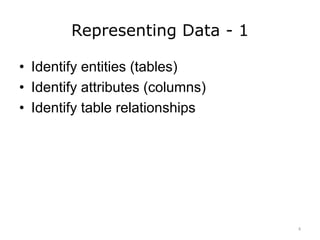
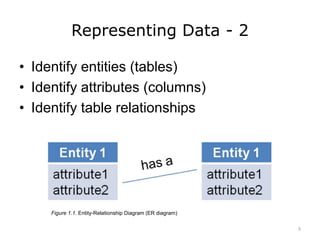
Figure 1.1. Entity-Relationship Diagram (ER diagram)
5
Representing Data - 3
• Identify entities (tables)
• Identify attributes (columns)
• Identify table relationships
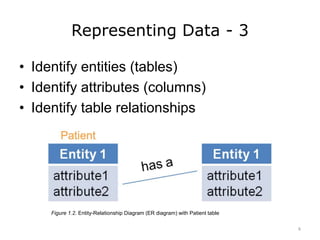
Figure 1.2. Entity-Relationship Diagram (ER diagram) with Patient table
6
Representing Data - 4
• Identify entities (tables)
• Identify attributes (columns)
• Identify table relationships
7
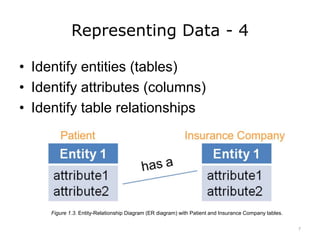
Figure 1.3. Entity-Relationship Diagram (ER diagram) with Patient and Insurance Company tables.
Relationships - 1
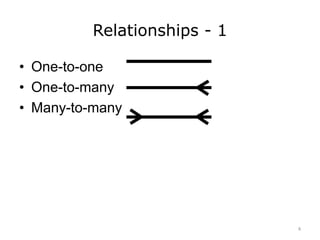
• One-to-one
• One-to-many
• Many-to-many
8
Relationships - 2
• One-to-one
• One-to-many
• Many-to-many
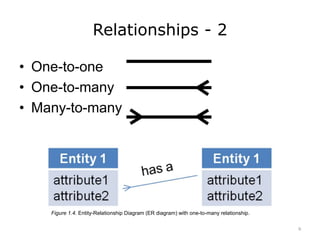
Figure 1.4. Entity-Relationship Diagram (ER diagram) with one-to-many relationship.
9
Relationships - 3
• One-to-one
• One-to-many
• Many-to-many
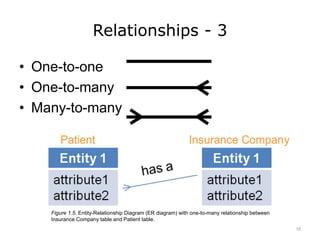
Figure 1.5. Entity-Relationship Diagram (ER diagram) with one-to-many relationship between
Insurance Company table and Patient table.
10
Relationships - 4
• One-to-one
• One-to-many
• Many-to-many
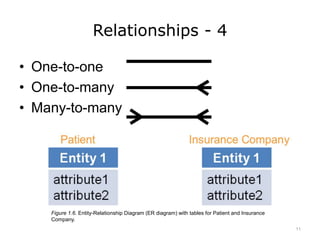
Figure 1.6. Entity-Relationship Diagram (ER diagram) with tables for Patient and Insurance
Company.
11
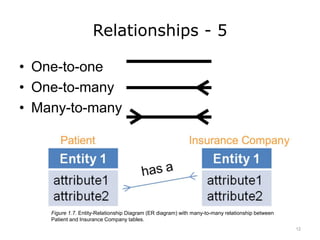
Relationships - 5
• One-to-one
• One-to-many
• Many-to-many
Figure 1.7. Entity-Relationship Diagram (ER diagram) with many-to-many relationship between
Patient and Insurance Company tables.
12
Simple Database
Structure
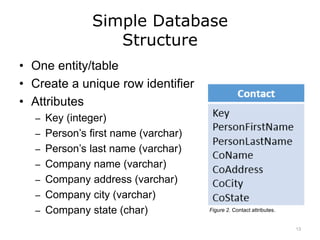
• One entity/table
• Create a unique row identifier
• Attributes
– Key (integer)
– Person’s first name (varchar)
– Person’s last name (varchar)
– Company name (varchar)
– Company address (varchar)
– Company city (varchar)
– Company state (char) Figure 2. Contact attributes.
13
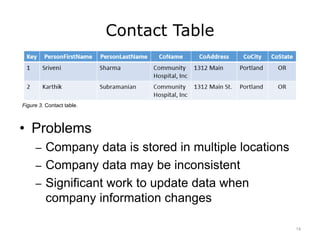
Contact Table
Figure 3. Contact table.
• Problems
– Company data is stored in multiple locations
– Company data may be inconsistent
– Significant work to update data when
company information changes
14
Database Normalization
• Prevent data inconsistency
• Prevent update errors
• Eliminate data redundancy
15
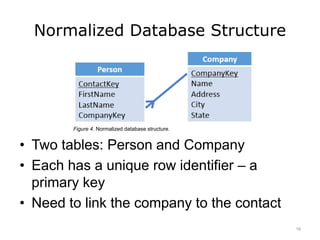
Normalized Database Structure
• Two tables: Person and Company
• Each has a unique row identifier – a
primary key
• Need to link the company to the contact
Figure 4. Normalized database structure.
16
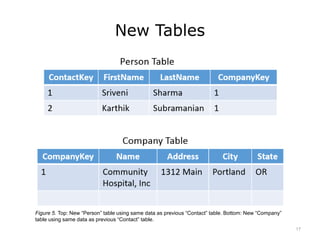
New Tables
Figure 5. Top: New “Person” table using same data as previous “Contact” table. Bottom: New “Company”
table using same data as previous “Contact” table.
17
How Do We Do This?
• Database
Management
System
– Create
– Maintain
– Use
• Many available (NOT
an exhaustive list)
– Oracle
– Microsoft SQL Server
– IBM DB2
– MySQL
– PostgreSQL
18
Building a Database
• Database Management System Tools
– Create tables
– Create relationships
– Control access
– More…
• Structured Query Language (SQL)
– Database management
– Access to data
19
Databases and SQL
Summary – Lecture b
• Databases can be modeled using entity
relationship diagrams
• Relationships can have 3 different types of
cardinality
• Normalization avoids duplicate data
• Relationships are created using foreign
keys
20
Databases and SQL
References – Lecture b
References
Chen, P.P. (1976). The Entity-Relationship Model - Toward a Unified View of Data. ACM
Transactions on Database Systems, 1(1).
International Organization for Standardization. (2008). Information technology --
Database languages -- SQL (No. ISO/IEC 9075-(1-4,9-11,13,14)).
Kent, W. (1983). A simple guide to five normal forms in relational database theory.
Communications of the ACM, 26(2), 120-125.
Figures
Figures 1.1-1.7: Entity-Relationship Diagrams. (2012). Public domain.
Figure 2. Contact attributes. (2012). Public domain.
Figure 3. Contact table. (2012). Public domain.
Figure 4. Normalized database structure. (2012). Public domain.
Figure 5. Top: New “Person” table using same data as previous “Contact” table. Bottom:
New “Company” table using same data as previous “Contact” table. (2012). Public
domain.
21
Introduction to Computer Science
Databases and SQL
Lecture b
This material was developed by Oregon
Health & Science University, funded by the
Department of Health and Human Services,
Office of the National Coordinator for Health
Information Technology under Award
Number 90WT0001.
22

Databases and SQL - Lecture B

  • 1.
    Introduction to ComputerScience Databases and SQL Lecture b This material (Comp 4 Unit 5) was developed by Oregon Health & Science University, funded by the Department of Health and Human Services, Office of the National Coordinator for Health Information Technology under Award Number 90WT0001. This work is licensed under the Creative Commons Attribution-NonCommercial-ShareAlike 4.0 International License. To view a copy of this license, visit http://creativecommons.org/licenses/by-nc-sa/4.0/.
  • 2.
    Databases and SQL LearningObjectives - 1 • Define and describe the purpose of databases (Lecture a) • Describe a relational database (Lecture a) • Describe data modeling and normalization (Lecture b) • Describe the structured query language (SQL) (Lecture c) 2
  • 3.
    Databases and SQL LearningObjectives - 2 • Define the basic data operations for relational databases and how to implement them in SQL (Lecture c) • Design a simple relational database and create corresponding SQL commands (Lecture c) • Examine the structure of a health care database component (Lecture d) 3
  • 4.
    Representing Data -1 • Identify entities (tables) • Identify attributes (columns) • Identify table relationships 4
  • 5.
    Representing Data -2 • Identify entities (tables) • Identify attributes (columns) • Identify table relationships Figure 1.1. Entity-Relationship Diagram (ER diagram) 5
  • 6.
    Representing Data -3 • Identify entities (tables) • Identify attributes (columns) • Identify table relationships Figure 1.2. Entity-Relationship Diagram (ER diagram) with Patient table 6
  • 7.
    Representing Data -4 • Identify entities (tables) • Identify attributes (columns) • Identify table relationships 7 Figure 1.3. Entity-Relationship Diagram (ER diagram) with Patient and Insurance Company tables.
  • 8.
    Relationships - 1 •One-to-one • One-to-many • Many-to-many 8
  • 9.
    Relationships - 2 •One-to-one • One-to-many • Many-to-many Figure 1.4. Entity-Relationship Diagram (ER diagram) with one-to-many relationship. 9
  • 10.
    Relationships - 3 •One-to-one • One-to-many • Many-to-many Figure 1.5. Entity-Relationship Diagram (ER diagram) with one-to-many relationship between Insurance Company table and Patient table. 10
  • 11.
    Relationships - 4 •One-to-one • One-to-many • Many-to-many Figure 1.6. Entity-Relationship Diagram (ER diagram) with tables for Patient and Insurance Company. 11
  • 12.
    Relationships - 5 •One-to-one • One-to-many • Many-to-many Figure 1.7. Entity-Relationship Diagram (ER diagram) with many-to-many relationship between Patient and Insurance Company tables. 12
  • 13.
    Simple Database Structure • Oneentity/table • Create a unique row identifier • Attributes – Key (integer) – Person’s first name (varchar) – Person’s last name (varchar) – Company name (varchar) – Company address (varchar) – Company city (varchar) – Company state (char) Figure 2. Contact attributes. 13
  • 14.
    Contact Table Figure 3.Contact table. • Problems – Company data is stored in multiple locations – Company data may be inconsistent – Significant work to update data when company information changes 14
  • 15.
    Database Normalization • Preventdata inconsistency • Prevent update errors • Eliminate data redundancy 15
  • 16.
    Normalized Database Structure •Two tables: Person and Company • Each has a unique row identifier – a primary key • Need to link the company to the contact Figure 4. Normalized database structure. 16
  • 17.
    New Tables Figure 5.Top: New “Person” table using same data as previous “Contact” table. Bottom: New “Company” table using same data as previous “Contact” table. 17
  • 18.
    How Do WeDo This? • Database Management System – Create – Maintain – Use • Many available (NOT an exhaustive list) – Oracle – Microsoft SQL Server – IBM DB2 – MySQL – PostgreSQL 18
  • 19.
    Building a Database •Database Management System Tools – Create tables – Create relationships – Control access – More… • Structured Query Language (SQL) – Database management – Access to data 19
  • 20.
    Databases and SQL Summary– Lecture b • Databases can be modeled using entity relationship diagrams • Relationships can have 3 different types of cardinality • Normalization avoids duplicate data • Relationships are created using foreign keys 20
  • 21.
    Databases and SQL References– Lecture b References Chen, P.P. (1976). The Entity-Relationship Model - Toward a Unified View of Data. ACM Transactions on Database Systems, 1(1). International Organization for Standardization. (2008). Information technology -- Database languages -- SQL (No. ISO/IEC 9075-(1-4,9-11,13,14)). Kent, W. (1983). A simple guide to five normal forms in relational database theory. Communications of the ACM, 26(2), 120-125. Figures Figures 1.1-1.7: Entity-Relationship Diagrams. (2012). Public domain. Figure 2. Contact attributes. (2012). Public domain. Figure 3. Contact table. (2012). Public domain. Figure 4. Normalized database structure. (2012). Public domain. Figure 5. Top: New “Person” table using same data as previous “Contact” table. Bottom: New “Company” table using same data as previous “Contact” table. (2012). Public domain. 21
  • 22.
    Introduction to ComputerScience Databases and SQL Lecture b This material was developed by Oregon Health & Science University, funded by the Department of Health and Human Services, Office of the National Coordinator for Health Information Technology under Award Number 90WT0001. 22

Editor's Notes

  • #2 Welcome to Introduction to Computer Science: Databases and Structured Query Language, or SQL. This is lecture b. The component, Introduction to Computer Science, is a basic overview of computer architecture; data organization, representation and structure; structure of programming languages; networking and data communication. It also includes the basic terminology of computing.
  • #3 The learning objectives for Databases and SQL are to: Define and describe the purpose of databases Describe a relational database Describe data modeling and normalization Describe the structured query language, or SQL
  • #4 Define the basic data operations for relational databases and how to implement them in SQL Design a simple relational database and create corresponding SQL commands And, examine the structure of a health care database component
  • #5 4
  • #6 5
  • #7 6
  • #8 7
  • #9 8
  • #10 9
  • #11 10
  • #12 11
  • #13 12
  • #14 13
  • #15 14
  • #16 15
  • #17 16
  • #18 17
  • #19 18
  • #20 19
  • #21 20
  • #22 References slide. No audio.
  • #23 No audio.