What Would You Do???
It’s Monday morning.
Fatal production system hardware problem, or

production hardware location is now a smoking hole
Expect Production to be down for an unforseen
amount of time
It is year-end, you have a new manager and your
senior DBA is on vacation

Jeff Slavitz - NorCal OAUG Training Day 2010 v3
What is your backup situation?
Do you have a cold backup? On-site or off-site?
Do you have a hot backup. On disk? On tape? On

another accessible site? How recent is it?
Will you be able to read your tape backups?
How recent are the archive logs that are now on the
system that is down?
Where are your archive log backups since the last hot
backup?

Jeff Slavitz - NorCal OAUG Training Day 2010 v3
Options
Restore and clone latest backup to a test box. How

familiar is your DBA with RMAN recover? Is the box
big enough to run the company? Will interfaces work
(EDI, Payroll, …)
Rent or buy a box. How long would it take to find
and setup a new box?
How long will it take to get the company up and
running? Have you practiced this process or is this a
fire drill? How many P1s will you need?
How much data will the company lose?
What does the company do while Oracle is down?
Jeff Slavitz - NorCal OAUG Training Day 2010 v3
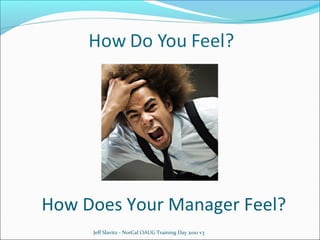
How Does Your Manager Feel?
Jeff Slavitz - NorCal OAUG Training Day 2010 v3
Or…
In 15 minutes you’ve fully switched Oracle

Applications over to a standby database
You’ve tested the procedure with all DBAs
The failover procedure is fully supported and
documented by Oracle
Interfaces are tested on the standby database
You run the entire company once a month for a short
period of time on the standby database
You have a test standby database that DBAs practice
on and you use for reporting purposes
Jeff Slavitz - NorCal OAUG Training Day 2010 v3
How Does Your Manager Feel?
Jeff Slavitz - NorCal OAUG Training Day 2010 v3
My Goal Today
Tell you how you can be relaxed, not stressed, in a

disaster recovery situation
What is Data Guard
Describe added value Data Guard and Flashback
provide in addition to disaster recovery
On a high level, review steps to implement Data
Guard and Flashback
Lessons learned - what Metalink notes don’t tell you
Please ask questions as I go along
Apologies to the non-DBAs
Jeff Slavitz - NorCal OAUG Training Day 2010 v3
What is Data Guard?
Data Guard is part of Oracle, not a separate

product, which provides a set of services that
create, maintain, manage, and monitor one or
more standby databases
Data Guard maintains these standby databases as
transactionally consistent copies of the
production database
Data Guard can switch any standby database to
the production role

Jeff Slavitz - NorCal OAUG Training Day 2010 v3
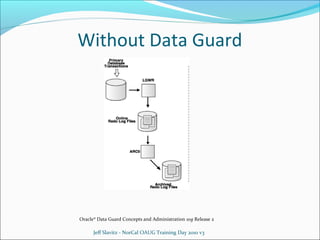
Without Data Guard

Oracle® Data Guard Concepts and Administration 10g Release 2

Jeff Slavitz - NorCal OAUG Training Day 2010 v3
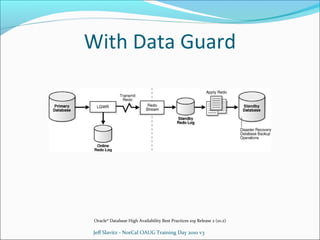
With Data Guard

Oracle® Database High Availability Best Practices 10g Release 2 (10.2)

Jeff Slavitz - NorCal OAUG Training Day 2010 v3
Why Not Use Data Guard?
 Too expensive – not! You already have and license it if you

have Oracle Enterprise Edition. Nothing to purchase in order
to implement what we discuss today.
 Too bleeding edge. Data Guard has been around since Oracle
9i and Oracle 8i as Standby Server.
 Too difficult to implement. Well documented by Oracle and
completely supported. This presentation is a roadmap
through the process plus my own observations and
experiences.
 No DR box(Data Resident box). Use test box for standby.
Doesn’t protect against smoking hole but it’s better than
nothing.
 How often do you really need DR? Is once enough? Plus a
standby database can be used for other purposes.
Jeff Slavitz - NorCal OAUG Training Day 2010 v3
Why You Should Use Data Guard
If your Production Oracle Applications instance went

away would anybody notice?
Our job is to protect the company’s data
Your manager will thank you – DR is important.
Data Guard plus Flashback provide added value:
Instant clone
 Reporting instance
 Many exciting possibilities!


Jeff Slavitz - NorCal OAUG Training Day 2010 v3
What Is Flashback?
Introduced in Oracle 9i
Flashback is part of your Oracle database – no

licensing requirement
Provides a rewind button for your data
Flashback Database - return database to a previous
point in time
Flashback Table - return a table to a previous point in
time
Flashback Query – see data at a previous point in
time
Jeff Slavitz - NorCal OAUG Training Day 2010 v3
Data Guard and Flashback
Together
Many possibilities when used together …
Scenario:
Show stopper problem in Production
Need to test a patch or data fix with current production
data on test system ASAP
Old school: Clone
Time to complete: ??? Hours
Data Guard: Use standby database as an instant clone
Time to complete: 10 minutes
Jeff Slavitz - NorCal OAUG Training Day 2010 v3
Instant Clone
Activate standby database
Perform testing on standby database
When testing complete, flashback standby database

to activation point in time
Test again? Allows destructive testing.
When all done, flashback and re-activate standby
database

Jeff Slavitz - NorCal OAUG Training Day 2010 v3
Reporting Database
Scenario:
You want a data warehouse which is a snapshot of
Production as of 9pm the day before. Users need
access via Oracle Applications and Discoverer
Old School: Daily clone
Data Guard: Use standby database as a reporting
database

Jeff Slavitz - NorCal OAUG Training Day 2010 v3
Reporting Database
Activate standby database
Users login to standby database with Oracle Applications,

Discoverer, or any other tool. Users can make changes in
Application though they won’t be saved after Flashback.
Archive logs accumulate on standby database
At 9pm each day flashback database to the way it was at
9pm the day before, apply archive logs created since then,
reopen database
Can have multiple standby databases – one for DR, one for
reporting, one for ???
Oracle 11i Active Data Guard allows read-only access to
standby database while it is being updated from primary
Jeff Slavitz - NorCal OAUG Training Day 2010 v3
Bumps Along the Way
Time implementation so it’s not at year-end
Bumpy transition into production – low Test database

activity is not an accurate picture of how Data Guard
and Flashback will work in Production
3mb network was not enough for standby to keep up
with primary - needed 10mb just for Data Guard
Do periodic full company test of standby system
Data Guard and Flashback implementation are well
documented but there is a learning curve

Jeff Slavitz - NorCal OAUG Training Day 2010 v3
Implementing Data Guard and
Flashback

Jeff Slavitz - NorCal OAUG Training Day 2010 v3
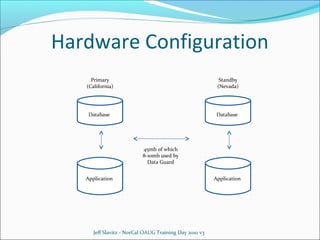
Hardware Configuration
Primary
(California)

Standby
(Nevada)

Database

Database

45mb of which
8-10mb used by
Data Guard
Application

Jeff Slavitz - NorCal OAUG Training Day 2010 v3

Application
Software Configuration
Database
10.2.0.4
Data Guard Physical Bundle patch 7936993
Data Guard Logical Bundle patch 7937113
Data Guard Broker Bundle patch 7936793

Applications 11.5.10.2

Jeff Slavitz - NorCal OAUG Training Day 2010 v3
Logical vs Physical
Two types of standby databases
Physical
 Byte-for-byte duplicate of the primary database
 Archived redo logs transferred from primary database are

directly applied to the standby database
 When standby in recovery mode it is mounted not open

Logical
 Different structure than the primary database
 Oracle uses SQL statements to update standby
 Standby can be open while it is being updated

Today we are talking about Physical standby databases
Jeff Slavitz - NorCal OAUG Training Day 2010 v3
Maximum Protection Mode
Three types of protection – Maximum Protection is

highest level of data security
Primary database changes are not committed until it
has been confirmed that the data is available on at
least one standby database
If Oracle determines that the redo data cannot be
transferred from the primary server to the standby
server, it will automatically stop the primary
database instance
Data transmitted synchronously - network
implications
Jeff Slavitz - NorCal OAUG Training Day 2010 v3
Maximum Performance Mode
Default protection mode
The commit operation on the primary database is not

contingent upon the data being received by the
standby server
If all of the standby servers become unavailable,
processing will continue on the primary database
Data transmitted asynchronously
This performance mode is what are discussing today

Jeff Slavitz - NorCal OAUG Training Day 2010 v3
Maximum Availability Mode
Second highest level of data security
Primary database changes are not committed until it

has been confirmed that the data is available on at
least one standby database
If the standby database becomes unavailable for any
reason, the protection mode is temporarily lowered to
maximum performance until the problem has been
corrected

Jeff Slavitz - NorCal OAUG Training Day 2010 v3
Data Guard Installation Overview
Develop a naming convention for your primary and

standby database servers e.g. PROD_<primary
server>, PROD_<standby server>
Create standby redo logs: one more than number of
redo logs, same size as redo logs, do not multiplex
Clone database to standby
Copy datafiles to standby with closed database or
with open database using
Test primary and standby
Clone application to standby
You are now ready to turn on Data Guard
Jeff Slavitz - NorCal OAUG Training Day 2010 v3
Start Data Guard
Start primary and second database and listeners
Primary: startup
Standby: startup mount
Turn on archive redo log transport on primary
alter system set log_archive_dest_state_2=enable;
Put standby in recovery mode
Recover managed standby database using current logfile
disconnect;
Confirm logs are shipping to standby
Primary: alter system archive log current;
Standby: Check archive directory or query v$archive_log
Jeff Slavitz - NorCal OAUG Training Day 2010 v3
Care and Feeding of Data
Check alert log of primary and standby on a regular basis
Guard


Set Enterprise Manager to email you when an error shows
up in alert log
Automatic archive log gap resolution usually works but
network connectivity issue can require you to manually fix
Primary alert log will notify you when a gap exists:
FAL[client]: Failed to request gap sequence
GAP - thread 1 sequence 435-442

Copy missing archive logs from primary to standby
On standby: alter database register logfile …

Jeff Slavitz - NorCal OAUG Training Day 2010 v3
 db_recovery_file_dest

Flashback

 defines Flash recovery area disk location
 This is the default location for control files, online redo logs, archived redo

logs, flashback logs, RMAN backups
 Archive logs are placed in flashback area in sub-directory with date
 DO NOT delete files in flashback area manually; database calculates space
available based on what RMAN has done
 db_recovery_file_dest_size
 Specifies limit on the total space to be used by the flash recovery area
 Check space usage using v$flash_recovery_area_usage
 When recovery area is full database stops!
 db_flashback_retention_target
 Defines in minutes, how long you want to keep flashback files
 Since using guaranteed flashback don't need this to be too big
 To turn flashback on: mount database and alter database flashback on
Jeff Slavitz - NorCal OAUG Training Day 2010 v3
Switchover – Database Steps
 Seamless switch from primary to standby
 Switch existing primary to new standby:
 Shutdown application
 Confirm all logs received and applied on standby
 alter database commit to switchover to standby with session

shutdown;
 Recover managed standby database using current logfile
disconnect
 Switch existing standby to new primary:
 alter database commit to switchover to primary;
 alter database open;
 alter system set log_archive_dest_state_2=enable;

 Confirm logs are shipping to standby by checking alert log, archive

directory or query v$archive_log Training Day 2010 v3
Jeff Slavitz - NorCal OAUG
Switchover – Application Steps
Some of these steps are not in Metalink note but are required
Clear application context: exec fnd_conc_clone.setup_clean
Run adautocfg on database and application tiers
Run cmclean.sql (note 134007.1) to avoid Output Post

Processing manager not starting
Update fnd_concurrent_requests
 Change logfile_name and outfile_name to new APPLCSF
path
 Change logfile_node_name and outfile_node_name to new
host name
Update fnd_conc_req_outputs (for XML reports)
 Change file_name to new APPLCSF patch
 Change file_node_name to new host name
Jeff Slavitz - NorCal OAUG Training Day 2010 v3
Switchover – Application Steps
Update wf_notification_attributes.text_value with new node

name
Update wf_item_attribute_values.text value with new node
name
Check for any other profile values that contain old node name
Clear Apache cache
Start application and send users new login url
Synchronize APPLCSF log and out files
Use rsync
 Faster than scp and only copies changed files
rsync -avz
$APPLCSF/out/${TWO_TASK}*/ applprod@lnxdrapp1:$APPLCSF/out/${TWO_TASK}*
Consider setting cron job to synchornize APPLCSF in case of
system failure
Jeff Slavitz - NorCal OAUG Training Day 2010 v3
Failover
Immediate switch of primary to standby system
Some archive log data may be lost due to network

latency
On standby-soon-to-be-primary:
Cancel database recovery

alter database commit to switchover to primary

Configure application as shown in Switchover
Even with cron job synchronizing APPLCSF log and

out files you probably won’t get all report output
Repair former primary system
Jeff Slavitz - NorCal OAUG Training Day 2010 v3
Failover – Sync Old Primary as New Standby
Establish new standby by copying primary datafiles

using RMAN, cold backup or flashback. To use
flashback:

Find the SCN when the existing primary database

became the primary:

select to_char(standby_became_primary_scn) from v$database;

On new standby:
Startup mount
 flashback database to scn <above #>
 alter database convert to physical standby;
 recover managed standby database using current logfile
disconnect;


Jeff Slavitz - NorCal OAUG Training Day 2010 v3
Instant Clone or Reporting Database
 On standby:

Cancel standby recovery
create restore point STBY_ON guarantee flashback database
Active and open database
Configure application as in Switchover
 Users can now login to the standby database through Oracle
Applications, Discoverer or anything.
 Apply patches, test, update data in standby database.
 To revert to restore point STBY_ON and do further testing as needed:
Shutdown immediate
Startup mount
Flashback database to guaranteed restore point STBY_ON
Alter database open
Jeff Slavitz - NorCal OAUG Training Day 2010 v3
Resume Standby Operation
On Standby:
Shutdown application
Shutdown database
Startup mount
Flashback database to restore point STBY_ON
Alter database convert to physical standby

Jeff Slavitz - NorCal OAUG Training Day 2010 v3
Lessons Learned
Script as much as possible – you will make typos

under time pressure
Use Enterprise Manager to see how Data Guard
affects your system and tune accordingly
Implement Data Guard and flashback at different
times
Setup one test database using Data Guard for testing
and training

Jeff Slavitz - NorCal OAUG Training Day 2010 v3
For the Future
Try Maximum Availability protection
Use Enterprise Manager to manage Data Guard. This

requires Data Guard Broker implementation which
requires use of spfile.
Completely script switchover and failover as shown in
note 452056.1
Use RMAN to backup standby database only
Upgrade database to 11G and experiment with Active
Data Guard. This allows you to create a read-only
database that is open and is constantly updated from
primary.
Jeff Slavitz - NorCal OAUG Training Day 2010 v3
For More Information
 Google (it knows everything)
 http://blogs.oracle.com/stevenchan
 Note 452056.1 – Business Continuity for Oracle Apps Release 12 on

Database 10GR2 (works fine for 11i)
 Note 216212.1 – Business Continuity for Oracle Apps Release 11i,
Database Releases 9i and 10G
 Note 753241.1 – Configuring Standby Database on R12 using RMAN
Hot Backup (works fine for 11i)
 Note 805438.1 – How to Open Physical Standby For Read Write
Testing and Flashback
 Data Guard Redo Transport & Network Best Practices Oracle 10GR2
White Paper
 Oracle Data Guard Concepts and Administration manual
 High Availability Best Practices manual
 Backup and Recovery Reference manual
Jeff Slavitz - NorCal OAUG Training Day 2010 v3
Questions?

Jeff Slavitz - NorCal OAUG Training Day 2010 v3

Data guard

  • 2.
    What Would YouDo??? It’s Monday morning. Fatal production system hardware problem, or production hardware location is now a smoking hole Expect Production to be down for an unforseen amount of time It is year-end, you have a new manager and your senior DBA is on vacation Jeff Slavitz - NorCal OAUG Training Day 2010 v3
  • 3.
    What is yourbackup situation? Do you have a cold backup? On-site or off-site? Do you have a hot backup. On disk? On tape? On another accessible site? How recent is it? Will you be able to read your tape backups? How recent are the archive logs that are now on the system that is down? Where are your archive log backups since the last hot backup? Jeff Slavitz - NorCal OAUG Training Day 2010 v3
  • 4.
    Options Restore and clonelatest backup to a test box. How familiar is your DBA with RMAN recover? Is the box big enough to run the company? Will interfaces work (EDI, Payroll, …) Rent or buy a box. How long would it take to find and setup a new box? How long will it take to get the company up and running? Have you practiced this process or is this a fire drill? How many P1s will you need? How much data will the company lose? What does the company do while Oracle is down? Jeff Slavitz - NorCal OAUG Training Day 2010 v3
  • 5.
    How Does YourManager Feel? Jeff Slavitz - NorCal OAUG Training Day 2010 v3
  • 6.
    Or… In 15 minutesyou’ve fully switched Oracle Applications over to a standby database You’ve tested the procedure with all DBAs The failover procedure is fully supported and documented by Oracle Interfaces are tested on the standby database You run the entire company once a month for a short period of time on the standby database You have a test standby database that DBAs practice on and you use for reporting purposes Jeff Slavitz - NorCal OAUG Training Day 2010 v3
  • 7.
    How Does YourManager Feel? Jeff Slavitz - NorCal OAUG Training Day 2010 v3
  • 8.
    My Goal Today Tellyou how you can be relaxed, not stressed, in a disaster recovery situation What is Data Guard Describe added value Data Guard and Flashback provide in addition to disaster recovery On a high level, review steps to implement Data Guard and Flashback Lessons learned - what Metalink notes don’t tell you Please ask questions as I go along Apologies to the non-DBAs Jeff Slavitz - NorCal OAUG Training Day 2010 v3
  • 9.
    What is DataGuard? Data Guard is part of Oracle, not a separate product, which provides a set of services that create, maintain, manage, and monitor one or more standby databases Data Guard maintains these standby databases as transactionally consistent copies of the production database Data Guard can switch any standby database to the production role Jeff Slavitz - NorCal OAUG Training Day 2010 v3
  • 10.
    Without Data Guard Oracle®Data Guard Concepts and Administration 10g Release 2 Jeff Slavitz - NorCal OAUG Training Day 2010 v3
  • 11.
    With Data Guard Oracle®Database High Availability Best Practices 10g Release 2 (10.2) Jeff Slavitz - NorCal OAUG Training Day 2010 v3
  • 12.
    Why Not UseData Guard?  Too expensive – not! You already have and license it if you have Oracle Enterprise Edition. Nothing to purchase in order to implement what we discuss today.  Too bleeding edge. Data Guard has been around since Oracle 9i and Oracle 8i as Standby Server.  Too difficult to implement. Well documented by Oracle and completely supported. This presentation is a roadmap through the process plus my own observations and experiences.  No DR box(Data Resident box). Use test box for standby. Doesn’t protect against smoking hole but it’s better than nothing.  How often do you really need DR? Is once enough? Plus a standby database can be used for other purposes. Jeff Slavitz - NorCal OAUG Training Day 2010 v3
  • 13.
    Why You ShouldUse Data Guard If your Production Oracle Applications instance went away would anybody notice? Our job is to protect the company’s data Your manager will thank you – DR is important. Data Guard plus Flashback provide added value: Instant clone  Reporting instance  Many exciting possibilities!  Jeff Slavitz - NorCal OAUG Training Day 2010 v3
  • 14.
    What Is Flashback? Introducedin Oracle 9i Flashback is part of your Oracle database – no licensing requirement Provides a rewind button for your data Flashback Database - return database to a previous point in time Flashback Table - return a table to a previous point in time Flashback Query – see data at a previous point in time Jeff Slavitz - NorCal OAUG Training Day 2010 v3
  • 15.
    Data Guard andFlashback Together Many possibilities when used together … Scenario: Show stopper problem in Production Need to test a patch or data fix with current production data on test system ASAP Old school: Clone Time to complete: ??? Hours Data Guard: Use standby database as an instant clone Time to complete: 10 minutes Jeff Slavitz - NorCal OAUG Training Day 2010 v3
  • 16.
    Instant Clone Activate standbydatabase Perform testing on standby database When testing complete, flashback standby database to activation point in time Test again? Allows destructive testing. When all done, flashback and re-activate standby database Jeff Slavitz - NorCal OAUG Training Day 2010 v3
  • 17.
    Reporting Database Scenario: You wanta data warehouse which is a snapshot of Production as of 9pm the day before. Users need access via Oracle Applications and Discoverer Old School: Daily clone Data Guard: Use standby database as a reporting database Jeff Slavitz - NorCal OAUG Training Day 2010 v3
  • 18.
    Reporting Database Activate standbydatabase Users login to standby database with Oracle Applications, Discoverer, or any other tool. Users can make changes in Application though they won’t be saved after Flashback. Archive logs accumulate on standby database At 9pm each day flashback database to the way it was at 9pm the day before, apply archive logs created since then, reopen database Can have multiple standby databases – one for DR, one for reporting, one for ??? Oracle 11i Active Data Guard allows read-only access to standby database while it is being updated from primary Jeff Slavitz - NorCal OAUG Training Day 2010 v3
  • 19.
    Bumps Along theWay Time implementation so it’s not at year-end Bumpy transition into production – low Test database activity is not an accurate picture of how Data Guard and Flashback will work in Production 3mb network was not enough for standby to keep up with primary - needed 10mb just for Data Guard Do periodic full company test of standby system Data Guard and Flashback implementation are well documented but there is a learning curve Jeff Slavitz - NorCal OAUG Training Day 2010 v3
  • 20.
    Implementing Data Guardand Flashback Jeff Slavitz - NorCal OAUG Training Day 2010 v3
  • 21.
    Hardware Configuration Primary (California) Standby (Nevada) Database Database 45mb ofwhich 8-10mb used by Data Guard Application Jeff Slavitz - NorCal OAUG Training Day 2010 v3 Application
  • 22.
    Software Configuration Database 10.2.0.4 Data GuardPhysical Bundle patch 7936993 Data Guard Logical Bundle patch 7937113 Data Guard Broker Bundle patch 7936793 Applications 11.5.10.2 Jeff Slavitz - NorCal OAUG Training Day 2010 v3
  • 23.
    Logical vs Physical Twotypes of standby databases Physical  Byte-for-byte duplicate of the primary database  Archived redo logs transferred from primary database are directly applied to the standby database  When standby in recovery mode it is mounted not open Logical  Different structure than the primary database  Oracle uses SQL statements to update standby  Standby can be open while it is being updated Today we are talking about Physical standby databases Jeff Slavitz - NorCal OAUG Training Day 2010 v3
  • 24.
    Maximum Protection Mode Threetypes of protection – Maximum Protection is highest level of data security Primary database changes are not committed until it has been confirmed that the data is available on at least one standby database If Oracle determines that the redo data cannot be transferred from the primary server to the standby server, it will automatically stop the primary database instance Data transmitted synchronously - network implications Jeff Slavitz - NorCal OAUG Training Day 2010 v3
  • 25.
    Maximum Performance Mode Defaultprotection mode The commit operation on the primary database is not contingent upon the data being received by the standby server If all of the standby servers become unavailable, processing will continue on the primary database Data transmitted asynchronously This performance mode is what are discussing today Jeff Slavitz - NorCal OAUG Training Day 2010 v3
  • 26.
    Maximum Availability Mode Secondhighest level of data security Primary database changes are not committed until it has been confirmed that the data is available on at least one standby database If the standby database becomes unavailable for any reason, the protection mode is temporarily lowered to maximum performance until the problem has been corrected Jeff Slavitz - NorCal OAUG Training Day 2010 v3
  • 27.
    Data Guard InstallationOverview Develop a naming convention for your primary and standby database servers e.g. PROD_<primary server>, PROD_<standby server> Create standby redo logs: one more than number of redo logs, same size as redo logs, do not multiplex Clone database to standby Copy datafiles to standby with closed database or with open database using Test primary and standby Clone application to standby You are now ready to turn on Data Guard Jeff Slavitz - NorCal OAUG Training Day 2010 v3
  • 28.
    Start Data Guard Startprimary and second database and listeners Primary: startup Standby: startup mount Turn on archive redo log transport on primary alter system set log_archive_dest_state_2=enable; Put standby in recovery mode Recover managed standby database using current logfile disconnect; Confirm logs are shipping to standby Primary: alter system archive log current; Standby: Check archive directory or query v$archive_log Jeff Slavitz - NorCal OAUG Training Day 2010 v3
  • 29.
    Care and Feedingof Data Check alert log of primary and standby on a regular basis Guard  Set Enterprise Manager to email you when an error shows up in alert log Automatic archive log gap resolution usually works but network connectivity issue can require you to manually fix Primary alert log will notify you when a gap exists: FAL[client]: Failed to request gap sequence GAP - thread 1 sequence 435-442 Copy missing archive logs from primary to standby On standby: alter database register logfile … Jeff Slavitz - NorCal OAUG Training Day 2010 v3
  • 30.
     db_recovery_file_dest Flashback  definesFlash recovery area disk location  This is the default location for control files, online redo logs, archived redo logs, flashback logs, RMAN backups  Archive logs are placed in flashback area in sub-directory with date  DO NOT delete files in flashback area manually; database calculates space available based on what RMAN has done  db_recovery_file_dest_size  Specifies limit on the total space to be used by the flash recovery area  Check space usage using v$flash_recovery_area_usage  When recovery area is full database stops!  db_flashback_retention_target  Defines in minutes, how long you want to keep flashback files  Since using guaranteed flashback don't need this to be too big  To turn flashback on: mount database and alter database flashback on Jeff Slavitz - NorCal OAUG Training Day 2010 v3
  • 31.
    Switchover – DatabaseSteps  Seamless switch from primary to standby  Switch existing primary to new standby:  Shutdown application  Confirm all logs received and applied on standby  alter database commit to switchover to standby with session shutdown;  Recover managed standby database using current logfile disconnect  Switch existing standby to new primary:  alter database commit to switchover to primary;  alter database open;  alter system set log_archive_dest_state_2=enable;  Confirm logs are shipping to standby by checking alert log, archive directory or query v$archive_log Training Day 2010 v3 Jeff Slavitz - NorCal OAUG
  • 32.
    Switchover – ApplicationSteps Some of these steps are not in Metalink note but are required Clear application context: exec fnd_conc_clone.setup_clean Run adautocfg on database and application tiers Run cmclean.sql (note 134007.1) to avoid Output Post Processing manager not starting Update fnd_concurrent_requests  Change logfile_name and outfile_name to new APPLCSF path  Change logfile_node_name and outfile_node_name to new host name Update fnd_conc_req_outputs (for XML reports)  Change file_name to new APPLCSF patch  Change file_node_name to new host name Jeff Slavitz - NorCal OAUG Training Day 2010 v3
  • 33.
    Switchover – ApplicationSteps Update wf_notification_attributes.text_value with new node name Update wf_item_attribute_values.text value with new node name Check for any other profile values that contain old node name Clear Apache cache Start application and send users new login url Synchronize APPLCSF log and out files Use rsync  Faster than scp and only copies changed files rsync -avz $APPLCSF/out/${TWO_TASK}*/ applprod@lnxdrapp1:$APPLCSF/out/${TWO_TASK}* Consider setting cron job to synchornize APPLCSF in case of system failure Jeff Slavitz - NorCal OAUG Training Day 2010 v3
  • 34.
    Failover Immediate switch ofprimary to standby system Some archive log data may be lost due to network latency On standby-soon-to-be-primary: Cancel database recovery alter database commit to switchover to primary Configure application as shown in Switchover Even with cron job synchronizing APPLCSF log and out files you probably won’t get all report output Repair former primary system Jeff Slavitz - NorCal OAUG Training Day 2010 v3
  • 35.
    Failover – SyncOld Primary as New Standby Establish new standby by copying primary datafiles using RMAN, cold backup or flashback. To use flashback: Find the SCN when the existing primary database became the primary: select to_char(standby_became_primary_scn) from v$database; On new standby: Startup mount  flashback database to scn <above #>  alter database convert to physical standby;  recover managed standby database using current logfile disconnect;  Jeff Slavitz - NorCal OAUG Training Day 2010 v3
  • 36.
    Instant Clone orReporting Database  On standby: Cancel standby recovery create restore point STBY_ON guarantee flashback database Active and open database Configure application as in Switchover  Users can now login to the standby database through Oracle Applications, Discoverer or anything.  Apply patches, test, update data in standby database.  To revert to restore point STBY_ON and do further testing as needed: Shutdown immediate Startup mount Flashback database to guaranteed restore point STBY_ON Alter database open Jeff Slavitz - NorCal OAUG Training Day 2010 v3
  • 37.
    Resume Standby Operation OnStandby: Shutdown application Shutdown database Startup mount Flashback database to restore point STBY_ON Alter database convert to physical standby Jeff Slavitz - NorCal OAUG Training Day 2010 v3
  • 38.
    Lessons Learned Script asmuch as possible – you will make typos under time pressure Use Enterprise Manager to see how Data Guard affects your system and tune accordingly Implement Data Guard and flashback at different times Setup one test database using Data Guard for testing and training Jeff Slavitz - NorCal OAUG Training Day 2010 v3
  • 39.
    For the Future TryMaximum Availability protection Use Enterprise Manager to manage Data Guard. This requires Data Guard Broker implementation which requires use of spfile. Completely script switchover and failover as shown in note 452056.1 Use RMAN to backup standby database only Upgrade database to 11G and experiment with Active Data Guard. This allows you to create a read-only database that is open and is constantly updated from primary. Jeff Slavitz - NorCal OAUG Training Day 2010 v3
  • 40.
    For More Information Google (it knows everything)  http://blogs.oracle.com/stevenchan  Note 452056.1 – Business Continuity for Oracle Apps Release 12 on Database 10GR2 (works fine for 11i)  Note 216212.1 – Business Continuity for Oracle Apps Release 11i, Database Releases 9i and 10G  Note 753241.1 – Configuring Standby Database on R12 using RMAN Hot Backup (works fine for 11i)  Note 805438.1 – How to Open Physical Standby For Read Write Testing and Flashback  Data Guard Redo Transport & Network Best Practices Oracle 10GR2 White Paper  Oracle Data Guard Concepts and Administration manual  High Availability Best Practices manual  Backup and Recovery Reference manual Jeff Slavitz - NorCal OAUG Training Day 2010 v3
  • 41.
    Questions? Jeff Slavitz -NorCal OAUG Training Day 2010 v3