SSAD
DATA FLOW DIAGRAM
Prepared By:
MUKESH MAHTO
MBA-IT
DATA FLOW DIAGRAM
• A “Data Flow Diagram” is a graphical representation that
depicts information flow, i.e. it represents the flow of data
between different processes in a business.
• The main purpose of DFD is to clarify system requirements and
identify major transformations that will be carried out in a
system.
• DFDs are used not only in Structured Systems Analysis and
Design but also as a general process modeling tool.
• It is also known as “Bubble Chart”.
DFD– Why?
• It gives the summary of the entire system.
• Easy to understand.
• It supports the logic behind the data flow within the system.
• It can also provide a detailed description of the system
components.
• It represents an information system from the viewpoint of data
movements – inputs & outputs.
• It defines the boundaries of the entire system.
• Also, the ability to represent the system at different levels is an
added advantage.
• It parallely shows the relation between a particular process
and its database.
Components of DFD
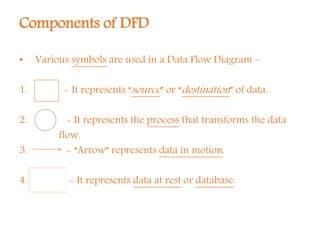
• Various symbols are used in a Data Flow Diagram –
1. - It represents “source” or “destination” of data.
2. - It represents the process that transforms the data
flow.
3. - “Arrow” represents data in motion.
4. - It represents data at rest or database.
Levels of DFD
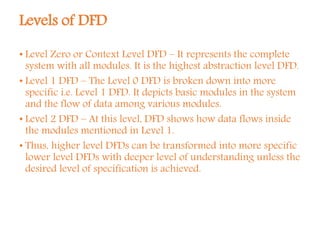
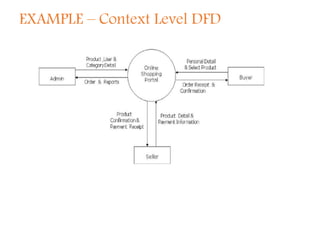
• Level Zero or Context Level DFD – It represents the complete
system with all modules. It is the highest abstraction level DFD.
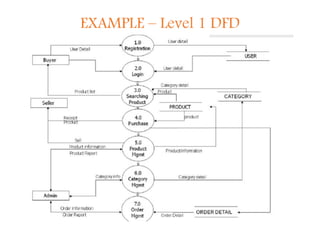
• Level 1 DFD – The Level 0 DFD is broken down into more
specific i.e. Level 1 DFD. It depicts basic modules in the system
and the flow of data among various modules.
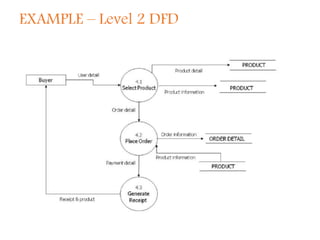
• Level 2 DFD – At this level, DFD shows how data flows inside
the modules mentioned in Level 1.
• Thus, higher level DFDs can be transformed into more specific
lower level DFDs with deeper level of understanding unless the
desired level of specification is achieved.
Rules / Good Conventions
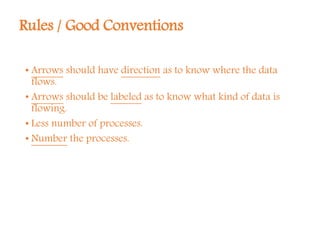
• Arrows should have direction as to know where the data
flows.
• Arrows should be labeled as to know what kind of data is
flowing.
• Less number of processes.
• Number the processes.
EXAMPLE – Context Level DFD
EXAMPLE – Level 1 DFD
EXAMPLE – Level 2 DFD
THANK YOU

Data flow diagram

  • 1.
    SSAD DATA FLOW DIAGRAM PreparedBy: MUKESH MAHTO MBA-IT
  • 2.
    DATA FLOW DIAGRAM •A “Data Flow Diagram” is a graphical representation that depicts information flow, i.e. it represents the flow of data between different processes in a business. • The main purpose of DFD is to clarify system requirements and identify major transformations that will be carried out in a system. • DFDs are used not only in Structured Systems Analysis and Design but also as a general process modeling tool. • It is also known as “Bubble Chart”.
  • 3.
    DFD– Why? • Itgives the summary of the entire system. • Easy to understand. • It supports the logic behind the data flow within the system. • It can also provide a detailed description of the system components. • It represents an information system from the viewpoint of data movements – inputs & outputs. • It defines the boundaries of the entire system. • Also, the ability to represent the system at different levels is an added advantage. • It parallely shows the relation between a particular process and its database.
  • 4.
    Components of DFD •Various symbols are used in a Data Flow Diagram – 1. - It represents “source” or “destination” of data. 2. - It represents the process that transforms the data flow. 3. - “Arrow” represents data in motion. 4. - It represents data at rest or database.
  • 5.
    Levels of DFD •Level Zero or Context Level DFD – It represents the complete system with all modules. It is the highest abstraction level DFD. • Level 1 DFD – The Level 0 DFD is broken down into more specific i.e. Level 1 DFD. It depicts basic modules in the system and the flow of data among various modules. • Level 2 DFD – At this level, DFD shows how data flows inside the modules mentioned in Level 1. • Thus, higher level DFDs can be transformed into more specific lower level DFDs with deeper level of understanding unless the desired level of specification is achieved.
  • 6.
    Rules / GoodConventions • Arrows should have direction as to know where the data flows. • Arrows should be labeled as to know what kind of data is flowing. • Less number of processes. • Number the processes.
  • 7.
  • 8.
  • 9.
  • 10.