Cypress is a great tool for end-to-end testing. They are fast, easyto
set up, and work well for modern web applications. However, like
every othertool, they have their limits-certainly so when you are
dealing with real complexities from the real world. Testers who have
tried testing Shadow DOM elements, interaction with iframes, or
methods of bypassing cross-origin restrictions know how it is not
always that simple.
These frustrations can be quite frustrating at first, but they also offer
you an opportunityto have a deeper grasp of Cypress and generally
web testing. While the above issues ensure yourtests are reliable,
getting the right solutions offers you more confidence in the quality
ofthe app you are building.
BEST PRACTICES CYPRESS TESTAUTOMATION
CypressTestAutomation:Handling
ComplexInteractions
• •
BY QATEAM
In this blog, we discuss common pain points users experience while
using Cypress-being it running tests on drag-and-drop functionality
or handling trickyform validations. More importantly, we showyou
practical approaches to solving them so you can take full advantage
of everything Cypress has to offer, even when things get complex.
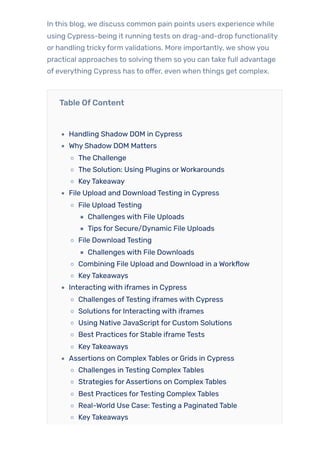
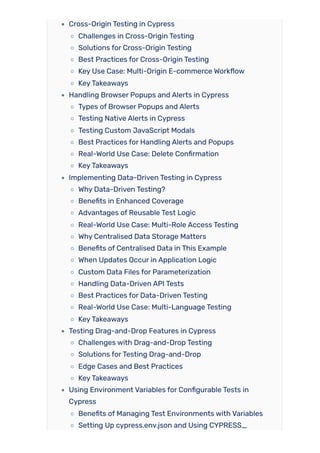
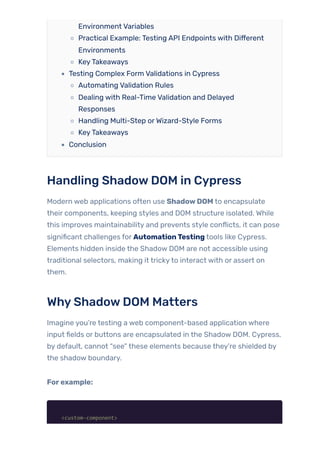
Table OfContent
Handling Shadow DOM in Cypress
Why Shadow DOM Matters
The Challenge
The Solution: Using Plugins orWorkarounds
KeyTakeaway
File Upload and Download Testing in Cypress
File Upload Testing
Challenges with File Uploads
Tips for Secure/Dynamic File Uploads
File Download Testing
Challenges with File Downloads
Combining File Upload and Download in a Workflow
KeyTakeaways
Interacting with iframes in Cypress
Challenges ofTesting iframes with Cypress
Solutions for Interacting with iframes
Using Native JavaScript for Custom Solutions
Best Practices for Stable iframe Tests
KeyTakeaways
Assertions on Complex Tables or Grids in Cypress
Challenges in Testing Complex Tables
Strategies forAssertions on Complex Tables
Best Practices forTesting Complex Tables
Real-World Use Case: Testing a Paginated Table
KeyTakeaways
Cross-Origin Testing in Cypress
Challenges in Cross-Origin Testing
Solutions for Cross-Origin Testing
Best Practices for Cross-Origin Testing
Key Use Case: Multi-Origin E-commerce Workflow
KeyTakeaways
Handling Browser Popups and Alerts in Cypress
Types of Browser Popups and Alerts
Testing Native Alerts in Cypress
Testing Custom JavaScript Modals
Best Practices for Handling Alerts and Popups
Real-World Use Case: Delete Confirmation
KeyTakeaways
Implementing Data-Driven Testing in Cypress
Why Data-Driven Testing?
Benefits in Enhanced Coverage
Advantages of Reusable Test Logic
Real-World Use Case: Multi-Role Access Testing
Why Centralised Data Storage Matters
Benefits of Centralised Data in This Example
When Updates Occur in Application Logic
Custom Data Files for Parameterization
Handling Data-Driven API Tests
Best Practices for Data-Driven Testing
Real-World Use Case: Multi-Language Testing
KeyTakeaways
Testing Drag-and-Drop Features in Cypress
Challenges with Drag-and-Drop Testing
Solutions forTesting Drag-and-Drop
Edge Cases and Best Practices
KeyTakeaways
Using Environment Variables for Configurable Tests in
Cypress
Benefits of Managing Test Environments with Variables
Setting Up cypress.env.json and Using CYPRESS_
Environment Variables
Practical Example: Testing API Endpoints with Different
Environments
KeyTakeaways
Testing Complex Form Validations in Cypress
Automating Validation Rules
Dealing with Real-Time Validation and Delayed
Responses
Handling Multi-Step orWizard-Style Forms
KeyTakeaways
Conclusion
Handling ShadowDOM in Cypress
Modern web applications often use ShadowDOM to encapsulate
their components, keeping styles and DOM structure isolated. While
this improves maintainability and prevents style conflicts, it can pose
significant challenges for AutomationTesting tools like Cypress.
Elements hidden inside the Shadow DOM are not accessible using
traditional selectors, making it trickyto interact with or assert on
them.
WhyShadowDOM Matters
Imagine you’re testing a web component-based application where
input fields or buttons are encapsulated in the Shadow DOM. Cypress,
by default, cannot “see” these elements because they’re shielded by
the shadow boundary.
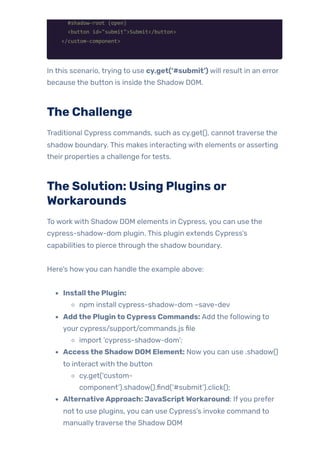
Forexample:
<custom-component>
#shadow-root (open)
<button id="submit">Submit</button>
</custom-component>
In this scenario, trying to use cy.get(‘#submit’) will result in an error
because the button is inside the Shadow DOM.
The Challenge
Traditional Cypress commands, such as cy.get(), cannot traverse the
shadow boundary. This makes interacting with elements or asserting
their properties a challenge fortests.
The Solution: Using Plugins or
Workarounds
To work with Shadow DOM elements in Cypress, you can use the
cypress-shadow-dom plugin. This plugin extends Cypress’s
capabilities to pierce through the shadow boundary.
Here’s howyou can handle the example above:
Installthe Plugin:
npm install cypress-shadow-dom –save-dev
Addthe Pluginto Cypress Commands: Add the following to
your cypress/support/commands.js file
import ‘cypress-shadow-dom’;
Accessthe ShadowDOM Element: Nowyou can use .shadow()
to interact with the button
cy.get(‘custom-
component’).shadow().find(‘#submit’).click();
AlternativeApproach: JavaScriptWorkaround: Ifyou prefer
not to use plugins, you can use Cypress’s invoke command to
manuallytraverse the Shadow DOM
cy.get(‘custom-
component’).shadow().find(‘button#submit’).click();
Real-World Example:
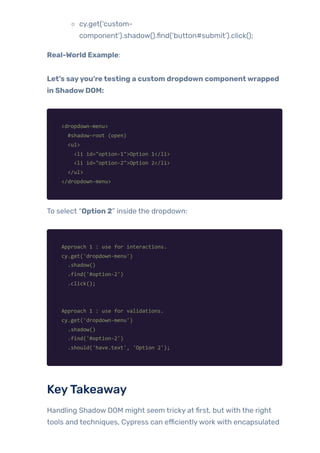
Let’s sayyou’retesting a custom dropdown componentwrapped
in ShadowDOM:
<dropdown-menu>
#shadow-root (open)
<ul>
<li id="option-1">Option 1</li>
<li id="option-2">Option 2</li>
</ul>
</dropdown-menu>
To select “Option 2” inside the dropdown:
Approach 1 : use for interactions.
cy.get('dropdown-menu')
.shadow()
.find('#option-2')
.click();
Approach 1 : use for validations.
cy.get('dropdown-menu')
.shadow()
.find('#option-2')
.should('have.text', 'Option 2');
KeyTakeaway
Handling Shadow DOM might seem tricky at first, but with the right
tools and techniques, Cypress can efficientlywork with encapsulated
elements. Plugins like cypress-shadow-dom make this process
seamless, saving time and ensuring yourtests remain robust and
reliable.
File Upload and DownloadTesting in
Cypress
File upload and download functionalities are common in many
modern web applications, whether it’s uploading resumes, submitting
documents, or downloading reports. However, automating these
features in Cypress can be challenging because they often involve
interactions with the local file system or asynchronous backend
operations.
This guide walks you through testing both file uploads and downloads
effectively in Cypress, complete with examples and practical tips.
File UploadTesting
Challengeswith File Uploads
Automating file uploads can be tricky because you need to simulate
attaching a file to an input field without directly interacting with the
file system. Cypress provides a solution using fixture files stored in
the cypress/fixtures folder.
Example:Testing a File Upload
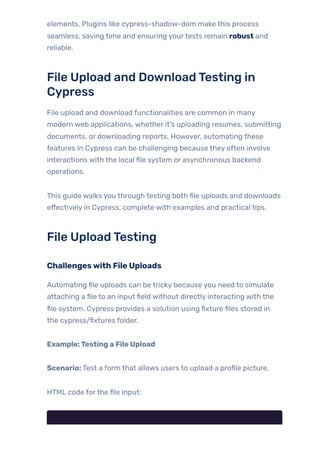
Scenario: Test a form that allows users to upload a profile picture.
HTML code forthe file input:
<form id="upload-form">
<input type="file" id="profile-pic" name="profile-pic" />
<button type="submit">Upload</button>
</form>
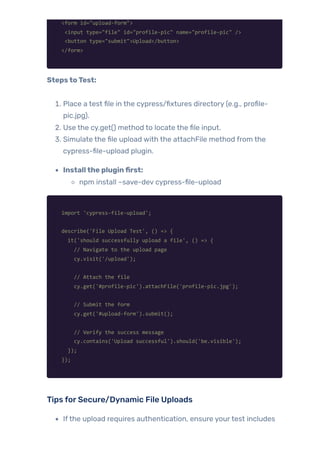
StepstoTest:
1. Place a test file in the cypress/fixtures directory (e.g., profile-
pic.jpg).
2. Use the cy.get() method to locate the file input.
3. Simulate the file upload with the attachFile method from the
cypress-file-upload plugin.
Installthe pluginfirst:
npm install –save-dev cypress-file-upload
import 'cypress-file-upload';
describe('File Upload Test', () => {
it('should successfully upload a file', () => {
// Navigate to the upload page
cy.visit('/upload');
// Attach the file
cy.get('#profile-pic').attachFile('profile-pic.jpg');
// Submit the form
cy.get('#upload-form').submit();
// Verify the success message
cy.contains('Upload successful').should('be.visible');
});
});
Tips forSecure/Dynamic File Uploads
Ifthe upload requires authentication, ensure yourtest includes
login steps.
For dynamic file uploads (e.g., files generated at runtime), create
the file using Node.js before attaching it.
File DownloadTesting
Challengeswith File Downloads
Cypress doesn’t provide native support forverifying file downloads
because it cannot directly access the local file system. However, you
can validate the behaviour by:
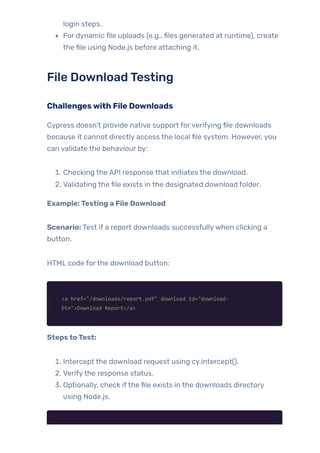
1. Checking the API response that initiates the download.
2. Validating the file exists in the designated download folder.
Example:Testing a File Download
Scenario: Test if a report downloads successfullywhen clicking a
button.
HTML code forthe download button:
<a href="/downloads/report.pdf" download id="download-
btn">Download Report</a>
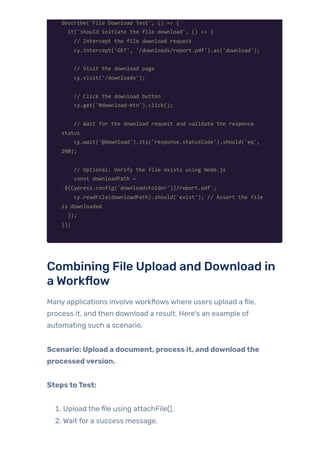
StepstoTest:
1. Intercept the download request using cy.intercept().
2. Verifythe response status.
3. Optionally, check ifthe file exists in the downloads directory
using Node.js.
describe('File Download Test', () => {
it('should initiate the file download', () => {
// Intercept the file download request
cy.intercept('GET', '/downloads/report.pdf').as('download');
// Visit the download page
cy.visit('/downloads');
// Click the download button
cy.get('#download-btn').click();
// Wait for the download request and validate the response
status
cy.wait('@download').its('response.statusCode').should('eq',
200);
// Optional: Verify the file exists using Node.js
const downloadPath =
`${Cypress.config('downloadsFolder')}/report.pdf`;
cy.readFile(downloadPath).should('exist'); // Assert the file
is downloaded
});
});
Combining File Upload and Download in
a Workflow
Many applications involve workflows where users upload a file,
process it, and then download a result. Here’s an example of
automating such a scenario.
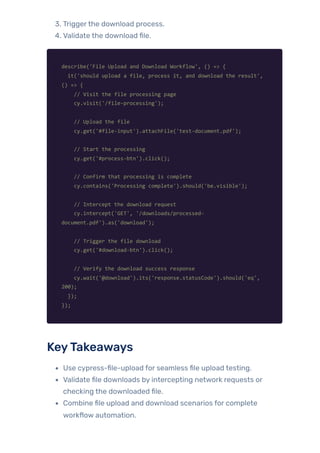
Scenario: Upload a document, process it, and downloadthe
processedversion.
StepstoTest:
1. Upload the file using attachFile().
2. Wait for a success message.
3. Triggerthe download process.
4. Validate the download file.
describe('File Upload and Download Workflow', () => {
it('should upload a file, process it, and download the result',
() => {
// Visit the file processing page
cy.visit('/file-processing');
// Upload the file
cy.get('#file-input').attachFile('test-document.pdf');
// Start the processing
cy.get('#process-btn').click();
// Confirm that processing is complete
cy.contains('Processing complete').should('be.visible');
// Intercept the download request
cy.intercept('GET', '/downloads/processed-
document.pdf').as('download');
// Trigger the file download
cy.get('#download-btn').click();
// Verify the download success response
cy.wait('@download').its('response.statusCode').should('eq',
200);
});
});
KeyTakeaways
Use cypress-file-upload for seamless file upload testing.
Validate file downloads by intercepting network requests or
checking the downloaded file.
Combine file upload and download scenarios for complete
workflow automation.
With these techniques, testing file upload and download
functionalities in Cypress becomes straightforward, reliable, and
efficient. These examples provide a solid foundation fortackling even
the most complex file-handling scenarios in your application.
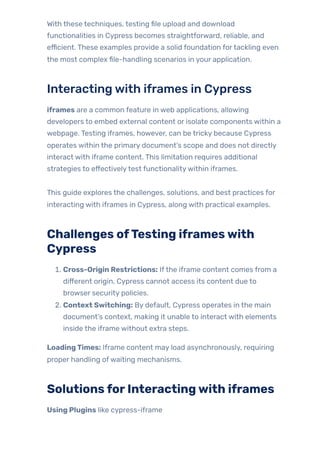
Interactingwith iframes in Cypress
iframes are a common feature in web applications, allowing
developers to embed external content or isolate components within a
webpage. Testing iframes, however, can be tricky because Cypress
operates within the primary document’s scope and does not directly
interact with iframe content. This limitation requires additional
strategies to effectivelytest functionalitywithin iframes.
This guide explores the challenges, solutions, and best practices for
interacting with iframes in Cypress, along with practical examples.
Challenges ofTesting iframeswith
Cypress
1. Cross-Origin Restrictions: Ifthe iframe content comes from a
different origin, Cypress cannot access its content due to
browser security policies.
2. Context Switching: By default, Cypress operates in the main
document’s context, making it unable to interact with elements
inside the iframe without extra steps.
LoadingTimes: Iframe content may load asynchronously, requiring
proper handling ofwaiting mechanisms.
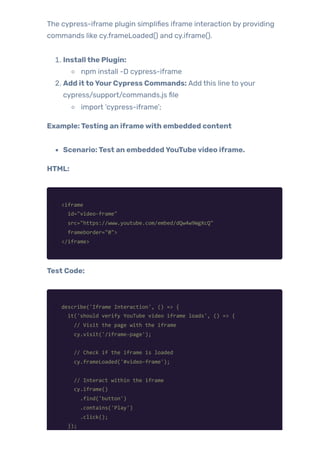
SolutionsforInteractingwith iframes
Using Plugins like cypress-iframe
The cypress-iframe plugin simplifies iframe interaction by providing
commands like cy.frameLoaded() and cy.iframe().
1. Installthe Plugin:
npm install -D cypress-iframe
2. Add ittoYourCypress Commands: Add this line to your
cypress/support/commands.js file
import ‘cypress-iframe’;
Example:Testing an iframewith embedded content
Scenario:Test an embeddedYouTubevideo iframe.
HTML:
<iframe
id="video-frame"
src="https://www.youtube.com/embed/dQw4w9WgXcQ"
frameborder="0">
</iframe>
Test Code:
describe('Iframe Interaction', () => {
it('should verify YouTube video iframe loads', () => {
// Visit the page with the iframe
cy.visit('/iframe-page');
// Check if the iframe is loaded
cy.frameLoaded('#video-frame');
// Interact within the iframe
cy.iframe()
.find('button')
.contains('Play')
.click();
});
});
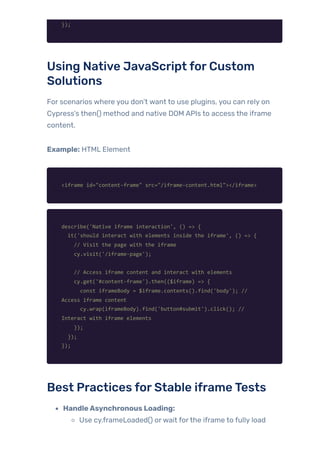
Using Native JavaScript forCustom
Solutions
For scenarios where you don’t want to use plugins, you can rely on
Cypress’s then() method and native DOM APIs to access the iframe
content.
Example: HTML Element
<iframe id="content-frame" src="/iframe-content.html"></iframe>
describe('Native iframe interaction', () => {
it('should interact with elements inside the iframe', () => {
// Visit the page with the iframe
cy.visit('/iframe-page');
// Access iframe content and interact with elements
cy.get('#content-frame').then(($iframe) => {
const iframeBody = $iframe.contents().find('body'); //
Access iframe content
cy.wrap(iframeBody).find('button#submit').click(); //
Interact with iframe elements
});
});
});
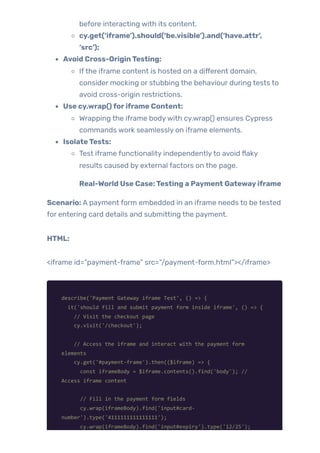
Best Practices forStable iframeTests
HandleAsynchronous Loading:
Use cy.frameLoaded() orwait forthe iframe to fully load
before interacting with its content.
cy.get(‘iframe’).should(‘be.visible’).and(‘have.attr’,
‘src’);
Avoid Cross-OriginTesting:
Ifthe iframe content is hosted on a different domain,
consider mocking or stubbing the behaviour during tests to
avoid cross-origin restrictions.
Use cy.wrap()foriframe Content:
Wrapping the iframe bodywith cy.wrap() ensures Cypress
commands work seamlessly on iframe elements.
IsolateTests:
Test iframe functionality independentlyto avoid flaky
results caused by external factors on the page.
Real-World Use Case:Testing a Payment Gatewayiframe
Scenario: A payment form embedded in an iframe needs to be tested
for entering card details and submitting the payment.
HTML:
<iframe id=”payment-frame” src=”/payment-form.html”></iframe>
describe('Payment Gateway iframe Test', () => {
it('should fill and submit payment form inside iframe', () => {
// Visit the checkout page
cy.visit('/checkout');
// Access the iframe and interact with the payment form
elements
cy.get('#payment-frame').then(($iframe) => {
const iframeBody = $iframe.contents().find('body'); //
Access iframe content
// Fill in the payment form fields
cy.wrap(iframeBody).find('input#card-
number').type('4111111111111111');
cy.wrap(iframeBody).find('input#expiry').type('12/25');
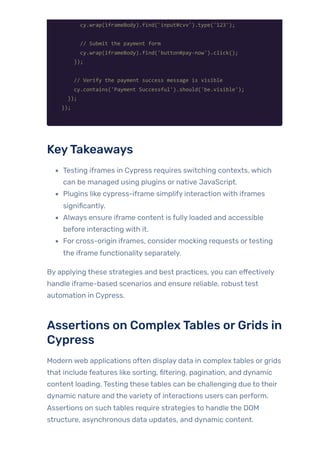
cy.wrap(iframeBody).find('input#cvv').type('123');
// Submit the payment form
cy.wrap(iframeBody).find('button#pay-now').click();
});
// Verify the payment success message is visible
cy.contains('Payment Successful').should('be.visible');
});
});
KeyTakeaways
Testing iframes in Cypress requires switching contexts, which
can be managed using plugins or native JavaScript.
Plugins like cypress-iframe simplify interaction with iframes
significantly.
Always ensure iframe content is fully loaded and accessible
before interacting with it.
For cross-origin iframes, consider mocking requests ortesting
the iframe functionality separately.
By applying these strategies and best practices, you can effectively
handle iframe-based scenarios and ensure reliable, robust test
automation in Cypress.
Assertions on ComplexTables orGrids in
Cypress
Modern web applications often display data in complex tables or grids
that include features like sorting, filtering, pagination, and dynamic
content loading. Testing these tables can be challenging due to their
dynamic nature and the variety of interactions users can perform.
Assertions on such tables require strategies to handle the DOM
structure, asynchronous data updates, and dynamic content.
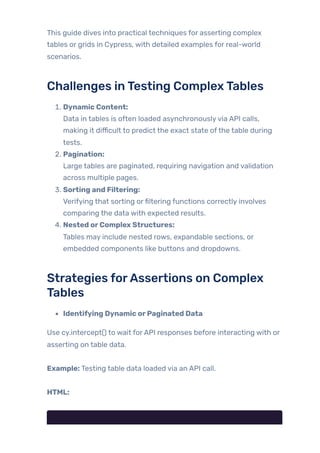
This guide dives into practical techniques for asserting complex
tables or grids in Cypress, with detailed examples for real-world
scenarios.
Challenges inTesting ComplexTables
1. Dynamic Content:
Data in tables is often loaded asynchronouslyvia API calls,
making it difficult to predict the exact state ofthe table during
tests.
2. Pagination:
Large tables are paginated, requiring navigation and validation
across multiple pages.
3. Sorting and Filtering:
Verifying that sorting orfiltering functions correctly involves
comparing the data with expected results.
4. Nested orComplex Structures:
Tables may include nested rows, expandable sections, or
embedded components like buttons and dropdowns.
Strategies forAssertions on Complex
Tables
Identifying Dynamic orPaginated Data
Use cy.intercept() to wait forAPI responses before interacting with or
asserting on table data.
Example: Testing table data loaded via an API call.
HTML:
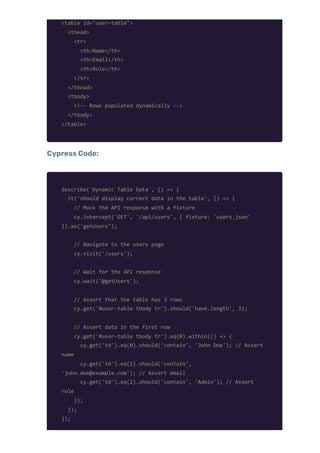
<table id="user-table">
<thead>
<tr>
<th>Name</th>
<th>Email</th>
<th>Role</th>
</tr>
</thead>
<tbody>
<!-- Rows populated dynamically -->
</tbody>
</table>
Cypress Code:
describe('Dynamic Table Data', () => {
it('should display correct data in the table', () => {
// Mock the API response with a fixture
cy.intercept('GET', '/api/users', { fixture: 'users.json'
}).as('getUsers');
// Navigate to the users page
cy.visit('/users');
// Wait for the API response
cy.wait('@getUsers');
// Assert that the table has 3 rows
cy.get('#user-table tbody tr').should('have.length', 3);
// Assert data in the first row
cy.get('#user-table tbody tr').eq(0).within(() => {
cy.get('td').eq(0).should('contain', 'John Doe'); // Assert
name
cy.get('td').eq(1).should('contain',
'john.doe@example.com'); // Assert email
cy.get('td').eq(2).should('contain', 'Admin'); // Assert
role
});
});
});
WritingAssertionsforSpecific Rows, Columns, orCellValues
To target specific table elements, use a combination of cy.get() and
within().
Example: Testing cell values for a specific row.
cy.get('#user-table tbody tr').each(($row) => {
// Wrap the row and assert that the name column (first td) is
not empty
cy.wrap($row).find('td').eq(0).should('not.be.empty');
});
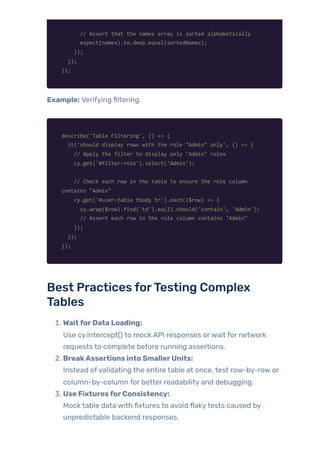
Verifying Sorting and Filtering
Sorting orfiltering involves asserting that the data displayed in the
table matches the expected order or criteria.
Example: Verifying sorting by name.
describe('Table Sorting', () => {
it('should sort the table alphabetically by name', () => {
// Click the sort button to sort the table by name
cy.get('#sort-name-btn').click();
// Get all the name cells in the first column and check the
sorting
cy.get('#user-table tbody tr td:nth-child(1)').then(($cells)
=> {
// Extract text content from each cell
const names = [...$cells].map((cell) =>
cell.textContent.trim());
// Create a sorted version of the names array
const sortedNames = [...names].sort(); // Sort names
alphabetically
// Assert that the names array is sorted alphabetically
expect(names).to.deep.equal(sortedNames);
});
});
});
Example: Verifying filtering.
describe('Table Filtering', () => {
it('should display rows with the role "Admin" only', () => {
// Apply the filter to display only "Admin" roles
cy.get('#filter-role').select('Admin');
// Check each row in the table to ensure the role column
contains "Admin"
cy.get('#user-table tbody tr').each(($row) => {
cy.wrap($row).find('td').eq(2).should('contain', 'Admin');
// Assert each row in the role column contains "Admin"
});
});
});
Best Practices forTesting Complex
Tables
1. WaitforData Loading:
Use cy.intercept() to mock API responses orwait for network
requests to complete before running assertions.
2. BreakAssertions into SmallerUnits:
Instead ofvalidating the entire table at once, test row-by-row or
column-by-column for better readability and debugging.
3. Use FixturesforConsistency:
Mock table data with fixtures to avoid flakytests caused by
unpredictable backend responses.
4. Combine UI andAPITests:
Validate the correctness oftable data both at the UI level and by
directly asserting API responses.
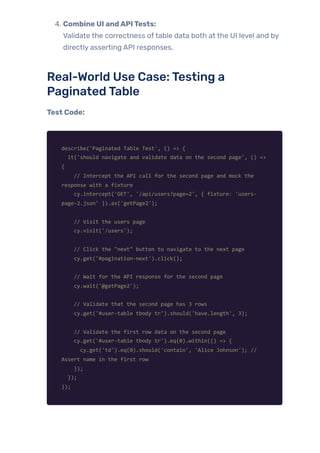
Real-World Use Case:Testing a
PaginatedTable
Test Code:
describe('Paginated Table Test', () => {
it('should navigate and validate data on the second page', () =>
{
// Intercept the API call for the second page and mock the
response with a fixture
cy.intercept('GET', '/api/users?page=2', { fixture: 'users-
page-2.json' }).as('getPage2');
// Visit the users page
cy.visit('/users');
// Click the "next" button to navigate to the next page
cy.get('#pagination-next').click();
// Wait for the API response for the second page
cy.wait('@getPage2');
// Validate that the second page has 3 rows
cy.get('#user-table tbody tr').should('have.length', 3);
// Validate the first row data on the second page
cy.get('#user-table tbody tr').eq(0).within(() => {
cy.get('td').eq(0).should('contain', 'Alice Johnson'); //
Assert name in the first row
});
});
});
KeyTakeaways
Complex tables require a mix of Cypress commands (cy.get(),
cy.each(), cy.intercept()) and smart targeting techniques for
assertions.
Sorting, filtering, and pagination can be tested reliably using
dynamic data and API stubs.
Mocked API responses with fixtures ensure consistent and
repeatable tests fortables.
Breaking down assertions row-by-row or column-by-column
makes tests easierto maintain.
With these strategies, testing even the most dynamic and complex
tables in yourweb application becomes straightforward and reliable.
Cross-OriginTesting in Cypress
Cross-origin testing is a critical aspect of modern web application
testing, especiallywhen dealing with workflows that span multiple
domains. Many applications redirect users between domains for
authentication, third-party integrations, or external resources.
Cypress, by default, enforces the same-origin policy, which can
pose challenges when testing such workflows. However, with the
right configurations and strategies, you can overcome these
limitations.
This blog explores the concept of cross-origin testing in Cypress, the
challenges involved, and practical solutions with examples.
Challenges in Cross-OriginTesting
1. Same-Origin Policy:Cypress’s architecture enforces that tests
remain within the same origin (protocol, host, and port).
Navigating between domains results in test failures or session
loss.
2. State and Session Management:Maintaining cookies, local
storage, or other session data across domains can be
problematic due to the strict separation of contexts.
3. ComplexTest Scenarios:Testing workflows like logging in
through a third-party authentication provider (e.g., Google
OAuth) or interacting with embedded widgets hosted on a
different domain requires careful handling.
Solutions forCross-OriginTesting
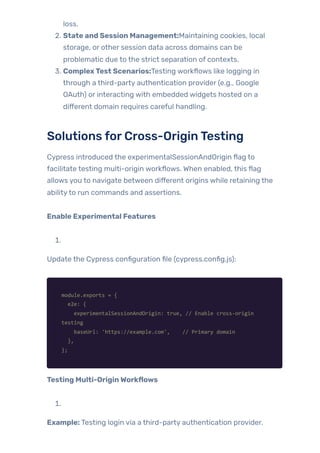
Cypress introduced the experimentalSessionAndOrigin flag to
facilitate testing multi-origin workflows. When enabled, this flag
allows you to navigate between different origins while retaining the
abilityto run commands and assertions.
Enable Experimental Features
1.
Update the Cypress configuration file (cypress.config.js):
module.exports = {
e2e: {
experimentalSessionAndOrigin: true, // Enable cross-origin
testing
baseUrl: 'https://example.com', // Primary domain
},
};
Testing Multi-OriginWorkflows
1.
Example: Testing login via a third-party authentication provider.
Scenario: A user logs into a web app using Google OAuth. After
successful authentication, they are redirected back to the main
application.
describe('Cross-Origin Authentication', () => {
it('should log in using Google OAuth and return to the app', ()
=> {
// Visit the app's login page
cy.visit('/login');
// Click the Google OAuth login button
cy.get('button#google-login').click();
// Switch to Google domain for authentication
cy.origin('https://accounts.google.com', () => {
cy.get('input[type="email"]').type('testuser@gmail.com{enter}');
cy.get('input[type="password"]').type('securePassword123{enter}');
});
// Back to the main application
cy.url().should('include', '/dashboard'); // Verify
redirection
cy.get('#welcome-message').should('contain', 'Welcome, Test
User');
});
});
Retaining StateAcross Origins
1.
Use the cy.session() command to preserve cookies, local storage, and
session data when navigating across origins.
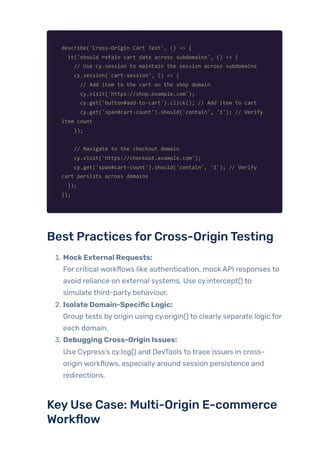
Example:
Testing a shopping cart that requires interactions on two different
subdomains.
describe('Cross-Origin Cart Test', () => {
it('should retain cart data across subdomains', () => {
// Use cy.session to maintain the session across subdomains
cy.session('cart-session', () => {
// Add item to the cart on the shop domain
cy.visit('https://shop.example.com');
cy.get('button#add-to-cart').click(); // Add item to cart
cy.get('span#cart-count').should('contain', '1'); // Verify
item count
});
// Navigate to the checkout domain
cy.visit('https://checkout.example.com');
cy.get('span#cart-count').should('contain', '1'); // Verify
cart persists across domains
});
});
Best Practices forCross-OriginTesting
1. MockExternal Requests:
For critical workflows like authentication, mock API responses to
avoid reliance on external systems. Use cy.intercept() to
simulate third-party behaviour.
2. Isolate Domain-Specific Logic:
Group tests by origin using cy.origin() to clearly separate logic for
each domain.
3. Debugging Cross-Origin Issues:
Use Cypress’s cy.log() and DevTools to trace issues in cross-
origin workflows, especially around session persistence and
redirections.
KeyUse Case: Multi-Origin E-commerce
Workflow
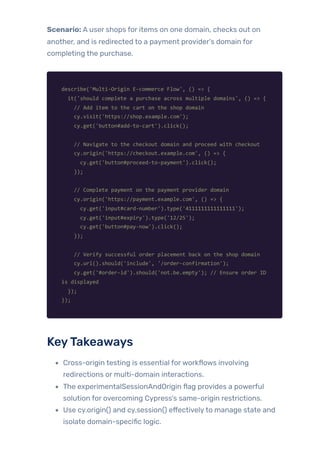
Scenario: A user shops for items on one domain, checks out on
another, and is redirected to a payment provider’s domain for
completing the purchase.
describe('Multi-Origin E-commerce Flow', () => {
it('should complete a purchase across multiple domains', () => {
// Add item to the cart on the shop domain
cy.visit('https://shop.example.com');
cy.get('button#add-to-cart').click();
// Navigate to the checkout domain and proceed with checkout
cy.origin('https://checkout.example.com', () => {
cy.get('button#proceed-to-payment').click();
});
// Complete payment on the payment provider domain
cy.origin('https://payment.example.com', () => {
cy.get('input#card-number').type('4111111111111111');
cy.get('input#expiry').type('12/25');
cy.get('button#pay-now').click();
});
// Verify successful order placement back on the shop domain
cy.url().should('include', '/order-confirmation');
cy.get('#order-id').should('not.be.empty'); // Ensure order ID
is displayed
});
});
KeyTakeaways
Cross-origin testing is essential forworkflows involving
redirections or multi-domain interactions.
The experimentalSessionAndOrigin flag provides a powerful
solution for overcoming Cypress’s same-origin restrictions.
Use cy.origin() and cy.session() effectivelyto manage state and
isolate domain-specific logic.
Mock external requests wherever possible to ensure consistent
and reliable tests.
By mastering these techniques, you can confidentlytackle the
challenges of cross-origin testing in Cypress, ensuring end-to-end
test coverage for even the most complex workflows.
Handling BrowserPopups andAlerts in
Cypress
Browser popups and alerts are commonly used in web applications
for confirmations, warnings, and user notifications. Testing these
features ensures that critical interactions work seamlessly and user
experience remains intact. Cypress provides robust tools to handle
both native browser dialogs (window.alert, window.confirm) and
custom JavaScript modals efficiently.
In this guide, we explore howto handle and test browser popups and
alerts with practical examples.
Types ofBrowserPopups andAlerts
1. Native BrowserAlerts:
window.alert: Displays a message to the user.
window.confirm: Displays a confirmation dialog with “OK”
and “Cancel” options.
window.prompt: Prompts the userfor input.
2. Custom JavaScript Modals:
Often created using libraries like Bootstrap, Material UI, or
custom code.
Typically DOM elements are styled to resemble native
dialogs.
Testing NativeAlerts in Cypress
Handlingwindow.alert
1.
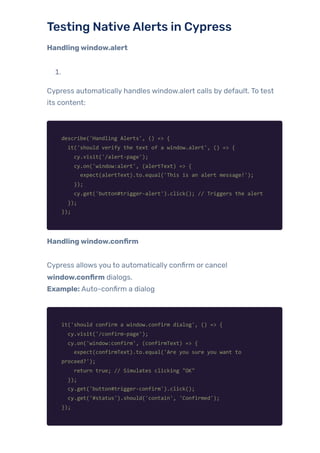
Cypress automatically handles window.alert calls by default. To test
its content:
describe('Handling Alerts', () => {
it('should verify the text of a window.alert', () => {
cy.visit('/alert-page');
cy.on('window:alert', (alertText) => {
expect(alertText).to.equal('This is an alert message!');
});
cy.get('button#trigger-alert').click(); // Triggers the alert
});
});
Handlingwindow.confirm
Cypress allows you to automatically confirm or cancel
window.confirm dialogs.
Example: Auto-confirm a dialog
it('should confirm a window.confirm dialog', () => {
cy.visit('/confirm-page');
cy.on('window:confirm', (confirmText) => {
expect(confirmText).to.equal('Are you sure you want to
proceed?');
return true; // Simulates clicking "OK"
});
cy.get('button#trigger-confirm').click();
cy.get('#status').should('contain', 'Confirmed');
});
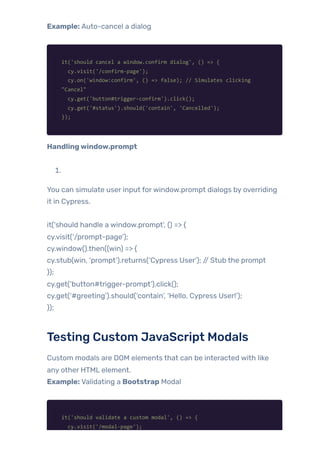
Example: Auto-cancel a dialog
it('should cancel a window.confirm dialog', () => {
cy.visit('/confirm-page');
cy.on('window:confirm', () => false); // Simulates clicking
"Cancel"
cy.get('button#trigger-confirm').click();
cy.get('#status').should('contain', 'Cancelled');
});
Handlingwindow.prompt
1.
You can simulate user input forwindow.prompt dialogs by overriding
it in Cypress.
it(‘should handle a window.prompt’, () => {
cy.visit(‘/prompt-page’);
cy.window().then((win) => {
cy.stub(win, ‘prompt’).returns(‘Cypress User’); // Stub the prompt
});
cy.get(‘button#trigger-prompt’).click();
cy.get(‘#greeting’).should(‘contain’, ‘Hello, Cypress User!’);
});
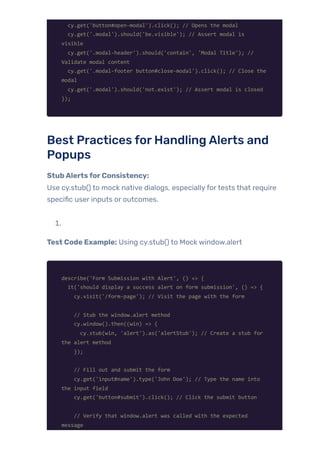
Testing Custom JavaScript Modals
Custom modals are DOM elements that can be interacted with like
any other HTML element.
Example: Validating a Bootstrap Modal
it('should validate a custom modal', () => {
cy.visit('/modal-page');
cy.get('button#open-modal').click(); // Opens the modal
cy.get('.modal').should('be.visible'); // Assert modal is
visible
cy.get('.modal-header').should('contain', 'Modal Title'); //
Validate modal content
cy.get('.modal-footer button#close-modal').click(); // Close the
modal
cy.get('.modal').should('not.exist'); // Assert modal is closed
});
Best Practices forHandlingAlerts and
Popups
StubAlertsforConsistency:
Use cy.stub() to mock native dialogs, especiallyfortests that require
specific user inputs or outcomes.
1.
Test Code Example: Using cy.stub() to Mock window.alert
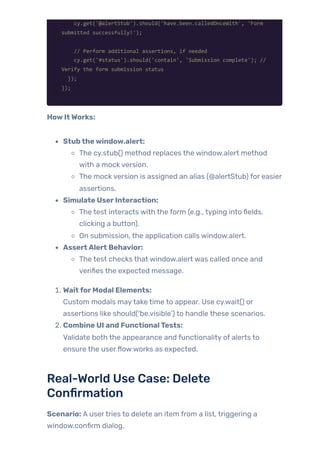
describe('Form Submission with Alert', () => {
it('should display a success alert on form submission', () => {
cy.visit('/form-page'); // Visit the page with the form
// Stub the window.alert method
cy.window().then((win) => {
cy.stub(win, 'alert').as('alertStub'); // Create a stub for
the alert method
});
// Fill out and submit the form
cy.get('input#name').type('John Doe'); // Type the name into
the input field
cy.get('button#submit').click(); // Click the submit button
// Verify that window.alert was called with the expected
message
cy.get('@alertStub').should('have.been.calledOnceWith', 'Form
submitted successfully!');
// Perform additional assertions, if needed
cy.get('#status').should('contain', 'Submission complete'); //
Verify the form submission status
});
});
HowItWorks:
Stubthewindow.alert:
The cy.stub() method replaces the window.alert method
with a mock version.
The mock version is assigned an alias (@alertStub) for easier
assertions.
Simulate UserInteraction:
The test interacts with the form (e.g., typing into fields,
clicking a button).
On submission, the application calls window.alert.
AssertAlert Behavior:
The test checks that window.alert was called once and
verifies the expected message.
1. WaitforModal Elements:
Custom modals maytake time to appear. Use cy.wait() or
assertions like should(‘be.visible’) to handle these scenarios.
2. Combine UI and FunctionalTests:
Validate both the appearance and functionality of alerts to
ensure the userflowworks as expected.
Real-World Use Case: Delete
Confirmation
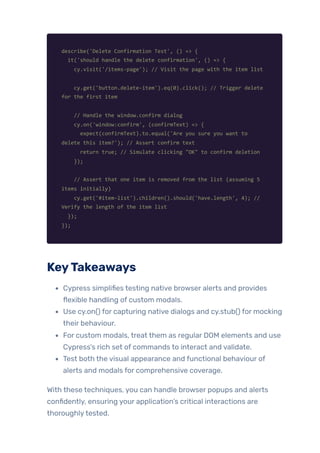
Scenario: A usertries to delete an item from a list, triggering a
window.confirm dialog.
describe('Delete Confirmation Test', () => {
it('should handle the delete confirmation', () => {
cy.visit('/items-page'); // Visit the page with the item list
cy.get('button.delete-item').eq(0).click(); // Trigger delete
for the first item
// Handle the window.confirm dialog
cy.on('window:confirm', (confirmText) => {
expect(confirmText).to.equal('Are you sure you want to
delete this item?'); // Assert confirm text
return true; // Simulate clicking "OK" to confirm deletion
});
// Assert that one item is removed from the list (assuming 5
items initially)
cy.get('#item-list').children().should('have.length', 4); //
Verify the length of the item list
});
});
KeyTakeaways
Cypress simplifies testing native browser alerts and provides
flexible handling of custom modals.
Use cy.on() for capturing native dialogs and cy.stub() for mocking
their behaviour.
For custom modals, treat them as regular DOM elements and use
Cypress’s rich set of commands to interact and validate.
Test both the visual appearance and functional behaviour of
alerts and modals for comprehensive coverage.
With these techniques, you can handle browser popups and alerts
confidently, ensuring your application’s critical interactions are
thoroughlytested.
Implementing Data-DrivenTesting in
Cypress
Data-driven testing is an essential approach in test automation that
involves running the same test case multiple times with different sets
of input data. This ensures comprehensive test coverage, especially
for scenarios requiring multiple variations of user input. Cypress, a
popular end-to-end testing framework, supports data-driven testing
with features like fixtures and custom data handling.
In this blog, we’ll explore howto implement data-driven testing
effectively using Cypress, along with practical examples.
WhyData-DrivenTesting?
1. EnhancedTest Coverage:
One ofthe key benefits of data-driven testing in Cypress is the
abilityto achieve enhanced test coverage by running the same
test logic across multiple data sets. This ensures that all possible
input combinations, edge cases, and unexpected inputs are
thoroughlyvalidated without duplicating test code.
HowItWorks
In traditional testing, a single test case often focuses on a specific
input-output scenario. However, real-world applications are expected
to handle a variety of inputs, including valid data, invalid data, and
edge-case scenarios. Data-driven testing allows you to:
1. Use Structured Data Sets:
By defining inputs and expected outcomes in a structured
format (like JSON or JavaScript objects), you can systematically
verify howthe application behaves under different conditions.
2. CoverEdge Cases Efficiently:
Instead ofwriting separate test cases for edge cases (e.g.,
minimum or maximum input lengths, special characters), you
can include these cases directly in the test data.
3. Simulate Real-World Scenarios:
You can mimic user behaviours with varying input combinations,
such as different usernames, roles, or language preferences.
Example: Validating a Login Form
Test Scenario: Verifythat a login form accepts valid credentials and
rejects invalid ones.
[
{
"username": "validUser",
"password": "validPass",
"expectedMessage": "Welcome validUser!"
},
{
"username": "validUser",
"password": "wrongPass",
"expectedMessage": "Invalid credentials"
},
{
"username": "short",
"password": "validPass",
"expectedMessage": "Username must be at least 6 characters"
},
{
"username": "validUser",
"password": "",
"expectedMessage": "Password cannot be empty"
}
]
Test Implementation in Cypress:
describe('Login Form Tests', () => {
beforeEach(() => {
cy.visit('/login');
});
it('should validate login form with multiple data sets', () => {
cy.fixture('loginTestData').then((testData) => {
testData.forEach((test) => {
// Enter credentials
cy.get('input[name="username"]').type(test.username);
cy.get('input[name="password"]').type(test.password);
cy.get('button[type="submit"]').click();
// Verify the result
cy.get('.message').should('contain',
test.expectedMessage);
// Reset the form for the next iteration
cy.get('button[type="reset"]').click();
});
});
});
});
Benefits in Enhanced Coverage
1. Efficiency:
A single test dynamically adapts to different input scenarios,
eliminating redundant code and saving time.
2. Reliability:
The application is tested against diverse inputs, ensuring
robustness in real-world usage.
3. Consistency:
Centralised data reduces the risk of inconsistent test logic or
input variations.
ReusableTest Logic in Data-DrivenTesting
Data-driven testing emphasises reusing the same test logic across
multiple data sets, streamlining the process ofvalidating different
inputs without duplicating test code. By decoupling test data from
test logic, you make yourtests cleaner, easierto maintain, and more
adaptable to changing requirements.
HowItWorks
1. Centralised Data Handling:
Test data is stored separately in files (e.g., JSON, CSV) orwithin
objects in yourtest code. This eliminates hardcoded values,
allowing for easier updates when data changes.
2. ParameterizedTest Execution:
The test iterates over multiple data sets, dynamically
substituting inputs and expected outputs for each iteration. This
ensures that a single test covers a broad spectrum of scenarios.
3. Minimised Redundancy:
By reusing test steps for different inputs, you reduce duplication
in your codebase, making yourtest scripts leaner and more
efficient.
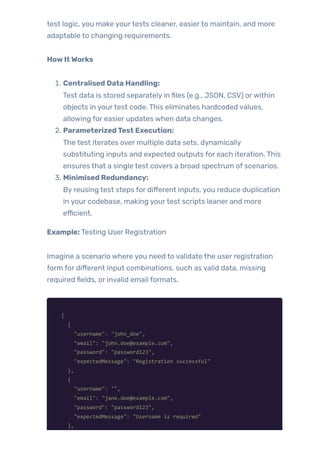
Example: Testing User Registration
Imagine a scenario where you need to validate the user registration
form for different input combinations, such as valid data, missing
required fields, or invalid email formats.
[
{
"username": "john_doe",
"email": "john.doe@example.com",
"password": "password123",
"expectedMessage": "Registration successful"
},
{
"username": "",
"email": "jane.doe@example.com",
"password": "password123",
"expectedMessage": "Username is required"
},
{
"username": "jane_doe",
"email": "invalid-email",
"password": "password123",
"expectedMessage": "Enter a valid email"
}
]
Test Implementation in Cypress:
describe('User Registration Tests', () => {
it('should test registration with multiple data sets', () => {
cy.fixture('registrationData').then((data) => {
data.forEach((user) => {
cy.visit('/register');
// Fill the form
if (user.username)
cy.get('#username').type(user.username);
if (user.email) cy.get('#email').type(user.email);
if (user.password)
cy.get('#password').type(user.password);
// Submit the form
cy.get('button[type="submit"]').click();
// Validate the response message
cy.get('.message').should('contain',
user.expectedMessage);
});
});
});
});
Advantages ofReusableTest Logic
1. EfficiencyGains:
Writing one reusable test for all scenarios saves significant time
compared to creating individual tests for each data set.
2. Simplified Maintenance:
When requirements change, you only need to update the test
data, leaving the test logic untouched. For example, ifthe
registration form introduces a newfield, you update the data set
to include it, and the same test adapts to the change.
3. Scalability:
Adding more test cases is as simple as appending new entries to
the data source. There’s no need to write newtest functions for
every new scenario.
4. ConsistencyinValidation:
Reusable logic ensures the same testing steps and validations
are applied consistently across all data sets.
Real-World Use Case: Multi-RoleAccess
Testing
In an application where different user roles (e.g., Admin, User, Guest)
have varying permissions, you can use reusable test logic to validate
access controls for all roles.
Test Data:
[
{
"role": "Admin",
"accessLevel": "Full",
"expectedPages": ["Dashboard", "Settings", "Reports"]
},
{
"role": "User",
"accessLevel": "Limited",
"expectedPages": ["Dashboard", "Reports"]
},
{
"role": "Guest",
"accessLevel": "Read-Only",
"expectedPages": ["Dashboard"]
}
]
Test Code:
describe('Role-Based Access Control Tests', () => {
it('should validate access levels for different roles', () => {
cy.fixture('roleData').then((roles) => {
roles.forEach((role) => {
cy.loginAs(role.role); // Custom command for logging in as
a specific role
// Validate accessible pages for the given role
role.expectedPages.forEach((page) => {
cy.visit(`/${page.toLowerCase()}`);
cy.get('h1').should('contain', page); // Check if the
page title matches the expected one
});
// Attempt access to restricted pages and verify access is
denied
const restrictedPages = ['Dashboard', 'Settings',
'Reports'].filter(
(page) => !role.expectedPages.includes(page) // Filter
out pages the role is allowed to access
);
restrictedPages.forEach((page) => {
cy.visit(`/${page.toLowerCase()}`);
cy.get('.error-message').should('contain', 'Access
Denied'); // Ensure access is blocked
});
});
});
});
});
Improved Maintenancewith Data-DrivenTesting
1.
In automation, maintenance is often the most time-consuming
aspect, particularlywhen changes occur in the application undertest
(AUT). Centralised data storage in data-driven testing significantly
simplifies updates, making yourtests adaptable, scalable, and easier
to maintain.
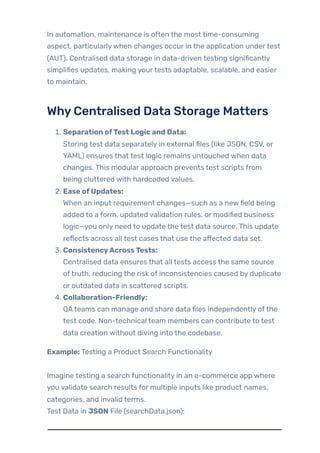
WhyCentralised Data Storage Matters
1. Separation ofTest Logic and Data:
Storing test data separately in external files (like JSON, CSV, or
YAML) ensures that test logic remains untouched when data
changes. This modular approach prevents test scripts from
being cluttered with hardcoded values.
2. Ease ofUpdates:
When an input requirement changes—such as a newfield being
added to a form, updated validation rules, or modified business
logic—you only need to update the test data source. This update
reflects across all test cases that use the affected data set.
3. ConsistencyAcrossTests:
Centralised data ensures that all tests access the same source
oftruth, reducing the risk of inconsistencies caused by duplicate
or outdated data in scattered scripts.
4. Collaboration-Friendly:
QAteams can manage and share data files independently ofthe
test code. Non-technical team members can contribute to test
data creation without diving into the codebase.
Example: Testing a Product Search Functionality
Imagine testing a search functionality in an e-commerce app where
you validate search results for multiple inputs like product names,
categories, and invalid terms.
Test Data in JSON File (searchData.json):
[
{
"query": "laptop",
"expectedResultsCount": 5
},
{
"query": "smartphone",
"expectedResultsCount": 8
},
{
"query": "randomItem123",
"expectedResultsCount": 0
}
]
Test Implementation in Cypress:
describe('Product Search Tests', () => {
beforeEach(() => {
cy.visit('/search'); // Visit the search page before each test
});
it('should verify search results for multiple queries', () => {
cy.fixture('searchData').then((searchQueries) => {
searchQueries.forEach((data) => {
// Perform search
cy.get('#search-input').clear().type(data.query);
cy.get('#search-button').click();
// Assert that the number of search results matches the
expected count
cy.get('.results-item').should('have.length',
data.expectedResultsCount);
// Optionally, log data for debugging
cy.log(`Tested query: ${data.query} with expected result
count: ${data.expectedResultsCount}`);
});
});
});
});
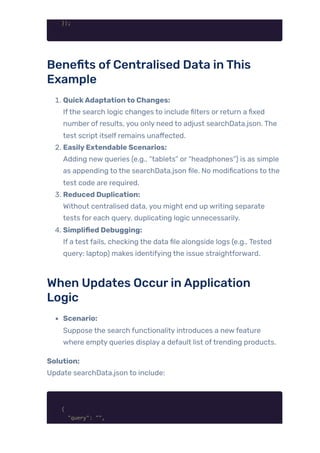
Benefits ofCentralised Data inThis
Example
1. QuickAdaptationto Changes:
Ifthe search logic changes to include filters or return a fixed
number of results, you only need to adjust searchData.json. The
test script itself remains unaffected.
2. EasilyExtendable Scenarios:
Adding new queries (e.g., “tablets” or “headphones”) is as simple
as appending to the searchData.json file. No modifications to the
test code are required.
3. Reduced Duplication:
Without centralised data, you might end up writing separate
tests for each query, duplicating logic unnecessarily.
4. Simplified Debugging:
If a test fails, checking the data file alongside logs (e.g., Tested
query: laptop) makes identifying the issue straightforward.
When Updates OccurinApplication
Logic
Scenario:
Suppose the search functionality introduces a newfeature
where empty queries display a default list oftrending products.
Solution:
Update searchData.json to include:
{
"query": "",
"expectedResultsCount": 10
}
The existing Cypress script will automatically handle this case
without requiring any changes to the test logic.
Custom Data Filesfor
Parameterization
Sometimes, data needs to be dynamically generated or retrieved from
external sources (e.g., databases, APIs). You can define custom data
objects or import data from external files.
Example: Using JavaScript Objects forTest Data
const userData = [
{ username: 'admin', password: 'admin123', expectedRole: 'Admin'
},
{ username: 'guest', password: 'guest123', expectedRole: 'Guest'
}
];
describe('Parameterized Role Tests', () => {
userData.forEach((user) => {
it(`should validate the role for ${user.username}`, () => {
cy.visit('/login');
cy.get('input[name="username"]').type(user.username);
cy.get('input[name="password"]').type(user.password);
cy.get('button[type="submit"]').click();
cy.get('#role').should('contain', user.expectedRole);
});
});
});
Handling Data-DrivenAPITests
Cypress can be used forAPI testing as well. By parameterizing
requests with multiple data sets, you can validate backend behaviour.
Example: Testing API Responses with Dynamic Data
const apiTestData = [
{ userId: 1, expectedName: 'John Doe' },
{ userId: 2, expectedName: 'Jane Doe' }
];
describe('API Data-Driven Tests', () => {
apiTestData.forEach((test) => {
it(`should verify the user name for userId ${test.userId}`, ()
=> {
cy.request(`/api/users/${test.userId}`).then((response) => {
expect(response.status).to.eq(200);
expect(response.body.name).to.eq(test.expectedName);
});
});
});
});
Best Practices forData-DrivenTesting
1. CentralizeTest Data:
Keep test data in a dedicated folder (fixtures or external data
sources) for easier maintenance.
2. Validate Data Completeness:
Ensure all required data fields are present and properly
formatted.
3. Leverage Dynamic Data:
Use tools like faker.js to generate random but realistic test data
for complex scenarios.
4. Separate DatafromTest Logic:
This enhances code readability and makes tests more modular.
Real-World Use Case: Multi-Language
Testing
Scenario:
Awebsite supports multiple languages, and you need to test the login
page’s language localization.
Fixture File (languages.json):
[
{
"language": "en",
"usernamePlaceholder": "Username",
"passwordPlaceholder": "Password"
},
{
"language": "es",
"usernamePlaceholder": "Usuario",
"passwordPlaceholder": "Contraseña"
}
]
Test Code:
describe('Multi-Language Login Page Tests', () => {
it('should validate placeholders in different languages', () =>
{
cy.fixture('languages').then((languages) => {
languages.forEach((lang) => {
cy.visit(`/login?lang=${lang.language}`); // Visit the
login page with the current language query param
// Validate the placeholder for the username field
cy.get('input[name="username"]')
.should('have.attr', 'placeholder',
lang.usernamePlaceholder);
// Validate the placeholder for the password field
cy.get('input[name="password"]')
.should('have.attr', 'placeholder',
lang.passwordPlaceholder);
});
});
});
});
KeyTakeaways
Data-driven testing simplifies and scales yourtest cases, making
them reusable and maintainable.
Cypress’s built-in support forfixtures and dynamic
parameterization makes implementing this strategy
straightforward.
Always separate test logic and data for cleaner code and better
test organisation.
Incorporate data-driven testing into both UI and API tests for
comprehensive test coverage.
By adopting these techniques, you can ensure your automation
framework is both robust and efficient, capable of handling diverse
testing requirements seamlessly.
Testing Drag-and-Drop Features in
Cypress
Drag-and-drop functionality is a critical interaction in manyweb
applications, particularlythose involving UI elements such as file
uploads, list rearrangements, or even complex data manipulation
interfaces. However, testing drag-and-drop features presents unique
challenges due to the involvement of custom DOM events,
animations, and the need for precise mouse movements. This article
explores howto effectivelytest drag-and-drop interactions in
Cypress, addressing the key challenges and offering solutions.
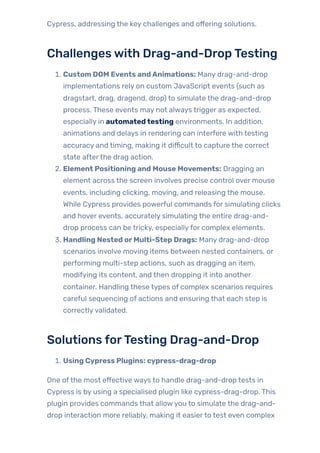
Challengeswith Drag-and-DropTesting
1. Custom DOM Events andAnimations: Many drag-and-drop
implementations rely on custom JavaScript events (such as
dragstart, drag, dragend, drop) to simulate the drag-and-drop
process. These events may not always trigger as expected,
especially in automatedtesting environments. In addition,
animations and delays in rendering can interfere with testing
accuracy and timing, making it difficult to capture the correct
state afterthe drag action.
2. Element Positioning and Mouse Movements: Dragging an
element across the screen involves precise control over mouse
events, including clicking, moving, and releasing the mouse.
While Cypress provides powerful commands for simulating clicks
and hover events, accurately simulating the entire drag-and-
drop process can be tricky, especiallyfor complex elements.
3. Handling Nested orMulti-Step Drags: Many drag-and-drop
scenarios involve moving items between nested containers, or
performing multi-step actions, such as dragging an item,
modifying its content, and then dropping it into another
container. Handling these types of complex scenarios requires
careful sequencing of actions and ensuring that each step is
correctlyvalidated.
Solutions forTesting Drag-and-Drop
1. Using Cypress Plugins: cypress-drag-drop
One ofthe most effective ways to handle drag-and-drop tests in
Cypress is by using a specialised plugin like cypress-drag-drop. This
plugin provides commands that allowyou to simulate the drag-and-
drop interaction more reliably, making it easierto test even complex
UI components.
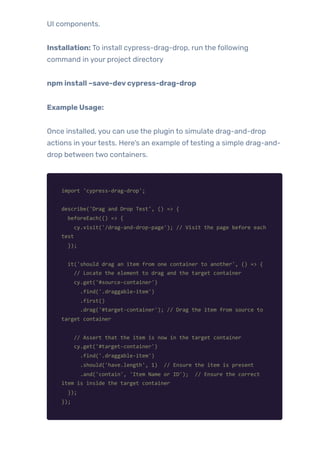
Installation: To install cypress-drag-drop, run the following
command in your project directory
npm install –save-devcypress-drag-drop
Example Usage:
Once installed, you can use the plugin to simulate drag-and-drop
actions in yourtests. Here’s an example oftesting a simple drag-and-
drop between two containers.
import 'cypress-drag-drop';
describe('Drag and Drop Test', () => {
beforeEach(() => {
cy.visit('/drag-and-drop-page'); // Visit the page before each
test
});
it('should drag an item from one container to another', () => {
// Locate the element to drag and the target container
cy.get('#source-container')
.find('.draggable-item')
.first()
.drag('#target-container'); // Drag the item from source to
target container
// Assert that the item is now in the target container
cy.get('#target-container')
.find('.draggable-item')
.should('have.length', 1) // Ensure the item is present
.and('contain', 'Item Name or ID'); // Ensure the correct
item is inside the target container
});
});
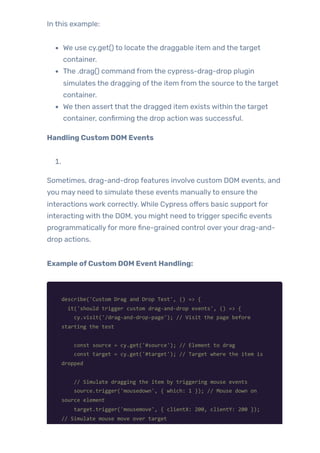
In this example:
We use cy.get() to locate the draggable item and the target
container.
The .drag() command from the cypress-drag-drop plugin
simulates the dragging ofthe item from the source to the target
container.
We then assert that the dragged item exists within the target
container, confirming the drop action was successful.
Handling Custom DOM Events
1.
Sometimes, drag-and-drop features involve custom DOM events, and
you may need to simulate these events manuallyto ensure the
interactions work correctly. While Cypress offers basic support for
interacting with the DOM, you might need to trigger specific events
programmaticallyfor more fine-grained control overyour drag-and-
drop actions.
Example ofCustom DOM Event Handling:
describe('Custom Drag and Drop Test', () => {
it('should trigger custom drag-and-drop events', () => {
cy.visit('/drag-and-drop-page'); // Visit the page before
starting the test
const source = cy.get('#source'); // Element to drag
const target = cy.get('#target'); // Target where the item is
dropped
// Simulate dragging the item by triggering mouse events
source.trigger('mousedown', { which: 1 }); // Mouse down on
source element
target.trigger('mousemove', { clientX: 200, clientY: 200 });
// Simulate mouse move over target
source.trigger('mouseup'); // Mouse up to drop the item
// Assert that the item is dropped in the target container
cy.get('#target')
.should('contain', 'Item Dropped') // Check that target
contains the expected text
.and('have.class', 'dropped'); // Optionally check if target
container has a class that indicates the item is dropped
});
});
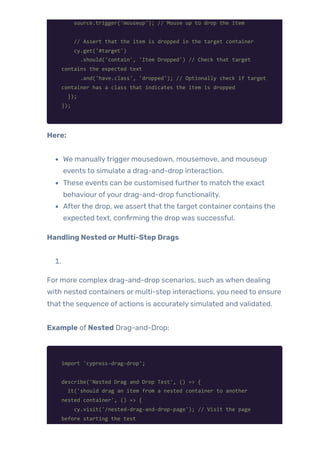
Here:
We manuallytrigger mousedown, mousemove, and mouseup
events to simulate a drag-and-drop interaction.
These events can be customised furtherto match the exact
behaviour ofyour drag-and-drop functionality.
Afterthe drop, we assert that the target container contains the
expected text, confirming the drop was successful.
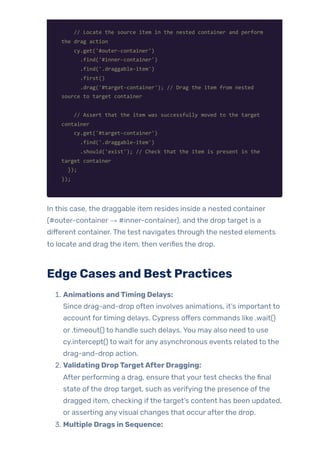
Handling Nested orMulti-Step Drags
1.
For more complex drag-and-drop scenarios, such as when dealing
with nested containers or multi-step interactions, you need to ensure
that the sequence of actions is accurately simulated and validated.
Example of Nested Drag-and-Drop:
import 'cypress-drag-drop';
describe('Nested Drag and Drop Test', () => {
it('should drag an item from a nested container to another
nested container', () => {
cy.visit('/nested-drag-and-drop-page'); // Visit the page
before starting the test
// Locate the source item in the nested container and perform
the drag action
cy.get('#outer-container')
.find('#inner-container')
.find('.draggable-item')
.first()
.drag('#target-container'); // Drag the item from nested
source to target container
// Assert that the item was successfully moved to the target
container
cy.get('#target-container')
.find('.draggable-item')
.should('exist'); // Check that the item is present in the
target container
});
});
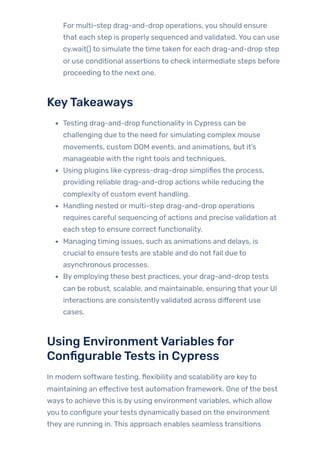
In this case, the draggable item resides inside a nested container
(#outer-container → #inner-container), and the drop target is a
different container. The test navigates through the nested elements
to locate and drag the item, then verifies the drop.
Edge Cases and Best Practices
1. Animations andTiming Delays:
Since drag-and-drop often involves animations, it’s important to
account fortiming delays. Cypress offers commands like .wait()
or .timeout() to handle such delays. You may also need to use
cy.intercept() to wait for any asynchronous events related to the
drag-and-drop action.
2. Validating DropTargetAfterDragging:
After performing a drag, ensure that yourtest checks the final
state ofthe drop target, such as verifying the presence ofthe
dragged item, checking ifthe target’s content has been updated,
or asserting anyvisual changes that occur afterthe drop.
3. Multiple Drags in Sequence:
For multi-step drag-and-drop operations, you should ensure
that each step is properly sequenced and validated. You can use
cy.wait() to simulate the time taken for each drag-and-drop step
or use conditional assertions to check intermediate steps before
proceeding to the next one.
KeyTakeaways
Testing drag-and-drop functionality in Cypress can be
challenging due to the need for simulating complex mouse
movements, custom DOM events, and animations, but it’s
manageable with the right tools and techniques.
Using plugins like cypress-drag-drop simplifies the process,
providing reliable drag-and-drop actions while reducing the
complexity of custom event handling.
Handling nested or multi-step drag-and-drop operations
requires careful sequencing of actions and precise validation at
each step to ensure correct functionality.
Managing timing issues, such as animations and delays, is
crucial to ensure tests are stable and do not fail due to
asynchronous processes.
By employing these best practices, your drag-and-drop tests
can be robust, scalable, and maintainable, ensuring that your UI
interactions are consistentlyvalidated across different use
cases.
Using EnvironmentVariables for
ConfigurableTests in Cypress
In modern software testing, flexibility and scalability are keyto
maintaining an effective test automation framework. One ofthe best
ways to achieve this is by using environment variables, which allow
you to configure yourtests dynamically based on the environment
they are running in. This approach enables seamless transitions
between development, testing, staging, and production
environments without hardcoding values into yourtest scripts.
Benefits ofManagingTest Environments
withVariables
1. Separation ofConfiguration andTest Logic:
Environment variables allowyou to separate the configuration
details (such as API endpoints, login credentials, orfeature flags)
from the actual test logic. This ensures that tests are reusable
across different environments without changes to the test code.
2. ImprovedTest Scalability:
By using environment variables, you can easily scale yourtests
to multiple environments or scenarios. For example, running the
same test suite against different databases or URLs, with no
changes to the test code itself.
3. Enhanced Security:
Storing sensitive information such as passwords, access tokens,
and keys in environment variables is much more secure than
hardcoding them into test scripts. This minimises the risk of
exposing sensitive data in source control or logs.
4. Simplified Continuous Integration (CI) Setup:
CI tools like Jenkins, GitHub Actions, or CircleCI often use
environment variables to configure different stages ofthe
pipeline (e.g., test, deploy). Using environment variables in
Cypress ensures that yourtests can easily integrate into CI
pipelines and run in different environments without modification.
Setting Up cypress.env.json and Using
CYPRESS_ EnvironmentVariables
Cypress provides an easywayto manage environment variables with
two main methods: the cypress.env.json file and CYPRESS_
environment variables passed during the test run.
Using cypress.env.json File:
1.
The cypress.env.json file is the simplest wayto store environment
variables for local testing. This file contains key-value pairs where you
can define variables specific to your environment.
Example cypress.env.json:
{
"baseUrl": "https://staging.example.com",
"env": {
"username": "testUser",
"password": "testPassword123",
"apiUrl": "https://api.staging.example.com"
}
}
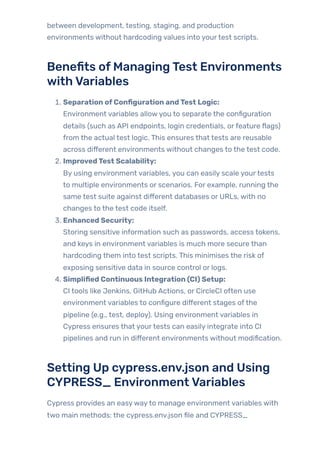
By defining these variables, you can access them in yourtest scripts
like so:
describe('Login Test', () => {
it('should log in with valid credentials', () => {
cy.visit(Cypress.env('baseUrl'));
cy.get('input[name="username"]').type(Cypress.env('username'));
cy.get('input[name="password"]').type(Cypress.env('password'));
cy.get('button[type="submit"]').click();
cy.url().should('include', '/dashboard');
});
});
Inthis example:
The baseUrl, username, and password values are retrieved from
the cypress.env.json file.
This allows the tests to remain flexible and adaptable, depending
on the environment they are run in.
Using CYPRESS_ EnvironmentVariables in CI:
1.
In Continuous Integration (CI) pipelines, you can pass environment
variables using the CYPRESS_ prefix. This allows you to configure
yourtests based on the environment without modifying the code.
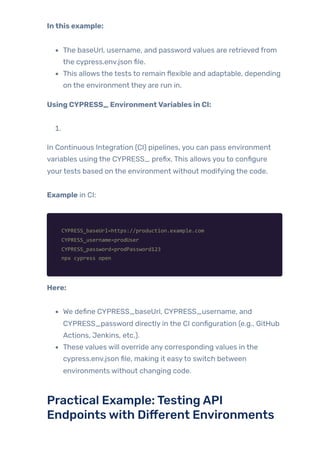
Example in CI:
CYPRESS_baseUrl=https://production.example.com
CYPRESS_username=prodUser
CYPRESS_password=prodPassword123
npx cypress open
Here:
We define CYPRESS_baseUrl, CYPRESS_username, and
CYPRESS_password directly in the CI configuration (e.g., GitHub
Actions, Jenkins, etc.).
These values will override any corresponding values in the
cypress.env.json file, making it easyto switch between
environments without changing code.
Practical Example:TestingAPI
Endpointswith Different Environments
Imagine you’re testing an API that requires different URLs for
development, staging, and production. Instead of modifying yourtest
code, you can use environment variables to easily switch between
environments.
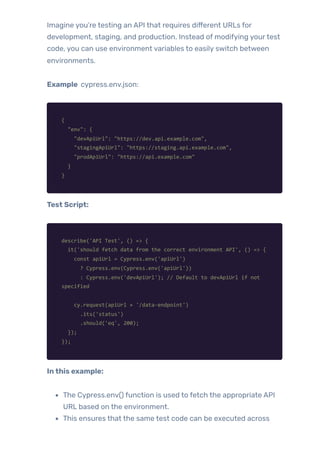
Example cypress.env.json:
{
"env": {
"devApiUrl": "https://dev.api.example.com",
"stagingApiUrl": "https://staging.api.example.com",
"prodApiUrl": "https://api.example.com"
}
}
Test Script:
describe('API Test', () => {
it('should fetch data from the correct environment API', () => {
const apiUrl = Cypress.env('apiUrl')
? Cypress.env(Cypress.env('apiUrl'))
: Cypress.env('devApiUrl'); // Default to devApiUrl if not
specified
cy.request(apiUrl + '/data-endpoint')
.its('status')
.should('eq', 200);
});
});
Inthis example:
The Cypress.env() function is used to fetch the appropriate API
URL based on the environment.
This ensures that the same test code can be executed across
different environments without any code changes.
KeyTakeaways
Dynamic Configuration: Using environment variables enables
dynamic configuration fortests, making it easyto switch
between different environments and adapt to changing
requirements.
Separation of Concerns: Storing sensitive or environment-
specific data in environment variables ensures that test scripts
remain clean, modular, and free of hardcoded values.
Security and Scalability: Environment variables improve the
security ofyourtests by protecting sensitive data and make your
tests more scalable as they adapt seamlessly across various
environments.
CI/CD Compatibility: Environment variables playwell with CI/CD
systems, making it easierto manage tests across multiple stages
and environments, ensuring a smooth integration with
automated workflows.
Testing Complex FormValidations in
Cypress
Form validation is a fundamental aspect of most web applications,
ensuring that users submit valid and correct data. When automating
tests for complex forms, especially ones with dynamic or multi-step
inputs, handling form validation becomes crucial. In Cypress, testing
form validation is straightforward for static forms, but when it comes
to more complex cases—such as real-time validation, multi-step
forms, or dynamic rules—the testing approach requires more careful
consideration.
AutomatingValidation Rules
One ofthe first steps in testing complex forms is to ensure that the
input fields behave correctly according to validation rules. These rules
can include:
Required Fields: Ensuring that users cannot submit forms with
mandatoryfields left blank.
Regex Patterns: Verifying that input fields such as email or
phone numbers match the correct format.
DynamicValidation: Rules that change based on previous user
input or selected options.
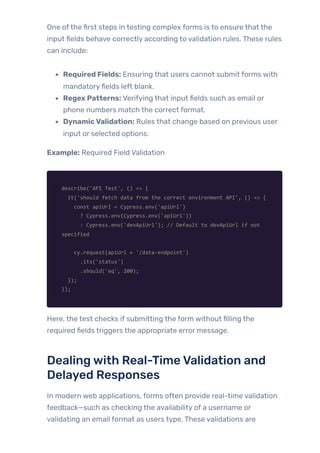
Example: Required Field Validation
describe('API Test', () => {
it('should fetch data from the correct environment API', () => {
const apiUrl = Cypress.env('apiUrl')
? Cypress.env(Cypress.env('apiUrl'))
: Cypress.env('devApiUrl'); // Default to devApiUrl if not
specified
cy.request(apiUrl + '/data-endpoint')
.its('status')
.should('eq', 200);
});
});
Here, the test checks if submitting the form without filling the
required fields triggers the appropriate error message.
Dealingwith Real-TimeValidation and
Delayed Responses
In modern web applications, forms often provide real-time validation
feedback—such as checking the availability of a username or
validating an email format as users type. These validations are
typicallytriggered via API calls or client-side JavaScript. When
automating tests for such forms, it’s important to handle
asynchronous actions and delays.
Example: Real-Time Validation for Email Field
describe('Email Validation', () => {
it('should show error message if email is invalid', () => {
cy.visit('/register');
// Type an invalid email
cy.get('input[name="email"]').type('invalid-email');
// Assert real-time validation error
cy.get('.email-error').should('contain', 'Please enter a valid
email address');
});
});
In this example, the test simulates typing an invalid email address and
checks forthe real-time error message that appears. Cypress
automaticallywaits forthe element to appear, so the test is more
stable in handling delayed responses.
Handling Multi-Step orWizard-Style
Forms
Multi-step forms orwizard-style forms (where the user completes a
series of steps to fill out a form) require additional attention in
automation. Each step might have its own validation rules, and some
fields might depend on the values entered in previous steps.
Example: Multi-Step Form Validation
describe('Multi-Step Form', () => {
it('should validate each step before moving to the next', () =>
{
cy.visit('/multi-step-form');
// Step 1: Fill out first page
cy.get('input[name="username"]').type('testuser');
cy.get('input[name="password"]').type('password123');
cy.get('button[type="submit"]').click();
// Assert that the form moves to the next step
cy.url().should('include', '/step-2');
// Step 2: Fill out second page
cy.get('input[name="email"]').type('invalid-email');
cy.get('button[type="submit"]').click();
// Assert that the second step fails due to invalid email
cy.get('.email-error').should('contain', 'Please enter a valid
email address');
});
});
In this test, the form goes through two steps:
In Step 1, the user enters a username and password.
In Step 2, the user provides an invalid email, and the test ensures
the form validation is triggered.
Cypress makes it easyto handle this type oftesting because it waits
forthe elements to load before moving on, which is particularly useful
when dealing with multi-step forms orthose that depend on previous
data.
KeyTakeaways
ComprehensiveValidation: It’s essential to test all validation
rules—required fields, regex patterns, and dynamic rules—across
all form fields.
Real-TimeValidation: Handle asynchronous or delayed
validation responses, ensuring that yourtests wait for real-time
feedback to avoid false positives.
Multi-Step Forms: Automating tests for multi-step forms
requires careful sequencing and validation checks after each
step to ensure properfunctionality.
Stabilityand Efficiency: With Cypress, you can write stable and
efficient tests for complex form validations, ensuring that user
input is correctlyvalidated and the form behaves as expected.
Conclusion
Cypress is a powerful automation tool, but like anyframework, it
comes with its own set of challenges. From managing Shadow DOM
elements and interacting with iframes to handling cross-origin
workflows and browser popups, each hurdle requires a tailored
approach to ensure stable and efficient test execution. This blog
explored solutions forthese challenges, including using specialized
commands, leveraging plugins, and adopting best practices to tackle
complex scenarios.
By implementing data-driven testing, configuring environment
variables, and optimizing tests for intricate features like drag-and-
drop and form validations, you can transform these challenges into
opportunities to enhance yourtest automation suite. Armed with
these strategies, testers can push the boundaries of Cypress and
deliver more reliable, maintainable, and scalable test coverage for
modern web applications.
Witness howourmeticulous approach and cutting-edge
solutions elevated qualityand performanceto newheights.
Beginyourjourneyintotheworld ofsoftwaretesting excellence.
To knowmore refertoTools &Technologies & QAServices.
Ifyouwould liketo learn more aboutthe awesome serviceswe
provide, be sureto reach out.
HappyTesting 🙂
TAGS:
Advanced Optimiz…

PREVIOUS POST
 Advanced Seleniu… 
NEXT POST
Related Blogs
ThinkAgile,TestSmarter:Howto
CreateaWinningQAStrategy
Next-LevelJMeter:Advanced
PerformanceTestingStrategies
ThatWork

Cypress Test Automation: Managing Complex Interactions

  • 1.
    Cypress is agreat tool for end-to-end testing. They are fast, easyto set up, and work well for modern web applications. However, like every othertool, they have their limits-certainly so when you are dealing with real complexities from the real world. Testers who have tried testing Shadow DOM elements, interaction with iframes, or methods of bypassing cross-origin restrictions know how it is not always that simple. These frustrations can be quite frustrating at first, but they also offer you an opportunityto have a deeper grasp of Cypress and generally web testing. While the above issues ensure yourtests are reliable, getting the right solutions offers you more confidence in the quality ofthe app you are building. BEST PRACTICES CYPRESS TESTAUTOMATION CypressTestAutomation:Handling ComplexInteractions • • BY QATEAM
  • 2.
    In this blog,we discuss common pain points users experience while using Cypress-being it running tests on drag-and-drop functionality or handling trickyform validations. More importantly, we showyou practical approaches to solving them so you can take full advantage of everything Cypress has to offer, even when things get complex. Table OfContent Handling Shadow DOM in Cypress Why Shadow DOM Matters The Challenge The Solution: Using Plugins orWorkarounds KeyTakeaway File Upload and Download Testing in Cypress File Upload Testing Challenges with File Uploads Tips for Secure/Dynamic File Uploads File Download Testing Challenges with File Downloads Combining File Upload and Download in a Workflow KeyTakeaways Interacting with iframes in Cypress Challenges ofTesting iframes with Cypress Solutions for Interacting with iframes Using Native JavaScript for Custom Solutions Best Practices for Stable iframe Tests KeyTakeaways Assertions on Complex Tables or Grids in Cypress Challenges in Testing Complex Tables Strategies forAssertions on Complex Tables Best Practices forTesting Complex Tables Real-World Use Case: Testing a Paginated Table KeyTakeaways
  • 3.
    Cross-Origin Testing inCypress Challenges in Cross-Origin Testing Solutions for Cross-Origin Testing Best Practices for Cross-Origin Testing Key Use Case: Multi-Origin E-commerce Workflow KeyTakeaways Handling Browser Popups and Alerts in Cypress Types of Browser Popups and Alerts Testing Native Alerts in Cypress Testing Custom JavaScript Modals Best Practices for Handling Alerts and Popups Real-World Use Case: Delete Confirmation KeyTakeaways Implementing Data-Driven Testing in Cypress Why Data-Driven Testing? Benefits in Enhanced Coverage Advantages of Reusable Test Logic Real-World Use Case: Multi-Role Access Testing Why Centralised Data Storage Matters Benefits of Centralised Data in This Example When Updates Occur in Application Logic Custom Data Files for Parameterization Handling Data-Driven API Tests Best Practices for Data-Driven Testing Real-World Use Case: Multi-Language Testing KeyTakeaways Testing Drag-and-Drop Features in Cypress Challenges with Drag-and-Drop Testing Solutions forTesting Drag-and-Drop Edge Cases and Best Practices KeyTakeaways Using Environment Variables for Configurable Tests in Cypress Benefits of Managing Test Environments with Variables Setting Up cypress.env.json and Using CYPRESS_
  • 4.
    Environment Variables Practical Example:Testing API Endpoints with Different Environments KeyTakeaways Testing Complex Form Validations in Cypress Automating Validation Rules Dealing with Real-Time Validation and Delayed Responses Handling Multi-Step orWizard-Style Forms KeyTakeaways Conclusion Handling ShadowDOM in Cypress Modern web applications often use ShadowDOM to encapsulate their components, keeping styles and DOM structure isolated. While this improves maintainability and prevents style conflicts, it can pose significant challenges for AutomationTesting tools like Cypress. Elements hidden inside the Shadow DOM are not accessible using traditional selectors, making it trickyto interact with or assert on them. WhyShadowDOM Matters Imagine you’re testing a web component-based application where input fields or buttons are encapsulated in the Shadow DOM. Cypress, by default, cannot “see” these elements because they’re shielded by the shadow boundary. Forexample: <custom-component>
  • 5.
    #shadow-root (open) <button id="submit">Submit</button> </custom-component> Inthis scenario, trying to use cy.get(‘#submit’) will result in an error because the button is inside the Shadow DOM. The Challenge Traditional Cypress commands, such as cy.get(), cannot traverse the shadow boundary. This makes interacting with elements or asserting their properties a challenge fortests. The Solution: Using Plugins or Workarounds To work with Shadow DOM elements in Cypress, you can use the cypress-shadow-dom plugin. This plugin extends Cypress’s capabilities to pierce through the shadow boundary. Here’s howyou can handle the example above: Installthe Plugin: npm install cypress-shadow-dom –save-dev Addthe Pluginto Cypress Commands: Add the following to your cypress/support/commands.js file import ‘cypress-shadow-dom’; Accessthe ShadowDOM Element: Nowyou can use .shadow() to interact with the button cy.get(‘custom- component’).shadow().find(‘#submit’).click(); AlternativeApproach: JavaScriptWorkaround: Ifyou prefer not to use plugins, you can use Cypress’s invoke command to manuallytraverse the Shadow DOM
  • 6.
    cy.get(‘custom- component’).shadow().find(‘button#submit’).click(); Real-World Example: Let’s sayyou’retestinga custom dropdown componentwrapped in ShadowDOM: <dropdown-menu> #shadow-root (open) <ul> <li id="option-1">Option 1</li> <li id="option-2">Option 2</li> </ul> </dropdown-menu> To select “Option 2” inside the dropdown: Approach 1 : use for interactions. cy.get('dropdown-menu') .shadow() .find('#option-2') .click(); Approach 1 : use for validations. cy.get('dropdown-menu') .shadow() .find('#option-2') .should('have.text', 'Option 2'); KeyTakeaway Handling Shadow DOM might seem tricky at first, but with the right tools and techniques, Cypress can efficientlywork with encapsulated
  • 7.
    elements. Plugins likecypress-shadow-dom make this process seamless, saving time and ensuring yourtests remain robust and reliable. File Upload and DownloadTesting in Cypress File upload and download functionalities are common in many modern web applications, whether it’s uploading resumes, submitting documents, or downloading reports. However, automating these features in Cypress can be challenging because they often involve interactions with the local file system or asynchronous backend operations. This guide walks you through testing both file uploads and downloads effectively in Cypress, complete with examples and practical tips. File UploadTesting Challengeswith File Uploads Automating file uploads can be tricky because you need to simulate attaching a file to an input field without directly interacting with the file system. Cypress provides a solution using fixture files stored in the cypress/fixtures folder. Example:Testing a File Upload Scenario: Test a form that allows users to upload a profile picture. HTML code forthe file input:
  • 8.
    <form id="upload-form"> <input type="file"id="profile-pic" name="profile-pic" /> <button type="submit">Upload</button> </form> StepstoTest: 1. Place a test file in the cypress/fixtures directory (e.g., profile- pic.jpg). 2. Use the cy.get() method to locate the file input. 3. Simulate the file upload with the attachFile method from the cypress-file-upload plugin. Installthe pluginfirst: npm install –save-dev cypress-file-upload import 'cypress-file-upload'; describe('File Upload Test', () => { it('should successfully upload a file', () => { // Navigate to the upload page cy.visit('/upload'); // Attach the file cy.get('#profile-pic').attachFile('profile-pic.jpg'); // Submit the form cy.get('#upload-form').submit(); // Verify the success message cy.contains('Upload successful').should('be.visible'); }); }); Tips forSecure/Dynamic File Uploads Ifthe upload requires authentication, ensure yourtest includes
  • 9.
    login steps. For dynamicfile uploads (e.g., files generated at runtime), create the file using Node.js before attaching it. File DownloadTesting Challengeswith File Downloads Cypress doesn’t provide native support forverifying file downloads because it cannot directly access the local file system. However, you can validate the behaviour by: 1. Checking the API response that initiates the download. 2. Validating the file exists in the designated download folder. Example:Testing a File Download Scenario: Test if a report downloads successfullywhen clicking a button. HTML code forthe download button: <a href="/downloads/report.pdf" download id="download- btn">Download Report</a> StepstoTest: 1. Intercept the download request using cy.intercept(). 2. Verifythe response status. 3. Optionally, check ifthe file exists in the downloads directory using Node.js.
  • 10.
    describe('File Download Test',() => { it('should initiate the file download', () => { // Intercept the file download request cy.intercept('GET', '/downloads/report.pdf').as('download'); // Visit the download page cy.visit('/downloads'); // Click the download button cy.get('#download-btn').click(); // Wait for the download request and validate the response status cy.wait('@download').its('response.statusCode').should('eq', 200); // Optional: Verify the file exists using Node.js const downloadPath = `${Cypress.config('downloadsFolder')}/report.pdf`; cy.readFile(downloadPath).should('exist'); // Assert the file is downloaded }); }); Combining File Upload and Download in a Workflow Many applications involve workflows where users upload a file, process it, and then download a result. Here’s an example of automating such a scenario. Scenario: Upload a document, process it, and downloadthe processedversion. StepstoTest: 1. Upload the file using attachFile(). 2. Wait for a success message.
  • 11.
    3. Triggerthe downloadprocess. 4. Validate the download file. describe('File Upload and Download Workflow', () => { it('should upload a file, process it, and download the result', () => { // Visit the file processing page cy.visit('/file-processing'); // Upload the file cy.get('#file-input').attachFile('test-document.pdf'); // Start the processing cy.get('#process-btn').click(); // Confirm that processing is complete cy.contains('Processing complete').should('be.visible'); // Intercept the download request cy.intercept('GET', '/downloads/processed- document.pdf').as('download'); // Trigger the file download cy.get('#download-btn').click(); // Verify the download success response cy.wait('@download').its('response.statusCode').should('eq', 200); }); }); KeyTakeaways Use cypress-file-upload for seamless file upload testing. Validate file downloads by intercepting network requests or checking the downloaded file. Combine file upload and download scenarios for complete workflow automation.
  • 12.
    With these techniques,testing file upload and download functionalities in Cypress becomes straightforward, reliable, and efficient. These examples provide a solid foundation fortackling even the most complex file-handling scenarios in your application. Interactingwith iframes in Cypress iframes are a common feature in web applications, allowing developers to embed external content or isolate components within a webpage. Testing iframes, however, can be tricky because Cypress operates within the primary document’s scope and does not directly interact with iframe content. This limitation requires additional strategies to effectivelytest functionalitywithin iframes. This guide explores the challenges, solutions, and best practices for interacting with iframes in Cypress, along with practical examples. Challenges ofTesting iframeswith Cypress 1. Cross-Origin Restrictions: Ifthe iframe content comes from a different origin, Cypress cannot access its content due to browser security policies. 2. Context Switching: By default, Cypress operates in the main document’s context, making it unable to interact with elements inside the iframe without extra steps. LoadingTimes: Iframe content may load asynchronously, requiring proper handling ofwaiting mechanisms. SolutionsforInteractingwith iframes Using Plugins like cypress-iframe
  • 13.
    The cypress-iframe pluginsimplifies iframe interaction by providing commands like cy.frameLoaded() and cy.iframe(). 1. Installthe Plugin: npm install -D cypress-iframe 2. Add ittoYourCypress Commands: Add this line to your cypress/support/commands.js file import ‘cypress-iframe’; Example:Testing an iframewith embedded content Scenario:Test an embeddedYouTubevideo iframe. HTML: <iframe id="video-frame" src="https://www.youtube.com/embed/dQw4w9WgXcQ" frameborder="0"> </iframe> Test Code: describe('Iframe Interaction', () => { it('should verify YouTube video iframe loads', () => { // Visit the page with the iframe cy.visit('/iframe-page'); // Check if the iframe is loaded cy.frameLoaded('#video-frame'); // Interact within the iframe cy.iframe() .find('button') .contains('Play') .click(); });
  • 14.
    }); Using Native JavaScriptforCustom Solutions For scenarios where you don’t want to use plugins, you can rely on Cypress’s then() method and native DOM APIs to access the iframe content. Example: HTML Element <iframe id="content-frame" src="/iframe-content.html"></iframe> describe('Native iframe interaction', () => { it('should interact with elements inside the iframe', () => { // Visit the page with the iframe cy.visit('/iframe-page'); // Access iframe content and interact with elements cy.get('#content-frame').then(($iframe) => { const iframeBody = $iframe.contents().find('body'); // Access iframe content cy.wrap(iframeBody).find('button#submit').click(); // Interact with iframe elements }); }); }); Best Practices forStable iframeTests HandleAsynchronous Loading: Use cy.frameLoaded() orwait forthe iframe to fully load
  • 15.
    before interacting withits content. cy.get(‘iframe’).should(‘be.visible’).and(‘have.attr’, ‘src’); Avoid Cross-OriginTesting: Ifthe iframe content is hosted on a different domain, consider mocking or stubbing the behaviour during tests to avoid cross-origin restrictions. Use cy.wrap()foriframe Content: Wrapping the iframe bodywith cy.wrap() ensures Cypress commands work seamlessly on iframe elements. IsolateTests: Test iframe functionality independentlyto avoid flaky results caused by external factors on the page. Real-World Use Case:Testing a Payment Gatewayiframe Scenario: A payment form embedded in an iframe needs to be tested for entering card details and submitting the payment. HTML: <iframe id=”payment-frame” src=”/payment-form.html”></iframe> describe('Payment Gateway iframe Test', () => { it('should fill and submit payment form inside iframe', () => { // Visit the checkout page cy.visit('/checkout'); // Access the iframe and interact with the payment form elements cy.get('#payment-frame').then(($iframe) => { const iframeBody = $iframe.contents().find('body'); // Access iframe content // Fill in the payment form fields cy.wrap(iframeBody).find('input#card- number').type('4111111111111111'); cy.wrap(iframeBody).find('input#expiry').type('12/25');
  • 16.
    cy.wrap(iframeBody).find('input#cvv').type('123'); // Submit thepayment form cy.wrap(iframeBody).find('button#pay-now').click(); }); // Verify the payment success message is visible cy.contains('Payment Successful').should('be.visible'); }); }); KeyTakeaways Testing iframes in Cypress requires switching contexts, which can be managed using plugins or native JavaScript. Plugins like cypress-iframe simplify interaction with iframes significantly. Always ensure iframe content is fully loaded and accessible before interacting with it. For cross-origin iframes, consider mocking requests ortesting the iframe functionality separately. By applying these strategies and best practices, you can effectively handle iframe-based scenarios and ensure reliable, robust test automation in Cypress. Assertions on ComplexTables orGrids in Cypress Modern web applications often display data in complex tables or grids that include features like sorting, filtering, pagination, and dynamic content loading. Testing these tables can be challenging due to their dynamic nature and the variety of interactions users can perform. Assertions on such tables require strategies to handle the DOM structure, asynchronous data updates, and dynamic content.
  • 17.
    This guide divesinto practical techniques for asserting complex tables or grids in Cypress, with detailed examples for real-world scenarios. Challenges inTesting ComplexTables 1. Dynamic Content: Data in tables is often loaded asynchronouslyvia API calls, making it difficult to predict the exact state ofthe table during tests. 2. Pagination: Large tables are paginated, requiring navigation and validation across multiple pages. 3. Sorting and Filtering: Verifying that sorting orfiltering functions correctly involves comparing the data with expected results. 4. Nested orComplex Structures: Tables may include nested rows, expandable sections, or embedded components like buttons and dropdowns. Strategies forAssertions on Complex Tables Identifying Dynamic orPaginated Data Use cy.intercept() to wait forAPI responses before interacting with or asserting on table data. Example: Testing table data loaded via an API call. HTML:
  • 18.
    <table id="user-table"> <thead> <tr> <th>Name</th> <th>Email</th> <th>Role</th> </tr> </thead> <tbody> <!-- Rowspopulated dynamically --> </tbody> </table> Cypress Code: describe('Dynamic Table Data', () => { it('should display correct data in the table', () => { // Mock the API response with a fixture cy.intercept('GET', '/api/users', { fixture: 'users.json' }).as('getUsers'); // Navigate to the users page cy.visit('/users'); // Wait for the API response cy.wait('@getUsers'); // Assert that the table has 3 rows cy.get('#user-table tbody tr').should('have.length', 3); // Assert data in the first row cy.get('#user-table tbody tr').eq(0).within(() => { cy.get('td').eq(0).should('contain', 'John Doe'); // Assert name cy.get('td').eq(1).should('contain', 'john.doe@example.com'); // Assert email cy.get('td').eq(2).should('contain', 'Admin'); // Assert role }); }); });
  • 19.
    WritingAssertionsforSpecific Rows, Columns,orCellValues To target specific table elements, use a combination of cy.get() and within(). Example: Testing cell values for a specific row. cy.get('#user-table tbody tr').each(($row) => { // Wrap the row and assert that the name column (first td) is not empty cy.wrap($row).find('td').eq(0).should('not.be.empty'); }); Verifying Sorting and Filtering Sorting orfiltering involves asserting that the data displayed in the table matches the expected order or criteria. Example: Verifying sorting by name. describe('Table Sorting', () => { it('should sort the table alphabetically by name', () => { // Click the sort button to sort the table by name cy.get('#sort-name-btn').click(); // Get all the name cells in the first column and check the sorting cy.get('#user-table tbody tr td:nth-child(1)').then(($cells) => { // Extract text content from each cell const names = [...$cells].map((cell) => cell.textContent.trim()); // Create a sorted version of the names array const sortedNames = [...names].sort(); // Sort names alphabetically
  • 20.
    // Assert thatthe names array is sorted alphabetically expect(names).to.deep.equal(sortedNames); }); }); }); Example: Verifying filtering. describe('Table Filtering', () => { it('should display rows with the role "Admin" only', () => { // Apply the filter to display only "Admin" roles cy.get('#filter-role').select('Admin'); // Check each row in the table to ensure the role column contains "Admin" cy.get('#user-table tbody tr').each(($row) => { cy.wrap($row).find('td').eq(2).should('contain', 'Admin'); // Assert each row in the role column contains "Admin" }); }); }); Best Practices forTesting Complex Tables 1. WaitforData Loading: Use cy.intercept() to mock API responses orwait for network requests to complete before running assertions. 2. BreakAssertions into SmallerUnits: Instead ofvalidating the entire table at once, test row-by-row or column-by-column for better readability and debugging. 3. Use FixturesforConsistency: Mock table data with fixtures to avoid flakytests caused by unpredictable backend responses.
  • 21.
    4. Combine UIandAPITests: Validate the correctness oftable data both at the UI level and by directly asserting API responses. Real-World Use Case:Testing a PaginatedTable Test Code: describe('Paginated Table Test', () => { it('should navigate and validate data on the second page', () => { // Intercept the API call for the second page and mock the response with a fixture cy.intercept('GET', '/api/users?page=2', { fixture: 'users- page-2.json' }).as('getPage2'); // Visit the users page cy.visit('/users'); // Click the "next" button to navigate to the next page cy.get('#pagination-next').click(); // Wait for the API response for the second page cy.wait('@getPage2'); // Validate that the second page has 3 rows cy.get('#user-table tbody tr').should('have.length', 3); // Validate the first row data on the second page cy.get('#user-table tbody tr').eq(0).within(() => { cy.get('td').eq(0).should('contain', 'Alice Johnson'); // Assert name in the first row }); }); });
  • 22.
    KeyTakeaways Complex tables requirea mix of Cypress commands (cy.get(), cy.each(), cy.intercept()) and smart targeting techniques for assertions. Sorting, filtering, and pagination can be tested reliably using dynamic data and API stubs. Mocked API responses with fixtures ensure consistent and repeatable tests fortables. Breaking down assertions row-by-row or column-by-column makes tests easierto maintain. With these strategies, testing even the most dynamic and complex tables in yourweb application becomes straightforward and reliable. Cross-OriginTesting in Cypress Cross-origin testing is a critical aspect of modern web application testing, especiallywhen dealing with workflows that span multiple domains. Many applications redirect users between domains for authentication, third-party integrations, or external resources. Cypress, by default, enforces the same-origin policy, which can pose challenges when testing such workflows. However, with the right configurations and strategies, you can overcome these limitations. This blog explores the concept of cross-origin testing in Cypress, the challenges involved, and practical solutions with examples. Challenges in Cross-OriginTesting 1. Same-Origin Policy:Cypress’s architecture enforces that tests remain within the same origin (protocol, host, and port). Navigating between domains results in test failures or session
  • 23.
    loss. 2. State andSession Management:Maintaining cookies, local storage, or other session data across domains can be problematic due to the strict separation of contexts. 3. ComplexTest Scenarios:Testing workflows like logging in through a third-party authentication provider (e.g., Google OAuth) or interacting with embedded widgets hosted on a different domain requires careful handling. Solutions forCross-OriginTesting Cypress introduced the experimentalSessionAndOrigin flag to facilitate testing multi-origin workflows. When enabled, this flag allows you to navigate between different origins while retaining the abilityto run commands and assertions. Enable Experimental Features 1. Update the Cypress configuration file (cypress.config.js): module.exports = { e2e: { experimentalSessionAndOrigin: true, // Enable cross-origin testing baseUrl: 'https://example.com', // Primary domain }, }; Testing Multi-OriginWorkflows 1. Example: Testing login via a third-party authentication provider.
  • 24.
    Scenario: A userlogs into a web app using Google OAuth. After successful authentication, they are redirected back to the main application. describe('Cross-Origin Authentication', () => { it('should log in using Google OAuth and return to the app', () => { // Visit the app's login page cy.visit('/login'); // Click the Google OAuth login button cy.get('button#google-login').click(); // Switch to Google domain for authentication cy.origin('https://accounts.google.com', () => { cy.get('input[type="email"]').type('testuser@gmail.com{enter}'); cy.get('input[type="password"]').type('securePassword123{enter}'); }); // Back to the main application cy.url().should('include', '/dashboard'); // Verify redirection cy.get('#welcome-message').should('contain', 'Welcome, Test User'); }); }); Retaining StateAcross Origins 1. Use the cy.session() command to preserve cookies, local storage, and session data when navigating across origins. Example: Testing a shopping cart that requires interactions on two different subdomains.
  • 25.
    describe('Cross-Origin Cart Test',() => { it('should retain cart data across subdomains', () => { // Use cy.session to maintain the session across subdomains cy.session('cart-session', () => { // Add item to the cart on the shop domain cy.visit('https://shop.example.com'); cy.get('button#add-to-cart').click(); // Add item to cart cy.get('span#cart-count').should('contain', '1'); // Verify item count }); // Navigate to the checkout domain cy.visit('https://checkout.example.com'); cy.get('span#cart-count').should('contain', '1'); // Verify cart persists across domains }); }); Best Practices forCross-OriginTesting 1. MockExternal Requests: For critical workflows like authentication, mock API responses to avoid reliance on external systems. Use cy.intercept() to simulate third-party behaviour. 2. Isolate Domain-Specific Logic: Group tests by origin using cy.origin() to clearly separate logic for each domain. 3. Debugging Cross-Origin Issues: Use Cypress’s cy.log() and DevTools to trace issues in cross- origin workflows, especially around session persistence and redirections. KeyUse Case: Multi-Origin E-commerce Workflow
  • 26.
    Scenario: A usershops for items on one domain, checks out on another, and is redirected to a payment provider’s domain for completing the purchase. describe('Multi-Origin E-commerce Flow', () => { it('should complete a purchase across multiple domains', () => { // Add item to the cart on the shop domain cy.visit('https://shop.example.com'); cy.get('button#add-to-cart').click(); // Navigate to the checkout domain and proceed with checkout cy.origin('https://checkout.example.com', () => { cy.get('button#proceed-to-payment').click(); }); // Complete payment on the payment provider domain cy.origin('https://payment.example.com', () => { cy.get('input#card-number').type('4111111111111111'); cy.get('input#expiry').type('12/25'); cy.get('button#pay-now').click(); }); // Verify successful order placement back on the shop domain cy.url().should('include', '/order-confirmation'); cy.get('#order-id').should('not.be.empty'); // Ensure order ID is displayed }); }); KeyTakeaways Cross-origin testing is essential forworkflows involving redirections or multi-domain interactions. The experimentalSessionAndOrigin flag provides a powerful solution for overcoming Cypress’s same-origin restrictions. Use cy.origin() and cy.session() effectivelyto manage state and isolate domain-specific logic.
  • 27.
    Mock external requestswherever possible to ensure consistent and reliable tests. By mastering these techniques, you can confidentlytackle the challenges of cross-origin testing in Cypress, ensuring end-to-end test coverage for even the most complex workflows. Handling BrowserPopups andAlerts in Cypress Browser popups and alerts are commonly used in web applications for confirmations, warnings, and user notifications. Testing these features ensures that critical interactions work seamlessly and user experience remains intact. Cypress provides robust tools to handle both native browser dialogs (window.alert, window.confirm) and custom JavaScript modals efficiently. In this guide, we explore howto handle and test browser popups and alerts with practical examples. Types ofBrowserPopups andAlerts 1. Native BrowserAlerts: window.alert: Displays a message to the user. window.confirm: Displays a confirmation dialog with “OK” and “Cancel” options. window.prompt: Prompts the userfor input. 2. Custom JavaScript Modals: Often created using libraries like Bootstrap, Material UI, or custom code. Typically DOM elements are styled to resemble native dialogs.
  • 28.
    Testing NativeAlerts inCypress Handlingwindow.alert 1. Cypress automatically handles window.alert calls by default. To test its content: describe('Handling Alerts', () => { it('should verify the text of a window.alert', () => { cy.visit('/alert-page'); cy.on('window:alert', (alertText) => { expect(alertText).to.equal('This is an alert message!'); }); cy.get('button#trigger-alert').click(); // Triggers the alert }); }); Handlingwindow.confirm Cypress allows you to automatically confirm or cancel window.confirm dialogs. Example: Auto-confirm a dialog it('should confirm a window.confirm dialog', () => { cy.visit('/confirm-page'); cy.on('window:confirm', (confirmText) => { expect(confirmText).to.equal('Are you sure you want to proceed?'); return true; // Simulates clicking "OK" }); cy.get('button#trigger-confirm').click(); cy.get('#status').should('contain', 'Confirmed'); });
  • 29.
    Example: Auto-cancel adialog it('should cancel a window.confirm dialog', () => { cy.visit('/confirm-page'); cy.on('window:confirm', () => false); // Simulates clicking "Cancel" cy.get('button#trigger-confirm').click(); cy.get('#status').should('contain', 'Cancelled'); }); Handlingwindow.prompt 1. You can simulate user input forwindow.prompt dialogs by overriding it in Cypress. it(‘should handle a window.prompt’, () => { cy.visit(‘/prompt-page’); cy.window().then((win) => { cy.stub(win, ‘prompt’).returns(‘Cypress User’); // Stub the prompt }); cy.get(‘button#trigger-prompt’).click(); cy.get(‘#greeting’).should(‘contain’, ‘Hello, Cypress User!’); }); Testing Custom JavaScript Modals Custom modals are DOM elements that can be interacted with like any other HTML element. Example: Validating a Bootstrap Modal it('should validate a custom modal', () => { cy.visit('/modal-page');
  • 30.
    cy.get('button#open-modal').click(); // Opensthe modal cy.get('.modal').should('be.visible'); // Assert modal is visible cy.get('.modal-header').should('contain', 'Modal Title'); // Validate modal content cy.get('.modal-footer button#close-modal').click(); // Close the modal cy.get('.modal').should('not.exist'); // Assert modal is closed }); Best Practices forHandlingAlerts and Popups StubAlertsforConsistency: Use cy.stub() to mock native dialogs, especiallyfortests that require specific user inputs or outcomes. 1. Test Code Example: Using cy.stub() to Mock window.alert describe('Form Submission with Alert', () => { it('should display a success alert on form submission', () => { cy.visit('/form-page'); // Visit the page with the form // Stub the window.alert method cy.window().then((win) => { cy.stub(win, 'alert').as('alertStub'); // Create a stub for the alert method }); // Fill out and submit the form cy.get('input#name').type('John Doe'); // Type the name into the input field cy.get('button#submit').click(); // Click the submit button // Verify that window.alert was called with the expected message
  • 31.
    cy.get('@alertStub').should('have.been.calledOnceWith', 'Form submitted successfully!'); //Perform additional assertions, if needed cy.get('#status').should('contain', 'Submission complete'); // Verify the form submission status }); }); HowItWorks: Stubthewindow.alert: The cy.stub() method replaces the window.alert method with a mock version. The mock version is assigned an alias (@alertStub) for easier assertions. Simulate UserInteraction: The test interacts with the form (e.g., typing into fields, clicking a button). On submission, the application calls window.alert. AssertAlert Behavior: The test checks that window.alert was called once and verifies the expected message. 1. WaitforModal Elements: Custom modals maytake time to appear. Use cy.wait() or assertions like should(‘be.visible’) to handle these scenarios. 2. Combine UI and FunctionalTests: Validate both the appearance and functionality of alerts to ensure the userflowworks as expected. Real-World Use Case: Delete Confirmation Scenario: A usertries to delete an item from a list, triggering a window.confirm dialog.
  • 32.
    describe('Delete Confirmation Test',() => { it('should handle the delete confirmation', () => { cy.visit('/items-page'); // Visit the page with the item list cy.get('button.delete-item').eq(0).click(); // Trigger delete for the first item // Handle the window.confirm dialog cy.on('window:confirm', (confirmText) => { expect(confirmText).to.equal('Are you sure you want to delete this item?'); // Assert confirm text return true; // Simulate clicking "OK" to confirm deletion }); // Assert that one item is removed from the list (assuming 5 items initially) cy.get('#item-list').children().should('have.length', 4); // Verify the length of the item list }); }); KeyTakeaways Cypress simplifies testing native browser alerts and provides flexible handling of custom modals. Use cy.on() for capturing native dialogs and cy.stub() for mocking their behaviour. For custom modals, treat them as regular DOM elements and use Cypress’s rich set of commands to interact and validate. Test both the visual appearance and functional behaviour of alerts and modals for comprehensive coverage. With these techniques, you can handle browser popups and alerts confidently, ensuring your application’s critical interactions are thoroughlytested.
  • 33.
    Implementing Data-DrivenTesting in Cypress Data-driventesting is an essential approach in test automation that involves running the same test case multiple times with different sets of input data. This ensures comprehensive test coverage, especially for scenarios requiring multiple variations of user input. Cypress, a popular end-to-end testing framework, supports data-driven testing with features like fixtures and custom data handling. In this blog, we’ll explore howto implement data-driven testing effectively using Cypress, along with practical examples. WhyData-DrivenTesting? 1. EnhancedTest Coverage: One ofthe key benefits of data-driven testing in Cypress is the abilityto achieve enhanced test coverage by running the same test logic across multiple data sets. This ensures that all possible input combinations, edge cases, and unexpected inputs are thoroughlyvalidated without duplicating test code. HowItWorks In traditional testing, a single test case often focuses on a specific input-output scenario. However, real-world applications are expected to handle a variety of inputs, including valid data, invalid data, and edge-case scenarios. Data-driven testing allows you to: 1. Use Structured Data Sets: By defining inputs and expected outcomes in a structured format (like JSON or JavaScript objects), you can systematically verify howthe application behaves under different conditions. 2. CoverEdge Cases Efficiently:
  • 34.
    Instead ofwriting separatetest cases for edge cases (e.g., minimum or maximum input lengths, special characters), you can include these cases directly in the test data. 3. Simulate Real-World Scenarios: You can mimic user behaviours with varying input combinations, such as different usernames, roles, or language preferences. Example: Validating a Login Form Test Scenario: Verifythat a login form accepts valid credentials and rejects invalid ones. [ { "username": "validUser", "password": "validPass", "expectedMessage": "Welcome validUser!" }, { "username": "validUser", "password": "wrongPass", "expectedMessage": "Invalid credentials" }, { "username": "short", "password": "validPass", "expectedMessage": "Username must be at least 6 characters" }, { "username": "validUser", "password": "", "expectedMessage": "Password cannot be empty" } ] Test Implementation in Cypress:
  • 35.
    describe('Login Form Tests',() => { beforeEach(() => { cy.visit('/login'); }); it('should validate login form with multiple data sets', () => { cy.fixture('loginTestData').then((testData) => { testData.forEach((test) => { // Enter credentials cy.get('input[name="username"]').type(test.username); cy.get('input[name="password"]').type(test.password); cy.get('button[type="submit"]').click(); // Verify the result cy.get('.message').should('contain', test.expectedMessage); // Reset the form for the next iteration cy.get('button[type="reset"]').click(); }); }); }); }); Benefits in Enhanced Coverage 1. Efficiency: A single test dynamically adapts to different input scenarios, eliminating redundant code and saving time. 2. Reliability: The application is tested against diverse inputs, ensuring robustness in real-world usage. 3. Consistency: Centralised data reduces the risk of inconsistent test logic or input variations. ReusableTest Logic in Data-DrivenTesting Data-driven testing emphasises reusing the same test logic across multiple data sets, streamlining the process ofvalidating different inputs without duplicating test code. By decoupling test data from
  • 36.
    test logic, youmake yourtests cleaner, easierto maintain, and more adaptable to changing requirements. HowItWorks 1. Centralised Data Handling: Test data is stored separately in files (e.g., JSON, CSV) orwithin objects in yourtest code. This eliminates hardcoded values, allowing for easier updates when data changes. 2. ParameterizedTest Execution: The test iterates over multiple data sets, dynamically substituting inputs and expected outputs for each iteration. This ensures that a single test covers a broad spectrum of scenarios. 3. Minimised Redundancy: By reusing test steps for different inputs, you reduce duplication in your codebase, making yourtest scripts leaner and more efficient. Example: Testing User Registration Imagine a scenario where you need to validate the user registration form for different input combinations, such as valid data, missing required fields, or invalid email formats. [ { "username": "john_doe", "email": "john.doe@example.com", "password": "password123", "expectedMessage": "Registration successful" }, { "username": "", "email": "jane.doe@example.com", "password": "password123", "expectedMessage": "Username is required" },
  • 37.
    { "username": "jane_doe", "email": "invalid-email", "password":"password123", "expectedMessage": "Enter a valid email" } ] Test Implementation in Cypress: describe('User Registration Tests', () => { it('should test registration with multiple data sets', () => { cy.fixture('registrationData').then((data) => { data.forEach((user) => { cy.visit('/register'); // Fill the form if (user.username) cy.get('#username').type(user.username); if (user.email) cy.get('#email').type(user.email); if (user.password) cy.get('#password').type(user.password); // Submit the form cy.get('button[type="submit"]').click(); // Validate the response message cy.get('.message').should('contain', user.expectedMessage); }); }); }); }); Advantages ofReusableTest Logic 1. EfficiencyGains: Writing one reusable test for all scenarios saves significant time compared to creating individual tests for each data set. 2. Simplified Maintenance:
  • 38.
    When requirements change,you only need to update the test data, leaving the test logic untouched. For example, ifthe registration form introduces a newfield, you update the data set to include it, and the same test adapts to the change. 3. Scalability: Adding more test cases is as simple as appending new entries to the data source. There’s no need to write newtest functions for every new scenario. 4. ConsistencyinValidation: Reusable logic ensures the same testing steps and validations are applied consistently across all data sets. Real-World Use Case: Multi-RoleAccess Testing In an application where different user roles (e.g., Admin, User, Guest) have varying permissions, you can use reusable test logic to validate access controls for all roles. Test Data: [ { "role": "Admin", "accessLevel": "Full", "expectedPages": ["Dashboard", "Settings", "Reports"] }, { "role": "User", "accessLevel": "Limited", "expectedPages": ["Dashboard", "Reports"] }, { "role": "Guest", "accessLevel": "Read-Only", "expectedPages": ["Dashboard"]
  • 39.
    } ] Test Code: describe('Role-Based AccessControl Tests', () => { it('should validate access levels for different roles', () => { cy.fixture('roleData').then((roles) => { roles.forEach((role) => { cy.loginAs(role.role); // Custom command for logging in as a specific role // Validate accessible pages for the given role role.expectedPages.forEach((page) => { cy.visit(`/${page.toLowerCase()}`); cy.get('h1').should('contain', page); // Check if the page title matches the expected one }); // Attempt access to restricted pages and verify access is denied const restrictedPages = ['Dashboard', 'Settings', 'Reports'].filter( (page) => !role.expectedPages.includes(page) // Filter out pages the role is allowed to access ); restrictedPages.forEach((page) => { cy.visit(`/${page.toLowerCase()}`); cy.get('.error-message').should('contain', 'Access Denied'); // Ensure access is blocked }); }); }); }); }); Improved Maintenancewith Data-DrivenTesting 1.
  • 40.
    In automation, maintenanceis often the most time-consuming aspect, particularlywhen changes occur in the application undertest (AUT). Centralised data storage in data-driven testing significantly simplifies updates, making yourtests adaptable, scalable, and easier to maintain. WhyCentralised Data Storage Matters 1. Separation ofTest Logic and Data: Storing test data separately in external files (like JSON, CSV, or YAML) ensures that test logic remains untouched when data changes. This modular approach prevents test scripts from being cluttered with hardcoded values. 2. Ease ofUpdates: When an input requirement changes—such as a newfield being added to a form, updated validation rules, or modified business logic—you only need to update the test data source. This update reflects across all test cases that use the affected data set. 3. ConsistencyAcrossTests: Centralised data ensures that all tests access the same source oftruth, reducing the risk of inconsistencies caused by duplicate or outdated data in scattered scripts. 4. Collaboration-Friendly: QAteams can manage and share data files independently ofthe test code. Non-technical team members can contribute to test data creation without diving into the codebase. Example: Testing a Product Search Functionality Imagine testing a search functionality in an e-commerce app where you validate search results for multiple inputs like product names, categories, and invalid terms. Test Data in JSON File (searchData.json):
  • 41.
    [ { "query": "laptop", "expectedResultsCount": 5 }, { "query":"smartphone", "expectedResultsCount": 8 }, { "query": "randomItem123", "expectedResultsCount": 0 } ] Test Implementation in Cypress: describe('Product Search Tests', () => { beforeEach(() => { cy.visit('/search'); // Visit the search page before each test }); it('should verify search results for multiple queries', () => { cy.fixture('searchData').then((searchQueries) => { searchQueries.forEach((data) => { // Perform search cy.get('#search-input').clear().type(data.query); cy.get('#search-button').click(); // Assert that the number of search results matches the expected count cy.get('.results-item').should('have.length', data.expectedResultsCount); // Optionally, log data for debugging cy.log(`Tested query: ${data.query} with expected result count: ${data.expectedResultsCount}`); }); }); });
  • 42.
    }); Benefits ofCentralised DatainThis Example 1. QuickAdaptationto Changes: Ifthe search logic changes to include filters or return a fixed number of results, you only need to adjust searchData.json. The test script itself remains unaffected. 2. EasilyExtendable Scenarios: Adding new queries (e.g., “tablets” or “headphones”) is as simple as appending to the searchData.json file. No modifications to the test code are required. 3. Reduced Duplication: Without centralised data, you might end up writing separate tests for each query, duplicating logic unnecessarily. 4. Simplified Debugging: If a test fails, checking the data file alongside logs (e.g., Tested query: laptop) makes identifying the issue straightforward. When Updates OccurinApplication Logic Scenario: Suppose the search functionality introduces a newfeature where empty queries display a default list oftrending products. Solution: Update searchData.json to include: { "query": "",
  • 43.
    "expectedResultsCount": 10 } The existingCypress script will automatically handle this case without requiring any changes to the test logic. Custom Data Filesfor Parameterization Sometimes, data needs to be dynamically generated or retrieved from external sources (e.g., databases, APIs). You can define custom data objects or import data from external files. Example: Using JavaScript Objects forTest Data const userData = [ { username: 'admin', password: 'admin123', expectedRole: 'Admin' }, { username: 'guest', password: 'guest123', expectedRole: 'Guest' } ]; describe('Parameterized Role Tests', () => { userData.forEach((user) => { it(`should validate the role for ${user.username}`, () => { cy.visit('/login'); cy.get('input[name="username"]').type(user.username); cy.get('input[name="password"]').type(user.password); cy.get('button[type="submit"]').click(); cy.get('#role').should('contain', user.expectedRole); }); }); }); Handling Data-DrivenAPITests
  • 44.
    Cypress can beused forAPI testing as well. By parameterizing requests with multiple data sets, you can validate backend behaviour. Example: Testing API Responses with Dynamic Data const apiTestData = [ { userId: 1, expectedName: 'John Doe' }, { userId: 2, expectedName: 'Jane Doe' } ]; describe('API Data-Driven Tests', () => { apiTestData.forEach((test) => { it(`should verify the user name for userId ${test.userId}`, () => { cy.request(`/api/users/${test.userId}`).then((response) => { expect(response.status).to.eq(200); expect(response.body.name).to.eq(test.expectedName); }); }); }); }); Best Practices forData-DrivenTesting 1. CentralizeTest Data: Keep test data in a dedicated folder (fixtures or external data sources) for easier maintenance. 2. Validate Data Completeness: Ensure all required data fields are present and properly formatted. 3. Leverage Dynamic Data: Use tools like faker.js to generate random but realistic test data for complex scenarios. 4. Separate DatafromTest Logic: This enhances code readability and makes tests more modular.
  • 45.
    Real-World Use Case:Multi-Language Testing Scenario: Awebsite supports multiple languages, and you need to test the login page’s language localization. Fixture File (languages.json): [ { "language": "en", "usernamePlaceholder": "Username", "passwordPlaceholder": "Password" }, { "language": "es", "usernamePlaceholder": "Usuario", "passwordPlaceholder": "Contraseña" } ] Test Code: describe('Multi-Language Login Page Tests', () => { it('should validate placeholders in different languages', () => { cy.fixture('languages').then((languages) => { languages.forEach((lang) => { cy.visit(`/login?lang=${lang.language}`); // Visit the login page with the current language query param // Validate the placeholder for the username field cy.get('input[name="username"]') .should('have.attr', 'placeholder', lang.usernamePlaceholder);
  • 46.
    // Validate theplaceholder for the password field cy.get('input[name="password"]') .should('have.attr', 'placeholder', lang.passwordPlaceholder); }); }); }); }); KeyTakeaways Data-driven testing simplifies and scales yourtest cases, making them reusable and maintainable. Cypress’s built-in support forfixtures and dynamic parameterization makes implementing this strategy straightforward. Always separate test logic and data for cleaner code and better test organisation. Incorporate data-driven testing into both UI and API tests for comprehensive test coverage. By adopting these techniques, you can ensure your automation framework is both robust and efficient, capable of handling diverse testing requirements seamlessly. Testing Drag-and-Drop Features in Cypress Drag-and-drop functionality is a critical interaction in manyweb applications, particularlythose involving UI elements such as file uploads, list rearrangements, or even complex data manipulation interfaces. However, testing drag-and-drop features presents unique challenges due to the involvement of custom DOM events, animations, and the need for precise mouse movements. This article explores howto effectivelytest drag-and-drop interactions in
  • 47.
    Cypress, addressing thekey challenges and offering solutions. Challengeswith Drag-and-DropTesting 1. Custom DOM Events andAnimations: Many drag-and-drop implementations rely on custom JavaScript events (such as dragstart, drag, dragend, drop) to simulate the drag-and-drop process. These events may not always trigger as expected, especially in automatedtesting environments. In addition, animations and delays in rendering can interfere with testing accuracy and timing, making it difficult to capture the correct state afterthe drag action. 2. Element Positioning and Mouse Movements: Dragging an element across the screen involves precise control over mouse events, including clicking, moving, and releasing the mouse. While Cypress provides powerful commands for simulating clicks and hover events, accurately simulating the entire drag-and- drop process can be tricky, especiallyfor complex elements. 3. Handling Nested orMulti-Step Drags: Many drag-and-drop scenarios involve moving items between nested containers, or performing multi-step actions, such as dragging an item, modifying its content, and then dropping it into another container. Handling these types of complex scenarios requires careful sequencing of actions and ensuring that each step is correctlyvalidated. Solutions forTesting Drag-and-Drop 1. Using Cypress Plugins: cypress-drag-drop One ofthe most effective ways to handle drag-and-drop tests in Cypress is by using a specialised plugin like cypress-drag-drop. This plugin provides commands that allowyou to simulate the drag-and- drop interaction more reliably, making it easierto test even complex
  • 48.
    UI components. Installation: Toinstall cypress-drag-drop, run the following command in your project directory npm install –save-devcypress-drag-drop Example Usage: Once installed, you can use the plugin to simulate drag-and-drop actions in yourtests. Here’s an example oftesting a simple drag-and- drop between two containers. import 'cypress-drag-drop'; describe('Drag and Drop Test', () => { beforeEach(() => { cy.visit('/drag-and-drop-page'); // Visit the page before each test }); it('should drag an item from one container to another', () => { // Locate the element to drag and the target container cy.get('#source-container') .find('.draggable-item') .first() .drag('#target-container'); // Drag the item from source to target container // Assert that the item is now in the target container cy.get('#target-container') .find('.draggable-item') .should('have.length', 1) // Ensure the item is present .and('contain', 'Item Name or ID'); // Ensure the correct item is inside the target container }); });
  • 49.
    In this example: Weuse cy.get() to locate the draggable item and the target container. The .drag() command from the cypress-drag-drop plugin simulates the dragging ofthe item from the source to the target container. We then assert that the dragged item exists within the target container, confirming the drop action was successful. Handling Custom DOM Events 1. Sometimes, drag-and-drop features involve custom DOM events, and you may need to simulate these events manuallyto ensure the interactions work correctly. While Cypress offers basic support for interacting with the DOM, you might need to trigger specific events programmaticallyfor more fine-grained control overyour drag-and- drop actions. Example ofCustom DOM Event Handling: describe('Custom Drag and Drop Test', () => { it('should trigger custom drag-and-drop events', () => { cy.visit('/drag-and-drop-page'); // Visit the page before starting the test const source = cy.get('#source'); // Element to drag const target = cy.get('#target'); // Target where the item is dropped // Simulate dragging the item by triggering mouse events source.trigger('mousedown', { which: 1 }); // Mouse down on source element target.trigger('mousemove', { clientX: 200, clientY: 200 }); // Simulate mouse move over target
  • 50.
    source.trigger('mouseup'); // Mouseup to drop the item // Assert that the item is dropped in the target container cy.get('#target') .should('contain', 'Item Dropped') // Check that target contains the expected text .and('have.class', 'dropped'); // Optionally check if target container has a class that indicates the item is dropped }); }); Here: We manuallytrigger mousedown, mousemove, and mouseup events to simulate a drag-and-drop interaction. These events can be customised furtherto match the exact behaviour ofyour drag-and-drop functionality. Afterthe drop, we assert that the target container contains the expected text, confirming the drop was successful. Handling Nested orMulti-Step Drags 1. For more complex drag-and-drop scenarios, such as when dealing with nested containers or multi-step interactions, you need to ensure that the sequence of actions is accurately simulated and validated. Example of Nested Drag-and-Drop: import 'cypress-drag-drop'; describe('Nested Drag and Drop Test', () => { it('should drag an item from a nested container to another nested container', () => { cy.visit('/nested-drag-and-drop-page'); // Visit the page before starting the test
  • 51.
    // Locate thesource item in the nested container and perform the drag action cy.get('#outer-container') .find('#inner-container') .find('.draggable-item') .first() .drag('#target-container'); // Drag the item from nested source to target container // Assert that the item was successfully moved to the target container cy.get('#target-container') .find('.draggable-item') .should('exist'); // Check that the item is present in the target container }); }); In this case, the draggable item resides inside a nested container (#outer-container → #inner-container), and the drop target is a different container. The test navigates through the nested elements to locate and drag the item, then verifies the drop. Edge Cases and Best Practices 1. Animations andTiming Delays: Since drag-and-drop often involves animations, it’s important to account fortiming delays. Cypress offers commands like .wait() or .timeout() to handle such delays. You may also need to use cy.intercept() to wait for any asynchronous events related to the drag-and-drop action. 2. Validating DropTargetAfterDragging: After performing a drag, ensure that yourtest checks the final state ofthe drop target, such as verifying the presence ofthe dragged item, checking ifthe target’s content has been updated, or asserting anyvisual changes that occur afterthe drop. 3. Multiple Drags in Sequence:
  • 52.
    For multi-step drag-and-dropoperations, you should ensure that each step is properly sequenced and validated. You can use cy.wait() to simulate the time taken for each drag-and-drop step or use conditional assertions to check intermediate steps before proceeding to the next one. KeyTakeaways Testing drag-and-drop functionality in Cypress can be challenging due to the need for simulating complex mouse movements, custom DOM events, and animations, but it’s manageable with the right tools and techniques. Using plugins like cypress-drag-drop simplifies the process, providing reliable drag-and-drop actions while reducing the complexity of custom event handling. Handling nested or multi-step drag-and-drop operations requires careful sequencing of actions and precise validation at each step to ensure correct functionality. Managing timing issues, such as animations and delays, is crucial to ensure tests are stable and do not fail due to asynchronous processes. By employing these best practices, your drag-and-drop tests can be robust, scalable, and maintainable, ensuring that your UI interactions are consistentlyvalidated across different use cases. Using EnvironmentVariables for ConfigurableTests in Cypress In modern software testing, flexibility and scalability are keyto maintaining an effective test automation framework. One ofthe best ways to achieve this is by using environment variables, which allow you to configure yourtests dynamically based on the environment they are running in. This approach enables seamless transitions
  • 53.
    between development, testing,staging, and production environments without hardcoding values into yourtest scripts. Benefits ofManagingTest Environments withVariables 1. Separation ofConfiguration andTest Logic: Environment variables allowyou to separate the configuration details (such as API endpoints, login credentials, orfeature flags) from the actual test logic. This ensures that tests are reusable across different environments without changes to the test code. 2. ImprovedTest Scalability: By using environment variables, you can easily scale yourtests to multiple environments or scenarios. For example, running the same test suite against different databases or URLs, with no changes to the test code itself. 3. Enhanced Security: Storing sensitive information such as passwords, access tokens, and keys in environment variables is much more secure than hardcoding them into test scripts. This minimises the risk of exposing sensitive data in source control or logs. 4. Simplified Continuous Integration (CI) Setup: CI tools like Jenkins, GitHub Actions, or CircleCI often use environment variables to configure different stages ofthe pipeline (e.g., test, deploy). Using environment variables in Cypress ensures that yourtests can easily integrate into CI pipelines and run in different environments without modification. Setting Up cypress.env.json and Using CYPRESS_ EnvironmentVariables Cypress provides an easywayto manage environment variables with two main methods: the cypress.env.json file and CYPRESS_
  • 54.
    environment variables passedduring the test run. Using cypress.env.json File: 1. The cypress.env.json file is the simplest wayto store environment variables for local testing. This file contains key-value pairs where you can define variables specific to your environment. Example cypress.env.json: { "baseUrl": "https://staging.example.com", "env": { "username": "testUser", "password": "testPassword123", "apiUrl": "https://api.staging.example.com" } } By defining these variables, you can access them in yourtest scripts like so: describe('Login Test', () => { it('should log in with valid credentials', () => { cy.visit(Cypress.env('baseUrl')); cy.get('input[name="username"]').type(Cypress.env('username')); cy.get('input[name="password"]').type(Cypress.env('password')); cy.get('button[type="submit"]').click(); cy.url().should('include', '/dashboard'); }); });
  • 55.
    Inthis example: The baseUrl,username, and password values are retrieved from the cypress.env.json file. This allows the tests to remain flexible and adaptable, depending on the environment they are run in. Using CYPRESS_ EnvironmentVariables in CI: 1. In Continuous Integration (CI) pipelines, you can pass environment variables using the CYPRESS_ prefix. This allows you to configure yourtests based on the environment without modifying the code. Example in CI: CYPRESS_baseUrl=https://production.example.com CYPRESS_username=prodUser CYPRESS_password=prodPassword123 npx cypress open Here: We define CYPRESS_baseUrl, CYPRESS_username, and CYPRESS_password directly in the CI configuration (e.g., GitHub Actions, Jenkins, etc.). These values will override any corresponding values in the cypress.env.json file, making it easyto switch between environments without changing code. Practical Example:TestingAPI Endpointswith Different Environments
  • 56.
    Imagine you’re testingan API that requires different URLs for development, staging, and production. Instead of modifying yourtest code, you can use environment variables to easily switch between environments. Example cypress.env.json: { "env": { "devApiUrl": "https://dev.api.example.com", "stagingApiUrl": "https://staging.api.example.com", "prodApiUrl": "https://api.example.com" } } Test Script: describe('API Test', () => { it('should fetch data from the correct environment API', () => { const apiUrl = Cypress.env('apiUrl') ? Cypress.env(Cypress.env('apiUrl')) : Cypress.env('devApiUrl'); // Default to devApiUrl if not specified cy.request(apiUrl + '/data-endpoint') .its('status') .should('eq', 200); }); }); Inthis example: The Cypress.env() function is used to fetch the appropriate API URL based on the environment. This ensures that the same test code can be executed across
  • 57.
    different environments withoutany code changes. KeyTakeaways Dynamic Configuration: Using environment variables enables dynamic configuration fortests, making it easyto switch between different environments and adapt to changing requirements. Separation of Concerns: Storing sensitive or environment- specific data in environment variables ensures that test scripts remain clean, modular, and free of hardcoded values. Security and Scalability: Environment variables improve the security ofyourtests by protecting sensitive data and make your tests more scalable as they adapt seamlessly across various environments. CI/CD Compatibility: Environment variables playwell with CI/CD systems, making it easierto manage tests across multiple stages and environments, ensuring a smooth integration with automated workflows. Testing Complex FormValidations in Cypress Form validation is a fundamental aspect of most web applications, ensuring that users submit valid and correct data. When automating tests for complex forms, especially ones with dynamic or multi-step inputs, handling form validation becomes crucial. In Cypress, testing form validation is straightforward for static forms, but when it comes to more complex cases—such as real-time validation, multi-step forms, or dynamic rules—the testing approach requires more careful consideration. AutomatingValidation Rules
  • 58.
    One ofthe firststeps in testing complex forms is to ensure that the input fields behave correctly according to validation rules. These rules can include: Required Fields: Ensuring that users cannot submit forms with mandatoryfields left blank. Regex Patterns: Verifying that input fields such as email or phone numbers match the correct format. DynamicValidation: Rules that change based on previous user input or selected options. Example: Required Field Validation describe('API Test', () => { it('should fetch data from the correct environment API', () => { const apiUrl = Cypress.env('apiUrl') ? Cypress.env(Cypress.env('apiUrl')) : Cypress.env('devApiUrl'); // Default to devApiUrl if not specified cy.request(apiUrl + '/data-endpoint') .its('status') .should('eq', 200); }); }); Here, the test checks if submitting the form without filling the required fields triggers the appropriate error message. Dealingwith Real-TimeValidation and Delayed Responses In modern web applications, forms often provide real-time validation feedback—such as checking the availability of a username or validating an email format as users type. These validations are
  • 59.
    typicallytriggered via APIcalls or client-side JavaScript. When automating tests for such forms, it’s important to handle asynchronous actions and delays. Example: Real-Time Validation for Email Field describe('Email Validation', () => { it('should show error message if email is invalid', () => { cy.visit('/register'); // Type an invalid email cy.get('input[name="email"]').type('invalid-email'); // Assert real-time validation error cy.get('.email-error').should('contain', 'Please enter a valid email address'); }); }); In this example, the test simulates typing an invalid email address and checks forthe real-time error message that appears. Cypress automaticallywaits forthe element to appear, so the test is more stable in handling delayed responses. Handling Multi-Step orWizard-Style Forms Multi-step forms orwizard-style forms (where the user completes a series of steps to fill out a form) require additional attention in automation. Each step might have its own validation rules, and some fields might depend on the values entered in previous steps. Example: Multi-Step Form Validation
  • 60.
    describe('Multi-Step Form', ()=> { it('should validate each step before moving to the next', () => { cy.visit('/multi-step-form'); // Step 1: Fill out first page cy.get('input[name="username"]').type('testuser'); cy.get('input[name="password"]').type('password123'); cy.get('button[type="submit"]').click(); // Assert that the form moves to the next step cy.url().should('include', '/step-2'); // Step 2: Fill out second page cy.get('input[name="email"]').type('invalid-email'); cy.get('button[type="submit"]').click(); // Assert that the second step fails due to invalid email cy.get('.email-error').should('contain', 'Please enter a valid email address'); }); }); In this test, the form goes through two steps: In Step 1, the user enters a username and password. In Step 2, the user provides an invalid email, and the test ensures the form validation is triggered. Cypress makes it easyto handle this type oftesting because it waits forthe elements to load before moving on, which is particularly useful when dealing with multi-step forms orthose that depend on previous data. KeyTakeaways ComprehensiveValidation: It’s essential to test all validation rules—required fields, regex patterns, and dynamic rules—across all form fields.
  • 61.
    Real-TimeValidation: Handle asynchronousor delayed validation responses, ensuring that yourtests wait for real-time feedback to avoid false positives. Multi-Step Forms: Automating tests for multi-step forms requires careful sequencing and validation checks after each step to ensure properfunctionality. Stabilityand Efficiency: With Cypress, you can write stable and efficient tests for complex form validations, ensuring that user input is correctlyvalidated and the form behaves as expected. Conclusion Cypress is a powerful automation tool, but like anyframework, it comes with its own set of challenges. From managing Shadow DOM elements and interacting with iframes to handling cross-origin workflows and browser popups, each hurdle requires a tailored approach to ensure stable and efficient test execution. This blog explored solutions forthese challenges, including using specialized commands, leveraging plugins, and adopting best practices to tackle complex scenarios. By implementing data-driven testing, configuring environment variables, and optimizing tests for intricate features like drag-and- drop and form validations, you can transform these challenges into opportunities to enhance yourtest automation suite. Armed with these strategies, testers can push the boundaries of Cypress and deliver more reliable, maintainable, and scalable test coverage for modern web applications. Witness howourmeticulous approach and cutting-edge solutions elevated qualityand performanceto newheights. Beginyourjourneyintotheworld ofsoftwaretesting excellence. To knowmore refertoTools &Technologies & QAServices.
  • 62.
    Ifyouwould liketo learnmore aboutthe awesome serviceswe provide, be sureto reach out. HappyTesting 🙂 TAGS: Advanced Optimiz…  PREVIOUS POST  Advanced Seleniu…  NEXT POST Related Blogs ThinkAgile,TestSmarter:Howto CreateaWinningQAStrategy Next-LevelJMeter:Advanced PerformanceTestingStrategies ThatWork