Overview of Cyber Forensics
GAYATRI VIDYA PARISHAD COLLEGE FOR
DEGREE AND P.G COURSES(A)
RUSHIKONDA-530045
VISAKHAPATNAM
By
Prasanna kumar
panda
MCA-4Th Sem
Contents
1. Primer: Cyber Forensics Glossary
2. States of Data
3. Network Forensics
4. Event Log Analysis and Sources
5. Anti-Forensics Detection
6. Timeline Analysis
© Yansi Keim
PRIMER
© Yansi Keim
What is Cybersecurity?
â–¶ What? Cybersecurity tends to focus on how malicious actors use electronic assets
(Internet, WAN, LAN, routers, printers, network appliances) to attack information.
â–¶ Why? To prevent individuals, organizations, financial institutions and universities from
cyber attacks including kill chains, zero-day attacks, ransomware, malware etc.
â–¶ How? Running the assets safely with security implementations of databases, networks,
hardware, firewalls and encryption.
© Yansi Keim
What is Cyber Forensics?
â–¶ What? The practice of gathering, retaining, and analyzing computer-related data for
investigative purposes in a manner that maintains the integrity of the data.
â–¶ How? Through the digital forensics investigation process including: Identification,
Preservation, Analysis, and Presentation (IPAP).
â–¶ Why? Used in criminal investigations to identify what happened, how it happened,
when it happened and the people involved.
© Yansi Keim
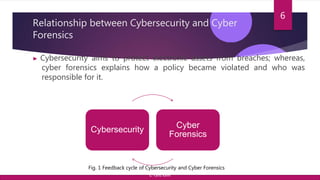
Relationship between Cybersecurity and Cyber
Forensics
â–¶ Cybersecurity aims to protect electronic assets from breaches; whereas,
cyber forensics explains how a policy became violated and who was
responsible for it.
6
Cybersecurity
Cyber
Forensics
Fig. 1 Feedback cycle of Cybersecurity and Cyber Forensics
© Yansi Keim
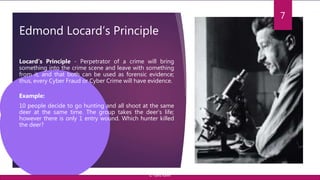
Edmond Locard’s Principle
7
Locard’s Principle - Perpetrator of a crime will bring
something into the crime scene and leave with something
from it, and that both can be used as forensic evidence;
thus, every Cyber Fraud or Cyber Crime will have evidence.
Example:
10 people decide to go hunting and all shoot at the same
deer at the same time. The group takes the deer’s life;
however there is only 1 entry wound. Which hunter killed
the deer?
© Yansi Keim
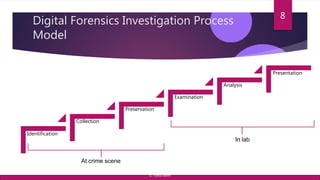
Digital Forensics Investigation Process
Model
8
Identification
Presentation
Analysis
Examination
Preservation
Collection
At crime scene
In lab
© Yansi Keim
Stage 1: Identification
9
In this stage, potential sources of relevant evidence and/or information (devices)
as well as key custodians and location of data are identified.
• determine the scope of the incident
• assess the case,
• nature of case : internal, civil or criminal
• characteristics of case
© Yansi Keim
Stage 2: Collection
Collecting digital information that may be relevant to the investigation.
Collection may involve removing the electronic device(s) from the crime or
incident scene and then taking photos, imaging, copying or printing out its
(their) content.
*Important Note*: As collection begins, those persons doing the collecting
should keep the Chain of Custody in mind.
10
© Yansi Keim
Step 2: Collection: Chain of Custody (CoC)
The CoC is a printed or electronic document in which the acquisition, custody and transfers of any piece of
evidence are recorded. It must include all basic information regarding:
1. Acquisition: Who, when, where and how. Who acquired the evidence, when and where the evidence
was acquired, and what method was used.
2. Custody: Who, where, how and how long. Who had possession of the evidence, where it was kept,
what method was used to store it, and how long it was kept.
3. Processing: What was done to the evidence (cloning, analysis, etc.)
4. Transfer: Transfer of the evidence from one possessor to another, recorded along with the signature of
the new keeper.
5. Final Fate: Destruction, secure deletion of evidence, return of evidence to owner, etc.
11
© Yansi Keim
Collecting Evidence: What is the most important
thing?
â–¶ Document, document, document
â–¶ Lawfully capture evidence
â–¶ Make cryptographically verifiable copies
â–¶ Setup secure storage of collected evidence
â–¶ Establish chain of custody
â–¶ Analyze copies only
â–¶ Use legally obtained, reputable tools
â–¶ Document every step
12
© Yansi Keim
Stage 3: Preservation
The process of preserving relevant electronically stored information (ESI) by
protecting the crime or incident scene, capturing visual images of the scene
and documenting all relevant information about the evidence and how it was
acquired.
It’s an important step because information may be lost upon lack of care on
volatile electronic devices.
13
© Yansi Keim
Stage 4: Examination
The purpose of the examination process is to extract and analyze digital
evidence.
Extraction refers to the recovery of data from its media.
*Important Note*
Before dealing with the data, it’s imperative to know Types of Data which is
discussed in later slides.
14
© Yansi Keim
Stage 5: Analysis
An in-depth systematic search of evidence relating to the incident being
investigated.
The outputs of examination are data objects found in the collected information;
this may include system- and user-generated files.
Note: Timeline Analysis aims to draw conclusions based on the evidence found.
15
© Yansi Keim
Stage 6: Presentation
Begins with reports based on proven techniques and methodologies.
Also includes the aspect that other competent forensic examiners should be able
to duplicate and reproduce the same results.
16
© Yansi Keim
States of Data
© Yansi Keim
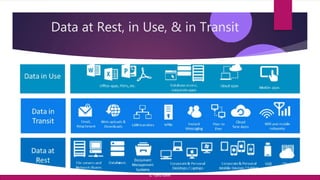
Data at Rest, in Use, & in Transit
© Yansi Keim
Forensically Analyzing Data at Rest: Disk Imaging
19
It is defined as the processes and tools used in copying a physical storage
device for conducting investigations and gathering evidence.
This copy does not just include files which are visible to the operating
system but every bit of data, every sector, partition, files, folders, master boot
records, deleted files and un-allocated spaces. The image is an identical copy of
all the drive structures and contents.
Note: Imaging is not Copy and Paste | Tool: EnCase Forensics
© Yansi Keim
Disk cloning: Analyzing Data at Rest
Disk cloning creates a copy of the original drive and includes all the
information that will enable the duplicate (cloned) drive to boot the operating
system, accessing all the files as if it were the original. The Disk Cloning process
creates what is known as a 'one-to-one' copy.
This duplicate is fully functional and in the event that it is swapped to replace
the original drive, will work just like the original. The computer, when booted
using the cloned drive, has its operations and data, identical to the original
drive.
20
© Yansi Keim
Forensically Analyzing Data in Use :
Techniques
â–¶ Cross-drive analysis
â–¶ Correlation of information found on multiple hard drives.
â–¶ Techniques:
• multi-drive correlation
• creation of timelines
â–¶ Application: identifying social networks and performing anomaly detection
â–¶ Live Analysis
▶ Examination of computers’ operating systems using custom forensics to extract evidence in real time.
â–¶ Techniques:
• Acquisition of RAM (Ram dump) and capture PageFile
• Crash Dump
• VM Snapshot
▶ Application: Identifying and quantifying the threat, collecting artifacts – running processes, suspicious mutexes, prefetch files, registry keys, open network connections, system
accounts
21
© Yansi Keim
Network Forensics
Data in Transit
© Yansi Keim
Network Forensics
â–¶ What? Process of collecting and analyzing raw network data and tracking network
traffic .
â–¶ Why? Intruders leave a trail behind; thus, this trail leaves a data record for the
incident responder(s). It’s also important for daily security operations workflow.
â–¶ How? Through alerts, network log analysis, threat hunting and intelligence, SIEM.
© Yansi Keim
Network based Evidence:
Methods of acquisition
1. Ethernet
â–¶ Eavesdropping via sniffers
â–¶Popular packet analyzers: Wireshark (Win/Linux/MacOS), TCPdump (Unix), Tshark,
Netflow
2. Sysinternals
â–¶ RegMon shows registry data in real time
â–¶ Process explorer shows what is loaded
â–¶ Handle shows open files and processes using them
â–¶ Filemon shows file system activity
24
© Yansi Keim
Network based Evidence:
Methods of acquisition
3. PsTools (SysInternals)
â–¶ PsExec - execute processes remotely
â–¶ PsFile - shows files opened remotely
â–¶ PsGetSid - display the SID of a computer or a user
â–¶ PsInfo - list information about a system
â–¶ PsPing - measure network performance
â–¶ PsKill - kill processes by name or process ID
â–¶ PsList - list detailed information about processes
25
© Yansi Keim
Network based Evidence :
Methods of acquisition
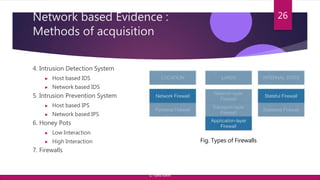
4. Intrusion Detection System
â–¶ Host based IDS
â–¶ Network based IDS
5. Intrusion Prevention System
â–¶ Host based IPS
â–¶ Network based IPS
6. Honey Pots
â–¶ Low Interaction
â–¶ High Interaction
7. Firewalls
26
Fig. Types of Firewalls
© Yansi Keim
Network based Evidence: Logs…where can
you find them?
â–¶ Most network traffic leaves an audit trail.
â–¶ Routers, firewalls, servers, maintain logs
â–¶ DHCP log
â–¶ Firewalls offer logging.
â–¶ IDS can capture part of an attack
â–¶ Host-based sensors detect alteration of libraries
â–¶ Login attempts are logged
â–¶ Note: Chain of Custody: captured files need to be authenticated
27
© Yansi Keim
Event Log Analysis
and Sources
© Yansi Keim
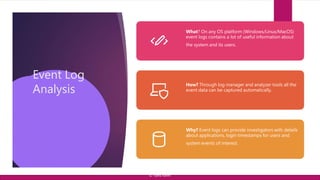
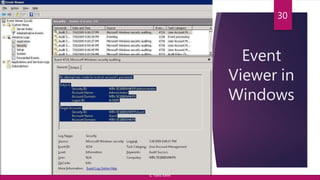
Event Log
Analysis
What? On any OS platform (Windows/Linux/MacOS)
event logs contains a lot of useful information about
the system and its users.
How? Through log manager and analyzer tools all the
event data can be captured automatically.
Why? Event logs can provide investigators with details
about applications, login timestamps for users and
system events of interest.
© Yansi Keim
Event
Viewer in
Windows
30
© Yansi Keim
Event Log
Sources
â–¶ Malware
© Yansi Keim
â–¶ Web-Based
Attacks
â–¶ Phishing
â–¶ Spam
â–¶ Denial of Service
â–¶ DDoS
(Distributed)
Attacks â–¶ Ransomware
â–¶ Web Application â–¶ Botnet
â–¶ Insider Threat
31
System Auditing
â–¶ Auditing should identify attacks (successful or not) that pose a threat to your network,
and attacks against resources that you have determined to be valuable in your risk
assessment.
â–¶ Auditing helps in to track what programs ran on the investigated computers.
â–¶ Windows security auditing lets you enable process tracking and monitor process creation
and process termination.
â–¶ To enable process auditing you should use Group Policy Editor (gpedit.msc) or Local
Security Policy (secpol.msc).
â–¶ You should configure Security Settings -> Audit Policy -> Audit Process Tracking or
use Advanced Audit Policy Configuration -> System Audit Policy -> Detailed
Tracking.
32
© Yansi Keim
Threat Hunting
Threat Hunting – A focused and iterative approach to searching out,
identifying and understanding adversaries internal to the defender’s
networks. It’s a method of searching though networks and datasets to find
APTs that evade existing security defense. (SANS)
Note: It’s not a set of tools. It requires human intervention on every step.
33
© Yansi Keim
Types of Threat Hunting
▶ Statistical Anomaly – Threats can be detected by taking note of
abnormal behavior in a system or network. You may notice this
intuitively, but it is better to have a performance “baseline” for
comparison.
▶ Open Source Intelligence (OSINT) – Monitoring media sources: social
media, e-mail, gossip around the “water cooler”
▶ Situational Awareness – You’re monitoring specific assets, performing
risk assessments, and finding threats.
34
© Yansi Keim
Threat Hunting Cycle
35
Threat
Hunting
Loop
Purpose
CREATE
Hypotheses
INVESTIGAT
E
Via Tools
and
Techniques
UNCOVER
New
Patterns
and TTPs
INFORM &
ENRICH
Analytics
https://virtualizationandstorage.files.wor
dpress.com/2018/08/framework-for-
threat-hunting-whitepaper.pdf
© Yansi Keim
Anti-Forensic Detection
RECOVERING DELETED FILES
© Yansi Keim
Source : File Systems and Hard
Drives
37
â–¶ Traditional hard drives store data as sector
which is 512 bytes while Modern hard drives
use what is called Advanced Format, which is
4096 byte sectors.
â–¶ However, file systems look at clusters, not
sectors. A cluster can be from 1 to 128
sectors.
â–¶ To recover data, you must know which OS
and File System is active on suspect machine.
© Yansi Keim
Anti-Forensics Detection: Disk Data and
Recovery Tools
â–¶ What all can be recovered?
â–¶ Known files
â–¶ Deleted files
â–¶ Slack Space
â–¶ Unallocated Space
â–¶ Compressed File and Sectors
38
Available Tools
â–¶ Hex Editor,
â–¶ Encase Forensics,
â–¶ Volatility
â–¶ Autopsy (Open Source)
© Yansi Keim
Timeline Analysis
© Yansi Keim
Timeline Analysis
â–¶ Used in cybercrime investigation to answer questions like
â–¶ When a computer was used?
â–¶ What events occurred before or after an event?
â–¶ Any potential tool extracts timestamps and clusters similar events from the seized device.
The places to find these timestamps are:
â–¶ Files on the disk
â–¶ Web or Internet Artefacts
â–¶ Tool specific data
â–¶ Tool used: Maltego and Autopsy
40
© Yansi Keim
41
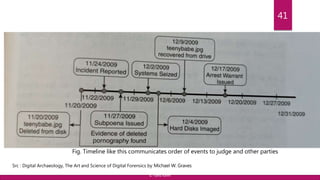
Fig. Timeline like this communicates order of events to judge and other parties
Src : Digital Archaeology, The Art and Science of Digital Forensics by Michael W. Graves
© Yansi Keim
Identifying Preparators (Machines/Users)
â–¶ Check for live systems in NMAP,
Kali Linux
â–¶ Connect Scan
â–¶ Half-open Scan
â–¶ XMAS Scan
â–¶ FIN Scan
â–¶ ACK Scan
â–¶ Null Scan
â–¶ Idle Scan
42
â–¶ Banner Grabbing
â–¶ OS Version Check
â–¶ Services Running on the
OS and their version
â–¶ Check for open ports
â–¶ Vulnerability Scanning
â–¶ Tool: Nessus, Accunetix
© Yansi Keim
”
“Thank You

cyberforensicsv2-191113184409.pptx

  • 1.
    Overview of CyberForensics GAYATRI VIDYA PARISHAD COLLEGE FOR DEGREE AND P.G COURSES(A) RUSHIKONDA-530045 VISAKHAPATNAM By Prasanna kumar panda MCA-4Th Sem
  • 2.
    Contents 1. Primer: CyberForensics Glossary 2. States of Data 3. Network Forensics 4. Event Log Analysis and Sources 5. Anti-Forensics Detection 6. Timeline Analysis © Yansi Keim
  • 3.
  • 4.
    What is Cybersecurity? ▶What? Cybersecurity tends to focus on how malicious actors use electronic assets (Internet, WAN, LAN, routers, printers, network appliances) to attack information. ▶ Why? To prevent individuals, organizations, financial institutions and universities from cyber attacks including kill chains, zero-day attacks, ransomware, malware etc. ▶ How? Running the assets safely with security implementations of databases, networks, hardware, firewalls and encryption. © Yansi Keim
  • 5.
    What is CyberForensics? ▶ What? The practice of gathering, retaining, and analyzing computer-related data for investigative purposes in a manner that maintains the integrity of the data. ▶ How? Through the digital forensics investigation process including: Identification, Preservation, Analysis, and Presentation (IPAP). ▶ Why? Used in criminal investigations to identify what happened, how it happened, when it happened and the people involved. © Yansi Keim
  • 6.
    Relationship between Cybersecurityand Cyber Forensics ▶ Cybersecurity aims to protect electronic assets from breaches; whereas, cyber forensics explains how a policy became violated and who was responsible for it. 6 Cybersecurity Cyber Forensics Fig. 1 Feedback cycle of Cybersecurity and Cyber Forensics © Yansi Keim
  • 7.
    Edmond Locard’s Principle 7 Locard’sPrinciple - Perpetrator of a crime will bring something into the crime scene and leave with something from it, and that both can be used as forensic evidence; thus, every Cyber Fraud or Cyber Crime will have evidence. Example: 10 people decide to go hunting and all shoot at the same deer at the same time. The group takes the deer’s life; however there is only 1 entry wound. Which hunter killed the deer? © Yansi Keim
  • 8.
    Digital Forensics InvestigationProcess Model 8 Identification Presentation Analysis Examination Preservation Collection At crime scene In lab © Yansi Keim
  • 9.
    Stage 1: Identification 9 Inthis stage, potential sources of relevant evidence and/or information (devices) as well as key custodians and location of data are identified. • determine the scope of the incident • assess the case, • nature of case : internal, civil or criminal • characteristics of case © Yansi Keim
  • 10.
    Stage 2: Collection Collectingdigital information that may be relevant to the investigation. Collection may involve removing the electronic device(s) from the crime or incident scene and then taking photos, imaging, copying or printing out its (their) content. *Important Note*: As collection begins, those persons doing the collecting should keep the Chain of Custody in mind. 10 © Yansi Keim
  • 11.
    Step 2: Collection:Chain of Custody (CoC) The CoC is a printed or electronic document in which the acquisition, custody and transfers of any piece of evidence are recorded. It must include all basic information regarding: 1. Acquisition: Who, when, where and how. Who acquired the evidence, when and where the evidence was acquired, and what method was used. 2. Custody: Who, where, how and how long. Who had possession of the evidence, where it was kept, what method was used to store it, and how long it was kept. 3. Processing: What was done to the evidence (cloning, analysis, etc.) 4. Transfer: Transfer of the evidence from one possessor to another, recorded along with the signature of the new keeper. 5. Final Fate: Destruction, secure deletion of evidence, return of evidence to owner, etc. 11 © Yansi Keim
  • 12.
    Collecting Evidence: Whatis the most important thing? ▶ Document, document, document ▶ Lawfully capture evidence ▶ Make cryptographically verifiable copies ▶ Setup secure storage of collected evidence ▶ Establish chain of custody ▶ Analyze copies only ▶ Use legally obtained, reputable tools ▶ Document every step 12 © Yansi Keim
  • 13.
    Stage 3: Preservation Theprocess of preserving relevant electronically stored information (ESI) by protecting the crime or incident scene, capturing visual images of the scene and documenting all relevant information about the evidence and how it was acquired. It’s an important step because information may be lost upon lack of care on volatile electronic devices. 13 © Yansi Keim
  • 14.
    Stage 4: Examination Thepurpose of the examination process is to extract and analyze digital evidence. Extraction refers to the recovery of data from its media. *Important Note* Before dealing with the data, it’s imperative to know Types of Data which is discussed in later slides. 14 © Yansi Keim
  • 15.
    Stage 5: Analysis Anin-depth systematic search of evidence relating to the incident being investigated. The outputs of examination are data objects found in the collected information; this may include system- and user-generated files. Note: Timeline Analysis aims to draw conclusions based on the evidence found. 15 © Yansi Keim
  • 16.
    Stage 6: Presentation Beginswith reports based on proven techniques and methodologies. Also includes the aspect that other competent forensic examiners should be able to duplicate and reproduce the same results. 16 © Yansi Keim
  • 17.
  • 18.
    Data at Rest,in Use, & in Transit © Yansi Keim
  • 19.
    Forensically Analyzing Dataat Rest: Disk Imaging 19 It is defined as the processes and tools used in copying a physical storage device for conducting investigations and gathering evidence. This copy does not just include files which are visible to the operating system but every bit of data, every sector, partition, files, folders, master boot records, deleted files and un-allocated spaces. The image is an identical copy of all the drive structures and contents. Note: Imaging is not Copy and Paste | Tool: EnCase Forensics © Yansi Keim
  • 20.
    Disk cloning: AnalyzingData at Rest Disk cloning creates a copy of the original drive and includes all the information that will enable the duplicate (cloned) drive to boot the operating system, accessing all the files as if it were the original. The Disk Cloning process creates what is known as a 'one-to-one' copy. This duplicate is fully functional and in the event that it is swapped to replace the original drive, will work just like the original. The computer, when booted using the cloned drive, has its operations and data, identical to the original drive. 20 © Yansi Keim
  • 21.
    Forensically Analyzing Datain Use : Techniques ▶ Cross-drive analysis ▶ Correlation of information found on multiple hard drives. ▶ Techniques: • multi-drive correlation • creation of timelines ▶ Application: identifying social networks and performing anomaly detection ▶ Live Analysis ▶ Examination of computers’ operating systems using custom forensics to extract evidence in real time. ▶ Techniques: • Acquisition of RAM (Ram dump) and capture PageFile • Crash Dump • VM Snapshot ▶ Application: Identifying and quantifying the threat, collecting artifacts – running processes, suspicious mutexes, prefetch files, registry keys, open network connections, system accounts 21 © Yansi Keim
  • 22.
    Network Forensics Data inTransit © Yansi Keim
  • 23.
    Network Forensics ▶ What?Process of collecting and analyzing raw network data and tracking network traffic . ▶ Why? Intruders leave a trail behind; thus, this trail leaves a data record for the incident responder(s). It’s also important for daily security operations workflow. ▶ How? Through alerts, network log analysis, threat hunting and intelligence, SIEM. © Yansi Keim
  • 24.
    Network based Evidence: Methodsof acquisition 1. Ethernet ▶ Eavesdropping via sniffers ▶Popular packet analyzers: Wireshark (Win/Linux/MacOS), TCPdump (Unix), Tshark, Netflow 2. Sysinternals ▶ RegMon shows registry data in real time ▶ Process explorer shows what is loaded ▶ Handle shows open files and processes using them ▶ Filemon shows file system activity 24 © Yansi Keim
  • 25.
    Network based Evidence: Methodsof acquisition 3. PsTools (SysInternals) ▶ PsExec - execute processes remotely ▶ PsFile - shows files opened remotely ▶ PsGetSid - display the SID of a computer or a user ▶ PsInfo - list information about a system ▶ PsPing - measure network performance ▶ PsKill - kill processes by name or process ID ▶ PsList - list detailed information about processes 25 © Yansi Keim
  • 26.
    Network based Evidence: Methods of acquisition 4. Intrusion Detection System ▶ Host based IDS ▶ Network based IDS 5. Intrusion Prevention System ▶ Host based IPS ▶ Network based IPS 6. Honey Pots ▶ Low Interaction ▶ High Interaction 7. Firewalls 26 Fig. Types of Firewalls © Yansi Keim
  • 27.
    Network based Evidence:Logs…where can you find them? ▶ Most network traffic leaves an audit trail. ▶ Routers, firewalls, servers, maintain logs ▶ DHCP log ▶ Firewalls offer logging. ▶ IDS can capture part of an attack ▶ Host-based sensors detect alteration of libraries ▶ Login attempts are logged ▶ Note: Chain of Custody: captured files need to be authenticated 27 © Yansi Keim
  • 28.
    Event Log Analysis andSources © Yansi Keim
  • 29.
    Event Log Analysis What? Onany OS platform (Windows/Linux/MacOS) event logs contains a lot of useful information about the system and its users. How? Through log manager and analyzer tools all the event data can be captured automatically. Why? Event logs can provide investigators with details about applications, login timestamps for users and system events of interest. © Yansi Keim
  • 30.
  • 31.
    Event Log Sources ▶ Malware ©Yansi Keim ▶ Web-Based Attacks ▶ Phishing ▶ Spam ▶ Denial of Service ▶ DDoS (Distributed) Attacks ▶ Ransomware ▶ Web Application ▶ Botnet ▶ Insider Threat 31
  • 32.
    System Auditing ▶ Auditingshould identify attacks (successful or not) that pose a threat to your network, and attacks against resources that you have determined to be valuable in your risk assessment. ▶ Auditing helps in to track what programs ran on the investigated computers. ▶ Windows security auditing lets you enable process tracking and monitor process creation and process termination. ▶ To enable process auditing you should use Group Policy Editor (gpedit.msc) or Local Security Policy (secpol.msc). ▶ You should configure Security Settings -> Audit Policy -> Audit Process Tracking or use Advanced Audit Policy Configuration -> System Audit Policy -> Detailed Tracking. 32 © Yansi Keim
  • 33.
    Threat Hunting Threat Hunting– A focused and iterative approach to searching out, identifying and understanding adversaries internal to the defender’s networks. It’s a method of searching though networks and datasets to find APTs that evade existing security defense. (SANS) Note: It’s not a set of tools. It requires human intervention on every step. 33 © Yansi Keim
  • 34.
    Types of ThreatHunting ▶ Statistical Anomaly – Threats can be detected by taking note of abnormal behavior in a system or network. You may notice this intuitively, but it is better to have a performance “baseline” for comparison. ▶ Open Source Intelligence (OSINT) – Monitoring media sources: social media, e-mail, gossip around the “water cooler” ▶ Situational Awareness – You’re monitoring specific assets, performing risk assessments, and finding threats. 34 © Yansi Keim
  • 35.
    Threat Hunting Cycle 35 Threat Hunting Loop Purpose CREATE Hypotheses INVESTIGAT E ViaTools and Techniques UNCOVER New Patterns and TTPs INFORM & ENRICH Analytics https://virtualizationandstorage.files.wor dpress.com/2018/08/framework-for- threat-hunting-whitepaper.pdf © Yansi Keim
  • 36.
  • 37.
    Source : FileSystems and Hard Drives 37 ▶ Traditional hard drives store data as sector which is 512 bytes while Modern hard drives use what is called Advanced Format, which is 4096 byte sectors. ▶ However, file systems look at clusters, not sectors. A cluster can be from 1 to 128 sectors. ▶ To recover data, you must know which OS and File System is active on suspect machine. © Yansi Keim
  • 38.
    Anti-Forensics Detection: DiskData and Recovery Tools ▶ What all can be recovered? ▶ Known files ▶ Deleted files ▶ Slack Space ▶ Unallocated Space ▶ Compressed File and Sectors 38 Available Tools ▶ Hex Editor, ▶ Encase Forensics, ▶ Volatility ▶ Autopsy (Open Source) © Yansi Keim
  • 39.
  • 40.
    Timeline Analysis ▶ Usedin cybercrime investigation to answer questions like ▶ When a computer was used? ▶ What events occurred before or after an event? ▶ Any potential tool extracts timestamps and clusters similar events from the seized device. The places to find these timestamps are: ▶ Files on the disk ▶ Web or Internet Artefacts ▶ Tool specific data ▶ Tool used: Maltego and Autopsy 40 © Yansi Keim
  • 41.
    41 Fig. Timeline likethis communicates order of events to judge and other parties Src : Digital Archaeology, The Art and Science of Digital Forensics by Michael W. Graves © Yansi Keim
  • 42.
    Identifying Preparators (Machines/Users) ▶Check for live systems in NMAP, Kali Linux ▶ Connect Scan ▶ Half-open Scan ▶ XMAS Scan ▶ FIN Scan ▶ ACK Scan ▶ Null Scan ▶ Idle Scan 42 ▶ Banner Grabbing ▶ OS Version Check ▶ Services Running on the OS and their version ▶ Check for open ports ▶ Vulnerability Scanning ▶ Tool: Nessus, Accunetix © Yansi Keim
  • 43.