11/12/2015
CSS
Box Model
Reed Crouch
11/12/2015
WHAT IS THE CSS BOX MODEL?
 HTML elements can be considered as
boxes. In CSS, the term "box model" is
used when referring to layout. You can think
of it as a box that wraps around HTML
content elements (text, graphics, etc.),
consisting of the box elements: padding,
borders, and margins.
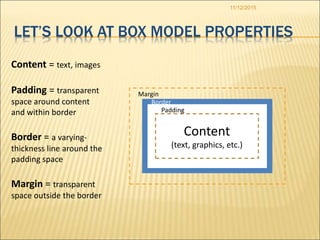
Border
Padding
11/12/2015
LET’S LOOK AT BOX MODEL PROPERTIES
Content
(text, graphics, etc.)
Margin
Content = text, images
Padding = transparent
space around content
and within border
Border = a varying-
thickness line around the
padding space
Margin = transparent
space outside the border
11/12/2015
SOME COMMON BOX MODEL USES
 Add a border around elements
 Create a space between text and image
elements
 Make boxes visible, invisible, or
semitransparent
 Apply rounded corners and shadows to visible
boxes or backgrounds
 Control width and height of a content element +
its box elements (padding, border, margin)
 …and more.
Border
3 px all 4 sides
11/12/2015
SHOW ME DETAILS!
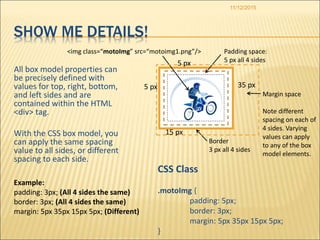
All box model properties can
be precisely defined with
values for top, right, bottom,
and left sides and are
contained within the HTML
<div> tag.
With the CSS box model, you
can apply the same spacing
value to all sides, or different
spacing to each side.
Padding space:
5 px all 4 sides
CSS Class
.motoImg {
padding: 5px;
border: 3px;
margin: 5px 35px 15px 5px;
}
Margin space
Note different
spacing on each of
4 sides. Varying
values can apply
to any of the box
model elements.
<img class=“motoImg” src=“motoimg1.png”/>
Example:
padding: 3px; (All 4 sides the same)
border: 3px; (All 4 sides the same)
margin: 5px 35px 15px 5px; (Different)
35 px
15 px
5 px
5 px
PAGE
BACKGROUND
BANNER AREA
11/12/2015
ANOTHER EXAMPLE
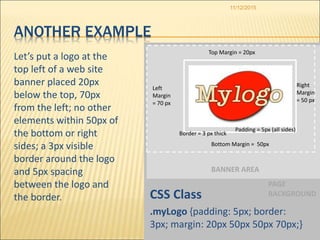
Let’s put a logo at the
top left of a web site
banner placed 20px
below the top, 70px
from the left; no other
elements within 50px of
the bottom or right
sides; a 3px visible
border around the logo
and 5px spacing
between the logo and
the border. CSS Class
.myLogo {padding: 5px; border:
3px; margin: 20px 50px 50px 70px;}
Padding = 5px (all sides)
Border = 3 px thick
Left
Margin
= 70 px
Bottom Margin = 50px
Top Margin = 20px
Right
Margin
= 50 px
11/12/2015
BOX MODEL PROPERTIES AND VALUES
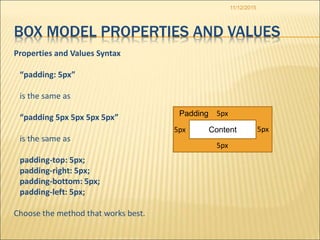
Properties and Values Syntax
“padding: 5px”
is the same as
“padding 5px 5px 5px 5px”
is the same as
padding-top: 5px;
padding-right: 5px;
padding-bottom: 5px;
padding-left: 5px;
Choose the method that works best.
5px
5px
5px5px Content
Padding
11/12/2015
Thank You!

CSS Box Model Presentation

  • 1.
  • 2.
    11/12/2015 WHAT IS THECSS BOX MODEL?  HTML elements can be considered as boxes. In CSS, the term "box model" is used when referring to layout. You can think of it as a box that wraps around HTML content elements (text, graphics, etc.), consisting of the box elements: padding, borders, and margins.
  • 3.
    Border Padding 11/12/2015 LET’S LOOK ATBOX MODEL PROPERTIES Content (text, graphics, etc.) Margin Content = text, images Padding = transparent space around content and within border Border = a varying- thickness line around the padding space Margin = transparent space outside the border
  • 4.
    11/12/2015 SOME COMMON BOXMODEL USES  Add a border around elements  Create a space between text and image elements  Make boxes visible, invisible, or semitransparent  Apply rounded corners and shadows to visible boxes or backgrounds  Control width and height of a content element + its box elements (padding, border, margin)  …and more.
  • 5.
    Border 3 px all4 sides 11/12/2015 SHOW ME DETAILS! All box model properties can be precisely defined with values for top, right, bottom, and left sides and are contained within the HTML <div> tag. With the CSS box model, you can apply the same spacing value to all sides, or different spacing to each side. Padding space: 5 px all 4 sides CSS Class .motoImg { padding: 5px; border: 3px; margin: 5px 35px 15px 5px; } Margin space Note different spacing on each of 4 sides. Varying values can apply to any of the box model elements. <img class=“motoImg” src=“motoimg1.png”/> Example: padding: 3px; (All 4 sides the same) border: 3px; (All 4 sides the same) margin: 5px 35px 15px 5px; (Different) 35 px 15 px 5 px 5 px
  • 6.
    PAGE BACKGROUND BANNER AREA 11/12/2015 ANOTHER EXAMPLE Let’sput a logo at the top left of a web site banner placed 20px below the top, 70px from the left; no other elements within 50px of the bottom or right sides; a 3px visible border around the logo and 5px spacing between the logo and the border. CSS Class .myLogo {padding: 5px; border: 3px; margin: 20px 50px 50px 70px;} Padding = 5px (all sides) Border = 3 px thick Left Margin = 70 px Bottom Margin = 50px Top Margin = 20px Right Margin = 50 px
  • 7.
    11/12/2015 BOX MODEL PROPERTIESAND VALUES Properties and Values Syntax “padding: 5px” is the same as “padding 5px 5px 5px 5px” is the same as padding-top: 5px; padding-right: 5px; padding-bottom: 5px; padding-left: 5px; Choose the method that works best. 5px 5px 5px5px Content Padding
  • 8.

Editor's Notes