Richard Thomson
Principal Architect for Modeling, Daz 3D
legalize@xmission.com
@LegalizeAdulthd
LegalizeAdulthood.wordpress.com
Thanks to our Sponsors!
Community Sponsor
Yearly Sponsor
Marquee Sponsor
About Me...
 Meetup organizer:
 Utah C++ Programmers (2nd Wednesday)
 Salt Lake City Software Craftsmanship (1st Thursday)
 3D Modelers (3rd Tuesday)
 C++ language track on exercism.io
 Polyglot developer
 Currently: C++, JavaScript/NodeJS
 Previously: C#, JavaScript/NodeJS, Python, Java
 Distantly: C, Perl, FORTRAN, LISP, FORTH, Assembly, TECO
 Different languages have their strengths
 Leverage strengths where appropriate
Why C++ for Mobile?
 Write once, run everywhere
 Seriously!
 Modern C++ is more familiar than you think
 Come to "Modern C++", 3:40 pm, Room 5130 for more
No, really. Why C++ for Mobile?
 Rich variety of abstraction mechanisms
 Directly express concepts in code
 Execution model maps directly to the machine
 Wisely use precious battery life
 Deterministic resource allocation
 Hold onto resources only for as long as you need them
and no longer
 No garbage collection
 Responsive UI, even when chewing on lots of data
Case Study: DropBox
 Started with platform specific apps
 Write everything twice!
 Debug everything twice!
 Ship everything twice! (and not at the same time)
 Switched to MVVM architecture
 View: Thin platform-specific UI layer (Java/ObjC)
 Thin platform-specific services layer (Java/ObjC)
 Model, ViewModel: C++
 Share business logic and UI logic between platforms
 Write almost everything once
DropBox Deep Dive on YouTube
 CppCon 2014: T. Grue & S. Kabbes "From the DropBox
Trenches: A Deep Dive into 2 Cross-Platform Mobile
Apps Written in C++"
 CppCon 2014: Alex Allain & Andrew Twyman
"Practical Cross-Platform Mobile C++ Development"
 CppCon 2015: Jacob Potter & Andrew Twyman
“Bridging Languages Cross-Platform: Djinni
Implementation Techniques"
Why Visual Studio?
 Single IDE for all platforms
 Platform-specific IntelliSense:
 code completion
 code navigation
 Single debugger experience
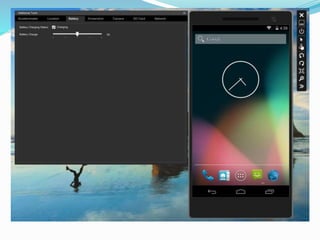
 Fast, full-featured Android emulator
 Networked connection to Mac host for iOS debugging
Android Development Features
 Supported Versions
 4.4 "KitKat", API Level 19
 5.0 "Lollipop", API Level 21
 Emulator features include
 OpenGL ES 2.0
 Multi-touch gestures
 Advanced camera
simulation
 WiFi network simulation
 Debug directly from VS
 Integrated LogCat viewer
 Debugger visualizations
 Externally built native
activity apps
 Can attach to running APKs
 Stripped debugging to
reduce deployment size
 Deploy, Debug directly
from VS to emulator or
device
iOS Development Features
 Supports versions 6, 7, and 8
 Debug directly from Visual Studio
 Need a connected Mac to deploy and debug on devices
only (no emulator)
Universal Windows Platform
 Can also do Universal Windows Platform applications
 ...but not the subject of this talk :)
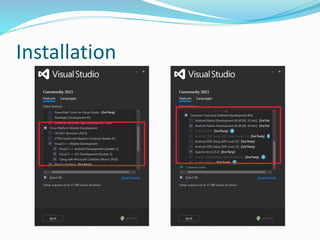
Installation
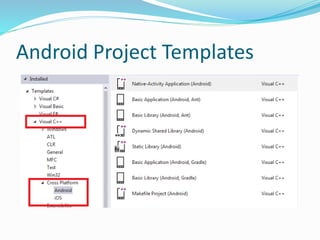
Android Project Templates
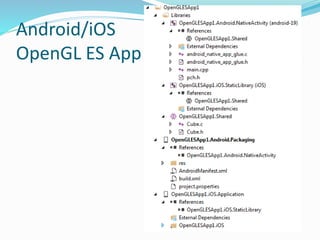
Android/iOS
OpenGL ES App
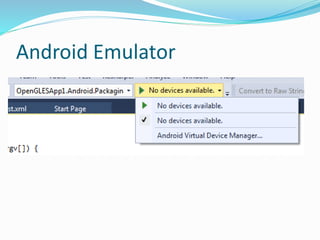
Android Emulator
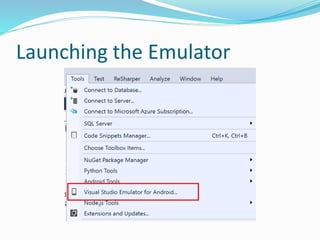
Launching the Emulator
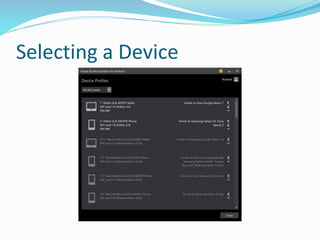
Selecting a Device
Android Debugger Demo
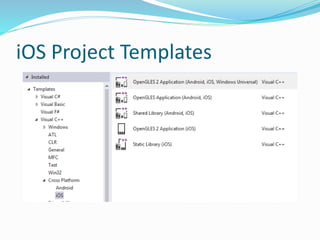
iOS Project Templates
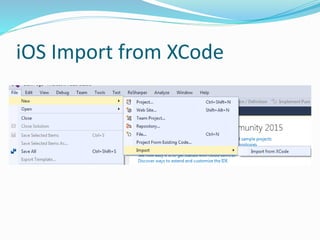
iOS Import from XCode
iOS Building and Debugging
 Configure Mac pair machine in Tools / Options
 Used for building iOS application
 Xcode build output is shown in VS output pane
 Debugging is done remotely via gdb
 Displayed locally in VS as if you were debugging on
Windows
 Can issue commands directly to gdb if desired

Cross Platform Mobile Development with Visual Studio 2015 and C++

  • 1.
    Richard Thomson Principal Architectfor Modeling, Daz 3D legalize@xmission.com @LegalizeAdulthd LegalizeAdulthood.wordpress.com
  • 2.
    Thanks to ourSponsors! Community Sponsor Yearly Sponsor Marquee Sponsor
  • 3.
    About Me...  Meetuporganizer:  Utah C++ Programmers (2nd Wednesday)  Salt Lake City Software Craftsmanship (1st Thursday)  3D Modelers (3rd Tuesday)  C++ language track on exercism.io  Polyglot developer  Currently: C++, JavaScript/NodeJS  Previously: C#, JavaScript/NodeJS, Python, Java  Distantly: C, Perl, FORTRAN, LISP, FORTH, Assembly, TECO  Different languages have their strengths  Leverage strengths where appropriate
  • 4.
    Why C++ forMobile?  Write once, run everywhere  Seriously!  Modern C++ is more familiar than you think  Come to "Modern C++", 3:40 pm, Room 5130 for more
  • 5.
    No, really. WhyC++ for Mobile?  Rich variety of abstraction mechanisms  Directly express concepts in code  Execution model maps directly to the machine  Wisely use precious battery life  Deterministic resource allocation  Hold onto resources only for as long as you need them and no longer  No garbage collection  Responsive UI, even when chewing on lots of data
  • 6.
    Case Study: DropBox Started with platform specific apps  Write everything twice!  Debug everything twice!  Ship everything twice! (and not at the same time)  Switched to MVVM architecture  View: Thin platform-specific UI layer (Java/ObjC)  Thin platform-specific services layer (Java/ObjC)  Model, ViewModel: C++  Share business logic and UI logic between platforms  Write almost everything once
  • 7.
    DropBox Deep Diveon YouTube  CppCon 2014: T. Grue & S. Kabbes "From the DropBox Trenches: A Deep Dive into 2 Cross-Platform Mobile Apps Written in C++"  CppCon 2014: Alex Allain & Andrew Twyman "Practical Cross-Platform Mobile C++ Development"  CppCon 2015: Jacob Potter & Andrew Twyman “Bridging Languages Cross-Platform: Djinni Implementation Techniques"
  • 8.
    Why Visual Studio? Single IDE for all platforms  Platform-specific IntelliSense:  code completion  code navigation  Single debugger experience  Fast, full-featured Android emulator  Networked connection to Mac host for iOS debugging
  • 9.
    Android Development Features Supported Versions  4.4 "KitKat", API Level 19  5.0 "Lollipop", API Level 21  Emulator features include  OpenGL ES 2.0  Multi-touch gestures  Advanced camera simulation  WiFi network simulation  Debug directly from VS  Integrated LogCat viewer  Debugger visualizations  Externally built native activity apps  Can attach to running APKs  Stripped debugging to reduce deployment size  Deploy, Debug directly from VS to emulator or device
  • 10.
    iOS Development Features Supports versions 6, 7, and 8  Debug directly from Visual Studio  Need a connected Mac to deploy and debug on devices only (no emulator)
  • 11.
    Universal Windows Platform Can also do Universal Windows Platform applications  ...but not the subject of this talk :)
  • 12.
  • 13.
  • 14.
  • 15.
  • 16.
  • 17.
  • 19.
  • 20.
  • 21.
  • 22.
    iOS Building andDebugging  Configure Mac pair machine in Tools / Options  Used for building iOS application  Xcode build output is shown in VS output pane  Debugging is done remotely via gdb  Displayed locally in VS as if you were debugging on Windows  Can issue commands directly to gdb if desired