Using the Google SOAP APIs with 
Salesforce 
Ami Assayag, 
Architect, CRM Science 
PhillyForce DUG Leader 
@AmiAssayag 
Yad Jayanth, 
Advanced Developer, CRM Science 
Dallas DUG Co-Organizer 
@YadJayanth
Safe Harbor 
Safe harbor statement under the Private Securities Litigation Reform Act of 1995: 
This presentation may contain forward-looking statements that involve risks, uncertainties, and assumptions. If any such uncertainties materialize or if any of 
the assumptions proves incorrect, the results of salesforce.com, inc. could differ materially from the results expressed or implied by the forward-looking 
statements we make. All statements other than statements of historical fact could be deemed forward-looking, including any projections of product or service 
availability, subscriber growth, earnings, revenues, or other financial items and any statements regarding strategies or plans of management for future 
operations, statements of belief, any statements concerning new, planned, or upgraded services or technology developments and customer contracts or use of 
our services. 
The risks and uncertainties referred to above include – but are not limited to – risks associated with developing and delivering new functionality for our service, 
new products and services, our new business model, our past operating losses, possible fluctuations in our operating results and rate of growth, interruptions or 
delays in our Web hosting, breach of our security measures, the outcome of any litigation, risks associated with completed and any possible mergers and 
acquisitions, the immature market in which we operate, our relatively limited operating history, our ability to expand, retain, and motivate our employees and 
manage our growth, new releases of our service and successful customer deployment, our limited history reselling non-salesforce.com products, and utilization 
and selling to larger enterprise customers. Further information on potential factors that could affect the financial results of salesforce.com, inc. is included in our 
annual report on Form 10-K for the most recent fiscal year and in our quarterly report on Form 10-Q for the most recent fiscal quarter. These documents and 
others containing important disclosures are available on the SEC Filings section of the Investor Information section of our Web site. 
Any unreleased services or features referenced in this or other presentations, press releases or public statements are not currently available and may not be 
delivered on time or at all. Customers who purchase our services should make the purchase decisions based upon features that are currently available. 
Salesforce.com, inc. assumes no obligation and does not intend to update these forward-looking statements.
Ami Assayag 
Architect, CRM Science 
PhillyForce DUG Leader
Yad Jayanth 
Advanced Developer, CRM Science 
Dallas DUG Co-Organizer
Digital Advertising Project 
• Doubleclick For Publishers (DFP) 
• Advertising management platform 
• SOAP API (xml) 
• Oauth 2.0 (json)
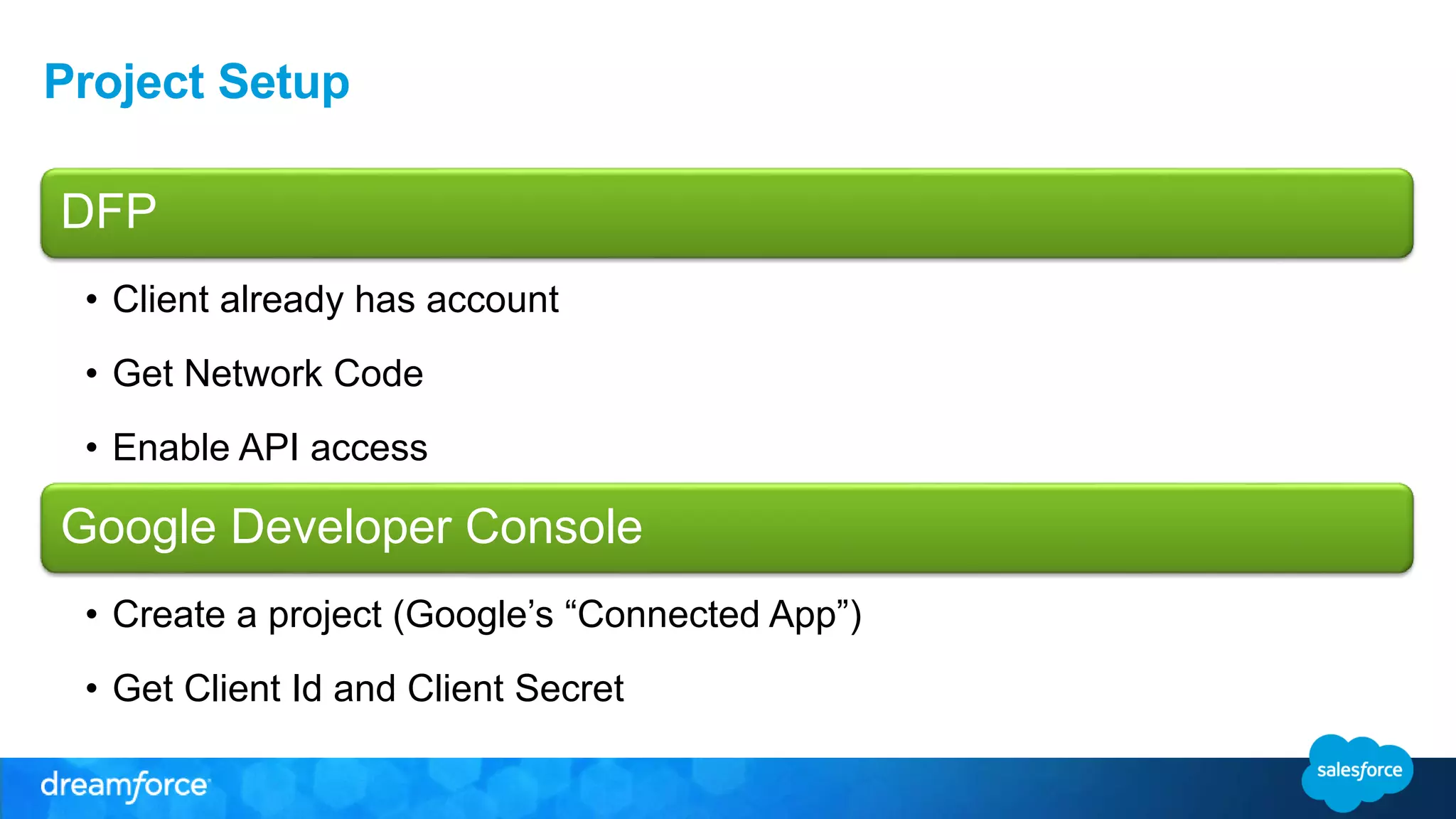
Project Setup 
DFP 
• Client already has account 
• Get Network Code 
• Enable API access 
Google Developer Console 
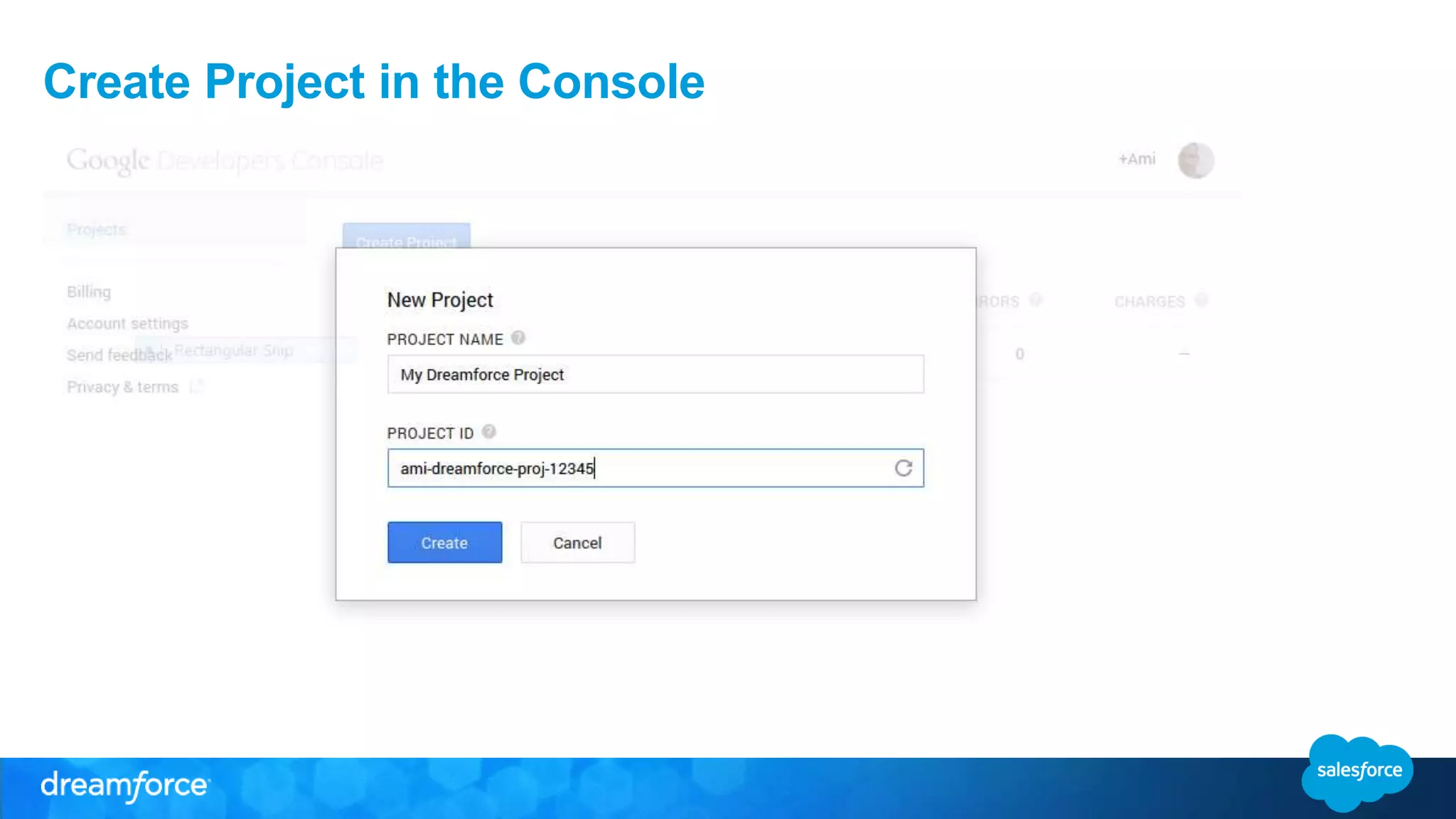
• Create a project (Google’s “Connected App”) 
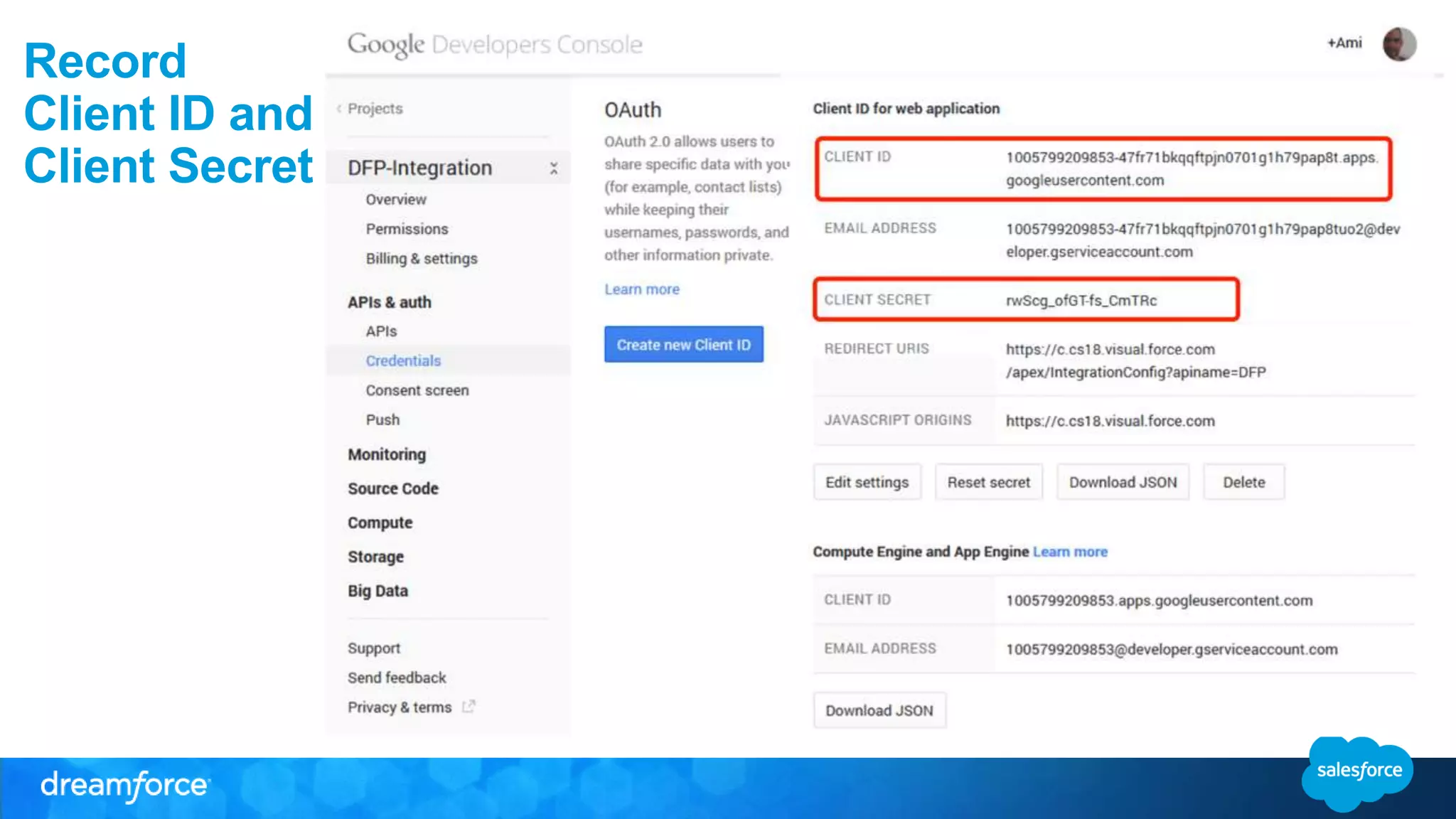
• Get Client Id and Client Secret
Create Project in the Console
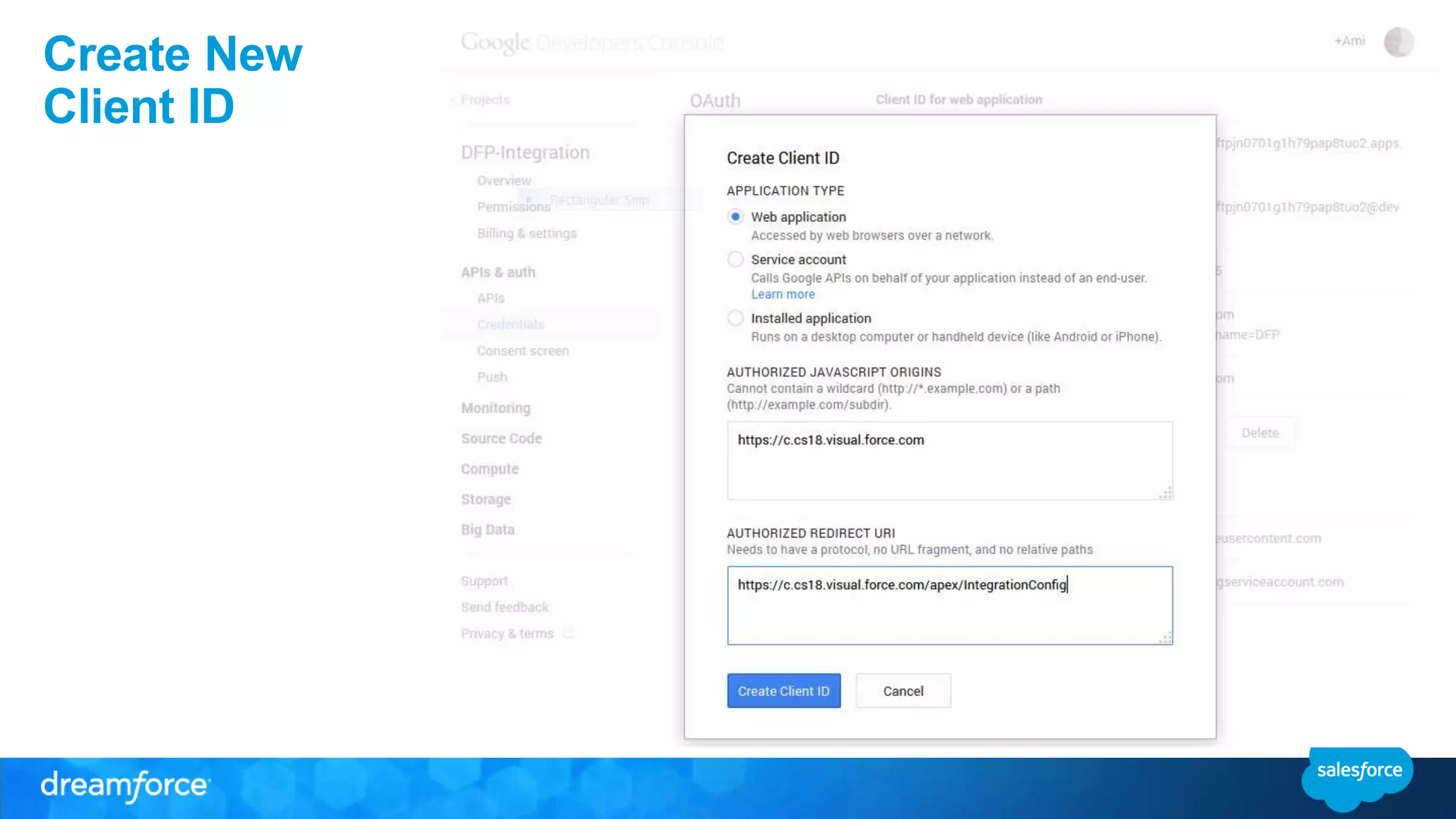
Create New 
Client ID
Record 
Client ID and 
Client Secret
Google Oauth 2.0 Authentication
Authorization 
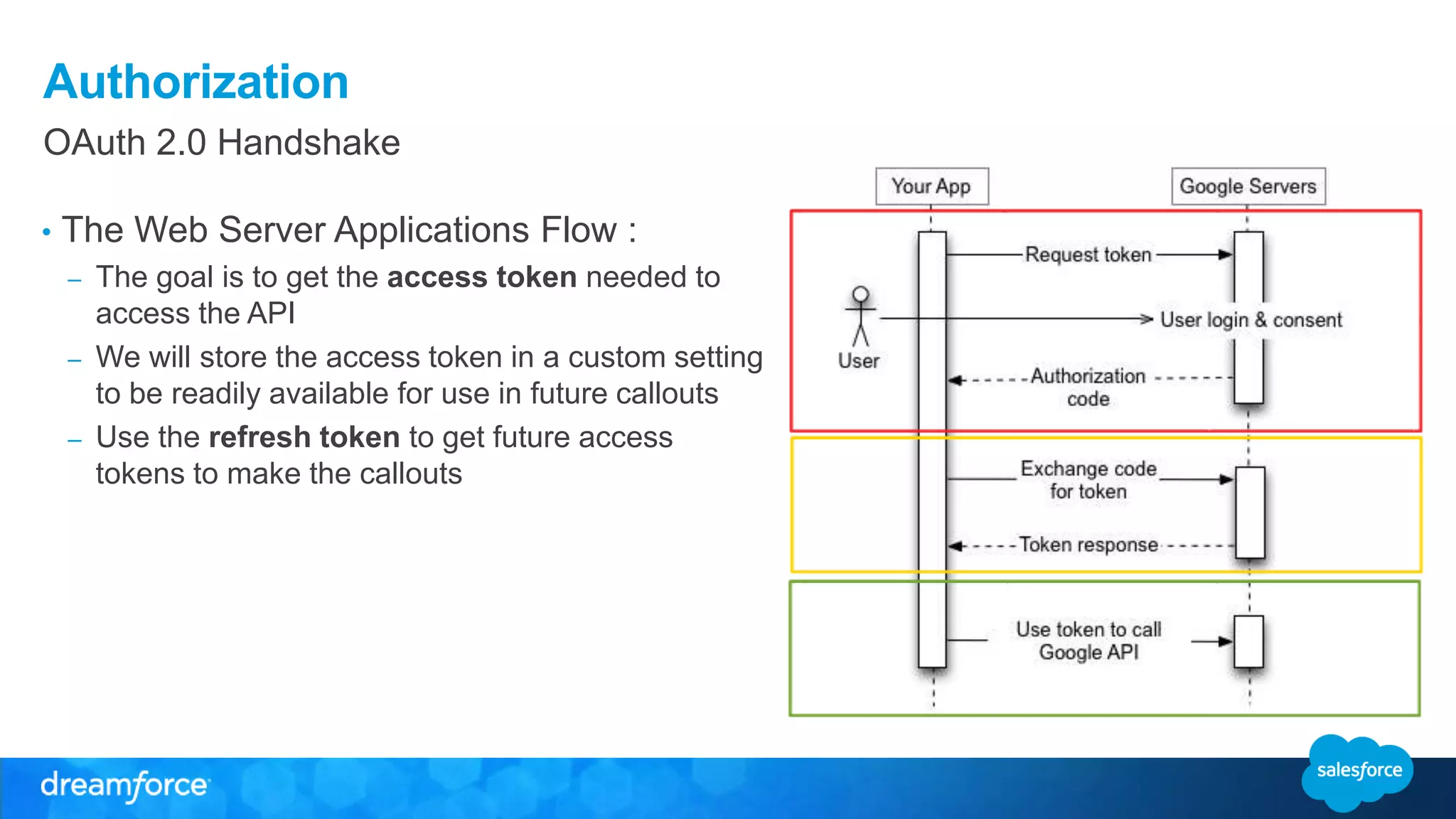
OAuth 2.0 Handshake 
• The Web Server Applications Flow : 
– The goal is to get the access token needed to 
access the API 
– We will store the access token in a custom setting 
to be readily available for use in future callouts 
– Use the refresh token to get future access 
tokens to make the callouts
Authorization 
Code Sample 
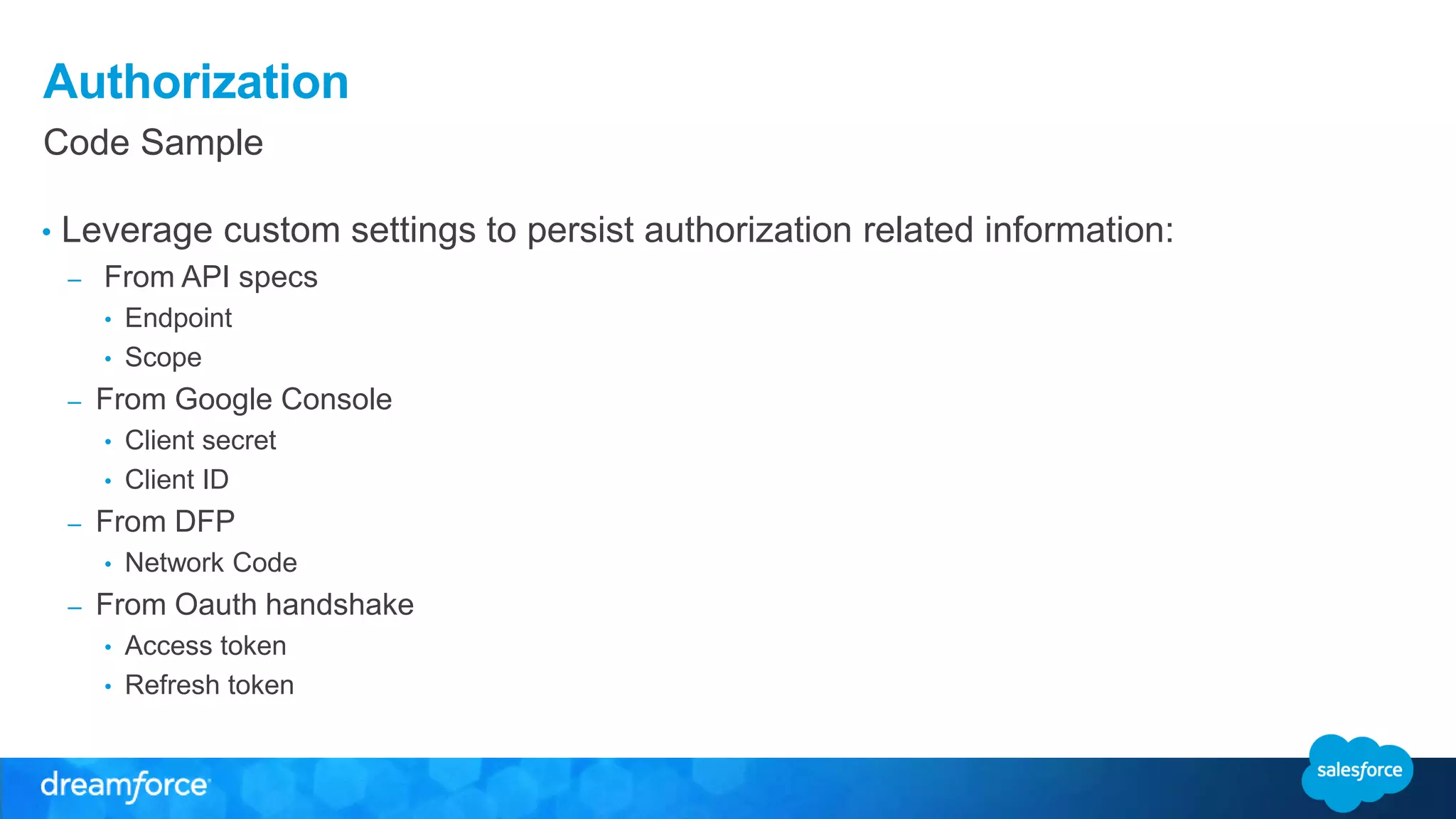
• Leverage custom settings to persist authorization related information: 
– From API specs 
• Endpoint 
• Scope 
– From Google Console 
• Client secret 
• Client ID 
– From DFP 
• Network Code 
– From Oauth handshake 
• Access token 
• Refresh token
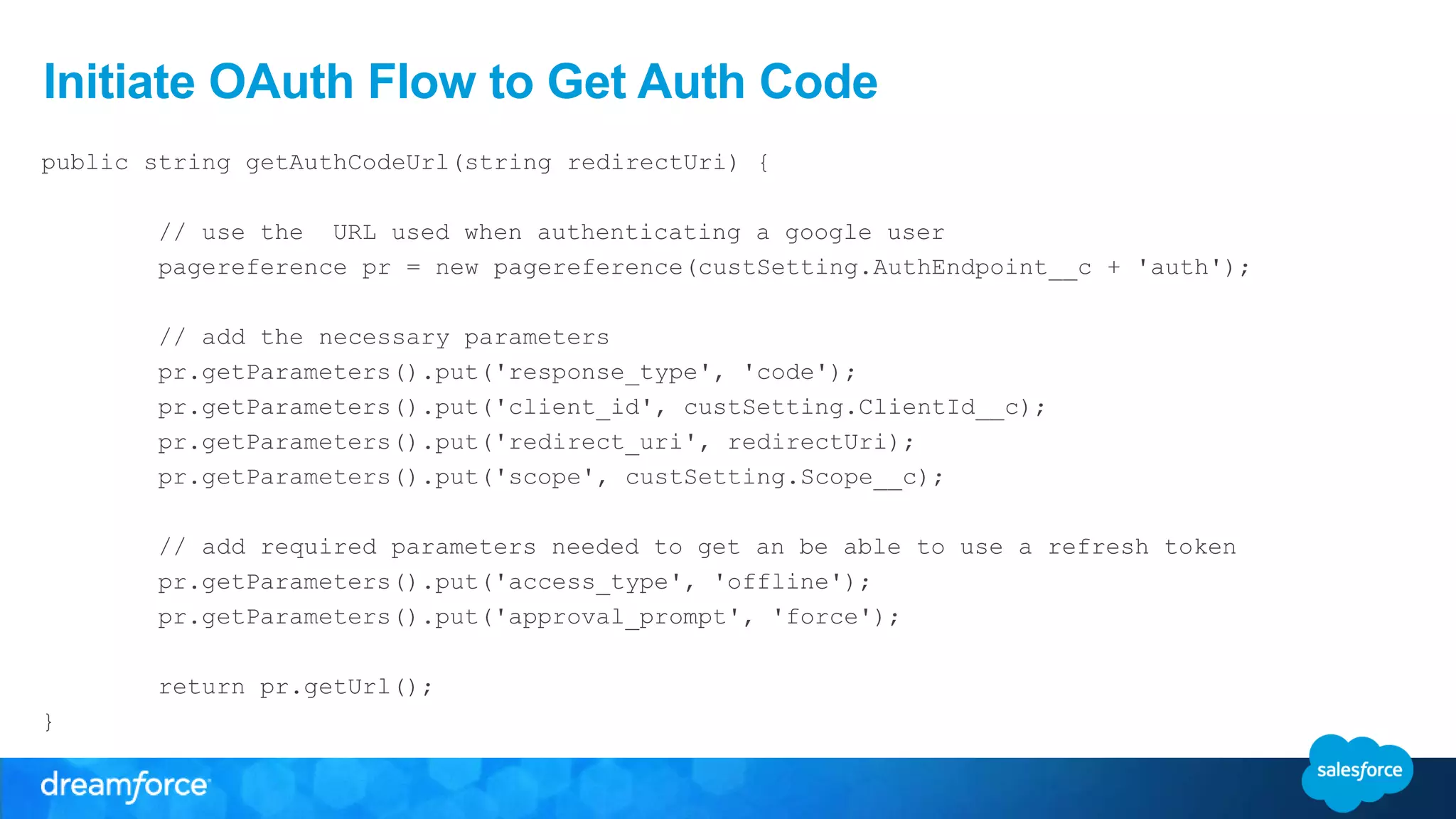
Initiate OAuth Flow to Get Auth Code 
public string getAuthCodeUrl(string redirectUri) { 
// use the URL used when authenticating a google user 
pagereference pr = new pagereference(custSetting.AuthEndpoint__c + 'auth'); 
// add the necessary parameters 
pr.getParameters().put('response_type', 'code'); 
pr.getParameters().put('client_id', custSetting.ClientId__c); 
pr.getParameters().put('redirect_uri', redirectUri); 
pr.getParameters().put('scope', custSetting.Scope__c); 
// add required parameters needed to get an be able to use a refresh token 
pr.getParameters().put('access_type', 'offline'); 
pr.getParameters().put('approval_prompt', 'force'); 
return pr.getUrl(); 
}
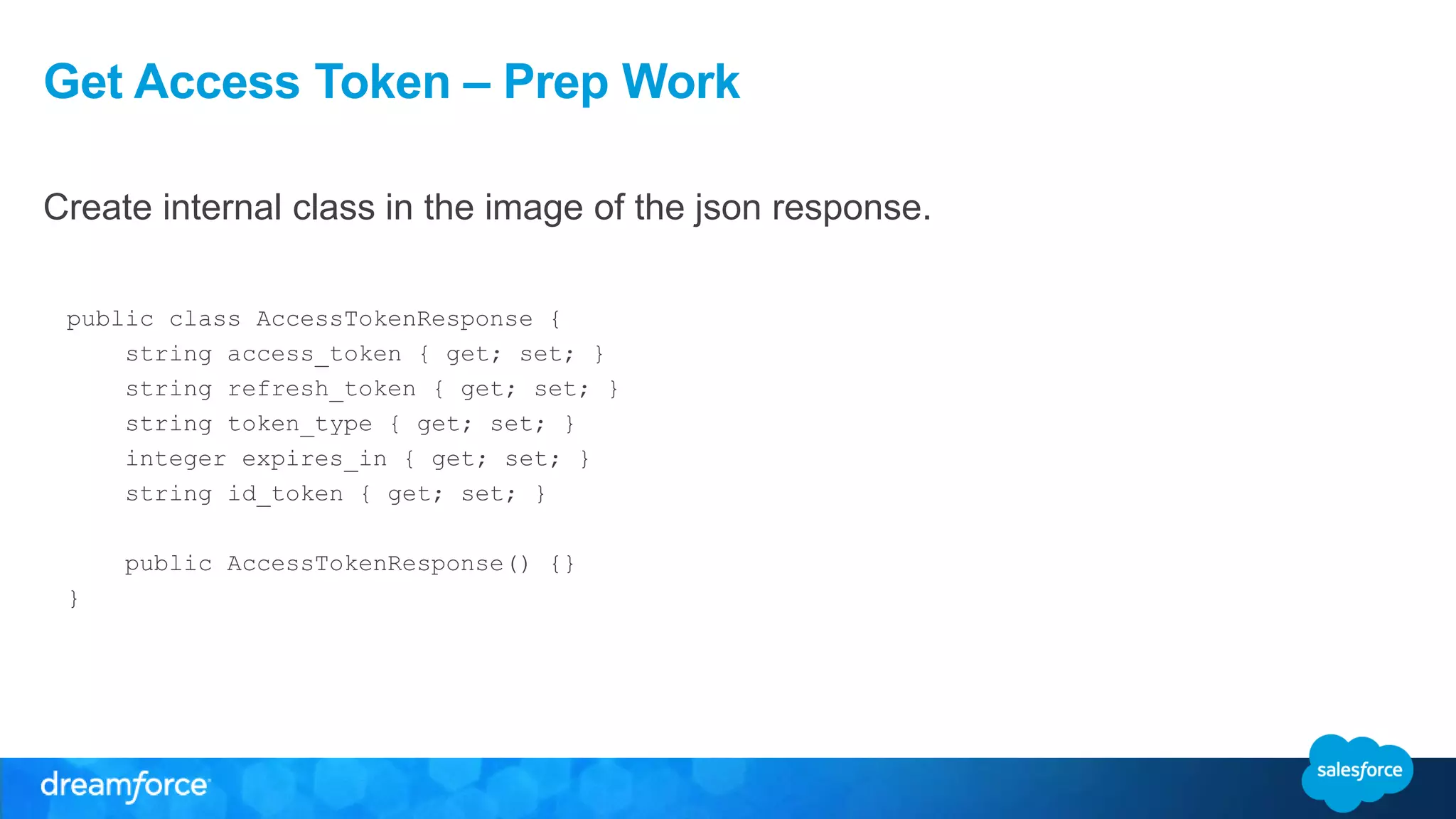
Get Access Token – Prep Work 
Create internal class in the image of the json response. 
public class AccessTokenResponse { 
string access_token { get; set; } 
string refresh_token { get; set; } 
string token_type { get; set; } 
integer expires_in { get; set; } 
string id_token { get; set; } 
public AccessTokenResponse() {} 
}
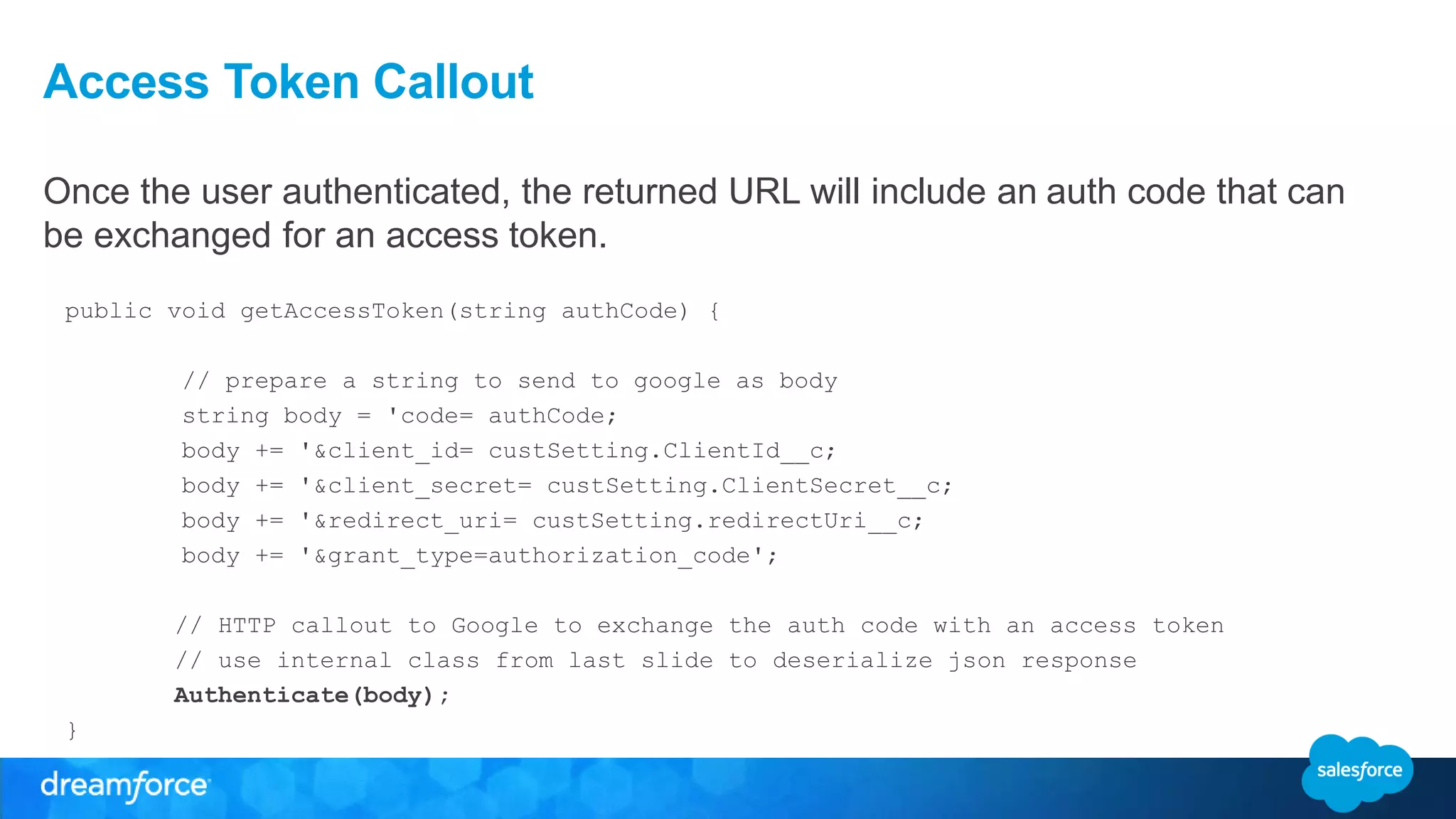
Access Token Callout 
Once the user authenticated, the returned URL will include an auth code that can 
be exchanged for an access token. 
public void getAccessToken(string authCode) { 
// prepare a string to send to google as body 
string body = 'code= authCode; 
body += '&client_id= custSetting.ClientId__c; 
body += '&client_secret= custSetting.ClientSecret__c; 
body += '&redirect_uri= custSetting.redirectUri__c; 
body += '&grant_type=authorization_code'; 
// HTTP callout to Google to exchange the auth code with an access token 
// use internal class from last slide to deserialize json response 
Authenticate(body); 
}
Google SOAP API Callouts
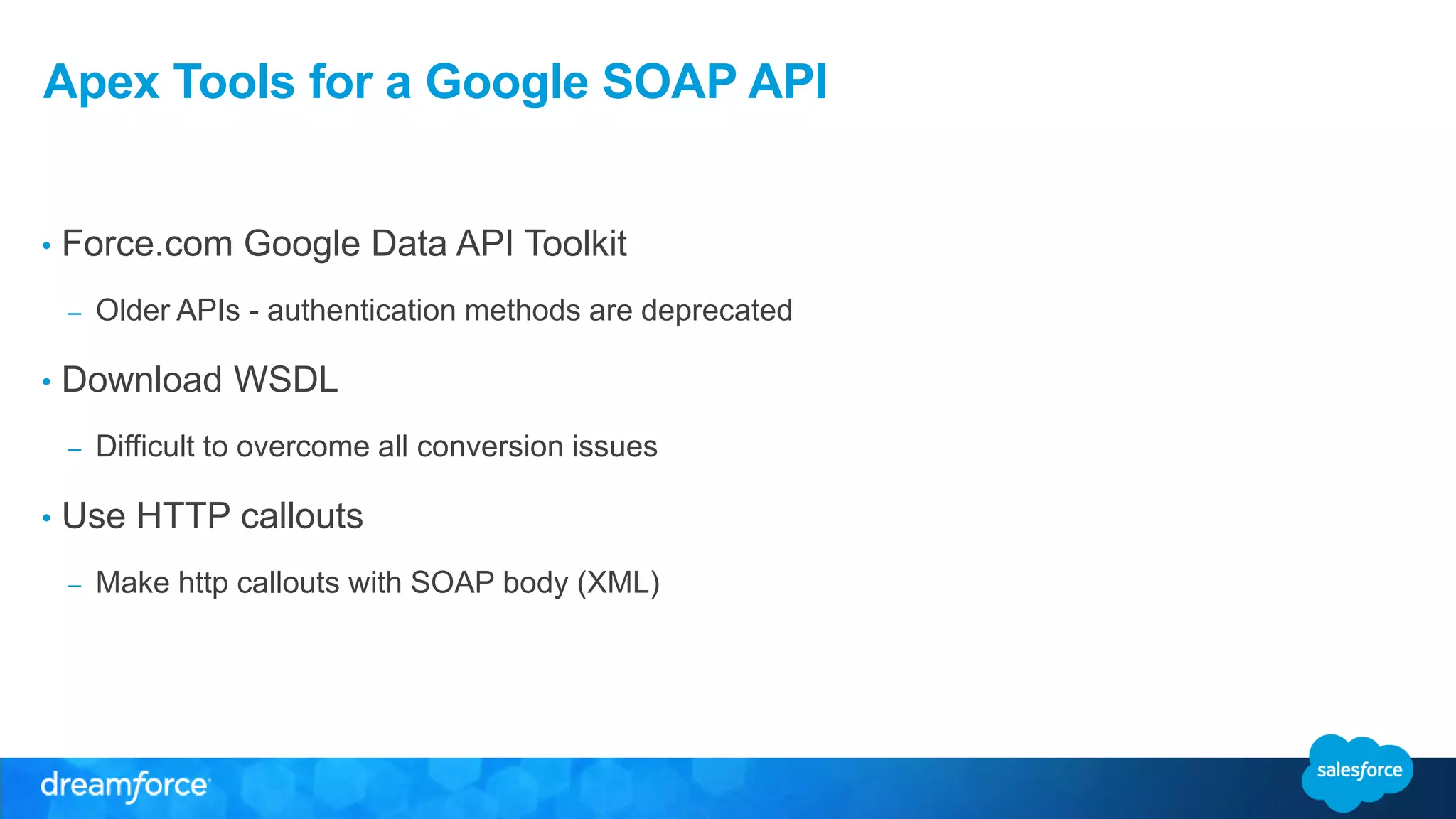
Apex Tools for a Google SOAP API 
• Force.com Google Data API Toolkit 
– Older APIs - authentication methods are deprecated 
• Download WSDL 
– Difficult to overcome all conversion issues 
• Use HTTP callouts 
– Make http callouts with SOAP body (XML)
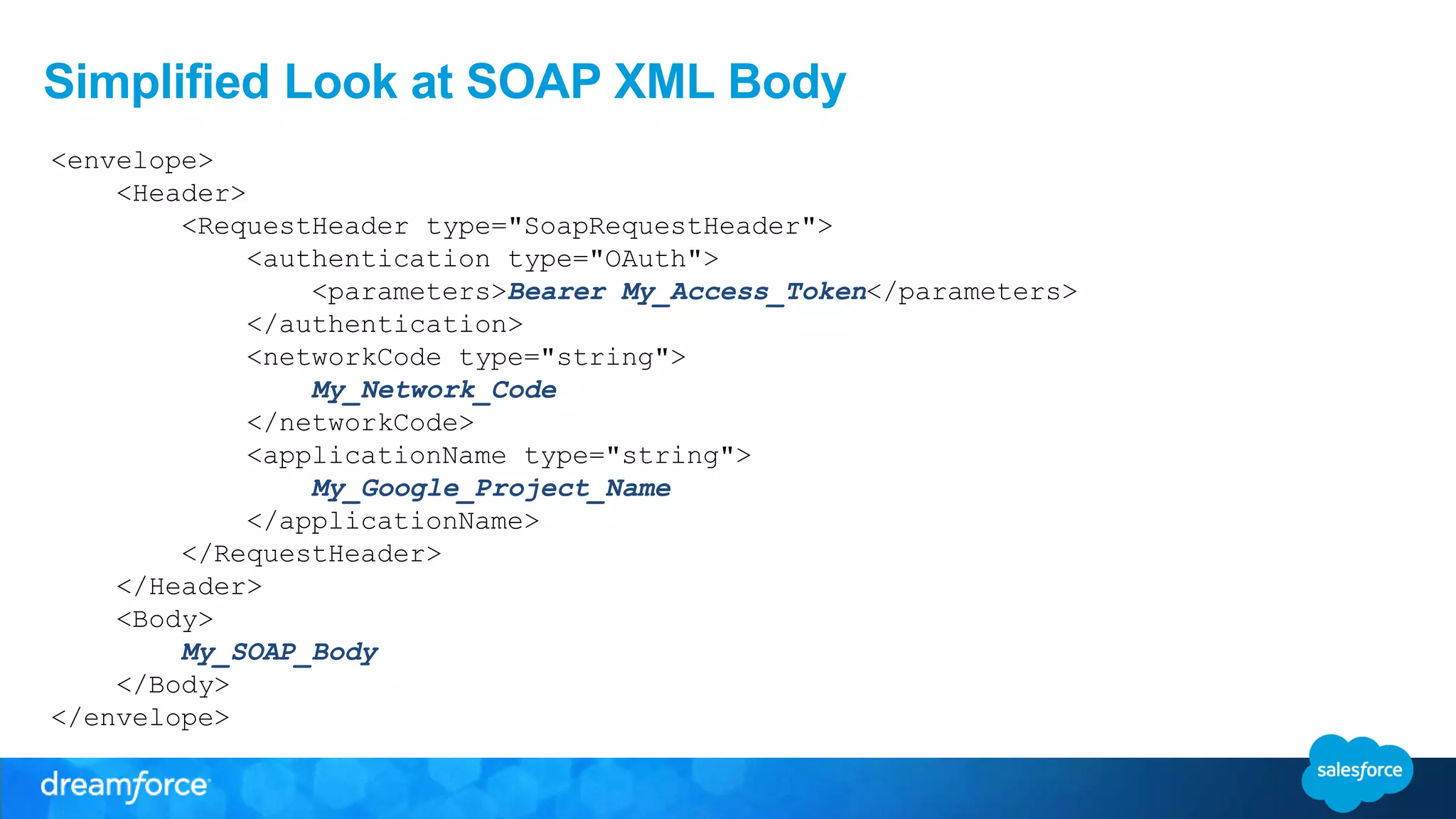
Simplified Look at SOAP XML Body 
<envelope> 
<Header> 
<RequestHeader type="SoapRequestHeader"> 
<authentication type="OAuth"> 
<parameters>Bearer My_Access_Token</parameters> 
</authentication> 
<networkCode type="string"> 
My_Network_Code 
</networkCode> 
<applicationName type="string"> 
My_Google_Project_Name 
</applicationName> 
</RequestHeader> 
</Header> 
<Body> 
My_SOAP_Body 
</Body> 
</envelope>
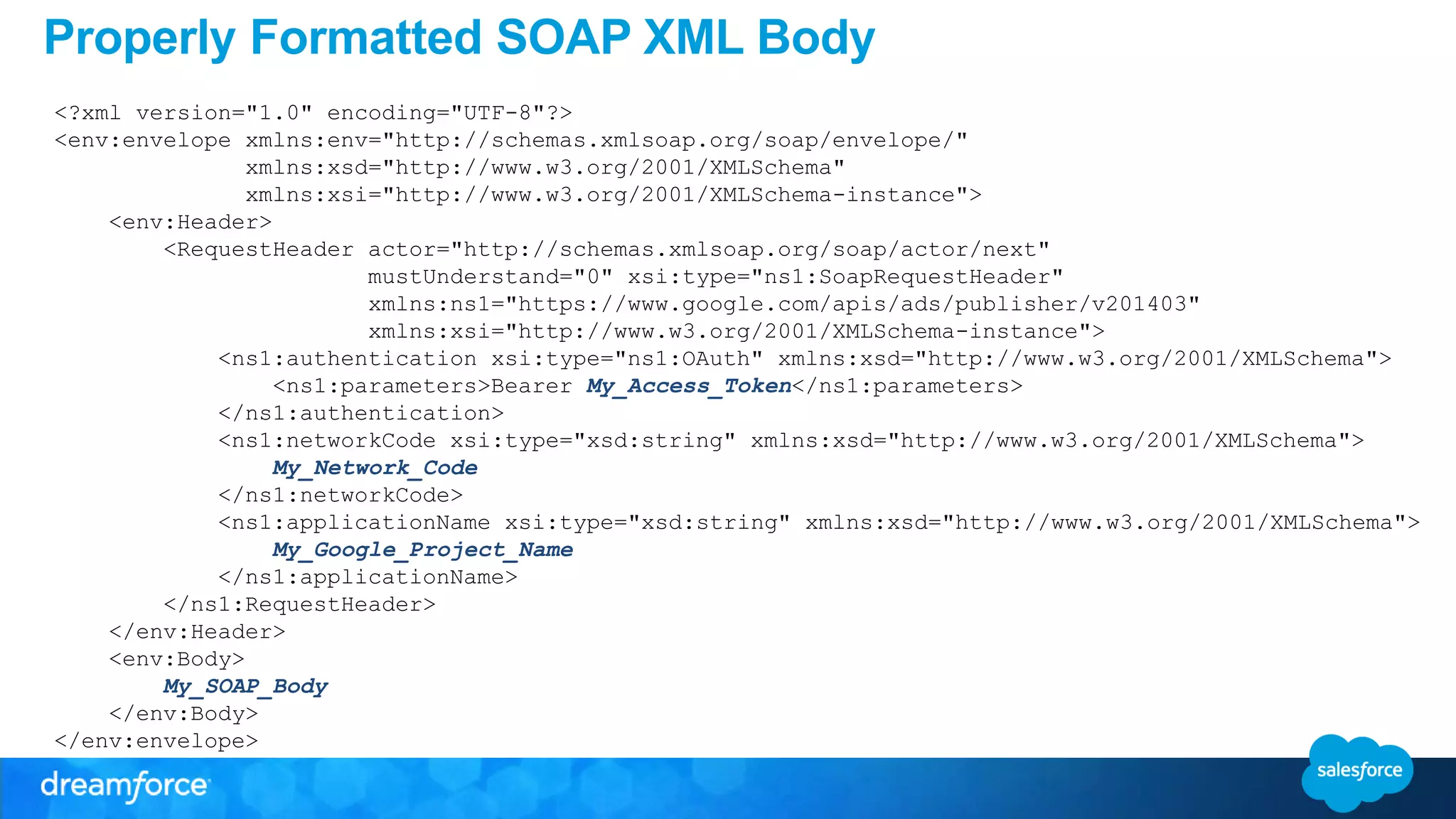
Properly Formatted SOAP XML Body 
<?xml version="1.0" encoding="UTF-8"?> 
<env:envelope xmlns:env="http://schemas.xmlsoap.org/soap/envelope/" 
xmlns:xsd="http://www.w3.org/2001/XMLSchema" 
xmlns:xsi="http://www.w3.org/2001/XMLSchema-instance"> 
<env:Header> 
<RequestHeader actor="http://schemas.xmlsoap.org/soap/actor/next" 
mustUnderstand="0" xsi:type="ns1:SoapRequestHeader" 
xmlns:ns1="https://www.google.com/apis/ads/publisher/v201403" 
xmlns:xsi="http://www.w3.org/2001/XMLSchema-instance"> 
<ns1:authentication xsi:type="ns1:OAuth" xmlns:xsd="http://www.w3.org/2001/XMLSchema"> 
<ns1:parameters>Bearer My_Access_Token</ns1:parameters> 
</ns1:authentication> 
<ns1:networkCode xsi:type="xsd:string" xmlns:xsd="http://www.w3.org/2001/XMLSchema"> 
My_Network_Code 
</ns1:networkCode> 
<ns1:applicationName xsi:type="xsd:string" xmlns:xsd="http://www.w3.org/2001/XMLSchema"> 
My_Google_Project_Name 
</ns1:applicationName> 
</ns1:RequestHeader> 
</env:Header> 
<env:Body> 
My_SOAP_Body 
</env:Body> 
</env:envelope>
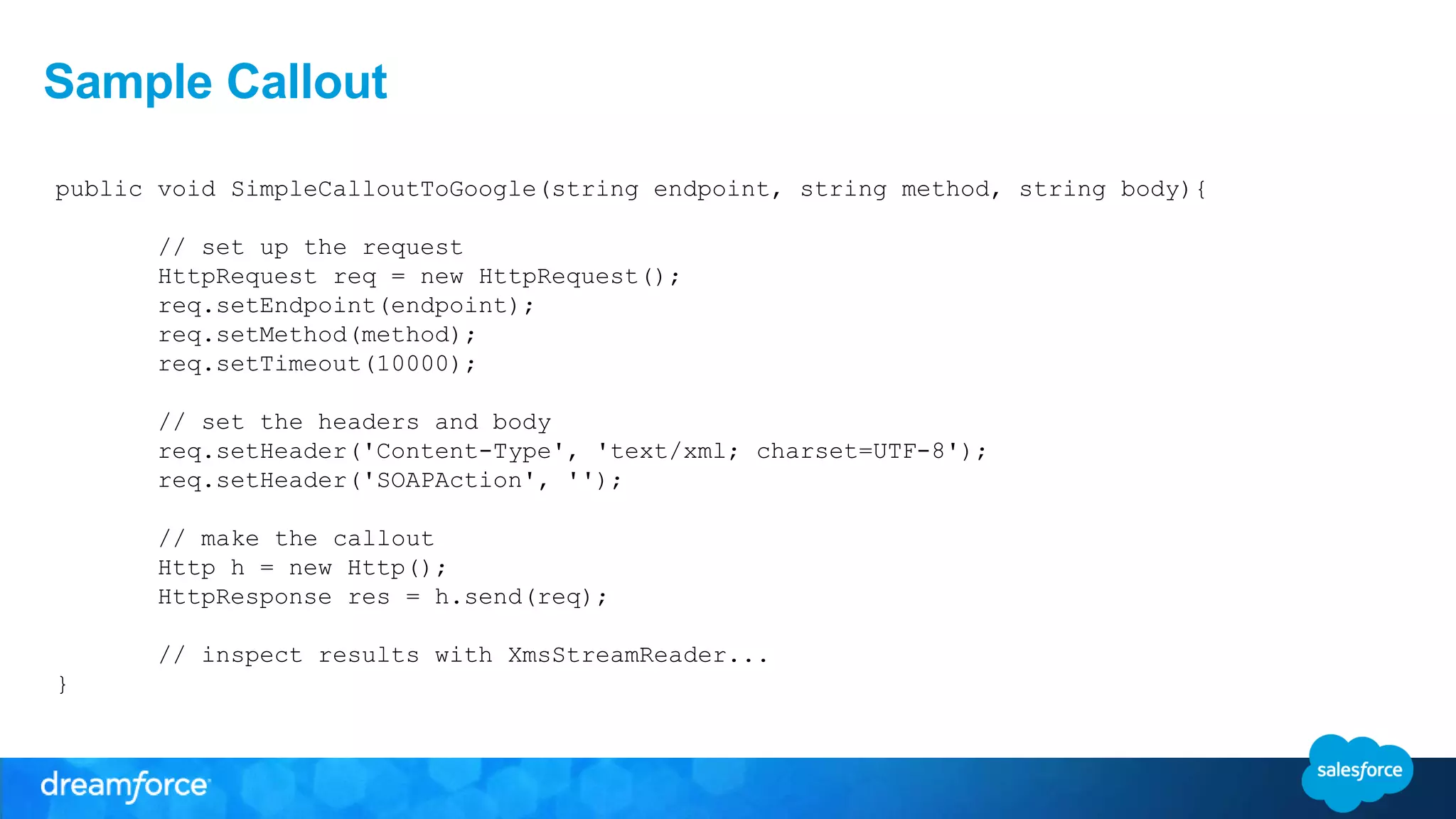
Sample Callout 
public void SimpleCalloutToGoogle(string endpoint, string method, string body){ 
// set up the request 
HttpRequest req = new HttpRequest(); 
req.setEndpoint(endpoint); 
req.setMethod(method); 
req.setTimeout(10000); 
// set the headers and body 
req.setHeader('Content-Type', 'text/xml; charset=UTF-8'); 
req.setHeader('SOAPAction', ''); 
// make the callout 
Http h = new Http(); 
HttpResponse res = h.send(req); 
// inspect results with XmsStreamReader... 
}
Using the Google SOAP APIs with 
Salesforce 
Ami Assayag, 
Architect, CRM Science 
PhillyForce DUG Leader 
@AmiAssayag 
Yad Jayanth, 
Advanced Developer, CRM Science 
Dallas DUG Co-Organizer 
@YadJayanth

CRM Science - Dreamforce '14: Using the Google SOAP API

  • 1.
    Using the GoogleSOAP APIs with Salesforce Ami Assayag, Architect, CRM Science PhillyForce DUG Leader @AmiAssayag Yad Jayanth, Advanced Developer, CRM Science Dallas DUG Co-Organizer @YadJayanth
  • 2.
    Safe Harbor Safeharbor statement under the Private Securities Litigation Reform Act of 1995: This presentation may contain forward-looking statements that involve risks, uncertainties, and assumptions. If any such uncertainties materialize or if any of the assumptions proves incorrect, the results of salesforce.com, inc. could differ materially from the results expressed or implied by the forward-looking statements we make. All statements other than statements of historical fact could be deemed forward-looking, including any projections of product or service availability, subscriber growth, earnings, revenues, or other financial items and any statements regarding strategies or plans of management for future operations, statements of belief, any statements concerning new, planned, or upgraded services or technology developments and customer contracts or use of our services. The risks and uncertainties referred to above include – but are not limited to – risks associated with developing and delivering new functionality for our service, new products and services, our new business model, our past operating losses, possible fluctuations in our operating results and rate of growth, interruptions or delays in our Web hosting, breach of our security measures, the outcome of any litigation, risks associated with completed and any possible mergers and acquisitions, the immature market in which we operate, our relatively limited operating history, our ability to expand, retain, and motivate our employees and manage our growth, new releases of our service and successful customer deployment, our limited history reselling non-salesforce.com products, and utilization and selling to larger enterprise customers. Further information on potential factors that could affect the financial results of salesforce.com, inc. is included in our annual report on Form 10-K for the most recent fiscal year and in our quarterly report on Form 10-Q for the most recent fiscal quarter. These documents and others containing important disclosures are available on the SEC Filings section of the Investor Information section of our Web site. Any unreleased services or features referenced in this or other presentations, press releases or public statements are not currently available and may not be delivered on time or at all. Customers who purchase our services should make the purchase decisions based upon features that are currently available. Salesforce.com, inc. assumes no obligation and does not intend to update these forward-looking statements.
  • 3.
    Ami Assayag Architect,CRM Science PhillyForce DUG Leader
  • 4.
    Yad Jayanth AdvancedDeveloper, CRM Science Dallas DUG Co-Organizer
  • 5.
    Digital Advertising Project • Doubleclick For Publishers (DFP) • Advertising management platform • SOAP API (xml) • Oauth 2.0 (json)
  • 6.
    Project Setup DFP • Client already has account • Get Network Code • Enable API access Google Developer Console • Create a project (Google’s “Connected App”) • Get Client Id and Client Secret
  • 7.
    Create Project inthe Console
  • 8.
  • 9.
    Record Client IDand Client Secret
  • 10.
    Google Oauth 2.0Authentication
  • 11.
    Authorization OAuth 2.0Handshake • The Web Server Applications Flow : – The goal is to get the access token needed to access the API – We will store the access token in a custom setting to be readily available for use in future callouts – Use the refresh token to get future access tokens to make the callouts
  • 12.
    Authorization Code Sample • Leverage custom settings to persist authorization related information: – From API specs • Endpoint • Scope – From Google Console • Client secret • Client ID – From DFP • Network Code – From Oauth handshake • Access token • Refresh token
  • 13.
    Initiate OAuth Flowto Get Auth Code public string getAuthCodeUrl(string redirectUri) { // use the URL used when authenticating a google user pagereference pr = new pagereference(custSetting.AuthEndpoint__c + 'auth'); // add the necessary parameters pr.getParameters().put('response_type', 'code'); pr.getParameters().put('client_id', custSetting.ClientId__c); pr.getParameters().put('redirect_uri', redirectUri); pr.getParameters().put('scope', custSetting.Scope__c); // add required parameters needed to get an be able to use a refresh token pr.getParameters().put('access_type', 'offline'); pr.getParameters().put('approval_prompt', 'force'); return pr.getUrl(); }
  • 14.
    Get Access Token– Prep Work Create internal class in the image of the json response. public class AccessTokenResponse { string access_token { get; set; } string refresh_token { get; set; } string token_type { get; set; } integer expires_in { get; set; } string id_token { get; set; } public AccessTokenResponse() {} }
  • 15.
    Access Token Callout Once the user authenticated, the returned URL will include an auth code that can be exchanged for an access token. public void getAccessToken(string authCode) { // prepare a string to send to google as body string body = 'code= authCode; body += '&client_id= custSetting.ClientId__c; body += '&client_secret= custSetting.ClientSecret__c; body += '&redirect_uri= custSetting.redirectUri__c; body += '&grant_type=authorization_code'; // HTTP callout to Google to exchange the auth code with an access token // use internal class from last slide to deserialize json response Authenticate(body); }
  • 16.
  • 17.
    Apex Tools fora Google SOAP API • Force.com Google Data API Toolkit – Older APIs - authentication methods are deprecated • Download WSDL – Difficult to overcome all conversion issues • Use HTTP callouts – Make http callouts with SOAP body (XML)
  • 18.
    Simplified Look atSOAP XML Body <envelope> <Header> <RequestHeader type="SoapRequestHeader"> <authentication type="OAuth"> <parameters>Bearer My_Access_Token</parameters> </authentication> <networkCode type="string"> My_Network_Code </networkCode> <applicationName type="string"> My_Google_Project_Name </applicationName> </RequestHeader> </Header> <Body> My_SOAP_Body </Body> </envelope>
  • 19.
    Properly Formatted SOAPXML Body <?xml version="1.0" encoding="UTF-8"?> <env:envelope xmlns:env="http://schemas.xmlsoap.org/soap/envelope/" xmlns:xsd="http://www.w3.org/2001/XMLSchema" xmlns:xsi="http://www.w3.org/2001/XMLSchema-instance"> <env:Header> <RequestHeader actor="http://schemas.xmlsoap.org/soap/actor/next" mustUnderstand="0" xsi:type="ns1:SoapRequestHeader" xmlns:ns1="https://www.google.com/apis/ads/publisher/v201403" xmlns:xsi="http://www.w3.org/2001/XMLSchema-instance"> <ns1:authentication xsi:type="ns1:OAuth" xmlns:xsd="http://www.w3.org/2001/XMLSchema"> <ns1:parameters>Bearer My_Access_Token</ns1:parameters> </ns1:authentication> <ns1:networkCode xsi:type="xsd:string" xmlns:xsd="http://www.w3.org/2001/XMLSchema"> My_Network_Code </ns1:networkCode> <ns1:applicationName xsi:type="xsd:string" xmlns:xsd="http://www.w3.org/2001/XMLSchema"> My_Google_Project_Name </ns1:applicationName> </ns1:RequestHeader> </env:Header> <env:Body> My_SOAP_Body </env:Body> </env:envelope>
  • 20.
    Sample Callout publicvoid SimpleCalloutToGoogle(string endpoint, string method, string body){ // set up the request HttpRequest req = new HttpRequest(); req.setEndpoint(endpoint); req.setMethod(method); req.setTimeout(10000); // set the headers and body req.setHeader('Content-Type', 'text/xml; charset=UTF-8'); req.setHeader('SOAPAction', ''); // make the callout Http h = new Http(); HttpResponse res = h.send(req); // inspect results with XmsStreamReader... }
  • 22.
    Using the GoogleSOAP APIs with Salesforce Ami Assayag, Architect, CRM Science PhillyForce DUG Leader @AmiAssayag Yad Jayanth, Advanced Developer, CRM Science Dallas DUG Co-Organizer @YadJayanth