1
Online Text
Repository
and Messages
2
© SAP AG 2005, ABAP Web Dynpro
Introduction to internationalization
Online Text Repository
Message handling
Contents:
Online Text Repository (OTR) and Messages
3
© SAP AG 2005, ABAP Web Dynpro
After completing this lesson, you will be able to:
Understand ABAP WD support for Online Text
Repository
Report messages to the user using the
IF_WD_MESSAGE_MANAGER interface
Messages and Error Handling: Objectives
4
Internationalization
Due to the fact that “Internationalization” is such a long word, it is often
abbreviated to “I18N”. That is, the first letter “I”, the last letter “N”, and don’t
bother about the 18 other letters in between!
© SAP AG 2005, ABAP Web Dynpro
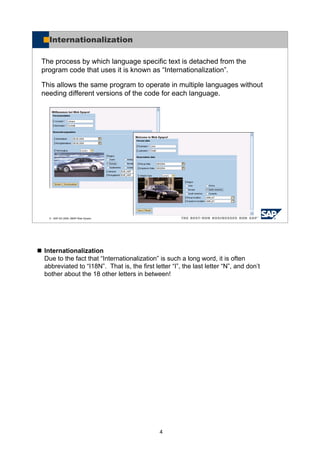
Internationalization
The process by which language specific text is detached from the
program code that uses it is known as “Internationalization”.
This allows the same program to operate in multiple languages without
needing different versions of the code for each language.
5
The Online Text Repository (OTR) is a central storage area for texts and provides
services for processing these texts. The Online Text Repository supports the entry
and translation of texts and can be used for Web Dynpro applications. OTR
directives for entry and translation of text can be used in the layout of a Web
Dynpro ABAP. Here a distinction is made between alias texts and long texts. Alias
texts are reusable text literals with a length of less than 255 characters.
© SAP AG 2005, ABAP Web Dynpro
Internationalization (I18N) Support
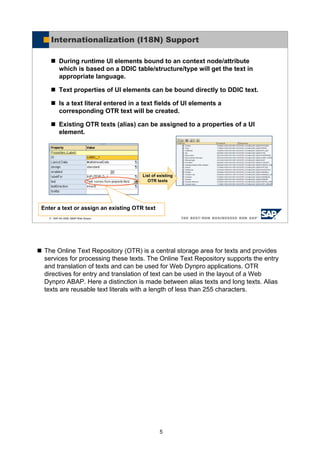
During runtime UI elements bound to an context node/attribute
which is based on a DDIC table/structure/type will get the text in
appropriate language.
Text properties of UI elements can be bound directly to DDIC text.
Is a text literal entered in a text fields of UI elements a
corresponding OTR text will be created.
Existing OTR texts (alias) can be assigned to a properties of a UI
element.
List of existing
OTR texts
Enter a text or assign an existing OTR text
6
© SAP AG 2005, ABAP Web Dynpro
Using the Online Text Repository
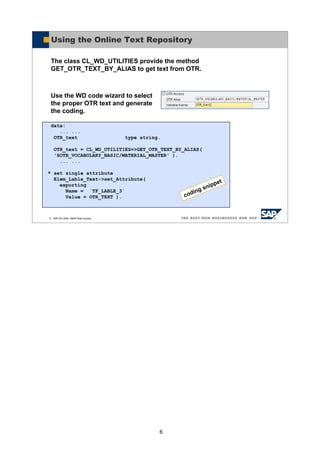
The class CL_WD_UTILITIES provide the method
GET_OTR_TEXT_BY_ALIAS to get text from OTR.
Use the WD code wizard to select
the proper OTR text and generate
the coding.
data:
... ...
OTR_text type string.
OTR_text = CL_WD_UTILITIES=>GET_OTR_TEXT_BY_ALIAS(
'SOTR_VOCABULARY_BASIC/MATERIAL_MASTER' ).
... ...
* set single attribute
Elem_Lable_Text->set_Attribute(
exporting
Name = `TF_LABLE_3`
Value = OTR_TEXT ). coding snippet
7
© SAP AG 2005, ABAP Web Dynpro
Web Dynpro Messages and Error Handling
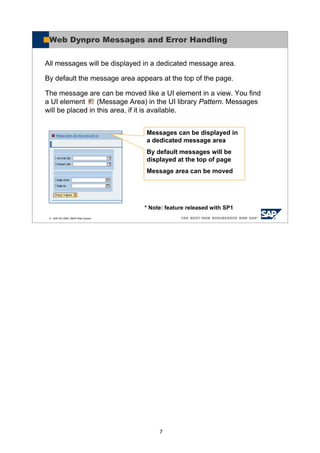
All messages will be displayed in a dedicated message area.
By default the message area appears at the top of the page.
The message are can be moved like a UI element in a view. You find
a UI element (Message Area) in the UI library Pattern. Messages
will be placed in this area, if it is available.
Messages can be displayed in
a dedicated message area
By default messages will be
displayed at the top of page
Message area can be moved
* Note: feature released with SP1
8
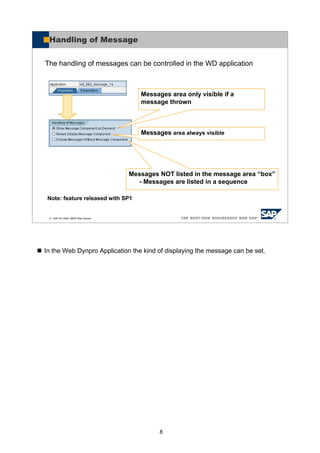
In the Web Dynpro Application the kind of displaying the message can be set.
© SAP AG 2005, ABAP Web Dynpro
Handling of Message
The handling of messages can be controlled in the WD application
Messages area only visible if a
message thrown
Messages area always visible
Messages NOT listed in the message area “box”
- Messages are listed in a sequence
Note: feature released with SP1
9
© SAP AG 2005, ABAP Web Dynpro
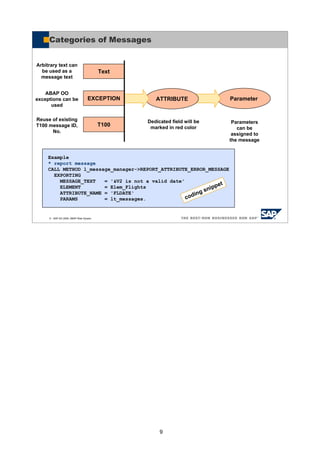
coding snippet
Parameter
Categories of Messages
Text
EXCEPTION
T100
ATTRIBUTE
Example
* report message
CALL METHOD l_message_manager->REPORT_ATTRIBUTE_ERROR_MESSAGE
EXPORTING
MESSAGE_TEXT = '&V2 is not a valid date'
ELEMENT = Elem_Flights
ATTRIBUTE_NAME = 'FLDATE'
PARAMS = lt_messages.
Arbitrary text can
be used as a
message text
ABAP OO
exceptions can be
used
Reuse of existing
T100 message ID,
No.
Dedicated field will be
marked in red color
Parameters
can be
assigned to
the message
10
© SAP AG 2005, ABAP Web Dynpro
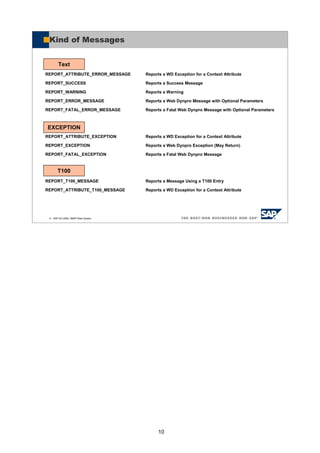
Kind of Messages
REPORT_ATTRIBUTE_ERROR_MESSAGE Reports a WD Exception for a Context Attribute
REPORT_SUCCESS Reports a Success Message
REPORT_WARNING Reports a Warning
REPORT_ERROR_MESSAGE Reports a Web Dynpro Message with Optional Parameters
REPORT_FATAL_ERROR_MESSAGE Reports a Fatal Web Dynpro Message with Optional Parameters
REPORT_ATTRIBUTE_EXCEPTION Reports a WD Exception for a Context Attribute
REPORT_EXCEPTION Reports a Web Dynpro Exception (May Return)
REPORT_FATAL_EXCEPTION Reports a Fatal Web Dynpro Message
REPORT_T100_MESSAGE Reports a Message Using a T100 Entry
REPORT_ATTRIBUTE_T100_MESSAGE Reports a WD Exception for a Context Attribute
T100
EXCEPTION
Text
11
© SAP AG 2005, ABAP Web Dynpro
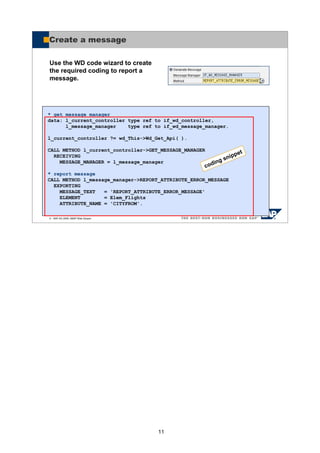
Create a message
* get message manager
data: l_current_controller type ref to if_wd_controller,
l_message_manager type ref to if_wd_message_manager.
l_current_controller ?= wd_This->Wd_Get_Api( ).
CALL METHOD l_current_controller->GET_MESSAGE_MANAGER
RECEIVING
MESSAGE_MANAGER = l_message_manager
* report message
CALL METHOD l_message_manager->REPORT_ATTRIBUTE_ERROR_MESSAGE
EXPORTING
MESSAGE_TEXT = 'REPORT_ATTRIBUTE_ERROR_MESSAGE'
ELEMENT = Elem_Flights
ATTRIBUTE_NAME = 'CITYFROM'.
coding snippet
Use the WD code wizard to create
the required coding to report a
message.
12
© SAP AG 2005, ABAP Web Dynpro
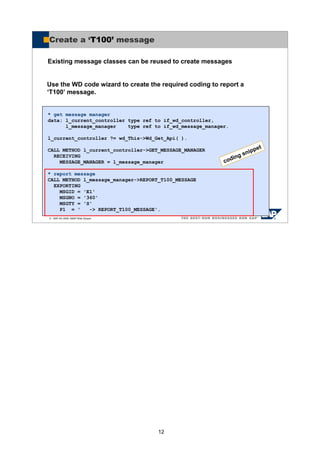
Create a ‘T100’ message
* get message manager
data: l_current_controller type ref to if_wd_controller,
l_message_manager type ref to if_wd_message_manager.
l_current_controller ?= wd_This->Wd_Get_Api( ).
CALL METHOD l_current_controller->GET_MESSAGE_MANAGER
RECEIVING
MESSAGE_MANAGER = l_message_manager
* report message
CALL METHOD l_message_manager->REPORT_T100_MESSAGE
EXPORTING
MSGID = 'E1'
MSGNO = '360'
MSGTY = 'S'
P1 = ' -> REPORT_T100_MESSAGE'.
coding snippet
Existing message classes can be reused to create messages
Use the WD code wizard to create the required coding to report a
‘T100’ message.
13
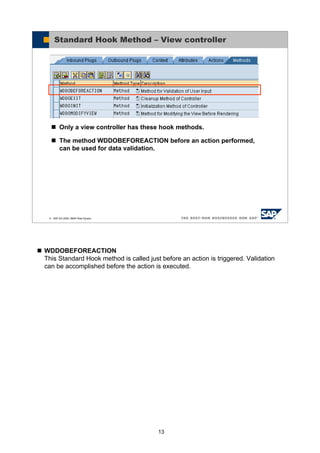
WDDOBEFOREACTION
This Standard Hook method is called just before an action is triggered. Validation
can be accomplished before the action is executed.
© SAP AG 2005, ABAP Web Dynpro
Standard Hook Method – View controller
Only a view controller has these hook methods.
The method WDDOBEFOREACTION before an action performed,
can be used for data validation.
14
© SAP AG 2005, ABAP Web Dynpro
You should now be able to:
Understand ABAP WD support for Online Text
Repository
Report messages to the user using the
IF_WD_MESSAGE_MANAGER interface
Messages and Error Handling: Summary

Creating messages

  • 1.
  • 2.
    2 © SAP AG2005, ABAP Web Dynpro Introduction to internationalization Online Text Repository Message handling Contents: Online Text Repository (OTR) and Messages
  • 3.
    3 © SAP AG2005, ABAP Web Dynpro After completing this lesson, you will be able to: Understand ABAP WD support for Online Text Repository Report messages to the user using the IF_WD_MESSAGE_MANAGER interface Messages and Error Handling: Objectives
  • 4.
    4 Internationalization Due to thefact that “Internationalization” is such a long word, it is often abbreviated to “I18N”. That is, the first letter “I”, the last letter “N”, and don’t bother about the 18 other letters in between! © SAP AG 2005, ABAP Web Dynpro Internationalization The process by which language specific text is detached from the program code that uses it is known as “Internationalization”. This allows the same program to operate in multiple languages without needing different versions of the code for each language.
  • 5.
    5 The Online TextRepository (OTR) is a central storage area for texts and provides services for processing these texts. The Online Text Repository supports the entry and translation of texts and can be used for Web Dynpro applications. OTR directives for entry and translation of text can be used in the layout of a Web Dynpro ABAP. Here a distinction is made between alias texts and long texts. Alias texts are reusable text literals with a length of less than 255 characters. © SAP AG 2005, ABAP Web Dynpro Internationalization (I18N) Support During runtime UI elements bound to an context node/attribute which is based on a DDIC table/structure/type will get the text in appropriate language. Text properties of UI elements can be bound directly to DDIC text. Is a text literal entered in a text fields of UI elements a corresponding OTR text will be created. Existing OTR texts (alias) can be assigned to a properties of a UI element. List of existing OTR texts Enter a text or assign an existing OTR text
  • 6.
    6 © SAP AG2005, ABAP Web Dynpro Using the Online Text Repository The class CL_WD_UTILITIES provide the method GET_OTR_TEXT_BY_ALIAS to get text from OTR. Use the WD code wizard to select the proper OTR text and generate the coding. data: ... ... OTR_text type string. OTR_text = CL_WD_UTILITIES=>GET_OTR_TEXT_BY_ALIAS( 'SOTR_VOCABULARY_BASIC/MATERIAL_MASTER' ). ... ... * set single attribute Elem_Lable_Text->set_Attribute( exporting Name = `TF_LABLE_3` Value = OTR_TEXT ). coding snippet
  • 7.
    7 © SAP AG2005, ABAP Web Dynpro Web Dynpro Messages and Error Handling All messages will be displayed in a dedicated message area. By default the message area appears at the top of the page. The message are can be moved like a UI element in a view. You find a UI element (Message Area) in the UI library Pattern. Messages will be placed in this area, if it is available. Messages can be displayed in a dedicated message area By default messages will be displayed at the top of page Message area can be moved * Note: feature released with SP1
  • 8.
    8 In the WebDynpro Application the kind of displaying the message can be set. © SAP AG 2005, ABAP Web Dynpro Handling of Message The handling of messages can be controlled in the WD application Messages area only visible if a message thrown Messages area always visible Messages NOT listed in the message area “box” - Messages are listed in a sequence Note: feature released with SP1
  • 9.
    9 © SAP AG2005, ABAP Web Dynpro coding snippet Parameter Categories of Messages Text EXCEPTION T100 ATTRIBUTE Example * report message CALL METHOD l_message_manager->REPORT_ATTRIBUTE_ERROR_MESSAGE EXPORTING MESSAGE_TEXT = '&V2 is not a valid date' ELEMENT = Elem_Flights ATTRIBUTE_NAME = 'FLDATE' PARAMS = lt_messages. Arbitrary text can be used as a message text ABAP OO exceptions can be used Reuse of existing T100 message ID, No. Dedicated field will be marked in red color Parameters can be assigned to the message
  • 10.
    10 © SAP AG2005, ABAP Web Dynpro Kind of Messages REPORT_ATTRIBUTE_ERROR_MESSAGE Reports a WD Exception for a Context Attribute REPORT_SUCCESS Reports a Success Message REPORT_WARNING Reports a Warning REPORT_ERROR_MESSAGE Reports a Web Dynpro Message with Optional Parameters REPORT_FATAL_ERROR_MESSAGE Reports a Fatal Web Dynpro Message with Optional Parameters REPORT_ATTRIBUTE_EXCEPTION Reports a WD Exception for a Context Attribute REPORT_EXCEPTION Reports a Web Dynpro Exception (May Return) REPORT_FATAL_EXCEPTION Reports a Fatal Web Dynpro Message REPORT_T100_MESSAGE Reports a Message Using a T100 Entry REPORT_ATTRIBUTE_T100_MESSAGE Reports a WD Exception for a Context Attribute T100 EXCEPTION Text
  • 11.
    11 © SAP AG2005, ABAP Web Dynpro Create a message * get message manager data: l_current_controller type ref to if_wd_controller, l_message_manager type ref to if_wd_message_manager. l_current_controller ?= wd_This->Wd_Get_Api( ). CALL METHOD l_current_controller->GET_MESSAGE_MANAGER RECEIVING MESSAGE_MANAGER = l_message_manager * report message CALL METHOD l_message_manager->REPORT_ATTRIBUTE_ERROR_MESSAGE EXPORTING MESSAGE_TEXT = 'REPORT_ATTRIBUTE_ERROR_MESSAGE' ELEMENT = Elem_Flights ATTRIBUTE_NAME = 'CITYFROM'. coding snippet Use the WD code wizard to create the required coding to report a message.
  • 12.
    12 © SAP AG2005, ABAP Web Dynpro Create a ‘T100’ message * get message manager data: l_current_controller type ref to if_wd_controller, l_message_manager type ref to if_wd_message_manager. l_current_controller ?= wd_This->Wd_Get_Api( ). CALL METHOD l_current_controller->GET_MESSAGE_MANAGER RECEIVING MESSAGE_MANAGER = l_message_manager * report message CALL METHOD l_message_manager->REPORT_T100_MESSAGE EXPORTING MSGID = 'E1' MSGNO = '360' MSGTY = 'S' P1 = ' -> REPORT_T100_MESSAGE'. coding snippet Existing message classes can be reused to create messages Use the WD code wizard to create the required coding to report a ‘T100’ message.
  • 13.
    13 WDDOBEFOREACTION This Standard Hookmethod is called just before an action is triggered. Validation can be accomplished before the action is executed. © SAP AG 2005, ABAP Web Dynpro Standard Hook Method – View controller Only a view controller has these hook methods. The method WDDOBEFOREACTION before an action performed, can be used for data validation.
  • 14.
    14 © SAP AG2005, ABAP Web Dynpro You should now be able to: Understand ABAP WD support for Online Text Repository Report messages to the user using the IF_WD_MESSAGE_MANAGER interface Messages and Error Handling: Summary