Creating a Frame within an Applet


    http://improvejava.blogspot.in/
                                      1
Objective

On completion of this period, you would be
able to know

• Creating a Frame with in an Applet


              http://improvejava.blogspot.in/
                                                2
Recap

In the previous class, you have leant
• Different methods of Frame class
• They are necessary for working with Frames


                http://improvejava.blogspot.in/
                                                  3
Creating a Frame in an Applet

•   Creating a new frame window from within an
    applet is actually quite easy
•   The following steps may be used to do it
    1. Create a subclass of Frame
    2. Override any of the standard window methods, such
       as init( ), start( ), stop( ), and paint( )
    3. Implement the windowClosing( ) method of the
       WindowListener interface, calling setVisible(false)
       when the window is closed

                      http://improvejava.blogspot.in/        4
Creating a Frame in an Applet                  contd..


• Once you have defined a Frame subclass, you
  can create an object of that class
• But it will not be initially visible
• You make it visible by calling setVisible( )
• When created, the window is given a default
  height and width
• You can set the size of the window explicitly by
  calling the setSize( ) method


                 http://improvejava.blogspot.in/             5
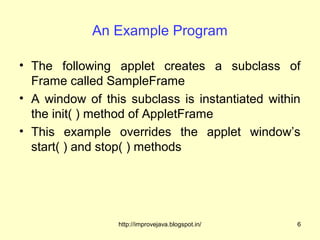
An Example Program

• The following applet creates a subclass of
  Frame called SampleFrame
• A window of this subclass is instantiated within
  the init( ) method of AppletFrame
• This example overrides the applet window’s
  start( ) and stop( ) methods


                 http://improvejava.blogspot.in/   6
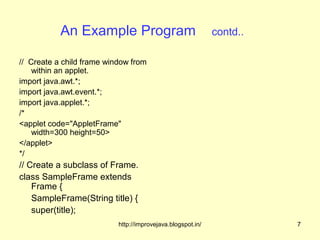
An Example Program                                contd..

// Create a child frame window from
    within an applet.
import java.awt.*;
import java.awt.event.*;
import java.applet.*;
/*
<applet code="AppletFrame"
    width=300 height=50>
</applet>
*/
// Create a subclass of Frame.
class SampleFrame extends
    Frame {
    SampleFrame(String title) {
    super(title);
                           http://improvejava.blogspot.in/             7
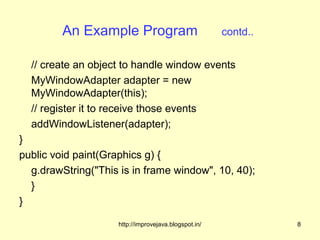
An Example Program                            contd..


  // create an object to handle window events
  MyWindowAdapter adapter = new
  MyWindowAdapter(this);
  // register it to receive those events
  addWindowListener(adapter);
}
public void paint(Graphics g) {
  g.drawString("This is in frame window", 10, 40);
  }
}

                     http://improvejava.blogspot.in/             8
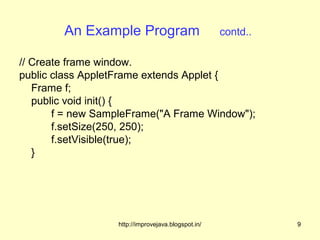
An Example Program                          contd..

// Create frame window.
public class AppletFrame extends Applet {
   Frame f;
   public void init() {
       f = new SampleFrame("A Frame Window");
       f.setSize(250, 250);
       f.setVisible(true);
   }


                  http://improvejava.blogspot.in/             9
An Example Program                             contd..

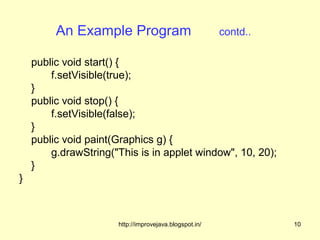
    public void start() {
        f.setVisible(true);
    }
    public void stop() {
        f.setVisible(false);
    }
    public void paint(Graphics g) {
        g.drawString("This is in applet window", 10, 20);
    }
}


                      http://improvejava.blogspot.in/             10
An Example Program                            contd..


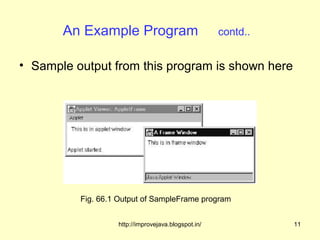
• Sample output from this program is shown here


          Fig. 66.1 Output of SampleFrame program


                   http://improvejava.blogspot.in/             11
Summary

• The steps for creating a new frame window from
  within an applet are
  1. Create a subclass of Frame
  2. Override any of the standard window methods, such
     as init( ), start( ), stop( ), and paint( )
  3. Implement the windowClosing( ) method of the
     WindowListener interface, calling setVisible(false)
     when the window is closed


                    http://improvejava.blogspot.in/        12
Quiz

1. Whether the Frame object is directly visible
    once it is created?
  a) No
  b) Yes


                  http://improvejava.blogspot.in/   13
Frequently Asked Questions

1. Write the steps for creating a frame in an applet
2. Write a program for creating a frame in an applet


                  http://improvejava.blogspot.in/   14

Creating a frame within an applet

  • 1.
    Creating a Framewithin an Applet http://improvejava.blogspot.in/ 1
  • 2.
    Objective On completion ofthis period, you would be able to know • Creating a Frame with in an Applet http://improvejava.blogspot.in/ 2
  • 3.
    Recap In the previousclass, you have leant • Different methods of Frame class • They are necessary for working with Frames http://improvejava.blogspot.in/ 3
  • 4.
    Creating a Framein an Applet • Creating a new frame window from within an applet is actually quite easy • The following steps may be used to do it 1. Create a subclass of Frame 2. Override any of the standard window methods, such as init( ), start( ), stop( ), and paint( ) 3. Implement the windowClosing( ) method of the WindowListener interface, calling setVisible(false) when the window is closed http://improvejava.blogspot.in/ 4
  • 5.
    Creating a Framein an Applet contd.. • Once you have defined a Frame subclass, you can create an object of that class • But it will not be initially visible • You make it visible by calling setVisible( ) • When created, the window is given a default height and width • You can set the size of the window explicitly by calling the setSize( ) method http://improvejava.blogspot.in/ 5
  • 6.
    An Example Program •The following applet creates a subclass of Frame called SampleFrame • A window of this subclass is instantiated within the init( ) method of AppletFrame • This example overrides the applet window’s start( ) and stop( ) methods http://improvejava.blogspot.in/ 6
  • 7.
    An Example Program contd.. // Create a child frame window from within an applet. import java.awt.*; import java.awt.event.*; import java.applet.*; /* <applet code="AppletFrame" width=300 height=50> </applet> */ // Create a subclass of Frame. class SampleFrame extends Frame { SampleFrame(String title) { super(title); http://improvejava.blogspot.in/ 7
  • 8.
    An Example Program contd.. // create an object to handle window events MyWindowAdapter adapter = new MyWindowAdapter(this); // register it to receive those events addWindowListener(adapter); } public void paint(Graphics g) { g.drawString("This is in frame window", 10, 40); } } http://improvejava.blogspot.in/ 8
  • 9.
    An Example Program contd.. // Create frame window. public class AppletFrame extends Applet { Frame f; public void init() { f = new SampleFrame("A Frame Window"); f.setSize(250, 250); f.setVisible(true); } http://improvejava.blogspot.in/ 9
  • 10.
    An Example Program contd.. public void start() { f.setVisible(true); } public void stop() { f.setVisible(false); } public void paint(Graphics g) { g.drawString("This is in applet window", 10, 20); } } http://improvejava.blogspot.in/ 10
  • 11.
    An Example Program contd.. • Sample output from this program is shown here Fig. 66.1 Output of SampleFrame program http://improvejava.blogspot.in/ 11
  • 12.
    Summary • The stepsfor creating a new frame window from within an applet are 1. Create a subclass of Frame 2. Override any of the standard window methods, such as init( ), start( ), stop( ), and paint( ) 3. Implement the windowClosing( ) method of the WindowListener interface, calling setVisible(false) when the window is closed http://improvejava.blogspot.in/ 12
  • 13.
    Quiz 1. Whether theFrame object is directly visible once it is created? a) No b) Yes http://improvejava.blogspot.in/ 13
  • 14.
    Frequently Asked Questions 1.Write the steps for creating a frame in an applet 2. Write a program for creating a frame in an applet http://improvejava.blogspot.in/ 14