C-Programming
Walchand Institute of Technology (RC1131), Solapur Page 1
Handout#2
Assignment/Program Statement:
Study basic structure of C program and write C programs using formatted input-
output functions, clrscr() function and getch() function in C.
Learning Objectives:
Students will be able to
- explain basic structure of C program
- explain printf, scanf, clrsrc() and getch() functions in C
- write C code using formatted input functions in C (i.e. scanf)
- write C code using formatted output functions in C (i.e. printf)
Theory:
[I] Basic Structure of C Program
Documentation Section
 This section consists of comment lines which include the name of
programmer, the author and other details like time and date of writing the
program.
C-Programming
Walchand Institute of Technology (RC1131), Solapur Page 2
 Documentation section helps anyone to get an overview of the program.
Link Section
 The link section consists of the header files of the functions that are used in
the program.
 It provides instructions to the compiler to link functions from the system
library.
Definition Section
 All the symbolic constants are written in definition section.
 Macros are known as symbolic constants.
Global Declaration Section
 The global variables that can be used anywhere in the program are declared
in global declaration section.
 This section also declares the user defined functions.
main() Function Section
 It is necessary have one main() function section in every C program.
 This section contains two parts, declaration and executable part.
 The declaration part declares all the variables that are used in executable
part.
 These two parts must be written in between the opening and closing braces.
 Each statement in the declaration and executable part must end with a
semicolon (;).
 The execution of program starts at opening braces and ends at closing
braces.
Subprogram Section
 The subprogram section contains all the user defined functions that are used
to perform a specific task.
 These user defined functions are called in the main() function.
[Reference: http://www.thecrazyprogrammer.com/2013/07/explain-basic-structure-of-c-
programs.html ]
C-Programming
Walchand Institute of Technology (RC1131), Solapur Page 3
Sample C Program:
#include<stdio.h>
#include<conio.h>
void main()
{
clrscr();
printf(“Hello World”);
getch();
}
[II] Basics of Formatted Input/Output in C
(A) Output with printf
 The basic format of a printf function call is:
printf (format_string, list_of_expressions);
where:
 format_string is the layout of what's being printed
 list_of_expressions is a comma-separated list of variables or expressions
yielding results to be inserted into the output
To output string literals, just use one parameter on printf, the string itself
printf("Hello, world!n");
printf("Greetings, Earthlingnn");
Sample C Program:
#include<stdio.h>
#include<conio.h>
void main()
{
clrscr();
printf(“Hello World”);
getch();
}
Header files required to use
built-in functions in C
main() function in C-program
C-function to clear screen
C-function to print
statement on screen
C-function to read a
key from keyboard
C-Programming
Walchand Institute of Technology (RC1131), Solapur Page 4
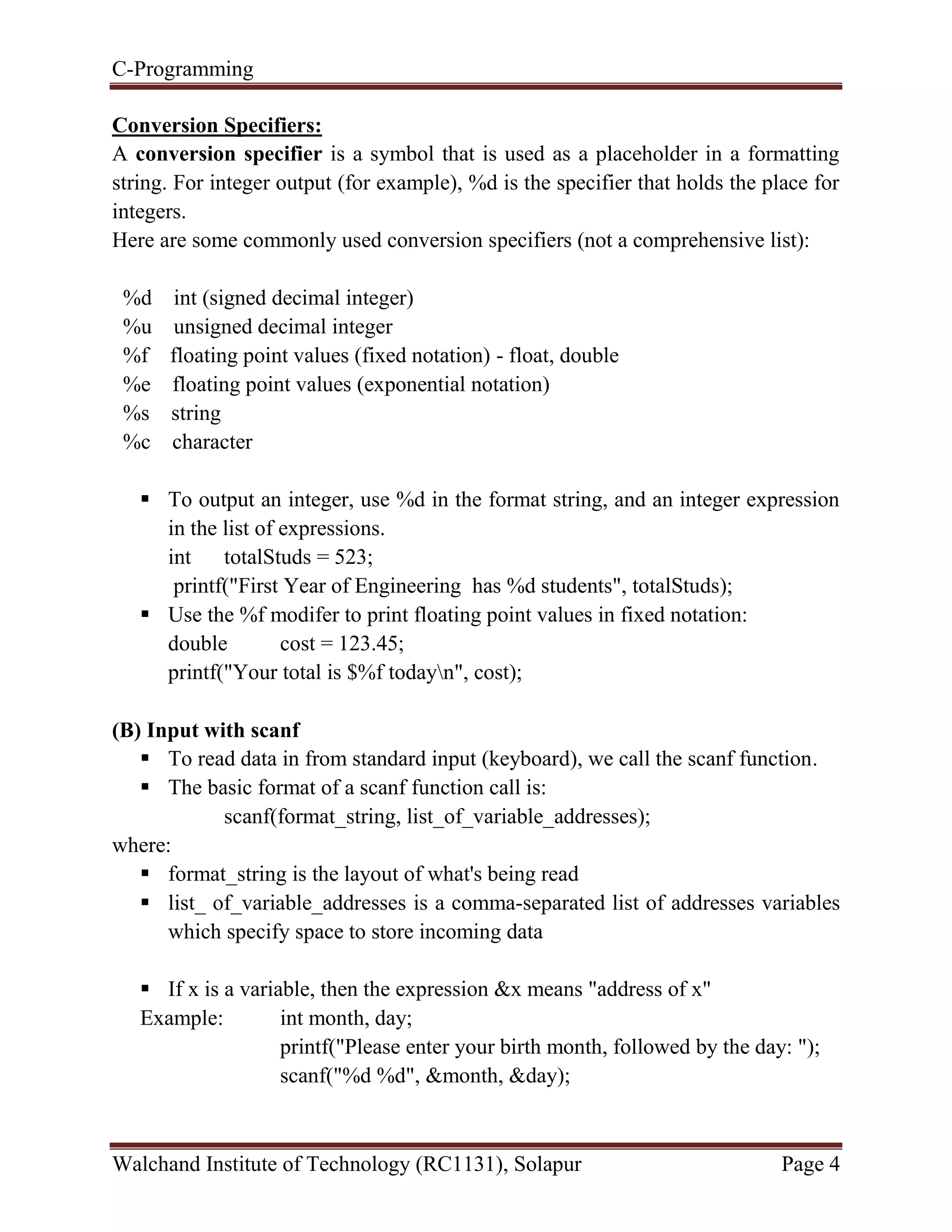
Conversion Specifiers:
A conversion specifier is a symbol that is used as a placeholder in a formatting
string. For integer output (for example), %d is the specifier that holds the place for
integers.
Here are some commonly used conversion specifiers (not a comprehensive list):
%d int (signed decimal integer)
%u unsigned decimal integer
%f floating point values (fixed notation) - float, double
%e floating point values (exponential notation)
%s string
%c character
 To output an integer, use %d in the format string, and an integer expression
in the list of expressions.
int totalStuds = 523;
printf("First Year of Engineering has %d students", totalStuds);
 Use the %f modifer to print floating point values in fixed notation:
double cost = 123.45;
printf("Your total is $%f todayn", cost);
(B) Input with scanf
 To read data in from standard input (keyboard), we call the scanf function.
 The basic format of a scanf function call is:
scanf(format_string, list_of_variable_addresses);
where:
 format_string is the layout of what's being read
 list_ of_variable_addresses is a comma-separated list of addresses variables
which specify space to store incoming data
 If x is a variable, then the expression &x means "address of x"
Example: int month, day;
printf("Please enter your birth month, followed by the day: ");
scanf("%d %d", &month, &day);
C-Programming
Walchand Institute of Technology (RC1131), Solapur Page 5
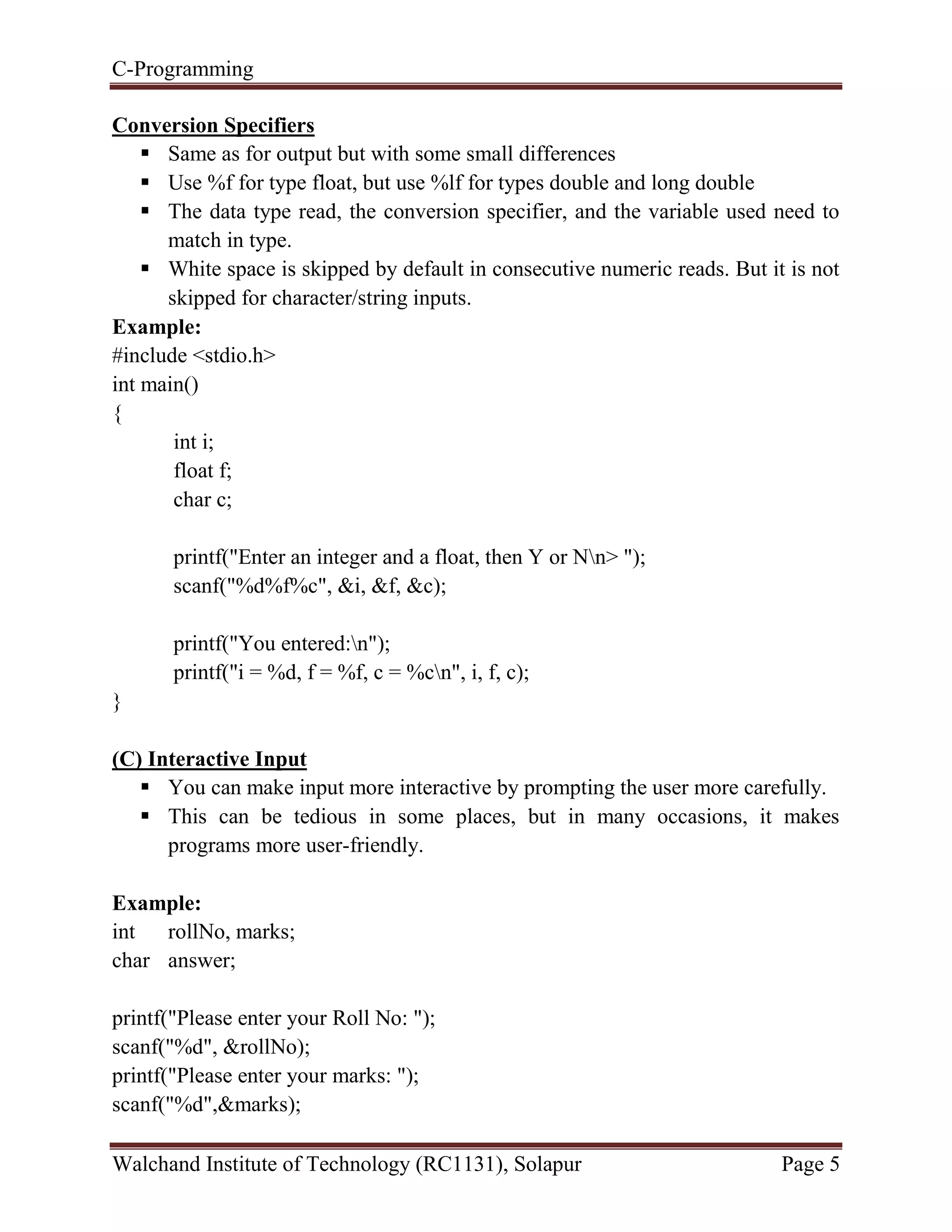
Conversion Specifiers
 Same as for output but with some small differences
 Use %f for type float, but use %lf for types double and long double
 The data type read, the conversion specifier, and the variable used need to
match in type.
 White space is skipped by default in consecutive numeric reads. But it is not
skipped for character/string inputs.
Example:
#include <stdio.h>
int main()
{
int i;
float f;
char c;
printf("Enter an integer and a float, then Y or Nn> ");
scanf("%d%f%c", &i, &f, &c);
printf("You entered:n");
printf("i = %d, f = %f, c = %cn", i, f, c);
}
(C) Interactive Input
 You can make input more interactive by prompting the user more carefully.
 This can be tedious in some places, but in many occasions, it makes
programs more user-friendly.
Example:
int rollNo, marks;
char answer;
printf("Please enter your Roll No: ");
scanf("%d", &rollNo);
printf("Please enter your marks: ");
scanf("%d",&marks);
C-Programming
Walchand Institute of Technology (RC1131), Solapur Page 6
printf("Do you want to continue (Y/N)? ");
scanf("%c",&answer);
[III] clrscr() function in C:
 It is built-in function in "conio.h" (console input output header file) used to
clear the console screen.
 It is used to clear the data from console (Monitor).
 Use of clrscr() function is always optional.
 This function should be place after variable or function declaration only.
[Reference: www.tutorial4us.com/cprogramming/c-clrscr-and-getch ]
[IV] getch() function in C:
 It is built-in function available under in "conio.h" (console input output
header file) will tell to the console wait for some time until a key is hit given
after running of program.
 This function can be used to read a character directly from the keyboard.
 Generally getch() are placing at end of the program after printing the output
on screen.
[Reference: www.tutorial4us.com/cprogramming/c-clrscr-and-getch ]
Example:
#include<stdio.h>
void main()
{
int rollNo, marks;
clrscr();
printf("Please enter your Roll No: ");
scanf("%d", &rollNo);
printf("Please enter your marks: ");
scanf("%d",&marks);
getch();
}
C-Programming
Walchand Institute of Technology (RC1131), Solapur Page 7
Practice Problem Statements:
[Note: In following programs make use of clrscr() and getch() functions]
1) Write a program demonstrating scanf() function for addition of two numbers.
2) Write a program to read five subjects (Maths, BECP, Chemistry, Basic Civil &
Engineering Graphics) marks and display the average, percentage & total marks in
the following format
----------------------------------------------------------------------------------------
INPUT: Entered Marks
Maths : 85
BECP : 90
Chemistry : 80
Basic Civil : 75
Engineering Graphics : 92
---------------------------------------------------------------------------------------
OUTPUT:
Total Marks : 422
Average : 84.4
Percentage : 84.4%
----------------------------------------------------------------------------------------
Conclusion:
Thus we have studies the basic structure of C program, basic functions in C such as
printf to print and scanf to read. To clear screen, clrsrc() in C and to read key input
from keyboard getch(), we studied.
Learning Outcomes:
At the end of this assignment, students are able to
- explain basic structure of C program
- explain printf, scanf, clrsrc() and getch() functions in C
- write C code using formatted input functions in C (i.e. scanf)
- write C code using formatted output functions in C (i.e. printf)

CP Handout#2

  • 1.
    C-Programming Walchand Institute ofTechnology (RC1131), Solapur Page 1 Handout#2 Assignment/Program Statement: Study basic structure of C program and write C programs using formatted input- output functions, clrscr() function and getch() function in C. Learning Objectives: Students will be able to - explain basic structure of C program - explain printf, scanf, clrsrc() and getch() functions in C - write C code using formatted input functions in C (i.e. scanf) - write C code using formatted output functions in C (i.e. printf) Theory: [I] Basic Structure of C Program Documentation Section  This section consists of comment lines which include the name of programmer, the author and other details like time and date of writing the program.
  • 2.
    C-Programming Walchand Institute ofTechnology (RC1131), Solapur Page 2  Documentation section helps anyone to get an overview of the program. Link Section  The link section consists of the header files of the functions that are used in the program.  It provides instructions to the compiler to link functions from the system library. Definition Section  All the symbolic constants are written in definition section.  Macros are known as symbolic constants. Global Declaration Section  The global variables that can be used anywhere in the program are declared in global declaration section.  This section also declares the user defined functions. main() Function Section  It is necessary have one main() function section in every C program.  This section contains two parts, declaration and executable part.  The declaration part declares all the variables that are used in executable part.  These two parts must be written in between the opening and closing braces.  Each statement in the declaration and executable part must end with a semicolon (;).  The execution of program starts at opening braces and ends at closing braces. Subprogram Section  The subprogram section contains all the user defined functions that are used to perform a specific task.  These user defined functions are called in the main() function. [Reference: http://www.thecrazyprogrammer.com/2013/07/explain-basic-structure-of-c- programs.html ]
  • 3.
    C-Programming Walchand Institute ofTechnology (RC1131), Solapur Page 3 Sample C Program: #include<stdio.h> #include<conio.h> void main() { clrscr(); printf(“Hello World”); getch(); } [II] Basics of Formatted Input/Output in C (A) Output with printf  The basic format of a printf function call is: printf (format_string, list_of_expressions); where:  format_string is the layout of what's being printed  list_of_expressions is a comma-separated list of variables or expressions yielding results to be inserted into the output To output string literals, just use one parameter on printf, the string itself printf("Hello, world!n"); printf("Greetings, Earthlingnn"); Sample C Program: #include<stdio.h> #include<conio.h> void main() { clrscr(); printf(“Hello World”); getch(); } Header files required to use built-in functions in C main() function in C-program C-function to clear screen C-function to print statement on screen C-function to read a key from keyboard
  • 4.
    C-Programming Walchand Institute ofTechnology (RC1131), Solapur Page 4 Conversion Specifiers: A conversion specifier is a symbol that is used as a placeholder in a formatting string. For integer output (for example), %d is the specifier that holds the place for integers. Here are some commonly used conversion specifiers (not a comprehensive list): %d int (signed decimal integer) %u unsigned decimal integer %f floating point values (fixed notation) - float, double %e floating point values (exponential notation) %s string %c character  To output an integer, use %d in the format string, and an integer expression in the list of expressions. int totalStuds = 523; printf("First Year of Engineering has %d students", totalStuds);  Use the %f modifer to print floating point values in fixed notation: double cost = 123.45; printf("Your total is $%f todayn", cost); (B) Input with scanf  To read data in from standard input (keyboard), we call the scanf function.  The basic format of a scanf function call is: scanf(format_string, list_of_variable_addresses); where:  format_string is the layout of what's being read  list_ of_variable_addresses is a comma-separated list of addresses variables which specify space to store incoming data  If x is a variable, then the expression &x means "address of x" Example: int month, day; printf("Please enter your birth month, followed by the day: "); scanf("%d %d", &month, &day);
  • 5.
    C-Programming Walchand Institute ofTechnology (RC1131), Solapur Page 5 Conversion Specifiers  Same as for output but with some small differences  Use %f for type float, but use %lf for types double and long double  The data type read, the conversion specifier, and the variable used need to match in type.  White space is skipped by default in consecutive numeric reads. But it is not skipped for character/string inputs. Example: #include <stdio.h> int main() { int i; float f; char c; printf("Enter an integer and a float, then Y or Nn> "); scanf("%d%f%c", &i, &f, &c); printf("You entered:n"); printf("i = %d, f = %f, c = %cn", i, f, c); } (C) Interactive Input  You can make input more interactive by prompting the user more carefully.  This can be tedious in some places, but in many occasions, it makes programs more user-friendly. Example: int rollNo, marks; char answer; printf("Please enter your Roll No: "); scanf("%d", &rollNo); printf("Please enter your marks: "); scanf("%d",&marks);
  • 6.
    C-Programming Walchand Institute ofTechnology (RC1131), Solapur Page 6 printf("Do you want to continue (Y/N)? "); scanf("%c",&answer); [III] clrscr() function in C:  It is built-in function in "conio.h" (console input output header file) used to clear the console screen.  It is used to clear the data from console (Monitor).  Use of clrscr() function is always optional.  This function should be place after variable or function declaration only. [Reference: www.tutorial4us.com/cprogramming/c-clrscr-and-getch ] [IV] getch() function in C:  It is built-in function available under in "conio.h" (console input output header file) will tell to the console wait for some time until a key is hit given after running of program.  This function can be used to read a character directly from the keyboard.  Generally getch() are placing at end of the program after printing the output on screen. [Reference: www.tutorial4us.com/cprogramming/c-clrscr-and-getch ] Example: #include<stdio.h> void main() { int rollNo, marks; clrscr(); printf("Please enter your Roll No: "); scanf("%d", &rollNo); printf("Please enter your marks: "); scanf("%d",&marks); getch(); }
  • 7.
    C-Programming Walchand Institute ofTechnology (RC1131), Solapur Page 7 Practice Problem Statements: [Note: In following programs make use of clrscr() and getch() functions] 1) Write a program demonstrating scanf() function for addition of two numbers. 2) Write a program to read five subjects (Maths, BECP, Chemistry, Basic Civil & Engineering Graphics) marks and display the average, percentage & total marks in the following format ---------------------------------------------------------------------------------------- INPUT: Entered Marks Maths : 85 BECP : 90 Chemistry : 80 Basic Civil : 75 Engineering Graphics : 92 --------------------------------------------------------------------------------------- OUTPUT: Total Marks : 422 Average : 84.4 Percentage : 84.4% ---------------------------------------------------------------------------------------- Conclusion: Thus we have studies the basic structure of C program, basic functions in C such as printf to print and scanf to read. To clear screen, clrsrc() in C and to read key input from keyboard getch(), we studied. Learning Outcomes: At the end of this assignment, students are able to - explain basic structure of C program - explain printf, scanf, clrsrc() and getch() functions in C - write C code using formatted input functions in C (i.e. scanf) - write C code using formatted output functions in C (i.e. printf)