Diogo Gomesdgomes@ua.ptDiogo Gomes<dgomes@ua.pt>
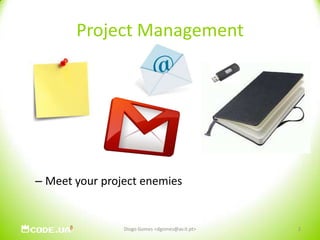
Project ManagementMeet your project enemiesDiogo Gomes <dgomes@av.it.pt>2
Managing ProjectsWhere do you keep issues/to-do’s ?Email ?Excel Sheets ?Post-it’sWhat about documentationWord documentHow do you handle collaboration ?!Diogo Gomes <dgomes@av.it.pt>3
Managing FilesExchanging files, code, docsEmail ?FTP ?USB sticks ?!BackupsRenaming files (v1, v2, very old, backup, bck)Multiple foldersExternal device (USB stick, USB disk)Diogo Gomes <dgomes@av.it.pt>4
SolutionsSoftware tools can help:Track iterationsOrganize DocumentationOrganize Data/CodeCollaborateDiogo Gomes <dgomes@av.it.pt>5
Project ManagementInnumerous ToolsMS Project, Trac, *Forge, Redmine, Google CodeFunctionalitiesCollaboration (wiki’s, mailing lists, forum’s)Issue TrackingTime PlanningPortfolioResources ManagementDocumentation Management6Diogo Gomes <dgomes@av.it.pt>
WikiIt’s a set of interlinked web pages created using a simplified markup languageEnables cooperative editing of documentationAnyone can edit!Navigation is usually chaotic, but provides a better mapping of relationship between subjects.Diogo Gomes <dgomes@av.it.pt>7
Issue Trackingtrouble ticket system, support ticket or incident ticket system can overlap with bug trackerSystematic approach to problem solvingEnables efficient tracking of progressProvides the means to monitor and coordinate a project progressDiogo Gomes <dgomes@av.it.pt>8
Source Code Management (SCM)don’t worry about overwriting files or losing code. keep a constant history of every file in your project. view the changes to specific code, review with your team, and even roll back changes to previous versions. Diogo Gomes <dgomes@av.it.pt>9
Benefits of SCM’sImproves team collaboration. Many people can update the same files without the risk of overwriting each others work.Can provide a constant backup of your files in a central location, where you can share changes and updates with team members. Diogo Gomes <dgomes@av.it.pt>10
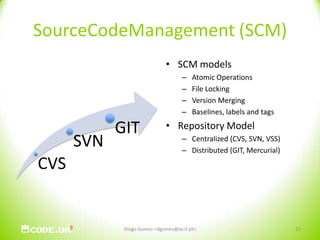
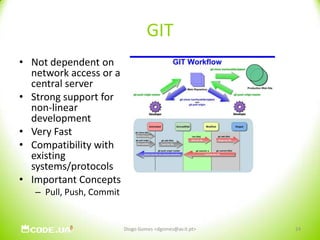
SourceCodeManagement (SCM)SCM modelsAtomic OperationsFile LockingVersion MergingBaselines, labels and tagsRepository ModelCentralized (CVS, SVN, VSS)Distributed (GIT, Mercurial)11Diogo Gomes <dgomes@av.it.pt>
CodeUAObjectivesProvide the academic community a tool that can assist in software project management.Research (IEETA, IT)Classes (ARA, Eng. Software, Eng. Serviços, FR, P*, etc)To allow both public and private projectsTo gather all efforts under a single entity/toolMultiplatform Solution (Windows, Linux, OSX)Integrated with the university remaining services (SSO)OpportunitiesTo provide students experience using software and project management toolsUsage of the tool in order to track grad-students progressMass software collection tool Platform used: Redmine + SVN (WIP: GIT)12Diogo Gomes <dgomes@av.it.pt>
Redminehttp://www.redmine.org/Main featuresMultiple project supportFlexible access control systemIssue trackingDocument ManagementRSS and E-Mail notificationPer Project Wiki’s and Forum’sTime Management including Gantt graph generationEasy integration of several SCM’s (eg: SVN, CVS, Git)New functionalities can be introduced through PluginsBuilt on Ruby-on-Rails (RoR) (Mongrel + MySQL)13Diogo Gomes <dgomes@av.it.pt>
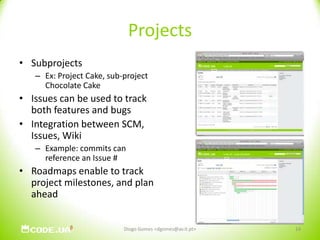
ProjectsSubprojectsEx: Project Cake, sub-project Chocolate CakeIssues can be used to track both features and bugsIntegration between SCM, Issues, WikiExample: commits can reference an Issue #Roadmaps enable to track project milestones, and plan ahead14Diogo Gomes <dgomes@av.it.pt>
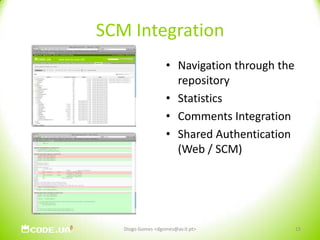
SCM IntegrationNavigation through the repositoryStatistics Comments IntegrationShared Authentication (Web / SCM)15Diogo Gomes <dgomes@av.it.pt>
SVNHow can I use SVN?Client SoftwareWindows: TortoiseSVNLinux: Use the cmdlineOSX: VersionsCreate your projectCodeUAGoogle CodeSourceForgeDiogo Gomes <dgomes@av.it.pt>16
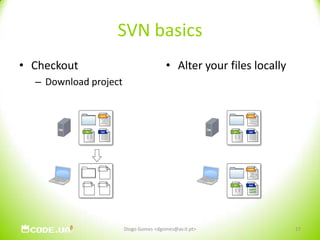
SVN basicsCheckoutDownload projectAlter your files locallyDiogo Gomes <dgomes@av.it.pt>17
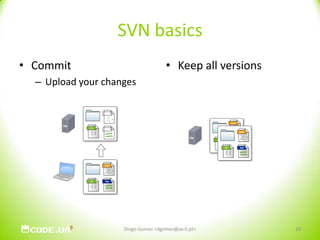
SVN basicsCommitUpload your changesKeep all versionsDiogo Gomes <dgomes@av.it.pt>18
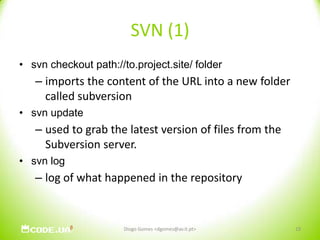
SVN (1)svn checkout path://to.project.site/ folderimports the content of the URL into a new folder called subversionsvn updateused to grab the latest version of files from the Subversion server. svn loglog of what happened in the repositoryDiogo Gomes <dgomes@av.it.pt>19
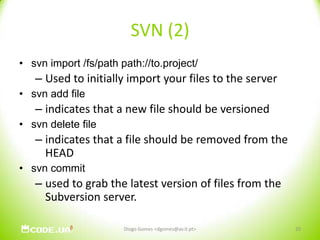
SVN (2)svn import /fs/path path://to.project/ Used to initially import your files to the serversvn add fileindicates that a new file should be versionedsvn delete fileindicates that a file should be removed from the HEADsvn commitused to grab the latest version of files from the Subversion server. Diogo Gomes <dgomes@av.it.pt>20
SVN (3)svn diff filewhat have I done compared with the repository svn blame filewho did which change to the filesvn statusshows the things that have changed in your working copy. Diogo Gomes <dgomes@av.it.pt>21
WalkThroughhttps://code.ua.pt22Diogo Gomes <dgomes@av.it.pt>
WalkThroughLoginListagem de projectos (publicos vs privados)Criação de um projectoDefinição de RolesCriação de IssuesEdição do WikiCheckout via SVN23Diogo Gomes <dgomes@av.it.pt>

Conversas 2.0@sapo.labs - "svn+code.ua"

  • 1.
  • 2.
    Project ManagementMeet yourproject enemiesDiogo Gomes <dgomes@av.it.pt>2
  • 3.
    Managing ProjectsWhere doyou keep issues/to-do’s ?Email ?Excel Sheets ?Post-it’sWhat about documentationWord documentHow do you handle collaboration ?!Diogo Gomes <dgomes@av.it.pt>3
  • 4.
    Managing FilesExchanging files,code, docsEmail ?FTP ?USB sticks ?!BackupsRenaming files (v1, v2, very old, backup, bck)Multiple foldersExternal device (USB stick, USB disk)Diogo Gomes <dgomes@av.it.pt>4
  • 5.
    SolutionsSoftware tools canhelp:Track iterationsOrganize DocumentationOrganize Data/CodeCollaborateDiogo Gomes <dgomes@av.it.pt>5
  • 6.
    Project ManagementInnumerous ToolsMSProject, Trac, *Forge, Redmine, Google CodeFunctionalitiesCollaboration (wiki’s, mailing lists, forum’s)Issue TrackingTime PlanningPortfolioResources ManagementDocumentation Management6Diogo Gomes <dgomes@av.it.pt>
  • 7.
    WikiIt’s a setof interlinked web pages created using a simplified markup languageEnables cooperative editing of documentationAnyone can edit!Navigation is usually chaotic, but provides a better mapping of relationship between subjects.Diogo Gomes <dgomes@av.it.pt>7
  • 8.
    Issue Trackingtrouble ticketsystem, support ticket or incident ticket system can overlap with bug trackerSystematic approach to problem solvingEnables efficient tracking of progressProvides the means to monitor and coordinate a project progressDiogo Gomes <dgomes@av.it.pt>8
  • 9.
    Source Code Management(SCM)don’t worry about overwriting files or losing code. keep a constant history of every file in your project. view the changes to specific code, review with your team, and even roll back changes to previous versions. Diogo Gomes <dgomes@av.it.pt>9
  • 10.
    Benefits of SCM’sImprovesteam collaboration. Many people can update the same files without the risk of overwriting each others work.Can provide a constant backup of your files in a central location, where you can share changes and updates with team members. Diogo Gomes <dgomes@av.it.pt>10
  • 11.
    SourceCodeManagement (SCM)SCM modelsAtomicOperationsFile LockingVersion MergingBaselines, labels and tagsRepository ModelCentralized (CVS, SVN, VSS)Distributed (GIT, Mercurial)11Diogo Gomes <dgomes@av.it.pt>
  • 12.
    CodeUAObjectivesProvide the academiccommunity a tool that can assist in software project management.Research (IEETA, IT)Classes (ARA, Eng. Software, Eng. Serviços, FR, P*, etc)To allow both public and private projectsTo gather all efforts under a single entity/toolMultiplatform Solution (Windows, Linux, OSX)Integrated with the university remaining services (SSO)OpportunitiesTo provide students experience using software and project management toolsUsage of the tool in order to track grad-students progressMass software collection tool Platform used: Redmine + SVN (WIP: GIT)12Diogo Gomes <dgomes@av.it.pt>
  • 13.
    Redminehttp://www.redmine.org/Main featuresMultiple projectsupportFlexible access control systemIssue trackingDocument ManagementRSS and E-Mail notificationPer Project Wiki’s and Forum’sTime Management including Gantt graph generationEasy integration of several SCM’s (eg: SVN, CVS, Git)New functionalities can be introduced through PluginsBuilt on Ruby-on-Rails (RoR) (Mongrel + MySQL)13Diogo Gomes <dgomes@av.it.pt>
  • 14.
    ProjectsSubprojectsEx: Project Cake,sub-project Chocolate CakeIssues can be used to track both features and bugsIntegration between SCM, Issues, WikiExample: commits can reference an Issue #Roadmaps enable to track project milestones, and plan ahead14Diogo Gomes <dgomes@av.it.pt>
  • 15.
    SCM IntegrationNavigation throughthe repositoryStatistics Comments IntegrationShared Authentication (Web / SCM)15Diogo Gomes <dgomes@av.it.pt>
  • 16.
    SVNHow can Iuse SVN?Client SoftwareWindows: TortoiseSVNLinux: Use the cmdlineOSX: VersionsCreate your projectCodeUAGoogle CodeSourceForgeDiogo Gomes <dgomes@av.it.pt>16
  • 17.
    SVN basicsCheckoutDownload projectAlteryour files locallyDiogo Gomes <dgomes@av.it.pt>17
  • 18.
    SVN basicsCommitUpload yourchangesKeep all versionsDiogo Gomes <dgomes@av.it.pt>18
  • 19.
    SVN (1)svn checkoutpath://to.project.site/ folderimports the content of the URL into a new folder called subversionsvn updateused to grab the latest version of files from the Subversion server. svn loglog of what happened in the repositoryDiogo Gomes <dgomes@av.it.pt>19
  • 20.
    SVN (2)svn import/fs/path path://to.project/ Used to initially import your files to the serversvn add fileindicates that a new file should be versionedsvn delete fileindicates that a file should be removed from the HEADsvn commitused to grab the latest version of files from the Subversion server. Diogo Gomes <dgomes@av.it.pt>20
  • 21.
    SVN (3)svn difffilewhat have I done compared with the repository svn blame filewho did which change to the filesvn statusshows the things that have changed in your working copy. Diogo Gomes <dgomes@av.it.pt>21
  • 22.
  • 23.
    WalkThroughLoginListagem de projectos(publicos vs privados)Criação de um projectoDefinição de RolesCriação de IssuesEdição do WikiCheckout via SVN23Diogo Gomes <dgomes@av.it.pt>