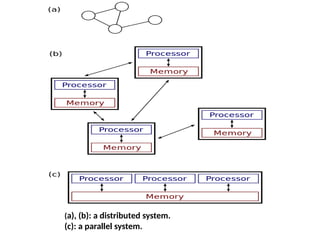
(a), (b): adistributed system.
(c): a parallel system.
6.
Ways of DistributedSystems
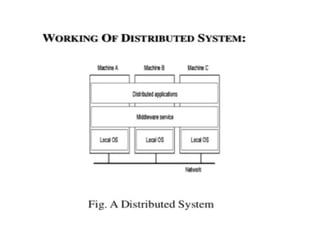
• Distributed Computing System :The distributed
system is used in performance computation which
requires high computing.
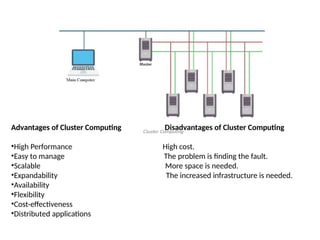
• Cluster Computing: Cluster Computing is a collection
of connected computers that work together as a unit
to perform operations together, functioning in a
single system.
• Clusters are generally connected quickly via local
area networks & each node is running the same
operating system.
7.
Cluster Continued…
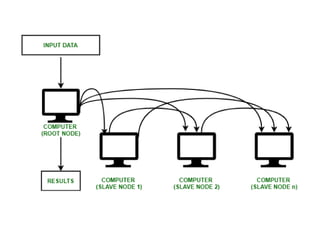
• Wheninput comes from a client to the main
computer, the master CPU divides the task
into simple jobs and sends it to the slave note
to do it when the jobs are done by the slave
nodes, they send it back to the master node,
and then it shows the result to the main
computer.
8.
Advantages of ClusterComputing Disadvantages of Cluster Computing
•High Performance High cost.
•Easy to manage The problem is finding the fault.
•Scalable More space is needed.
•Expandability The increased infrastructure is needed.
•Availability
•Flexibility
•Cost-effectiveness
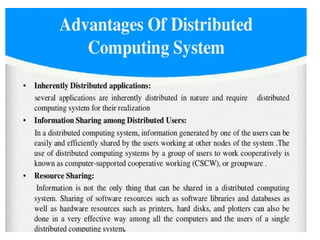
•Distributed applications
10.
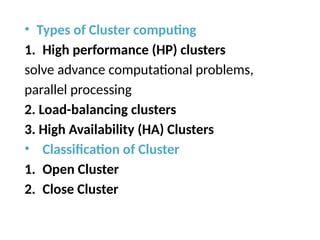
• Types ofCluster computing
1. High performance (HP) clusters
solve advance computational problems,
parallel processing
2. Load-balancing clusters
3. High Availability (HA) Clusters
• Classification of Cluster
1. Open Cluster
2. Close Cluster
11.
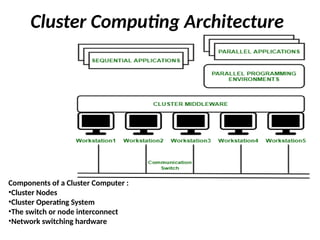
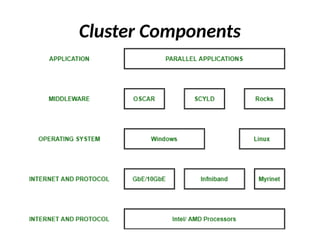
Cluster Computing Architecture
Componentsof a Cluster Computer :
•Cluster Nodes
•Cluster Operating System
•The switch or node interconnect
•Network switching hardware
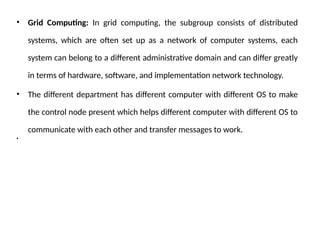
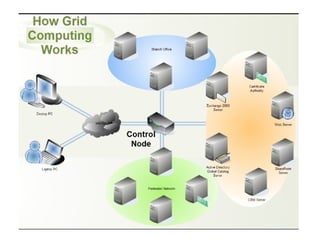
• Grid Computing:In grid computing, the subgroup consists of distributed
systems, which are often set up as a network of computer systems, each
system can belong to a different administrative domain and can differ greatly
in terms of hardware, software, and implementation network technology.
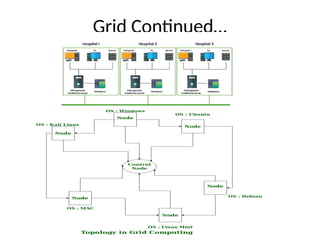
• The different department has different computer with different OS to make
the control node present which helps different computer with different OS to
communicate with each other and transfer messages to work.
•
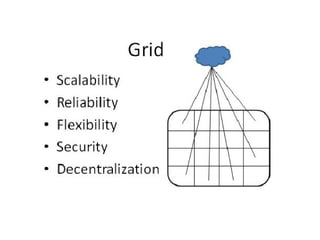
• Grid Advantages
–Offers a cost effective solution & ability to use many
resources.
– Saves money & resources by utilising the power of idle
computers.
– Can solve bigger and more complex problems in a shorter
time frame. Easier collaboration with other organizations
and better use of existing equipment.
• Disadvantages of Grid Computing
– Non-interactive job submission.
– Licensing on many servers can be prohibitive for some
applications.
– You may need a fast connection between computer
resources.
19.
Distributed Information System
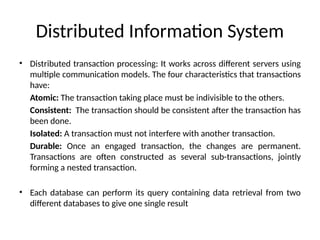
•Distributed transaction processing: It works across different servers using
multiple communication models. The four characteristics that transactions
have:
Atomic: The transaction taking place must be indivisible to the others.
Consistent: The transaction should be consistent after the transaction has
been done.
Isolated: A transaction must not interfere with another transaction.
Durable: Once an engaged transaction, the changes are permanent.
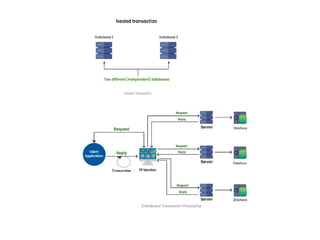
Transactions are often constructed as several sub-transactions, jointly
forming a nested transaction.
• Each database can perform its query containing data retrieval from two
different databases to give one single result
21.
• In thecompany’s middleware systems, the
component that manages distributed (or nested)
transactions has formed the application integration
core at the server or database. This was referred to
as the Transaction Processing Monitor(TP Monitor).
• Its main task is to allow an application to access
multiple servers/databases by providing a
transactional programming model.
• Many requests are sent to the database to get the
result, to ensure each request gets successfully
executed and deliver result to each request, this
work is handled by the TP Monitor.
22.
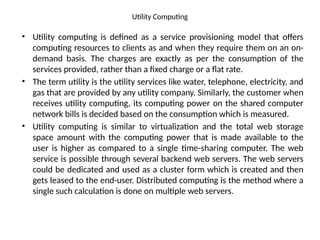
Utility Computing
• Utilitycomputing is defined as a service provisioning model that offers
computing resources to clients as and when they require them on an on-
demand basis. The charges are exactly as per the consumption of the
services provided, rather than a fixed charge or a flat rate.
• The term utility is the utility services like water, telephone, electricity, and
gas that are provided by any utility company. Similarly, the customer when
receives utility computing, its computing power on the shared computer
network bills is decided based on the consumption which is measured.
• Utility computing is similar to virtualization and the total web storage
space amount with the computing power that is made available to the
user is higher as compared to a single time-sharing computer. The web
service is possible through several backend web servers. The web servers
could be dedicated and used as a cluster form which is created and then
gets leased to the end-user. Distributed computing is the method where a
single such calculation is done on multiple web servers.
23.
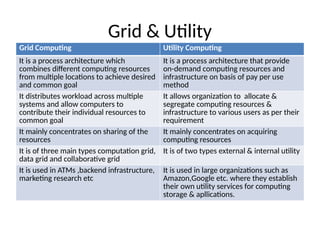
Grid & Utility
GridComputing Utility Computing
It is a process architecture which
combines different computing resources
from multiple locations to achieve desired
and common goal
It is a process architecture that provide
on-demand computing resources and
infrastructure on basis of pay per use
method
It distributes workload across multiple
systems and allow computers to
contribute their individual resources to
common goal
It allows organization to allocate &
segregate computing resources &
infrastructure to various users as per their
requirement
It mainly concentrates on sharing of the
resources
It mainly concentrates on acquiring
computing resources
It is of three main types computation grid,
data grid and collaborative grid
It is of two types external & internal utility
It is used in ATMs ,backend infrastructure,
marketing research etc
It is used in large organizations such as
Amazon,Google etc. where they establish
their own utility services for computing
storage & apllications.
28.
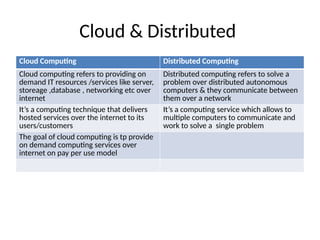
Cloud & Distributed
CloudComputing Distributed Computing
Cloud computing refers to providing on
demand IT resources /services like server,
storeage ,database , networking etc over
internet
Distributed computing refers to solve a
problem over distributed autonomous
computers & they communicate between
them over a network
It’s a computing technique that delivers
hosted services over the internet to its
users/customers
It’s a computing service which allows to
multiple computers to communicate and
work to solve a single problem
The goal of cloud computing is tp provide
on demand computing services over
internet on pay per use model
30.
What is CloudComputing?
• Cloud computing is the delivery of computing
services—including servers, storage, databases,
networking, software, analytics, and intelligence—
over the Internet (“the cloud”) to offer faster
innovation, flexible resources, and economies of
scale.
• Cloud computing is a general term for the delivery
of hosted computing services and IT resources
over the internet with pay-as-you-go pricing.
31.
How does cloudcomputing work?
• Cloud computing lets client devices access
rented computing resources, such as data,
analytics and cloud applications over the
internet.
• It relies on a network of remote data centers,
servers and storage systems that are owned
and operated by cloud service providers.
32.
Following steps areinvolved in cloud computing:
• An internet network connection links the front end -- the
accessing client device, browser, network and cloud software
applications -- with the back end, which consists of
databases, servers, operating systems and computers.
• The back end functions as a repository, storing data accessed
by the front end.
• A central server manages communications between the front
and back ends. It relies on protocols to facilitate the
exchange of data. The central server uses both software and
middleware to manage connectivity between different client
devices and cloud servers.
• Typically, there's a dedicated server for each application or
workload.
33.
• Cloud computingrelies heavily on virtualization and
automation technologies. Virtualization lets IT
organizations create virtual instances of servers, storage
and other resources that let multiple VMs or cloud
environments run on a single physical server using
software known as a hypervisor.
• This simplifies the abstraction and provisioning of cloud
resources into logical entities, letting users easily request
and use these resources. Automation and accompanying
orchestration capabilities provide users with a high
degree of self-service to provision resources, connect
services and deploy workloads without direct
intervention from the cloud provider's IT staff.
35.
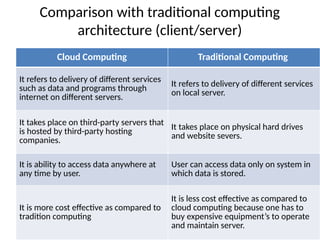
Comparison with traditionalcomputing
architecture (client/server)
Cloud Computing Traditional Computing
It refers to delivery of different services
such as data and programs through
internet on different servers.
It refers to delivery of different services
on local server.
It takes place on third-party servers that
is hosted by third-party hosting
companies.
It takes place on physical hard drives
and website severs.
It is ability to access data anywhere at
any time by user.
User can access data only on system in
which data is stored.
It is more cost effective as compared to
tradition computing
It is less cost effective as compared to
cloud computing because one has to
buy expensive equipment’s to operate
and maintain server.
36.
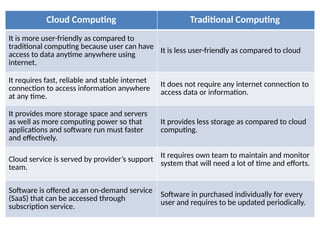
Cloud Computing TraditionalComputing
It is more user-friendly as compared to
traditional computing because user can have
access to data anytime anywhere using
internet.
It is less user-friendly as compared to cloud
It requires fast, reliable and stable internet
connection to access information anywhere
at any time.
It does not require any internet connection to
access data or information.
It provides more storage space and servers
as well as more computing power so that
applications and software run must faster
and effectively.
It provides less storage as compared to cloud
computing.
Cloud service is served by provider’s support
team.
It requires own team to maintain and monitor
system that will need a lot of time and efforts.
Software is offered as an on-demand service
(SaaS) that can be accessed through
subscription service.
Software in purchased individually for every
user and requires to be updated periodically.
38.
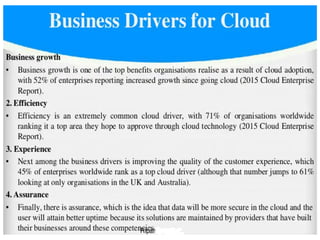
• Business Driversfor Cloud
• Capacity Planning
1. Level of Demand
2. Cost of Production
3. Availability of Funds
• Cost Reduction
• Organizational Agility
• Role of Open Standards