Open Source Open Source 
Computer VisionComputer Vision
for your projectsfor your projects
Marian HackMan Marinov <mm@siteground.com>
Who am I?
● Chief System Architect of
● I teach Network Security and Linux System
Administration
Why am I talking about computer vision?
I have a car :)
I have a car :)
I have a Raspberry Pi
I have a car :)
I have a Raspberry Pi
I know programming
So what did I wanted?
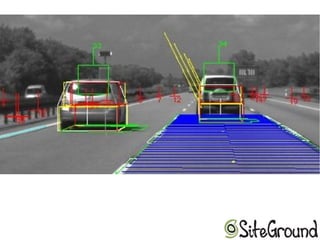
➢ Car High/Low beams detection
➢ Car detection
➢ Car High/Low beams detection
➢ Car detection
➢ brand
➢ Car High/Low beams detection
➢ Car detection
➢ brand
➢ position
why position?
➢ Car High/Low beams detection
➢ Car detection
➢ brand
➢ position
why position?
➢ to point the LIDAR in that direction and get
the distance to that car
➢ Car High/Low beams detection
➢ Car detection
➢ brand
➢ position
why position?
➢ to point the LIDAR in that direction and get
the distance to that car
➢ Traffic signs detection
How I started all that?
➢ NO GOOGLE was involved in these steps :)
How I started all that?
➢ NO GOOGLE was involved in these steps :)
➢ ffmpeg for grabbing frames from rtsp stream
How I started all that?
➢ NO GOOGLE was involved in these steps :)
➢ ffmpeg for grabbing frames from rtsp stream
➢ ImageMagick for converting them to grayscale
How I started all that?
➢ NO GOOGLE was involved in these steps :)
➢ ffmpeg for grabbing frames from rtsp stream
➢ ImageMagick for converting them to grayscale
➢ Then read the docs of ffmpeg and used it for
grayscale
How I started all that?
➢ NO GOOGLE was involved in these steps :)
➢ ffmpeg for grabbing frames from rtsp stream
➢ ImageMagick for converting them to grayscale
➢ Then read the docs of ffmpeg and used it for
grayscale
➢ My own franken vision matrix analysis algorithm
Open Source computer vision
OpenCV - http://opencv.org
JeVois - started Jan.2017
What can you do with CV?
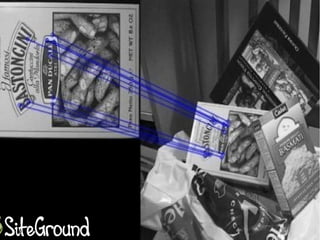
➢ Object detection
➢ Object detection
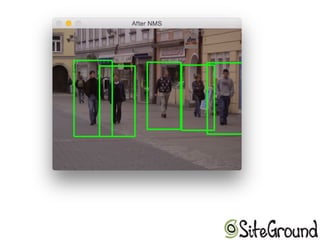
➢ Face recognition
➢ Object detection
➢ Face recognition
➢ Predefined shapes eg. square, triangle and
etc.
➢ Object detection
➢ Face recognition
➢ Predefined shapes eg. square, triangle and
etc.
➢ Pre-trained image, like apples, squirrels, dogs,
traffic signs and etc.
Now that you have CV...
How can you use it in your own projects?
 Detect a face
 call the secretary
do additional match for face recognitioning
 Detect lights
 turn off high beams
turn on street lights
 Detect an object
 alert the driver
 prevent the robot from hitting that object
trigger OCR over that part of the image
trigger OCR and store the car number
 Detect a gesture
 dim the lights
 turn on the heating
call a friend
turn on/off some device
How can you start?
➢ JeVois is a nice, easy way
➢ Raspbery Pi + Pi Camera
➢ JeVois is a nice, easy way
➢ Raspbery Pi + Pi Camera
➢ Home PC + USB camera
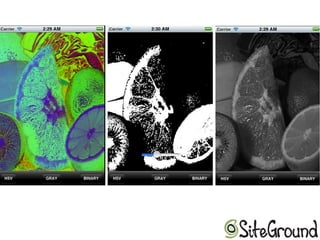
Some examples
Thank yoU!

Computer vision for your projects

  • 1.
  • 2.
    Who am I? ●Chief System Architect of ● I teach Network Security and Linux System Administration
  • 3.
    Why am Italking about computer vision?
  • 4.
    I have acar :)
  • 5.
    I have acar :) I have a Raspberry Pi
  • 6.
    I have acar :) I have a Raspberry Pi I know programming
  • 7.
    So what didI wanted?
  • 8.
    ➢ Car High/Lowbeams detection
  • 9.
    ➢ Car High/Lowbeams detection ➢ Car detection
  • 10.
    ➢ Car High/Lowbeams detection ➢ Car detection ➢ brand
  • 11.
    ➢ Car High/Lowbeams detection ➢ Car detection ➢ brand ➢ position why position?
  • 12.
    ➢ Car High/Lowbeams detection ➢ Car detection ➢ brand ➢ position why position? ➢ to point the LIDAR in that direction and get the distance to that car
  • 13.
    ➢ Car High/Lowbeams detection ➢ Car detection ➢ brand ➢ position why position? ➢ to point the LIDAR in that direction and get the distance to that car ➢ Traffic signs detection
  • 14.
    How I startedall that?
  • 15.
    How I startedall that? ➢ NO GOOGLE was involved in these steps :)
  • 16.
    How I startedall that? ➢ NO GOOGLE was involved in these steps :) ➢ ffmpeg for grabbing frames from rtsp stream
  • 17.
    How I startedall that? ➢ NO GOOGLE was involved in these steps :) ➢ ffmpeg for grabbing frames from rtsp stream ➢ ImageMagick for converting them to grayscale
  • 18.
    How I startedall that? ➢ NO GOOGLE was involved in these steps :) ➢ ffmpeg for grabbing frames from rtsp stream ➢ ImageMagick for converting them to grayscale ➢ Then read the docs of ffmpeg and used it for grayscale
  • 19.
    How I startedall that? ➢ NO GOOGLE was involved in these steps :) ➢ ffmpeg for grabbing frames from rtsp stream ➢ ImageMagick for converting them to grayscale ➢ Then read the docs of ffmpeg and used it for grayscale ➢ My own franken vision matrix analysis algorithm
  • 20.
    Open Source computervision OpenCV - http://opencv.org JeVois - started Jan.2017
  • 21.
    What can youdo with CV?
  • 22.
  • 23.
    ➢ Object detection ➢Face recognition
  • 24.
    ➢ Object detection ➢Face recognition ➢ Predefined shapes eg. square, triangle and etc.
  • 25.
    ➢ Object detection ➢Face recognition ➢ Predefined shapes eg. square, triangle and etc. ➢ Pre-trained image, like apples, squirrels, dogs, traffic signs and etc.
  • 26.
    Now that youhave CV... How can you use it in your own projects?
  • 27.
     Detect aface  call the secretary do additional match for face recognitioning
  • 28.
     Detect lights turn off high beams turn on street lights
  • 29.
     Detect anobject  alert the driver  prevent the robot from hitting that object trigger OCR over that part of the image trigger OCR and store the car number
  • 30.
     Detect agesture  dim the lights  turn on the heating call a friend turn on/off some device
  • 31.
  • 32.
    ➢ JeVois isa nice, easy way
  • 33.
    ➢ JeVois isa nice, easy way ➢ Raspbery Pi + Pi Camera
  • 34.
    ➢ JeVois isa nice, easy way ➢ Raspbery Pi + Pi Camera ➢ Home PC + USB camera
  • 35.
  • 40.