Computer
security
Prof. dr. Frederik Questier - Vrije Universiteit Brussel
Workshop for Lib@web 2015 - International Training Program @ University of Antwerp
Management of Electronic Information and Digital Libraries
This presentation can be found at
http://questier.com
http://www.slideshare.net/Frederik_Questier
Main objectives
of computer security
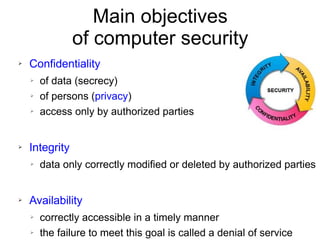
➢ Confidentiality
➢ of data (secrecy)
➢ of persons (privacy)
➢ access only by authorized parties
➢ Integrity
➢ data only correctly modified or deleted by authorized parties
➢ Availability
➢ correctly accessible in a timely manner
➢ the failure to meet this goal is called a denial of service
Assignment 1
personal computer security
➢ Throughout this workshop: write down all possible ways
how your personal computer system could be
compromised. What are the possible attack vectors?
Assignment 2:
institutional
data security
Congratulations!
You are elected member of the newly established
computer and data security team in your institution.
1) Make a list of all possible risks that can have an impact
on the security and stability of your data and internal
and external Information & Technology services.
2) Make a list of recommendations to lower the risks.
What can go wrong?
Nature
➢
lightning strike
➢
fire
➢
flood
➢
heat wave – cold wave
➢
storm weather, hurricane
➢
earthquake
➢
tsunami
➢
volcano eruption
➢
electro magnetic pulse from the sun
➢
disease of key employees
What can go wrong?
Evil actions by people
➢
break in (hackers - crackers)
➢
social engineering
➢
phishing
➢
(identity) theft
➢
vandalism
➢
unhappy employees
➢
sabotage (time bomb)
➢
cyber attack, e.g. (Distributed) Denial of Service
➢
terrorism
➢
war
➢
nuclear bomb
What can go wrong?
Malware (malicious software)
➢
virus
➢
worm
➢
trojan horse
➢
rootkit
➢
spyware
➢
ransomware
➢
keylogger
➢
network sniffer
➢
back door
➢
dialer
What can go wrong?
Infrastructure or services problems
➢
Failure of
➢
software (bugs)
➢
hardware
➢
electricity
➢
power outage or power surge
➢
network (cable cut – saturation)
➢
airconditioning
➢
water pipes –> leak
➢
system upgrades
➢
service providers (e.g. cloud)
➢
Overload of CPU, memory, storage, network (spam)
What can go wrong?
Human errors
➢
Weak security
➢
Loss of laptops, smartphones, USB-sticks, …
➢
No encryption
➢
Passwords leaks or cracks
➢
Computer console left unlocked
➢
Misunderstanding computer interface or other mistakes
➢
Deleting data
➢
Corrupting data
➢
Confiscation of machines
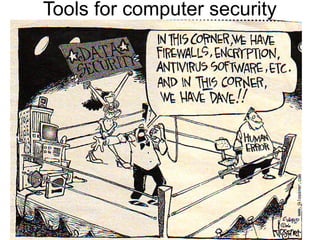
Tools for computer security
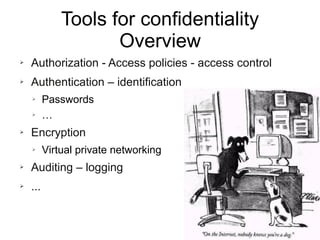
Tools for confidentiality
Overview
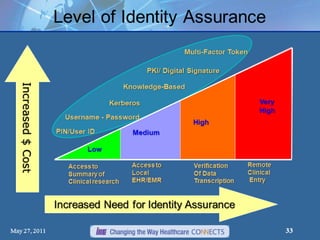
➢ Authorization - Access policies - access control
➢ Authentication – identification
➢ Passwords
➢ …
➢ Encryption
➢ Virtual private networking
➢ Auditing – logging
➢ ...
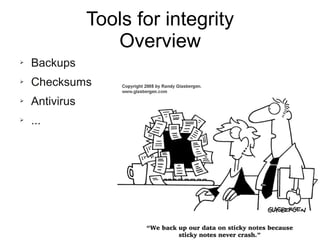
Tools for integrity
Overview
➢ Backups
➢ Checksums
➢ Antivirus
➢ ...
Tools for availability
Overview
➢ Disaster recovery planning
➢ Physical protections
➢ Anti-theft
➢ Uninterruptible Power Supply
➢ Redundancies
➢ Intrusion-detection systems
➢ Antivirus software
➢ Firewall
➢ ...
TOOLS FOR CONFIDENTIALITY
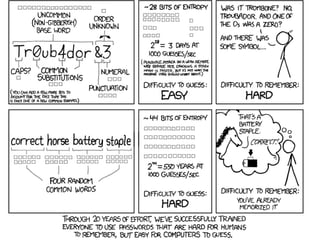
Passwords
➢ Don't share them
➢ Not even with computer administrators
➢ Don't write them down
➢ Don't reuse them among different sites
➢ Change them often
➢ Select wise:
➢ Easy to remember
➢ Hard to guess (resistant to dictionary attacks)
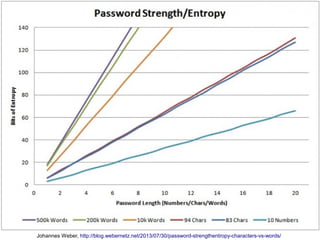
➢ Password length
➢ Large set of characters (caps, lower case, numbers, symbols)
Some notorious password leaks
➢ 2014: 5M Gmail passwords
➢ 2013: 38M Adobe passwords (and source code)
➢ 2013: 250K Twitter passwords
➢ 2012: 12M Apple User IDs stolen by FBI, 1M leaked
➢ 2012: 6M LinkedIn passwords
➢ 2012: 450K plaintext Yahoo passwords
➢ 2012: 1.5M plaintext Youporn passwords
➢ 2009: 10K MS Hotmail, MSN and Live passwords
Johannes Weber, http://blog.webernetz.net/2013/07/30/password-strengthentropy-characters-vs-words/
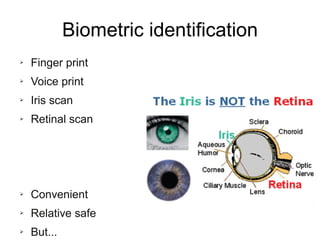
Biometric identification
➢ Finger print
➢ Voice print
➢ Iris scan
➢ Retinal scan
➢ Convenient
➢ Relative safe
➢ But...
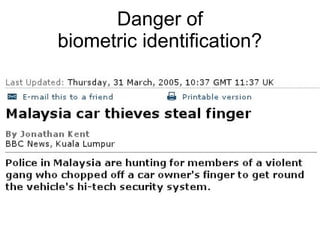
Danger of
biometric identification?
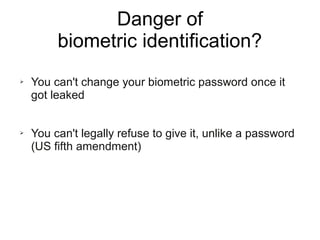
Danger of
biometric identification?
➢ You can't change your biometric password once it
got leaked
➢ You can't legally refuse to give it, unlike a password
(US fifth amendment)
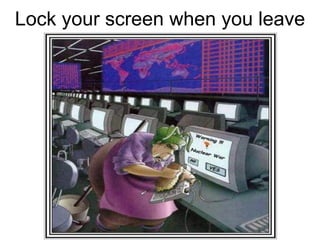
Lock your screen when you leave
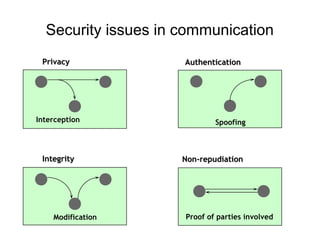
Security issues in communication
PrivacyPrivacy
IntegrityIntegrity
AuthenticationAuthentication
Non-repudiationNon-repudiation
Interception Spoofing
Modification Proof of parties involved
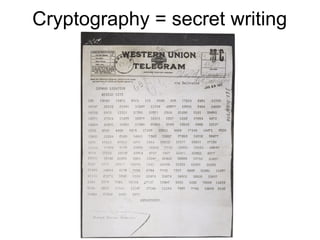
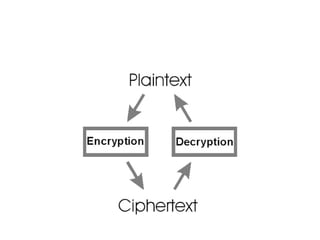
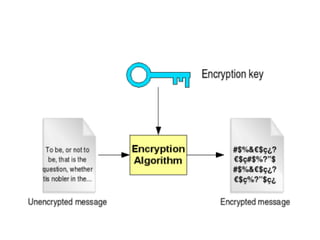
Cryptography = secret writing
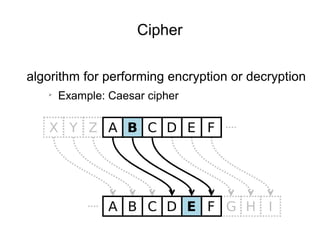
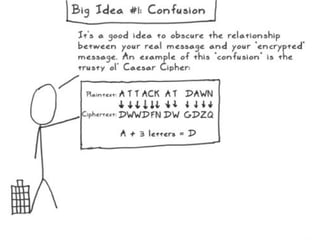
Cipher
algorithm for performing encryption or decryption
➢
Example: Caesar cipher
Great if we can exchange
our messages encrypted!
But how can we safely
exchange our keys?
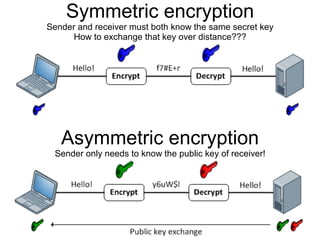
Symmetric encryption
Sender and receiver must both know the same secret key
How to exchange that key over distance???
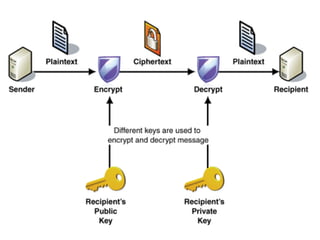
Asymmetric encryption
Sender only needs to know the public key of receiver!
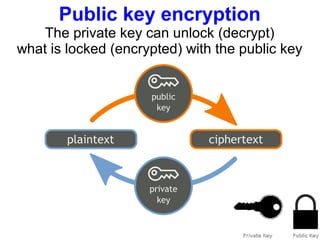
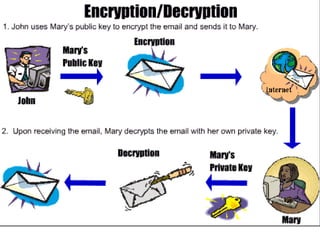
Public key encryption
The private key can unlock (decrypt)
what is locked (encrypted) with the public key
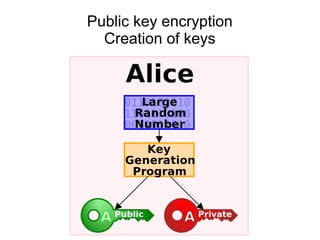
Public key encryption
Creation of keys
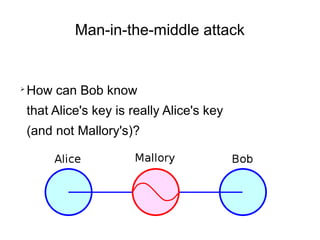
Man-in-the-middle attack
➢
How can Bob know
that Alice's key is really Alice's key
(and not Mallory's)?
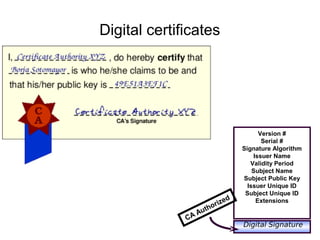
Digital certificates
Version #
Serial #
Signature Algorithm
Issuer Name
Validity Period
Subject Name
Subject Public Key
Issuer Unique ID
Subject Unique ID
Extensions
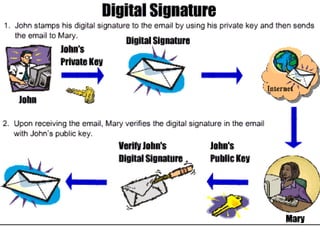
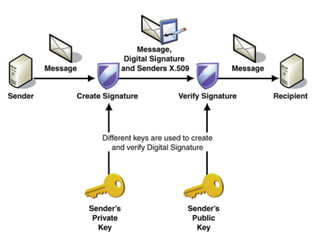
Digital Signature
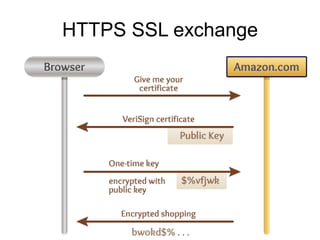
HTTPS SSL exchange
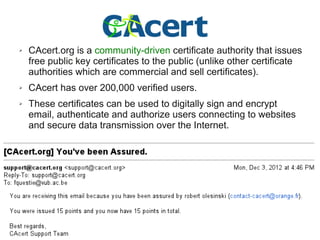
➢ CAcert.org is a community-driven certificate authority that
issues free public key certificates to the public (unlike
other certificate authorities which are commercial and sell
certificates).
➢ CAcert has over 200,000 verified users.
➢ These certificates can be used to digitally sign and encrypt
email, authenticate and authorize users connecting to
websites and secure data transmission over the Internet.
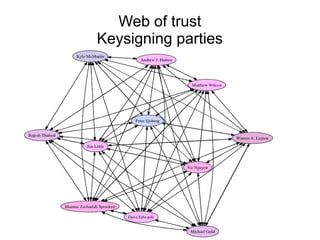
Web of trust
Keysigning parties
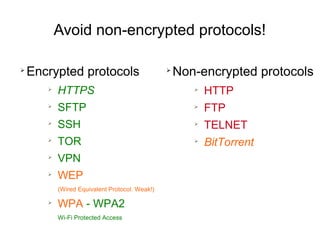
Avoid non-encrypted protocols!
➢
Encrypted protocols
➢
HTTPS
➢
SFTP
➢
SSH
➢
TOR
➢
VPN
➢
WEP
(Wired Equivalent Protocol. Weak!)
➢
WPA - WPA2
Wi-Fi Protected Access
➢
Non-encrypted protocols
➢
HTTP
➢
FTP
➢
TELNET
➢
BitTorrent
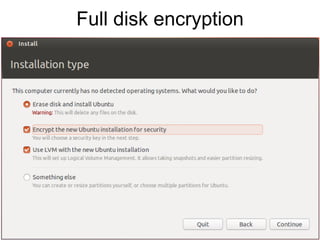
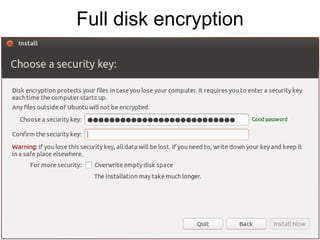
Full disk encryption
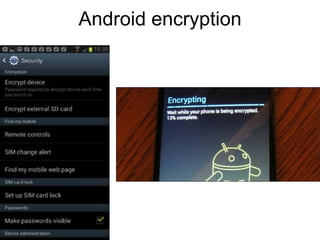
Android encryption
Virtual drive in file container
Encrypted file
container.txt
Mountable as virtual drive
/media/encrypted-disk
/Volumes/encrypted-disk
E:
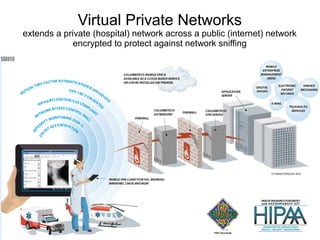
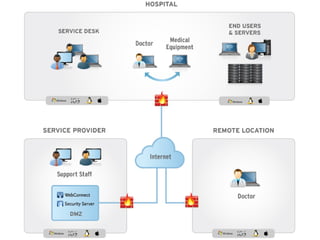
Virtual Private Networks
extends a private (hospital) network across a public (internet) network
encrypted to protect against network sniffing
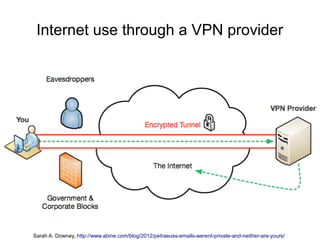
Internet use through a VPN provider
Sarah A. Downey, http://www.abine.com/blog/2012/petraeuss-emails-werent-private-and-neither-are-yours/
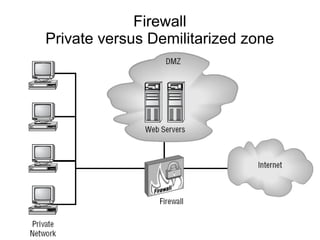
Firewall
Private versus Demilitarized zone
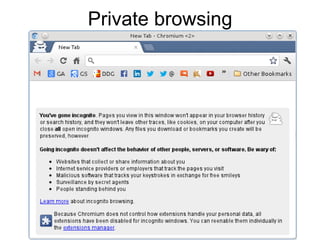
Private browsing
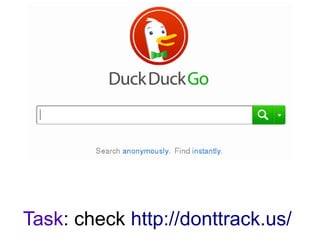
Task: check http://donttrack.us/
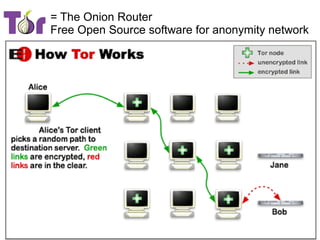
= The Onion Router
Free Open Source software for anonymity network
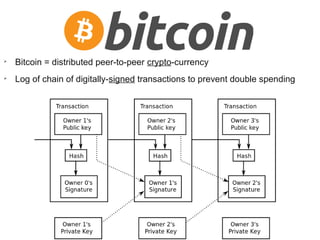
➢ Bitcoin = distributed peer-to-peer crypto-currency
➢ Log of chain of digitally-signed transactions to prevent double spending
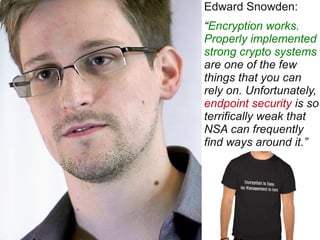
Edward Snowden:
“Encryption works.
Properly implemented
strong crypto systems
are one of the few
things that you can
rely on. Unfortunately,
endpoint security is so
terrifically weak that
NSA can frequently
find ways around it.”
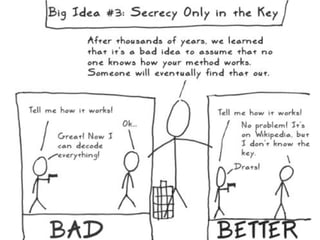
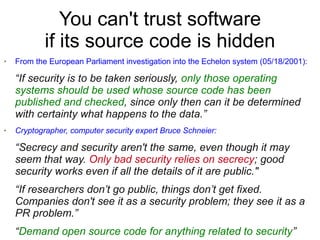
You can't trust software
if its source code is hidden
➢ From the European Parliament investigation into the Echelon system (05/18/2001):
“If security is to be taken seriously, only those operating
systems should be used whose source code has been
published and checked, since only then can it be determined
with certainty what happens to the data.”
➢ Cryptographer, computer security expert Bruce Schneier:
“Secrecy and security aren't the same, even though it may
seem that way. Only bad security relies on secrecy; good
security works even if all the details of it are public."
“If researchers don’t go public, things don’t get fixed.
Companies don't see it as a security problem; they see it as a
PR problem.”
“Demand open source code for anything related to security”
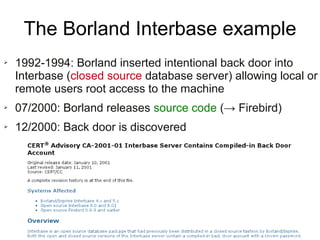
The Borland Interbase example
➢ 1992-1994: Borland inserted intentional back door into
Interbase (closed source database server) allowing local or
remote users root access to the machine
➢ 07/2000: Borland releases source code (→ Firebird)
➢ 12/2000: Back door is discovered
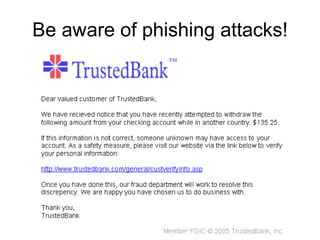
Be aware of phishing attacks!
TOOLS FOR INTEGRITY
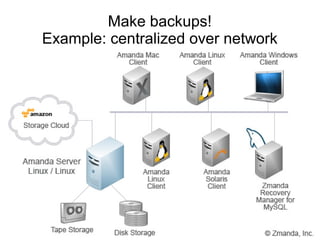
Make backups!
Example: centralized over network
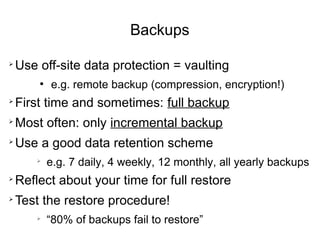
Backups
➢
Use off-site data protection = vaulting
●
e.g. remote backup (compression, encryption!)
➢
First time and sometimes: full backup
➢
Most often: only incremental backup
➢
Use a good data retention scheme
➢
e.g. 7 daily, 4 weekly, 12 monthly, all yearly backups
➢
Reflect about your time for full restore
➢
Test the restore procedure!
➢
“80% of backups fail to restore”
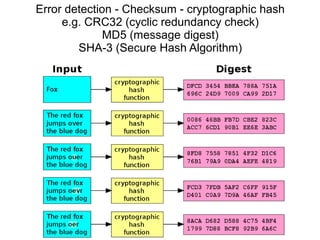
Error detection - Checksum - cryptographic hash
e.g. CRC32 (cyclic redundancy check)
MD5 (message digest)
SHA-3 (Secure Hash Algorithm)
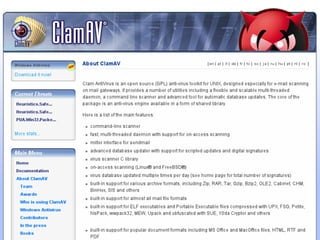
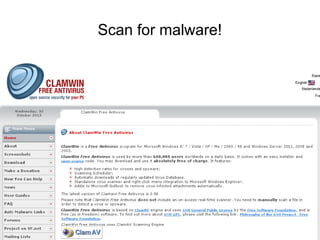
Scan for malware!
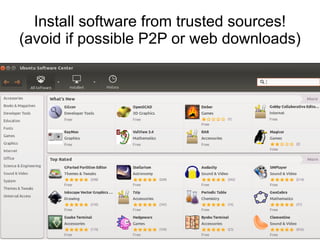
Install software from trusted sources!
(avoid if possible P2P or web downloads)
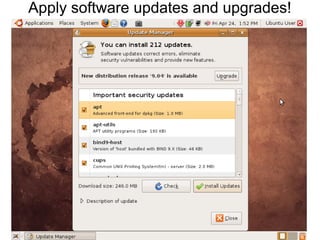
Apply software updates and upgrades!
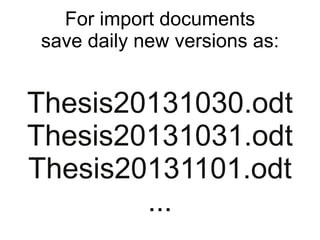
For import documents
save daily new versions as:
Thesis20131030.odt
Thesis20131031.odt
Thesis20131101.odt
...
TOOLS FOR AVAILABILITY
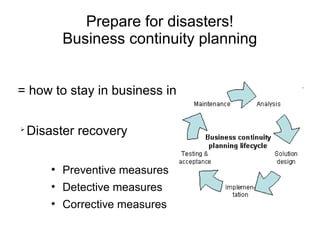
Prepare for disasters!
Business continuity planning
= how to stay in business in the event of disaster?
➢
Disaster recovery
●
Preventive measures
●
Detective measures
●
Corrective measures
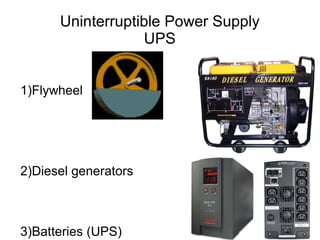
Uninterruptible Power Supply
UPS
1)Flywheel
2)Diesel generators
3)Batteries (UPS)
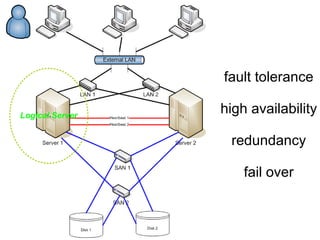
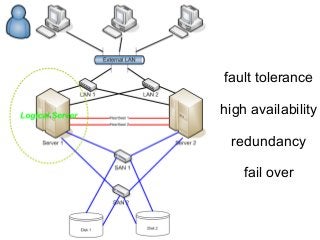
fault tolerance
high availability
redundancy
fail over
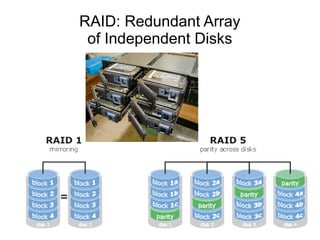
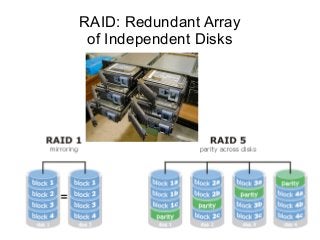
RAID: Redundant Array
of Independent Disks
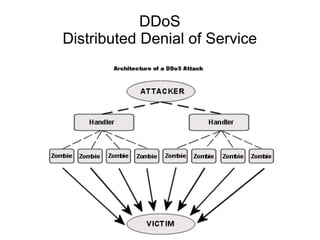
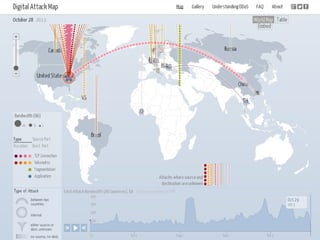
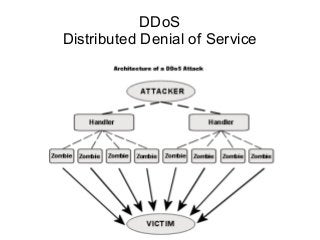
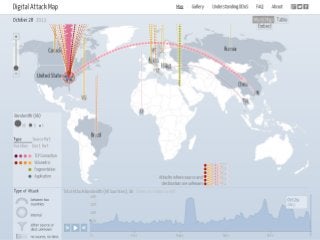
DDoS
Distributed Denial of Service
Questions? Thanks!
Questier.com
Frederik AT Questier.com
www.linkedin.com/in/fquestie
www.diigo.com/user/frederikquestier
www.slideshare.net/Frederik_Questier
Credits
➢ Hacker - Hacking – Symbol.jpg, CC BY-SA, www.elbpresse.de
➢ Internet Archive, Copyright Bibliotheca Alexandrina, International School of
Information Science (ISIS), http://www.bibalex.org/isis/large/000.jpg
➢ Password Strength, Creative Commons BY-NC http://xkcd.com/936/
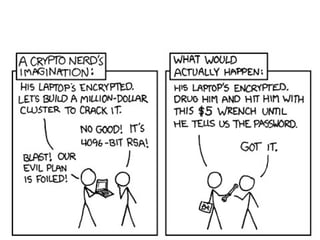
➢ Security, Creative Commons BY-NC http://xkcd.com/538/
➢ Zimmermann Telegram, 1917, no known copyright restrictions
➢ Assymetric and symmetric encryption by Jeremy Stretch,
http://packetlife.net/blog/2010/nov/23/symmetric-asymmetric-encryption-hashing/
➢ Orange blue public key cryptography, Creative Commons CC0 by Bananenfalter
➢ HTTPS SSL Exchange by Robb Perry,
http://coding.smashingmagazine.com/2012/05/17/backpack-algorithms-and-public-key-cryptography-made-easy/
➢ Bitcoin logo, Public Domain by bitboy
➢ Bitcoin Transaction Visual, Creative Commons CC0 by Graingert
➢ Social Icons by Iconshock http://www.iconshock.com/social-icons/
This presentation was made
with 100% Free Software
No animals were harmed

Computer Security

  • 1.
    Computer security Prof. dr. FrederikQuestier - Vrije Universiteit Brussel Workshop for Lib@web 2015 - International Training Program @ University of Antwerp Management of Electronic Information and Digital Libraries
  • 2.
    This presentation canbe found at http://questier.com http://www.slideshare.net/Frederik_Questier
  • 3.
    Main objectives of computersecurity ➢ Confidentiality ➢ of data (secrecy) ➢ of persons (privacy) ➢ access only by authorized parties ➢ Integrity ➢ data only correctly modified or deleted by authorized parties ➢ Availability ➢ correctly accessible in a timely manner ➢ the failure to meet this goal is called a denial of service
  • 4.
    Assignment 1 personal computersecurity ➢ Throughout this workshop: write down all possible ways how your personal computer system could be compromised. What are the possible attack vectors?
  • 5.
    Assignment 2: institutional data security Congratulations! Youare elected member of the newly established computer and data security team in your institution. 1) Make a list of all possible risks that can have an impact on the security and stability of your data and internal and external Information & Technology services. 2) Make a list of recommendations to lower the risks.
  • 6.
    What can gowrong? Nature ➢ lightning strike ➢ fire ➢ flood ➢ heat wave – cold wave ➢ storm weather, hurricane ➢ earthquake ➢ tsunami ➢ volcano eruption ➢ electro magnetic pulse from the sun ➢ disease of key employees
  • 7.
    What can gowrong? Evil actions by people ➢ break in (hackers - crackers) ➢ social engineering ➢ phishing ➢ (identity) theft ➢ vandalism ➢ unhappy employees ➢ sabotage (time bomb) ➢ cyber attack, e.g. (Distributed) Denial of Service ➢ terrorism ➢ war ➢ nuclear bomb
  • 8.
    What can gowrong? Malware (malicious software) ➢ virus ➢ worm ➢ trojan horse ➢ rootkit ➢ spyware ➢ ransomware ➢ keylogger ➢ network sniffer ➢ back door ➢ dialer
  • 9.
    What can gowrong? Infrastructure or services problems ➢ Failure of ➢ software (bugs) ➢ hardware ➢ electricity ➢ power outage or power surge ➢ network (cable cut – saturation) ➢ airconditioning ➢ water pipes –> leak ➢ system upgrades ➢ service providers (e.g. cloud) ➢ Overload of CPU, memory, storage, network (spam)
  • 10.
    What can gowrong? Human errors ➢ Weak security ➢ Loss of laptops, smartphones, USB-sticks, … ➢ No encryption ➢ Passwords leaks or cracks ➢ Computer console left unlocked ➢ Misunderstanding computer interface or other mistakes ➢ Deleting data ➢ Corrupting data ➢ Confiscation of machines
  • 11.
  • 12.
    Tools for confidentiality Overview ➢Authorization - Access policies - access control ➢ Authentication – identification ➢ Passwords ➢ … ➢ Encryption ➢ Virtual private networking ➢ Auditing – logging ➢ ...
  • 13.
    Tools for integrity Overview ➢Backups ➢ Checksums ➢ Antivirus ➢ ...
  • 14.
    Tools for availability Overview ➢Disaster recovery planning ➢ Physical protections ➢ Anti-theft ➢ Uninterruptible Power Supply ➢ Redundancies ➢ Intrusion-detection systems ➢ Antivirus software ➢ Firewall ➢ ...
  • 15.
  • 16.
    Passwords ➢ Don't sharethem ➢ Not even with computer administrators ➢ Don't write them down ➢ Don't reuse them among different sites ➢ Change them often ➢ Select wise: ➢ Easy to remember ➢ Hard to guess (resistant to dictionary attacks) ➢ Password length ➢ Large set of characters (caps, lower case, numbers, symbols)
  • 17.
    Some notorious passwordleaks ➢ 2014: 5M Gmail passwords ➢ 2013: 38M Adobe passwords (and source code) ➢ 2013: 250K Twitter passwords ➢ 2012: 12M Apple User IDs stolen by FBI, 1M leaked ➢ 2012: 6M LinkedIn passwords ➢ 2012: 450K plaintext Yahoo passwords ➢ 2012: 1.5M plaintext Youporn passwords ➢ 2009: 10K MS Hotmail, MSN and Live passwords
  • 19.
  • 21.
    Biometric identification ➢ Fingerprint ➢ Voice print ➢ Iris scan ➢ Retinal scan ➢ Convenient ➢ Relative safe ➢ But...
  • 22.
  • 23.
    Danger of biometric identification? ➢You can't change your biometric password once it got leaked ➢ You can't legally refuse to give it, unlike a password (US fifth amendment)
  • 24.
    Lock your screenwhen you leave
  • 25.
    Security issues incommunication PrivacyPrivacy IntegrityIntegrity AuthenticationAuthentication Non-repudiationNon-repudiation Interception Spoofing Modification Proof of parties involved
  • 26.
  • 28.
    Cipher algorithm for performingencryption or decryption ➢ Example: Caesar cipher
  • 33.
    Great if wecan exchange our messages encrypted! But how can we safely exchange our keys?
  • 34.
    Symmetric encryption Sender andreceiver must both know the same secret key How to exchange that key over distance??? Asymmetric encryption Sender only needs to know the public key of receiver!
  • 35.
    Public key encryption Theprivate key can unlock (decrypt) what is locked (encrypted) with the public key
  • 36.
  • 41.
    Man-in-the-middle attack ➢ How canBob know that Alice's key is really Alice's key (and not Mallory's)?
  • 42.
    Digital certificates Version # Serial# Signature Algorithm Issuer Name Validity Period Subject Name Subject Public Key Issuer Unique ID Subject Unique ID Extensions Digital Signature
  • 43.
  • 44.
    ➢ CAcert.org isa community-driven certificate authority that issues free public key certificates to the public (unlike other certificate authorities which are commercial and sell certificates). ➢ CAcert has over 200,000 verified users. ➢ These certificates can be used to digitally sign and encrypt email, authenticate and authorize users connecting to websites and secure data transmission over the Internet.
  • 45.
  • 46.
    Avoid non-encrypted protocols! ➢ Encryptedprotocols ➢ HTTPS ➢ SFTP ➢ SSH ➢ TOR ➢ VPN ➢ WEP (Wired Equivalent Protocol. Weak!) ➢ WPA - WPA2 Wi-Fi Protected Access ➢ Non-encrypted protocols ➢ HTTP ➢ FTP ➢ TELNET ➢ BitTorrent
  • 48.
  • 49.
  • 50.
  • 53.
    Virtual drive infile container Encrypted file container.txt Mountable as virtual drive /media/encrypted-disk /Volumes/encrypted-disk E:
  • 56.
    Virtual Private Networks extendsa private (hospital) network across a public (internet) network encrypted to protect against network sniffing
  • 57.
    Internet use througha VPN provider Sarah A. Downey, http://www.abine.com/blog/2012/petraeuss-emails-werent-private-and-neither-are-yours/
  • 58.
  • 60.
  • 61.
  • 62.
    = The OnionRouter Free Open Source software for anonymity network
  • 63.
    ➢ Bitcoin =distributed peer-to-peer crypto-currency ➢ Log of chain of digitally-signed transactions to prevent double spending
  • 64.
    Edward Snowden: “Encryption works. Properlyimplemented strong crypto systems are one of the few things that you can rely on. Unfortunately, endpoint security is so terrifically weak that NSA can frequently find ways around it.”
  • 66.
    You can't trustsoftware if its source code is hidden ➢ From the European Parliament investigation into the Echelon system (05/18/2001): “If security is to be taken seriously, only those operating systems should be used whose source code has been published and checked, since only then can it be determined with certainty what happens to the data.” ➢ Cryptographer, computer security expert Bruce Schneier: “Secrecy and security aren't the same, even though it may seem that way. Only bad security relies on secrecy; good security works even if all the details of it are public." “If researchers don’t go public, things don’t get fixed. Companies don't see it as a security problem; they see it as a PR problem.” “Demand open source code for anything related to security”
  • 67.
    The Borland Interbaseexample ➢ 1992-1994: Borland inserted intentional back door into Interbase (closed source database server) allowing local or remote users root access to the machine ➢ 07/2000: Borland releases source code (→ Firebird) ➢ 12/2000: Back door is discovered
  • 69.
    Be aware ofphishing attacks!
  • 70.
  • 71.
  • 72.
    Backups ➢ Use off-site dataprotection = vaulting ● e.g. remote backup (compression, encryption!) ➢ First time and sometimes: full backup ➢ Most often: only incremental backup ➢ Use a good data retention scheme ➢ e.g. 7 daily, 4 weekly, 12 monthly, all yearly backups ➢ Reflect about your time for full restore ➢ Test the restore procedure! ➢ “80% of backups fail to restore”
  • 73.
    Error detection -Checksum - cryptographic hash e.g. CRC32 (cyclic redundancy check) MD5 (message digest) SHA-3 (Secure Hash Algorithm)
  • 76.
  • 77.
    Install software fromtrusted sources! (avoid if possible P2P or web downloads)
  • 78.
  • 80.
    For import documents savedaily new versions as: Thesis20131030.odt Thesis20131031.odt Thesis20131101.odt ...
  • 81.
  • 82.
    Prepare for disasters! Businesscontinuity planning = how to stay in business in the event of disaster? ➢ Disaster recovery ● Preventive measures ● Detective measures ● Corrective measures
  • 83.
  • 84.
  • 85.
    RAID: Redundant Array ofIndependent Disks
  • 86.
  • 88.
    Questions? Thanks! Questier.com Frederik ATQuestier.com www.linkedin.com/in/fquestie www.diigo.com/user/frederikquestier www.slideshare.net/Frederik_Questier
  • 89.
    Credits ➢ Hacker -Hacking – Symbol.jpg, CC BY-SA, www.elbpresse.de ➢ Internet Archive, Copyright Bibliotheca Alexandrina, International School of Information Science (ISIS), http://www.bibalex.org/isis/large/000.jpg ➢ Password Strength, Creative Commons BY-NC http://xkcd.com/936/ ➢ Security, Creative Commons BY-NC http://xkcd.com/538/ ➢ Zimmermann Telegram, 1917, no known copyright restrictions ➢ Assymetric and symmetric encryption by Jeremy Stretch, http://packetlife.net/blog/2010/nov/23/symmetric-asymmetric-encryption-hashing/ ➢ Orange blue public key cryptography, Creative Commons CC0 by Bananenfalter ➢ HTTPS SSL Exchange by Robb Perry, http://coding.smashingmagazine.com/2012/05/17/backpack-algorithms-and-public-key-cryptography-made-easy/ ➢ Bitcoin logo, Public Domain by bitboy ➢ Bitcoin Transaction Visual, Creative Commons CC0 by Graingert ➢ Social Icons by Iconshock http://www.iconshock.com/social-icons/
  • 90.
    This presentation wasmade with 100% Free Software No animals were harmed