7.1 Introduction
Till now we have written some programs and might
have realised that as the problem gets complex, the
number of lines in a program increase, which makes the
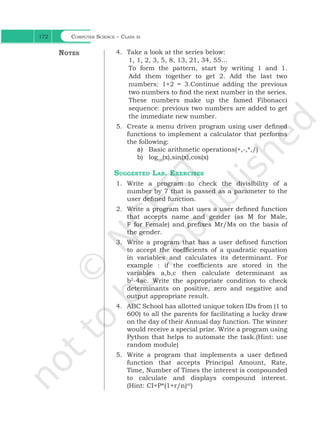
program look bulky and difficult to manage. Consider
the following problem statement:
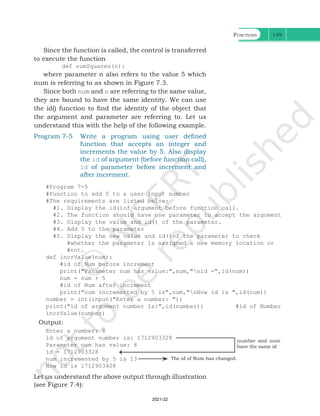
There is a company that manufactures tents as per
user’s requirements. The shape of the tent is cylindrical
surmounted by a conical top.
“Once you succeed in writing
the programs for [these]
complicated algorithms, they
usually run extremely fast.
The computer doesn’t need
to understand the algorithm,
its task is only to run the
programs.”
– R. Tarjan
Chapter 7
Functions
In this chapter
»
» Introduction to
Functions
»
» User Defined
Functions
»
» Scope of a Variable
»
» Python Standard
Library
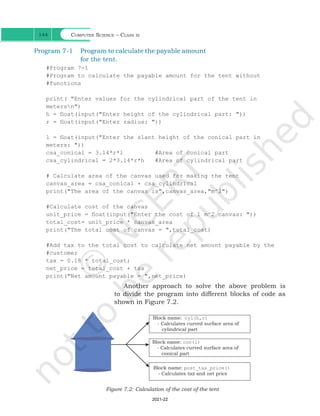
Figure 7.1: Shape of a tent
The company performs the following tasks to fix the
selling price of each tent.
1. Accept user requirements for the tent, such as
a) height
b) radius
c) slant height of the conical part
2. Calculate the area of the canvas used
3. Calculate the cost of the canvas used for making
the tent
4. Calculate the net payable amount by the customer
that is inclusive of the 18% tax
The company has created a computer program for
quick and accurate calculation for the payable amount
as shown in program 7-1.
Ch 7.indd 143 08-Apr-19 12:23:12 PM
2021-22
Computer Science – Class xi
144
Program 7-1 Program to calculate the payable amount
for the tent.
#Program 7-1
#Program to calculate the payable amount for the tent without
#functions
print( "Enter values for the cylindrical part of the tent in
metersn")
h = float(input("Enter height of the cylindrical part: "))
r = float(input("Enter radius: "))
l = float(input("Enter the slant height of the conical part in
meters: "))
csa_conical = 3.14*r*l #Area of conical part
csa_cylindrical = 2*3.14*r*h #Area of cylindrical part
# Calculate area of the canvas used for making the tent
canvas_area = csa_conical + csa_cylindrical
print("The area of the canvas is",canvas_area,"m^2")
#Calculate cost of the canvas
unit_price = float(input("Enter the cost of 1 m^2 canvas: "))
total_cost= unit_price * canvas_area
print("The total cost of canvas = ",total_cost)
#Add tax to the total cost to calculate net amount payable by the
#customer
tax = 0.18 * total_cost;
net_price = total_cost + tax
print("Net amount payable = ",net_price)
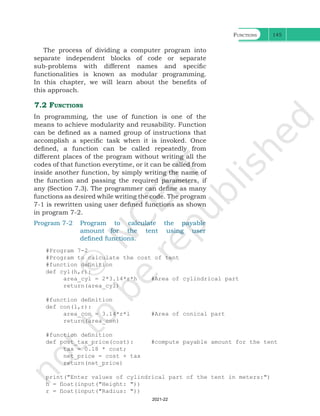
Another approach to solve the above problem is
to divide the program into different blocks of code as
shown in Figure 7.2.
Figure 7.2: Calculation of the cost of the tent
Ch 7.indd 144 08-Apr-19 12:23:12 PM
2021-22
Functions 145
The process of dividing a computer program into
separate independent blocks of code or separate
sub-problems with different names and specific
functionalities is known as modular programming.
In this chapter, we will learn about the benefits of
this approach.
7.2 Functions
In programming, the use of function is one of the
means to achieve modularity and reusability. Function
can be defined as a named group of instructions that
accomplish a specific task when it is invoked. Once
defined, a function can be called repeatedly from
different places of the program without writing all the
codes of that function everytime, or it can be called from
inside another function, by simply writing the name of
the function and passing the required parameters, if
any (Section 7.3). The programmer can define as many
functions as desired while writing the code. The program
7-1 is rewritten using user defined functions as shown
in program 7-2.
Program 7-2 Program to calculate the payable
amount for the tent using user
defined functions.
#Program 7-2
#Program to calculate the cost of tent
#function definition
def cyl(h,r):
area_cyl = 2*3.14*r*h #Area of cylindrical part
return(area_cyl)
#function definition
def con(l,r):
area_con = 3.14*r*l #Area of conical part
return(area_con)
#function definition
def post_tax_price(cost): #compute payable amount for the tent
tax = 0.18 * cost;
net_price = cost + tax
return(net_price)
print("Enter values of cylindrical part of the tent in meters:")
h = float(input("Height: "))
r = float(input("Radius: "))
Ch 7.indd 145 08-Apr-19 12:23:12 PM
2021-22
Computer Science – Class xi
146
csa_cyl = cyl(h,r) #function call
l = float(input("Enter slant height of the conical area in meters: "))
csa_con = con(l,r) #function call
#Calculate area of the canvas used for making the tent
canvas_area = csa_cyl + csa_con
print("Area of canvas = ",canvas_area," m^2")
#Calculate cost of canvas
unit_price = float(input("Enter cost of 1 m^2 canvas in rupees: "))
total_cost = unit_price * canvas_area
print("Total cost of canvas before tax = ",total_cost)
print("Net amount payable (including tax) = ",post_tax_price(total_
cost))
If we compare program 7-1 and 7-2, it is evident that
program 7-2 looks more organised and easier to read.
7.2.1 The Advantages of Function
Suppose in further the company decides to design
another type of tent whose base is rectangular, while
the upper part remains the same. In such a scenario,
some part of the existing code can be reused by calling
the function con(l,r). If the company develops other
products or provides services, and where 18% tax rate
is to be applied, the programmer can use the function
post_tax_price(cost)directly.
Thus, following are the advantages of using functions
in a program:
• Increases readability, particularly for longer code
as by using functions, the program is better
organised and easy to understand.
• Reduces code length as same code is not required
to be written at multiple places in a program. This
also makes debugging easier.
• Increases reusability, as function can be called from
another function or another program. Thus, we can
reuse or build upon already defined functions and
avoid repetitions of writing the same piece of code.
• Work can be easily divided among team members
and completed in parallel.
7.3 User Defined Functions
Taking advantage of reusability feature of functions,
there is a large number of functions already available
Ch 7.indd 146 08-Apr-19 12:23:13 PM
2021-22
Functions 147
in Python under standard library (section 7.5). We can
directly call these functions in our program without
defining them. However, in addition to the standard
library functions, we can define our own functions while
writing the program. Such functions are called user
defined functions. Thus, a function defined to achieve
some task as per the programmer's requirement is
called a user defined function.
7.3.1 Creating User Defined Function
A function definition begins with def (short for define).
The syntax for creating a user defined function is
as follows:
• The items enclosed in "[ ]" are called parameters
and they are optional. Hence, a function may or
may not have parameters. Also, a function may or
may not return a value.
• Function header always ends with a colon (:).
• Function name should be unique. Rules for naming
identifiers also applies for function naming.
• The statements outside the function indentation
are not considered as part of the function.
Program 7-3 Write a user defined function to add 2 		
numbers and display their sum.
#Program 7-3
#Function to add two numbers
#The requirements are listed below:
#1. We need to accept 2 numbers from the user.
#2. Calculate their sum
#3. Display the sum.
#function definition
def addnum():
fnum = int(input("Enter first number: "))
snum = int(input("Enter second number: "))
sum = fnum + snum
print("The sum of ",fnum,"and ",snum,"is ",sum)
#function call
addnum()
Ch 7.indd 147 15-Jun-21 11:16:13 AM
Computer Science – Class xi
148
In order to execute the function addnum(), we need
to call it. The function can be called in the program by
writing function name followed by () as shown in the
last line of program 7-3.
Output:
Enter first number: 5
Enter second number: 6
The sum of 5 and 6 is 11
7.3.2 Arguments and Parameters
In the above example, the numbers were accepted from
the user within the function itself, but it is also possible
for a user defined function to receive values at the time
of being called. An argument is a value passed to the
function during the function call which is received in
corresponding parameter defined in function header.
Program 7-4 Write a program using a user defined
function that displays sum of first n
natural numbers, where n is passed as
an argument.
#Program 7-4
#Program to find the sum of first n natural numbers
#The requirements are:
#1. n be passed as an argument
#2. Calculate sum of first n natural numbers
#3. Display the sum
#function header
def sumSquares(n): #n is the parameter
sum = 0
for i in range(1,n+1):
sum = sum + i
print("The sum of first",n,"natural numbers is: ",sum)
num = int(input("Enter the value for n: "))
#num is an argument referring to the value input by the user
sumSquares(num) 		 #function call
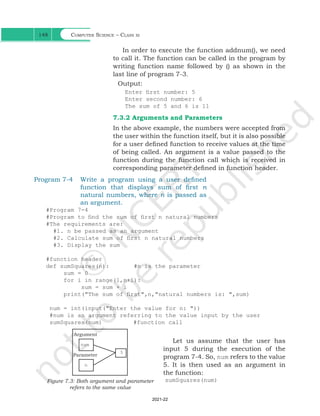
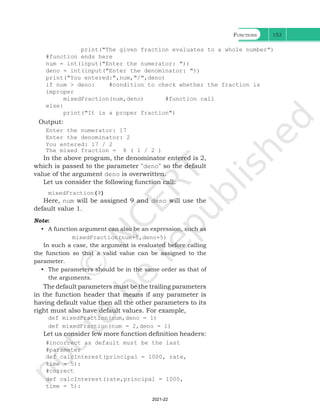
Let us assume that the user has
input 5 during the execution of the
program 7-4. So, num refers to the value
5. It is then used as an argument in
the function:
sumSquares(num)
Argument
num
n
5
Parameter
Figure 7.3: Both argument and parameter
refers to the same value
Ch 7.indd 148 08-Apr-19 12:23:13 PM
2021-22
Functions 149
Since the function is called, the control is transferred
to execute the function
def sumSquares(n):
where parameter n also refers to the value 5 which
num is referring to as shown in Figure 7.3.
Since both num and n are referring to the same value,
they are bound to have the same identity. We can use
the id() function to find the identity of the object that
the argument and parameter are referring to. Let us
understand this with the help of the following example.
Program 7-5 Write a program using user defined
function that accepts an integer and
increments the value by 5. Also display
the id of argument (before function call),
id of parameter before increment and
after increment.
#Program 7-5
#Function to add 5 to a user input number
#The requirements are listed below:
#1. Display the id()of argument before function call.
#2. The function should have one parameter to accept the argument
#3. Display the value and id() of the parameter.
#4. Add 5 to the parameter
#5. Display the new value and id()of the parameter to check
#whether the parameter is assigned a new memory location or
#not.
def incrValue(num):
#id of Num before increment
print("Parameter num has value:",num,"nid =",id(num))
num = num + 5
#id of Num after increment
print("num incremented by 5 is",num,"nNow id is ",id(num))
number = int(input("Enter a number: "))
print("id of argument number is:",id(number)) #id of Number
incrValue(number)
Output:
Enter a number: 8
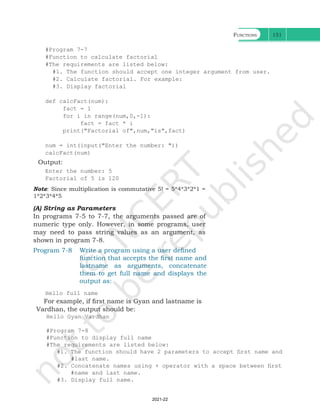
id of argument number is: 1712903328
Parameter num has value: 8 					
id = 1712903328							
num incremented by 5 is 13 					
Now id is 1712903408
number and num
have the same id
Let us understand the above output through illustration
(see Figure 7.4):
The id of Num has changed.
Ch 7.indd 149 08-Apr-19 12:23:13 PM
2021-22
Computer Science – Class xi
150
Number
Num
8
id
id
Before
increment
Number
Num
8
13
id
id
After
increment
5 added
to 8
Figure 7.4: ID of argument and parameter before and after increment
Both argument and parameter can have the same
name as shown in program 7-6.
Program 7-6 Write a program using a user defined
function myMean() to calculate the mean
of floating values stored in a list.
#Program 7-6
#Function to calculate mean
#The requirements are listed below:
#1. The function should have 1 parameter (list containing floating
#point values)
#2. To calculate mean by adding all the numbers and dividing by
#total number of elements
		
def myMean(myList): #function to compute means of values in list
total = 0
count = 0
for i in myList:
total = total + i #Adds each element i to total
count = count + 1 #Counts the number of elements
mean = total/count #mean is calculated
print("The calculated mean is:",mean)
myList = [1.3,2.4,3.5,6.9]
#Function call with list "myList" as an argument
myMean(myList)
Output:
The calculated mean is: 3.5250000000000004
Program 7-7 Write a program using a user defined
function calcFact() to calculate and
display the factorial of a number num
passed as an argument.
1712903408
1712903328
1712903328
1712903328
Ch 7.indd 150 08-Apr-19 12:23:13 PM
2021-22
Functions 151
#Program 7-7
#Function to calculate factorial
#The requirements are listed below:
#1. The function should accept one integer argument from user.
#2. Calculate factorial. For example:
#3. Display factorial
def calcFact(num):
fact = 1
for i in range(num,0,-1):
fact = fact * i
print("Factorial of",num,"is",fact)
num = int(input("Enter the number: "))
calcFact(num)
Output:
Enter the number: 5
Factorial of 5 is 120
Note: Since multiplication is commutative 5! = 5*4*3*2*1 =
1*2*3*4*5
(A) String as Parameters
In programs 7-5 to 7-7, the arguments passed are of
numeric type only. However, in some programs, user
may need to pass string values as an argument, as
shown in program 7-8.
Program 7-8 Write a program using a user defined
function that accepts the first name and
lastname as arguments, concatenate
them to get full name and displays the
output as:
Hello full name
For example, if first name is Gyan and lastname is
Vardhan, the output should be:
Hello Gyan Vardhan
#Program 7-8
#Function to display full name
#The requirements are listed below:
#1. The function should have 2 parameters to accept first name and
#last name.
#2. Concatenate names using + operator with a space between first
#name and last name.
#3. Display full name.
Ch 7.indd 151 08-Apr-19 12:23:13 PM
2021-22
Computer Science – Class xi
152
def fullname(first,last):
#+ operator is used to concatenate strings
fullname = first + " " + last
print("Hello",fullname)
#function ends here
first = input("Enter first name: ")
last = input("Enter last name: ")
#function call
fullname(first,last) 		
Output:
Enter first name: Gyan
Enter last name: Vardhan
Hello Gyan Vardhan
(B) Default Parameter
Python allows assigning a default value to the parameter.
A default value is a value that is predecided and assigned
to the parameter when the function call does not have
its corresponding argument.
Program 7-9 Write a program that accepts numerator
and denominator of a fractional number
and calls a user defined function
mixedFraction() when the fraction
formed is not a proper fraction. The
default value of denominator is 1. The
function displays a mixed fraction only
if the fraction formed by the parameters
does not evaluate to a whole number.
#Program 7-9
#Function to display mixed fraction for an improper fraction
#The requirements are listed below:
#1. Input numerator and denominator from the user.
#2. Check if the entered numerator and denominator form a proper
#fraction.
#3. If they do not form a proper fraction, then call
#mixedFraction().
#4. mixedFraction()display a mixed fraction only when the fraction
#does not evaluate to a whole number.
def mixedFraction(num,deno = 1):
remainder = num % deno
#check if the fraction does not evaluate to a whole number
if remainder!= 0:
quotient = int(num/deno)
print("The mixed fraction=", quotient,"(",remainder, "/",
deno,")")
else:
Ch 7.indd 152 08-Apr-19 12:23:13 PM
2021-22
Functions 153
print("The given fraction evaluates to a whole number")
#function ends here
num = int(input("Enter the numerator: "))
deno = int(input("Enter the denominator: "))
print("You entered:",num,"/",deno)
if num > deno: #condition to check whether the fraction is
improper
mixedFraction(num,deno) #function call
else:
print("It is a proper fraction")
Output:
Enter the numerator: 17
Enter the denominator: 2
You entered: 17 / 2
The mixed fraction = 8 ( 1 / 2 )
In the above program, the denominator entered is 2,
which is passed to the parameter "deno" so the default
value of the argument deno is overwritten.
Let us consider the following function call:
mixedFraction(9)
Here, num will be assigned 9 and deno will use the
default value 1.
Note:
• A function argument can also be an expression, such as
		 mixedFraction(num+5,deno+5)
In such a case, the argument is evaluated before calling
the function so that a valid value can be assigned to the
parameter.
• The parameters should be in the same order as that of
the arguments.
The default parameters must be the trailing parameters
in the function header that means if any parameter is
having default value then all the other parameters to its
right must also have default values. For example,
def mixedFraction(num,deno = 1)
def mixedFraction(num = 2,deno = 1)
Let us consider few more function definition headers:
#incorrect as default must be the last
#parameter
def calcInterest(principal = 1000, rate,
time = 5):
#correct
def calcInterest(rate,principal = 1000,
time = 5):
Ch 7.indd 153 08-Apr-19 12:23:13 PM
2021-22
Computer Science – Class xi
154
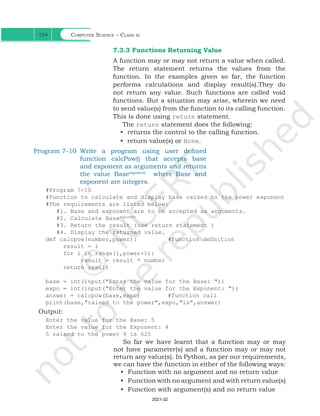
7.3.3 Functions Returning Value
A function may or may not return a value when called.
The return statement returns the values from the
function. In the examples given so far, the function
performs calculations and display result(s).They do
not return any value. Such functions are called void
functions. But a situation may arise, wherein we need
to send value(s) from the function to its calling function.
This is done using return statement.
The return statement does the following:
• returns the control to the calling function.
• return value(s) or None.
Program 7-10 Write a program using user defined
function calcPow() that accepts base
and exponent as arguments and returns
the value Baseexponent
where Base and
exponent are integers.
#Program 7-10
#Function to calculate and display base raised to the power exponent
#The requirements are listed below:
#1. Base and exponent are to be accepted as arguments.
#2. Calculate Baseexponent
#3. Return the result (use return statement )
#4. Display the returned value.
def calcpow(number,power):		 #function definition
result = 1
for i in range(1,power+1):
result = result * number
return result
base = int(input("Enter the value for the Base: "))
expo = int(input("Enter the value for the Exponent: "))
answer = calcpow(base,expo)		 #function call		
print(base,"raised to the power",expo,"is",answer)
Output:
Enter the value for the Base: 5
Enter the value for the Exponent: 4
5 raised to the power 4 is 625
So far we have learnt that a function may or may
not have parameter(s) and a function may or may not
return any value(s). In Python, as per our requirements,
we can have the function in either of the following ways:
• Function with no argument and no return value
• Function with no argument and with return value(s)
• Function with argument(s) and no return value
Ch 7.indd 154 08-Apr-19 12:23:13 PM
2021-22
Functions 155
• Function with argument(s) and return value(s)
7.3.4 Flow of Execution
Flow of execution can be defined as the order in which
the statements in a program are executed. The Python
interpreter starts executing the instructions in a
program from the first statement. The statements are
executed one by one, in the order of appearance from
top to bottom.
When the interpreter encounters a function definition,
the statements inside the function are not executed
until the function is called. Later, when the interpreter
encounters a function call, there is a little deviation
in the flow of execution. In that case, instead of going
to the next statement, the control jumps to the called
function and executes the statement of that function.
After that, the control comes back the point of function
call so that the remaining statements in the program
can be executed. Therefore, when we read a program,
we should not simply read from top to bottom. Instead,
we should follow the flow of control or execution. It is
also important to note that a function must be defined
before its call within a program.
Program 7-11 Program to understand the low of 		
execution using functions.
#Program 7-11
#print using functions
helloPython() #Function Call
def helloPython(): #Function definition
print("I love Programming")
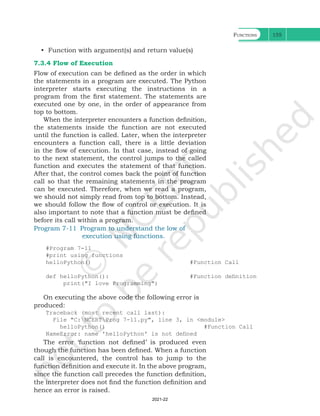
On executing the above code the following error is
produced:
Traceback (most recent call last):
File "C:NCERTProg 7-11.py", line 3, in <module>
helloPython() #Function Call
NameError: name 'helloPython' is not defined
The error ‘function not defined’ is produced even
though the function has been defined. When a function
call is encountered, the control has to jump to the
function definition and execute it. In the above program,
since the function call precedes the function definition,
the interpreter does not find the function definition and
hence an error is raised.
Ch 7.indd 155 08-Apr-19 12:23:13 PM
2021-22
Computer Science – Class xi
156
That is why, the function definition should be made
before the function call as shown below:
def helloPython(): #Function definition
print("I love Programming")
helloPython() #Function Call
Figure7.5explains
the flow of execution
for two programs. The
number in square
brackets shows the
order of execution of
the statements.
Sometime, a
function needs to
return multiple
values which may be
returned using tuple.
Program 7-12 shows
a function which
returns two values
area and perimeter of
rectangle using tuple.
[2]
[3]
[1]
[4]
def Greetings(Name):
print("Hello "+Name)
Greetings("John")
print("Thanks")
#Function Header
#Function Call
[4]
[5]
[1]
[2]
[3][6]
[7]
[8]
def RectangleArea(l,b):
return l*b
l = input("Length: ")
b = input("Breadth: ")
Area = RectangleArea(l,b)
print(Area)
print("thanks")
#Function Header
#Function Call
Figure 7.5: Order of execution of statements
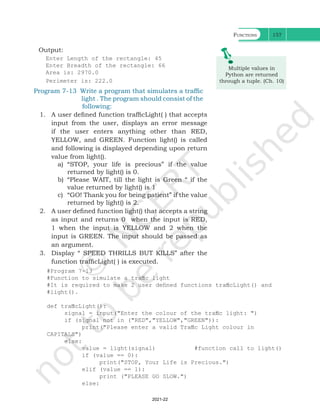
Program 7-12 Write a program using user defined
function that accepts length and breadth
of a rectangle and returns the area and
perimeter of the rectangle.
#Program 7-12
#Function to calculate area and perimeter of a rectangle
#The requirements are listed below:
#1. The function should accept 2 parameters.
#2. Calculate area and perimeter.
#3. Return area and perimeter.
def calcAreaPeri(Length,Breadth):
area = length * breadth
perimeter = 2 * (length + breadth)
#a tuple is returned consisting of 2 values area and perimeter
return (area,perimeter)
l = float(input("Enter length of the rectangle: "))
b = float(input("Enter breadth of the rectangle: "))
#value of tuples assigned in order they are returned
area,perimeter = calcAreaPeri(l,b)
print("Area is:",area,"nPerimeter is:",perimeter)
Ch 7.indd 156 08-Apr-19 12:23:13 PM
2021-22
Functions 157
Output:
Enter Length of the rectangle: 45
Enter Breadth of the rectangle: 66
Area is: 2970.0
Perimeter is: 222.0
M
Py
th
Multiple values in
Python are returned
through a tuple. (Ch. 10)
#Program 7-13
#Function to simulate a traffic light
#It is required to make 2 user defined functions trafficLight() and
#light().
def trafficLight():
signal = input("Enter the colour of the traffic light: ")
if (signal not in ("RED","YELLOW","GREEN")):
print("Please enter a valid Traffic Light colour in
CAPITALS")
else:
value = light(signal) #function call to light()
if (value == 0):
print("STOP, Your Life is Precious.")
elif (value == 1):
print ("PLEASE GO SLOW.")
else:
Program 7-13 Write a program that simulates a traffic
light . The program should consist of the
following:
1. A user defined function trafficLight( ) that accepts
input from the user, displays an error message
if the user enters anything other than RED,
YELLOW, and GREEN. Function light() is called
and following is displayed depending upon return
value from light().
a) “STOP, your life is precious” if the value
returned by light() is 0.
b) “Please WAIT, till the light is Green “ if the
value returned by light() is 1
c) “GO! Thank you for being patient” if the value
returned by light() is 2.
2. A user defined function light() that accepts a string
as input and returns 0 when the input is RED,
1 when the input is YELLOW and 2 when the
input is GREEN. The input should be passed as
an argument.
3. Display “ SPEED THRILLS BUT KILLS” after the
function trafficLight( ) is executed.
Ch 7.indd 157 08-Apr-19 12:23:13 PM
2021-22
Computer Science – Class xi
158
print("GO!,Thank you for being patient.")
#function ends here
def light(colour):
if (colour == "RED"):
return(0);
elif (colour == "YELLOW"):
return (1)
else:
return(2)
#function ends here
trafficLight()
print("SPEED THRILLS BUT KILLS")
Output:
Enter the colour of the traffic light: YELLOW
PLEASE GO SLOW.
SPEED THRILLS BUT KILLS
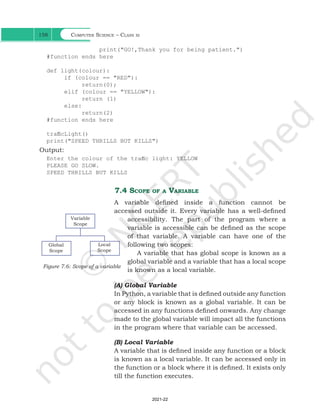
7.4 Scope of a Variable
A variable defined inside a function cannot be
accessed outside it. Every variable has a well-defined
accessibility. The part of the program where a
variable is accessible can be defined as the scope
of that variable. A variable can have one of the
following two scopes:
A variable that has global scope is known as a
global variable and a variable that has a local scope
is known as a local variable.
(A) Global Variable
In Python, a variable that is defined outside any function
or any block is known as a global variable. It can be
accessed in any functions defined onwards. Any change
made to the global variable will impact all the functions
in the program where that variable can be accessed.
(B) Local Variable
A variable that is defined inside any function or a block
is known as a local variable. It can be accessed only in
the function or a block where it is defined. It exists only
till the function executes.
Variable
Scope
Global
Scope
Local
Scope
Figure 7.6: Scope of a variable
Ch 7.indd 158 08-Apr-19 12:23:13 PM
2021-22
Functions 159
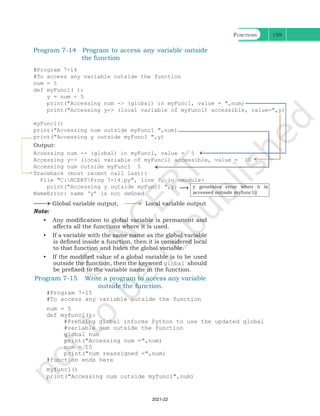
Program 7-14 Program to access any variable outside
the function
#Program 7-14
#To access any variable outside the function
num = 5
def myFunc1( ):
y = num + 5
print("Accessing num -> (global) in myFunc1, value = ",num)
print("Accessing y-> (local variable of myFunc1) accessible, value=",y)
myFunc1()
print("Accessing num outside myFunc1 ",num)
print("Accessing y outside myFunc1 ",y)
Output:
Accessing num -> (global) in myFunc1, value = 5
Accessing y-> (local variable of myFunc1) accessible, value = 10
Accessing num outside myFunc1 5
Traceback (most recent call last):
File "C:NCERTProg 7-14.py", line 9, in <module>
print("Accessing y outside myFunc1 ",y)
NameError: name ‘y’ is not defined
Global variable output, Local variable output
y generates error when it is
accessed outside myfunc1()
Note:
• Any modification to global variable is permanent and
affects all the functions where it is used.
• If a variable with the same name as the global variable
is defined inside a function, then it is considered local
to that function and hides the global variable.
• If the modified value of a global variable is to be used
outside the function, then the keyword global should
be prefixed to the variable name in the function.
Program 7-15 Write a program to access any variable
outside the function.
#Program 7-15
#To access any variable outside the function
num = 5
def myfunc1():
#Prefixing global informs Python to use the updated global
#variable num outside the function
global num
print("Accessing num =",num)
num = 10
print("num reassigned =",num)
#function ends here
myfunc1()
print("Accessing num outside myfunc1",num)
Ch 7.indd 159 08-Apr-19 12:23:13 PM
2021-22
Computer Science – Class xi
160
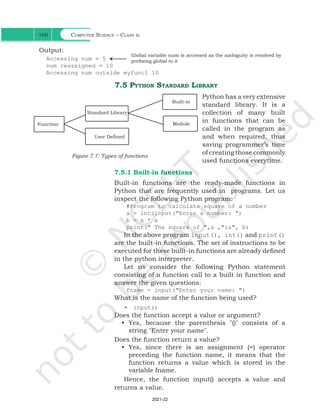
Output:
Accessing num = 5
num reassigned = 10
Accessing num outside myfunc1 10
Global variable num is accessed as the ambiguity is resolved by
prefixing global to it
7.5 Python Standard Library
Python has a very extensive
standard library. It is a
collection of many built
in functions that can be
called in the program as
and when required, thus
saving programmer’s time
of creating those commonly
used functions everytime.
7.5.1 Built-in functions
Built-in functions are the ready-made functions in
Python that are frequently used in programs. Let us
inspect the following Python program:
#Program to calculate square of a number
a = int(input("Enter a number: ")
b = a * a
print(" The square of ",a ,"is", b)
In the above program input(), int() and print()
are the built-in functions. The set of instructions to be
executed for these built-in functions are already defined
in the python interpreter.
Let us consider the following Python statement
consisting of a function call to a built in function and
answer the given questions:
fname = input("Enter your name: ")
What is the name of the function being used?
• input()
Does the function accept a value or argument?
• Yes, because the parenthesis "()" consists of a
string "Enter your name".
Does the function return a value?
• Yes, since there is an assignment (=) operator
preceding the function name, it means that the
function returns a value which is stored in the
variable fname.
Hence, the function input() accepts a value and
returns a value.
Standard Library
User Defined
Function
Built-in
Module
Figure 7.7: Types of functions
Ch 7.indd 160 08-Apr-19 12:23:13 PM
2021-22
Functions 161
Now consider the built-in functions int() and print(),
and answer the questions below:
• Does the function accept a value or argument?
• Does the function return a value?
Following is a categorised list of some of the
frequently used built-in functions in Python:
Built-in Functions
Input or Output Datatype
Conversion
Mathematical
Functions
Other Functions
input()
print()
bool()
chr()
dict()
float()
int()
list()
ord()
set()
str()
tuple()
abs()
divmod()
max()
min()
pow()
sum()
__import__()
len()
range()
type()
We have already used some of the built-in functions.
Let us get familiar with some of them as explained in
Table 7.1.
Table 7.1 Commonly used built-in functions
Function
Syntax
Arguments Returns Example
Output
abs(x) x may be an integer
or floating point
number
Absolute value of x >>> abs(4)
4
>>> abs(-5.7)
5.7
divmod(x,y) x and y are integers A tuple:
(quotient, remainder)
>>> divmod(7,2)
(3, 1)
>>> divmod(7.5,2)
(3.0, 1.5)
>>> divmod(-7,2)
(-4, 1)
max(sequence)
or
max(x,y,z,...)
x,y,z,.. may be
integer or floating
point number
Largest number
in the sequence/
largest of two or
more arguments
>>> max([1,2,3,4])
4
>>> max("Sincerity")
'y' #Based on ASCII value
Ch 7.indd 161 08-Apr-19 12:23:13 PM
2021-22
Computer Science – Class xi
162
>>> max(23,4,56)
56
min(sequence)
or
min(x,y,z,...)
x, y, z,.. may be
integer or floating
point number
Smallest number
in the sequence/
smallest of two or
more arguments
>>> min([1,2,3,4])
1
>>> min("Sincerity")
'S'
#Uppercase letters have
lower ASCII values than
lowercase letters.
>>> min(23,4,56)
4
pow(x,y[,z]) x, y, z may be
integer or floating
point number
xy
(x raised to the
power y)
if z is provided, then:
(xy
) % z
>>> pow(5,2)
25.0
>>> pow(5.3,2.2)
39.2
>>> pow(5,2,4)
1
sum(x[,num]) x is a numeric
sequence and num
is an optional
argument
Sum of all the
elements in the
sequence from left to
right.
if given parameter,
num is added to the
sum
>>> sum([2,4,7,3])
16
>>> sum([2,4,7,3],3)
19
>>> sum((52,8,4,2))
66
len(x) x can be a sequence
or a dictionary
Count of elements
in x
>>> len(“Patience”)
8
>>> len([12,34,98])
3
>>> len((9,45))
2 >>>len({1:”Anuj”,2:”Razia”,
3:”Gurpreet”,4:”Sandra”})
4
7.5.2 Module
Other than the built-in functions, the Python standard
library also consists of a number of modules. While
a function is a grouping of instructions, a module
is a grouping of functions. As we know that when a
program grows, function is used to simplify the code
and to avoid repetition. For a complex problem, it may
not be feasible to manage the code in one single file.
Then, the program is divided into different parts under
different levels, called modules. Also, suppose we have
created some functions in a program and we want to
reuse them in another program. In that case, we can
save those functions under a module and reuse them.
A module is created as a python (.py) file containing a
collection of function definitions.
Ch 7.indd 162 08-Apr-19 12:23:13 PM
2021-22
Functions 163
To use a module, we need to import the module. Once
we import a module, we can directly use all the functions
of that module. The syntax of import statement is as
follows:
import modulename1 [,modulename2, …]
This gives us access to all the functions in the
module(s). To call a function of a module, the function
name should be preceded with the name of the module
with a dot(.) as a separator.
The syntax is as shown below:
modulename.functionname()
(A) Built-in Modules
Python library has many built-in modules that are really
handy to programmers. Let us explore some commonly
used modules and the frequently used functions that
are found in those modules:
• math
• random
• statistics
1. Module name : math
It contains different types of mathematical functions.
Most of the functions in this module return a float value.
Some of the commonly used functions in math module
are given in Table 7.2. In order to use the math module
we need to import it using the following statement:
import math
Remember, Python is case
sensitive. All the module
names are in lowercase.
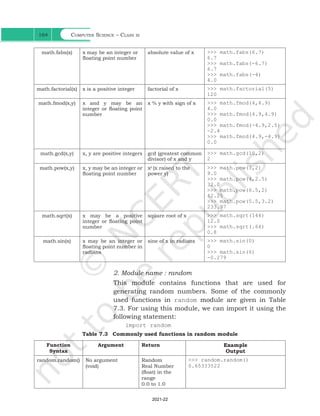
Table 7.2 Commonly used functions in math module
Function
Syntax
Arguments Returns Example
Output
math.ceil(x) x may be an integer or
floating point number
ceiling value of x >>> math.ceil(-9.7)
-9
>>> math.ceil (9.7)
10
>>> math.ceil(9)
9
math.floor(x) x may be an integer or
floating point number
floor value of x >>> math.floor(-4.5)
-5
>>> math.floor(4.5)
4
>>> math.floor(4)
4
Ch 7.indd 163 08-Apr-19 12:23:14 PM
2021-22
Computer Science – Class xi
164
math.fabs(x) x may be an integer or
floating point number
absolute value of x >>> math.fabs(6.7)
6.7
>>> math.fabs(-6.7)
6.7
>>> math.fabs(-4)
4.0
math.factorial(x) x is a positive integer factorial of x >>> math.factorial(5)
120
math.fmod(x,y) x and y may be an
integer or floating point
number
x % y with sign of x >>> math.fmod(4,4.9)
4.0
>>> math.fmod(4.9,4.9)
0.0
>>> math.fmod(-4.9,2.5)
-2.4
>>> math.fmod(4.9,-4.9)
0.0
math.gcd(x,y) x, y are positive integers gcd (greatest common
divisor) of x and y
>>> math.gcd(10,2)
2
math.pow(x,y) x, y may be an integer or
floating point number
xy
(x raised to the
power y)
>>> math.pow(3,2)
9.0
>>> math.pow(4,2.5)
32.0
>>> math.pow(6.5,2)
42.25
>>> math.pow(5.5,3.2)
233.97
math.sqrt(x) x may be a positive
integer or floating point
number
square root of x >>> math.sqrt(144)
12.0
>>> math.sqrt(.64)
0.8
math.sin(x) x may be an integer or
floating point number in
radians
sine of x in radians >>> math.sin(0)
0
>>> math.sin(6)
-0.279
2. Module name : random
This module contains functions that are used for
generating random numbers. Some of the commonly
used functions in random module are given in Table
7.3. For using this module, we can import it using the
following statement:
import random
Table 7.3 Commonly used functions in random module
Function
Syntax
Argument Return Example
Output
random.random() No argument
(void)
Random
Real Number
(float) in the
range
0.0 to 1.0
>>> random.random()
0.65333522
Ch 7.indd 164 08-Apr-19 12:23:14 PM
2021-22
Functions 165
random.
randint(x,y)
x, y are integers
such that
x <= y
Random integer
between x and y
>>> random.randint(3,7)
4
>>> random.randint(-3,5)
1
>>> random.randint(-5,-3)
-5.0
random.
randrange(y)
y is a positive integer
signifying the stop
value
Random integer
between 0 and y
>>> random.randrange(5)
4
random.
randrange(x,y)
x and y are positive
integers signifying
the start and stop
value
Random integer
between x and y
>>> random.randrange(2,7)
2
3. Module name : statistics
This module provides functions for calculating statistics
of numeric (Real-valued) data. Some of the commonly
used functions in statistics module are given in
Table 7.4. It can be included in the program by using
the following statements:
import statistics
Table 7.4 Some of the function available through statistics module
Function Syntax Argument Return Example
Output
statistics.mean(x) x is a numeric
sequence
arithmetic
mean
>>> statistics.
mean([11,24,32,45,51])
32.6
statistics.median(x) x is a numeric
sequence
median
(middle
value) of x
>>>statistics.
median([11,24,32,45,51])
32
statistics.mode(x) x is a sequence mode
(the most
repeated
value)
>>> statistics.
mode([11,24,11,45,11])
11
>>> statistics.
mode(("red","blue","red"))
'red'
Note:
• import statement can be written anywhere in the
program
• Module must be imported only once
• In order to get a list of modules available in Python, we
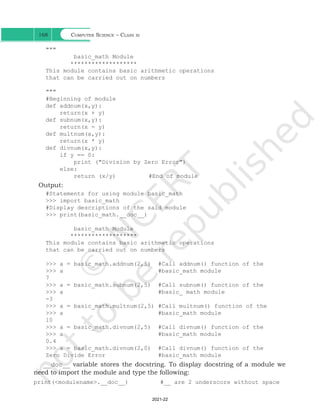
can use the following statement:
>>> help("module")
• To view the content of a module say math, type the
following:
>>> help("math")
Ch 7.indd 165 08-Apr-19 12:23:14 PM
2021-22
Computer Science – Class xi
166
Figure 7.8: Content of module "math"
• The modules in the standard library can be found in
the Lib folder of Python.
(B) From Statement
Instead of loading all the functions into memory by
importing a module, from statement can be used to
access only the required functions from a module. It
loads only the specified function(s) instead of all the
functions in a module.
Its syntax is
>>> from modulename import functionname [,
functionname,...]
To use the function when imported using "from
statement" we do not need to precede it with the module
name. Rather we can directly call the function as shown
in the following examples:
Example 7.5
>>> from random import random
>>> random() #Function called without
the module name
Output:
0.9796352504608387
Example 7.6
>>> from math import ceil,sqrt
>>> value = ceil(624.7)
>>> sqrt(value)
Output:
25.0
In example 7.2, the ceil value of 624.7 is stored in the
variable "value" and then sqrt function is applied on the
Good Programming
Practice: Only using
the required function(s)
rather than importing a
module saves memory.
Ch 7.indd 166 08-Apr-19 12:23:14 PM
2021-22
Functions 167
variable "value". The above example can be rewritten as:
>>> sqrt(ceil(624.7))
The execution of the function sqrt() is dependent
on the output of ceil() function.
If we want to extract the integer part of 624.7 (we will
use trunc() function from math module), we can use
the following statements.
#ceil and sqrt already been imported above
>>> from math import trunc
>>> sqrt(trunc(625.7))
Output:
25.0
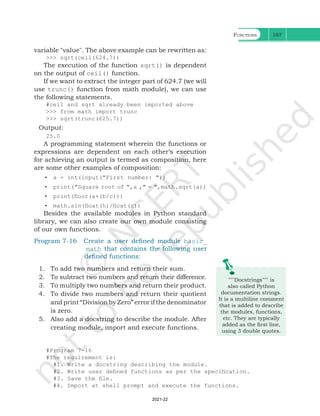
A programming statement wherein the functions or
expressions are dependent on each other’s execution
for achieving an output is termed as composition, here
are some other examples of composition:
• a = int(input("First number: "))
• print("Square root of ",a ," = ",math.sqrt(a))
• print(floor(a+(b/c)))
• math.sin(float(h)/float(c))
Besides the available modules in Python standard
library, we can also create our own module consisting
of our own functions.
"""Docstrings""" is
also called Python
documentation strings.
It is a multiline comment
that is added to describe
the modules, functions,
etc. They are typically
added as the first line,
using 3 double quotes.
#Program 7-16
#The requirement is:
#1. Write a docstring describing the module.
#2. Write user defined functions as per the specification.
#3. Save the file.
#4. Import at shell prompt and execute the functions.
Program 7-16 Create a user defined module basic_
math that contains the following user
defined functions:
1. To add two numbers and return their sum.
2. To subtract two numbers and return their difference.
3. To multiply two numbers and return their product.
4. To divide two numbers and return their quotient
and print “Division by Zero” error if the denominator
is zero.
5. Also add a docstring to describe the module. After
creating module, import and execute functions.
Ch 7.indd 167 08-Apr-19 12:23:14 PM
2021-22
Computer Science – Class xi
168
"""
basic_math Module
*******************
This module contains basic arithmetic operations
that can be carried out on numbers
"""
#Beginning of module
def addnum(x,y):
return(x + y)
def subnum(x,y):
return(x - y)
def multnum(x,y):
return(x * y)
def divnum(x,y):
if y == 0:
print ("Division by Zero Error")
else:
return (x/y) 		 #End of module
Output:
#Statements for using module basic_math
>>> import basic_math
#Display descriptions of the said module
>>> print(basic_math.__doc__)
basic_math Module
*******************
This module contains basic arithmetic operations
that can be carried out on numbers
>>> a = basic_math.addnum(2,5) #Call addnum() function of the
>>> a #basic_math module
7
>>> a = basic_math.subnum(2,5) #Call subnum() function of the
>>> a #basic_ math module
-3
>>> a = basic_math.multnum(2,5) #Call multnum() function of the
>>> a #basic_math module
10
>>> a = basic_math.divnum(2,5) #Call divnum() function of the
>>> a #basic_math module
0.4
>>> a = basic_math.divnum(2,0) #Call divnum() function of the
Zero Divide Error #basic_math module
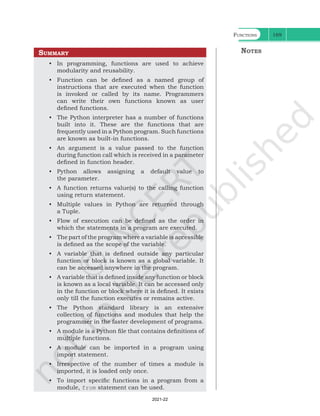
__doc__ variable stores the docstring. To display docstring of a module we
need to import the module and type the following:
print(<modulename>.__doc__) #__ are 2 underscore without space
Ch 7.indd 168 08-Apr-19 12:23:14 PM
2021-22
Functions 169
Summary
• In programming, functions are used to achieve
modularity and reusability.
• Function can be defined as a named group of
instructions that are executed when the function
is invoked or called by its name. Programmers
can write their own functions known as user
defined functions.
• The Python interpreter has a number of functions
built into it. These are the functions that are
frequently used in a Python program. Such functions
are known as built-in functions.
• An argument is a value passed to the function
during function call which is received in a parameter
defined in function header.
• Python allows assigning a default value to
the parameter.
• A function returns value(s) to the calling function
using return statement.
• Multiple values in Python are returned through
a Tuple.
• Flow of execution can be defined as the order in
which the statements in a program are executed.
• The part of the program where a variable is accessible
is defined as the scope of the variable.
• A variable that is defined outside any particular
function or block is known as a global variable. It
can be accessed anywhere in the program.
• A variable that is defined inside any function or block
is known as a local variable. It can be accessed only
in the function or block where it is defined. It exists
only till the function executes or remains active.
• The Python standard library is an extensive
collection of functions and modules that help the
programmer in the faster development of programs.
• A module is a Python file that contains definitions of
multiple functions.
• A module can be imported in a program using
import statement.
• Irrespective of the number of times a module is
imported, it is loaded only once.
• To import specific functions in a program from a
module, from statement can be used.
Notes
Ch 7.indd 169 08-Apr-19 12:23:14 PM
2021-22
Computer Science – Class xi
170
Exercise
1. Observe the following programs carefully, and
identify the error:
a) def create (text, freq):
for i in range (1, freq):
print text
create(5) #function call
b) from math import sqrt,ceil
def calc():
print cos(0)
calc() #function call
c) mynum = 9
def add9():
mynum = mynum + 9
print mynum
add9() #function call
d) def findValue( vall = 1.1, val2, val3):
final = (val2 + val3)/ vall
print(final)
findvalue() #function call
e) def greet():
return("Good morning")
greet() = message #function call
2. How is math.ceil(89.7) different from math.floor
(89.7)?
3. Out of random() and randint(), which function
should we use to generate random numbers between
1 and 5. Justify.
4. How is built-in function pow() function different from
function math.pow() ? Explain with an example.
5. Using an example show how a function in Python
can return multiple values.
6. Differentiate between following with the help of an
example:
a) Argument and Parameter
b) Global and Local variable
7. Does a function always return a value? Explain with
an example.
Notes
Ch 7.indd 170 08-Apr-19 12:23:14 PM
2021-22
Functions 171
Activity-based Questions
Note: Writing a program implies:
• Adding comments as part of documentation
• Writing function definition
• Executing the function through a function call
1. To secure your account, whether it be an email,
online bank account or any other account, it is
important that we use authentication. Use your
programming expertise to create a program using
user defined function named login that accepts
userid and password as parameters (login(uid,pwd))
that displays a message “account blocked” in case of
three wrong attempts. The login is successful if the
user enters user ID as "ADMIN" and password as
"St0rE@1". On successful login, display a message
“login successful”.
2. XYZ store plans to give festival discount to its
customers. The store management has decided to
give discount on the following criteria:
Shopping Amount Discount Offered
>=500 and <1000 5%
>=1000 and <2000 8%
>=2000 10%
An additional discount of 5% is given to customers
who are the members of the store. Create a program
using user defined function that accepts the shopping
amount as a parameter and calculates discount and net
amount payable on the basis of the following conditions:
Net Payable Amount = Total Shopping Amount –
Discount.
3. ‘Play and learn’ strategy helps toddlers understand
concepts in a fun way. Being a senior student you
have taken responsibility to develop a program using
user defined functions to help children master two
and three-letter words using English alphabets and
addition of single digit numbers. Make sure that you
perform a careful analysis of the type of questions
that can be included as per the age and curriculum.
Notes
Ch 7.indd 171 08-Apr-19 12:23:14 PM
2021-22
Computer Science – Class xi
172
4. Take a look at the series below:
1, 1, 2, 3, 5, 8, 13, 21, 34, 55…
To form the pattern, start by writing 1 and 1.
Add them together to get 2. Add the last two
numbers: 1+2 = 3.Continue adding the previous
two numbers to find the next number in the series.
These numbers make up the famed Fibonacci
sequence: previous two numbers are added to get
the immediate new number.
5. Create a menu driven program using user defined
functions to implement a calculator that performs
the following:
a) Basic arithmetic operations(+,-,*,/)
b) log10
(x),sin(x),cos(x)
Suggested Lab. Exercises
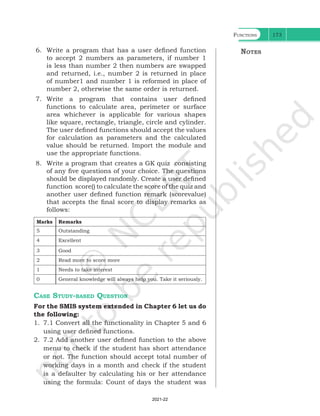
1. Write a program to check the divisibility of a
number by 7 that is passed as a parameter to the
user defined function.
2. Write a program that uses a user defined function
that accepts name and gender (as M for Male,
F for Female) and prefixes Mr/Ms on the basis of
the gender.
3. Write a program that has a user defined function
to accept the coefficients of a quadratic equation
in variables and calculates its determinant. For
example : if the coefficients are stored in the
variables a,b,c then calculate determinant as
b2
-4ac. Write the appropriate condition to check
determinants on positive, zero and negative and
output appropriate result.
4. ABC School has allotted unique token IDs from (1 to
600) to all the parents for facilitating a lucky draw
on the day of their Annual day function. The winner
would receive a special prize. Write a program using
Python that helps to automate the task.(Hint: use
random module)
5. Write a program that implements a user defined
function that accepts Principal Amount, Rate,
Time, Number of Times the interest is compounded
to calculate and displays compound interest.
(Hint: CI=P*(1+r/n)nt
)
Notes
Ch 7.indd 172 15-Jun-21 11:16:46 AM
Functions 173
6. Write a program that has a user defined function
to accept 2 numbers as parameters, if number 1
is less than number 2 then numbers are swapped
and returned, i.e., number 2 is returned in place
of number1 and number 1 is reformed in place of
number 2, otherwise the same order is returned.
7. Write a program that contains user defined
functions to calculate area, perimeter or surface
area whichever is applicable for various shapes
like square, rectangle, triangle, circle and cylinder.
The user defined functions should accept the values
for calculation as parameters and the calculated
value should be returned. Import the module and
use the appropriate functions.
8. Write a program that creates a GK quiz consisting
of any five questions of your choice. The questions
should be displayed randomly. Create a user defined
function score() to calculate the score of the quiz and
another user defined function remark (scorevalue)
that accepts the final score to display remarks as
follows:
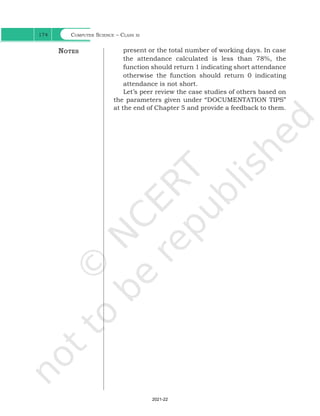
Marks Remarks
5 Outstanding
4 Excellent
3 Good
2 Read more to score more
1 Needs to take interest
0 General knowledge will always help you. Take it seriously.
Case Study-based Question
For the SMIS system extended in Chapter 6 let us do
the following:
1. 7.1 Convert all the functionality in Chapter 5 and 6
using user defined functions.
2. 7.2 Add another user defined function to the above
menu to check if the student has short attendance
or not. The function should accept total number of
working days in a month and check if the student
is a defaulter by calculating his or her attendance
using the formula: Count of days the student was
Notes
Ch 7.indd 173 08-Apr-19 12:23:14 PM
2021-22
Computer Science – Class xi
174
present or the total number of working days. In case
the attendance calculated is less than 78%, the
function should return 1 indicating short attendance
otherwise the function should return 0 indicating
attendance is not short.
Let’s peer review the case studies of others based on
the parameters given under “DOCUMENTATION TIPS”
at the end of Chapter 5 and provide a feedback to them.
Notes
Ch 7.indd 174 08-Apr-19 12:23:14 PM
2021-22

Computer Science chapter 7 functions class 12

  • 1.
    7.1 Introduction Till nowwe have written some programs and might have realised that as the problem gets complex, the number of lines in a program increase, which makes the program look bulky and difficult to manage. Consider the following problem statement: There is a company that manufactures tents as per user’s requirements. The shape of the tent is cylindrical surmounted by a conical top. “Once you succeed in writing the programs for [these] complicated algorithms, they usually run extremely fast. The computer doesn’t need to understand the algorithm, its task is only to run the programs.” – R. Tarjan Chapter 7 Functions In this chapter » » Introduction to Functions » » User Defined Functions » » Scope of a Variable » » Python Standard Library Figure 7.1: Shape of a tent The company performs the following tasks to fix the selling price of each tent. 1. Accept user requirements for the tent, such as a) height b) radius c) slant height of the conical part 2. Calculate the area of the canvas used 3. Calculate the cost of the canvas used for making the tent 4. Calculate the net payable amount by the customer that is inclusive of the 18% tax The company has created a computer program for quick and accurate calculation for the payable amount as shown in program 7-1. Ch 7.indd 143 08-Apr-19 12:23:12 PM 2021-22
  • 2.
    Computer Science –Class xi 144 Program 7-1 Program to calculate the payable amount for the tent. #Program 7-1 #Program to calculate the payable amount for the tent without #functions print( "Enter values for the cylindrical part of the tent in metersn") h = float(input("Enter height of the cylindrical part: ")) r = float(input("Enter radius: ")) l = float(input("Enter the slant height of the conical part in meters: ")) csa_conical = 3.14*r*l #Area of conical part csa_cylindrical = 2*3.14*r*h #Area of cylindrical part # Calculate area of the canvas used for making the tent canvas_area = csa_conical + csa_cylindrical print("The area of the canvas is",canvas_area,"m^2") #Calculate cost of the canvas unit_price = float(input("Enter the cost of 1 m^2 canvas: ")) total_cost= unit_price * canvas_area print("The total cost of canvas = ",total_cost) #Add tax to the total cost to calculate net amount payable by the #customer tax = 0.18 * total_cost; net_price = total_cost + tax print("Net amount payable = ",net_price) Another approach to solve the above problem is to divide the program into different blocks of code as shown in Figure 7.2. Figure 7.2: Calculation of the cost of the tent Ch 7.indd 144 08-Apr-19 12:23:12 PM 2021-22
  • 3.
    Functions 145 The processof dividing a computer program into separate independent blocks of code or separate sub-problems with different names and specific functionalities is known as modular programming. In this chapter, we will learn about the benefits of this approach. 7.2 Functions In programming, the use of function is one of the means to achieve modularity and reusability. Function can be defined as a named group of instructions that accomplish a specific task when it is invoked. Once defined, a function can be called repeatedly from different places of the program without writing all the codes of that function everytime, or it can be called from inside another function, by simply writing the name of the function and passing the required parameters, if any (Section 7.3). The programmer can define as many functions as desired while writing the code. The program 7-1 is rewritten using user defined functions as shown in program 7-2. Program 7-2 Program to calculate the payable amount for the tent using user defined functions. #Program 7-2 #Program to calculate the cost of tent #function definition def cyl(h,r): area_cyl = 2*3.14*r*h #Area of cylindrical part return(area_cyl) #function definition def con(l,r): area_con = 3.14*r*l #Area of conical part return(area_con) #function definition def post_tax_price(cost): #compute payable amount for the tent tax = 0.18 * cost; net_price = cost + tax return(net_price) print("Enter values of cylindrical part of the tent in meters:") h = float(input("Height: ")) r = float(input("Radius: ")) Ch 7.indd 145 08-Apr-19 12:23:12 PM 2021-22
  • 4.
    Computer Science –Class xi 146 csa_cyl = cyl(h,r) #function call l = float(input("Enter slant height of the conical area in meters: ")) csa_con = con(l,r) #function call #Calculate area of the canvas used for making the tent canvas_area = csa_cyl + csa_con print("Area of canvas = ",canvas_area," m^2") #Calculate cost of canvas unit_price = float(input("Enter cost of 1 m^2 canvas in rupees: ")) total_cost = unit_price * canvas_area print("Total cost of canvas before tax = ",total_cost) print("Net amount payable (including tax) = ",post_tax_price(total_ cost)) If we compare program 7-1 and 7-2, it is evident that program 7-2 looks more organised and easier to read. 7.2.1 The Advantages of Function Suppose in further the company decides to design another type of tent whose base is rectangular, while the upper part remains the same. In such a scenario, some part of the existing code can be reused by calling the function con(l,r). If the company develops other products or provides services, and where 18% tax rate is to be applied, the programmer can use the function post_tax_price(cost)directly. Thus, following are the advantages of using functions in a program: • Increases readability, particularly for longer code as by using functions, the program is better organised and easy to understand. • Reduces code length as same code is not required to be written at multiple places in a program. This also makes debugging easier. • Increases reusability, as function can be called from another function or another program. Thus, we can reuse or build upon already defined functions and avoid repetitions of writing the same piece of code. • Work can be easily divided among team members and completed in parallel. 7.3 User Defined Functions Taking advantage of reusability feature of functions, there is a large number of functions already available Ch 7.indd 146 08-Apr-19 12:23:13 PM 2021-22
  • 5.
    Functions 147 in Pythonunder standard library (section 7.5). We can directly call these functions in our program without defining them. However, in addition to the standard library functions, we can define our own functions while writing the program. Such functions are called user defined functions. Thus, a function defined to achieve some task as per the programmer's requirement is called a user defined function. 7.3.1 Creating User Defined Function A function definition begins with def (short for define). The syntax for creating a user defined function is as follows: • The items enclosed in "[ ]" are called parameters and they are optional. Hence, a function may or may not have parameters. Also, a function may or may not return a value. • Function header always ends with a colon (:). • Function name should be unique. Rules for naming identifiers also applies for function naming. • The statements outside the function indentation are not considered as part of the function. Program 7-3 Write a user defined function to add 2 numbers and display their sum. #Program 7-3 #Function to add two numbers #The requirements are listed below: #1. We need to accept 2 numbers from the user. #2. Calculate their sum #3. Display the sum. #function definition def addnum(): fnum = int(input("Enter first number: ")) snum = int(input("Enter second number: ")) sum = fnum + snum print("The sum of ",fnum,"and ",snum,"is ",sum) #function call addnum() Ch 7.indd 147 15-Jun-21 11:16:13 AM
  • 6.
    Computer Science –Class xi 148 In order to execute the function addnum(), we need to call it. The function can be called in the program by writing function name followed by () as shown in the last line of program 7-3. Output: Enter first number: 5 Enter second number: 6 The sum of 5 and 6 is 11 7.3.2 Arguments and Parameters In the above example, the numbers were accepted from the user within the function itself, but it is also possible for a user defined function to receive values at the time of being called. An argument is a value passed to the function during the function call which is received in corresponding parameter defined in function header. Program 7-4 Write a program using a user defined function that displays sum of first n natural numbers, where n is passed as an argument. #Program 7-4 #Program to find the sum of first n natural numbers #The requirements are: #1. n be passed as an argument #2. Calculate sum of first n natural numbers #3. Display the sum #function header def sumSquares(n): #n is the parameter sum = 0 for i in range(1,n+1): sum = sum + i print("The sum of first",n,"natural numbers is: ",sum) num = int(input("Enter the value for n: ")) #num is an argument referring to the value input by the user sumSquares(num) #function call Let us assume that the user has input 5 during the execution of the program 7-4. So, num refers to the value 5. It is then used as an argument in the function: sumSquares(num) Argument num n 5 Parameter Figure 7.3: Both argument and parameter refers to the same value Ch 7.indd 148 08-Apr-19 12:23:13 PM 2021-22
  • 7.
    Functions 149 Since thefunction is called, the control is transferred to execute the function def sumSquares(n): where parameter n also refers to the value 5 which num is referring to as shown in Figure 7.3. Since both num and n are referring to the same value, they are bound to have the same identity. We can use the id() function to find the identity of the object that the argument and parameter are referring to. Let us understand this with the help of the following example. Program 7-5 Write a program using user defined function that accepts an integer and increments the value by 5. Also display the id of argument (before function call), id of parameter before increment and after increment. #Program 7-5 #Function to add 5 to a user input number #The requirements are listed below: #1. Display the id()of argument before function call. #2. The function should have one parameter to accept the argument #3. Display the value and id() of the parameter. #4. Add 5 to the parameter #5. Display the new value and id()of the parameter to check #whether the parameter is assigned a new memory location or #not. def incrValue(num): #id of Num before increment print("Parameter num has value:",num,"nid =",id(num)) num = num + 5 #id of Num after increment print("num incremented by 5 is",num,"nNow id is ",id(num)) number = int(input("Enter a number: ")) print("id of argument number is:",id(number)) #id of Number incrValue(number) Output: Enter a number: 8 id of argument number is: 1712903328 Parameter num has value: 8 id = 1712903328 num incremented by 5 is 13 Now id is 1712903408 number and num have the same id Let us understand the above output through illustration (see Figure 7.4): The id of Num has changed. Ch 7.indd 149 08-Apr-19 12:23:13 PM 2021-22
  • 8.
    Computer Science –Class xi 150 Number Num 8 id id Before increment Number Num 8 13 id id After increment 5 added to 8 Figure 7.4: ID of argument and parameter before and after increment Both argument and parameter can have the same name as shown in program 7-6. Program 7-6 Write a program using a user defined function myMean() to calculate the mean of floating values stored in a list. #Program 7-6 #Function to calculate mean #The requirements are listed below: #1. The function should have 1 parameter (list containing floating #point values) #2. To calculate mean by adding all the numbers and dividing by #total number of elements def myMean(myList): #function to compute means of values in list total = 0 count = 0 for i in myList: total = total + i #Adds each element i to total count = count + 1 #Counts the number of elements mean = total/count #mean is calculated print("The calculated mean is:",mean) myList = [1.3,2.4,3.5,6.9] #Function call with list "myList" as an argument myMean(myList) Output: The calculated mean is: 3.5250000000000004 Program 7-7 Write a program using a user defined function calcFact() to calculate and display the factorial of a number num passed as an argument. 1712903408 1712903328 1712903328 1712903328 Ch 7.indd 150 08-Apr-19 12:23:13 PM 2021-22
  • 9.
    Functions 151 #Program 7-7 #Functionto calculate factorial #The requirements are listed below: #1. The function should accept one integer argument from user. #2. Calculate factorial. For example: #3. Display factorial def calcFact(num): fact = 1 for i in range(num,0,-1): fact = fact * i print("Factorial of",num,"is",fact) num = int(input("Enter the number: ")) calcFact(num) Output: Enter the number: 5 Factorial of 5 is 120 Note: Since multiplication is commutative 5! = 5*4*3*2*1 = 1*2*3*4*5 (A) String as Parameters In programs 7-5 to 7-7, the arguments passed are of numeric type only. However, in some programs, user may need to pass string values as an argument, as shown in program 7-8. Program 7-8 Write a program using a user defined function that accepts the first name and lastname as arguments, concatenate them to get full name and displays the output as: Hello full name For example, if first name is Gyan and lastname is Vardhan, the output should be: Hello Gyan Vardhan #Program 7-8 #Function to display full name #The requirements are listed below: #1. The function should have 2 parameters to accept first name and #last name. #2. Concatenate names using + operator with a space between first #name and last name. #3. Display full name. Ch 7.indd 151 08-Apr-19 12:23:13 PM 2021-22
  • 10.
    Computer Science –Class xi 152 def fullname(first,last): #+ operator is used to concatenate strings fullname = first + " " + last print("Hello",fullname) #function ends here first = input("Enter first name: ") last = input("Enter last name: ") #function call fullname(first,last) Output: Enter first name: Gyan Enter last name: Vardhan Hello Gyan Vardhan (B) Default Parameter Python allows assigning a default value to the parameter. A default value is a value that is predecided and assigned to the parameter when the function call does not have its corresponding argument. Program 7-9 Write a program that accepts numerator and denominator of a fractional number and calls a user defined function mixedFraction() when the fraction formed is not a proper fraction. The default value of denominator is 1. The function displays a mixed fraction only if the fraction formed by the parameters does not evaluate to a whole number. #Program 7-9 #Function to display mixed fraction for an improper fraction #The requirements are listed below: #1. Input numerator and denominator from the user. #2. Check if the entered numerator and denominator form a proper #fraction. #3. If they do not form a proper fraction, then call #mixedFraction(). #4. mixedFraction()display a mixed fraction only when the fraction #does not evaluate to a whole number. def mixedFraction(num,deno = 1): remainder = num % deno #check if the fraction does not evaluate to a whole number if remainder!= 0: quotient = int(num/deno) print("The mixed fraction=", quotient,"(",remainder, "/", deno,")") else: Ch 7.indd 152 08-Apr-19 12:23:13 PM 2021-22
  • 11.
    Functions 153 print("The givenfraction evaluates to a whole number") #function ends here num = int(input("Enter the numerator: ")) deno = int(input("Enter the denominator: ")) print("You entered:",num,"/",deno) if num > deno: #condition to check whether the fraction is improper mixedFraction(num,deno) #function call else: print("It is a proper fraction") Output: Enter the numerator: 17 Enter the denominator: 2 You entered: 17 / 2 The mixed fraction = 8 ( 1 / 2 ) In the above program, the denominator entered is 2, which is passed to the parameter "deno" so the default value of the argument deno is overwritten. Let us consider the following function call: mixedFraction(9) Here, num will be assigned 9 and deno will use the default value 1. Note: • A function argument can also be an expression, such as mixedFraction(num+5,deno+5) In such a case, the argument is evaluated before calling the function so that a valid value can be assigned to the parameter. • The parameters should be in the same order as that of the arguments. The default parameters must be the trailing parameters in the function header that means if any parameter is having default value then all the other parameters to its right must also have default values. For example, def mixedFraction(num,deno = 1) def mixedFraction(num = 2,deno = 1) Let us consider few more function definition headers: #incorrect as default must be the last #parameter def calcInterest(principal = 1000, rate, time = 5): #correct def calcInterest(rate,principal = 1000, time = 5): Ch 7.indd 153 08-Apr-19 12:23:13 PM 2021-22
  • 12.
    Computer Science –Class xi 154 7.3.3 Functions Returning Value A function may or may not return a value when called. The return statement returns the values from the function. In the examples given so far, the function performs calculations and display result(s).They do not return any value. Such functions are called void functions. But a situation may arise, wherein we need to send value(s) from the function to its calling function. This is done using return statement. The return statement does the following: • returns the control to the calling function. • return value(s) or None. Program 7-10 Write a program using user defined function calcPow() that accepts base and exponent as arguments and returns the value Baseexponent where Base and exponent are integers. #Program 7-10 #Function to calculate and display base raised to the power exponent #The requirements are listed below: #1. Base and exponent are to be accepted as arguments. #2. Calculate Baseexponent #3. Return the result (use return statement ) #4. Display the returned value. def calcpow(number,power): #function definition result = 1 for i in range(1,power+1): result = result * number return result base = int(input("Enter the value for the Base: ")) expo = int(input("Enter the value for the Exponent: ")) answer = calcpow(base,expo) #function call print(base,"raised to the power",expo,"is",answer) Output: Enter the value for the Base: 5 Enter the value for the Exponent: 4 5 raised to the power 4 is 625 So far we have learnt that a function may or may not have parameter(s) and a function may or may not return any value(s). In Python, as per our requirements, we can have the function in either of the following ways: • Function with no argument and no return value • Function with no argument and with return value(s) • Function with argument(s) and no return value Ch 7.indd 154 08-Apr-19 12:23:13 PM 2021-22
  • 13.
    Functions 155 • Functionwith argument(s) and return value(s) 7.3.4 Flow of Execution Flow of execution can be defined as the order in which the statements in a program are executed. The Python interpreter starts executing the instructions in a program from the first statement. The statements are executed one by one, in the order of appearance from top to bottom. When the interpreter encounters a function definition, the statements inside the function are not executed until the function is called. Later, when the interpreter encounters a function call, there is a little deviation in the flow of execution. In that case, instead of going to the next statement, the control jumps to the called function and executes the statement of that function. After that, the control comes back the point of function call so that the remaining statements in the program can be executed. Therefore, when we read a program, we should not simply read from top to bottom. Instead, we should follow the flow of control or execution. It is also important to note that a function must be defined before its call within a program. Program 7-11 Program to understand the low of execution using functions. #Program 7-11 #print using functions helloPython() #Function Call def helloPython(): #Function definition print("I love Programming") On executing the above code the following error is produced: Traceback (most recent call last): File "C:NCERTProg 7-11.py", line 3, in <module> helloPython() #Function Call NameError: name 'helloPython' is not defined The error ‘function not defined’ is produced even though the function has been defined. When a function call is encountered, the control has to jump to the function definition and execute it. In the above program, since the function call precedes the function definition, the interpreter does not find the function definition and hence an error is raised. Ch 7.indd 155 08-Apr-19 12:23:13 PM 2021-22
  • 14.
    Computer Science –Class xi 156 That is why, the function definition should be made before the function call as shown below: def helloPython(): #Function definition print("I love Programming") helloPython() #Function Call Figure7.5explains the flow of execution for two programs. The number in square brackets shows the order of execution of the statements. Sometime, a function needs to return multiple values which may be returned using tuple. Program 7-12 shows a function which returns two values area and perimeter of rectangle using tuple. [2] [3] [1] [4] def Greetings(Name): print("Hello "+Name) Greetings("John") print("Thanks") #Function Header #Function Call [4] [5] [1] [2] [3][6] [7] [8] def RectangleArea(l,b): return l*b l = input("Length: ") b = input("Breadth: ") Area = RectangleArea(l,b) print(Area) print("thanks") #Function Header #Function Call Figure 7.5: Order of execution of statements Program 7-12 Write a program using user defined function that accepts length and breadth of a rectangle and returns the area and perimeter of the rectangle. #Program 7-12 #Function to calculate area and perimeter of a rectangle #The requirements are listed below: #1. The function should accept 2 parameters. #2. Calculate area and perimeter. #3. Return area and perimeter. def calcAreaPeri(Length,Breadth): area = length * breadth perimeter = 2 * (length + breadth) #a tuple is returned consisting of 2 values area and perimeter return (area,perimeter) l = float(input("Enter length of the rectangle: ")) b = float(input("Enter breadth of the rectangle: ")) #value of tuples assigned in order they are returned area,perimeter = calcAreaPeri(l,b) print("Area is:",area,"nPerimeter is:",perimeter) Ch 7.indd 156 08-Apr-19 12:23:13 PM 2021-22
  • 15.
    Functions 157 Output: Enter Lengthof the rectangle: 45 Enter Breadth of the rectangle: 66 Area is: 2970.0 Perimeter is: 222.0 M Py th Multiple values in Python are returned through a tuple. (Ch. 10) #Program 7-13 #Function to simulate a traffic light #It is required to make 2 user defined functions trafficLight() and #light(). def trafficLight(): signal = input("Enter the colour of the traffic light: ") if (signal not in ("RED","YELLOW","GREEN")): print("Please enter a valid Traffic Light colour in CAPITALS") else: value = light(signal) #function call to light() if (value == 0): print("STOP, Your Life is Precious.") elif (value == 1): print ("PLEASE GO SLOW.") else: Program 7-13 Write a program that simulates a traffic light . The program should consist of the following: 1. A user defined function trafficLight( ) that accepts input from the user, displays an error message if the user enters anything other than RED, YELLOW, and GREEN. Function light() is called and following is displayed depending upon return value from light(). a) “STOP, your life is precious” if the value returned by light() is 0. b) “Please WAIT, till the light is Green “ if the value returned by light() is 1 c) “GO! Thank you for being patient” if the value returned by light() is 2. 2. A user defined function light() that accepts a string as input and returns 0 when the input is RED, 1 when the input is YELLOW and 2 when the input is GREEN. The input should be passed as an argument. 3. Display “ SPEED THRILLS BUT KILLS” after the function trafficLight( ) is executed. Ch 7.indd 157 08-Apr-19 12:23:13 PM 2021-22
  • 16.
    Computer Science –Class xi 158 print("GO!,Thank you for being patient.") #function ends here def light(colour): if (colour == "RED"): return(0); elif (colour == "YELLOW"): return (1) else: return(2) #function ends here trafficLight() print("SPEED THRILLS BUT KILLS") Output: Enter the colour of the traffic light: YELLOW PLEASE GO SLOW. SPEED THRILLS BUT KILLS 7.4 Scope of a Variable A variable defined inside a function cannot be accessed outside it. Every variable has a well-defined accessibility. The part of the program where a variable is accessible can be defined as the scope of that variable. A variable can have one of the following two scopes: A variable that has global scope is known as a global variable and a variable that has a local scope is known as a local variable. (A) Global Variable In Python, a variable that is defined outside any function or any block is known as a global variable. It can be accessed in any functions defined onwards. Any change made to the global variable will impact all the functions in the program where that variable can be accessed. (B) Local Variable A variable that is defined inside any function or a block is known as a local variable. It can be accessed only in the function or a block where it is defined. It exists only till the function executes. Variable Scope Global Scope Local Scope Figure 7.6: Scope of a variable Ch 7.indd 158 08-Apr-19 12:23:13 PM 2021-22
  • 17.
    Functions 159 Program 7-14Program to access any variable outside the function #Program 7-14 #To access any variable outside the function num = 5 def myFunc1( ): y = num + 5 print("Accessing num -> (global) in myFunc1, value = ",num) print("Accessing y-> (local variable of myFunc1) accessible, value=",y) myFunc1() print("Accessing num outside myFunc1 ",num) print("Accessing y outside myFunc1 ",y) Output: Accessing num -> (global) in myFunc1, value = 5 Accessing y-> (local variable of myFunc1) accessible, value = 10 Accessing num outside myFunc1 5 Traceback (most recent call last): File "C:NCERTProg 7-14.py", line 9, in <module> print("Accessing y outside myFunc1 ",y) NameError: name ‘y’ is not defined Global variable output, Local variable output y generates error when it is accessed outside myfunc1() Note: • Any modification to global variable is permanent and affects all the functions where it is used. • If a variable with the same name as the global variable is defined inside a function, then it is considered local to that function and hides the global variable. • If the modified value of a global variable is to be used outside the function, then the keyword global should be prefixed to the variable name in the function. Program 7-15 Write a program to access any variable outside the function. #Program 7-15 #To access any variable outside the function num = 5 def myfunc1(): #Prefixing global informs Python to use the updated global #variable num outside the function global num print("Accessing num =",num) num = 10 print("num reassigned =",num) #function ends here myfunc1() print("Accessing num outside myfunc1",num) Ch 7.indd 159 08-Apr-19 12:23:13 PM 2021-22
  • 18.
    Computer Science –Class xi 160 Output: Accessing num = 5 num reassigned = 10 Accessing num outside myfunc1 10 Global variable num is accessed as the ambiguity is resolved by prefixing global to it 7.5 Python Standard Library Python has a very extensive standard library. It is a collection of many built in functions that can be called in the program as and when required, thus saving programmer’s time of creating those commonly used functions everytime. 7.5.1 Built-in functions Built-in functions are the ready-made functions in Python that are frequently used in programs. Let us inspect the following Python program: #Program to calculate square of a number a = int(input("Enter a number: ") b = a * a print(" The square of ",a ,"is", b) In the above program input(), int() and print() are the built-in functions. The set of instructions to be executed for these built-in functions are already defined in the python interpreter. Let us consider the following Python statement consisting of a function call to a built in function and answer the given questions: fname = input("Enter your name: ") What is the name of the function being used? • input() Does the function accept a value or argument? • Yes, because the parenthesis "()" consists of a string "Enter your name". Does the function return a value? • Yes, since there is an assignment (=) operator preceding the function name, it means that the function returns a value which is stored in the variable fname. Hence, the function input() accepts a value and returns a value. Standard Library User Defined Function Built-in Module Figure 7.7: Types of functions Ch 7.indd 160 08-Apr-19 12:23:13 PM 2021-22
  • 19.
    Functions 161 Now considerthe built-in functions int() and print(), and answer the questions below: • Does the function accept a value or argument? • Does the function return a value? Following is a categorised list of some of the frequently used built-in functions in Python: Built-in Functions Input or Output Datatype Conversion Mathematical Functions Other Functions input() print() bool() chr() dict() float() int() list() ord() set() str() tuple() abs() divmod() max() min() pow() sum() __import__() len() range() type() We have already used some of the built-in functions. Let us get familiar with some of them as explained in Table 7.1. Table 7.1 Commonly used built-in functions Function Syntax Arguments Returns Example Output abs(x) x may be an integer or floating point number Absolute value of x >>> abs(4) 4 >>> abs(-5.7) 5.7 divmod(x,y) x and y are integers A tuple: (quotient, remainder) >>> divmod(7,2) (3, 1) >>> divmod(7.5,2) (3.0, 1.5) >>> divmod(-7,2) (-4, 1) max(sequence) or max(x,y,z,...) x,y,z,.. may be integer or floating point number Largest number in the sequence/ largest of two or more arguments >>> max([1,2,3,4]) 4 >>> max("Sincerity") 'y' #Based on ASCII value Ch 7.indd 161 08-Apr-19 12:23:13 PM 2021-22
  • 20.
    Computer Science –Class xi 162 >>> max(23,4,56) 56 min(sequence) or min(x,y,z,...) x, y, z,.. may be integer or floating point number Smallest number in the sequence/ smallest of two or more arguments >>> min([1,2,3,4]) 1 >>> min("Sincerity") 'S' #Uppercase letters have lower ASCII values than lowercase letters. >>> min(23,4,56) 4 pow(x,y[,z]) x, y, z may be integer or floating point number xy (x raised to the power y) if z is provided, then: (xy ) % z >>> pow(5,2) 25.0 >>> pow(5.3,2.2) 39.2 >>> pow(5,2,4) 1 sum(x[,num]) x is a numeric sequence and num is an optional argument Sum of all the elements in the sequence from left to right. if given parameter, num is added to the sum >>> sum([2,4,7,3]) 16 >>> sum([2,4,7,3],3) 19 >>> sum((52,8,4,2)) 66 len(x) x can be a sequence or a dictionary Count of elements in x >>> len(“Patience”) 8 >>> len([12,34,98]) 3 >>> len((9,45)) 2 >>>len({1:”Anuj”,2:”Razia”, 3:”Gurpreet”,4:”Sandra”}) 4 7.5.2 Module Other than the built-in functions, the Python standard library also consists of a number of modules. While a function is a grouping of instructions, a module is a grouping of functions. As we know that when a program grows, function is used to simplify the code and to avoid repetition. For a complex problem, it may not be feasible to manage the code in one single file. Then, the program is divided into different parts under different levels, called modules. Also, suppose we have created some functions in a program and we want to reuse them in another program. In that case, we can save those functions under a module and reuse them. A module is created as a python (.py) file containing a collection of function definitions. Ch 7.indd 162 08-Apr-19 12:23:13 PM 2021-22
  • 21.
    Functions 163 To usea module, we need to import the module. Once we import a module, we can directly use all the functions of that module. The syntax of import statement is as follows: import modulename1 [,modulename2, …] This gives us access to all the functions in the module(s). To call a function of a module, the function name should be preceded with the name of the module with a dot(.) as a separator. The syntax is as shown below: modulename.functionname() (A) Built-in Modules Python library has many built-in modules that are really handy to programmers. Let us explore some commonly used modules and the frequently used functions that are found in those modules: • math • random • statistics 1. Module name : math It contains different types of mathematical functions. Most of the functions in this module return a float value. Some of the commonly used functions in math module are given in Table 7.2. In order to use the math module we need to import it using the following statement: import math Remember, Python is case sensitive. All the module names are in lowercase. Table 7.2 Commonly used functions in math module Function Syntax Arguments Returns Example Output math.ceil(x) x may be an integer or floating point number ceiling value of x >>> math.ceil(-9.7) -9 >>> math.ceil (9.7) 10 >>> math.ceil(9) 9 math.floor(x) x may be an integer or floating point number floor value of x >>> math.floor(-4.5) -5 >>> math.floor(4.5) 4 >>> math.floor(4) 4 Ch 7.indd 163 08-Apr-19 12:23:14 PM 2021-22
  • 22.
    Computer Science –Class xi 164 math.fabs(x) x may be an integer or floating point number absolute value of x >>> math.fabs(6.7) 6.7 >>> math.fabs(-6.7) 6.7 >>> math.fabs(-4) 4.0 math.factorial(x) x is a positive integer factorial of x >>> math.factorial(5) 120 math.fmod(x,y) x and y may be an integer or floating point number x % y with sign of x >>> math.fmod(4,4.9) 4.0 >>> math.fmod(4.9,4.9) 0.0 >>> math.fmod(-4.9,2.5) -2.4 >>> math.fmod(4.9,-4.9) 0.0 math.gcd(x,y) x, y are positive integers gcd (greatest common divisor) of x and y >>> math.gcd(10,2) 2 math.pow(x,y) x, y may be an integer or floating point number xy (x raised to the power y) >>> math.pow(3,2) 9.0 >>> math.pow(4,2.5) 32.0 >>> math.pow(6.5,2) 42.25 >>> math.pow(5.5,3.2) 233.97 math.sqrt(x) x may be a positive integer or floating point number square root of x >>> math.sqrt(144) 12.0 >>> math.sqrt(.64) 0.8 math.sin(x) x may be an integer or floating point number in radians sine of x in radians >>> math.sin(0) 0 >>> math.sin(6) -0.279 2. Module name : random This module contains functions that are used for generating random numbers. Some of the commonly used functions in random module are given in Table 7.3. For using this module, we can import it using the following statement: import random Table 7.3 Commonly used functions in random module Function Syntax Argument Return Example Output random.random() No argument (void) Random Real Number (float) in the range 0.0 to 1.0 >>> random.random() 0.65333522 Ch 7.indd 164 08-Apr-19 12:23:14 PM 2021-22
  • 23.
    Functions 165 random. randint(x,y) x, yare integers such that x <= y Random integer between x and y >>> random.randint(3,7) 4 >>> random.randint(-3,5) 1 >>> random.randint(-5,-3) -5.0 random. randrange(y) y is a positive integer signifying the stop value Random integer between 0 and y >>> random.randrange(5) 4 random. randrange(x,y) x and y are positive integers signifying the start and stop value Random integer between x and y >>> random.randrange(2,7) 2 3. Module name : statistics This module provides functions for calculating statistics of numeric (Real-valued) data. Some of the commonly used functions in statistics module are given in Table 7.4. It can be included in the program by using the following statements: import statistics Table 7.4 Some of the function available through statistics module Function Syntax Argument Return Example Output statistics.mean(x) x is a numeric sequence arithmetic mean >>> statistics. mean([11,24,32,45,51]) 32.6 statistics.median(x) x is a numeric sequence median (middle value) of x >>>statistics. median([11,24,32,45,51]) 32 statistics.mode(x) x is a sequence mode (the most repeated value) >>> statistics. mode([11,24,11,45,11]) 11 >>> statistics. mode(("red","blue","red")) 'red' Note: • import statement can be written anywhere in the program • Module must be imported only once • In order to get a list of modules available in Python, we can use the following statement: >>> help("module") • To view the content of a module say math, type the following: >>> help("math") Ch 7.indd 165 08-Apr-19 12:23:14 PM 2021-22
  • 24.
    Computer Science –Class xi 166 Figure 7.8: Content of module "math" • The modules in the standard library can be found in the Lib folder of Python. (B) From Statement Instead of loading all the functions into memory by importing a module, from statement can be used to access only the required functions from a module. It loads only the specified function(s) instead of all the functions in a module. Its syntax is >>> from modulename import functionname [, functionname,...] To use the function when imported using "from statement" we do not need to precede it with the module name. Rather we can directly call the function as shown in the following examples: Example 7.5 >>> from random import random >>> random() #Function called without the module name Output: 0.9796352504608387 Example 7.6 >>> from math import ceil,sqrt >>> value = ceil(624.7) >>> sqrt(value) Output: 25.0 In example 7.2, the ceil value of 624.7 is stored in the variable "value" and then sqrt function is applied on the Good Programming Practice: Only using the required function(s) rather than importing a module saves memory. Ch 7.indd 166 08-Apr-19 12:23:14 PM 2021-22
  • 25.
    Functions 167 variable "value".The above example can be rewritten as: >>> sqrt(ceil(624.7)) The execution of the function sqrt() is dependent on the output of ceil() function. If we want to extract the integer part of 624.7 (we will use trunc() function from math module), we can use the following statements. #ceil and sqrt already been imported above >>> from math import trunc >>> sqrt(trunc(625.7)) Output: 25.0 A programming statement wherein the functions or expressions are dependent on each other’s execution for achieving an output is termed as composition, here are some other examples of composition: • a = int(input("First number: ")) • print("Square root of ",a ," = ",math.sqrt(a)) • print(floor(a+(b/c))) • math.sin(float(h)/float(c)) Besides the available modules in Python standard library, we can also create our own module consisting of our own functions. """Docstrings""" is also called Python documentation strings. It is a multiline comment that is added to describe the modules, functions, etc. They are typically added as the first line, using 3 double quotes. #Program 7-16 #The requirement is: #1. Write a docstring describing the module. #2. Write user defined functions as per the specification. #3. Save the file. #4. Import at shell prompt and execute the functions. Program 7-16 Create a user defined module basic_ math that contains the following user defined functions: 1. To add two numbers and return their sum. 2. To subtract two numbers and return their difference. 3. To multiply two numbers and return their product. 4. To divide two numbers and return their quotient and print “Division by Zero” error if the denominator is zero. 5. Also add a docstring to describe the module. After creating module, import and execute functions. Ch 7.indd 167 08-Apr-19 12:23:14 PM 2021-22
  • 26.
    Computer Science –Class xi 168 """ basic_math Module ******************* This module contains basic arithmetic operations that can be carried out on numbers """ #Beginning of module def addnum(x,y): return(x + y) def subnum(x,y): return(x - y) def multnum(x,y): return(x * y) def divnum(x,y): if y == 0: print ("Division by Zero Error") else: return (x/y) #End of module Output: #Statements for using module basic_math >>> import basic_math #Display descriptions of the said module >>> print(basic_math.__doc__) basic_math Module ******************* This module contains basic arithmetic operations that can be carried out on numbers >>> a = basic_math.addnum(2,5) #Call addnum() function of the >>> a #basic_math module 7 >>> a = basic_math.subnum(2,5) #Call subnum() function of the >>> a #basic_ math module -3 >>> a = basic_math.multnum(2,5) #Call multnum() function of the >>> a #basic_math module 10 >>> a = basic_math.divnum(2,5) #Call divnum() function of the >>> a #basic_math module 0.4 >>> a = basic_math.divnum(2,0) #Call divnum() function of the Zero Divide Error #basic_math module __doc__ variable stores the docstring. To display docstring of a module we need to import the module and type the following: print(<modulename>.__doc__) #__ are 2 underscore without space Ch 7.indd 168 08-Apr-19 12:23:14 PM 2021-22
  • 27.
    Functions 169 Summary • Inprogramming, functions are used to achieve modularity and reusability. • Function can be defined as a named group of instructions that are executed when the function is invoked or called by its name. Programmers can write their own functions known as user defined functions. • The Python interpreter has a number of functions built into it. These are the functions that are frequently used in a Python program. Such functions are known as built-in functions. • An argument is a value passed to the function during function call which is received in a parameter defined in function header. • Python allows assigning a default value to the parameter. • A function returns value(s) to the calling function using return statement. • Multiple values in Python are returned through a Tuple. • Flow of execution can be defined as the order in which the statements in a program are executed. • The part of the program where a variable is accessible is defined as the scope of the variable. • A variable that is defined outside any particular function or block is known as a global variable. It can be accessed anywhere in the program. • A variable that is defined inside any function or block is known as a local variable. It can be accessed only in the function or block where it is defined. It exists only till the function executes or remains active. • The Python standard library is an extensive collection of functions and modules that help the programmer in the faster development of programs. • A module is a Python file that contains definitions of multiple functions. • A module can be imported in a program using import statement. • Irrespective of the number of times a module is imported, it is loaded only once. • To import specific functions in a program from a module, from statement can be used. Notes Ch 7.indd 169 08-Apr-19 12:23:14 PM 2021-22
  • 28.
    Computer Science –Class xi 170 Exercise 1. Observe the following programs carefully, and identify the error: a) def create (text, freq): for i in range (1, freq): print text create(5) #function call b) from math import sqrt,ceil def calc(): print cos(0) calc() #function call c) mynum = 9 def add9(): mynum = mynum + 9 print mynum add9() #function call d) def findValue( vall = 1.1, val2, val3): final = (val2 + val3)/ vall print(final) findvalue() #function call e) def greet(): return("Good morning") greet() = message #function call 2. How is math.ceil(89.7) different from math.floor (89.7)? 3. Out of random() and randint(), which function should we use to generate random numbers between 1 and 5. Justify. 4. How is built-in function pow() function different from function math.pow() ? Explain with an example. 5. Using an example show how a function in Python can return multiple values. 6. Differentiate between following with the help of an example: a) Argument and Parameter b) Global and Local variable 7. Does a function always return a value? Explain with an example. Notes Ch 7.indd 170 08-Apr-19 12:23:14 PM 2021-22
  • 29.
    Functions 171 Activity-based Questions Note:Writing a program implies: • Adding comments as part of documentation • Writing function definition • Executing the function through a function call 1. To secure your account, whether it be an email, online bank account or any other account, it is important that we use authentication. Use your programming expertise to create a program using user defined function named login that accepts userid and password as parameters (login(uid,pwd)) that displays a message “account blocked” in case of three wrong attempts. The login is successful if the user enters user ID as "ADMIN" and password as "St0rE@1". On successful login, display a message “login successful”. 2. XYZ store plans to give festival discount to its customers. The store management has decided to give discount on the following criteria: Shopping Amount Discount Offered >=500 and <1000 5% >=1000 and <2000 8% >=2000 10% An additional discount of 5% is given to customers who are the members of the store. Create a program using user defined function that accepts the shopping amount as a parameter and calculates discount and net amount payable on the basis of the following conditions: Net Payable Amount = Total Shopping Amount – Discount. 3. ‘Play and learn’ strategy helps toddlers understand concepts in a fun way. Being a senior student you have taken responsibility to develop a program using user defined functions to help children master two and three-letter words using English alphabets and addition of single digit numbers. Make sure that you perform a careful analysis of the type of questions that can be included as per the age and curriculum. Notes Ch 7.indd 171 08-Apr-19 12:23:14 PM 2021-22
  • 30.
    Computer Science –Class xi 172 4. Take a look at the series below: 1, 1, 2, 3, 5, 8, 13, 21, 34, 55… To form the pattern, start by writing 1 and 1. Add them together to get 2. Add the last two numbers: 1+2 = 3.Continue adding the previous two numbers to find the next number in the series. These numbers make up the famed Fibonacci sequence: previous two numbers are added to get the immediate new number. 5. Create a menu driven program using user defined functions to implement a calculator that performs the following: a) Basic arithmetic operations(+,-,*,/) b) log10 (x),sin(x),cos(x) Suggested Lab. Exercises 1. Write a program to check the divisibility of a number by 7 that is passed as a parameter to the user defined function. 2. Write a program that uses a user defined function that accepts name and gender (as M for Male, F for Female) and prefixes Mr/Ms on the basis of the gender. 3. Write a program that has a user defined function to accept the coefficients of a quadratic equation in variables and calculates its determinant. For example : if the coefficients are stored in the variables a,b,c then calculate determinant as b2 -4ac. Write the appropriate condition to check determinants on positive, zero and negative and output appropriate result. 4. ABC School has allotted unique token IDs from (1 to 600) to all the parents for facilitating a lucky draw on the day of their Annual day function. The winner would receive a special prize. Write a program using Python that helps to automate the task.(Hint: use random module) 5. Write a program that implements a user defined function that accepts Principal Amount, Rate, Time, Number of Times the interest is compounded to calculate and displays compound interest. (Hint: CI=P*(1+r/n)nt ) Notes Ch 7.indd 172 15-Jun-21 11:16:46 AM
  • 31.
    Functions 173 6. Writea program that has a user defined function to accept 2 numbers as parameters, if number 1 is less than number 2 then numbers are swapped and returned, i.e., number 2 is returned in place of number1 and number 1 is reformed in place of number 2, otherwise the same order is returned. 7. Write a program that contains user defined functions to calculate area, perimeter or surface area whichever is applicable for various shapes like square, rectangle, triangle, circle and cylinder. The user defined functions should accept the values for calculation as parameters and the calculated value should be returned. Import the module and use the appropriate functions. 8. Write a program that creates a GK quiz consisting of any five questions of your choice. The questions should be displayed randomly. Create a user defined function score() to calculate the score of the quiz and another user defined function remark (scorevalue) that accepts the final score to display remarks as follows: Marks Remarks 5 Outstanding 4 Excellent 3 Good 2 Read more to score more 1 Needs to take interest 0 General knowledge will always help you. Take it seriously. Case Study-based Question For the SMIS system extended in Chapter 6 let us do the following: 1. 7.1 Convert all the functionality in Chapter 5 and 6 using user defined functions. 2. 7.2 Add another user defined function to the above menu to check if the student has short attendance or not. The function should accept total number of working days in a month and check if the student is a defaulter by calculating his or her attendance using the formula: Count of days the student was Notes Ch 7.indd 173 08-Apr-19 12:23:14 PM 2021-22
  • 32.
    Computer Science –Class xi 174 present or the total number of working days. In case the attendance calculated is less than 78%, the function should return 1 indicating short attendance otherwise the function should return 0 indicating attendance is not short. Let’s peer review the case studies of others based on the parameters given under “DOCUMENTATION TIPS” at the end of Chapter 5 and provide a feedback to them. Notes Ch 7.indd 174 08-Apr-19 12:23:14 PM 2021-22