What is Python?
•Python is a general-purpose interpreted, interactive, object-
oriented, and high-level programming language.
• It was created by Guido van Rossum during 1985- 1990. Like
Perl, Python source code is also available under the GNU
General Public License (GPL).
3.
Why Learn Python?
•Python is a high-level, interpreted, interactive and object-oriented scripting
language. Python is designed to be highly readable. It uses English
keywords frequently where as other languages use punctuation, and it has
fewer syntactical constructions than other languages.
• Advantages of learning Python:
• Python is Interpreted − Python is processed at runtime by the interpreter. You do
not need to compile your program before executing it. This is similar to PERL and
PHP.
• Python is Interactive − You can actually sit at a Python prompt and interact with the
interpreter directly to write your programs.
• Python is Object-Oriented − Python supports Object-Oriented style or technique of
programming that encapsulates code within objects.
• Python is a Beginner's Language − Python is a great language for the beginner-
level programmers and supports the development of a wide range of applications
from simple text processing to WWW browsers to games.
4.
Characteristics of Python
•It supports functional and structured programming methods as
well as Object-Oriented Programming (OOP).
• It can be used as a scripting language or can be compiled to
byte-code for building large applications.
• It provides very high-level dynamic data types and supports
dynamic type checking.
• It supports automatic garbage collection.
• It can be easily integrated with C, C++, COM, ActiveX, CORBA,
and Java.
5.
Applications of Python
•Easy-to-learn − Python has few keywords, simple structure, and a
clearly defined syntax. This allows the student to pick up the
language quickly.
• Easy-to-read − Python code is more clearly defined and visible to
the eyes.
• Easy-to-maintain − Python's source code is fairly easy-to-maintain.
• A broad standard library − Python's bulk of the library is very
portable and cross-platform compatible on UNIX, Windows, and
Macintosh.
• Interactive Mode − Python has support for an interactive mode
which allows interactive testing and debugging of snippets of code.
• Portable − Python can run on a wide variety of hardware platforms
and has the same interface on all platforms.
6.
Applications of Python
•Extendable − You can add low-level modules to the Python
interpreter. These modules enable programmers to add to or
customize their tools to be more efficient.
• Databases − Python provides interfaces to all major
commercial databases.
• GUI Programming − Python supports GUI applications that can
be created and ported to many system calls, libraries and
windows systems, such as Windows MFC, Macintosh, and the
X Window system of Unix.
• Scalable − Python provides a better structure and support for
large programs than shell scripting.
7.
First Python Program(in different programming
modes
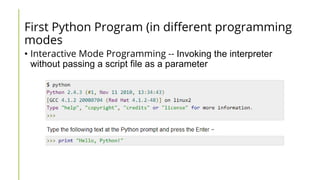
• Interactive Mode Programming -- Invoking the interpreter
without passing a script file as a parameter
8.
First Python Program(in different programming
modes
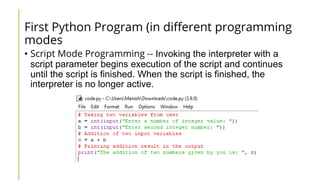
• Script Mode Programming -- Invoking the interpreter with a
script parameter begins execution of the script and continues
until the script is finished. When the script is finished, the
interpreter is no longer active.
9.
Python Identifiers
• APython identifier is a name used to identify a variable, function, class, module
or other object. An identifier starts with a letter A to Z or a to z or an underscore
(_) followed by zero or more letters, underscores and digits (0 to 9).
• Python does not allow punctuation characters such as @, $, and % within
identifiers. Python is a case sensitive programming language.
Thus, Manpower and manpower are two different identifiers in Python.
• Here are naming conventions for Python identifiers −
• Class names start with an uppercase letter. All other identifiers start with a lowercase
letter.
• Starting an identifier with a single leading underscore indicates that the identifier is
private.
• Starting an identifier with two leading underscores indicates a strongly private identifier.
• If the identifier also ends with two trailing underscores, the identifier is a language-defined
special name.
10.
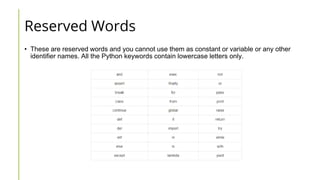
Reserved Words
• Theseare reserved words and you cannot use them as constant or variable or any other
identifier names. All the Python keywords contain lowercase letters only.
11.
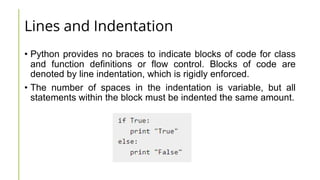
Lines and Indentation
•Python provides no braces to indicate blocks of code for class
and function definitions or flow control. Blocks of code are
denoted by line indentation, which is rigidly enforced.
• The number of spaces in the indentation is variable, but all
statements within the block must be indented the same amount.
12.
Multi-Line Statements
• Statementsin Python
typically end with a new
line. Python does,
however, allow the use of
the line continuation
character () to denote that
the line should continue.
• Statements contained
within the [], {}, or ()
brackets do not need to
use the line continuation
character.
13.
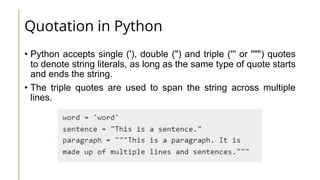
Quotation in Python
•Python accepts single ('), double (") and triple (''' or """) quotes
to denote string literals, as long as the same type of quote starts
and ends the string.
• The triple quotes are used to span the string across multiple
lines.
14.
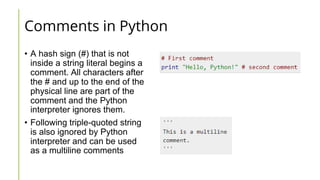
Comments in Python
•A hash sign (#) that is not
inside a string literal begins a
comment. All characters after
the # and up to the end of the
physical line are part of the
comment and the Python
interpreter ignores them.
• Following triple-quoted string
is also ignored by Python
interpreter and can be used
as a multiline comments
15.
Using blank lines
•A line containing only whitespace, possibly with a comment, is
known as a blank line and Python totally ignores it.
• In an interactive interpreter session, you must enter an empty
physical line to terminate a multiline statement.
16.
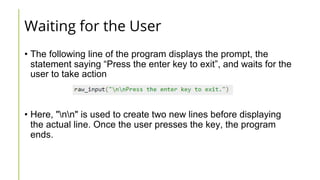
Waiting for theUser
• The following line of the program displays the prompt, the
statement saying “Press the enter key to exit”, and waits for the
user to take action
• Here, "nn" is used to create two new lines before displaying
the actual line. Once the user presses the key, the program
ends.
17.
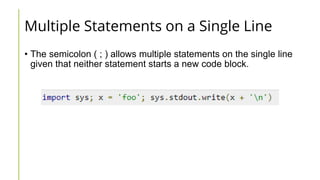
Multiple Statements ona Single Line
• The semicolon ( ; ) allows multiple statements on the single line
given that neither statement starts a new code block.
18.
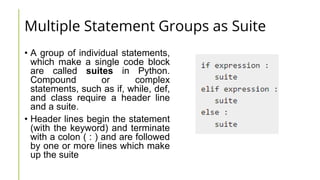
Multiple Statement Groupsas Suite
• A group of individual statements,
which make a single code block
are called suites in Python.
Compound or complex
statements, such as if, while, def,
and class require a header line
and a suite.
• Header lines begin the statement
(with the keyword) and terminate
with a colon ( : ) and are followed
by one or more lines which make
up the suite
19.
VARIABLES
• Variables arenothing but reserved memory locations to store
values. This means that when you create a variable you reserve
some space in memory.
• Based on the data type of a variable, the interpreter allocates
memory and decides what can be stored in the reserved
memory. Therefore, by assigning different data types to
variables, you can store integers, decimals or characters in
these variables.
20.
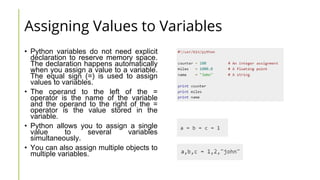
Assigning Values toVariables
• Python variables do not need explicit
declaration to reserve memory space.
The declaration happens automatically
when you assign a value to a variable.
The equal sign (=) is used to assign
values to variables.
• The operand to the left of the =
operator is the name of the variable
and the operand to the right of the =
operator is the value stored in the
variable.
• Python allows you to assign a single
value to several variables
simultaneously.
• You can also assign multiple objects to
multiple variables.
21.
Standard Data Types
•Python has five standard data types −
• Numbers
• String
• List
• Tuple
• Dictionary
22.
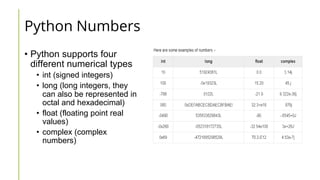
Python Numbers
• Pythonsupports four
different numerical types
• int (signed integers)
• long (long integers, they
can also be represented in
octal and hexadecimal)
• float (floating point real
values)
• complex (complex
numbers)
23.
Python Strings
• Stringsin Python are
identified as a contiguous set
of characters represented in
the quotation marks. Python
allows for either pairs of
single or double quotes.
Subsets of strings can be
taken using the slice operator
([ ] and [:] ) with indexes
starting at 0 in the beginning
of the string and working their
way from -1 at the end.
• The plus (+) sign is the string
concatenation operator and
the asterisk (*) is the
repetition operator.
24.
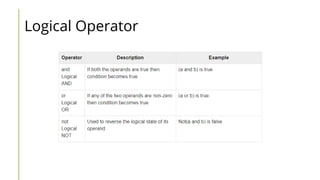
OPERATORS
• Types ofOperator
• Python language supports the following types of operators.
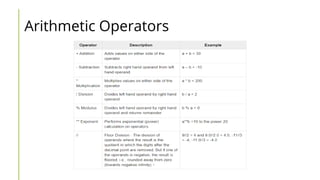
• Arithmetic Operators
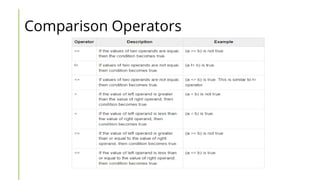
• Comparison (Relational) Operators
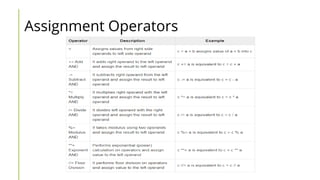
• Assignment Operators
• Logical Operators
• Bitwise Operators
• Membership Operators
• Identity Operators
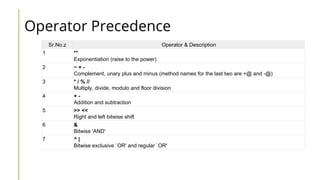
Operator Precedence
Sr.No.z Operator& Description
1 **
Exponentiation (raise to the power)
2 ~ + -
Complement, unary plus and minus (method names for the last two are +@ and -@)
3 * / % //
Multiply, divide, modulo and floor division
4 + -
Addition and subtraction
5 >> <<
Right and left bitwise shift
6 &
Bitwise 'AND'
7 ^ |
Bitwise exclusive `OR' and regular `OR'
30.
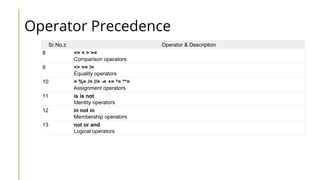
Operator Precedence
Sr.No.z Operator& Description
8 <= < > >=
Comparison operators
9 <> == !=
Equality operators
10 = %= /= //= -= += *= **=
Assignment operators
11 is is not
Identity operators
12 in not in
Membership operators
13 not or and
Logical operators
31.
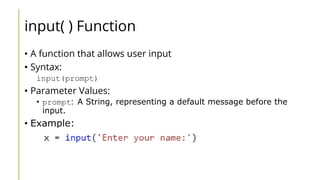
input( ) Function
•A function that allows user input
• Syntax:
input(prompt)
• Parameter Values:
• prompt: A String, representing a default message before the
input.
• Example:
32.
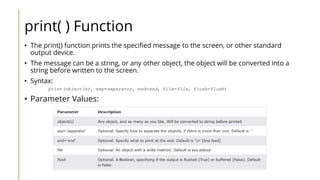
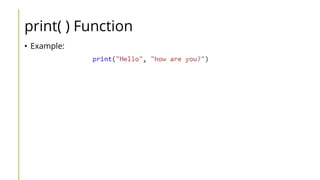
print( ) Function
•The print() function prints the specified message to the screen, or other standard
output device.
• The message can be a string, or any other object, the object will be converted into a
string before written to the screen.
• Syntax:
print(object(s), sep=separator, end=end, file=file, flush=flush)
• Parameter Values:
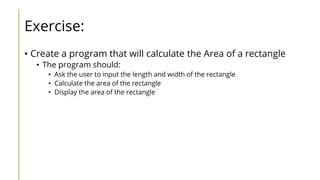
Exercise:
• Create aprogram that will calculate the Area of a rectangle
• The program should:
• Ask the user to input the length and width of the rectangle
• Calculate the area of the rectangle
• Display the area of the rectangle
![Multi-Line Statements
• Statements in Python
typically end with a new
line. Python does,
however, allow the use of
the line continuation
character () to denote that
the line should continue.
• Statements contained
within the [], {}, or ()
brackets do not need to
use the line continuation
character.](https://image.slidesharecdn.com/python-250801053238-e99eab27/85/Computer-Related-material-named-Phython-ok-12-320.jpg)
![Python Strings
• Strings in Python are
identified as a contiguous set
of characters represented in
the quotation marks. Python
allows for either pairs of
single or double quotes.
Subsets of strings can be
taken using the slice operator
([ ] and [:] ) with indexes
starting at 0 in the beginning
of the string and working their
way from -1 at the end.
• The plus (+) sign is the string
concatenation operator and
the asterisk (*) is the
repetition operator.](https://image.slidesharecdn.com/python-250801053238-e99eab27/85/Computer-Related-material-named-Phython-ok-23-320.jpg)