Computer Networking

            By Jill Lunceford
                 EdTech 541
What is a Computer Network

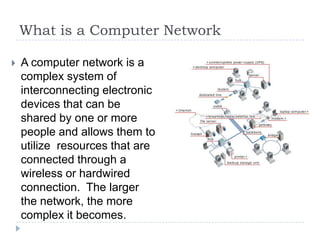
   A computer network is a
    complex system of
    interconnecting electronic
    devices that can be
    shared by one or more
    people and allows them to
    utilize resources that are
    connected through a
    wireless or hardwired
    connection. The larger
    the network, the more
    complex it becomes.
To infinity and beyond….

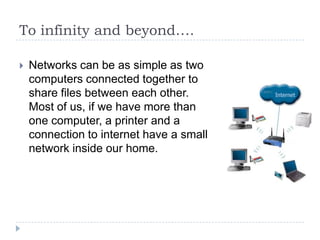
   Networks can be as simple as two
    computers connected together to
    share files between each other.
    Most of us, if we have more than
    one computer, a printer and a
    connection to internet have a small
    network inside our home.
To infinity and beyond….
   Businesses and schools can have networks within
    networks that could have 1000’s of devices
    interconnected across a city or even the country.
    This helps their employees and workers be more
    productive, work collaboratively and share resources
    like printers, scanners, hard drives, files and internet
    connections. Sharing of resources, especially
    hardware, can save a school or business a lot of
    money and eliminate having to purchase one of
    every thing for everyone.
To infinity and beyond….


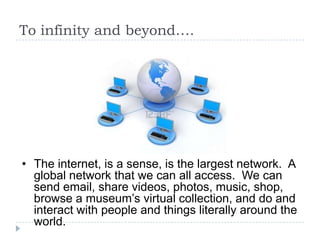
• The internet, is a sense, is the largest network. A
  global network that we can all access. We can
  send email, share videos, photos, music, shop,
  browse a museum’s virtual collection, and do and
  interact with people and things literally around the
  world.
The Home Network
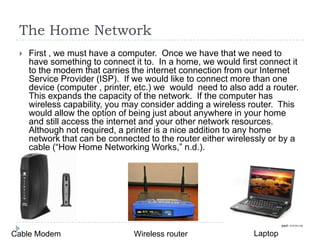
    First , we must have a computer. Once we have that we need to
     have something to connect it to. In a home, we would first connect it
     to the modem that carries the internet connection from our Internet
     Service Provider (ISP). If we would like to connect more than one
     device (computer , printer, etc.) we would need to also add a router.
     This expands the capacity of the network. If the computer has
     wireless capability, you may consider adding a wireless router. This
     would allow the option of being just about anywhere in your home
     and still access the internet and your other network resources.
     Although not required, a printer is a nice addition to any home
     network that can be connected to the router either wirelessly or by a
     cable (“How Home Networking Works,” n.d.).


Cable Modem                    Wireless router                Laptop
Larger Networks - LAN’s
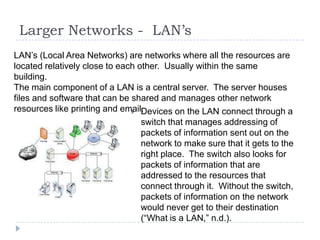
LAN’s (Local Area Networks) are networks where all the resources are
located relatively close to each other. Usually within the same
building.
The main component of a LAN is a central server. The server houses
files and software that can be shared and manages other network
resources like printing and email.
                                Devices on the LAN connect through a
                                  switch that manages addressing of
                                  packets of information sent out on the
                                  network to make sure that it gets to the
                                  right place. The switch also looks for
                                  packets of information that are
                                  addressed to the resources that
                                  connect through it. Without the switch,
                                  packets of information on the network
                                  would never get to their destination
                                  (“What is a LAN,” n.d.).
Larger Networks – WAN’s
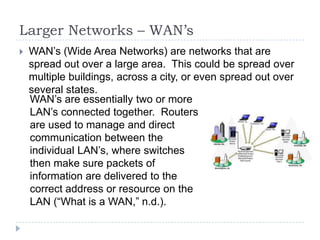
   WAN’s (Wide Area Networks) are networks that are
    spread out over a large area. This could be spread over
    multiple buildings, across a city, or even spread out over
    several states.
    WAN’s are essentially two or more
    LAN’s connected together. Routers
    are used to manage and direct
    communication between the
    individual LAN’s, where switches
    then make sure packets of
    information are delivered to the
    correct address or resource on the
    LAN (“What is a WAN,” n.d.).
Network Software

   Like your individual computer, some sort of software is
    needed to create a common language (so to speak)
    for all devices on the network to be able to
    communicate with each other. Without it, the network
    would be like two people screaming at each other in
    totally different languages.
                              • Neither understanding
                                the other, nothing getting
                                accomplished and it only
                                frustrates all those
                                around them, continuing
                                to complicate the
                                situation.
Network Software
• On a small simple network, your computer or laptop’s
  operating system may be enough to run and manage
  your network.
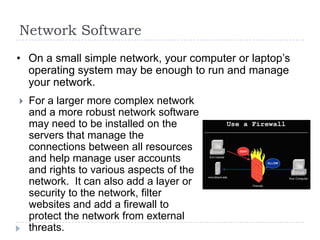
   For a larger more complex network
    and a more robust network software
    may need to be installed on the
    servers that manage the
    connections between all resources
    and help manage user accounts
    and rights to various aspects of the
    network. It can also add a layer or
    security to the network, filter
    websites and add a firewall to
    protect the network from external
    threats.
References
   HowStuffWorks “How Home Networking Works.” (n.d.). Retrieved
    February 8, 2012, from http://computer.howstuffworks.com/home-
    network.htm

   What is a LAN? (n.d.). Retrieved February 8, 2012, from
    http://www.wisegeek.com/what-is-a-lan.htm

   What is a WAN? (n.d.). Retrieved February 8, 2012, from
    http://www.wisegeek.com/what-is-a-wan.htm
Picture Credits

   Slide 2 : http://visual.merriam-webster.com/communications/office-
    automation/computer-network/wide-area-network.php#routers33358
   Slide 3 : http://www.techstore.ie/our-services/computer-networking
   Slide 5 : http://www.123rf.com/photo_3078786_global-computer-network.html
   Slide 6 :
       Cable modem : http://www.olx.com.sg/pictures/linksys-broadband-router-wrt54g-
        usbnetwork-adapter-motorola-sbv5120-cable-modem-iid-79853928
       Wirelss : http://www.olx.com.sg/linksys-broadband-router-wrt54g-usbnetwork-
        adapter-motorola-sbv5120-cable-modem-iid-79853928
       Laptop -: http://www.f-paper.com/?i935976-Photo:-Smart-Core-business-for-sale-
        8000-the-ThinkPad-T420
   Slide 7 :
       LAN : http://ops.fhwa.dot.gov/publications/telecomm_handbook/chapter2_03.htm
       WAN : http://technet.microsoft.com/en-us/library/cc751420.aspx
   Slide 8 : http://www.goodtherapy.org/blog/couples-do-dont-speak-same-language/
   Slide 9 : http://www.brown.edu/cis/information_security/news/06-021.html

Computer networking-revised

  • 1.
    Computer Networking By Jill Lunceford EdTech 541
  • 2.
    What is aComputer Network  A computer network is a complex system of interconnecting electronic devices that can be shared by one or more people and allows them to utilize resources that are connected through a wireless or hardwired connection. The larger the network, the more complex it becomes.
  • 3.
    To infinity andbeyond….  Networks can be as simple as two computers connected together to share files between each other. Most of us, if we have more than one computer, a printer and a connection to internet have a small network inside our home.
  • 4.
    To infinity andbeyond….  Businesses and schools can have networks within networks that could have 1000’s of devices interconnected across a city or even the country. This helps their employees and workers be more productive, work collaboratively and share resources like printers, scanners, hard drives, files and internet connections. Sharing of resources, especially hardware, can save a school or business a lot of money and eliminate having to purchase one of every thing for everyone.
  • 5.
    To infinity andbeyond…. • The internet, is a sense, is the largest network. A global network that we can all access. We can send email, share videos, photos, music, shop, browse a museum’s virtual collection, and do and interact with people and things literally around the world.
  • 6.
    The Home Network  First , we must have a computer. Once we have that we need to have something to connect it to. In a home, we would first connect it to the modem that carries the internet connection from our Internet Service Provider (ISP). If we would like to connect more than one device (computer , printer, etc.) we would need to also add a router. This expands the capacity of the network. If the computer has wireless capability, you may consider adding a wireless router. This would allow the option of being just about anywhere in your home and still access the internet and your other network resources. Although not required, a printer is a nice addition to any home network that can be connected to the router either wirelessly or by a cable (“How Home Networking Works,” n.d.). Cable Modem Wireless router Laptop
  • 7.
    Larger Networks -LAN’s LAN’s (Local Area Networks) are networks where all the resources are located relatively close to each other. Usually within the same building. The main component of a LAN is a central server. The server houses files and software that can be shared and manages other network resources like printing and email.  Devices on the LAN connect through a switch that manages addressing of packets of information sent out on the network to make sure that it gets to the right place. The switch also looks for packets of information that are addressed to the resources that connect through it. Without the switch, packets of information on the network would never get to their destination (“What is a LAN,” n.d.).
  • 8.
    Larger Networks –WAN’s  WAN’s (Wide Area Networks) are networks that are spread out over a large area. This could be spread over multiple buildings, across a city, or even spread out over several states. WAN’s are essentially two or more LAN’s connected together. Routers are used to manage and direct communication between the individual LAN’s, where switches then make sure packets of information are delivered to the correct address or resource on the LAN (“What is a WAN,” n.d.).
  • 9.
    Network Software  Like your individual computer, some sort of software is needed to create a common language (so to speak) for all devices on the network to be able to communicate with each other. Without it, the network would be like two people screaming at each other in totally different languages. • Neither understanding the other, nothing getting accomplished and it only frustrates all those around them, continuing to complicate the situation.
  • 10.
    Network Software • Ona small simple network, your computer or laptop’s operating system may be enough to run and manage your network.  For a larger more complex network and a more robust network software may need to be installed on the servers that manage the connections between all resources and help manage user accounts and rights to various aspects of the network. It can also add a layer or security to the network, filter websites and add a firewall to protect the network from external threats.
  • 11.
    References  HowStuffWorks “How Home Networking Works.” (n.d.). Retrieved February 8, 2012, from http://computer.howstuffworks.com/home- network.htm  What is a LAN? (n.d.). Retrieved February 8, 2012, from http://www.wisegeek.com/what-is-a-lan.htm  What is a WAN? (n.d.). Retrieved February 8, 2012, from http://www.wisegeek.com/what-is-a-wan.htm
  • 12.
    Picture Credits  Slide 2 : http://visual.merriam-webster.com/communications/office- automation/computer-network/wide-area-network.php#routers33358  Slide 3 : http://www.techstore.ie/our-services/computer-networking  Slide 5 : http://www.123rf.com/photo_3078786_global-computer-network.html  Slide 6 :  Cable modem : http://www.olx.com.sg/pictures/linksys-broadband-router-wrt54g- usbnetwork-adapter-motorola-sbv5120-cable-modem-iid-79853928  Wirelss : http://www.olx.com.sg/linksys-broadband-router-wrt54g-usbnetwork- adapter-motorola-sbv5120-cable-modem-iid-79853928  Laptop -: http://www.f-paper.com/?i935976-Photo:-Smart-Core-business-for-sale- 8000-the-ThinkPad-T420  Slide 7 :  LAN : http://ops.fhwa.dot.gov/publications/telecomm_handbook/chapter2_03.htm  WAN : http://technet.microsoft.com/en-us/library/cc751420.aspx  Slide 8 : http://www.goodtherapy.org/blog/couples-do-dont-speak-same-language/  Slide 9 : http://www.brown.edu/cis/information_security/news/06-021.html