SQL
(STRUCTURED
QUERY
LANGUAGE)
About Computer Networking
Infographics
● This template contains an assortment of complementary infographic resources for the
Computer Networking Project Proposal presentation.
● These infographics are adapted to the style of the aforementioned presentation, so you can insert
them easily and have them completely integrated at once. You just need to do the following:
○ Select the element that you want to copy
○ Right-click and choose “Copy”
○ Go to the slide where you want the element to appear
○ Right-click and choose “Paste”
Venus
Venus is the second
planet from the Sun
01
Computer Networking Infographics
Jupiter
Jupiter is the biggest
planet of them all
02
Mars
Despite being red,
Mars is a cold place
03
Saturn
Saturn is a gas giant
and has several rings
04
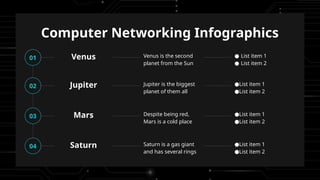
Computer Networking Infographics
Venus Venus is the second
planet from the Sun
01 ● List item 1
● List item 2
Mars Despite being red,
Mars is a cold place
03 ●List item 1
●List item 2
Jupiter Jupiter is the biggest
planet of them all
02 ●List item 1
●List item 2
Saturn Saturn is a gas giant
and has several rings
04 ●List item 1
●List item 2
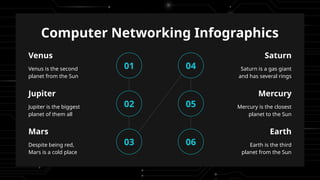
Computer Networking Infographics
01
Venus
Venus is the second
planet from the Sun
Jupiter
Jupiter is the biggest
planet of them all
02
Mars
Despite being red,
Mars is a cold place
03
Saturn
Saturn is a gas giant
and has several rings
04
Mercury
Mercury is the closest
planet to the Sun
05
Earth
Earth is the third
planet from the Sun
06
Computer Networking Infographics
Desire
Mars
Despite being red, Mars
is a cold place
Interest
Jupiter
Jupiter is the biggest
planet of them all
Action
Saturn
Saturn is a gas giant
and has several rings
Venus
Venus is the second
planet from the Sun
Attention
Computer Networking Infographics
Venus
Venus has a beautiful
name and is the
second planet from
the Sun
Mars
Despite being red,
Mars is actually a cold
place full of iron oxide
dust
Jupiter
Jupiter is a gas giant
and the biggest planet
in the Solar System
Mercury
Mercury is the closest
planet to the Sun and
the smallest one
Computer
networkin
g
Computer Networking Infographics
Venus has a beautiful name
but is a very hot planet
Venus
Neptune is the farthest planet
from the Sun and is a gas
giant
Neptune
Mercury is the closest planet
to the Sun and the smallest
one
Mercury
What are we working on
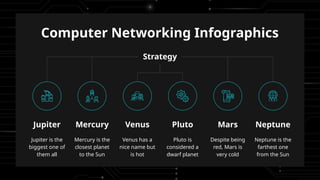
Computer Networking Infographics
Jupiter
Jupiter is the
biggest one of
them all
Mercury
Mercury is the
closest planet
to the Sun
Venus
Venus has a
nice name but
is hot
Pluto
Pluto is
considered a
dwarf planet
Mars
Despite being
red, Mars is
very cold
Neptune
Neptune is the
farthest one
from the Sun
Strategy
Computer Networking Infographics
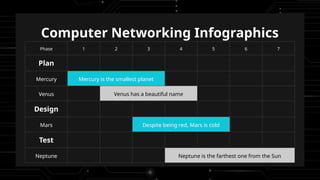
Phase 1 2 3 4 5 6 7
Plan
Mercury Mercury is the smallest planet
Venus Venus has a beautiful name
Design
Mars Despite being red, Mars is cold
Test
Neptune Neptune is the farthest one from the Sun
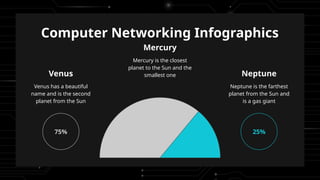
Computer Networking Infographics
Mercury
Mercury is the closest
planet to the Sun and the
smallest one
Venus
Venus has a beautiful
name and is the second
planet from the Sun
75%
Neptune
Neptune is the farthest
planet from the Sun and
is a gas giant
25%
Computer Networking Infographics
Research, design &
development
Product production
Product manufacturing
Marketing & total sales
Idea creation Marketplace
Need of society & marketplace
New needs Tech push
State of technology & production
New tech Market pull
Computer Networking Infographics
Idea evaluation
Idea
Mercury is the closest planet to the Sun and the
smallest one in the Solar System
Innovatio
n
Improvement
Benefit 1 Quality service Benefit 2 Time limit Benefit 3 Low cost
Description
Yes, Saturn is a very big gas giant with several rings around it and it's
composed for the most part of hydrogen and helium
Objectives Risks
Venus has a very beautiful name but is actually
terribly hot, hotter than Mercury
Jupiter is a huge gas giant named after the Roman
god of the skies and the lightning
Computer Networking Infographics
Key activities
● Activity 1
● Activity 2
● Activity 3
● Activity 4
● Activity 5
● Activity 6
● Activity 7
● Activity 8
● Activity 9
● Activity 10
● Activity 11
● Activity 12
Deliverables
Mercury is the closest planet to the Sun and the
smallest one in the entire Solar System
Mars is a cold place full
of iron oxide dust,
which gives the planet
its reddish cast
Opportunity
assessment
Market
analysis
Transition
management
Ongoing
operations
Computer Networking Infographics
Balance Assets Liabilities Equity
01 Mars 3,600 5,550 7,800
02 Venus 1,900 3,500 4,100
03 Mercury 5,800 2,500 5,800
04 Jupiter 3,240 1,320 2,654
05 Saturn 2,234 3,540 2,430
06 Neptune 4,560 2,340 5,125
Computer Networking Infographics
60%
Mercury
Mercury is the closest
planet to the Sun and
the smallest one
10%
Venus
Venus has a beautiful
name and is the
second planet from
the Sun
30%
Neptune
Neptune is the
farthest planet from
the Sun and is a gas
giant
Computer Networking Infographics
Earth is the third planet from the Sun
and the only one that harbors life in
the Solar System. This is where we all
live on
75% 25%
Mercury
Mercury is the closest
planet to the Sun
Despite being red, Mars is
a very cold place
Mars
Computer Networking Infographics
Project innovation
Disagre
e
Partially Agree Activities
Jupiter is a gas giant and it’s
the biggest one
Idea generation
Mercury is the closest planet to
the Sun
Cross-platform
Venus has a nice name but is a
very hot place
External sourcing
Despite being red, Mars is a
very cold place
Selection
Computer Networking Infographics
Computer networking
teams
Network operations
Venus has a beautiful name and is the
second planet from the Sun. It’s
terribly hot—even hotter than Mercury
Network
engineer
IT
Manager
/Director
Cybersecurity
Planet Earth is the third planet from
the Sun and the only one that harbors
life in the Solar System
Help desk
support
Network
analyst
Computer Networking Infographics
● Date: January 05-10, 2xxx
● Where: London, UK
● Price: $2,570
Event 1
Mercury is the closest planet to the Sun and
the smallest one in the Solar System. This
planet’s name has nothing to do with the
liquid metal
● Date: February 10-17, 2xxx
● Where: Barcelona, Spain
● Price: $3,765
Event 2
Venus has a beautiful name and is the second
planet from the Sun. It’s terribly hot, even
hotter than Mercury, and its atmosphere is
poisonous
Computer Networking Infographics
Category
Estimate
d
Scope Scale
Hardware 3,200 1,200 1,000
Software 5,500 2,300 2,200
Labor 1,200 4,500 3,300
Consulting 4,500 2,500 2,000
Training 5,650 5,200 450
Project budget
Computer network
$35,750
Additional service
$25,650
Instructions for use
For more information about editing slides, please read our FAQs or visit our blog:
https://slidesgo.com/faqs and https://slidesgo.com/slidesgo-school
If you have a free account, in order to use this template, you must credit Slidesgo in your final presentation. Please refer
to the next slide to read the instructions for premium users.
As a Free user, you are allowed to:
- Modify this template.
- Use it for both personal and commercial projects.
You are not allowed to:
- Sublicense, sell or rent any of Slidesgo Content (or a modified version of Slidesgo Content).
- Distribute Slidesgo Content unless it has been expressly authorized by Slidesgo.
- Include Slidesgo Content in an online or offline database or file.
- Offer Slidesgo templates (or modified versions of Slidesgo templates) for download.
- Acquire the copyright of Slidesgo Content.
Instructions for use (premium users)
As a Premium user, you can use this template without attributing Slidesgo.
You are allowed to:
● Modify this template.
● Use it for both personal and commercial purposes.
● Share this template in an editable format with people who are not part of your team.
You are not allowed to:
● Sublicense, sell or rent this Slidesgo Template (or a modified version of this Slidesgo Template).
● Distribute this Slidesgo Template (or a modified version of this Slidesgo Template) or include it in a database or in
any other product or service that offers downloadable images, icons or presentations that may be subject to
distribution or resale.
● Use any of the elements that are part of this Slidesgo Template in an isolated and separated way from this
Template.
● Register any of the elements that are part of this template as a trademark or logo, or register it as a work in an
intellectual property registry or similar.
For more information about editing slides, please read our FAQs or visit our blog:
https://slidesgo.com/faqs and https://slidesgo.com/slidesgo-school
Infographics
You can add and edit some infographics to your presentation to present your data in a visual way.
● Choose your favourite infographic and insert it in your presentation using Ctrl C
+ Ctrl V or Cmd C + Cmd V in Mac.
● Select one of the parts and ungroup it by right-clicking and choosing
“Ungroup”.
● Change the color by clicking on the paint bucket.
● Then resize the element by clicking and dragging one of the square-shaped
points of its bounding box (the cursor should look like a double-headed arrow).
Remember to hold Shift while dragging to keep the proportions.
● Group the elements again by selecting them, right-clicking and choosing
“Group”.
● Repeat the steps above with the other parts and when you’re done editing,
copy the end result and paste it into your presentation.
● Remember to choose the “Keep source formatting” option so that it keeps the
design. For more info, please visit our blog.

computer-networking-project-proposal-infographics.pptx

  • 1.
  • 2.
    About Computer Networking Infographics ●This template contains an assortment of complementary infographic resources for the Computer Networking Project Proposal presentation. ● These infographics are adapted to the style of the aforementioned presentation, so you can insert them easily and have them completely integrated at once. You just need to do the following: ○ Select the element that you want to copy ○ Right-click and choose “Copy” ○ Go to the slide where you want the element to appear ○ Right-click and choose “Paste”
  • 3.
    Venus Venus is thesecond planet from the Sun 01 Computer Networking Infographics Jupiter Jupiter is the biggest planet of them all 02 Mars Despite being red, Mars is a cold place 03 Saturn Saturn is a gas giant and has several rings 04
  • 4.
    Computer Networking Infographics VenusVenus is the second planet from the Sun 01 ● List item 1 ● List item 2 Mars Despite being red, Mars is a cold place 03 ●List item 1 ●List item 2 Jupiter Jupiter is the biggest planet of them all 02 ●List item 1 ●List item 2 Saturn Saturn is a gas giant and has several rings 04 ●List item 1 ●List item 2
  • 5.
    Computer Networking Infographics 01 Venus Venusis the second planet from the Sun Jupiter Jupiter is the biggest planet of them all 02 Mars Despite being red, Mars is a cold place 03 Saturn Saturn is a gas giant and has several rings 04 Mercury Mercury is the closest planet to the Sun 05 Earth Earth is the third planet from the Sun 06
  • 6.
    Computer Networking Infographics Desire Mars Despitebeing red, Mars is a cold place Interest Jupiter Jupiter is the biggest planet of them all Action Saturn Saturn is a gas giant and has several rings Venus Venus is the second planet from the Sun Attention
  • 7.
    Computer Networking Infographics Venus Venushas a beautiful name and is the second planet from the Sun Mars Despite being red, Mars is actually a cold place full of iron oxide dust Jupiter Jupiter is a gas giant and the biggest planet in the Solar System Mercury Mercury is the closest planet to the Sun and the smallest one Computer networkin g
  • 8.
    Computer Networking Infographics Venushas a beautiful name but is a very hot planet Venus Neptune is the farthest planet from the Sun and is a gas giant Neptune Mercury is the closest planet to the Sun and the smallest one Mercury What are we working on
  • 9.
    Computer Networking Infographics Jupiter Jupiteris the biggest one of them all Mercury Mercury is the closest planet to the Sun Venus Venus has a nice name but is hot Pluto Pluto is considered a dwarf planet Mars Despite being red, Mars is very cold Neptune Neptune is the farthest one from the Sun Strategy
  • 10.
    Computer Networking Infographics Phase1 2 3 4 5 6 7 Plan Mercury Mercury is the smallest planet Venus Venus has a beautiful name Design Mars Despite being red, Mars is cold Test Neptune Neptune is the farthest one from the Sun
  • 11.
    Computer Networking Infographics Mercury Mercuryis the closest planet to the Sun and the smallest one Venus Venus has a beautiful name and is the second planet from the Sun 75% Neptune Neptune is the farthest planet from the Sun and is a gas giant 25%
  • 12.
    Computer Networking Infographics Research,design & development Product production Product manufacturing Marketing & total sales Idea creation Marketplace Need of society & marketplace New needs Tech push State of technology & production New tech Market pull
  • 13.
    Computer Networking Infographics Ideaevaluation Idea Mercury is the closest planet to the Sun and the smallest one in the Solar System Innovatio n Improvement Benefit 1 Quality service Benefit 2 Time limit Benefit 3 Low cost Description Yes, Saturn is a very big gas giant with several rings around it and it's composed for the most part of hydrogen and helium Objectives Risks Venus has a very beautiful name but is actually terribly hot, hotter than Mercury Jupiter is a huge gas giant named after the Roman god of the skies and the lightning
  • 14.
    Computer Networking Infographics Keyactivities ● Activity 1 ● Activity 2 ● Activity 3 ● Activity 4 ● Activity 5 ● Activity 6 ● Activity 7 ● Activity 8 ● Activity 9 ● Activity 10 ● Activity 11 ● Activity 12 Deliverables Mercury is the closest planet to the Sun and the smallest one in the entire Solar System Mars is a cold place full of iron oxide dust, which gives the planet its reddish cast Opportunity assessment Market analysis Transition management Ongoing operations
  • 15.
    Computer Networking Infographics BalanceAssets Liabilities Equity 01 Mars 3,600 5,550 7,800 02 Venus 1,900 3,500 4,100 03 Mercury 5,800 2,500 5,800 04 Jupiter 3,240 1,320 2,654 05 Saturn 2,234 3,540 2,430 06 Neptune 4,560 2,340 5,125
  • 16.
    Computer Networking Infographics 60% Mercury Mercuryis the closest planet to the Sun and the smallest one 10% Venus Venus has a beautiful name and is the second planet from the Sun 30% Neptune Neptune is the farthest planet from the Sun and is a gas giant
  • 17.
    Computer Networking Infographics Earthis the third planet from the Sun and the only one that harbors life in the Solar System. This is where we all live on 75% 25% Mercury Mercury is the closest planet to the Sun Despite being red, Mars is a very cold place Mars
  • 18.
    Computer Networking Infographics Projectinnovation Disagre e Partially Agree Activities Jupiter is a gas giant and it’s the biggest one Idea generation Mercury is the closest planet to the Sun Cross-platform Venus has a nice name but is a very hot place External sourcing Despite being red, Mars is a very cold place Selection
  • 19.
    Computer Networking Infographics Computernetworking teams Network operations Venus has a beautiful name and is the second planet from the Sun. It’s terribly hot—even hotter than Mercury Network engineer IT Manager /Director Cybersecurity Planet Earth is the third planet from the Sun and the only one that harbors life in the Solar System Help desk support Network analyst
  • 20.
    Computer Networking Infographics ●Date: January 05-10, 2xxx ● Where: London, UK ● Price: $2,570 Event 1 Mercury is the closest planet to the Sun and the smallest one in the Solar System. This planet’s name has nothing to do with the liquid metal ● Date: February 10-17, 2xxx ● Where: Barcelona, Spain ● Price: $3,765 Event 2 Venus has a beautiful name and is the second planet from the Sun. It’s terribly hot, even hotter than Mercury, and its atmosphere is poisonous
  • 21.
    Computer Networking Infographics Category Estimate d ScopeScale Hardware 3,200 1,200 1,000 Software 5,500 2,300 2,200 Labor 1,200 4,500 3,300 Consulting 4,500 2,500 2,000 Training 5,650 5,200 450 Project budget Computer network $35,750 Additional service $25,650
  • 22.
    Instructions for use Formore information about editing slides, please read our FAQs or visit our blog: https://slidesgo.com/faqs and https://slidesgo.com/slidesgo-school If you have a free account, in order to use this template, you must credit Slidesgo in your final presentation. Please refer to the next slide to read the instructions for premium users. As a Free user, you are allowed to: - Modify this template. - Use it for both personal and commercial projects. You are not allowed to: - Sublicense, sell or rent any of Slidesgo Content (or a modified version of Slidesgo Content). - Distribute Slidesgo Content unless it has been expressly authorized by Slidesgo. - Include Slidesgo Content in an online or offline database or file. - Offer Slidesgo templates (or modified versions of Slidesgo templates) for download. - Acquire the copyright of Slidesgo Content.
  • 23.
    Instructions for use(premium users) As a Premium user, you can use this template without attributing Slidesgo. You are allowed to: ● Modify this template. ● Use it for both personal and commercial purposes. ● Share this template in an editable format with people who are not part of your team. You are not allowed to: ● Sublicense, sell or rent this Slidesgo Template (or a modified version of this Slidesgo Template). ● Distribute this Slidesgo Template (or a modified version of this Slidesgo Template) or include it in a database or in any other product or service that offers downloadable images, icons or presentations that may be subject to distribution or resale. ● Use any of the elements that are part of this Slidesgo Template in an isolated and separated way from this Template. ● Register any of the elements that are part of this template as a trademark or logo, or register it as a work in an intellectual property registry or similar. For more information about editing slides, please read our FAQs or visit our blog: https://slidesgo.com/faqs and https://slidesgo.com/slidesgo-school
  • 24.
    Infographics You can addand edit some infographics to your presentation to present your data in a visual way. ● Choose your favourite infographic and insert it in your presentation using Ctrl C + Ctrl V or Cmd C + Cmd V in Mac. ● Select one of the parts and ungroup it by right-clicking and choosing “Ungroup”. ● Change the color by clicking on the paint bucket. ● Then resize the element by clicking and dragging one of the square-shaped points of its bounding box (the cursor should look like a double-headed arrow). Remember to hold Shift while dragging to keep the proportions. ● Group the elements again by selecting them, right-clicking and choosing “Group”. ● Repeat the steps above with the other parts and when you’re done editing, copy the end result and paste it into your presentation. ● Remember to choose the “Keep source formatting” option so that it keeps the design. For more info, please visit our blog.