Computer Memory
ShaikhAshraful Alam
Department of ACCE
BSMRSTU
Email:ashrafulalam96@gmail.co
m
COMPUTER MEMORY
Computer memory is any physical device capable of storing information
temporarily or permanently.
Memory is the most essential part of a computer.
Without memory there would be no computer, as we know it today.
Modern computers use semiconductor memory
It is made up of thousands of circuits (paths) for electrical currents on a
single silicon chip
This can be divided into three categories
-Internal processor Memory
-Main Memory
-Secondary Memory
Shaikh Ashraful Alam |ACCE,BSMRSTU
Types of MEMORY
I. PRIMARY MEMORY OR MAIN MEMORY
Random Access Memory (RAM)
Read Only Memory (ROM)
II.CACHE MEMORY
Level 1 (L1) cache
Level 2 (L2) cache
III. SECONDARY MEMORY
Optical Media Devices
Magnetic Media Devices
Shaikh Ashraful Alam |ACCE,BSMRSTU
I. Primary Memory (Main Memory)
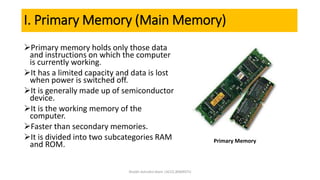
Primary memory holds only those data
and instructions on which the computer
is currently working.
It has a limited capacity and data is lost
when power is switched off.
It is generally made up of semiconductor
device.
It is the working memory of the
computer.
Faster than secondary memories.
It is divided into two subcategories RAM
and ROM. Primary Memory
Shaikh Ashraful Alam |ACCE,BSMRSTU
I. Primary Memory: Random Access Memory (RAM)
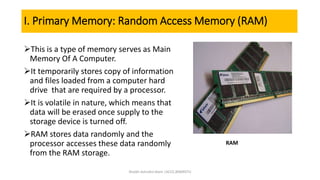
This is a type of memory serves as Main
Memory Of A Computer.
It temporarily stores copy of information
and files loaded from a computer hard
drive that are required by a processor.
It is volatile in nature, which means that
data will be erased once supply to the
storage device is turned off.
RAM stores data randomly and the
processor accesses these data randomly
from the RAM storage.
RAM
Shaikh Ashraful Alam |ACCE,BSMRSTU
I. Primary Memory: Types of Random Access Memory (RAM)
The RAM chips are of two types.
Dynamic RAM(DRAM)
A type of RAM that stores each bit of data in a separate capacitor within
an integrated circuit.
Static RAM (SRAM)
It is a type of memory in which, memory refreshing is not required.
Shaikh Ashraful Alam |ACCE,BSMRSTU
I. Primary Memory: Read Only Memory(ROM)
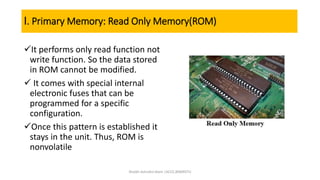
It performs only read function not
write function. So the data stored
in ROM cannot be modified.
 It comes with special internal
electronic fuses that can be
programmed for a specific
configuration.
Once this pattern is established it
stays in the unit. Thus, ROM is
nonvolatile
Shaikh Ashraful Alam |ACCE,BSMRSTU
I. Primary Memory: Types of Read Only Memory(ROM)
1. Programmable read-only memory (PROM)
2. Electrically Erasable Programmable Read-Only
Memory (EEPROM)
3. Erasable programmable read only memory (EPROM)
Shaikh Ashraful Alam |ACCE,BSMRSTU
I. Primary Memory:Capacity
1. In computer’s memory both programs and data are stored in
the binary form
2. The binary system has only two values (bits ) 0 and 1.
3. Each of RAM’s locations stores one byte ) 8 bits)
4. (1 kilobyte is 1024 bytes)
5. (1Megabyte is 1024 kilobytes)
6. (1 terabyte is 1024 megabytes)
7. Thus 64 kilobyte (KB) memory is capable of storing
64 X 1024 = 32,767 bytes
Shaikh Ashraful Alam |ACCE,BSMRSTU
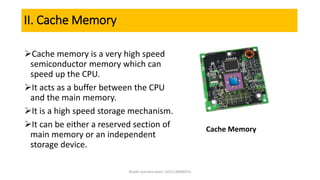
II. Cache Memory
Cache memory is a very high speed
semiconductor memory which can
speed up the CPU.
It acts as a buffer between the CPU
and the main memory.
It is a high speed storage mechanism.
It can be either a reserved section of
main memory or an independent
storage device.
Cache Memory
Shaikh Ashraful Alam |ACCE,BSMRSTU
II. Cache Memory: Advantage and Disadvantage
 Advantages
The advantages of cache memory are as follows −
Cache memory is faster than main memory.
It consumes less access time as compared to main memory.
It stores the program that can be executed within a short period of
time.
It stores data for temporary use.
 Disadvantages
The disadvantages of cache memory are as follows −
Cache memory has limited capacity.
It is very expensive
Shaikh Ashraful Alam |ACCE,BSMRSTU
II. Cache Memory: types
Level 1 (L1) cache
Built inside the CPU.
Level 2 (L2) cache
Built external to CPU, in the motherboard.
Shaikh Ashraful Alam |ACCE,BSMRSTU
III. Secondary Memory
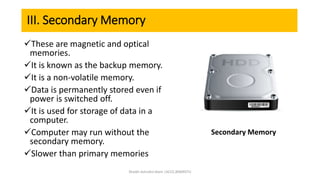
These are magnetic and optical
memories.
It is known as the backup memory.
It is a non-volatile memory.
Data is permanently stored even if
power is switched off.
It is used for storage of data in a
computer.
Computer may run without the
secondary memory.
Slower than primary memories
Secondary Memory
Shaikh Ashraful Alam |ACCE,BSMRSTU
III. Secondary Memory:types
It is broadly of two types-
1) MAGNETIC MEDIA
It is a form of non-volatile memory.
The information is accessed using one
or more read/write heads.
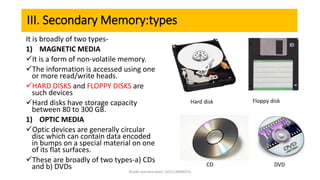
HARD DISKS and FLOPPY DISKS are
such devices
Hard disks have storage capacity
between 80 to 300 GB.
1) OPTIC MEDIA
Optic devices are generally circular
disc which can contain data encoded
in bumps on a special material on one
of its flat surfaces.
These are broadly of two types-a) CDs
and b) DVDs
Hard disk Floppy disk
CD DVD
Shaikh Ashraful Alam |ACCE,BSMRSTU
Conclusion
Memory plays great role in computer systems. As we have
discussed, there are three computer memory
types available in standard computer based on their
function and physical makeup. However, only the main
memory that can be upgraded and changed, the others
comes with the system whether it is a processor, ROM or
graphics card.
Shaikh Ashraful Alam |ACCE,BSMRSTU

Computer Memory

  • 1.
    Computer Memory ShaikhAshraful Alam Departmentof ACCE BSMRSTU Email:ashrafulalam96@gmail.co m
  • 2.
    COMPUTER MEMORY Computer memoryis any physical device capable of storing information temporarily or permanently. Memory is the most essential part of a computer. Without memory there would be no computer, as we know it today. Modern computers use semiconductor memory It is made up of thousands of circuits (paths) for electrical currents on a single silicon chip This can be divided into three categories -Internal processor Memory -Main Memory -Secondary Memory Shaikh Ashraful Alam |ACCE,BSMRSTU
  • 3.
    Types of MEMORY I.PRIMARY MEMORY OR MAIN MEMORY Random Access Memory (RAM) Read Only Memory (ROM) II.CACHE MEMORY Level 1 (L1) cache Level 2 (L2) cache III. SECONDARY MEMORY Optical Media Devices Magnetic Media Devices Shaikh Ashraful Alam |ACCE,BSMRSTU
  • 4.
    I. Primary Memory(Main Memory) Primary memory holds only those data and instructions on which the computer is currently working. It has a limited capacity and data is lost when power is switched off. It is generally made up of semiconductor device. It is the working memory of the computer. Faster than secondary memories. It is divided into two subcategories RAM and ROM. Primary Memory Shaikh Ashraful Alam |ACCE,BSMRSTU
  • 5.
    I. Primary Memory:Random Access Memory (RAM) This is a type of memory serves as Main Memory Of A Computer. It temporarily stores copy of information and files loaded from a computer hard drive that are required by a processor. It is volatile in nature, which means that data will be erased once supply to the storage device is turned off. RAM stores data randomly and the processor accesses these data randomly from the RAM storage. RAM Shaikh Ashraful Alam |ACCE,BSMRSTU
  • 6.
    I. Primary Memory:Types of Random Access Memory (RAM) The RAM chips are of two types. Dynamic RAM(DRAM) A type of RAM that stores each bit of data in a separate capacitor within an integrated circuit. Static RAM (SRAM) It is a type of memory in which, memory refreshing is not required. Shaikh Ashraful Alam |ACCE,BSMRSTU
  • 7.
    I. Primary Memory:Read Only Memory(ROM) It performs only read function not write function. So the data stored in ROM cannot be modified.  It comes with special internal electronic fuses that can be programmed for a specific configuration. Once this pattern is established it stays in the unit. Thus, ROM is nonvolatile Shaikh Ashraful Alam |ACCE,BSMRSTU
  • 8.
    I. Primary Memory:Types of Read Only Memory(ROM) 1. Programmable read-only memory (PROM) 2. Electrically Erasable Programmable Read-Only Memory (EEPROM) 3. Erasable programmable read only memory (EPROM) Shaikh Ashraful Alam |ACCE,BSMRSTU
  • 9.
    I. Primary Memory:Capacity 1.In computer’s memory both programs and data are stored in the binary form 2. The binary system has only two values (bits ) 0 and 1. 3. Each of RAM’s locations stores one byte ) 8 bits) 4. (1 kilobyte is 1024 bytes) 5. (1Megabyte is 1024 kilobytes) 6. (1 terabyte is 1024 megabytes) 7. Thus 64 kilobyte (KB) memory is capable of storing 64 X 1024 = 32,767 bytes Shaikh Ashraful Alam |ACCE,BSMRSTU
  • 10.
    II. Cache Memory Cachememory is a very high speed semiconductor memory which can speed up the CPU. It acts as a buffer between the CPU and the main memory. It is a high speed storage mechanism. It can be either a reserved section of main memory or an independent storage device. Cache Memory Shaikh Ashraful Alam |ACCE,BSMRSTU
  • 11.
    II. Cache Memory:Advantage and Disadvantage  Advantages The advantages of cache memory are as follows − Cache memory is faster than main memory. It consumes less access time as compared to main memory. It stores the program that can be executed within a short period of time. It stores data for temporary use.  Disadvantages The disadvantages of cache memory are as follows − Cache memory has limited capacity. It is very expensive Shaikh Ashraful Alam |ACCE,BSMRSTU
  • 12.
    II. Cache Memory:types Level 1 (L1) cache Built inside the CPU. Level 2 (L2) cache Built external to CPU, in the motherboard. Shaikh Ashraful Alam |ACCE,BSMRSTU
  • 13.
    III. Secondary Memory Theseare magnetic and optical memories. It is known as the backup memory. It is a non-volatile memory. Data is permanently stored even if power is switched off. It is used for storage of data in a computer. Computer may run without the secondary memory. Slower than primary memories Secondary Memory Shaikh Ashraful Alam |ACCE,BSMRSTU
  • 14.
    III. Secondary Memory:types Itis broadly of two types- 1) MAGNETIC MEDIA It is a form of non-volatile memory. The information is accessed using one or more read/write heads. HARD DISKS and FLOPPY DISKS are such devices Hard disks have storage capacity between 80 to 300 GB. 1) OPTIC MEDIA Optic devices are generally circular disc which can contain data encoded in bumps on a special material on one of its flat surfaces. These are broadly of two types-a) CDs and b) DVDs Hard disk Floppy disk CD DVD Shaikh Ashraful Alam |ACCE,BSMRSTU
  • 15.
    Conclusion Memory plays greatrole in computer systems. As we have discussed, there are three computer memory types available in standard computer based on their function and physical makeup. However, only the main memory that can be upgraded and changed, the others comes with the system whether it is a processor, ROM or graphics card. Shaikh Ashraful Alam |ACCE,BSMRSTU
  • 16.
    Shaikh Ashraful Alam|ACCE,BSMRSTU