Computer Mediated Communication
Boutkhil Guemide
University Mohammed Boudiaf, M’sila
Algeria
Computer Mediated Communication
 Computer- Mediated Communication:
(CMC) is any form of communication
between two or more individuals who
interact and/ or influence each other
via separate computers through the
Internet, or a network connection -
using software.
 CMC does not include the methods by
which two computers communicate,
but rather how people communicate
via computers.
 “Any communication … mediated
through the computer" (Metz,
1992, p. 3).
 Walther and Burgoon (1992): “…
CMC is … a communication
channel through which much of
our business and social
interaction takes place…" (p.
51).
 The process by which people create, exchange, and
perceive information using networked
telecommunications systems that facilitate encoding,
transmitting, and decoding messages.
 Jones (1995): It is the space within which the relations
occur and the tool that individuals use to enter that
space.
 Shaft, Martin, and Gay (2001):
CMC is human-to-human communication using
networked computer environments to facilitate
interaction. It is an umbrella term for all kinds of
interpersonal (private and public) communication carried
out on the Internet by e-mail, instant messaging
systems, mailing lists, newsgroups, web discussion
boards, Internet Chat, and web chat channels.
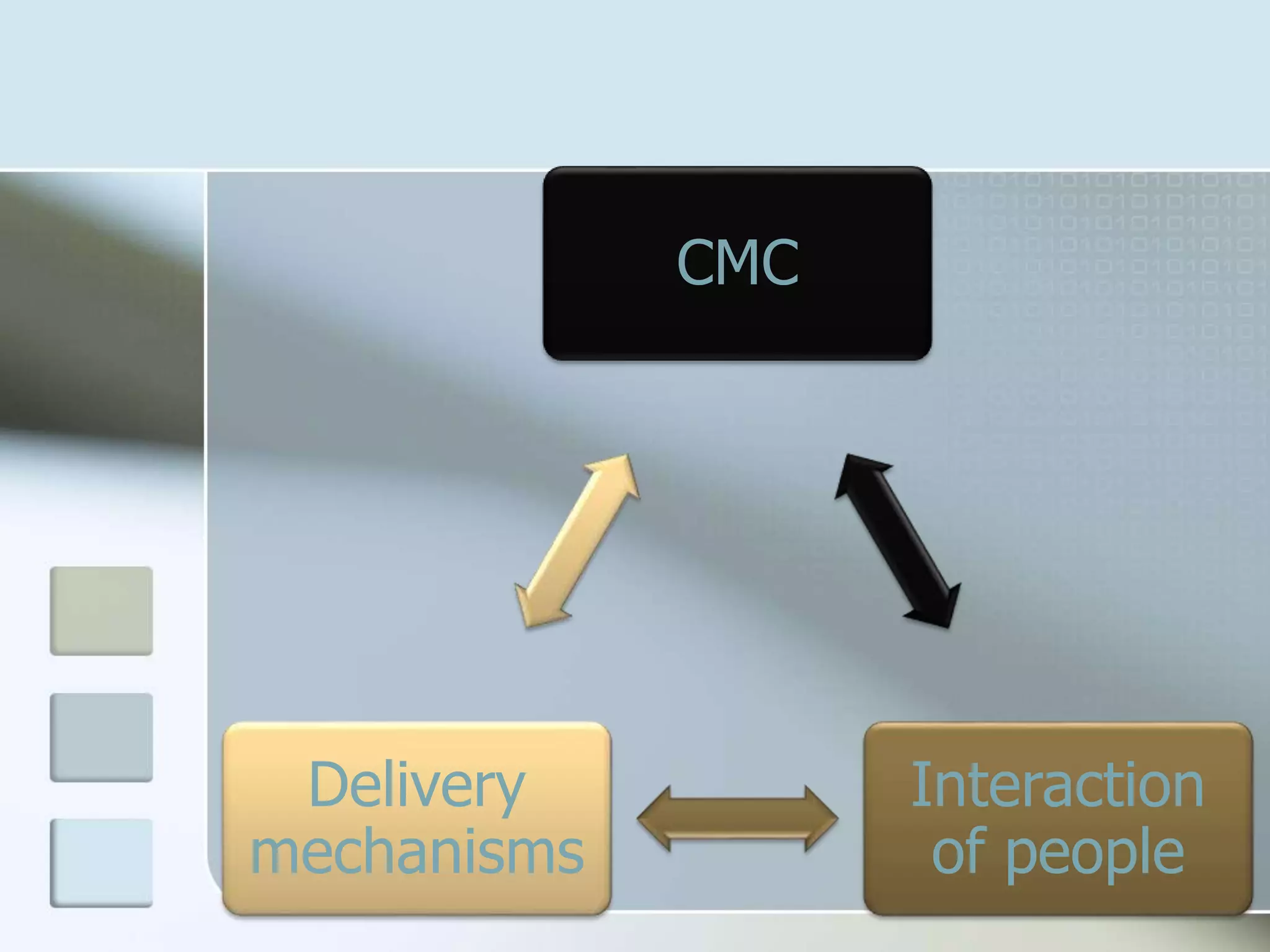
CMC
Interaction
of people
Delivery
mechanisms
Why CMC?
CMC
 CMC promotes self-discipline and
requires students to take more
responsibility for their own learning.
 Using CMC, instructors can vary a
course's instructional design to
include everything from structured
projects to open projects in which
students are free to work on problem
solving.
CMC
 CMC promotes an equalization of
users: Because CMC is, at present,
primarily text-only, the consequent
reduction in social cues leads to a
protective ignorance surrounding a
person's social roles, rank, and
status. Further, it is impossible to
know if another person took several
hours to draft a one screen
response, or several minutes.
CMC
 Computer- mediated technology
provides tools that are useful in
promoting collaborative learning
activities that can mediate
communication between learners.
 Furthermore, asynchronous discussions
allow students, in groups, to collaborate
with each other in an exchange of
opinions, experiences, and
interpretations of course content.
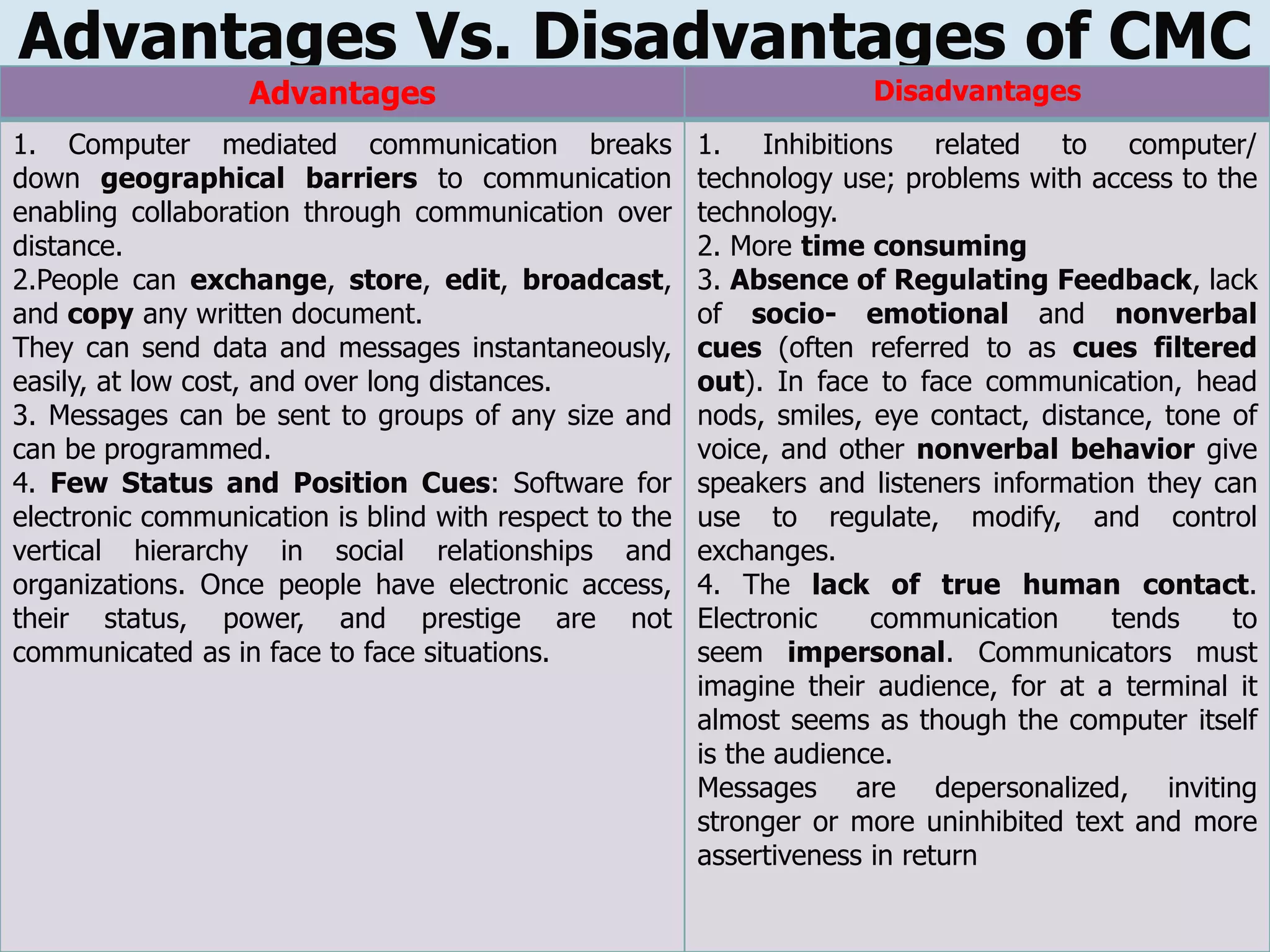
Advantages Vs. Disadvantages of CMC
Advantages Disadvantages
1. Computer mediated communication breaks
down geographical barriers to communication
enabling collaboration through communication over
distance.
2.People can exchange, store, edit, broadcast,
and copy any written document.
They can send data and messages instantaneously,
easily, at low cost, and over long distances.
3. Messages can be sent to groups of any size and
can be programmed.
4. Few Status and Position Cues: Software for
electronic communication is blind with respect to the
vertical hierarchy in social relationships and
organizations. Once people have electronic access,
their status, power, and prestige are not
communicated as in face to face situations.
1. Inhibitions related to computer/
technology use; problems with access to the
technology.
2. More time consuming
3. Absence of Regulating Feedback, lack
of socio- emotional and nonverbal
cues (often referred to as cues filtered
out). In face to face communication, head
nods, smiles, eye contact, distance, tone of
voice, and other nonverbal behavior give
speakers and listeners information they can
use to regulate, modify, and control
exchanges.
4. The lack of true human contact.
Electronic communication tends to
seem impersonal. Communicators must
imagine their audience, for at a terminal it
almost seems as though the computer itself
is the audience.
Messages are depersonalized, inviting
stronger or more uninhibited text and more
assertiveness in return
TYPES?
Asyncronous Communication
 Asynchronous activities are independent of
real-time and are comprised of activities,
such as, viewing a web page, composing
an Electronic Mail (e-mail), watching a
video clip, or dowloading a file.
Asyncronous CMC
CMC can include anything that is text -
based, uses ICT as a technological base
and can be used for two way transmission
of ideas.
Examples of CMC can include:
 emails
 mailbases
 shared network group folders
 discussion boards (or fora/forums)
 frequently updated hyperlinked webpages.
Asyncronous CMC
 Benefits of asynchronous discussions
include opportunities to think about course
content and to address a diverse set of
topics in more depth than can be done in
class or in asynchronous environment, thus
allowing students to conceptualize a topic
from multiple viewpoints and to contribute
to each other’s understanding
(Weasenforth et all, 2002).
Synchronous Communication
 Synchronous activities occur concurrently
between two or more users including such
real-time applications as chat rooms or
instant messaging which allow users to
interact simultaneously through text, audio,
and video with other users located
anywhere in the world.
Syncronous CMC
Synchronous CMC includes:
 Chat
 Instant messaging
 Also,it provides an opportunity for students
who are more familiar with the technology
to introduce some of the abbreviation and
emoticons used in chat to their less
experienced peers.
 Explain the procedure for participation: i.e.
that comments or responses have to be
done in a sequence.
 Impose order on the discussion when
required. The lecturer’s role in a chat also
includes that of moderator. Whereas in
face-to-face one’s authority can be
underlined by raising one’s voice, in chat
you can use upper case to make your point
more forcefully.
Which CMC should we use?
 The major factor in selecting a CMC
medium is “should the communication be
synchronous or asynchronous?” This
decision should be based on the following
criteria:
 Can all of the participants meet at the
same time?
 Is the activity time -dependent (i.e. to fit in
with a teaching program)? If so, then a
synchronous medium is most appropriate.
 Are the participants part-time
students/spread across time zones?
 Is the subject matter one which requires
in-depth analysis and response? If so, then
an asynchronous medium is most
appropriate.
The use of CMC
 Educators often categorize the use of
instructional CMC in three ways:
 For conferencing
 Informatics
 Computer-assisted instruction (CAI)
The use of CMC
 Informatics (repositories or maintainers of
organized information) include library
online public access catalogs (OPACs),
interactive access to remote databases,
program/data archive sites (e.g., archives
of files for pictures, sound, text, movies),
campus-wide information systems, wide-
area information systems, and information
managers.
CAI
 Computer assisted instruction (CAI) refers
to instruction or remediation presented on
a computer.
 Computer-assisted instruction improves
instruction for students with disabilities
because students receive immediate
feedback and do not continue to practice
the wrong skills.
CAI
 Computers capture the students’ attention
because the programs are interactive and
engage the students’ spirit of
competitiveness to increase their scores.
Also, computer assisted instruction moves
at the students’ pace and usually does not
move ahead until they have mastered the
skill.
Online Discussions
 Online discussions are “a key feature of
computer conferencing” (Murphy and
Collins 1997). Currently, both
asynchronous and synchronous computer
conferencing have been widely used in
distance learning courses.
 When online discussion becomes part of
learning activities in both asynchronous
learning courses and primarily face-to-face
courses, does it promote active student
learning?
Harasim (1990) suggests several key
differences between computer-mediated
and face-to-face discussions:
 time dependence, place dependence, the
structure of communication and richness of
communication.
Also, Larkin-Hein (2001) said, “The use of
online discussion groups offers a relatively
new avenue through which the learner can
take an active role in the learning process.”
 Althaus (1997) stated that, “In theory,
online discussions help more students learn
better by placing them in an intellectual
environment that encourages active,
thoughtful, and equal participation from all
comers”.
 Thomas’ (2002) study of online discussion
assumed that the nature of computer-
mediated communication impacts on
students’ learning. This study found that
online discussion forums promote high
levels of cognitive engagement and critical
thinking.
 However, the virtual learning space of an
online forum does not promote the
coherent and interactive dialogue
necessary for conversational modes of
learning. To overcome the incoherence, the
role of moderator and facilitator of
discussion is important in the online
discussion forum.

Computer mediated communication

  • 1.
    Computer Mediated Communication BoutkhilGuemide University Mohammed Boudiaf, M’sila Algeria
  • 2.
    Computer Mediated Communication Computer- Mediated Communication: (CMC) is any form of communication between two or more individuals who interact and/ or influence each other via separate computers through the Internet, or a network connection - using software.  CMC does not include the methods by which two computers communicate, but rather how people communicate via computers.
  • 3.
     “Any communication… mediated through the computer" (Metz, 1992, p. 3).  Walther and Burgoon (1992): “… CMC is … a communication channel through which much of our business and social interaction takes place…" (p. 51).
  • 4.
     The processby which people create, exchange, and perceive information using networked telecommunications systems that facilitate encoding, transmitting, and decoding messages.  Jones (1995): It is the space within which the relations occur and the tool that individuals use to enter that space.  Shaft, Martin, and Gay (2001): CMC is human-to-human communication using networked computer environments to facilitate interaction. It is an umbrella term for all kinds of interpersonal (private and public) communication carried out on the Internet by e-mail, instant messaging systems, mailing lists, newsgroups, web discussion boards, Internet Chat, and web chat channels.
  • 5.
  • 7.
  • 8.
    CMC  CMC promotesself-discipline and requires students to take more responsibility for their own learning.  Using CMC, instructors can vary a course's instructional design to include everything from structured projects to open projects in which students are free to work on problem solving.
  • 9.
    CMC  CMC promotesan equalization of users: Because CMC is, at present, primarily text-only, the consequent reduction in social cues leads to a protective ignorance surrounding a person's social roles, rank, and status. Further, it is impossible to know if another person took several hours to draft a one screen response, or several minutes.
  • 10.
    CMC  Computer- mediatedtechnology provides tools that are useful in promoting collaborative learning activities that can mediate communication between learners.  Furthermore, asynchronous discussions allow students, in groups, to collaborate with each other in an exchange of opinions, experiences, and interpretations of course content.
  • 11.
    Advantages Vs. Disadvantagesof CMC Advantages Disadvantages 1. Computer mediated communication breaks down geographical barriers to communication enabling collaboration through communication over distance. 2.People can exchange, store, edit, broadcast, and copy any written document. They can send data and messages instantaneously, easily, at low cost, and over long distances. 3. Messages can be sent to groups of any size and can be programmed. 4. Few Status and Position Cues: Software for electronic communication is blind with respect to the vertical hierarchy in social relationships and organizations. Once people have electronic access, their status, power, and prestige are not communicated as in face to face situations. 1. Inhibitions related to computer/ technology use; problems with access to the technology. 2. More time consuming 3. Absence of Regulating Feedback, lack of socio- emotional and nonverbal cues (often referred to as cues filtered out). In face to face communication, head nods, smiles, eye contact, distance, tone of voice, and other nonverbal behavior give speakers and listeners information they can use to regulate, modify, and control exchanges. 4. The lack of true human contact. Electronic communication tends to seem impersonal. Communicators must imagine their audience, for at a terminal it almost seems as though the computer itself is the audience. Messages are depersonalized, inviting stronger or more uninhibited text and more assertiveness in return
  • 12.
  • 13.
    Asyncronous Communication  Asynchronousactivities are independent of real-time and are comprised of activities, such as, viewing a web page, composing an Electronic Mail (e-mail), watching a video clip, or dowloading a file.
  • 14.
    Asyncronous CMC CMC caninclude anything that is text - based, uses ICT as a technological base and can be used for two way transmission of ideas. Examples of CMC can include:  emails  mailbases  shared network group folders  discussion boards (or fora/forums)  frequently updated hyperlinked webpages.
  • 15.
    Asyncronous CMC  Benefitsof asynchronous discussions include opportunities to think about course content and to address a diverse set of topics in more depth than can be done in class or in asynchronous environment, thus allowing students to conceptualize a topic from multiple viewpoints and to contribute to each other’s understanding (Weasenforth et all, 2002).
  • 16.
    Synchronous Communication  Synchronousactivities occur concurrently between two or more users including such real-time applications as chat rooms or instant messaging which allow users to interact simultaneously through text, audio, and video with other users located anywhere in the world.
  • 17.
    Syncronous CMC Synchronous CMCincludes:  Chat  Instant messaging
  • 18.
     Also,it providesan opportunity for students who are more familiar with the technology to introduce some of the abbreviation and emoticons used in chat to their less experienced peers.  Explain the procedure for participation: i.e. that comments or responses have to be done in a sequence.
  • 19.
     Impose orderon the discussion when required. The lecturer’s role in a chat also includes that of moderator. Whereas in face-to-face one’s authority can be underlined by raising one’s voice, in chat you can use upper case to make your point more forcefully.
  • 20.
    Which CMC shouldwe use?  The major factor in selecting a CMC medium is “should the communication be synchronous or asynchronous?” This decision should be based on the following criteria:
  • 21.
     Can allof the participants meet at the same time?  Is the activity time -dependent (i.e. to fit in with a teaching program)? If so, then a synchronous medium is most appropriate.
  • 22.
     Are theparticipants part-time students/spread across time zones?  Is the subject matter one which requires in-depth analysis and response? If so, then an asynchronous medium is most appropriate.
  • 23.
    The use ofCMC  Educators often categorize the use of instructional CMC in three ways:  For conferencing  Informatics  Computer-assisted instruction (CAI)
  • 24.
    The use ofCMC  Informatics (repositories or maintainers of organized information) include library online public access catalogs (OPACs), interactive access to remote databases, program/data archive sites (e.g., archives of files for pictures, sound, text, movies), campus-wide information systems, wide- area information systems, and information managers.
  • 25.
    CAI  Computer assistedinstruction (CAI) refers to instruction or remediation presented on a computer.  Computer-assisted instruction improves instruction for students with disabilities because students receive immediate feedback and do not continue to practice the wrong skills.
  • 26.
    CAI  Computers capturethe students’ attention because the programs are interactive and engage the students’ spirit of competitiveness to increase their scores. Also, computer assisted instruction moves at the students’ pace and usually does not move ahead until they have mastered the skill.
  • 27.
    Online Discussions  Onlinediscussions are “a key feature of computer conferencing” (Murphy and Collins 1997). Currently, both asynchronous and synchronous computer conferencing have been widely used in distance learning courses.
  • 28.
     When onlinediscussion becomes part of learning activities in both asynchronous learning courses and primarily face-to-face courses, does it promote active student learning?
  • 29.
    Harasim (1990) suggestsseveral key differences between computer-mediated and face-to-face discussions:  time dependence, place dependence, the structure of communication and richness of communication. Also, Larkin-Hein (2001) said, “The use of online discussion groups offers a relatively new avenue through which the learner can take an active role in the learning process.”
  • 30.
     Althaus (1997)stated that, “In theory, online discussions help more students learn better by placing them in an intellectual environment that encourages active, thoughtful, and equal participation from all comers”.
  • 31.
     Thomas’ (2002)study of online discussion assumed that the nature of computer- mediated communication impacts on students’ learning. This study found that online discussion forums promote high levels of cognitive engagement and critical thinking.
  • 32.
     However, thevirtual learning space of an online forum does not promote the coherent and interactive dialogue necessary for conversational modes of learning. To overcome the incoherence, the role of moderator and facilitator of discussion is important in the online discussion forum.