Keyboard
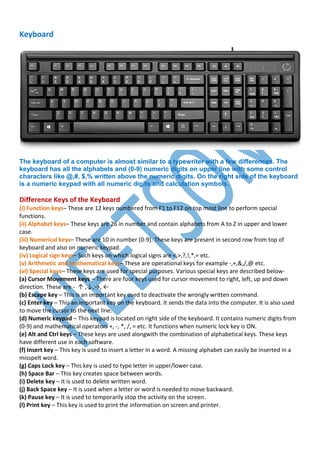
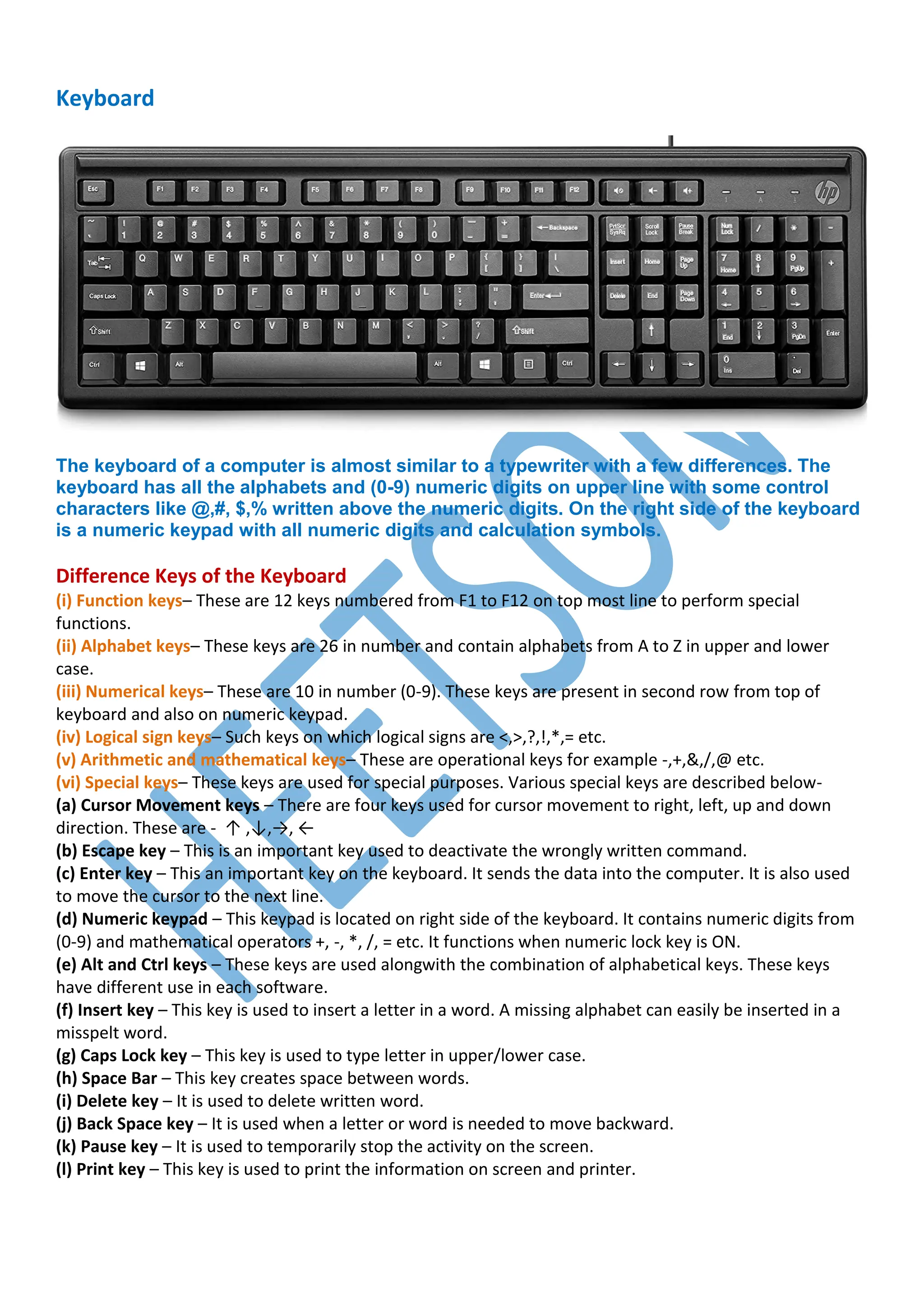
The keyboard of a computer is almost similar to a typewriter with a few differences. The
keyboard has all the alphabets and (0-9) numeric digits on upper line with some control
characters like @,#, $,% written above the numeric digits. On the right side of the keyboard
is a numeric keypad with all numeric digits and calculation symbols.
Difference Keys of the Keyboard
(i) Function keys– These are 12 keys numbered from F1 to F12 on top most line to perform special
functions.
(ii) Alphabet keys– These keys are 26 in number and contain alphabets from A to Z in upper and lower
case.
(iii) Numerical keys– These are 10 in number (0-9). These keys are present in second row from top of
keyboard and also on numeric keypad.
(iv) Logical sign keys– Such keys on which logical signs are <,>,?,!,*,= etc.
(v) Arithmetic and mathematical keys– These are operational keys for example -,+,&,/,@ etc.
(vi) Special keys– These keys are used for special purposes. Various special keys are described below-
(a) Cursor Movement keys – There are four keys used for cursor movement to right, left, up and down
direction. These are - ↑ ,↓,→, ←
(b) Escape key – This is an important key used to deactivate the wrongly written command.
(c) Enter key – This an important key on the keyboard. It sends the data into the computer. It is also used
to move the cursor to the next line.
(d) Numeric keypad – This keypad is located on right side of the keyboard. It contains numeric digits from
(0-9) and mathematical operators +, -, *, /, = etc. It functions when numeric lock key is ON.
(e) Alt and Ctrl keys – These keys are used alongwith the combination of alphabetical keys. These keys
have different use in each software.
(f) Insert key – This key is used to insert a letter in a word. A missing alphabet can easily be inserted in a
misspelt word.
(g) Caps Lock key – This key is used to type letter in upper/lower case.
(h) Space Bar – This key creates space between words.
(i) Delete key – It is used to delete written word.
(j) Back Space key – It is used when a letter or word is needed to move backward.
(k) Pause key – It is used to temporarily stop the activity on the screen.
(l) Print key – This key is used to print the information on screen and printer.
Keyboard MCQ
1. Functional keys used to perform _____.
Ans. Specific Task
2. To close a selected drop-down list, cancel a command and close a dialog box, key used is
a) Esc key b) End key
c) Enter key d) Alt key
Ans. a
3. Which keys allows user to enter frequently used operations in a single key stroke?
a) Function keys
b) Cursor control keys
c) Trackball
d) Control keys
Ans. a
4. What type of keys are ‘ctrl’ and ‘shift’?
a) adjustment
b) function
c) modifier
d) alphanumeric
Ans. c
5. Why is the Caps Lock key referred to as a toggle key?
a) Because its function goes back and forth every time it is pressed
b) Because it cannot be used for entering numbers
c) Because it cannot be used to delete
d) Because it cannot be used to insert
Ans. a
6. The ____ key and the ____ key can be used in combination with other keys to perform
shortcuts and special tasks.
a) Control, Alt
b) Function toggle
c) Delete, Insert
d) Caps Lock, Num Lock
Ans. a
7. Which key is used in combination with another key to perform a specific task?
a) Function
b) Control
c) Arrow
d) Space bar
Ans. b
8. The most common input devices include…….
a) Monitor and keyboard
b) Monitor and mouse
c) Mouse and keyboard
d) Printer and mouse
Ans. c
9. Letters, numbers and symbols found on a keyboard are …….
a) Icon
b) Screen
c) Keys
d) Menu
Ans. c
10. To make the number pad act as directional arrows, you press the _____ key.
a) num lock
b) caps lock
c) arrow lock
d) alt
Ans. a
11. The modern keyboard typically has ______ function keys.
a) 8
b) 10
c) 12
d) 14
Ans. c
12. Which device of computer operation dispenses with the use of the keyboard?
a) joystick
b) Light pen
c) Mouse
d) Touch
Ans. c
13. Which among the following is the most common device that accepts letters, numbers and
command from a user?
a) Optical Mouse
b) Sensitive Screen or touch screen
c) Keyboard
d) USB
Ans. c
14. What type of keyboard is used in fast food restaurants, offices and shops?
a) Numeric keypads
b) Numeric keyboard
c) Concept keyboard
d) Concise keyboard
Ans. c
15. What type of keyboard is used in telephone and ATMs?
a) Numeric keyboard b) Numeric keypad
c) Folding keyboard d) Any type of keyboard
Ans. a
16. There are different types of keys which cannot work independently. Which one of the following
keys cannot work independently?
a) Delete key b) Space bar key
c) Alt key d) Enter key
Ans. c
17. Third generation computer used ______for input.
(a) magnetic disk
(b) magnetic tape
(c) keyboard
(d) all of them
Ans. d
18. Common keyboards used in India have _______ layout of keys.
(a) English US
(b) English UK
(c) either a or b
(d) neither a nor b
Ans. c
19. The ______ button moves the cursor to the next predetermined stop location.
(a) space bar (b) enter
(c) backspace (d) tab
Ans. b
20. The _______ button toggles capital letter for input.
(a) caps lock (b) print screen
(c) scroll lock (d) pause/break
Ans. a
21. The _____ button takes a screenshot and copies it to clipboard or saves it to a file.
(a) caps lock (b) print screen
(c) scroll lock (d) pause/break
Ans. b
22. The _______ button stops or resumes the boot process.
(a) caps lock (b) print screen
(c) scroll lock (d) pause/break
Ans. d
23. _______ button keeps the scrollmode on or off.
(a) caps lock (b) print screen
(c) scroll lock (d) pause/break
Ans. c
24. The group of number keys and basic arithmetic operators placed on theleft side of a keyboard
is called ______.
(a) number pad (b) note pad
(c) arrow keys (d) cursor controls
Ans. a
25. The ______ key toggles number pad on or off.
(a) num lock (b) caps lock (c) scroll lock (d) Esc
Ans. a
26. The ______ keys can move the cursor up, down, left or right.
(a) num lock (b) arrow
(c) scroll lock (d) Esc
Ans. b
27. The _______ key moves out of current screen or terminates current operation.
(a) num lock (b) arrow
(c) scroll lock (d) Esc
Ans. d
28. The _______ key helps to access alternate character of each key (e.g. !by pressing 1, @ by
pressing 2, etc.).
(a) num lock (b) arrow
(c) shift (d) Esc
Ans. c
29. The ______ key opens context menu.
(a) Ctrl
(b) Windows button
(c) Alt
(d) function key
Ans. b
30. The series of keys named F1 ... F12 are called _______ .
(a) function keys
(b) scroll keys
(c) number keys
(d) navigation keys
Ans. a
31. Function keys are placed at the _______ of keyboard.
(a) bottom (b) right
(c) top (d) left
Ans. c
32. The Insert, Delete, Home, End, Page Up and Page Down keys are placed above _____.
(a) arrow keys
(b) number lock
(c) function keys
(d) scroll lock
Ans. a
33. A second enter key is available in _______ area of keyboard.
(a) arrow keys
(b) number lock
(c) function keys
(d) scroll lock
Ans. b
34. Most of the shortcut keys are designed to use _____ key along with one or two characters.
(a) Ctrl (b) Alt (c) both a & b (d) none of them
Ans. c
1. What is the full form of caps lock button on keyboard.
a) Cap lock b) capitals lock c) camera lock d) camp lock
2. What are Modifier keys?
3. What are Toggle keys?
4. What is a standard input device?
5. Which key is used to delete programs of files permanently?
a) F5
b) Ctrl + Del
c) Alt + D
d) Shift + Del
6. To run/execute the selected command, ______ key is used.
a) Ctrl key
b) Alt key
c) Enter key
d) Shift key
7. The most commonly used input device is
a) Mouse
b) Keyboard
c) Scanner
d) Printer
8. Which is the most common computer keyboard layout?
a) QWERTY
b) JCUKEN
c) Devorak
d) Colemark
9. When a key is pressed on the keyboard, which standard is used for converting the keystroke
into the corresponding bits?
a) ANSI
b) ASCII
c) EBCDIC
d) ISO
10. Keyboard developed by______
a) Christopher Latham Sholes
b) Charles babbage
c) Allen Turing
d) Lady Ada lovelace
11. Which communication mode is used by keyboard or Monitor?
a) Simplex b) Half Duplex
c) Full Duplex d) All of these
12. A button that makes character either upper or lower case and numbers to symbols.
a) Caps lock
b) Shift key
c) Icon
d) Mouse
13. Which of the following is not an output device of a computer?
a) Printer b) Keyboard c) VDU d) CRT screen
14. The longest/largest button on keyboard is ______ .
(a) space bar (b) enter (c) backspace (d) tab
15. The _______ button removes a character to the left of cursor position.
(a) space bar (b) enter (c) backspace (d) tab
16. The _______ button ends current line of input.
(a) space bar (b) enter (c) backspace (d) tab
17. The _______ keys are placed to the left and right of space bar.
(a) Ctrl (b) Windows button (c) Alt (d) all of them
18. ______ opens the start menu.
(a) Windows key (b) Ctrl (c) Alt (d) F1
19. The function keys are arranged in 3 groups of ______ keys in a group.
(a) 2 (b) 3 (c) 4 (d) 5
20. ______ opens help.
(a) Windows key (b) Ctrl (c) Alt (d) F1
Click here for Answers
Computer Best MCQ Book in Just Rs.29/- [7000+ Question in English]
https://bharatskills.in/best-computer-mcq-book-for-competitive-exams/
Computer Best MCQ Book in Just Rs.25/- (2100+ Question in Hindi)
https://bharatskills.in/computer-mcq-book-in-hindi-pdf/
HEETSON
Telegram https://t.me/Heetson_Official
WhatsApp Channel
@heetsoniti

Computer Keyboard Related MCQ Question Answer

  • 1.
    Keyboard The keyboard ofa computer is almost similar to a typewriter with a few differences. The keyboard has all the alphabets and (0-9) numeric digits on upper line with some control characters like @,#, $,% written above the numeric digits. On the right side of the keyboard is a numeric keypad with all numeric digits and calculation symbols. Difference Keys of the Keyboard (i) Function keys– These are 12 keys numbered from F1 to F12 on top most line to perform special functions. (ii) Alphabet keys– These keys are 26 in number and contain alphabets from A to Z in upper and lower case. (iii) Numerical keys– These are 10 in number (0-9). These keys are present in second row from top of keyboard and also on numeric keypad. (iv) Logical sign keys– Such keys on which logical signs are <,>,?,!,*,= etc. (v) Arithmetic and mathematical keys– These are operational keys for example -,+,&,/,@ etc. (vi) Special keys– These keys are used for special purposes. Various special keys are described below- (a) Cursor Movement keys – There are four keys used for cursor movement to right, left, up and down direction. These are - ↑ ,↓,→, ← (b) Escape key – This is an important key used to deactivate the wrongly written command. (c) Enter key – This an important key on the keyboard. It sends the data into the computer. It is also used to move the cursor to the next line. (d) Numeric keypad – This keypad is located on right side of the keyboard. It contains numeric digits from (0-9) and mathematical operators +, -, *, /, = etc. It functions when numeric lock key is ON. (e) Alt and Ctrl keys – These keys are used alongwith the combination of alphabetical keys. These keys have different use in each software. (f) Insert key – This key is used to insert a letter in a word. A missing alphabet can easily be inserted in a misspelt word. (g) Caps Lock key – This key is used to type letter in upper/lower case. (h) Space Bar – This key creates space between words. (i) Delete key – It is used to delete written word. (j) Back Space key – It is used when a letter or word is needed to move backward. (k) Pause key – It is used to temporarily stop the activity on the screen. (l) Print key – This key is used to print the information on screen and printer.
  • 2.
    Keyboard MCQ 1. Functionalkeys used to perform _____. Ans. Specific Task 2. To close a selected drop-down list, cancel a command and close a dialog box, key used is a) Esc key b) End key c) Enter key d) Alt key Ans. a 3. Which keys allows user to enter frequently used operations in a single key stroke? a) Function keys b) Cursor control keys c) Trackball d) Control keys Ans. a 4. What type of keys are ‘ctrl’ and ‘shift’? a) adjustment b) function c) modifier d) alphanumeric Ans. c 5. Why is the Caps Lock key referred to as a toggle key? a) Because its function goes back and forth every time it is pressed b) Because it cannot be used for entering numbers c) Because it cannot be used to delete d) Because it cannot be used to insert Ans. a 6. The ____ key and the ____ key can be used in combination with other keys to perform shortcuts and special tasks. a) Control, Alt b) Function toggle c) Delete, Insert d) Caps Lock, Num Lock Ans. a 7. Which key is used in combination with another key to perform a specific task? a) Function b) Control c) Arrow d) Space bar Ans. b 8. The most common input devices include……. a) Monitor and keyboard b) Monitor and mouse c) Mouse and keyboard d) Printer and mouse Ans. c
  • 3.
    9. Letters, numbersand symbols found on a keyboard are ……. a) Icon b) Screen c) Keys d) Menu Ans. c 10. To make the number pad act as directional arrows, you press the _____ key. a) num lock b) caps lock c) arrow lock d) alt Ans. a 11. The modern keyboard typically has ______ function keys. a) 8 b) 10 c) 12 d) 14 Ans. c 12. Which device of computer operation dispenses with the use of the keyboard? a) joystick b) Light pen c) Mouse d) Touch Ans. c 13. Which among the following is the most common device that accepts letters, numbers and command from a user? a) Optical Mouse b) Sensitive Screen or touch screen c) Keyboard d) USB Ans. c 14. What type of keyboard is used in fast food restaurants, offices and shops? a) Numeric keypads b) Numeric keyboard c) Concept keyboard d) Concise keyboard Ans. c 15. What type of keyboard is used in telephone and ATMs? a) Numeric keyboard b) Numeric keypad c) Folding keyboard d) Any type of keyboard Ans. a 16. There are different types of keys which cannot work independently. Which one of the following keys cannot work independently? a) Delete key b) Space bar key c) Alt key d) Enter key Ans. c
  • 4.
    17. Third generationcomputer used ______for input. (a) magnetic disk (b) magnetic tape (c) keyboard (d) all of them Ans. d 18. Common keyboards used in India have _______ layout of keys. (a) English US (b) English UK (c) either a or b (d) neither a nor b Ans. c 19. The ______ button moves the cursor to the next predetermined stop location. (a) space bar (b) enter (c) backspace (d) tab Ans. b 20. The _______ button toggles capital letter for input. (a) caps lock (b) print screen (c) scroll lock (d) pause/break Ans. a 21. The _____ button takes a screenshot and copies it to clipboard or saves it to a file. (a) caps lock (b) print screen (c) scroll lock (d) pause/break Ans. b 22. The _______ button stops or resumes the boot process. (a) caps lock (b) print screen (c) scroll lock (d) pause/break Ans. d 23. _______ button keeps the scrollmode on or off. (a) caps lock (b) print screen (c) scroll lock (d) pause/break Ans. c 24. The group of number keys and basic arithmetic operators placed on theleft side of a keyboard is called ______. (a) number pad (b) note pad (c) arrow keys (d) cursor controls Ans. a 25. The ______ key toggles number pad on or off. (a) num lock (b) caps lock (c) scroll lock (d) Esc Ans. a 26. The ______ keys can move the cursor up, down, left or right. (a) num lock (b) arrow (c) scroll lock (d) Esc Ans. b
  • 5.
    27. The _______key moves out of current screen or terminates current operation. (a) num lock (b) arrow (c) scroll lock (d) Esc Ans. d 28. The _______ key helps to access alternate character of each key (e.g. !by pressing 1, @ by pressing 2, etc.). (a) num lock (b) arrow (c) shift (d) Esc Ans. c 29. The ______ key opens context menu. (a) Ctrl (b) Windows button (c) Alt (d) function key Ans. b 30. The series of keys named F1 ... F12 are called _______ . (a) function keys (b) scroll keys (c) number keys (d) navigation keys Ans. a 31. Function keys are placed at the _______ of keyboard. (a) bottom (b) right (c) top (d) left Ans. c 32. The Insert, Delete, Home, End, Page Up and Page Down keys are placed above _____. (a) arrow keys (b) number lock (c) function keys (d) scroll lock Ans. a 33. A second enter key is available in _______ area of keyboard. (a) arrow keys (b) number lock (c) function keys (d) scroll lock Ans. b 34. Most of the shortcut keys are designed to use _____ key along with one or two characters. (a) Ctrl (b) Alt (c) both a & b (d) none of them Ans. c 1. What is the full form of caps lock button on keyboard. a) Cap lock b) capitals lock c) camera lock d) camp lock 2. What are Modifier keys?
  • 6.
    3. What areToggle keys? 4. What is a standard input device? 5. Which key is used to delete programs of files permanently? a) F5 b) Ctrl + Del c) Alt + D d) Shift + Del 6. To run/execute the selected command, ______ key is used. a) Ctrl key b) Alt key c) Enter key d) Shift key 7. The most commonly used input device is a) Mouse b) Keyboard c) Scanner d) Printer 8. Which is the most common computer keyboard layout? a) QWERTY b) JCUKEN c) Devorak d) Colemark 9. When a key is pressed on the keyboard, which standard is used for converting the keystroke into the corresponding bits? a) ANSI b) ASCII c) EBCDIC d) ISO 10. Keyboard developed by______ a) Christopher Latham Sholes b) Charles babbage c) Allen Turing d) Lady Ada lovelace 11. Which communication mode is used by keyboard or Monitor? a) Simplex b) Half Duplex c) Full Duplex d) All of these 12. A button that makes character either upper or lower case and numbers to symbols. a) Caps lock b) Shift key c) Icon d) Mouse
  • 7.
    13. Which ofthe following is not an output device of a computer? a) Printer b) Keyboard c) VDU d) CRT screen 14. The longest/largest button on keyboard is ______ . (a) space bar (b) enter (c) backspace (d) tab 15. The _______ button removes a character to the left of cursor position. (a) space bar (b) enter (c) backspace (d) tab 16. The _______ button ends current line of input. (a) space bar (b) enter (c) backspace (d) tab 17. The _______ keys are placed to the left and right of space bar. (a) Ctrl (b) Windows button (c) Alt (d) all of them 18. ______ opens the start menu. (a) Windows key (b) Ctrl (c) Alt (d) F1 19. The function keys are arranged in 3 groups of ______ keys in a group. (a) 2 (b) 3 (c) 4 (d) 5 20. ______ opens help. (a) Windows key (b) Ctrl (c) Alt (d) F1 Click here for Answers Computer Best MCQ Book in Just Rs.29/- [7000+ Question in English] https://bharatskills.in/best-computer-mcq-book-for-competitive-exams/ Computer Best MCQ Book in Just Rs.25/- (2100+ Question in Hindi) https://bharatskills.in/computer-mcq-book-in-hindi-pdf/ HEETSON Telegram https://t.me/Heetson_Official WhatsApp Channel @heetsoniti