Computational Physics
By:
Asad Khan
GPGC Lakki Marwat
For Loop
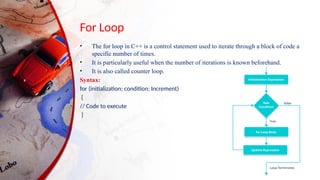
• The for loop in C++ is a control statement used to iterate through a block of code a
specific number of times.
• It is particularly useful when the number of iterations is known beforehand.
• It is also called counter loop.
Syntax:
for (initialization; condition; Increment)
{
// Code to execute
}
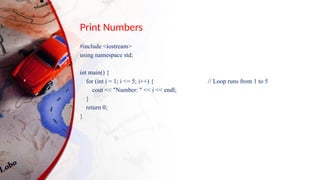
Print Numbers
#include <iostream>
using namespace std;
int main() {
for (int i = 1; i <= 5; i++) { // Loop runs from 1 to 5
cout << "Number: " << i << endl;
}
return 0;
}
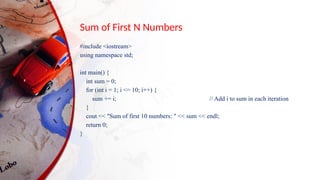
Sum of First N Numbers
#include <iostream>
using namespace std;
int main() {
int sum = 0;
for (int i = 1; i <= 10; i++) {
sum += i; // Add i to sum in each iteration
}
cout << "Sum of first 10 numbers: " << sum << endl;
return 0;
}
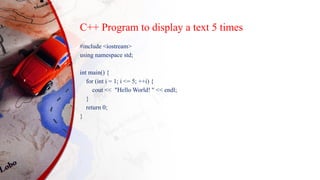
C++ Program to display a text 5 times
#include <iostream>
using namespace std;
int main() {
for (int i = 1; i <= 5; ++i) {
cout << "Hello World! " << endl;
}
return 0;
}
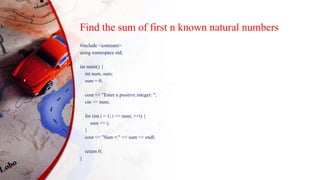
Find the sum of first n known natural numbers
#include <iostream>
using namespace std;
int main() {
int num, sum;
sum = 0;
cout << "Enter a positive integer: ";
cin >> num;
for (int i = 1; i <= num; ++i) {
sum += i;
}
cout << "Sum = " << sum << endl;
return 0;
}
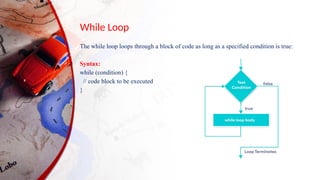
While Loop
The while loop loops through a block of code as long as a specified condition is true:
Syntax:
while (condition) {
// code block to be executed
}
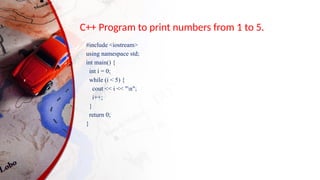
C++ Program to print numbers from 1 to 5.
#include <iostream>
using namespace std;
int main() {
int i = 0;
while (i < 5) {
cout << i << "n";
i++;
}
return 0;
}
Print Numbers
#include <iostream>
using namespace std;
int main() {
int i = 1; // Initialization
while (i <= 5) { // Condition
cout << "Number: " << i << endl;
i++; // Update
}
return 0;
}
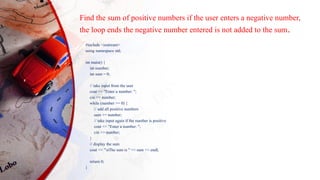
Find the sum of positive numbers if the user enters a negative number,
the loop ends the negative number entered is not added to the sum.
#include <iostream>
using namespace std;
int main() {
int number;
int sum = 0;
// take input from the user
cout << "Enter a number: ";
cin >> number;
while (number >= 0) {
// add all positive numbers
sum += number;
// take input again if the number is positive
cout << "Enter a number: ";
cin >> number;
}
// display the sum
cout << "nThe sum is " << sum << endl;
return 0;
}
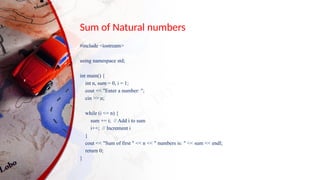
Sum of Natural numbers
#include <iostream>
using namespace std;
int main() {
int n, sum = 0, i = 1;
cout << "Enter a number: ";
cin >> n;
while (i <= n) {
sum += i; // Add i to sum
i++; // Increment i
}
cout << "Sum of first " << n << " numbers is: " << sum << endl;
return 0;
}
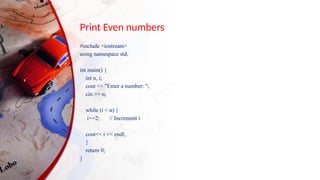
Print Even numbers
#include <iostream>
using namespace std;
int main() {
int n, i;
cout << "Enter a number: ";
cin >> n;
while (i < n) {
i+=2; // Increment i
cout<< i << endl;
}
return 0;
}
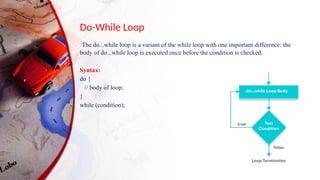
Do-While Loop
The do...while loop is a variant of the while loop with one important difference: the
body of do...while loop is executed once before the condition is checked.
Syntax:
do {
// body of loop;
}
while (condition);
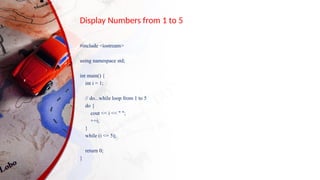
Display Numbers from 1 to 5
#include <iostream>
using namespace std;
int main() {
int i = 1;
// do...while loop from 1 to 5
do {
cout << i << " ";
++i;
}
while (i <= 5);
return 0;
}
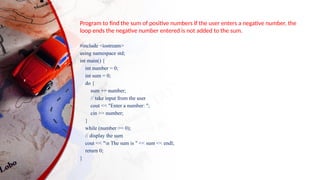
#include <iostream>
using namespace std;
int main() {
int number = 0;
int sum = 0;
do {
sum += number;
// take input from the user
cout << "Enter a number: ";
cin >> number;
}
while (number >= 0);
// display the sum
cout << "n The sum is " << sum << endl;
return 0;
}
Program to find the sum of positive numbers If the user enters a negative number, the
loop ends the negative number entered is not added to the sum.
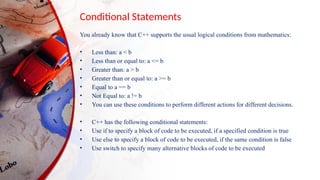
Conditional Statements
You already know that C++ supports the usual logical conditions from mathematics:
• Less than: a < b
• Less than or equal to: a <= b
• Greater than: a > b
• Greater than or equal to: a >= b
• Equal to a == b
• Not Equal to: a != b
• You can use these conditions to perform different actions for different decisions.
• C++ has the following conditional statements:
• Use if to specify a block of code to be executed, if a specified condition is true
• Use else to specify a block of code to be executed, if the same condition is false
• Use switch to specify many alternative blocks of code to be executed
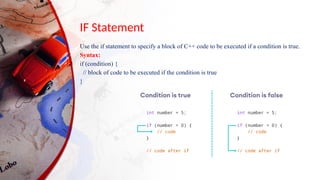
IF Statement
Use the if statement to specify a block of C++ code to be executed if a condition is true.
Syntax:
if (condition) {
// block of code to be executed if the condition is true
}
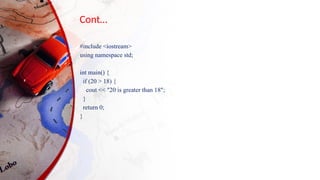
Cont…
#include <iostream>
using namespace std;
int main() {
if (20 > 18) {
cout << "20 is greater than 18";
}
return 0;
}
Cont…
#include <iostream>
using namespace std;
int main() {
int x = 20;
int y = 18;
if (x > y) {
cout << "x is greater than y";
}
return 0;
}
Program to print positive number entered by the user, If the user
enters a negative number, it is skipped.
#include <iostream>
using namespace std;
int main() {
int number;
cout << "Enter an integer: ";
cin >> number;
// checks if the number is positive
if (number > 0) {
cout << "You entered a positive integer: " << number << endl;
}
cout << "This statement is always executed.";
return 0;
}
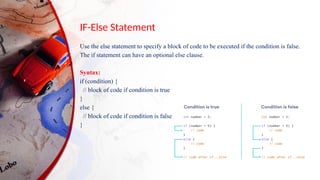
IF-Else Statement
Use the else statement to specify a block of code to be executed if the condition is false.
The if statement can have an optional else clause.
Syntax:
if (condition) {
// block of code if condition is true
}
else {
// block of code if condition is false
}
Compare time
• #include <iostream>
• using namespace std;
• int main() {
• int time = 20;
• if (time < 18) {
• cout << "Good day.";
• } else {
• cout << "Good evening.";
• }
• return 0;
• }
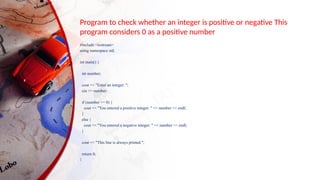
Program to check whether an integer is positive or negative This
program considers 0 as a positive number
#include <iostream>
using namespace std;
int main() {
int number;
cout << "Enter an integer: ";
cin >> number;
if (number >= 0) {
cout << "You entered a positive integer: " << number << endl;
}
else {
cout << "You entered a negative integer: " << number << endl;
}
cout << "This line is always printed.";
return 0;
}
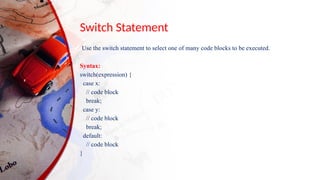
Switch Statement
Use the switch statement to select one of many code blocks to be executed.
Syntax:
switch(expression) {
case x:
// code block
break;
case y:
// code block
break;
default:
// code block
}
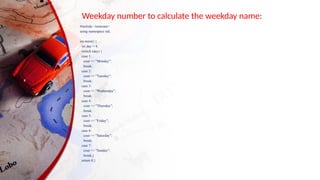
Weekday number to calculate the weekday name:
#include <iostream>
using namespace std;
int main() {
int day = 4;
switch (day) {
case 1:
cout << "Monday";
break;
case 2:
cout << "Tuesday";
break;
case 3:
cout << "Wednesday";
break;
case 4:
cout << "Thursday";
break;
case 5:
cout << "Friday";
break;
case 6:
cout << "Saturday";
break;
case 7:
cout << "Sunday";
break;}
return 0;}
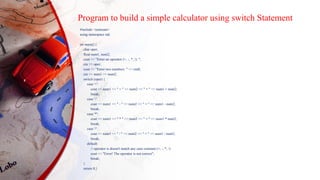
Program to build a simple calculator using switch Statement
#include <iostream>
using namespace std;
int main() {
char oper;
float num1, num2;
cout << "Enter an operator (+, -, *, /): ";
cin >> oper;
cout << "Enter two numbers: " << endl;
cin >> num1 >> num2;
switch (oper) {
case '+':
cout << num1 << " + " << num2 << " = " << num1 + num2;
break;
case '-':
cout << num1 << " - " << num2 << " = " << num1 - num2;
break;
case '*':
cout << num1 << " * " << num2 << " = " << num1 * num2;
break;
case '/':
cout << num1 << " / " << num2 << " = " << num1 / num2;
break;
default:
// operator is doesn't match any case constant (+, -, *, /)
cout << "Error! The operator is not correct";
break;
}
return 0;}
Thank you

Computational Physics Cpp Portiiion.pptx

  • 1.
  • 2.
    For Loop • Thefor loop in C++ is a control statement used to iterate through a block of code a specific number of times. • It is particularly useful when the number of iterations is known beforehand. • It is also called counter loop. Syntax: for (initialization; condition; Increment) { // Code to execute }
  • 3.
    Print Numbers #include <iostream> usingnamespace std; int main() { for (int i = 1; i <= 5; i++) { // Loop runs from 1 to 5 cout << "Number: " << i << endl; } return 0; }
  • 4.
    Sum of FirstN Numbers #include <iostream> using namespace std; int main() { int sum = 0; for (int i = 1; i <= 10; i++) { sum += i; // Add i to sum in each iteration } cout << "Sum of first 10 numbers: " << sum << endl; return 0; }
  • 5.
    C++ Program todisplay a text 5 times #include <iostream> using namespace std; int main() { for (int i = 1; i <= 5; ++i) { cout << "Hello World! " << endl; } return 0; }
  • 6.
    Find the sumof first n known natural numbers #include <iostream> using namespace std; int main() { int num, sum; sum = 0; cout << "Enter a positive integer: "; cin >> num; for (int i = 1; i <= num; ++i) { sum += i; } cout << "Sum = " << sum << endl; return 0; }
  • 7.
    While Loop The whileloop loops through a block of code as long as a specified condition is true: Syntax: while (condition) { // code block to be executed }
  • 8.
    C++ Program toprint numbers from 1 to 5. #include <iostream> using namespace std; int main() { int i = 0; while (i < 5) { cout << i << "n"; i++; } return 0; }
  • 9.
    Print Numbers #include <iostream> usingnamespace std; int main() { int i = 1; // Initialization while (i <= 5) { // Condition cout << "Number: " << i << endl; i++; // Update } return 0; }
  • 10.
    Find the sumof positive numbers if the user enters a negative number, the loop ends the negative number entered is not added to the sum. #include <iostream> using namespace std; int main() { int number; int sum = 0; // take input from the user cout << "Enter a number: "; cin >> number; while (number >= 0) { // add all positive numbers sum += number; // take input again if the number is positive cout << "Enter a number: "; cin >> number; } // display the sum cout << "nThe sum is " << sum << endl; return 0; }
  • 11.
    Sum of Naturalnumbers #include <iostream> using namespace std; int main() { int n, sum = 0, i = 1; cout << "Enter a number: "; cin >> n; while (i <= n) { sum += i; // Add i to sum i++; // Increment i } cout << "Sum of first " << n << " numbers is: " << sum << endl; return 0; }
  • 12.
    Print Even numbers #include<iostream> using namespace std; int main() { int n, i; cout << "Enter a number: "; cin >> n; while (i < n) { i+=2; // Increment i cout<< i << endl; } return 0; }
  • 13.
    Do-While Loop The do...whileloop is a variant of the while loop with one important difference: the body of do...while loop is executed once before the condition is checked. Syntax: do { // body of loop; } while (condition);
  • 14.
    Display Numbers from1 to 5 #include <iostream> using namespace std; int main() { int i = 1; // do...while loop from 1 to 5 do { cout << i << " "; ++i; } while (i <= 5); return 0; }
  • 15.
    #include <iostream> using namespacestd; int main() { int number = 0; int sum = 0; do { sum += number; // take input from the user cout << "Enter a number: "; cin >> number; } while (number >= 0); // display the sum cout << "n The sum is " << sum << endl; return 0; } Program to find the sum of positive numbers If the user enters a negative number, the loop ends the negative number entered is not added to the sum.
  • 16.
    Conditional Statements You alreadyknow that C++ supports the usual logical conditions from mathematics: • Less than: a < b • Less than or equal to: a <= b • Greater than: a > b • Greater than or equal to: a >= b • Equal to a == b • Not Equal to: a != b • You can use these conditions to perform different actions for different decisions. • C++ has the following conditional statements: • Use if to specify a block of code to be executed, if a specified condition is true • Use else to specify a block of code to be executed, if the same condition is false • Use switch to specify many alternative blocks of code to be executed
  • 17.
    IF Statement Use theif statement to specify a block of C++ code to be executed if a condition is true. Syntax: if (condition) { // block of code to be executed if the condition is true }
  • 18.
    Cont… #include <iostream> using namespacestd; int main() { if (20 > 18) { cout << "20 is greater than 18"; } return 0; }
  • 19.
    Cont… #include <iostream> using namespacestd; int main() { int x = 20; int y = 18; if (x > y) { cout << "x is greater than y"; } return 0; }
  • 20.
    Program to printpositive number entered by the user, If the user enters a negative number, it is skipped. #include <iostream> using namespace std; int main() { int number; cout << "Enter an integer: "; cin >> number; // checks if the number is positive if (number > 0) { cout << "You entered a positive integer: " << number << endl; } cout << "This statement is always executed."; return 0; }
  • 21.
    IF-Else Statement Use theelse statement to specify a block of code to be executed if the condition is false. The if statement can have an optional else clause. Syntax: if (condition) { // block of code if condition is true } else { // block of code if condition is false }
  • 22.
    Compare time • #include<iostream> • using namespace std; • int main() { • int time = 20; • if (time < 18) { • cout << "Good day."; • } else { • cout << "Good evening."; • } • return 0; • }
  • 23.
    Program to checkwhether an integer is positive or negative This program considers 0 as a positive number #include <iostream> using namespace std; int main() { int number; cout << "Enter an integer: "; cin >> number; if (number >= 0) { cout << "You entered a positive integer: " << number << endl; } else { cout << "You entered a negative integer: " << number << endl; } cout << "This line is always printed."; return 0; }
  • 24.
    Switch Statement Use theswitch statement to select one of many code blocks to be executed. Syntax: switch(expression) { case x: // code block break; case y: // code block break; default: // code block }
  • 25.
    Weekday number tocalculate the weekday name: #include <iostream> using namespace std; int main() { int day = 4; switch (day) { case 1: cout << "Monday"; break; case 2: cout << "Tuesday"; break; case 3: cout << "Wednesday"; break; case 4: cout << "Thursday"; break; case 5: cout << "Friday"; break; case 6: cout << "Saturday"; break; case 7: cout << "Sunday"; break;} return 0;}
  • 26.
    Program to builda simple calculator using switch Statement #include <iostream> using namespace std; int main() { char oper; float num1, num2; cout << "Enter an operator (+, -, *, /): "; cin >> oper; cout << "Enter two numbers: " << endl; cin >> num1 >> num2; switch (oper) { case '+': cout << num1 << " + " << num2 << " = " << num1 + num2; break; case '-': cout << num1 << " - " << num2 << " = " << num1 - num2; break; case '*': cout << num1 << " * " << num2 << " = " << num1 * num2; break; case '/': cout << num1 << " / " << num2 << " = " << num1 / num2; break; default: // operator is doesn't match any case constant (+, -, *, /) cout << "Error! The operator is not correct"; break; } return 0;}
  • 27.