1
Angel and Shreiner: Interactive Computer Graphics 6E © Addison-Wesley 2012
What is Computer Graphics?
Ed Angel
Professor Emeritus of Computer Science,
University of New Mexico
2
Angel and Shreiner: Interactive Computer Graphics 6E © Addison-Wesley 2012
Objectives
•In this lecture, we explore what computer
graphics is about and survey some
application areas
•We start with a historical introduction
3
Angel and Shreiner: Interactive Computer Graphics 6E © Addison-Wesley 2012
Computer Graphics
•Computer graphics deals with all aspects
of creating images with a computer
­ Hardware
­ Software
­ Applications
4
Angel and Shreiner: Interactive Computer Graphics 6E © Addison-Wesley 2012
Example
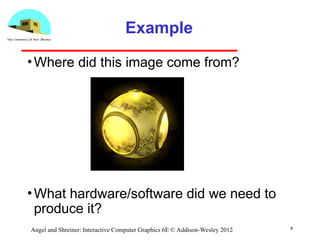
•Where did this image come from?
•What hardware/software did we need to
produce it?
5
Angel and Shreiner: Interactive Computer Graphics 6E © Addison-Wesley 2012
Preliminary Answer
•Application: The object is an artist’s
rendition of the sun for an animation to be
shown in a domed environment
(planetarium)
•Software: Maya for modeling and
rendering but Maya is built on top of
OpenGL
•Hardware: PC with graphics card for
modeling and rendering
6
Angel and Shreiner: Interactive Computer Graphics 6E © Addison-Wesley 2012
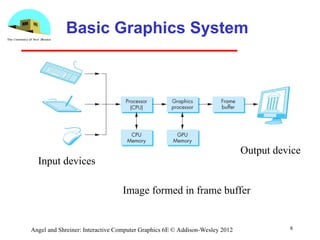
Basic Graphics System
Input devices
Output device
Image formed in frame buffer
7
Angel and Shreiner: Interactive Computer Graphics 6E © Addison-Wesley 2012
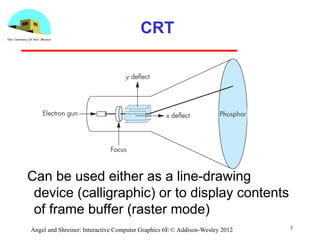
CRT
Can be used either as a line-drawing
device (calligraphic) or to display contents
of frame buffer (raster mode)
8
Angel and Shreiner: Interactive Computer Graphics 6E © Addison-Wesley 2012
Computer Graphics: 1950-1960
•Computer graphics goes back to the
earliest days of computing
­ Strip charts
­ Pen plotters
­ Simple displays using A/D converters to go
from computer to calligraphic CRT
•Cost of refresh for CRT too high
­ Computers slow, expensive, unreliable
9
Angel and Shreiner: Interactive Computer Graphics 6E © Addison-Wesley 2012
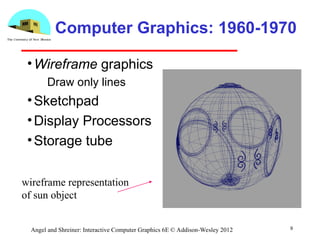
Computer Graphics: 1960-1970
•Wireframe graphics
­ Draw only lines
•Sketchpad
•Display Processors
•Storage tube
wireframe representation
of sun object
10
Angel and Shreiner: Interactive Computer Graphics 6E © Addison-Wesley 2012
Sketchpad
•Ivan Sutherland’s PhD thesis at MIT
­ Recognized the potential of man-machine
interaction
­ Loop
• Display something
• User moves light pen
• Computer generates new display
­ Sutherland also created many of the now
common algorithms for computer graphics
11
Angel and Shreiner: Interactive Computer Graphics 6E © Addison-Wesley 2012
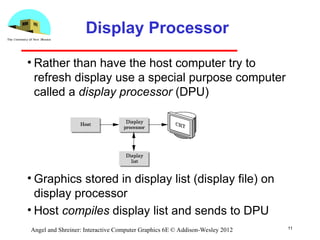
Display Processor
• Rather than have the host computer try to
refresh display use a special purpose computer
called a display processor (DPU)
• Graphics stored in display list (display file) on
display processor
• Host compiles display list and sends to DPU
12
Angel and Shreiner: Interactive Computer Graphics 6E © Addison-Wesley 2012
Direct View Storage Tube
•Created by Tektronix
­ Did not require constant refresh
­ Standard interface to computers
• Allowed for standard software
• Plot3D in Fortran
­ Relatively inexpensive
• Opened door to use of computer graphics for CAD
community
13
Angel and Shreiner: Interactive Computer Graphics 6E © Addison-Wesley 2012
Computer Graphics: 1970-1980
•Raster Graphics
•Beginning of graphics standards
­ IFIPS
• GKS: European effort
– Becomes ISO 2D standard
• Core: North American effort
– 3D but fails to become ISO standard
•Workstations and PCs
14
Angel and Shreiner: Interactive Computer Graphics 6E © Addison-Wesley 2012
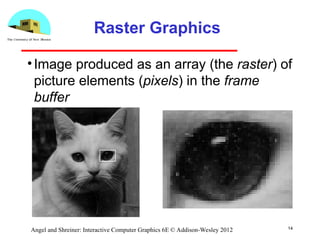
Raster Graphics
•Image produced as an array (the raster) of
picture elements (pixels) in the frame
buffer
15
Angel and Shreiner: Interactive Computer Graphics 6E © Addison-Wesley 2012
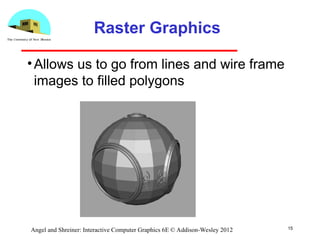
Raster Graphics
•Allows us to go from lines and wire frame
images to filled polygons
16
Angel and Shreiner: Interactive Computer Graphics 6E © Addison-Wesley 2012
PCs and Workstations
•Although we no longer make the
distinction between workstations and PCs,
historically they evolved from different
roots
­ Early workstations characterized by
• Networked connection: client-server model
• High-level of interactivity
­ Early PCs included frame buffer as part of user
memory
• Easy to change contents and create images
17
Angel and Shreiner: Interactive Computer Graphics 6E © Addison-Wesley 2012
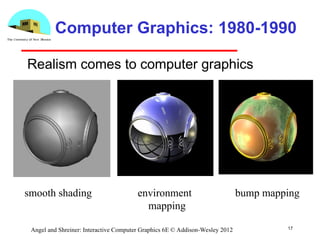
Computer Graphics: 1980-1990
Realism comes to computer graphics
smooth shading environment
mapping
bump mapping
18
Angel and Shreiner: Interactive Computer Graphics 6E © Addison-Wesley 2012
Computer Graphics: 1980-1990
•Special purpose hardware
­ Silicon Graphics geometry engine
• VLSI implementation of graphics pipeline
•Industry-based standards
­ PHIGS
­ RenderMan
•Networked graphics: X Window System
•Human-Computer Interface (HCI)
19
Angel and Shreiner: Interactive Computer Graphics 6E © Addison-Wesley 2012
Computer Graphics: 1990-2000
•OpenGL API
•Completely computer-generated feature-
length movies (Toy Story) are successful
•New hardware capabilities
­ Texture mapping
­ Blending
­ Accumulation, stencil buffers
20
Angel and Shreiner: Interactive Computer Graphics 6E © Addison-Wesley 2012
Computer Graphics: 2000-
•Photorealism
•Graphics cards for PCs dominate market
­ Nvidia, ATI
•Game boxes and game players determine
direction of market
•Computer graphics routine in movie
industry: Maya, Lightwave
•Programmable pipelines

Components of VR System Rendering Processor.ppt

  • 1.
    1 Angel and Shreiner:Interactive Computer Graphics 6E © Addison-Wesley 2012 What is Computer Graphics? Ed Angel Professor Emeritus of Computer Science, University of New Mexico
  • 2.
    2 Angel and Shreiner:Interactive Computer Graphics 6E © Addison-Wesley 2012 Objectives •In this lecture, we explore what computer graphics is about and survey some application areas •We start with a historical introduction
  • 3.
    3 Angel and Shreiner:Interactive Computer Graphics 6E © Addison-Wesley 2012 Computer Graphics •Computer graphics deals with all aspects of creating images with a computer ­ Hardware ­ Software ­ Applications
  • 4.
    4 Angel and Shreiner:Interactive Computer Graphics 6E © Addison-Wesley 2012 Example •Where did this image come from? •What hardware/software did we need to produce it?
  • 5.
    5 Angel and Shreiner:Interactive Computer Graphics 6E © Addison-Wesley 2012 Preliminary Answer •Application: The object is an artist’s rendition of the sun for an animation to be shown in a domed environment (planetarium) •Software: Maya for modeling and rendering but Maya is built on top of OpenGL •Hardware: PC with graphics card for modeling and rendering
  • 6.
    6 Angel and Shreiner:Interactive Computer Graphics 6E © Addison-Wesley 2012 Basic Graphics System Input devices Output device Image formed in frame buffer
  • 7.
    7 Angel and Shreiner:Interactive Computer Graphics 6E © Addison-Wesley 2012 CRT Can be used either as a line-drawing device (calligraphic) or to display contents of frame buffer (raster mode)
  • 8.
    8 Angel and Shreiner:Interactive Computer Graphics 6E © Addison-Wesley 2012 Computer Graphics: 1950-1960 •Computer graphics goes back to the earliest days of computing ­ Strip charts ­ Pen plotters ­ Simple displays using A/D converters to go from computer to calligraphic CRT •Cost of refresh for CRT too high ­ Computers slow, expensive, unreliable
  • 9.
    9 Angel and Shreiner:Interactive Computer Graphics 6E © Addison-Wesley 2012 Computer Graphics: 1960-1970 •Wireframe graphics ­ Draw only lines •Sketchpad •Display Processors •Storage tube wireframe representation of sun object
  • 10.
    10 Angel and Shreiner:Interactive Computer Graphics 6E © Addison-Wesley 2012 Sketchpad •Ivan Sutherland’s PhD thesis at MIT ­ Recognized the potential of man-machine interaction ­ Loop • Display something • User moves light pen • Computer generates new display ­ Sutherland also created many of the now common algorithms for computer graphics
  • 11.
    11 Angel and Shreiner:Interactive Computer Graphics 6E © Addison-Wesley 2012 Display Processor • Rather than have the host computer try to refresh display use a special purpose computer called a display processor (DPU) • Graphics stored in display list (display file) on display processor • Host compiles display list and sends to DPU
  • 12.
    12 Angel and Shreiner:Interactive Computer Graphics 6E © Addison-Wesley 2012 Direct View Storage Tube •Created by Tektronix ­ Did not require constant refresh ­ Standard interface to computers • Allowed for standard software • Plot3D in Fortran ­ Relatively inexpensive • Opened door to use of computer graphics for CAD community
  • 13.
    13 Angel and Shreiner:Interactive Computer Graphics 6E © Addison-Wesley 2012 Computer Graphics: 1970-1980 •Raster Graphics •Beginning of graphics standards ­ IFIPS • GKS: European effort – Becomes ISO 2D standard • Core: North American effort – 3D but fails to become ISO standard •Workstations and PCs
  • 14.
    14 Angel and Shreiner:Interactive Computer Graphics 6E © Addison-Wesley 2012 Raster Graphics •Image produced as an array (the raster) of picture elements (pixels) in the frame buffer
  • 15.
    15 Angel and Shreiner:Interactive Computer Graphics 6E © Addison-Wesley 2012 Raster Graphics •Allows us to go from lines and wire frame images to filled polygons
  • 16.
    16 Angel and Shreiner:Interactive Computer Graphics 6E © Addison-Wesley 2012 PCs and Workstations •Although we no longer make the distinction between workstations and PCs, historically they evolved from different roots ­ Early workstations characterized by • Networked connection: client-server model • High-level of interactivity ­ Early PCs included frame buffer as part of user memory • Easy to change contents and create images
  • 17.
    17 Angel and Shreiner:Interactive Computer Graphics 6E © Addison-Wesley 2012 Computer Graphics: 1980-1990 Realism comes to computer graphics smooth shading environment mapping bump mapping
  • 18.
    18 Angel and Shreiner:Interactive Computer Graphics 6E © Addison-Wesley 2012 Computer Graphics: 1980-1990 •Special purpose hardware ­ Silicon Graphics geometry engine • VLSI implementation of graphics pipeline •Industry-based standards ­ PHIGS ­ RenderMan •Networked graphics: X Window System •Human-Computer Interface (HCI)
  • 19.
    19 Angel and Shreiner:Interactive Computer Graphics 6E © Addison-Wesley 2012 Computer Graphics: 1990-2000 •OpenGL API •Completely computer-generated feature- length movies (Toy Story) are successful •New hardware capabilities ­ Texture mapping ­ Blending ­ Accumulation, stencil buffers
  • 20.
    20 Angel and Shreiner:Interactive Computer Graphics 6E © Addison-Wesley 2012 Computer Graphics: 2000- •Photorealism •Graphics cards for PCs dominate market ­ Nvidia, ATI •Game boxes and game players determine direction of market •Computer graphics routine in movie industry: Maya, Lightwave •Programmable pipelines