



The Collaboration
Campground
Code & No-Code Journeys:
Heather Vercillo
Product Team @ Applitools
Mapping the terrain
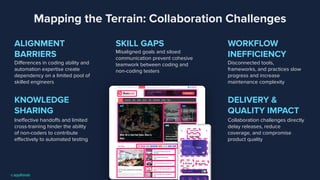
Mapping the Terrain: Collaboration Challenges
ALIGNMENT
BARRIERS
Differences in coding ability and
automation expertise create
dependency on a limited pool of
skilled engineers
WORKFLOW
INEFFICIENCY
Disconnected tools,
frameworks, and practices slow
progress and increase
maintenance complexity
SKILL GAPS
Misaligned goals and siloed
communication prevent cohesive
teamwork between coding and
non-coding testers
DELIVERY &
QUALITY IMPACT
Collaboration challenges directly
delay releases, reduce
coverage, and compromise
product quality
KNOWLEDGE
SHARING
Ineffective handoffs and limited
cross-training hinder the ability
of non-coders to contribute
effectively to automated testing
Finding common ground
5
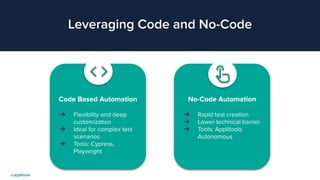
Leveraging Code and No-Code
Code Based Automation
➔ Flexibility and deep
customization
➔ Ideal for complex test
scenarios
➔ Tools: Cypress,
Playwright
No-Code Automation
➔ Rapid test creation
➔ Lower technical barrier
➔ Tools: Applitools
Autonomous
What to pack for a collaborative
campground?
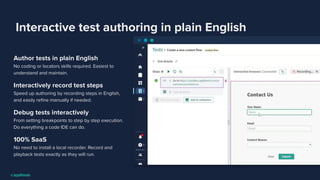
Interactive test authoring in plain English
Author tests in plain English
No coding or locators skills required. Easiest to
understand and maintain.
Interactively record test steps
Speed up authoring by recording steps in English,
and easily refine manually if needed.
Debug tests interactively
From setting breakpoints to step by step execution.
Do everything a code IDE can do.
100% SaaS
No need to install a local recorder. Record and
playback tests exactly as they will run.
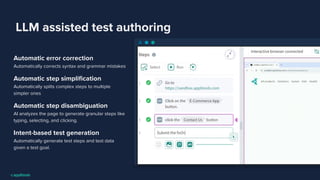
LLM assisted test authoring
Automatic error correction
Automatically corrects syntax and grammar mistakes
Automatic step simplification
Automatically splits complex steps to multiple
simpler ones
Automatic step disambiguation
AI analyzes the page to generate granular steps like
typing, selecting, and clicking.
Intent-based test generation
Automatically generate test steps and test data
given a test goal.
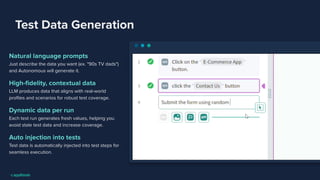
Test Data Generation
Natural language prompts
Just describe the data you want (ex. "90s TV dads")
and Autonomous will generate it.
High-fidelity, contextual data
LLM produces data that aligns with real-world
profiles and scenarios for robust test coverage.
Dynamic data per run
Each test run generates fresh values, helping you
avoid stale test data and increase coverage.
Auto injection into tests
Test data is automatically injected into test steps for
seamless execution.
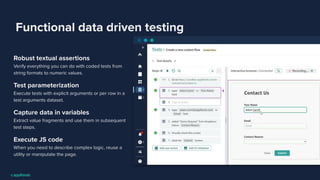
Functional data driven testing
Robust textual assertions
Verify everything you can do with coded tests from
string formats to numeric values.
Test parameterization
Execute tests with explicit arguments or per row in a
test arguments dataset.
Capture data in variables
Extract value fragments and use them in subsequent
test steps.
Execute JS code
When you need to describe complex logic, reuse a
utility or manipulate the page.
AI as your trail guide
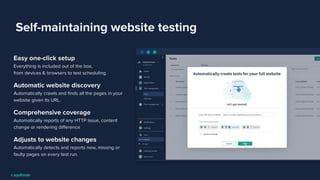
Self-maintaining website testing
Easy one-click setup
Everything is included out of the box,
from devices & browsers to test scheduling.
Automatic website discovery
Automatically crawls and finds all the pages in your
website given its URL.
Comprehensive coverage
Automatically reports of any HTTP issue, content
change or rendering difference
Adjusts to website changes
Automatically detects and reports new, missing or
faulty pages on every test run.
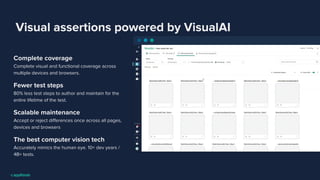
Visual assertions powered by VisualAI
Complete coverage
Complete visual and functional coverage across
multiple devices and browsers.
Fewer test steps
80% less test steps to author and maintain for the
entire lifetime of the test.
Scalable maintenance
Accept or reject differences once across all pages,
devices and browsers
The best computer vision tech
Accurately mimics the human eye. 10+ dev years /
4B+ tests.
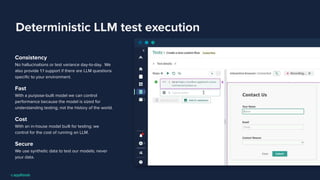
Deterministic LLM test execution
Consistency
No hallucinations or test variance day-to-day. We
also provide 1:1 support if there are LLM questions
specific to your environment.
Fast
With a purpose-built model we can control
performance because the model is sized for
understanding testing; not the history of the world.
Cost
With an in-house model built for testing; we
control for the cost of running an LLM.
Secure
We use synthetic data to test our models; never
your data.
How to Leverage Code and
No-Code
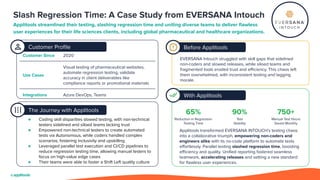
Slash Regression Time: A Case Study from EVERSANA Intouch
Applitools streamlined their testing, slashing regression time and uniting diverse teams to deliver flawless
user experiences for their life sciences clients, including global pharmaceutical and healthcare organizations.
The Journey with Applitools
● Coding skill disparities slowed testing, with non-technical
testers sidelined and siloed teams lacking trust
● Empowered non-technical testers to create automated
tests via Autonomous, while coders handled complex
scenarios, fostering inclusivity and upskilling
● Leveraged parallel test execution and CI/CD pipelines to
reduce regression testing time, allowing manual testers to
focus on high-value edge cases
● Their teams were able to foster a Shift Left quality culture
Customer Profile Before Applitools
With Applitools
EVERSANA Intouch struggled with skill gaps that sidelined
non-coders and slowed releases, while siloed teams and
fragmented tools eroded trust and efficiency. This chaos left
them overwhelmed, with inconsistent testing and lagging
morale.
Applitools transformed EVERSANA INTOUCH’s testing chaos
into a collaborative triumph, empowering non-coders and
engineers alike with its no-code platform to automate tests
effortlessly. Parallel testing slashed regression time, boosting
efficiency and quality. Unified reporting fostered seamless
teamwork, accelerating releases and setting a new standard
for flawless user experiences.
65% 90% 750+
Reduction in Regression
Testing Time
Test
Stability
Manual Test Hours
Saved Monthly
Customer Since 2020
Use Cases
Visual testing of pharmaceutical websites,
automate regression testing, validate
accuracy in client deliverables like
compliance reports or promotional materials
Integrations Azure DevOps, Teams
Questions?
See Applitools in Action
during a personalized demo
https://applitools.info/cci

Code and No-Code Journeys: The Collaboration Campground.pdf

  • 1.
    The Collaboration Campground Code &No-Code Journeys: Heather Vercillo Product Team @ Applitools
  • 2.
  • 3.
    Mapping the Terrain:Collaboration Challenges ALIGNMENT BARRIERS Differences in coding ability and automation expertise create dependency on a limited pool of skilled engineers WORKFLOW INEFFICIENCY Disconnected tools, frameworks, and practices slow progress and increase maintenance complexity SKILL GAPS Misaligned goals and siloed communication prevent cohesive teamwork between coding and non-coding testers DELIVERY & QUALITY IMPACT Collaboration challenges directly delay releases, reduce coverage, and compromise product quality KNOWLEDGE SHARING Ineffective handoffs and limited cross-training hinder the ability of non-coders to contribute effectively to automated testing
  • 4.
  • 5.
    5 Leveraging Code andNo-Code Code Based Automation ➔ Flexibility and deep customization ➔ Ideal for complex test scenarios ➔ Tools: Cypress, Playwright No-Code Automation ➔ Rapid test creation ➔ Lower technical barrier ➔ Tools: Applitools Autonomous
  • 6.
    What to packfor a collaborative campground?
  • 7.
    Interactive test authoringin plain English Author tests in plain English No coding or locators skills required. Easiest to understand and maintain. Interactively record test steps Speed up authoring by recording steps in English, and easily refine manually if needed. Debug tests interactively From setting breakpoints to step by step execution. Do everything a code IDE can do. 100% SaaS No need to install a local recorder. Record and playback tests exactly as they will run.
  • 8.
    LLM assisted testauthoring Automatic error correction Automatically corrects syntax and grammar mistakes Automatic step simplification Automatically splits complex steps to multiple simpler ones Automatic step disambiguation AI analyzes the page to generate granular steps like typing, selecting, and clicking. Intent-based test generation Automatically generate test steps and test data given a test goal.
  • 9.
    Test Data Generation Naturallanguage prompts Just describe the data you want (ex. "90s TV dads") and Autonomous will generate it. High-fidelity, contextual data LLM produces data that aligns with real-world profiles and scenarios for robust test coverage. Dynamic data per run Each test run generates fresh values, helping you avoid stale test data and increase coverage. Auto injection into tests Test data is automatically injected into test steps for seamless execution.
  • 10.
    Functional data driventesting Robust textual assertions Verify everything you can do with coded tests from string formats to numeric values. Test parameterization Execute tests with explicit arguments or per row in a test arguments dataset. Capture data in variables Extract value fragments and use them in subsequent test steps. Execute JS code When you need to describe complex logic, reuse a utility or manipulate the page.
  • 11.
    AI as yourtrail guide
  • 12.
    Self-maintaining website testing Easyone-click setup Everything is included out of the box, from devices & browsers to test scheduling. Automatic website discovery Automatically crawls and finds all the pages in your website given its URL. Comprehensive coverage Automatically reports of any HTTP issue, content change or rendering difference Adjusts to website changes Automatically detects and reports new, missing or faulty pages on every test run.
  • 13.
    Visual assertions poweredby VisualAI Complete coverage Complete visual and functional coverage across multiple devices and browsers. Fewer test steps 80% less test steps to author and maintain for the entire lifetime of the test. Scalable maintenance Accept or reject differences once across all pages, devices and browsers The best computer vision tech Accurately mimics the human eye. 10+ dev years / 4B+ tests.
  • 14.
    Deterministic LLM testexecution Consistency No hallucinations or test variance day-to-day. We also provide 1:1 support if there are LLM questions specific to your environment. Fast With a purpose-built model we can control performance because the model is sized for understanding testing; not the history of the world. Cost With an in-house model built for testing; we control for the cost of running an LLM. Secure We use synthetic data to test our models; never your data.
  • 15.
    How to LeverageCode and No-Code
  • 17.
    Slash Regression Time:A Case Study from EVERSANA Intouch Applitools streamlined their testing, slashing regression time and uniting diverse teams to deliver flawless user experiences for their life sciences clients, including global pharmaceutical and healthcare organizations. The Journey with Applitools ● Coding skill disparities slowed testing, with non-technical testers sidelined and siloed teams lacking trust ● Empowered non-technical testers to create automated tests via Autonomous, while coders handled complex scenarios, fostering inclusivity and upskilling ● Leveraged parallel test execution and CI/CD pipelines to reduce regression testing time, allowing manual testers to focus on high-value edge cases ● Their teams were able to foster a Shift Left quality culture Customer Profile Before Applitools With Applitools EVERSANA Intouch struggled with skill gaps that sidelined non-coders and slowed releases, while siloed teams and fragmented tools eroded trust and efficiency. This chaos left them overwhelmed, with inconsistent testing and lagging morale. Applitools transformed EVERSANA INTOUCH’s testing chaos into a collaborative triumph, empowering non-coders and engineers alike with its no-code platform to automate tests effortlessly. Parallel testing slashed regression time, boosting efficiency and quality. Unified reporting fostered seamless teamwork, accelerating releases and setting a new standard for flawless user experiences. 65% 90% 750+ Reduction in Regression Testing Time Test Stability Manual Test Hours Saved Monthly Customer Since 2020 Use Cases Visual testing of pharmaceutical websites, automate regression testing, validate accuracy in client deliverables like compliance reports or promotional materials Integrations Azure DevOps, Teams
  • 18.
    Questions? See Applitools inAction during a personalized demo https://applitools.info/cci