Overview of CloudComputing
Origin of Cloud Computing
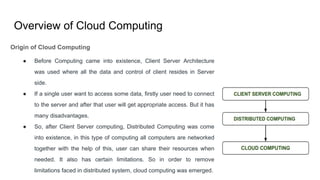
● Before Computing came into existence, Client Server Architecture
was used where all the data and control of client resides in Server
side.
● If a single user want to access some data, firstly user need to connect
to the server and after that user will get appropriate access. But it has
many disadvantages.
● So, after Client Server computing, Distributed Computing was come
into existence, in this type of computing all computers are networked
together with the help of this, user can share their resources when
needed. It also has certain limitations. So in order to remove
limitations faced in distributed system, cloud computing was emerged.
3.
Origin of CloudComputing
● During 1961, John MacCharty delivered his speech at MIT that “Computing Can be sold as a Utility,
like Water and Electricity.” So, this is implemented by Salesforce.com in 1999
● In 2002, Amazon started Amazon Web Services (AWS), Amazon provide storage, computation over
the internet. In 2006 Amazon launch Elastic Compute Cloud Commercial Service which is open for
Everybody to use.
● After that in 2009, Google Play also started providing Cloud Computing Enterprise Application as
other companies will see the emergence of Cloud Computing they also started providing their cloud
services. Thus, in 2009, Microsoft launch Microsoft Azure and after that other companies like
Alibaba, IBM, Oracle, HP also introduces their Cloud Services.
4.
Cloud Components
● ClientInfrastructure
○ The client infrastructure component is the part of the frontend which provides a graphic user interface
for the user to interact with the cloud.
● Application
○ An application is any platform like an app or software offered by a company by which the clients
access the cloud.
● Service
A cloud service manages the kind of service that a client needs to use according to his requirement. There
are three types of services in cloud computing. Software as a Service (SaaS), Platform as a Service (PaaS),
Infrastructure as a service (IaaS).
5.
● Runtime Cloud
Theruntime cloud provides the execution and runtime environment to the virtual machines.
● Storage
The storage component of cloud computing provides the storage capacity in the cloud for storing and managing
data.
● Management
Management is used for managing the components such as storage services, applications, runtime cloud
infrastructure, and security issues in the backend and for establishing coordination.
● Security
Security is the backend component of cloud computing, which insurance the security of data in the cloud.
● Internet
Internet is the medium using which the frontend and backend components communicate and interact with each
other.
6.
Key Features
● On-demand self-service: You get access to cloud resources such as the
processing power, storage, and network you need, using a simple
interface,without requiring human interaction with each service provider.
● Broad network connectivity: cloud computing resources can be accessed via
the network through standard mechanisms and platforms such as mobile
phones, tablets, laptops, and workstations.
● Location-independent: Users of cloud systems can work from any location as
long as you have an Internet connection.It allows users to be more productive
by adjusting the system to their work schedules.
7.
● Resource pooling:It is what gives cloud providers economies of scale, which they
pass on to their customers, making cloud cost-efficient.Using a multi-tenant model,
computing resources are pooled to serve multiple consumers; cloud resources are
dynamically assigned and reassigned, according to demand, without customers
needing to concern themselves with the physical location of these resources.
● Rapid Flexibility: implies that you can access more resources when you need them,
and scale back when you don’t—because resources are elastically provisioned and
released.
● Pay-as you-use service: means that you only pay for what you use or reserve as you
go; if you’re not using resources, you’re not paying. Resource usage is monitored,
measured, and reported transparently based on utilization.
8.
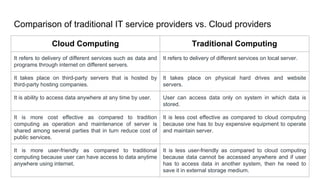
Comparison of traditionalIT service providers vs. Cloud providers
Cloud Computing Traditional Computing
It refers to delivery of different services such as data and
programs through internet on different servers.
It refers to delivery of different services on local server.
It takes place on third-party servers that is hosted by
third-party hosting companies.
It takes place on physical hard drives and website
servers.
It is ability to access data anywhere at any time by user. User can access data only on system in which data is
stored.
It is more cost effective as compared to tradition
computing as operation and maintenance of server is
shared among several parties that in turn reduce cost of
public services.
It is less cost effective as compared to cloud computing
because one has to buy expensive equipment to operate
and maintain server.
It is more user-friendly as compared to traditional
computing because user can have access to data anytime
anywhere using internet.
It is less user-friendly as compared to cloud computing
because data cannot be accessed anywhere and if user
has to access data in another system, then he need to
save it in external storage medium.
9.
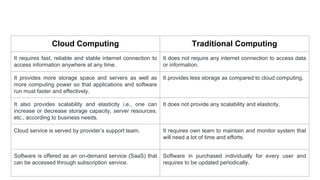
Cloud Computing TraditionalComputing
It requires fast, reliable and stable internet connection to
access information anywhere at any time.
It does not require any internet connection to access data
or information.
It provides more storage space and servers as well as
more computing power so that applications and software
run must faster and effectively.
It provides less storage as compared to cloud computing.
It also provides scalability and elasticity i.e., one can
increase or decrease storage capacity, server resources,
etc., according to business needs.
It does not provide any scalability and elasticity.
Cloud service is served by provider’s support team. It requires own team to maintain and monitor system that
will need a lot of time and efforts.
Software is offered as an on-demand service (SaaS) that
can be accessed through subscription service.
Software in purchased individually for every user and
requires to be updated periodically.
10.
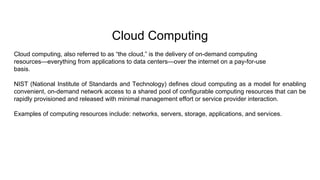
Cloud Computing
Cloud computing,also referred to as “the cloud,” is the delivery of on-demand computing
resources—everything from applications to data centers—over the internet on a pay-for-use
basis.
NIST (National Institute of Standards and Technology) defines cloud computing as a model for enabling
convenient, on-demand network access to a shared pool of configurable computing resources that can be
rapidly provisioned and released with minimal management effort or service provider interaction.
Examples of computing resources include: networks, servers, storage, applications, and services.
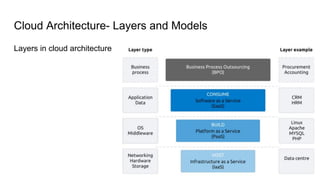
● Infrastructure asa Service (IaaS)
○ The basic layer of cloud is the infrastructure –IaaS (Infrastructure as a service). This layer is basically
hardware and network.
○ What distinguishes this from a regular server or hosting company are mainly two things: scalability
and virtualisation.
○ IaaS service providers scale this layer in such a manner that the additional cost of adding more
storage or bandwidth is minimal.
○ Owing to virtualisation, these providers are able to use up to 90% of their computing resources in
contrast to traditional hosting services where servers may lay idle at times.
○ One of the first services where this was seen was in Gmail, the Google email service where each user gets
around 8 GB of free storage. In order to do this, Google built gigantic data centres consisting of (probably)
millions of servers.
13.
Key Features ofIaaS
● Highly scalable resources
● Enterprise-grade infrastructure
● Cost depends on consumption
● Multitenant architecture, i.e. a single piece of hardware serves many users
● The client gets complete control over the infrastructure
IaaS Advantages
● The most flexible and dynamic model
● Cost-effective due to pay-as-you-go pricing
● Easy to use due to the automated deployment of hardware
● Management tasks are virtualized, so employees have more free time for other tasks
IaaS Disadvantages
● Data security issues due to multitenant architecture
● Vendor outages make customers unable to access their data for a while
● The need for team training to learn how to manage new infrastructure
14.
● Platform asa Service (PaaS)
○ The second layer of the cloud is the platform – the PaaS (Platform as a service). The platform layer
provides resources to actually build applications.
○ In combination with IaaS, PaaS provides the ability to develop, test, run, and host applications.
○ This layer of the cloud caters to the requirements of software developers as it is the place where new
applications are developed.
○ You can use PaaS services to build and test your applications on the cloud before deploying them.
○ In fact, it is designed in such a manner that it supports the entire lifecycle of an application, right from
building, testing and deployment to maintenance and updating. Like IaaS, PaaS includes
infrastructure, but also includes development tools, database management systems and much more.
○ An example of a well-known PaaS is Microsoft Azure. This platform provides developers with swift
access to a full development and deployment environment and even let you host the application you
are building.
15.
Key Features ofPaaS
● Allows for developing, testing and hosting apps in the same environment
● Resources can be scaled up and down depending on business needs
● Multiple users can access the same app in development
● The user doesn’t have complete control over the infrastructure
● Web services and databases are integrated
● Remote teams can collaborate easily
PaaS Advantages
● PaaS-built software is highly scalable, available and multi-tenant, as it is cloud-based
● The development process is quickened and simplified
● Reduced expenses for creating, testing and launching apps
● Automated company policy
● Reduced amount of coding required
● Allows for easy migrating to the hybrid cloud
PaaS Disadvantages
● Data security issues
● Compatibility of existing infrastructure (not every element can be cloud-enabled)
● Dependency on vendor’s speed, reliability and support
16.
● Software asa Service (SaaS)
○ The third cloud layer is the actual Software – the SaaS (Software as a service). SaaS has been used
for many years, but in a Cloud setting, it is the layer in which the user consumes the offering from the
service provider.
○ Here, organizations rent the usage of a SaaS application, and users connect to it by means of the
internet.
○ The application, therefore, needs to be web-based server so that it can be accessed from anywhere.
○ In this case, the service provider offers both the software and the hardware.
○ The SaaS layer must be web-based and hence accessible from everywhere and preferably on any
device. The key is to understand that it makes no sense to ask whether a service is cloud or SaaS, as
SaaS is a layer in the cloud stack.
17.
Key Features
● Thesubscription model of utilizing
● No need to download, install or upgrade software
● Resources can be scaled depending on requirements
● Apps are accessible from any connected device
● The provider is responsible for everything
SaaS Advantages
● No hardware costs
● No initial setup costs
● Automated upgrades
● Cross-device compatibility
● Accessible from any location
● Pay-as-you-go model
● Scalability
● Easy customization
SaaS Disadvantages
● Loss of control
● Limited range of solutions
● Connectivity is a must
18.
Service Provider
● Acloud service provider is a third-party company offering a cloud-based platform, infrastructure,
application or storage services. Much like a homeowner would pay for a utility such as electricity or gas,
companies typically have to pay only for the amount of cloud services they use, as business demands
require.
● Besides the pay-per-use model, cloud service providers also give companies a wide range of benefits.
Businesses can take advantage of scalability and flexibility by not being limited to physical constraints of
on-premises servers, the reliability of multiple data centers with multiple redundancies, customisation by
configuring servers to your preferences and responsive load balancing which can easily respond to
changing demands.
● Though businesses should also evaluate security considerations of storing information in the cloud to
ensure industry-recommended access and compliance management configurations and practices are
enacted and met.
19.
Cloud Adoption
● Everyorganization’s transformation journey is unique, and therefore every organization’s
cloud adoption strategy is also unique to them.
● Agility, flexibility, and competitiveness are key drivers for moving to the cloud, provided it is
done without creating business disruption or issues related to security, compliance and
performance.
● Let’s look at some key considerations that organizations can use as a guide while working
through their cloud strategy.
20.
● The firstconsideration is infrastructure and workloads:The cost of building and
operating data centers can become astronomical.On the other hand, low initial
costs and pay-as-you-go attributes of cloud computing can add up to significant
cost savings. Also, a point to consider is that not all workloads may be ready for
the cloud, as-is.
● The second consideration is around SaaS and development platforms:
Organizations need to consider if paying for application access is a more viable
option than purchasing off-the-shelf software and subsequently investing in
upgrades.
○ Organizations also need to consider speed and productivity—what it means for them to get a
new application up and running in ‘x’ hours on the cloud versus a coupleof weeks, even
months on traditional platforms.
21.
● Organizations needto consider the impact of making a wrong decision:
their risk exposure.
○ Is it riskier, for example, for them to invest in the hardware and software or rent by the hour?
○ Is it safer for them to work on a 12-month plan to build, write, test, and release the code if
they’re uncertain about adoption?
○ Is it better for them to “try” something new paying-as-you-go rather than making long-term
decisions based on little or no trial or adoption?
22.
Benefits of CloudAdoption
Categorized broadly into- Flexibility, Efficiency and Strategic Value.
● Cloud gives us Flexibility: Users can scale back or scale up services to fit their
needs, customize applications,and access cloud services from anywhere with an
internet connection.
● Cloud infrastructure scales on demand to support fluctuating workloads.
Organizations can determine their level of control with as-a-service options.Users
can select from a menu of pre-built tools and features to build a solution that fits
their specific needs.And Virtual Private Clouds, encryption, and API keys help keep
data secure.
23.
● Cloud alsobrings great Efficiency: Enterprise users can get applications to market
quickly without worrying about underlying infrastructure costs or its
maintenance.Cloud-based applications and data are accessible from virtually any
internet-connected device. Hardware failures do not result in data loss because of
networked backups.
● Cloud brings Strategic Value: Cloud computing uses remote resources, saving
organizations the cost of servers and other equipment, and paying on use-basis.
Cloud services give enterprises a competitive advantage by providing the most
innovative technologies available while managing the underlying infrastructure, thus
enabling organizations to focus on their priorities.
24.
Cloud Adoption Risks
●Risks include: Data security, associated with loss or unavailability of data causing business
disruption;
● Governance and sovereignty issues;
● Legal, regulatory, and compliance issues;
● Lack of standardization in how the constantly evolving technologies integrate and interoperate;
● Choosing the right deployment and service models to serve specific needs;
● Partnering with the right cloud service providers;
● Concerns related to business continuity and disaster recovery.
Organizations can no longer think of cloud adoption as something that is to be looked at in the future. With
the right cloud adoption strategies, technologies, services, and service providers,these risks can be
mitigated.
25.
Challenges in CloudAdoption
● Setting a Business Objective: Setting clear and flexible objectives and plans based on business
requirements is important in any cloud migration.
● Financial Costs: Though cloud migration brings in a lot of returns and benefits, in the long run, getting
there is usually expensive and time-consuming.
● What to Migrate and What Not? : Decision on what to migrate and what to leave behind is
important for a successful migration strategy. Therefore, careful selection is very important.
● Data Security: Data security is the biggest concern when enterprises store their sensitive data with a
third-party cloud provider. If data is lost, leaked, or exposed, it could cause severe disruption and damage to
the business
● Cloud Service Provider: The availability of multiple similar cloud service providers makes it a hurdle
to choose the right one.
26.
● Complexity andLack of Expertise: Most organizations are scared of the complexity of cloud
environments and migration processes. However, surveys show that complexity is still a blocking factor in cloud
adoptions.
● Compliance: For companies operating under strict regulatory and compliance frameworks, it is hard to migrate
to the cloud.
● Migration Strategy: Whether to rebuild, lift and shift, re-host(IaaS), refactor (PaaS), replace (SaaS) or opt for
a combination? is always a challenging question during migration.
● Downtime: Downtime can be catastrophic to business in terms of revenue and reputation to many
organizations.
● Post Migration: One of the other key concerns is the data privacy, security, and monitoring capabilities of the
application running on the cloud.
27.
Cloud Deployment Model
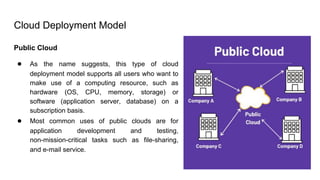
PublicCloud
● As the name suggests, this type of cloud
deployment model supports all users who want to
make use of a computing resource, such as
hardware (OS, CPU, memory, storage) or
software (application server, database) on a
subscription basis.
● Most common uses of public clouds are for
application development and testing,
non-mission-critical tasks such as file-sharing,
and e-mail service.
28.
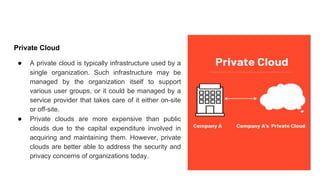
Private Cloud
● Aprivate cloud is typically infrastructure used by a
single organization. Such infrastructure may be
managed by the organization itself to support
various user groups, or it could be managed by a
service provider that takes care of it either on-site
or off-site.
● Private clouds are more expensive than public
clouds due to the capital expenditure involved in
acquiring and maintaining them. However, private
clouds are better able to address the security and
privacy concerns of organizations today.
29.
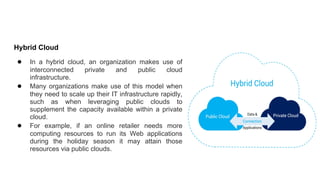
Hybrid Cloud
● Ina hybrid cloud, an organization makes use of
interconnected private and public cloud
infrastructure.
● Many organizations make use of this model when
they need to scale up their IT infrastructure rapidly,
such as when leveraging public clouds to
supplement the capacity available within a private
cloud.
● For example, if an online retailer needs more
computing resources to run its Web applications
during the holiday season it may attain those
resources via public clouds.
30.
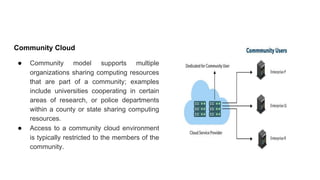
Community Cloud
● Communitymodel supports multiple
organizations sharing computing resources
that are part of a community; examples
include universities cooperating in certain
areas of research, or police departments
within a county or state sharing computing
resources.
● Access to a community cloud environment
is typically restricted to the members of the
community.


![NSUT_Lecture1_cloud computing[1].pptx](https://cdn.slidesharecdn.com/ss_thumbnails/nsutlecture1cloudcomputing1-230411154037-271a377d-thumbnail.jpg?width=640&height=640&fit=bounds)


