
Visit www.seminarlinks.blogspot.in to
Download
Basic Questions
"What's the cloud?"

"Where is the cloud?"

"Are we in the cloud now?!"

These are all questions you've probably heard or even asked yourself. The
term "cloud computing" is everywhere.
Definition
In the simplest terms, cloud computing means storing and accessing
data and programs over the Internet instead of your computer's hard
drive.
In computer networking, cloud computing is a phrase used to describe
a variety of computing concepts that involve a large number of
computers connected through a real-time communication
network such as the Internet.
Why it is called Cloud
The cloud is just a metaphor for the Internet.

It goes back to the days of flowcharts and presentations that would
represent the gigantic server-farm infrastructure of the Internet as
nothing but a puffy, white cumulonimbus cloud, accepting connections
and doling out information as it floats.
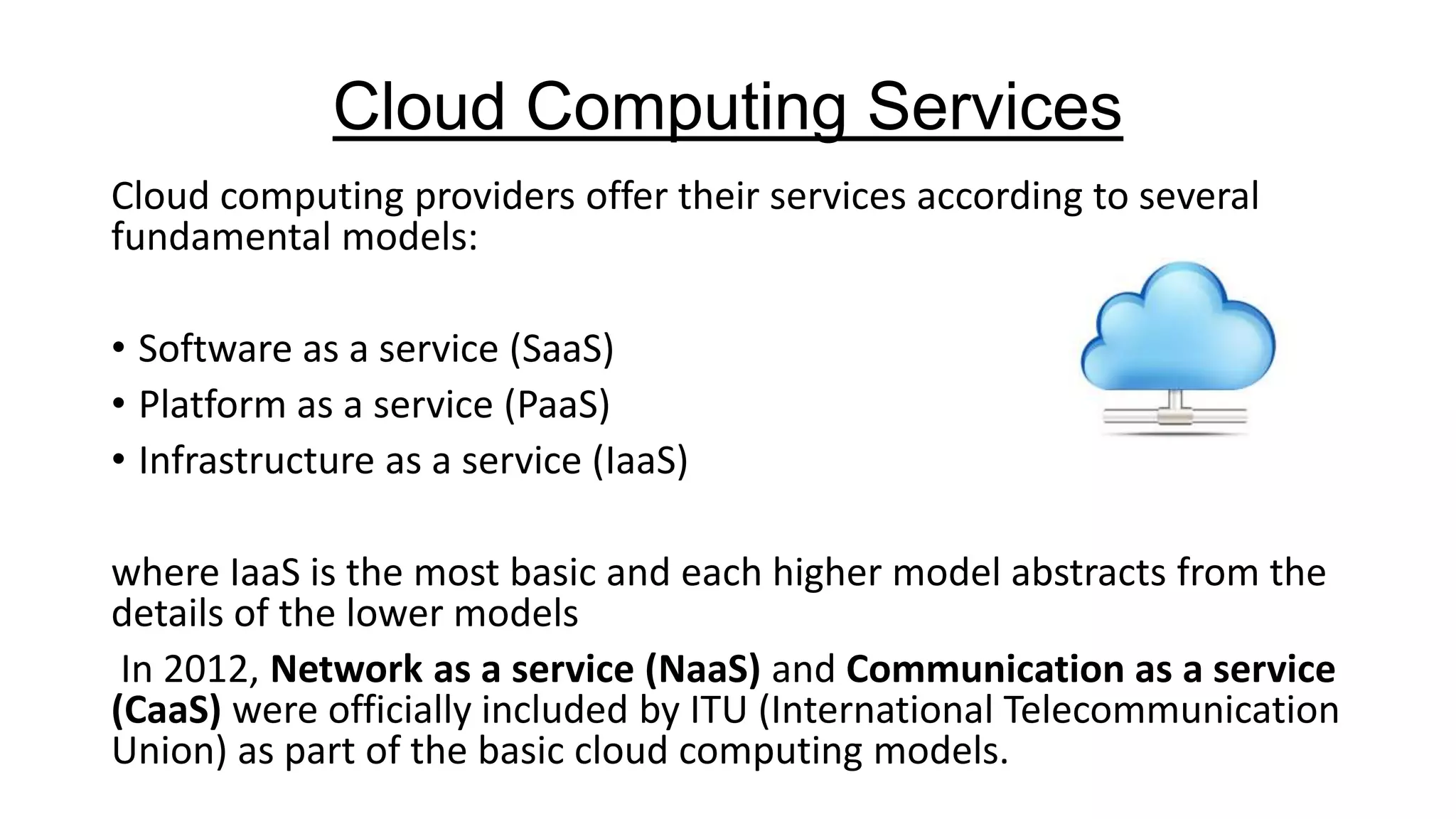
Cloud Computing Services
Cloud computing providers offer their services according to several
fundamental models:
• Software as a service (SaaS)
• Platform as a service (PaaS)
• Infrastructure as a service (IaaS)
where IaaS is the most basic and each higher model abstracts from the
details of the lower models
In 2012, Network as a service (NaaS) and Communication as a service
(CaaS) were officially included by ITU (International Telecommunication
Union) as part of the basic cloud computing models.
Infrastructure as a service (IaaS)
Infrastructure as a Service (IaaS) is a way to rent
storage, hardware, servers and network capacity over the Internet.
The service provider owns massive computer resources and is
responsible for running and maintaining them.
Meanwhile, the client needs only computer and Internet connection to
access these bottomless resources and typically pays for it on a per-use
basis.
Infrastructure as a service (IaaS)
The main features and components of Iaas are:
• service-oriented utility computing,
• automation of administrative tasks,
• unlimited resources,
• on demand self-service,
• pay-per-use pricing,
• desktop virtualization,
• policy-based services.
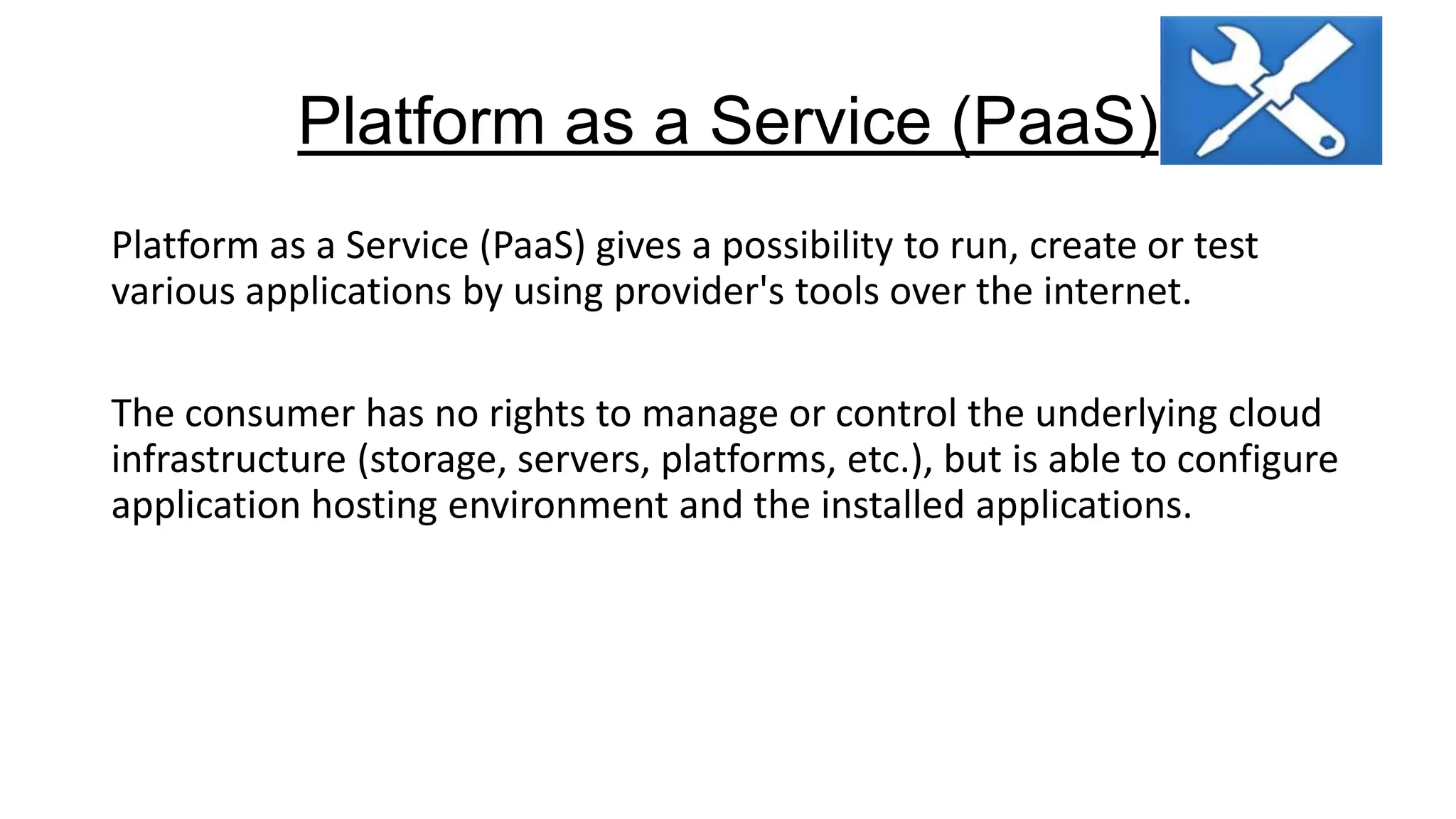
Platform as a Service (PaaS)
Platform as a Service (PaaS) gives a possibility to run, create or test
various applications by using provider's tools over the internet.
The consumer has no rights to manage or control the underlying cloud
infrastructure (storage, servers, platforms, etc.), but is able to configure
application hosting environment and the installed applications.
Advantages-PaaS
Advantages of using PaaS are:
• possibility to change and upgrade the characteristics and components
of operating system,
• easier collaboration with specialist over the word,
• opportunity to use resources that are over the national border
without crossing it,
• overall cost reduction by minimizing the expenses of hardware and
programming tools, incompatibility problems and so on.
Disadvantages-PaaS
Disadvantages of using PaaS are:

• some providers may not allow moving developed software out of his
platform (security issues),
• flexibility of this service may still be insufficient in meeting the needs
of users, whose requirements are constantly changing.
Software as a Service (SaaS)
Software as a Service (SaaS) is a cloud computing model, which hosts
various software applications and makes them available to customers
over the Internet or other network.
There are two main software delivery models for SaaS:
• to give an online access to a single copy of an application,
• to host commercially available software and deliver it over Internet.
Advantages-SaaS
The main advantages of SaaS model are:

• no concerns about software buying (licenses), installing and
maintaining,
• automatic updates and patch management,
• automation of administrative tasks,
• easier collaboration with other users – everyone has the same version
of software,
• world-wide access.
Disadvantages-SaaS
Disadvantages of SaaS (Software as a Service)
• Security Issue: As data is stored on cloud, security becomes a major issue.
• Latency Issue: Again as data is stored in cloud far away from end user, it
may take more transactional time as compared to traditional approach.
• Total Dependency on Internet: Relying on an Internet connection means
that data is transferred to and from a SaaS firm at Internet speeds, rather
than the potentially higher speeds of a firm’s internal network.
• Switching between SaaS vendors is difficult: Switching SaaS vendors may
involve the slow and difficult task of transferring very large data files over
the Internet.
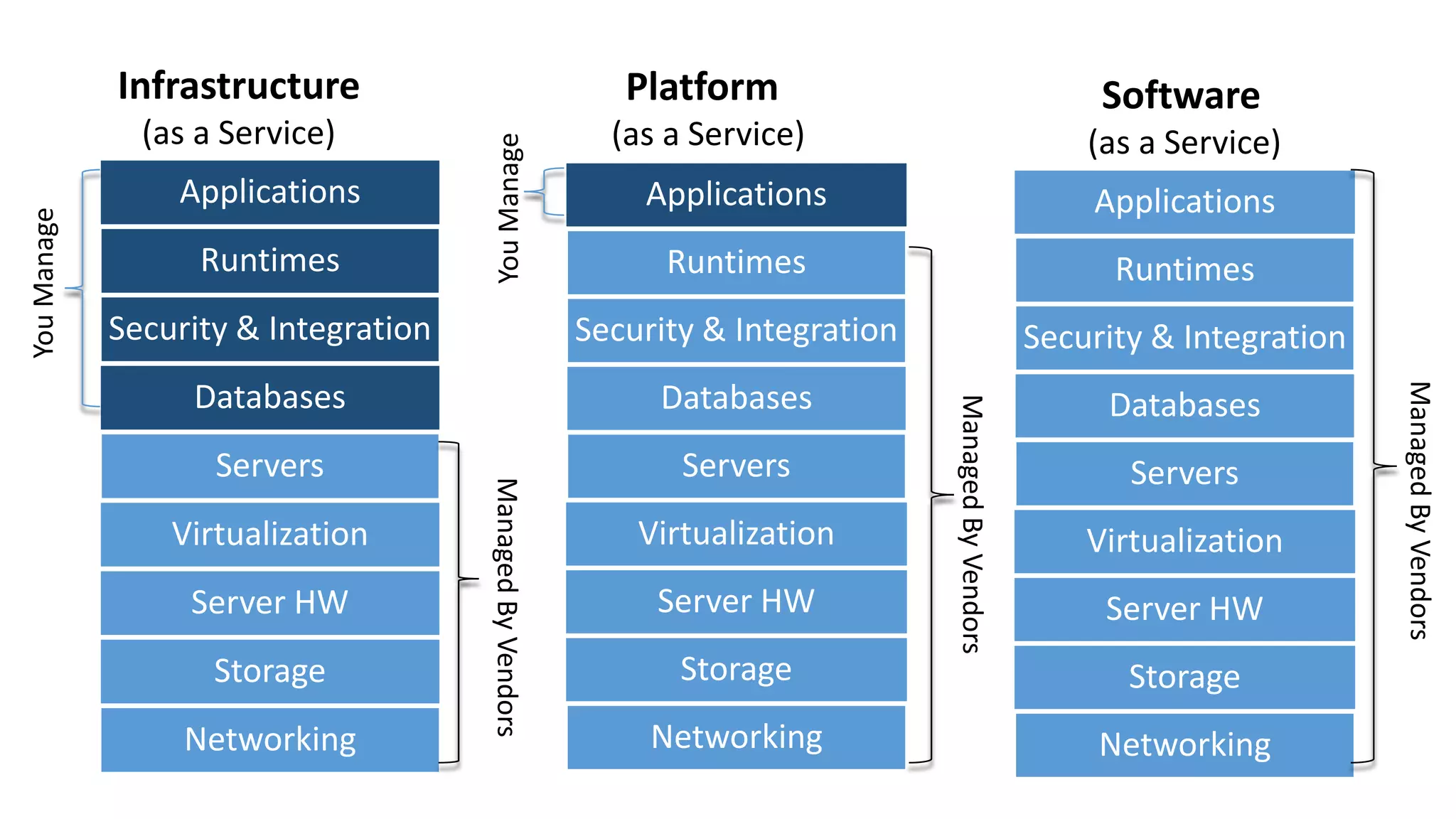
(as a Service)

Applications

You Manage

Platform

(as a Service)
You Manage

Infrastructure

Software
(as a Service)
Runtimes

Security & Integration

Security & Integration

Security & Integration

Databases

Databases

Databases

Servers

Servers

Virtualization
Server HW
Storage
Networking

Virtualization
Server HW
Storage

Networking

Servers
Virtualization
Server HW

Storage
Networking

Managed By Vendors

Runtimes

Runtimes

Managed By Vendors

Applications

Managed By Vendors

Applications
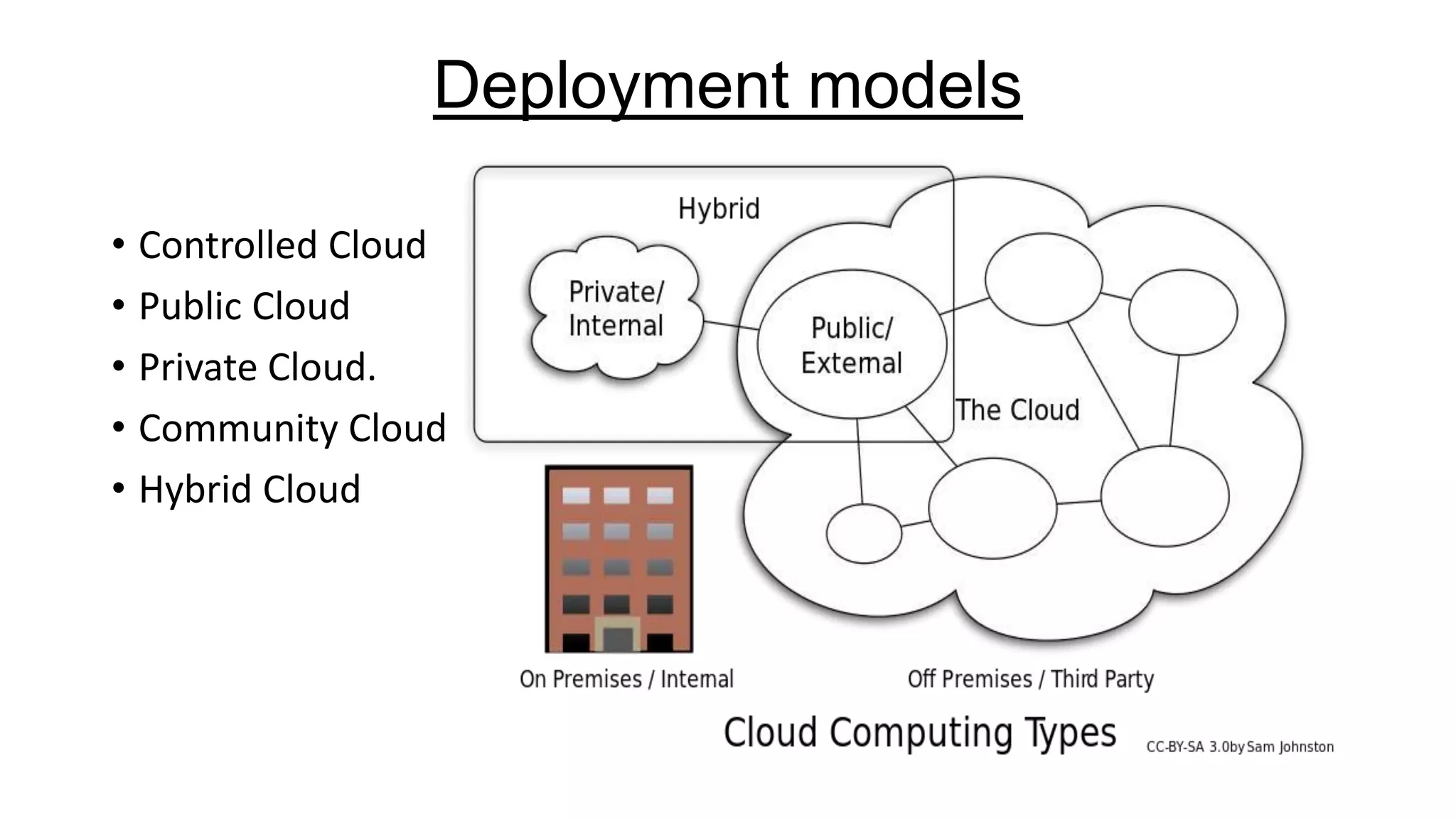
Deployment models
• Controlled Cloud
• Public Cloud
• Private Cloud.
• Community Cloud
• Hybrid Cloud
Controlled cloud
Controlled cloud services are not publicly available; users are specifically
authorized by services vendors.
Access to the controlled cloud may be through the Internet;
however, connections would be encrypted.
The cloud vendor employs various techniques and technologies to prevent
unauthorized access.

Use of services is governed by contracts, and service-level
agreements which specify the responsibilities of the vendor and the
responsibilities of the customer with regard to data stewardship.
Public Cloud
• A public cloud is a standard cloud computing model wherein a service provider
manages storage and computing resources on behalf of consumer over the
Internet.
• Public clouds are run by third parties, and applications from different users are
shared on the provider’s cloud servers, storage systems, and networks.
• Benefits of public clouds include ease of on-demand scalability as they are
larger than a company’s private cloud.
Security Concern:
• Shared resources are major target of attack for hackers.
• target of a Denial of Service (DoS) attack.

e.g.- Amazon Elastic Compute Cloud (EC2), IBM's Blue Cloud, Sun Cloud, Google
AppEngine and Windows Azure Services Platform.
Private Cloud
• also called internal cloud or corporate cloud
• typically hosted on customer premises
• provides hosted services to authorized users behind a company firewall
• company has control over resources, data, security and QoS.
• The company owns the infrastructure and controls how applications are
deployed on it.
• Benefits of going with private cloud is increased control and monitoring
of resources, flexibility of customization, ability to recover from
failure, and the ability to scale up or down depending upon demand.
Attracted criticism because users "still have to buy, build, and manage
them" and thus do not benefit from less hands-on management
Community Cloud
• Community cloud shares infrastructure between several organizations
from a specific community with common concerns (security,
compliance, jurisdiction, etc.), whether managed internally or by a
third-party and hosted internally or externally.

• The costs are spread over fewer users than a public cloud (but more
than a private cloud), so only some of the cost savings potential of
cloud computing are realized.
Hybrid Cloud
• composition of two or more clouds (private, community or public)
• remain unique entities but are bound together
• offering the benefits of multiple deployment models
• ability to connect collocation, managed and/or dedicated services
with cloud resources
• Companies able to obtain degrees of fault tolerance combined with
locally immediate usability without dependency on internet
connectivity.
• It requires both on-premises resources and off-site (remote) serverbased cloud infrastructure.
Cloud Bursting
• It is an application deployment model in which an application runs in
a private cloud or data center and "bursts" to a public cloud when the
demand for computing capacity increases.
• A primary advantage of cloud bursting and a hybrid cloud model is
that an organization only pays for extra compute resources when they
are needed.

• Cloud bursting enables data centers to create an in-house IT
infrastructure that supports average workloads, and use cloud
resources from public or private clouds, during spikes in processing
demands
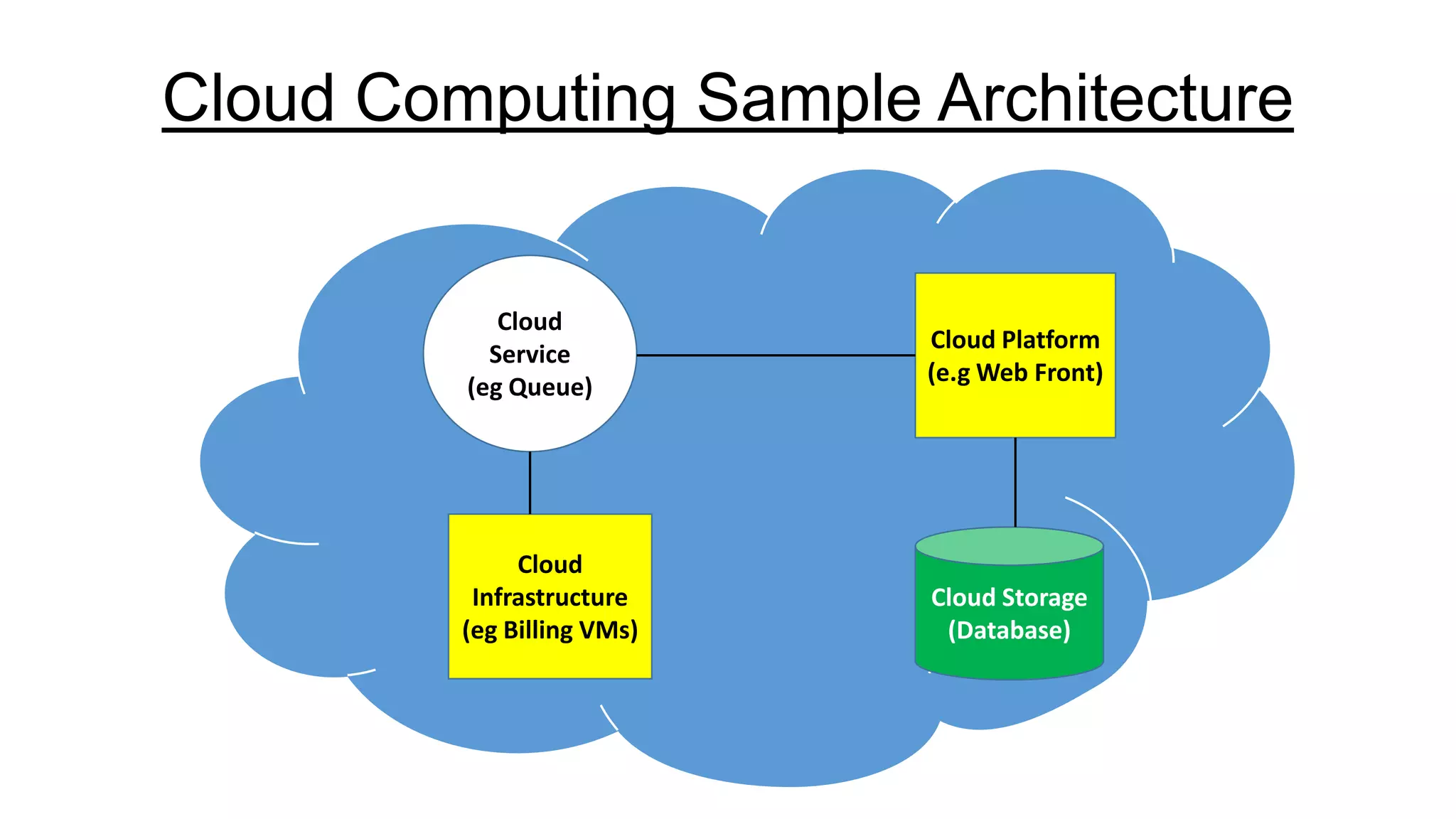
Cloud Computing Sample Architecture

Cloud
Service
(eg Queue)

Cloud
Infrastructure
(eg Billing VMs)

Cloud Platform
(e.g Web Front)

Cloud Storage
(Database)
Cloud Service Providers
• Amazon Web Services
• Google
• Microsoft
• Rackspace
• JustCloud
• SugarSync
• SpiderOak
Advantages of Cloud Computing
• Cost – Transform Capital Expenditure for servers into and operating expenses
• Multi-tenancy – Several customer share the shame infrastructure
• Scalability – “On-demand” provisioning of Computing resources
• Redundancy – Redundancy of sites is easier to implement
• Accessibility – Device and Location independence
• Maintenance – Upgrades are applied centrally and done by IT experts
Disadvantages of Cloud Computing
• Security – Loss of control oversensitive data
• Dependency – Tied to you Cloud Service Provider
• Flexibility – Special customization of computing resources may not be possible

• Cost – Cost structure is becoming opaque
• Knowledge – Most of the knowledge is concentrated at the cloud service Provider
• Integration – Difficult Integration with other equipment and systems
Conclusion
For it to be considered "cloud computing," you need to access your
data or your programs over the Internet, or at the very least, have that
data synchronized with other information over the Net.
With an online connection, cloud computing can be done
anywhere, anytime.
Like everything else, cloud computing too has its pros and cons. While
the technology can prove to be a great asset to your company, it could
also cause harm if not understood and used properly.
References
• http://www.pcmag.com/article2/0,2817,2372165,00.asp
• http://mobiledevices.about.com/od/additionalresources/a/CloudComputing-Is-It-Really-All-That-Beneficial.htm
• http://www.wikinvest.com/concept/Cloud_Computing
• http://sbinfocanada.about.com/od/itmanagement/a/CloudComputing-Disadvantages.htm
• http://en.wikipedia.org/wiki/Cloud_computing
Cloud Computing and Services | PPT

Cloud Computing and Services | PPT

  • 1.
  • 2.
    Basic Questions "What's thecloud?" "Where is the cloud?" "Are we in the cloud now?!" These are all questions you've probably heard or even asked yourself. The term "cloud computing" is everywhere.
  • 3.
    Definition In the simplestterms, cloud computing means storing and accessing data and programs over the Internet instead of your computer's hard drive. In computer networking, cloud computing is a phrase used to describe a variety of computing concepts that involve a large number of computers connected through a real-time communication network such as the Internet.
  • 4.
    Why it iscalled Cloud The cloud is just a metaphor for the Internet. It goes back to the days of flowcharts and presentations that would represent the gigantic server-farm infrastructure of the Internet as nothing but a puffy, white cumulonimbus cloud, accepting connections and doling out information as it floats.
  • 6.
    Cloud Computing Services Cloudcomputing providers offer their services according to several fundamental models: • Software as a service (SaaS) • Platform as a service (PaaS) • Infrastructure as a service (IaaS) where IaaS is the most basic and each higher model abstracts from the details of the lower models In 2012, Network as a service (NaaS) and Communication as a service (CaaS) were officially included by ITU (International Telecommunication Union) as part of the basic cloud computing models.
  • 7.
    Infrastructure as aservice (IaaS) Infrastructure as a Service (IaaS) is a way to rent storage, hardware, servers and network capacity over the Internet. The service provider owns massive computer resources and is responsible for running and maintaining them. Meanwhile, the client needs only computer and Internet connection to access these bottomless resources and typically pays for it on a per-use basis.
  • 8.
    Infrastructure as aservice (IaaS) The main features and components of Iaas are: • service-oriented utility computing, • automation of administrative tasks, • unlimited resources, • on demand self-service, • pay-per-use pricing, • desktop virtualization, • policy-based services.
  • 9.
    Platform as aService (PaaS) Platform as a Service (PaaS) gives a possibility to run, create or test various applications by using provider's tools over the internet. The consumer has no rights to manage or control the underlying cloud infrastructure (storage, servers, platforms, etc.), but is able to configure application hosting environment and the installed applications.
  • 10.
    Advantages-PaaS Advantages of usingPaaS are: • possibility to change and upgrade the characteristics and components of operating system, • easier collaboration with specialist over the word, • opportunity to use resources that are over the national border without crossing it, • overall cost reduction by minimizing the expenses of hardware and programming tools, incompatibility problems and so on.
  • 11.
    Disadvantages-PaaS Disadvantages of usingPaaS are: • some providers may not allow moving developed software out of his platform (security issues), • flexibility of this service may still be insufficient in meeting the needs of users, whose requirements are constantly changing.
  • 12.
    Software as aService (SaaS) Software as a Service (SaaS) is a cloud computing model, which hosts various software applications and makes them available to customers over the Internet or other network. There are two main software delivery models for SaaS: • to give an online access to a single copy of an application, • to host commercially available software and deliver it over Internet.
  • 13.
    Advantages-SaaS The main advantagesof SaaS model are: • no concerns about software buying (licenses), installing and maintaining, • automatic updates and patch management, • automation of administrative tasks, • easier collaboration with other users – everyone has the same version of software, • world-wide access.
  • 14.
    Disadvantages-SaaS Disadvantages of SaaS(Software as a Service) • Security Issue: As data is stored on cloud, security becomes a major issue. • Latency Issue: Again as data is stored in cloud far away from end user, it may take more transactional time as compared to traditional approach. • Total Dependency on Internet: Relying on an Internet connection means that data is transferred to and from a SaaS firm at Internet speeds, rather than the potentially higher speeds of a firm’s internal network. • Switching between SaaS vendors is difficult: Switching SaaS vendors may involve the slow and difficult task of transferring very large data files over the Internet.
  • 15.
    (as a Service) Applications YouManage Platform (as a Service) You Manage Infrastructure Software (as a Service) Runtimes Security & Integration Security & Integration Security & Integration Databases Databases Databases Servers Servers Virtualization Server HW Storage Networking Virtualization Server HW Storage Networking Servers Virtualization Server HW Storage Networking Managed By Vendors Runtimes Runtimes Managed By Vendors Applications Managed By Vendors Applications
  • 16.
    Deployment models • ControlledCloud • Public Cloud • Private Cloud. • Community Cloud • Hybrid Cloud
  • 17.
    Controlled cloud Controlled cloudservices are not publicly available; users are specifically authorized by services vendors. Access to the controlled cloud may be through the Internet; however, connections would be encrypted. The cloud vendor employs various techniques and technologies to prevent unauthorized access. Use of services is governed by contracts, and service-level agreements which specify the responsibilities of the vendor and the responsibilities of the customer with regard to data stewardship.
  • 18.
    Public Cloud • Apublic cloud is a standard cloud computing model wherein a service provider manages storage and computing resources on behalf of consumer over the Internet. • Public clouds are run by third parties, and applications from different users are shared on the provider’s cloud servers, storage systems, and networks. • Benefits of public clouds include ease of on-demand scalability as they are larger than a company’s private cloud. Security Concern: • Shared resources are major target of attack for hackers. • target of a Denial of Service (DoS) attack. e.g.- Amazon Elastic Compute Cloud (EC2), IBM's Blue Cloud, Sun Cloud, Google AppEngine and Windows Azure Services Platform.
  • 19.
    Private Cloud • alsocalled internal cloud or corporate cloud • typically hosted on customer premises • provides hosted services to authorized users behind a company firewall • company has control over resources, data, security and QoS. • The company owns the infrastructure and controls how applications are deployed on it. • Benefits of going with private cloud is increased control and monitoring of resources, flexibility of customization, ability to recover from failure, and the ability to scale up or down depending upon demand. Attracted criticism because users "still have to buy, build, and manage them" and thus do not benefit from less hands-on management
  • 20.
    Community Cloud • Communitycloud shares infrastructure between several organizations from a specific community with common concerns (security, compliance, jurisdiction, etc.), whether managed internally or by a third-party and hosted internally or externally. • The costs are spread over fewer users than a public cloud (but more than a private cloud), so only some of the cost savings potential of cloud computing are realized.
  • 21.
    Hybrid Cloud • compositionof two or more clouds (private, community or public) • remain unique entities but are bound together • offering the benefits of multiple deployment models • ability to connect collocation, managed and/or dedicated services with cloud resources • Companies able to obtain degrees of fault tolerance combined with locally immediate usability without dependency on internet connectivity. • It requires both on-premises resources and off-site (remote) serverbased cloud infrastructure.
  • 22.
    Cloud Bursting • Itis an application deployment model in which an application runs in a private cloud or data center and "bursts" to a public cloud when the demand for computing capacity increases. • A primary advantage of cloud bursting and a hybrid cloud model is that an organization only pays for extra compute resources when they are needed. • Cloud bursting enables data centers to create an in-house IT infrastructure that supports average workloads, and use cloud resources from public or private clouds, during spikes in processing demands
  • 23.
    Cloud Computing SampleArchitecture Cloud Service (eg Queue) Cloud Infrastructure (eg Billing VMs) Cloud Platform (e.g Web Front) Cloud Storage (Database)
  • 24.
    Cloud Service Providers •Amazon Web Services • Google • Microsoft • Rackspace • JustCloud • SugarSync • SpiderOak
  • 25.
    Advantages of CloudComputing • Cost – Transform Capital Expenditure for servers into and operating expenses • Multi-tenancy – Several customer share the shame infrastructure • Scalability – “On-demand” provisioning of Computing resources • Redundancy – Redundancy of sites is easier to implement • Accessibility – Device and Location independence • Maintenance – Upgrades are applied centrally and done by IT experts
  • 26.
    Disadvantages of CloudComputing • Security – Loss of control oversensitive data • Dependency – Tied to you Cloud Service Provider • Flexibility – Special customization of computing resources may not be possible • Cost – Cost structure is becoming opaque • Knowledge – Most of the knowledge is concentrated at the cloud service Provider • Integration – Difficult Integration with other equipment and systems
  • 27.
    Conclusion For it tobe considered "cloud computing," you need to access your data or your programs over the Internet, or at the very least, have that data synchronized with other information over the Net. With an online connection, cloud computing can be done anywhere, anytime. Like everything else, cloud computing too has its pros and cons. While the technology can prove to be a great asset to your company, it could also cause harm if not understood and used properly.
  • 28.
    References • http://www.pcmag.com/article2/0,2817,2372165,00.asp • http://mobiledevices.about.com/od/additionalresources/a/CloudComputing-Is-It-Really-All-That-Beneficial.htm •http://www.wikinvest.com/concept/Cloud_Computing • http://sbinfocanada.about.com/od/itmanagement/a/CloudComputing-Disadvantages.htm • http://en.wikipedia.org/wiki/Cloud_computing