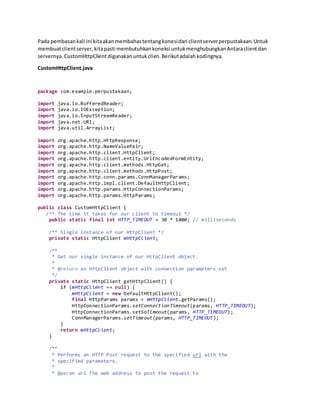
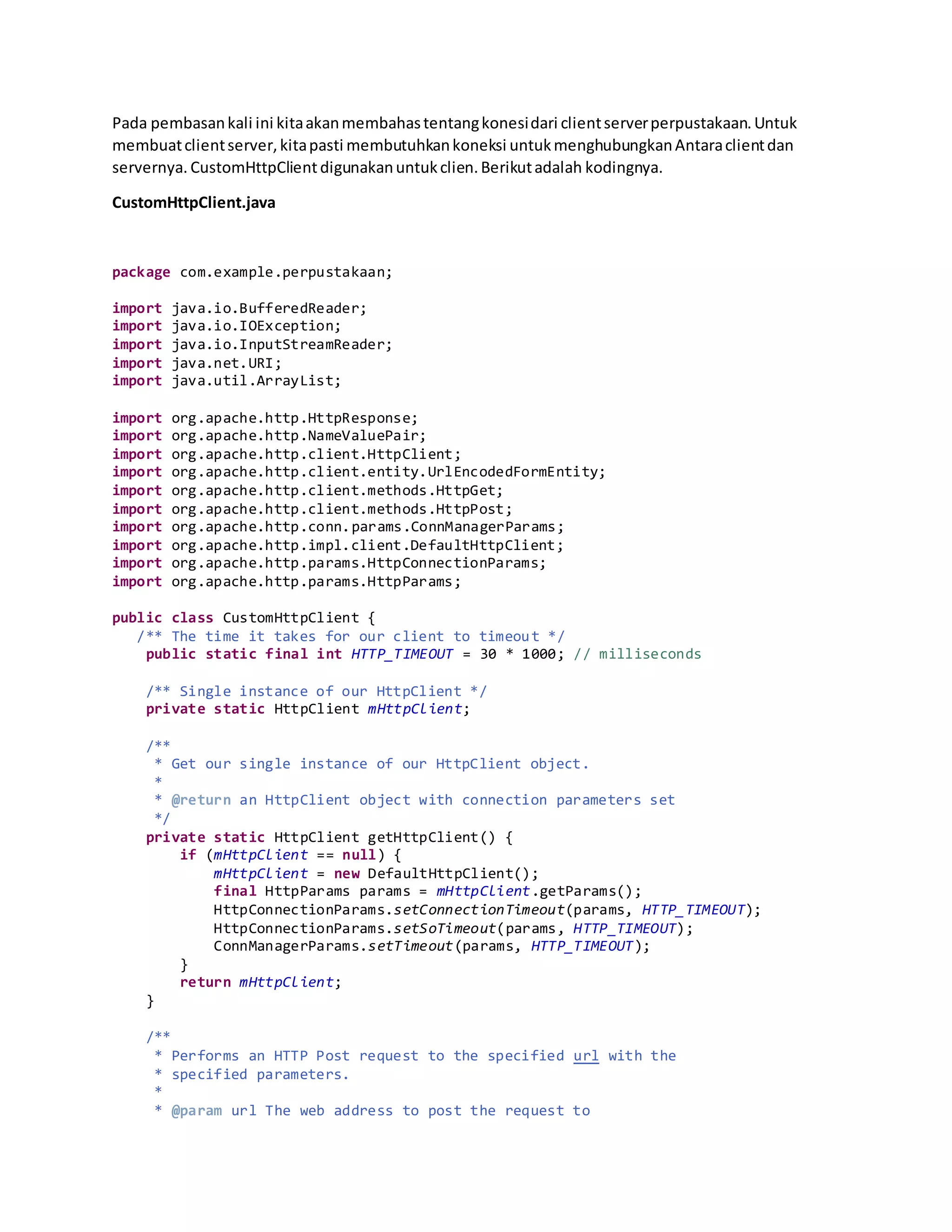
Pada pembasankali ini kitaakanmembahastentangkonesidari clientserverperpustakaan.Untuk
membuatclientserver,kitapasti membutuhkankoneksi untukmenghubungkanAntaraclientdan
servernya. CustomHttpClientdigunakanuntukclien.Berikutadalah kodingnya.
CustomHttpClient.java
package com.example.perpustakaan;
import java.io.BufferedReader;
import java.io.IOException;
import java.io.InputStreamReader;
import java.net.URI;
import java.util.ArrayList;
import org.apache.http.HttpResponse;
import org.apache.http.NameValuePair;
import org.apache.http.client.HttpClient;
import org.apache.http.client.entity.UrlEncodedFormEntity;
import org.apache.http.client.methods.HttpGet;
import org.apache.http.client.methods.HttpPost;
import org.apache.http.conn.params.ConnManagerParams;
import org.apache.http.impl.client.DefaultHttpClient;
import org.apache.http.params.HttpConnectionParams;
import org.apache.http.params.HttpParams;
public class CustomHttpClient {
/** The time it takes for our client to timeout */
public static final int HTTP_TIMEOUT = 30 * 1000; // milliseconds
/** Single instance of our HttpClient */
private static HttpClient mHttpClient;
/**
* Get our single instance of our HttpClient object.
*
* @return an HttpClient object with connection parameters set
*/
private static HttpClient getHttpClient() {
if (mHttpClient == null) {
mHttpClient = new DefaultHttpClient();
final HttpParams params = mHttpClient.getParams();
HttpConnectionParams.setConnectionTimeout(params, HTTP_TIMEOUT);
HttpConnectionParams.setSoTimeout(params, HTTP_TIMEOUT);
ConnManagerParams.setTimeout(params, HTTP_TIMEOUT);
}
return mHttpClient;
}
/**
* Performs an HTTP Post request to the specified url with the
* specified parameters.
*
* @param url The web address to post the request to
* @param postParameters The parameters to send via the request
* @return The result of the request
* @throws Exception
*/
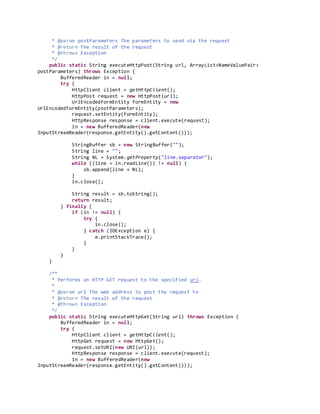
public static String executeHttpPost(String url, ArrayList<NameValuePair>
postParameters) throws Exception {
BufferedReader in = null;
try {
HttpClient client = getHttpClient();
HttpPost request = new HttpPost(url);
UrlEncodedFormEntity formEntity = new
UrlEncodedFormEntity(postParameters);
request.setEntity(formEntity);
HttpResponse response = client.execute(request);
in = new BufferedReader(new
InputStreamReader(response.getEntity().getContent()));
StringBuffer sb = new StringBuffer("");
String line = "";
String NL = System.getProperty("line.separator");
while ((line = in.readLine()) != null) {
sb.append(line + NL);
}
in.close();
String result = sb.toString();
return result;
} finally {
if (in != null) {
try {
in.close();
} catch (IOException e) {
e.printStackTrace();
}
}
}
}
/**
* Performs an HTTP GET request to the specified url.
*
* @param url The web address to post the request to
* @return The result of the request
* @throws Exception
*/
public static String executeHttpGet(String url) throws Exception {
BufferedReader in = null;
try {
HttpClient client = getHttpClient();
HttpGet request = new HttpGet();
request.setURI(new URI(url));
HttpResponse response = client.execute(request);
in = new BufferedReader(new
InputStreamReader(response.getEntity().getContent()));
StringBuffer sb = new StringBuffer("");
String line = "";
String NL = System.getProperty("line.separator");
while ((line = in.readLine()) != null) {
sb.append(line + NL);
}
in.close();
String result = sb.toString();
return result;
} finally {
if (in != null) {
try {
in.close();
} catch (IOException e) {
e.printStackTrace();
}
}
}
}
}
Setelahkitamengetahui tentangkoneksidari clientkitaakanpindahke koneksidatabase.Dalam
pembuatankoneksi database,yangharuskitaperhatikanadalahfild”yangadapada table database yang
akan kitatuju.Berikutadalahkodingnya.
Pinjam.php
<?php
$nim=$_POST['nim'];
$nama=$_POST['nama'];
$telp=$_POST['telp'];
$semester=$_POST['semester'];
$tgl_pinjam=$_POST['tgl_pinjam'];
$conn = mysql_connect("localhost","root","");
mysql_select_db("perpustakaan");
$query= "INSERTINTO histori (nim,nama,telp,semester,tgl_pinjam) values
('$nim','$nama','$telp','$semester','$tgl_pinjam')";
$result= mysql_query($query) ordie ("Gagal");
if (mysql_num_rows($result)==1){
echo1;
}
else{
echo0;
}
?>
Dan berikutadalahkodingdari database ke server.
!-- <?php
$username = @$_POST['username'];
$password= md5(@$_POST['password']);
$koneksi = mysql_connect("localhost","root","");
mysql_select_db("perpustakaan");
$query = "SELECT * FROMuser WHERE username = '$username'ANDpassword='$password'";
$result= mysql_query($query) ordie("Unable toverifyuserbecause :". mysql_error());
if (mysql_num_rows($result)==1){
echo 1;
}
else {
// printstatusmessage
echo0;
}
?>
-->

Client server part 12

  • 1.
    Pada pembasankali inikitaakanmembahastentangkonesidari clientserverperpustakaan.Untuk membuatclientserver,kitapasti membutuhkankoneksi untukmenghubungkanAntaraclientdan servernya. CustomHttpClientdigunakanuntukclien.Berikutadalah kodingnya. CustomHttpClient.java package com.example.perpustakaan; import java.io.BufferedReader; import java.io.IOException; import java.io.InputStreamReader; import java.net.URI; import java.util.ArrayList; import org.apache.http.HttpResponse; import org.apache.http.NameValuePair; import org.apache.http.client.HttpClient; import org.apache.http.client.entity.UrlEncodedFormEntity; import org.apache.http.client.methods.HttpGet; import org.apache.http.client.methods.HttpPost; import org.apache.http.conn.params.ConnManagerParams; import org.apache.http.impl.client.DefaultHttpClient; import org.apache.http.params.HttpConnectionParams; import org.apache.http.params.HttpParams; public class CustomHttpClient { /** The time it takes for our client to timeout */ public static final int HTTP_TIMEOUT = 30 * 1000; // milliseconds /** Single instance of our HttpClient */ private static HttpClient mHttpClient; /** * Get our single instance of our HttpClient object. * * @return an HttpClient object with connection parameters set */ private static HttpClient getHttpClient() { if (mHttpClient == null) { mHttpClient = new DefaultHttpClient(); final HttpParams params = mHttpClient.getParams(); HttpConnectionParams.setConnectionTimeout(params, HTTP_TIMEOUT); HttpConnectionParams.setSoTimeout(params, HTTP_TIMEOUT); ConnManagerParams.setTimeout(params, HTTP_TIMEOUT); } return mHttpClient; } /** * Performs an HTTP Post request to the specified url with the * specified parameters. * * @param url The web address to post the request to
  • 2.
    * @param postParametersThe parameters to send via the request * @return The result of the request * @throws Exception */ public static String executeHttpPost(String url, ArrayList<NameValuePair> postParameters) throws Exception { BufferedReader in = null; try { HttpClient client = getHttpClient(); HttpPost request = new HttpPost(url); UrlEncodedFormEntity formEntity = new UrlEncodedFormEntity(postParameters); request.setEntity(formEntity); HttpResponse response = client.execute(request); in = new BufferedReader(new InputStreamReader(response.getEntity().getContent())); StringBuffer sb = new StringBuffer(""); String line = ""; String NL = System.getProperty("line.separator"); while ((line = in.readLine()) != null) { sb.append(line + NL); } in.close(); String result = sb.toString(); return result; } finally { if (in != null) { try { in.close(); } catch (IOException e) { e.printStackTrace(); } } } } /** * Performs an HTTP GET request to the specified url. * * @param url The web address to post the request to * @return The result of the request * @throws Exception */ public static String executeHttpGet(String url) throws Exception { BufferedReader in = null; try { HttpClient client = getHttpClient(); HttpGet request = new HttpGet(); request.setURI(new URI(url)); HttpResponse response = client.execute(request); in = new BufferedReader(new InputStreamReader(response.getEntity().getContent()));
  • 3.
    StringBuffer sb =new StringBuffer(""); String line = ""; String NL = System.getProperty("line.separator"); while ((line = in.readLine()) != null) { sb.append(line + NL); } in.close(); String result = sb.toString(); return result; } finally { if (in != null) { try { in.close(); } catch (IOException e) { e.printStackTrace(); } } } } } Setelahkitamengetahui tentangkoneksidari clientkitaakanpindahke koneksidatabase.Dalam pembuatankoneksi database,yangharuskitaperhatikanadalahfild”yangadapada table database yang akan kitatuju.Berikutadalahkodingnya. Pinjam.php <?php $nim=$_POST['nim']; $nama=$_POST['nama']; $telp=$_POST['telp']; $semester=$_POST['semester']; $tgl_pinjam=$_POST['tgl_pinjam']; $conn = mysql_connect("localhost","root",""); mysql_select_db("perpustakaan"); $query= "INSERTINTO histori (nim,nama,telp,semester,tgl_pinjam) values ('$nim','$nama','$telp','$semester','$tgl_pinjam')";
  • 4.
    $result= mysql_query($query) ordie("Gagal"); if (mysql_num_rows($result)==1){ echo1; } else{ echo0; } ?> Dan berikutadalahkodingdari database ke server. !-- <?php $username = @$_POST['username']; $password= md5(@$_POST['password']); $koneksi = mysql_connect("localhost","root",""); mysql_select_db("perpustakaan"); $query = "SELECT * FROMuser WHERE username = '$username'ANDpassword='$password'"; $result= mysql_query($query) ordie("Unable toverifyuserbecause :". mysql_error()); if (mysql_num_rows($result)==1){ echo 1; } else { // printstatusmessage
  • 5.