ClassPoint
Turn slides into quizzes and
engage your students
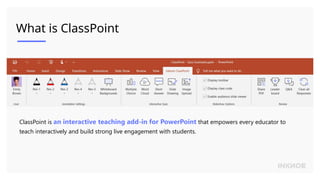
What is ClassPoint
ClassPoint is an interactive teaching add-in for PowerPoint that empowers every educator to
teach interactively and build strong live engagement with students.
The Workflow
Design a slide with the question you want to ask
1
Add a question button and set its properties
2
During slide show, click the question button and
students will be able to submit their answers
3
View student responses live or review them anytime
after class, right inside PowerPoint
4
Multiple
Choice
Word
Cloud
Short
Answer
Slide
Drawing
Image
Upload
Example: Multiple Choice
Kelan Dumating ang PBB?
A. Feb. 2, 2022
B. Feb. 3, 2022
C. Feb. 4, 2022
D. Feb. 5, 2022
E. Feb. 6, 2022
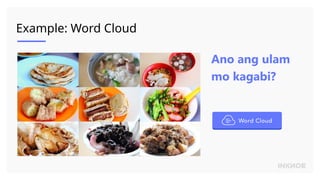
Example: Word Cloud
Ano ang ulam
mo kagabi?
Example: Short Answer
Anong balak mo sa
Valentine’s Day?
Example: Slide Drawing
Example: Image Upload
Show your last Selfie
Play Options Explained
Start question with slide
When you navigate to this slide, the question will automatically start
Minimize result window after question starts
After question starts, the submission window will automatically minimize itself so you can go back to the slide
Close submission after a countdown
Create some excitement for your students by closing submission automatically after a countdown
Still have questions?
Contact us and we will get back to you as soon as possible.
1
Watch our tutorial videos
Message us from in-app Helpdesk from ClassPoint ribbon
Email us at support@inknoe.com
2
3
ClassPoint - Quiz Examples using classpoint.pptx

  • 1.
    ClassPoint Turn slides intoquizzes and engage your students
  • 2.
    What is ClassPoint ClassPointis an interactive teaching add-in for PowerPoint that empowers every educator to teach interactively and build strong live engagement with students.
  • 3.
    The Workflow Design aslide with the question you want to ask 1 Add a question button and set its properties 2 During slide show, click the question button and students will be able to submit their answers 3 View student responses live or review them anytime after class, right inside PowerPoint 4 Multiple Choice Word Cloud Short Answer Slide Drawing Image Upload
  • 4.
    Example: Multiple Choice KelanDumating ang PBB? A. Feb. 2, 2022 B. Feb. 3, 2022 C. Feb. 4, 2022 D. Feb. 5, 2022 E. Feb. 6, 2022
  • 5.
    Example: Word Cloud Anoang ulam mo kagabi?
  • 6.
    Example: Short Answer Anongbalak mo sa Valentine’s Day?
  • 7.
  • 8.
  • 9.
    Play Options Explained Startquestion with slide When you navigate to this slide, the question will automatically start Minimize result window after question starts After question starts, the submission window will automatically minimize itself so you can go back to the slide Close submission after a countdown Create some excitement for your students by closing submission automatically after a countdown
  • 10.
    Still have questions? Contactus and we will get back to you as soon as possible. 1 Watch our tutorial videos Message us from in-app Helpdesk from ClassPoint ribbon Email us at support@inknoe.com 2 3

Editor's Notes

  • #2 What can CP do Why we develop CP
  • #10 In Slide Show mode, select the arrows to visit links.