Module 1:
Communications in a
Connected World
Dr. RONALD H. PIRAMIDE
CCAI, CCNP, CCNA, CCENT, CompTIA N+, ICDL (V4&5)
MCT, MCSE, MCSA, MCTS, MCTS-BDD, MCP, CEI, CSCU
© 2020 Cisco and/or its affiliates. All rights reserved. Cisco Confidential 2
Module Objectives
Module Title: Communications in a Connected World
Module Objective: Explain the concept of network communication.
Topic Title Topic Objective
Network Types Explain the concept of a network.
Data Transmission Describe network data.
Bandwidth and
Throughput
Explain the network transmission speed and capacity.
Clients and Servers Explain the roles of clients and servers in a network.
Network
Components
Explain the roles of network infrastructure devices.
© 2020 Cisco and/or its affiliates. All rights reserved. Cisco Confidential 3
1.1 Network Types
© 2020 Cisco and/or its affiliates. All rights reserved. Cisco Confidential 4
Network Types
Everything is Online
The internet has
become such a part of
everyday life that we
almost take it for
granted.
Normally, when people
use the term internet,
they are not referring to
the physical connections
in the real world. Rather,
they tend to think of it as
a formless collection of
connections. It is the
“place” people go to find
or share information.
© 2020 Cisco and/or its affiliates. All rights reserved. Cisco Confidential 5
Network Types
Who Owns “The Internet”?
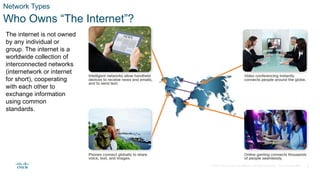
The internet is not owned
by any individual or
group. The internet is a
worldwide collection of
interconnected networks
(internetwork or internet
for short), cooperating
with each other to
exchange information
using common
standards.
© 2020 Cisco and/or its affiliates. All rights reserved. Cisco Confidential 6
Network Types
Local Networks
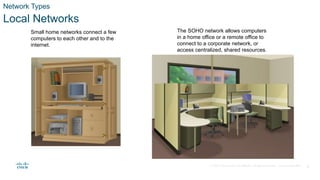
Small home networks connect a few
computers to each other and to the
internet.
The SOHO network allows computers
in a home office or a remote office to
connect to a corporate network, or
access centralized, shared resources.
© 2020 Cisco and/or its affiliates. All rights reserved. Cisco Confidential 7
Network Types
Local Networks (Cont.)
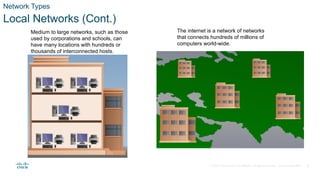
Medium to large networks, such as those
used by corporations and schools, can
have many locations with hundreds or
thousands of interconnected hosts.
The internet is a network of networks
that connects hundreds of millions of
computers world-wide.
© 2020 Cisco and/or its affiliates. All rights reserved. Cisco Confidential 8
Network Types
Video - Different Network Connections
© 2020 Cisco and/or its affiliates. All rights reserved. Cisco Confidential 9
Network Types
Mobile Devices
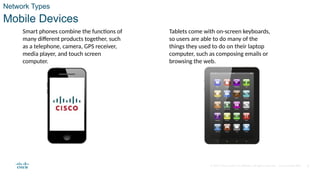
Smart phones combine the functions of
many different products together, such
as a telephone, camera, GPS receiver,
media player, and touch screen
computer.
Tablets come with on-screen keyboards,
so users are able to do many of the
things they used to do on their laptop
computer, such as composing emails or
browsing the web.
© 2020 Cisco and/or its affiliates. All rights reserved. Cisco Confidential 10
Network Types
Mobile Devices (Cont.)
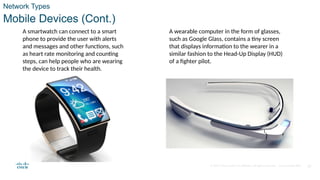
A smartwatch can connect to a smart
phone to provide the user with alerts
and messages and other functions, such
as heart rate monitoring and counting
steps, can help people who are wearing
the device to track their health.
A wearable computer in the form of glasses,
such as Google Glass, contains a tiny screen
that displays information to the wearer in a
similar fashion to the Head-Up Display (HUD)
of a fighter pilot.
© 2020 Cisco and/or its affiliates. All rights reserved. Cisco Confidential 11
Network Types
Connected Home Devices
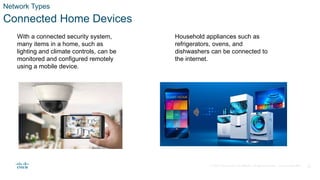
With a connected security system,
many items in a home, such as
lighting and climate controls, can be
monitored and configured remotely
using a mobile device.
Household appliances such as
refrigerators, ovens, and
dishwashers can be connected to
the internet.
© 2020 Cisco and/or its affiliates. All rights reserved. Cisco Confidential
Network Types
Connected Home Devices (Cont.)
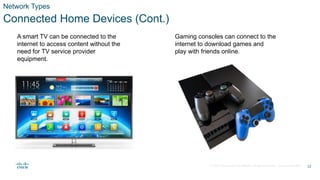
A smart TV can be connected to the
internet to access content without the
need for TV service provider
equipment.
Gaming consoles can connect to the
internet to download games and
play with friends online.
12
© 2020 Cisco and/or its affiliates. All rights reserved. Cisco Confidential 13
Network Types
Other Connected Devices
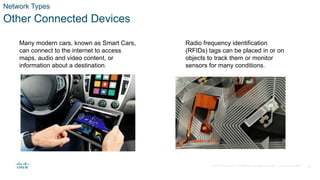
Many modern cars, known as Smart Cars,
can connect to the internet to access
maps, audio and video content, or
information about a destination.
Radio frequency identification
(RFIDs) tags can be placed in or on
objects to track them or monitor
sensors for many conditions.
© 2020 Cisco and/or its affiliates. All rights reserved. Cisco Confidential 14
Network Types
Other Connected Devices (Cont.)
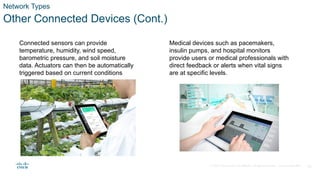
Connected sensors can provide
temperature, humidity, wind speed,
barometric pressure, and soil moisture
data. Actuators can then be automatically
triggered based on current conditions
Medical devices such as pacemakers,
insulin pumps, and hospital monitors
provide users or medical professionals with
direct feedback or alerts when vital signs
are at specific levels.
© 2020 Cisco and/or its affiliates. All rights reserved. Cisco Confidential 15
1.2 Data Transmission
© 2020 Cisco and/or its affiliates. All rights reserved. Cisco Confidential 16
Data Transmission
Video - Types of Personal Data
© 2020 Cisco and/or its affiliates. All rights reserved. Cisco Confidential 17
Data Transmission
Types of Personal Data
The following categories are used to classify types of personal data:
• Volunteered data - This is created and explicitly shared by individuals, such as social network profiles.
This type of data might include video files, pictures, text or audio files.
• Observed data - This is captured by recording the actions of individuals, such as location data when
using cell phones.
• Inferred data - This is data such as a credit score, which is based on analysis of volunteered or observed
data.
© 2020 Cisco and/or its affiliates. All rights reserved. Cisco Confidential 18
Data Transmission
The Bit
Did you know that computers and networks only work with binary digits, zeros and ones? Each bit
can only have one of two possible values, 0 or 1. The term bit is an abbreviation of “binary digit” and
represents the smallest piece of data. Humans interpret words and pictures, computers interpret only
patterns of bits. Each group of eight bits, such as the representations of letters and numbers, is
known as a byte.
Using the American Standard Code for Information Interchange (ASCII), each character is
represented by eight bits. For example:
Capital letter: A = 01000001
Number: 9 = 00111001
Special character: # = 00100011
This page includes an ASCII bit translation engine where you can enter any character and see the 8
bit translation.
© 2020 Cisco and/or its affiliates. All rights reserved. Cisco Confidential 19
Data Transmission
Common Methods of Data Transmission
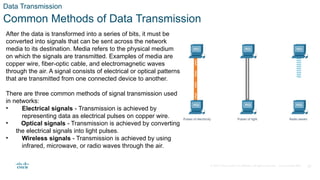
After the data is transformed into a series of bits, it must be
converted into signals that can be sent across the network
media to its destination. Media refers to the physical medium
on which the signals are transmitted. Examples of media are
copper wire, fiber-optic cable, and electromagnetic waves
through the air. A signal consists of electrical or optical patterns
that are transmitted from one connected device to another.
There are three common methods of signal transmission used
in networks:
• Electrical signals - Transmission is achieved by
representing data as electrical pulses on copper wire.
• Optical signals - Transmission is achieved by converting
the electrical signals into light pulses.
• Wireless signals - Transmission is achieved by using
infrared, microwave, or radio waves through the air.
© 2020 Cisco and/or its affiliates. All rights reserved. Cisco Confidential 20
1.3 Bandwidth and Throughput
© 2020 Cisco and/or its affiliates. All rights reserved. Cisco Confidential 21
Bandwidth and Throughput
Bandwidth
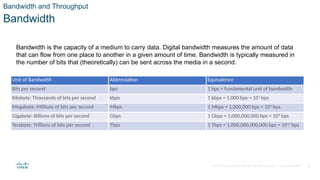
Bandwidth is the capacity of a medium to carry data. Digital bandwidth measures the amount of data
that can flow from one place to another in a given amount of time. Bandwidth is typically measured in
the number of bits that (theoretically) can be sent across the media in a second.
Unit of Bandwidth Abbreviation Equivalence
Bits per second bps 1 bps = fundamental unit of bandwidth
Kilobyte: Thousands of bits per second kbps 1 kbps = 1,000 bps = 103
bps
Megabyte: Millions of bits per second Mbps 1 Mbps = 1,000,000 bps = 106
bps
Gigabyte: Billions of bits per second Gbps 1 Gbps = 1,000,000,000 bps = 109
bps
Terabyte: Trillions of bits per second Tbps 1 Tbps = 1,000,000,000,000 bps = 1012
bps
© 2020 Cisco and/or its affiliates. All rights reserved. Cisco Confidential 22
Bandwidth and Throughput
Video - Throughput
© 2020 Cisco and/or its affiliates. All rights reserved. Cisco Confidential 23
Bandwidth and Throughput
Throughput
Like bandwidth, throughput is the measure of the transfer of bits across the media over a given
period of time. However, due to a number of factors, throughput does not usually match the
specified bandwidth. Many factors influence throughput including:
• The amount of data being sent and received over the connection
• The types of data being transmitted
• The latency created by the number of network devices encountered between source and
destination
Latency refers to the amount of time, including delays, for data to travel from one given point to
another.
© 2020 Cisco and/or its affiliates. All rights reserved. Cisco Confidential 24
1.4 Clients and Servers
© 2020 Cisco and/or its affiliates. All rights reserved. Cisco Confidential 25
Clients and Servers
Clients and Server Roles
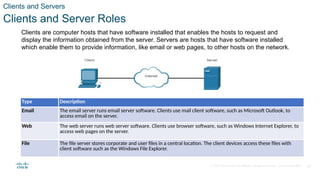
Clients are computer hosts that have software installed that enables the hosts to request and
display the information obtained from the server. Servers are hosts that have software installed
which enable them to provide information, like email or web pages, to other hosts on the network.
Type Description
Email The email server runs email server software. Clients use mail client software, such as Microsoft Outlook, to
access email on the server.
Web The web server runs web server software. Clients use browser software, such as Windows Internet Explorer, to
access web pages on the server.
File The file server stores corporate and user files in a central location. The client devices access these files with
client software such as the Windows File Explorer.
© 2020 Cisco and/or its affiliates. All rights reserved. Cisco Confidential 26
Clients and Servers
Peer-to-Peer Networks
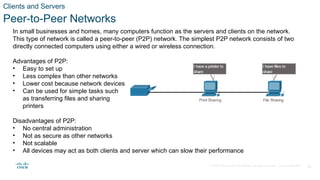
In small businesses and homes, many computers function as the servers and clients on the network.
This type of network is called a peer-to-peer (P2P) network. The simplest P2P network consists of two
directly connected computers using either a wired or wireless connection.
Advantages of P2P:
• Easy to set up
• Less complex than other networks
• Lower cost because network devices and dedicated servers may not be required
• Can be used for simple tasks such
as transferring files and sharing
printers
Disadvantages of P2P:
• No central administration
• Not as secure as other networks
• Not scalable
• All devices may act as both clients and server which can slow their performance
© 2020 Cisco and/or its affiliates. All rights reserved. Cisco Confidential 27
Clients and Servers
Peer-to-Peer Applications
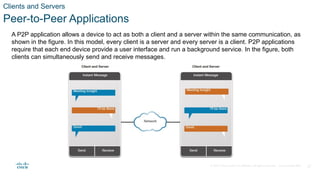
A P2P application allows a device to act as both a client and a server within the same communication, as
shown in the figure. In this model, every client is a server and every server is a client. P2P applications
require that each end device provide a user interface and run a background service. In the figure, both
clients can simultaneously send and receive messages.
© 2020 Cisco and/or its affiliates. All rights reserved. Cisco Confidential 28
Clients and Servers
Multiple Roles in the Network
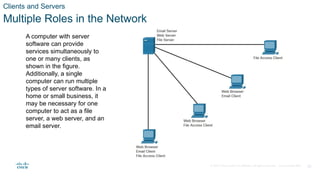
A computer with server
software can provide
services simultaneously to
one or many clients, as
shown in the figure.
Additionally, a single
computer can run multiple
types of server software. In a
home or small business, it
may be necessary for one
computer to act as a file
server, a web server, and an
email server.
© 2020 Cisco and/or its affiliates. All rights reserved. Cisco Confidential 29
1.5 Network Components
© 2020 Cisco and/or its affiliates. All rights reserved. Cisco Confidential 30
Network Components
Video - Network Infrastructure Symbols
© 2020 Cisco and/or its affiliates. All rights reserved. Cisco Confidential 31
Network Components
Network Infrastructure
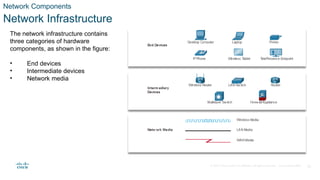
The network infrastructure contains
three categories of hardware
components, as shown in the figure:
• End devices
• Intermediate devices
• Network media
© 2020 Cisco and/or its affiliates. All rights reserved. Cisco Confidential 32
Network Components
End Devices
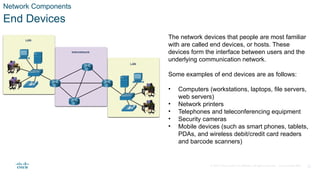
The network devices that people are most familiar
with are called end devices, or hosts. These
devices form the interface between users and the
underlying communication network.
Some examples of end devices are as follows:
• Computers (workstations, laptops, file servers,
web servers)
• Network printers
• Telephones and teleconferencing equipment
• Security cameras
• Mobile devices (such as smart phones, tablets,
PDAs, and wireless debit/credit card readers
and barcode scanners)
© 2020 Cisco and/or its affiliates. All rights reserved. Cisco Confidential 33
Network Components
Lab - My Local Network
In this lab, you will complete the following objectives:
• Record all the different network-attached devices in your home or classroom.
• Investigate how each device connects to the network to send and receive information.
• Create a diagram showing the topology of your network.
• Label each device with its function within the network.
© 2020 Cisco and/or its affiliates. All rights reserved. Cisco Confidential 34
1.6 Communications in a
Connected World Summary
© 2020 Cisco and/or its affiliates. All rights reserved. Cisco Confidential 35
Communications in a Connected World Summary
What Did I Learn in this Module?
• The internet is a worldwide collection of interconnected networks cooperating with each other to
exchange information using common standards.
• Some types of networks that you may use are small home, SOHO, medium to large networks such
as those created by corporations and schools, and the internet.
• Mobile devices include smart phones, tablets, smart watches, and smart glasses.
• Connected home devices include security systems, smart appliances and TVs, and gaming
consoles.
• Other connected devices include smart cars, RFIDs, sensors/actuators, and medical devices.
• Types of personal data are categorized as volunteered, observed, and inferred.
• Each bit can only have one of two possible values, 0 or 1. Each group of eight bits is known as a
byte.
• There are three common methods of signal transmission used in networks: electrical signals, optical
signals, and wireless signals.
• Bandwidth is typically measured in the number of bits that (theoretically) can be sent across the
media in a second.
• Many factors influence throughput including: the amount of data being sent and received over the
connection, the types of data being transmitted, and the latency created by the number of network
devices encountered between source and destination. You can measure your throughput by going to
speedtest.net.
© 2020 Cisco and/or its affiliates. All rights reserved. Cisco Confidential 36
Communications in a Connected World Summary
What Did I Learn in this Module? (Cont.)
• Clients are computer hosts that have software installed that enables the hosts to request and display
the information obtained from the server. Servers are hosts that have software installed which
enable them to provide information, like email or web pages, to other hosts on the network.
• The simplest P2P network consists of two directly connected computers using either a wired or
wireless connection.
• A P2P application allows a device to act as both a client and a server within the same
communication.
• A computer with server software can provide services simultaneously to one or many clients.
Additionally, a single computer can run multiple types of server software.
• The network infrastructure contains three categories of hardware components: end devices,
intermediate devices, and network media.
• The network devices that people are most familiar with are called end devices, or hosts. These
devices form the interface between users and the underlying communication network.
Cisco Networking Essentials 2.0 Module1.ppsx

Cisco Networking Essentials 2.0 Module1.ppsx

  • 1.
    Module 1: Communications ina Connected World Dr. RONALD H. PIRAMIDE CCAI, CCNP, CCNA, CCENT, CompTIA N+, ICDL (V4&5) MCT, MCSE, MCSA, MCTS, MCTS-BDD, MCP, CEI, CSCU
  • 2.
    © 2020 Ciscoand/or its affiliates. All rights reserved. Cisco Confidential 2 Module Objectives Module Title: Communications in a Connected World Module Objective: Explain the concept of network communication. Topic Title Topic Objective Network Types Explain the concept of a network. Data Transmission Describe network data. Bandwidth and Throughput Explain the network transmission speed and capacity. Clients and Servers Explain the roles of clients and servers in a network. Network Components Explain the roles of network infrastructure devices.
  • 3.
    © 2020 Ciscoand/or its affiliates. All rights reserved. Cisco Confidential 3 1.1 Network Types
  • 4.
    © 2020 Ciscoand/or its affiliates. All rights reserved. Cisco Confidential 4 Network Types Everything is Online The internet has become such a part of everyday life that we almost take it for granted. Normally, when people use the term internet, they are not referring to the physical connections in the real world. Rather, they tend to think of it as a formless collection of connections. It is the “place” people go to find or share information.
  • 5.
    © 2020 Ciscoand/or its affiliates. All rights reserved. Cisco Confidential 5 Network Types Who Owns “The Internet”? The internet is not owned by any individual or group. The internet is a worldwide collection of interconnected networks (internetwork or internet for short), cooperating with each other to exchange information using common standards.
  • 6.
    © 2020 Ciscoand/or its affiliates. All rights reserved. Cisco Confidential 6 Network Types Local Networks Small home networks connect a few computers to each other and to the internet. The SOHO network allows computers in a home office or a remote office to connect to a corporate network, or access centralized, shared resources.
  • 7.
    © 2020 Ciscoand/or its affiliates. All rights reserved. Cisco Confidential 7 Network Types Local Networks (Cont.) Medium to large networks, such as those used by corporations and schools, can have many locations with hundreds or thousands of interconnected hosts. The internet is a network of networks that connects hundreds of millions of computers world-wide.
  • 8.
    © 2020 Ciscoand/or its affiliates. All rights reserved. Cisco Confidential 8 Network Types Video - Different Network Connections
  • 9.
    © 2020 Ciscoand/or its affiliates. All rights reserved. Cisco Confidential 9 Network Types Mobile Devices Smart phones combine the functions of many different products together, such as a telephone, camera, GPS receiver, media player, and touch screen computer. Tablets come with on-screen keyboards, so users are able to do many of the things they used to do on their laptop computer, such as composing emails or browsing the web.
  • 10.
    © 2020 Ciscoand/or its affiliates. All rights reserved. Cisco Confidential 10 Network Types Mobile Devices (Cont.) A smartwatch can connect to a smart phone to provide the user with alerts and messages and other functions, such as heart rate monitoring and counting steps, can help people who are wearing the device to track their health. A wearable computer in the form of glasses, such as Google Glass, contains a tiny screen that displays information to the wearer in a similar fashion to the Head-Up Display (HUD) of a fighter pilot.
  • 11.
    © 2020 Ciscoand/or its affiliates. All rights reserved. Cisco Confidential 11 Network Types Connected Home Devices With a connected security system, many items in a home, such as lighting and climate controls, can be monitored and configured remotely using a mobile device. Household appliances such as refrigerators, ovens, and dishwashers can be connected to the internet.
  • 12.
    © 2020 Ciscoand/or its affiliates. All rights reserved. Cisco Confidential Network Types Connected Home Devices (Cont.) A smart TV can be connected to the internet to access content without the need for TV service provider equipment. Gaming consoles can connect to the internet to download games and play with friends online. 12
  • 13.
    © 2020 Ciscoand/or its affiliates. All rights reserved. Cisco Confidential 13 Network Types Other Connected Devices Many modern cars, known as Smart Cars, can connect to the internet to access maps, audio and video content, or information about a destination. Radio frequency identification (RFIDs) tags can be placed in or on objects to track them or monitor sensors for many conditions.
  • 14.
    © 2020 Ciscoand/or its affiliates. All rights reserved. Cisco Confidential 14 Network Types Other Connected Devices (Cont.) Connected sensors can provide temperature, humidity, wind speed, barometric pressure, and soil moisture data. Actuators can then be automatically triggered based on current conditions Medical devices such as pacemakers, insulin pumps, and hospital monitors provide users or medical professionals with direct feedback or alerts when vital signs are at specific levels.
  • 15.
    © 2020 Ciscoand/or its affiliates. All rights reserved. Cisco Confidential 15 1.2 Data Transmission
  • 16.
    © 2020 Ciscoand/or its affiliates. All rights reserved. Cisco Confidential 16 Data Transmission Video - Types of Personal Data
  • 17.
    © 2020 Ciscoand/or its affiliates. All rights reserved. Cisco Confidential 17 Data Transmission Types of Personal Data The following categories are used to classify types of personal data: • Volunteered data - This is created and explicitly shared by individuals, such as social network profiles. This type of data might include video files, pictures, text or audio files. • Observed data - This is captured by recording the actions of individuals, such as location data when using cell phones. • Inferred data - This is data such as a credit score, which is based on analysis of volunteered or observed data.
  • 18.
    © 2020 Ciscoand/or its affiliates. All rights reserved. Cisco Confidential 18 Data Transmission The Bit Did you know that computers and networks only work with binary digits, zeros and ones? Each bit can only have one of two possible values, 0 or 1. The term bit is an abbreviation of “binary digit” and represents the smallest piece of data. Humans interpret words and pictures, computers interpret only patterns of bits. Each group of eight bits, such as the representations of letters and numbers, is known as a byte. Using the American Standard Code for Information Interchange (ASCII), each character is represented by eight bits. For example: Capital letter: A = 01000001 Number: 9 = 00111001 Special character: # = 00100011 This page includes an ASCII bit translation engine where you can enter any character and see the 8 bit translation.
  • 19.
    © 2020 Ciscoand/or its affiliates. All rights reserved. Cisco Confidential 19 Data Transmission Common Methods of Data Transmission After the data is transformed into a series of bits, it must be converted into signals that can be sent across the network media to its destination. Media refers to the physical medium on which the signals are transmitted. Examples of media are copper wire, fiber-optic cable, and electromagnetic waves through the air. A signal consists of electrical or optical patterns that are transmitted from one connected device to another. There are three common methods of signal transmission used in networks: • Electrical signals - Transmission is achieved by representing data as electrical pulses on copper wire. • Optical signals - Transmission is achieved by converting the electrical signals into light pulses. • Wireless signals - Transmission is achieved by using infrared, microwave, or radio waves through the air.
  • 20.
    © 2020 Ciscoand/or its affiliates. All rights reserved. Cisco Confidential 20 1.3 Bandwidth and Throughput
  • 21.
    © 2020 Ciscoand/or its affiliates. All rights reserved. Cisco Confidential 21 Bandwidth and Throughput Bandwidth Bandwidth is the capacity of a medium to carry data. Digital bandwidth measures the amount of data that can flow from one place to another in a given amount of time. Bandwidth is typically measured in the number of bits that (theoretically) can be sent across the media in a second. Unit of Bandwidth Abbreviation Equivalence Bits per second bps 1 bps = fundamental unit of bandwidth Kilobyte: Thousands of bits per second kbps 1 kbps = 1,000 bps = 103 bps Megabyte: Millions of bits per second Mbps 1 Mbps = 1,000,000 bps = 106 bps Gigabyte: Billions of bits per second Gbps 1 Gbps = 1,000,000,000 bps = 109 bps Terabyte: Trillions of bits per second Tbps 1 Tbps = 1,000,000,000,000 bps = 1012 bps
  • 22.
    © 2020 Ciscoand/or its affiliates. All rights reserved. Cisco Confidential 22 Bandwidth and Throughput Video - Throughput
  • 23.
    © 2020 Ciscoand/or its affiliates. All rights reserved. Cisco Confidential 23 Bandwidth and Throughput Throughput Like bandwidth, throughput is the measure of the transfer of bits across the media over a given period of time. However, due to a number of factors, throughput does not usually match the specified bandwidth. Many factors influence throughput including: • The amount of data being sent and received over the connection • The types of data being transmitted • The latency created by the number of network devices encountered between source and destination Latency refers to the amount of time, including delays, for data to travel from one given point to another.
  • 24.
    © 2020 Ciscoand/or its affiliates. All rights reserved. Cisco Confidential 24 1.4 Clients and Servers
  • 25.
    © 2020 Ciscoand/or its affiliates. All rights reserved. Cisco Confidential 25 Clients and Servers Clients and Server Roles Clients are computer hosts that have software installed that enables the hosts to request and display the information obtained from the server. Servers are hosts that have software installed which enable them to provide information, like email or web pages, to other hosts on the network. Type Description Email The email server runs email server software. Clients use mail client software, such as Microsoft Outlook, to access email on the server. Web The web server runs web server software. Clients use browser software, such as Windows Internet Explorer, to access web pages on the server. File The file server stores corporate and user files in a central location. The client devices access these files with client software such as the Windows File Explorer.
  • 26.
    © 2020 Ciscoand/or its affiliates. All rights reserved. Cisco Confidential 26 Clients and Servers Peer-to-Peer Networks In small businesses and homes, many computers function as the servers and clients on the network. This type of network is called a peer-to-peer (P2P) network. The simplest P2P network consists of two directly connected computers using either a wired or wireless connection. Advantages of P2P: • Easy to set up • Less complex than other networks • Lower cost because network devices and dedicated servers may not be required • Can be used for simple tasks such as transferring files and sharing printers Disadvantages of P2P: • No central administration • Not as secure as other networks • Not scalable • All devices may act as both clients and server which can slow their performance
  • 27.
    © 2020 Ciscoand/or its affiliates. All rights reserved. Cisco Confidential 27 Clients and Servers Peer-to-Peer Applications A P2P application allows a device to act as both a client and a server within the same communication, as shown in the figure. In this model, every client is a server and every server is a client. P2P applications require that each end device provide a user interface and run a background service. In the figure, both clients can simultaneously send and receive messages.
  • 28.
    © 2020 Ciscoand/or its affiliates. All rights reserved. Cisco Confidential 28 Clients and Servers Multiple Roles in the Network A computer with server software can provide services simultaneously to one or many clients, as shown in the figure. Additionally, a single computer can run multiple types of server software. In a home or small business, it may be necessary for one computer to act as a file server, a web server, and an email server.
  • 29.
    © 2020 Ciscoand/or its affiliates. All rights reserved. Cisco Confidential 29 1.5 Network Components
  • 30.
    © 2020 Ciscoand/or its affiliates. All rights reserved. Cisco Confidential 30 Network Components Video - Network Infrastructure Symbols
  • 31.
    © 2020 Ciscoand/or its affiliates. All rights reserved. Cisco Confidential 31 Network Components Network Infrastructure The network infrastructure contains three categories of hardware components, as shown in the figure: • End devices • Intermediate devices • Network media
  • 32.
    © 2020 Ciscoand/or its affiliates. All rights reserved. Cisco Confidential 32 Network Components End Devices The network devices that people are most familiar with are called end devices, or hosts. These devices form the interface between users and the underlying communication network. Some examples of end devices are as follows: • Computers (workstations, laptops, file servers, web servers) • Network printers • Telephones and teleconferencing equipment • Security cameras • Mobile devices (such as smart phones, tablets, PDAs, and wireless debit/credit card readers and barcode scanners)
  • 33.
    © 2020 Ciscoand/or its affiliates. All rights reserved. Cisco Confidential 33 Network Components Lab - My Local Network In this lab, you will complete the following objectives: • Record all the different network-attached devices in your home or classroom. • Investigate how each device connects to the network to send and receive information. • Create a diagram showing the topology of your network. • Label each device with its function within the network.
  • 34.
    © 2020 Ciscoand/or its affiliates. All rights reserved. Cisco Confidential 34 1.6 Communications in a Connected World Summary
  • 35.
    © 2020 Ciscoand/or its affiliates. All rights reserved. Cisco Confidential 35 Communications in a Connected World Summary What Did I Learn in this Module? • The internet is a worldwide collection of interconnected networks cooperating with each other to exchange information using common standards. • Some types of networks that you may use are small home, SOHO, medium to large networks such as those created by corporations and schools, and the internet. • Mobile devices include smart phones, tablets, smart watches, and smart glasses. • Connected home devices include security systems, smart appliances and TVs, and gaming consoles. • Other connected devices include smart cars, RFIDs, sensors/actuators, and medical devices. • Types of personal data are categorized as volunteered, observed, and inferred. • Each bit can only have one of two possible values, 0 or 1. Each group of eight bits is known as a byte. • There are three common methods of signal transmission used in networks: electrical signals, optical signals, and wireless signals. • Bandwidth is typically measured in the number of bits that (theoretically) can be sent across the media in a second. • Many factors influence throughput including: the amount of data being sent and received over the connection, the types of data being transmitted, and the latency created by the number of network devices encountered between source and destination. You can measure your throughput by going to speedtest.net.
  • 36.
    © 2020 Ciscoand/or its affiliates. All rights reserved. Cisco Confidential 36 Communications in a Connected World Summary What Did I Learn in this Module? (Cont.) • Clients are computer hosts that have software installed that enables the hosts to request and display the information obtained from the server. Servers are hosts that have software installed which enable them to provide information, like email or web pages, to other hosts on the network. • The simplest P2P network consists of two directly connected computers using either a wired or wireless connection. • A P2P application allows a device to act as both a client and a server within the same communication. • A computer with server software can provide services simultaneously to one or many clients. Additionally, a single computer can run multiple types of server software. • The network infrastructure contains three categories of hardware components: end devices, intermediate devices, and network media. • The network devices that people are most familiar with are called end devices, or hosts. These devices form the interface between users and the underlying communication network.
Editor's Notes

  • #3 1 – Communications in a Connected World 1.1 – Network Types
  • #4 1 – Communications in a Connected World 1.1 – Network Types 1.1.1 – Everything is Online
  • #5 1 – Communications in a Connected World 1.1 – Network Types 1.1.2 – Who Owns “The Internet”?
  • #6 1 – Communications in a Connected World 1.1 – Network Types 1.1.3 – Local Networks
  • #7 1 – Communications in a Connected World 1.1 – Network Types 1.1.3 – Local Networks (Cont.)
  • #8 1 – Communications in a Connected World 1.1 – Network Types 1.1.4 – Video – Different Network Connections
  • #9 1 – Communications in a Connected World 1.1 – Network Types 1.1.5 – Mobile Devices
  • #10 1 – Communications in a Connected World 1.1 – Network Types 1.1.5 – Mobile Devices (Cont.)
  • #11 1 – Communications in a Connected World 1.1 – Network Types 1.1.6 – Connected Home Devices
  • #12 1 – Communications in a Connected World 1.1 – Network Types 1.1.6 – Connected Home Devices (Cont.)
  • #13 1 – Communications in a Connected World 1.1 – Network Types 1.1.7 – Other Connected Devices
  • #14 1 – Communications in a Connected World 1.1 – Network Types 1.1.7 – Other Connected Devices (Cont.) 1.1.8 – Check Your Understanding – Network Types
  • #15 1 – Communications in a Connected World 1.2 – Data Transmission
  • #16 1 – Communications in a Connected World 1.2 – Data Transmission 1.2.1 – Video – Types of Personal Data
  • #17 1 – Communications in a Connected World 1.2 – Data Transmission 1.2.2 – Types of Personal Data
  • #18 1 – Communications in a Connected World 1.2 – Data Transmission 1.2.3 – The Bit
  • #19 1 – Communications in a Connected World 1.2 – Data Transmission 1.2.4 – Common Methods of Data Transmission 1.2.5 – Check Your Understanding – Data Transmission
  • #20 1 – Communications in a Connected World 1.3 – Bandwidth and Throughput
  • #21 1 – Communications in a Connected World 1.3 – Bandwidth and Throughput 1.3.1 - Bandwidth
  • #22 1 – Communications in a Connected World 1.3 – Bandwidth and Throughput 1.3.2 – Video - Throughput
  • #23 1 – Communications in a Connected World 1.3 – Bandwidth and Throughput 1.3.3 – Throughput 1.3.4 – Check Your Understanding – Bandwidth and Throughput
  • #24 1 – Communications in a Connected World 1.4 – Clients and Servers
  • #25 1 – Communications in a Connected World 1.4 – Clients and Servers 1.4.1 – Clients and Server Roles
  • #26 1 – Communications in a Connected World 1.4 – Clients and Servers 1.4.2 – Peer-to-Peer Networks
  • #27 1 – Communications in a Connected World 1.4 – Clients and Servers 1.4.3 – Peer-to-Peer Applications
  • #28 1 – Communications in a Connected World 1.4 – Clients and Servers 1.4.4 – Multiple Roles in the Network 1.4.5 – Check Your Understanding – Clients and Servers
  • #29 1 – Communications in a Connected World 1.5 – Network Components
  • #30 1 – Communications in a Connected World 1.5 – Network Components 1.5.1 – Video – Network Infrastructure Symbols
  • #31 1 – Communications in a Connected World 1.5 – Network Components 1.5.2 – Network Infrastructure
  • #32 1 – Communications in a Connected World 1.5 – Network Components 1.5.3 – End Devices
  • #33 1 – Communications in a Connected World 1.5 – Network Components 1.5.4 – Lab – My Local Network 1.5.5 – Check Your understanding – Identify End and Intermediary Devices
  • #34 1 – Communications in a Connected World 1.6 – Communications in a Connected World Summary
  • #35 1 – Communications in a Connected World 1.6 – Communications in a Connected World Summary 1.6.1 – What Did I Learn in this Module?
  • #36 1 – Communications in a Connected World 1.6 – Communications in a Connected World Summary 1.6.1 – What Did I Learn in this Module? (Cont.) 16.2 – Module Quiz – Communications in a Connected World Quiz