Chrome OS
Arkoprobho Pal
Enroll:510815038
5th
semester ,IT
IIEST Shibpur
Introduction
● What is OS?
In short,a program designed to run other programs.
Main roles:
● IO Management
● Processor Management
● File Management
● Memory Management
Introduction
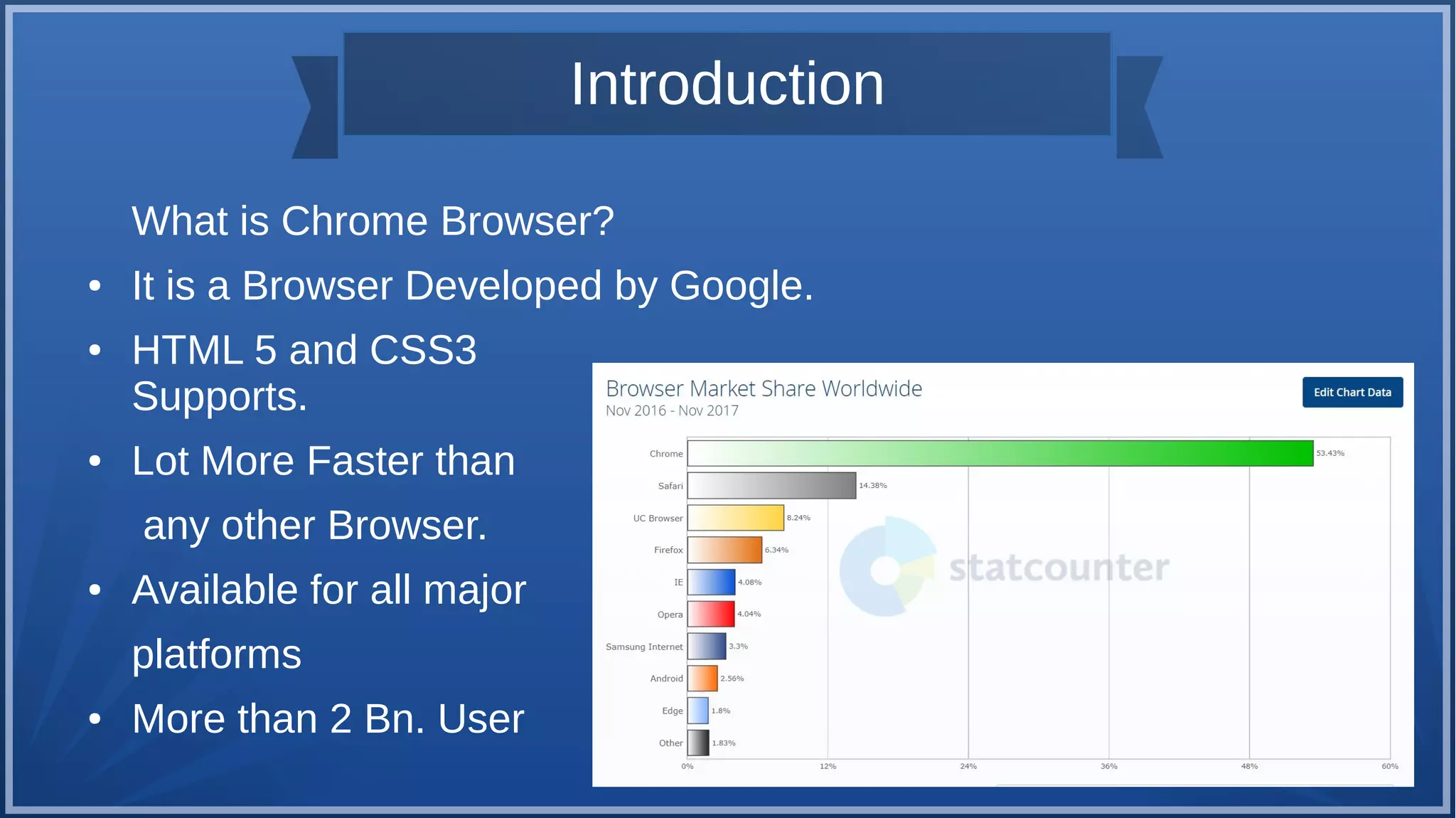
What is Chrome Browser?
● It is a Browser Developed by Google.
● HTML 5 and CSS3
Supports.
● Lot More Faster than
any other Browser.
● Available for all major
platforms
● More than 2 Bn. User
Introduction
Android :
● Mobile operating system
● Built on Open Linux Kernel
● Provides a better platform
for smartphones.
● Developers can create rich applications to provide more
relevant user experience.
What is a Chrome OS?
● Chrome OS is an operating system designed by Google that is
based on the Linux kernel and uses the Google Chrome web
browser as its principal user interface. As a result, Chrome OS
primarily supports web applications.
● Google announced the project in July 2009, conceiving it as an
operating system in which both applications and user data
reside in the cloud: hence Chrome OS primarily runs web
applications.
Google Chrome OS: An
Internet OS
● Extension of Chrome Browser
And Android
● Targeted for use on Netbooks
● First OS dedicated to internet
● Created Specially for Computers of
new age.
Tim O’Reilly defines:
‘simply use our
facilities, and
the complexity will
go away’
thing is Internet OS.
Specification
● Company/developer Google Inc.
● Programmed in C,C++
● OS family Linux
● Kernel type Monolithic:Linux kernel
● Default UI On the Google Chrome browser
● Working state Preinstalled on specific hardware
(Chromebooks,Chromeboxes)
● Update Method Rolling release(frequent Updates)
Features
● Speed
● Simplicity
● Security
● “Hardened OS”
– Auto Updation
– SandBox
● Use of Cloud
● Includes Binary Packages
On the Chrome notebook,
each web page and
application visited runs in a
restricted environment called
a “sandbox.” So if you visit
an infected page, it can’t
affect the other tabs or apps
on your computer, or
anything else on your
machine. The threat is
contained.
Speed
Speed is an unsaid feature of the Google Chrome OS. With Google
Chrome’s tremendous booting speed and more, users have a lot to say
about experiencing ‘waitlessness’
● Boots in 10 Seconds
● Resumes from sleep instantly
Speed
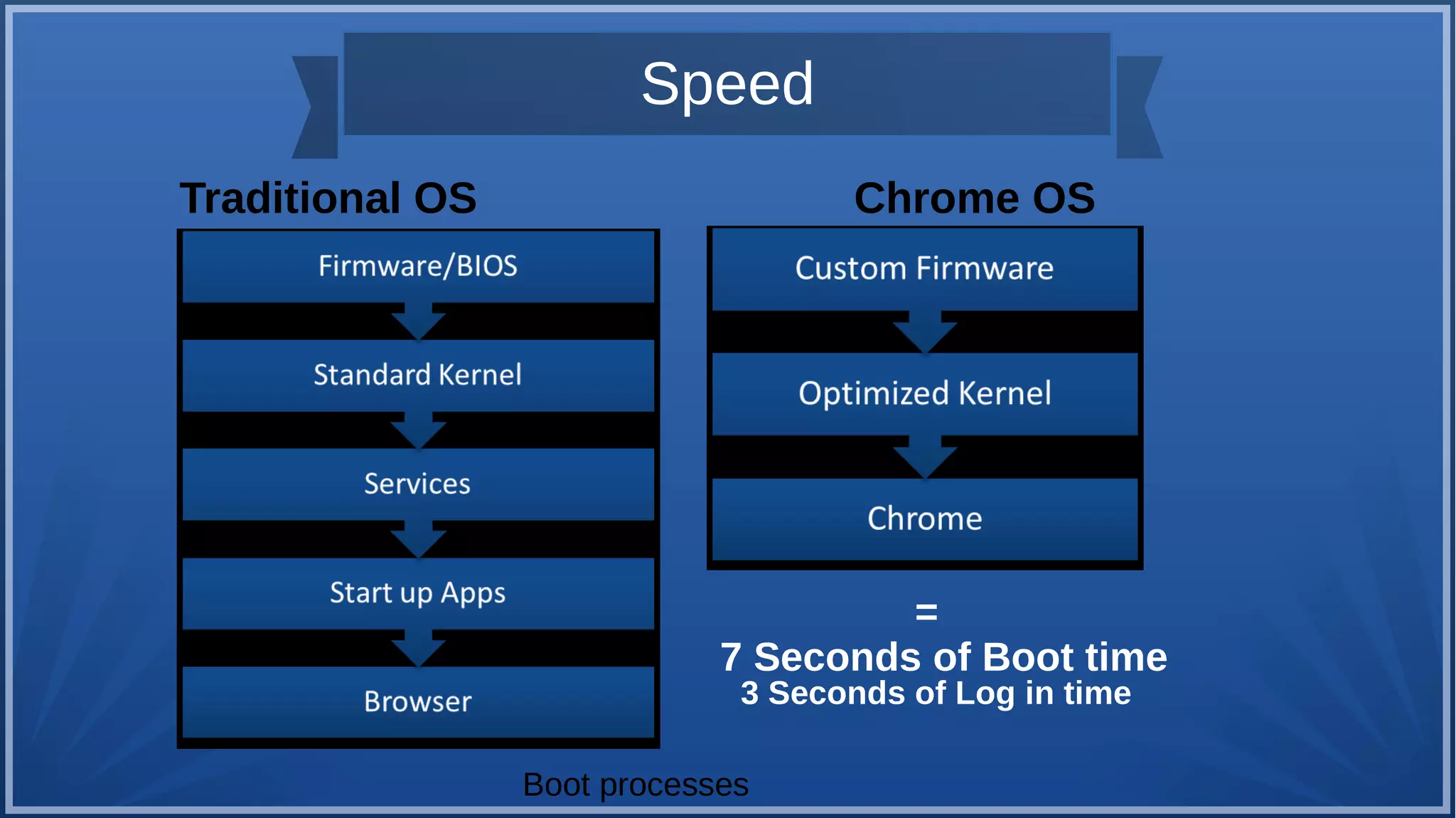
Traditional OS Chrome OS
=
7 Seconds of Boot time
3 Seconds of Log in time
Boot processes
Simplicity
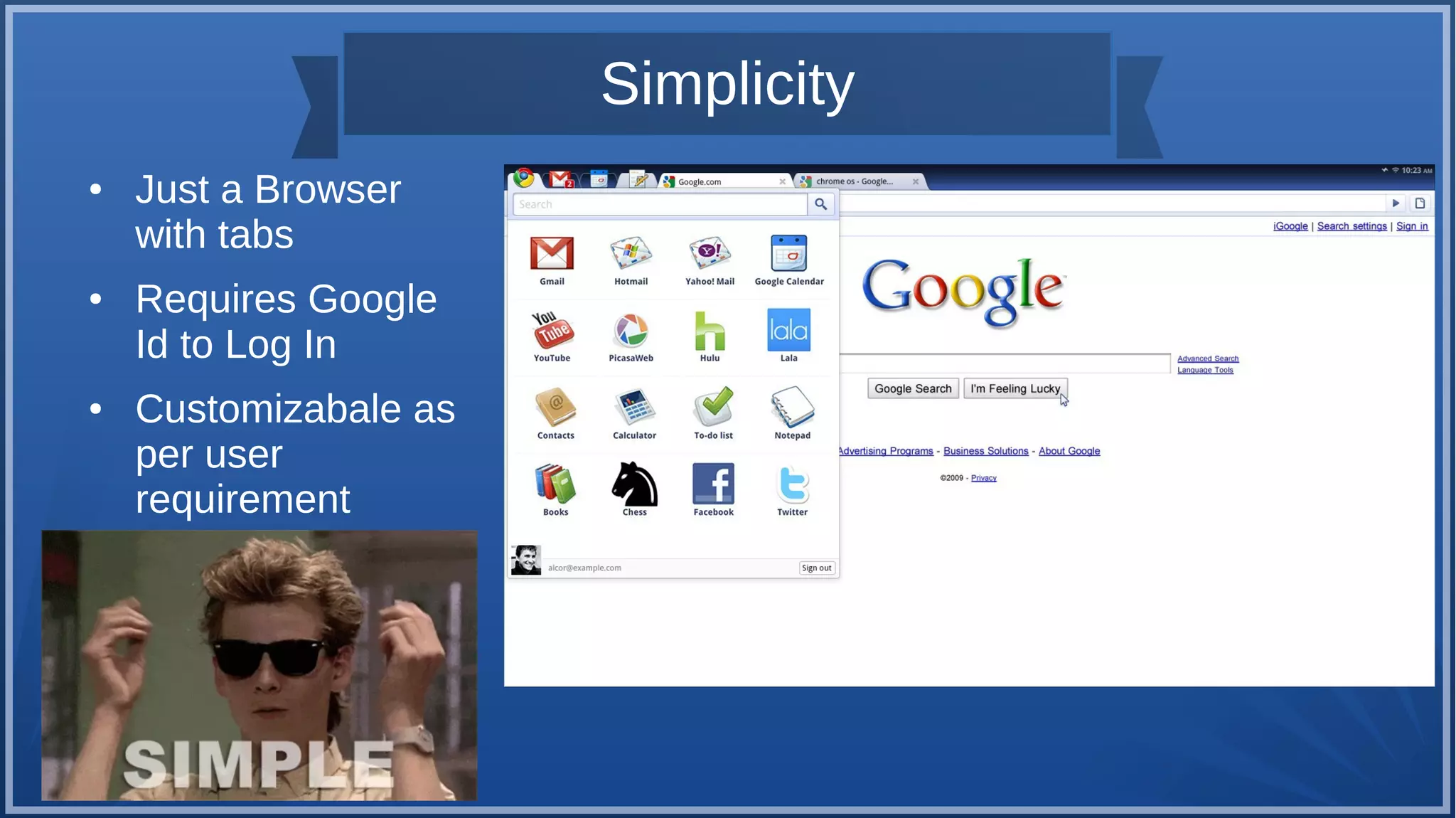
● Just a Browser
with tabs
● Requires Google
Id to Log In
● Customizabale as
per user
requirement
Security
● It uses the principle of “defense in depth” to provide multiple
layers of protection, so if any one layer is bypassed, others are
still in effect.
● Small list of Verified Programs: Signed and verified before each
use
● Run in Secure Sandbox mode
● File system is locked down:
– Read only Root File System in EEPROM
– Self automatic updates for entire OS
Security
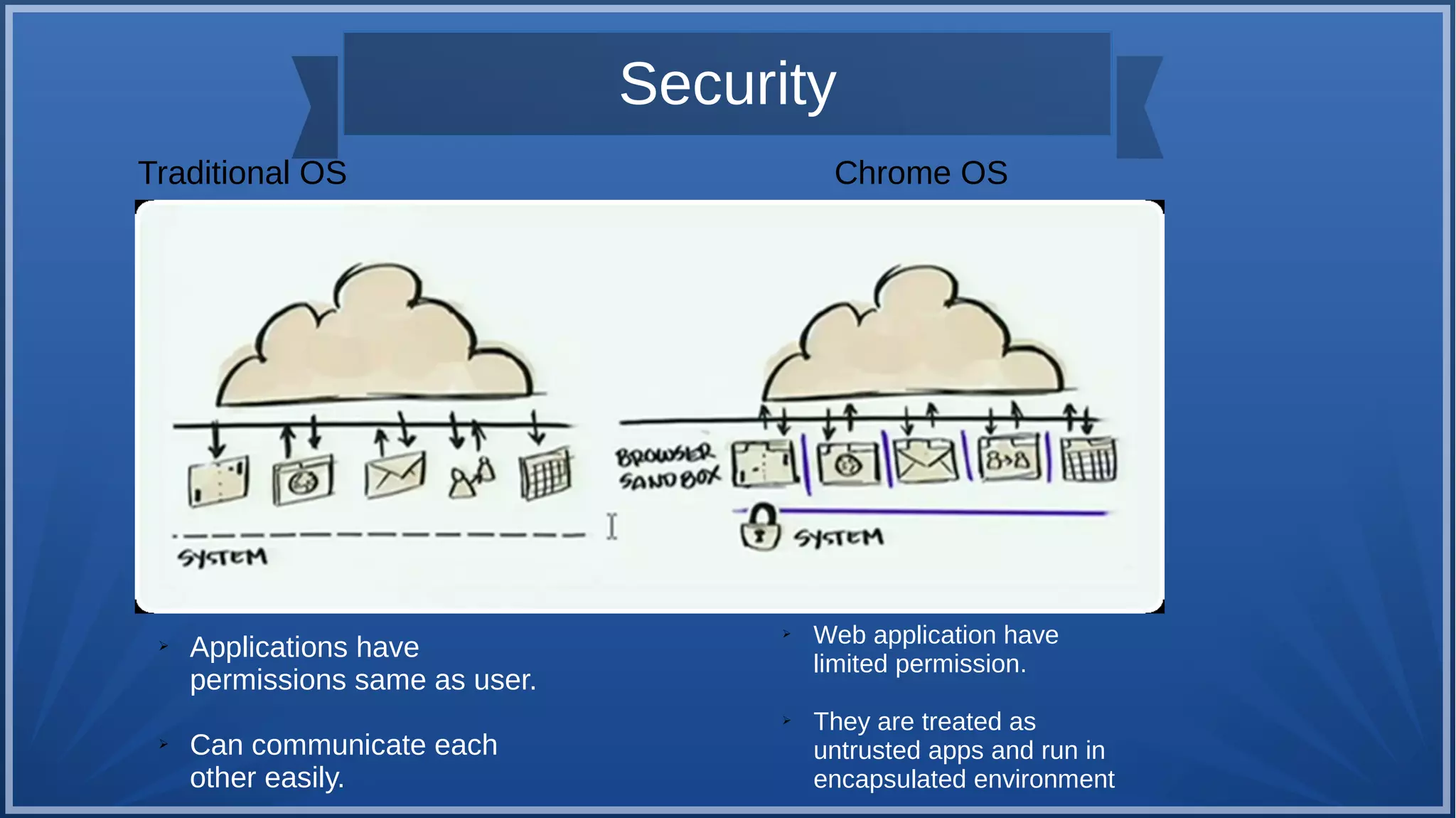
Traditional OS Chrome OS
➢ Applications have
permissions same as user.
➢ Can communicate each
other easily.
➢ Web application have
limited permission.
➢ They are treated as
untrusted apps and run in
encapsulated environment
Other Features
• Supports external Memory Devices Ex. SD Card
• Explores external devices in Chrome Browser itself
● Can be also work offline
● There is a chrome app store called web store,where we can do stuffs in the
app
• Embedded Video Player is provided as a feature of HTML 5
• Videos are played as separate tab
• Chatting feature is readily available
• V8 JavaScript engine is used to increase browser speed
More Features
• Chrome OS is hardware dependent currently supports x86
and ARM (Advanced RISC Machine)architecture
• Developer mode is included with a switch mode button
• Developer mode allows developer to install their own builds
of Chrome OS
Advantages
• Free, Open Source : Lots of opportunity for developers
• Low hardware cost
• New web based applications need to be
• User friendly
Limitations
• Hardware specific
• No physical data storage
• Does not support Microsoft Office
References
● https://en.wikipedia.org/wiki/Chrome_OS
• http://www.chromium.org/developers/design-documents/:
Chromium Developments site
• http://www.youtube.com/watch?v=5JyFbF7QFlY : Google Chrome OS
Open Source Project Announcement
• http://www.w3schools.com/browsers/browsers_stats.asp
• http://www.android.com/about/
From Google
End
ThankYou!

Chrome Operating System

  • 1.
  • 2.
    Introduction ● What isOS? In short,a program designed to run other programs. Main roles: ● IO Management ● Processor Management ● File Management ● Memory Management
  • 3.
    Introduction What is ChromeBrowser? ● It is a Browser Developed by Google. ● HTML 5 and CSS3 Supports. ● Lot More Faster than any other Browser. ● Available for all major platforms ● More than 2 Bn. User
  • 4.
    Introduction Android : ● Mobileoperating system ● Built on Open Linux Kernel ● Provides a better platform for smartphones. ● Developers can create rich applications to provide more relevant user experience.
  • 5.
    What is aChrome OS? ● Chrome OS is an operating system designed by Google that is based on the Linux kernel and uses the Google Chrome web browser as its principal user interface. As a result, Chrome OS primarily supports web applications. ● Google announced the project in July 2009, conceiving it as an operating system in which both applications and user data reside in the cloud: hence Chrome OS primarily runs web applications.
  • 6.
    Google Chrome OS:An Internet OS ● Extension of Chrome Browser And Android ● Targeted for use on Netbooks ● First OS dedicated to internet ● Created Specially for Computers of new age. Tim O’Reilly defines: ‘simply use our facilities, and the complexity will go away’ thing is Internet OS.
  • 7.
    Specification ● Company/developer GoogleInc. ● Programmed in C,C++ ● OS family Linux ● Kernel type Monolithic:Linux kernel ● Default UI On the Google Chrome browser ● Working state Preinstalled on specific hardware (Chromebooks,Chromeboxes) ● Update Method Rolling release(frequent Updates)
  • 8.
    Features ● Speed ● Simplicity ●Security ● “Hardened OS” – Auto Updation – SandBox ● Use of Cloud ● Includes Binary Packages On the Chrome notebook, each web page and application visited runs in a restricted environment called a “sandbox.” So if you visit an infected page, it can’t affect the other tabs or apps on your computer, or anything else on your machine. The threat is contained.
  • 9.
    Speed Speed is anunsaid feature of the Google Chrome OS. With Google Chrome’s tremendous booting speed and more, users have a lot to say about experiencing ‘waitlessness’ ● Boots in 10 Seconds ● Resumes from sleep instantly
  • 10.
    Speed Traditional OS ChromeOS = 7 Seconds of Boot time 3 Seconds of Log in time Boot processes
  • 11.
    Simplicity ● Just aBrowser with tabs ● Requires Google Id to Log In ● Customizabale as per user requirement
  • 12.
    Security ● It usesthe principle of “defense in depth” to provide multiple layers of protection, so if any one layer is bypassed, others are still in effect. ● Small list of Verified Programs: Signed and verified before each use ● Run in Secure Sandbox mode ● File system is locked down: – Read only Root File System in EEPROM – Self automatic updates for entire OS
  • 13.
    Security Traditional OS ChromeOS ➢ Applications have permissions same as user. ➢ Can communicate each other easily. ➢ Web application have limited permission. ➢ They are treated as untrusted apps and run in encapsulated environment
  • 14.
    Other Features • Supportsexternal Memory Devices Ex. SD Card • Explores external devices in Chrome Browser itself ● Can be also work offline ● There is a chrome app store called web store,where we can do stuffs in the app • Embedded Video Player is provided as a feature of HTML 5 • Videos are played as separate tab • Chatting feature is readily available • V8 JavaScript engine is used to increase browser speed
  • 15.
    More Features • ChromeOS is hardware dependent currently supports x86 and ARM (Advanced RISC Machine)architecture • Developer mode is included with a switch mode button • Developer mode allows developer to install their own builds of Chrome OS
  • 16.
    Advantages • Free, OpenSource : Lots of opportunity for developers • Low hardware cost • New web based applications need to be • User friendly
  • 17.
    Limitations • Hardware specific •No physical data storage • Does not support Microsoft Office
  • 18.
    References ● https://en.wikipedia.org/wiki/Chrome_OS • http://www.chromium.org/developers/design-documents/: ChromiumDevelopments site • http://www.youtube.com/watch?v=5JyFbF7QFlY : Google Chrome OS Open Source Project Announcement • http://www.w3schools.com/browsers/browsers_stats.asp • http://www.android.com/about/
  • 19.
  • 20.