Chapter 3 Computer
Hardware
James A. O'Brien, and George Marakas.
Management Information Systems with MISource
2007, 8th
ed. Boston, MA: McGraw-Hill, Inc.,
2007. ISBN: 13 9780073323091
Chapter 3 Computer Hardware 2
 Understand the history and evolution of computer
hardware
 Identify the major types and uses of microcomputer,
midrange, and mainframe computer systems
 Outline the major technologies and uses of
computer peripherals for input, output, and storage
 Identify and give examples of the components and
functions of a computer system
 Identify the computer systems and peripherals you
would acquire or recommend for a business of your
choice, and explain the reasons for your selection
Learning Objectives
Chapter 3 Computer Hardware 3
Early Computing
 19th Century
Charles Babbage proposed the Analytical
Engine, which could calculate, store values in
memory, perform logical comparisons
Never built because of lack of electronics
 1880s
Hollerith’s punched cards used to record
census data using On/Off patterns
The holes turned sensors On or Off when run
through tabulating machine
This company became the foundation for IBM
Chapter 3 Computer Hardware 4
Electronic Computers
 1946 - First Generation Computer
ENIAC
Programmable
5000 calculations per second
Used vacuum tubes
Drawbacks were size and processing ability
 1950s
ENIAC replaced by UNIVAC 1, then the
IBM 704
Calculations jumped to 100,000 per second
Chapter 3 Computer Hardware 5
Waves of Computing
 Late 1950s - Second Generation
Transistors replaced vacuum tubes
200,000 to 250,000 calculations per second
 Mid-1960s - Third Generation
Integrated circuitry and miniaturization
 1971 - Fourth Generation
Further miniaturization
Multiprogramming and virtual storage
 1980s - Fifth Generation
Millions of calculations per second
Chapter 3 Computer Hardware 6
Microcomputers
 1975
ALTAIR flicking switches
 1977
Commodore and Radio Shack produce
personal computers
 1979
Apple computer, the fastest selling PC thus far
 1982
IBM introduced the PC, which changed the
market
Chapter 3 Computer Hardware 7
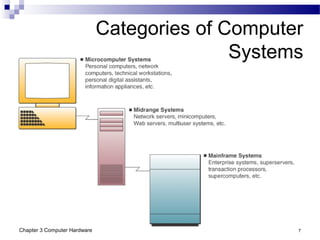
Categories of Computer
Systems
Chapter 3 Computer Hardware 8
Microcomputer Systems
 Usually called a personal computer or PC
 Computing power now exceeds that of the
mainframes of previous generations
 Relatively inexpensive
 Are the networked professional workstations
used by business processions
 Versions include hand-held, notebook, laptop,
tablet, portable, desktop, and floor-standing
Chapter 3 Computer Hardware 9
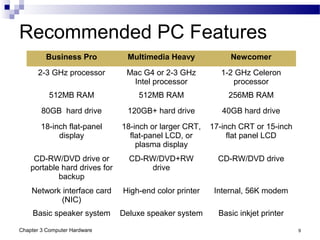
Recommended PC Features
Business Pro Multimedia Heavy Newcomer
2-3 GHz processor Mac G4 or 2-3 GHz
Intel processor
1-2 GHz Celeron
processor
512MB RAM 512MB RAM 256MB RAM
80GB hard drive 120GB+ hard drive 40GB hard drive
18-inch flat-panel
display
18-inch or larger CRT,
flat-panel LCD, or
plasma display
17-inch CRT or 15-inch
flat panel LCD
CD-RW/DVD drive or
portable hard drives for
backup
CD-RW/DVD+RW
drive
CD-RW/DVD drive
Network interface card
(NIC)
High-end color printer Internal, 56K modem
Basic speaker system Deluxe speaker system Basic inkjet printer
Chapter 3 Computer Hardware 10
Microcomputer Uses
 Workstations
Supports have mathematical computer and
graphics display demands
CAD, investment and portfolio analysis
 Network Servers
More powerful than workstations
Coordinates telecommunications and resource
sharing
Supports small networks and Internet or
intranet websites
Chapter 3 Computer Hardware 11
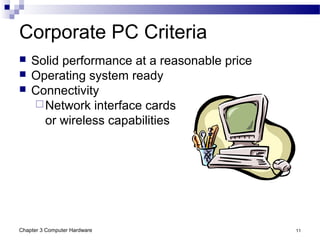
Corporate PC Criteria
 Solid performance at a reasonable price
 Operating system ready
 Connectivity
Network interface cards
or wireless capabilities
Chapter 3 Computer Hardware 12
Information Appliances
 Hand-held microcomputer devices
 Known as personal digital assistants (PDAs)
Web-enabled PDAs use touch screens,
handwriting recognition, or keypads
Mobile workers use to access email or the Web,
exchange data with desktop PCs or servers
Latest entrant is the BlackBerry
 PDAs include
Video-game consoles
Cellular and PCS phones
Telephone-based home email appliances
Chapter 3 Computer Hardware 13
Midrange Systems
 High-end network servers that handle large-scale
processing of business applications
 Not as powerful as mainframes
Less expensive to buy, operate, and maintain
 Often used to manage
Large Internet websites
Corporate intranets and extranets
Integrated, enterprise-wide applications
 Used as front-end servers to assist mainframes
with telecommunications and networks
Chapter 3 Computer Hardware 14
Mainframe Computer Systems
 Large, fast, powerful computer systems
Large primary storage capacity
High transaction processing
Handles complex computations
 Widely used as superservers for…
Large client/server networks
High-volume Internet websites
 Becoming a popular computing platform for…
Data mining and warehousing
Electronic commerce applications
Chapter 3 Computer Hardware 15
Supercomputer Systems
 Extremely powerful systems designed for…
Scientific, engineering, and business applications
Massive numeric computations
 Markets include…
Government research agencies
Large universities
Major corporations
 Uses parallel processing
Billions to trillions of operations per second
(gigaflops and teraflops)
Costs $5 to $50 million
Chapter 3 Computer Hardware 16
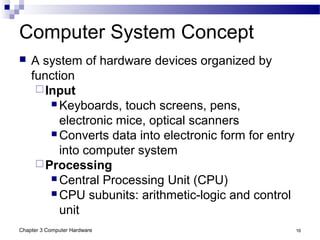
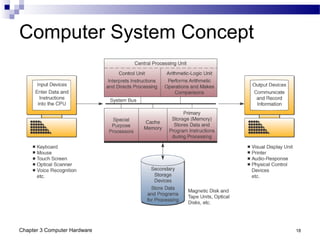
Computer System Concept
 A system of hardware devices organized by
function
Input
 Keyboards, touch screens, pens,
electronic mice, optical scanners
 Converts data into electronic form for entry
into computer system
Processing
 Central Processing Unit (CPU)
 CPU subunits: arithmetic-logic and control
unit
Chapter 3 Computer Hardware 17
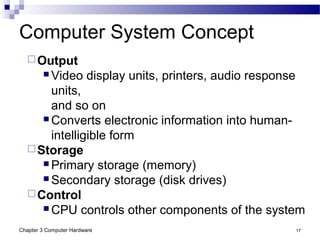
Computer System Concept
Output
 Video display units, printers, audio response
units,
and so on
 Converts electronic information into human-
intelligible form
Storage
 Primary storage (memory)
 Secondary storage (disk drives)
Control
 CPU controls other components of the system
Chapter 3 Computer Hardware 18
Computer System Concept
Chapter 3 Computer Hardware 19
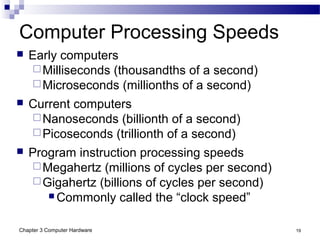
Computer Processing Speeds
 Early computers
Milliseconds (thousandths of a second)
Microseconds (millionths of a second)
 Current computers
Nanoseconds (billionth of a second)
Picoseconds (trillionth of a second)
 Program instruction processing speeds
Megahertz (millions of cycles per second)
Gigahertz (billions of cycles per second)
 Commonly called the “clock speed”
Chapter 3 Computer Hardware 20
Computer Processing Speeds
 Throughput
The ability to perform useful computation or
data processing assignments during a given
period
 Speed is dependant on…
Size of circuitry paths (buses) that interconnect
microprocessor components
Capacity of instruction processing registers
Use of high-speed cache memory
Use of specialized microprocessor, such as
math coprocessor
Chapter 3 Computer Hardware 21
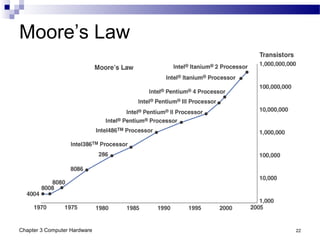
Moore’s Law
 A doubling in the number of transistors per
integrated circuit every 18 to 24 months
Originally observed in 1965, it holds true
today
 Common corollary of Moore’s Law…
Computing prices will be cut in half every 18
to 24 months
This has been consistently accurate
Applies to cost of storage as well
Chapter 3 Computer Hardware 22
Moore’s Law
Chapter 3 Computer Hardware 23
Peripherals
 Peripheral is a generic name for all input, output,
and secondary storage devices
Parts of the computer system, but not the CPU
Are all online devices
 Online devices
Separate from the CPU, but electronically
connected to and controlled by it
 Offline devices
Separate from and not under the control of the
CPU
Chapter 3 Computer Hardware 24
Input Technologies
 Keyboard - Still most widely used input device
 Graphical User Interface (GUI) - Icons, menus,
windows, buttons, bars; Selected with pointing
devices
 Electronic Mouse - Most popular pointing device;
Pressing mouse buttons initiates activity
represented by the icon selected
 Trackball - Stationary device, similar to mouse;
Roller ball moves cursor on screen
 Pointing Stick - Small eraser-head device
embedded in keyboard; Cursor moves in the
direction of the pressure placed on the stick
Chapter 3 Computer Hardware 25
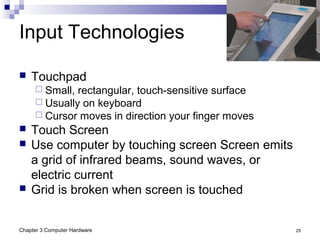
Input Technologies
 Touchpad
 Small, rectangular, touch-sensitive surface
 Usually on keyboard
 Cursor moves in direction your finger moves
 Touch Screen
 Use computer by touching screen Screen emits
a grid of infrared beams, sound waves, or
electric current
 Grid is broken when screen is touched
Chapter 3 Computer Hardware 26
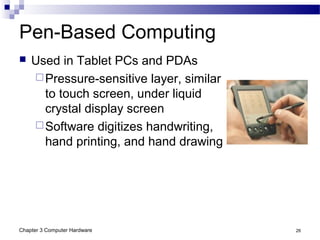
Pen-Based Computing
 Used in Tablet PCs and PDAs
Pressure-sensitive layer, similar
to touch screen, under liquid
crystal display screen
Software digitizes handwriting,
hand printing, and hand drawing
Chapter 3 Computer Hardware 27
Speech Recognition Systems
 Speech be the future of data entry
 Easiest, most natural means of human communication
 Recognizing speech patterns
 Discrete required pauses between each word
 Continuous speech recognition software (CSR) recognized
continuous, conversationally paced speech
 Speech recognition systems digitize, analyze, and classify
speech and sound patterns
 Compares to a database of sound patterns in its vocabulary
 Passes recognized words to the application software
 Typically requires voice recognition training
 Speaker-independent voice recognition systems
 Allows computer to recognize words from a voice it has never
heard before
 Typically used in voice-messaging computers
Chapter 3 Computer Hardware 28
Optical Scanning
 Devices read text or graphics and convert them into digital input
for a computers
 Enables direct entry of data from source documents
 A document management library system
 Scans documents, then organizes and stores them for easy
reference or retrieval
 Scanners
 Compact desktop models are popular for low cost and ease of
use
 Larger, more expensive flatbed scanners are faster and
provide high-resolution color scanning
 Optical Character Recognition (OCR)
 Software that reads characters and codes
 Used to real merchandise tags, sort mail, score tests
 Optical scanning wands read bar codes
Chapter 3 Computer Hardware 29
Other Input Technologies
 Magnetic Stripe
 Reads the magnetic stripe on credit cards
 Smart Cards
 Microprocessor chip and memory on credit card
 Use more in Europe than in the U.S.
 Digital Cameras
 Allows you to shoot, store, and download photos or full-
motion video with audio into the PC
 Images and audio can then be edited or enhanced
 Magnetic Ink Character Recognition (MICR)
 Used by banks to magnetically read checks and deposit
slips
 Requires an iron oxide-based ink
 Reader-sorter equipment magnetizes the ink, then passes
it under a reading head to sense the signal
Chapter 3 Computer Hardware 30
Output Technologies
 Video Displays
Cathode-ray tube (CRT)
Liquid crystal displays (LCDs)
 Active matrix and dual scan
Plasma displays
 Used in large TVs and flat-panel monitors
 Printed Output
Inkjet printers spray ink on a page
Laser printers use an electrostatic process
similar to a photocopying machine
Chapter 3 Computer Hardware 31
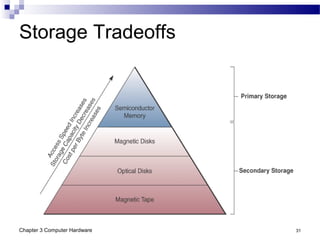
Storage Tradeoffs
Chapter 3 Computer Hardware 32
Computer Storage Fundamentals
 Uses a two-state or binary representation of data
On or Off
On represents the number 1
Off represents the number 0
 Data are processed and stored in computer
systems through the presence or absence of
On/Off signals
Chapter 3 Computer Hardware 33
Bit and Byte
 Bit
Short for binary digit
Smallest element of data
Either zero or one
 Byte
Group of eight bits, which operate as a single
unit
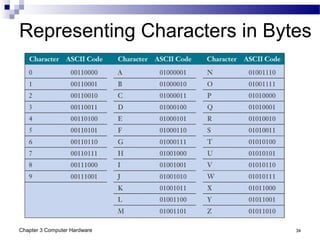
Represents one character or number
Chapter 3 Computer Hardware 34
Representing Characters in Bytes
Chapter 3 Computer Hardware 35
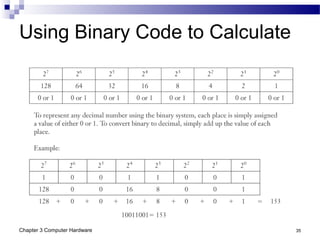
Using Binary Code to Calculate
Chapter 3 Computer Hardware 36
Storage Capacity Measurement
 Kilobyte (KB): one thousand bytes
 Megabyte (MB): one million bytes
 Gigabyte (GB): one billions bytes
 Terabyte (TB): one trillion bytes
 Petabyte (PB): one quadrillion bytes
Chapter 3 Computer Hardware 37
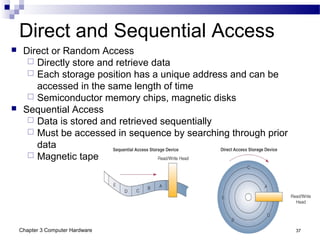
Direct and Sequential Access
 Direct or Random Access
 Directly store and retrieve data
 Each storage position has a unique address and can be
accessed in the same length of time
 Semiconductor memory chips, magnetic disks
 Sequential Access
 Data is stored and retrieved sequentially
 Must be accessed in sequence by searching through prior
data
 Magnetic tape
Chapter 3 Computer Hardware 38
Semiconductor Memory
 Microelectronic semiconductor memory chips
are used for primary storage
Advantages: small size, fast, shock and
temperature resistance
Disadvantages: volatility; must have
uninterrupted electric power or loses memory
Chapter 3 Computer Hardware 39
Types of Semiconductor Memory
 Random Access Memory (RAM)
Most widely used primary storage medium
Volatile memory
Read/write memory
 Read-Only Memory (ROM)
Permanent storage
Can be read, but not overwritten
Frequently used programs burnt into chips
during manufacturing process
Called firmware
Chapter 3 Computer Hardware 40
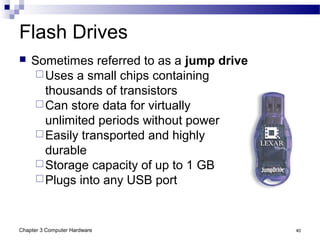
Flash Drives
 Sometimes referred to as a jump drive
Uses a small chips containing
thousands of transistors
Can store data for virtually
unlimited periods without power
Easily transported and highly
durable
Storage capacity of up to 1 GB
Plugs into any USB port
Chapter 3 Computer Hardware 41
Magnetic Disks
 Used for secondary storage
 Fast access and high capacity
 Reasonable cost
 Types of Magnetic Disks
 Floppy Disks (diskettes)
 Magnetic disk inside a plastic jacket
 Hard Disk Drives (hard drives)
 Magnetic disk, access arms, and read/write heads in
sealed module for stable environment
 Fixed or removable
 Capacity from several hundred MBs to
hundreds of GBs
Chapter 3 Computer Hardware 42
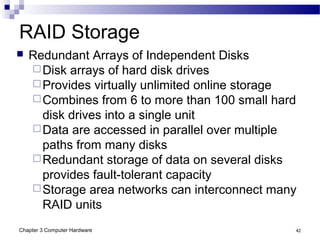
RAID Storage
 Redundant Arrays of Independent Disks
Disk arrays of hard disk drives
Provides virtually unlimited online storage
Combines from 6 to more than 100 small hard
disk drives into a single unit
Data are accessed in parallel over multiple
paths from many disks
Redundant storage of data on several disks
provides fault-tolerant capacity
Storage area networks can interconnect many
RAID units
Chapter 3 Computer Hardware 43
Magnetic Tape
 Secondary storage
Tape reels, cassettes, and cartridges
Used in robotic, automated drive assemblies
Archival and backup storage
Lower-cost storage solution
Chapter 3 Computer Hardware 44
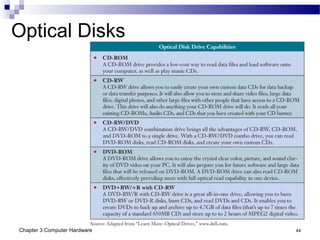
Optical Disks
Chapter 3 Computer Hardware 45
Uses of Optical Disks
 Image processing
Long-term storage of historical image files
Storage of scanned documents
 Publishing medium
Allows fast access to reference materials
Catalogs, directories, and so on
 Interactive multimedia applications
Video games, educational videos, and so on
Chapter 3 Computer Hardware 46
Radio Frequency Identification (RFID)
 One of the newest and fastest growing storage
technologies
System for tagging and identifying mobile
objects
Used with store merchandise, postal packages,
casino chips, pets
Special reader allows objects to be tracked as
they move from place to place
Chips half the size of a grain of sand
 Passive chips derive power from reader signal
Active chips are self-powered
Chapter 3 Computer Hardware 47
RFID Versus Bar Coding
 RFID
Scans from greater distance
Can store data
Allows more information to be tracked
 Privacy concerns
Invisible nature of the system
Capacity to transmit fairly sophisticated
messages
Chapter 3 Computer Hardware 48
Case 3 Self-Service Kiosks
 Self-service kiosks at airports
More than half of Northwest Airline’s eligible
customers choose self-service check-in
Kiosks shave 5 to 15 minutes off the time
Delta customers stand in line
Cost savings are massive
 Vancouver Airport would need 145
additional
check-in counters without the kiosks
Chapter 3 Computer Hardware 49
Self-Service Kiosk Technology
 Networked special-purpose microcomputer
terminals
Video touch screens
Built-in thermal printers
Magnetic-stripe card readers

chapter3computerhardware-170131150641.pdf

  • 1.
    Chapter 3 Computer Hardware JamesA. O'Brien, and George Marakas. Management Information Systems with MISource 2007, 8th ed. Boston, MA: McGraw-Hill, Inc., 2007. ISBN: 13 9780073323091
  • 2.
    Chapter 3 ComputerHardware 2  Understand the history and evolution of computer hardware  Identify the major types and uses of microcomputer, midrange, and mainframe computer systems  Outline the major technologies and uses of computer peripherals for input, output, and storage  Identify and give examples of the components and functions of a computer system  Identify the computer systems and peripherals you would acquire or recommend for a business of your choice, and explain the reasons for your selection Learning Objectives
  • 3.
    Chapter 3 ComputerHardware 3 Early Computing  19th Century Charles Babbage proposed the Analytical Engine, which could calculate, store values in memory, perform logical comparisons Never built because of lack of electronics  1880s Hollerith’s punched cards used to record census data using On/Off patterns The holes turned sensors On or Off when run through tabulating machine This company became the foundation for IBM
  • 4.
    Chapter 3 ComputerHardware 4 Electronic Computers  1946 - First Generation Computer ENIAC Programmable 5000 calculations per second Used vacuum tubes Drawbacks were size and processing ability  1950s ENIAC replaced by UNIVAC 1, then the IBM 704 Calculations jumped to 100,000 per second
  • 5.
    Chapter 3 ComputerHardware 5 Waves of Computing  Late 1950s - Second Generation Transistors replaced vacuum tubes 200,000 to 250,000 calculations per second  Mid-1960s - Third Generation Integrated circuitry and miniaturization  1971 - Fourth Generation Further miniaturization Multiprogramming and virtual storage  1980s - Fifth Generation Millions of calculations per second
  • 6.
    Chapter 3 ComputerHardware 6 Microcomputers  1975 ALTAIR flicking switches  1977 Commodore and Radio Shack produce personal computers  1979 Apple computer, the fastest selling PC thus far  1982 IBM introduced the PC, which changed the market
  • 7.
    Chapter 3 ComputerHardware 7 Categories of Computer Systems
  • 8.
    Chapter 3 ComputerHardware 8 Microcomputer Systems  Usually called a personal computer or PC  Computing power now exceeds that of the mainframes of previous generations  Relatively inexpensive  Are the networked professional workstations used by business processions  Versions include hand-held, notebook, laptop, tablet, portable, desktop, and floor-standing
  • 9.
    Chapter 3 ComputerHardware 9 Recommended PC Features Business Pro Multimedia Heavy Newcomer 2-3 GHz processor Mac G4 or 2-3 GHz Intel processor 1-2 GHz Celeron processor 512MB RAM 512MB RAM 256MB RAM 80GB hard drive 120GB+ hard drive 40GB hard drive 18-inch flat-panel display 18-inch or larger CRT, flat-panel LCD, or plasma display 17-inch CRT or 15-inch flat panel LCD CD-RW/DVD drive or portable hard drives for backup CD-RW/DVD+RW drive CD-RW/DVD drive Network interface card (NIC) High-end color printer Internal, 56K modem Basic speaker system Deluxe speaker system Basic inkjet printer
  • 10.
    Chapter 3 ComputerHardware 10 Microcomputer Uses  Workstations Supports have mathematical computer and graphics display demands CAD, investment and portfolio analysis  Network Servers More powerful than workstations Coordinates telecommunications and resource sharing Supports small networks and Internet or intranet websites
  • 11.
    Chapter 3 ComputerHardware 11 Corporate PC Criteria  Solid performance at a reasonable price  Operating system ready  Connectivity Network interface cards or wireless capabilities
  • 12.
    Chapter 3 ComputerHardware 12 Information Appliances  Hand-held microcomputer devices  Known as personal digital assistants (PDAs) Web-enabled PDAs use touch screens, handwriting recognition, or keypads Mobile workers use to access email or the Web, exchange data with desktop PCs or servers Latest entrant is the BlackBerry  PDAs include Video-game consoles Cellular and PCS phones Telephone-based home email appliances
  • 13.
    Chapter 3 ComputerHardware 13 Midrange Systems  High-end network servers that handle large-scale processing of business applications  Not as powerful as mainframes Less expensive to buy, operate, and maintain  Often used to manage Large Internet websites Corporate intranets and extranets Integrated, enterprise-wide applications  Used as front-end servers to assist mainframes with telecommunications and networks
  • 14.
    Chapter 3 ComputerHardware 14 Mainframe Computer Systems  Large, fast, powerful computer systems Large primary storage capacity High transaction processing Handles complex computations  Widely used as superservers for… Large client/server networks High-volume Internet websites  Becoming a popular computing platform for… Data mining and warehousing Electronic commerce applications
  • 15.
    Chapter 3 ComputerHardware 15 Supercomputer Systems  Extremely powerful systems designed for… Scientific, engineering, and business applications Massive numeric computations  Markets include… Government research agencies Large universities Major corporations  Uses parallel processing Billions to trillions of operations per second (gigaflops and teraflops) Costs $5 to $50 million
  • 16.
    Chapter 3 ComputerHardware 16 Computer System Concept  A system of hardware devices organized by function Input  Keyboards, touch screens, pens, electronic mice, optical scanners  Converts data into electronic form for entry into computer system Processing  Central Processing Unit (CPU)  CPU subunits: arithmetic-logic and control unit
  • 17.
    Chapter 3 ComputerHardware 17 Computer System Concept Output  Video display units, printers, audio response units, and so on  Converts electronic information into human- intelligible form Storage  Primary storage (memory)  Secondary storage (disk drives) Control  CPU controls other components of the system
  • 18.
    Chapter 3 ComputerHardware 18 Computer System Concept
  • 19.
    Chapter 3 ComputerHardware 19 Computer Processing Speeds  Early computers Milliseconds (thousandths of a second) Microseconds (millionths of a second)  Current computers Nanoseconds (billionth of a second) Picoseconds (trillionth of a second)  Program instruction processing speeds Megahertz (millions of cycles per second) Gigahertz (billions of cycles per second)  Commonly called the “clock speed”
  • 20.
    Chapter 3 ComputerHardware 20 Computer Processing Speeds  Throughput The ability to perform useful computation or data processing assignments during a given period  Speed is dependant on… Size of circuitry paths (buses) that interconnect microprocessor components Capacity of instruction processing registers Use of high-speed cache memory Use of specialized microprocessor, such as math coprocessor
  • 21.
    Chapter 3 ComputerHardware 21 Moore’s Law  A doubling in the number of transistors per integrated circuit every 18 to 24 months Originally observed in 1965, it holds true today  Common corollary of Moore’s Law… Computing prices will be cut in half every 18 to 24 months This has been consistently accurate Applies to cost of storage as well
  • 22.
    Chapter 3 ComputerHardware 22 Moore’s Law
  • 23.
    Chapter 3 ComputerHardware 23 Peripherals  Peripheral is a generic name for all input, output, and secondary storage devices Parts of the computer system, but not the CPU Are all online devices  Online devices Separate from the CPU, but electronically connected to and controlled by it  Offline devices Separate from and not under the control of the CPU
  • 24.
    Chapter 3 ComputerHardware 24 Input Technologies  Keyboard - Still most widely used input device  Graphical User Interface (GUI) - Icons, menus, windows, buttons, bars; Selected with pointing devices  Electronic Mouse - Most popular pointing device; Pressing mouse buttons initiates activity represented by the icon selected  Trackball - Stationary device, similar to mouse; Roller ball moves cursor on screen  Pointing Stick - Small eraser-head device embedded in keyboard; Cursor moves in the direction of the pressure placed on the stick
  • 25.
    Chapter 3 ComputerHardware 25 Input Technologies  Touchpad  Small, rectangular, touch-sensitive surface  Usually on keyboard  Cursor moves in direction your finger moves  Touch Screen  Use computer by touching screen Screen emits a grid of infrared beams, sound waves, or electric current  Grid is broken when screen is touched
  • 26.
    Chapter 3 ComputerHardware 26 Pen-Based Computing  Used in Tablet PCs and PDAs Pressure-sensitive layer, similar to touch screen, under liquid crystal display screen Software digitizes handwriting, hand printing, and hand drawing
  • 27.
    Chapter 3 ComputerHardware 27 Speech Recognition Systems  Speech be the future of data entry  Easiest, most natural means of human communication  Recognizing speech patterns  Discrete required pauses between each word  Continuous speech recognition software (CSR) recognized continuous, conversationally paced speech  Speech recognition systems digitize, analyze, and classify speech and sound patterns  Compares to a database of sound patterns in its vocabulary  Passes recognized words to the application software  Typically requires voice recognition training  Speaker-independent voice recognition systems  Allows computer to recognize words from a voice it has never heard before  Typically used in voice-messaging computers
  • 28.
    Chapter 3 ComputerHardware 28 Optical Scanning  Devices read text or graphics and convert them into digital input for a computers  Enables direct entry of data from source documents  A document management library system  Scans documents, then organizes and stores them for easy reference or retrieval  Scanners  Compact desktop models are popular for low cost and ease of use  Larger, more expensive flatbed scanners are faster and provide high-resolution color scanning  Optical Character Recognition (OCR)  Software that reads characters and codes  Used to real merchandise tags, sort mail, score tests  Optical scanning wands read bar codes
  • 29.
    Chapter 3 ComputerHardware 29 Other Input Technologies  Magnetic Stripe  Reads the magnetic stripe on credit cards  Smart Cards  Microprocessor chip and memory on credit card  Use more in Europe than in the U.S.  Digital Cameras  Allows you to shoot, store, and download photos or full- motion video with audio into the PC  Images and audio can then be edited or enhanced  Magnetic Ink Character Recognition (MICR)  Used by banks to magnetically read checks and deposit slips  Requires an iron oxide-based ink  Reader-sorter equipment magnetizes the ink, then passes it under a reading head to sense the signal
  • 30.
    Chapter 3 ComputerHardware 30 Output Technologies  Video Displays Cathode-ray tube (CRT) Liquid crystal displays (LCDs)  Active matrix and dual scan Plasma displays  Used in large TVs and flat-panel monitors  Printed Output Inkjet printers spray ink on a page Laser printers use an electrostatic process similar to a photocopying machine
  • 31.
    Chapter 3 ComputerHardware 31 Storage Tradeoffs
  • 32.
    Chapter 3 ComputerHardware 32 Computer Storage Fundamentals  Uses a two-state or binary representation of data On or Off On represents the number 1 Off represents the number 0  Data are processed and stored in computer systems through the presence or absence of On/Off signals
  • 33.
    Chapter 3 ComputerHardware 33 Bit and Byte  Bit Short for binary digit Smallest element of data Either zero or one  Byte Group of eight bits, which operate as a single unit Represents one character or number
  • 34.
    Chapter 3 ComputerHardware 34 Representing Characters in Bytes
  • 35.
    Chapter 3 ComputerHardware 35 Using Binary Code to Calculate
  • 36.
    Chapter 3 ComputerHardware 36 Storage Capacity Measurement  Kilobyte (KB): one thousand bytes  Megabyte (MB): one million bytes  Gigabyte (GB): one billions bytes  Terabyte (TB): one trillion bytes  Petabyte (PB): one quadrillion bytes
  • 37.
    Chapter 3 ComputerHardware 37 Direct and Sequential Access  Direct or Random Access  Directly store and retrieve data  Each storage position has a unique address and can be accessed in the same length of time  Semiconductor memory chips, magnetic disks  Sequential Access  Data is stored and retrieved sequentially  Must be accessed in sequence by searching through prior data  Magnetic tape
  • 38.
    Chapter 3 ComputerHardware 38 Semiconductor Memory  Microelectronic semiconductor memory chips are used for primary storage Advantages: small size, fast, shock and temperature resistance Disadvantages: volatility; must have uninterrupted electric power or loses memory
  • 39.
    Chapter 3 ComputerHardware 39 Types of Semiconductor Memory  Random Access Memory (RAM) Most widely used primary storage medium Volatile memory Read/write memory  Read-Only Memory (ROM) Permanent storage Can be read, but not overwritten Frequently used programs burnt into chips during manufacturing process Called firmware
  • 40.
    Chapter 3 ComputerHardware 40 Flash Drives  Sometimes referred to as a jump drive Uses a small chips containing thousands of transistors Can store data for virtually unlimited periods without power Easily transported and highly durable Storage capacity of up to 1 GB Plugs into any USB port
  • 41.
    Chapter 3 ComputerHardware 41 Magnetic Disks  Used for secondary storage  Fast access and high capacity  Reasonable cost  Types of Magnetic Disks  Floppy Disks (diskettes)  Magnetic disk inside a plastic jacket  Hard Disk Drives (hard drives)  Magnetic disk, access arms, and read/write heads in sealed module for stable environment  Fixed or removable  Capacity from several hundred MBs to hundreds of GBs
  • 42.
    Chapter 3 ComputerHardware 42 RAID Storage  Redundant Arrays of Independent Disks Disk arrays of hard disk drives Provides virtually unlimited online storage Combines from 6 to more than 100 small hard disk drives into a single unit Data are accessed in parallel over multiple paths from many disks Redundant storage of data on several disks provides fault-tolerant capacity Storage area networks can interconnect many RAID units
  • 43.
    Chapter 3 ComputerHardware 43 Magnetic Tape  Secondary storage Tape reels, cassettes, and cartridges Used in robotic, automated drive assemblies Archival and backup storage Lower-cost storage solution
  • 44.
    Chapter 3 ComputerHardware 44 Optical Disks
  • 45.
    Chapter 3 ComputerHardware 45 Uses of Optical Disks  Image processing Long-term storage of historical image files Storage of scanned documents  Publishing medium Allows fast access to reference materials Catalogs, directories, and so on  Interactive multimedia applications Video games, educational videos, and so on
  • 46.
    Chapter 3 ComputerHardware 46 Radio Frequency Identification (RFID)  One of the newest and fastest growing storage technologies System for tagging and identifying mobile objects Used with store merchandise, postal packages, casino chips, pets Special reader allows objects to be tracked as they move from place to place Chips half the size of a grain of sand  Passive chips derive power from reader signal Active chips are self-powered
  • 47.
    Chapter 3 ComputerHardware 47 RFID Versus Bar Coding  RFID Scans from greater distance Can store data Allows more information to be tracked  Privacy concerns Invisible nature of the system Capacity to transmit fairly sophisticated messages
  • 48.
    Chapter 3 ComputerHardware 48 Case 3 Self-Service Kiosks  Self-service kiosks at airports More than half of Northwest Airline’s eligible customers choose self-service check-in Kiosks shave 5 to 15 minutes off the time Delta customers stand in line Cost savings are massive  Vancouver Airport would need 145 additional check-in counters without the kiosks
  • 49.
    Chapter 3 ComputerHardware 49 Self-Service Kiosk Technology  Networked special-purpose microcomputer terminals Video touch screens Built-in thermal printers Magnetic-stripe card readers