
Copyright © Terry Felke-Morris http://terrymorris.net
Web Development & Design
Foundations with HTML5
8th
Edition
CHAPTER 3
KEY CONCEPTS
1
Copyright © Terry Felke-Morris
Copyright © Terry Felke-Morris http://terrymorris.net
Learning Outcomes
In this chapter, you will learn how to . . .
◦ Describe the evolution of style sheets from print media to the Web
◦ List advantages of using Cascading Style Sheets
◦ Use color on web pages
◦ Create style sheets that configure common color and text properties
◦ Apply inline styles
◦ Use embedded style sheets
◦ Use external style sheets
◦ Configure element, class, id, and contextual selectors
◦ Utilize the “cascade” in CSS
◦ Validate CSS
2
Copyright © Terry Felke-Morris http://terrymorris.net
Overview of
Cascading Style Sheets (CSS)
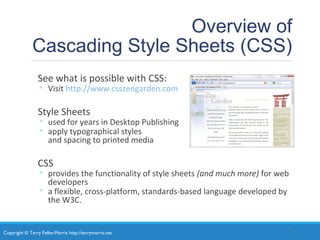
See what is possible with CSS:
◦ Visit http://www.csszengarden.com
Style Sheets
◦ used for years in Desktop Publishing
◦ apply typographical styles
and spacing to printed media
CSS
◦ provides the functionality of style sheets (and much more) for web
developers
◦ a flexible, cross-platform, standards-based language developed by
the W3C.
3
Copyright © Terry Felke-Morris http://terrymorris.net
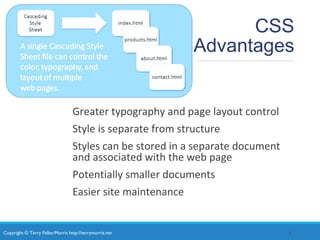
CSS
Advantages
Greater typography and page layout control
Style is separate from structure
Styles can be stored in a separate document
and associated with the web page
Potentially smaller documents
Easier site maintenance
4
Copyright © Terry Felke-Morris http://terrymorris.net
Types of
Cascading Style Sheets
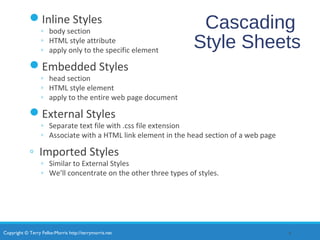
Inline Styles
Embedded Styles
External Styles
Imported Styles
5
Copyright © Terry Felke-Morris http://terrymorris.net
Cascading
Style Sheets
Inline Styles
◦ body section
◦ HTML style attribute
◦ apply only to the specific element
Embedded Styles
◦ head section
◦ HTML style element
◦ apply to the entire web page document
External Styles
◦ Separate text file with .css file extension
◦ Associate with a HTML link element in the head section of a web page
◦ Imported Styles
◦ Similar to External Styles
◦ We’ll concentrate on the other three types of styles.
6
Copyright © Terry Felke-Morris http://terrymorris.net
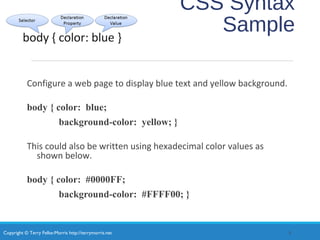
CSS Syntax
Style sheets are composed of "Rules" that describe the
styling to be applied.
Each Rule contains a Selector and a Declaration
7
Copyright © Terry Felke-Morris http://terrymorris.net
CSS Syntax
Sample
Configure a web page to display blue text and yellow background.
body { color: blue;
background-color: yellow; }
This could also be written using hexadecimal color values as
shown below.
body { color: #0000FF;
background-color: #FFFF00; }
8
Copyright © Terry Felke-Morris http://terrymorris.net
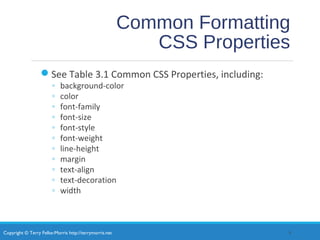
Common Formatting
CSS Properties
See Table 3.1 Common CSS Properties, including:
◦ background-color
◦ color
◦ font-family
◦ font-size
◦ font-style
◦ font-weight
◦ line-height
◦ margin
◦ text-align
◦ text-decoration
◦ width
9
Copyright © Terry Felke-Morris http://terrymorris.net
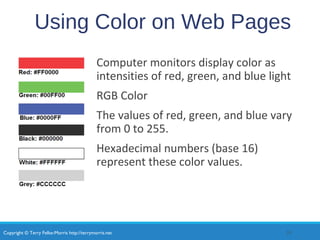
Using Color on Web Pages
Computer monitors display color as
intensities of red, green, and blue light
RGB Color
The values of red, green, and blue vary
from 0 to 255.
Hexadecimal numbers (base 16)
represent these color values.
10
Copyright © Terry Felke-Morris http://terrymorris.net
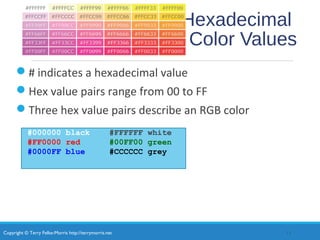
Hexadecimal
Color Values
# indicates a hexadecimal value
Hex value pairs range from 00 to FF
Three hex value pairs describe an RGB color
#000000 black #FFFFFF white
#FF0000 red #00FF00 green
#0000FF blue #CCCCCC grey
11
Copyright © Terry Felke-Morris http://terrymorris.net
Web Color Palette
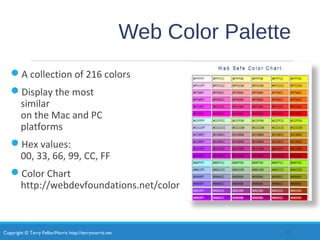
A collection of 216 colors
Display the most
similar
on the Mac and PC
platforms
Hex values:
00, 33, 66, 99, CC, FF
Color Chart
http://webdevfoundations.net/color
12
Copyright © Terry Felke-Morris http://terrymorris.net
Making Color Choices
How to choose a color scheme?
◦Monochromatic
◦ http://meyerweb.com/eric/tools/color-blend
◦Choose from a photograph or other image
◦ http://www.colr.org
◦Begin with a favorite color
◦Use one of the sites below to choose other colors
◦ http://colorsontheweb.com/colorwizard.asp
◦ https://color.adobe.com/create/color-wheel
◦ http://paletton.com
13
Copyright © Terry Felke-Morris http://terrymorris.net
Support Web Accessiblity
Verify Sufficient Contrast
When you choose colors for text and background,
sufficient contrast is needed so that the text is easy
to read.
Use one of the following online tools to verify
contrast:
◦http://webaim.org/resources/contrastchecker
◦http://snook.ca/technical/colour_contrast/colour.html
◦http://juicystudio.com/services/luminositycontrastratio.php
14
Copyright © Terry Felke-Morris http://terrymorris.net
Configuring Color with Inline
CSS
Inline CSS
◦Configured in the body of the web page
◦Use the style attribute of an HTML tag
◦Apply only to the specific element
The Style Attribute
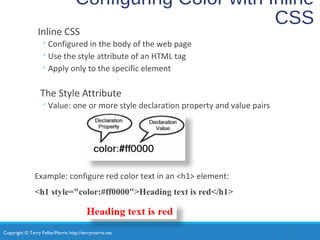
◦Value: one or more style declaration property and value pairs
Example: configure red color text in an <h1> element:
<h1 style="color:#ff0000">Heading text is red</h1>
15
Copyright © Terry Felke-Morris http://terrymorris.net
Configuring Color with Inline
CSS (2)
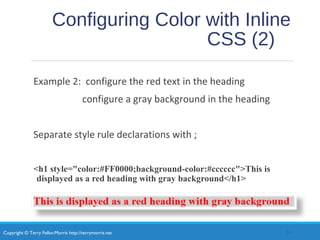
Example 2: configure the red text in the heading
configure a gray background in the heading
Separate style rule declarations with ;
<h1 style="color:#FF0000;background-color:#cccccc">This is
displayed as a red heading with gray background</h1>
16
Copyright © Terry Felke-Morris http://terrymorris.net
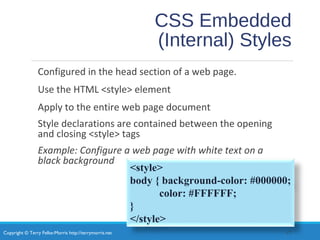
CSS Embedded
(Internal) Styles
Configured in the head section of a web page.
Use the HTML <style> element
Apply to the entire web page document
Style declarations are contained between the opening
and closing <style> tags
Example: Configure a web page with white text on a
black background
17
<style>
body { background-color: #000000;
color: #FFFFFF;
}
</style>
Copyright © Terry Felke-Morris http://terrymorris.net
CSS Embedded Styles
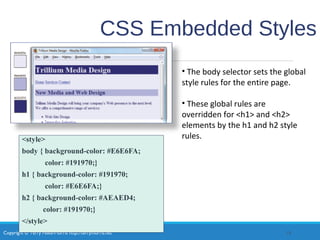
<style>
body { background-color: #E6E6FA;
color: #191970;}
h1 { background-color: #191970;
color: #E6E6FA;}
h2 { background-color: #AEAED4;
color: #191970;}
</style>
18
• The body selector sets the global
style rules for the entire page.
• These global rules are
overridden for <h1> and <h2>
elements by the h1 and h2 style
rules.
Copyright © Terry Felke-Morris http://terrymorris.net
Checkpoint 3.1
1. List three reasons to use CSS on a web page.
2. When designing a page that uses colors other than the
default colors for text and background, explain why it is a
good reason to configure style rules for both text color
and background color.
3. Describe one advantage to using embedded styles
instead of inline styles.
19
Copyright © Terry Felke-Morris http://terrymorris.net
Configuring Text with CSS
CSS properties for configuring text:
◦font-weight
◦Configures the boldness of text
◦font-style
◦Configures text to an italic style
◦font-size
◦Configures the size of the text
◦font-family
◦Configures the font typeface of the text
20
Copyright © Terry Felke-Morris http://terrymorris.net
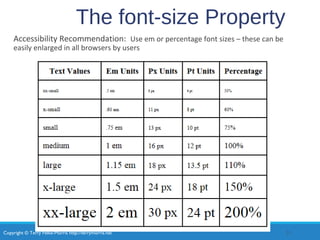
The font-size Property
Accessibility Recommendation: Use em or percentage font sizes – these can be
easily enlarged in all browsers by users
21
Copyright © Terry Felke-Morris http://terrymorris.net
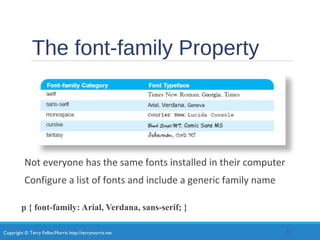
The font-family Property
Not everyone has the same fonts installed in their computer
Configure a list of fonts and include a generic family name
p { font-family: Arial, Verdana, sans-serif; }
22
Copyright © Terry Felke-Morris http://terrymorris.net
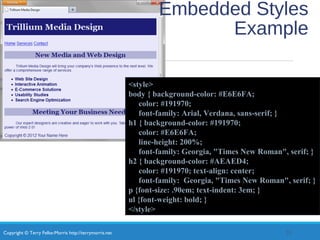
Embedded Styles
Example
23
<style>
body { background-color: #E6E6FA;
color: #191970;
font-family: Arial, Verdana, sans-serif; }
h1 { background-color: #191970;
color: #E6E6FA;
line-height: 200%;
font-family: Georgia, "Times New Roman", serif; }
h2 { background-color: #AEAED4;
color: #191970; text-align: center;
font-family: Georgia, "Times New Roman", serif; }
p {font-size: .90em; text-indent: 3em; }
ul {font-weight: bold; }
</style>
Copyright © Terry Felke-Morris http://terrymorris.net
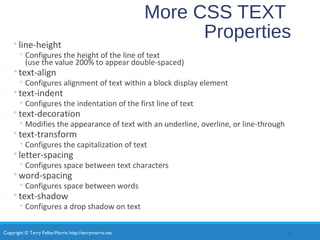
More CSS TEXT
Properties◦line-height
◦ Configures the height of the line of text
(use the value 200% to appear double-spaced)
◦text-align
◦ Configures alignment of text within a block display element
◦text-indent
◦ Configures the indentation of the first line of text
◦text-decoration
◦ Modifies the appearance of text with an underline, overline, or line-through
◦text-transform
◦ Configures the capitalization of text
◦letter-spacing
◦ Configures space between text characters
◦word-spacing
◦ Configures space between words
◦text-shadow
◦ Configures a drop shadow on text
24
Copyright © Terry Felke-Morris http://terrymorris.net
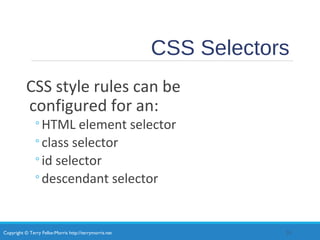
CSS Selectors
CSS style rules can be
configured for an:
◦HTML element selector
◦class selector
◦id selector
◦descendant selector
25
Copyright © Terry Felke-Morris http://terrymorris.net
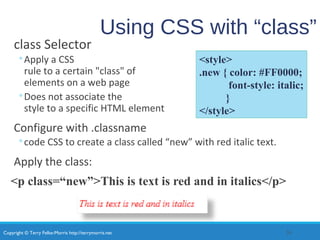
Using CSS with “class”
class Selector
◦Apply a CSS
rule to a certain "class" of
elements on a web page
◦Does not associate the
style to a specific HTML element
Configure with .classname
◦code CSS to create a class called “new” with red italic text.
Apply the class:
<p class=“new”>This is text is red and in italics</p>
26
<style>
.new { color: #FF0000;
font-style: italic;
}
</style>
Copyright © Terry Felke-Morris http://terrymorris.net
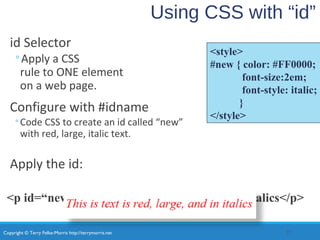
Using CSS with “id”
id Selector
◦Apply a CSS
rule to ONE element
on a web page.
Configure with #idname
◦Code CSS to create an id called “new”
with red, large, italic text.
Apply the id:
<p id=“new”>This is text is red, large, and in italics</p>
27
<style>
#new { color: #FF0000;
font-size:2em;
font-style: italic;
}
</style>
Copyright © Terry Felke-Morris http://terrymorris.net
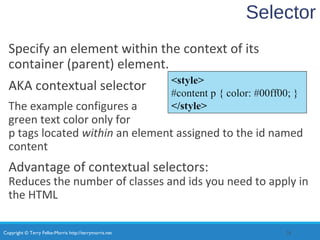
Selector
Specify an element within the context of its
container (parent) element.
AKA contextual selector
The example configures a
green text color only for
p tags located within an element assigned to the id named
content
Advantage of contextual selectors:
Reduces the number of classes and ids you need to apply in
the HTML
28
<style>
#content p { color: #00ff00; }
</style>
Copyright © Terry Felke-Morris http://terrymorris.net
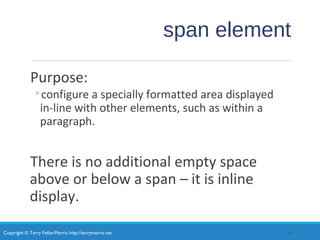
span element
Purpose:
◦configure a specially formatted area displayed
in-line with other elements, such as within a
paragraph.
There is no additional empty space
above or below a span – it is inline
display.
29
Copyright © Terry Felke-Morris http://terrymorris.net
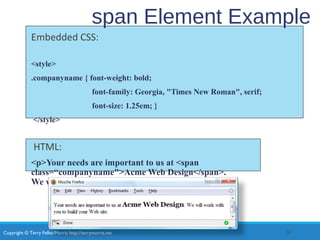
span Element Example
Embedded CSS:
<style>
.companyname { font-weight: bold;
font-family: Georgia, "Times New Roman", serif;
font-size: 1.25em; }
</style>
HTML:
<p>Your needs are important to us at <span
class=“companyname">Acme Web Design</span>.
We will work with you to build your Web site.</p>
30
Copyright © Terry Felke-Morris http://terrymorris.net
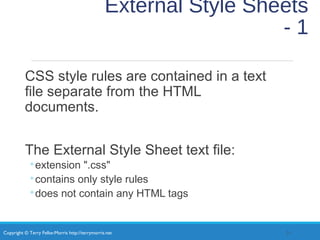
External Style Sheets
- 1
CSS style rules are contained in a text
file separate from the HTML
documents.
The External Style Sheet text file:
◦extension ".css"
◦contains only style rules
◦does not contain any HTML tags
31
Copyright © Terry Felke-Morris http://terrymorris.net
body {background-color:#E6E6FA;
color:#000000;
font-family: Arial, sans-serif;
font-size:90%; }
h2 { color: #003366; }
nav { font-size: 16px;
font-weight: bold; }
body {background-color:#E6E6FA;
color:#000000;
font-family: Arial, sans-serif;
font-size:90%; }
h2 { color: #003366; }
nav { font-size: 16px;
font-weight: bold; }
External Style Sheets
- 2
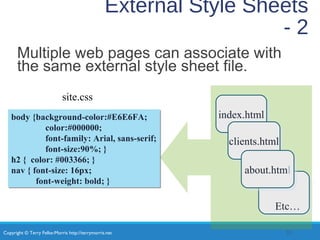
Multiple web pages can associate with
the same external style sheet file.
32
site.css
index.htmlindex.html
clients.htmlclients.html
about.htmlabout.html
Etc…
Copyright © Terry Felke-Morris http://terrymorris.net
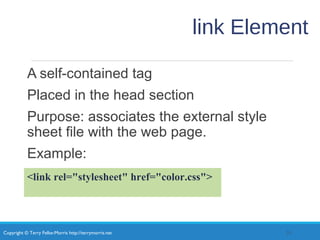
link Element
A self-contained tag
Placed in the head section
Purpose: associates the external style
sheet file with the web page.
Example:
33
<link rel="stylesheet" href="color.css">
Copyright © Terry Felke-Morris http://terrymorris.net
Using an External Style
Sheet
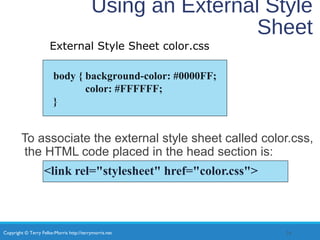
To associate the external style sheet called color.css,
the HTML code placed in the head section is:
<link rel="stylesheet" href="color.css">
34
body { background-color: #0000FF;
color: #FFFFFF;
}
External Style Sheet color.css
Copyright © Terry Felke-Morris http://terrymorris.net
Checkpoint 3.2
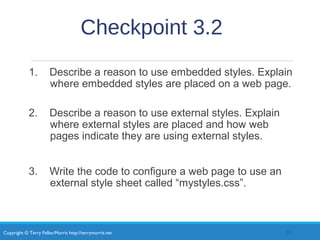
1. Describe a reason to use embedded styles. Explain
where embedded styles are placed on a web page.
2. Describe a reason to use external styles. Explain
where external styles are placed and how web
pages indicate they are using external styles.
3. Write the code to configure a web page to use an
external style sheet called “mystyles.css”.
35
Copyright © Terry Felke-Morris http://terrymorris.net
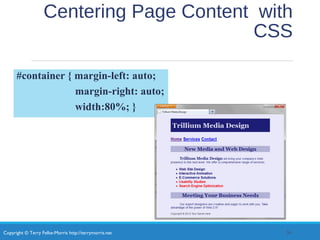
Centering Page Content with
CSS
#container { margin-left: auto;
margin-right: auto;
width:80%; }
36
Copyright © Terry Felke-Morris http://terrymorris.net
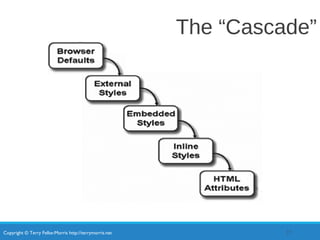
The “Cascade”
37
Copyright © Terry Felke-Morris http://terrymorris.net
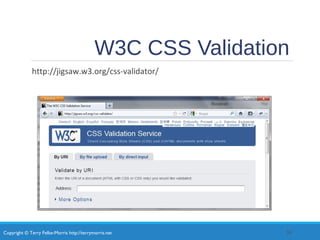
W3C CSS Validation
http://jigsaw.w3.org/css-validator/
38
Copyright © Terry Felke-Morris http://terrymorris.net
Summary
This chapter introduced you to Cascading Style Sheet Rules
associated with color and text on web pages.
You configured inline styles, embedded styles, and external styles.
You applied CSS style rues to HTML, class, id, and descendent
selectors.
You are able to submit your CSS to the W3C CSS Validation test.
39

Chapter3

  • 1.
    Copyright © TerryFelke-Morris http://terrymorris.net Web Development & Design Foundations with HTML5 8th Edition CHAPTER 3 KEY CONCEPTS 1 Copyright © Terry Felke-Morris
  • 2.
    Copyright © TerryFelke-Morris http://terrymorris.net Learning Outcomes In this chapter, you will learn how to . . . ◦ Describe the evolution of style sheets from print media to the Web ◦ List advantages of using Cascading Style Sheets ◦ Use color on web pages ◦ Create style sheets that configure common color and text properties ◦ Apply inline styles ◦ Use embedded style sheets ◦ Use external style sheets ◦ Configure element, class, id, and contextual selectors ◦ Utilize the “cascade” in CSS ◦ Validate CSS 2
  • 3.
    Copyright © TerryFelke-Morris http://terrymorris.net Overview of Cascading Style Sheets (CSS) See what is possible with CSS: ◦ Visit http://www.csszengarden.com Style Sheets ◦ used for years in Desktop Publishing ◦ apply typographical styles and spacing to printed media CSS ◦ provides the functionality of style sheets (and much more) for web developers ◦ a flexible, cross-platform, standards-based language developed by the W3C. 3
  • 4.
    Copyright © TerryFelke-Morris http://terrymorris.net CSS Advantages Greater typography and page layout control Style is separate from structure Styles can be stored in a separate document and associated with the web page Potentially smaller documents Easier site maintenance 4
  • 5.
    Copyright © TerryFelke-Morris http://terrymorris.net Types of Cascading Style Sheets Inline Styles Embedded Styles External Styles Imported Styles 5
  • 6.
    Copyright © TerryFelke-Morris http://terrymorris.net Cascading Style Sheets Inline Styles ◦ body section ◦ HTML style attribute ◦ apply only to the specific element Embedded Styles ◦ head section ◦ HTML style element ◦ apply to the entire web page document External Styles ◦ Separate text file with .css file extension ◦ Associate with a HTML link element in the head section of a web page ◦ Imported Styles ◦ Similar to External Styles ◦ We’ll concentrate on the other three types of styles. 6
  • 7.
    Copyright © TerryFelke-Morris http://terrymorris.net CSS Syntax Style sheets are composed of "Rules" that describe the styling to be applied. Each Rule contains a Selector and a Declaration 7
  • 8.
    Copyright © TerryFelke-Morris http://terrymorris.net CSS Syntax Sample Configure a web page to display blue text and yellow background. body { color: blue; background-color: yellow; } This could also be written using hexadecimal color values as shown below. body { color: #0000FF; background-color: #FFFF00; } 8
  • 9.
    Copyright © TerryFelke-Morris http://terrymorris.net Common Formatting CSS Properties See Table 3.1 Common CSS Properties, including: ◦ background-color ◦ color ◦ font-family ◦ font-size ◦ font-style ◦ font-weight ◦ line-height ◦ margin ◦ text-align ◦ text-decoration ◦ width 9
  • 10.
    Copyright © TerryFelke-Morris http://terrymorris.net Using Color on Web Pages Computer monitors display color as intensities of red, green, and blue light RGB Color The values of red, green, and blue vary from 0 to 255. Hexadecimal numbers (base 16) represent these color values. 10
  • 11.
    Copyright © TerryFelke-Morris http://terrymorris.net Hexadecimal Color Values # indicates a hexadecimal value Hex value pairs range from 00 to FF Three hex value pairs describe an RGB color #000000 black #FFFFFF white #FF0000 red #00FF00 green #0000FF blue #CCCCCC grey 11
  • 12.
    Copyright © TerryFelke-Morris http://terrymorris.net Web Color Palette A collection of 216 colors Display the most similar on the Mac and PC platforms Hex values: 00, 33, 66, 99, CC, FF Color Chart http://webdevfoundations.net/color 12
  • 13.
    Copyright © TerryFelke-Morris http://terrymorris.net Making Color Choices How to choose a color scheme? ◦Monochromatic ◦ http://meyerweb.com/eric/tools/color-blend ◦Choose from a photograph or other image ◦ http://www.colr.org ◦Begin with a favorite color ◦Use one of the sites below to choose other colors ◦ http://colorsontheweb.com/colorwizard.asp ◦ https://color.adobe.com/create/color-wheel ◦ http://paletton.com 13
  • 14.
    Copyright © TerryFelke-Morris http://terrymorris.net Support Web Accessiblity Verify Sufficient Contrast When you choose colors for text and background, sufficient contrast is needed so that the text is easy to read. Use one of the following online tools to verify contrast: ◦http://webaim.org/resources/contrastchecker ◦http://snook.ca/technical/colour_contrast/colour.html ◦http://juicystudio.com/services/luminositycontrastratio.php 14
  • 15.
    Copyright © TerryFelke-Morris http://terrymorris.net Configuring Color with Inline CSS Inline CSS ◦Configured in the body of the web page ◦Use the style attribute of an HTML tag ◦Apply only to the specific element The Style Attribute ◦Value: one or more style declaration property and value pairs Example: configure red color text in an <h1> element: <h1 style="color:#ff0000">Heading text is red</h1> 15
  • 16.
    Copyright © TerryFelke-Morris http://terrymorris.net Configuring Color with Inline CSS (2) Example 2: configure the red text in the heading configure a gray background in the heading Separate style rule declarations with ; <h1 style="color:#FF0000;background-color:#cccccc">This is displayed as a red heading with gray background</h1> 16
  • 17.
    Copyright © TerryFelke-Morris http://terrymorris.net CSS Embedded (Internal) Styles Configured in the head section of a web page. Use the HTML <style> element Apply to the entire web page document Style declarations are contained between the opening and closing <style> tags Example: Configure a web page with white text on a black background 17 <style> body { background-color: #000000; color: #FFFFFF; } </style>
  • 18.
    Copyright © TerryFelke-Morris http://terrymorris.net CSS Embedded Styles <style> body { background-color: #E6E6FA; color: #191970;} h1 { background-color: #191970; color: #E6E6FA;} h2 { background-color: #AEAED4; color: #191970;} </style> 18 • The body selector sets the global style rules for the entire page. • These global rules are overridden for <h1> and <h2> elements by the h1 and h2 style rules.
  • 19.
    Copyright © TerryFelke-Morris http://terrymorris.net Checkpoint 3.1 1. List three reasons to use CSS on a web page. 2. When designing a page that uses colors other than the default colors for text and background, explain why it is a good reason to configure style rules for both text color and background color. 3. Describe one advantage to using embedded styles instead of inline styles. 19
  • 20.
    Copyright © TerryFelke-Morris http://terrymorris.net Configuring Text with CSS CSS properties for configuring text: ◦font-weight ◦Configures the boldness of text ◦font-style ◦Configures text to an italic style ◦font-size ◦Configures the size of the text ◦font-family ◦Configures the font typeface of the text 20
  • 21.
    Copyright © TerryFelke-Morris http://terrymorris.net The font-size Property Accessibility Recommendation: Use em or percentage font sizes – these can be easily enlarged in all browsers by users 21
  • 22.
    Copyright © TerryFelke-Morris http://terrymorris.net The font-family Property Not everyone has the same fonts installed in their computer Configure a list of fonts and include a generic family name p { font-family: Arial, Verdana, sans-serif; } 22
  • 23.
    Copyright © TerryFelke-Morris http://terrymorris.net Embedded Styles Example 23 <style> body { background-color: #E6E6FA; color: #191970; font-family: Arial, Verdana, sans-serif; } h1 { background-color: #191970; color: #E6E6FA; line-height: 200%; font-family: Georgia, "Times New Roman", serif; } h2 { background-color: #AEAED4; color: #191970; text-align: center; font-family: Georgia, "Times New Roman", serif; } p {font-size: .90em; text-indent: 3em; } ul {font-weight: bold; } </style>
  • 24.
    Copyright © TerryFelke-Morris http://terrymorris.net More CSS TEXT Properties◦line-height ◦ Configures the height of the line of text (use the value 200% to appear double-spaced) ◦text-align ◦ Configures alignment of text within a block display element ◦text-indent ◦ Configures the indentation of the first line of text ◦text-decoration ◦ Modifies the appearance of text with an underline, overline, or line-through ◦text-transform ◦ Configures the capitalization of text ◦letter-spacing ◦ Configures space between text characters ◦word-spacing ◦ Configures space between words ◦text-shadow ◦ Configures a drop shadow on text 24
  • 25.
    Copyright © TerryFelke-Morris http://terrymorris.net CSS Selectors CSS style rules can be configured for an: ◦HTML element selector ◦class selector ◦id selector ◦descendant selector 25
  • 26.
    Copyright © TerryFelke-Morris http://terrymorris.net Using CSS with “class” class Selector ◦Apply a CSS rule to a certain "class" of elements on a web page ◦Does not associate the style to a specific HTML element Configure with .classname ◦code CSS to create a class called “new” with red italic text. Apply the class: <p class=“new”>This is text is red and in italics</p> 26 <style> .new { color: #FF0000; font-style: italic; } </style>
  • 27.
    Copyright © TerryFelke-Morris http://terrymorris.net Using CSS with “id” id Selector ◦Apply a CSS rule to ONE element on a web page. Configure with #idname ◦Code CSS to create an id called “new” with red, large, italic text. Apply the id: <p id=“new”>This is text is red, large, and in italics</p> 27 <style> #new { color: #FF0000; font-size:2em; font-style: italic; } </style>
  • 28.
    Copyright © TerryFelke-Morris http://terrymorris.net Selector Specify an element within the context of its container (parent) element. AKA contextual selector The example configures a green text color only for p tags located within an element assigned to the id named content Advantage of contextual selectors: Reduces the number of classes and ids you need to apply in the HTML 28 <style> #content p { color: #00ff00; } </style>
  • 29.
    Copyright © TerryFelke-Morris http://terrymorris.net span element Purpose: ◦configure a specially formatted area displayed in-line with other elements, such as within a paragraph. There is no additional empty space above or below a span – it is inline display. 29
  • 30.
    Copyright © TerryFelke-Morris http://terrymorris.net span Element Example Embedded CSS: <style> .companyname { font-weight: bold; font-family: Georgia, "Times New Roman", serif; font-size: 1.25em; } </style> HTML: <p>Your needs are important to us at <span class=“companyname">Acme Web Design</span>. We will work with you to build your Web site.</p> 30
  • 31.
    Copyright © TerryFelke-Morris http://terrymorris.net External Style Sheets - 1 CSS style rules are contained in a text file separate from the HTML documents. The External Style Sheet text file: ◦extension ".css" ◦contains only style rules ◦does not contain any HTML tags 31
  • 32.
    Copyright © TerryFelke-Morris http://terrymorris.net body {background-color:#E6E6FA; color:#000000; font-family: Arial, sans-serif; font-size:90%; } h2 { color: #003366; } nav { font-size: 16px; font-weight: bold; } body {background-color:#E6E6FA; color:#000000; font-family: Arial, sans-serif; font-size:90%; } h2 { color: #003366; } nav { font-size: 16px; font-weight: bold; } External Style Sheets - 2 Multiple web pages can associate with the same external style sheet file. 32 site.css index.htmlindex.html clients.htmlclients.html about.htmlabout.html Etc…
  • 33.
    Copyright © TerryFelke-Morris http://terrymorris.net link Element A self-contained tag Placed in the head section Purpose: associates the external style sheet file with the web page. Example: 33 <link rel="stylesheet" href="color.css">
  • 34.
    Copyright © TerryFelke-Morris http://terrymorris.net Using an External Style Sheet To associate the external style sheet called color.css, the HTML code placed in the head section is: <link rel="stylesheet" href="color.css"> 34 body { background-color: #0000FF; color: #FFFFFF; } External Style Sheet color.css
  • 35.
    Copyright © TerryFelke-Morris http://terrymorris.net Checkpoint 3.2 1. Describe a reason to use embedded styles. Explain where embedded styles are placed on a web page. 2. Describe a reason to use external styles. Explain where external styles are placed and how web pages indicate they are using external styles. 3. Write the code to configure a web page to use an external style sheet called “mystyles.css”. 35
  • 36.
    Copyright © TerryFelke-Morris http://terrymorris.net Centering Page Content with CSS #container { margin-left: auto; margin-right: auto; width:80%; } 36
  • 37.
    Copyright © TerryFelke-Morris http://terrymorris.net The “Cascade” 37
  • 38.
    Copyright © TerryFelke-Morris http://terrymorris.net W3C CSS Validation http://jigsaw.w3.org/css-validator/ 38
  • 39.
    Copyright © TerryFelke-Morris http://terrymorris.net Summary This chapter introduced you to Cascading Style Sheet Rules associated with color and text on web pages. You configured inline styles, embedded styles, and external styles. You applied CSS style rues to HTML, class, id, and descendent selectors. You are able to submit your CSS to the W3C CSS Validation test. 39