Download free for 30 days
Sign in
Upload
Language (EN)
Support
Business
Mobile
Social Media
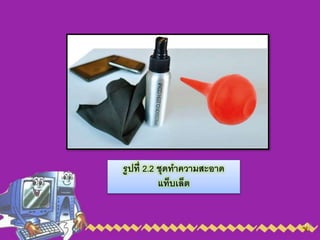
Marketing
Technology
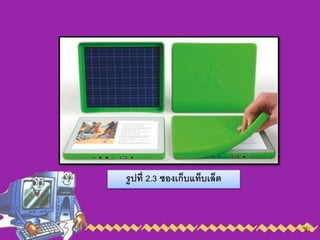
Art & Photos
Career
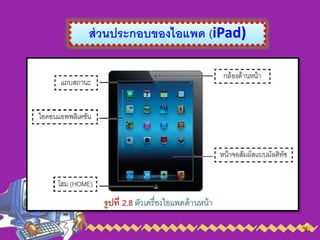
Design
Education
Presentations & Public Speaking
Government & Nonprofit
Healthcare
Internet
Law
Leadership & Management
Automotive
Engineering
Software
Recruiting & HR
Retail
Sales
Services
Science
Small Business & Entrepreneurship
Food
Environment
Economy & Finance
Data & Analytics
Investor Relations
Sports
Spiritual
News & Politics
Travel
Self Improvement
Real Estate
Entertainment & Humor
Health & Medicine
Devices & Hardware
Lifestyle
Change Language
Language
English
Español
Português
Français
Deutsche
Cancel
Save
EN
Uploaded by
Yupin Sangchang
118 views
Chapter2
การใช้งานและบำรุงรักษา Tablet
Education
◦
Read more
0
Save
Share
Embed
Embed presentation
1
/ 13
2
/ 13
3
/ 13
4
/ 13
5
/ 13
6
/ 13
7
/ 13
8
/ 13
9
/ 13
10
/ 13
11
/ 13
12
/ 13
13
/ 13
More Related Content
PPT
Microsoft Surface
by
brabanner
PDF
Joystick
by
Tang Pruedsapol
DOCX
ใบงานเรื่องอุปกรณ์เสริมคอมพิวเตอร์
by
arayatk
PPT
ส่วนรับข้อมูล
by
saysey
PPT
การส่งเสริมสนับสนุนการใช้ Ict
by
Prachyanun Nilsook
PPTX
E-learning
by
เบญจศีล บัวสาย
PPT
Moodle - e-Learning
by
Boonlert Aroonpiboon
PDF
Trainer adobe captivate 7
by
Dr.Kridsanapong Lertbumroongchai
Microsoft Surface
by
brabanner
Joystick
by
Tang Pruedsapol
ใบงานเรื่องอุปกรณ์เสริมคอมพิวเตอร์
by
arayatk
ส่วนรับข้อมูล
by
saysey
การส่งเสริมสนับสนุนการใช้ Ict
by
Prachyanun Nilsook
E-learning
by
เบญจศีล บัวสาย
Moodle - e-Learning
by
Boonlert Aroonpiboon
Trainer adobe captivate 7
by
Dr.Kridsanapong Lertbumroongchai
Similar to Chapter2
PDF
What is touch screen 1
by
Siripoom Songkitrat
PPT
Touch screen(จอสัมผัส)
by
nidnattanan1027
PPT
Touch screen(จอสัมผัส)
by
nidnattanan1027
PPT
Touch screen
by
nidnattanan1027
PDF
คู่มือการใช้ Ipad (IOS5)
by
รองประธานศูนย์บริการชุมชนคลองจั่น, กรรมการชมรมผู้อาวุโส สคช.,
PDF
Training
by
Nozumu Tee
PDF
การดู Serial Number โครงการ OTPC
by
kruamporn
PDF
SerialNumberandMacAdress_TabletMachine
by
sompriaw aums
PDF
การดู serial number และ Mac Address Tablet OTPC
by
Napadon Yingyongsakul
DOCX
It news
by
Aom Warisara
DOCX
It news
by
Aom Warisara
PDF
ความรู้เบื้องต้นการใช้ Tablet
by
Chutwitra F 'a' NG
What is touch screen 1
by
Siripoom Songkitrat
Touch screen(จอสัมผัส)
by
nidnattanan1027
Touch screen(จอสัมผัส)
by
nidnattanan1027
Touch screen
by
nidnattanan1027
คู่มือการใช้ Ipad (IOS5)
by
รองประธานศูนย์บริการชุมชนคลองจั่น, กรรมการชมรมผู้อาวุโส สคช.,
Training
by
Nozumu Tee
การดู Serial Number โครงการ OTPC
by
kruamporn
SerialNumberandMacAdress_TabletMachine
by
sompriaw aums
การดู serial number และ Mac Address Tablet OTPC
by
Napadon Yingyongsakul
It news
by
Aom Warisara
It news
by
Aom Warisara
ความรู้เบื้องต้นการใช้ Tablet
by
Chutwitra F 'a' NG
Chapter2
2.
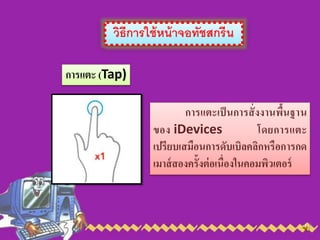
วิธีการใช้หน้าจอทัชสกรีน การแตะ (Tap) การแตะเป็นการสั่งงานพื้นฐาน ของ iDevices
โดยการแตะ เปรียบเสมือนการดับเบิลคลิกหรือการกด เมาส์สองครั้งต่อเนื่องในคอมพิวเตอร์
3.
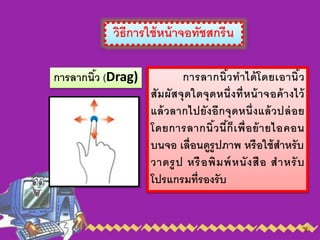
วิธีการใช้หน้าจอทัชสกรีน การลากนิ้ว (Drag) การลากนิ้วทาได้โดยเอานิ้ว สัมผัสจุดใดจุดหนึ่งที่หน้าจอค้างไว้ แล้วลากไปยังอีกจุดหนึ่งแล้วปล่อย โดยการลากนิ้วนี้ก็เพื่อย้ายไอคอน บนจอ
เลื่อนดูรูปภาพ หรือใช้สาหรับ วาดรูป หรือพิมพ์หนังสือ สาหรับ โปรแกรมที่รองรับ
4.
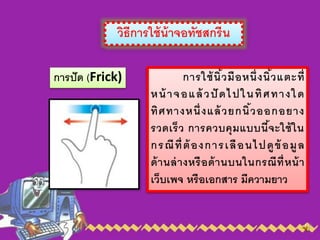
วิธีการใช้น้าจอทัชสกรีน การปัด (Frick) การใช้นิ้วมือหนึ่งนิ้วแตะที่ หน้
าจอแล้ วปั ดไปในทิศทางใด ทิศทางหนึ่งแล้วยกนิ้วออกอยาง รวดเร็ว การควบคุมแบบนี้จะใช้ใน กรณีที่ต้องการเลือนไปดูข้อมูล ด้านล่างหรือด้านบนในกรณีที่หน้า เว็บเพจ หรือเอกสาร มีความยาว
5.
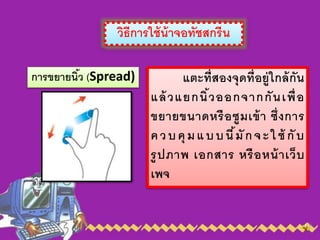
วิธีการใช้น้าจอทัชสกรีน การขยายนิ้ว (Spread) แตะที่สองจุดที่อยู่ใกล้กัน แล้วแยกนิ้วออกจากกันเพื่อ ขยายขนาดหรือซูมเข้า
ซึ่งการ ควบคุมแบบนี้มักจะใช้ กับ รูปภาพ เอกสาร หรือหน้าเว็บ เพจ
6.
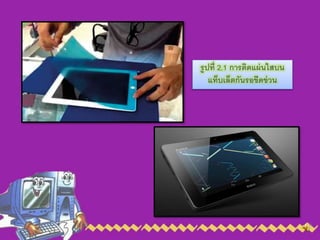
การแนะนาในการบารุงรักษาตัวเครื่อง 1) หน้าจอทัชสกรีน (Touch
Screen) จำเป็นต้อง ดูแลรักษำหน้ำจอแบบทัชสกรีน โดยกำรติดแผ่นใสกันรอยที่ผลิต ขึ้นมำสำหรับใช้กับหน้ำจอของแท็บเล็ต พีซี โดยเฉพำะเท่ำนั้น
7.
รูปที่ 2.1 การติดแผ่นใสบน แท็บเล็ตกันรอขีดข่วน
8.
การแนะนาในการบารุงรักษาตัวเครื่อง 2) การทาความสะอาดหน้าจอและตัวเครื่อง ผ้ำที่ใช้ เช็ดทำควำมสะอำดหน้ำจอ
ควรใช้ผ้ำที่ไม่มีขน เช่น ผ้ำเช็ดแว่นที่ อ่อน หรือผ้ำที่ติดมำกับตัวเครื่อง
9.
รูปที่ 2.2 ชุดทาความสะอาด แท็บเล็ต
10.
การแนะนาในการบารุงรักษาตัวเครื่อง 3) การเก็บรักษา และการพกพาตัวเครื่อง
ไม่ควรนำ เครื่องวำงไว้ ณ สถำนที่ที่มีอุณหภูมิสูง เช่น ในรถยนต์ที่จอดทิ้งไว้ กลำงแดด
11.
รูปที่ 2.3 ซองเก็บแท็บเล็ต
12.
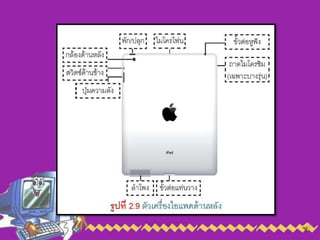
ส่วนประกอบของไอแพด (iPad)