Class Applet
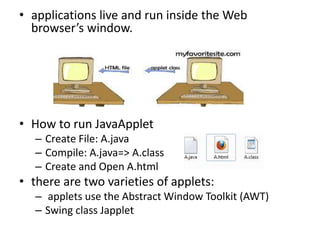
• applications live and run inside the Web
browser’s window.
• How to run JavaApplet
– Create File: A.java
– Compile: A.java=> A.class
– Create and Open A.html
• there are two varieties of applets:
– applets use the Abstract Window Toolkit (AWT)
– Swing class Japplet
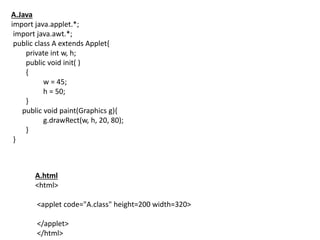
A.Java
import java.applet.*;
import java.awt.*;
public class A extends Applet{
private int w, h;
public void init( )
{
w = 45;
h = 50;
}
public void paint(Graphics g){
g.drawRect(w, h, 20, 80);
}
}
A.html
<html>
<applet code="A.class" height=200 width=320>
</applet>
</html>
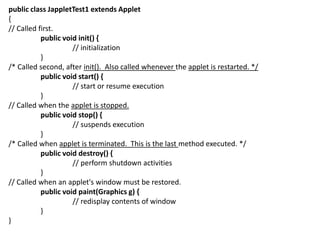
public class JappletTest1 extends Applet
{
// Called first.
public void init() {
// initialization
}
/* Called second, after init(). Also called whenever the applet is restarted. */
public void start() {
// start or resume execution
}
// Called when the applet is stopped.
public void stop() {
// suspends execution
}
/* Called when applet is terminated. This is the last method executed. */
public void destroy() {
// perform shutdown activities
}
// Called when an applet's window must be restored.
public void paint(Graphics g) {
// redisplay contents of window
}
}
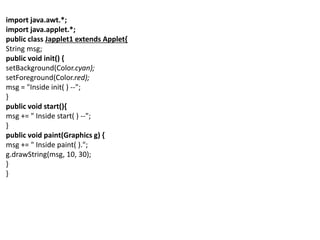
import java.awt.*;
import java.applet.*;
public class Japplet1 extends Applet{
String msg;
public void init() {
setBackground(Color.cyan);
setForeground(Color.red);
msg = "Inside init( ) --";
}
public void start(){
msg += " Inside start( ) --";
}
public void paint(Graphics g) {
msg += " Inside paint( ).";
g.drawString(msg, 10, 30);
}
}
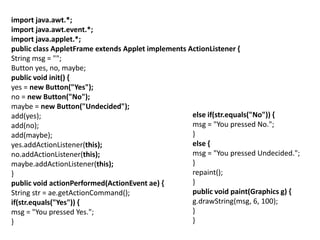
import java.awt.*;
import java.awt.event.*;
import java.applet.*;
public class AppletFrame extends Applet implements ActionListener {
String msg = "";
Button yes, no, maybe;
public void init() {
yes = new Button("Yes");
no = new Button("No");
maybe = new Button("Undecided");
add(yes);
add(no);
add(maybe);
yes.addActionListener(this);
no.addActionListener(this);
maybe.addActionListener(this);
}
public void actionPerformed(ActionEvent ae) {
String str = ae.getActionCommand();
if(str.equals("Yes")) {
msg = "You pressed Yes.";
}
else if(str.equals("No")) {
msg = "You pressed No.";
}
else {
msg = "You pressed Undecided.";
}
repaint();
}
public void paint(Graphics g) {
g.drawString(msg, 6, 100);
}
}
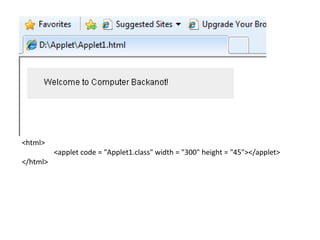
<html>
<applet code = "Applet1.class" width = "300" height = "45"></applet>
</html>
Chapter vi(class applet)

Chapter vi(class applet)

  • 1.
  • 2.
    • applications liveand run inside the Web browser’s window. • How to run JavaApplet – Create File: A.java – Compile: A.java=> A.class – Create and Open A.html • there are two varieties of applets: – applets use the Abstract Window Toolkit (AWT) – Swing class Japplet
  • 3.
    A.Java import java.applet.*; import java.awt.*; publicclass A extends Applet{ private int w, h; public void init( ) { w = 45; h = 50; } public void paint(Graphics g){ g.drawRect(w, h, 20, 80); } } A.html <html> <applet code="A.class" height=200 width=320> </applet> </html>
  • 4.
    public class JappletTest1extends Applet { // Called first. public void init() { // initialization } /* Called second, after init(). Also called whenever the applet is restarted. */ public void start() { // start or resume execution } // Called when the applet is stopped. public void stop() { // suspends execution } /* Called when applet is terminated. This is the last method executed. */ public void destroy() { // perform shutdown activities } // Called when an applet's window must be restored. public void paint(Graphics g) { // redisplay contents of window } }
  • 5.
    import java.awt.*; import java.applet.*; publicclass Japplet1 extends Applet{ String msg; public void init() { setBackground(Color.cyan); setForeground(Color.red); msg = "Inside init( ) --"; } public void start(){ msg += " Inside start( ) --"; } public void paint(Graphics g) { msg += " Inside paint( )."; g.drawString(msg, 10, 30); } }
  • 6.
    import java.awt.*; import java.awt.event.*; importjava.applet.*; public class AppletFrame extends Applet implements ActionListener { String msg = ""; Button yes, no, maybe; public void init() { yes = new Button("Yes"); no = new Button("No"); maybe = new Button("Undecided"); add(yes); add(no); add(maybe); yes.addActionListener(this); no.addActionListener(this); maybe.addActionListener(this); } public void actionPerformed(ActionEvent ae) { String str = ae.getActionCommand(); if(str.equals("Yes")) { msg = "You pressed Yes."; } else if(str.equals("No")) { msg = "You pressed No."; } else { msg = "You pressed Undecided."; } repaint(); } public void paint(Graphics g) { g.drawString(msg, 6, 100); } }
  • 7.
    <html> <applet code ="Applet1.class" width = "300" height = "45"></applet> </html>

Editor's Notes

  • #8  import java.awt.Graphics; // program uses class Graphics import javax.swing.JApplet; // program uses class JApplet public class Applet1 extends JApplet { // draw text on applet's background public void paint( Graphics g ) { // call superclass version of method paint super.paint( g ); // draw a String at x-coordinate 25 and y-coordinate 25 g.drawString( "Welcome to Computer Backanot!", 25, 25 ); } // end method paint } // end class WelcomeApplet
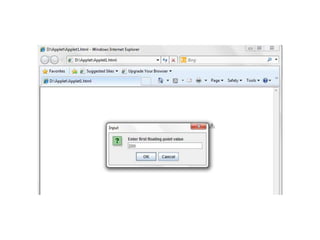
  • #9  import java.awt.Graphics; // program uses class Graphics import javax.swing.JApplet; // program uses class JApplet import javax.swing.JOptionPane; // program uses class JOptionPane public class Applet1 extends JApplet { private double sum; // sum of values entered by user // initialize applet by obtaining values from user public void init () { String firstNumber; // first string entered by user String secondNumber; // second string entered by user double number1; // first number to add double number2; // second number to add // obtain first number from user firstNumber = JOptionPane.showInputDialog("Enter first floating-point value" ); // obtain second number from user secondNumber = JOptionPane.showInputDialog( "Enter second floating-point value" ); // convert numbers from type String to type double number1 = Double.parseDouble( firstNumber ); number2 = Double.parseDouble( secondNumber ); sum = number1 + number2; // add numbers } // end method init // draw results in a rectangle on applet's background public void paint( Graphics g ) { super.paint( g ); // call superclass version of method paint // draw rectangle starting from (15, 10) that is 270 // pixels wide and 20 pixels tall g.drawRect( 15, 10, 270, 20 ); // draw results as a String at (25, 25) g.drawString( "The sum is " + sum, 25, 25 ); } // end method paint } // end class AdditionApplet
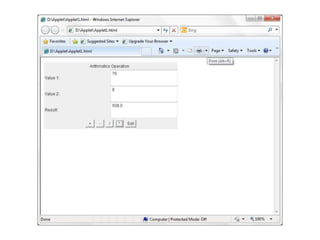
  • #10 import javax.swing.JApplet; // program uses class JApplet import java.awt.*; import java.awt.event.*; public class Applet1 extends JApplet { Button btSum,btMin,btDiv,btMult; TextField tfVal1,tfVal2,tfResult; public void init () { Frame frm = new Frame("Calculation"); Panel P1=new Panel(); P1.setLayout(new GridLayout(3,2)); P1.add(new Label("Value 1:"));P1.add(tfVal1=new TextField(20)); P1.add(new Label("Value 2:"));P1.add(tfVal2=new TextField(20)); P1.add(new Label("Result:"));P1.add(tfResult=new TextField(20)); Panel P2=new Panel(); P2.add(btSum=new Button(" + "));P2.add(btMin=new Button(" - ")); P2.add(btDiv=new Button(" / "));P2.add(btMult=new Button(" * ")); Button btEx; P2.add(btEx=new Button("Exit")); Panel P=new Panel(); P.setLayout(new BorderLayout()); P.add(new Label(" Arithmatics Operation"),BorderLayout.NORTH); P.add(P1,BorderLayout.CENTER); P.add(P2,BorderLayout.SOUTH); frm.setSize(200,100); add(P); btSum.addActionListener( new ActionListener(){ public void actionPerformed(ActionEvent e) { tfResult.setText((Float.parseFloat(tfVal1.getText())+Float.parseFloat(tfVal2.getText()))+ ""); } }); btMult.addActionListener( new ActionListener(){ public void actionPerformed(ActionEvent e) { tfResult.setText((Float.parseFloat(tfVal1.getText())*Float.parseFloat(tfVal2.getText()))+ ""); } }); btDiv.addActionListener( new ActionListener(){ public void actionPerformed(ActionEvent e) { tfResult.setText((Float.parseFloat(tfVal1.getText())/Float.parseFloat(tfVal2.getText()))+ ""); } }); btMin.addActionListener( new ActionListener(){ public void actionPerformed(ActionEvent e) { tfResult.setText((Float.parseFloat(tfVal1.getText())-Float.parseFloat(tfVal2.getText()))+ ""); } }); btEx.addActionListener( new ActionListener(){ public void actionPerformed(ActionEvent e) { System.exit(0); } }); } // end method init } // end class AdditionApplet
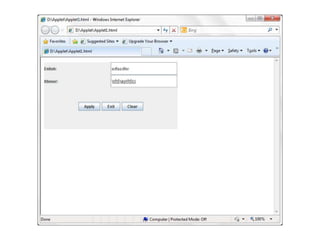
  • #11  import javax.swing.*; import javax.swing.JOptionPane; // program uses class JOptionPane import java.awt.*; import java.awt.event.ActionEvent; import java.awt.event.ActionListener; public class Applet1 extends JApplet { JTextField jTfEn,jTfKh; JButton jBapply,jBexit,jBclear; public void init () { setSize(300, 200); JPanel jp1=new JPanel(); jp1.setLayout(new GridLayout(3,3)); JLabel jlEn=new JLabel("Enlish:");jp1.add(jlEn);jTfEn=new JTextField(20);jp1.add(jTfEn); Font font = new Font("Limon S1", Font.PLAIN, 30); JLabel jlKh=new JLabel("Khmer:");jp1.add(jlKh);jTfKh=new JTextField(20);jp1.add(jTfKh); jTfKh.setFont(font); JPanel jp2=new JPanel(); jp2.setLayout(new FlowLayout()); jBapply=new JButton("Apply");jp2.add(jBapply);jBexit=new JButton("Exit");jp2.add(jBexit); jBclear=new JButton("Clear");jp2.add(jBclear); JPanel jp=new JPanel(); jp.setLayout(new BorderLayout()); jp.add(jp1,BorderLayout.NORTH); jp.add(jp2,BorderLayout.CENTER); jBapply.addActionListener(new ActionListener(){ public void actionPerformed(ActionEvent e) { if(jTfEn.getText().equals("")) { JOptionPane.showMessageDialog(null,"Please, Enter English word bat!"); } else jTfKh.setText(jTfEn.getText()); } }); jBexit.addActionListener(new ActionListener() { public void actionPerformed(ActionEvent arg0) { System.exit(0); } }); jBclear.addActionListener(new ActionListener() { public void actionPerformed(ActionEvent arg0) { jTfKh.setText(""); jTfEn.setText(""); } }); add(jp); } // end method init } // end class AdditionApplet