Introduction to Computer System and
Hardware
• Computer: It is an electronic device
which processes given data to derive the
required and useful information. During
the processing the computer has to
perform various functions like:
I. Accepting Instructions & data from the
user.
II.Performing various arithmetic and Logical
operations as per Instructions given.
III.Presenting the Information or Output to
the user.
Introduction to Computer System and
Hardware
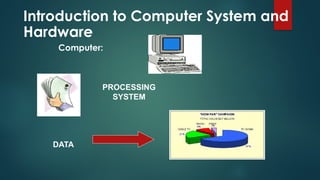
Computer:
PROCESSING
SYSTEM
DATA
Introduction to Computer System and
Hardware
• Characteristics of a Computer Some
of the Characteristics which make
computer indispensable are :
1.Speed
2.Accuracy
3.Reliable
4.Storage Capacity
Introduction to
Computer System and
Hardware
Limitation of Computer:
1.Computer does not work on itself,
2.Computer are not intelligent,
3.Computers cannot take decisions on
its own.
Introduction to
Computer System and
Hardware
According to Size and Capacity:
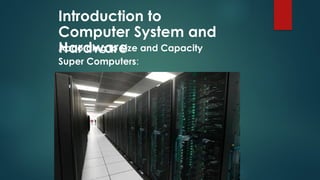
1.Super Computers: These computers
are characterised as being the fastest,
with very high processing speed, very
large size, most powerful.
Introduction to
Computer System and
Hardware
According to Size and Capacity
Super Computers:
Introduction to
Computer System and
Hardware
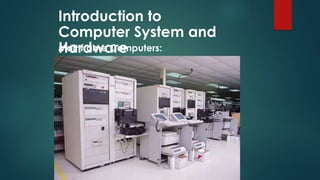
2 Mainframe Computers:
These Computers have the capability
to support many peripheral devices
and terminals, which can process
several Million Instructions / second
(MIPS.
Introduction to
Computer System and
Hardware
Mainframe Computers:
Introduction to
Computer System and
Hardware
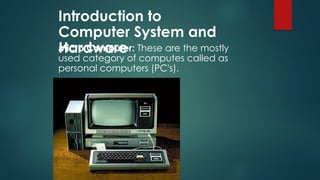
Micro Computer: These are the mostly
used category of computes called as
personal computers (PC's).
Introduction to
Computer System and
Hardware
Structure of Computers
A Computer System contain:
• Hardware
• Software
Introduction to
Computer System and
Hardware
Structure of Computers
Hardware:
Computer hardware is the collection of
various physical components of the
computer, like the computer itself, the
input-output devices.
Introduction to
Computer System and
Hardware
Structure of Computers
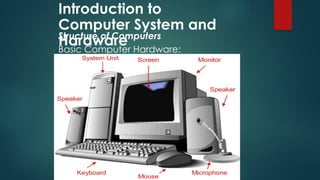
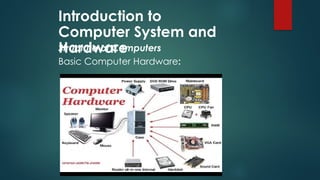
The major hardware components of a
computer system are:
• Processor
• Main memory
• Secondary memory (i.e. Hard disk drive)
• Input devices
• Output devices
Introduction to
Computer System and
Hardware
Structure of Computers
Basic Computer Hardware:
Introduction to
Computer System and
Hardware
Structure of Computers
Basic Computer Hardware:
Introduction to
Computer System and
Hardware
Input and Output Devices
Input and output devices allow the
computer system to interact with the
outside world by moving data into and
out of the system.
Introduction to
Computer System and
Hardware
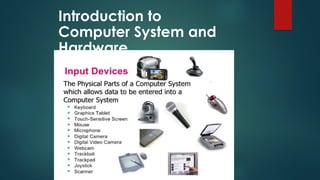
Input Devices
An input device is used to bring data
into the system. Some input devices
are:
• Keyboard
• Mouse
• Microphone
• Bar code reader
• Graphics tablet
Introduction to
Computer System and
Hardware
Introduction to
Computer System and
Hardware
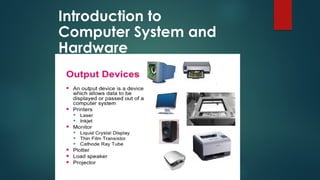
Output Devices
An output device is used to send data
out of the system. Some output devices
are:
• Monitor
• Printer
• Speaker
Introduction to
Computer System and
Hardware
Introduction to
Computer System and
Hardware
Software: Software is set of instructions
usually termed as programs which are
required for processing activities of the
computer.
Introduction to
Computer System and
Hardware
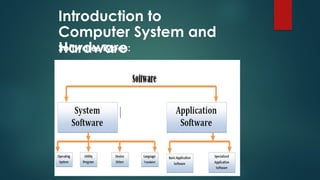
Software: Types:
Introduction to
Computer System and
Hardware
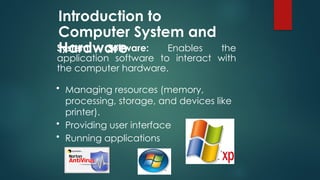
System Software: Enables the
application software to interact with
the computer hardware.
• Managing resources (memory,
processing, storage, and devices like
printer).
• Providing user interface
• Running applications
Introduction to
Computer System and
Hardware
Application Software: Provides the real
functionality of a computer. It help you
use your computer to do specific types of
work.
 Basic Applications, widely used in all
career areas.
 Specialized Applications, more
narrowly focused on specific
disciplines and occupations.
Introduction to
Computer System and
Hardware
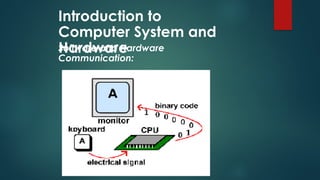
Software and Hardware Communication:
• Modern computer hardware and software
systems commonly use a binary number
system to communicate.
• The binary numeral system also known as
base-2 number system represents numeric
values using two symbols: 0 and 1
Introduction to
Computer System and
Hardware
Software and Hardware
Communication:
Introduction to Computer System and Hardware
Basic Units of Measurements:
Bit
A Bit is the basic unit in computer
information and has only two different
values, normally defined as a 0 or 1. These
values can be
on or off, yes or no, true or false, etc. It just
depends on the binary code.
Introduction to Computer System and Hardware
Basic Units of Measurements:
Byte
A Byte is just 8 Bits and is the smallest
unit of memory that can be addressed
in many computer systems.
Introduction to Computer System and Hardware
Basic Units of Measurements:
A byte can be used to represent a single
character, which can be:
• A letter
• A number
• A special character or symbol, or
• A space
Introduction to Computer System and Hardware
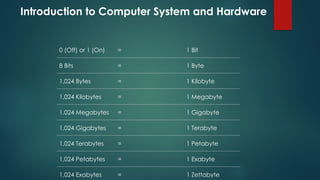
0 (Off) or 1 (On) = 1 Bit
8 Bits = 1 Byte
1,024 Bytes = 1 Kilobyte
1,024 Kilobytes = 1 Megabyte
1,024 Megabytes = 1 Gigabyte
1,024 Gigabytes = 1 Terabyte
1,024 Terabytes = 1 Petabyte
1,024 Petabytes = 1 Exabyte
1,024 Exabytes = 1 Zettabyte
Introduction to Computer System and Hardware
Integrated I/O ports
• Many of the standard I/O controllers for
peripherals are integrated in the
motherboard.
• Their connectors are accessible from the rear
of the computer case and are used to
connect I/O devices.
Introduction to Computer System and Hardware
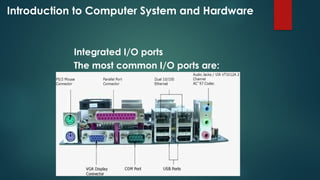
Integrated I/O ports
The most common I/O ports are:

chapter two plus.pptxfctffffffffffffffffffffffffffffft

  • 1.
    Introduction to ComputerSystem and Hardware • Computer: It is an electronic device which processes given data to derive the required and useful information. During the processing the computer has to perform various functions like: I. Accepting Instructions & data from the user. II.Performing various arithmetic and Logical operations as per Instructions given. III.Presenting the Information or Output to the user.
  • 2.
    Introduction to ComputerSystem and Hardware Computer: PROCESSING SYSTEM DATA
  • 3.
    Introduction to ComputerSystem and Hardware • Characteristics of a Computer Some of the Characteristics which make computer indispensable are : 1.Speed 2.Accuracy 3.Reliable 4.Storage Capacity
  • 4.
    Introduction to Computer Systemand Hardware Limitation of Computer: 1.Computer does not work on itself, 2.Computer are not intelligent, 3.Computers cannot take decisions on its own.
  • 5.
    Introduction to Computer Systemand Hardware According to Size and Capacity: 1.Super Computers: These computers are characterised as being the fastest, with very high processing speed, very large size, most powerful.
  • 6.
    Introduction to Computer Systemand Hardware According to Size and Capacity Super Computers:
  • 7.
    Introduction to Computer Systemand Hardware 2 Mainframe Computers: These Computers have the capability to support many peripheral devices and terminals, which can process several Million Instructions / second (MIPS.
  • 8.
    Introduction to Computer Systemand Hardware Mainframe Computers:
  • 9.
    Introduction to Computer Systemand Hardware Micro Computer: These are the mostly used category of computes called as personal computers (PC's).
  • 10.
    Introduction to Computer Systemand Hardware Structure of Computers A Computer System contain: • Hardware • Software
  • 11.
    Introduction to Computer Systemand Hardware Structure of Computers Hardware: Computer hardware is the collection of various physical components of the computer, like the computer itself, the input-output devices.
  • 12.
    Introduction to Computer Systemand Hardware Structure of Computers The major hardware components of a computer system are: • Processor • Main memory • Secondary memory (i.e. Hard disk drive) • Input devices • Output devices
  • 13.
    Introduction to Computer Systemand Hardware Structure of Computers Basic Computer Hardware:
  • 14.
    Introduction to Computer Systemand Hardware Structure of Computers Basic Computer Hardware:
  • 15.
    Introduction to Computer Systemand Hardware Input and Output Devices Input and output devices allow the computer system to interact with the outside world by moving data into and out of the system.
  • 16.
    Introduction to Computer Systemand Hardware Input Devices An input device is used to bring data into the system. Some input devices are: • Keyboard • Mouse • Microphone • Bar code reader • Graphics tablet
  • 17.
  • 18.
    Introduction to Computer Systemand Hardware Output Devices An output device is used to send data out of the system. Some output devices are: • Monitor • Printer • Speaker
  • 19.
  • 20.
    Introduction to Computer Systemand Hardware Software: Software is set of instructions usually termed as programs which are required for processing activities of the computer.
  • 21.
    Introduction to Computer Systemand Hardware Software: Types:
  • 22.
    Introduction to Computer Systemand Hardware System Software: Enables the application software to interact with the computer hardware. • Managing resources (memory, processing, storage, and devices like printer). • Providing user interface • Running applications
  • 23.
    Introduction to Computer Systemand Hardware Application Software: Provides the real functionality of a computer. It help you use your computer to do specific types of work.  Basic Applications, widely used in all career areas.  Specialized Applications, more narrowly focused on specific disciplines and occupations.
  • 24.
    Introduction to Computer Systemand Hardware Software and Hardware Communication: • Modern computer hardware and software systems commonly use a binary number system to communicate. • The binary numeral system also known as base-2 number system represents numeric values using two symbols: 0 and 1
  • 25.
    Introduction to Computer Systemand Hardware Software and Hardware Communication:
  • 26.
    Introduction to ComputerSystem and Hardware Basic Units of Measurements: Bit A Bit is the basic unit in computer information and has only two different values, normally defined as a 0 or 1. These values can be on or off, yes or no, true or false, etc. It just depends on the binary code.
  • 27.
    Introduction to ComputerSystem and Hardware Basic Units of Measurements: Byte A Byte is just 8 Bits and is the smallest unit of memory that can be addressed in many computer systems.
  • 28.
    Introduction to ComputerSystem and Hardware Basic Units of Measurements: A byte can be used to represent a single character, which can be: • A letter • A number • A special character or symbol, or • A space
  • 29.
    Introduction to ComputerSystem and Hardware 0 (Off) or 1 (On) = 1 Bit 8 Bits = 1 Byte 1,024 Bytes = 1 Kilobyte 1,024 Kilobytes = 1 Megabyte 1,024 Megabytes = 1 Gigabyte 1,024 Gigabytes = 1 Terabyte 1,024 Terabytes = 1 Petabyte 1,024 Petabytes = 1 Exabyte 1,024 Exabytes = 1 Zettabyte
  • 30.
    Introduction to ComputerSystem and Hardware Integrated I/O ports • Many of the standard I/O controllers for peripherals are integrated in the motherboard. • Their connectors are accessible from the rear of the computer case and are used to connect I/O devices.
  • 31.
    Introduction to ComputerSystem and Hardware Integrated I/O ports The most common I/O ports are: