• Understanding Validation
• Validation Controls
• BaseValidator Class Properties
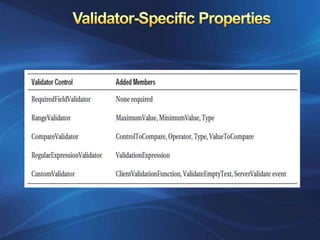
• Validator Specific Properties
• Validating with Regular Expressions
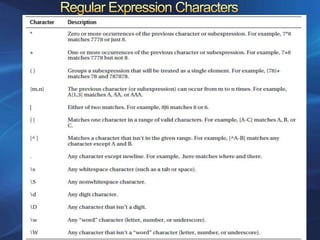
• Regular Expression Characters
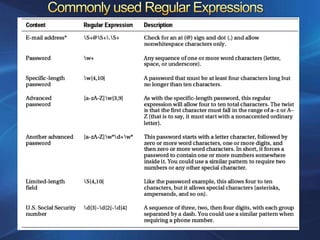
• Commonly used Regular Expressions
• Validation Summary Control
• Manual Validation
• Validation Groups
Validation means ensuring that the data inserted into an
application satisfies defined formats and other input criteria.


Some possible mistakes a user can make:
• Users might ignore an important field and leave it blank.
• Users might try to type a short string of nonsense to
  circumvent a required field check.
• Enter a nonnumeric character in a number field.
• Malicious users might try to exploit a weakness in your
  code by entering carefully structured wrong values
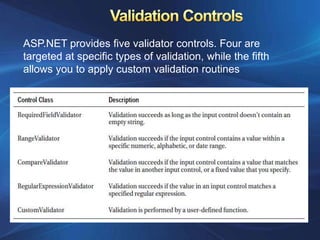
ASP.NET provides five validator controls. Four are
targeted at specific types of validation, while the fifth
allows you to apply custom validation routines
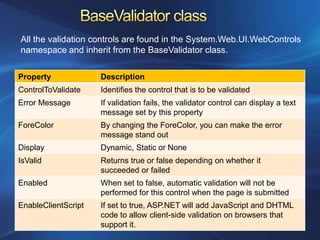
All the validation controls are found in the System.Web.UI.WebControls
namespace and inherit from the BaseValidator class.

Property             Description
ControlToValidate    Identifies the control that is to be validated
Error Message        If validation fails, the validator control can display a text
                     message set by this property
ForeColor            By changing the ForeColor, you can make the error
                     message stand out
Display              Dynamic, Static or None
IsValid              Returns true or false depending on whether it
                     succeeded or failed
Enabled              When set to false, automatic validation will not be
                     performed for this control when the page is submitted
EnableClientScript   If set to true, ASP.NET will add JavaScript and DHTML
                     code to allow client-side validation on browsers that
                     support it.
One of ASP.NET’s most powerful validation controls is the
RegularExpressionValidator, which validates text by determining
whether it matches a specific pattern.

333sddd
s represents any whitespace character (such as a space or tab). d
represents any digit

You can use the plus (+) sign to represent a repeated character. For
example, 5+7 means “one or more occurrences of the character 5,
followed by a single 7.” The number 57 would match, as would
555557

The following expression would match any word that starts with a
letter from a to f, contains one or more “word” characters (letters),
and ends with ing—possible matches include acting and developing.
[a-f]w+ing
In some modern browsers, ASP.NET automatically
adds JavaScript code for client-side validation. In this
case, when the user clicks a CausesValidation button,
the same error messages will appear without the page
needing to be submitted and returned from the server.
This increases the responsiveness of your web page.

However, even if the page validates successfully on
the client side, ASP.NET still revalidates it when it’s
received at the server.
What happens when the user clicks a button :

• If CausesValidation is false, ASP.NET will ignore the
validation controls, the page will be posted back, and
your event handling code will run normally.

• If CausesValidation is true (the default), ASP.NET will
automatically validate the page when the user clicks
the button. It does this by performing the validation for
each control on the page. If any control fails to
validate, ASP.NET will return the page with some error
information. Your click event handling code may or
may not be executed.
Use IsValid property in a conditional logic and write
event handling code inside it.
Accommodates all the error messages from all the
validation controls at a suitable location normally at the
bottom of the page.

Error messages from all the validators are hided by
setting their Display property to None.

When you run the page, you won’t see any dynamic
messages as you enter invalid information and
tab to a new field. However, when you click the OK
button, the ValidationSummary will appear with a list
of all error messages.

It automatically retrieves the value of the ErrorMessage
property from each validator
In some cases, you’ll want to display a full message in
the summary and some sort of visual indicator next to
the offending control

You can use this technique with the help of the Text
property of the validators. Ordinarily, Text is left empty,
and the validator doesn’t show any content in the web
page. However, if you set both Text and ErrorMessage,
the ErrorMessage value will be used for the summary
while the Text value is displayed in the validator.

Of course, you’ll need to make sure you aren’t also
setting the Display property of your validator to None.
Manual validation is when you disable validation and perform
the work on your own. This allows you to create a specialized
error message of your own.
You can create manual validation in one of three ways:

I.    Use your own code to verify values. In this case, you
      won’t use any of the ASP.NET validation controls.

II.   Disable the EnableClientScript property for each
      validation control. This allows an invalid page to be
      submitted, after which you can decide what to do with
      itdepending on the problems that may exist.

III. Add a button with CausesValidation set to false. When
     this button is clicked, manually validate the page by
     calling the Page.Validate() method. Then examine the
     IsValid property, and decide what to do.
Every control that provides a CausesValidation property
also includes the ValidationGroup property.

In some situations you might have several distinct groups of
controls, possibly in separate panels and you may want to
perform validations separately.

To create a validation group, you need to set the
ValidationGroup property of every control in the same
logical group with the same descriptive string.

Chapter 9

  • 1.
    • Understanding Validation •Validation Controls • BaseValidator Class Properties • Validator Specific Properties • Validating with Regular Expressions • Regular Expression Characters • Commonly used Regular Expressions • Validation Summary Control • Manual Validation • Validation Groups
  • 2.
    Validation means ensuringthat the data inserted into an application satisfies defined formats and other input criteria. Some possible mistakes a user can make: • Users might ignore an important field and leave it blank. • Users might try to type a short string of nonsense to circumvent a required field check. • Enter a nonnumeric character in a number field. • Malicious users might try to exploit a weakness in your code by entering carefully structured wrong values
  • 3.
    ASP.NET provides fivevalidator controls. Four are targeted at specific types of validation, while the fifth allows you to apply custom validation routines
  • 4.
    All the validationcontrols are found in the System.Web.UI.WebControls namespace and inherit from the BaseValidator class. Property Description ControlToValidate Identifies the control that is to be validated Error Message If validation fails, the validator control can display a text message set by this property ForeColor By changing the ForeColor, you can make the error message stand out Display Dynamic, Static or None IsValid Returns true or false depending on whether it succeeded or failed Enabled When set to false, automatic validation will not be performed for this control when the page is submitted EnableClientScript If set to true, ASP.NET will add JavaScript and DHTML code to allow client-side validation on browsers that support it.
  • 6.
    One of ASP.NET’smost powerful validation controls is the RegularExpressionValidator, which validates text by determining whether it matches a specific pattern. 333sddd s represents any whitespace character (such as a space or tab). d represents any digit You can use the plus (+) sign to represent a repeated character. For example, 5+7 means “one or more occurrences of the character 5, followed by a single 7.” The number 57 would match, as would 555557 The following expression would match any word that starts with a letter from a to f, contains one or more “word” characters (letters), and ends with ing—possible matches include acting and developing. [a-f]w+ing
  • 9.
    In some modernbrowsers, ASP.NET automatically adds JavaScript code for client-side validation. In this case, when the user clicks a CausesValidation button, the same error messages will appear without the page needing to be submitted and returned from the server. This increases the responsiveness of your web page. However, even if the page validates successfully on the client side, ASP.NET still revalidates it when it’s received at the server.
  • 10.
    What happens whenthe user clicks a button : • If CausesValidation is false, ASP.NET will ignore the validation controls, the page will be posted back, and your event handling code will run normally. • If CausesValidation is true (the default), ASP.NET will automatically validate the page when the user clicks the button. It does this by performing the validation for each control on the page. If any control fails to validate, ASP.NET will return the page with some error information. Your click event handling code may or may not be executed. Use IsValid property in a conditional logic and write event handling code inside it.
  • 11.
    Accommodates all theerror messages from all the validation controls at a suitable location normally at the bottom of the page. Error messages from all the validators are hided by setting their Display property to None. When you run the page, you won’t see any dynamic messages as you enter invalid information and tab to a new field. However, when you click the OK button, the ValidationSummary will appear with a list of all error messages. It automatically retrieves the value of the ErrorMessage property from each validator
  • 12.
    In some cases,you’ll want to display a full message in the summary and some sort of visual indicator next to the offending control You can use this technique with the help of the Text property of the validators. Ordinarily, Text is left empty, and the validator doesn’t show any content in the web page. However, if you set both Text and ErrorMessage, the ErrorMessage value will be used for the summary while the Text value is displayed in the validator. Of course, you’ll need to make sure you aren’t also setting the Display property of your validator to None.
  • 13.
    Manual validation iswhen you disable validation and perform the work on your own. This allows you to create a specialized error message of your own. You can create manual validation in one of three ways: I. Use your own code to verify values. In this case, you won’t use any of the ASP.NET validation controls. II. Disable the EnableClientScript property for each validation control. This allows an invalid page to be submitted, after which you can decide what to do with itdepending on the problems that may exist. III. Add a button with CausesValidation set to false. When this button is clicked, manually validate the page by calling the Page.Validate() method. Then examine the IsValid property, and decide what to do.
  • 14.
    Every control thatprovides a CausesValidation property also includes the ValidationGroup property. In some situations you might have several distinct groups of controls, possibly in separate panels and you may want to perform validations separately. To create a validation group, you need to set the ValidationGroup property of every control in the same logical group with the same descriptive string.