© 2016 Cengage Learning®. May not be scanned, copied or
duplicated, or posted to a publicly accessible website, in whole
or in part.
Introduction to Programming in C++
Eighth Edition
Chapter 5:
The Selection Structure
© 2016 Cengage Learning®. May not be scanned, copied or
duplicated, or posted to a publicly accessible website, in whole
or in part.
• Include the selection structure in pseudocode and in a
flowchart
• Code a selection structure using the if statement
• Include comparison operators in a selection structure’s
condition
• Include logical operators in a selection structure’s
condition
• Temporarily convert a character to either uppercase or
lowercase
• Format numeric output
Objectives
An Introduction to Programming with C++, Eighth Edition 2
© 2016 Cengage Learning®. May not be scanned, copied or
duplicated, or posted to a publicly accessible website, in whole
or in part.
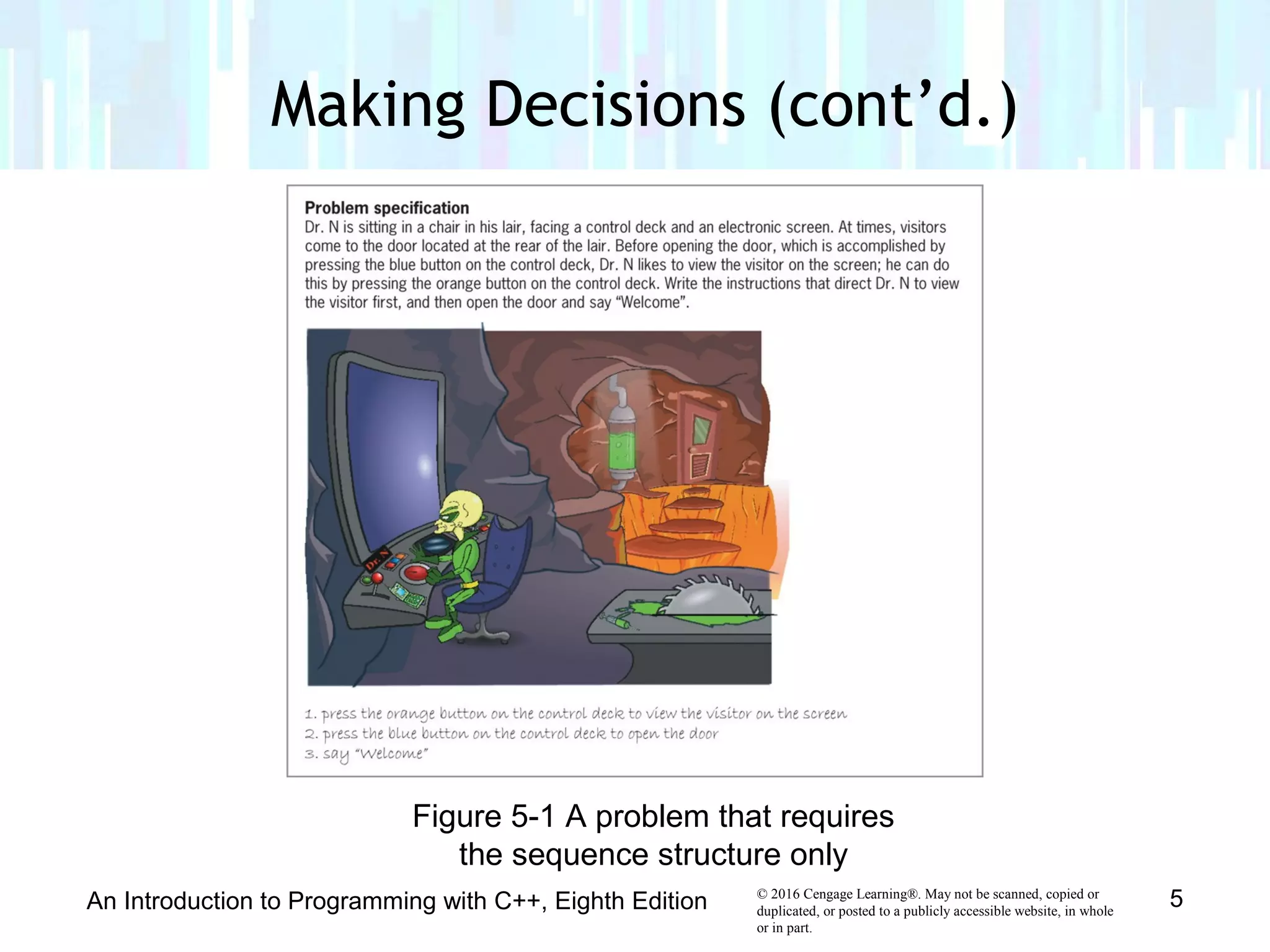
• With only the sequence structure, all instructions are
executed in order
• A selection structure is needed when a decision must
be made (based on some condition) before selecting an
instruction to execute
• A selection structure’s condition must be phrased as a
Boolean expression (evaluates to true or false)
Making Decisions
An Introduction to Programming with C++, Eighth Edition 3
© 2016 Cengage Learning®. May not be scanned, copied or
duplicated, or posted to a publicly accessible website, in whole
or in part.
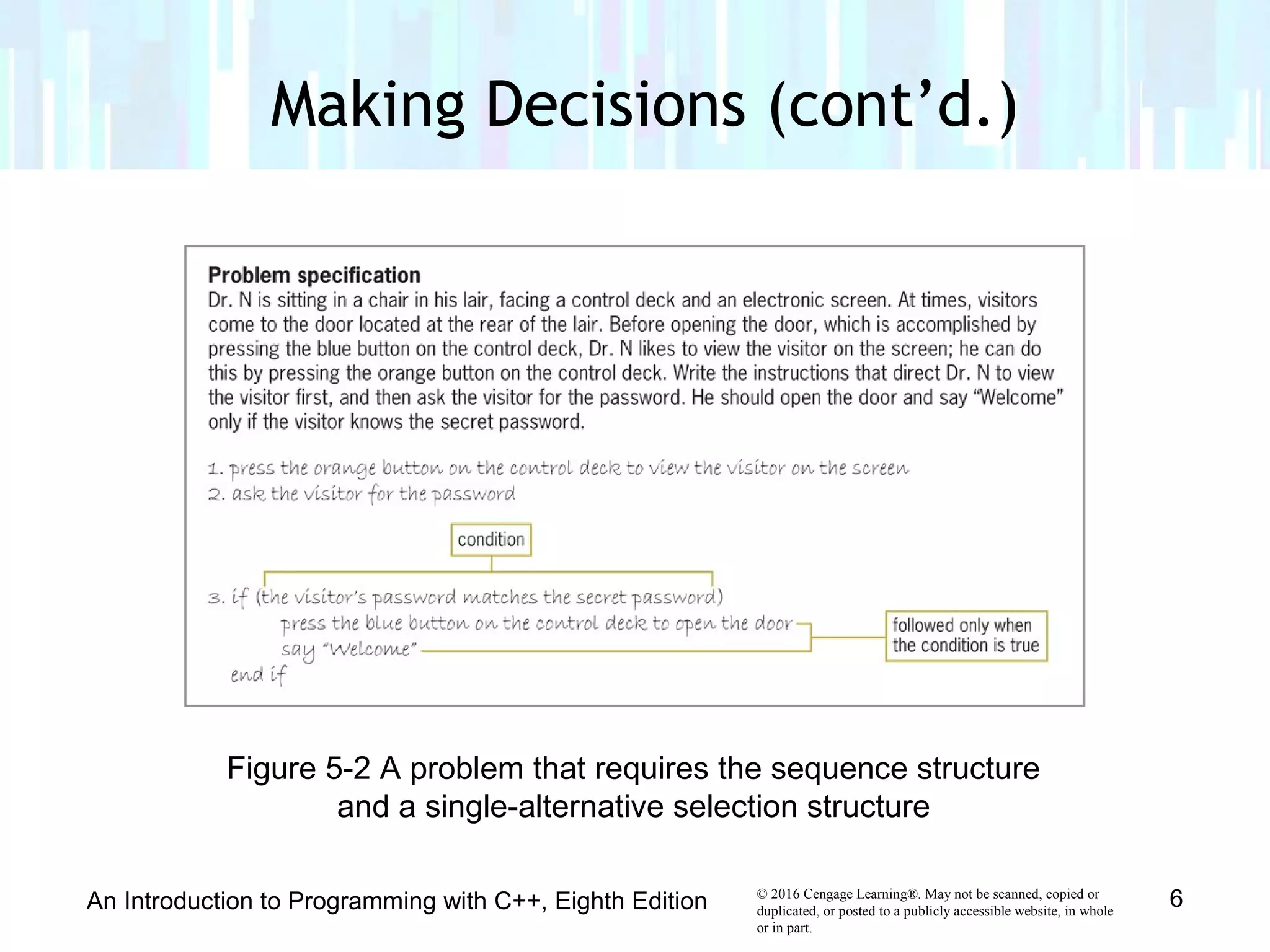
• Single-alternative selection structure
– Set of instructions is executed only if condition evaluates to
true
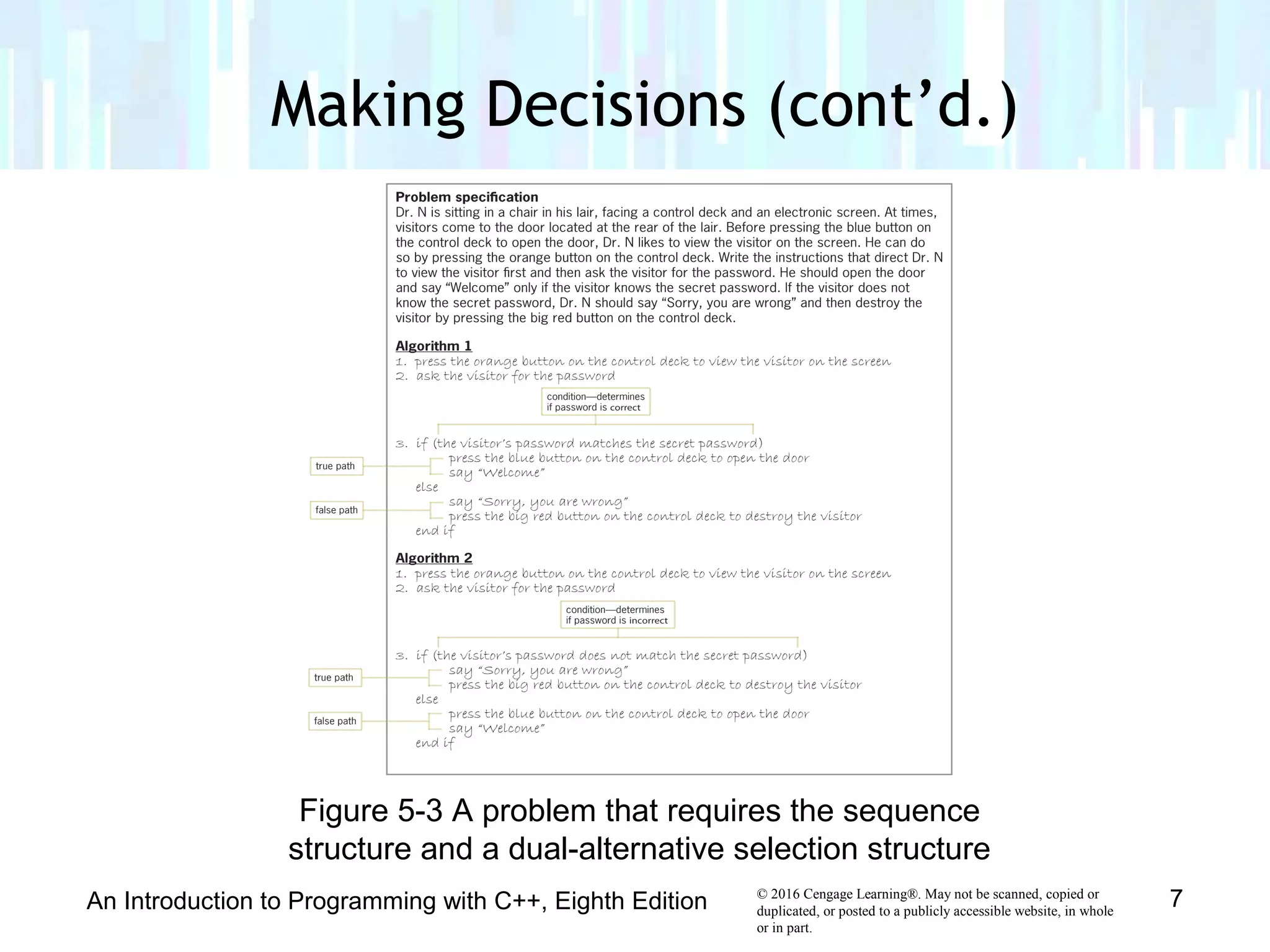
• Dual-alternative selection structure
– Executes different sets of instructions based on whether
condition evaluates to true or false
• True path
– Instructions followed when condition evaluates to true
• False path
– Instructions followed when condition evaluates to false
Making Decisions (cont’d.)
An Introduction to Programming with C++, Eighth Edition 4
© 2016 Cengage Learning®. May not be scanned, copied or
duplicated, or posted to a publicly accessible website, in whole
or in part.
Making Decisions (cont’d.)
An Introduction to Programming with C++, Eighth Edition 5
Figure 5-1 A problem that requires
the sequence structure only
© 2016 Cengage Learning®. May not be scanned, copied or
duplicated, or posted to a publicly accessible website, in whole
or in part.
Making Decisions (cont’d.)
An Introduction to Programming with C++, Eighth Edition 6
Figure 5-2 A problem that requires the sequence structure
and a single-alternative selection structure
© 2016 Cengage Learning®. May not be scanned, copied or
duplicated, or posted to a publicly accessible website, in whole
or in part.
Making Decisions (cont’d.)
An Introduction to Programming with C++, Eighth Edition 7
Figure 5-3 A problem that requires the sequence
structure and a dual-alternative selection structure
© 2016 Cengage Learning®. May not be scanned, copied or
duplicated, or posted to a publicly accessible website, in whole
or in part.
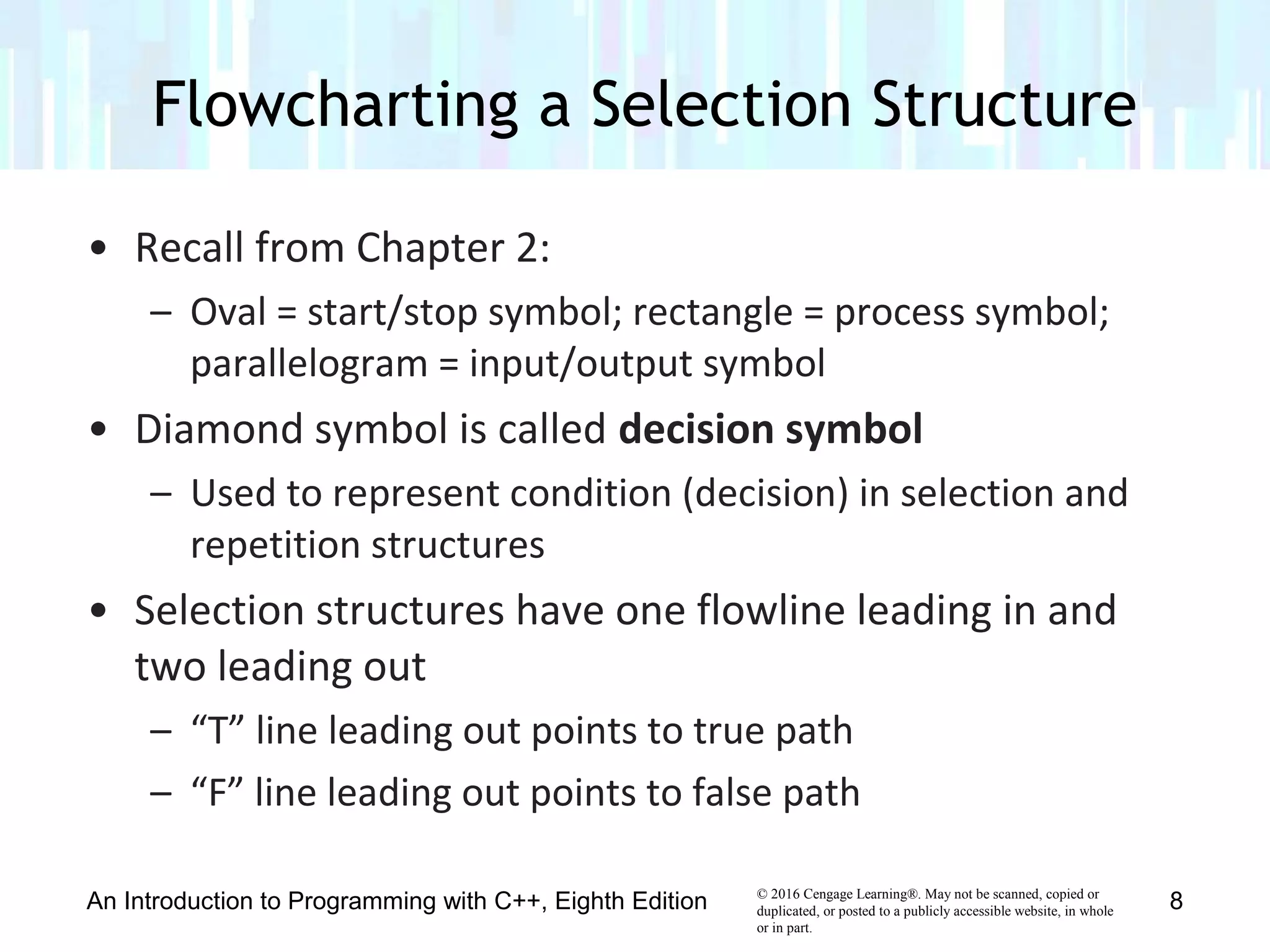
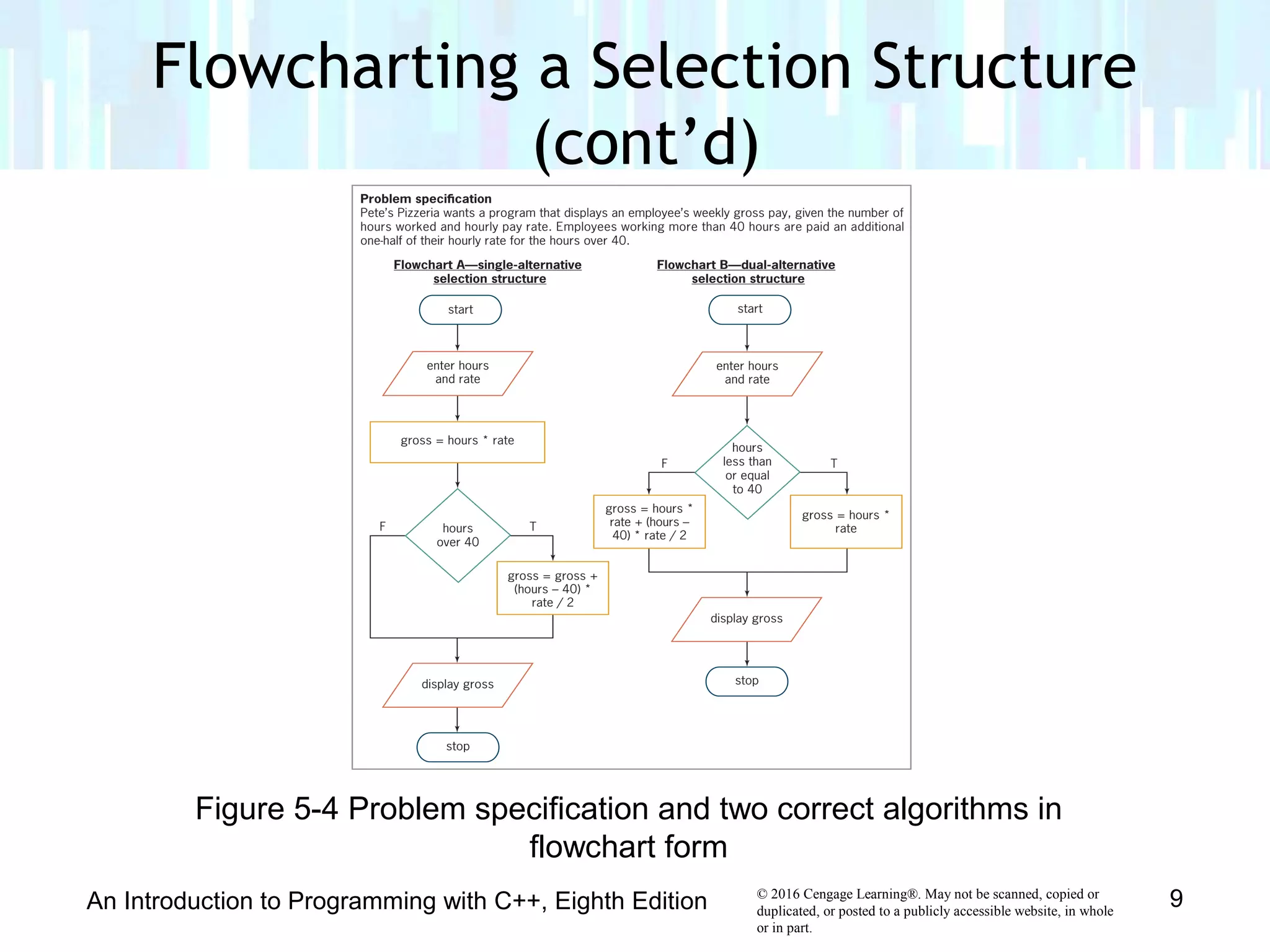
• Recall from Chapter 2:
– Oval = start/stop symbol; rectangle = process symbol;
parallelogram = input/output symbol
• Diamond symbol is called decision symbol
– Used to represent condition (decision) in selection and
repetition structures
• Selection structures have one flowline leading in and
two leading out
– “T” line leading out points to true path
– “F” line leading out points to false path
Flowcharting a Selection Structure
An Introduction to Programming with C++, Eighth Edition 8
© 2016 Cengage Learning®. May not be scanned, copied or
duplicated, or posted to a publicly accessible website, in whole
or in part.
Flowcharting a Selection Structure
(cont’d)
An Introduction to Programming with C++, Eighth Edition 9
Figure 5-4 Problem specification and two correct algorithms in
flowchart form
© 2016 Cengage Learning®. May not be scanned, copied or
duplicated, or posted to a publicly accessible website, in whole
or in part.
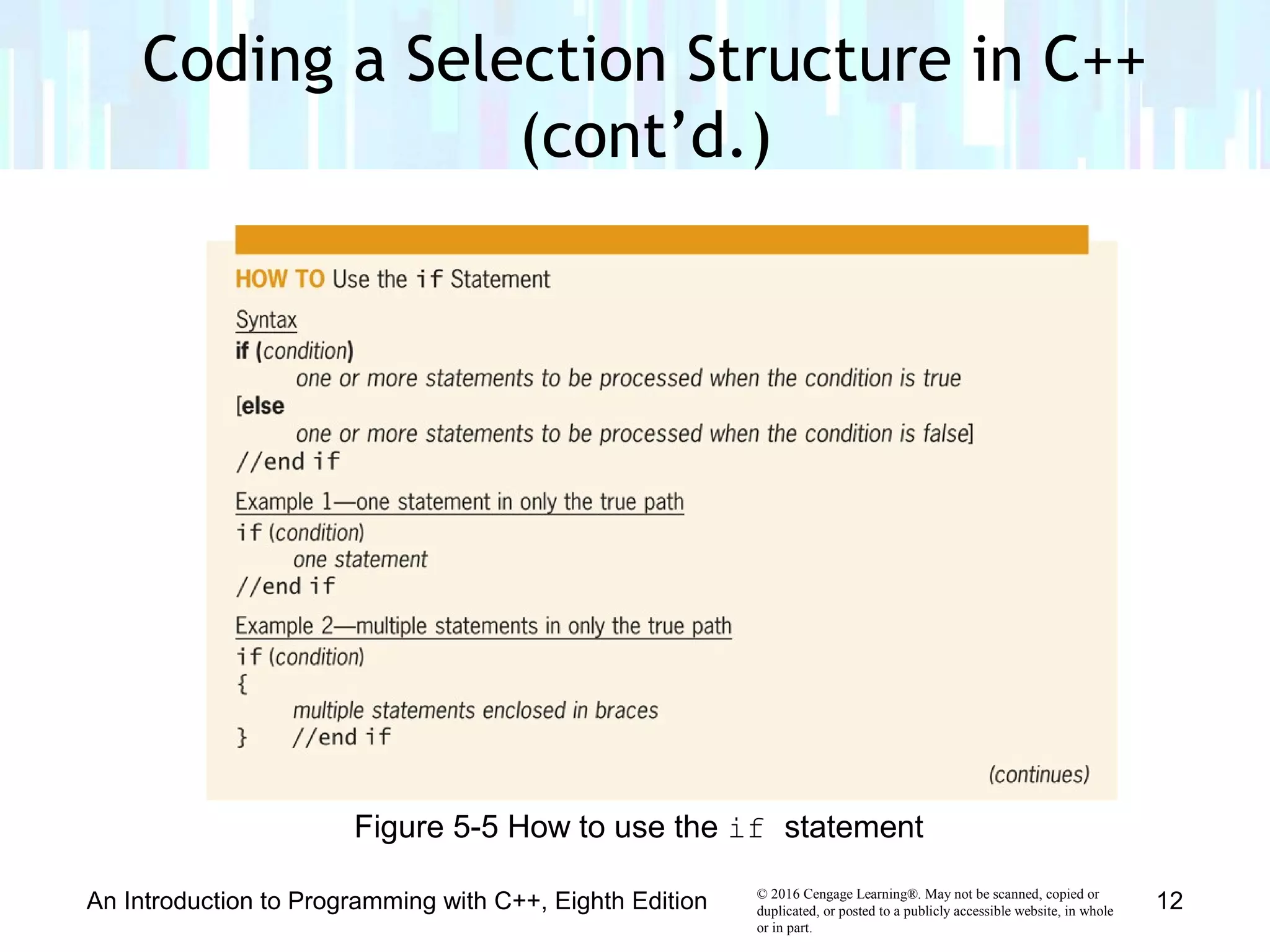
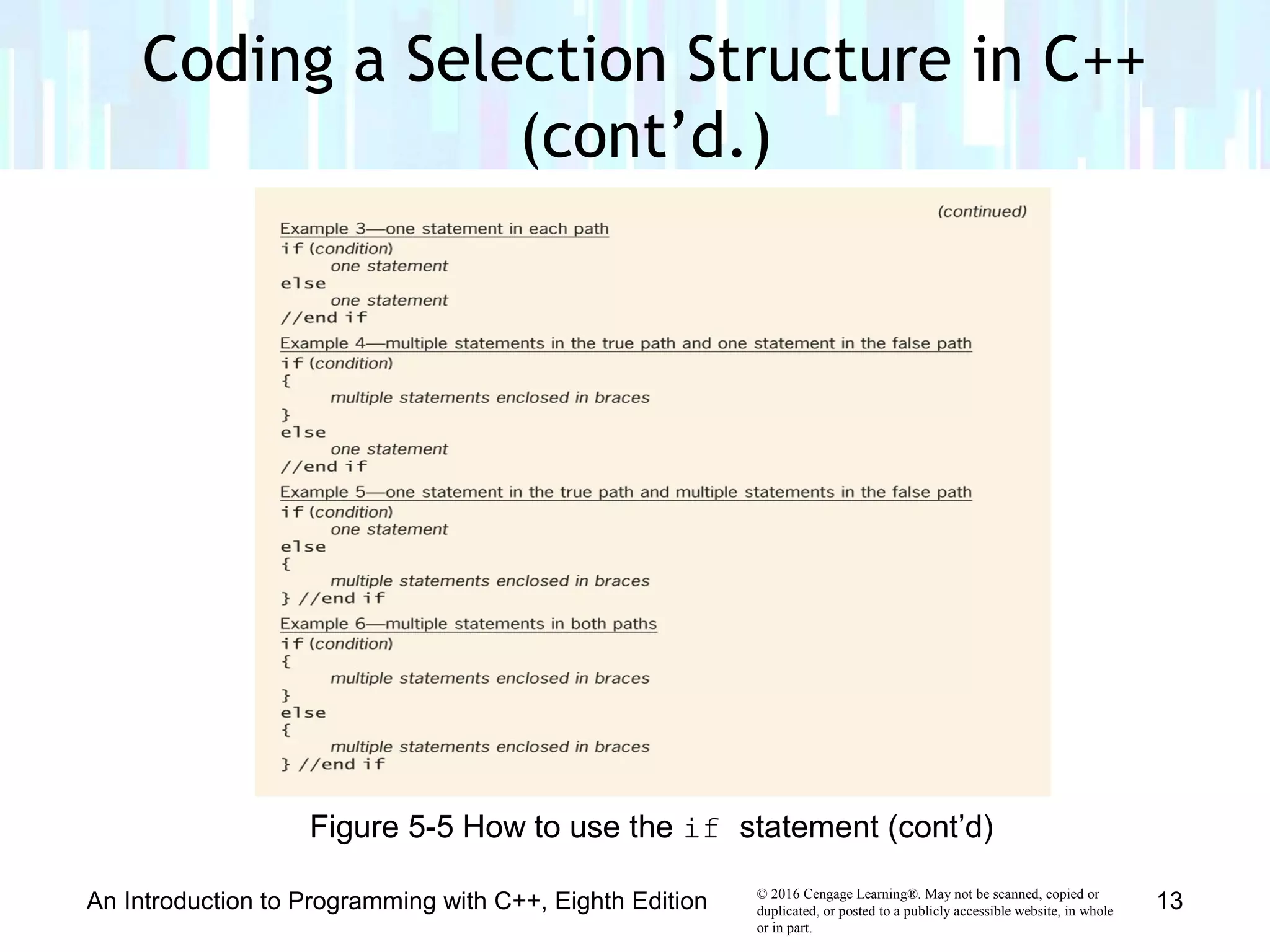
• The if (and else) statement is used to code most
selection structures in C++
• Syntax
if (condition)
one or more statements (true path)
[else
one or more statements (false path)]
• Keyword if and condition are required
• Portion in brackets (else clause) is optional
– Only used for dual-alternative selection structures
Coding a Selection Structure in C++
An Introduction to Programming with C++, Eighth Edition 10
© 2016 Cengage Learning®. May not be scanned, copied or
duplicated, or posted to a publicly accessible website, in whole
or in part.
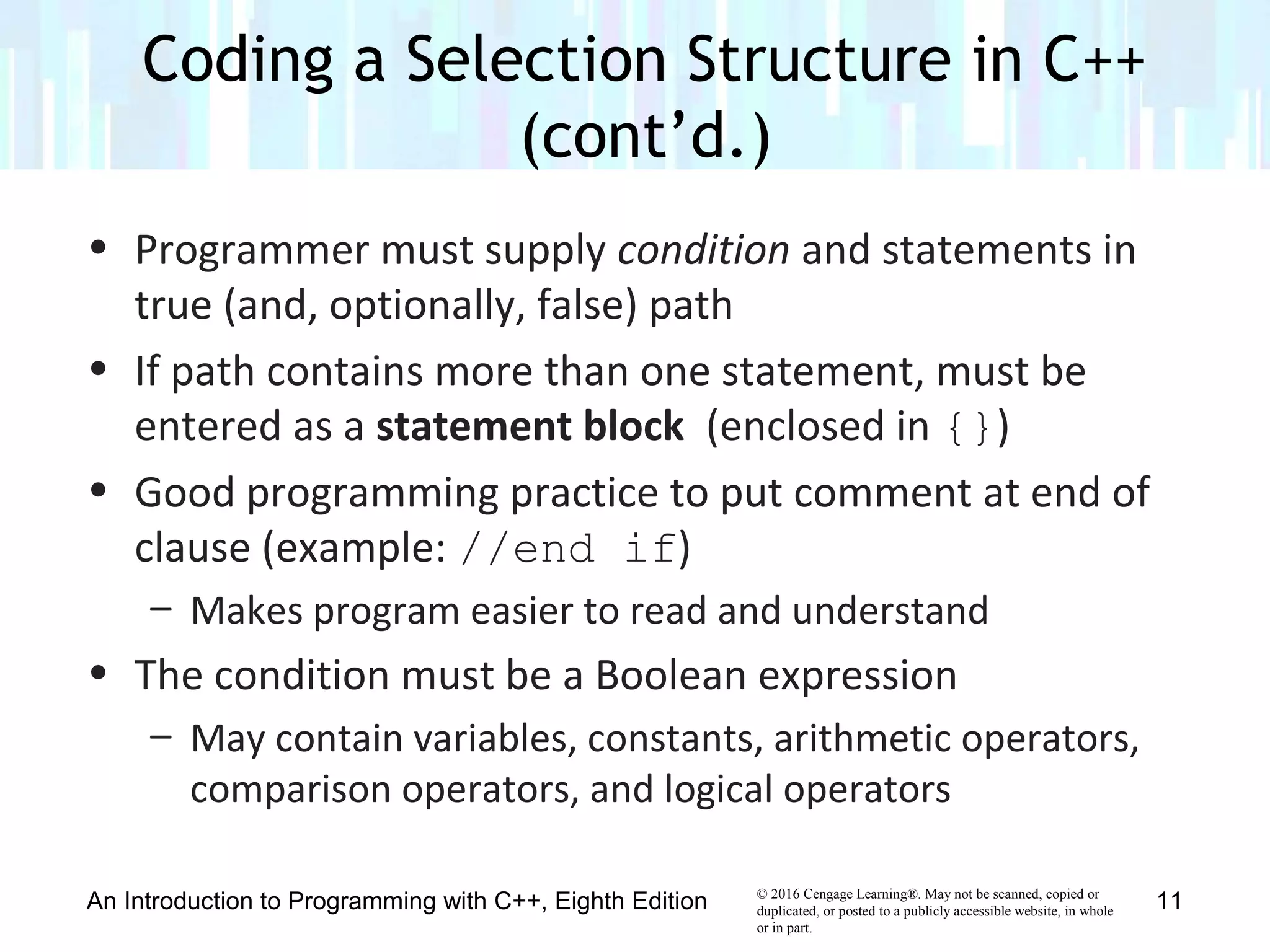
• Programmer must supply condition and statements in
true (and, optionally, false) path
• If path contains more than one statement, must be
entered as a statement block (enclosed in {})
• Good programming practice to put comment at end of
clause (example: //end if)
– Makes program easier to read and understand
• The condition must be a Boolean expression
– May contain variables, constants, arithmetic operators,
comparison operators, and logical operators
Coding a Selection Structure in C++
(cont’d.)
An Introduction to Programming with C++, Eighth Edition 11
© 2016 Cengage Learning®. May not be scanned, copied or
duplicated, or posted to a publicly accessible website, in whole
or in part.
An Introduction to Programming with C++, Eighth Edition 12
Figure 5-5 How to use the if statement
Coding a Selection Structure in C++
(cont’d.)
© 2016 Cengage Learning®. May not be scanned, copied or
duplicated, or posted to a publicly accessible website, in whole
or in part.
An Introduction to Programming with C++, Eighth Edition 13
Figure 5-5 How to use the if statement (cont’d)
Coding a Selection Structure in C++
(cont’d.)
© 2016 Cengage Learning®. May not be scanned, copied or
duplicated, or posted to a publicly accessible website, in whole
or in part.
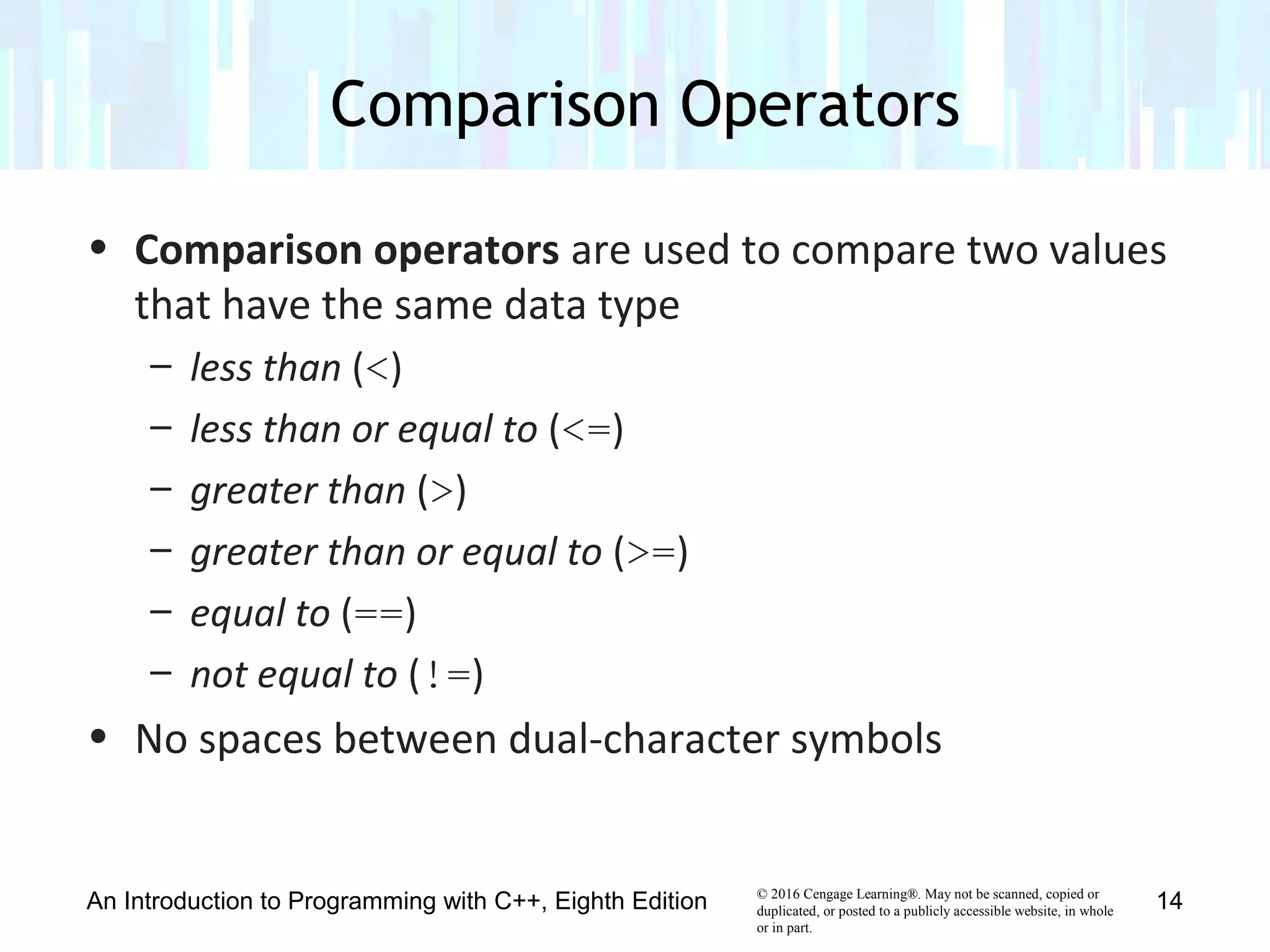
• Comparison operators are used to compare two values
that have the same data type
– less than (<)
– less than or equal to (<=)
– greater than (>)
– greater than or equal to (>=)
– equal to (==)
– not equal to (!=)
• No spaces between dual-character symbols
Comparison Operators
An Introduction to Programming with C++, Eighth Edition 14
© 2016 Cengage Learning®. May not be scanned, copied or
duplicated, or posted to a publicly accessible website, in whole
or in part.
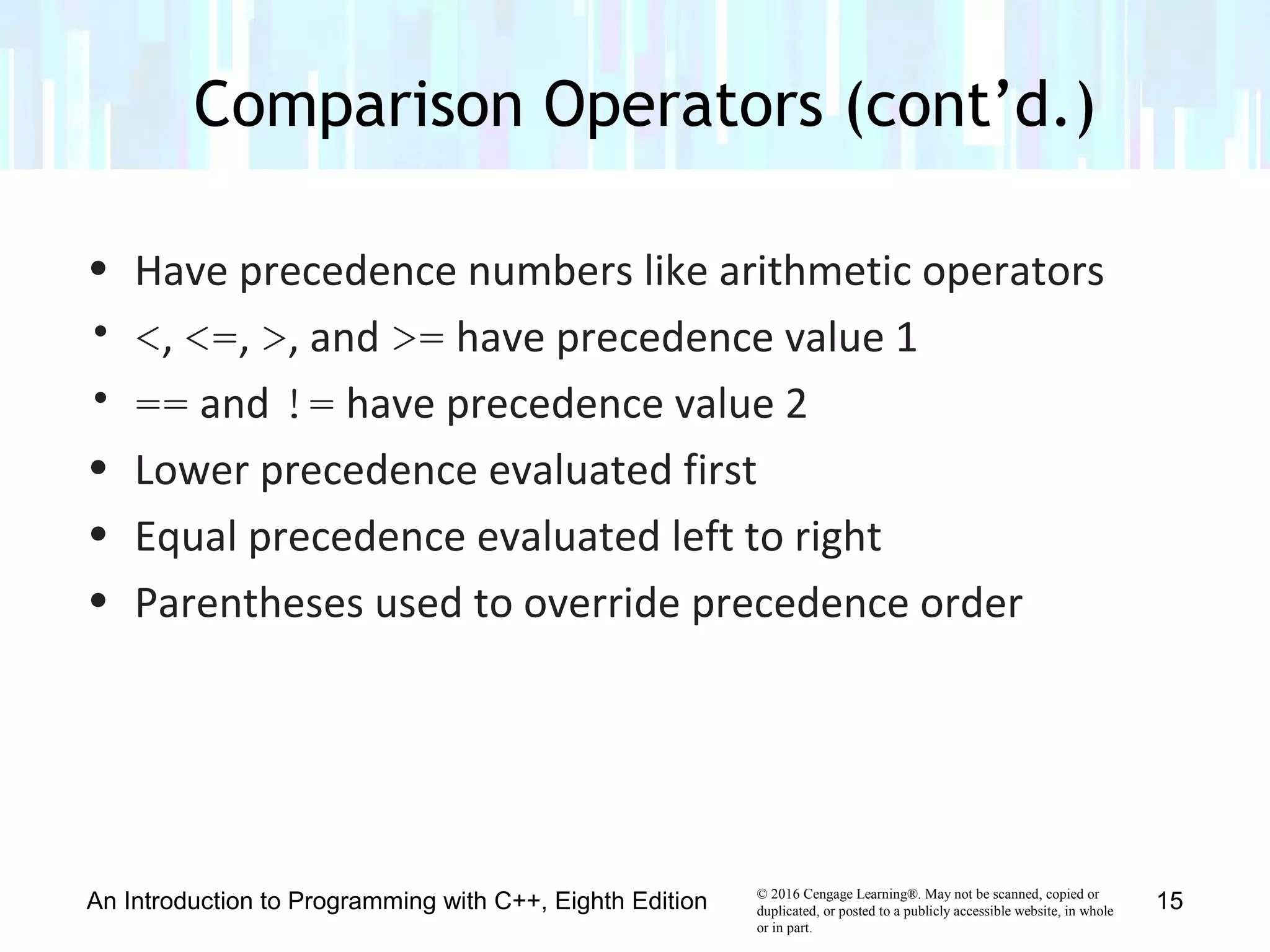
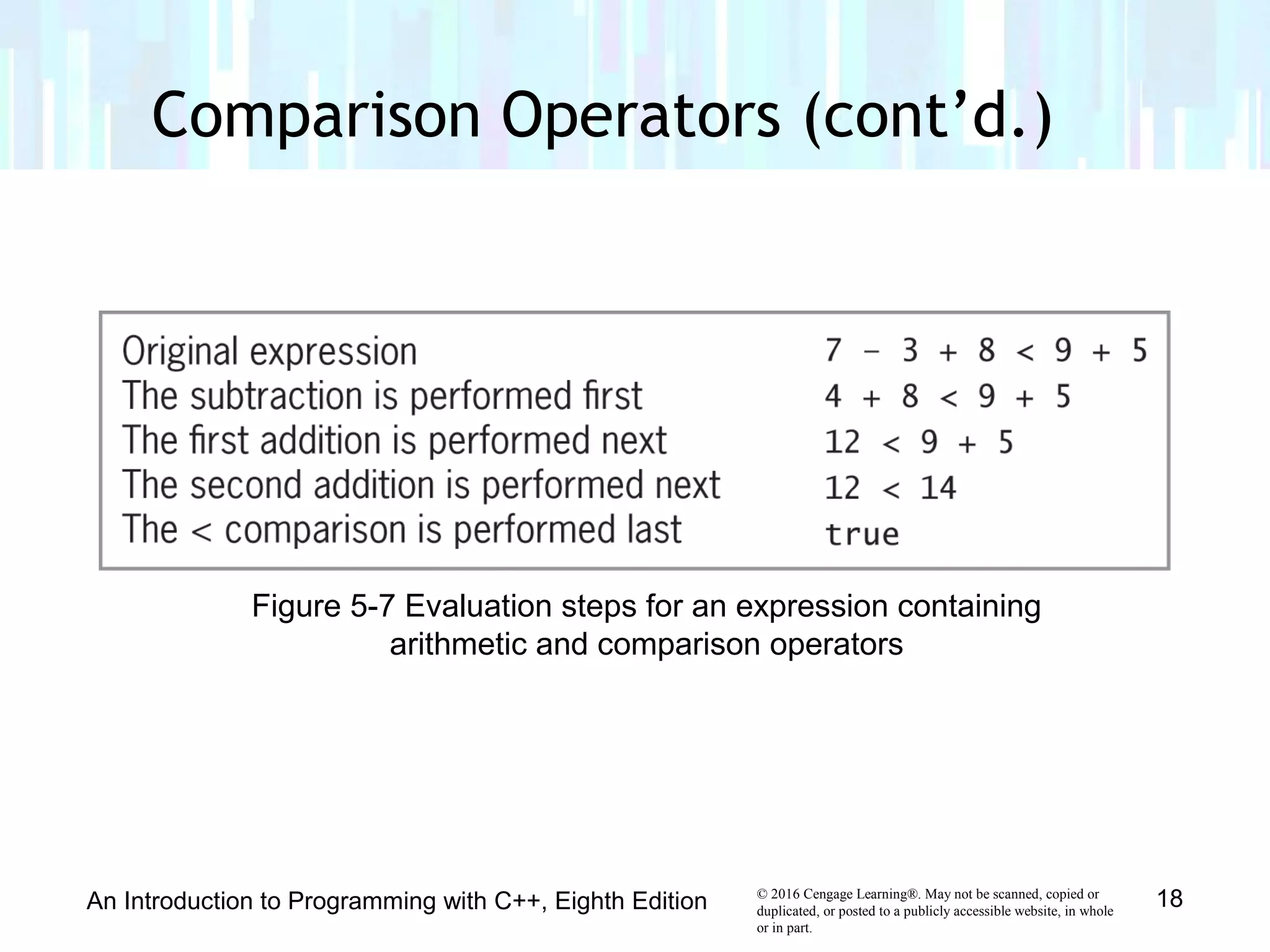
• Have precedence numbers like arithmetic operators
• <, <=, >, and >= have precedence value 1
• == and != have precedence value 2
• Lower precedence evaluated first
• Equal precedence evaluated left to right
• Parentheses used to override precedence order
Comparison Operators (cont’d.)
An Introduction to Programming with C++, Eighth Edition 15
© 2016 Cengage Learning®. May not be scanned, copied or
duplicated, or posted to a publicly accessible website, in whole
or in part.
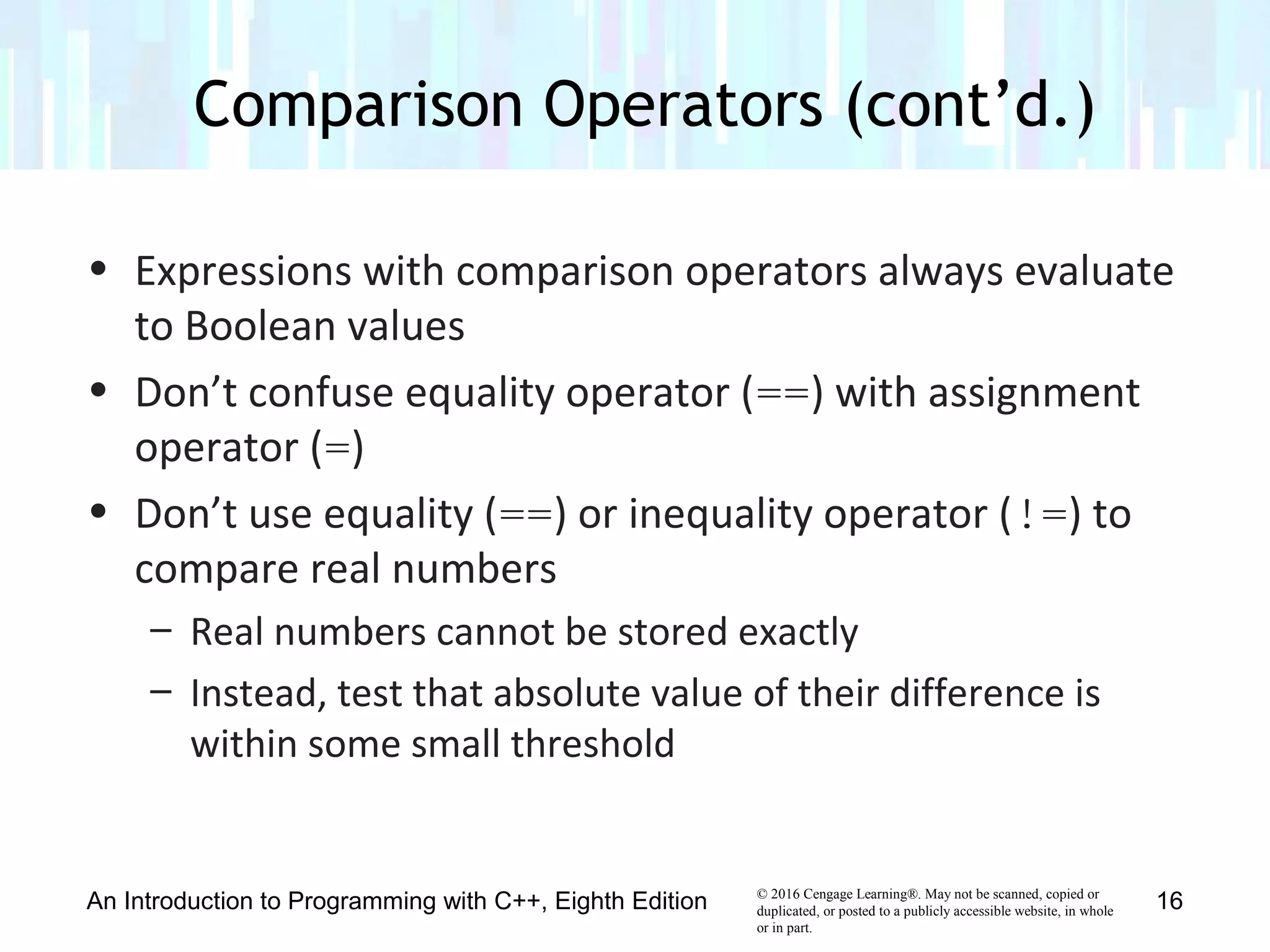
• Expressions with comparison operators always evaluate
to Boolean values
• Don’t confuse equality operator (==) with assignment
operator (=)
• Don’t use equality (==) or inequality operator (!=) to
compare real numbers
– Real numbers cannot be stored exactly
– Instead, test that absolute value of their difference is
within some small threshold
Comparison Operators (cont’d.)
An Introduction to Programming with C++, Eighth Edition 16
© 2016 Cengage Learning®. May not be scanned, copied or
duplicated, or posted to a publicly accessible website, in whole
or in part.
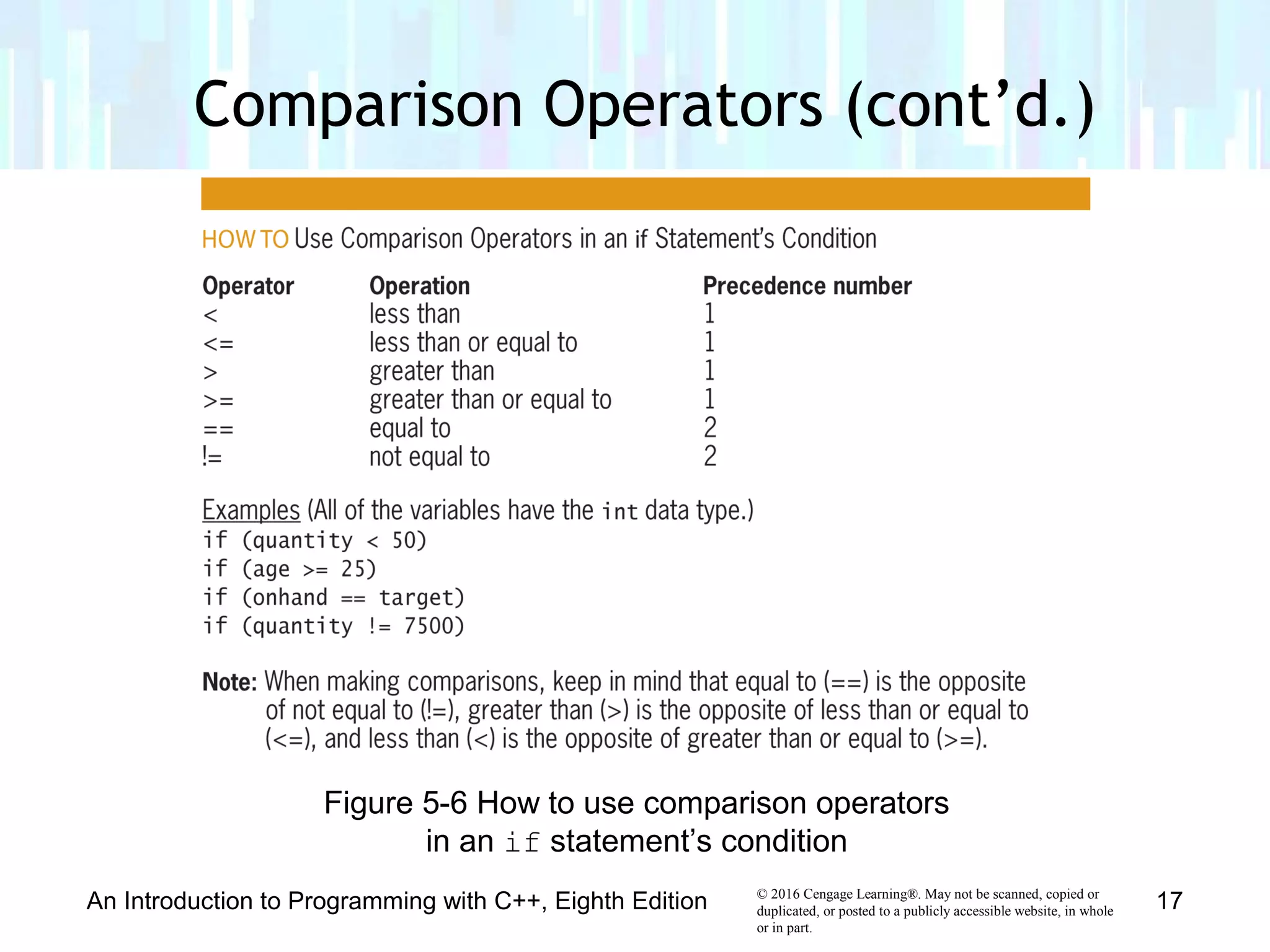
Comparison Operators (cont’d.)
An Introduction to Programming with C++, Eighth Edition 17
Figure 5-6 How to use comparison operators
in an if statement’s condition
© 2016 Cengage Learning®. May not be scanned, copied or
duplicated, or posted to a publicly accessible website, in whole
or in part.
Comparison Operators (cont’d.)
An Introduction to Programming with C++, Eighth Edition 18
Figure 5-7 Evaluation steps for an expression containing
arithmetic and comparison operators
© 2016 Cengage Learning®. May not be scanned, copied or
duplicated, or posted to a publicly accessible website, in whole
or in part.
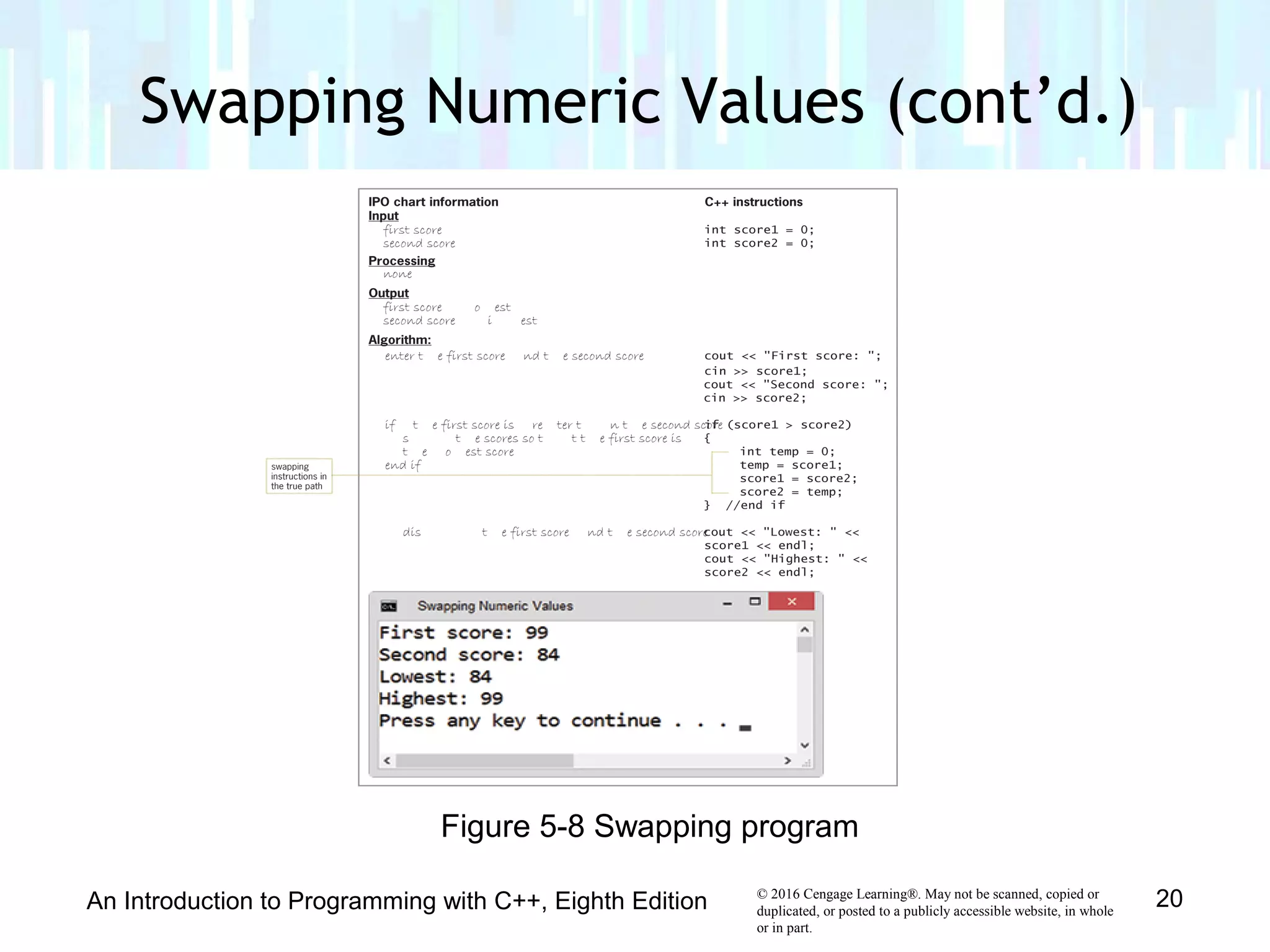
• Example program (next slide) takes in two integers,
swaps them if first is greater, and then prints out lower
number, followed by higher number
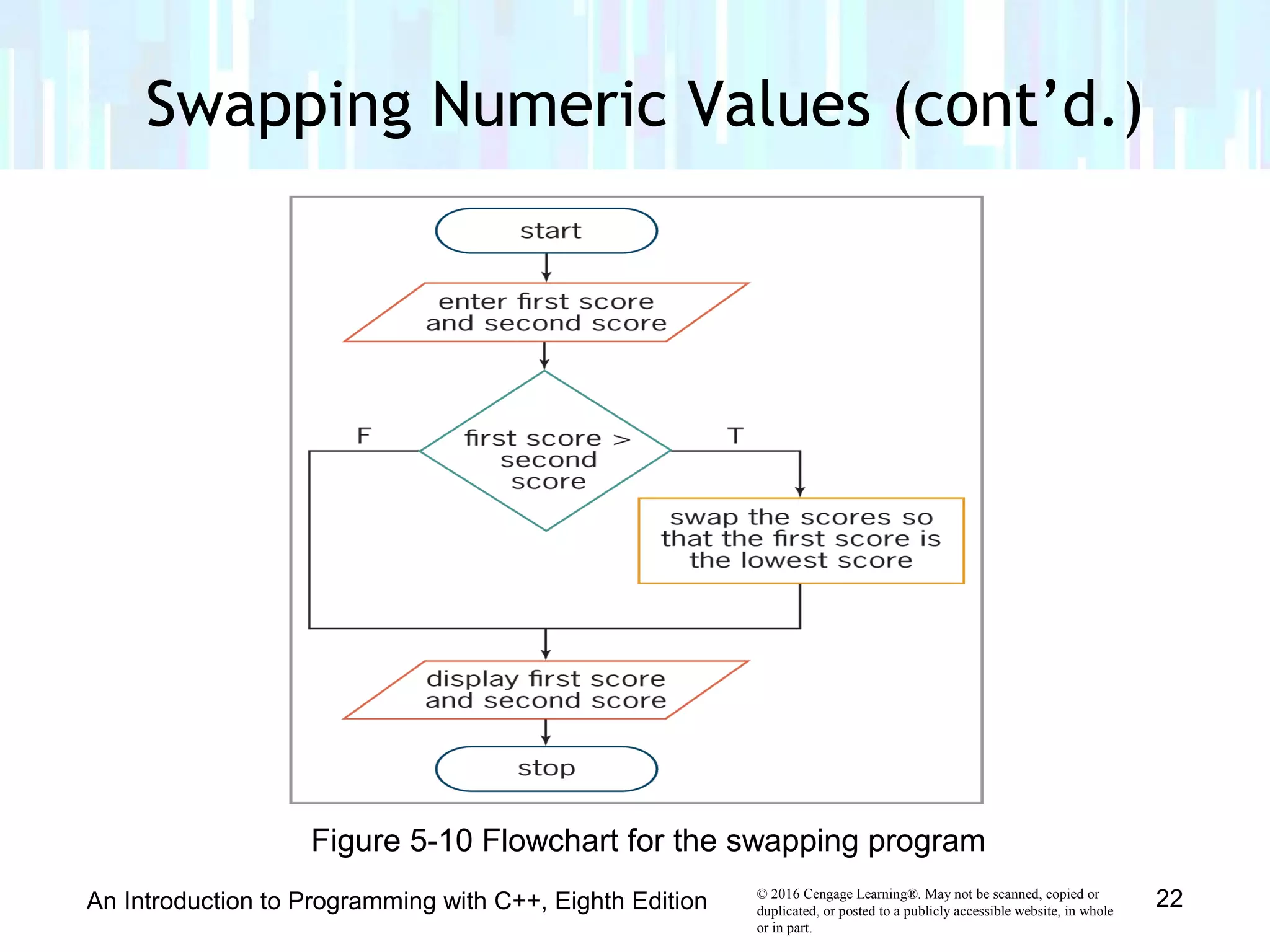
• Uses single-alternative selection structure with
statement block in true path
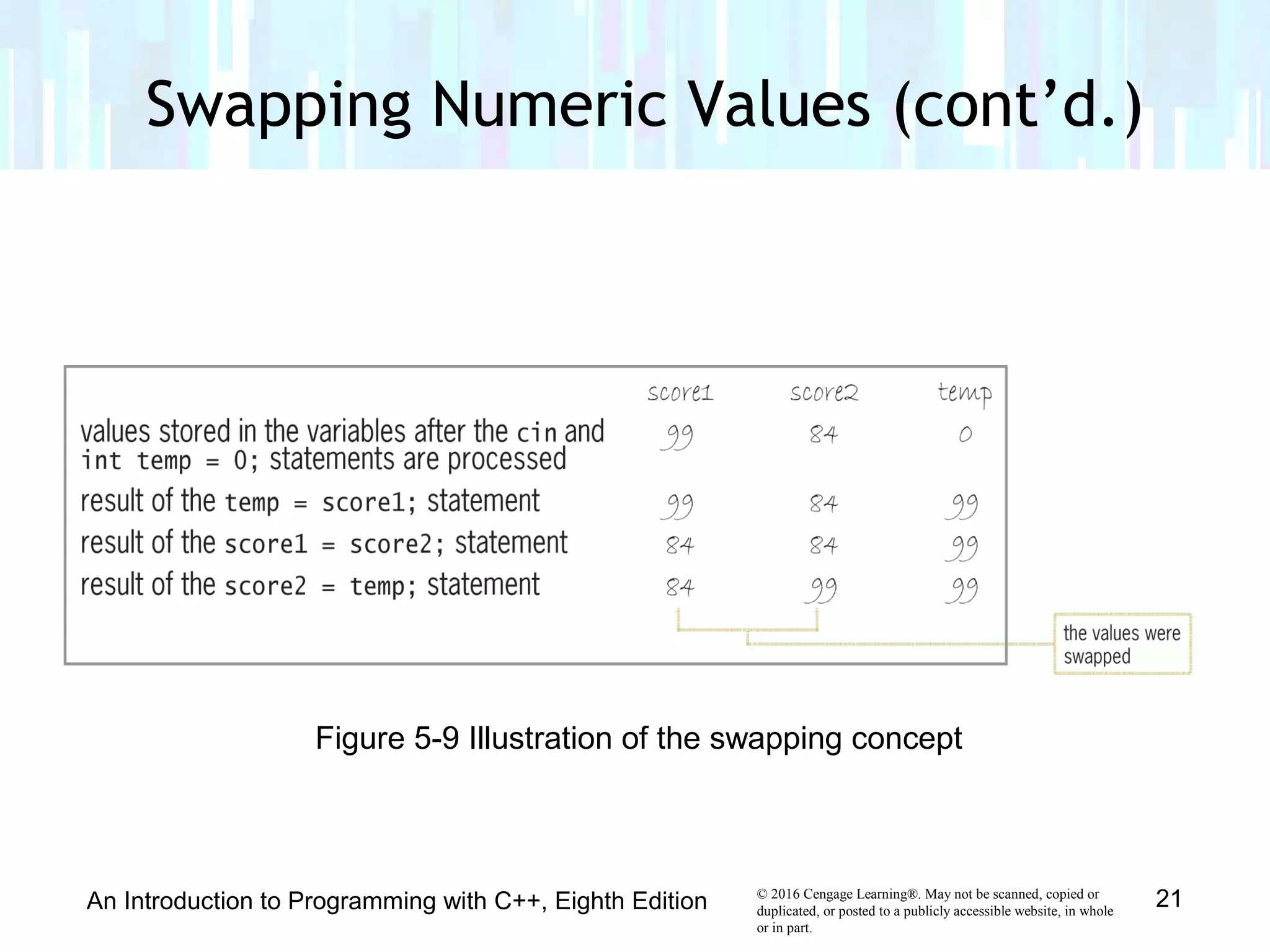
• Creates temporary variable to accomplish swap
• Temp variable can only be used in statement block in
which it is declared; called a local variable
Swapping Numeric Values
An Introduction to Programming with C++, Eighth Edition 19
© 2016 Cengage Learning®. May not be scanned, copied or
duplicated, or posted to a publicly accessible website, in whole
or in part.
An Introduction to Programming with C++, Eighth Edition 20
Figure 5-8 Swapping program
Swapping Numeric Values (cont’d.)
© 2016 Cengage Learning®. May not be scanned, copied or
duplicated, or posted to a publicly accessible website, in whole
or in part.
Swapping Numeric Values (cont’d.)
An Introduction to Programming with C++, Eighth Edition 21
Figure 5-9 Illustration of the swapping concept
© 2016 Cengage Learning®. May not be scanned, copied or
duplicated, or posted to a publicly accessible website, in whole
or in part.
Swapping Numeric Values (cont’d.)
An Introduction to Programming with C++, Eighth Edition 22
Figure 5-10 Flowchart for the swapping program
© 2016 Cengage Learning®. May not be scanned, copied or
duplicated, or posted to a publicly accessible website, in whole
or in part.
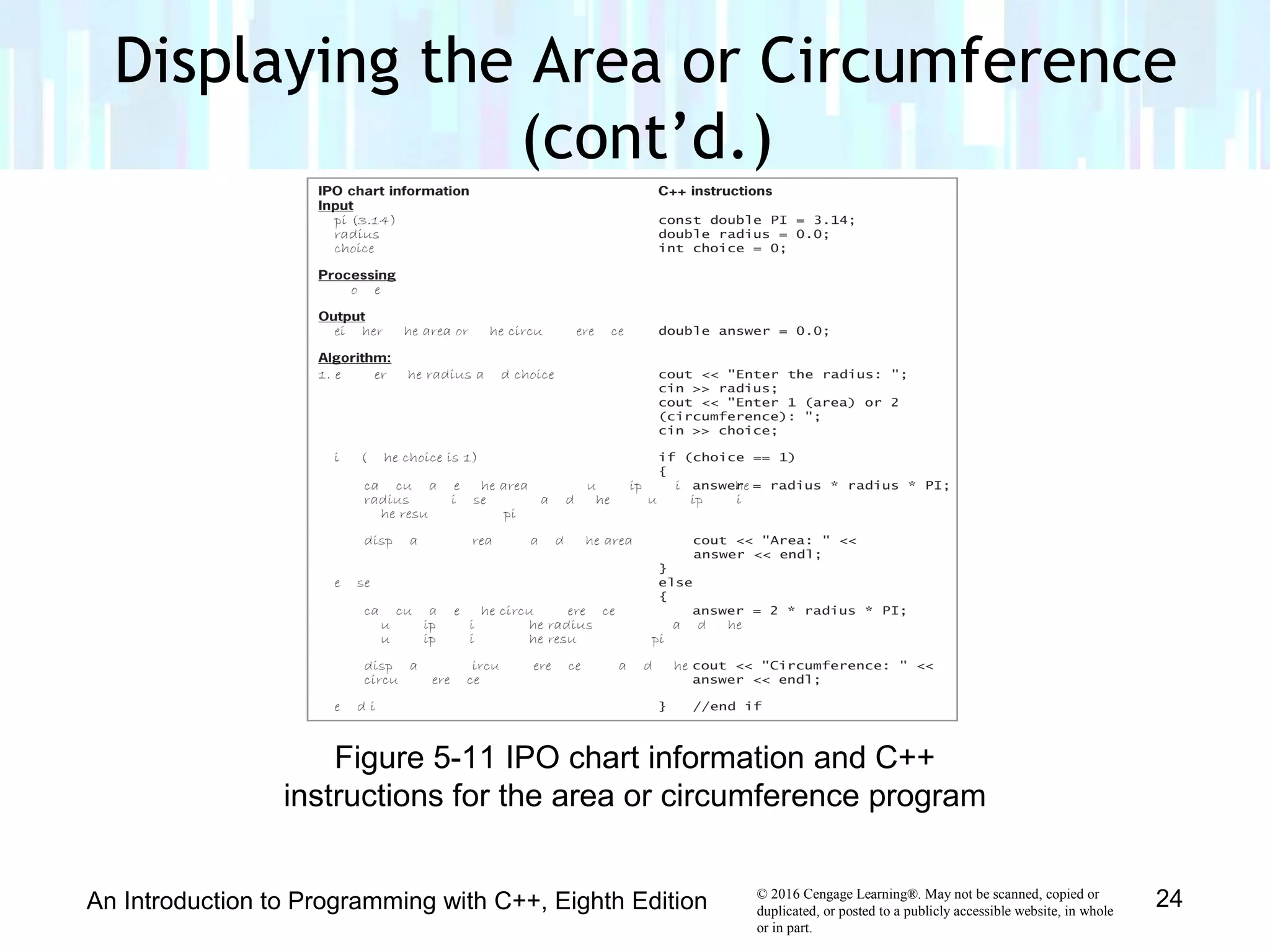
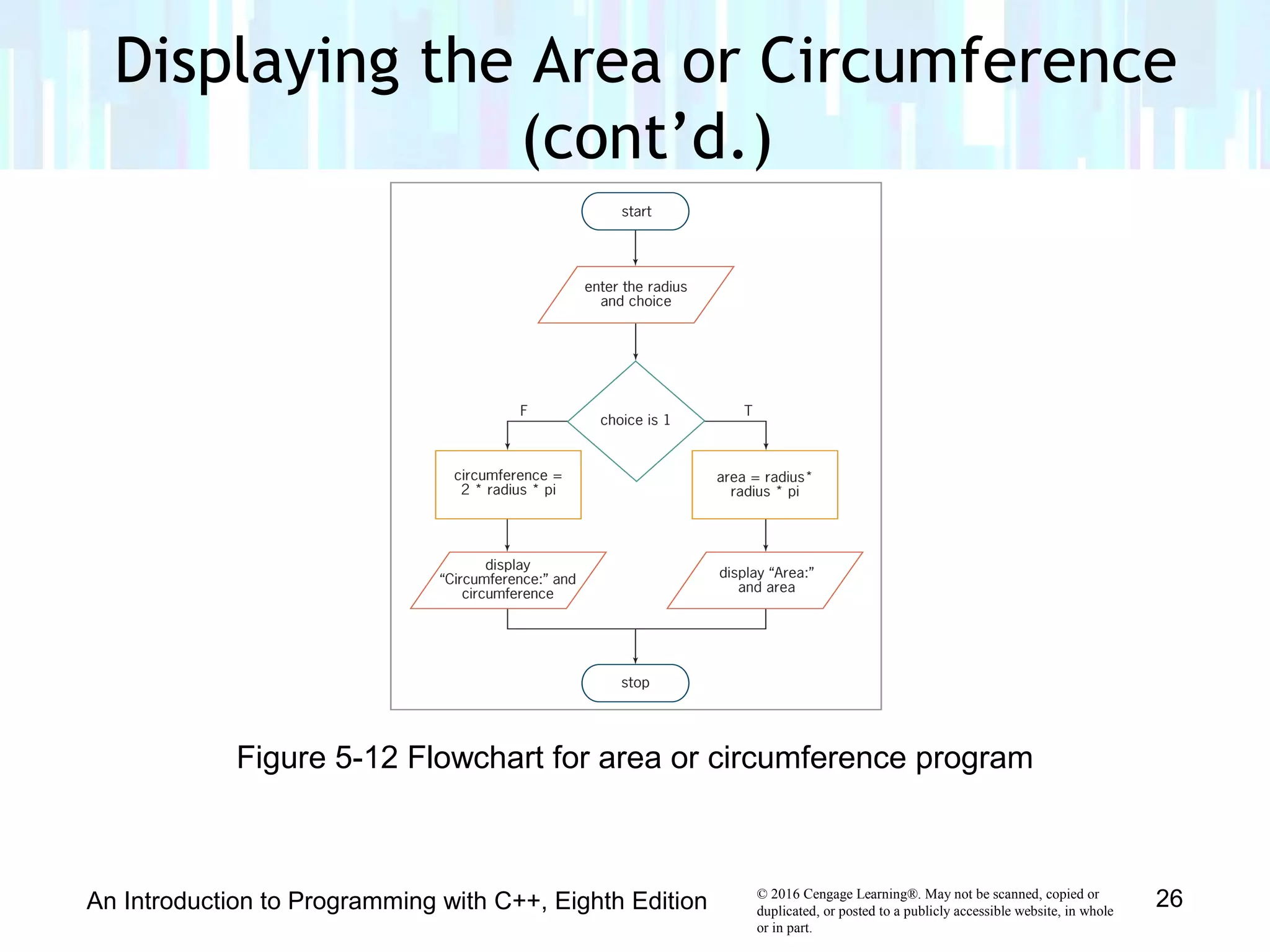
• Example program (next slide) displays the area or
circumference of a circle given the radius
• Choice of area or circumference is selected by user
• Uses a dual-alternative selection structure
Displaying the Area or Circumference
An Introduction to Programming with C++, Eighth Edition 23
© 2016 Cengage Learning®. May not be scanned, copied or
duplicated, or posted to a publicly accessible website, in whole
or in part.
Displaying the Area or Circumference
(cont’d.)
An Introduction to Programming with C++, Eighth Edition 24
Figure 5-11 IPO chart information and C++
instructions for the area or circumference program
© 2016 Cengage Learning®. May not be scanned, copied or
duplicated, or posted to a publicly accessible website, in whole
or in part.
An Introduction to Programming with C++, Eighth Edition 25
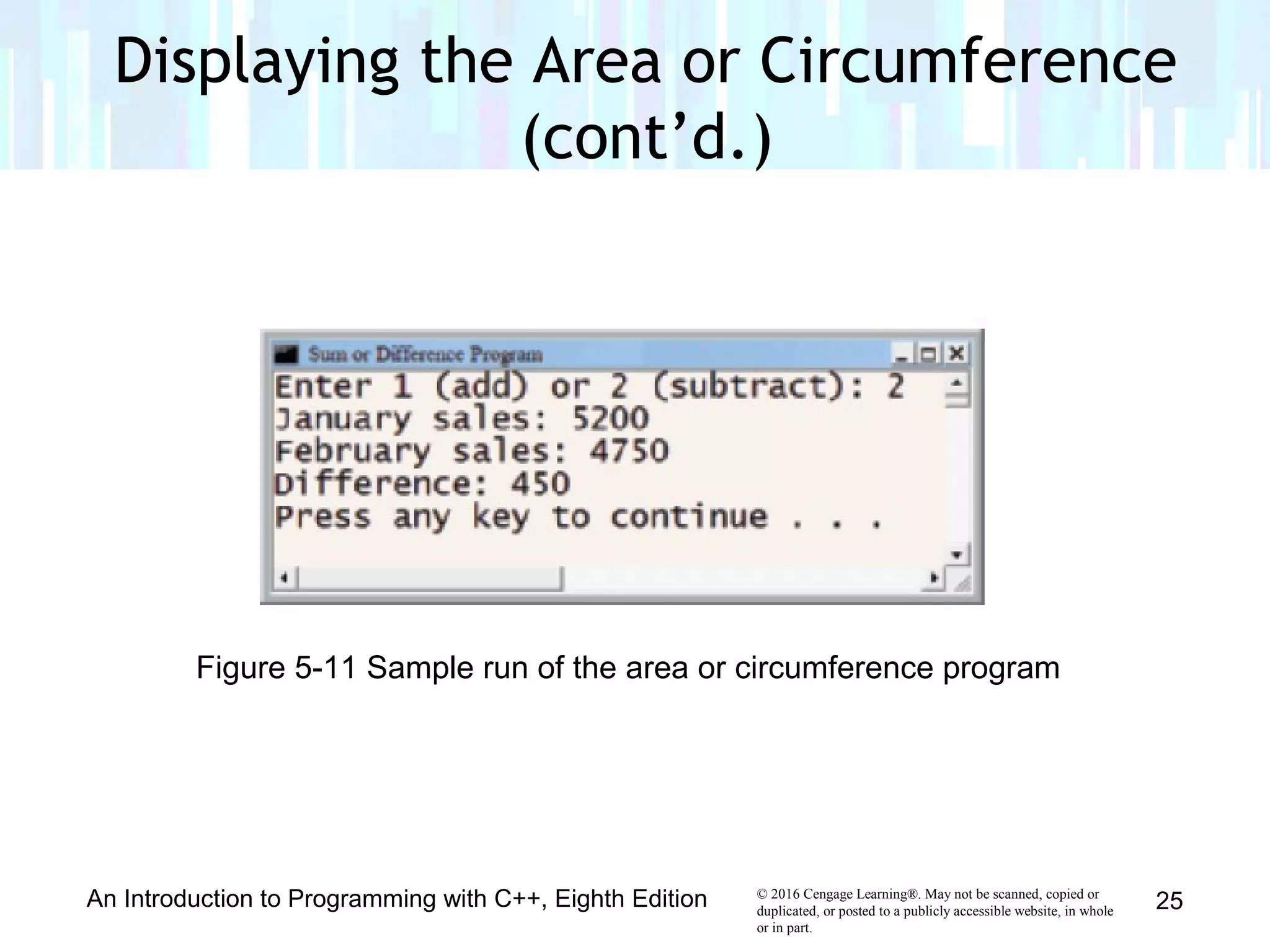
Figure 5-11 Sample run of the area or circumference program
Displaying the Area or Circumference
(cont’d.)
© 2016 Cengage Learning®. May not be scanned, copied or
duplicated, or posted to a publicly accessible website, in whole
or in part.
An Introduction to Programming with C++, Eighth Edition 26
Figure 5-12 Flowchart for area or circumference program
Displaying the Area or Circumference
(cont’d.)
© 2016 Cengage Learning®. May not be scanned, copied or
duplicated, or posted to a publicly accessible website, in whole
or in part.
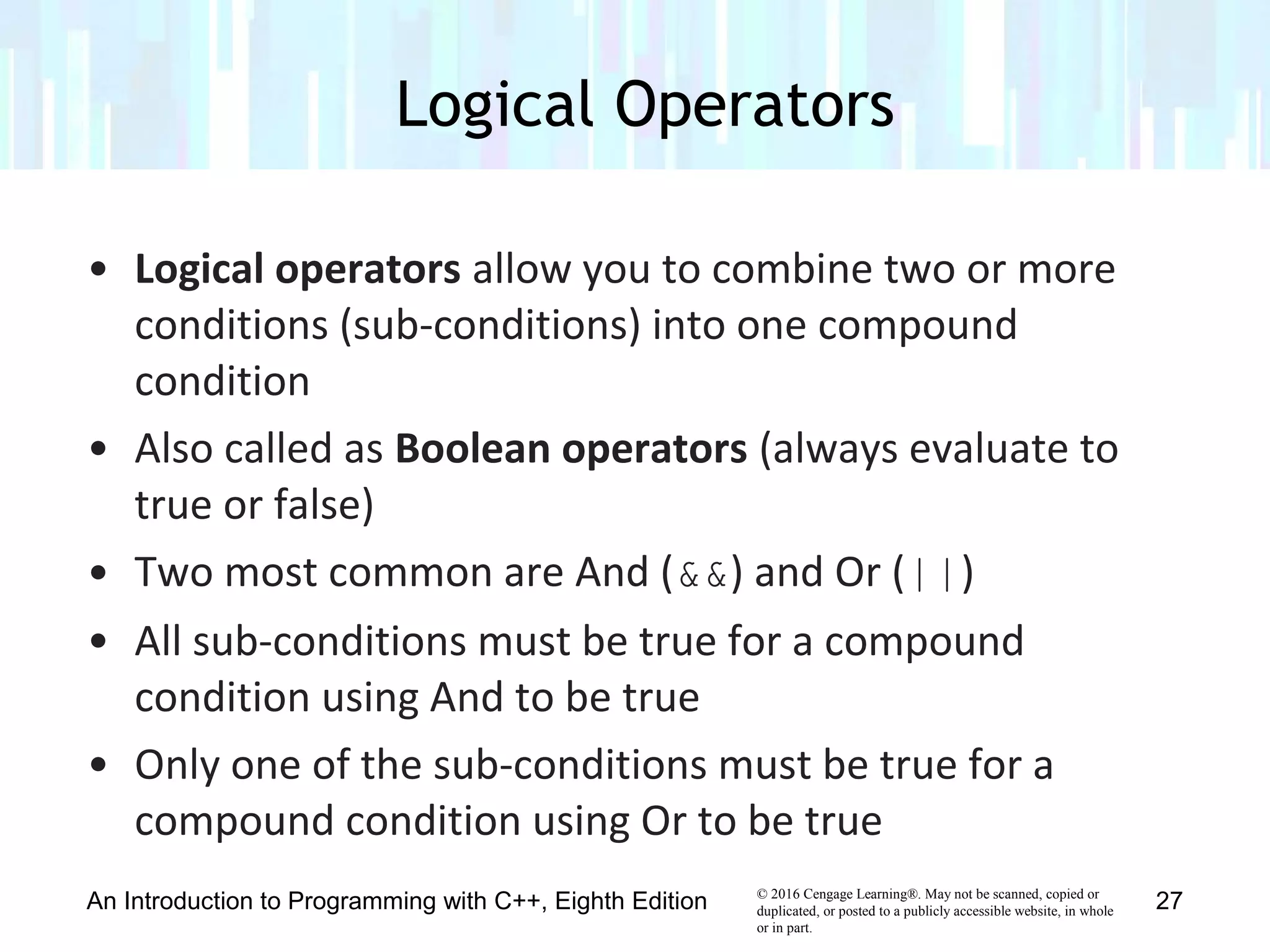
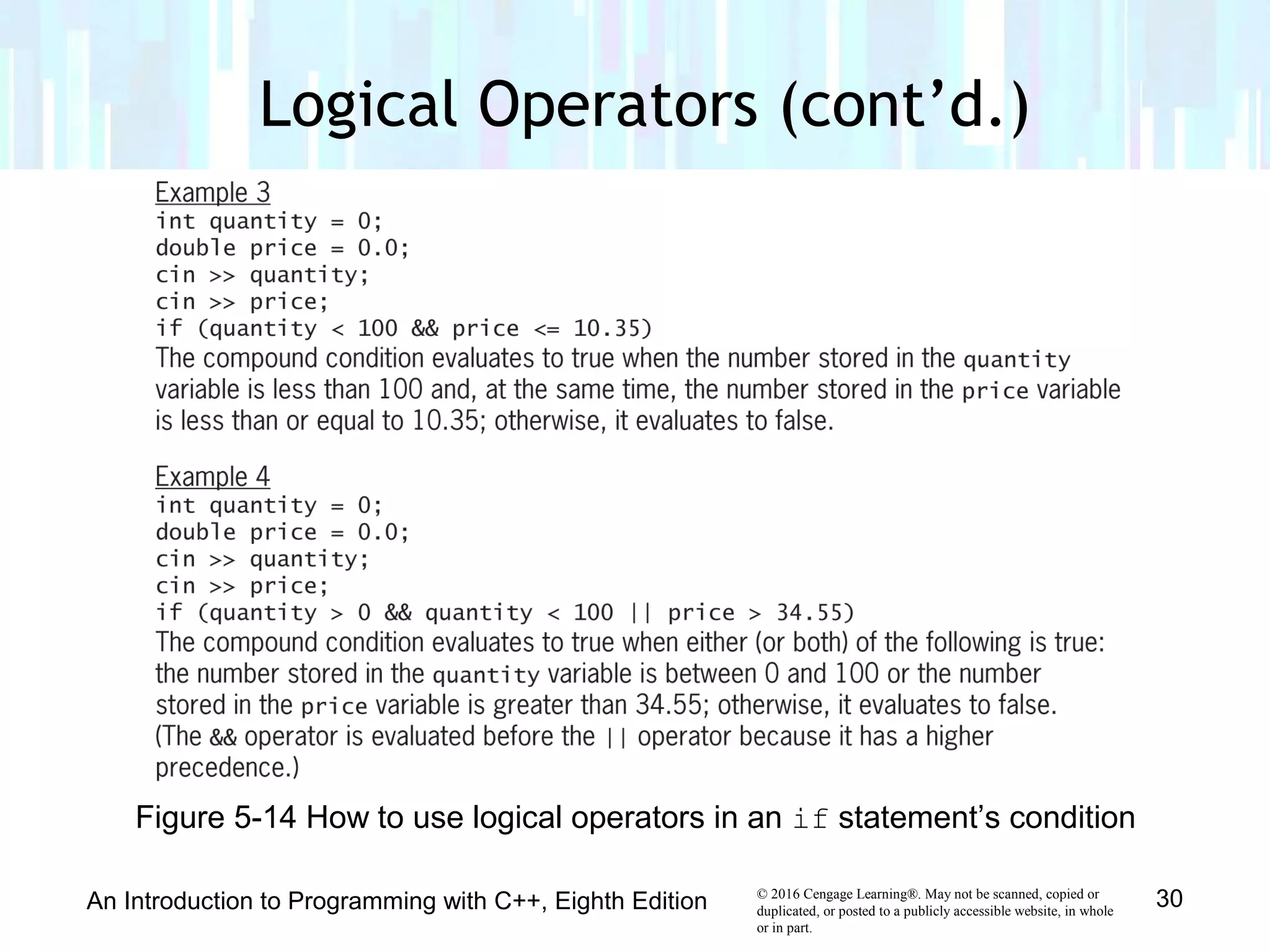
• Logical operators allow you to combine two or more
conditions (sub-conditions) into one compound
condition
• Also called as Boolean operators (always evaluate to
true or false)
• Two most common are And (&&) and Or (||)
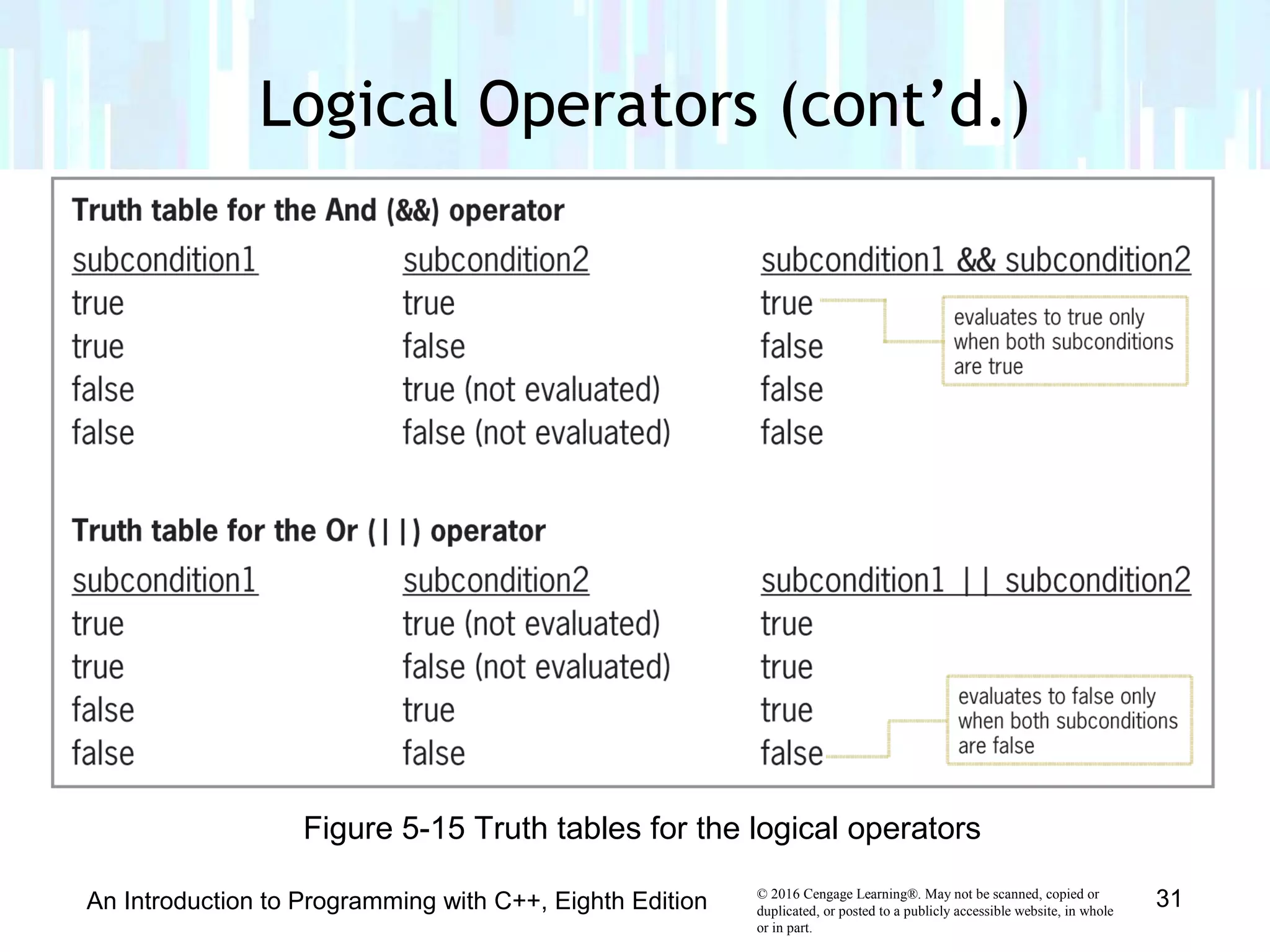
• All sub-conditions must be true for a compound
condition using And to be true
• Only one of the sub-conditions must be true for a
compound condition using Or to be true
Logical Operators
An Introduction to Programming with C++, Eighth Edition 27
© 2016 Cengage Learning®. May not be scanned, copied or
duplicated, or posted to a publicly accessible website, in whole
or in part.
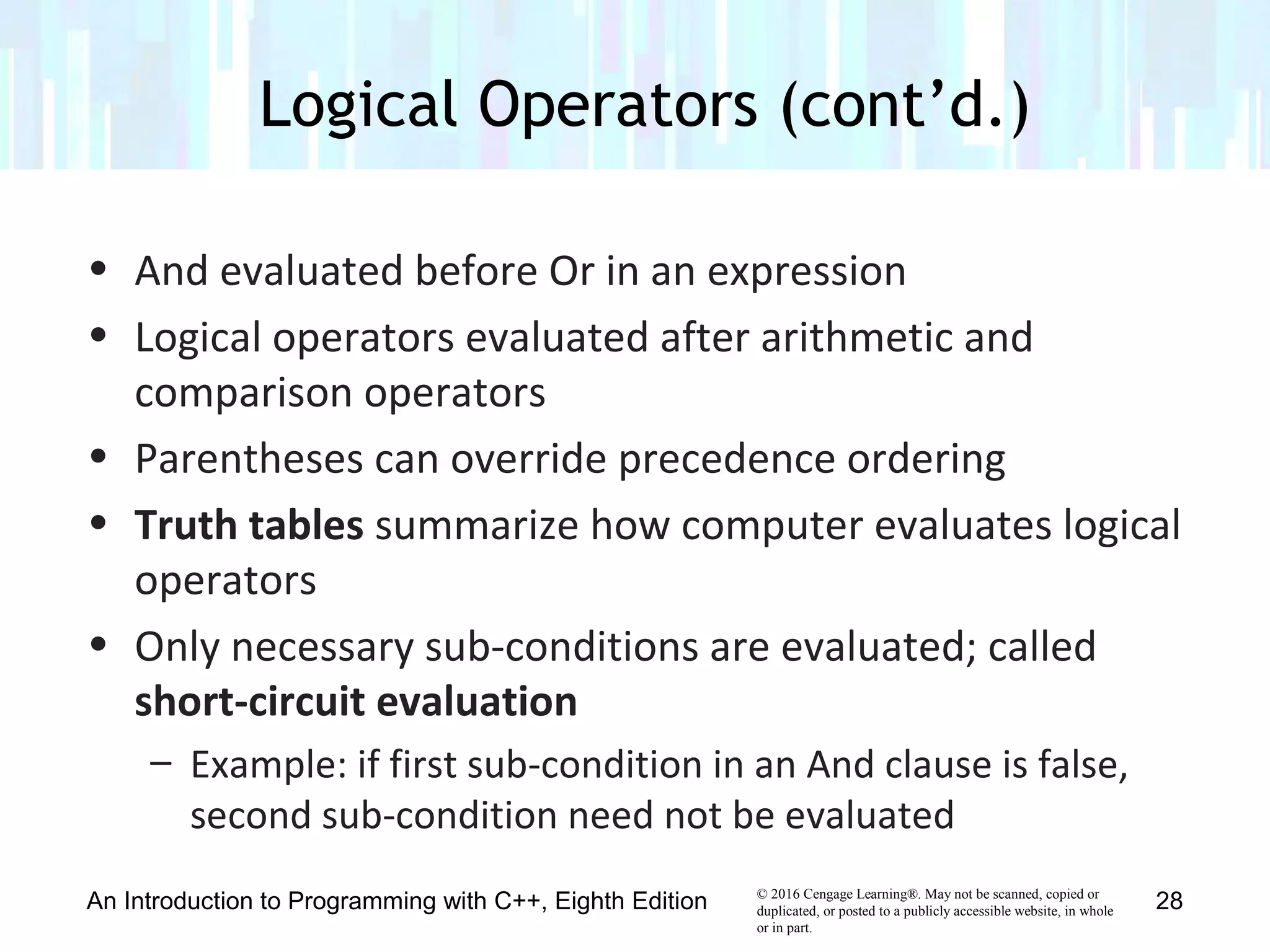
• And evaluated before Or in an expression
• Logical operators evaluated after arithmetic and
comparison operators
• Parentheses can override precedence ordering
• Truth tables summarize how computer evaluates logical
operators
• Only necessary sub-conditions are evaluated; called
short-circuit evaluation
– Example: if first sub-condition in an And clause is false,
second sub-condition need not be evaluated
Logical Operators (cont’d.)
An Introduction to Programming with C++, Eighth Edition 28
© 2016 Cengage Learning®. May not be scanned, copied or
duplicated, or posted to a publicly accessible website, in whole
or in part.
Logical Operators (cont’d.)
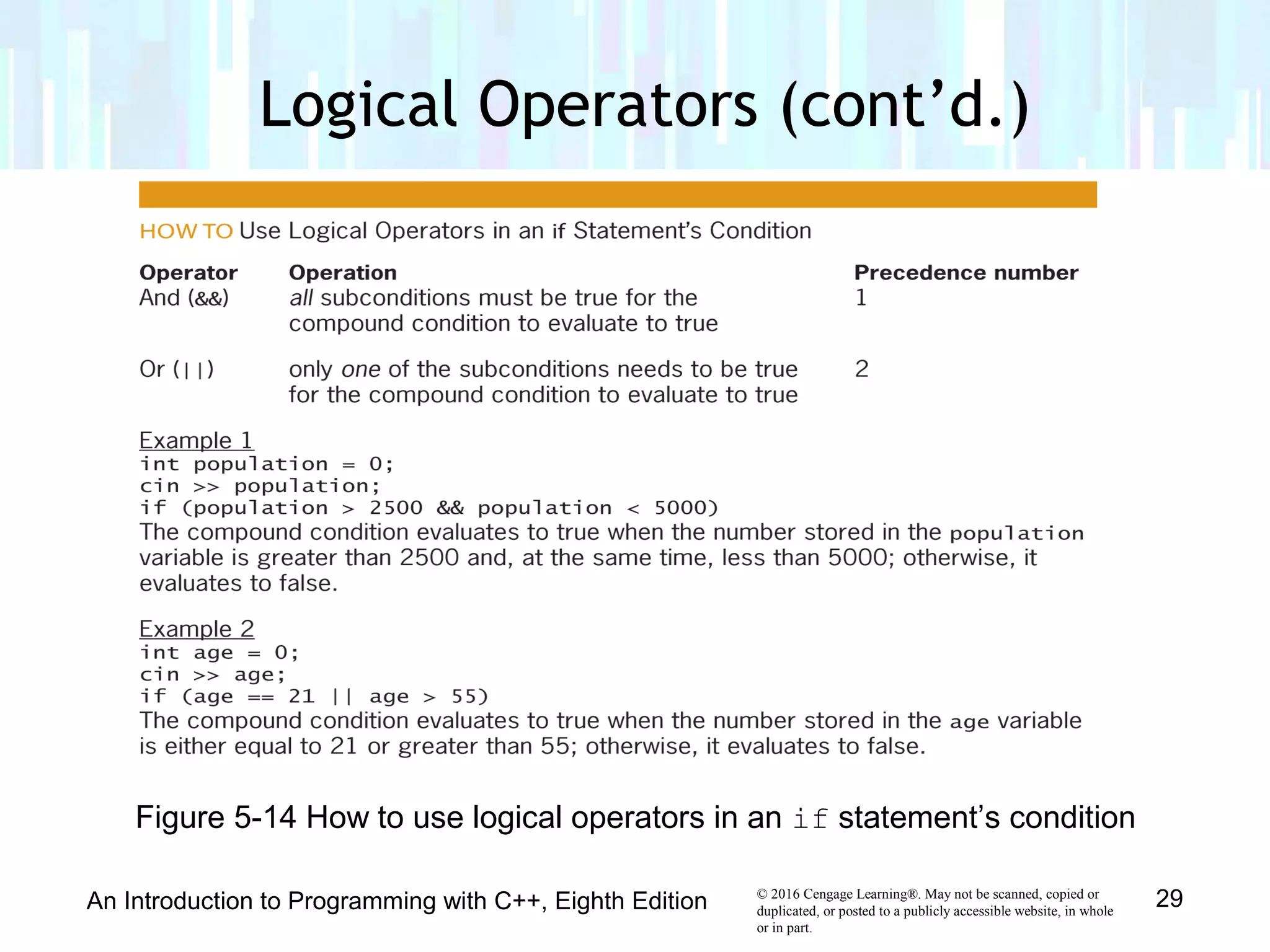
An Introduction to Programming with C++, Eighth Edition 29
Figure 5-14 How to use logical operators in an if statement’s condition
© 2016 Cengage Learning®. May not be scanned, copied or
duplicated, or posted to a publicly accessible website, in whole
or in part.
Logical Operators (cont’d.)
An Introduction to Programming with C++, Eighth Edition 30
Figure 5-14 How to use logical operators in an if statement’s condition
© 2016 Cengage Learning®. May not be scanned, copied or
duplicated, or posted to a publicly accessible website, in whole
or in part.
Logical Operators (cont’d.)
An Introduction to Programming with C++, Eighth Edition 31
Figure 5-15 Truth tables for the logical operators
© 2016 Cengage Learning®. May not be scanned, copied or
duplicated, or posted to a publicly accessible website, in whole
or in part.
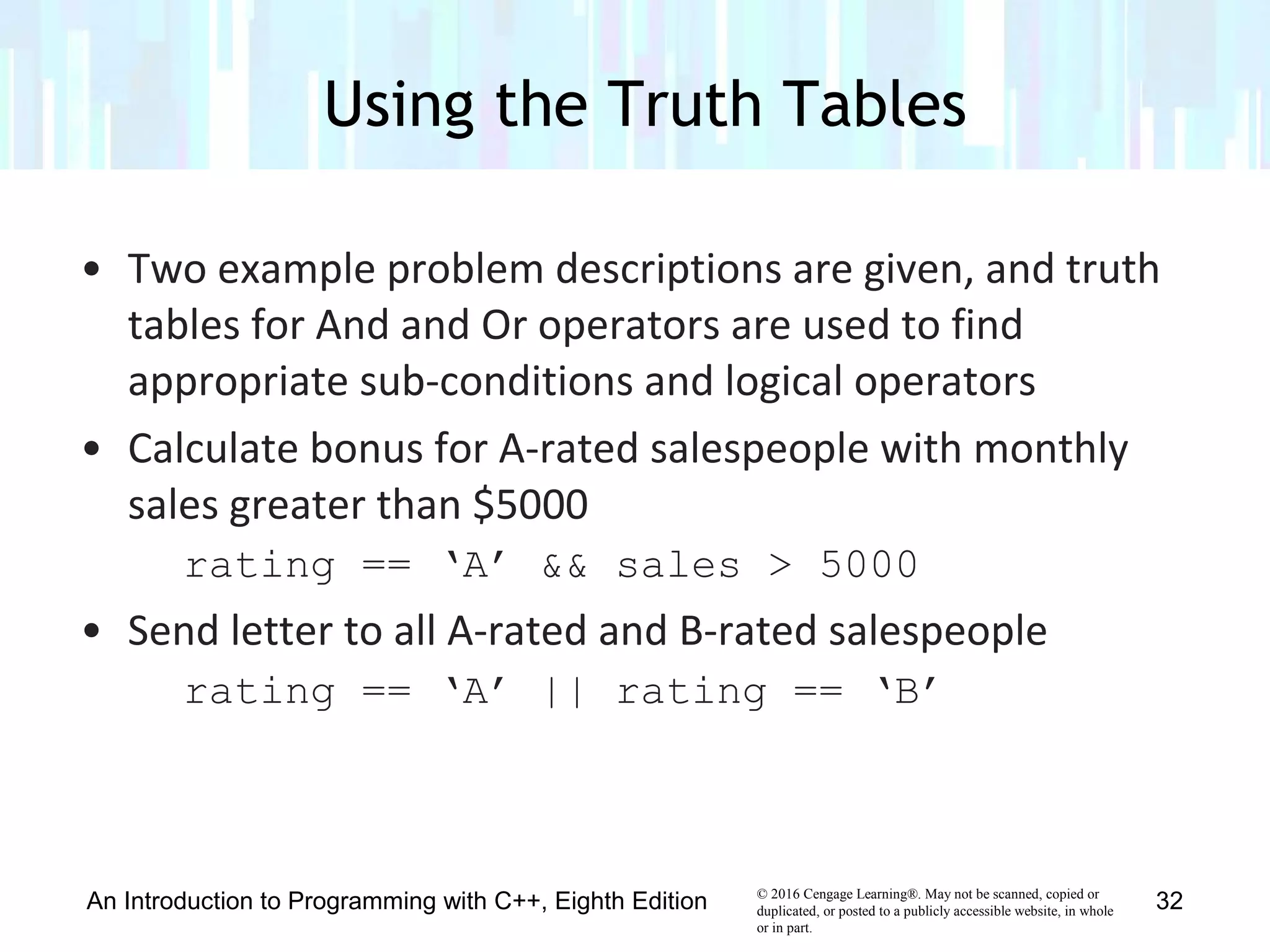
• Two example problem descriptions are given, and truth
tables for And and Or operators are used to find
appropriate sub-conditions and logical operators
• Calculate bonus for A-rated salespeople with monthly
sales greater than $5000
rating == ‘A’ && sales > 5000
• Send letter to all A-rated and B-rated salespeople
rating == ‘A’ || rating == ‘B’
Using the Truth Tables
An Introduction to Programming with C++, Eighth Edition 32
© 2016 Cengage Learning®. May not be scanned, copied or
duplicated, or posted to a publicly accessible website, in whole
or in part.
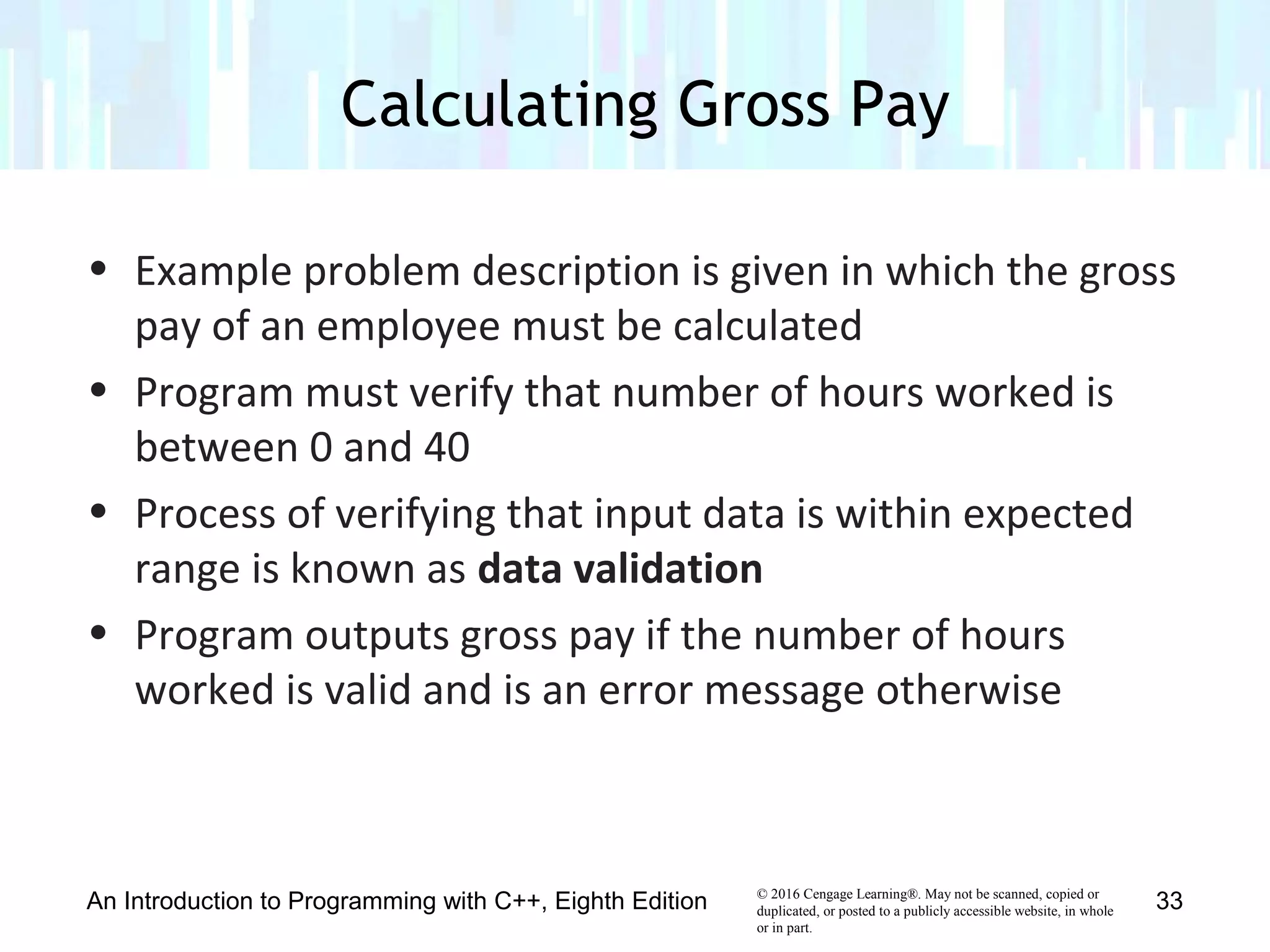
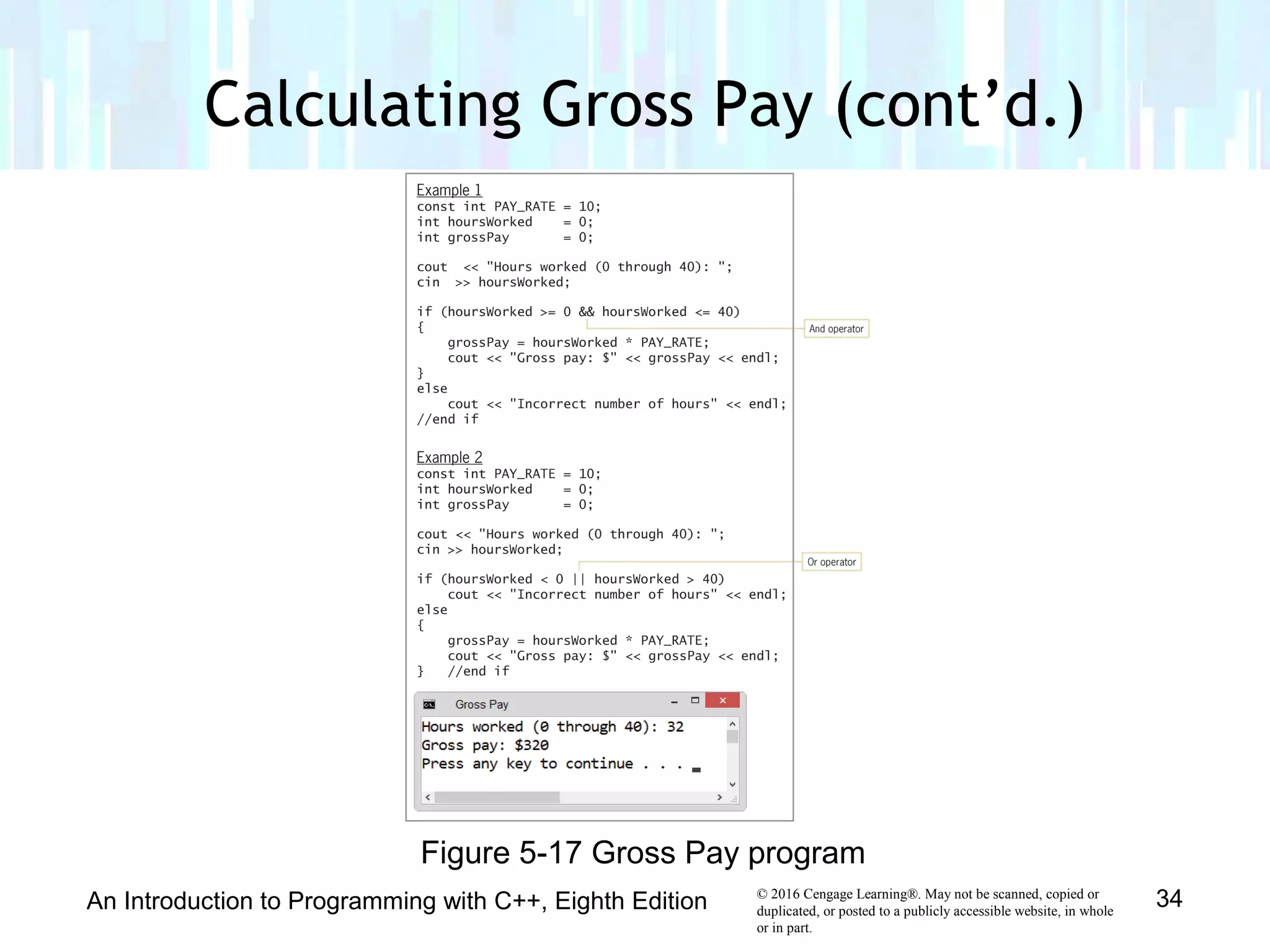
• Example problem description is given in which the gross
pay of an employee must be calculated
• Program must verify that number of hours worked is
between 0 and 40
• Process of verifying that input data is within expected
range is known as data validation
• Program outputs gross pay if the number of hours
worked is valid and is an error message otherwise
Calculating Gross Pay
An Introduction to Programming with C++, Eighth Edition 33
© 2016 Cengage Learning®. May not be scanned, copied or
duplicated, or posted to a publicly accessible website, in whole
or in part.
Calculating Gross Pay (cont’d.)
An Introduction to Programming with C++, Eighth Edition 34
Figure 5-17 Gross Pay program
© 2016 Cengage Learning®. May not be scanned, copied or
duplicated, or posted to a publicly accessible website, in whole
or in part.
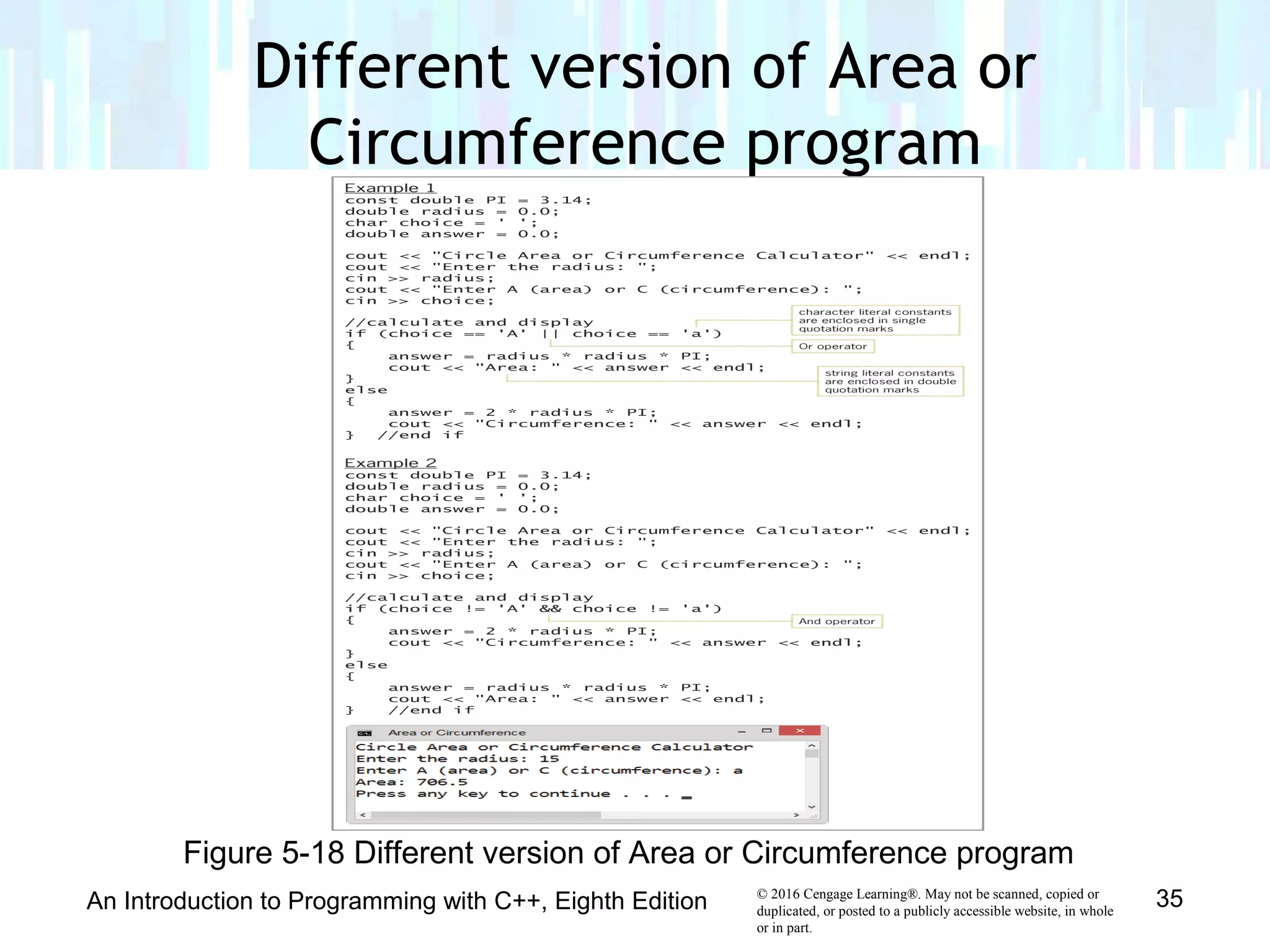
Different version of Area or
Circumference program
An Introduction to Programming with C++, Eighth Edition 35
Figure 5-18 Different version of Area or Circumference program
© 2016 Cengage Learning®. May not be scanned, copied or
duplicated, or posted to a publicly accessible website, in whole
or in part.
An Introduction to Programming with C++, Eighth Edition 36
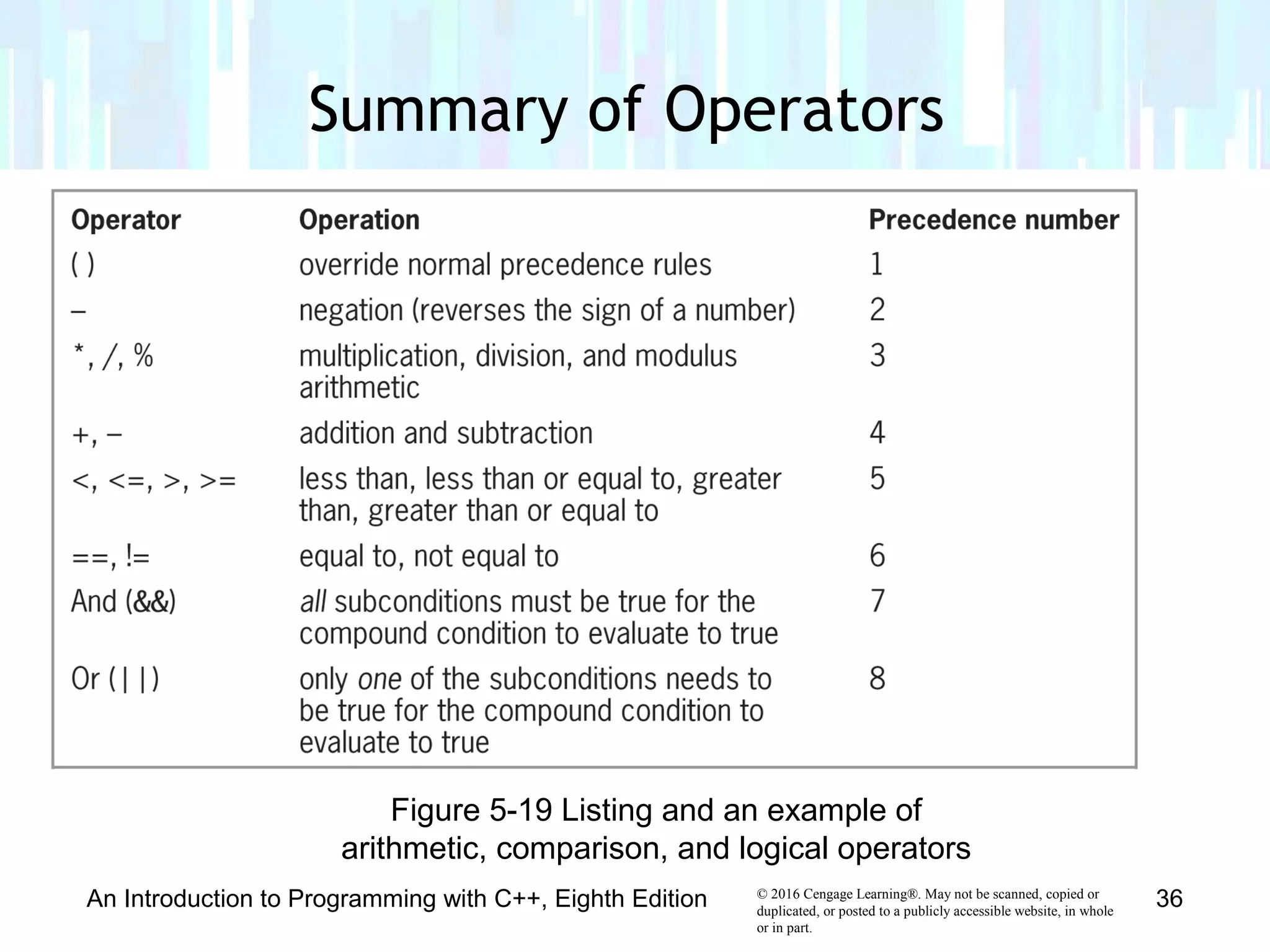
Figure 5-19 Listing and an example of
arithmetic, comparison, and logical operators
Summary of Operators
© 2016 Cengage Learning®. May not be scanned, copied or
duplicated, or posted to a publicly accessible website, in whole
or in part.
An Introduction to Programming with C++, Eighth Edition 37
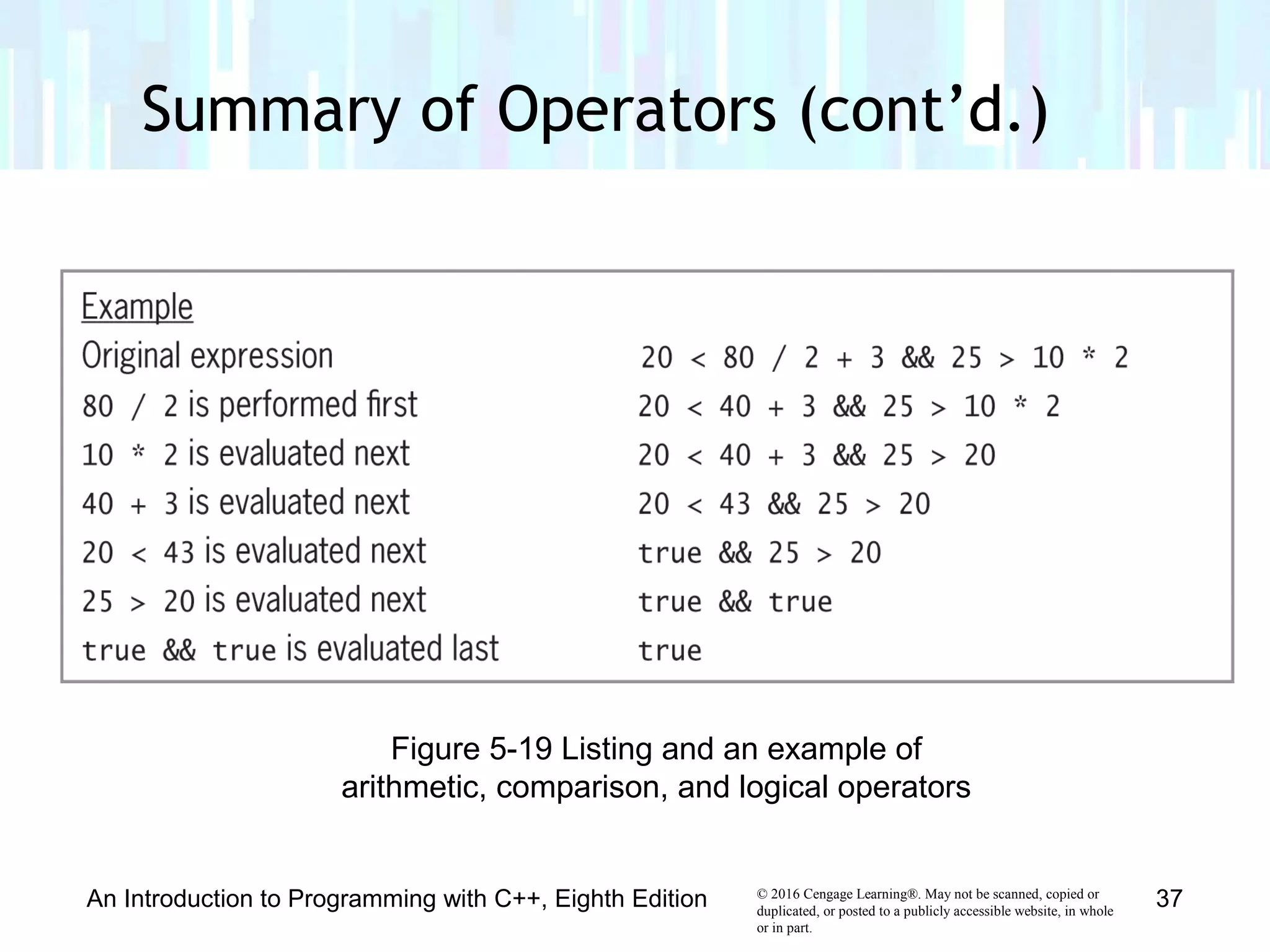
Figure 5-19 Listing and an example of
arithmetic, comparison, and logical operators
Summary of Operators (cont’d.)
© 2016 Cengage Learning®. May not be scanned, copied or
duplicated, or posted to a publicly accessible website, in whole
or in part.
• toupper and tolower functions used to convert
characters between uppercase and lowercase
• toupper function temporarily converts a character to
uppercase; tolower function temporarily converts a
character to lowercase
• Syntax is toupper(charVariable) and
tolower(charVariable)
• Item between parentheses in a function’s syntax is
called an argument – information the function needs to
perform its task
Converting a Character to Uppercase
or Lowercase
An Introduction to Programming with C++, Eighth Edition 38
© 2016 Cengage Learning®. May not be scanned, copied or
duplicated, or posted to a publicly accessible website, in whole
or in part.
• Each function copies the character in its argument to a
temporary location in internal memory, converts the
character to the appropriate case, and returns the
temporary character
• Neither function changes the contents of its argument,
but rather, changes the temporary variable
Converting a Character to Uppercase
or Lowercase (cont’d.)
An Introduction to Programming with C++, Eighth Edition 39
© 2016 Cengage Learning®. May not be scanned, copied or
duplicated, or posted to a publicly accessible website, in whole
or in part.
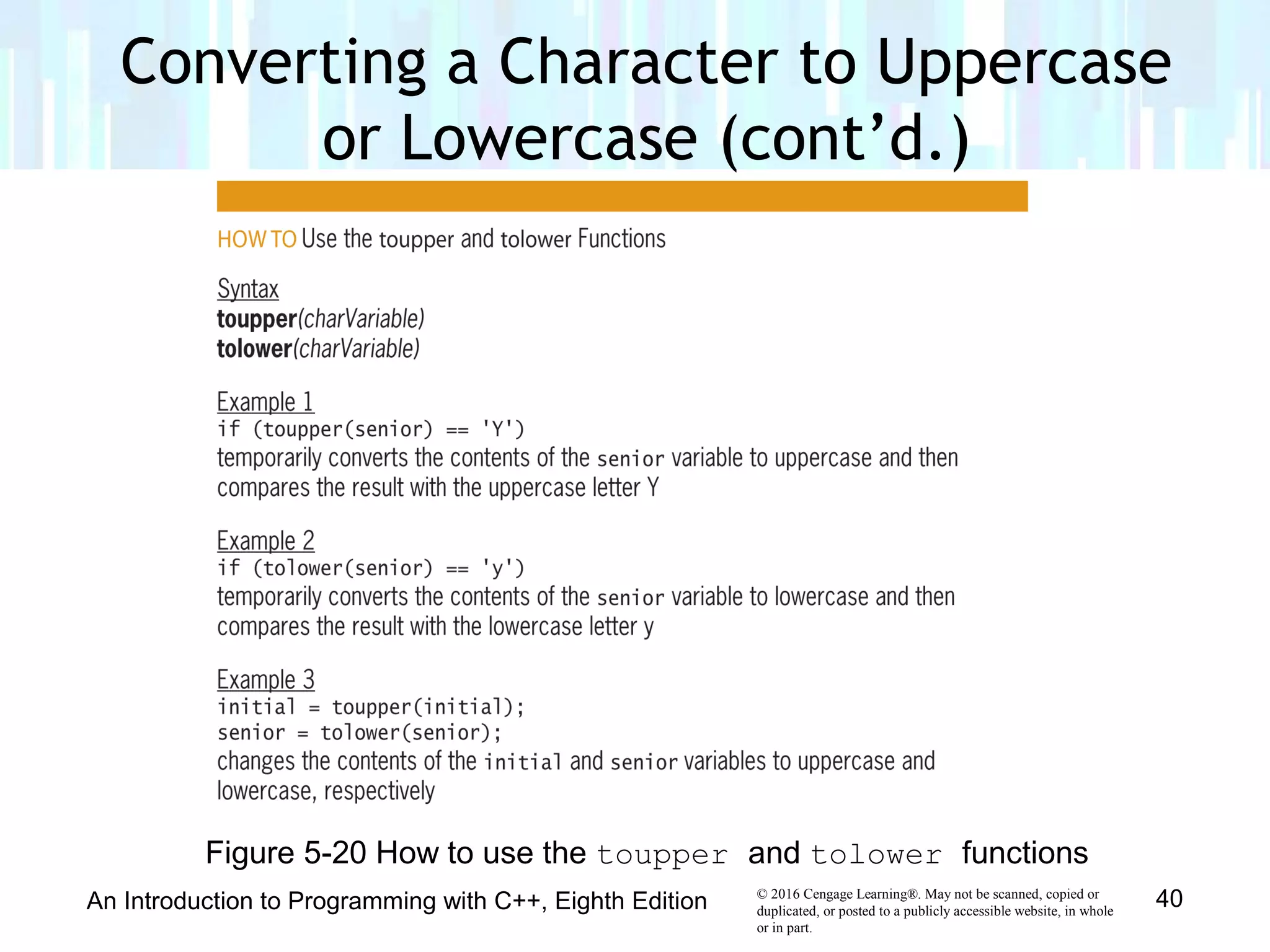
An Introduction to Programming with C++, Eighth Edition 40
Figure 5-20 How to use the toupper and tolower functions
Converting a Character to Uppercase
or Lowercase (cont’d.)
© 2016 Cengage Learning®. May not be scanned, copied or
duplicated, or posted to a publicly accessible website, in whole
or in part.
• Real numbers are displayed in either fixed-point or
scientific (e) notation
• Small real numbers (six or less digits before decimal
place) displayed in fixed-point notation
– Example: 1,234.56 displayed as 1234.560000
• Large real numbers (more than six digits before decimal
place) displayed in e notation
– Example: 1,225,000.00 displayed as 1.225e+006
• Purpose of program determines appropriate format
Formatting Numeric Output
An Introduction to Programming with C++, Eighth Edition 41
© 2016 Cengage Learning®. May not be scanned, copied or
duplicated, or posted to a publicly accessible website, in whole
or in part.
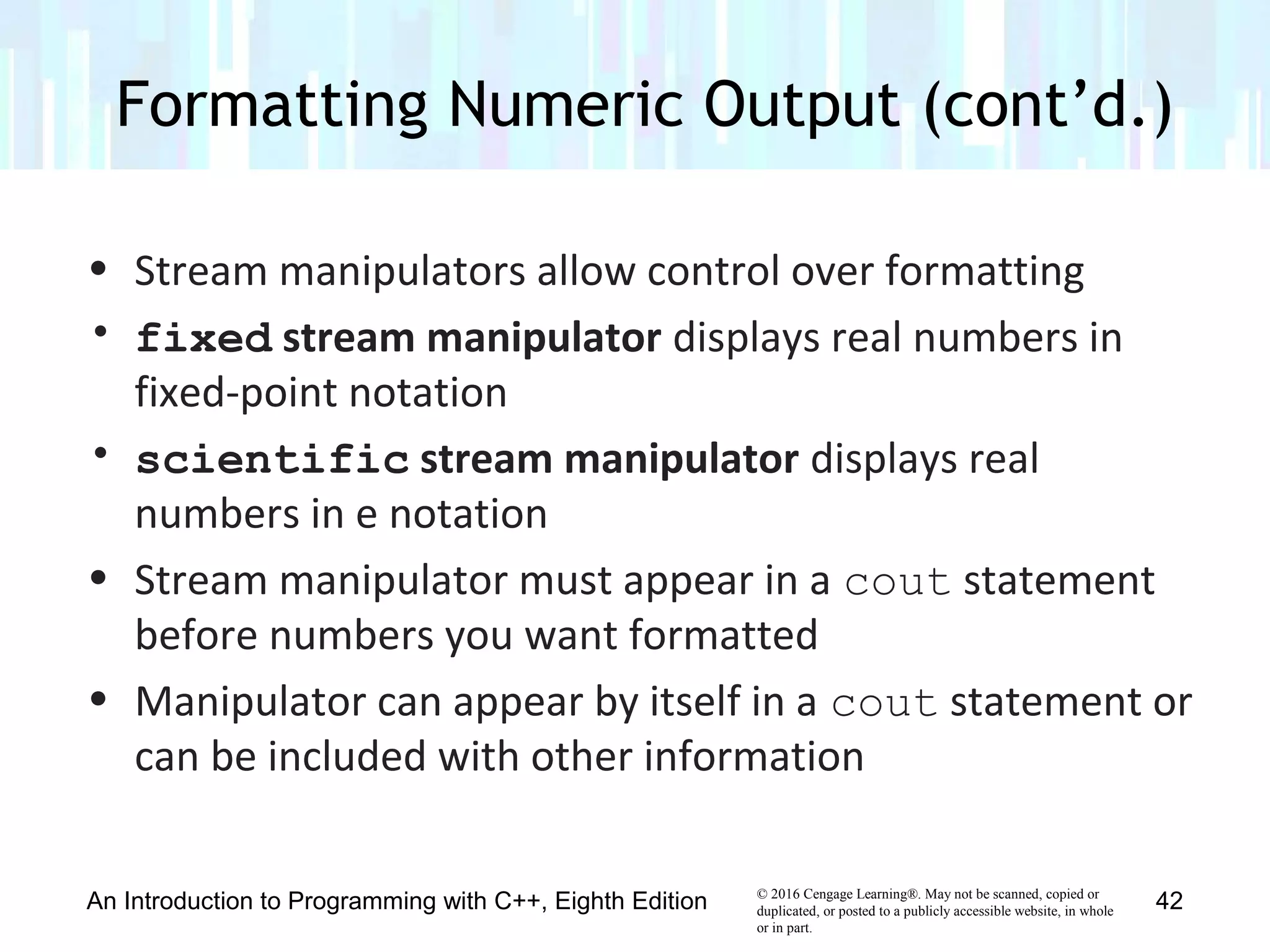
• Stream manipulators allow control over formatting
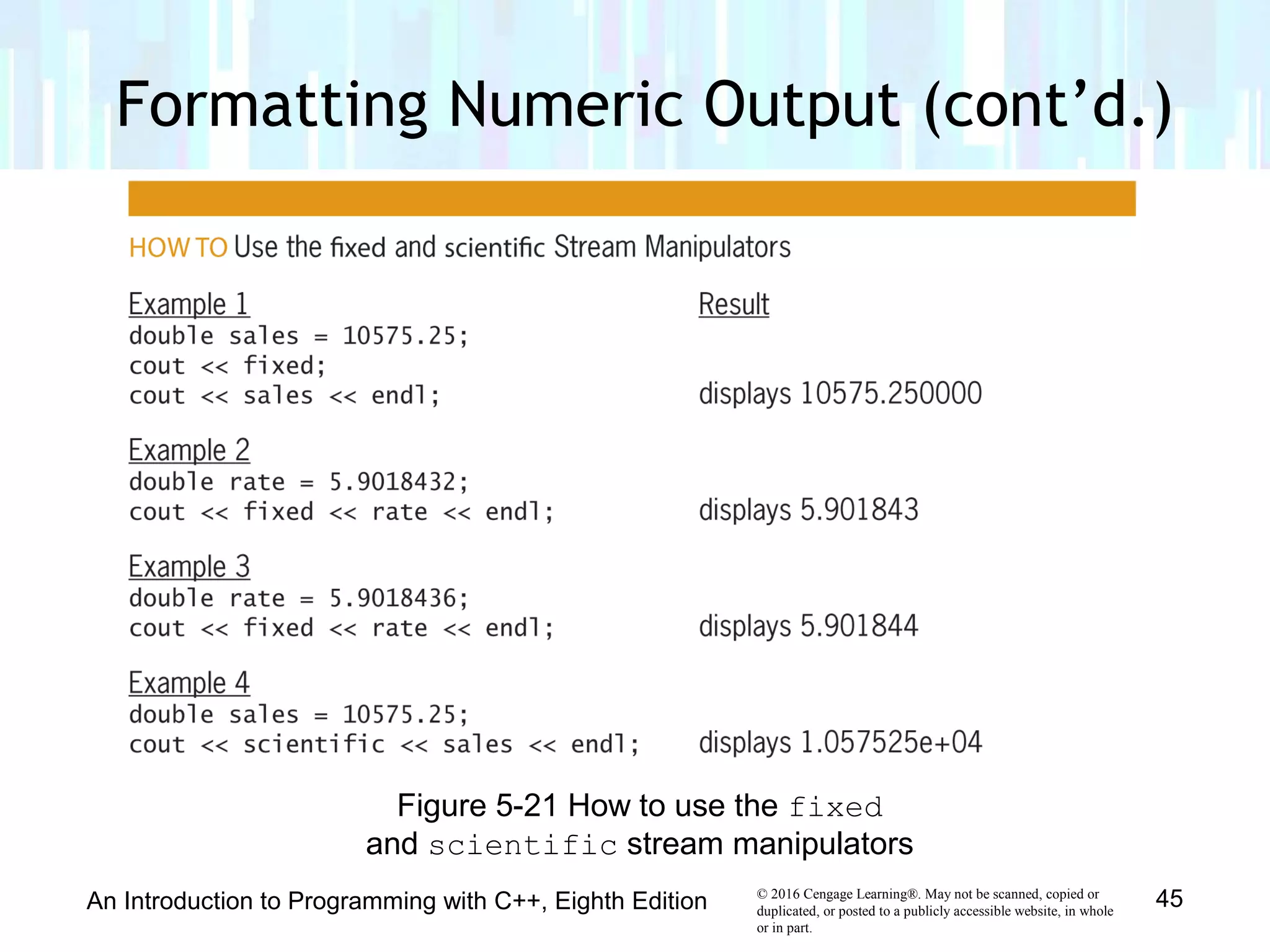
• fixed stream manipulator displays real numbers in
fixed-point notation
• scientific stream manipulator displays real
numbers in e notation
• Stream manipulator must appear in a cout statement
before numbers you want formatted
• Manipulator can appear by itself in a cout statement or
can be included with other information
Formatting Numeric Output (cont’d.)
An Introduction to Programming with C++, Eighth Edition 42
© 2016 Cengage Learning®. May not be scanned, copied or
duplicated, or posted to a publicly accessible website, in whole
or in part.
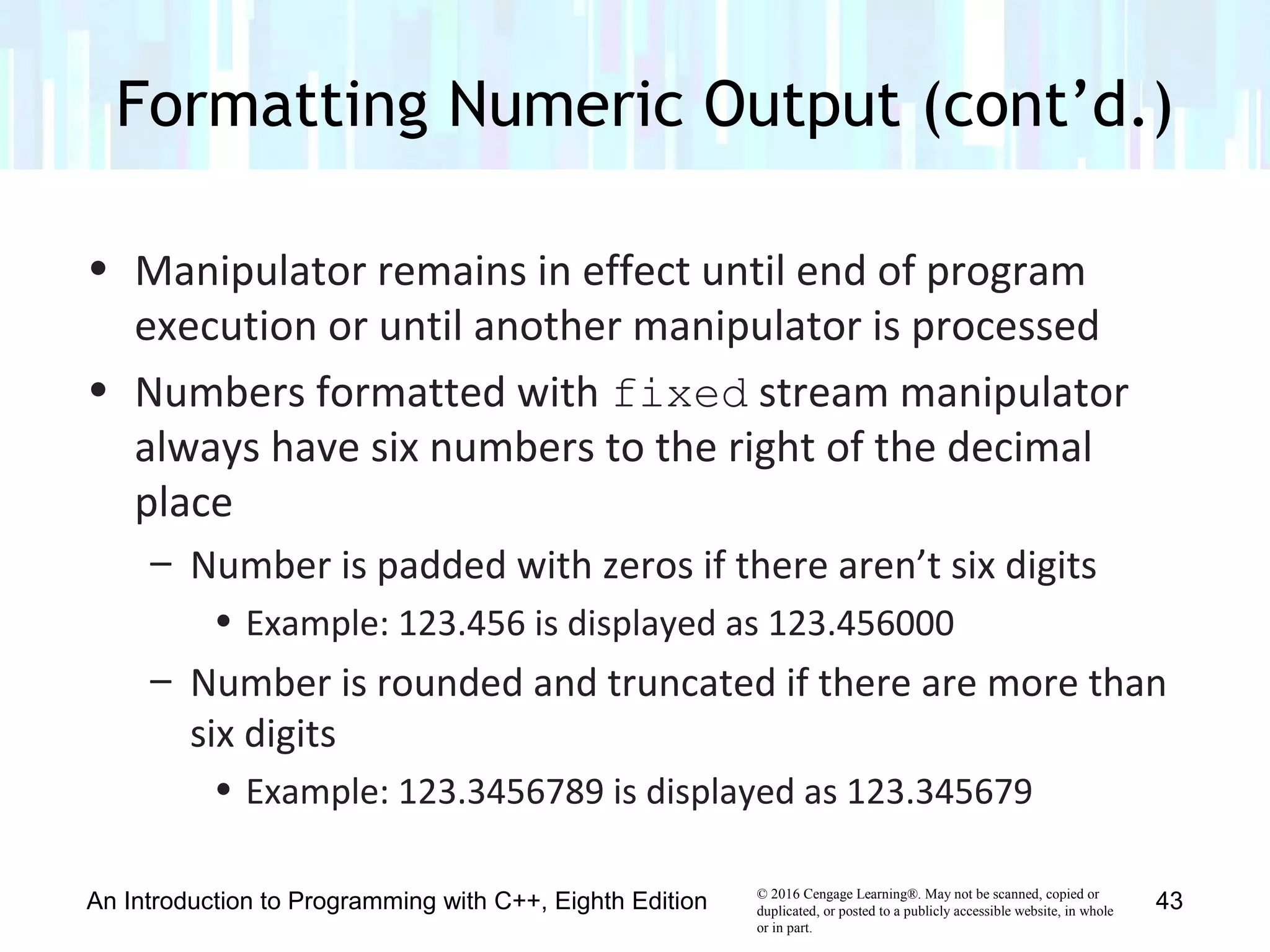
• Manipulator remains in effect until end of program
execution or until another manipulator is processed
• Numbers formatted with fixed stream manipulator
always have six numbers to the right of the decimal
place
– Number is padded with zeros if there aren’t six digits
• Example: 123.456 is displayed as 123.456000
– Number is rounded and truncated if there are more than
six digits
• Example: 123.3456789 is displayed as 123.345679
Formatting Numeric Output (cont’d.)
An Introduction to Programming with C++, Eighth Edition 43
© 2016 Cengage Learning®. May not be scanned, copied or
duplicated, or posted to a publicly accessible website, in whole
or in part.
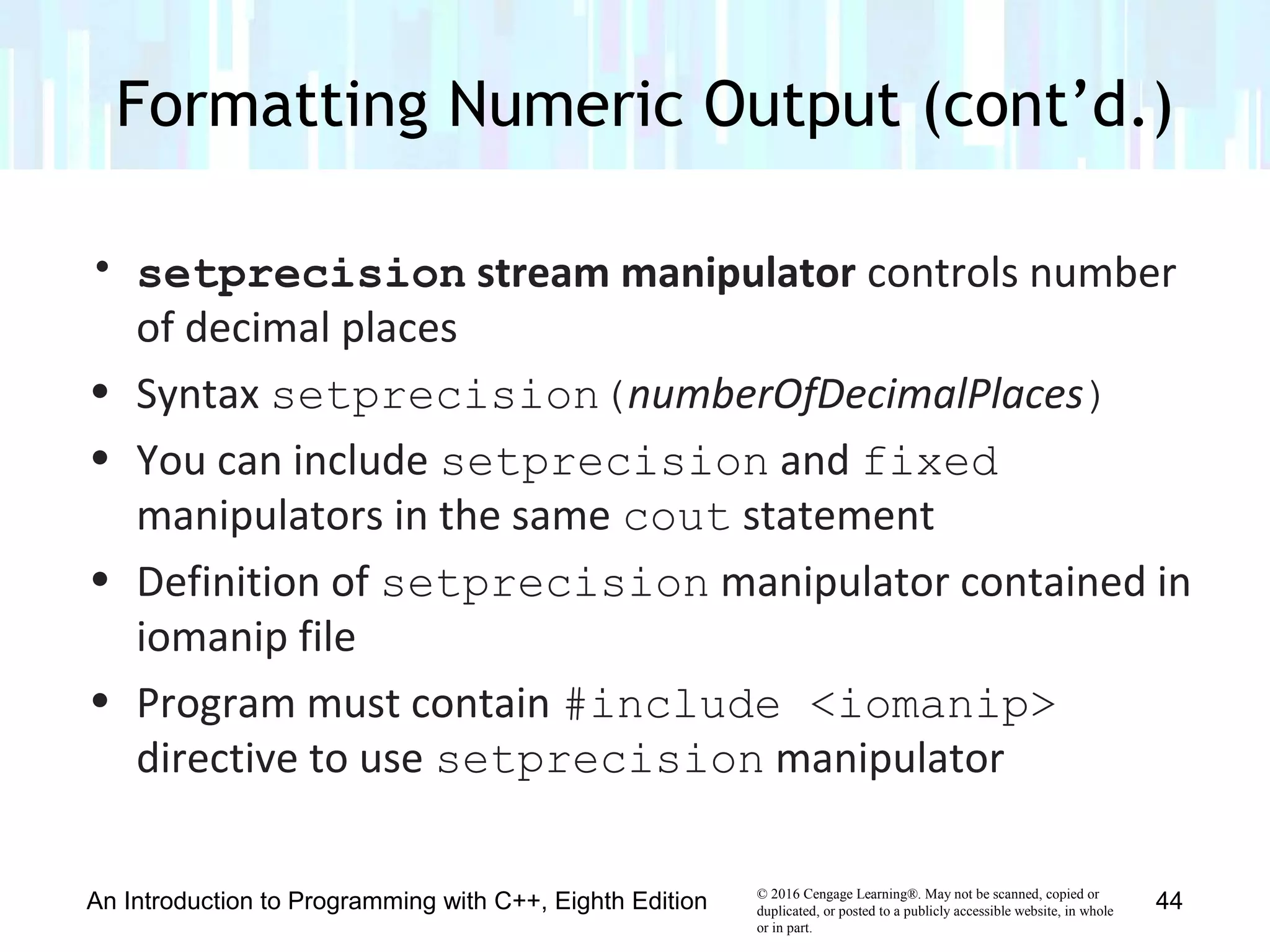
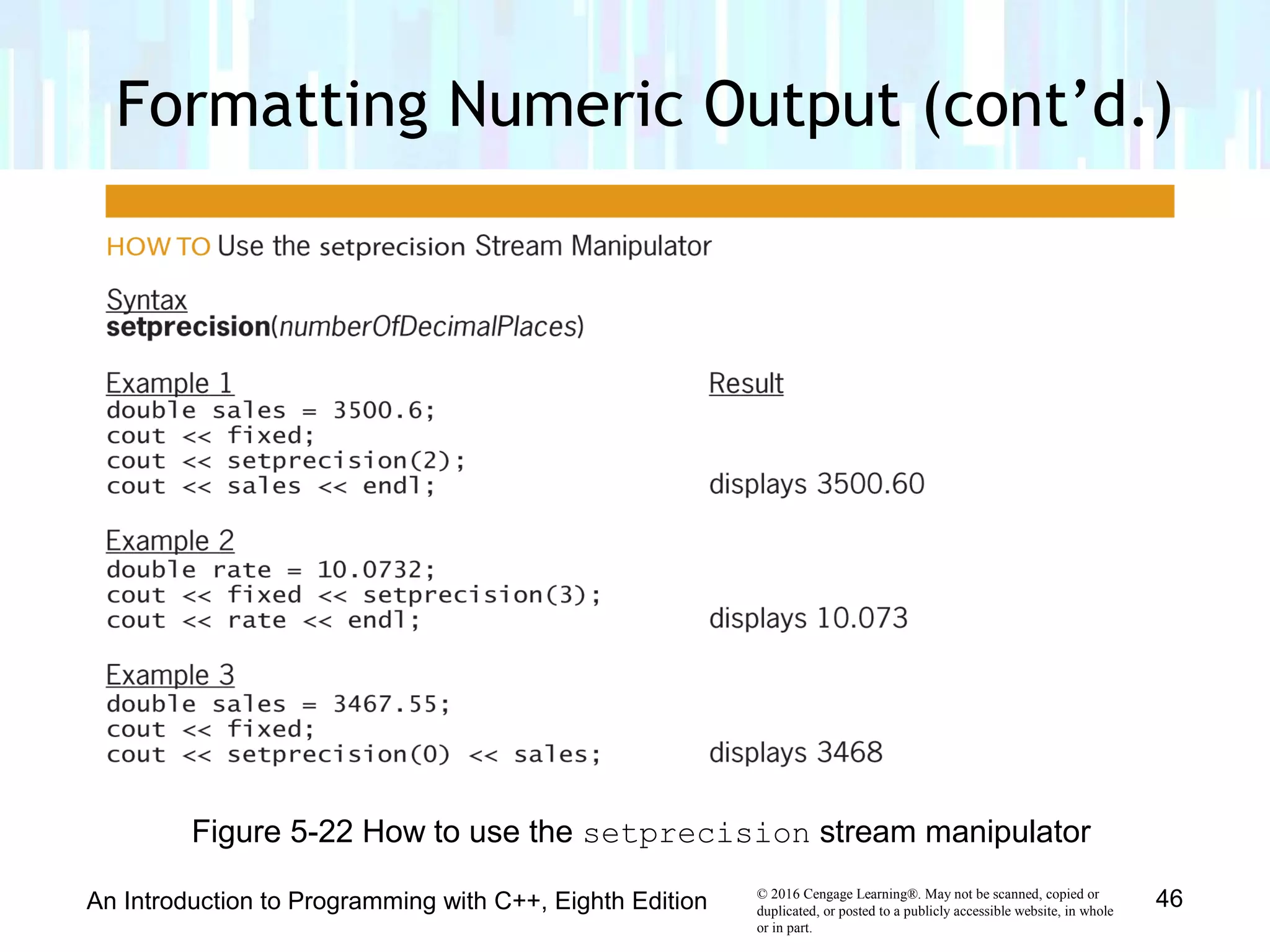
• setprecision stream manipulator controls number
of decimal places
• Syntax setprecision(numberOfDecimalPlaces)
• You can include setprecision and fixed
manipulators in the same cout statement
• Definition of setprecision manipulator contained in
iomanip file
• Program must contain #include <iomanip>
directive to use setprecision manipulator
Formatting Numeric Output (cont’d.)
An Introduction to Programming with C++, Eighth Edition 44
© 2016 Cengage Learning®. May not be scanned, copied or
duplicated, or posted to a publicly accessible website, in whole
or in part.
Formatting Numeric Output (cont’d.)
An Introduction to Programming with C++, Eighth Edition 45
Figure 5-21 How to use the fixed
and scientific stream manipulators
© 2016 Cengage Learning®. May not be scanned, copied or
duplicated, or posted to a publicly accessible website, in whole
or in part.
Formatting Numeric Output (cont’d.)
An Introduction to Programming with C++, Eighth Edition 46
Figure 5-22 How to use the setprecision stream manipulator
© 2016 Cengage Learning®. May not be scanned, copied or
duplicated, or posted to a publicly accessible website, in whole
or in part.
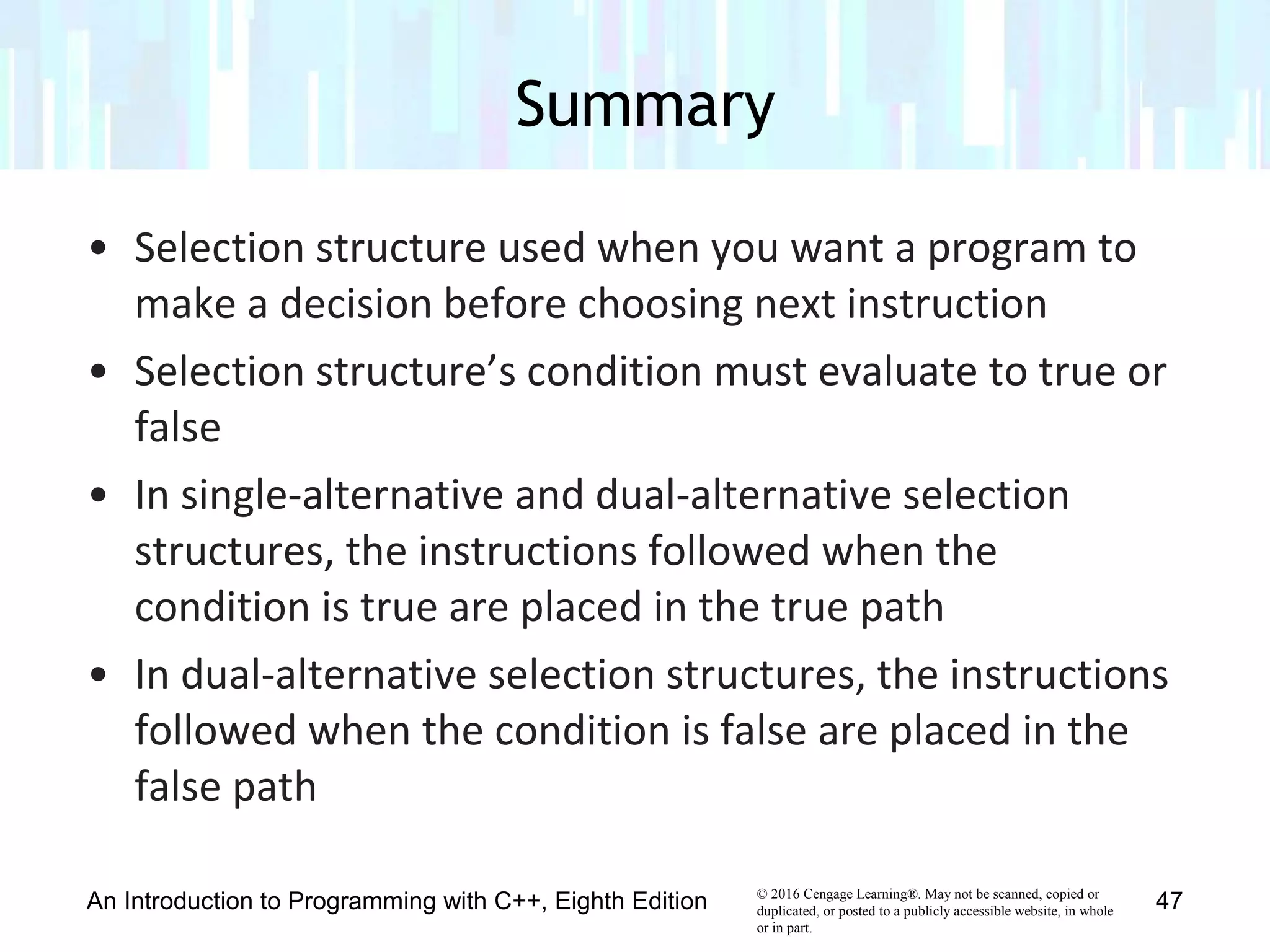
• Selection structure used when you want a program to
make a decision before choosing next instruction
• Selection structure’s condition must evaluate to true or
false
• In single-alternative and dual-alternative selection
structures, the instructions followed when the
condition is true are placed in the true path
• In dual-alternative selection structures, the instructions
followed when the condition is false are placed in the
false path
Summary
An Introduction to Programming with C++, Eighth Edition 47
© 2016 Cengage Learning®. May not be scanned, copied or
duplicated, or posted to a publicly accessible website, in whole
or in part.
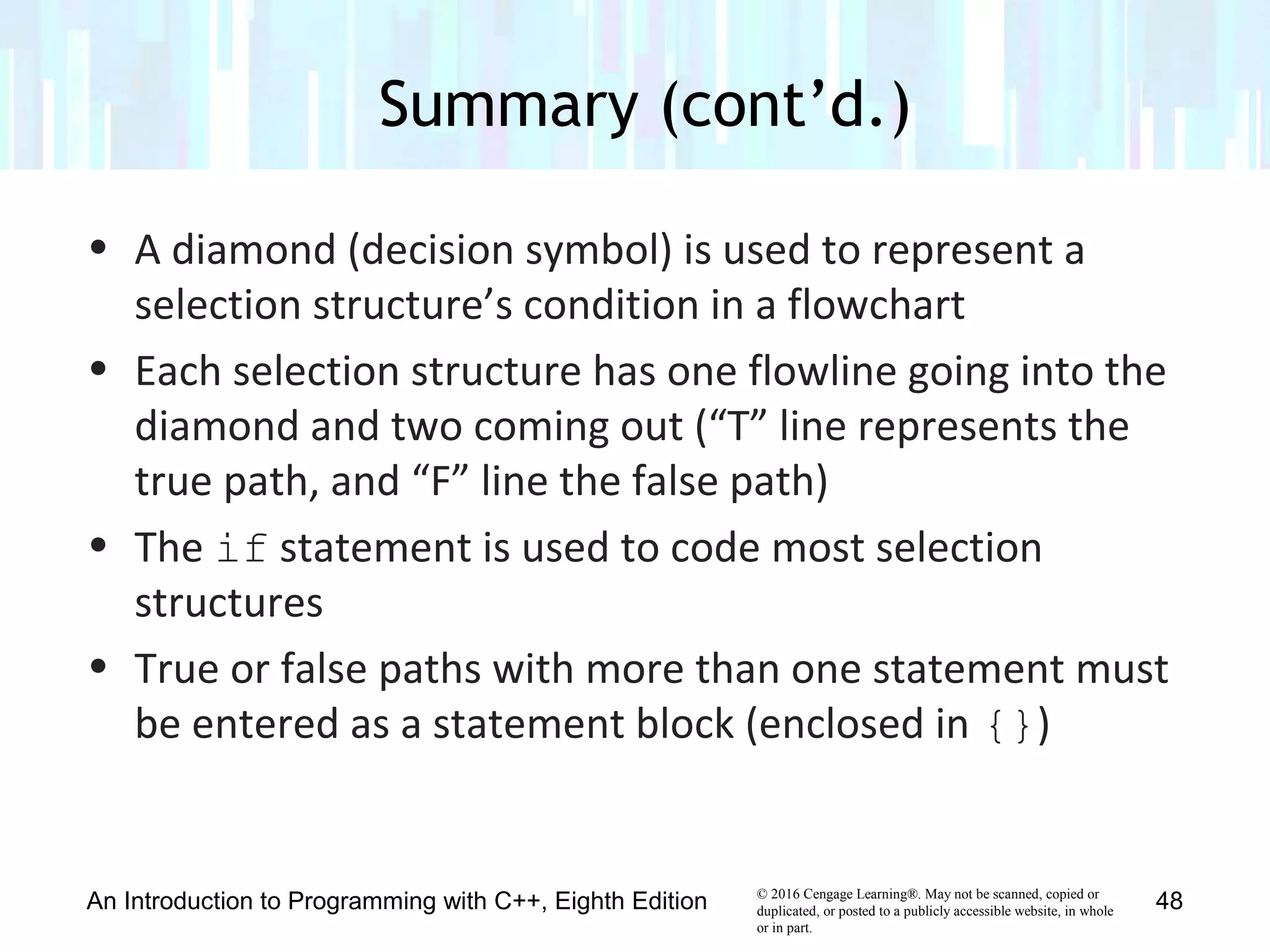
• A diamond (decision symbol) is used to represent a
selection structure’s condition in a flowchart
• Each selection structure has one flowline going into the
diamond and two coming out (“T” line represents the
true path, and “F” line the false path)
• The if statement is used to code most selection
structures
• True or false paths with more than one statement must
be entered as a statement block (enclosed in {})
Summary (cont’d.)
An Introduction to Programming with C++, Eighth Edition 48
© 2016 Cengage Learning®. May not be scanned, copied or
duplicated, or posted to a publicly accessible website, in whole
or in part.
• Good practice to end if and else statements with a
comment (//end if)
• Comparison operators are used to compare values –
Expressions using them evaluate to true or false
• Comparison operators have precedence ordering
similar to arithmetic operators
• Don’t use == and != to compare real numbers
• Local variables can only be used in the statement block
in which they are declared
Summary (cont’d.)
An Introduction to Programming with C++, Eighth Edition 49
© 2016 Cengage Learning®. May not be scanned, copied or
duplicated, or posted to a publicly accessible website, in whole
or in part.
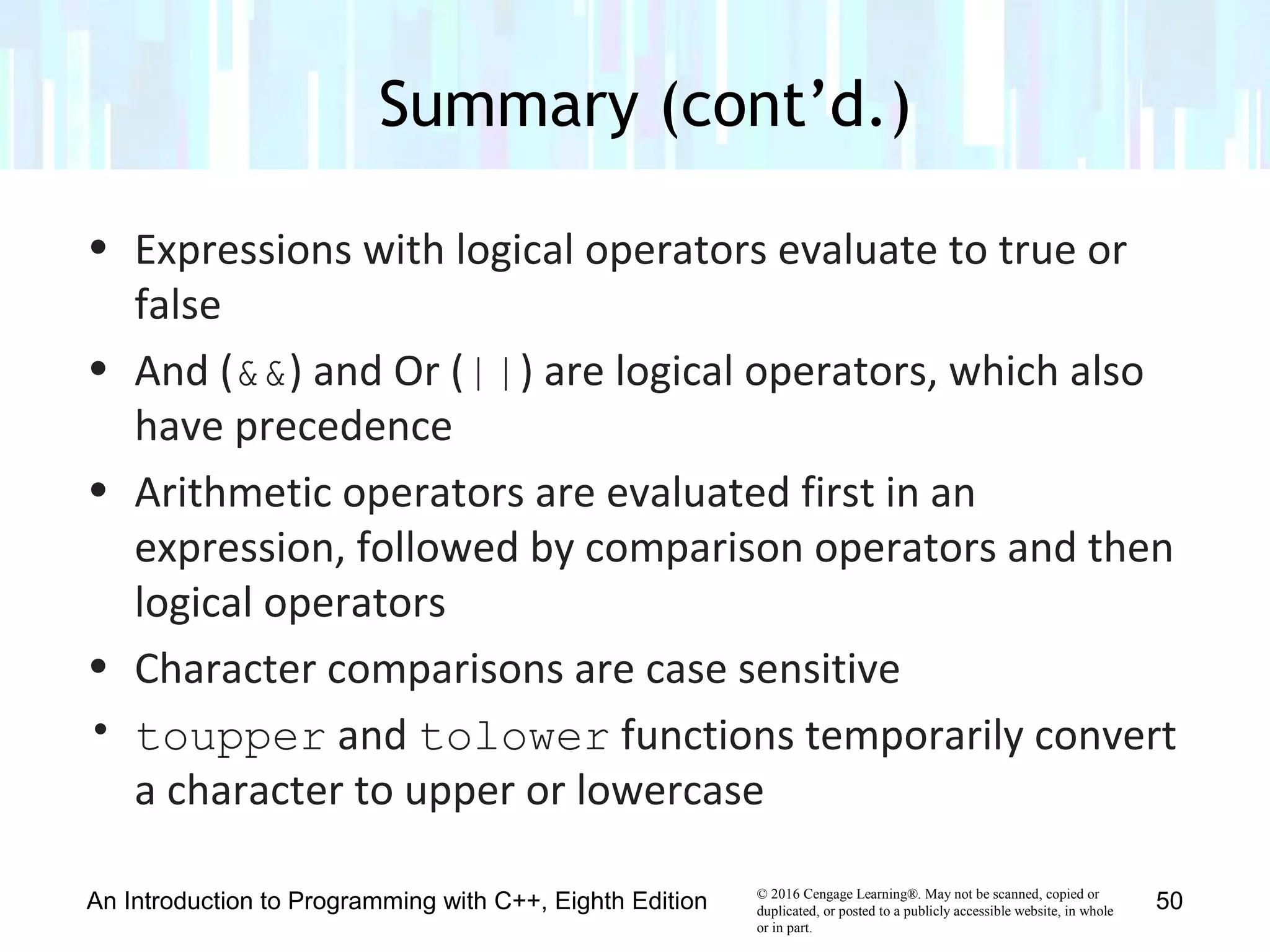
• Expressions with logical operators evaluate to true or
false
• And (&&) and Or (||) are logical operators, which also
have precedence
• Arithmetic operators are evaluated first in an
expression, followed by comparison operators and then
logical operators
• Character comparisons are case sensitive
• toupper and tolower functions temporarily convert
a character to upper or lowercase
Summary (cont’d.)
An Introduction to Programming with C++, Eighth Edition 50
© 2016 Cengage Learning®. May not be scanned, copied or
duplicated, or posted to a publicly accessible website, in whole
or in part.
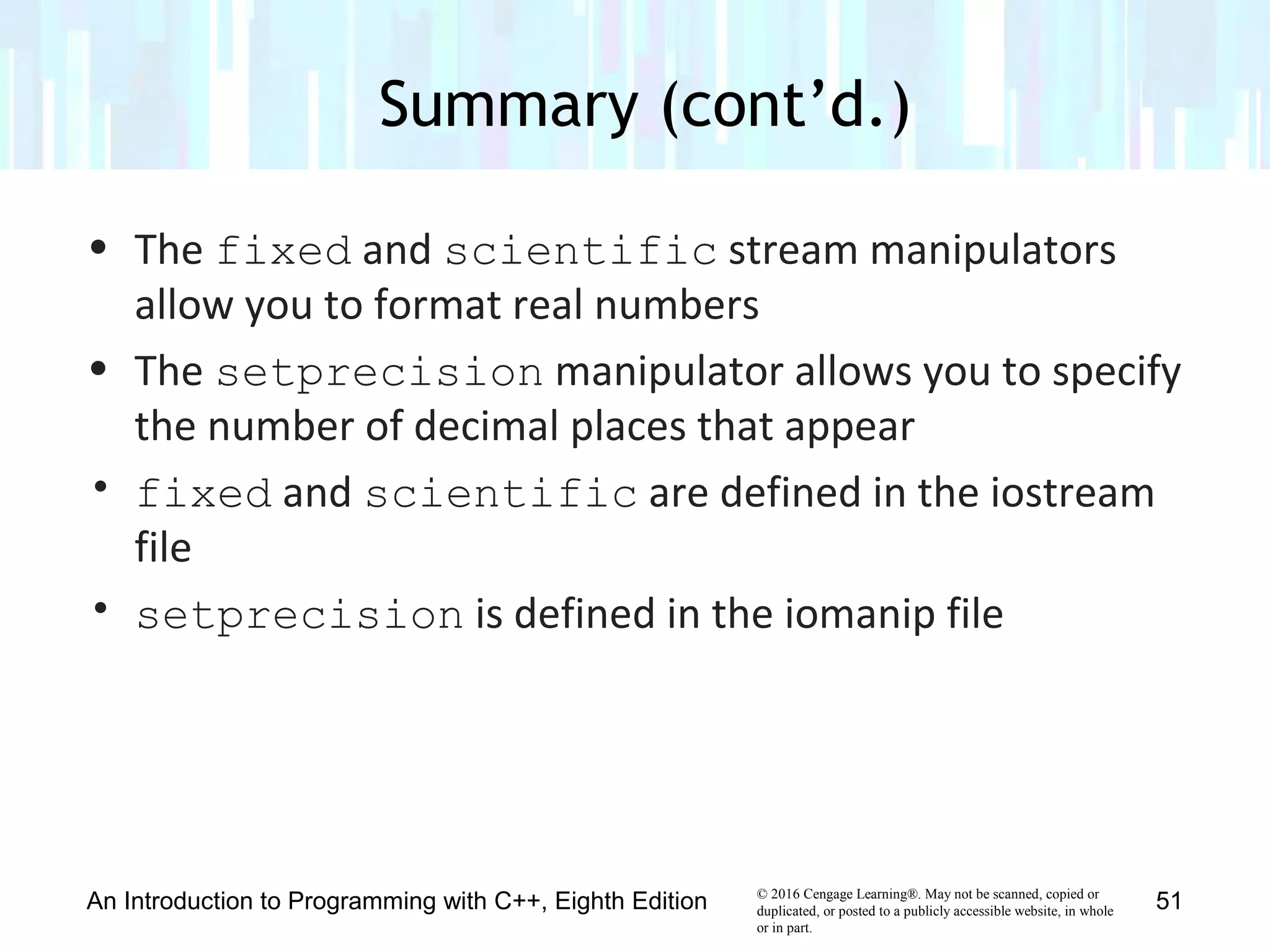
• The fixed and scientific stream manipulators
allow you to format real numbers
• The setprecision manipulator allows you to specify
the number of decimal places that appear
• fixed and scientific are defined in the iostream
file
• setprecision is defined in the iomanip file
Summary (cont’d.)
An Introduction to Programming with C++, Eighth Edition 51
© 2016 Cengage Learning®. May not be scanned, copied or
duplicated, or posted to a publicly accessible website, in whole
or in part.
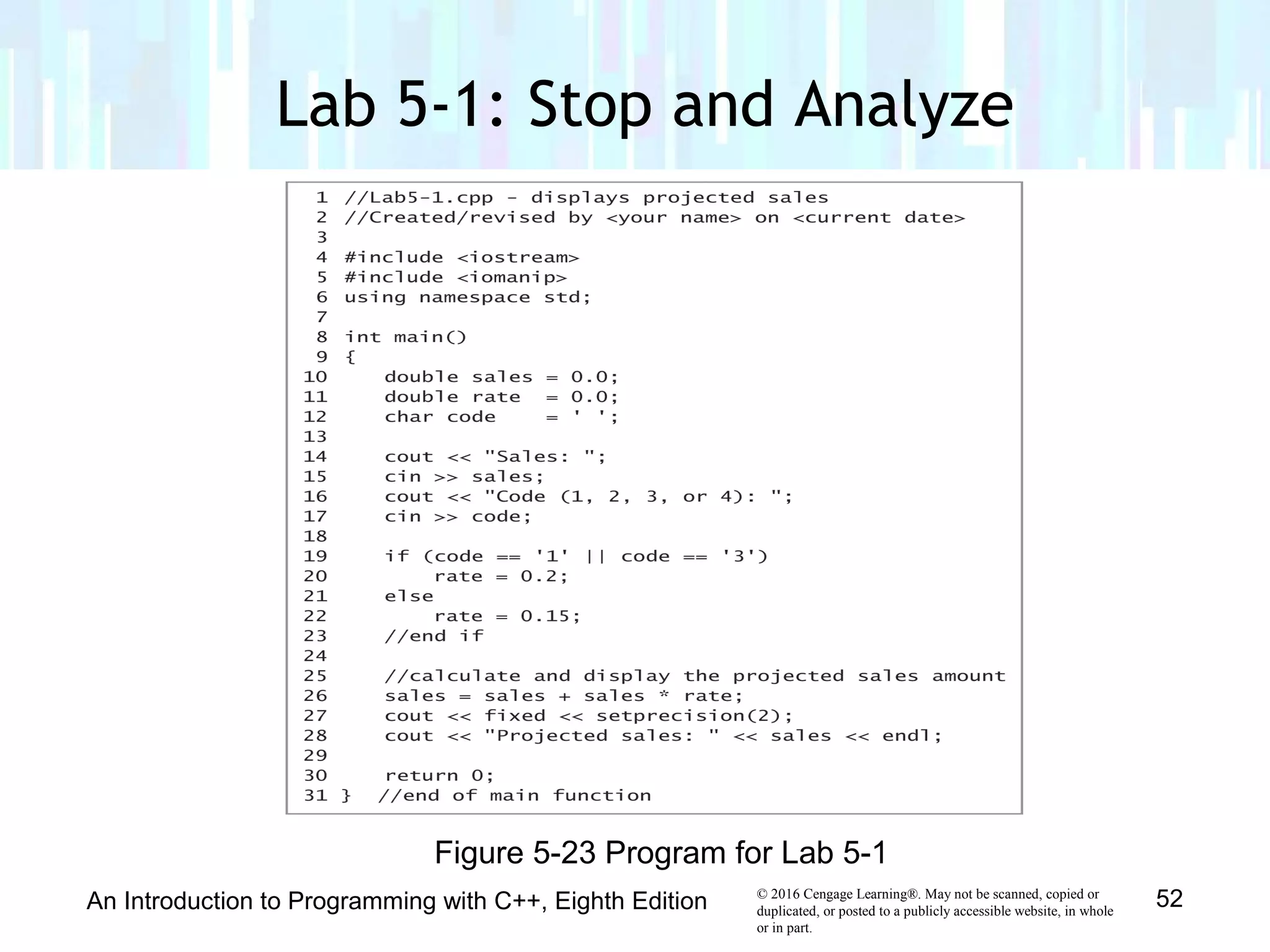
Lab 5-1: Stop and Analyze
An Introduction to Programming with C++, Eighth Edition 52
Figure 5-23 Program for Lab 5-1
© 2016 Cengage Learning®. May not be scanned, copied or
duplicated, or posted to a publicly accessible website, in whole
or in part.
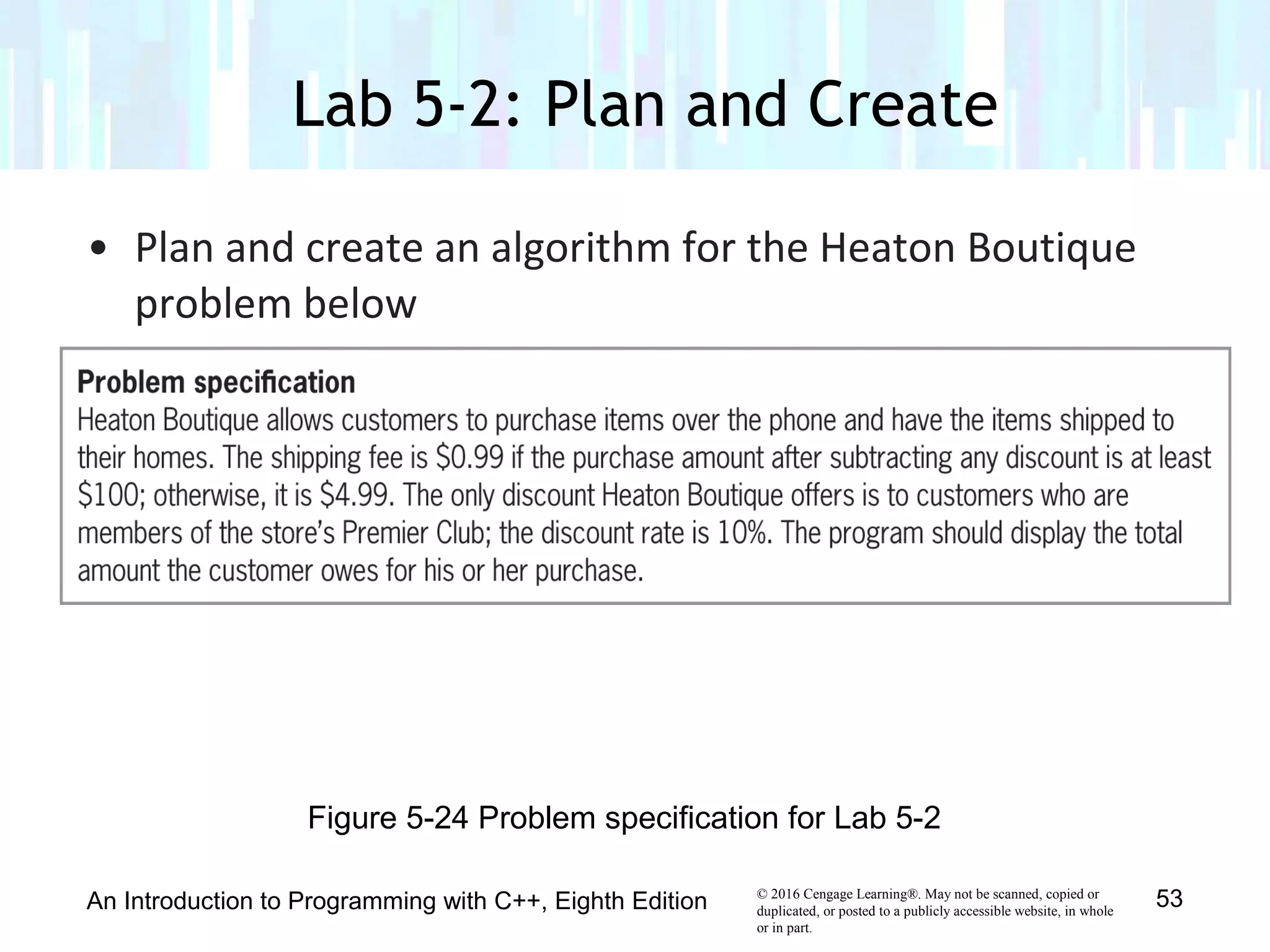
• Plan and create an algorithm for the Heaton Boutique
problem below
Lab 5-2: Plan and Create
An Introduction to Programming with C++, Eighth Edition 53
Figure 5-24 Problem specification for Lab 5-2
© 2016 Cengage Learning®. May not be scanned, copied or
duplicated, or posted to a publicly accessible website, in whole
or in part.
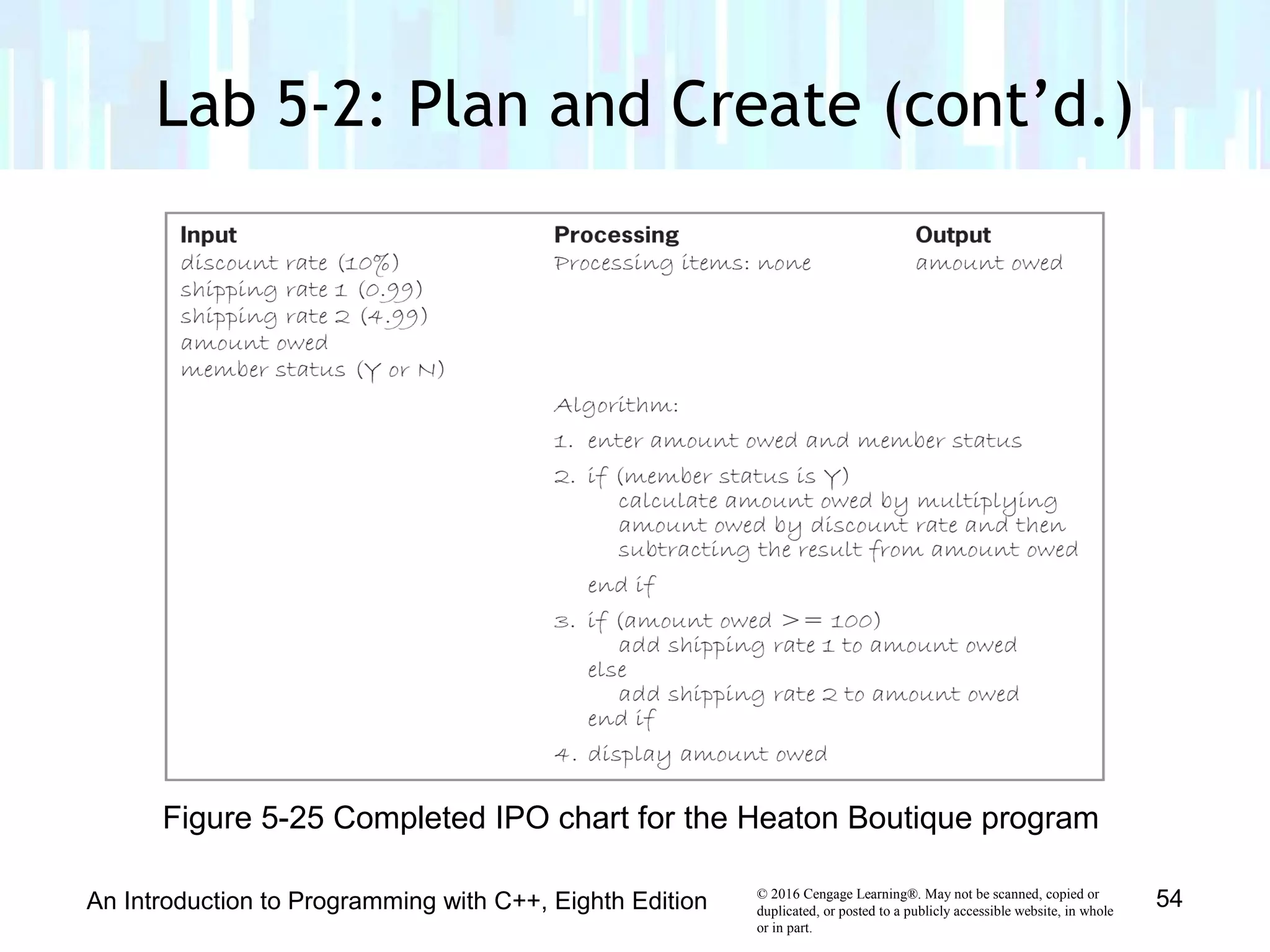
Lab 5-2: Plan and Create (cont’d.)
An Introduction to Programming with C++, Eighth Edition 54
Figure 5-25 Completed IPO chart for the Heaton Boutique program
© 2016 Cengage Learning®. May not be scanned, copied or
duplicated, or posted to a publicly accessible website, in whole
or in part.
Lab 5-2: Plan and Create (cont’d.)
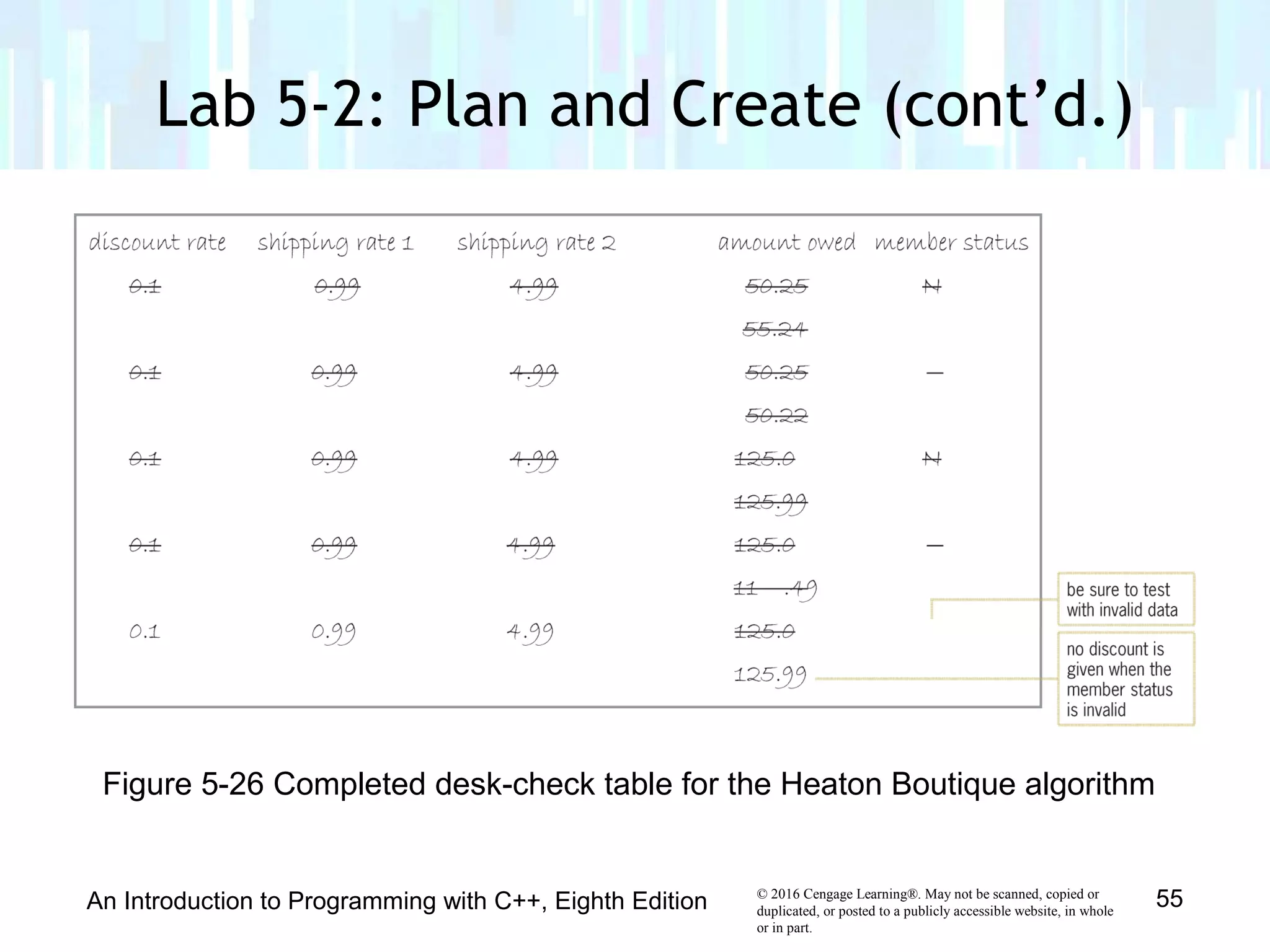
An Introduction to Programming with C++, Eighth Edition 55
Figure 5-26 Completed desk-check table for the Heaton Boutique algorithm
© 2016 Cengage Learning®. May not be scanned, copied or
duplicated, or posted to a publicly accessible website, in whole
or in part.
Lab 5-2: Plan and Create (cont’d.)
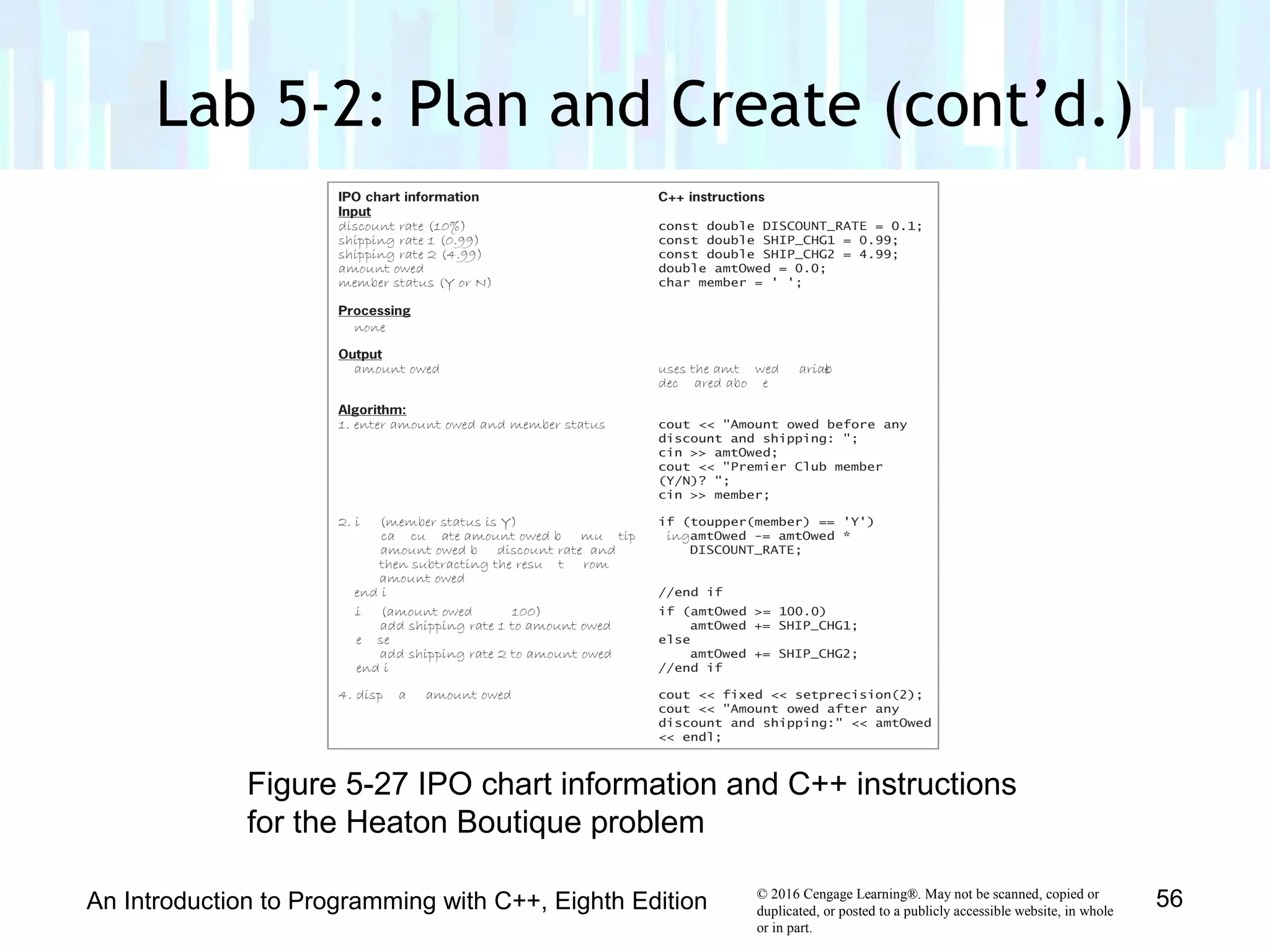
An Introduction to Programming with C++, Eighth Edition 56
Figure 5-27 IPO chart information and C++ instructions
for the Heaton Boutique problem
© 2016 Cengage Learning®. May not be scanned, copied or
duplicated, or posted to a publicly accessible website, in whole
or in part.
Lab 5-2: Plan and Create (cont’d.)
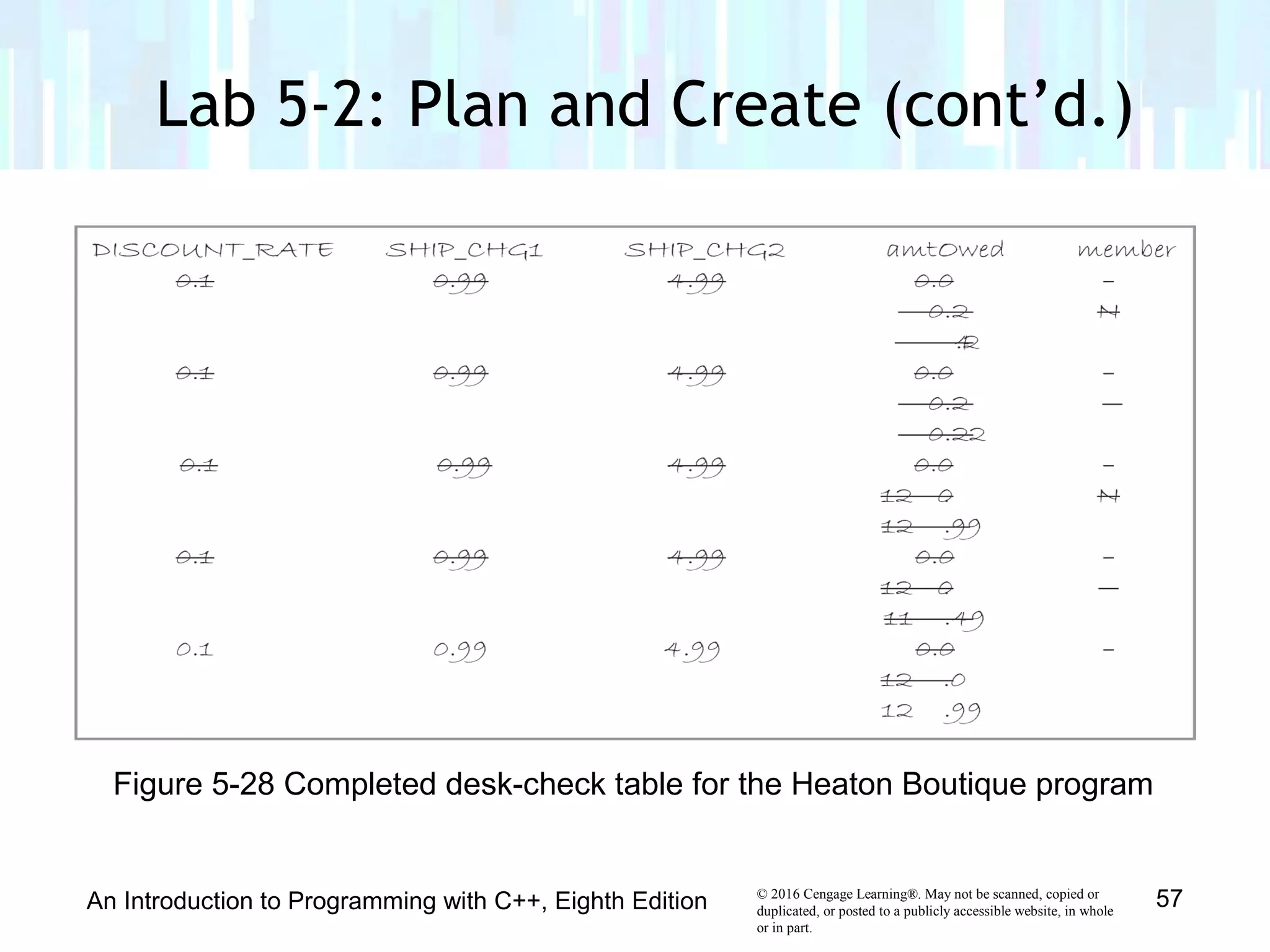
An Introduction to Programming with C++, Eighth Edition 57
Figure 5-28 Completed desk-check table for the Heaton Boutique program
© 2016 Cengage Learning®. May not be scanned, copied or
duplicated, or posted to a publicly accessible website, in whole
or in part.
Lab 5-2: Plan and Create (cont’d.)
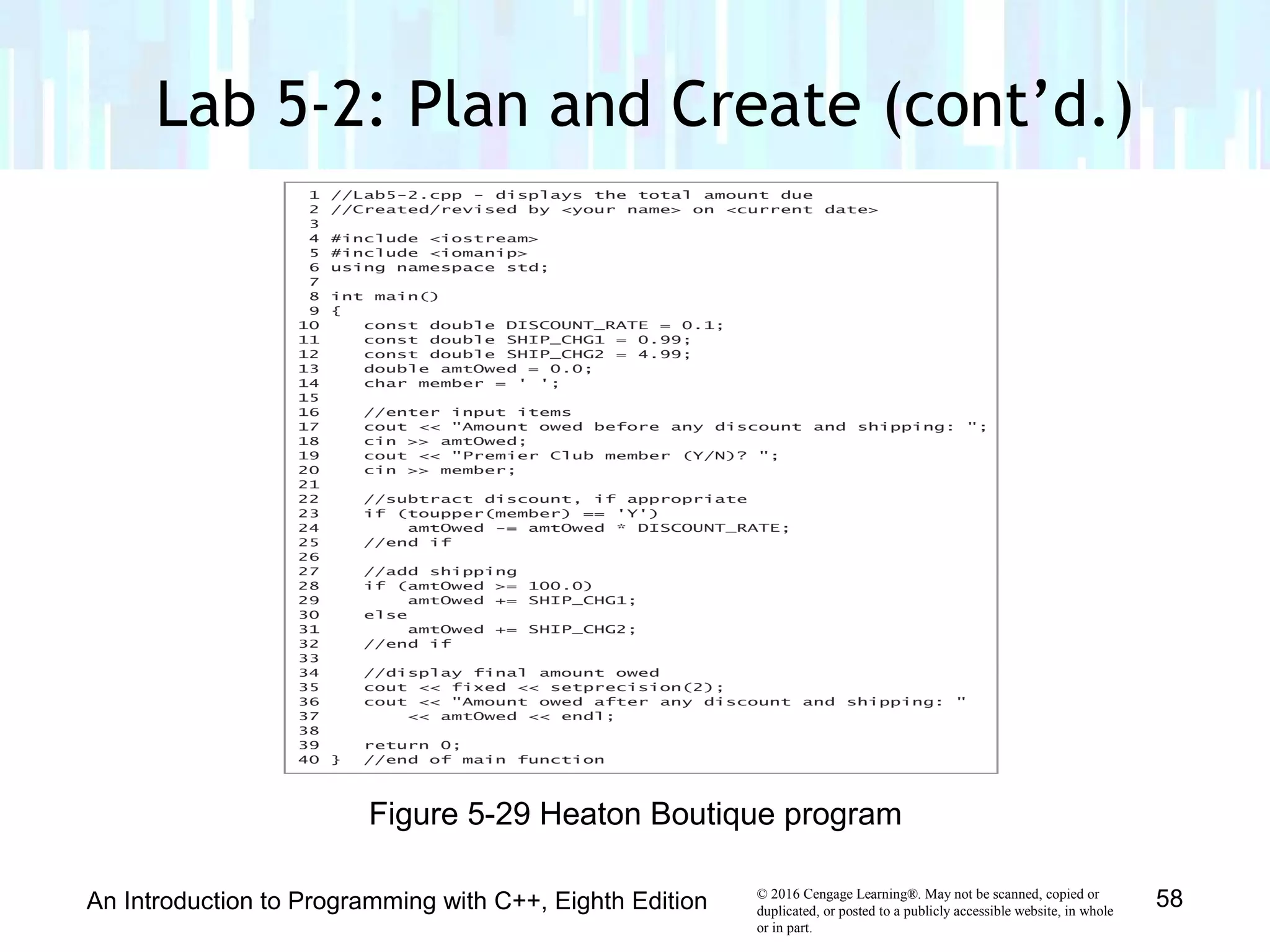
An Introduction to Programming with C++, Eighth Edition 58
Figure 5-29 Heaton Boutique program
© 2016 Cengage Learning®. May not be scanned, copied or
duplicated, or posted to a publicly accessible website, in whole
or in part.
• Modify the Heaton Boutique program from Lab 5-2 to
give a 10% discount to members of the store’s Premier
Club, and a 5% discount to all other customers.
Lab 5-3: Modify
An Introduction to Programming with C++, Eighth Edition 59
© 2016 Cengage Learning®. May not be scanned, copied or
duplicated, or posted to a publicly accessible website, in whole
or in part.
• The program in this lab should display the total price of
the tickets purchased by a customer. A maximum
number of 10 tickets can be purchased.
• Put the C++ instructions in the proper order, and then
determine the one or more missing instructions.
• Test the program three times using the following data:
8, 12, and -3.
Lab 5-4: What’s Missing?
An Introduction to Programming with C++, Eighth Edition 60
© 2016 Cengage Learning®. May not be scanned, copied or
duplicated, or posted to a publicly accessible website, in whole
or in part.
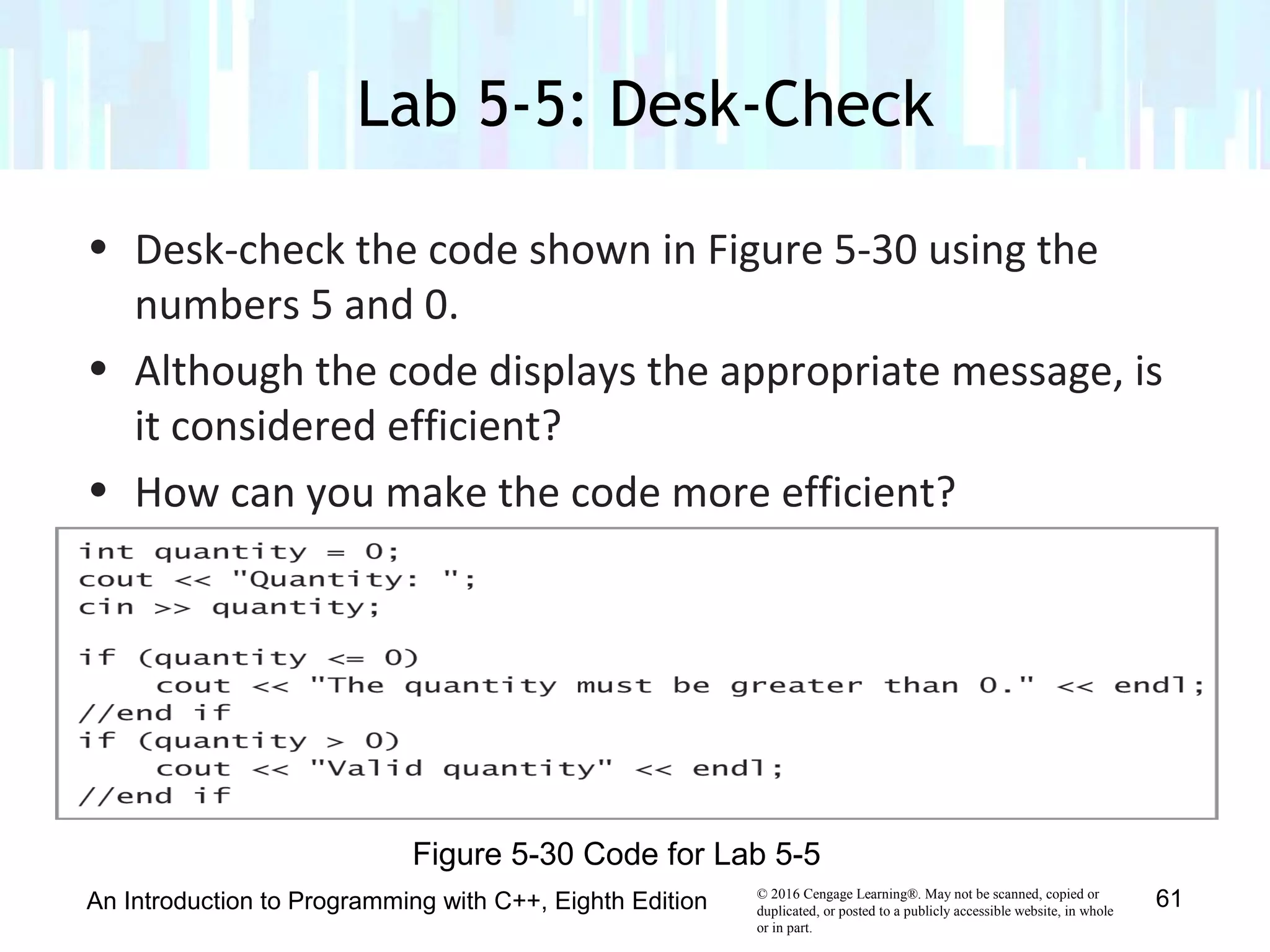
• Desk-check the code shown in Figure 5-30 using the
numbers 5 and 0.
• Although the code displays the appropriate message, is
it considered efficient?
• How can you make the code more efficient?
Lab 5-5: Desk-Check
An Introduction to Programming with C++, Eighth Edition 61
Figure 5-30 Code for Lab 5-5
© 2016 Cengage Learning®. May not be scanned, copied or
duplicated, or posted to a publicly accessible website, in whole
or in part.
• Follow the instructions for starting C++ and opening the
Ch05-Lab5-6.cpp file.
• Test the program using codes 1, 2, and 3. Use 100 as
the purchase price.
• Debug the program.
Lab 5-6: Debug
An Introduction to Programming with C++, Eighth Edition 62

Chapter 5 - The Selection Structure

  • 1.
    © 2016 CengageLearning®. May not be scanned, copied or duplicated, or posted to a publicly accessible website, in whole or in part. Introduction to Programming in C++ Eighth Edition Chapter 5: The Selection Structure
  • 2.
    © 2016 CengageLearning®. May not be scanned, copied or duplicated, or posted to a publicly accessible website, in whole or in part. • Include the selection structure in pseudocode and in a flowchart • Code a selection structure using the if statement • Include comparison operators in a selection structure’s condition • Include logical operators in a selection structure’s condition • Temporarily convert a character to either uppercase or lowercase • Format numeric output Objectives An Introduction to Programming with C++, Eighth Edition 2
  • 3.
    © 2016 CengageLearning®. May not be scanned, copied or duplicated, or posted to a publicly accessible website, in whole or in part. • With only the sequence structure, all instructions are executed in order • A selection structure is needed when a decision must be made (based on some condition) before selecting an instruction to execute • A selection structure’s condition must be phrased as a Boolean expression (evaluates to true or false) Making Decisions An Introduction to Programming with C++, Eighth Edition 3
  • 4.
    © 2016 CengageLearning®. May not be scanned, copied or duplicated, or posted to a publicly accessible website, in whole or in part. • Single-alternative selection structure – Set of instructions is executed only if condition evaluates to true • Dual-alternative selection structure – Executes different sets of instructions based on whether condition evaluates to true or false • True path – Instructions followed when condition evaluates to true • False path – Instructions followed when condition evaluates to false Making Decisions (cont’d.) An Introduction to Programming with C++, Eighth Edition 4
  • 5.
    © 2016 CengageLearning®. May not be scanned, copied or duplicated, or posted to a publicly accessible website, in whole or in part. Making Decisions (cont’d.) An Introduction to Programming with C++, Eighth Edition 5 Figure 5-1 A problem that requires the sequence structure only
  • 6.
    © 2016 CengageLearning®. May not be scanned, copied or duplicated, or posted to a publicly accessible website, in whole or in part. Making Decisions (cont’d.) An Introduction to Programming with C++, Eighth Edition 6 Figure 5-2 A problem that requires the sequence structure and a single-alternative selection structure
  • 7.
    © 2016 CengageLearning®. May not be scanned, copied or duplicated, or posted to a publicly accessible website, in whole or in part. Making Decisions (cont’d.) An Introduction to Programming with C++, Eighth Edition 7 Figure 5-3 A problem that requires the sequence structure and a dual-alternative selection structure
  • 8.
    © 2016 CengageLearning®. May not be scanned, copied or duplicated, or posted to a publicly accessible website, in whole or in part. • Recall from Chapter 2: – Oval = start/stop symbol; rectangle = process symbol; parallelogram = input/output symbol • Diamond symbol is called decision symbol – Used to represent condition (decision) in selection and repetition structures • Selection structures have one flowline leading in and two leading out – “T” line leading out points to true path – “F” line leading out points to false path Flowcharting a Selection Structure An Introduction to Programming with C++, Eighth Edition 8
  • 9.
    © 2016 CengageLearning®. May not be scanned, copied or duplicated, or posted to a publicly accessible website, in whole or in part. Flowcharting a Selection Structure (cont’d) An Introduction to Programming with C++, Eighth Edition 9 Figure 5-4 Problem specification and two correct algorithms in flowchart form
  • 10.
    © 2016 CengageLearning®. May not be scanned, copied or duplicated, or posted to a publicly accessible website, in whole or in part. • The if (and else) statement is used to code most selection structures in C++ • Syntax if (condition) one or more statements (true path) [else one or more statements (false path)] • Keyword if and condition are required • Portion in brackets (else clause) is optional – Only used for dual-alternative selection structures Coding a Selection Structure in C++ An Introduction to Programming with C++, Eighth Edition 10
  • 11.
    © 2016 CengageLearning®. May not be scanned, copied or duplicated, or posted to a publicly accessible website, in whole or in part. • Programmer must supply condition and statements in true (and, optionally, false) path • If path contains more than one statement, must be entered as a statement block (enclosed in {}) • Good programming practice to put comment at end of clause (example: //end if) – Makes program easier to read and understand • The condition must be a Boolean expression – May contain variables, constants, arithmetic operators, comparison operators, and logical operators Coding a Selection Structure in C++ (cont’d.) An Introduction to Programming with C++, Eighth Edition 11
  • 12.
    © 2016 CengageLearning®. May not be scanned, copied or duplicated, or posted to a publicly accessible website, in whole or in part. An Introduction to Programming with C++, Eighth Edition 12 Figure 5-5 How to use the if statement Coding a Selection Structure in C++ (cont’d.)
  • 13.
    © 2016 CengageLearning®. May not be scanned, copied or duplicated, or posted to a publicly accessible website, in whole or in part. An Introduction to Programming with C++, Eighth Edition 13 Figure 5-5 How to use the if statement (cont’d) Coding a Selection Structure in C++ (cont’d.)
  • 14.
    © 2016 CengageLearning®. May not be scanned, copied or duplicated, or posted to a publicly accessible website, in whole or in part. • Comparison operators are used to compare two values that have the same data type – less than (<) – less than or equal to (<=) – greater than (>) – greater than or equal to (>=) – equal to (==) – not equal to (!=) • No spaces between dual-character symbols Comparison Operators An Introduction to Programming with C++, Eighth Edition 14
  • 15.
    © 2016 CengageLearning®. May not be scanned, copied or duplicated, or posted to a publicly accessible website, in whole or in part. • Have precedence numbers like arithmetic operators • <, <=, >, and >= have precedence value 1 • == and != have precedence value 2 • Lower precedence evaluated first • Equal precedence evaluated left to right • Parentheses used to override precedence order Comparison Operators (cont’d.) An Introduction to Programming with C++, Eighth Edition 15
  • 16.
    © 2016 CengageLearning®. May not be scanned, copied or duplicated, or posted to a publicly accessible website, in whole or in part. • Expressions with comparison operators always evaluate to Boolean values • Don’t confuse equality operator (==) with assignment operator (=) • Don’t use equality (==) or inequality operator (!=) to compare real numbers – Real numbers cannot be stored exactly – Instead, test that absolute value of their difference is within some small threshold Comparison Operators (cont’d.) An Introduction to Programming with C++, Eighth Edition 16
  • 17.
    © 2016 CengageLearning®. May not be scanned, copied or duplicated, or posted to a publicly accessible website, in whole or in part. Comparison Operators (cont’d.) An Introduction to Programming with C++, Eighth Edition 17 Figure 5-6 How to use comparison operators in an if statement’s condition
  • 18.
    © 2016 CengageLearning®. May not be scanned, copied or duplicated, or posted to a publicly accessible website, in whole or in part. Comparison Operators (cont’d.) An Introduction to Programming with C++, Eighth Edition 18 Figure 5-7 Evaluation steps for an expression containing arithmetic and comparison operators
  • 19.
    © 2016 CengageLearning®. May not be scanned, copied or duplicated, or posted to a publicly accessible website, in whole or in part. • Example program (next slide) takes in two integers, swaps them if first is greater, and then prints out lower number, followed by higher number • Uses single-alternative selection structure with statement block in true path • Creates temporary variable to accomplish swap • Temp variable can only be used in statement block in which it is declared; called a local variable Swapping Numeric Values An Introduction to Programming with C++, Eighth Edition 19
  • 20.
    © 2016 CengageLearning®. May not be scanned, copied or duplicated, or posted to a publicly accessible website, in whole or in part. An Introduction to Programming with C++, Eighth Edition 20 Figure 5-8 Swapping program Swapping Numeric Values (cont’d.)
  • 21.
    © 2016 CengageLearning®. May not be scanned, copied or duplicated, or posted to a publicly accessible website, in whole or in part. Swapping Numeric Values (cont’d.) An Introduction to Programming with C++, Eighth Edition 21 Figure 5-9 Illustration of the swapping concept
  • 22.
    © 2016 CengageLearning®. May not be scanned, copied or duplicated, or posted to a publicly accessible website, in whole or in part. Swapping Numeric Values (cont’d.) An Introduction to Programming with C++, Eighth Edition 22 Figure 5-10 Flowchart for the swapping program
  • 23.
    © 2016 CengageLearning®. May not be scanned, copied or duplicated, or posted to a publicly accessible website, in whole or in part. • Example program (next slide) displays the area or circumference of a circle given the radius • Choice of area or circumference is selected by user • Uses a dual-alternative selection structure Displaying the Area or Circumference An Introduction to Programming with C++, Eighth Edition 23
  • 24.
    © 2016 CengageLearning®. May not be scanned, copied or duplicated, or posted to a publicly accessible website, in whole or in part. Displaying the Area or Circumference (cont’d.) An Introduction to Programming with C++, Eighth Edition 24 Figure 5-11 IPO chart information and C++ instructions for the area or circumference program
  • 25.
    © 2016 CengageLearning®. May not be scanned, copied or duplicated, or posted to a publicly accessible website, in whole or in part. An Introduction to Programming with C++, Eighth Edition 25 Figure 5-11 Sample run of the area or circumference program Displaying the Area or Circumference (cont’d.)
  • 26.
    © 2016 CengageLearning®. May not be scanned, copied or duplicated, or posted to a publicly accessible website, in whole or in part. An Introduction to Programming with C++, Eighth Edition 26 Figure 5-12 Flowchart for area or circumference program Displaying the Area or Circumference (cont’d.)
  • 27.
    © 2016 CengageLearning®. May not be scanned, copied or duplicated, or posted to a publicly accessible website, in whole or in part. • Logical operators allow you to combine two or more conditions (sub-conditions) into one compound condition • Also called as Boolean operators (always evaluate to true or false) • Two most common are And (&&) and Or (||) • All sub-conditions must be true for a compound condition using And to be true • Only one of the sub-conditions must be true for a compound condition using Or to be true Logical Operators An Introduction to Programming with C++, Eighth Edition 27
  • 28.
    © 2016 CengageLearning®. May not be scanned, copied or duplicated, or posted to a publicly accessible website, in whole or in part. • And evaluated before Or in an expression • Logical operators evaluated after arithmetic and comparison operators • Parentheses can override precedence ordering • Truth tables summarize how computer evaluates logical operators • Only necessary sub-conditions are evaluated; called short-circuit evaluation – Example: if first sub-condition in an And clause is false, second sub-condition need not be evaluated Logical Operators (cont’d.) An Introduction to Programming with C++, Eighth Edition 28
  • 29.
    © 2016 CengageLearning®. May not be scanned, copied or duplicated, or posted to a publicly accessible website, in whole or in part. Logical Operators (cont’d.) An Introduction to Programming with C++, Eighth Edition 29 Figure 5-14 How to use logical operators in an if statement’s condition
  • 30.
    © 2016 CengageLearning®. May not be scanned, copied or duplicated, or posted to a publicly accessible website, in whole or in part. Logical Operators (cont’d.) An Introduction to Programming with C++, Eighth Edition 30 Figure 5-14 How to use logical operators in an if statement’s condition
  • 31.
    © 2016 CengageLearning®. May not be scanned, copied or duplicated, or posted to a publicly accessible website, in whole or in part. Logical Operators (cont’d.) An Introduction to Programming with C++, Eighth Edition 31 Figure 5-15 Truth tables for the logical operators
  • 32.
    © 2016 CengageLearning®. May not be scanned, copied or duplicated, or posted to a publicly accessible website, in whole or in part. • Two example problem descriptions are given, and truth tables for And and Or operators are used to find appropriate sub-conditions and logical operators • Calculate bonus for A-rated salespeople with monthly sales greater than $5000 rating == ‘A’ && sales > 5000 • Send letter to all A-rated and B-rated salespeople rating == ‘A’ || rating == ‘B’ Using the Truth Tables An Introduction to Programming with C++, Eighth Edition 32
  • 33.
    © 2016 CengageLearning®. May not be scanned, copied or duplicated, or posted to a publicly accessible website, in whole or in part. • Example problem description is given in which the gross pay of an employee must be calculated • Program must verify that number of hours worked is between 0 and 40 • Process of verifying that input data is within expected range is known as data validation • Program outputs gross pay if the number of hours worked is valid and is an error message otherwise Calculating Gross Pay An Introduction to Programming with C++, Eighth Edition 33
  • 34.
    © 2016 CengageLearning®. May not be scanned, copied or duplicated, or posted to a publicly accessible website, in whole or in part. Calculating Gross Pay (cont’d.) An Introduction to Programming with C++, Eighth Edition 34 Figure 5-17 Gross Pay program
  • 35.
    © 2016 CengageLearning®. May not be scanned, copied or duplicated, or posted to a publicly accessible website, in whole or in part. Different version of Area or Circumference program An Introduction to Programming with C++, Eighth Edition 35 Figure 5-18 Different version of Area or Circumference program
  • 36.
    © 2016 CengageLearning®. May not be scanned, copied or duplicated, or posted to a publicly accessible website, in whole or in part. An Introduction to Programming with C++, Eighth Edition 36 Figure 5-19 Listing and an example of arithmetic, comparison, and logical operators Summary of Operators
  • 37.
    © 2016 CengageLearning®. May not be scanned, copied or duplicated, or posted to a publicly accessible website, in whole or in part. An Introduction to Programming with C++, Eighth Edition 37 Figure 5-19 Listing and an example of arithmetic, comparison, and logical operators Summary of Operators (cont’d.)
  • 38.
    © 2016 CengageLearning®. May not be scanned, copied or duplicated, or posted to a publicly accessible website, in whole or in part. • toupper and tolower functions used to convert characters between uppercase and lowercase • toupper function temporarily converts a character to uppercase; tolower function temporarily converts a character to lowercase • Syntax is toupper(charVariable) and tolower(charVariable) • Item between parentheses in a function’s syntax is called an argument – information the function needs to perform its task Converting a Character to Uppercase or Lowercase An Introduction to Programming with C++, Eighth Edition 38
  • 39.
    © 2016 CengageLearning®. May not be scanned, copied or duplicated, or posted to a publicly accessible website, in whole or in part. • Each function copies the character in its argument to a temporary location in internal memory, converts the character to the appropriate case, and returns the temporary character • Neither function changes the contents of its argument, but rather, changes the temporary variable Converting a Character to Uppercase or Lowercase (cont’d.) An Introduction to Programming with C++, Eighth Edition 39
  • 40.
    © 2016 CengageLearning®. May not be scanned, copied or duplicated, or posted to a publicly accessible website, in whole or in part. An Introduction to Programming with C++, Eighth Edition 40 Figure 5-20 How to use the toupper and tolower functions Converting a Character to Uppercase or Lowercase (cont’d.)
  • 41.
    © 2016 CengageLearning®. May not be scanned, copied or duplicated, or posted to a publicly accessible website, in whole or in part. • Real numbers are displayed in either fixed-point or scientific (e) notation • Small real numbers (six or less digits before decimal place) displayed in fixed-point notation – Example: 1,234.56 displayed as 1234.560000 • Large real numbers (more than six digits before decimal place) displayed in e notation – Example: 1,225,000.00 displayed as 1.225e+006 • Purpose of program determines appropriate format Formatting Numeric Output An Introduction to Programming with C++, Eighth Edition 41
  • 42.
    © 2016 CengageLearning®. May not be scanned, copied or duplicated, or posted to a publicly accessible website, in whole or in part. • Stream manipulators allow control over formatting • fixed stream manipulator displays real numbers in fixed-point notation • scientific stream manipulator displays real numbers in e notation • Stream manipulator must appear in a cout statement before numbers you want formatted • Manipulator can appear by itself in a cout statement or can be included with other information Formatting Numeric Output (cont’d.) An Introduction to Programming with C++, Eighth Edition 42
  • 43.
    © 2016 CengageLearning®. May not be scanned, copied or duplicated, or posted to a publicly accessible website, in whole or in part. • Manipulator remains in effect until end of program execution or until another manipulator is processed • Numbers formatted with fixed stream manipulator always have six numbers to the right of the decimal place – Number is padded with zeros if there aren’t six digits • Example: 123.456 is displayed as 123.456000 – Number is rounded and truncated if there are more than six digits • Example: 123.3456789 is displayed as 123.345679 Formatting Numeric Output (cont’d.) An Introduction to Programming with C++, Eighth Edition 43
  • 44.
    © 2016 CengageLearning®. May not be scanned, copied or duplicated, or posted to a publicly accessible website, in whole or in part. • setprecision stream manipulator controls number of decimal places • Syntax setprecision(numberOfDecimalPlaces) • You can include setprecision and fixed manipulators in the same cout statement • Definition of setprecision manipulator contained in iomanip file • Program must contain #include <iomanip> directive to use setprecision manipulator Formatting Numeric Output (cont’d.) An Introduction to Programming with C++, Eighth Edition 44
  • 45.
    © 2016 CengageLearning®. May not be scanned, copied or duplicated, or posted to a publicly accessible website, in whole or in part. Formatting Numeric Output (cont’d.) An Introduction to Programming with C++, Eighth Edition 45 Figure 5-21 How to use the fixed and scientific stream manipulators
  • 46.
    © 2016 CengageLearning®. May not be scanned, copied or duplicated, or posted to a publicly accessible website, in whole or in part. Formatting Numeric Output (cont’d.) An Introduction to Programming with C++, Eighth Edition 46 Figure 5-22 How to use the setprecision stream manipulator
  • 47.
    © 2016 CengageLearning®. May not be scanned, copied or duplicated, or posted to a publicly accessible website, in whole or in part. • Selection structure used when you want a program to make a decision before choosing next instruction • Selection structure’s condition must evaluate to true or false • In single-alternative and dual-alternative selection structures, the instructions followed when the condition is true are placed in the true path • In dual-alternative selection structures, the instructions followed when the condition is false are placed in the false path Summary An Introduction to Programming with C++, Eighth Edition 47
  • 48.
    © 2016 CengageLearning®. May not be scanned, copied or duplicated, or posted to a publicly accessible website, in whole or in part. • A diamond (decision symbol) is used to represent a selection structure’s condition in a flowchart • Each selection structure has one flowline going into the diamond and two coming out (“T” line represents the true path, and “F” line the false path) • The if statement is used to code most selection structures • True or false paths with more than one statement must be entered as a statement block (enclosed in {}) Summary (cont’d.) An Introduction to Programming with C++, Eighth Edition 48
  • 49.
    © 2016 CengageLearning®. May not be scanned, copied or duplicated, or posted to a publicly accessible website, in whole or in part. • Good practice to end if and else statements with a comment (//end if) • Comparison operators are used to compare values – Expressions using them evaluate to true or false • Comparison operators have precedence ordering similar to arithmetic operators • Don’t use == and != to compare real numbers • Local variables can only be used in the statement block in which they are declared Summary (cont’d.) An Introduction to Programming with C++, Eighth Edition 49
  • 50.
    © 2016 CengageLearning®. May not be scanned, copied or duplicated, or posted to a publicly accessible website, in whole or in part. • Expressions with logical operators evaluate to true or false • And (&&) and Or (||) are logical operators, which also have precedence • Arithmetic operators are evaluated first in an expression, followed by comparison operators and then logical operators • Character comparisons are case sensitive • toupper and tolower functions temporarily convert a character to upper or lowercase Summary (cont’d.) An Introduction to Programming with C++, Eighth Edition 50
  • 51.
    © 2016 CengageLearning®. May not be scanned, copied or duplicated, or posted to a publicly accessible website, in whole or in part. • The fixed and scientific stream manipulators allow you to format real numbers • The setprecision manipulator allows you to specify the number of decimal places that appear • fixed and scientific are defined in the iostream file • setprecision is defined in the iomanip file Summary (cont’d.) An Introduction to Programming with C++, Eighth Edition 51
  • 52.
    © 2016 CengageLearning®. May not be scanned, copied or duplicated, or posted to a publicly accessible website, in whole or in part. Lab 5-1: Stop and Analyze An Introduction to Programming with C++, Eighth Edition 52 Figure 5-23 Program for Lab 5-1
  • 53.
    © 2016 CengageLearning®. May not be scanned, copied or duplicated, or posted to a publicly accessible website, in whole or in part. • Plan and create an algorithm for the Heaton Boutique problem below Lab 5-2: Plan and Create An Introduction to Programming with C++, Eighth Edition 53 Figure 5-24 Problem specification for Lab 5-2
  • 54.
    © 2016 CengageLearning®. May not be scanned, copied or duplicated, or posted to a publicly accessible website, in whole or in part. Lab 5-2: Plan and Create (cont’d.) An Introduction to Programming with C++, Eighth Edition 54 Figure 5-25 Completed IPO chart for the Heaton Boutique program
  • 55.
    © 2016 CengageLearning®. May not be scanned, copied or duplicated, or posted to a publicly accessible website, in whole or in part. Lab 5-2: Plan and Create (cont’d.) An Introduction to Programming with C++, Eighth Edition 55 Figure 5-26 Completed desk-check table for the Heaton Boutique algorithm
  • 56.
    © 2016 CengageLearning®. May not be scanned, copied or duplicated, or posted to a publicly accessible website, in whole or in part. Lab 5-2: Plan and Create (cont’d.) An Introduction to Programming with C++, Eighth Edition 56 Figure 5-27 IPO chart information and C++ instructions for the Heaton Boutique problem
  • 57.
    © 2016 CengageLearning®. May not be scanned, copied or duplicated, or posted to a publicly accessible website, in whole or in part. Lab 5-2: Plan and Create (cont’d.) An Introduction to Programming with C++, Eighth Edition 57 Figure 5-28 Completed desk-check table for the Heaton Boutique program
  • 58.
    © 2016 CengageLearning®. May not be scanned, copied or duplicated, or posted to a publicly accessible website, in whole or in part. Lab 5-2: Plan and Create (cont’d.) An Introduction to Programming with C++, Eighth Edition 58 Figure 5-29 Heaton Boutique program
  • 59.
    © 2016 CengageLearning®. May not be scanned, copied or duplicated, or posted to a publicly accessible website, in whole or in part. • Modify the Heaton Boutique program from Lab 5-2 to give a 10% discount to members of the store’s Premier Club, and a 5% discount to all other customers. Lab 5-3: Modify An Introduction to Programming with C++, Eighth Edition 59
  • 60.
    © 2016 CengageLearning®. May not be scanned, copied or duplicated, or posted to a publicly accessible website, in whole or in part. • The program in this lab should display the total price of the tickets purchased by a customer. A maximum number of 10 tickets can be purchased. • Put the C++ instructions in the proper order, and then determine the one or more missing instructions. • Test the program three times using the following data: 8, 12, and -3. Lab 5-4: What’s Missing? An Introduction to Programming with C++, Eighth Edition 60
  • 61.
    © 2016 CengageLearning®. May not be scanned, copied or duplicated, or posted to a publicly accessible website, in whole or in part. • Desk-check the code shown in Figure 5-30 using the numbers 5 and 0. • Although the code displays the appropriate message, is it considered efficient? • How can you make the code more efficient? Lab 5-5: Desk-Check An Introduction to Programming with C++, Eighth Edition 61 Figure 5-30 Code for Lab 5-5
  • 62.
    © 2016 CengageLearning®. May not be scanned, copied or duplicated, or posted to a publicly accessible website, in whole or in part. • Follow the instructions for starting C++ and opening the Ch05-Lab5-6.cpp file. • Test the program using codes 1, 2, and 3. Use 100 as the purchase price. • Debug the program. Lab 5-6: Debug An Introduction to Programming with C++, Eighth Edition 62