1© 2009 Cisco Learning Institute.
CCNA Security
Chapter Four
Implementing Firewall Technologies
222© 2009 Cisco Learning Institute.
Lesson Planning
• This lesson should take 3-6 hours to present
• The lesson should include lecture,
demonstrations, discussion and assessment
• The lesson can be taught in person or using
remote instruction
333© 2009 Cisco Learning Institute.
Major Concepts
• Implement ACLs
• Describe the purpose and operation of firewall
technologies
• Implement CBAC
• Zone-based Policy Firewall using SDM and CLI
444© 2009 Cisco Learning Institute.
Lesson Objectives
Upon completion of this lesson, the successful participant
will be able to:
1. Describe standard and extended ACLs
2. Describe applications of standard and extended ACLs
3. Describe the relationship between topology and flow for ACLs
and describe the proper selection of ACL types for particular
topologies (ACL design methodology)
4. Describe how to implement ACLs with SDM
5. Describe the usage and syntax for complex ACLs
6. Describe the usage and syntax for dynamic ACLs
7. Interpret the output of the show and debug commands used to
verify and troubleshoot complex ACL implementations
555© 2009 Cisco Learning Institute.
Lesson Objectives
8. Describe how to mitigate common network attacks with ACLs
9. Describe the purpose of firewalls and where they reside in a
modern network
10. Describe the various types of firewalls
11. Describe design considerations for firewalls and the implications
for the network security policy
12. Describe the role of CBAC in a modern network
13. Describe the underlying operation of CBAC
14. Describe the configuration of CBAC
15. Describe the verification and troubleshooting of CBAC
666© 2009 Cisco Learning Institute.
Lesson Objectives
16. Describe the role of Zone-Based Policy Firewall in a modern
network
17. Describe the underlying operation of Zone-Based Policy Firewall
18. Describe the implementation of Zone-Based Policy Firewall with
CLI
19. Describe the implementation of Zone-Based Policy Firewall with
manual SDM
20. Describe the implementation of Zone-Based Policy Firewall with
the SDM Wizard
21. Describe the verification and troubleshooting of Zone-Based Policy
Firewall
777© 2009 Cisco Learning Institute.
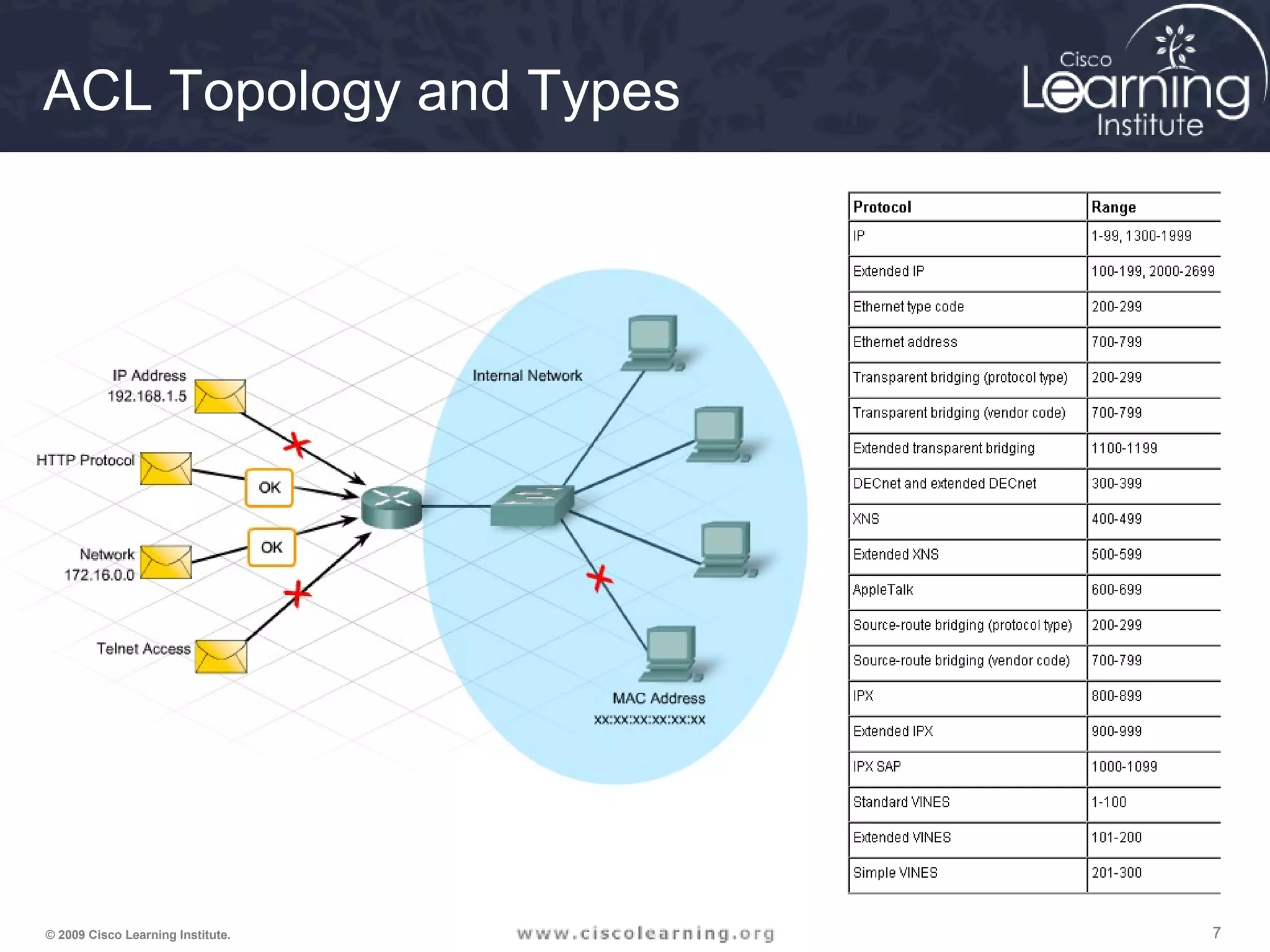
ACL Topology and Types
888© 2009 Cisco Learning Institute.
Standard Numbered IP ACLs
• The first value specifies the ACL number
• The second value specifies whether to permit or deny the configured
source IP address traffic
• The third value is the source IP address that must be matched
• The fourth value is the wildcard mask to be applied to the previously
configured IP address to indicate the range
• All ACLs assume an implicit deny statement at the end of the ACL6+
• At least one permit statement should be included or all traffic will be
dropped once that ACL is applied to an interface
Router(config)# access-list {1-99} {permit | deny}
source-addr [source-mask]
999© 2009 Cisco Learning Institute.
Extended Numbered IP ACLs
• The first value specifies the ACL number
• The second value specifies whether to permit or deny accordingly
• The third value indicates protocol type
• The source IP address and wildcard mask determine where traffic
originates. The destination IP address and wildcard mask are used
to indicate the final destination of the network traffic
• The command to apply the standard or extended numbered ACL:
Router(config)# access-list {100-199} {permit | deny}
protocol source-addr [source-mask] [operator operand]
destination-addr [destination-mask] [operator operand]
[established]
Router(config-if)# ip access-group number {in | out}
101010© 2009 Cisco Learning Institute.
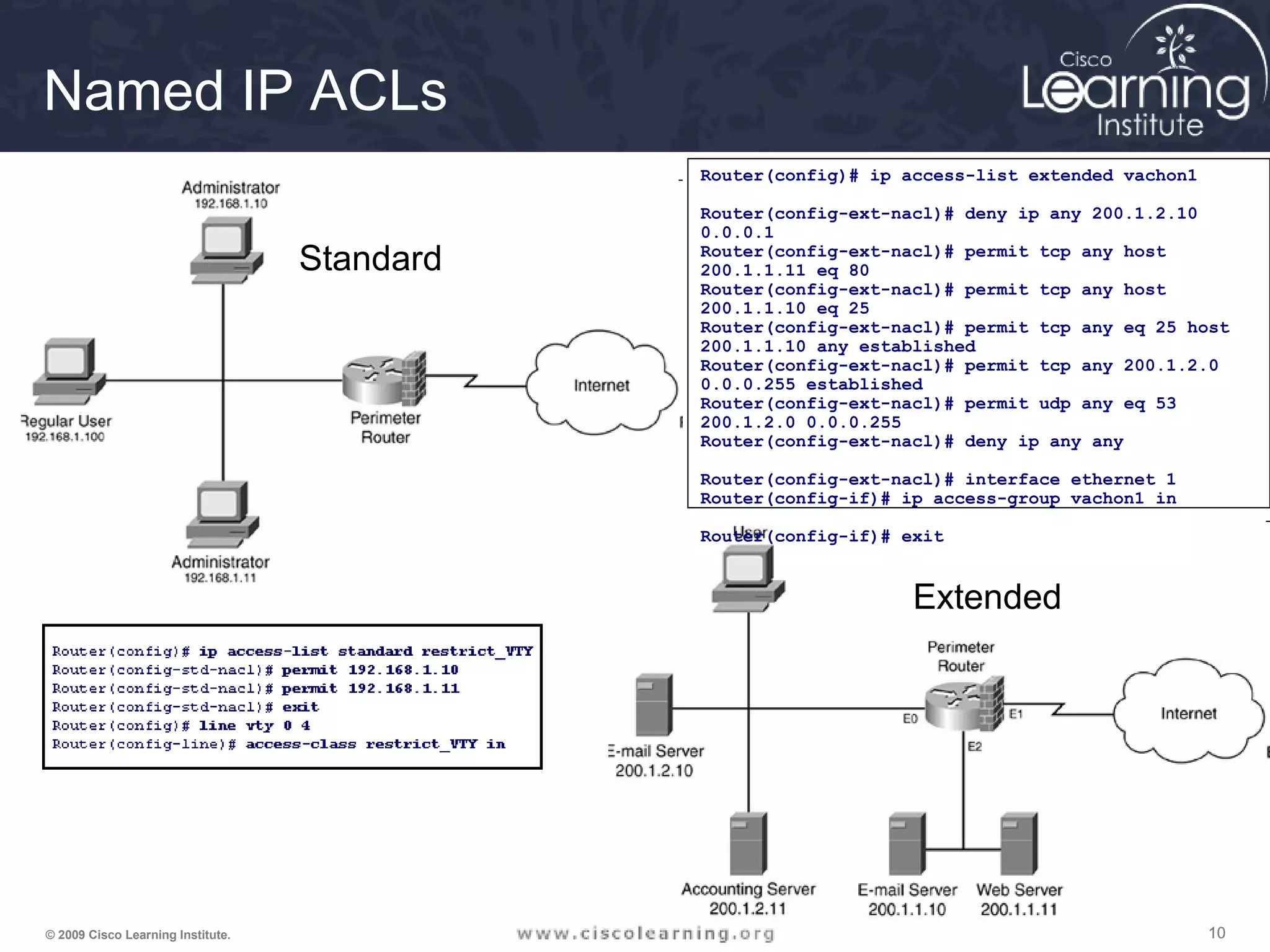
Named IP ACLs
Router(config)# ip access-list extended vachon1
Router(config-ext-nacl)# deny ip any 200.1.2.10
0.0.0.1
Router(config-ext-nacl)# permit tcp any host
200.1.1.11 eq 80
Router(config-ext-nacl)# permit tcp any host
200.1.1.10 eq 25
Router(config-ext-nacl)# permit tcp any eq 25 host
200.1.1.10 any established
Router(config-ext-nacl)# permit tcp any 200.1.2.0
0.0.0.255 established
Router(config-ext-nacl)# permit udp any eq 53
200.1.2.0 0.0.0.255
Router(config-ext-nacl)# deny ip any any
Router(config-ext-nacl)# interface ethernet 1
Router(config-if)# ip access-group vachon1 in
Router(config-if)# exit
Standard
Extended
111111© 2009 Cisco Learning Institute.
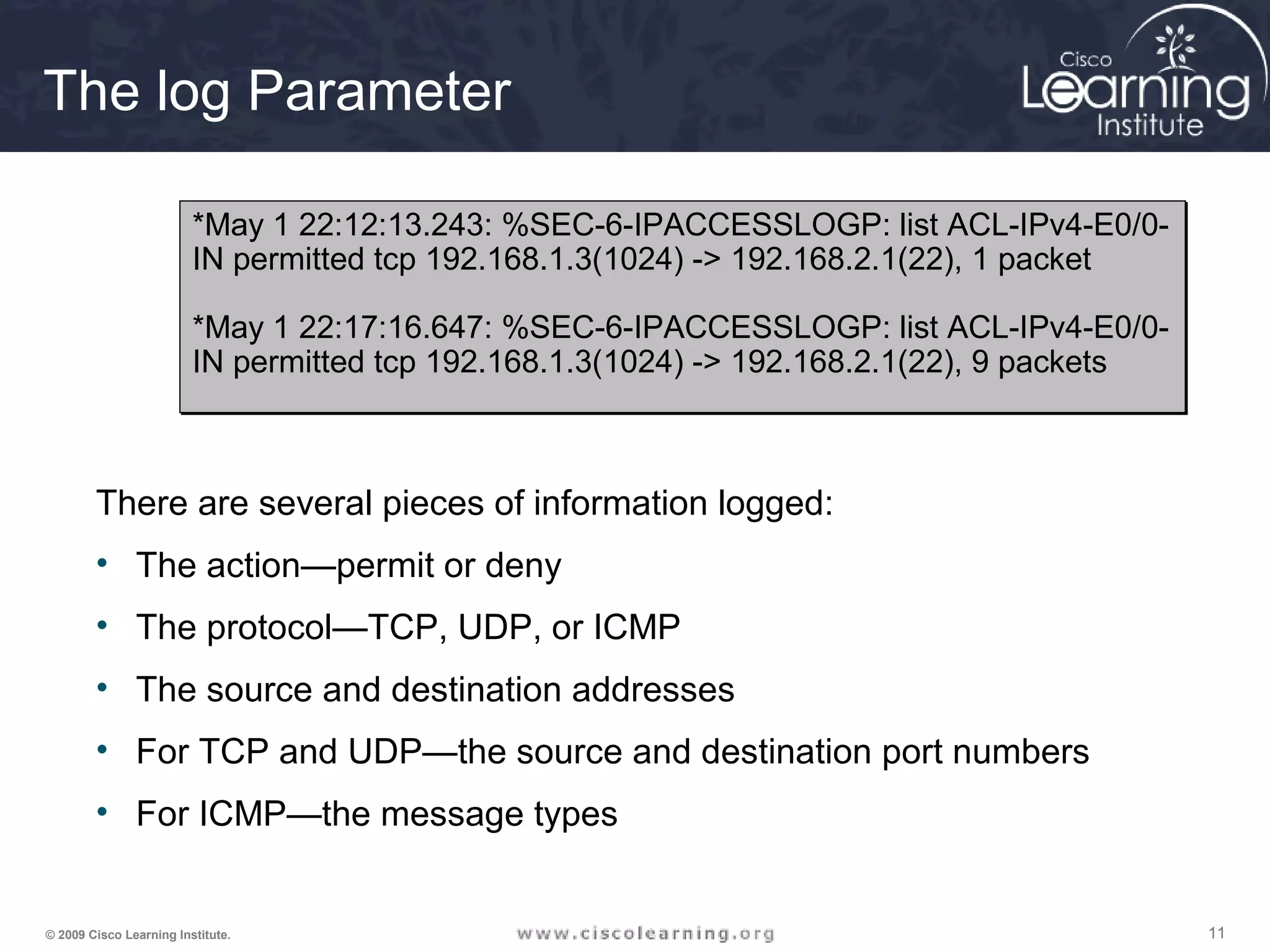
The log Parameter
There are several pieces of information logged:
• The action—permit or deny
• The protocol—TCP, UDP, or ICMP
• The source and destination addresses
• For TCP and UDP—the source and destination port numbers
• For ICMP—the message types
*May 1 22:12:13.243: %SEC-6-IPACCESSLOGP: list ACL-IPv4-E0/0-
IN permitted tcp 192.168.1.3(1024) -> 192.168.2.1(22), 1 packet
*May 1 22:17:16.647: %SEC-6-IPACCESSLOGP: list ACL-IPv4-E0/0-
IN permitted tcp 192.168.1.3(1024) -> 192.168.2.1(22), 9 packets
*May 1 22:12:13.243: %SEC-6-IPACCESSLOGP: list ACL-IPv4-E0/0-
IN permitted tcp 192.168.1.3(1024) -> 192.168.2.1(22), 1 packet
*May 1 22:17:16.647: %SEC-6-IPACCESSLOGP: list ACL-IPv4-E0/0-
IN permitted tcp 192.168.1.3(1024) -> 192.168.2.1(22), 9 packets
121212© 2009 Cisco Learning Institute.
ACL Configuration Guidelines
• ACLs are created globally and then applied to interfaces
• ACLs filter traffic going through the router, or traffic to
and from the router, depending on how it is applied
• Only one ACL per interface, per protocol, per direction
• Standard or extended indicates the information that is
used to filter packets
• ACLs are process top-down. The most specific
statements must go at the top of the list
• All ACLs have an implicit “deny all” statement at the end,
therefore every list must have at least one permit
statement to allow any traffic to pass
131313© 2009 Cisco Learning Institute.
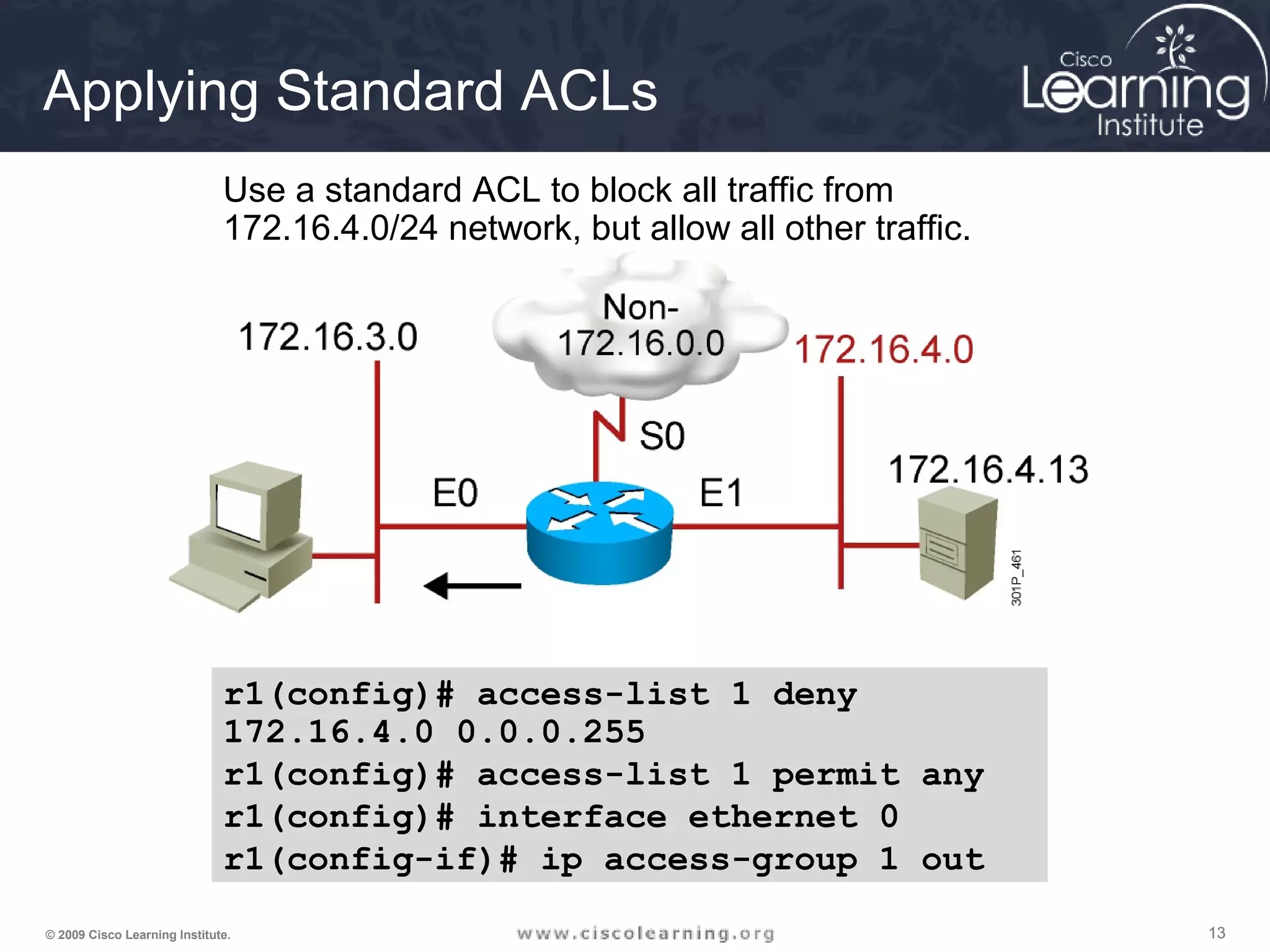
r1
Use a standard ACL to block all traffic from
172.16.4.0/24 network, but allow all other traffic.
r1(config)# access-list 1 deny
172.16.4.0 0.0.0.255
r1(config)# access-list 1 permit any
r1(config)# interface ethernet 0
r1(config-if)# ip access-group 1 out
Applying Standard ACLs
141414© 2009 Cisco Learning Institute.
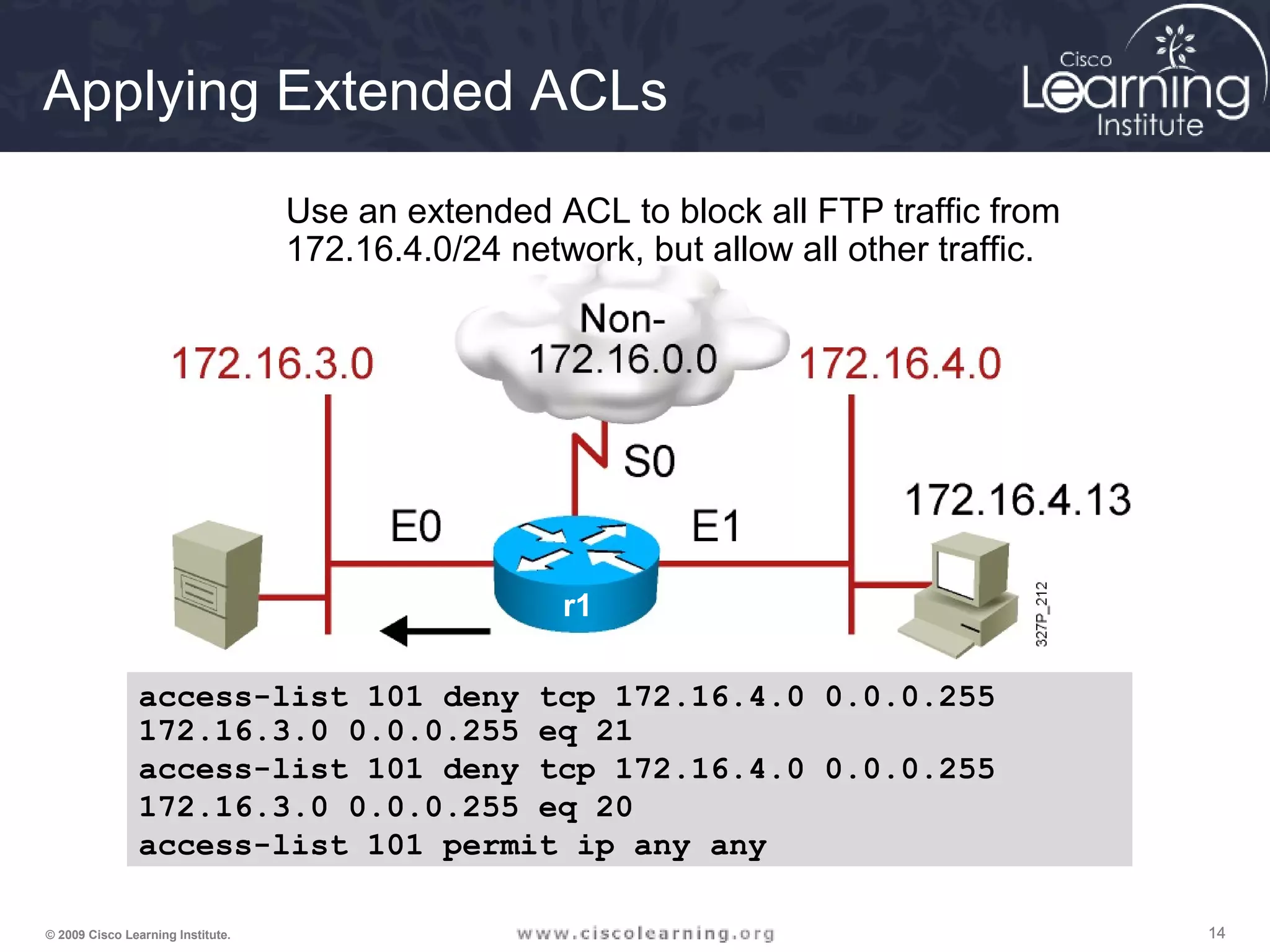
Applying Extended ACLs
r1
Use an extended ACL to block all FTP traffic from
172.16.4.0/24 network, but allow all other traffic.
access-list 101 deny tcp 172.16.4.0 0.0.0.255
172.16.3.0 0.0.0.255 eq 21
access-list 101 deny tcp 172.16.4.0 0.0.0.255
172.16.3.0 0.0.0.255 eq 20
access-list 101 permit ip any any
151515© 2009 Cisco Learning Institute.
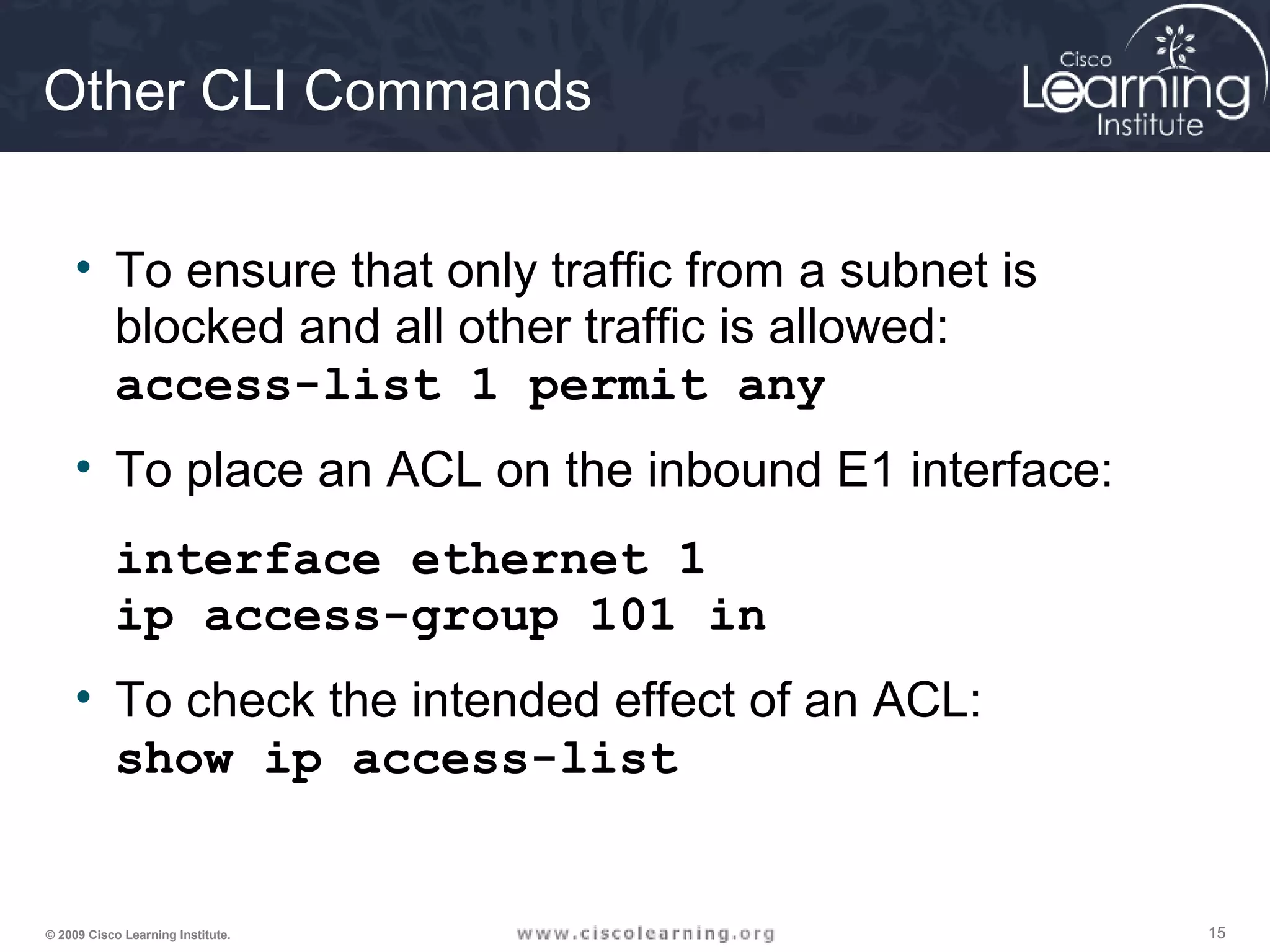
Other CLI Commands
• To ensure that only traffic from a subnet is
blocked and all other traffic is allowed:
access-list 1 permit any
• To place an ACL on the inbound E1 interface:
interface ethernet 1
ip access-group 101 in
• To check the intended effect of an ACL:
show ip access-list
161616© 2009 Cisco Learning Institute.
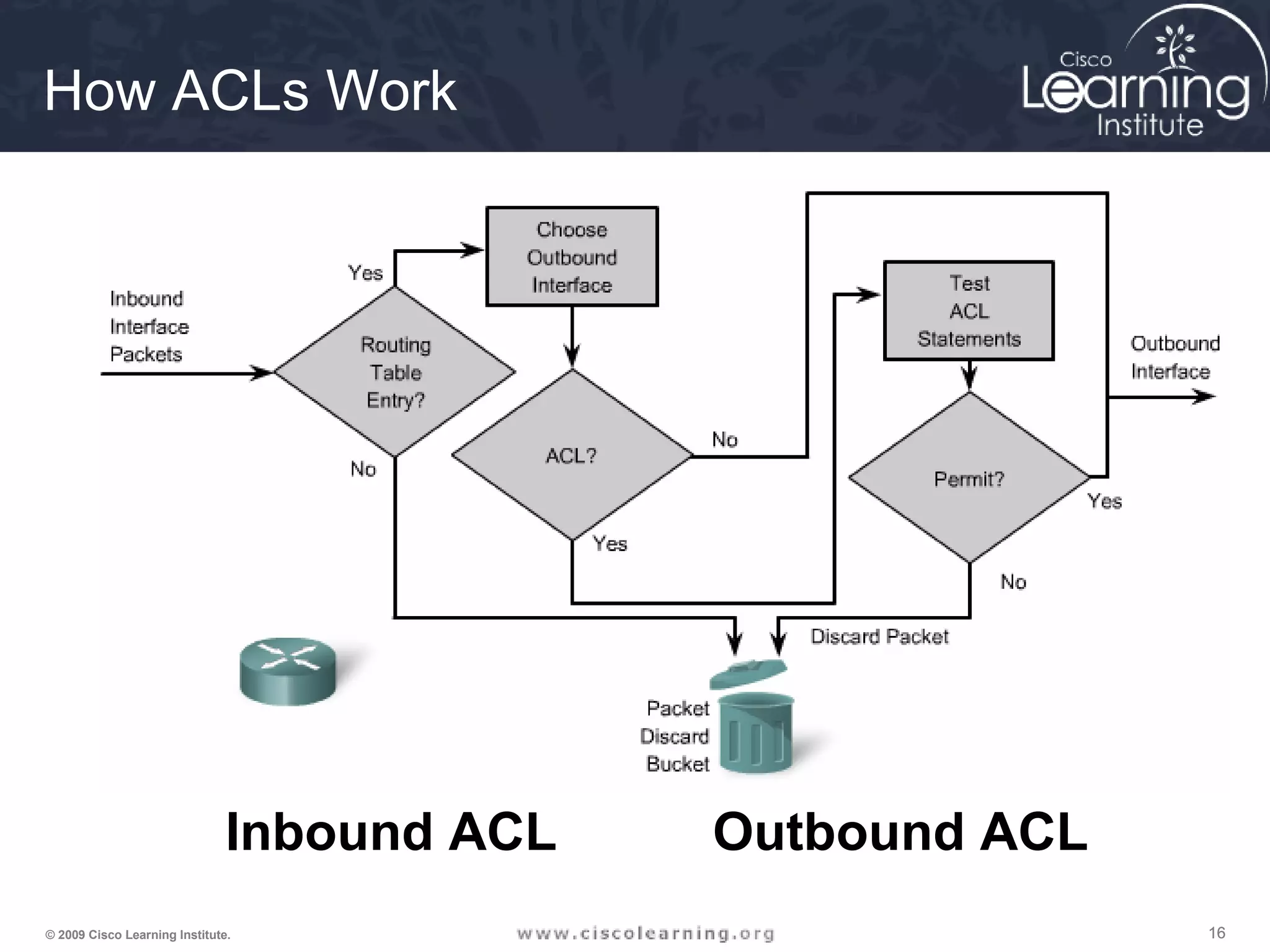
Click to view examples
How ACLs Work
Inbound ACL Outbound ACL
171717© 2009 Cisco Learning Institute.
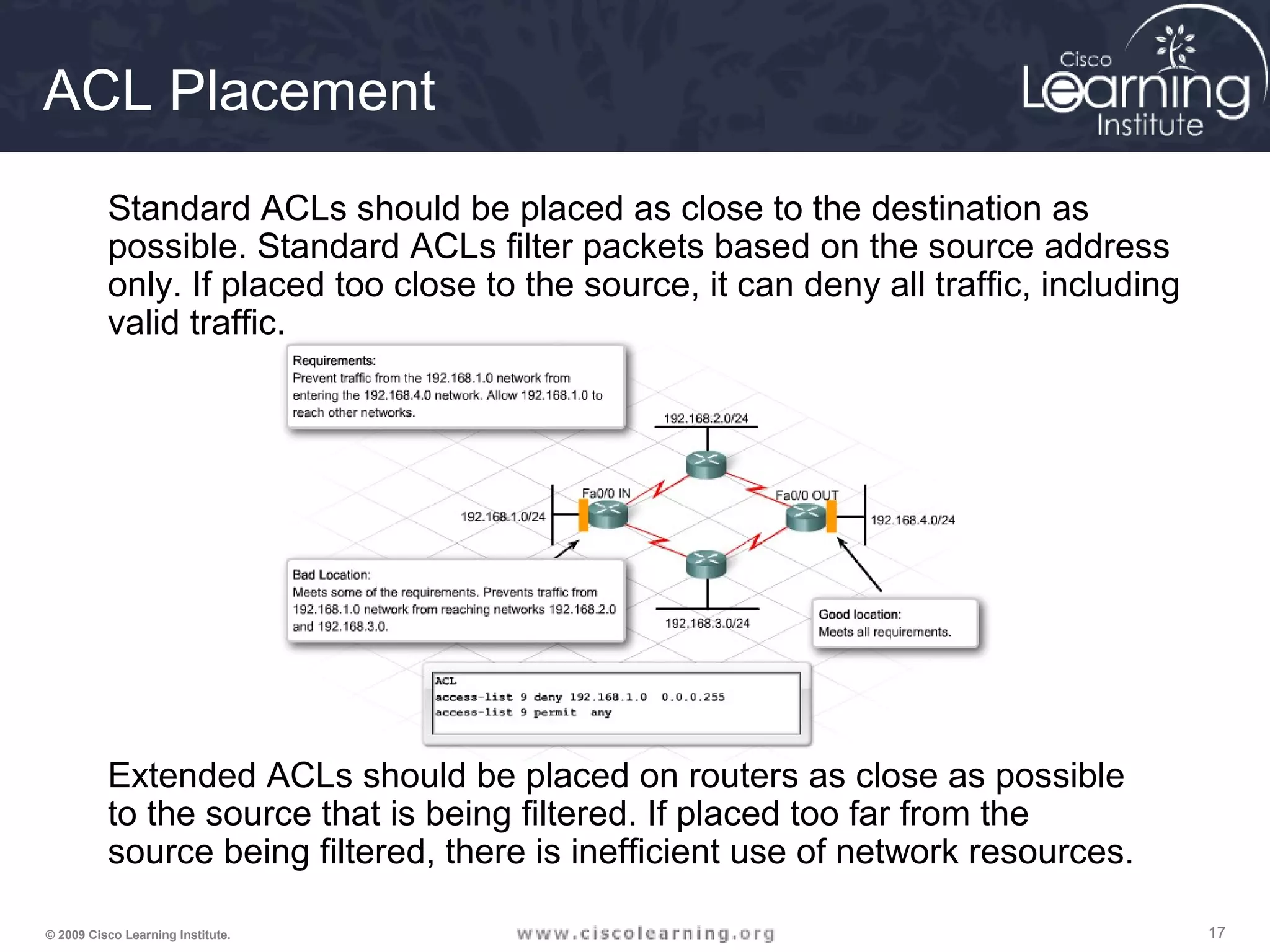
ACL Placement
Extended ACLs should be placed on routers as close as possible
to the source that is being filtered. If placed too far from the
source being filtered, there is inefficient use of network resources.
Standard ACLs should be placed as close to the destination as
possible. Standard ACLs filter packets based on the source address
only. If placed too close to the source, it can deny all traffic, including
valid traffic.
181818© 2009 Cisco Learning Institute.
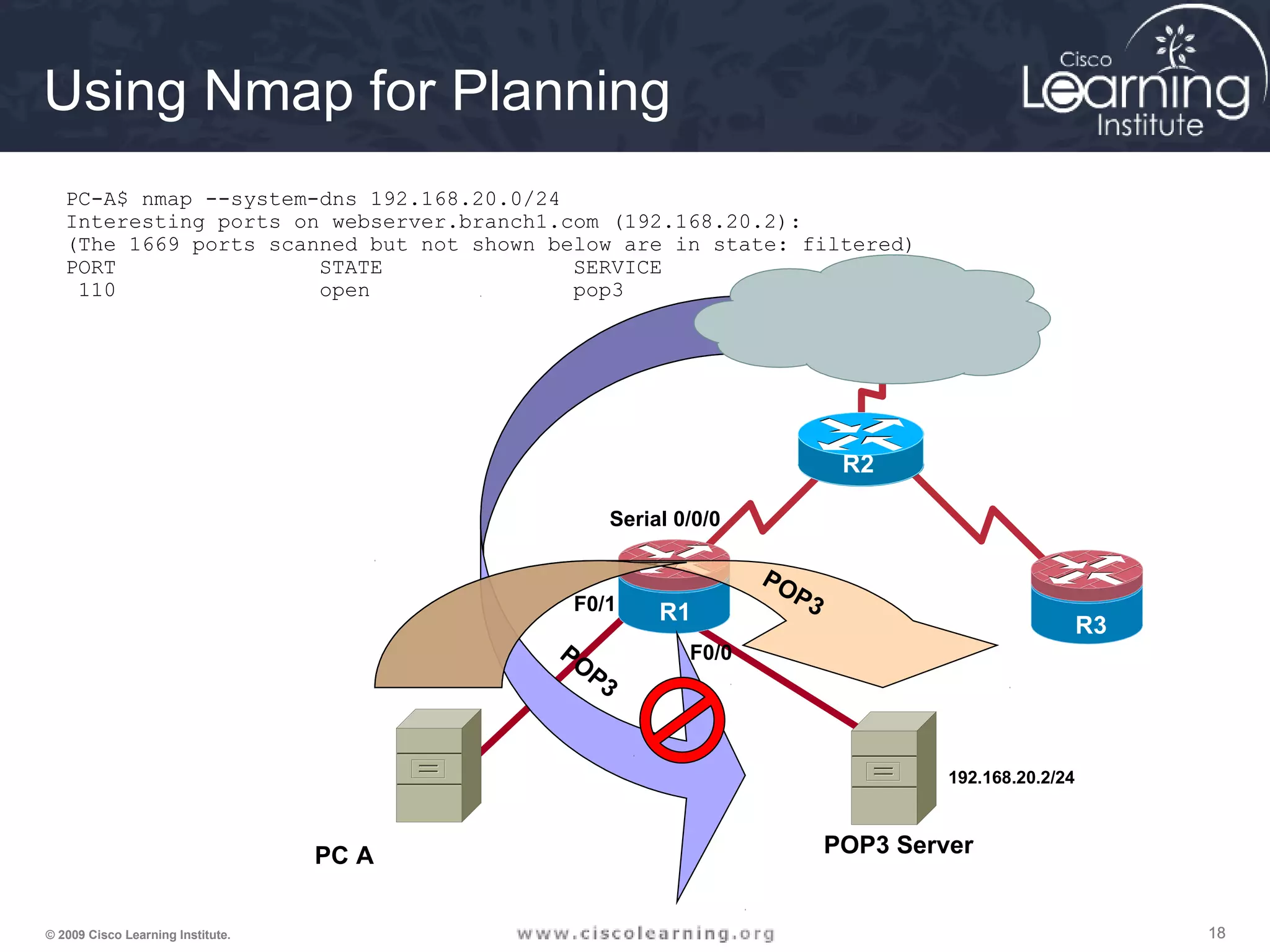
PC A
F0/0
Serial 0/0/0
R1
R3
R2
POP3 Server
POP3
192.168.20.2/24
F0/1
POP3
Using Nmap for Planning
PC-A$ nmap --system-dns 192.168.20.0/24
Interesting ports on webserver.branch1.com (192.168.20.2):
(The 1669 ports scanned but not shown below are in state: filtered)
PORT STATE SERVICE
110 open pop3
191919© 2009 Cisco Learning Institute.
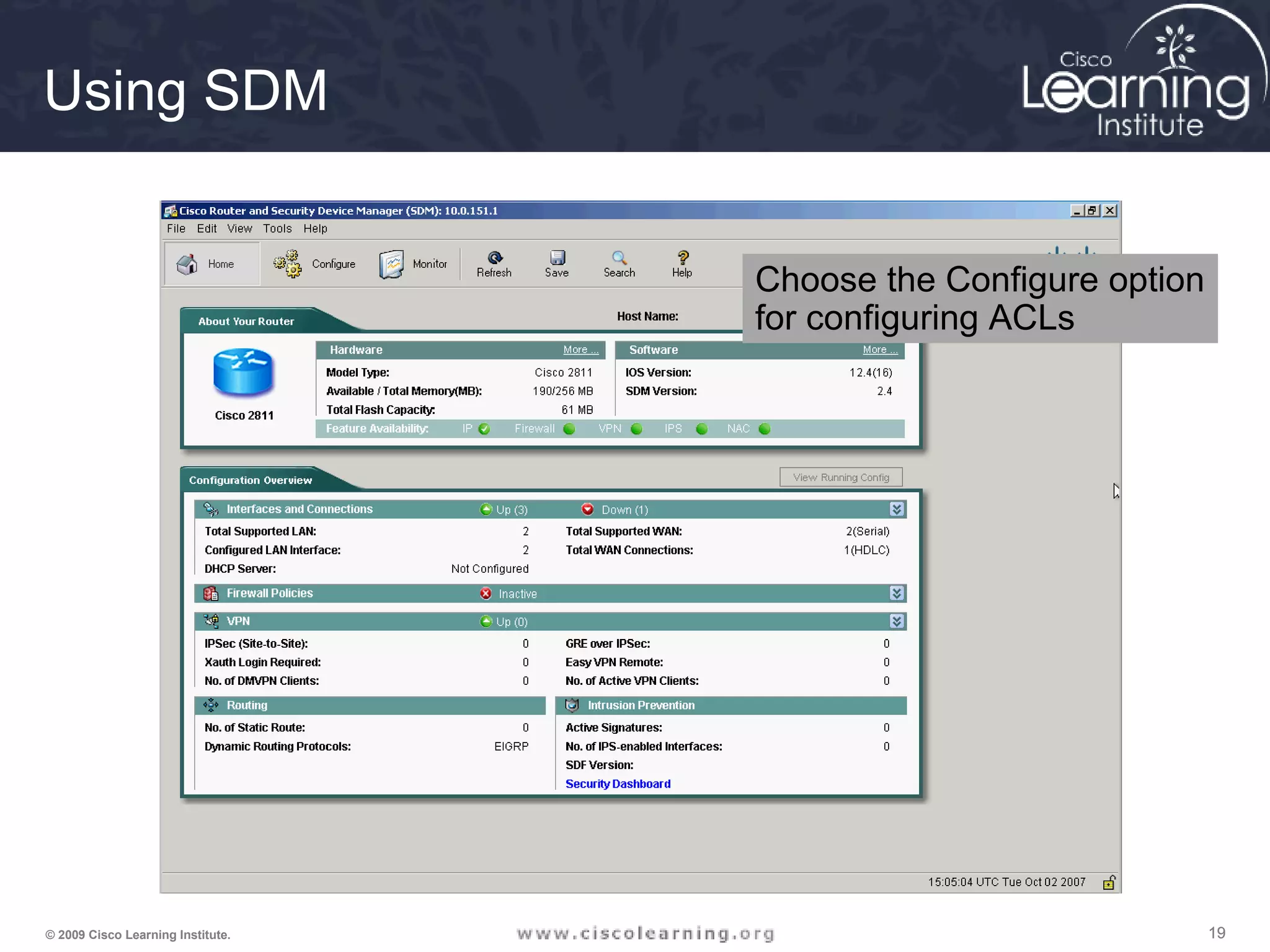
Using SDM
Choose the Configure option
for configuring ACLs
202020© 2009 Cisco Learning Institute.
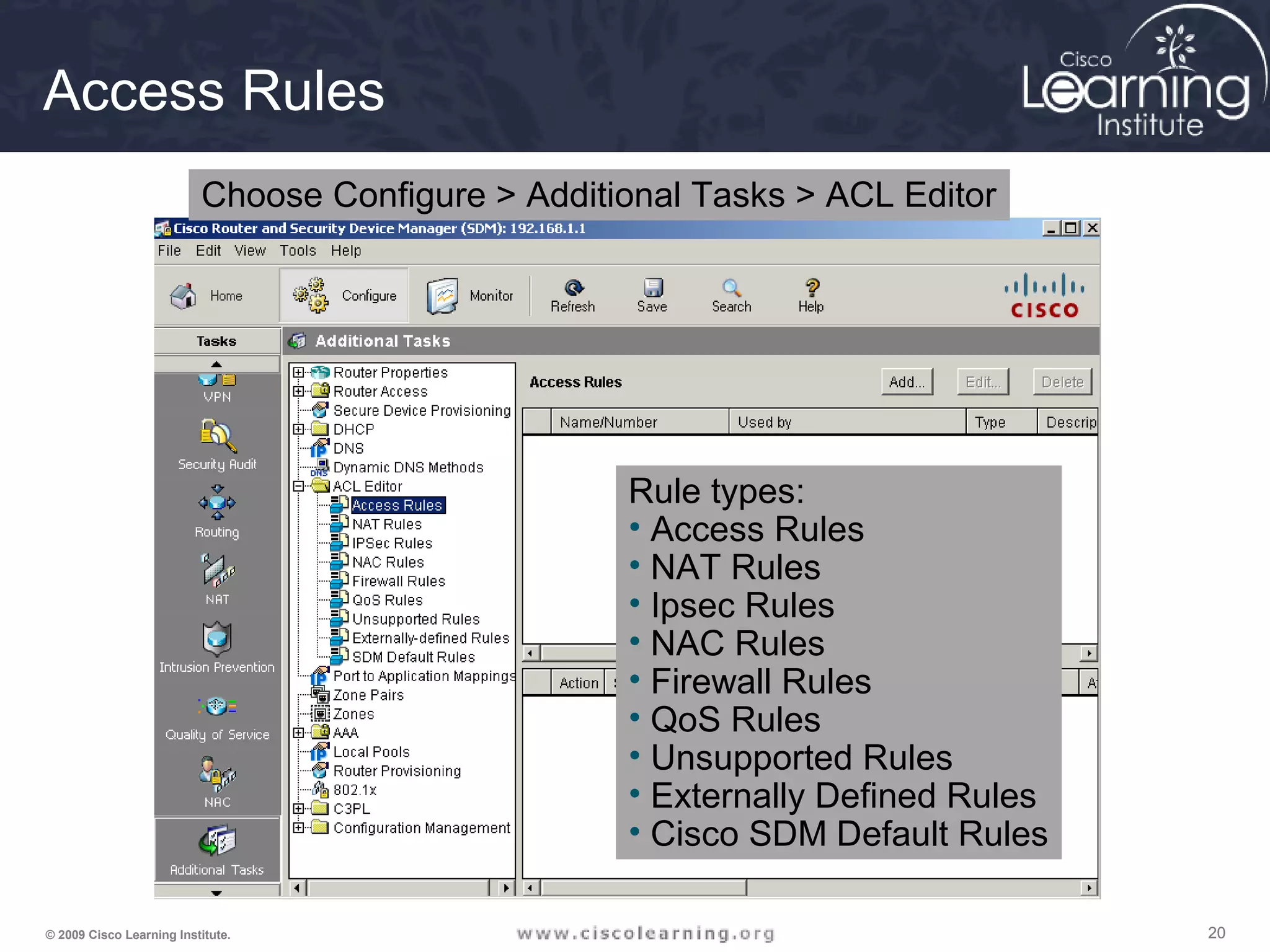
Access Rules
Choose Configure > Additional Tasks > ACL Editor
Rule types:
• Access Rules
• NAT Rules
• Ipsec Rules
• NAC Rules
• Firewall Rules
• QoS Rules
• Unsupported Rules
• Externally Defined Rules
• Cisco SDM Default Rules
212121© 2009 Cisco Learning Institute.
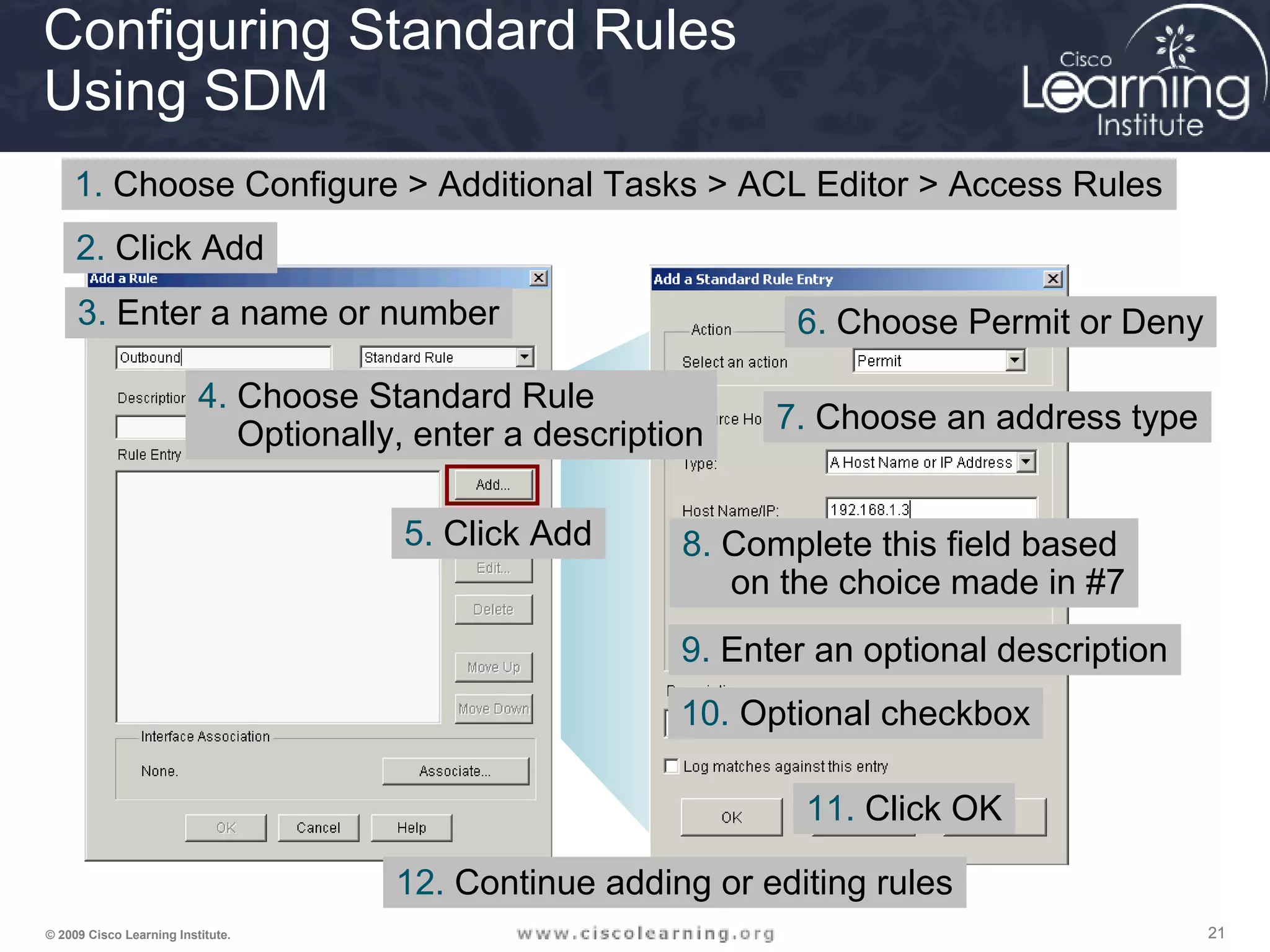
Configuring Standard Rules
Using SDM
1. Choose Configure > Additional Tasks > ACL Editor > Access Rules
5. Click Add
3. Enter a name or number
4. Choose Standard Rule
Optionally, enter a description
2. Click Add
6. Choose Permit or Deny
7. Choose an address type
8. Complete this field based
on the choice made in #7
9. Enter an optional description
10. Optional checkbox
11. Click OK
12. Continue adding or editing rules
222222© 2009 Cisco Learning Institute.
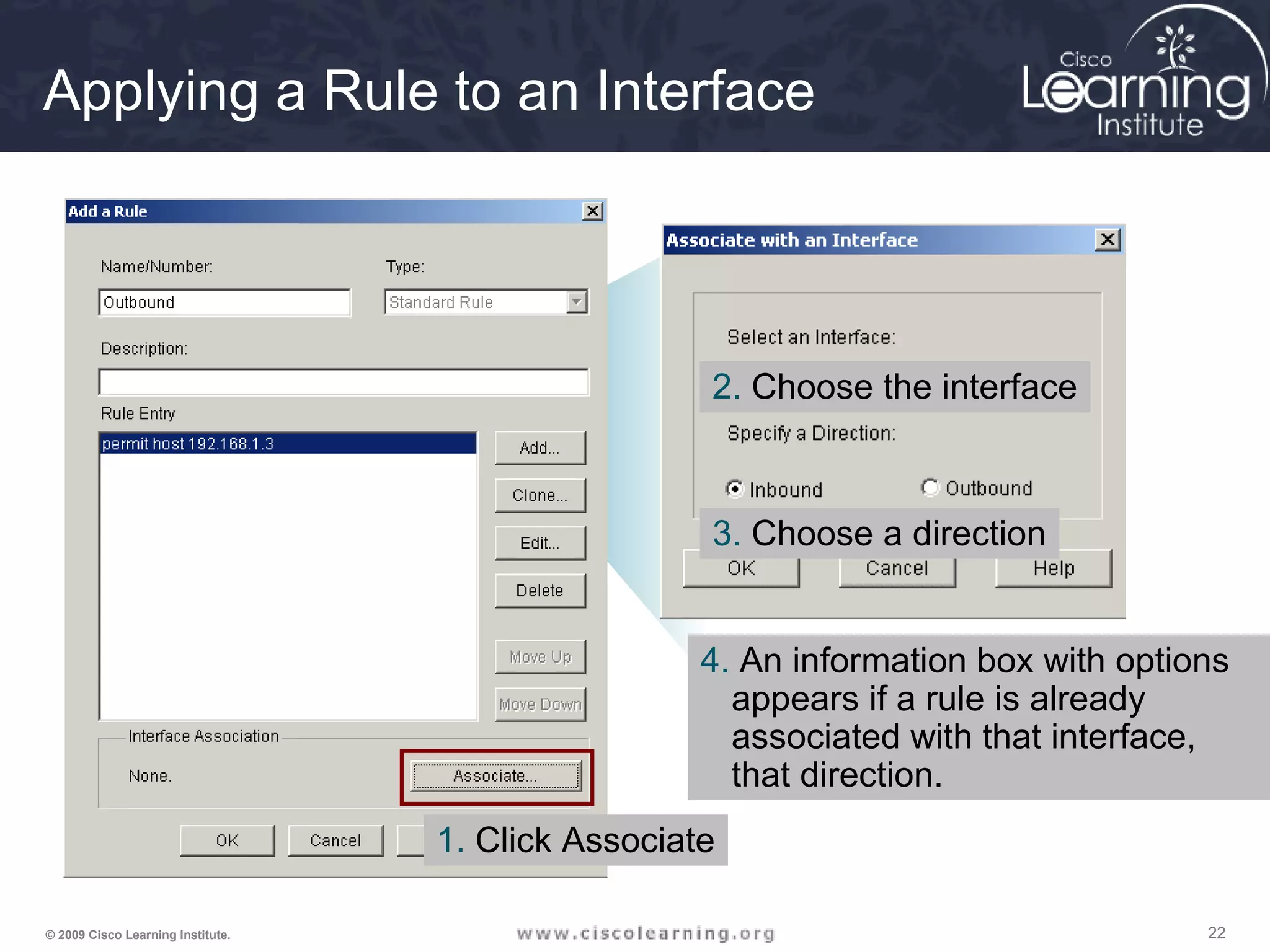
Applying a Rule to an Interface
1. Click Associate
2. Choose the interface
3. Choose a direction
4. An information box with options
appears if a rule is already
associated with that interface,
that direction.
232323© 2009 Cisco Learning Institute.
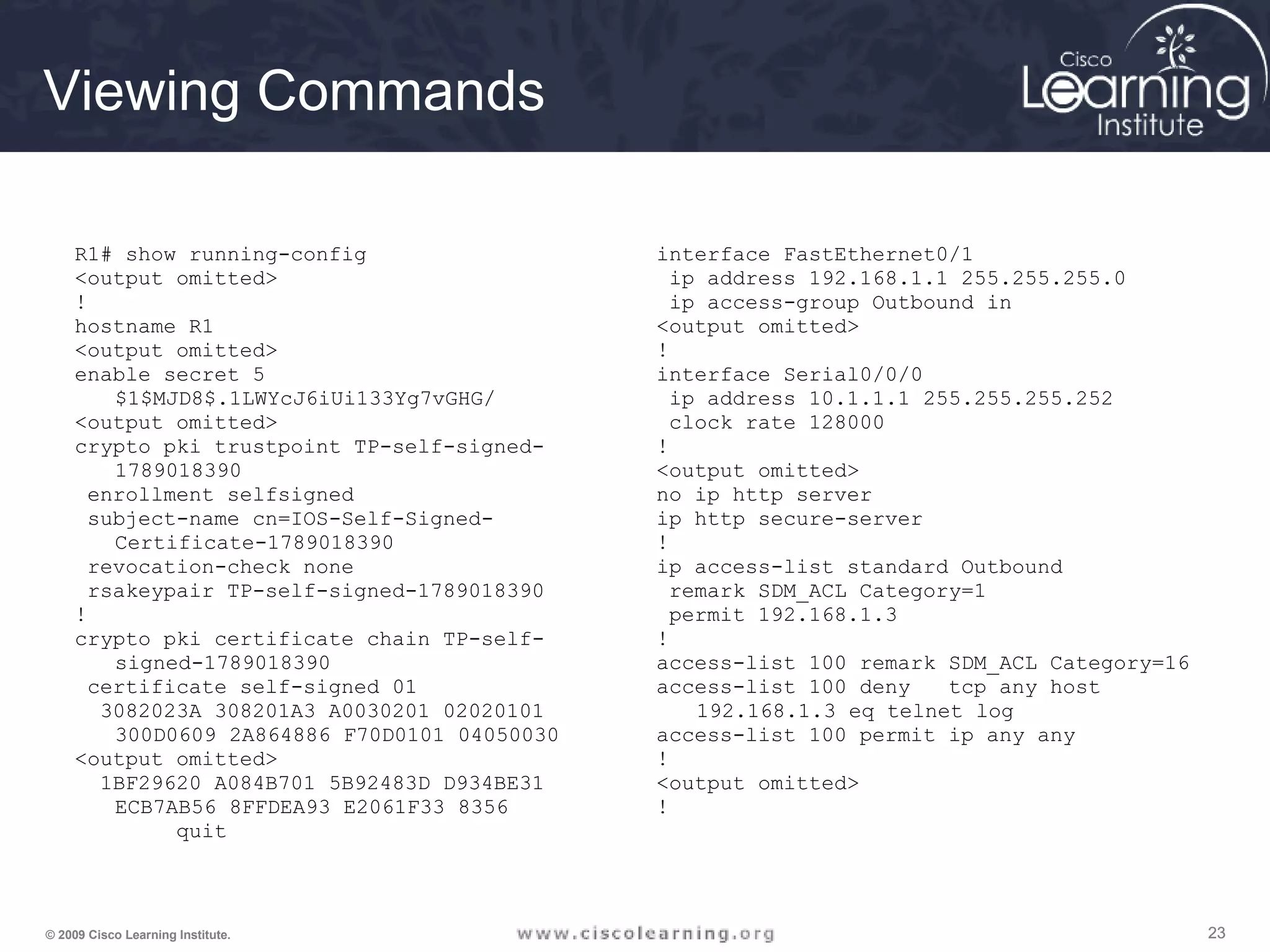
Viewing Commands
R1# show running-config
<output omitted>
!
hostname R1
<output omitted>
enable secret 5
$1$MJD8$.1LWYcJ6iUi133Yg7vGHG/
<output omitted>
crypto pki trustpoint TP-self-signed-
1789018390
enrollment selfsigned
subject-name cn=IOS-Self-Signed-
Certificate-1789018390
revocation-check none
rsakeypair TP-self-signed-1789018390
!
crypto pki certificate chain TP-self-
signed-1789018390
certificate self-signed 01
3082023A 308201A3 A0030201 02020101
300D0609 2A864886 F70D0101 04050030
<output omitted>
1BF29620 A084B701 5B92483D D934BE31
ECB7AB56 8FFDEA93 E2061F33 8356
quit
interface FastEthernet0/1
ip address 192.168.1.1 255.255.255.0
ip access-group Outbound in
<output omitted>
!
interface Serial0/0/0
ip address 10.1.1.1 255.255.255.252
clock rate 128000
!
<output omitted>
no ip http server
ip http secure-server
!
ip access-list standard Outbound
remark SDM_ACL Category=1
permit 192.168.1.3
!
access-list 100 remark SDM_ACL Category=16
access-list 100 deny tcp any host
192.168.1.3 eq telnet log
access-list 100 permit ip any any
!
<output omitted>
!
242424© 2009 Cisco Learning Institute.
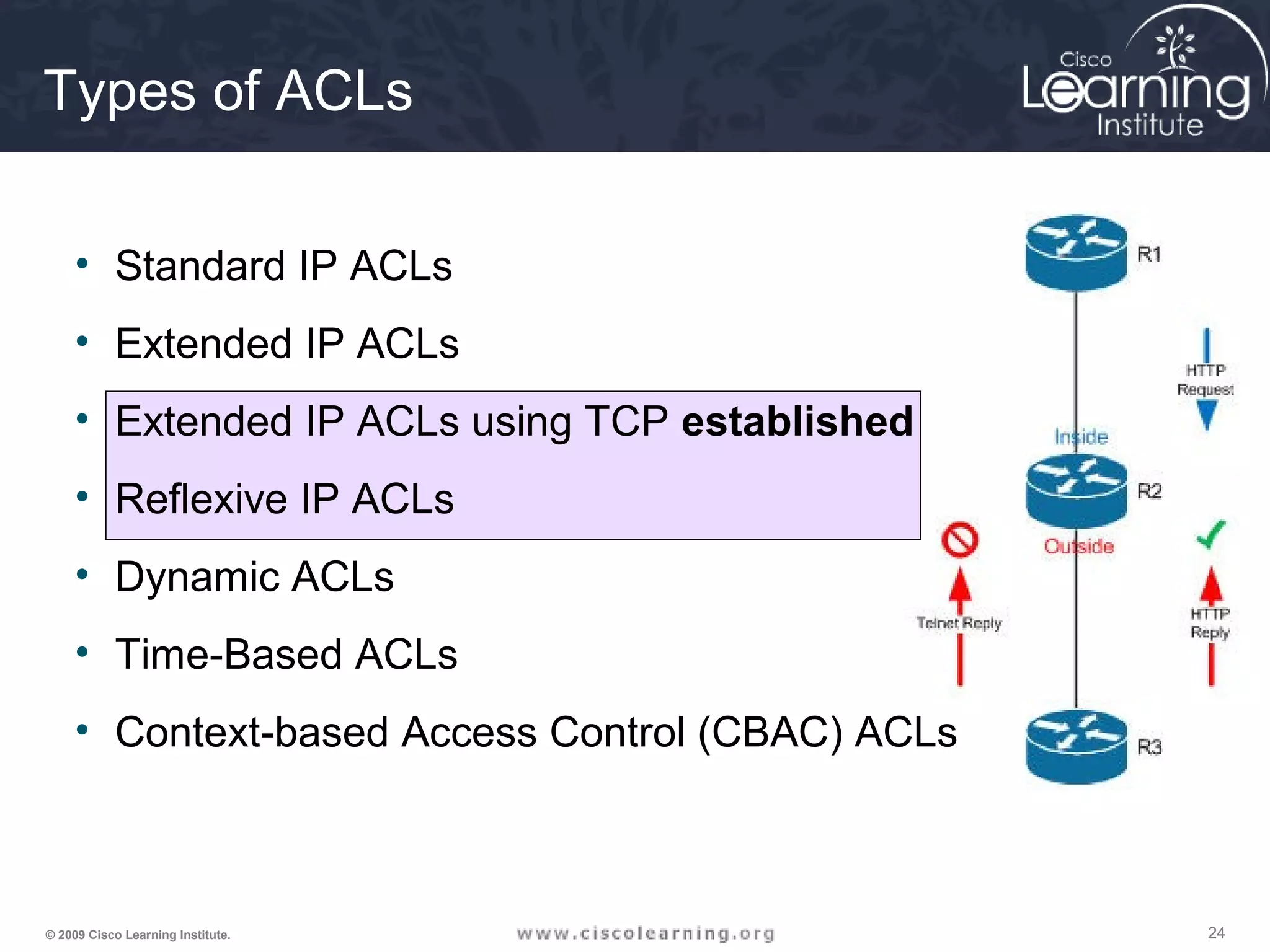
• Standard IP ACLs
• Extended IP ACLs
• Extended IP ACLs using TCP established
• Reflexive IP ACLs
• Dynamic ACLs
• Time-Based ACLs
• Context-based Access Control (CBAC) ACLs
Types of ACLs
252525© 2009 Cisco Learning Institute.
Syntax for TCP Established
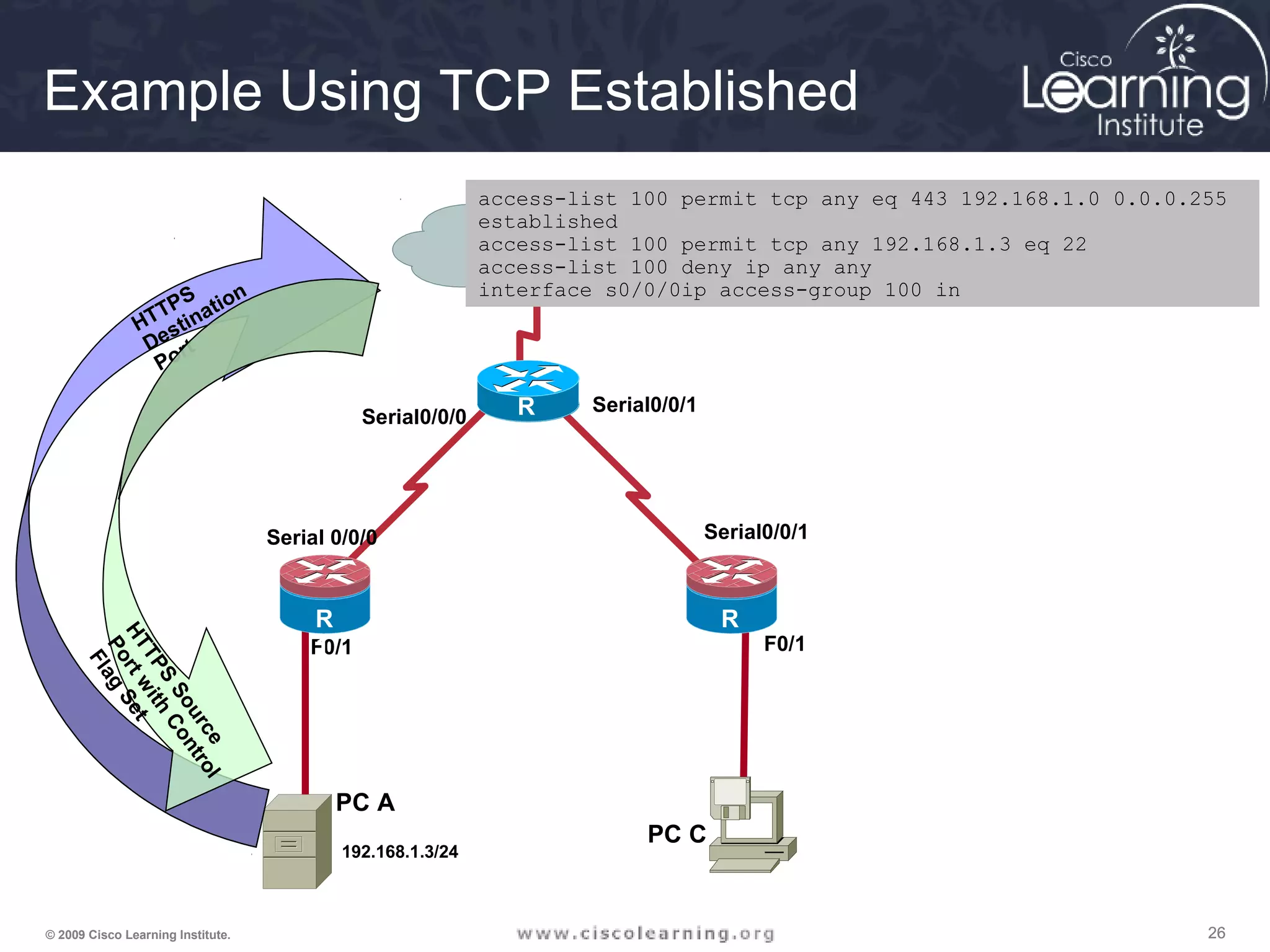
The established keyword:
• Forces a check by the routers to see if the ACK, FIN,
PSH, RST, SYN or URG TCP control flags are set. If flag
is set, the TCP traffic is allowed in.
• Does not implement a stateful firewall on a router
• Hackers can take advantage of the open hole
• Option does not apply to UDP or ICMP traffic
Router(config)# access-list access-list-number
{permit | deny} protocol source source-wildcard
[operator port] destination destination-wildcard
[operator port] [established]
262626© 2009 Cisco Learning Institute.
PC A
F0/1 F0/1
Serial 0/0/0
Serial0/0/0
Serial0/0/1
Serial0/0/1
R
1
R
3
R
2
PC C
R
1
192.168.1.3/24
HTTPS
Destination
Port
HTTPS
Source
Portwith
Control
Flag
Set
access-list 100 permit tcp any eq 443 192.168.1.0 0.0.0.255
established
access-list 100 permit tcp any 192.168.1.3 eq 22
access-list 100 deny ip any any
interface s0/0/0ip access-group 100 in
Example Using TCP Established
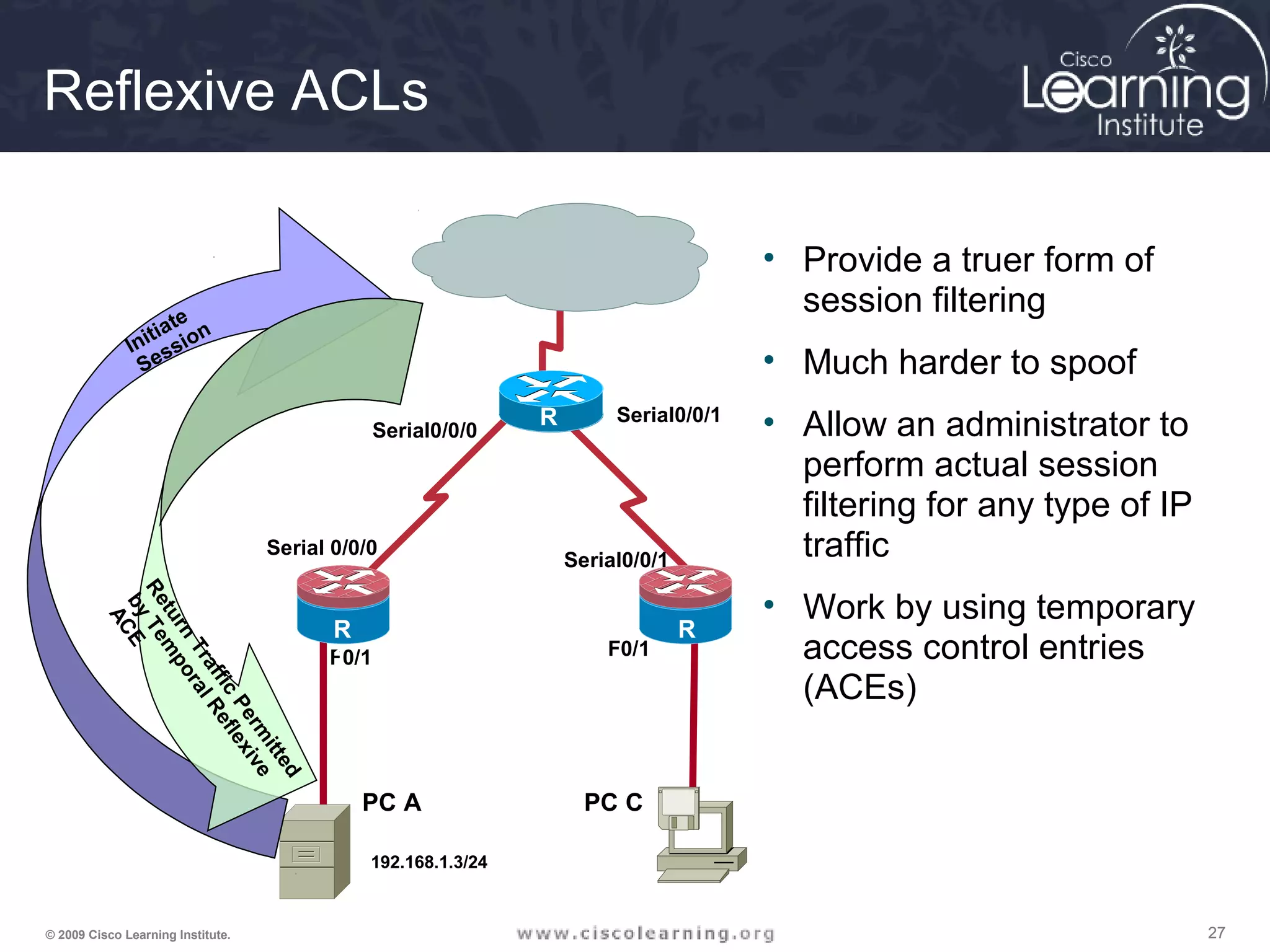
272727© 2009 Cisco Learning Institute.
F0/1 F0/1
Serial 0/0/0
Serial0/0/0
Serial0/0/1
Serial0/0/1
R
1
R
3
R
2
PC A PC C
R
1
192.168.1.3/24
Initiate
Session
Return
Traffic
Perm
itted
byTem
poralReflexive
ACE
Reflexive ACLs
• Provide a truer form of
session filtering
• Much harder to spoof
• Allow an administrator to
perform actual session
filtering for any type of IP
traffic
• Work by using temporary
access control entries
(ACEs)
282828© 2009 Cisco Learning Institute.
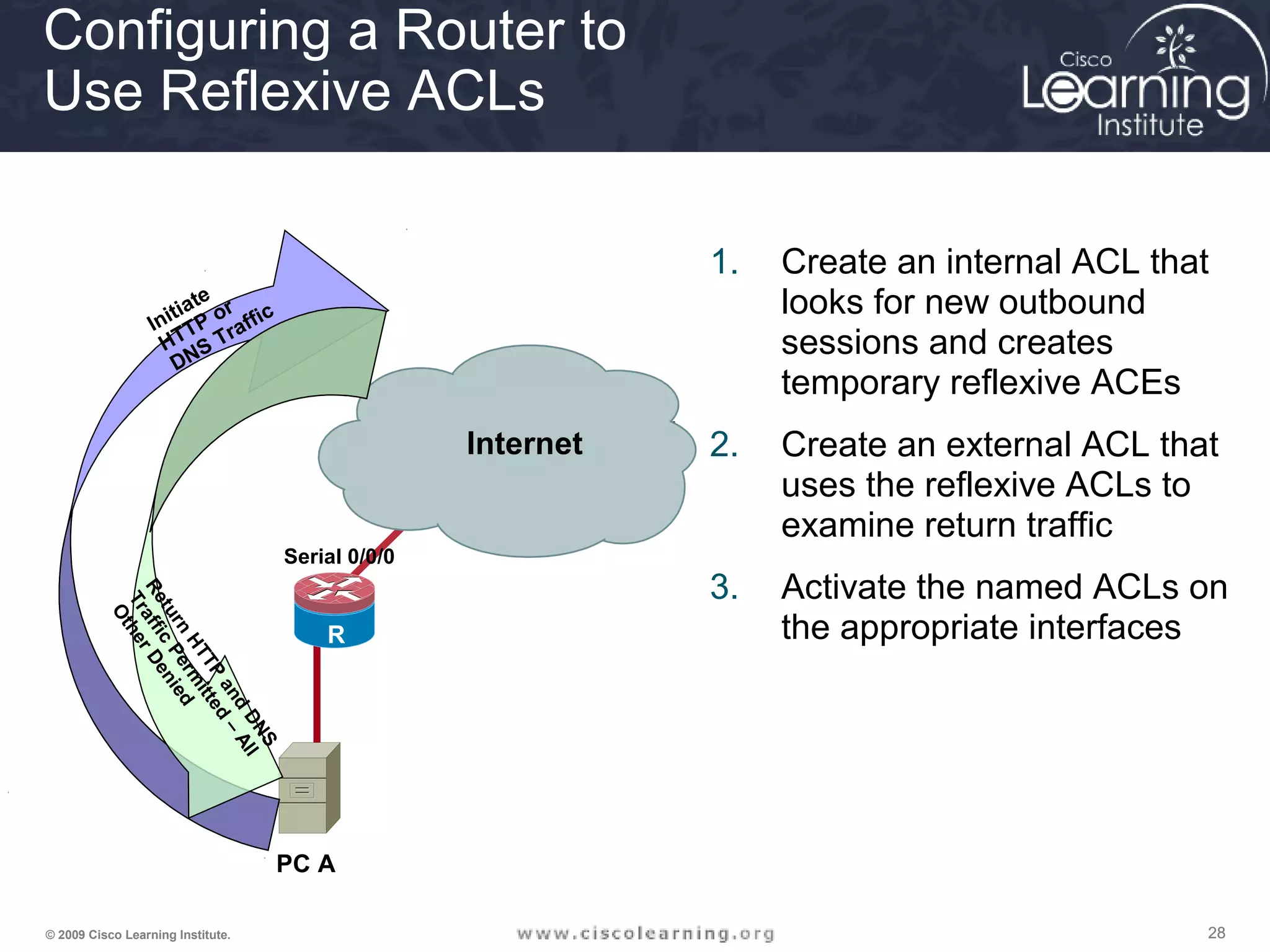
Serial 0/0/0
Serial0/
0/0
Serial0/0/1
R
1
R
2
PC A
Initiate
HTTP or
DNS Traffic
Return
HTTP
and
DNS
Traffic
Perm
itted
–
All
OtherDenied
Internet
Configuring a Router to
Use Reflexive ACLs
1. Create an internal ACL that
looks for new outbound
sessions and creates
temporary reflexive ACEs
2. Create an external ACL that
uses the reflexive ACLs to
examine return traffic
3. Activate the named ACLs on
the appropriate interfaces
292929© 2009 Cisco Learning Institute.
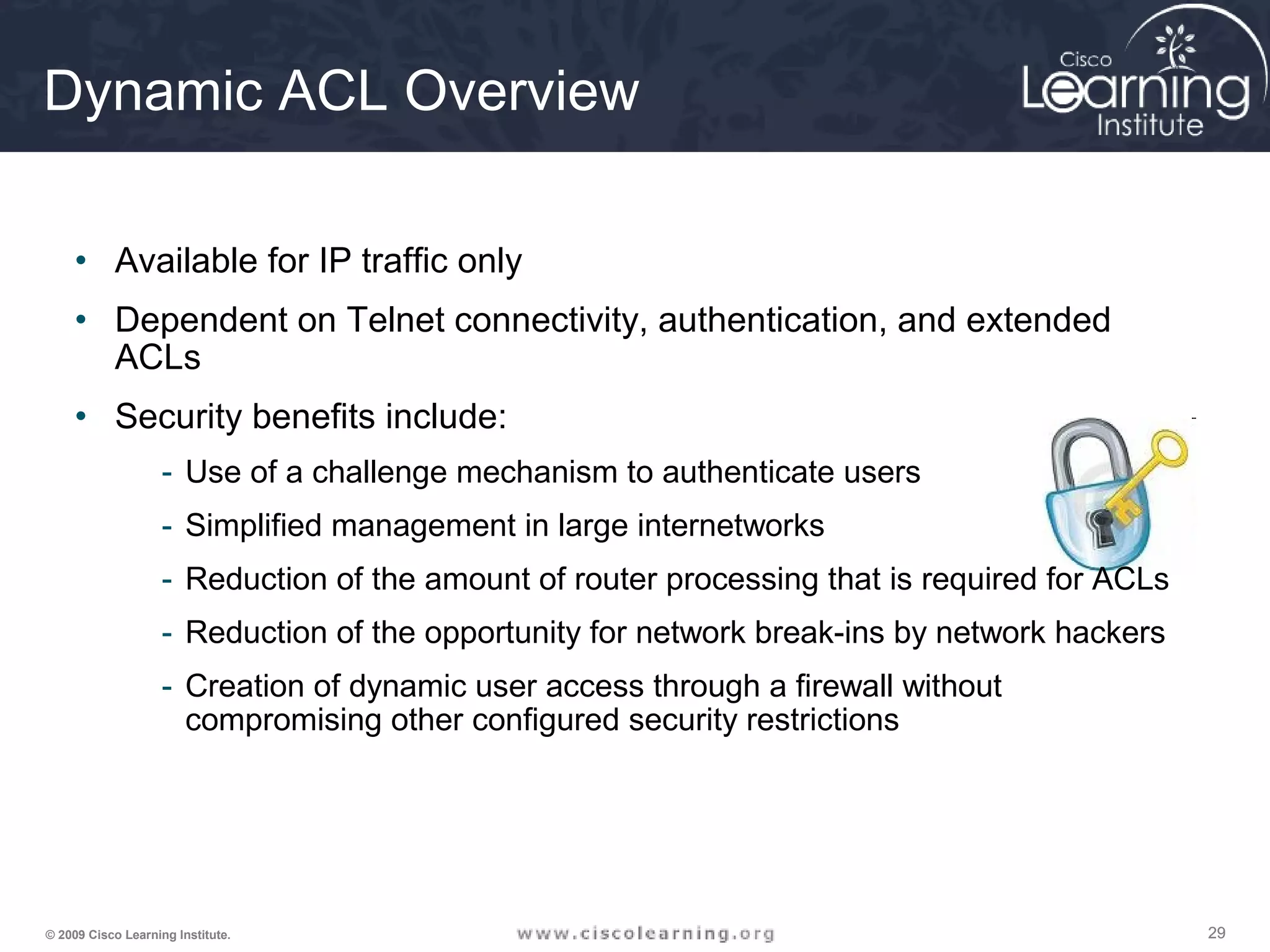
Dynamic ACL Overview
• Available for IP traffic only
• Dependent on Telnet connectivity, authentication, and extended
ACLs
• Security benefits include:
- Use of a challenge mechanism to authenticate users
- Simplified management in large internetworks
- Reduction of the amount of router processing that is required for ACLs
- Reduction of the opportunity for network break-ins by network hackers
- Creation of dynamic user access through a firewall without
compromising other configured security restrictions
303030© 2009 Cisco Learning Institute.
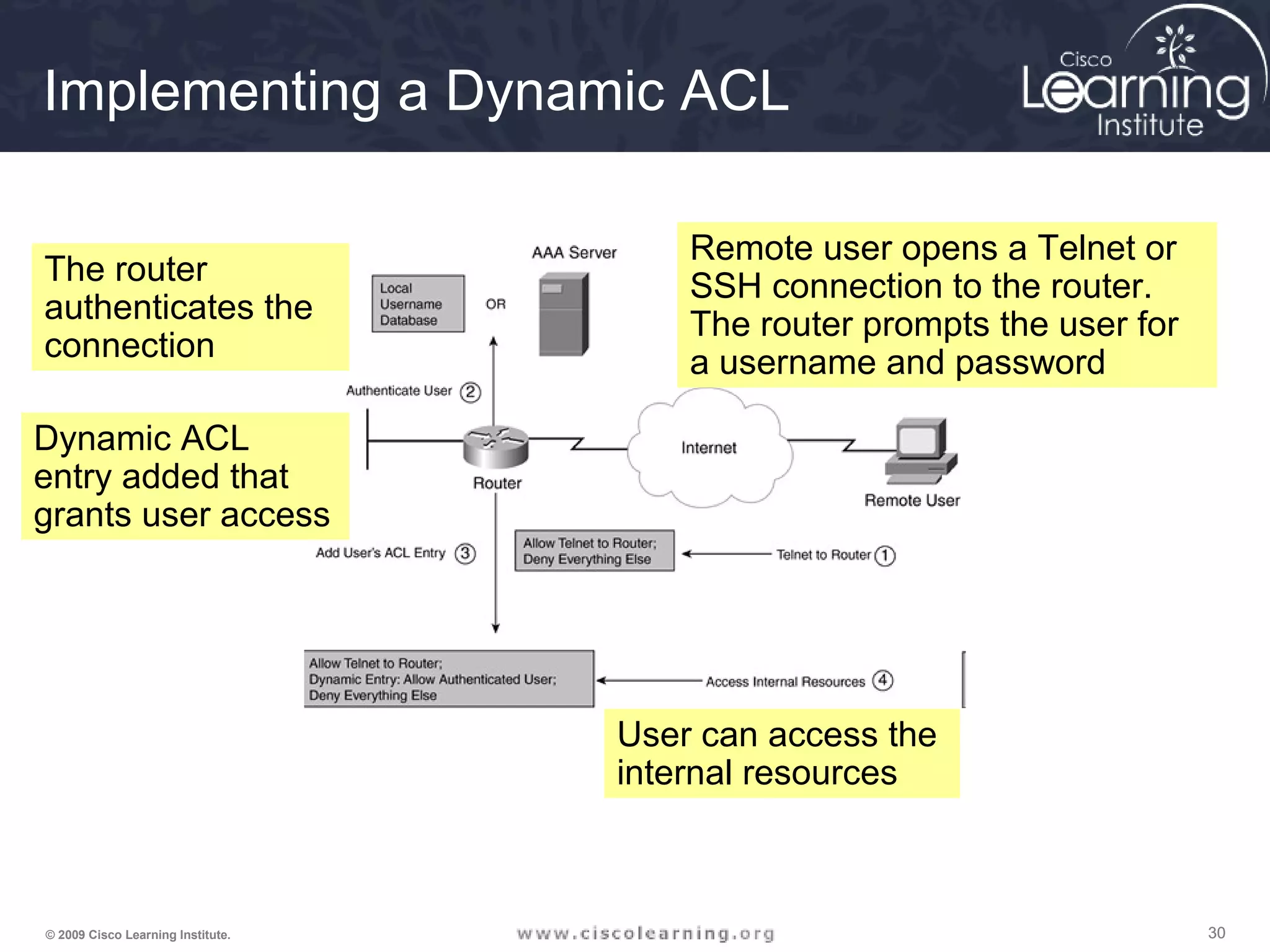
Implementing a Dynamic ACL
Remote user opens a Telnet or
SSH connection to the router.
The router prompts the user for
a username and password
The router
authenticates the
connection
Dynamic ACL
entry added that
grants user access
User can access the
internal resources
313131© 2009 Cisco Learning Institute.
Setting up a Dynamic ACL
Router(config)# access-list ACL_# dynamic dynamic_ACL_name [timeout
minutes] {deny | permit} IP_protocol source_IP_address src_wildcard_mask
destination_IP_address dst_wildcard_mask [established] [log]
323232© 2009 Cisco Learning Institute.
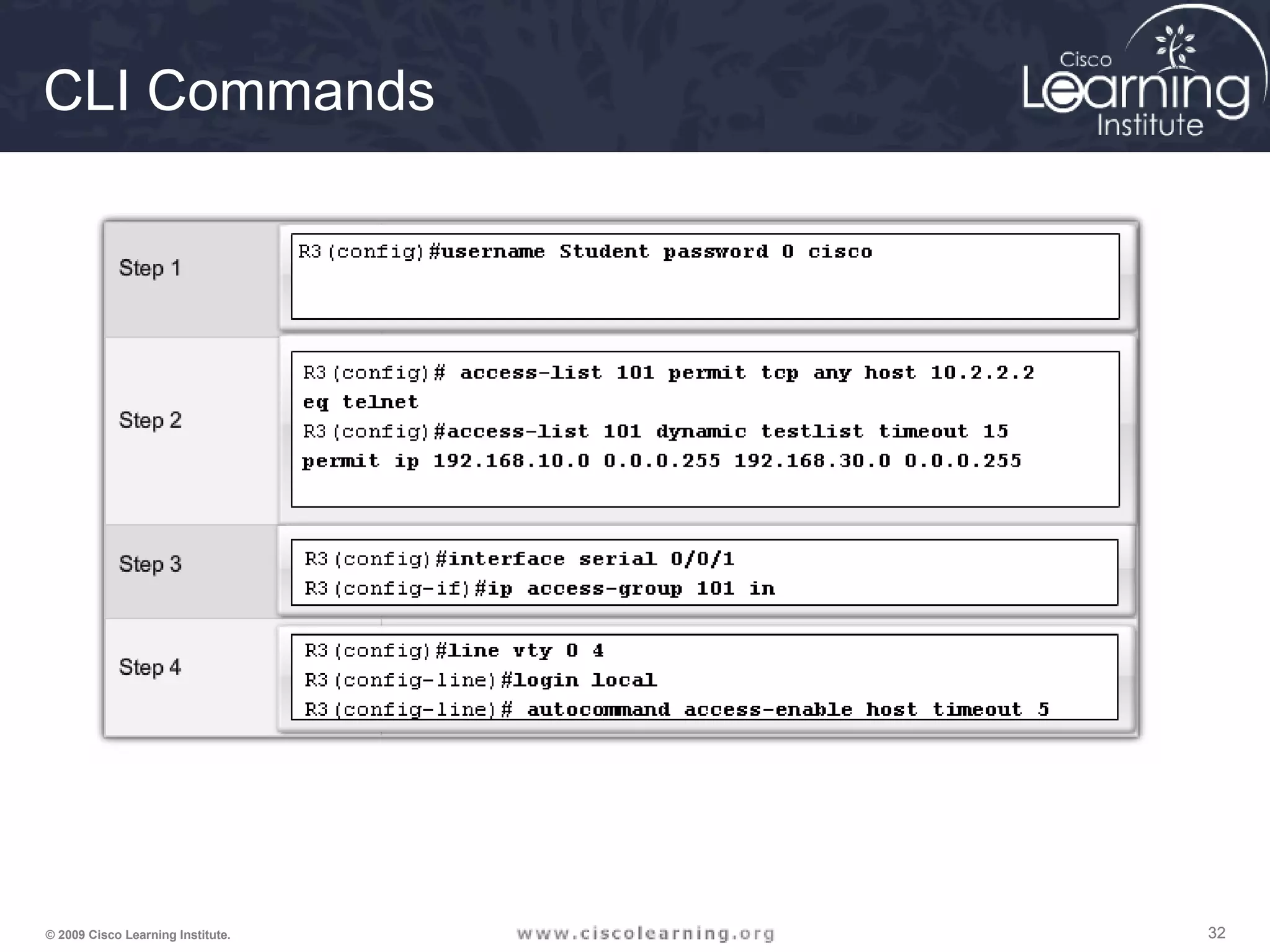
CLI Commands
333333© 2009 Cisco Learning Institute.
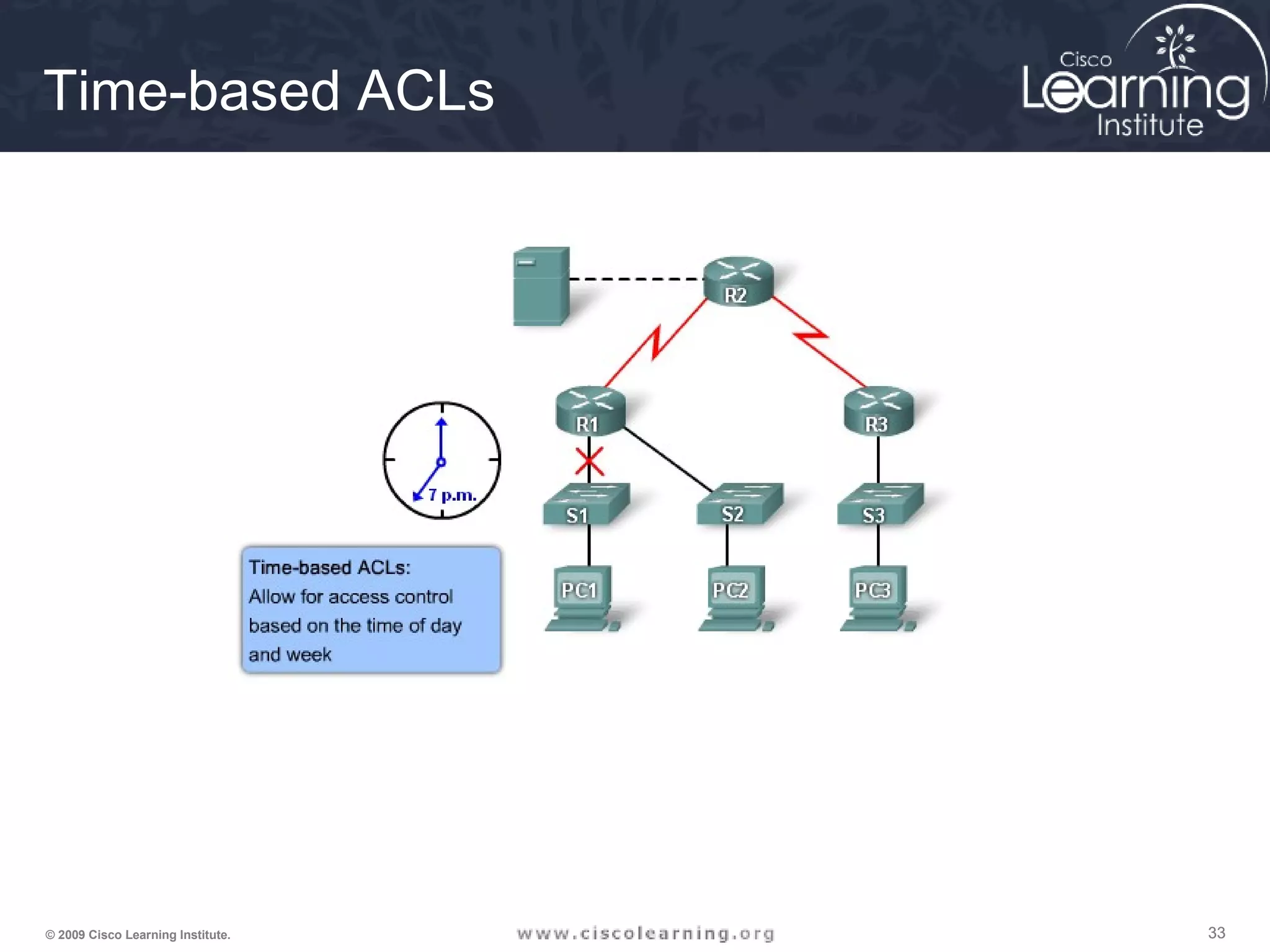
Time-based ACLs
343434© 2009 Cisco Learning Institute.
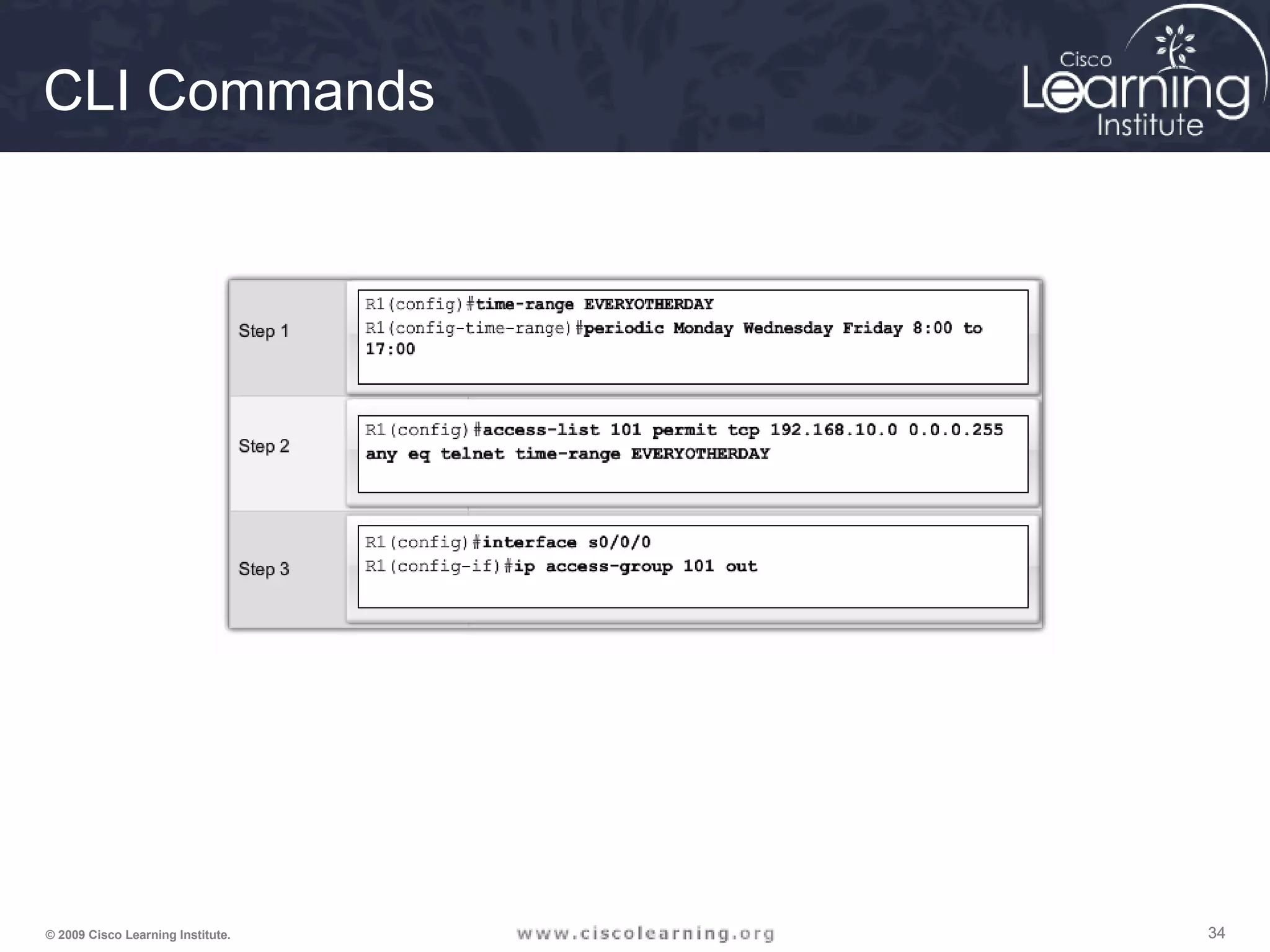
CLI Commands
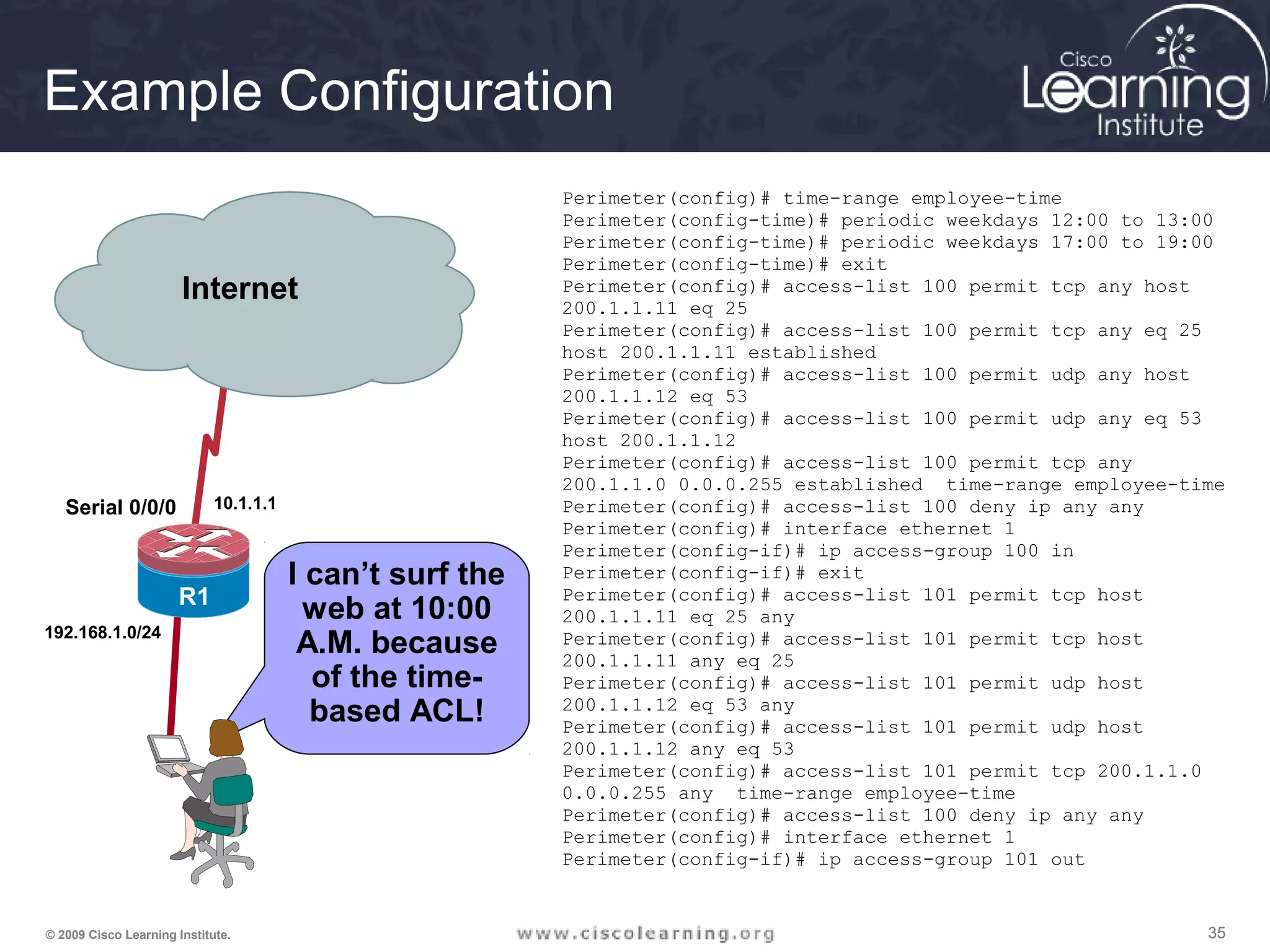
353535© 2009 Cisco Learning Institute.
I can’t surf the
web at 10:00
A.M. because
of the time-
based ACL!
Serial 0/0/0
Serial0/0/1
R1
R2
Internet
192.168.1.0/24
10.1.1.1
Example Configuration
Perimeter(config)# time-range employee-time
Perimeter(config-time)# periodic weekdays 12:00 to 13:00
Perimeter(config-time)# periodic weekdays 17:00 to 19:00
Perimeter(config-time)# exit
Perimeter(config)# access-list 100 permit tcp any host
200.1.1.11 eq 25
Perimeter(config)# access-list 100 permit tcp any eq 25
host 200.1.1.11 established
Perimeter(config)# access-list 100 permit udp any host
200.1.1.12 eq 53
Perimeter(config)# access-list 100 permit udp any eq 53
host 200.1.1.12
Perimeter(config)# access-list 100 permit tcp any
200.1.1.0 0.0.0.255 established time-range employee-time
Perimeter(config)# access-list 100 deny ip any any
Perimeter(config)# interface ethernet 1
Perimeter(config-if)# ip access-group 100 in
Perimeter(config-if)# exit
Perimeter(config)# access-list 101 permit tcp host
200.1.1.11 eq 25 any
Perimeter(config)# access-list 101 permit tcp host
200.1.1.11 any eq 25
Perimeter(config)# access-list 101 permit udp host
200.1.1.12 eq 53 any
Perimeter(config)# access-list 101 permit udp host
200.1.1.12 any eq 53
Perimeter(config)# access-list 101 permit tcp 200.1.1.0
0.0.0.255 any time-range employee-time
Perimeter(config)# access-list 100 deny ip any any
Perimeter(config)# interface ethernet 1
Perimeter(config-if)# ip access-group 101 out
363636© 2009 Cisco Learning Institute.
The ACLs are
implemented.
Now it is time to
verify that they
are working
properly.
F0/1 F0/1
Serial 0/0/0
Serial0/0/0
Serial0/0/1
Serial0/0/1
R
1
R
3
R
2
PC C
R
1
Router# show access-lists [access-list-number |
access-list-name]
Verifying ACL Configuration
373737© 2009 Cisco Learning Institute.
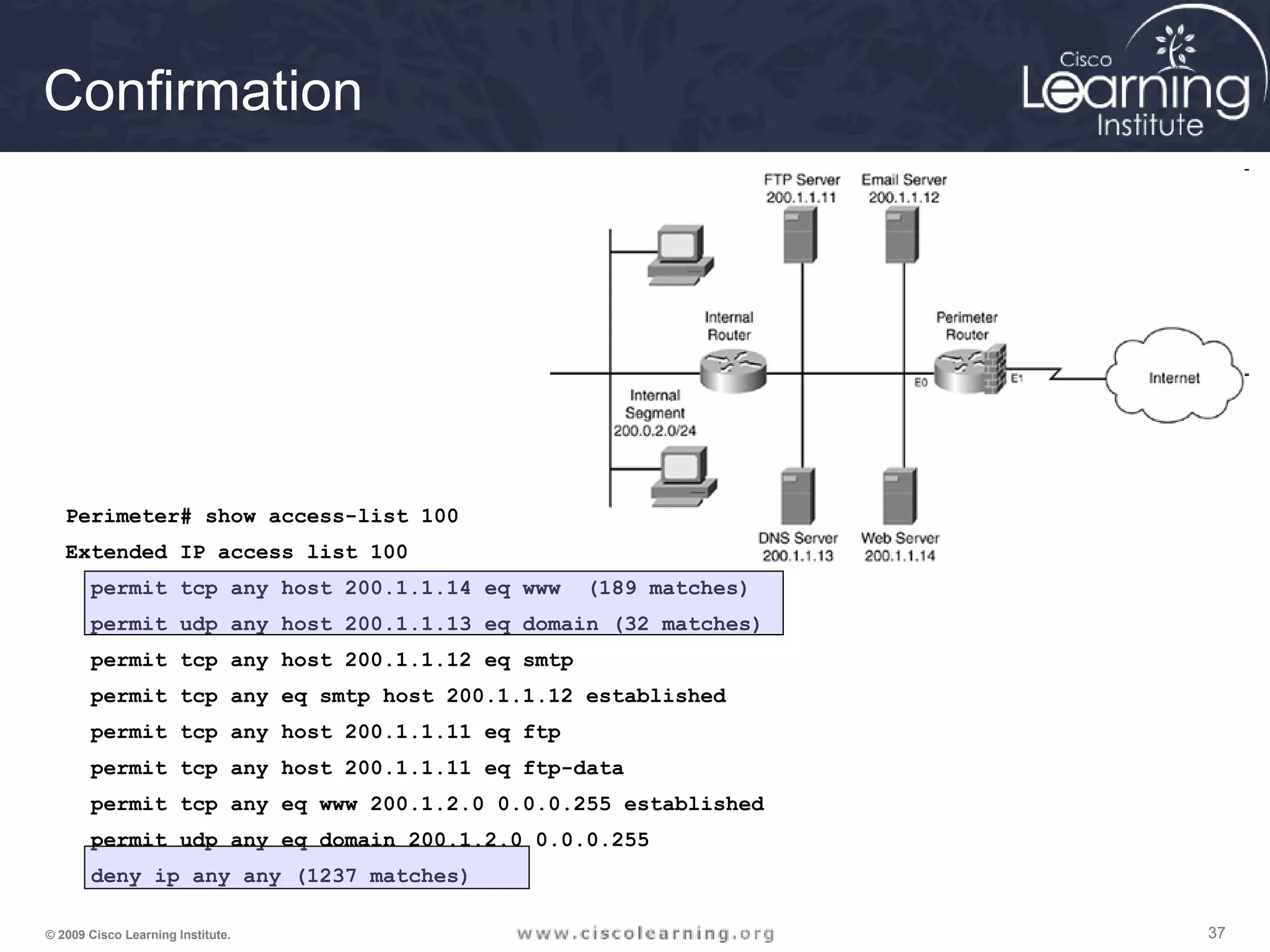
Perimeter# show access-list 100
Extended IP access list 100
permit tcp any host 200.1.1.14 eq www (189 matches)
permit udp any host 200.1.1.13 eq domain (32 matches)
permit tcp any host 200.1.1.12 eq smtp
permit tcp any eq smtp host 200.1.1.12 established
permit tcp any host 200.1.1.11 eq ftp
permit tcp any host 200.1.1.11 eq ftp-data
permit tcp any eq www 200.1.2.0 0.0.0.255 established
permit udp any eq domain 200.1.2.0 0.0.0.255
deny ip any any (1237 matches)
Confirmation
383838© 2009 Cisco Learning Institute.
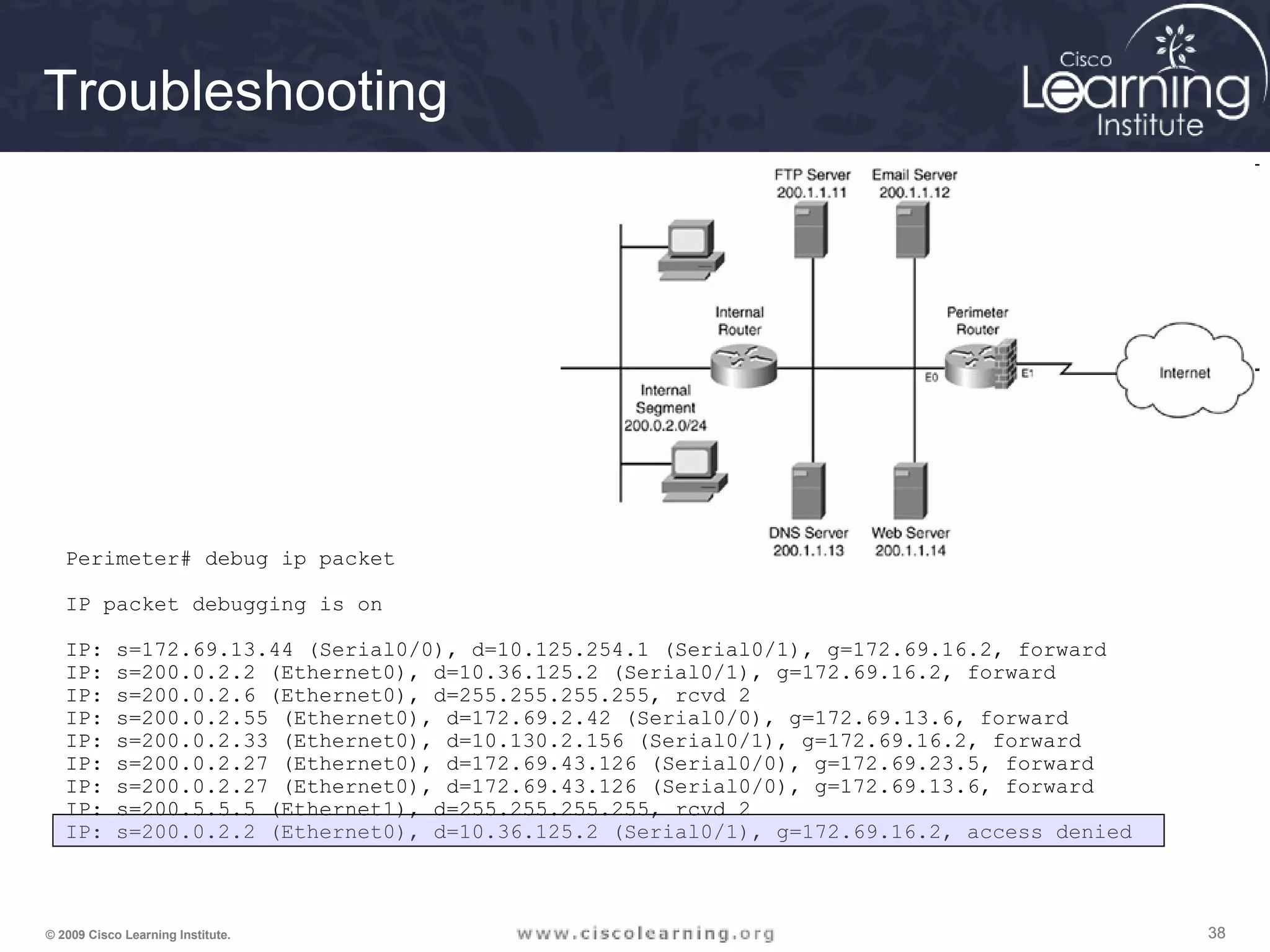
Perimeter# debug ip packet
IP packet debugging is on
IP: s=172.69.13.44 (Serial0/0), d=10.125.254.1 (Serial0/1), g=172.69.16.2, forward
IP: s=200.0.2.2 (Ethernet0), d=10.36.125.2 (Serial0/1), g=172.69.16.2, forward
IP: s=200.0.2.6 (Ethernet0), d=255.255.255.255, rcvd 2
IP: s=200.0.2.55 (Ethernet0), d=172.69.2.42 (Serial0/0), g=172.69.13.6, forward
IP: s=200.0.2.33 (Ethernet0), d=10.130.2.156 (Serial0/1), g=172.69.16.2, forward
IP: s=200.0.2.27 (Ethernet0), d=172.69.43.126 (Serial0/0), g=172.69.23.5, forward
IP: s=200.0.2.27 (Ethernet0), d=172.69.43.126 (Serial0/0), g=172.69.13.6, forward
IP: s=200.5.5.5 (Ethernet1), d=255.255.255.255, rcvd 2
IP: s=200.0.2.2 (Ethernet0), d=10.36.125.2 (Serial0/1), g=172.69.16.2, access denied
Troubleshooting
393939© 2009 Cisco Learning Institute.
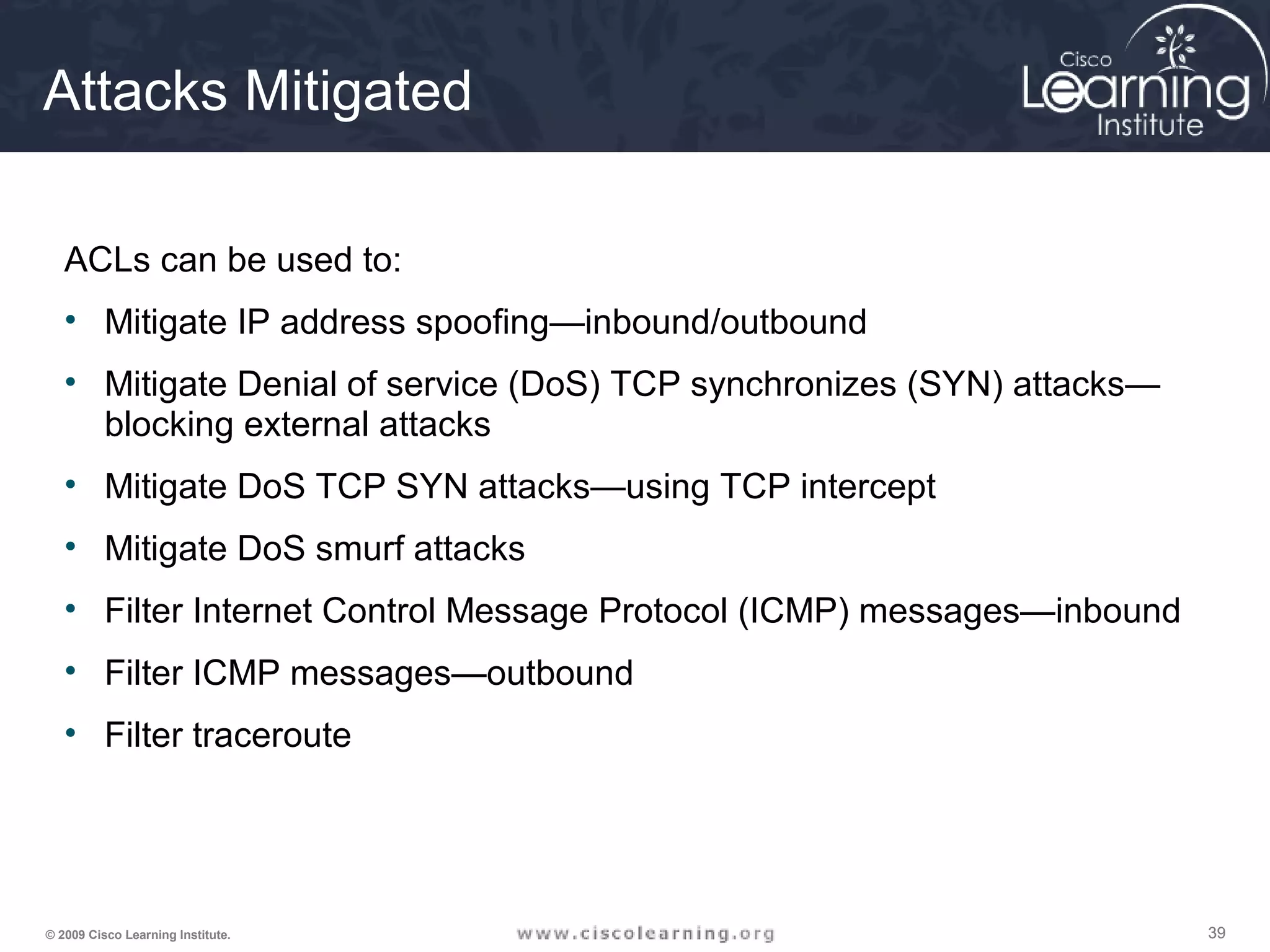
Attacks Mitigated
ACLs can be used to:
• Mitigate IP address spoofing—inbound/outbound
• Mitigate Denial of service (DoS) TCP synchronizes (SYN) attacks—
blocking external attacks
• Mitigate DoS TCP SYN attacks—using TCP intercept
• Mitigate DoS smurf attacks
• Filter Internet Control Message Protocol (ICMP) messages—inbound
• Filter ICMP messages—outbound
• Filter traceroute
404040© 2009 Cisco Learning Institute.
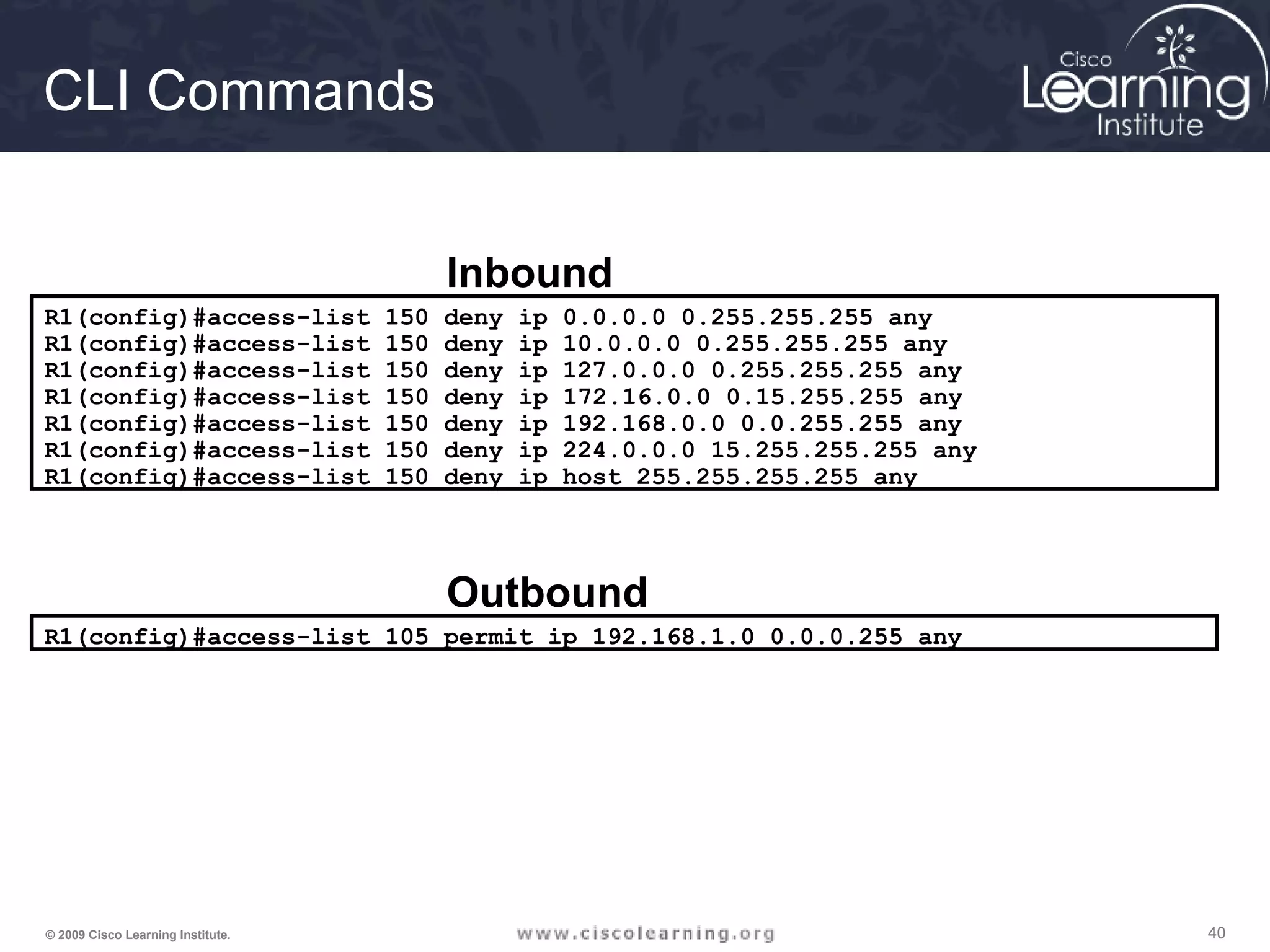
R1(config)#access-list 150 deny ip 0.0.0.0 0.255.255.255 any
R1(config)#access-list 150 deny ip 10.0.0.0 0.255.255.255 any
R1(config)#access-list 150 deny ip 127.0.0.0 0.255.255.255 any
R1(config)#access-list 150 deny ip 172.16.0.0 0.15.255.255 any
R1(config)#access-list 150 deny ip 192.168.0.0 0.0.255.255 any
R1(config)#access-list 150 deny ip 224.0.0.0 15.255.255.255 any
R1(config)#access-list 150 deny ip host 255.255.255.255 any
Inbound
R1(config)#access-list 105 permit ip 192.168.1.0 0.0.0.255 any
Outbound
CLI Commands
414141© 2009 Cisco Learning Institute.
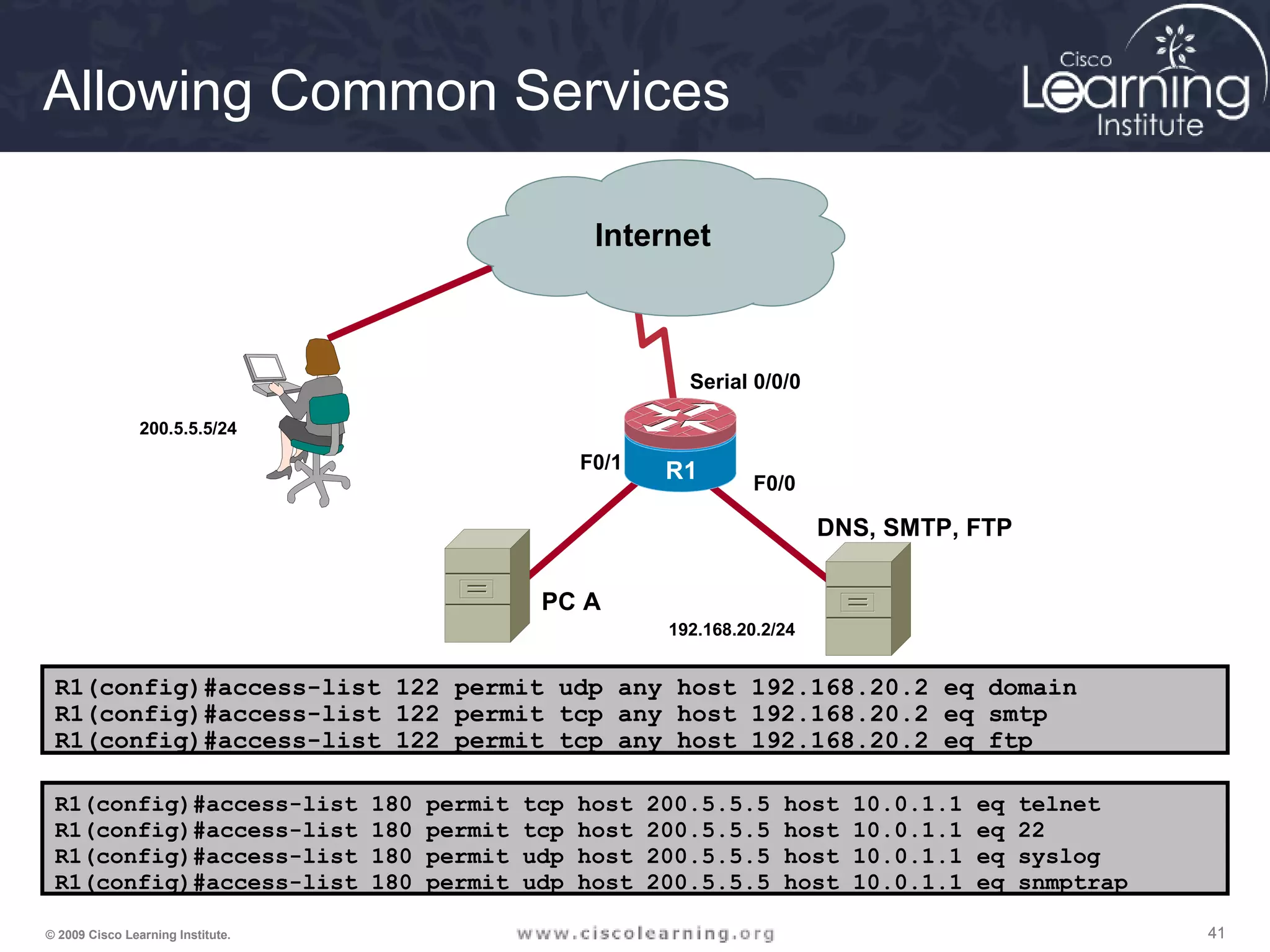
Allowing Common Services
R1(config)#access-list 122 permit udp any host 192.168.20.2 eq domain
R1(config)#access-list 122 permit tcp any host 192.168.20.2 eq smtp
R1(config)#access-list 122 permit tcp any host 192.168.20.2 eq ftp
R1(config)#access-list 180 permit tcp host 200.5.5.5 host 10.0.1.1 eq telnet
R1(config)#access-list 180 permit tcp host 200.5.5.5 host 10.0.1.1 eq 22
R1(config)#access-list 180 permit udp host 200.5.5.5 host 10.0.1.1 eq syslog
R1(config)#access-list 180 permit udp host 200.5.5.5 host 10.0.1.1 eq snmptrap
R1
Internet
F0/0
Serial 0/0/0
R1
DNS, SMTP, FTP
192.168.20.2/24
F0/1
PC A
200.5.5.5/24
424242© 2009 Cisco Learning Institute.
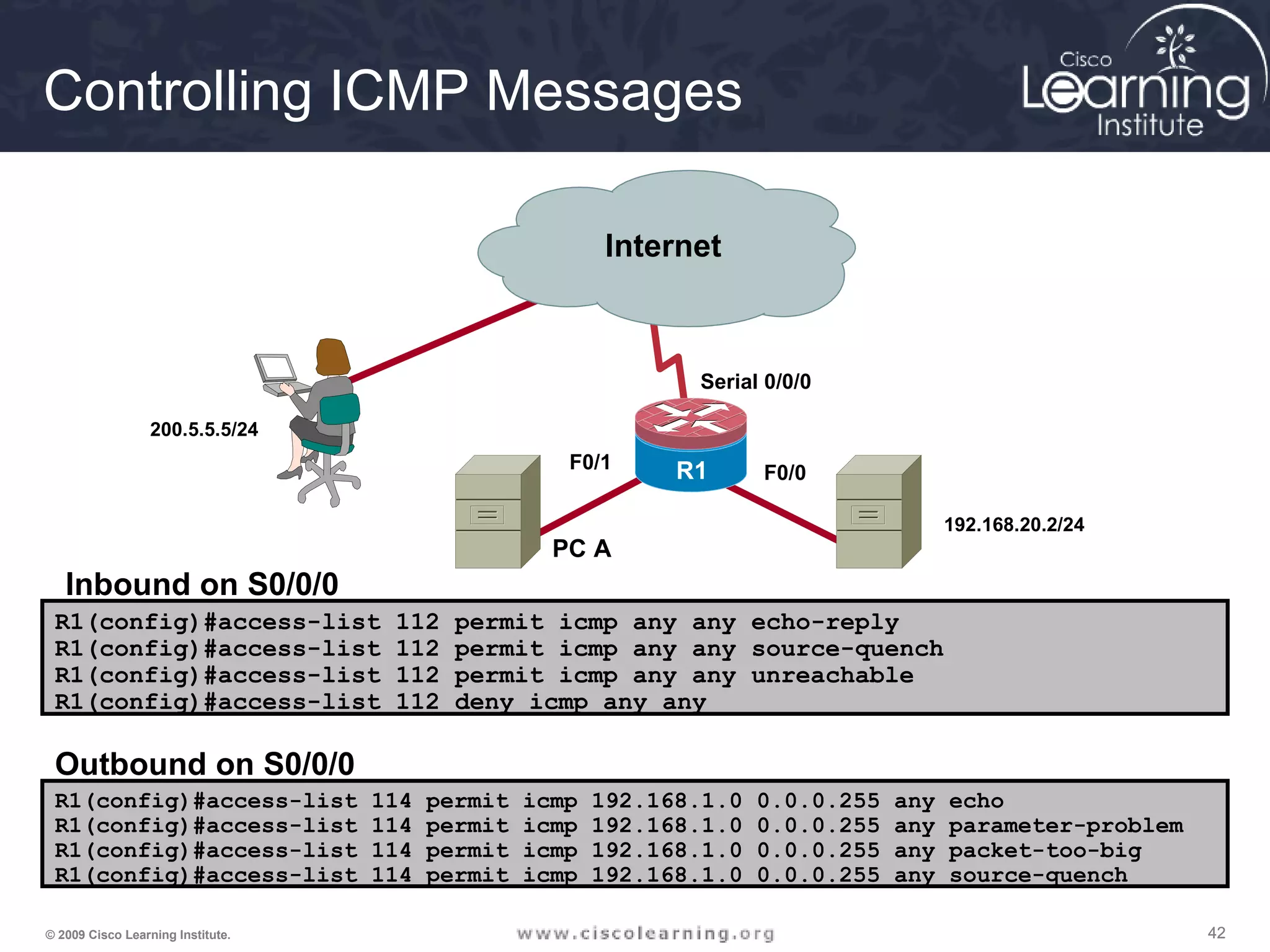
R1(config)#access-list 112 permit icmp any any echo-reply
R1(config)#access-list 112 permit icmp any any source-quench
R1(config)#access-list 112 permit icmp any any unreachable
R1(config)#access-list 112 deny icmp any any
R1(config)#access-list 114 permit icmp 192.168.1.0 0.0.0.255 any echo
R1(config)#access-list 114 permit icmp 192.168.1.0 0.0.0.255 any parameter-problem
R1(config)#access-list 114 permit icmp 192.168.1.0 0.0.0.255 any packet-too-big
R1(config)#access-list 114 permit icmp 192.168.1.0 0.0.0.255 any source-quench
Inbound on S0/0/0
Outbound on S0/0/0
R1
Internet
F0/0
Serial 0/0/0
R1
192.168.20.2/24
F0/1
PC A
200.5.5.5/24
Controlling ICMP Messages
434343© 2009 Cisco Learning Institute.
Firewalls
• A firewall is a system that enforces an access
control policy between network
• Common properties of firewalls:
- The firewall is resistant to attacks
- The firewall is the only transit point between networks
- The firewall enforces the access control policy
444444© 2009 Cisco Learning Institute.
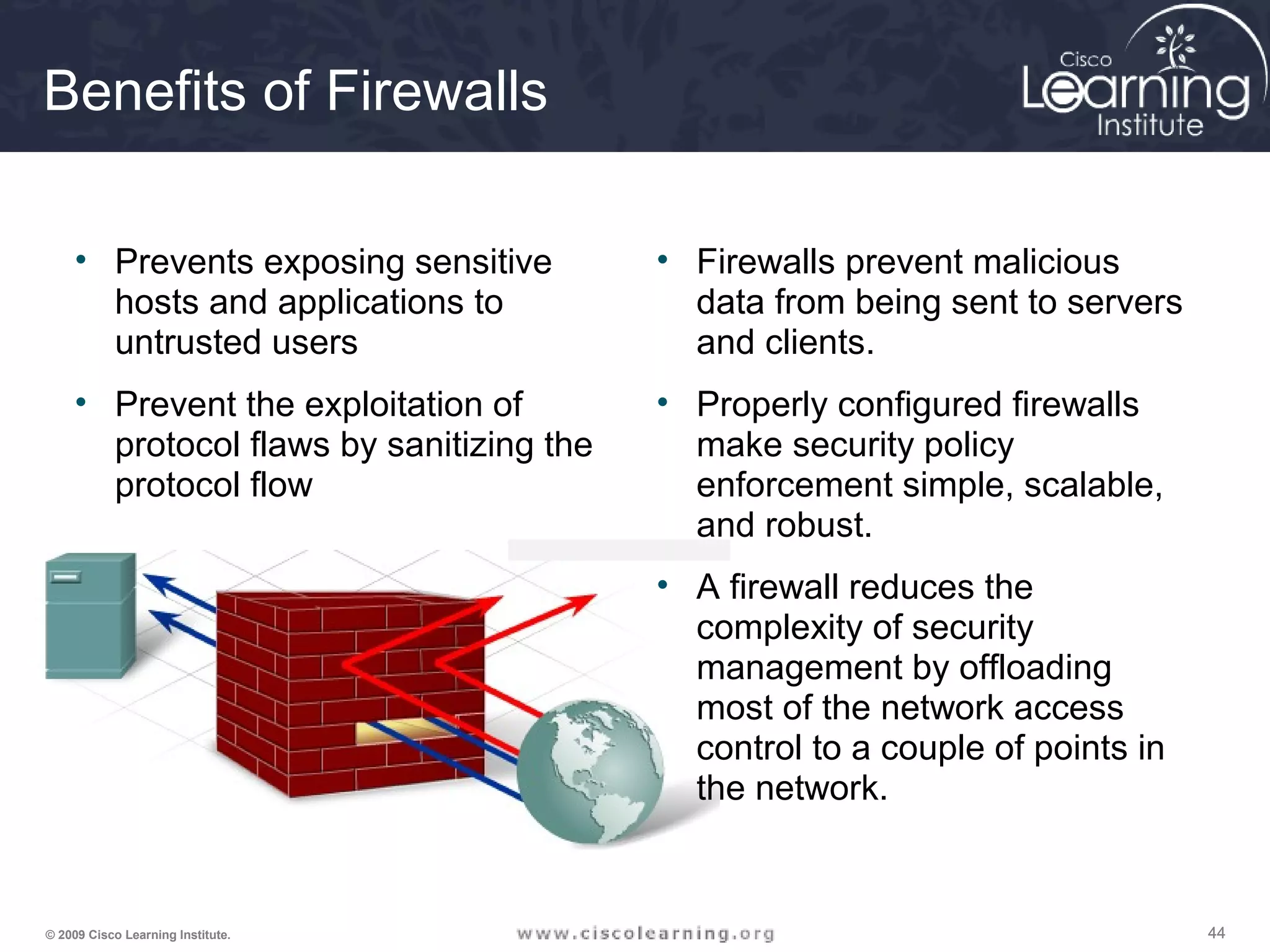
Benefits of Firewalls
• Prevents exposing sensitive
hosts and applications to
untrusted users
• Prevent the exploitation of
protocol flaws by sanitizing the
protocol flow
• Firewalls prevent malicious
data from being sent to servers
and clients.
• Properly configured firewalls
make security policy
enforcement simple, scalable,
and robust.
• A firewall reduces the
complexity of security
management by offloading
most of the network access
control to a couple of points in
the network.
454545© 2009 Cisco Learning Institute.
Types of Filtering Firewalls
• Packet-filtering firewall—is typically a router that has the capability to
filter on some of the contents of packets (examines Layer 3 and
sometimes Layer 4 information)
• Stateful firewall—keeps track of the state of a connection: whether
the connection is in an initiation, data transfer, or termination state
• Application gateway firewall (proxy firewall) —filters information at
Layers 3, 4, 5, and 7. Firewall control and filtering done in software.
• Address-translation firewall—expands the number of IP addresses
available and hides network addressing design.
464646© 2009 Cisco Learning Institute.
Types of Filtering Firewalls
• Host-based (server and personal) firewall—a PC or server with
firewall software running on it.
• Transparent firewall—filters IP traffic between a pair of bridged
interfaces.
• Hybrid firewalls—some combination of the above firewalls. For
example, an application inspection firewall combines a stateful
firewall with an application gateway firewall.
474747© 2009 Cisco Learning Institute.
Packet-Filtering Firewall
Advantages
• Are based on simple permit or deny rule set
• Have a low impact on network performance
• Are easy to implement
• Are supported by most routers
• Afford an initial degree of security at a low
network layer
• Perform 90% of what higher-end firewalls do, at
a much lower cost
484848© 2009 Cisco Learning Institute.
Packet-Filtering Firewall
Disadvantages
• Packet filtering is susceptible to IP spoofing. Hackers
send arbitrary packets that fit ACL criteria and pass
through the filter.
• Packet filters do not filter fragmented packets well.
Because fragmented IP packets carry the TCP header in
the first fragment and packet filters filter on TCP header
information, all fragments after the first fragment are
passed unconditionally.
• Complex ACLs are difficult to implement and maintain
correctly.
• Packet filters cannot dynamically filter certain services.
• Packet filters are stateless.
494949© 2009 Cisco Learning Institute.
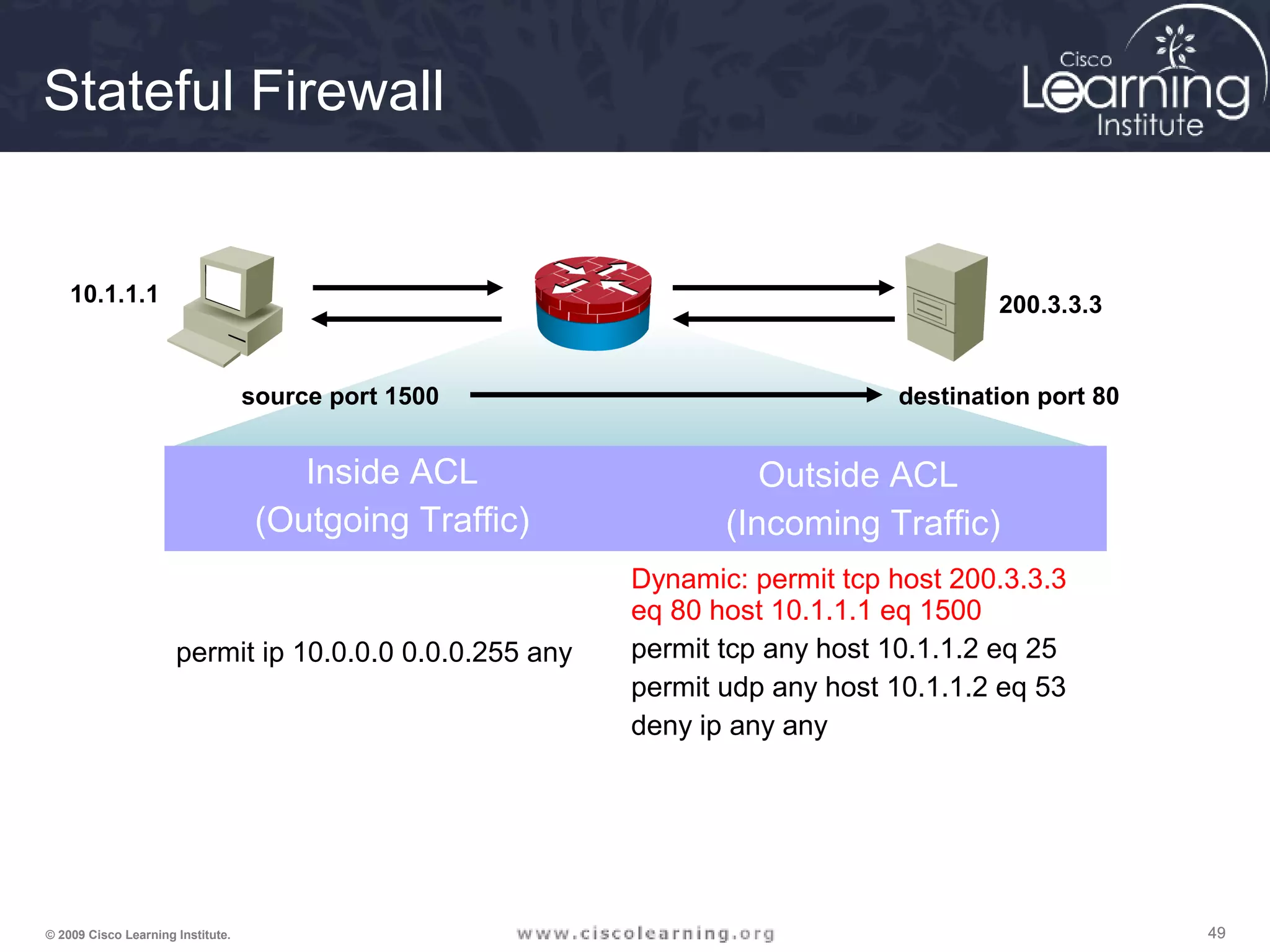
Stateful Firewall
10.1.1.1 200.3.3.3
Inside ACL
(Outgoing Traffic)
Outside ACL
(Incoming Traffic)
permit ip 10.0.0.0 0.0.0.255 any
Dynamic: permit tcp host 200.3.3.3
eq 80 host 10.1.1.1 eq 1500
permit tcp any host 10.1.1.2 eq 25
permit udp any host 10.1.1.2 eq 53
deny ip any any
source port 1500 destination port 80
505050© 2009 Cisco Learning Institute.
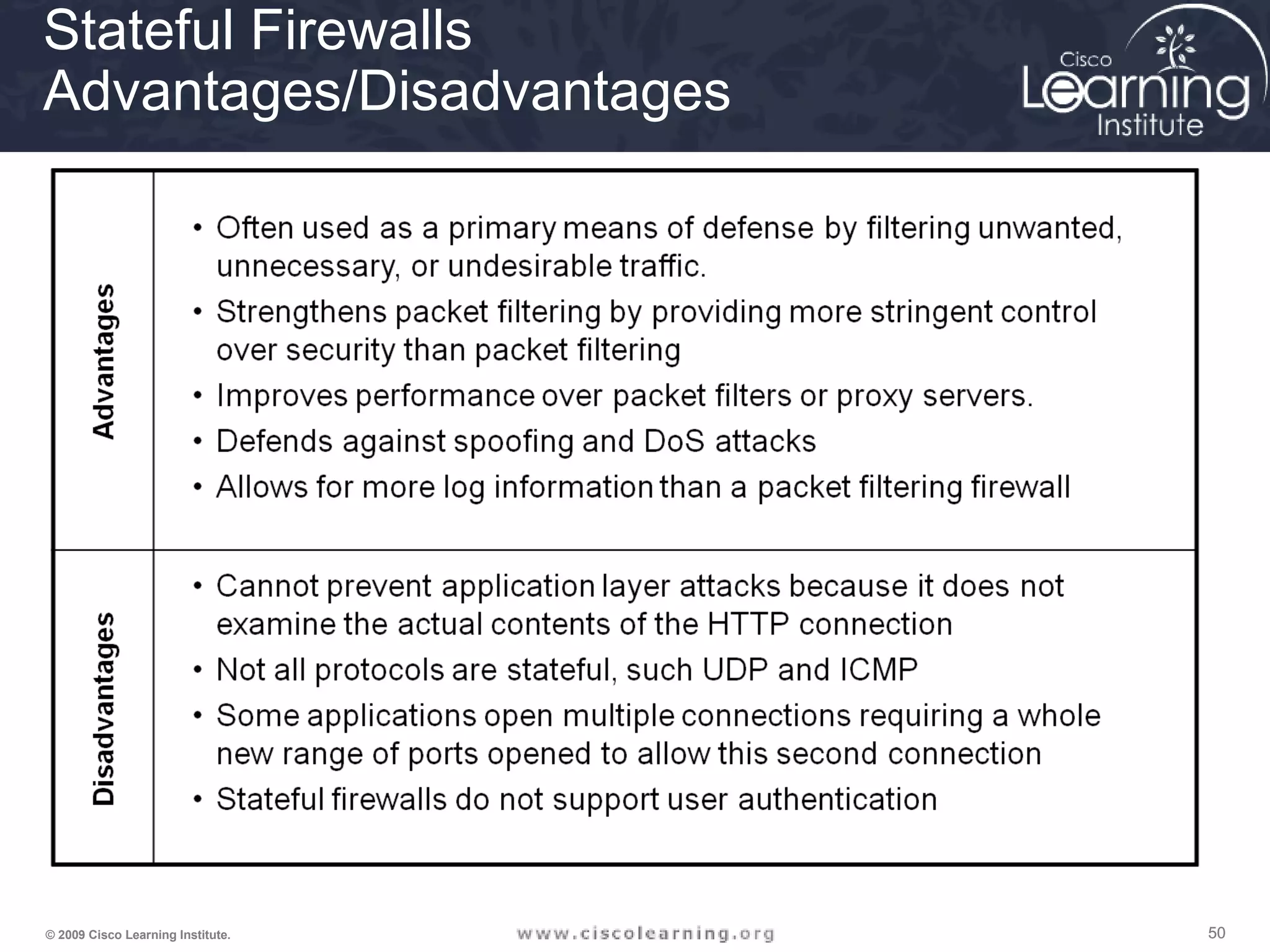
Stateful Firewalls
Advantages/Disadvantages
515151© 2009 Cisco Learning Institute.
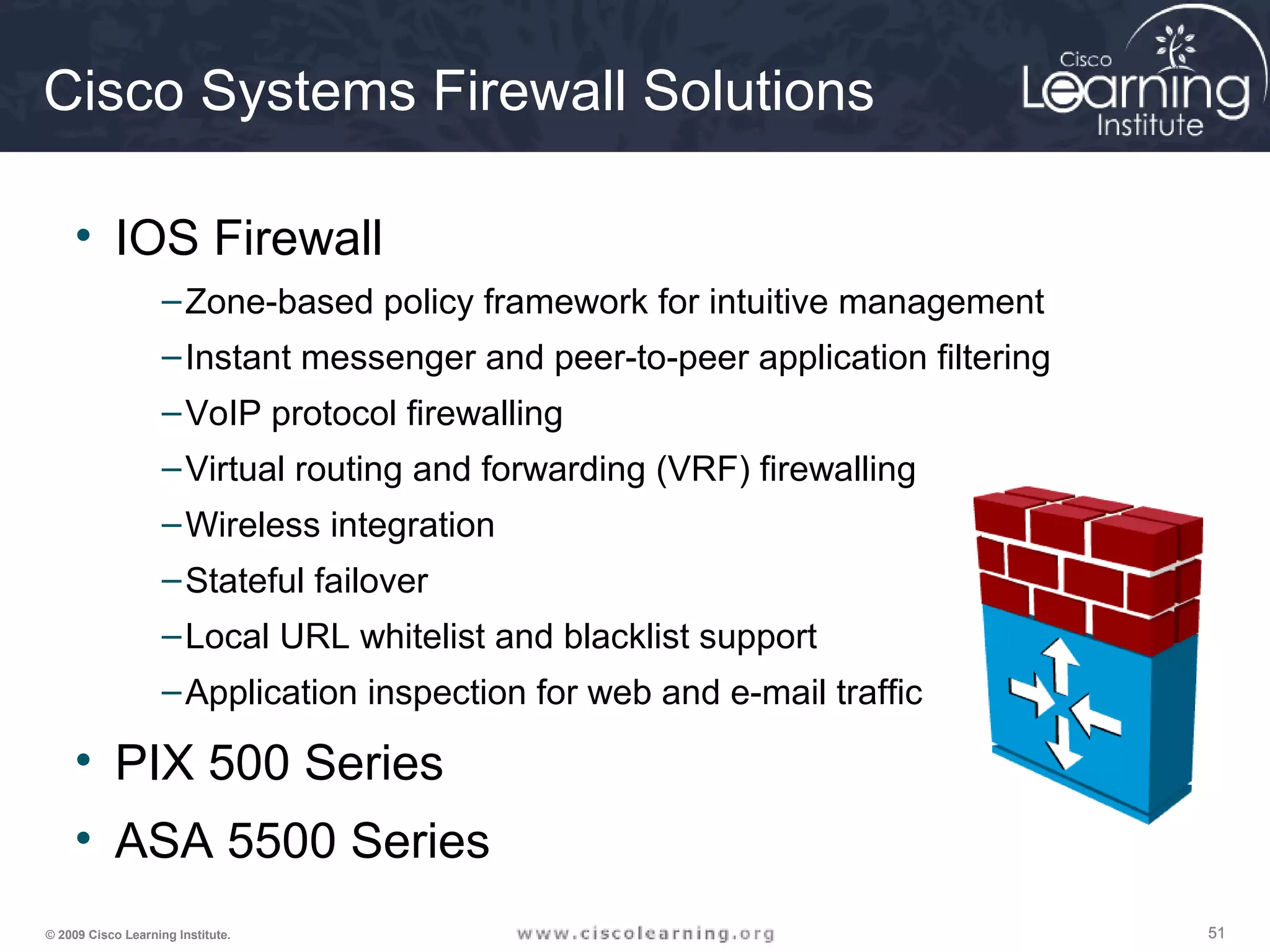
Cisco Systems Firewall Solutions
• IOS Firewall
–Zone-based policy framework for intuitive management
–Instant messenger and peer-to-peer application filtering
–VoIP protocol firewalling
–Virtual routing and forwarding (VRF) firewalling
–Wireless integration
–Stateful failover
–Local URL whitelist and blacklist support
–Application inspection for web and e-mail traffic
• PIX 500 Series
• ASA 5500 Series
525252© 2009 Cisco Learning Institute.
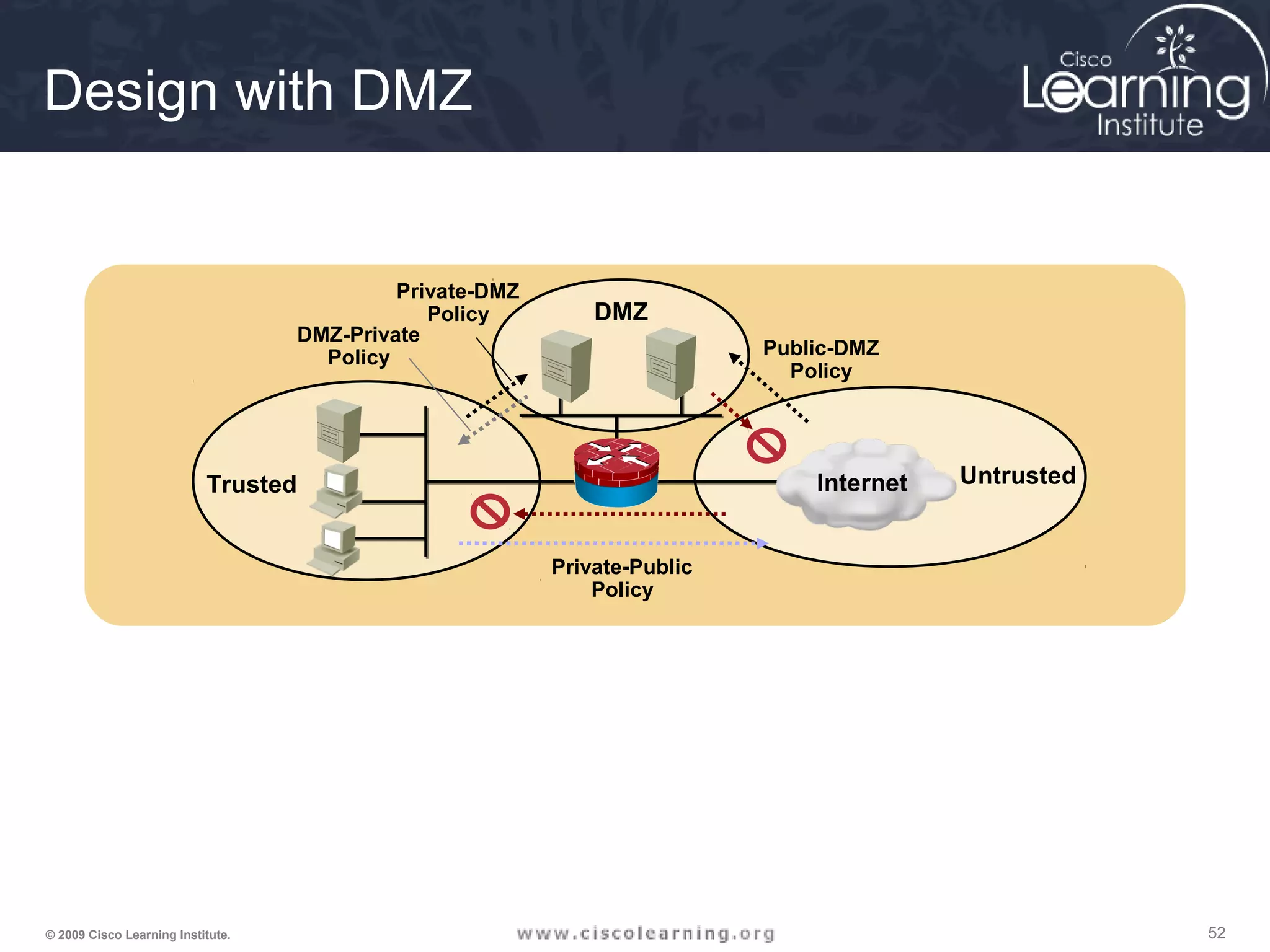
Design with DMZ
DMZ
UntrustedTrusted
Private-Public
Policy
Public-DMZ
Policy
DMZ-Private
Policy
Private-DMZ
Policy
Internet
535353© 2009 Cisco Learning Institute.
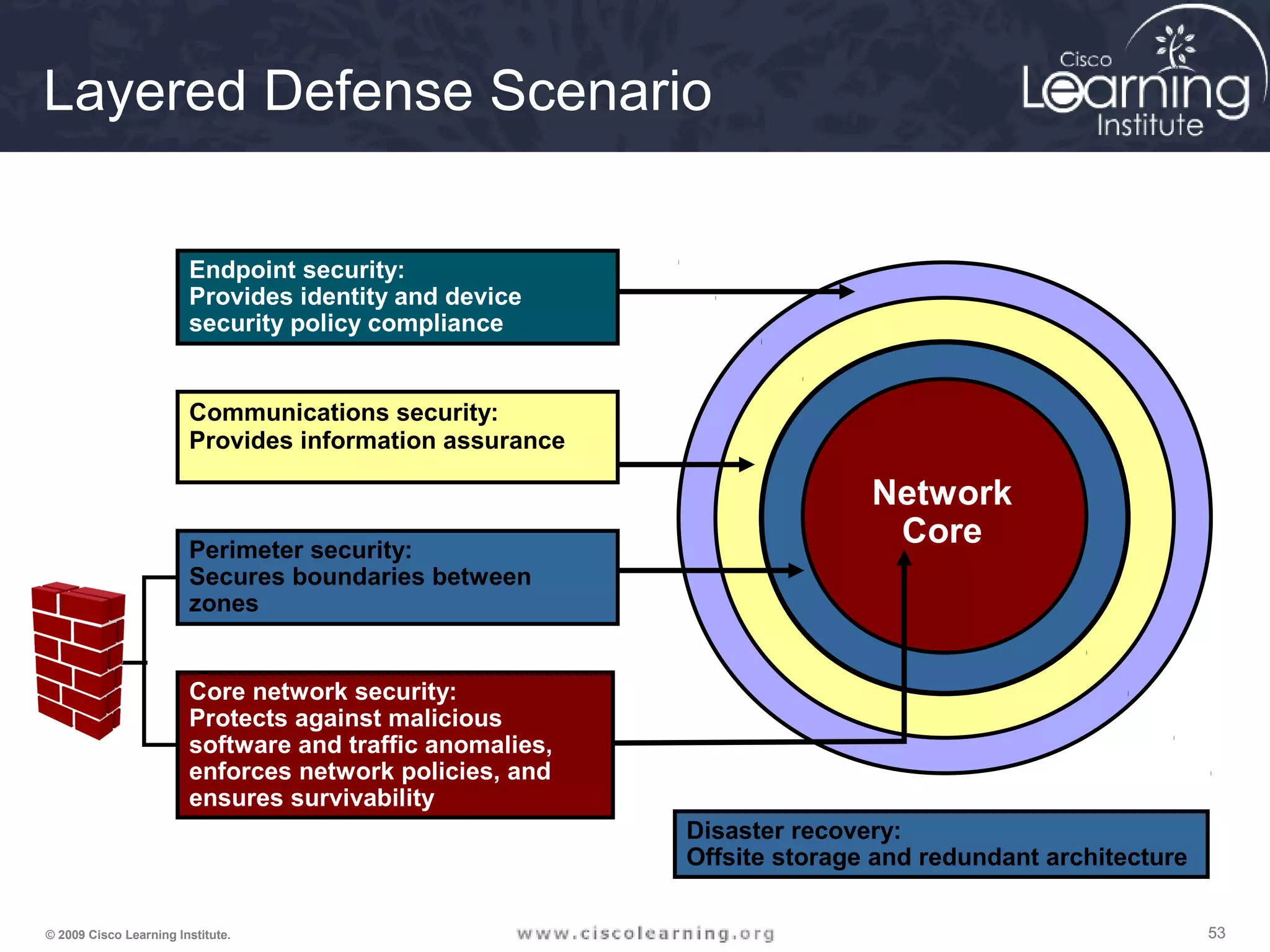
Layered Defense Scenario
Endpoint security:
Provides identity and device
security policy compliance
Core network security:
Protects against malicious
software and traffic anomalies,
enforces network policies, and
ensures survivability
Network
Core
Disaster recovery:
Offsite storage and redundant architecture
Communications security:
Provides information assurance
Perimeter security:
Secures boundaries between
zones
545454© 2009 Cisco Learning Institute.
Firewall Best Practices
• Position firewalls at security boundaries.
• Firewalls are the primary security device. It is unwise to
rely exclusively on a firewall for security.
• Deny all traffic by default. Permit only services that are
needed.
• Ensure that physical access to the firewall is controlled.
• Regularly monitor firewall logs.
• Practice change management for firewall configuration
changes.
• Remember that firewalls primarily protect from technical
attacks originating from the outside.
555555© 2009 Cisco Learning Institute.
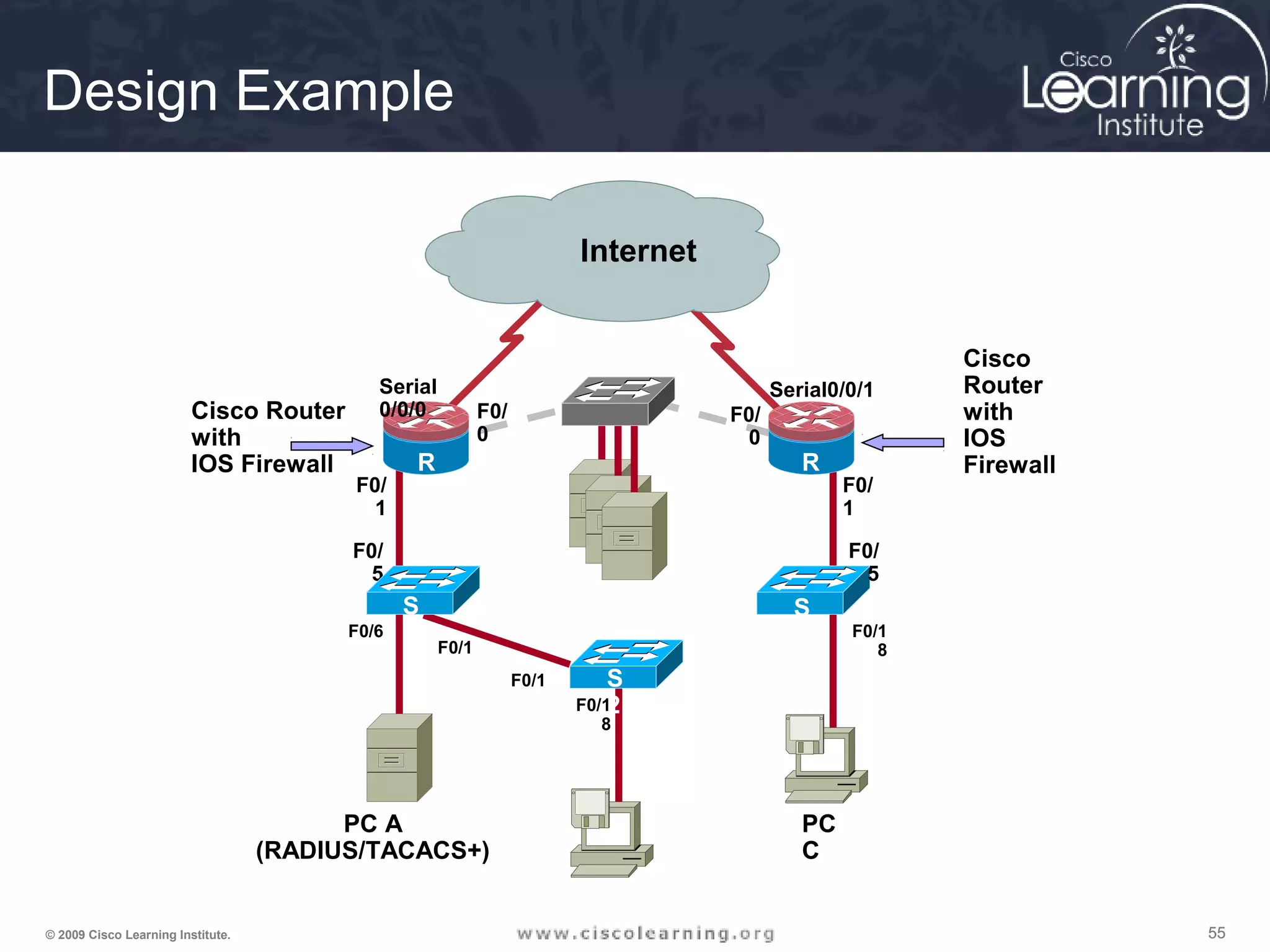
Design Example
F0/
1
F0/
0
F0/
0
F0/
1
Serial
0/0/0
Serial0/0/1
R
1
R
3
R
2
F0/
5
S
2
S
3F0/1
F0/1
F0/6
F0/1
8
F0/1
8
F0/
5
S
1
PC A
(RADIUS/TACACS+)
PC
C
Cisco Router
with
IOS Firewall
Cisco
Router
with
IOS
Firewall
Internet
565656© 2009 Cisco Learning Institute.
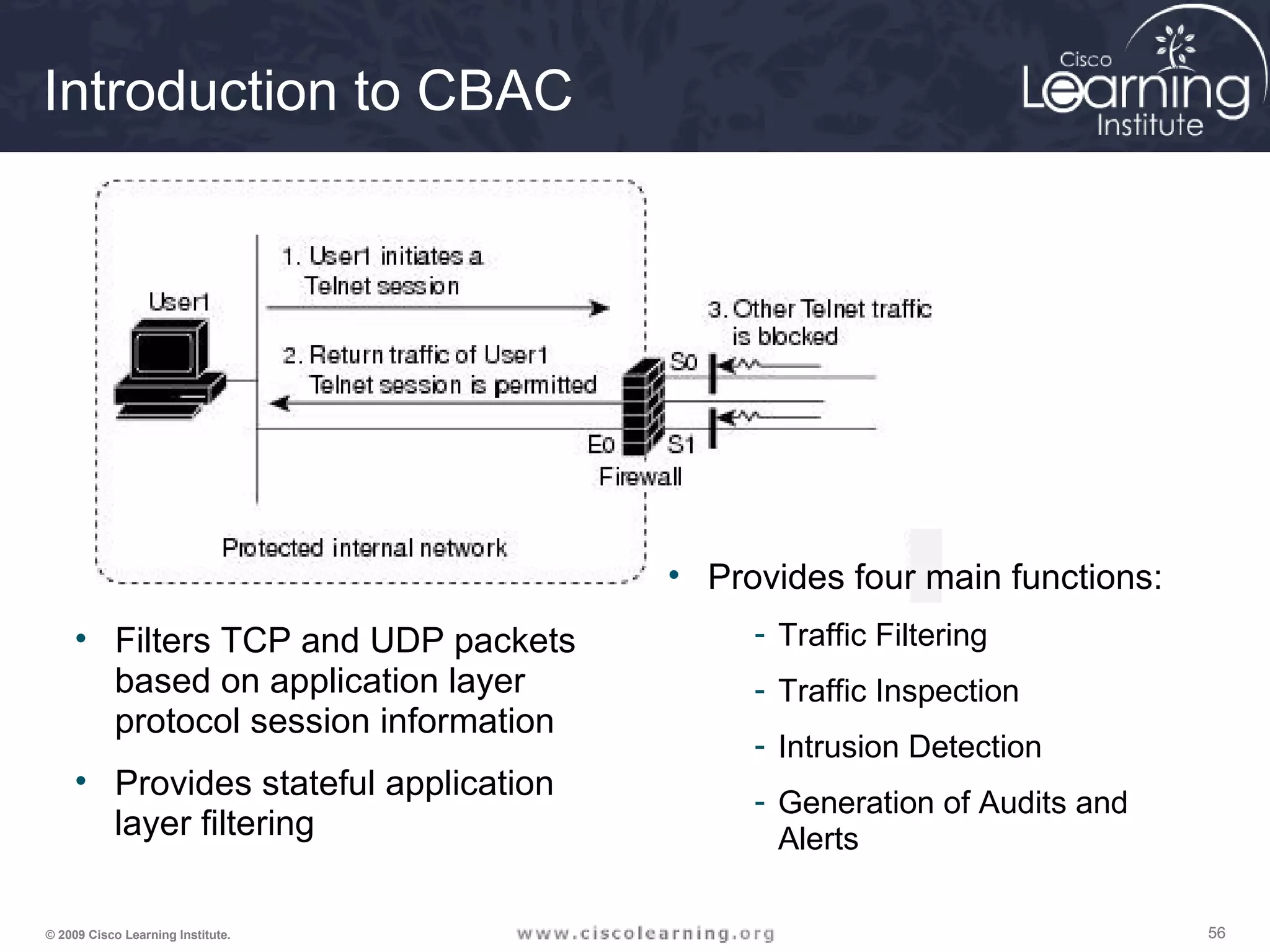
Introduction to CBAC
• Filters TCP and UDP packets
based on application layer
protocol session information
• Provides stateful application
layer filtering
• Provides four main functions:
- Traffic Filtering
- Traffic Inspection
- Intrusion Detection
- Generation of Audits and
Alerts
575757© 2009 Cisco Learning Institute.
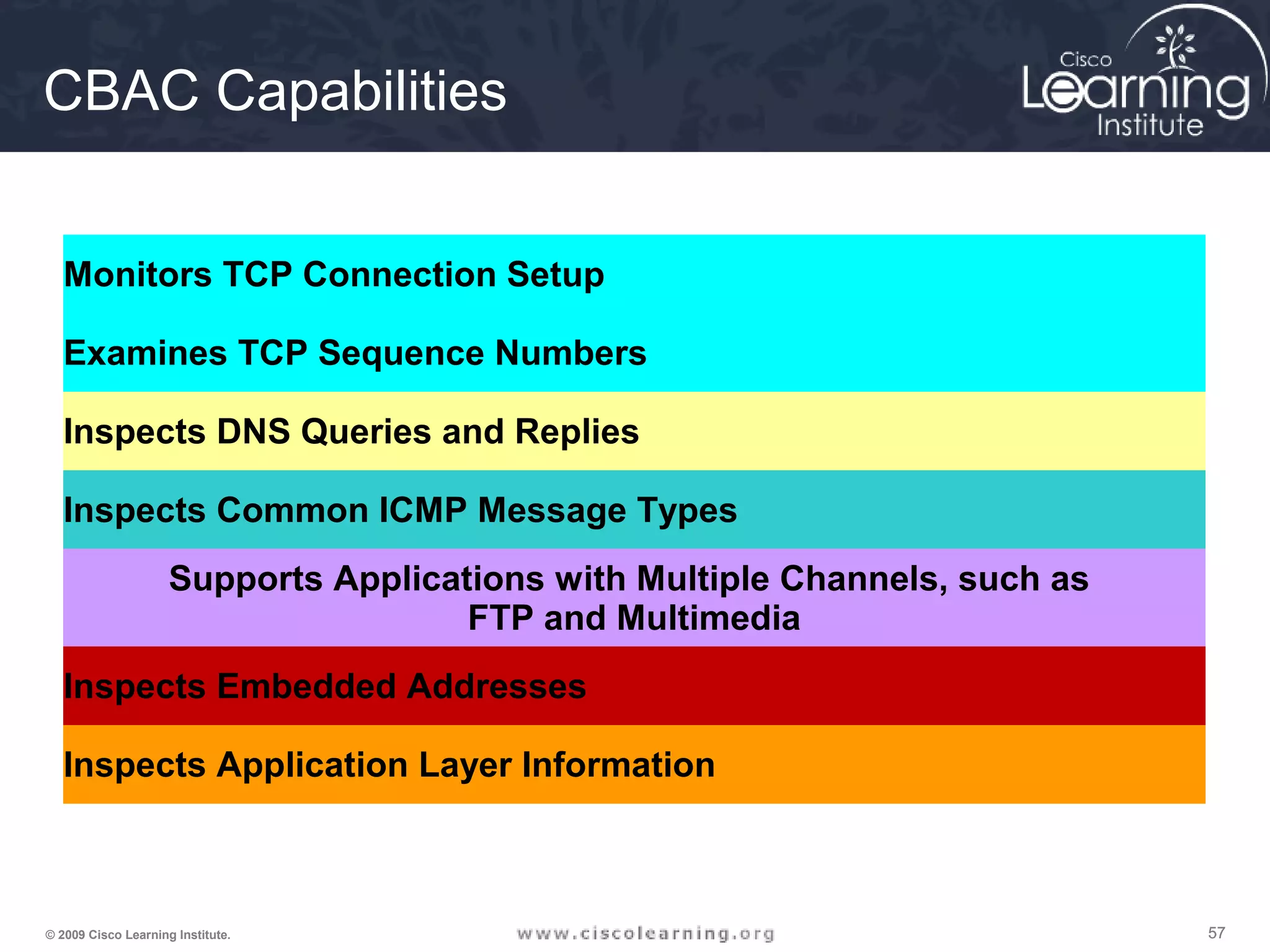
CBAC Capabilities
Monitors TCP Connection Setup
Examines TCP Sequence Numbers
Inspects DNS Queries and Replies
Inspects Common ICMP Message Types
Supports Applications with Multiple Channels, such as
FTP and Multimedia
Inspects Embedded Addresses
Inspects Application Layer Information
585858© 2009 Cisco Learning Institute.
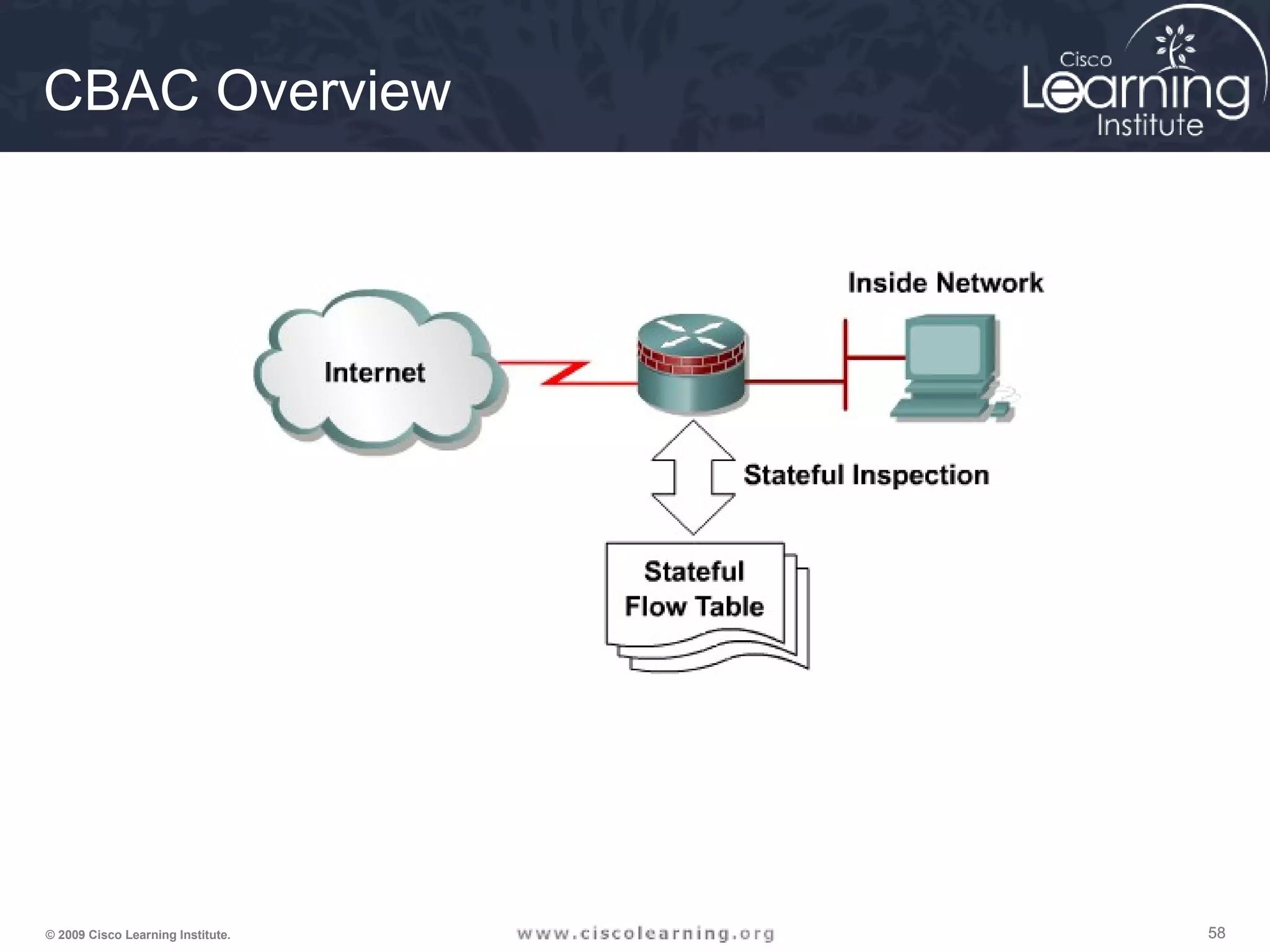
CBAC Overview
595959© 2009 Cisco Learning Institute.
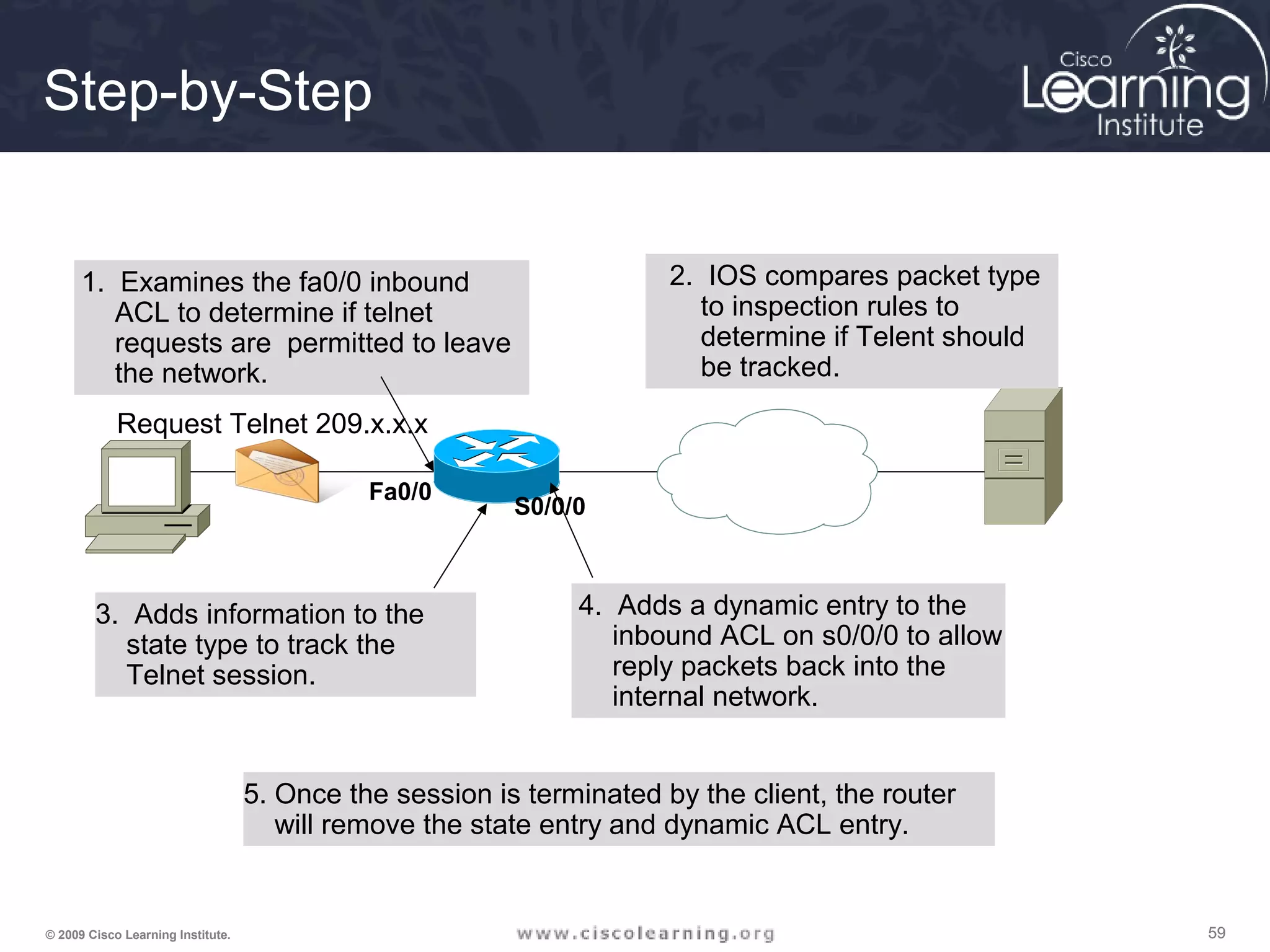
Step-by-Step
Request Telnet 209.x.x.x
5. Once the session is terminated by the client, the router
will remove the state entry and dynamic ACL entry.
Fa0/0
S0/0/0
1. Examines the fa0/0 inbound
ACL to determine if telnet
requests are permitted to leave
the network.
2. IOS compares packet type
to inspection rules to
determine if Telent should
be tracked.
3. Adds information to the
state type to track the
Telnet session.
4. Adds a dynamic entry to the
inbound ACL on s0/0/0 to allow
reply packets back into the
internal network.
606060© 2009 Cisco Learning Institute.
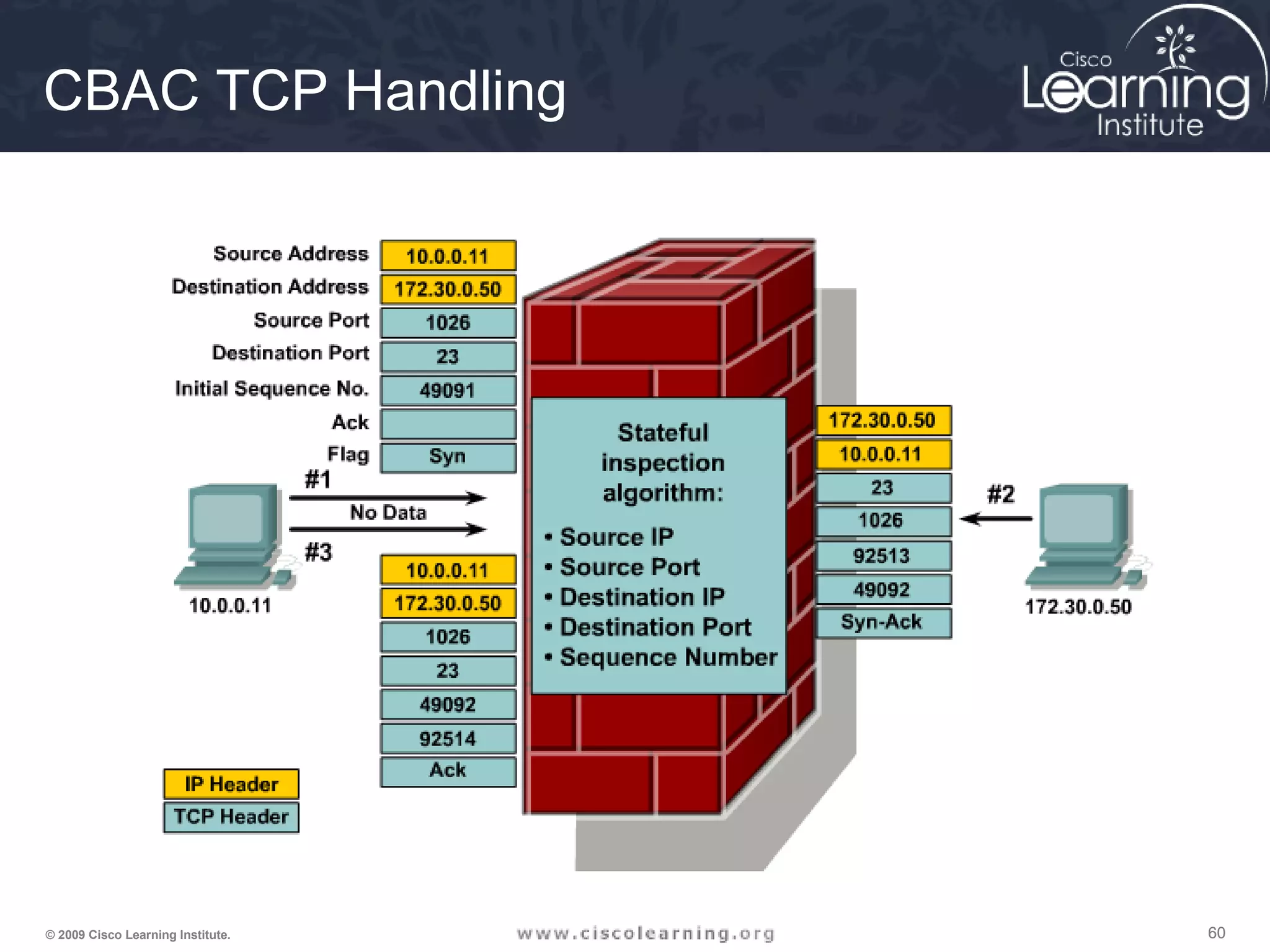
CBAC TCP Handling
616161© 2009 Cisco Learning Institute.
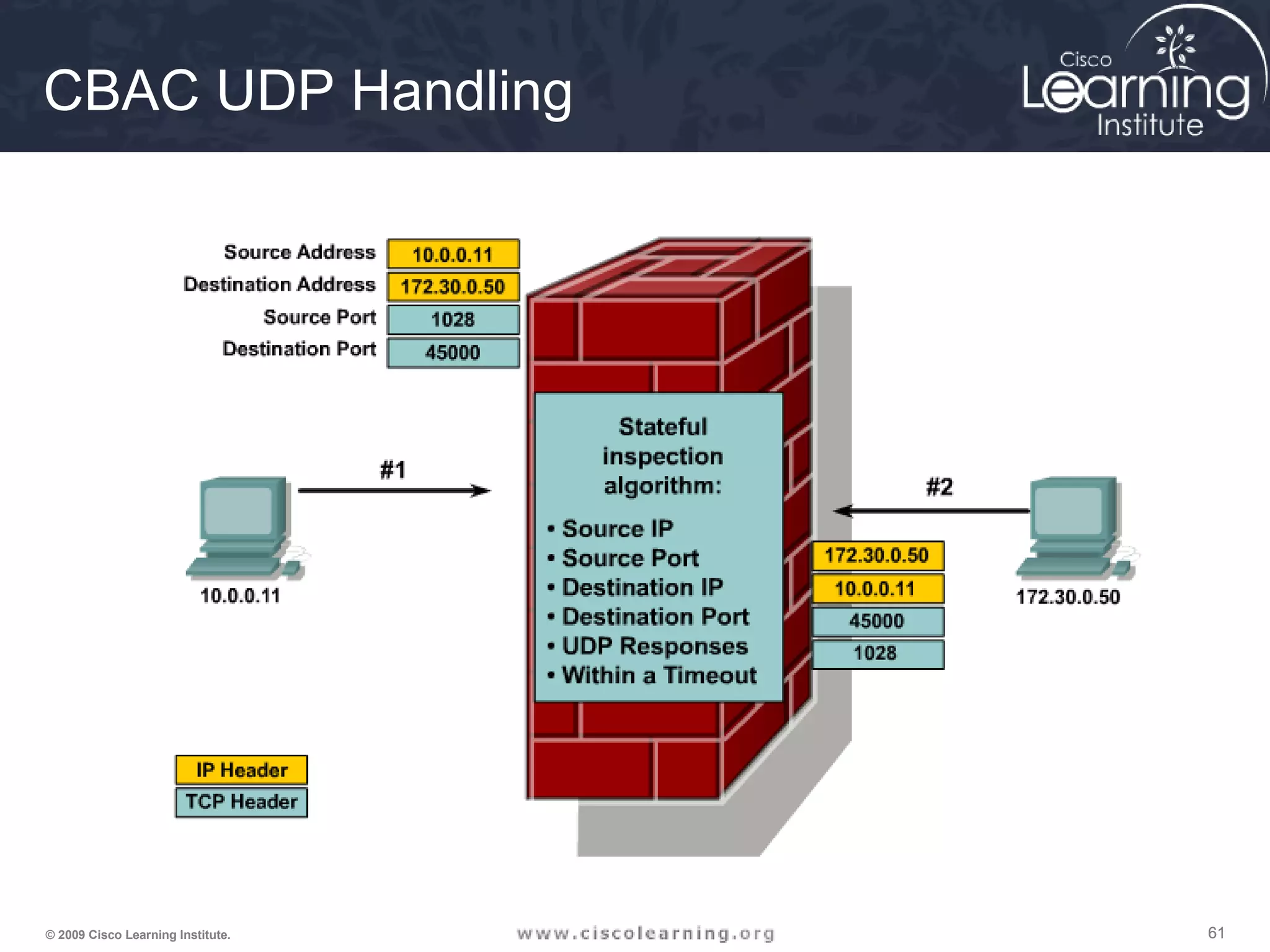
CBAC UDP Handling
626262© 2009 Cisco Learning Institute.
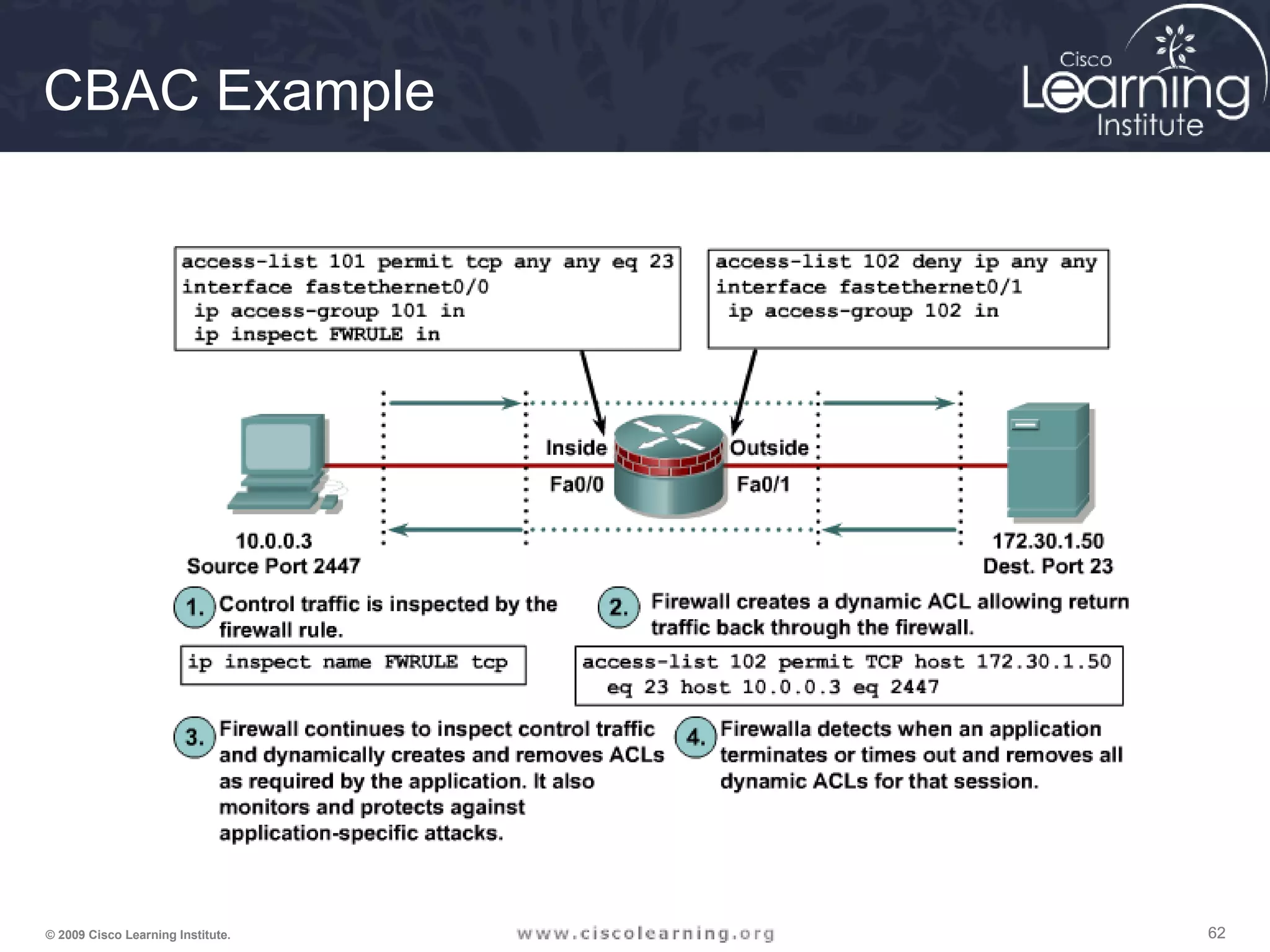
CBAC Example
636363© 2009 Cisco Learning Institute.
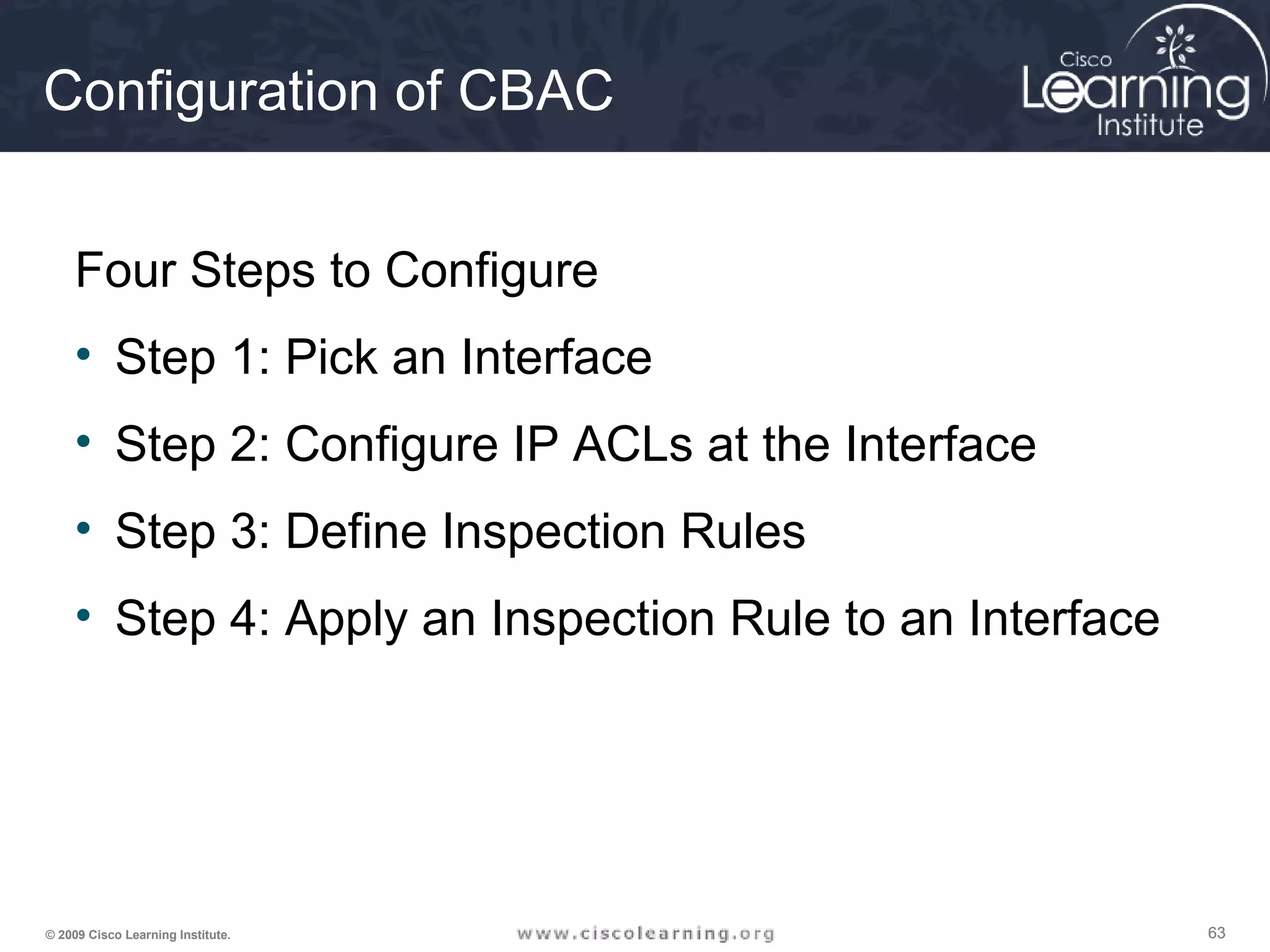
Configuration of CBAC
Four Steps to Configure
• Step 1: Pick an Interface
• Step 2: Configure IP ACLs at the Interface
• Step 3: Define Inspection Rules
• Step 4: Apply an Inspection Rule to an Interface
646464© 2009 Cisco Learning Institute.
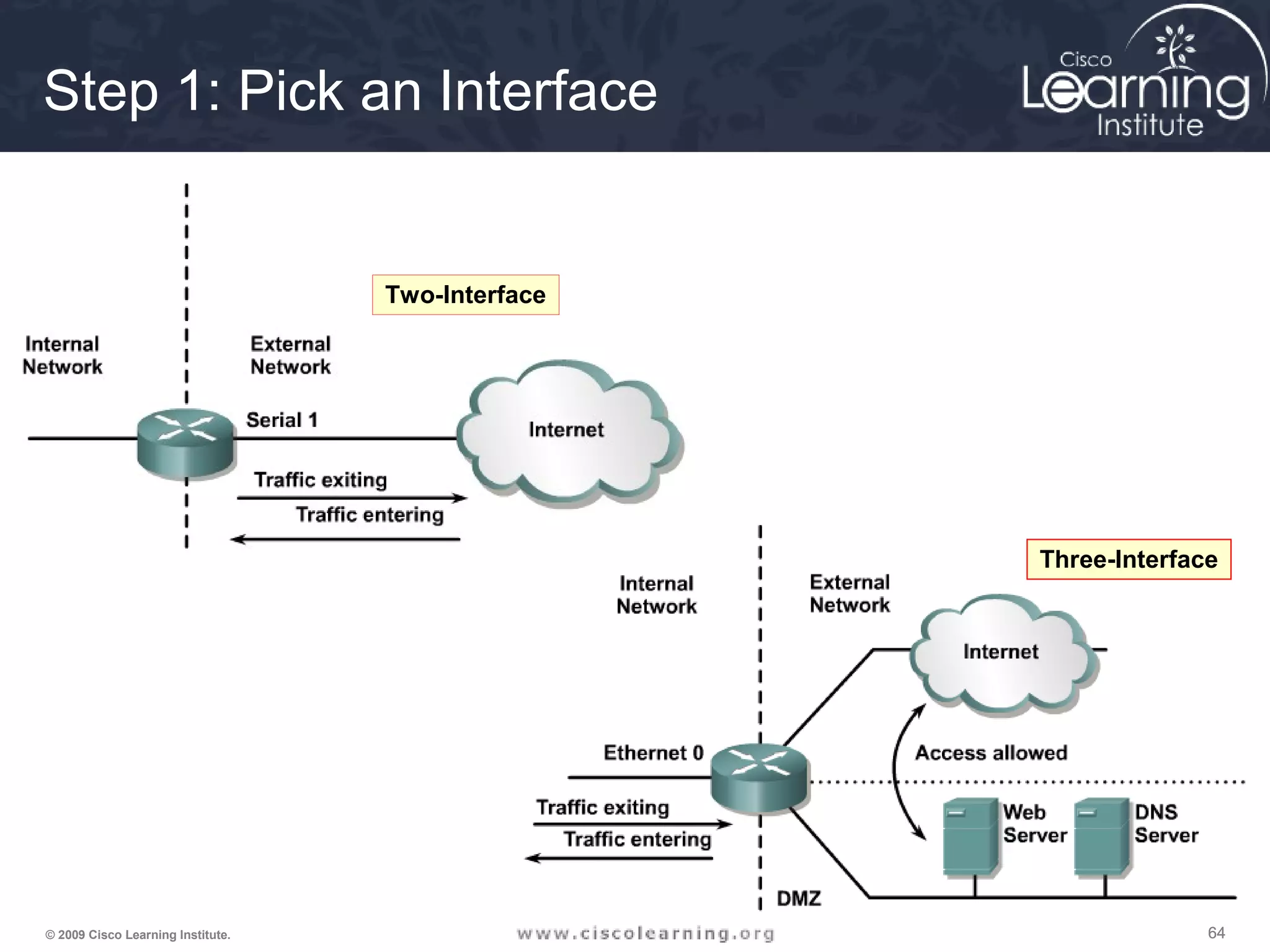
Step 1: Pick an Interface
Two-Interface
Three-Interface
656565© 2009 Cisco Learning Institute.
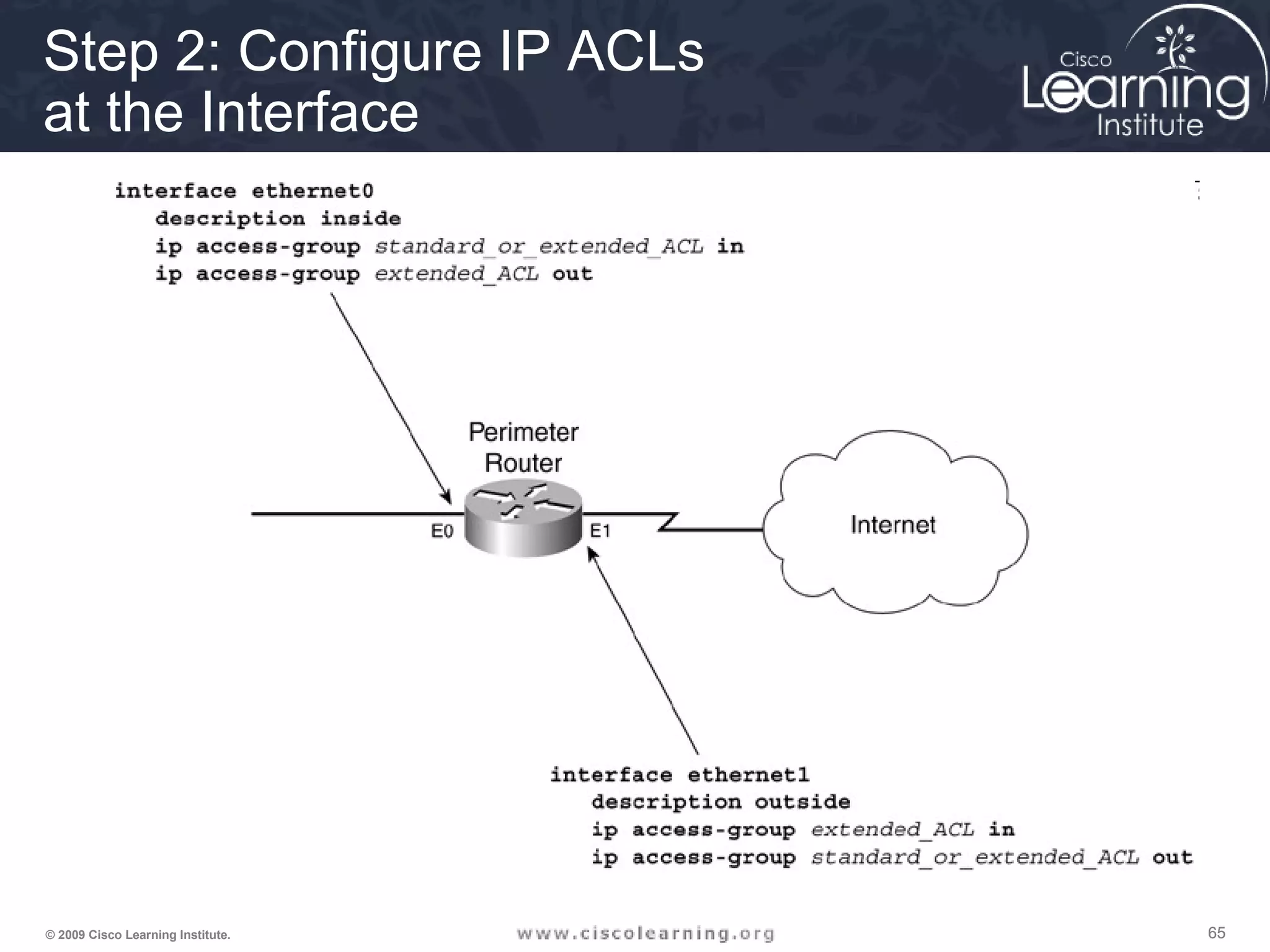
Step 2: Configure IP ACLs
at the Interface
666666© 2009 Cisco Learning Institute.
Step 3: Define Inspection Rules
ip inspect name inspection_name protocol [alert {on | off}] [audit-trail
{on | off}] [timeout seconds]
Router(config)#
676767© 2009 Cisco Learning Institute.
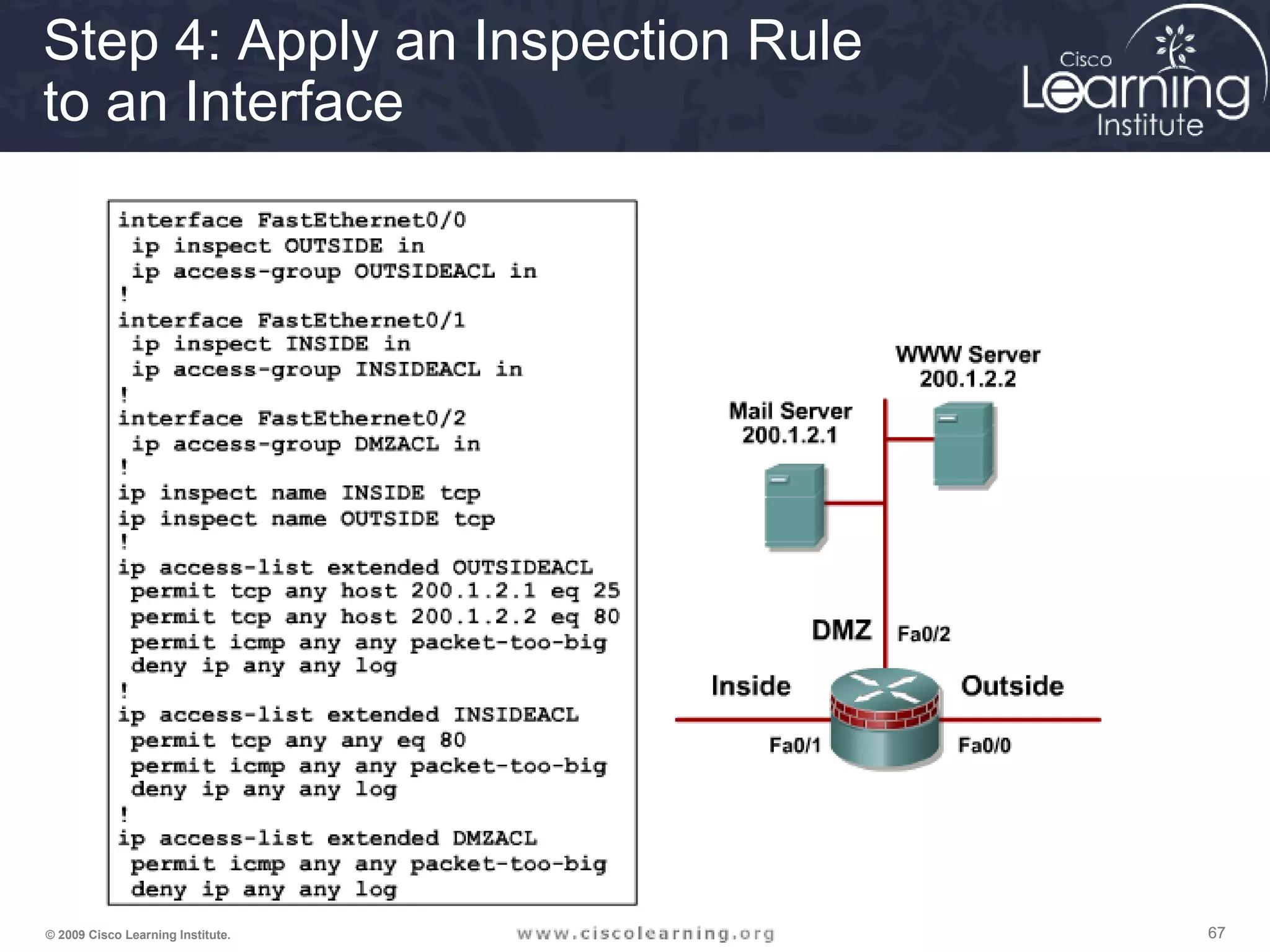
Step 4: Apply an Inspection Rule
to an Interface
686868© 2009 Cisco Learning Institute.
Verification and Troubleshooting
of CBAC
• Alerts and Audits
• show ip inspect Parameters
• debug ip inspect Parameters
696969© 2009 Cisco Learning Institute.
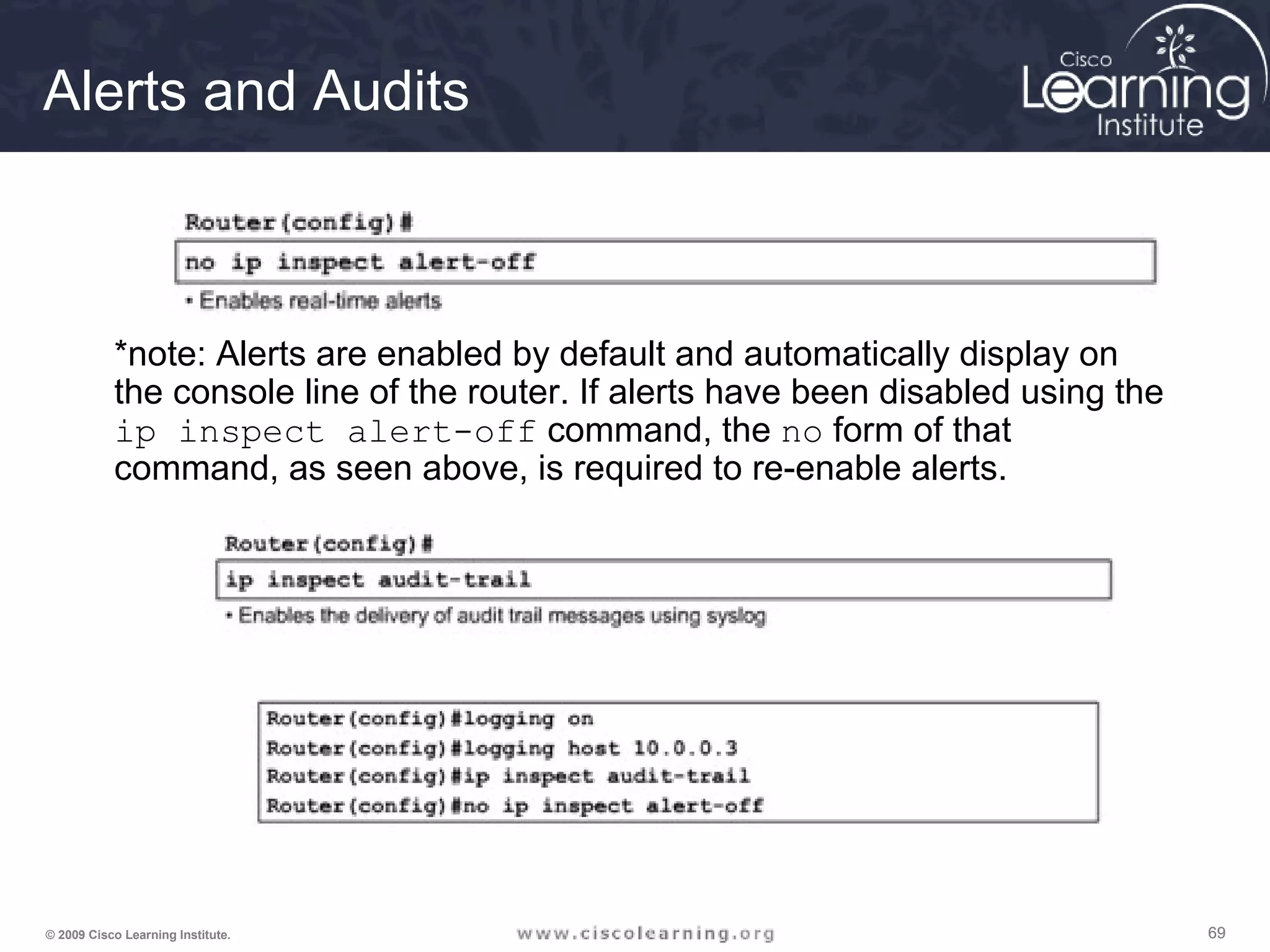
Alerts and Audits
*note: Alerts are enabled by default and automatically display on
the console line of the router. If alerts have been disabled using the
ip inspect alert-off command, the no form of that
command, as seen above, is required to re-enable alerts.
707070© 2009 Cisco Learning Institute.
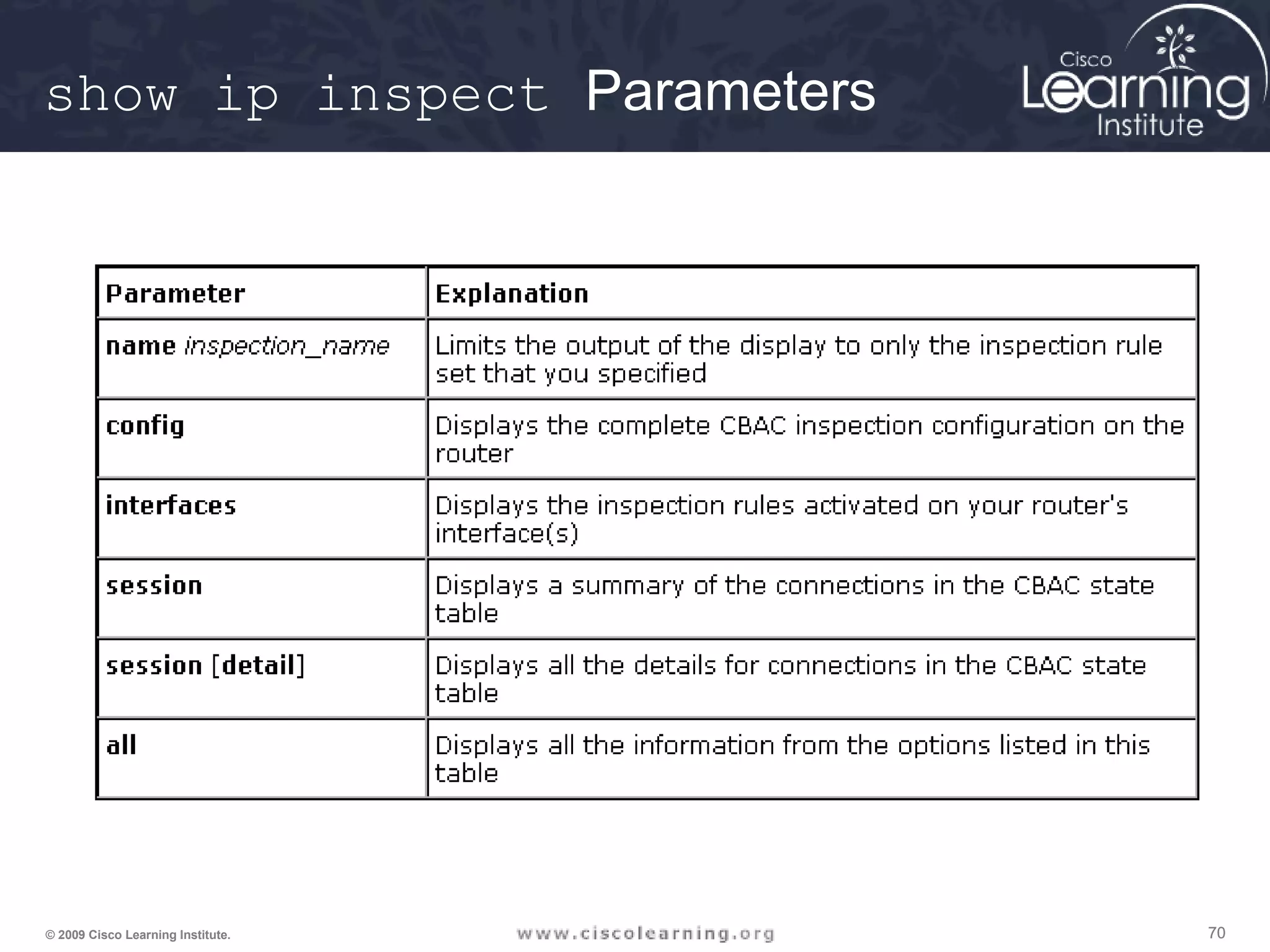
show ip inspect Parameters
717171© 2009 Cisco Learning Institute.
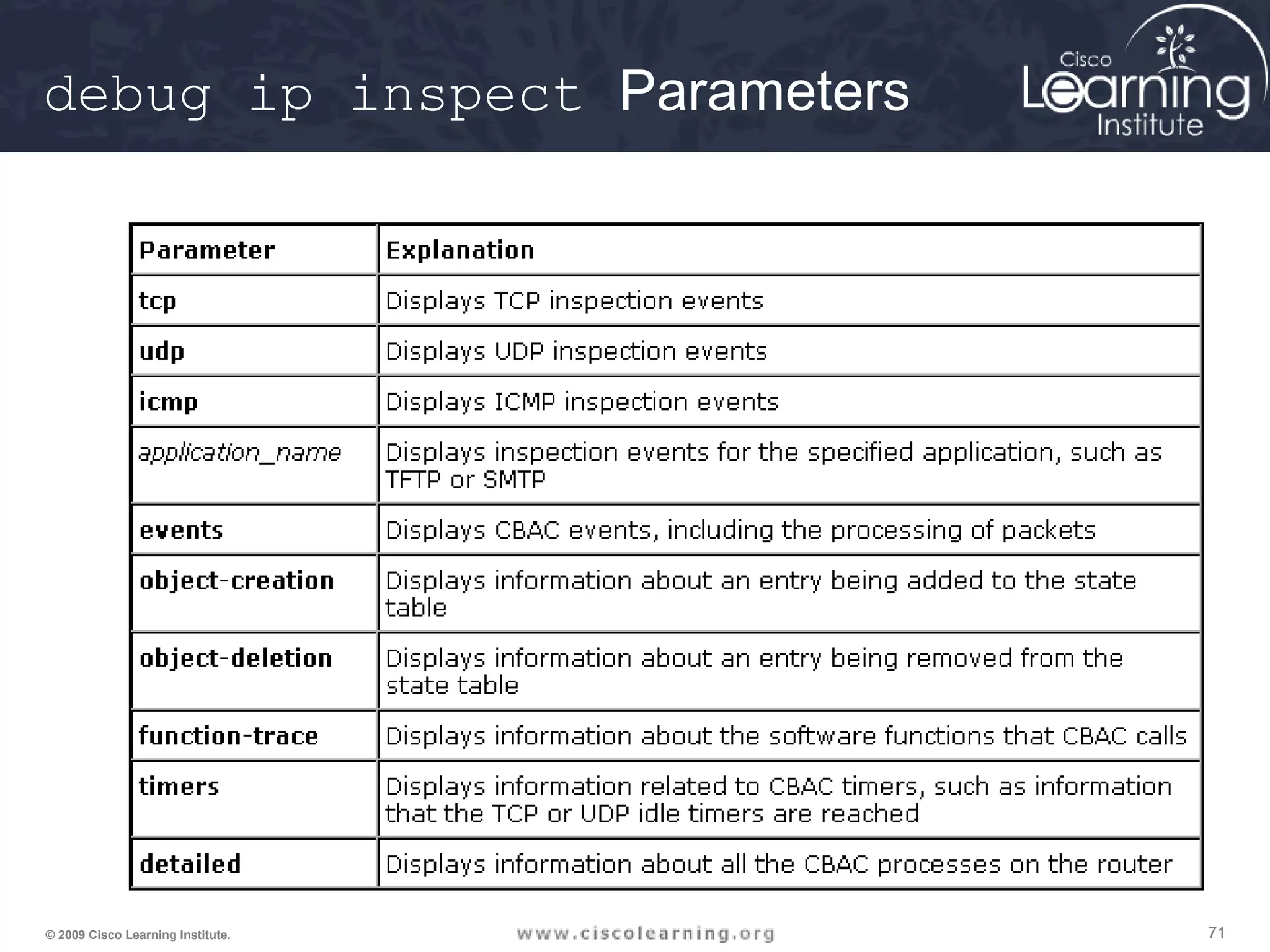
debug ip inspect Parameters
727272© 2009 Cisco Learning Institute.
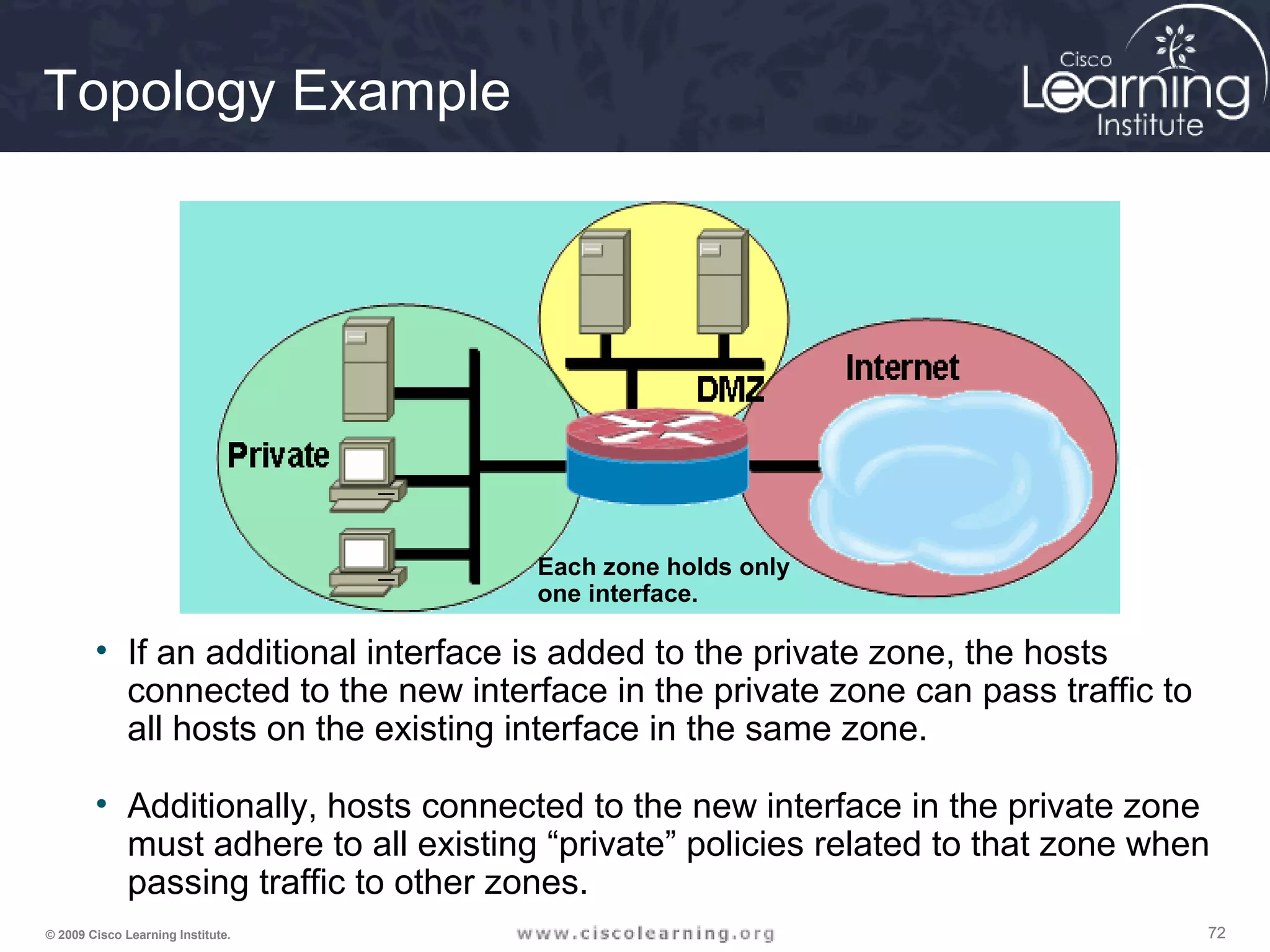
Topology Example
• If an additional interface is added to the private zone, the hosts
connected to the new interface in the private zone can pass traffic to
all hosts on the existing interface in the same zone.
• Additionally, hosts connected to the new interface in the private zone
must adhere to all existing “private” policies related to that zone when
passing traffic to other zones.
Each zone holds only
one interface.
737373© 2009 Cisco Learning Institute.
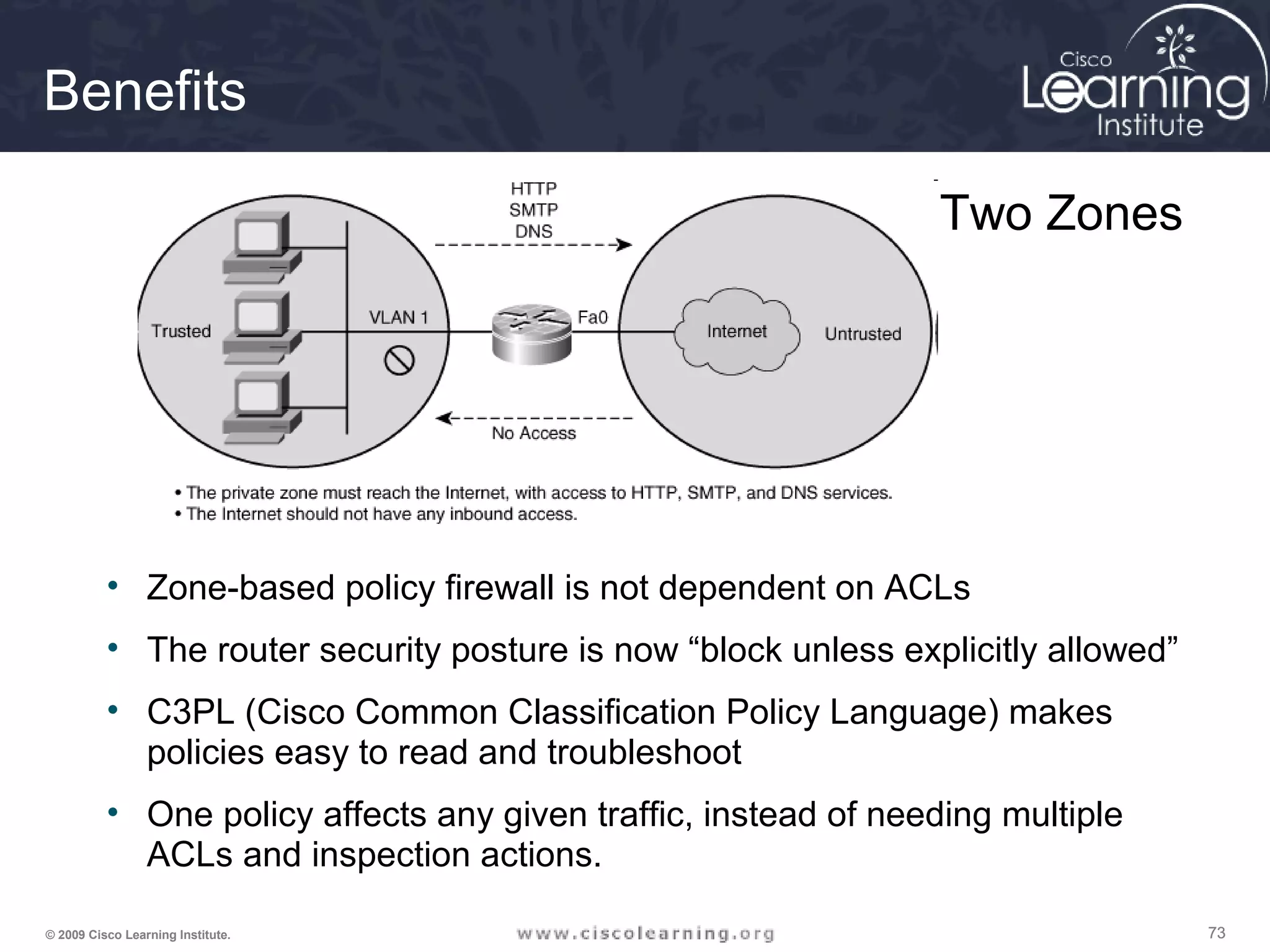
Benefits
• Zone-based policy firewall is not dependent on ACLs
• The router security posture is now “block unless explicitly allowed”
• C3PL (Cisco Common Classification Policy Language) makes
policies easy to read and troubleshoot
• One policy affects any given traffic, instead of needing multiple
ACLs and inspection actions.
Two Zones
747474© 2009 Cisco Learning Institute.
The Design Process
1. Internetworking infrastructure under consideration is split into well-
documented separate zones with various security levels
2. For each pair of source-destination zones, the sessions that clients
in source zones are allowed to open to servers in destination zones
are defined. For traffic that is not based on the concept of sessions
(for example, IPsec Encapsulating Security Payload [ESP]), the
administrator must define unidirectional traffic flows from source to
destination and vice versa.
3. The administrator must design the physical infrastructure.
4. For each firewall device in the design, the administrator must
identify zone subsets connected to its interfaces and merge the
traffic requirements for those zones, resulting in a device-specific
interzone policy.
757575© 2009 Cisco Learning Institute.
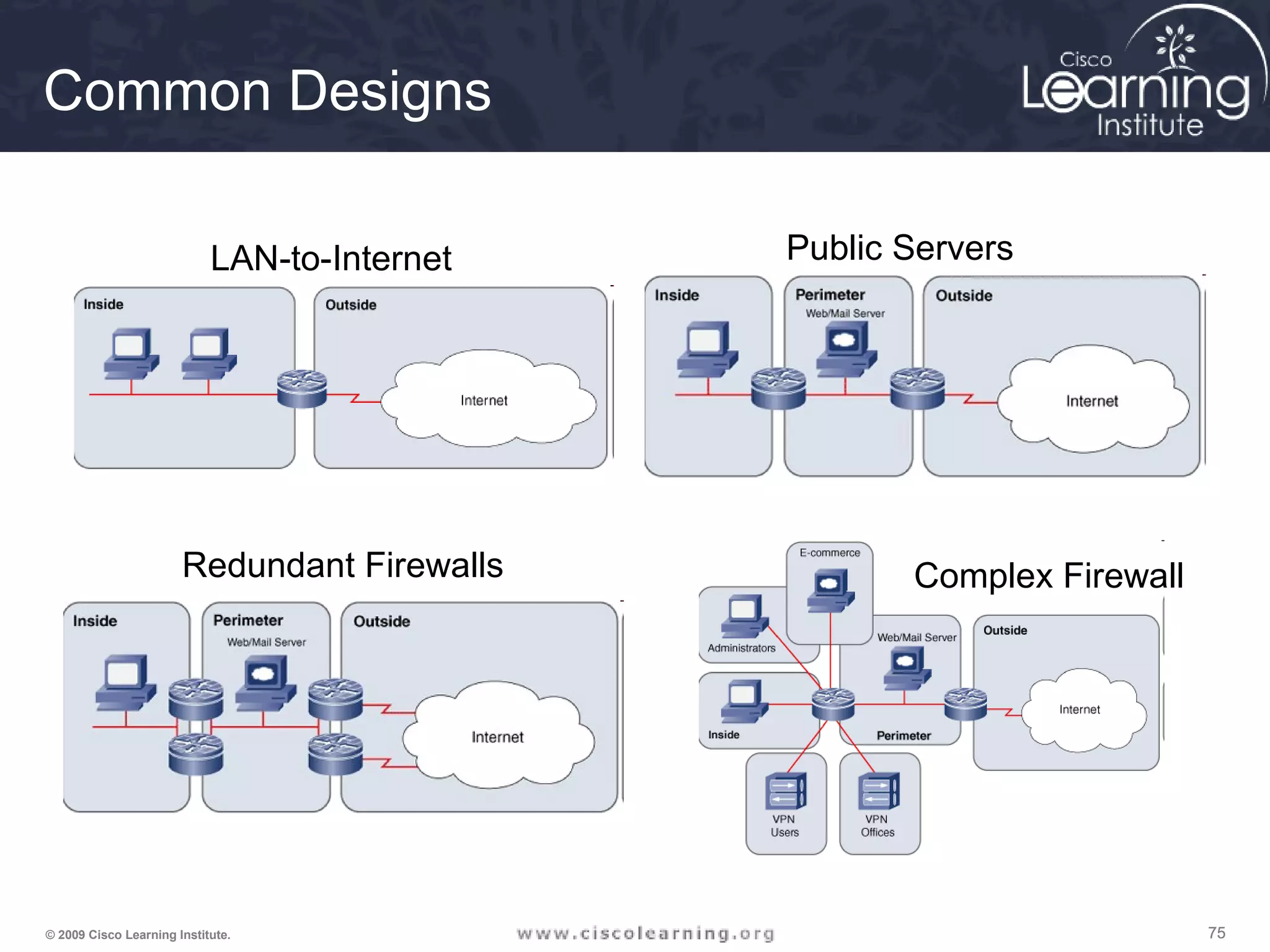
Common Designs
LAN-to-Internet Public Servers
Redundant Firewalls Complex Firewall
767676© 2009 Cisco Learning Institute.
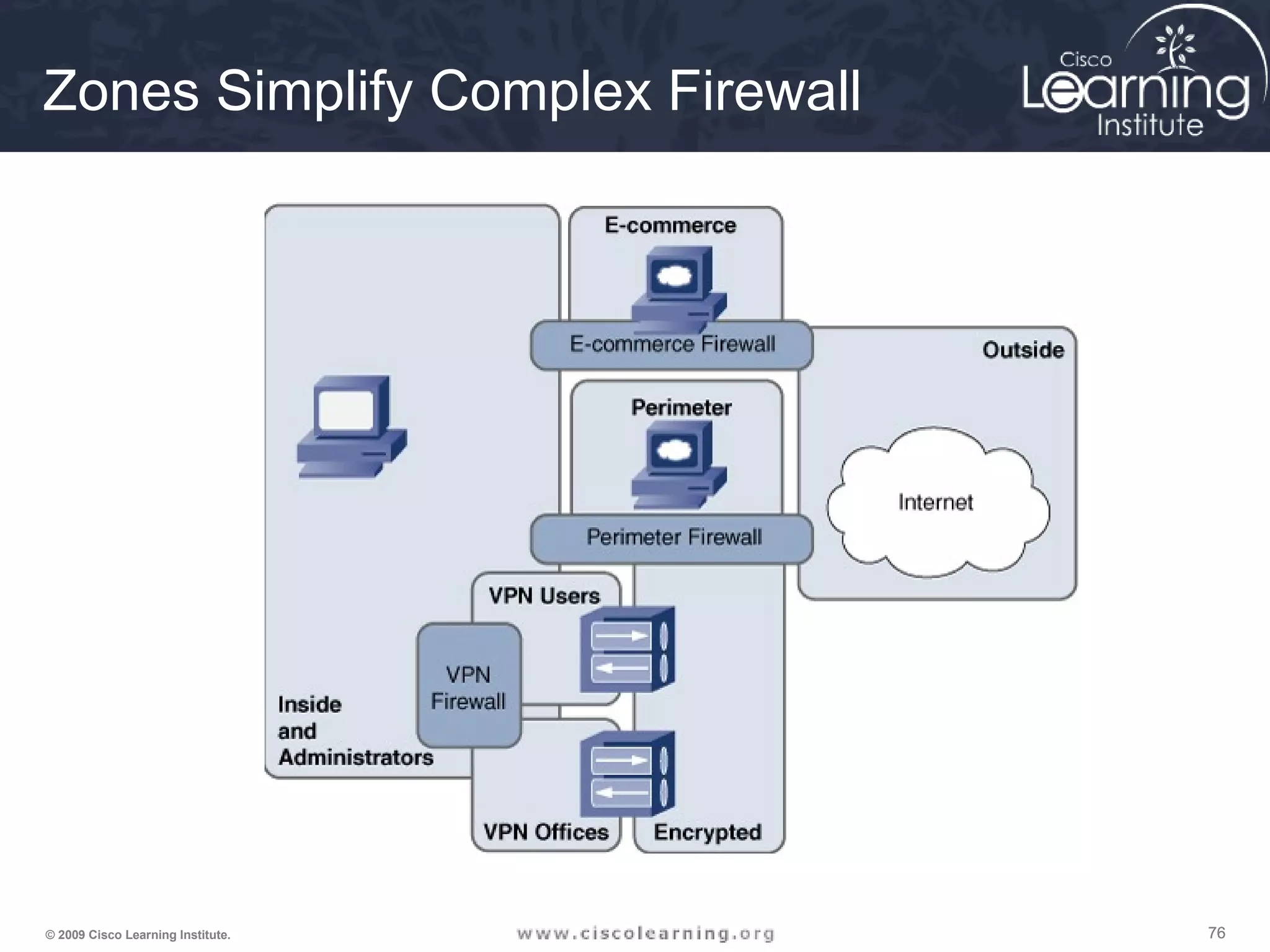
Zones Simplify Complex Firewall
777777© 2009 Cisco Learning Institute.
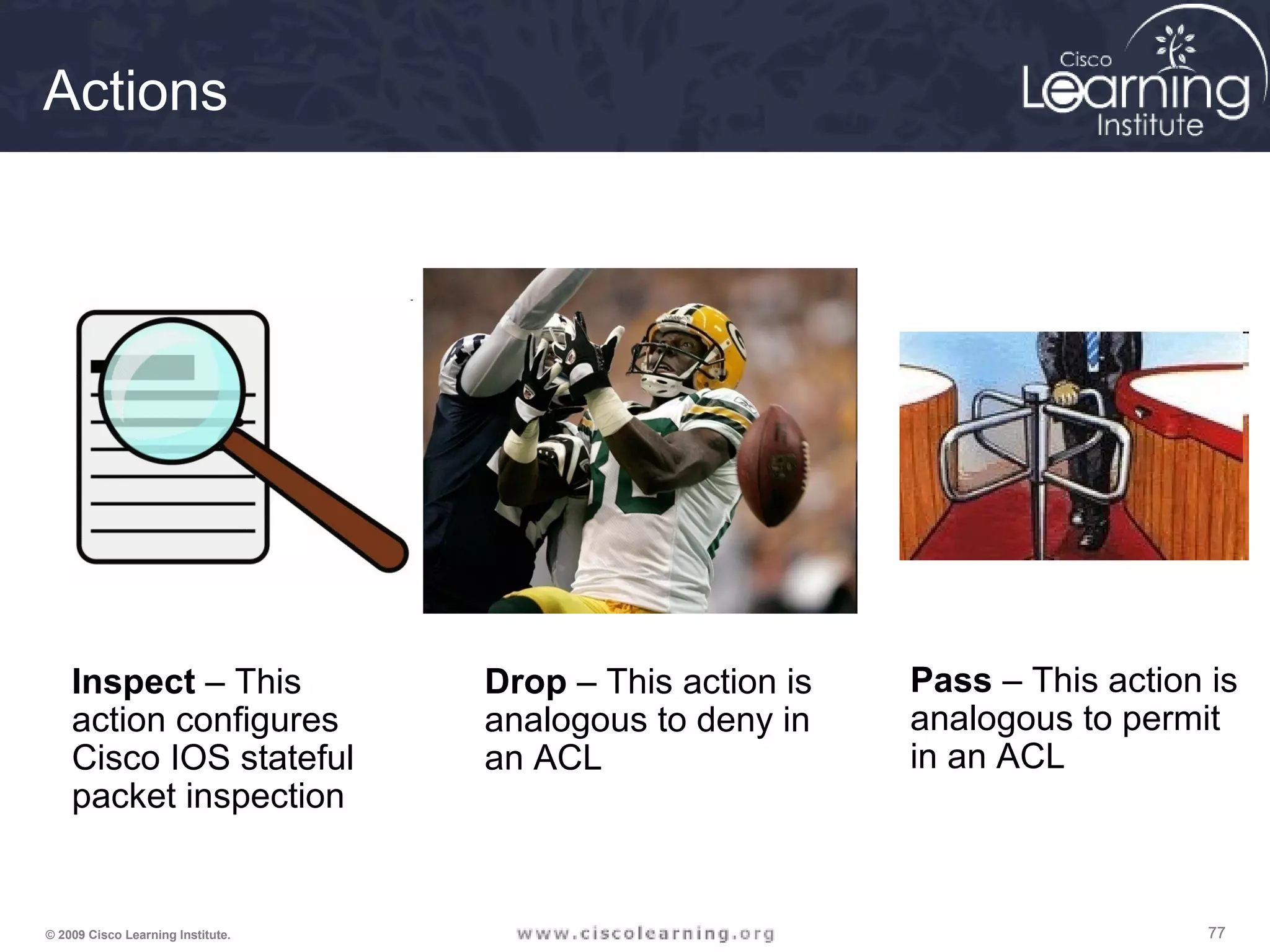
Actions
Inspect – This
action configures
Cisco IOS stateful
packet inspection
Drop – This action is
analogous to deny in
an ACL
Pass – This action is
analogous to permit
in an ACL
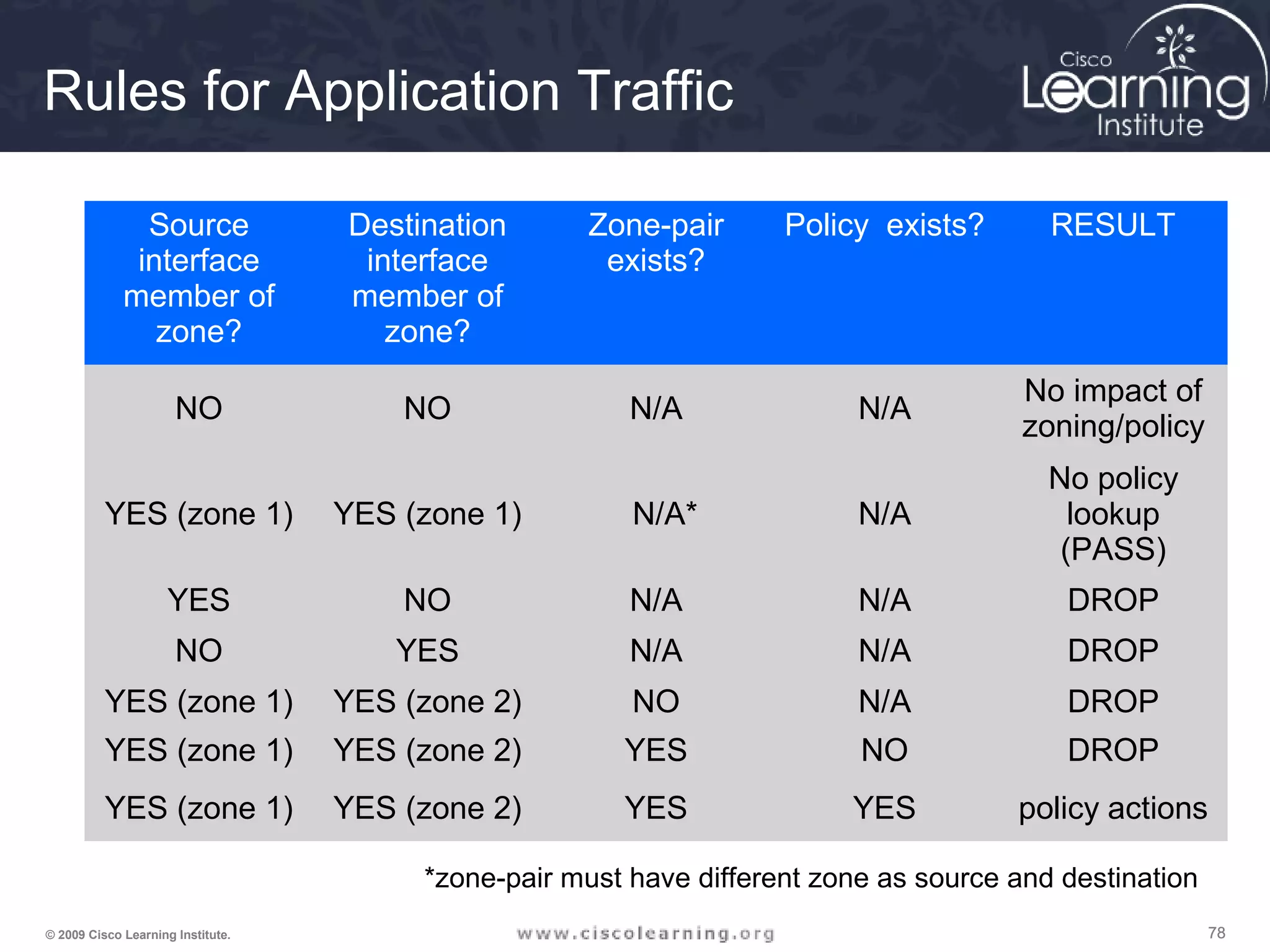
787878© 2009 Cisco Learning Institute.
Source
interface
member of
zone?
Destination
interface
member of
zone?
Zone-pair
exists?
Policy exists? RESULT
NO NO N/A N/A
No impact of
zoning/policy
YES (zone 1) YES (zone 1) N/A* N/A
No policy
lookup
(PASS)
YES NO N/A N/A DROP
NO YES N/A N/A DROP
YES (zone 1) YES (zone 2) NO N/A DROP
YES (zone 1) YES (zone 2) YES NO DROP
YES (zone 1) YES (zone 2) YES YES policy actions
*zone-pair must have different zone as source and destination
Rules for Application Traffic
797979© 2009 Cisco Learning Institute.
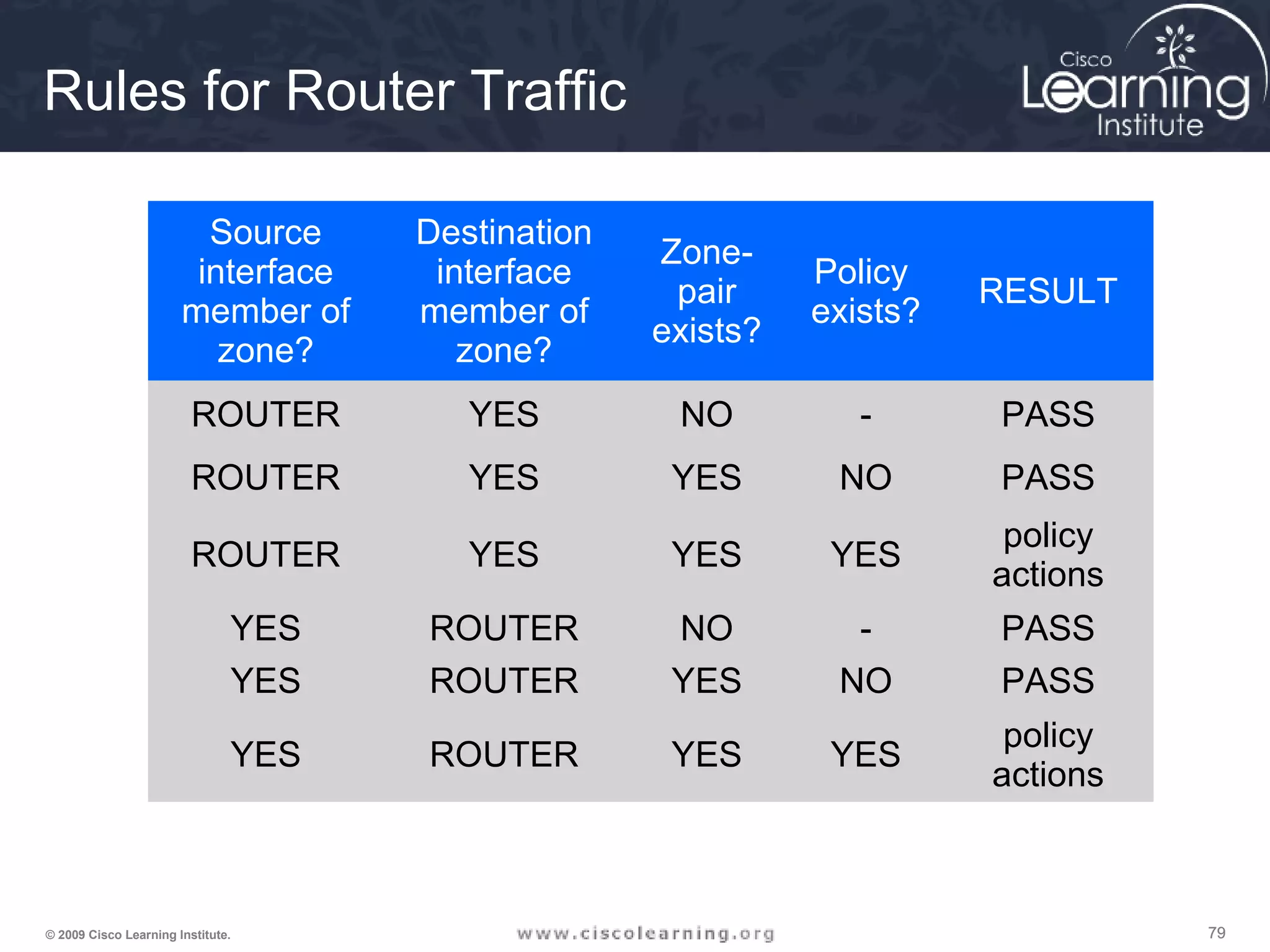
Rules for Router Traffic
Source
interface
member of
zone?
Destination
interface
member of
zone?
Zone-
pair
exists?
Policy
exists?
RESULT
ROUTER YES NO - PASS
ROUTER YES YES NO PASS
ROUTER YES YES YES
policy
actions
YES ROUTER NO - PASS
YES ROUTER YES NO PASS
YES ROUTER YES YES
policy
actions
808080© 2009 Cisco Learning Institute.
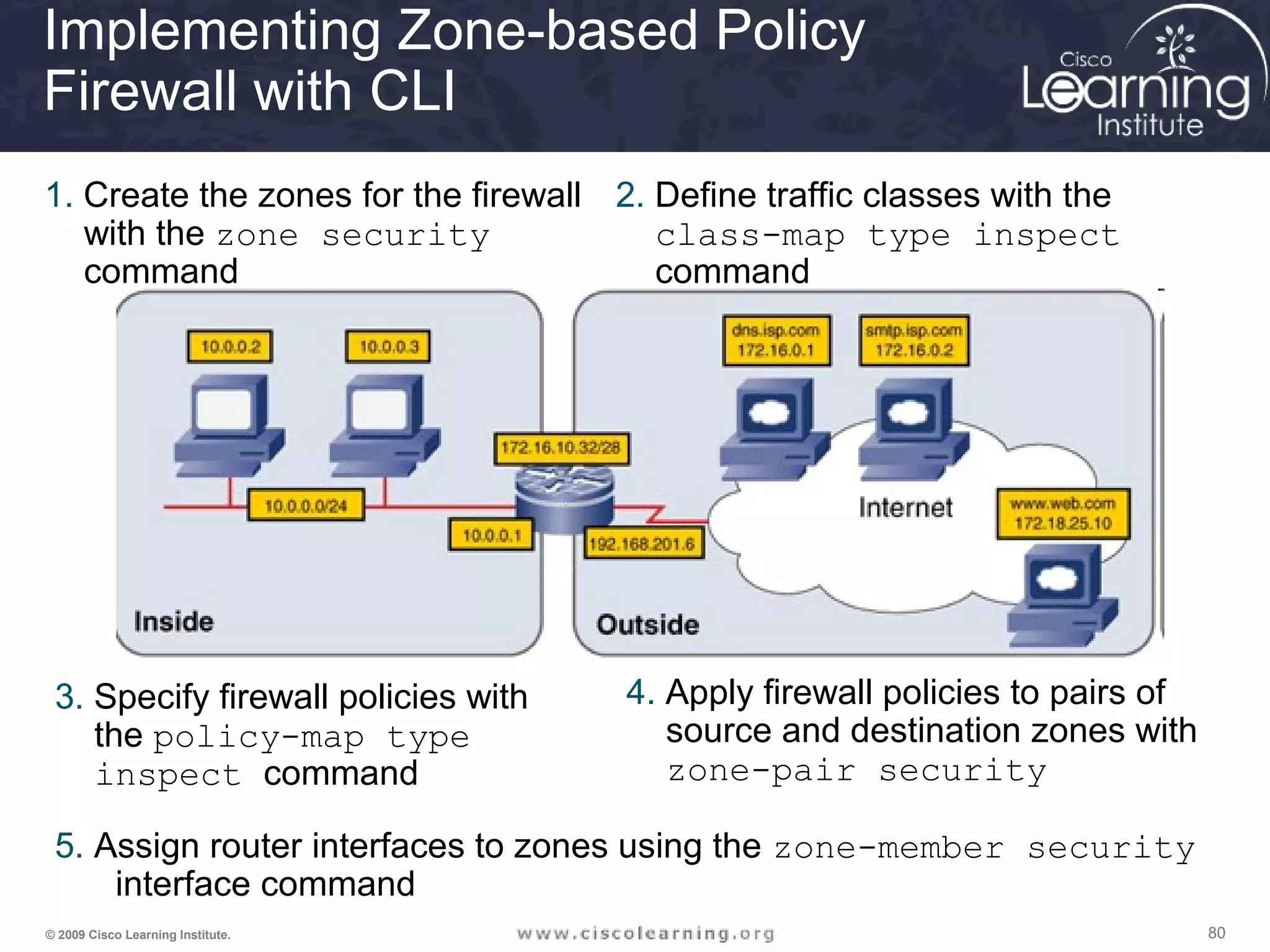
Implementing Zone-based Policy
Firewall with CLI
1. Create the zones for the firewall
with the zone security
command
3. Specify firewall policies with
the policy-map type
inspect command
2. Define traffic classes with the
class-map type inspect
command
4. Apply firewall policies to pairs of
source and destination zones with
zone-pair security
5. Assign router interfaces to zones using the zone-member security
interface command
818181© 2009 Cisco Learning Institute.
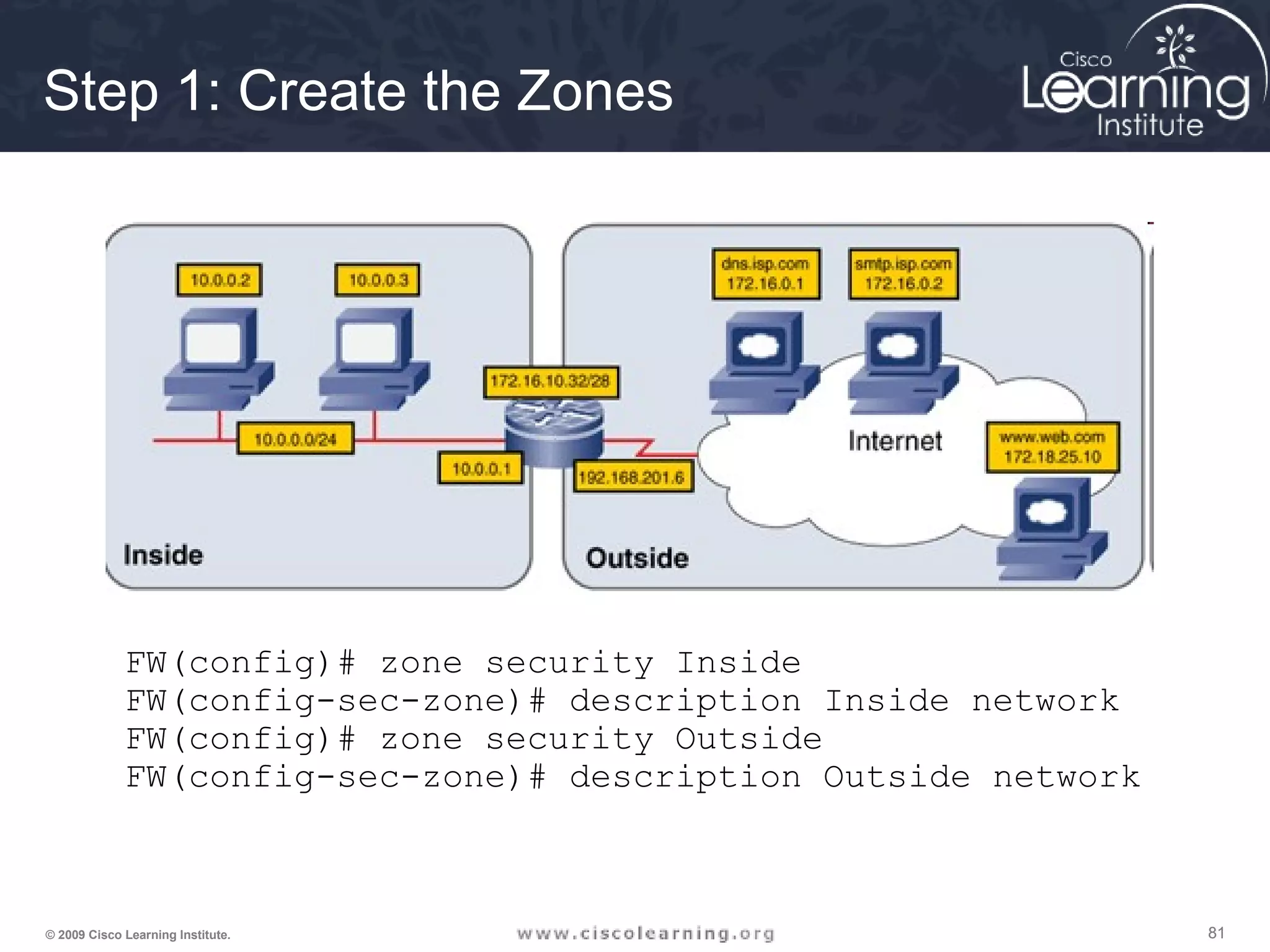
Step 1: Create the Zones
FW(config)# zone security Inside
FW(config-sec-zone)# description Inside network
FW(config)# zone security Outside
FW(config-sec-zone)# description Outside network
828282© 2009 Cisco Learning Institute.
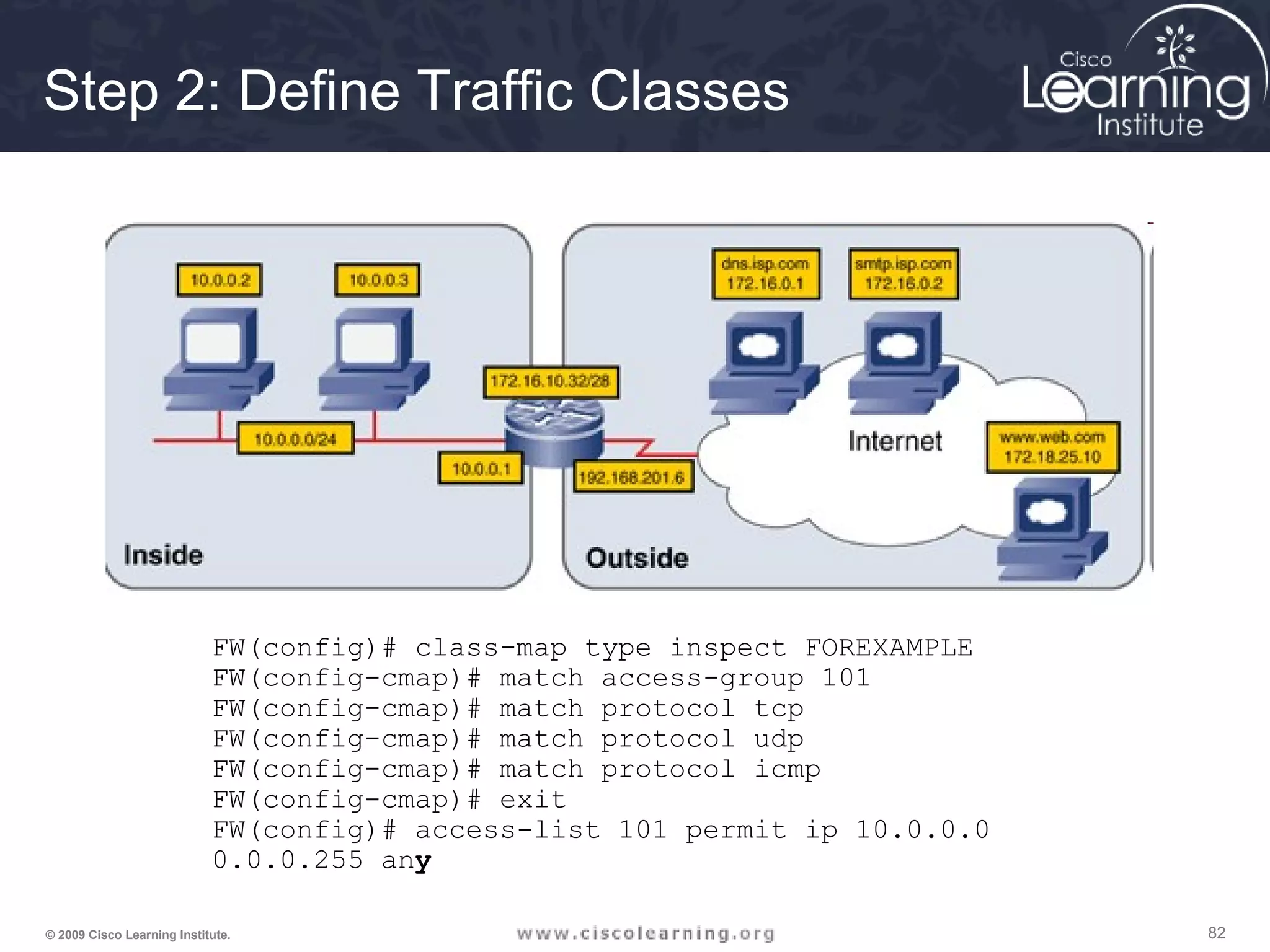
Step 2: Define Traffic Classes
FW(config)# class-map type inspect FOREXAMPLE
FW(config-cmap)# match access-group 101
FW(config-cmap)# match protocol tcp
FW(config-cmap)# match protocol udp
FW(config-cmap)# match protocol icmp
FW(config-cmap)# exit
FW(config)# access-list 101 permit ip 10.0.0.0
0.0.0.255 any
838383© 2009 Cisco Learning Institute.
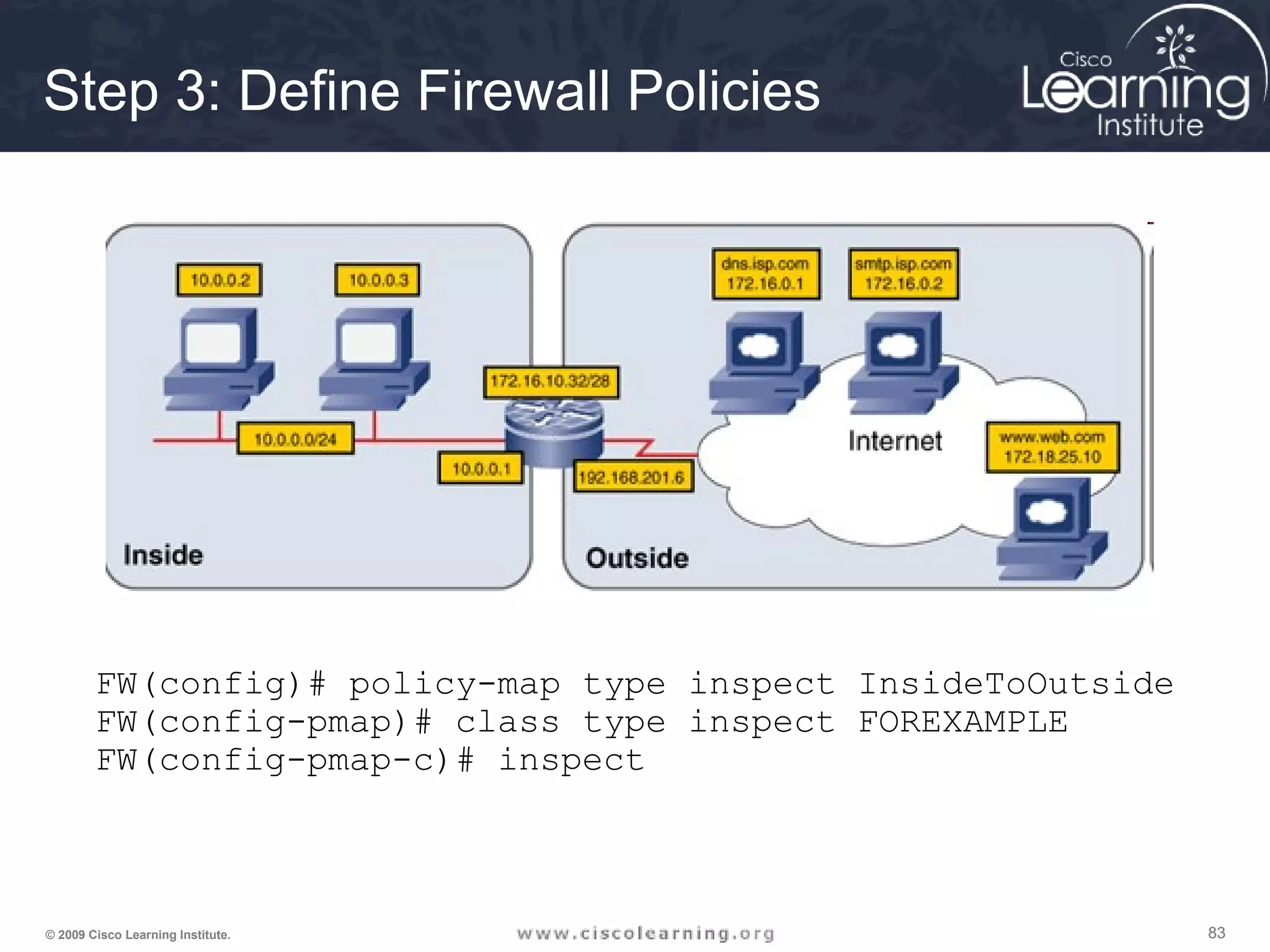
Step 3: Define Firewall Policies
FW(config)# policy-map type inspect InsideToOutside
FW(config-pmap)# class type inspect FOREXAMPLE
FW(config-pmap-c)# inspect
848484© 2009 Cisco Learning Institute.
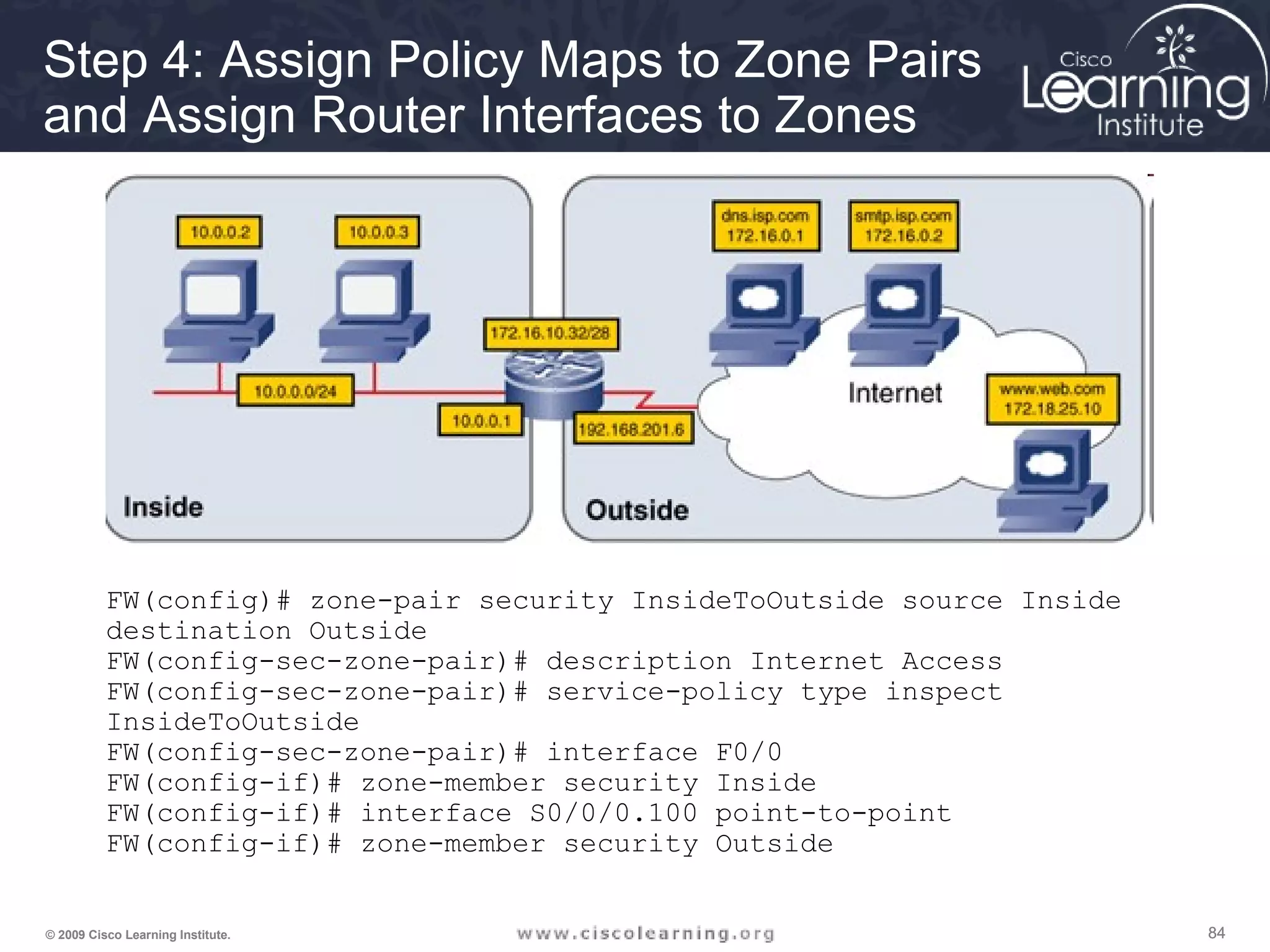
Step 4: Assign Policy Maps to Zone Pairs
and Assign Router Interfaces to Zones
FW(config)# zone-pair security InsideToOutside source Inside
destination Outside
FW(config-sec-zone-pair)# description Internet Access
FW(config-sec-zone-pair)# service-policy type inspect
InsideToOutside
FW(config-sec-zone-pair)# interface F0/0
FW(config-if)# zone-member security Inside
FW(config-if)# interface S0/0/0.100 point-to-point
FW(config-if)# zone-member security Outside
858585© 2009 Cisco Learning Institute.
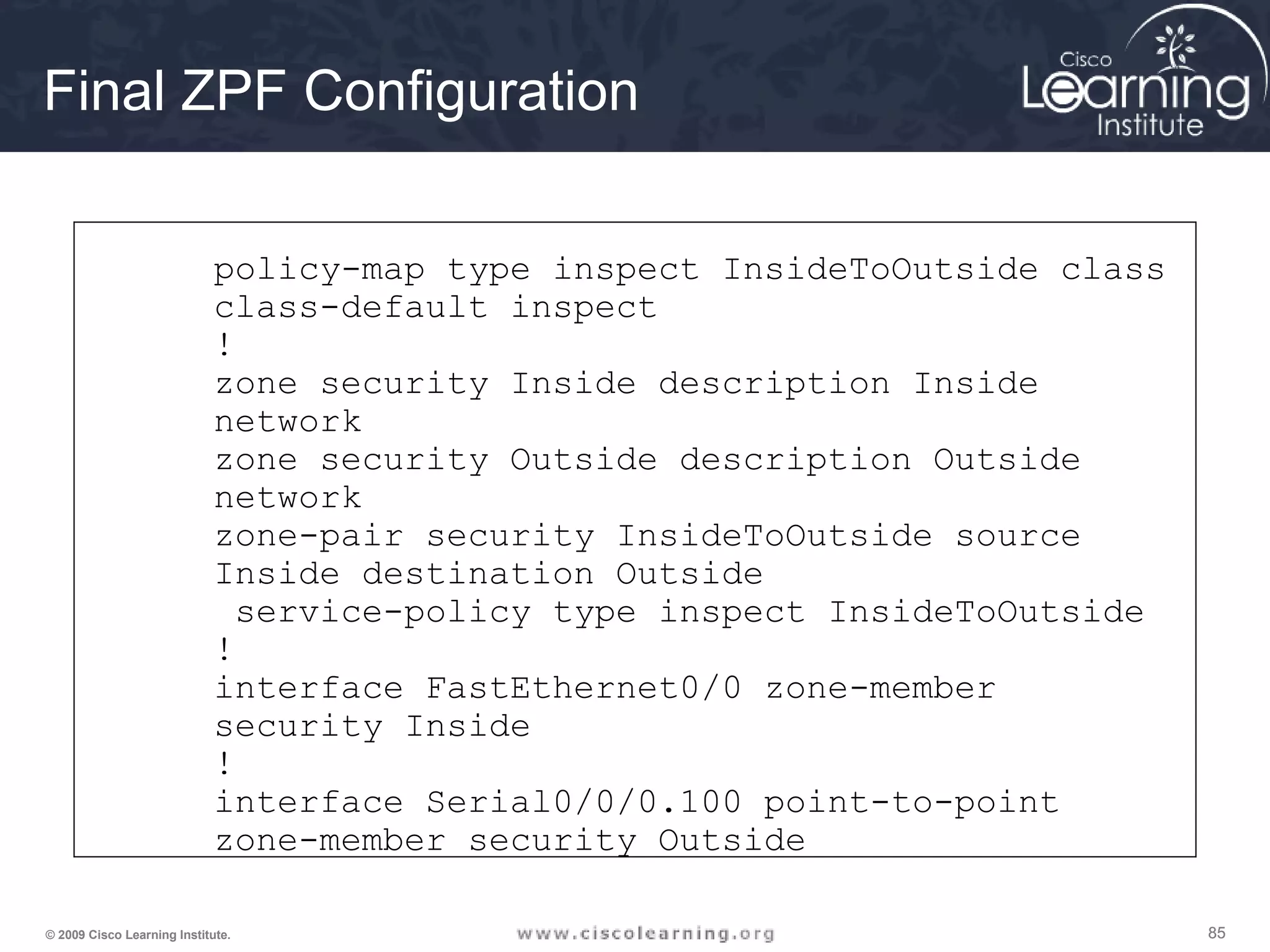
Final ZPF Configuration
policy-map type inspect InsideToOutside class
class-default inspect
!
zone security Inside description Inside
network
zone security Outside description Outside
network
zone-pair security InsideToOutside source
Inside destination Outside
service-policy type inspect InsideToOutside
!
interface FastEthernet0/0 zone-member
security Inside
!
interface Serial0/0/0.100 point-to-point
zone-member security Outside
868686© 2009 Cisco Learning Institute.
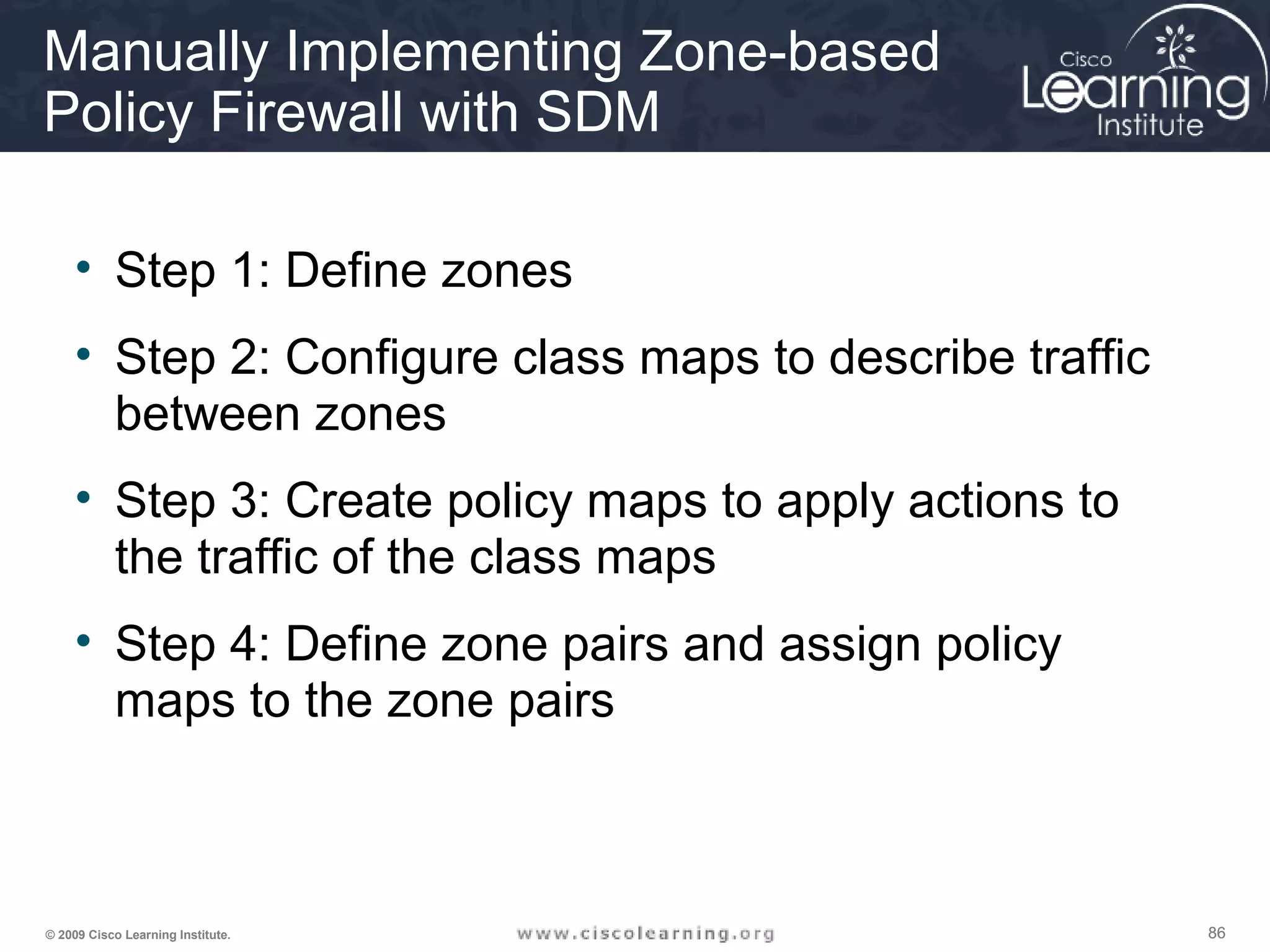
Manually Implementing Zone-based
Policy Firewall with SDM
• Step 1: Define zones
• Step 2: Configure class maps to describe traffic
between zones
• Step 3: Create policy maps to apply actions to
the traffic of the class maps
• Step 4: Define zone pairs and assign policy
maps to the zone pairs
878787© 2009 Cisco Learning Institute.
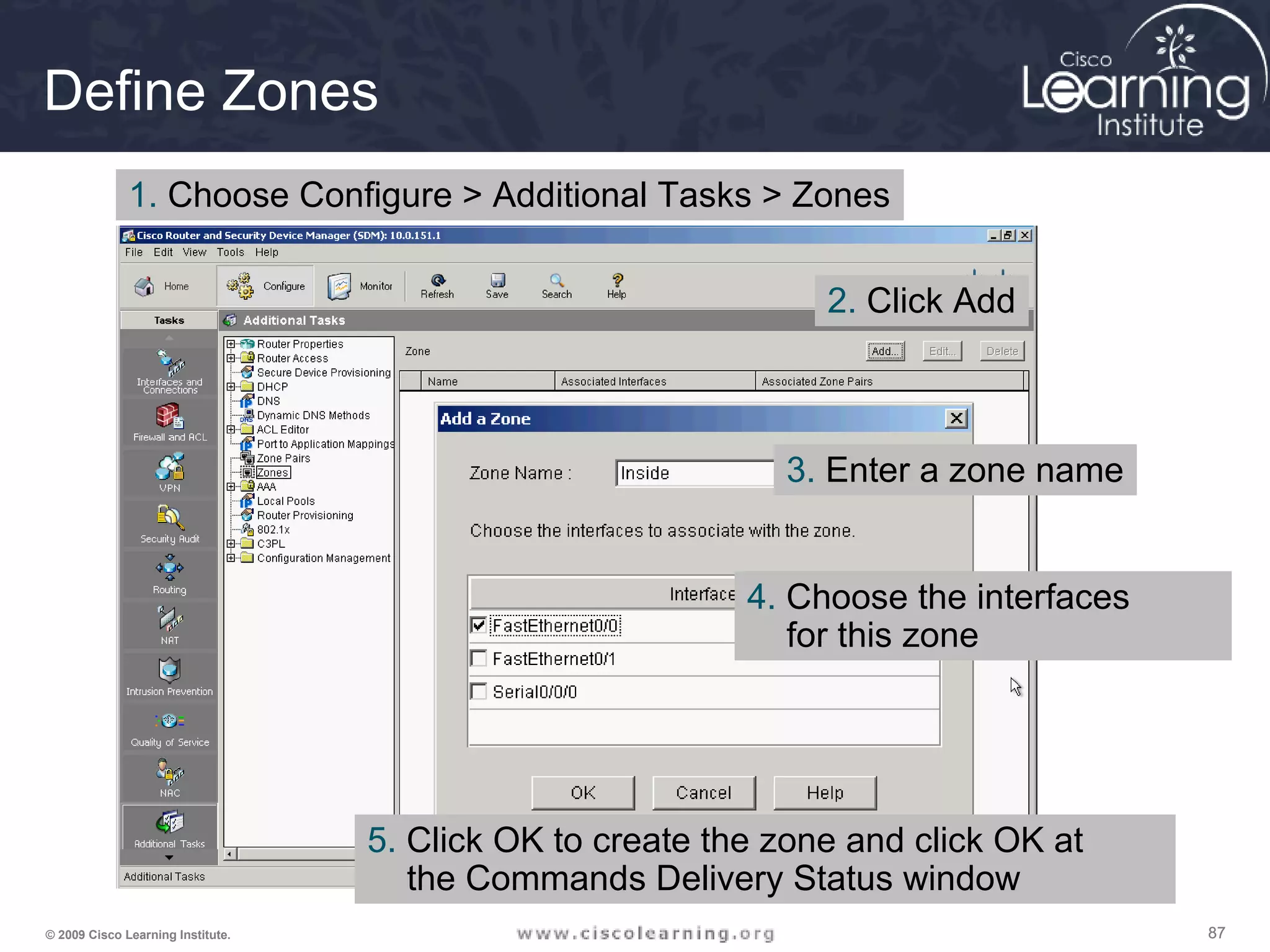
Define Zones
1. Choose Configure > Additional Tasks > Zones
2. Click Add
3. Enter a zone name
4. Choose the interfaces
for this zone
5. Click OK to create the zone and click OK at
the Commands Delivery Status window
888888© 2009 Cisco Learning Institute.
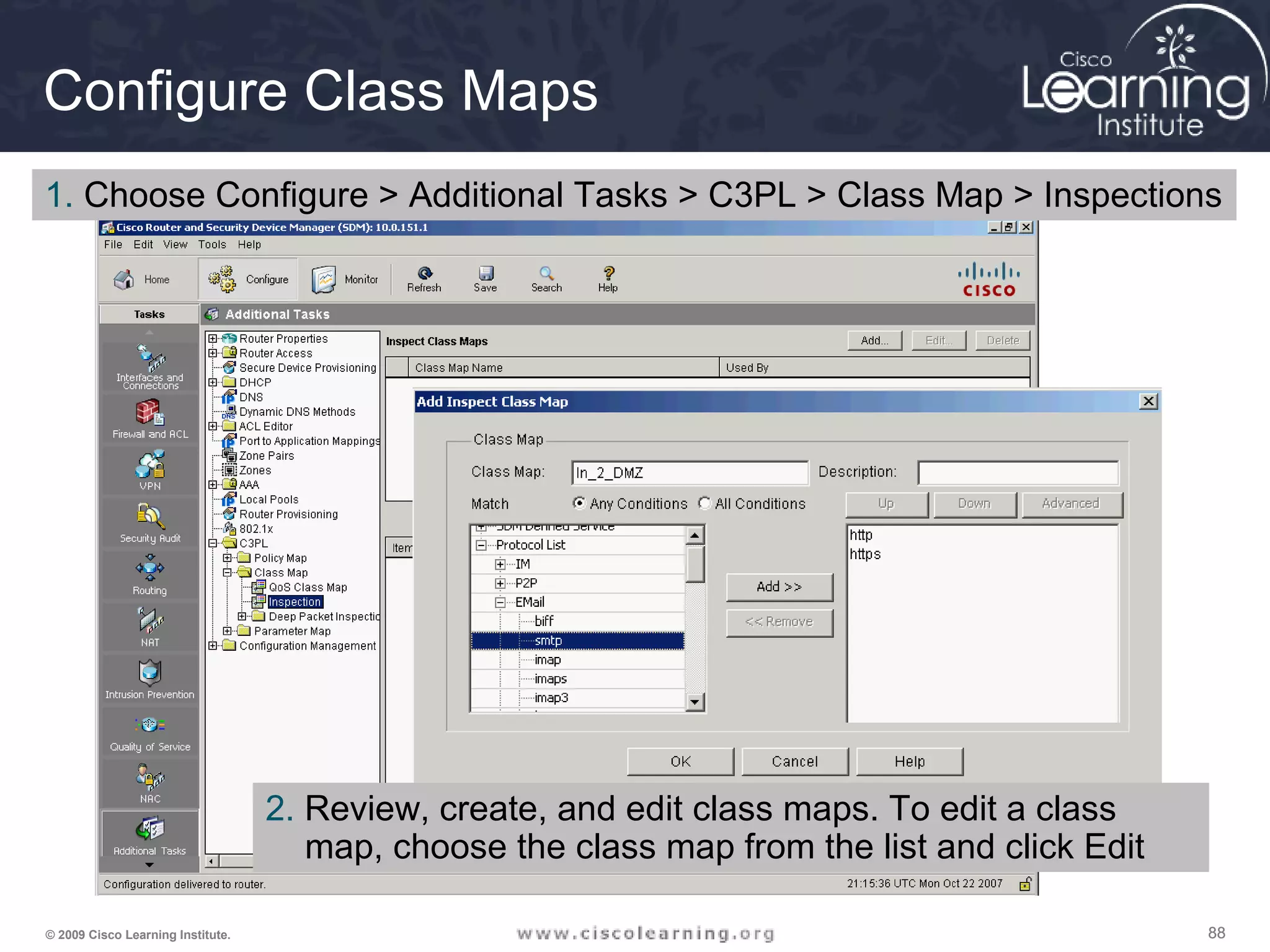
Configure Class Maps
1. Choose Configure > Additional Tasks > C3PL > Class Map > Inspections
2. Review, create, and edit class maps. To edit a class
map, choose the class map from the list and click Edit
898989© 2009 Cisco Learning Institute.
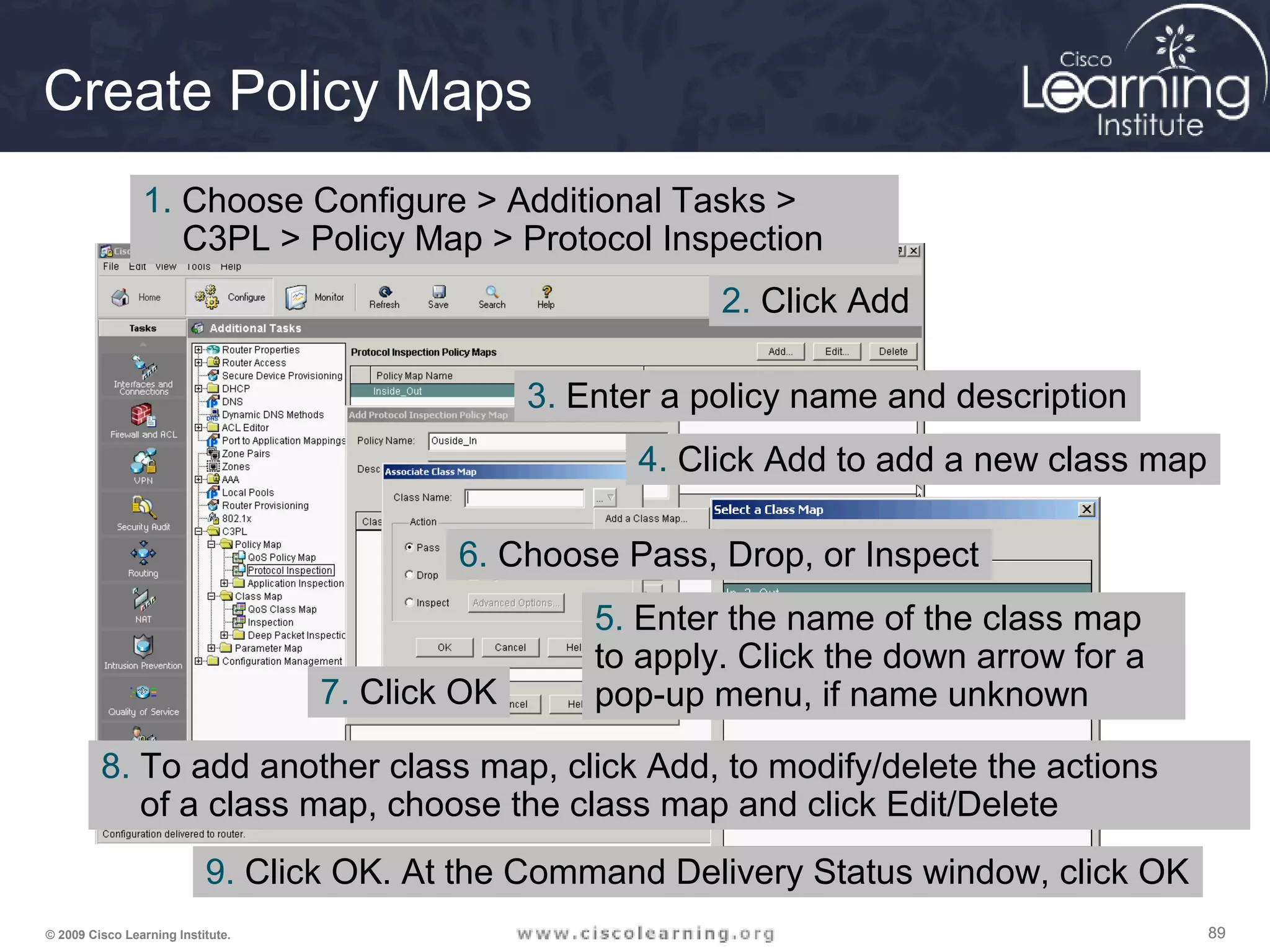
Create Policy Maps
1. Choose Configure > Additional Tasks >
C3PL > Policy Map > Protocol Inspection
2. Click Add
3. Enter a policy name and description
4. Click Add to add a new class map
5. Enter the name of the class map
to apply. Click the down arrow for a
pop-up menu, if name unknown
6. Choose Pass, Drop, or Inspect
7. Click OK
8. To add another class map, click Add, to modify/delete the actions
of a class map, choose the class map and click Edit/Delete
9. Click OK. At the Command Delivery Status window, click OK
909090© 2009 Cisco Learning Institute.
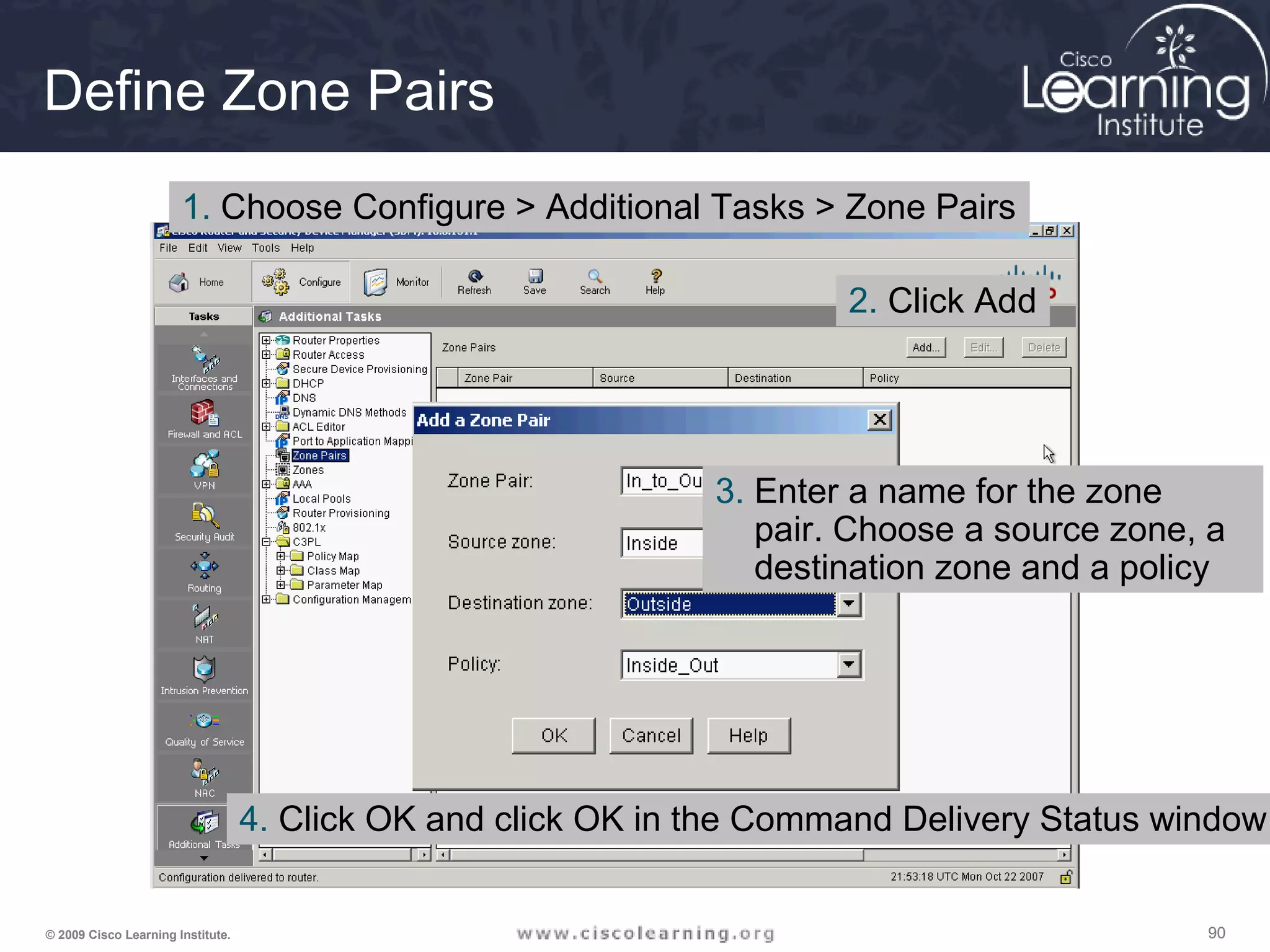
Define Zone Pairs
1. Choose Configure > Additional Tasks > Zone Pairs
2. Click Add
3. Enter a name for the zone
pair. Choose a source zone, a
destination zone and a policy
4. Click OK and click OK in the Command Delivery Status window
919191© 2009 Cisco Learning Institute.
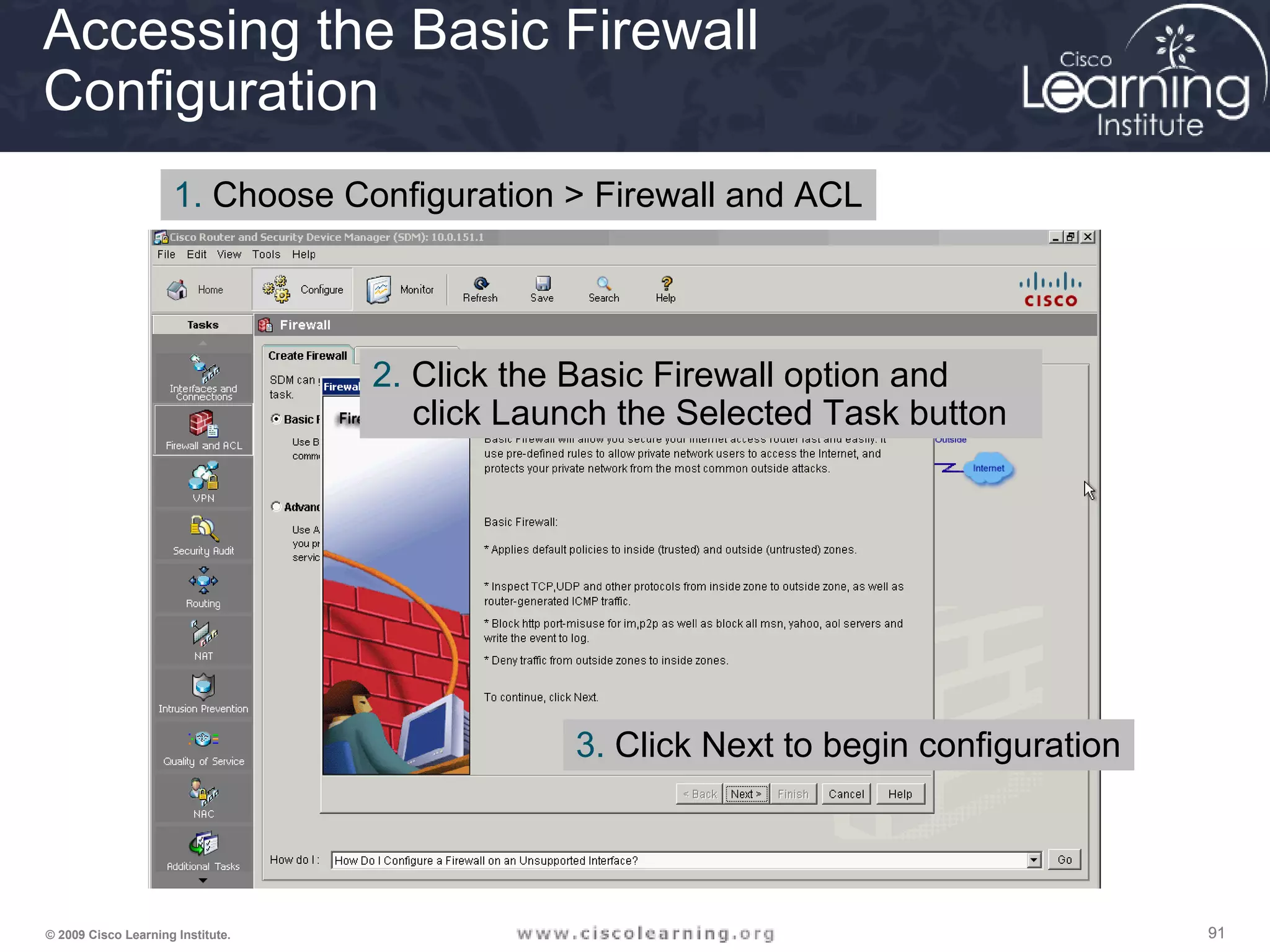
Accessing the Basic Firewall
Configuration
1. Choose Configuration > Firewall and ACL
2. Click the Basic Firewall option and
click Launch the Selected Task button
3. Click Next to begin configuration
929292© 2009 Cisco Learning Institute.
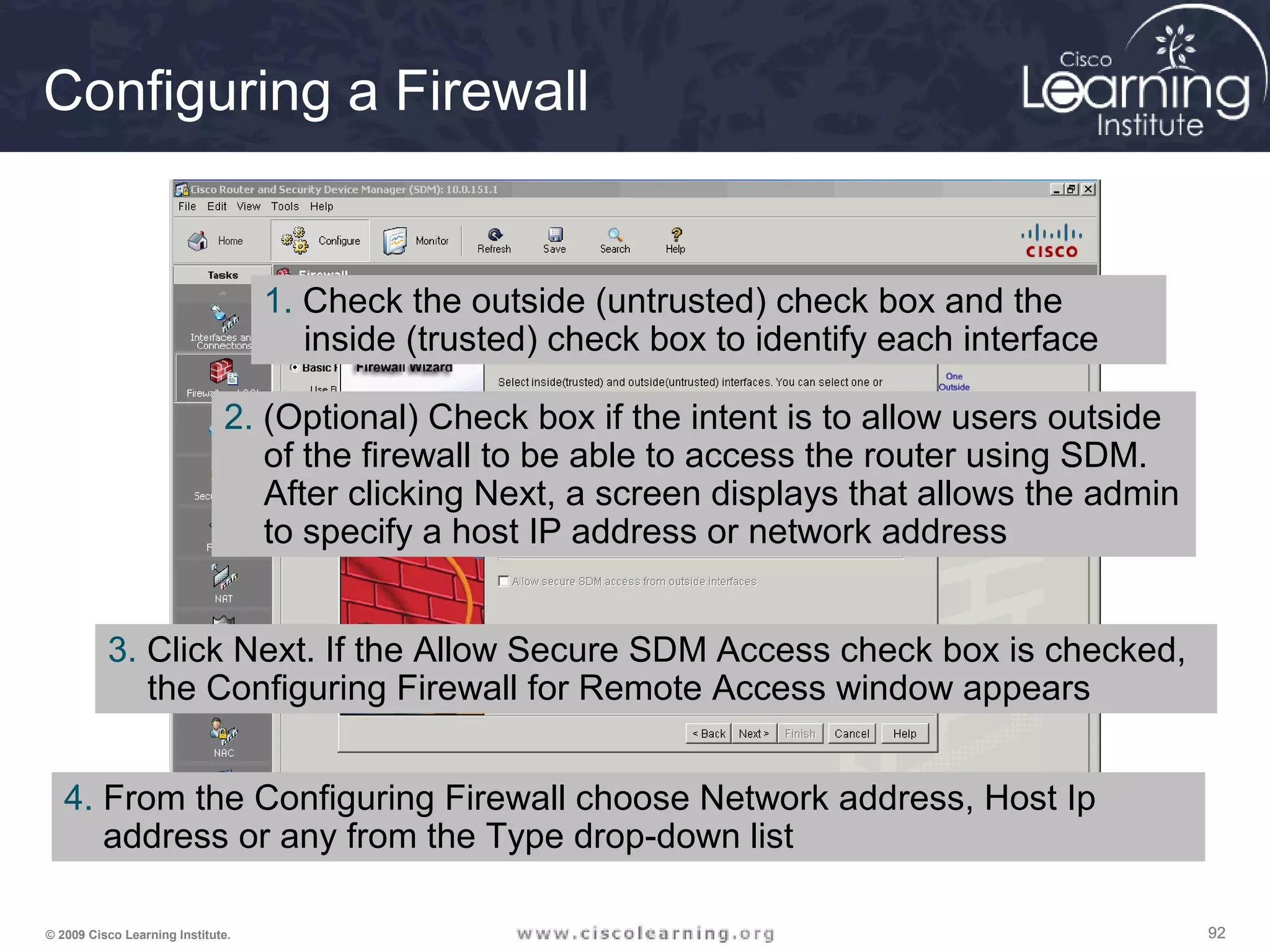
Configuring a Firewall
1. Check the outside (untrusted) check box and the
inside (trusted) check box to identify each interface
2. (Optional) Check box if the intent is to allow users outside
of the firewall to be able to access the router using SDM.
After clicking Next, a screen displays that allows the admin
to specify a host IP address or network address
3. Click Next. If the Allow Secure SDM Access check box is checked,
the Configuring Firewall for Remote Access window appears
4. From the Configuring Firewall choose Network address, Host Ip
address or any from the Type drop-down list
939393© 2009 Cisco Learning Institute.
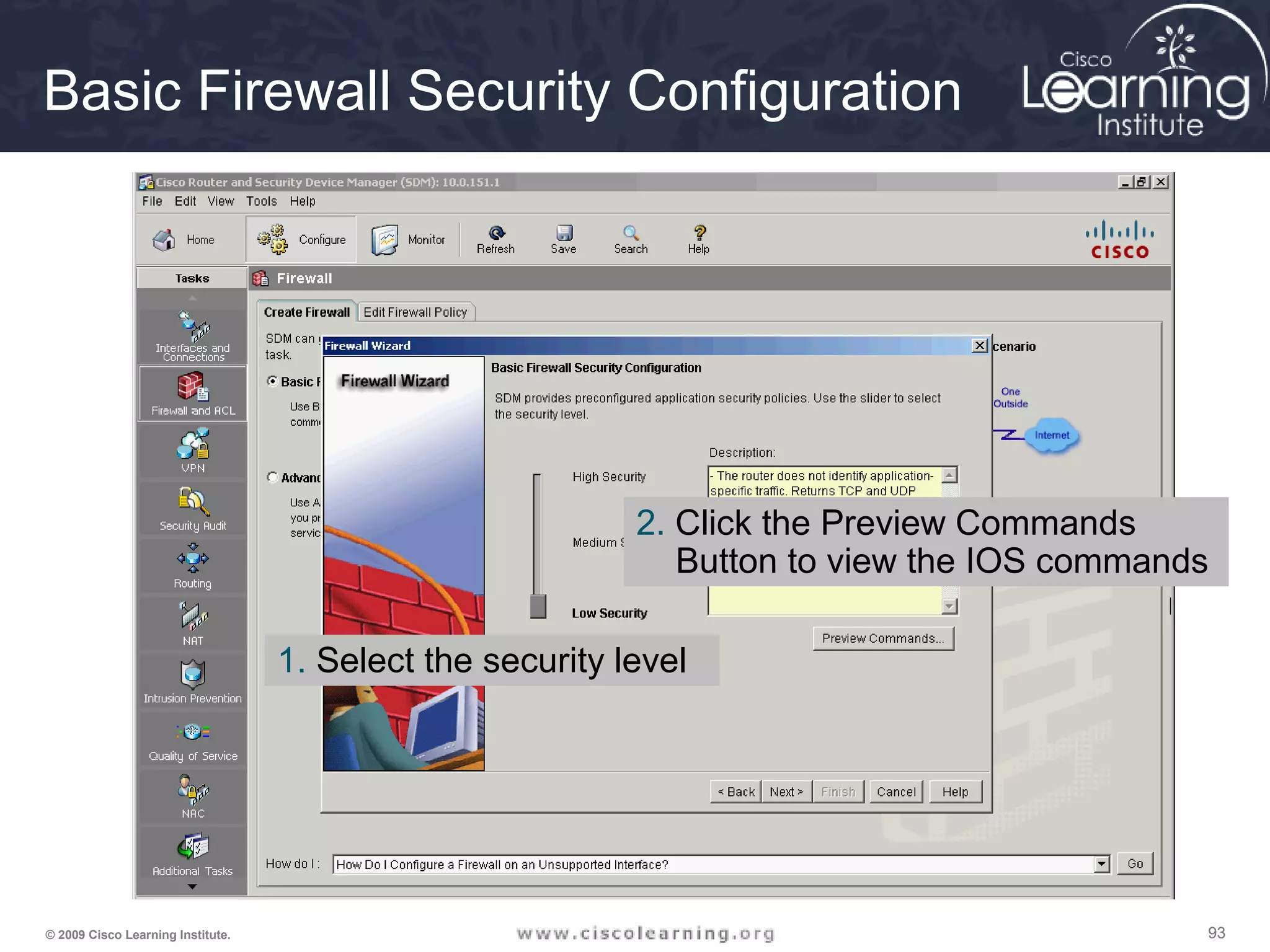
Basic Firewall Security Configuration
1. Select the security level
2. Click the Preview Commands
Button to view the IOS commands
949494© 2009 Cisco Learning Institute.
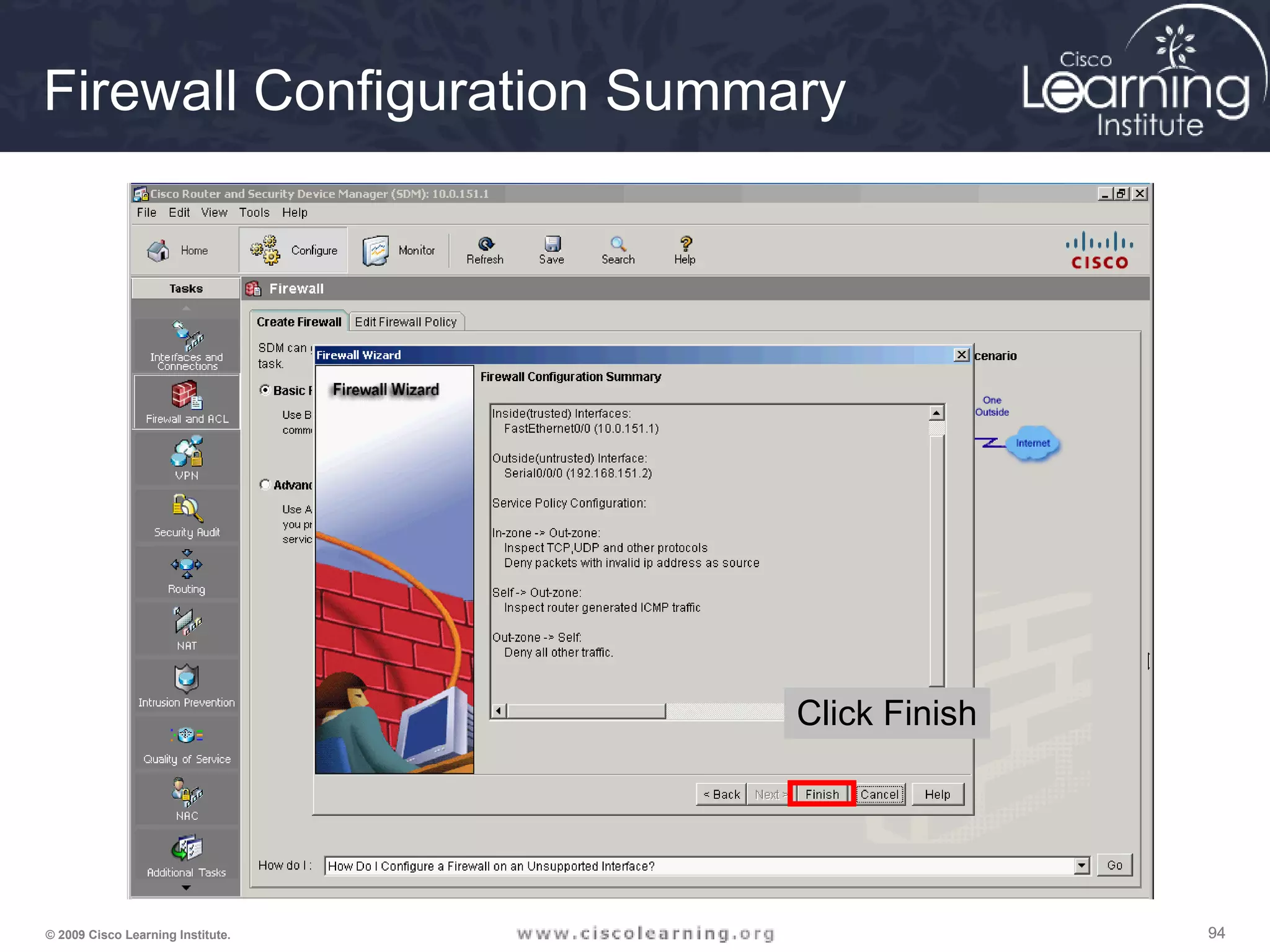
Firewall Configuration Summary
Click Finish
959595© 2009 Cisco Learning Institute.
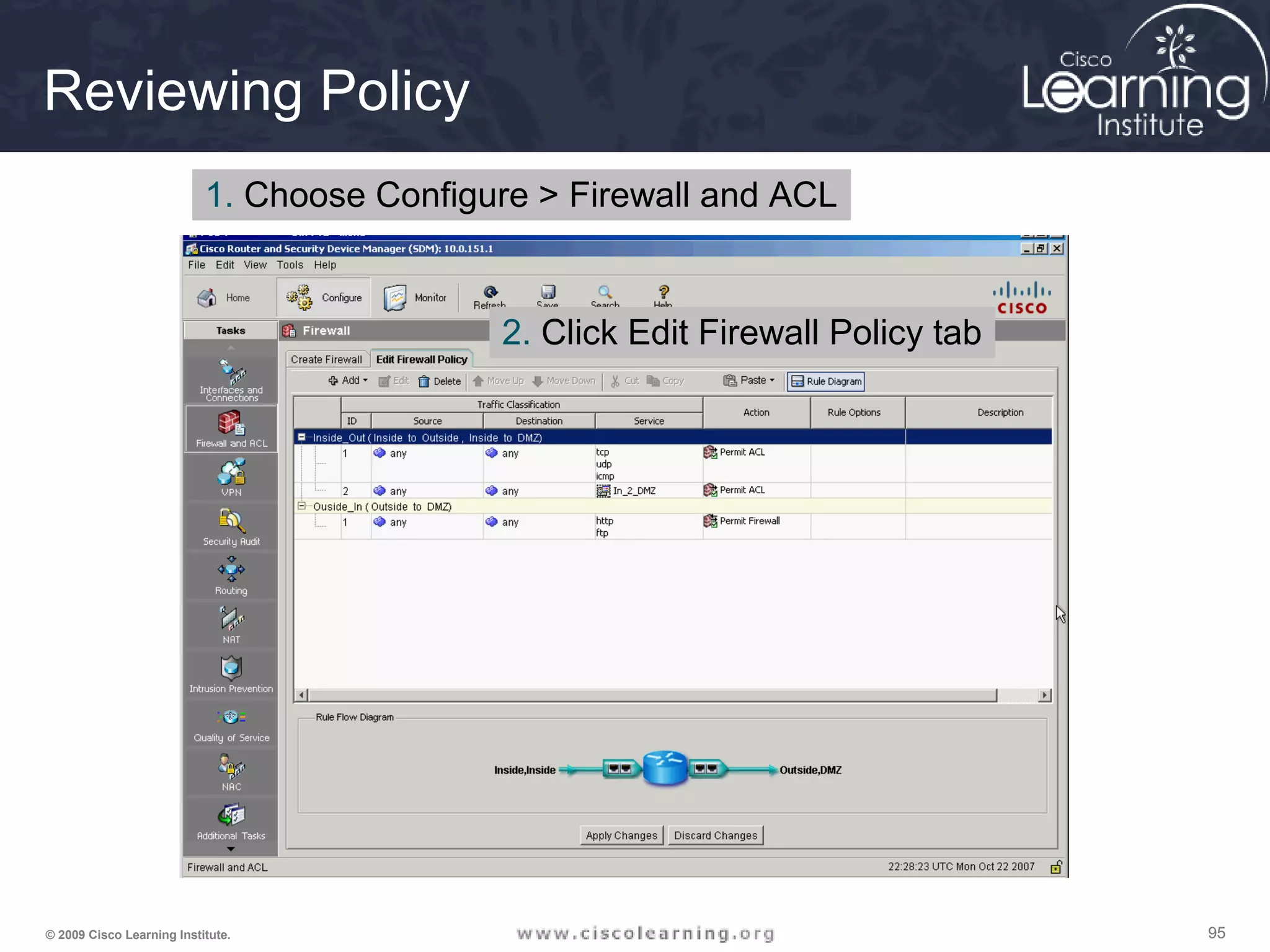
Reviewing Policy
1. Choose Configure > Firewall and ACL
2. Click Edit Firewall Policy tab
969696© 2009 Cisco Learning Institute.
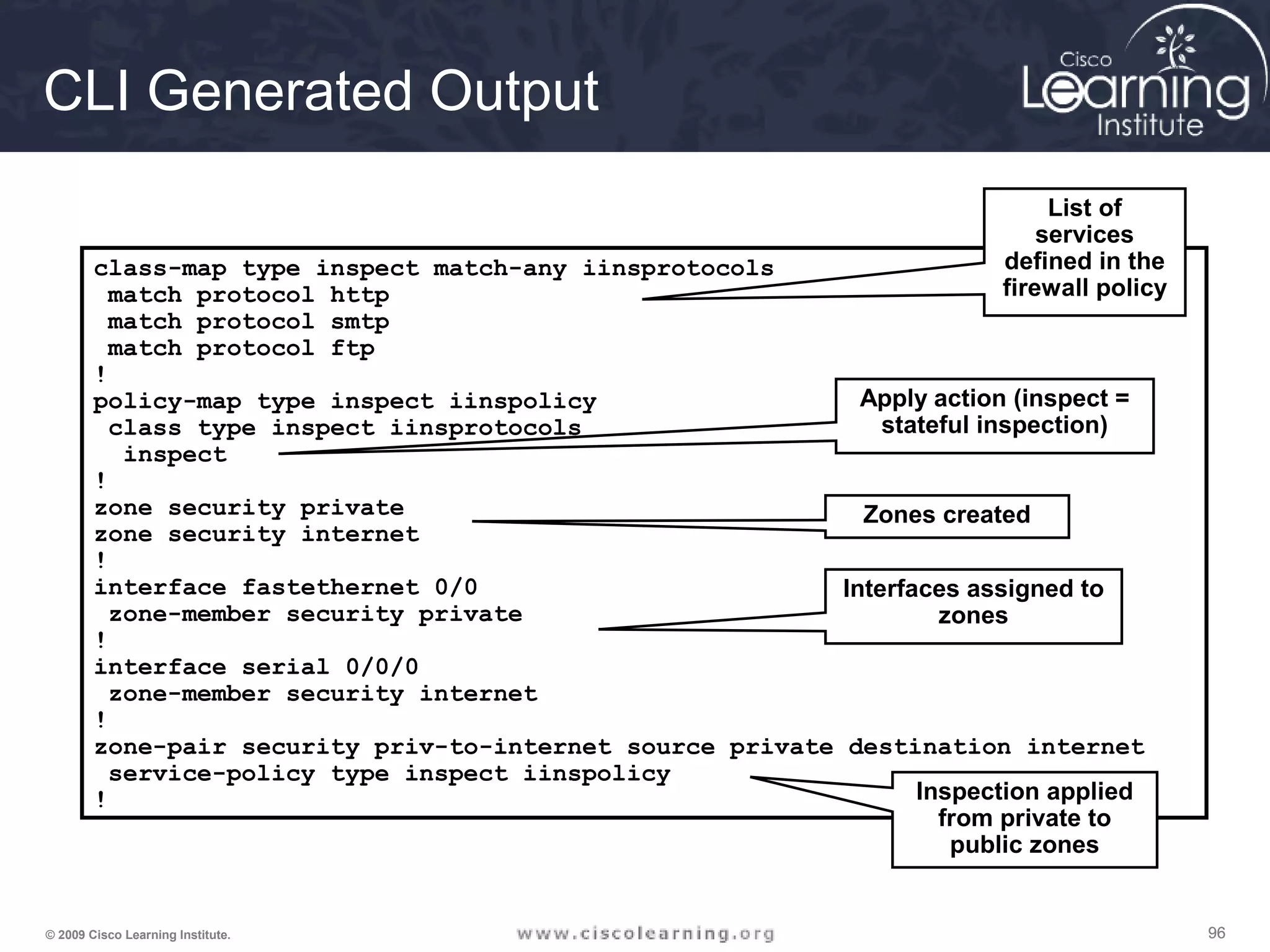
CLI Generated Output
class-map type inspect match-any iinsprotocols
match protocol http
match protocol smtp
match protocol ftp
!
policy-map type inspect iinspolicy
class type inspect iinsprotocols
inspect
!
zone security private
zone security internet
!
interface fastethernet 0/0
zone-member security private
!
interface serial 0/0/0
zone-member security internet
!
zone-pair security priv-to-internet source private destination internet
service-policy type inspect iinspolicy
!
List of
services
defined in the
firewall policy
Apply action (inspect =
stateful inspection)
Zones created
Interfaces assigned to
zones
Inspection applied
from private to
public zones
979797© 2009 Cisco Learning Institute.
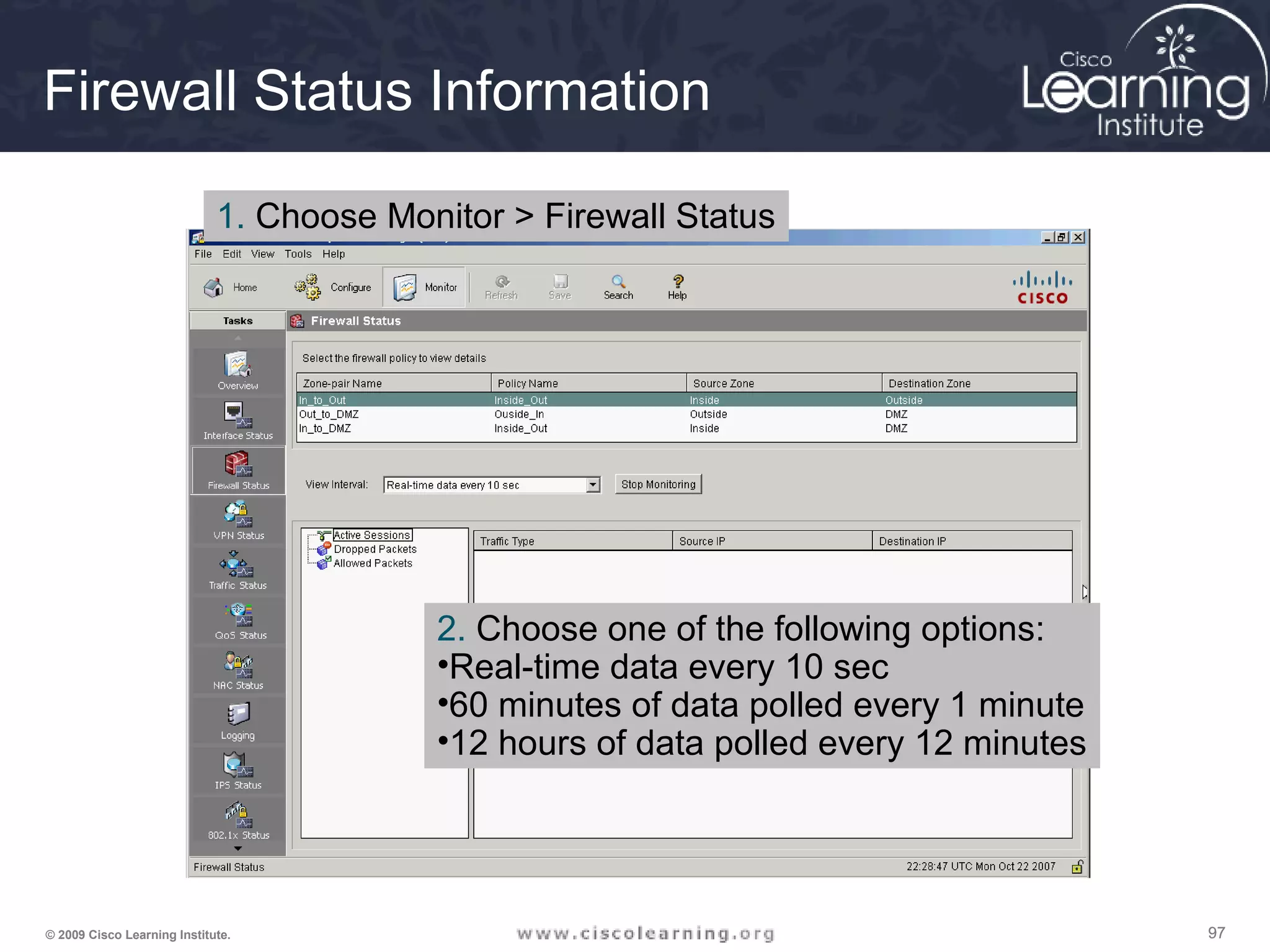
Firewall Status Information
1. Choose Monitor > Firewall Status
2. Choose one of the following options:
•Real-time data every 10 sec
•60 minutes of data polled every 1 minute
•12 hours of data polled every 12 minutes
989898© 2009 Cisco Learning Institute.
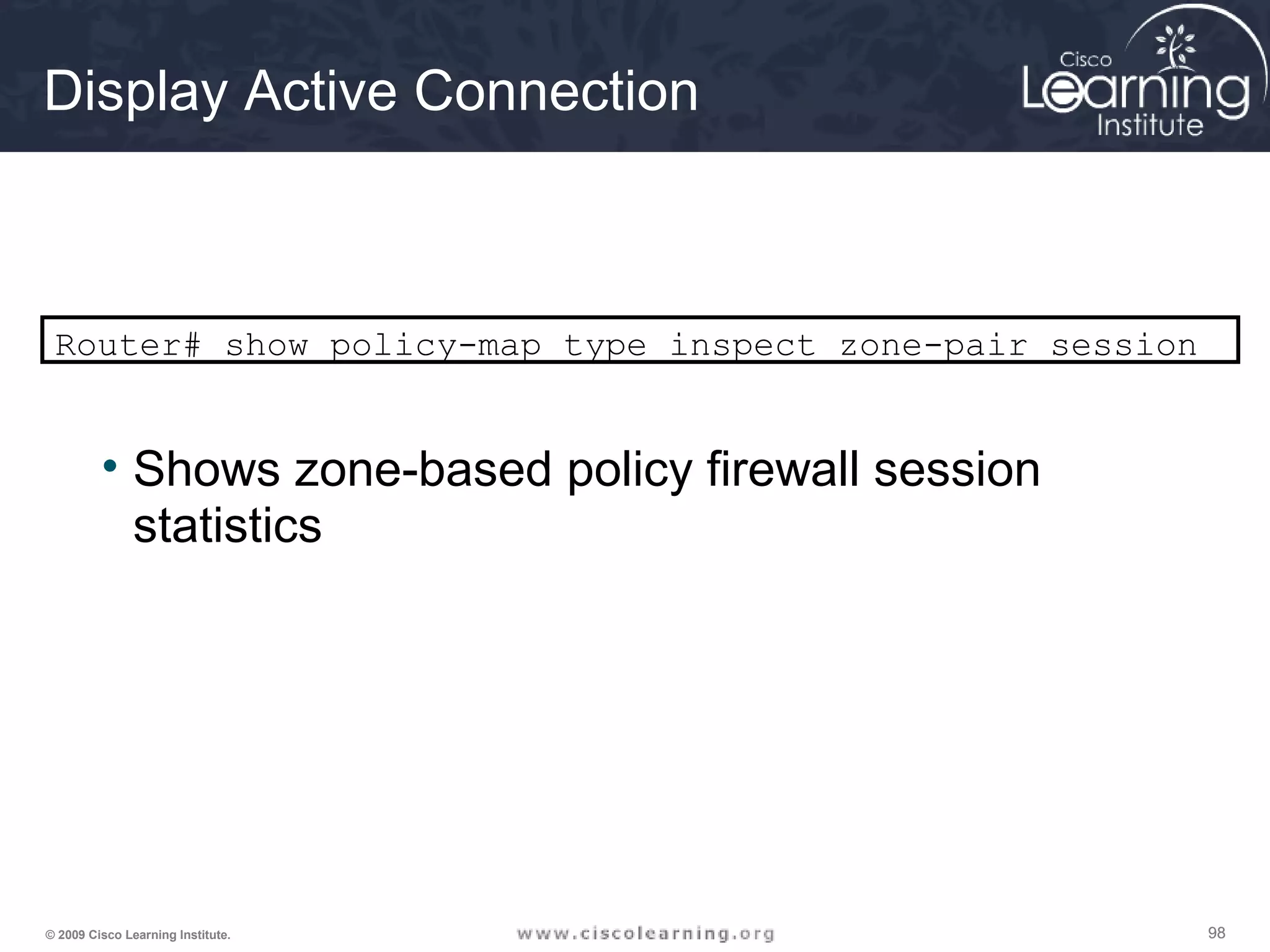
Display Active Connection
Router# show policy-map type inspect zone-pair session
• Shows zone-based policy firewall session
statistics
999999© 2009 Cisco Learning Institute.

Chapter 4 overview

  • 1.
    1© 2009 CiscoLearning Institute. CCNA Security Chapter Four Implementing Firewall Technologies
  • 2.
    222© 2009 CiscoLearning Institute. Lesson Planning • This lesson should take 3-6 hours to present • The lesson should include lecture, demonstrations, discussion and assessment • The lesson can be taught in person or using remote instruction
  • 3.
    333© 2009 CiscoLearning Institute. Major Concepts • Implement ACLs • Describe the purpose and operation of firewall technologies • Implement CBAC • Zone-based Policy Firewall using SDM and CLI
  • 4.
    444© 2009 CiscoLearning Institute. Lesson Objectives Upon completion of this lesson, the successful participant will be able to: 1. Describe standard and extended ACLs 2. Describe applications of standard and extended ACLs 3. Describe the relationship between topology and flow for ACLs and describe the proper selection of ACL types for particular topologies (ACL design methodology) 4. Describe how to implement ACLs with SDM 5. Describe the usage and syntax for complex ACLs 6. Describe the usage and syntax for dynamic ACLs 7. Interpret the output of the show and debug commands used to verify and troubleshoot complex ACL implementations
  • 5.
    555© 2009 CiscoLearning Institute. Lesson Objectives 8. Describe how to mitigate common network attacks with ACLs 9. Describe the purpose of firewalls and where they reside in a modern network 10. Describe the various types of firewalls 11. Describe design considerations for firewalls and the implications for the network security policy 12. Describe the role of CBAC in a modern network 13. Describe the underlying operation of CBAC 14. Describe the configuration of CBAC 15. Describe the verification and troubleshooting of CBAC
  • 6.
    666© 2009 CiscoLearning Institute. Lesson Objectives 16. Describe the role of Zone-Based Policy Firewall in a modern network 17. Describe the underlying operation of Zone-Based Policy Firewall 18. Describe the implementation of Zone-Based Policy Firewall with CLI 19. Describe the implementation of Zone-Based Policy Firewall with manual SDM 20. Describe the implementation of Zone-Based Policy Firewall with the SDM Wizard 21. Describe the verification and troubleshooting of Zone-Based Policy Firewall
  • 7.
    777© 2009 CiscoLearning Institute. ACL Topology and Types
  • 8.
    888© 2009 CiscoLearning Institute. Standard Numbered IP ACLs • The first value specifies the ACL number • The second value specifies whether to permit or deny the configured source IP address traffic • The third value is the source IP address that must be matched • The fourth value is the wildcard mask to be applied to the previously configured IP address to indicate the range • All ACLs assume an implicit deny statement at the end of the ACL6+ • At least one permit statement should be included or all traffic will be dropped once that ACL is applied to an interface Router(config)# access-list {1-99} {permit | deny} source-addr [source-mask]
  • 9.
    999© 2009 CiscoLearning Institute. Extended Numbered IP ACLs • The first value specifies the ACL number • The second value specifies whether to permit or deny accordingly • The third value indicates protocol type • The source IP address and wildcard mask determine where traffic originates. The destination IP address and wildcard mask are used to indicate the final destination of the network traffic • The command to apply the standard or extended numbered ACL: Router(config)# access-list {100-199} {permit | deny} protocol source-addr [source-mask] [operator operand] destination-addr [destination-mask] [operator operand] [established] Router(config-if)# ip access-group number {in | out}
  • 10.
    101010© 2009 CiscoLearning Institute. Named IP ACLs Router(config)# ip access-list extended vachon1 Router(config-ext-nacl)# deny ip any 200.1.2.10 0.0.0.1 Router(config-ext-nacl)# permit tcp any host 200.1.1.11 eq 80 Router(config-ext-nacl)# permit tcp any host 200.1.1.10 eq 25 Router(config-ext-nacl)# permit tcp any eq 25 host 200.1.1.10 any established Router(config-ext-nacl)# permit tcp any 200.1.2.0 0.0.0.255 established Router(config-ext-nacl)# permit udp any eq 53 200.1.2.0 0.0.0.255 Router(config-ext-nacl)# deny ip any any Router(config-ext-nacl)# interface ethernet 1 Router(config-if)# ip access-group vachon1 in Router(config-if)# exit Standard Extended
  • 11.
    111111© 2009 CiscoLearning Institute. The log Parameter There are several pieces of information logged: • The action—permit or deny • The protocol—TCP, UDP, or ICMP • The source and destination addresses • For TCP and UDP—the source and destination port numbers • For ICMP—the message types *May 1 22:12:13.243: %SEC-6-IPACCESSLOGP: list ACL-IPv4-E0/0- IN permitted tcp 192.168.1.3(1024) -> 192.168.2.1(22), 1 packet *May 1 22:17:16.647: %SEC-6-IPACCESSLOGP: list ACL-IPv4-E0/0- IN permitted tcp 192.168.1.3(1024) -> 192.168.2.1(22), 9 packets *May 1 22:12:13.243: %SEC-6-IPACCESSLOGP: list ACL-IPv4-E0/0- IN permitted tcp 192.168.1.3(1024) -> 192.168.2.1(22), 1 packet *May 1 22:17:16.647: %SEC-6-IPACCESSLOGP: list ACL-IPv4-E0/0- IN permitted tcp 192.168.1.3(1024) -> 192.168.2.1(22), 9 packets
  • 12.
    121212© 2009 CiscoLearning Institute. ACL Configuration Guidelines • ACLs are created globally and then applied to interfaces • ACLs filter traffic going through the router, or traffic to and from the router, depending on how it is applied • Only one ACL per interface, per protocol, per direction • Standard or extended indicates the information that is used to filter packets • ACLs are process top-down. The most specific statements must go at the top of the list • All ACLs have an implicit “deny all” statement at the end, therefore every list must have at least one permit statement to allow any traffic to pass
  • 13.
    131313© 2009 CiscoLearning Institute. r1 Use a standard ACL to block all traffic from 172.16.4.0/24 network, but allow all other traffic. r1(config)# access-list 1 deny 172.16.4.0 0.0.0.255 r1(config)# access-list 1 permit any r1(config)# interface ethernet 0 r1(config-if)# ip access-group 1 out Applying Standard ACLs
  • 14.
    141414© 2009 CiscoLearning Institute. Applying Extended ACLs r1 Use an extended ACL to block all FTP traffic from 172.16.4.0/24 network, but allow all other traffic. access-list 101 deny tcp 172.16.4.0 0.0.0.255 172.16.3.0 0.0.0.255 eq 21 access-list 101 deny tcp 172.16.4.0 0.0.0.255 172.16.3.0 0.0.0.255 eq 20 access-list 101 permit ip any any
  • 15.
    151515© 2009 CiscoLearning Institute. Other CLI Commands • To ensure that only traffic from a subnet is blocked and all other traffic is allowed: access-list 1 permit any • To place an ACL on the inbound E1 interface: interface ethernet 1 ip access-group 101 in • To check the intended effect of an ACL: show ip access-list
  • 16.
    161616© 2009 CiscoLearning Institute. Click to view examples How ACLs Work Inbound ACL Outbound ACL
  • 17.
    171717© 2009 CiscoLearning Institute. ACL Placement Extended ACLs should be placed on routers as close as possible to the source that is being filtered. If placed too far from the source being filtered, there is inefficient use of network resources. Standard ACLs should be placed as close to the destination as possible. Standard ACLs filter packets based on the source address only. If placed too close to the source, it can deny all traffic, including valid traffic.
  • 18.
    181818© 2009 CiscoLearning Institute. PC A F0/0 Serial 0/0/0 R1 R3 R2 POP3 Server POP3 192.168.20.2/24 F0/1 POP3 Using Nmap for Planning PC-A$ nmap --system-dns 192.168.20.0/24 Interesting ports on webserver.branch1.com (192.168.20.2): (The 1669 ports scanned but not shown below are in state: filtered) PORT STATE SERVICE 110 open pop3
  • 19.
    191919© 2009 CiscoLearning Institute. Using SDM Choose the Configure option for configuring ACLs
  • 20.
    202020© 2009 CiscoLearning Institute. Access Rules Choose Configure > Additional Tasks > ACL Editor Rule types: • Access Rules • NAT Rules • Ipsec Rules • NAC Rules • Firewall Rules • QoS Rules • Unsupported Rules • Externally Defined Rules • Cisco SDM Default Rules
  • 21.
    212121© 2009 CiscoLearning Institute. Configuring Standard Rules Using SDM 1. Choose Configure > Additional Tasks > ACL Editor > Access Rules 5. Click Add 3. Enter a name or number 4. Choose Standard Rule Optionally, enter a description 2. Click Add 6. Choose Permit or Deny 7. Choose an address type 8. Complete this field based on the choice made in #7 9. Enter an optional description 10. Optional checkbox 11. Click OK 12. Continue adding or editing rules
  • 22.
    222222© 2009 CiscoLearning Institute. Applying a Rule to an Interface 1. Click Associate 2. Choose the interface 3. Choose a direction 4. An information box with options appears if a rule is already associated with that interface, that direction.
  • 23.
    232323© 2009 CiscoLearning Institute. Viewing Commands R1# show running-config <output omitted> ! hostname R1 <output omitted> enable secret 5 $1$MJD8$.1LWYcJ6iUi133Yg7vGHG/ <output omitted> crypto pki trustpoint TP-self-signed- 1789018390 enrollment selfsigned subject-name cn=IOS-Self-Signed- Certificate-1789018390 revocation-check none rsakeypair TP-self-signed-1789018390 ! crypto pki certificate chain TP-self- signed-1789018390 certificate self-signed 01 3082023A 308201A3 A0030201 02020101 300D0609 2A864886 F70D0101 04050030 <output omitted> 1BF29620 A084B701 5B92483D D934BE31 ECB7AB56 8FFDEA93 E2061F33 8356 quit interface FastEthernet0/1 ip address 192.168.1.1 255.255.255.0 ip access-group Outbound in <output omitted> ! interface Serial0/0/0 ip address 10.1.1.1 255.255.255.252 clock rate 128000 ! <output omitted> no ip http server ip http secure-server ! ip access-list standard Outbound remark SDM_ACL Category=1 permit 192.168.1.3 ! access-list 100 remark SDM_ACL Category=16 access-list 100 deny tcp any host 192.168.1.3 eq telnet log access-list 100 permit ip any any ! <output omitted> !
  • 24.
    242424© 2009 CiscoLearning Institute. • Standard IP ACLs • Extended IP ACLs • Extended IP ACLs using TCP established • Reflexive IP ACLs • Dynamic ACLs • Time-Based ACLs • Context-based Access Control (CBAC) ACLs Types of ACLs
  • 25.
    252525© 2009 CiscoLearning Institute. Syntax for TCP Established The established keyword: • Forces a check by the routers to see if the ACK, FIN, PSH, RST, SYN or URG TCP control flags are set. If flag is set, the TCP traffic is allowed in. • Does not implement a stateful firewall on a router • Hackers can take advantage of the open hole • Option does not apply to UDP or ICMP traffic Router(config)# access-list access-list-number {permit | deny} protocol source source-wildcard [operator port] destination destination-wildcard [operator port] [established]
  • 26.
    262626© 2009 CiscoLearning Institute. PC A F0/1 F0/1 Serial 0/0/0 Serial0/0/0 Serial0/0/1 Serial0/0/1 R 1 R 3 R 2 PC C R 1 192.168.1.3/24 HTTPS Destination Port HTTPS Source Portwith Control Flag Set access-list 100 permit tcp any eq 443 192.168.1.0 0.0.0.255 established access-list 100 permit tcp any 192.168.1.3 eq 22 access-list 100 deny ip any any interface s0/0/0ip access-group 100 in Example Using TCP Established
  • 27.
    272727© 2009 CiscoLearning Institute. F0/1 F0/1 Serial 0/0/0 Serial0/0/0 Serial0/0/1 Serial0/0/1 R 1 R 3 R 2 PC A PC C R 1 192.168.1.3/24 Initiate Session Return Traffic Perm itted byTem poralReflexive ACE Reflexive ACLs • Provide a truer form of session filtering • Much harder to spoof • Allow an administrator to perform actual session filtering for any type of IP traffic • Work by using temporary access control entries (ACEs)
  • 28.
    282828© 2009 CiscoLearning Institute. Serial 0/0/0 Serial0/ 0/0 Serial0/0/1 R 1 R 2 PC A Initiate HTTP or DNS Traffic Return HTTP and DNS Traffic Perm itted – All OtherDenied Internet Configuring a Router to Use Reflexive ACLs 1. Create an internal ACL that looks for new outbound sessions and creates temporary reflexive ACEs 2. Create an external ACL that uses the reflexive ACLs to examine return traffic 3. Activate the named ACLs on the appropriate interfaces
  • 29.
    292929© 2009 CiscoLearning Institute. Dynamic ACL Overview • Available for IP traffic only • Dependent on Telnet connectivity, authentication, and extended ACLs • Security benefits include: - Use of a challenge mechanism to authenticate users - Simplified management in large internetworks - Reduction of the amount of router processing that is required for ACLs - Reduction of the opportunity for network break-ins by network hackers - Creation of dynamic user access through a firewall without compromising other configured security restrictions
  • 30.
    303030© 2009 CiscoLearning Institute. Implementing a Dynamic ACL Remote user opens a Telnet or SSH connection to the router. The router prompts the user for a username and password The router authenticates the connection Dynamic ACL entry added that grants user access User can access the internal resources
  • 31.
    313131© 2009 CiscoLearning Institute. Setting up a Dynamic ACL Router(config)# access-list ACL_# dynamic dynamic_ACL_name [timeout minutes] {deny | permit} IP_protocol source_IP_address src_wildcard_mask destination_IP_address dst_wildcard_mask [established] [log]
  • 32.
    323232© 2009 CiscoLearning Institute. CLI Commands
  • 33.
    333333© 2009 CiscoLearning Institute. Time-based ACLs
  • 34.
    343434© 2009 CiscoLearning Institute. CLI Commands
  • 35.
    353535© 2009 CiscoLearning Institute. I can’t surf the web at 10:00 A.M. because of the time- based ACL! Serial 0/0/0 Serial0/0/1 R1 R2 Internet 192.168.1.0/24 10.1.1.1 Example Configuration Perimeter(config)# time-range employee-time Perimeter(config-time)# periodic weekdays 12:00 to 13:00 Perimeter(config-time)# periodic weekdays 17:00 to 19:00 Perimeter(config-time)# exit Perimeter(config)# access-list 100 permit tcp any host 200.1.1.11 eq 25 Perimeter(config)# access-list 100 permit tcp any eq 25 host 200.1.1.11 established Perimeter(config)# access-list 100 permit udp any host 200.1.1.12 eq 53 Perimeter(config)# access-list 100 permit udp any eq 53 host 200.1.1.12 Perimeter(config)# access-list 100 permit tcp any 200.1.1.0 0.0.0.255 established time-range employee-time Perimeter(config)# access-list 100 deny ip any any Perimeter(config)# interface ethernet 1 Perimeter(config-if)# ip access-group 100 in Perimeter(config-if)# exit Perimeter(config)# access-list 101 permit tcp host 200.1.1.11 eq 25 any Perimeter(config)# access-list 101 permit tcp host 200.1.1.11 any eq 25 Perimeter(config)# access-list 101 permit udp host 200.1.1.12 eq 53 any Perimeter(config)# access-list 101 permit udp host 200.1.1.12 any eq 53 Perimeter(config)# access-list 101 permit tcp 200.1.1.0 0.0.0.255 any time-range employee-time Perimeter(config)# access-list 100 deny ip any any Perimeter(config)# interface ethernet 1 Perimeter(config-if)# ip access-group 101 out
  • 36.
    363636© 2009 CiscoLearning Institute. The ACLs are implemented. Now it is time to verify that they are working properly. F0/1 F0/1 Serial 0/0/0 Serial0/0/0 Serial0/0/1 Serial0/0/1 R 1 R 3 R 2 PC C R 1 Router# show access-lists [access-list-number | access-list-name] Verifying ACL Configuration
  • 37.
    373737© 2009 CiscoLearning Institute. Perimeter# show access-list 100 Extended IP access list 100 permit tcp any host 200.1.1.14 eq www (189 matches) permit udp any host 200.1.1.13 eq domain (32 matches) permit tcp any host 200.1.1.12 eq smtp permit tcp any eq smtp host 200.1.1.12 established permit tcp any host 200.1.1.11 eq ftp permit tcp any host 200.1.1.11 eq ftp-data permit tcp any eq www 200.1.2.0 0.0.0.255 established permit udp any eq domain 200.1.2.0 0.0.0.255 deny ip any any (1237 matches) Confirmation
  • 38.
    383838© 2009 CiscoLearning Institute. Perimeter# debug ip packet IP packet debugging is on IP: s=172.69.13.44 (Serial0/0), d=10.125.254.1 (Serial0/1), g=172.69.16.2, forward IP: s=200.0.2.2 (Ethernet0), d=10.36.125.2 (Serial0/1), g=172.69.16.2, forward IP: s=200.0.2.6 (Ethernet0), d=255.255.255.255, rcvd 2 IP: s=200.0.2.55 (Ethernet0), d=172.69.2.42 (Serial0/0), g=172.69.13.6, forward IP: s=200.0.2.33 (Ethernet0), d=10.130.2.156 (Serial0/1), g=172.69.16.2, forward IP: s=200.0.2.27 (Ethernet0), d=172.69.43.126 (Serial0/0), g=172.69.23.5, forward IP: s=200.0.2.27 (Ethernet0), d=172.69.43.126 (Serial0/0), g=172.69.13.6, forward IP: s=200.5.5.5 (Ethernet1), d=255.255.255.255, rcvd 2 IP: s=200.0.2.2 (Ethernet0), d=10.36.125.2 (Serial0/1), g=172.69.16.2, access denied Troubleshooting
  • 39.
    393939© 2009 CiscoLearning Institute. Attacks Mitigated ACLs can be used to: • Mitigate IP address spoofing—inbound/outbound • Mitigate Denial of service (DoS) TCP synchronizes (SYN) attacks— blocking external attacks • Mitigate DoS TCP SYN attacks—using TCP intercept • Mitigate DoS smurf attacks • Filter Internet Control Message Protocol (ICMP) messages—inbound • Filter ICMP messages—outbound • Filter traceroute
  • 40.
    404040© 2009 CiscoLearning Institute. R1(config)#access-list 150 deny ip 0.0.0.0 0.255.255.255 any R1(config)#access-list 150 deny ip 10.0.0.0 0.255.255.255 any R1(config)#access-list 150 deny ip 127.0.0.0 0.255.255.255 any R1(config)#access-list 150 deny ip 172.16.0.0 0.15.255.255 any R1(config)#access-list 150 deny ip 192.168.0.0 0.0.255.255 any R1(config)#access-list 150 deny ip 224.0.0.0 15.255.255.255 any R1(config)#access-list 150 deny ip host 255.255.255.255 any Inbound R1(config)#access-list 105 permit ip 192.168.1.0 0.0.0.255 any Outbound CLI Commands
  • 41.
    414141© 2009 CiscoLearning Institute. Allowing Common Services R1(config)#access-list 122 permit udp any host 192.168.20.2 eq domain R1(config)#access-list 122 permit tcp any host 192.168.20.2 eq smtp R1(config)#access-list 122 permit tcp any host 192.168.20.2 eq ftp R1(config)#access-list 180 permit tcp host 200.5.5.5 host 10.0.1.1 eq telnet R1(config)#access-list 180 permit tcp host 200.5.5.5 host 10.0.1.1 eq 22 R1(config)#access-list 180 permit udp host 200.5.5.5 host 10.0.1.1 eq syslog R1(config)#access-list 180 permit udp host 200.5.5.5 host 10.0.1.1 eq snmptrap R1 Internet F0/0 Serial 0/0/0 R1 DNS, SMTP, FTP 192.168.20.2/24 F0/1 PC A 200.5.5.5/24
  • 42.
    424242© 2009 CiscoLearning Institute. R1(config)#access-list 112 permit icmp any any echo-reply R1(config)#access-list 112 permit icmp any any source-quench R1(config)#access-list 112 permit icmp any any unreachable R1(config)#access-list 112 deny icmp any any R1(config)#access-list 114 permit icmp 192.168.1.0 0.0.0.255 any echo R1(config)#access-list 114 permit icmp 192.168.1.0 0.0.0.255 any parameter-problem R1(config)#access-list 114 permit icmp 192.168.1.0 0.0.0.255 any packet-too-big R1(config)#access-list 114 permit icmp 192.168.1.0 0.0.0.255 any source-quench Inbound on S0/0/0 Outbound on S0/0/0 R1 Internet F0/0 Serial 0/0/0 R1 192.168.20.2/24 F0/1 PC A 200.5.5.5/24 Controlling ICMP Messages
  • 43.
    434343© 2009 CiscoLearning Institute. Firewalls • A firewall is a system that enforces an access control policy between network • Common properties of firewalls: - The firewall is resistant to attacks - The firewall is the only transit point between networks - The firewall enforces the access control policy
  • 44.
    444444© 2009 CiscoLearning Institute. Benefits of Firewalls • Prevents exposing sensitive hosts and applications to untrusted users • Prevent the exploitation of protocol flaws by sanitizing the protocol flow • Firewalls prevent malicious data from being sent to servers and clients. • Properly configured firewalls make security policy enforcement simple, scalable, and robust. • A firewall reduces the complexity of security management by offloading most of the network access control to a couple of points in the network.
  • 45.
    454545© 2009 CiscoLearning Institute. Types of Filtering Firewalls • Packet-filtering firewall—is typically a router that has the capability to filter on some of the contents of packets (examines Layer 3 and sometimes Layer 4 information) • Stateful firewall—keeps track of the state of a connection: whether the connection is in an initiation, data transfer, or termination state • Application gateway firewall (proxy firewall) —filters information at Layers 3, 4, 5, and 7. Firewall control and filtering done in software. • Address-translation firewall—expands the number of IP addresses available and hides network addressing design.
  • 46.
    464646© 2009 CiscoLearning Institute. Types of Filtering Firewalls • Host-based (server and personal) firewall—a PC or server with firewall software running on it. • Transparent firewall—filters IP traffic between a pair of bridged interfaces. • Hybrid firewalls—some combination of the above firewalls. For example, an application inspection firewall combines a stateful firewall with an application gateway firewall.
  • 47.
    474747© 2009 CiscoLearning Institute. Packet-Filtering Firewall Advantages • Are based on simple permit or deny rule set • Have a low impact on network performance • Are easy to implement • Are supported by most routers • Afford an initial degree of security at a low network layer • Perform 90% of what higher-end firewalls do, at a much lower cost
  • 48.
    484848© 2009 CiscoLearning Institute. Packet-Filtering Firewall Disadvantages • Packet filtering is susceptible to IP spoofing. Hackers send arbitrary packets that fit ACL criteria and pass through the filter. • Packet filters do not filter fragmented packets well. Because fragmented IP packets carry the TCP header in the first fragment and packet filters filter on TCP header information, all fragments after the first fragment are passed unconditionally. • Complex ACLs are difficult to implement and maintain correctly. • Packet filters cannot dynamically filter certain services. • Packet filters are stateless.
  • 49.
    494949© 2009 CiscoLearning Institute. Stateful Firewall 10.1.1.1 200.3.3.3 Inside ACL (Outgoing Traffic) Outside ACL (Incoming Traffic) permit ip 10.0.0.0 0.0.0.255 any Dynamic: permit tcp host 200.3.3.3 eq 80 host 10.1.1.1 eq 1500 permit tcp any host 10.1.1.2 eq 25 permit udp any host 10.1.1.2 eq 53 deny ip any any source port 1500 destination port 80
  • 50.
    505050© 2009 CiscoLearning Institute. Stateful Firewalls Advantages/Disadvantages
  • 51.
    515151© 2009 CiscoLearning Institute. Cisco Systems Firewall Solutions • IOS Firewall –Zone-based policy framework for intuitive management –Instant messenger and peer-to-peer application filtering –VoIP protocol firewalling –Virtual routing and forwarding (VRF) firewalling –Wireless integration –Stateful failover –Local URL whitelist and blacklist support –Application inspection for web and e-mail traffic • PIX 500 Series • ASA 5500 Series
  • 52.
    525252© 2009 CiscoLearning Institute. Design with DMZ DMZ UntrustedTrusted Private-Public Policy Public-DMZ Policy DMZ-Private Policy Private-DMZ Policy Internet
  • 53.
    535353© 2009 CiscoLearning Institute. Layered Defense Scenario Endpoint security: Provides identity and device security policy compliance Core network security: Protects against malicious software and traffic anomalies, enforces network policies, and ensures survivability Network Core Disaster recovery: Offsite storage and redundant architecture Communications security: Provides information assurance Perimeter security: Secures boundaries between zones
  • 54.
    545454© 2009 CiscoLearning Institute. Firewall Best Practices • Position firewalls at security boundaries. • Firewalls are the primary security device. It is unwise to rely exclusively on a firewall for security. • Deny all traffic by default. Permit only services that are needed. • Ensure that physical access to the firewall is controlled. • Regularly monitor firewall logs. • Practice change management for firewall configuration changes. • Remember that firewalls primarily protect from technical attacks originating from the outside.
  • 55.
    555555© 2009 CiscoLearning Institute. Design Example F0/ 1 F0/ 0 F0/ 0 F0/ 1 Serial 0/0/0 Serial0/0/1 R 1 R 3 R 2 F0/ 5 S 2 S 3F0/1 F0/1 F0/6 F0/1 8 F0/1 8 F0/ 5 S 1 PC A (RADIUS/TACACS+) PC C Cisco Router with IOS Firewall Cisco Router with IOS Firewall Internet
  • 56.
    565656© 2009 CiscoLearning Institute. Introduction to CBAC • Filters TCP and UDP packets based on application layer protocol session information • Provides stateful application layer filtering • Provides four main functions: - Traffic Filtering - Traffic Inspection - Intrusion Detection - Generation of Audits and Alerts
  • 57.
    575757© 2009 CiscoLearning Institute. CBAC Capabilities Monitors TCP Connection Setup Examines TCP Sequence Numbers Inspects DNS Queries and Replies Inspects Common ICMP Message Types Supports Applications with Multiple Channels, such as FTP and Multimedia Inspects Embedded Addresses Inspects Application Layer Information
  • 58.
    585858© 2009 CiscoLearning Institute. CBAC Overview
  • 59.
    595959© 2009 CiscoLearning Institute. Step-by-Step Request Telnet 209.x.x.x 5. Once the session is terminated by the client, the router will remove the state entry and dynamic ACL entry. Fa0/0 S0/0/0 1. Examines the fa0/0 inbound ACL to determine if telnet requests are permitted to leave the network. 2. IOS compares packet type to inspection rules to determine if Telent should be tracked. 3. Adds information to the state type to track the Telnet session. 4. Adds a dynamic entry to the inbound ACL on s0/0/0 to allow reply packets back into the internal network.
  • 60.
    606060© 2009 CiscoLearning Institute. CBAC TCP Handling
  • 61.
    616161© 2009 CiscoLearning Institute. CBAC UDP Handling
  • 62.
    626262© 2009 CiscoLearning Institute. CBAC Example
  • 63.
    636363© 2009 CiscoLearning Institute. Configuration of CBAC Four Steps to Configure • Step 1: Pick an Interface • Step 2: Configure IP ACLs at the Interface • Step 3: Define Inspection Rules • Step 4: Apply an Inspection Rule to an Interface
  • 64.
    646464© 2009 CiscoLearning Institute. Step 1: Pick an Interface Two-Interface Three-Interface
  • 65.
    656565© 2009 CiscoLearning Institute. Step 2: Configure IP ACLs at the Interface
  • 66.
    666666© 2009 CiscoLearning Institute. Step 3: Define Inspection Rules ip inspect name inspection_name protocol [alert {on | off}] [audit-trail {on | off}] [timeout seconds] Router(config)#
  • 67.
    676767© 2009 CiscoLearning Institute. Step 4: Apply an Inspection Rule to an Interface
  • 68.
    686868© 2009 CiscoLearning Institute. Verification and Troubleshooting of CBAC • Alerts and Audits • show ip inspect Parameters • debug ip inspect Parameters
  • 69.
    696969© 2009 CiscoLearning Institute. Alerts and Audits *note: Alerts are enabled by default and automatically display on the console line of the router. If alerts have been disabled using the ip inspect alert-off command, the no form of that command, as seen above, is required to re-enable alerts.
  • 70.
    707070© 2009 CiscoLearning Institute. show ip inspect Parameters
  • 71.
    717171© 2009 CiscoLearning Institute. debug ip inspect Parameters
  • 72.
    727272© 2009 CiscoLearning Institute. Topology Example • If an additional interface is added to the private zone, the hosts connected to the new interface in the private zone can pass traffic to all hosts on the existing interface in the same zone. • Additionally, hosts connected to the new interface in the private zone must adhere to all existing “private” policies related to that zone when passing traffic to other zones. Each zone holds only one interface.
  • 73.
    737373© 2009 CiscoLearning Institute. Benefits • Zone-based policy firewall is not dependent on ACLs • The router security posture is now “block unless explicitly allowed” • C3PL (Cisco Common Classification Policy Language) makes policies easy to read and troubleshoot • One policy affects any given traffic, instead of needing multiple ACLs and inspection actions. Two Zones
  • 74.
    747474© 2009 CiscoLearning Institute. The Design Process 1. Internetworking infrastructure under consideration is split into well- documented separate zones with various security levels 2. For each pair of source-destination zones, the sessions that clients in source zones are allowed to open to servers in destination zones are defined. For traffic that is not based on the concept of sessions (for example, IPsec Encapsulating Security Payload [ESP]), the administrator must define unidirectional traffic flows from source to destination and vice versa. 3. The administrator must design the physical infrastructure. 4. For each firewall device in the design, the administrator must identify zone subsets connected to its interfaces and merge the traffic requirements for those zones, resulting in a device-specific interzone policy.
  • 75.
    757575© 2009 CiscoLearning Institute. Common Designs LAN-to-Internet Public Servers Redundant Firewalls Complex Firewall
  • 76.
    767676© 2009 CiscoLearning Institute. Zones Simplify Complex Firewall
  • 77.
    777777© 2009 CiscoLearning Institute. Actions Inspect – This action configures Cisco IOS stateful packet inspection Drop – This action is analogous to deny in an ACL Pass – This action is analogous to permit in an ACL
  • 78.
    787878© 2009 CiscoLearning Institute. Source interface member of zone? Destination interface member of zone? Zone-pair exists? Policy exists? RESULT NO NO N/A N/A No impact of zoning/policy YES (zone 1) YES (zone 1) N/A* N/A No policy lookup (PASS) YES NO N/A N/A DROP NO YES N/A N/A DROP YES (zone 1) YES (zone 2) NO N/A DROP YES (zone 1) YES (zone 2) YES NO DROP YES (zone 1) YES (zone 2) YES YES policy actions *zone-pair must have different zone as source and destination Rules for Application Traffic
  • 79.
    797979© 2009 CiscoLearning Institute. Rules for Router Traffic Source interface member of zone? Destination interface member of zone? Zone- pair exists? Policy exists? RESULT ROUTER YES NO - PASS ROUTER YES YES NO PASS ROUTER YES YES YES policy actions YES ROUTER NO - PASS YES ROUTER YES NO PASS YES ROUTER YES YES policy actions
  • 80.
    808080© 2009 CiscoLearning Institute. Implementing Zone-based Policy Firewall with CLI 1. Create the zones for the firewall with the zone security command 3. Specify firewall policies with the policy-map type inspect command 2. Define traffic classes with the class-map type inspect command 4. Apply firewall policies to pairs of source and destination zones with zone-pair security 5. Assign router interfaces to zones using the zone-member security interface command
  • 81.
    818181© 2009 CiscoLearning Institute. Step 1: Create the Zones FW(config)# zone security Inside FW(config-sec-zone)# description Inside network FW(config)# zone security Outside FW(config-sec-zone)# description Outside network
  • 82.
    828282© 2009 CiscoLearning Institute. Step 2: Define Traffic Classes FW(config)# class-map type inspect FOREXAMPLE FW(config-cmap)# match access-group 101 FW(config-cmap)# match protocol tcp FW(config-cmap)# match protocol udp FW(config-cmap)# match protocol icmp FW(config-cmap)# exit FW(config)# access-list 101 permit ip 10.0.0.0 0.0.0.255 any
  • 83.
    838383© 2009 CiscoLearning Institute. Step 3: Define Firewall Policies FW(config)# policy-map type inspect InsideToOutside FW(config-pmap)# class type inspect FOREXAMPLE FW(config-pmap-c)# inspect
  • 84.
    848484© 2009 CiscoLearning Institute. Step 4: Assign Policy Maps to Zone Pairs and Assign Router Interfaces to Zones FW(config)# zone-pair security InsideToOutside source Inside destination Outside FW(config-sec-zone-pair)# description Internet Access FW(config-sec-zone-pair)# service-policy type inspect InsideToOutside FW(config-sec-zone-pair)# interface F0/0 FW(config-if)# zone-member security Inside FW(config-if)# interface S0/0/0.100 point-to-point FW(config-if)# zone-member security Outside
  • 85.
    858585© 2009 CiscoLearning Institute. Final ZPF Configuration policy-map type inspect InsideToOutside class class-default inspect ! zone security Inside description Inside network zone security Outside description Outside network zone-pair security InsideToOutside source Inside destination Outside service-policy type inspect InsideToOutside ! interface FastEthernet0/0 zone-member security Inside ! interface Serial0/0/0.100 point-to-point zone-member security Outside
  • 86.
    868686© 2009 CiscoLearning Institute. Manually Implementing Zone-based Policy Firewall with SDM • Step 1: Define zones • Step 2: Configure class maps to describe traffic between zones • Step 3: Create policy maps to apply actions to the traffic of the class maps • Step 4: Define zone pairs and assign policy maps to the zone pairs
  • 87.
    878787© 2009 CiscoLearning Institute. Define Zones 1. Choose Configure > Additional Tasks > Zones 2. Click Add 3. Enter a zone name 4. Choose the interfaces for this zone 5. Click OK to create the zone and click OK at the Commands Delivery Status window
  • 88.
    888888© 2009 CiscoLearning Institute. Configure Class Maps 1. Choose Configure > Additional Tasks > C3PL > Class Map > Inspections 2. Review, create, and edit class maps. To edit a class map, choose the class map from the list and click Edit
  • 89.
    898989© 2009 CiscoLearning Institute. Create Policy Maps 1. Choose Configure > Additional Tasks > C3PL > Policy Map > Protocol Inspection 2. Click Add 3. Enter a policy name and description 4. Click Add to add a new class map 5. Enter the name of the class map to apply. Click the down arrow for a pop-up menu, if name unknown 6. Choose Pass, Drop, or Inspect 7. Click OK 8. To add another class map, click Add, to modify/delete the actions of a class map, choose the class map and click Edit/Delete 9. Click OK. At the Command Delivery Status window, click OK
  • 90.
    909090© 2009 CiscoLearning Institute. Define Zone Pairs 1. Choose Configure > Additional Tasks > Zone Pairs 2. Click Add 3. Enter a name for the zone pair. Choose a source zone, a destination zone and a policy 4. Click OK and click OK in the Command Delivery Status window
  • 91.
    919191© 2009 CiscoLearning Institute. Accessing the Basic Firewall Configuration 1. Choose Configuration > Firewall and ACL 2. Click the Basic Firewall option and click Launch the Selected Task button 3. Click Next to begin configuration
  • 92.
    929292© 2009 CiscoLearning Institute. Configuring a Firewall 1. Check the outside (untrusted) check box and the inside (trusted) check box to identify each interface 2. (Optional) Check box if the intent is to allow users outside of the firewall to be able to access the router using SDM. After clicking Next, a screen displays that allows the admin to specify a host IP address or network address 3. Click Next. If the Allow Secure SDM Access check box is checked, the Configuring Firewall for Remote Access window appears 4. From the Configuring Firewall choose Network address, Host Ip address or any from the Type drop-down list
  • 93.
    939393© 2009 CiscoLearning Institute. Basic Firewall Security Configuration 1. Select the security level 2. Click the Preview Commands Button to view the IOS commands
  • 94.
    949494© 2009 CiscoLearning Institute. Firewall Configuration Summary Click Finish
  • 95.
    959595© 2009 CiscoLearning Institute. Reviewing Policy 1. Choose Configure > Firewall and ACL 2. Click Edit Firewall Policy tab
  • 96.
    969696© 2009 CiscoLearning Institute. CLI Generated Output class-map type inspect match-any iinsprotocols match protocol http match protocol smtp match protocol ftp ! policy-map type inspect iinspolicy class type inspect iinsprotocols inspect ! zone security private zone security internet ! interface fastethernet 0/0 zone-member security private ! interface serial 0/0/0 zone-member security internet ! zone-pair security priv-to-internet source private destination internet service-policy type inspect iinspolicy ! List of services defined in the firewall policy Apply action (inspect = stateful inspection) Zones created Interfaces assigned to zones Inspection applied from private to public zones
  • 97.
    979797© 2009 CiscoLearning Institute. Firewall Status Information 1. Choose Monitor > Firewall Status 2. Choose one of the following options: •Real-time data every 10 sec •60 minutes of data polled every 1 minute •12 hours of data polled every 12 minutes
  • 98.
    989898© 2009 CiscoLearning Institute. Display Active Connection Router# show policy-map type inspect zone-pair session • Shows zone-based policy firewall session statistics
  • 99.
    999999© 2009 CiscoLearning Institute.

Editor's Notes

  • #70 ISCW 6.2.5-2
  • #79 The source policy application and default policy for traffic is applied according to the above rules.