More Related Content

PPT
operating Systems Structures and functions 
PPT
chapter 2 slide power point operating system structure 
PPT
chhhhhhhhhhhhhhhhhhhhhhhhhhhhhhhhhh2.ppt 
PPT
Structures of an operating system - OS.ppt 
PPT
process and threads in operating systems 
PPT
chapter 2 operating systems galvin slides 
PPT
Operating System task and sub task system call ch2 system call.ppt 
PPT
chapter 2 name:- operating System Structures Similar to Chapter 2 Operating System Structures.pptx

PPT
operating system introduction to os1.ppt 
PPT
Computer Operating Systems Structure Management Chapter 2 
PPT

PPT
Operating-System Structures 
PPT

PPT

PPT

PPT

PPT

PPT

PPT
Chapter-2 Operating System and Structures 
PDF
Operating System - Unit I - Operating System Structures 
PPTX

PPTX

PPT
chapter 02 - operating systems structures 
PPT

PPT
Chapter 2 Operating System Structures.ppt 
PPT
Chapter 2 Operating System Structures.ppt 
PPT
Chapter 2: Operating System Structures 
PPTX
Operating system structures Recently uploaded

PPTX
Tissue Expansion , a technique used in plastic surgery 
PPTX
Avascular necrosis of femoral head of femur.pptx 
PPTX
HEPATITIS C: STRUCTURE, GENOME, PATHOGENESIS, DIAGNOSIS, PREVENTION AND TREAT... 
PDF
12th biology Notes PDF Download 100% Irfanullah Mehar (2).pdf Irfanullah Mehar 
PPTX
cellstructurefunction-190628175900..PPTX 
PDF
10 space discoveries that terrified the scientist.pdf 
PPTX
ALLOSTERIC INHIBITION : ITS CHARACTERISTICS, STRUCTURE AND MECHANISMS 
PDF
Presentacion Cap. 22_d078bd243e36ee08576f0f6412f24754.pdf 
PDF
Breathing & Exchange of Gases || CBSE CLASS 11TH NCERT 
PPTX
Sci-Tech Filler - Quiz for Coeus 2023.pptx 
PPTX
Lecture 3_CellStructureFunction_2025.pptx 
PPTX
CHEM 723: Symmetry and Group Theory 
PPTX
Travis Hills of Minnesota Championing a Greener Future Through AI-Driven Pyro... 
PDF
12th Bio NCERT Important Questions @irfanullah_ mehar.pdf 
PPT
Laboratory (Do's and Don'ts) and Chemical Safety (Handling and Disposing) 
PPTX
interstitial nephritis,acute and chronic 
PPTX
Cell cycle part 2 (Mitosis, Meiosis, Differences, Nondisjuction and Aneuploid... 
PPTX
LAB SAFETY (2LAB SAFETY (2LAB SAFETY (2).pptx 
PPTX
PRE NATAL GROWTH OF MAXILLA in orthodontics.pptx 
PPTX
Psychopathology and mental Disorders.pptx Chapter 2 Operating System Structures.pptx
- 1.
- 2.
2.2 Silberschatz, Galvinand Gagne ©2013
Operating System Concepts – 9th
Chapter 2: Operating-System Structures
● Operating System Services
● User Operating System Interface
● System Calls
● Types of System Calls
● System Programs
● Operating System Design and Implementation
● Operating System Structure
- 3.
2.3 Silberschatz, Galvinand Gagne ©2013
Operating System Concepts – 9th
Objectives
● To describe the services an operating system provides to users,
processes, and other systems
● To discuss the various ways of structuring an operating system
● To explain how operating systems are installed and customized
and how they boot
- 4.
2.4 Silberschatz, Galvinand Gagne ©2013
Operating System Concepts – 9th
Operating System Services
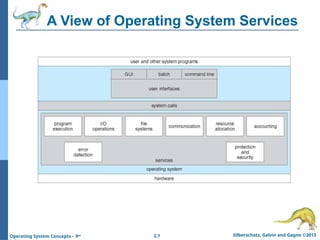
● Operating systems provide an environment for execution of programs and
services to programs and users
● One set of operating-system services provides functions that are helpful to
the user:
● User interface - Almost all operating systems have a user interface (UI).
4 Varies between Command-Line (CLI), Graphics User Interface
(GUI), Batch
● Program execution - The system must be able to load a program into
memory and to run that program, end execution, either normally or
abnormally (indicating error)
● I/O operations - A running program may require I/O, which may
involve a file or an I/O device
● File-system manipulation - The file system is of particular interest.
Programs need to read and write files and directories, create and delete
them, search them, list file Information, permission management.
- 5.
2.5 Silberschatz, Galvinand Gagne ©2013
Operating System Concepts – 9th
Operating System Services (Cont.)
● Communications – Processes may exchange information, on
the same computer or between computers over a network
4 Communications may be via shared memory or through
message passing (packets moved by the OS)
● Error detection – OS needs to be constantly aware of possible
errors
4 May occur in the CPU and memory hardware, in I/O devices,
in user program
4 For each type of error, OS should take the appropriate action
to ensure correct and consistent computing
4 Debugging facilities can greatly enhance the user’s and
programmer’s abilities to efficiently use the system
- 6.
2.6 Silberschatz, Galvinand Gagne ©2013
Operating System Concepts – 9th
Operating System Services (Cont.)
● Another set of OS functions exists for ensuring the efficient operation of
the system itself via resource sharing
● Resource allocation - When multiple users or multiple jobs running
concurrently, resources must be allocated to each of them
4 Many types of resources - Some (such as CPU cycles, main
memory, and file storage) may have special allocation code, others
(such as I/O devices) may have general request and release code
● Accounting - To keep track of which users use how much and what
kinds of computer resources
● Protection and security - The owners of information stored in a
multiuser or networked computer system may want to control use of
that information, concurrent processes should not interfere with each
other
4 Protection involves ensuring that all access to system resources is
controlled
4 Security of the system from outsiders requires user authentication,
extends to defending external I/O devices from invalid access
attempts
4 If a system is to be protected and secure, precautions must be
instituted throughout it. A chain is only as strong as its weakest
link.
- 7.
- 8.
2.8 Silberschatz, Galvinand Gagne ©2013
Operating System Concepts – 9th
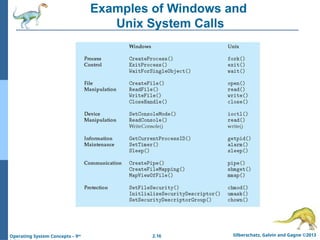
System Calls
● http://www.tuxradar.com/content/how-linux-kernel-works
● Programming interface to the services provided by the OS
● System calls are routines provided by the OS for user-space programs to
interact with the kernel, typically written in C/C++.They allow programs to
perform low-level operations like I/O, file manipulation, and process
creation.
● Typically written in a high-level language (C or C++)
● Mostly accessed by programs via a high-level Application
Programming Interface (API) rather than direct system call use
● Three most common APIs are Win32 API for Windows, POSIX API
for POSIX-based systems (including virtually all versions of UNIX,
Linux, and Mac OS X), and Java API for the Java virtual machine
(JVM)
● Why use APIs rather than system calls?
(Note that the system-call names used throughout this text are
generic)
- 9.
2.9 Silberschatz, Galvinand Gagne ©2013
Operating System Concepts – 9th
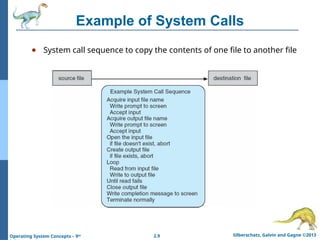
Example of System Calls
● System call sequence to copy the contents of one file to another file
- 10.
2.10 Silberschatz, Galvinand Gagne ©2013
Operating System Concepts – 9th
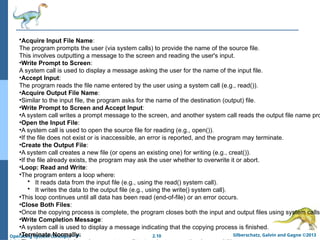
•Acquire Input File Name:
The program prompts the user (via system calls) to provide the name of the source file.
This involves outputting a message to the screen and reading the user's input.
•Write Prompt to Screen:
A system call is used to display a message asking the user for the name of the input file.
•Accept Input:
The program reads the file name entered by the user using a system call (e.g., read()).
•Acquire Output File Name:
•Similar to the input file, the program asks for the name of the destination (output) file.
•Write Prompt to Screen and Accept Input:
•A system call writes a prompt message to the screen, and another system call reads the output file name pro
•Open the Input File:
•A system call is used to open the source file for reading (e.g., open()).
•If the file does not exist or is inaccessible, an error is reported, and the program may terminate.
•Create the Output File:
•A system call creates a new file (or opens an existing one) for writing (e.g., creat()).
•If the file already exists, the program may ask the user whether to overwrite it or abort.
•Loop: Read and Write:
•The program enters a loop where:
• It reads data from the input file (e.g., using the read() system call).
• It writes the data to the output file (e.g., using the write() system call).
•This loop continues until all data has been read (end-of-file) or an error occurs.
•Close Both Files:
•Once the copying process is complete, the program closes both the input and output files using system calls
•Write Completion Message:
•A system call is used to display a message indicating that the copying process is finished.
•Terminate Normally:
- 11.
- 12.
2.12 Silberschatz, Galvinand Gagne ©2013
Operating System Concepts – 9th
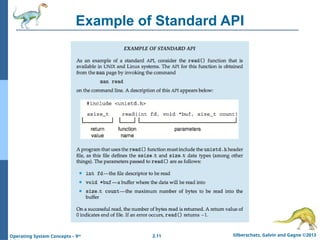
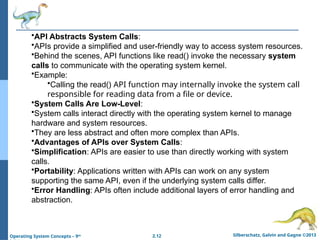
•API Abstracts System Calls:
•APIs provide a simplified and user-friendly way to access system resources.
•Behind the scenes, API functions like read() invoke the necessary system
calls to communicate with the operating system kernel.
•Example:
•Calling the read() API function may internally invoke the system call
responsible for reading data from a file or device.
•System Calls Are Low-Level:
•System calls interact directly with the operating system kernel to manage
hardware and system resources.
•They are less abstract and often more complex than APIs.
•Advantages of APIs over System Calls:
•Simplification: APIs are easier to use than directly working with system
calls.
•Portability: Applications written with APIs can work on any system
supporting the same API, even if the underlying system calls differ.
•Error Handling: APIs often include additional layers of error handling and
abstraction.
- 13.
2.13 Silberschatz, Galvinand Gagne ©2013
Operating System Concepts – 9th
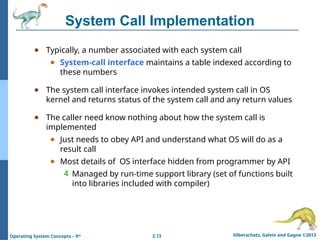
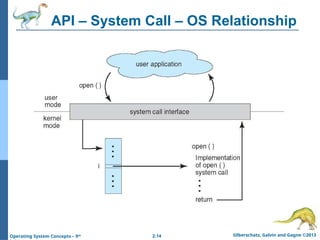
System Call Implementation
● Typically, a number associated with each system call
● System-call interface maintains a table indexed according to
these numbers
● The system call interface invokes intended system call in OS
kernel and returns status of the system call and any return values
● The caller need know nothing about how the system call is
implemented
● Just needs to obey API and understand what OS will do as a
result call
● Most details of OS interface hidden from programmer by API
4 Managed by run-time support library (set of functions built
into libraries included with compiler)
- 14.
- 15.
2.15 Silberschatz, Galvinand Gagne ©2013
Operating System Concepts – 9th
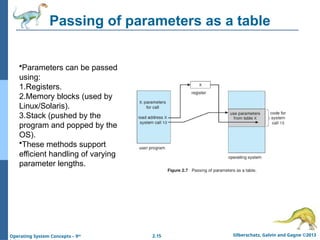
Passing of parameters as a table
•Parameters can be passed
using:
1.Registers.
2.Memory blocks (used by
Linux/Solaris).
3.Stack (pushed by the
program and popped by the
OS).
•These methods support
efficient handling of varying
parameter lengths.
- 16.
- 17.
2.17 Silberschatz, Galvinand Gagne ©2013
Operating System Concepts – 9th
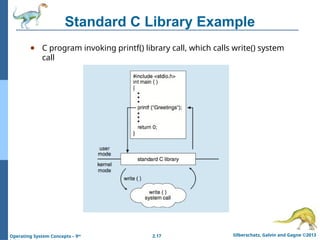
Standard C Library Example
● C program invoking printf() library call, which calls write() system
call
- 18.
2.18 Silberschatz, Galvinand Gagne ©2013
Operating System Concepts – 9th
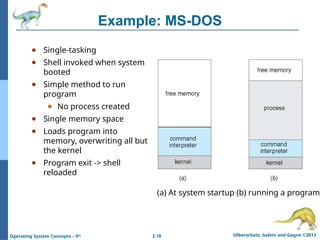
Example: MS-DOS
● Single-tasking
● Shell invoked when system
booted
● Simple method to run
program
● No process created
● Single memory space
● Loads program into
memory, overwriting all but
the kernel
● Program exit -> shell
reloaded
(a) At system startup (b) running a program
- 19.
2.19 Silberschatz, Galvinand Gagne ©2013
Operating System Concepts – 9th
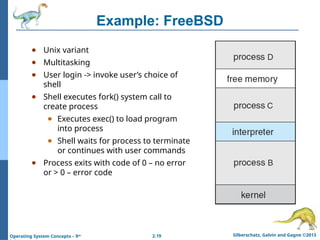
Example: FreeBSD
● Unix variant
● Multitasking
● User login -> invoke user’s choice of
shell
● Shell executes fork() system call to
create process
● Executes exec() to load program
into process
● Shell waits for process to terminate
or continues with user commands
● Process exits with code of 0 – no error
or > 0 – error code
- 20.
2.20 Silberschatz, Galvinand Gagne ©2013
Operating System Concepts – 9th
Operating-System Structure
• Operating systems are large and complex,
requiring careful engineering for proper functioning
and ease of modification.
• One traditional approach is the monolithic system,
where everything is part of a single, large block.
However, a modular approach is often preferred in
modern systems.
• The system is broken into smaller, manageable
components or modules, which helps manage
complexity.
• Each module should have clearly defined inputs,
outputs, and functions to ensure clear interaction
between them.
- 21.
2.21 Silberschatz, Galvinand Gagne ©2013
Operating System Concepts – 9th
Simple Structure
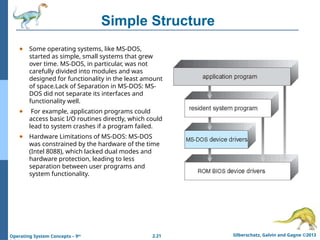
● Some operating systems, like MS-DOS,
started as simple, small systems that grew
over time. MS-DOS, in particular, was not
carefully divided into modules and was
designed for functionality in the least amount
of space.Lack of Separation in MS-DOS: MS-
DOS did not separate its interfaces and
functionality well.
● For example, application programs could
access basic I/O routines directly, which could
lead to system crashes if a program failed.
● Hardware Limitations of MS-DOS: MS-DOS
was constrained by the hardware of the time
(Intel 8088), which lacked dual modes and
hardware protection, leading to less
separation between user programs and
system functionality.
- 22.
2.22 Silberschatz, Galvinand Gagne ©2013
Operating System Concepts – 9th
UNIX
● UNIX – limited by hardware functionality, the original UNIX
operating system had limited structuring. The UNIX OS consists of
two separable parts
● Systems programs
● The kernel
4 Consists of everything below the system-call interface and
above the physical hardware
4 Provides the file system, CPU scheduling, memory
management, and other operating-system functions; a
large number of functions for one level
- 23.
2.23 Silberschatz, Galvinand Gagne ©2013
Operating System Concepts – 9th
Traditional UNIX System Structure
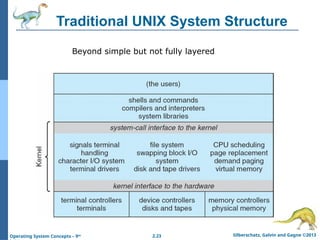
Beyond simple but not fully layered
- 24.
2.24 Silberschatz, Galvinand Gagne ©2013
Operating System Concepts – 9th
Traditional UNIX System Structure
•Layered Structure:
•The traditional UNIX operating system can be viewed as having a somewhat
layered architecture.
•Kernel Placement:
•The kernel lies between the system-call interface and the physical hardware.
•Kernel Responsibilities:
•The kernel provides core functions such as:
•File system management
•CPU scheduling
•Memory management
•Other operating system functions through system calls
•Monolithic Design:
•The kernel combines these functions into a single monolithic structure.
•This structure was challenging to implement and maintain.
•Performance Advantage:
•Minimal overhead exists in the system-call interface and communication within the
kernel.
- 25.
2.25 Silberschatz, Galvinand Gagne ©2013
Operating System Concepts – 9th
Layered Approach
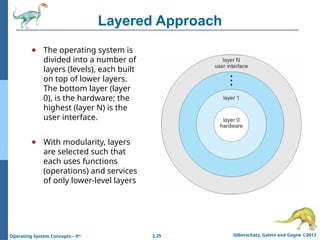
● The operating system is
divided into a number of
layers (levels), each built
on top of lower layers.
The bottom layer (layer
0), is the hardware; the
highest (layer N) is the
user interface.
● With modularity, layers
are selected such that
each uses functions
(operations) and services
of only lower-level layers
- 26.
2.26 Silberschatz, Galvinand Gagne ©2013
Operating System Concepts – 9th
Layered Approach
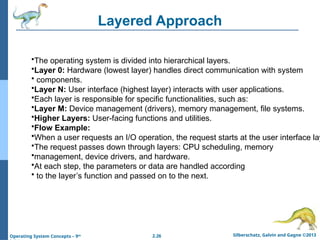
•The operating system is divided into hierarchical layers.
•Layer 0: Hardware (lowest layer) handles direct communication with system
• components.
•Layer N: User interface (highest layer) interacts with user applications.
•Each layer is responsible for specific functionalities, such as:
•Layer M: Device management (drivers), memory management, file systems.
•Higher Layers: User-facing functions and utilities.
•Flow Example:
•When a user requests an I/O operation, the request starts at the user interface lay
•The request passes down through layers: CPU scheduling, memory
•management, device drivers, and hardware.
•At each step, the parameters or data are handled according
• to the layer’s function and passed on to the next.
- 27.
2.27 Silberschatz, Galvinand Gagne ©2013
Operating System Concepts – 9th
Microkernel System Structure
● Moves as much from the kernel into user space
● Mach example of microkernel
● Mac OS X kernel (Darwin) partly based on Mach
● Communication takes place between user modules using
message passing
● Benefits:
● Easier to extend a microkernel
● Easier to port the operating system to new architectures
● More reliable (less code is running in kernel mode)
● More secure
● Detriments:
● Performance overhead of user space to kernel space
communication
- 28.
- 29.
2.29 Silberschatz, Galvinand Gagne ©2013
Operating System Concepts – 9th
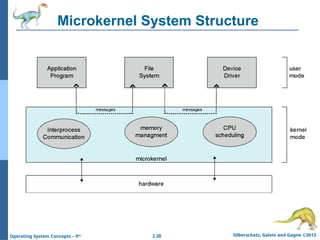
● A microkernel is a type of kernel architecture designed to be as small and simple as
possible while still managing essential operating system services. Unlike traditional
monolithic kernels (where most of the OS services run in kernel space), a microkernel only
includes the most basic services in kernel space, and most of the operating system
functions run in user space. This design enhances modularity and reduces complexity.
- 30.
2.30 Silberschatz, Galvinand Gagne ©2013
Operating System Concepts – 9th
Microkernel System Structure
● Advantages of Microkernels:
● Modularity:
● Services such as device drivers, file systems, and networking run in user space,
making the kernel much smaller and easier to maintain.
● Reliability and Stability:
● Since most OS services run in user space, a crash in one service doesn't directly affect
the kernel or other services.
● Security:
● Microkernels improve security by isolating system services into separate user-space
components. If one component is compromised, it doesn’t necessarily affect others.
● Disadvantages of Microkernels:
● Performance Overhead:
● Communication between user-space services and the kernel incurs performance
overhead because of frequent context switching and IPC.
● Complexity in Communication:
● Designing and managing efficient inter-process communication (IPC) mechanisms
can be complex and error-prone.
- 31.
2.31 Silberschatz, Galvinand Gagne ©2013
Operating System Concepts – 9th
•Microkernels aim for a small, modular kernel with services running in user space
The kernel’s role is primarily to provide inter-process communication
, basic process management, and security, but services are isolated from each oth
•Layered Approach divides the system into multiple hierarchical layers, where
higher layers depend on the lower layers. The layers work together more directly
but still maintain a modular approach for easier debugging and maintenance.
- 32.
2.32 Silberschatz, Galvinand Gagne ©2013
Operating System Concepts – 9th
Modules
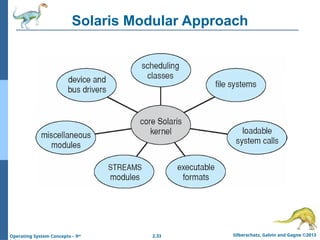
● Most modern operating systems implement loadable kernel modules
● Uses object-oriented approach
● Each core component is separate
● Each talks to the others over known interfaces
● Each is loadable as needed within the kernel
● Overall, similar to layers but with more flexible
● Linux, Solaris, etc
- 33.
- 34.
2.34 Silberschatz, Galvinand Gagne ©2013
Operating System Concepts – 9th
Hybrid Systems
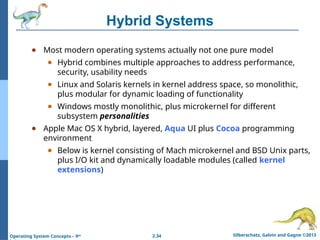
● Most modern operating systems actually not one pure model
● Hybrid combines multiple approaches to address performance,
security, usability needs
● Linux and Solaris kernels in kernel address space, so monolithic,
plus modular for dynamic loading of functionality
● Windows mostly monolithic, plus microkernel for different
subsystem personalities
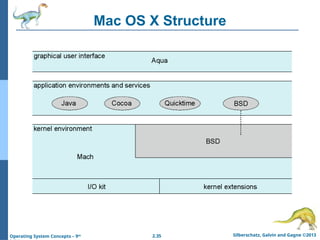
● Apple Mac OS X hybrid, layered, Aqua UI plus Cocoa programming
environment
● Below is kernel consisting of Mach microkernel and BSD Unix parts,
plus I/O kit and dynamically loadable modules (called kernel
extensions)
- 35.
- 36.
2.36 Silberschatz, Galvinand Gagne ©2013
Operating System Concepts – 9th
iOS
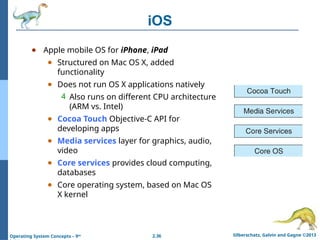
● Apple mobile OS for iPhone, iPad
● Structured on Mac OS X, added
functionality
● Does not run OS X applications natively
4 Also runs on different CPU architecture
(ARM vs. Intel)
● Cocoa Touch Objective-C API for
developing apps
● Media services layer for graphics, audio,
video
● Core services provides cloud computing,
databases
● Core operating system, based on Mac OS
X kernel
- 37.
2.37 Silberschatz, Galvinand Gagne ©2013
Operating System Concepts – 9th
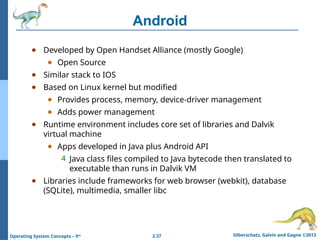
Android
● Developed by Open Handset Alliance (mostly Google)
● Open Source
● Similar stack to IOS
● Based on Linux kernel but modified
● Provides process, memory, device-driver management
● Adds power management
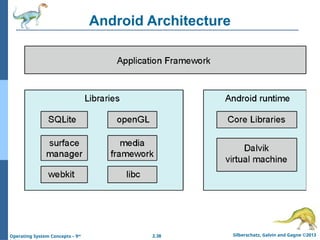
● Runtime environment includes core set of libraries and Dalvik
virtual machine
● Apps developed in Java plus Android API
4 Java class files compiled to Java bytecode then translated to
executable than runs in Dalvik VM
● Libraries include frameworks for web browser (webkit), database
(SQLite), multimedia, smaller libc
- 38.
- 39.