Hands-On Ethical
Hacking and
Network Defense
Chapter 6
Enumeration
Modified 1-11-17
Objectives
Describe the enumeration step of security
testing
Enumerate Microsoft OS targets
Enumerate *NIX OS targets
Introduction to Enumeration
Enumeration extracts information about:
– Resources or shares on the network
– Network topology and architecture
– Usernames or groups assigned on the network
– Information about users and recent logon times
Before enumeration, you use Port scanning and
footprinting
– To Determine OS being used
Intrusive process
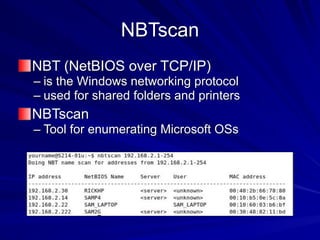
NBTscan
NBT (NetBIOS over TCP/IP)
– is the Windows networking protocol
– used for shared folders and printers
NBTscan
– Tool for enumerating Microsoft OSs
Enumerating Microsoft Operating
Systems
Study OS history
– Knowing your target makes your job easier
Many attacks that work for older Windows
OSs still work with newer versions
Windows 95
The first Windows version that did not start
with DOS
Still used the DOS kernel to some extent
Introduced the Registry database to
replace Win.ini, Autoexec.bat, and other
text files
Introduced Plug and Play and ActiveX
Used FAT16 file system
Windows 98 and ME
More Stable than Win 95
Used FAT32 file system
Win ME introduced System Restore
Win 95, 98, and ME are collectively called
"Win 9x"
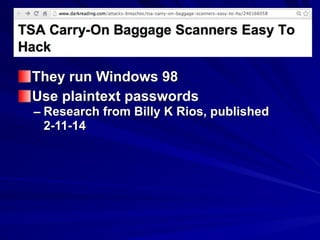
They run Windows 98
Use plaintext passwords
– Research from Billy K Rios, published
2-11-14
Windows NT 3.51 Server/Workstation
No dependence on DOS kernel
Domains and Domain Controllers
NTFS File System to replace FAT16 and
FAT32
Much more secure and stable than Win9x
Many companies still use Win NT Server
Domain Controllers
Win NT 4.0 was an upgrade
Windows 2000 Server/Professional
Upgrade of Win NT
Active Directory
– Powerful database storing information about
all objects in a network
Users, printers, servers, etc.
– Based on Novell's Novell Directory Services
Enumerating this system would include
enumerating Active Directory
Windows XP Professional
Much more secure, especially after
Service Pack 2
– Windows File Protection
– Data Execution Prevention
– Windows Firewall
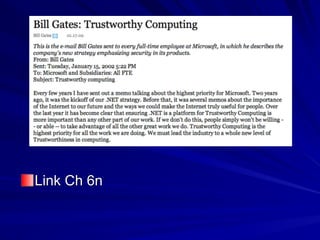
Link Ch 6n
Windows Server 2003
Much more secure, especially after
Service Pack 1
– Network services are closed by default
– Internet Explorer security set higher
14
Windows Vista
User Account Control
– Users log in with low privileges for most tasks
BitLocker Drive Encryption
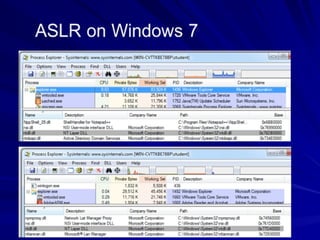
Address Space Layout Randomization
(ASLR)
Download Process Explorer (link Ch 3e)
View, Show Lower Pane
View, Lower Pane View, DLLS
View, Select Columns, DLL tab, Base
Address
Select explorer.exe and find ntdll.dll
Reboot to see base address change
ASLR Demo
17
Windows Server 2008
User Account Control
BitLocker Drive Encryption
ASLR
Network Access Protection
– Granular levels of network access based on a clients
level of compliance with policy
Server Core
– Small, stripped-down server, like Linux
Hyper-V
– Virtual Machines
18
Windows 7
XP Mode
– A virtual machine running Win XP
User Account Control was refined and
made easier to use
Windows 8
Built-in antivirus
SmartScreen protects against phishing
and social engineering by using a URL and
application reputation system
Windows 8 secure boot using EFI on ARM
prevents rootkits
Windows Server 2012
Authentication Silos to reduce the risk of
pass-the-hash attacks
DNSSEC which will someday make DNS
resolutions more secure
Windows 10
Brings back the Start button
Forced automatic updates
Device Guard allows only trusted apps to
run
Credential Guard uses virtualization to
protect access tokens from theft
Reducing the risk of pass-the-hash
attacks
Windows Server 2016
Windows Containers
Like little virtual machines
Can isolate services from one another
NetBIOS Basics
Network Basic Input Output System
(NetBIOS)
– Programming interface
– Allows computer communication over a LAN
– Used to share files and printers
NetBIOS names
Computer names on Windows systems
Limit of 16 characters
Last character identifies type of service
running
Must be unique on a network
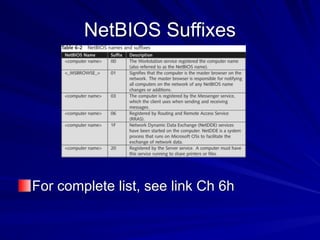
NetBIOS Suffixes
For complete list, see link Ch 6h
NetBIOS Null Sessions
Null session
– Unauthenticated connection to a Windows computer
– Does not use logon and passwords values
Around for over a decade
– Still present on Windows XP
– Disabled on Server 2003
– Absent entirely in Vista and later versions
A large vulnerability
– See links Ch 6a-f
Null Session Information
Using these NULL connections allows you
to gather the following information from the
host:
– List of users and groups
– List of machines
– List of shares
– Users and host SIDs (Security Identifiers)
From brown.edu (link Ch 6b)
NetBIOS Enumeration Tools
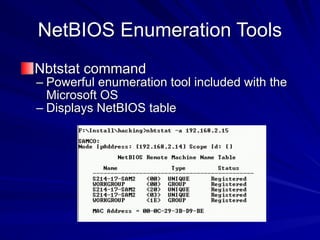
Nbtstat command
– Powerful enumeration tool included with the
Microsoft OS
– Displays NetBIOS table
NetBIOS Enumeration Tools
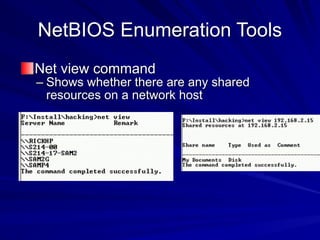
Net view command
– Shows whether there are any shared
resources on a network host
NetBIOS Enumeration Tools
(continued)
Net use command
– Used to connect to a computer with shared
folders or files
Additional Enumeration Tools
Windows tools included with BackTrack
– Smb4K tool
DumpSec
Hyena
Nessus and OpenVAS
Using Windows Enumeration Tools
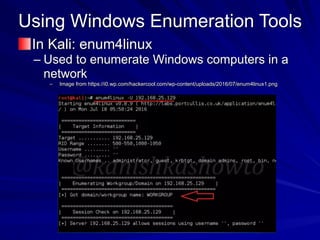
In Kali: enum4linux
– Used to enumerate Windows computers in a
network
– Image from https://i0.wp.com/hackercool.com/wp-content/uploads/2016/07/enum4linux1.png
DumpSec
Enumeration tool for Windows systems
– Produced by Foundstone, Inc.
Allows user to connect to a server and
“dump”:
– Permissions for shares
– Permissions for printers
– Permissions for the Registry
– Users in column or table format
– Policies
– Rights
– Services
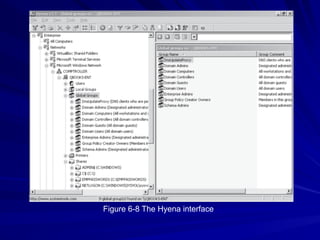
Hyena
Excellent GUI product for managing and
securing Windows OSs
– Shows shares and user logon names for
Windows servers and domain controllers
– Displays graphical representation of:
Microsoft Terminal Services
Microsoft Windows Network
Web Client Network
Find User/Group
Figure 6-8 The Hyena interface
Nessus and OpenVAS
OpenVAS
– Operates in client/server mode
– Open-source descendent of Nessus
Popular tool for identifying vulnerabilities
Nessus Server and Client
– Latest version can run on Windows, Mac OS
X, FreeBSD, and most Linux distributions
– Handy when enumerating different OSs on a
large network
Many servers in different locations
Enumerating the *nix Operating
System
Several variations
– Solaris and OpenSolaris
– HP-UX
– Mac OS X and OpenDarwin
– AIX
– BSD UNIX
– FreeBSD
– OpenBSD
– NetBSD
– Linux, including several distributions
Enumerating the *nix Operating
System
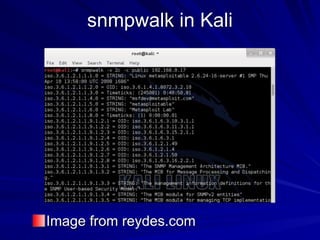
Simple Network Management Protocol
(SNMP)
Enables remote administration of
servers, routers, switches, firewalls, and
other devices
Can be used on Windows and Linux
snmpwalk in Kali
Image from reydes.com
UNIX Enumeration
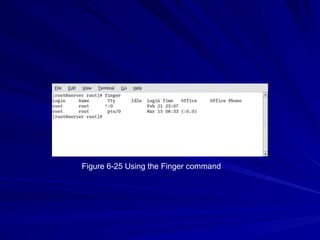
Finger utility
– Most popular enumeration tool for security
testers
– Finds out who is logged in to a *nix system
– Determines who was running a process
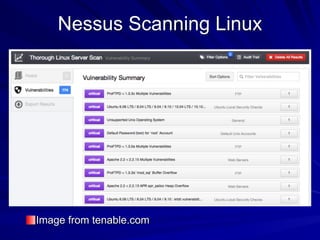
Nessus
– Another important *nix enumeration tool
Figure 6-25 Using the Finger command
Nessus Scanning Linux
Image from tenable.com

Ch 6: Enumeration

  • 1.
    Hands-On Ethical Hacking and NetworkDefense Chapter 6 Enumeration Modified 1-11-17
  • 2.
    Objectives Describe the enumerationstep of security testing Enumerate Microsoft OS targets Enumerate *NIX OS targets
  • 3.
    Introduction to Enumeration Enumerationextracts information about: – Resources or shares on the network – Network topology and architecture – Usernames or groups assigned on the network – Information about users and recent logon times Before enumeration, you use Port scanning and footprinting – To Determine OS being used Intrusive process
  • 4.
    NBTscan NBT (NetBIOS overTCP/IP) – is the Windows networking protocol – used for shared folders and printers NBTscan – Tool for enumerating Microsoft OSs
  • 5.
    Enumerating Microsoft Operating Systems StudyOS history – Knowing your target makes your job easier Many attacks that work for older Windows OSs still work with newer versions
  • 6.
    Windows 95 The firstWindows version that did not start with DOS Still used the DOS kernel to some extent Introduced the Registry database to replace Win.ini, Autoexec.bat, and other text files Introduced Plug and Play and ActiveX Used FAT16 file system
  • 7.
    Windows 98 andME More Stable than Win 95 Used FAT32 file system Win ME introduced System Restore Win 95, 98, and ME are collectively called "Win 9x"
  • 8.
    They run Windows98 Use plaintext passwords – Research from Billy K Rios, published 2-11-14
  • 9.
    Windows NT 3.51Server/Workstation No dependence on DOS kernel Domains and Domain Controllers NTFS File System to replace FAT16 and FAT32 Much more secure and stable than Win9x Many companies still use Win NT Server Domain Controllers Win NT 4.0 was an upgrade
  • 10.
    Windows 2000 Server/Professional Upgradeof Win NT Active Directory – Powerful database storing information about all objects in a network Users, printers, servers, etc. – Based on Novell's Novell Directory Services Enumerating this system would include enumerating Active Directory
  • 11.
    Windows XP Professional Muchmore secure, especially after Service Pack 2 – Windows File Protection – Data Execution Prevention – Windows Firewall
  • 12.
  • 13.
    Windows Server 2003 Muchmore secure, especially after Service Pack 1 – Network services are closed by default – Internet Explorer security set higher
  • 14.
    14 Windows Vista User AccountControl – Users log in with low privileges for most tasks BitLocker Drive Encryption Address Space Layout Randomization (ASLR)
  • 15.
    Download Process Explorer(link Ch 3e) View, Show Lower Pane View, Lower Pane View, DLLS View, Select Columns, DLL tab, Base Address Select explorer.exe and find ntdll.dll Reboot to see base address change ASLR Demo
  • 17.
    17 Windows Server 2008 UserAccount Control BitLocker Drive Encryption ASLR Network Access Protection – Granular levels of network access based on a clients level of compliance with policy Server Core – Small, stripped-down server, like Linux Hyper-V – Virtual Machines
  • 18.
    18 Windows 7 XP Mode –A virtual machine running Win XP User Account Control was refined and made easier to use
  • 19.
    Windows 8 Built-in antivirus SmartScreenprotects against phishing and social engineering by using a URL and application reputation system Windows 8 secure boot using EFI on ARM prevents rootkits
  • 20.
    Windows Server 2012 AuthenticationSilos to reduce the risk of pass-the-hash attacks DNSSEC which will someday make DNS resolutions more secure
  • 21.
    Windows 10 Brings backthe Start button Forced automatic updates Device Guard allows only trusted apps to run Credential Guard uses virtualization to protect access tokens from theft Reducing the risk of pass-the-hash attacks
  • 22.
    Windows Server 2016 WindowsContainers Like little virtual machines Can isolate services from one another
  • 23.
    NetBIOS Basics Network BasicInput Output System (NetBIOS) – Programming interface – Allows computer communication over a LAN – Used to share files and printers
  • 24.
    NetBIOS names Computer nameson Windows systems Limit of 16 characters Last character identifies type of service running Must be unique on a network
  • 25.
    NetBIOS Suffixes For completelist, see link Ch 6h
  • 26.
    NetBIOS Null Sessions Nullsession – Unauthenticated connection to a Windows computer – Does not use logon and passwords values Around for over a decade – Still present on Windows XP – Disabled on Server 2003 – Absent entirely in Vista and later versions A large vulnerability – See links Ch 6a-f
  • 27.
    Null Session Information Usingthese NULL connections allows you to gather the following information from the host: – List of users and groups – List of machines – List of shares – Users and host SIDs (Security Identifiers) From brown.edu (link Ch 6b)
  • 28.
    NetBIOS Enumeration Tools Nbtstatcommand – Powerful enumeration tool included with the Microsoft OS – Displays NetBIOS table
  • 29.
    NetBIOS Enumeration Tools Netview command – Shows whether there are any shared resources on a network host
  • 30.
    NetBIOS Enumeration Tools (continued) Netuse command – Used to connect to a computer with shared folders or files
  • 31.
    Additional Enumeration Tools Windowstools included with BackTrack – Smb4K tool DumpSec Hyena Nessus and OpenVAS
  • 32.
    Using Windows EnumerationTools In Kali: enum4linux – Used to enumerate Windows computers in a network – Image from https://i0.wp.com/hackercool.com/wp-content/uploads/2016/07/enum4linux1.png
  • 33.
    DumpSec Enumeration tool forWindows systems – Produced by Foundstone, Inc. Allows user to connect to a server and “dump”: – Permissions for shares – Permissions for printers – Permissions for the Registry – Users in column or table format – Policies – Rights – Services
  • 34.
    Hyena Excellent GUI productfor managing and securing Windows OSs – Shows shares and user logon names for Windows servers and domain controllers – Displays graphical representation of: Microsoft Terminal Services Microsoft Windows Network Web Client Network Find User/Group
  • 35.
    Figure 6-8 TheHyena interface
  • 36.
    Nessus and OpenVAS OpenVAS –Operates in client/server mode – Open-source descendent of Nessus Popular tool for identifying vulnerabilities Nessus Server and Client – Latest version can run on Windows, Mac OS X, FreeBSD, and most Linux distributions – Handy when enumerating different OSs on a large network Many servers in different locations
  • 37.
    Enumerating the *nixOperating System Several variations – Solaris and OpenSolaris – HP-UX – Mac OS X and OpenDarwin – AIX – BSD UNIX – FreeBSD – OpenBSD – NetBSD – Linux, including several distributions
  • 38.
    Enumerating the *nixOperating System Simple Network Management Protocol (SNMP) Enables remote administration of servers, routers, switches, firewalls, and other devices Can be used on Windows and Linux
  • 39.
    snmpwalk in Kali Imagefrom reydes.com
  • 40.
    UNIX Enumeration Finger utility –Most popular enumeration tool for security testers – Finds out who is logged in to a *nix system – Determines who was running a process Nessus – Another important *nix enumeration tool
  • 41.
    Figure 6-25 Usingthe Finger command
  • 42.