CEH Lab Manual
Footprinting and
Reconnaissance
Module 02
Module 02 - Footprinting and Reconnaissance
Footprirvting a Target Network
Footprintingrefers to uncoveringandcollectingas much information aspossible
regardinga targetnetnork
Lab Scenario
Penetration testing is much more than just running exploits against vulnerable
systems like we learned about 111the previous module. 111 fact, a penetration test
begins before penetration testers have even made contact with the victim’s
systems. Rather than blindly throwing out exploits and praying that one of
them returns a shell, a penetration tester meticulously studies the environment
for potential weaknesses and their mitigating factors. By the time a penetration
tester runs an exploit, he or she is nearly certain that it will be successful. Since
failed exploits can 111 some cases cause a crash or even damage to a victim
system, or at the very least make the victim un-exploitable 111 the tumre,
penetration testers won't get the best results, or deliver the most thorough
report to then‫־‬clients, if they blindly turn an automated exploit machine on the
victim network with no preparation.
Lab Objectives
The objective of the lab is to extract information concerning the target
organization that includes, but is not limited to:
■ IP address range associated with the target
■ Purpose of organization and why does it exists
■ How big is the organization? What class is its assigned IP Block?
■ Does the organization freely provide information on the type of
operating systems employed and network topology 111use?
■ Type of firewall implemented, either hardware or software or
combination of both
■ Does the organization allow wireless devices to connect to wired
networks?
■ Type of remote access used, either SSH or T N
■ Is help sought on IT positions that give information on network
services provided by the organization?
Ethical H acking and Countem ieasures Copyright © by EC-Council
All Rights Reserved. Reproduction is Stricdy Prohibited.
Valuable
mfonnation_____
Test your
knowledge
sA Web exercise
m Workbook review
C EH Lab M anual Page 2
Module 02 - Footprinting and Reconnaissance
■ IdentitV organization’s users who can disclose their personal
information that can be used for social engineering and assume such
possible usernames
Lab Environment
Tins lab requires:
■ Windows Server 2012 as host machine
■ A web browser with an Internet connection
■ Administrative privileges to 11111tools
Lab Duration
Time: 50 ]Minutes
Overview of Footprinting
Before a penetration test even begins, penetration testers spend time with their
clients working out the scope, mles, and goals ot the test. The penetration testers
may break 111using any means necessary, from information found 111the dumpster,
to web application security holes, to posing as the cable guy.
After pre-engagement activities, penetration testers begin gathering information
about their targets. Often all the information learned from a client is the list of IP
addresses and/or web domains that are 111 scope. Penetration testers then learn as
much about the client and their systems as possible, from searching for employees
on social networking sites to scanning die perimeter for live systems and open ports.
Taking all the information gathered into account, penetration testers sftidv the
systems to find the best routes of attack. Tins is similar to what an attacker would do
or what an invading army would do when trying to breach the perimeter. Then
penetration testers move into vulnerabilitv analysis, die first phase where they are
actively engaging the target. Some might say some port scanning does complete
connections. However, as cybercrime rates nse, large companies, government
organizations, and other popular sites are scanned quite frequendy. During
vulnerability analysis, a penetration tester begins actively probing the victim
systems for vulnerabilities and additional information. Only once a penetration
tester has a hill view of the target does exploitation begin. Tins is where all of the
information that has been meticulously gathered comes into play, allowing you to be
nearly 100% sure that an exploit will succeed.
Once a system has been successfully compromised, the penetration test is over,
right? Actually, that's not nght at all. Post exploitation is arguably the most
important part of a penetration test. Once you have breached the perimeter there is
whole new set of information to gather. You may have access to additional systems
that are not available trom the perimeter. The penetration test would be useless to a
client without reporting. You should take good notes during the other phases,
because during reporting you have to tie evervdiing you found together 111 a way
Ethical H acking and Countem ieasures Copyright © by EC-Council
All Rights Reserved. Reproduction is Stricdy Prohibited.
& Tools
demonstrated in
this lab are
available in
D:CEH-
ToolsCEHv8
Module 02
Footprinting and
Reconnaissance
C EH Lab M anual Page 3
Module 02 - Footprinting and Reconnaissance
everyone from the IT department who will be remediating the vulnerabilities to the
business executives who will be approving die budget can understand.
Lab Tasks
Pick an organization diat you feel is worthy of vour attention. Tins could be an
educational institution, a commercial company. 01 perhaps a nonprofit
charity.
Recommended labs to assist you 111footprinting;
■ Basic Network Troubleshooting Using the ping utility and nslookup Tool
■ People Search Using Anywho and Spokeo Online Tool
■ Analyzing Domain and IP Address Queries Using SmartWhois
■ Network Route Trace Using Path Analyzer Pro
■ Tracing Emails Using eMailTrackerPro Tool
■ Collecting Information About a target’s Website Using Firebug
■ Mirroring Website Using HTTrack Web Site Copier Tool
■ Extracting Company’s Data Using Web Data Extractor
■ Identifying Vulnerabilities and Information Disclosures 111Search Engines
using Search Diggity
Lab Analysis
Analyze and document the results related to die lab exercise. Give your opinion 011
your target’s security posture and exposure through public and free information.
P L E A S E T AL K T O Y O U R I N S T R U C T O R IF Y O U H A V E Q U E S T I O N S
R E L A T E D T O T H I S LAB.
Ethical H acking and Countermeasures Copyright © by EC-Council
All Rights Reserved. Reproduction is Stricdy Prohibited.
m TASK 1
Overview
C EH Lab M anual Page 4
Module 02 - Footprinting and Reconnaissance
Lab
1
Footprinting a Target Network
Using the Ping Utility
Pingis a computernetwork administrati0)1utility usedto testthe reachability of a
hostonan Internetprotocol(IP) network andto measurethe ronnd-trip timefor
messagessentfrom the originatinghostto a destination computer.
Lab Scenario
As a professional penetration tester, you will need to check for the reachability
of a computer 111 a network. Ping is one of the utilities that will allow you to
gather important information like IP address, maximum Packet Fame size,
etc. about the network computer to aid 111successful penetration test.
Lab Objectives
Tins lab provides insight into the ping command and shows how to gather
information using the ping command. The lab teaches how to:
■ Use ping
■ Emulate the tracert (traceroute) command with ping
■ Find maximum frame size for the network
■ Identity ICMP type and code for echo request and echo reply packets
Lab Environment
To carry out this lab you need:
■ Administrative privileges to run tools
■ TCP/IP settings correctly configured and an accessible DNS server
■ Tins lab will work 111the CEH lab environment - on Windows Server
2012. Windows 8 , Windows Server 2008. and Windows 7
Ethical H acking and Countermeasures Copyright © by EC-Council
All Rights Reserved. Reproduction is Stricdy Prohibited.
ICON KEY
[£Z7 Valuable
information
Test your
knowledge______
* Web exercise
Workbook review
& Tools
demonstrated in
this lab are
available in
D:CEH-
ToolsCEHv8
Module 02
Footprinting and
Reconnaissance
C EH Lab M anual Page 5
Module 02 - Footprinting and Reconnaissance
Lab Duration
Tune: 10 Minutes
Overview of Ping
The ping command sends Internet Control Message Protocol (ICMP) echo request
packets to the target host and waits tor an ICMP response. During tins request-
response process, ping measures the time from transmission to reception, known as
die round-trip time, and records any loss of packets.
Lab Tasks
1. Find the IP address lor http:/ Avww.certihedhacker.com
2. To launch Start menu, hover the mouse cursor in the lower-left corner
of the desktop
FIGURE 1.1:Windows Server 2012—Desktop view
3. Click Command Prompt app to open the command prompt window
FIGURE 1.2:Windows Server 2012—Apps
Type ping www.certifiedhacker.com 111the command prompt, and
press Enter to find out its IP address
The displayed response should be similar to the one shown 111the
following screenshot
b.
& PING stands for
Packet Internet Groper.
Ping command Syntax:
ping [-q] [-v] [-R] [-c
Count] [-iWait] [-s
PacketSize] Host.
Locate IP Address
For die command,
ping -c count, specify die
number of echo requests to
send.
Ethical H acking and Countermeasures Copyright © by EC-Council
All Rights Reserved. Reproduction is Strictly Prohibited.
C EH Lab M anual Page 6
Module 02 - Footprinting and Reconnaissance
'*'‫ם‬‫י‬‫־‬!Administrator: C:Windowssystem32cmd.exe
m The piiig command,
“ping —i wait,” means wait
time, that is the number of
seconds to wait between
each ping.
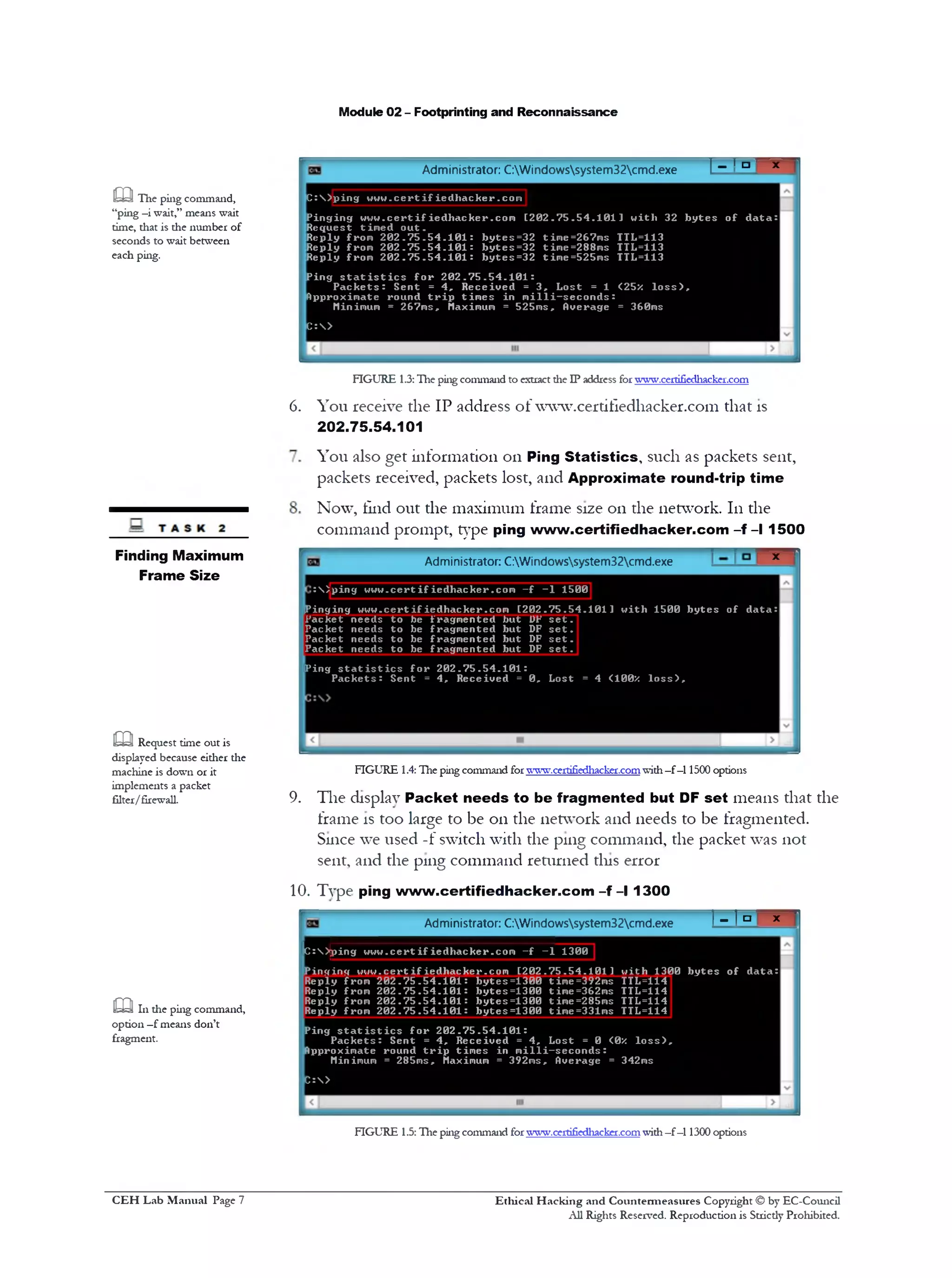
C :  ) p i n g u u u . c e r t i f ie d l1a c k er .co m
P in g in g w w w . c e r t i f ie d h a c k e r .c o m [ 2 0 2 . 7 5 . 5 4 . 1 0 1 1 w it 11 32 b y t e s o f d a t a :
R eq uest tim e d o u t .
R eply from 2 0 2 . ? 5 . 5 4 . 1 0 1 : b y t e s =32 tim e=267m s TTL=113
R eply from 2 0 2 . 7 5 . 5 4 . 1 0 1 : b y t e s = 3 2 tim e=288m s TTL=113
R eply from 2 0 2 . 7 5 . 5 4 . 1 0 1 : b y t e s = 3 2 tim e=525m s TTL=113
P ing s t a t i s t i c s f o r 2 0 2 . 7 5 . 5 4 . 1 0 1 :
P a c k e t s : S en t = 4 , R e c e iv e d = 3 , L o st = 1 <25z l o s s ) ,
Approxim ate round t r i p t im e s in m i l l i —s e c o n d s :
Minimum = 267m s, Maximum = 525m s, Overage = 360ms
C :>
FIGURE 1.3:The ping command to extract die IP address for www.certifiedhacker.com
You receive the IP address of www.certifledhacker.com that is
202.75.54.101
You also get information 011 Ping Statistics, such as packets sent,
packets received, packets lost, and Approximate round-trip time
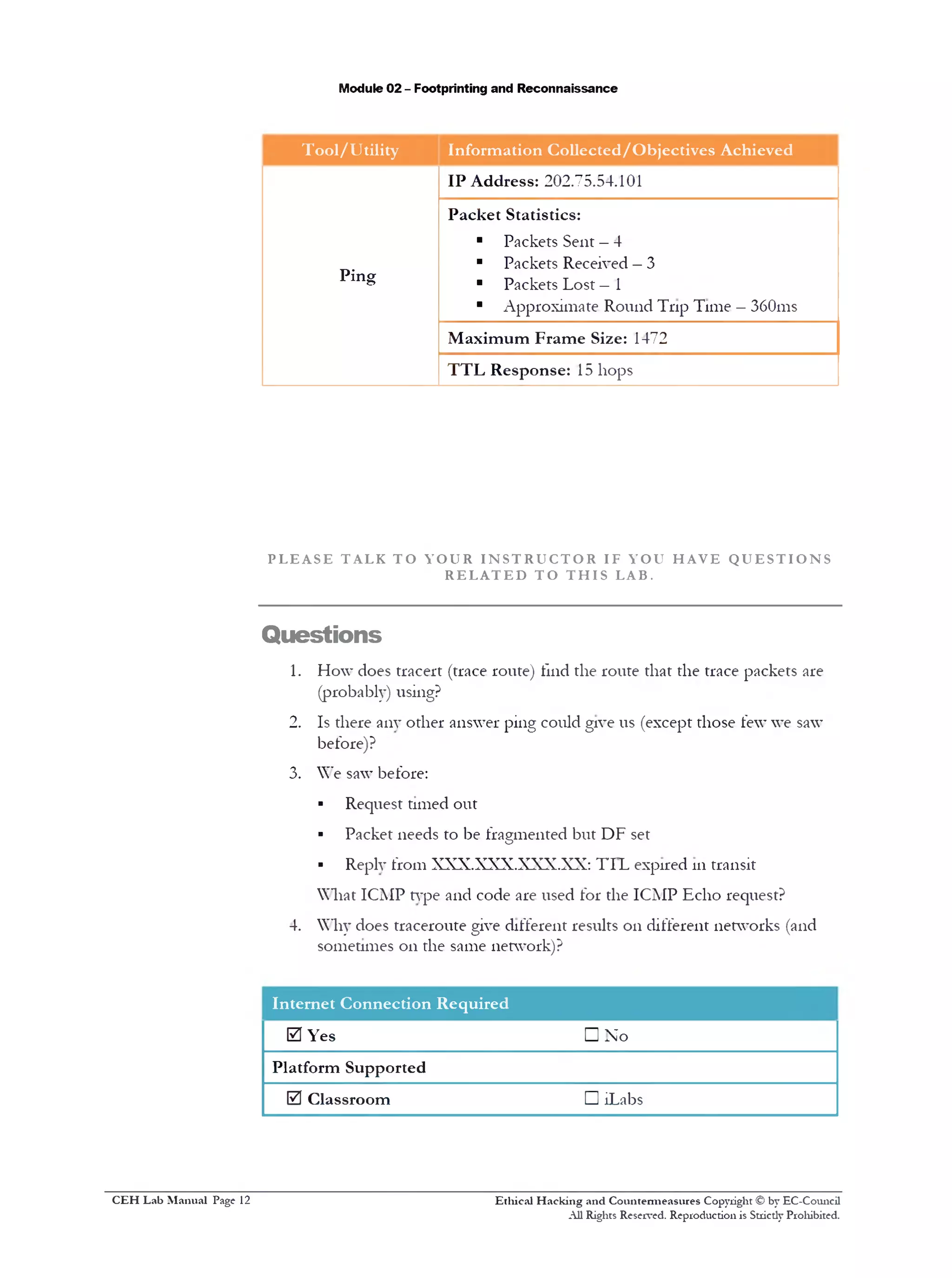
Now, find out the maximum frame size 011 the network. 111the
command prompt, type ping www.certifiedhacker.com - f - l 1500
6.
‫׳‬*Administrator: C:Windowssystem32cmd.exe
15001‫־‬p in g w w u .c e r t i f i e d l1a ck er.co m - f:  <
!Pinging w w w .c e r tifie d h a c k e r .c o m [ 2 0 2 .7 5 .5 4 .1 0 1 1 w ith 1500 b y t e s o f d a ta :
Packet n eeds t o be fragm en ted but UP s e t .
Packet n eeds t o be fragm en ted but DF s e t .
P acket n eeds t o be fragm en ted but DF s e t .
Packet n eeds t o be fragm en ted but DF s e t .
P in g s t a t i s t i c s f o r 2 0 2 . 7 5 . 5 4 . 1 0 1 :
P a c k e t s : S en t = 4 , R eceiv ed = 0 , Lost = 4 <100* l o s s ) .
FIGURE 1.4: The ping command forwww.certifiedhacker-comwith—f —11500 options
9. The display Packet needs to be fragmented but DF set means that the
frame is too large to be on the network and needs to be fragmented.
Since we used -f switch with the ping command, the packet was not
sent, and the ping command returned this error
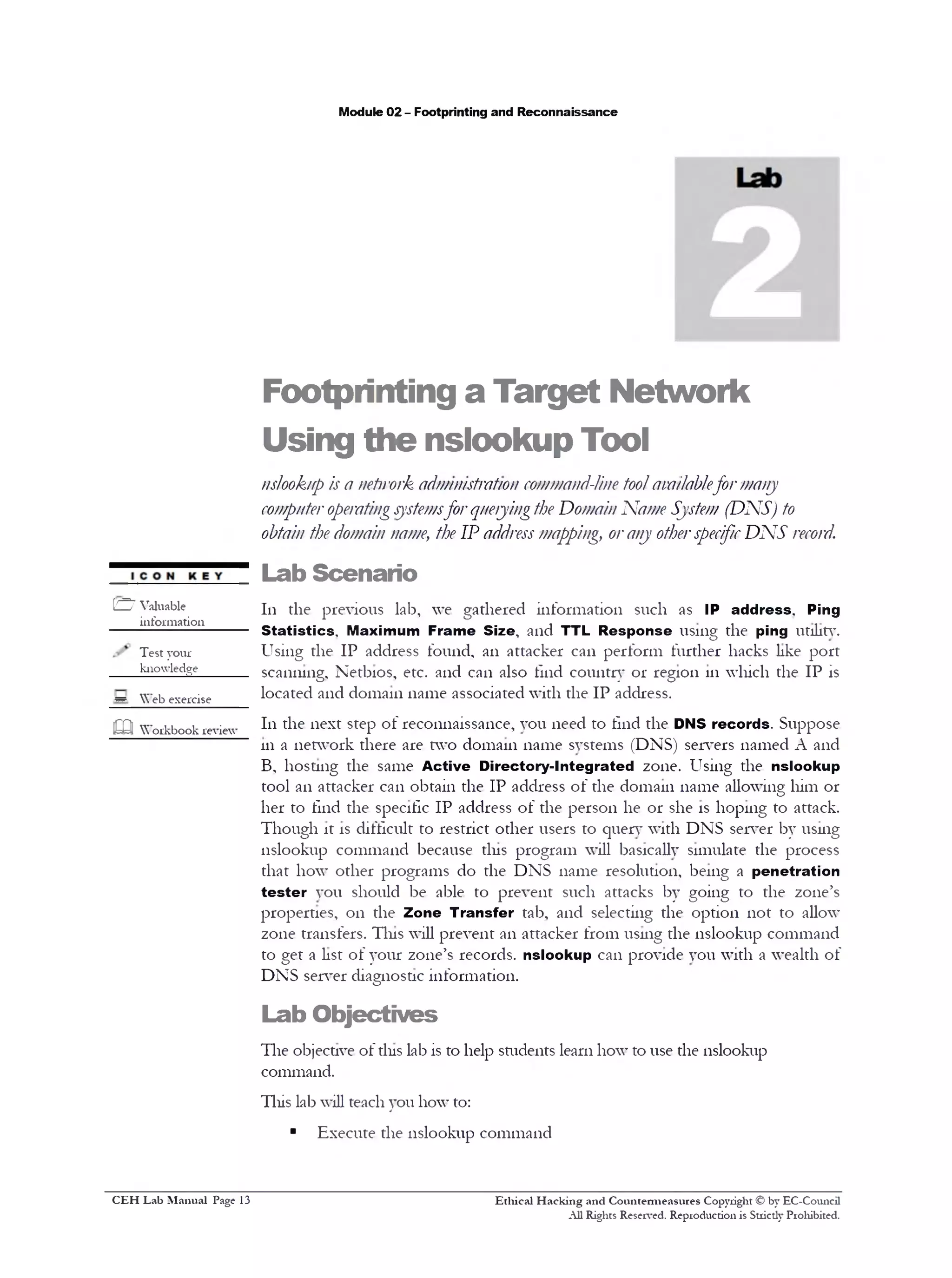
10. Type ping www.certifiedhacker.com -f - l 1300
Finding Maximum
Frame Size
m Request time out is
displayed because either the
machine is down or it
implements a packet
filter/firewall.
! - ! = ■ X '
Administrator: C:Windowssystem32cmd.exe
m 111 the ping command,
option —f means don’t
fragment.
Ic:>jping w w w .c e r t if ie d h a c k e r .c o m - f - 1 1300
P i n g in g w w w .c e r t if ie d h a c k e r .c o m [ 2 0 2 . 7 5 . 5 4 . 1 0 1 1 w ith 1300 b y t e s o f d a ta :
Reply from 2 0 2 .7 5 . 5 4 . 1 0 1 : b y te s = 1 3 0 0 time=392ms TTL=114
Reply from 2 0 2 .7 5 . 5 4 . 1 0 1 : b y te s = 1 3 0 0 time=362ms TTL=114
Reply from 2 0 2 .7 5 . 5 4 . 1 0 1 : b y te s = 1 3 0 0 time=285ms TTL=114
Reply from 2 0 2 .7 5 . 5 4 . 1 0 1 : b y te s = 1 3 0 0 time=331ms TTL=114
Ping s t a t i s t i c s f o r 2 0 2 . 7 5 . 5 4 . 1 0 1 :
P a c k e t s : S en t = 4 , R ec e iv e d = 4 , L o st = 0 <0X l o s s ) ,
Approximate round t r i p tim e s in m i l l i —s e c o n d s :
Minimum = 285ms, Maximum = 392m s, Average = 342ms
C :>
FIGURE 1.5: The ping command forwww.certifiedhacker.comwith—f —11300 options
Ethical H acking and Countermeasures Copyright © by EC-Council
All Rights Reserved. Reproduction is Strictly Prohibited.
C EH Lab M anual Page 7
Module 02 - Footprinting and Reconnaissance
11. You can see that the maximum packet size is less than 1500 bytes and
more than 1300 bytes
12. Now, try different values until you find the maximum frame size. For
instance, ping www.certifiedhacker.com -f - l 1473 replies with
Packet needs to be fragmented but DF set and ping
www.certifiedhacker.com -f- l 1472 replies with a successful ping. It
indicates that 1472 bytes is the maximum frame size on tins machine
network
Note: The maximum frame size will differ depending upon on the network
In die ping command,
“Ping —q,” means quiet
output, only summary lines
at startup and completion.
Administrator: C:Windowssystem32cmd.exe I ‫־־‬ I ‫ם‬ x 1
C :S )p in g w o w .cert i f ied h a ck er .co m - f 1473 1‫־‬
Pinccinc» w w w .c e r t if ied h a ck er .co m [ 2 0 2 . 7 5 . 5 4 . 1 0 1 1 w itli 1473 b y t e s o f d a ta :
Packet n eeds t o be fra gm en ted but DF s e t .
Packet n eed s t o be fra gm en ted but DF s e t .
Packet n eed s t o be fragm en ted but DF s e t .
Packet n eeds t o be fragm en ted but DF s e t .
P in g s t a t i s t i c s f o r 2 0 2 . 7 5 . 5 4 . 1 0 1 :
P a c k e t s : S en t = 4 , R ec e iv e d = 0 , L o st = 4 <100/ l o s s ) .
FIGURE 1.6: The ping command forwww.certifiedhacker.comwith—f—11473 options
1- 1=' » 'Administrator: C:Windowssystem32cmd.exe
C :>'ping w w w .c e r t if ie d h a c k e r .c o m - f - 1 1472
[Pinging w w w .c e r t if ie d h a c k e r .c o m [ 2 0 2 . 7 5 . 5 4 . 1 0 1 ] w ith 1472 b y t e s o f d a ta :
R eply from 2 0 2 . 7 5 . 5 4 . 1 0 1 : b y tes= 1 4 7 2 time=359ms TTL=114
R eply from 2 0 2 . 7 5 . 5 4 . 1 0 1 : b y t e s =1472 time=320ms TTL=114
R eply from 2 0 2 . 7 5 . 5 4 . 1 0 1 : b y tes= 1 4 7 2 time=282ms TTL=114
R eply from 2 0 2 . 7 5 . 5 4 . 1 0 1 : b y tes= 1 4 7 2 time=317ms TTL=114
Ping s t a t i s t i c s f o r 2 0 2 . 7 5 . 5 4 . 1 0 1 :
P a c k e t s : S en t = 4 , R ec e iv e d = 4 , Lost = 0 <0X l o s s ) ,
Approximate round t r i p tim e s in m i l l i - s e c o n d s :
Minimum = 282ms, Maximum = 359ms, Overage = 319ms
FIGURE 1.7: Hie ping command forwww.certifiedhacker.comwith—f—11472 options
13. Now, find out what happens when TTL (Time to Live) expires. Ever}1
frame 011 the network has TTL defined. If TTL reaches 0, the router
discards the packet. This mechanism prevents the loss of packets
14. 111the command prompt, type ping www.certifiedhacker.com -i 3.
The displayed response should be similar to the one shown 111the
following figure, but with a different IP address
c a The router discards
packets when TTL reaches
0(Zero) value.
! The ping command,
“Ping —R,” means record
route. It turns on route
recording for the Echo
Request packets, and
displays die route buffer on
returned packets (ignored
by many routers).
Ethical H acking and Countermeasures Copyright © by EC-Council
All Rights Reserved. Reproduction is Strictly Prohibited.
C EH Lab M anual Page 8
Module 02 - Footprinting and Reconnaissance
ej Administrator: C:Windowssystem32cmd.exe
C :> p in g u u w .c e r t if i e d h a c k e r .c o m - i 3
Pinsrincf 1 7 u u .c e r tifie d h a c k e r .c o m [2 0 2 .7 5 . 5 4 . 1 0 1 ] u i t h 32 b y t e s
1o f d a ta : p
R eply from 1 8 3 . 8 2 . 1 4 . 1 7 : TTL e x p ir e d in
Reply from 1 8 3 . 8 2 . 1 4 . 1 7 : TTL e x p ir e d in
t r a n s i t .
t r a n s i t .
t r a n s i t .
t r a n s i t .
■Ping s t a t i s t i c s f o r 2 0 2 . 7 5 . 5 4 . 1 0 1 :
P a c k e t s : Sent = 4 , R eceiv ed = 4 , L ost = 0 <0X l o s s ) .
lc:>
| < | 111 ‫רדו‬<1j
FIGURE 1.8: The ping command forvvvwcfrrifiedhacker.comwith -i 3 options
15. Reply from 183.82.14.17: TTL expired in transit means that the router
(183.82.14.17, students will have some other IP address) discarded the
frame, because its TTL has expired (reached 0)
16. The Emulate tracert (traceroute) command, using ping - manually,
found the route from your PC to ww~w.cert111edhacker.com
17. The results you receive are different from those 111tins lab. Your results
may also be different from those of the person sitting next to you
18. 111the command prompt, type ping www.certifiedhacker.com -i 1 -n
1. (Use -11 1 in order to produce only one answer, instead of receiving
four answers on Windows or pinging forever on Linux.) The displayed
response should be similar to the one shown in the following figure
T A S K 3
Emulate Tracert
Administrator: C:Windowssystem32cmd.exe
caIn the ping command,
the -i option represents
time to live TTL.
C :  > p i n g w w w . c e r t i f ie d h a c k e r .c o m —i 1 —n 1
P i n g i n g w w w . c e r t i f i e d h a c k e r . c o m [ 2 0 2 . 7 5 . 5 4 . 1 0 1 ] w i t h 32 b y t e s o f da
R e q u e st t im e d o u t .
P in g s t a t i s t i c s f o r 2 0 2 . 7 5 . 5 4 . 1 0 1 :
P a c k e t s : S e n t = 1 , R e c e i v e d = 0 , L o s t = 1 <100x 1 0 s s > ‫״‬
C : >
FIGURE 1.9: The ping command for ™ ‫׳!י‬ crrrifiedl1acker.comwith—i 1—n 1options
19. 111the command prompt, type ping www.certifiedhacker.com -i 2 -n
1. The only difference between the previous pmg command and tliis
one is -i 2 . The displayed response should be similar to the one shown
111the following figure
Ethical H acking and Countermeasures Copyright © by EC-Council
All Rights Reserved. Reproduction is Strictly Prohibited.
C EH Lab M anual Page 9
Module 02 - Footprinting and Reconnaissance
Administrator: C:Windowssystem32cmd.exe
m 111 the ping command,
-t means to ping the
specified host until
stopped.
C :  ) p i n g w w w . c e r t i f i e d h a c k e r . c o m —i 2 —n 1
P i n g i n g w w w . c e r t i f i e d h a c k e r . c o m [ 2 0 2 . 7 5 . 5 4 . 1 0 1 ] w i t h 32 b y t e s o f da
R e q u e st t im e d o u t .
P in g s t a t i s t i c s f o r 2 0 2 . 7 5 . 5 4 . 1 0 1 :
P a c k e t s : S e n t = 1 , R e c e i v e d = 0 , L o s t = 1 <100X l o s s ) ,
C : >
FIGURE 1.10:The ping command forwww.certifiedl1acke1.co1n with -i 2- 111options
20.111the command prompt, type ping www.certifiedhacker.com -i 3 -n
1. Use -n 1 111order to produce only one answer (instead of four on
Windows or pinging forever on Linux). The displayed response should
be similar to the one shown 111the following figure
sIn the ping command,
the -v option means
verbose output, which lists
individual ICMP packets, as
well as echo responses.
C :  ) p i n g w w w . c e r t i f i e d h a c k e r . c o n - i 3 - n 1
P i n g i n g w w w . c e r t i f i e d h a c k e r . c o m [ 2 0 2 . 7 5 . 5 4 . 1 0 1 ] w i t h 32 b y t e s o f da
R e p ly fro m 1 8 3 . 8 2 . 1 4 . 1 7 : TTL e x p i r e d in t r a n s i t .
P in g s t a t i s t i c s f o r 2 0 2 . 7 5 . 5 4 . 1 0 1 :
P a c k e t s : S e n t = 1 , R e c e i v e d = 1 , L o s t = 0 <0X l o s s ) ,
C :>
FIGURE 1.11: Hie ping command forwww.cerdfiedl1acker.comwith—i 3—n 1options
21.111the command prompt, type ping www.certifiedhacker.com -i 4 -n
1 . Use -n 1 111order to produce only one answer (instead of four on
Windows or pinging forever on Linux). The displayed response should
be similar to the one shown 111the following figure
H » l >‫־‬ 'Administrator: C:Windowssystem32cmd.exeG5J
D : > p in g w w w . c e r t i f i e d h a c k e r . c o m - i 4 - n 1
P i n g i n g w w w . c e r t i f i e d h a c k e r . c o m [ 2 0 2 . 7 5 . 5 4 . 1 0 1 ] w i t h 32 b y t e s o f da
R ep ly from 1 2 1 . 2 4 0 . 2 5 2 . 1 : TTL e x p i r e d in t r a n s i t .
P ing s t a t i s t i c s f o r 2 0 2 . 7 5 . 5 4 . 1 0 1 :
P a c k e t s : S e n t = 1 , R e c e i v e d = 1 , L o s t = 0 <0X l o s s ) .
FIGURE 1.12: Hie ping command forwT.vw.certifiedhacker.comwith—i 4—n 1options
£Q In the ping command, 22. We have received the answer from the same IP address in two different
the —1s12e option means to .. ..__. . .
send the buffer size. steps. Tins one identifies the packet filter; some packet filters do not
decrement TTL and are therefore invisible
Ethical H acking and Countermeasures Copyright © by EC-Council
All Rights Reserved. Reproduction is Strictly Prohibited.
C EH Lab M anual Page 10
Module 02 - Footprinting and Reconnaissance
23. Repeat the above step until you reach the IP address for
www.certifiedhacker.com (111this case, 202.75.54.101)
E M 'Administrator: C:Windowssystem32cmd.exe
m 111 the ping command,
the -w option represents
the timeout in milliseconds
to wait for each reply.
C :  ) p i n g w w w . c e r t i f ie d h a c k e r .c o m - i 10 -n 1
P i n g i n g w w w .c e r t if ie d h a c k e r .c o m [ 2 0 2 . 7 5 . 5 4 . 1 0 1 ] w it h 32 b y t e s o f d a t a :
R eply from 1 2 0 . 2 9 . 2 1 6 . 2 1 : TTL e x p i r e d in t r a n s i t .
P ing s t a t i s t i c s f o r 2 0 2 . 7 5 . 5 4 . 1 0 1 :
P a c k e t s : S en t = 1 , R e c e iv e d = 1 , L o st = 0 <0x l o s s ) ,
C :>
FIGURE 1.13:The ping command forwww.certifiedhacker.comwith—i 10—n 1options
24. Here the successful ping to reach www.certifiedhacker.com is 15
hops. The output will be similar to the trace route results
Administrator: C:Windowssystem32cmd.exe
:  > p 1ng w w w .ce rt1f 1ed h a ck er.c o m - 1 12 -n 1
i n g in g w w w .c e r t if ie d h a c k e r .c o m [ 2 0 2 . 7 5 . 5 4 . 1 0 1 1 w ith 32 b y t e s o f d a ta
e q u e s t tim e d o u t .
in g s t a t i s t i c s f o r 2 0 2 . 7 5 . 5 4 . 1 0 1 :
P a c k e t s : S en t = 1 , R e c e iv e d = 0 , L o st = 1 ( 100X l o s s ) ,
: S ) p i n g w w w .c e r t if ie d h a c k e r .c o m - i 13 -n 1
i n g in g v 4 w w .c e r tifie d h a c k e r .c o m [ 2 0 2 . 7 5 . 5 4 . 1 0 1 1 w it h 32 b y t e s o f d a ta
e p l y from 1 . 9 . 2 4 4 . 2 6 : TTL e x p ir e d in t r a n s i t .
in g s t a t i s t i c s f o r 2 0 2 . 7 5 . 5 4 . 1 0 1 :
P a c k e t s : S en t = 1 , R e c e iv e d = 1 , L o st = 0 <0x l o s s ) ,
: S ) p i n g w w w .c e r t if ie d h a c k e r .c o m —i 14 —n 1
i n g in g Hww.nRrtif1Rrthacker.com [ 2 0 2 . 7 5 . 5 4 . 1 0 1 1 w it h 32 b y t e s o f d a ta
e p l y from 2 0 2 . 7 5 . 5 2 . 1 : TTL e x p ir e d in t r a n s i t .
i n g s t a t i s t i c s f o r 2 0 2 . 7 5 . 5 4 . 1 0 1 :
P a c k e t s : S en t = 1 , R e c e iv e d = 1 , L o st = 0 <0X l o s s ) ,
:  > p i n g w w w .c e r t if ie d h a c k e r .c o m - i 15 -n 1
i n g i n g w w w .c e r t if ie d h a c k e r .c o m [ 2 0 2 . 7 5 . 5 4 . 1 0 1 1 w ith 32 b y t e s o f d ata
e p l y from 2 0 2 . 7 5 . 5 4 . 1 0 1 : b y te s = 3 2 time=267ms TTL=114
in g s t a t i s t i c s f o r 2 0 2 . 7 5 . 5 4 . 1 0 1 :
P a c k e t s : S en t = 1 , R e c e iv e d = 1 , L o st = 0 <0X l o s s ) ,
p pro xim a te round t r i p t im e s in m i l l i - s e c o n d s :
Minimum = 267m s, Maximum = 267m s, Overage = 267ms
m Traceroute sends a
sequence of Internet
Control Message Protocol
(ICMP) echo request
packets addressed to a
destination host.
FIGURE 1.14: Hie ping command forwww.ce1tifiedl1acker.comwith—i 15—111options
25. Now, make a note of all die IP addresses from which you receive the
reply during the ping to emulate tracert
Lab Analysis
Document all die IP addresses, reply request IP addresses, and their TJL'Ls.
Ethical H acking and Countermeasures Copyright © by EC-Council
All Rights Reserved. Reproduction is Strictly Prohibited.
C EH Lab M anual Page 11
Module 02 - Footprinting and Reconnaissance
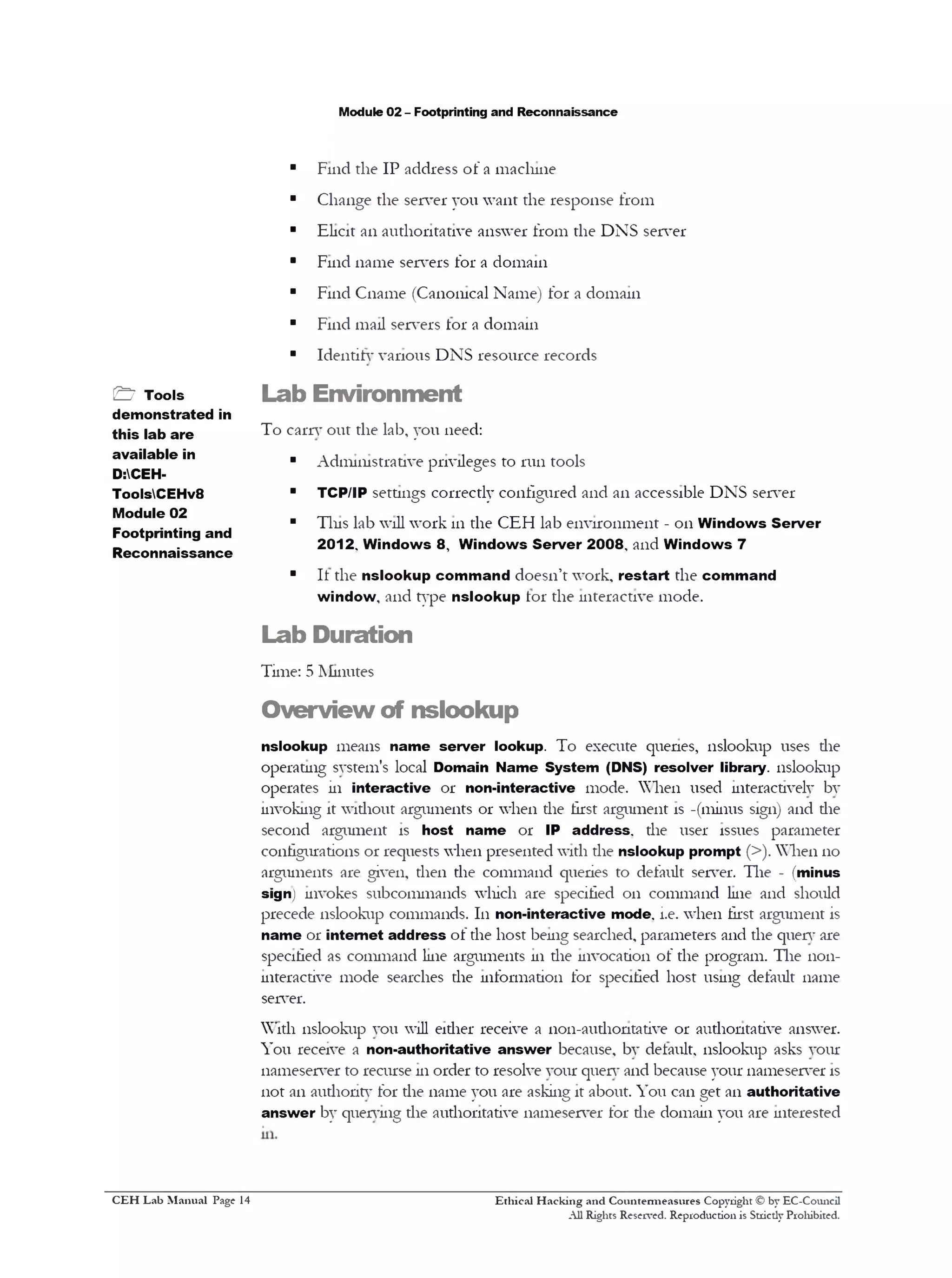
Tool/Utility Information Collected/Objectives Achieved
Ping
IP Address: 202.75.54.101
Packet Statistics:
■ Packets Sent —4
■ Packets Received —3
■ Packets Lost —1
■ Approximate Round Trip Time —360ms
Maximum Frame Size: 1472
TTL Response: 15 hops
P L E A S E T AL K T O Y O U R I N S T R U C T O R I F Y O U H A V E Q U E S T I O N S
R E L A T E D T O T H I S LAB.
Questions
1. How does tracert (trace route) find the route that the trace packets are
(probably) using?
2. Is there any other answer ping could give us (except those few we saw
before)?
3. We saw before:
‫י‬ Request timed out
‫י‬ Packet needs to be fragmented but DF set
‫י‬ Reply from XXX.XXX.XXX.XX: TI L expired 111transit
What ICMP type and code are used for the ICMP Echo request?
4. Why does traceroute give different results on different networks (and
sometimes on the same network)?
Internet Connection Required
0 Yes □ No
Platform Supported
0 Classroom D iLabs
Ethical H acking and Countermeasures Copyright © by EC-Council
All Rights Reserved. Reproduction is Stricdy Prohibited.
C EH Lab M anual Page 12
Module 02 - Footprinting and Reconnaissance
Footprinting a Target Network
Using the nslookup Tool
nslookup is a network administration command-line toolavailablefor many
computeroperatingsystemsfor queryingthe Domain Name System (DNS) to
obtain the domain name, the IP addressmapping, orany otherspecificDNS record.
Lab Scenario
111 the previous lab, we gathered information such as IP address. Ping
Statistics. Maximum Frame Size, and TTL Response using the ping utility.
Using the IP address found, an attacker can perform further hacks like port
scanning, Netbios, etc. and can also tlnd country or region 111which the IP is
located and domain name associated with the IP address.
111 the next step of reconnaissance, you need to find the DNS records. Suppose
111a network there are two domain name systems (DNS) servers named A and
B, hosting the same Active Directory-Integrated zone. Using the nslookup
tool an attacker can obtain the IP address of the domain name allowing him or
her to find the specific IP address of the person he or she is hoping to attack.
Though it is difficult to restrict other users to query with DNS server by using
nslookup command because tins program will basically simulate the process
that how other programs do the DNS name resolution, being a penetration
tester you should be able to prevent such attacks by going to the zone’s
properties, on the Zone Transfer tab, and selecting the option not to allow
zone transfers. Tins will prevent an attacker from using the nslookup command
to get a list of your zone’s records, nslookup can provide you with a wealth of
DNS server diagnostic information.
Lab Objectives
The objective of tins lab is to help students learn how to use the nslookup
command.
This lab will teach you how to:
■ Execute the nslookup command
Ethical H acking and Countermeasures Copyright © by EC-Council
All Rights Reserved. Reproduction is Stricdy Prohibited.
[£Z7 Valuable
information
Test your
knowledge______
* Web exercise
!322 Workbook review
C EH Lab M anual Page 13
Module 02 - Footprinting and Reconnaissance
■ Find the IP address of a machine
■ Change the server you want the response from
■ Elicit an authoritative answer from the DNS server
■ Find name servers for a domain
■ Find Cname (Canonical Name) for a domain
■ Find mail servers tor a domain
■ Identify various DNS resource records
Lab Environment
To carry out the lab, you need:
■ Administrative privileges to run tools
■ TCP/IP settings correctly configured and an accessible DNSserver
■ Tins lab will work 111the CEH lab environment - 011Windows Server
2012. Windows 8 , Windows Server 2008‫י‬ and Windows 7
■ It the nslookup command doesn’t work, restart the command
window, and type nslookup tor the interactive mode.
Lab Duration
Time: 5 Minutes
Overview of nslookup
nslookup means name server lookup. To execute quenes, nslookup uses die
operating system’s local Domain Name System (DNS) resolver library, nslookup
operates in interactive 01‫־‬ non-interactive mode. When used interactively by
invoking it without arguments 01‫־‬when die first argument is -(minus sign) and die
second argument is host name 01‫־‬ IP address, the user issues parameter
configurations 01‫־‬requests when presented with the nslookup prompt (>). When 110
arguments are given, then the command queries to default server. The - (minus
sign) invokes subcommands which are specified 011 command line and should
precede nslookup commands. In non-interactive mode. i.e. when first argument is
name 01‫־‬internet address of the host being searched, parameters and the query are
specified as command line arguments 111the invocation of the program. The non-
interactive mode searches the information for specified host using default name
server.
With nslookup you will eidier receive a non-audiontative or authoritative answer.
You receive a non-authoritative answer because, by default, nslookup asks your
nameserver to recurse 111order to resolve your query and because your nameserver is
not an authority for the name you are asking it about. You can get an authoritative
answer by querying the authoritative nameserver for die domain you are interested
Ethical H acking and Countem ieasures Copyright © by EC-Council
All Rights Reserved. Reproduction is Stricdy Prohibited.
& Tools
demonstrated in
this lab are
available in
D:CEH-
ToolsCEHv8
Module 02
Footprinting and
Reconnaissance
C EH Lab M anual Page 14
Module 02 - Footprinting and Reconnaissance
Lab Tasks
1. Launch Start menu by hovering the mouse cursor 111the lower-left
corner of the desktop
i j WindowsServer2012
fttndcMsSewe*2012ReleMQnxtditeOaiMtm•
!valuationcopyfold
IP P R P G S * 5 ; ‫י‬ ‫יט‬ ‫ן‬ ‫ל‬ ‫ל‬ ‫ן‬
FIGURE 2.1:Windows Server 2012—Desktop view
2. Click the Command Prompt app to open the command prompt
window
FIGURE 2.2:Windows Server 2012—Apps
3. 111the command prompt, type nslookup, and press Enter
4. Now, type help and press Enter. The displayed response should be similar
to die one shown 111the following figure
S TASK1
Extract
Information
,__ The general
command syntax is
nslookup [-option] [name |
-] [server].
Ethical H acking and Countermeasures Copyright © by EC-Council
All Rights Reserved. Reproduction is Stricdy Prohibited.
C EH Lab M anual Page 15
Module 02 - Footprinting and Reconnaissance
ss Administrator: C:Windowssystem32cmd.exe - nslookup
C :  ) n s l o o k u p
SD e f a u l t S e r v e r : n s l . b e a m n e t . in
A d d r e s s : 2 0 2 . 5 3 . 8 . 8
> h e l p
Commands: ( i d e n t i f i e r s a r e shown in u p p e r c a s e , LJ means o p t i o n a l )
NAME - p r i n t i n f o a b o u t t h e h o s t/ d o m a i n NAME u s i n g d e f a u l t s e r v e r
NAME1 NAME2 - a s a b o v e , b u t u s e NAME2 a s s e r v e r
h e l p o r ? ‫־‬ p r i n t i n f o on common commands
s e t OPTION - s e t an o p t i o n
a l l - p r i n t o p t i o n s * c u r r e n t s e r v e r an d h o s t
[n o ]d e b u g - p r i n t d e b u g g in g i n f o r m a t i o n
[ n o ld 2 ‫־‬ p r i n t e x h a u s t i v e d e b u g g in g i n f o r m a t i o n
[ n o I d e f name - a p p e n d domain name t o e a c h q u e ry
[ n o ! r e c u r s e - a s k f o r r e c u r s i v e a n s w e r t o q u e r y
[ n o ! s e a r c h - u s e domain s e a r c h l i s t
[no Ivc - a lw a y s u se a v i r t u a l c i r c u i t
domain =NAME - s e t d e f a u l t domain name t o NAME
s r c h l i s t = N 1 [ / N 2 / . . . / N 6 1 - s e t domain t o N1 an d s e a r c h l i s t t o N1,N2, e t c .
r o o t =NAME - s e t r o o t s e r v e r t o NAME
re tr y = X - s e t num ber o f r e t r i e s t o X
t imeout=X - s e t i n i t i a l t i m e - o u t i n t e r v a l t o X s e c o n d s
ty p e =X - s e t q u e r y t y p e ( e x . A,AAAA,A*AAAA,ANY,CNAME,MX,NS,PTR,
SOA,SRU)
q u e r y t y p e =X - same a s ty p e
c l a s s ‫־‬ X — s e t q u e r y c l a s s <ex. IN ( I n t e r n e t ) , ANY)
[n o ]m sx f r - u s e MS f a s t zone t r a n s f e r
i x f r v e r= X - c u r r e n t v e r s i o n t o u s e in IXFR t r a n s f e r r e q u e s t
s e r v e r NAME - s e t d e f a u l t s e r v e r t o NAME, u s i n g c u r r e n t d e f a u l t s e r v e r
l s e r w e r NAME - s e t d e f a u l t s e r v e r t o NAME, u s i n g i n i t i a l s e r v e r
r o o t - s e t c u r r e n t d e f a u l t s e r v e r t o t h e r o o t
I s [ o p t ] DOMAIN [> FILE] - l i s t a d d r e s s e s in DOMAIN ( o p t i o n a l : o u t p u t t o FILE)
- a ‫־‬ l i s t c a n o n i c a l names an d a l i a s e s
- d — l i s t a l l r e c o r d s
- t TYPE - l i s t r e c o r d s o f t h e g iv e n RFC r e c o r d t y p e ( e x . A,CNAME,MX,NS,
PTR e t c . >
view FILE - s o r t an ' I s ' o u t p u t f i l e an d v iew i t w i t h pg
e x i t
>
- e x i t t h e pro g ram
FIGURE 2.3: The nslookup commandwith help option
5. 111the nslookup interactive mode, type “set type=a” and press Enter
6. Now, type www.certifiedhacker.com and press Enter. The displayed
response should be similar to die one shown 111die following figure
Note: The DNS server Address (202.53.8.8) will be different from die one shown 111
die screenshot
FIGURE 2.4: hi nslookup command, set type=a option
7. You get Authoritative or Non-authoritative answer. The answer vanes,
but 111diis lab, it is Non-authoritative answer
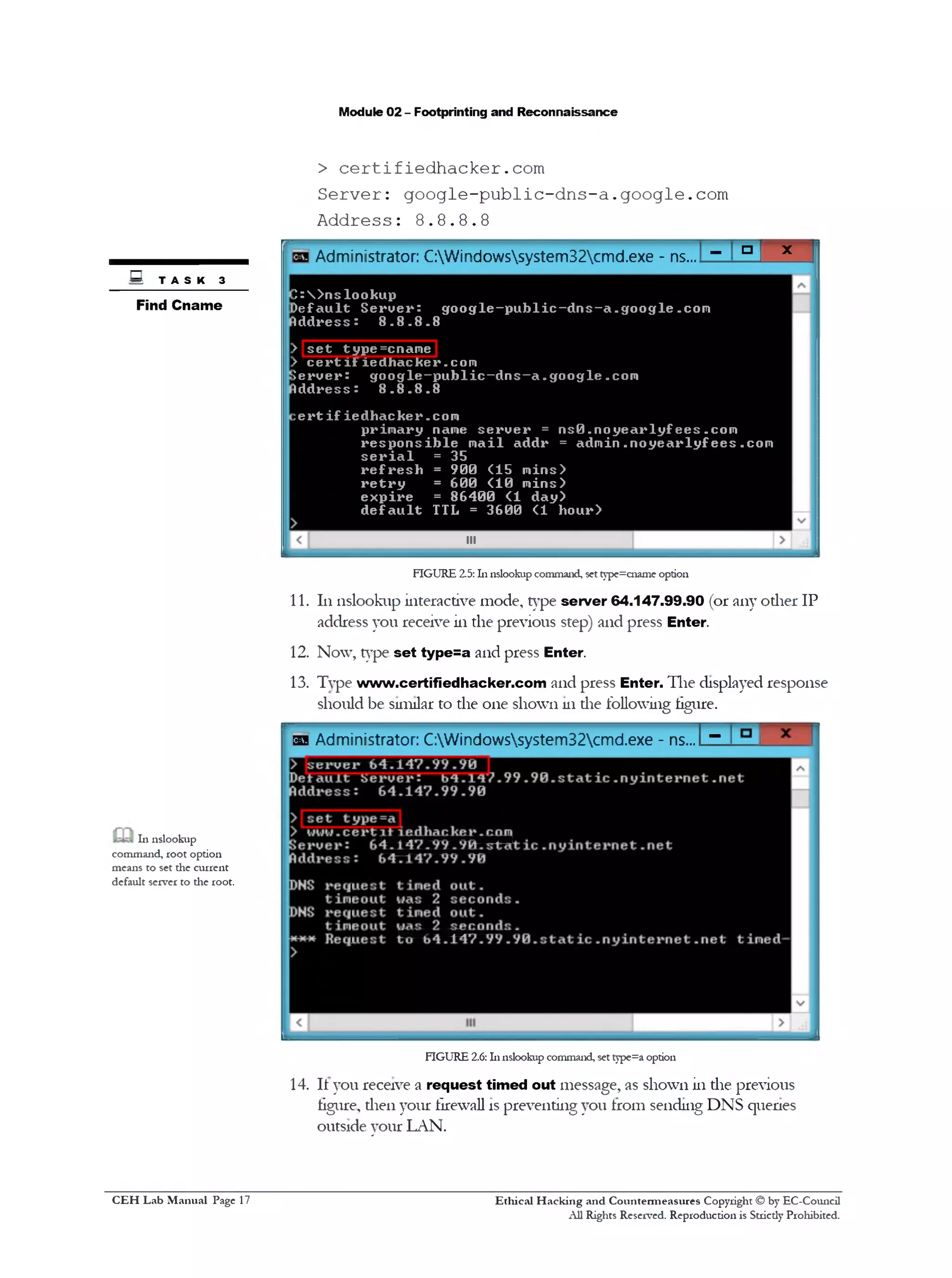
8. 111nslookup interactive mode, type set type=cname and press Enter
9. Now, type certifiedhacker.com and press Enter
Note: The DNS server address (8 .8 .8 .8) will be different dian die one 111screenshot
10. The displayed response should be similar to die one shown as follows:
> set type=cname
.S' Typing "help" or "?" at
the command prompt
generates a list of available
commands.
Use Elicit
Authoritative
Ethical H acking and Countermeasures Copyright © by EC-Council
All Rights Reserved. Reproduction is Strictly Prohibited.
C EH Lab M anual Page 16
Module 02 - Footprinting and Reconnaissance
> certifiedhacker.com
Server: google-public-dns-a.google.com
Address: 8.8.8.8
r ­ ‫ם‬ x
Administrator: C:Windowssystem32cmd.exe ‫־‬ ns...
‫נ‬ : > n s lo o k u p
) e f a u l t S e r v e r : g o o g le - p u b lic - d n s - a .g o o g le .c o n
Id d r e s s : 8 . 8 . 8 . 8
> s e t typ e= cn am e
> c e r t i t ie d h a c k e r.c o m
J e r u e r : g o o g le - p u b lic ‫־‬ d n s‫־‬ a . g o o g le .c o n
Id d r e s s : 8 . 8 . 8 . 8
: e r t i f ie d h a c k e r .c o n
p r im a r y nane s e r u e r = n s 0 .n o y e a r ly fe e s .c o m
r e s p o n s ib le m a il a d d r = a d m in .n o y e a r ly fe e s .c o m
s e r i a l = 35
r e f r e s h = 9 0 0 (1 5 m ins>
r e t r y = 6 0 0 ( 1 0 m in s )
e x p ir e = 8 6 4 0 0 (1 d a y )
d e f a u l t TTL = 3 6 0 0 (1 h o u r>
III
FIGURE 2.5:111iislookup command, settype=cname option
11. 111nslookiip interactive mode, type server 64.147.99.90 (or any other IP
address you receive in the previous step) and press Enter.
12. Now, type set type=a and press Enter.
13. Type www.certifiedhacker.com and press Enter. The displayed response
should be similar to the one shown 111die following tigure.
[SB Administrator: C:Windowssystem32cmd.exe - ns.‫״‬ L^.
FIGURE 2.6:111nslookiip command, set type=a option
14. It you receive a request timed out message, as shown in the previous
tigure, dien your firewall is preventing you trom sending DNS queries
outside your LAN.
Q T A S K 3
Find Cname
111 nslookiip
command, root option
means to set the current
default server to the root.
Ethical H acking and Countermeasures Copyright © by EC-Council
All Rights Reserved. Reproduction is Strictly Prohibited.
C EH Lab M anual Page 17
Module 02 - Footprinting and Reconnaissance
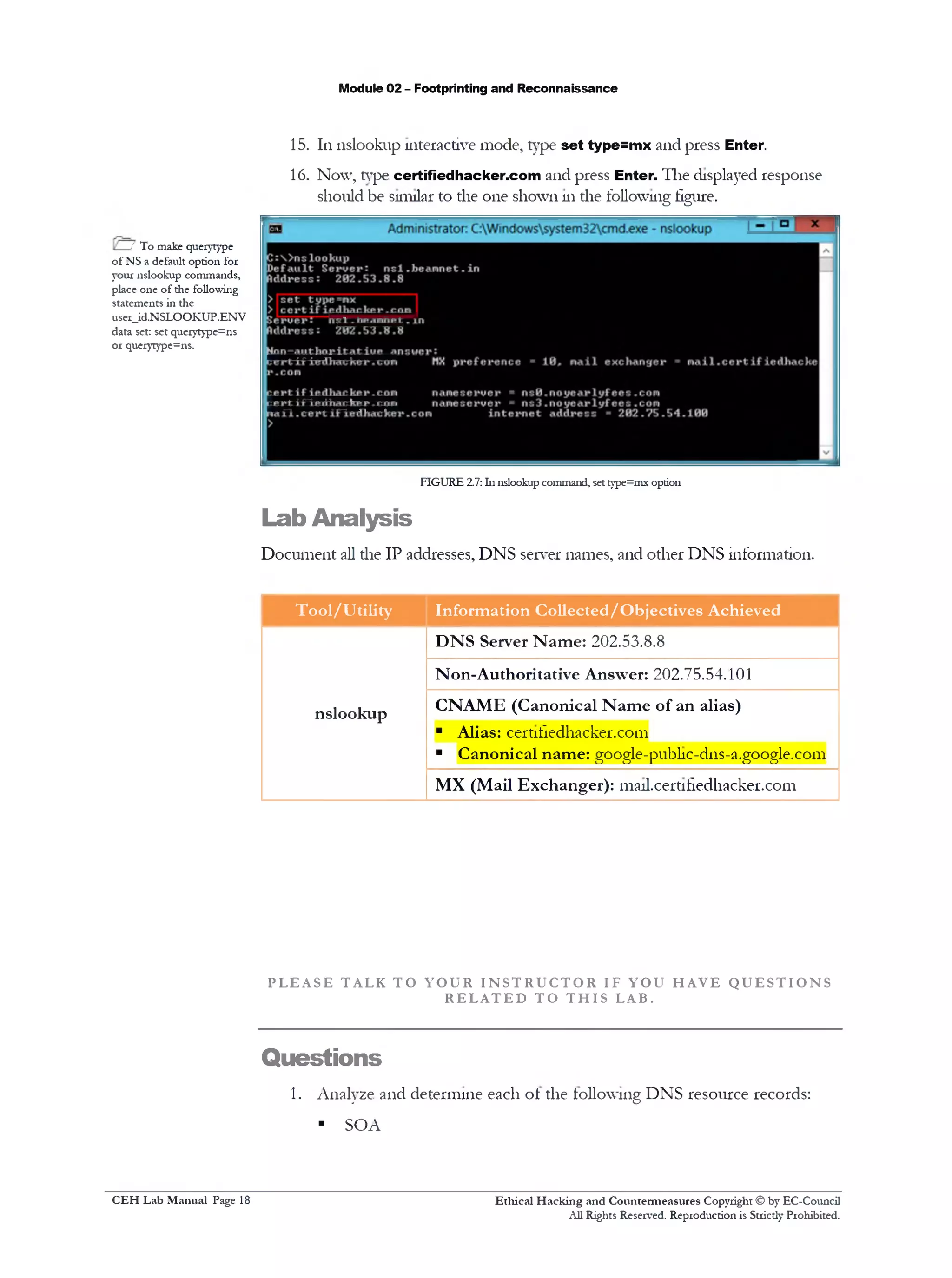
15. 111nslookup interactive mode, type set type=mx and press Enter.
16. Now, type certifiedhacker.com and press Enter. The displayed response
should be similar to the one shown 111die following figure.
‫׳‬-' To make queiytype
of NS a default option for
your nslookup commands,
place one of the following
statements in the
user_id.NSLOOKUP.ENV
data set: set querytype=ns
or querytype=ns.
FIGURE 2.7: In nslookup command, settype=mx option
Lab Analysis
Document all die IP addresses, DNS server names, and odier DNS information.
Tool/Utility Information Collected/Objectives Achieved
nslookup
DNS Server Name: 202.53.8.8
Non-Authoritative Answer: 202.75.54.101
CNAME (Canonical Name of an alias)
■ Alias: cert1fiedhacker.com
■ Canonical name: google-publ1c-d11s-a.google.com
MX (Mail Exchanger): 111a11.cert1fiedl1acker.com
P L E A S E T AL K T O Y O U R I N S T R U C T O R IF Y OU H A V E Q U E S T I O N S
R E L A T E D T O T H I S LAB.
Questions
1. Analyze and determine each of the following DNS resource records:
■ SOA
Ethical H acking and Countermeasures Copyright © by EC-Council
All Rights Reserved. Reproduction is Strictly Prohibited.
C EH Lab M anual Page 18
Module 02 - Footprinting and Reconnaissance
■ NS
■ A
■ PTR
■ CNAME
■ MX
■ SRY
2. Evaluate the difference between an authoritative and non-audioritative
answer.
3. Determine when you will receive request time out in nslookup.
Internet Connection Required
0 Yes □ No
Platform Supported
0 Classroom □ !Labs
Ethical H acking and Countermeasures Copyright © by EC-Council
All Rights Reserved. Reproduction is Stricdy Prohibited.
C EH Lab M anual Page 19
Module 02 - Footprinting and Reconnaissance
People Search Using the AnyWho
Online Tool
A_nyWho is an online whitepagespeople searchdirectoryforquickly lookingup
individualphone numbers.
Lab Scenario
You have already learned that the first stage in penetration testing is to gather as
much information as possible. 111the previous lab, you were able to find information
related to DNS records using the nslookup tool. If an attacker discovers a flaw 111a
DNS server, he or she will exploit the flaw to perform a cache poisoning attack,
making die server cache the incorrect entries locally and serve them to other users
that make the same request. As a penetration tester, you must always be cautious
and take preventive measures against attacks targeted at a name server by securely
configuring name servers to reduce the attacker's ability to cormpt a zone hie with
the amplification record.
To begin a penetration test it is also important to gather information about a user
location to intrude into the user’s organization successfully. 111tins particular lab, we
will learn how to locate a client or user location using die AnyWho online tool.
Lab Objectives
The objective of tins lab is to demonstrate the footprinting technique to collect
confidential information on an organization, such as then: key personnel and then‫־‬
contact details, usnig people search services. Students need to perform people
search and phone number lookup usnig http: / /www.a11ywho.com.
Lab Environment
111the lab, you need:
■ A web browser with an Internet comiection
■ Admnnstrative privileges to run tools
■ Tins lab will work 111the CEH lab environment - on Windows Server
2012. Windows 8 , Windows Server 2008. and Windows 7
Ethical H acking and Countem ieasures Copyright © by EC-Comicil
All Rights Reserved. Reproduction is Stricdy Prohibited.
Valuable
mfonnation_____
Test your
knowledge
*d Web exercise
m Workbook review
H Tools
demonstrated in
this lab are
available in
D:CEH-
ToolsCEHv8
Module 02
Footprinting and
Reconnaissance
C EH Lab M anual Page 20
Module 02 - Footprinting and Reconnaissance
Lab Duration
Tune: 5 ]luiutes
Overview of AnyWho
AnyWho is a part ot the ATTi family ot brands, which mostly tocuses 011 local
searches tor products and services. The site lists information from the White Pages
(Find a Person/Reverse Lookup) and the Yellow Pages (Find a Business).
Lab Tasks
1. Launch Start menu by hovering the mouse cursor 011 the lower-left
corner of the desktop
■8 Windows Server 2012
Window*Server
■KIWI
Window*Serve! 2012 Rele<aeCandidate
fviluatioftcopy ftuitd
FIGURE 3.1: Windows Server 2012—Desktop view
2. Click the Google Chrome app to launch the Chrome browser 01‫־‬launch
any other browser
FIGURE 3.2: Windows Server 2012—Apps
3. Li die browser, type http://www.anywho.com. and press Enter 011the
keyboard
m AnyWho allow you to
search for local businesses
by name to quickly find
their Yellow Pages listings
with basic details and maps,
plus any additional time
and money-saving features,
such as coupons, video
profiles or online
reservations.
TASK 1
People Search
with AnyWho
Ethical H acking and Countermeasures Copyright © by EC-Council
All Rights Reserved. Reproduction is Stricdy Prohibited.
C EH Lab M anual Page 21
Module 02 - Footprinting and Reconnaissance
ua AnyWho is part of the
ATTi family of brands,
which focuses on local
search products and
services.
4. Input die name of die person you want to search for in die Find a Person
section and click Find
c a Include both the first
and last name when
searching the AnyWho
White Pages.
5. AnyWho redirects you to search results with die name you have entered.
The number of results might van‫־‬
m Yellow Pages listings
(searches by category or
name) are obtained from
YP.COM and are updated
on a regular basis.
Find a Person b y Name . Byname ..ByAddiets ■>ByPhon• Nufntwr
Rose Chnstian City or 7IP Cofle ■ 1 5 0 1
11'tin*1c« ocvUtJIiy Welue.com Oteettmer
1 10 Listings Poundfor RoseChnstian
Tind mote inloim allon ftom Intollus
Rose A Christian
»a m toAccrees 899( ” Mace &onvng Drocncrs
M ore inform ation fo r Rose A Christian
‫•י‬ Email anfl Otner Phone Lookup
‫יי‬ Get Detailed Background information
•‫״‬ Get Pucnc Records
‫״‬ view Property &Area Information
‫״‬ View Social NetworkProfile
Rose B Christian
•M M I Cmm+0* OM W O O M if
» AddtoAddress B99k » Maps &Drivhg Dkecllor.s
M ore inform ation fo r Rose B Christian
» Email ano other Phone Lookup
*>Getoetaiso Backflround information
* Gel Public Records
* view Praocitv &Area Information
‫•י‬ view Social NetworkProfile
M ore Inform ation fo r Rose C Christian
‫יי‬ Email 300 otner Phone lookup
“ Get D ttilac BackQiound Information
» G•! Pjtl'C RtCOIdS
*‫״‬ Wew Property &A/ea Information
** view Social NetworkProfile
M ore inform ation to r R o •• E Christian
Rose C Christian
mmmm‫י״‬MM
•W •*% 9t t t
» A40(o /.M im B99k ‫״‬>Maps 4 DrivhgDictions
Rose E Christian
FIGURE 3.5: AnyWho People Search Results
it™WhitePage?| People Fin: ^
<‫־‬ C © www.anywho.com
AnyWho
FtnoirvPcopfeFaecestnoBjsnesscs
f t B s YELLOWPACES X WHITEPAGES O REVERSELOOKUP I AREA/ZIPCODELOOKUP © UAPS
White Pages | Find People By Name
Tind People in Our White Pages Directory
Are you starching for an old friend? Trying to verify an address?
Oi maybe you see an unfamiliar phone number in your records?
AnyWho provides a free online while pages directory where you
can find people by their name, address or you can do a reverse
lookjp by phone number
The AnyWho While Pages is updated weekly with phone
numbers of irdr/duals from across the nation For best results,
include both the first and last name when searching the
AnyWho White Pages and. ifyou have it. the ZIP Code
^ Find a P erso n
Rose | Christian
City or ZIP 1State [vl
By Mama By Address I By Phone Number
Personal identifyinginformation available onAnAVho
is n:t cio•*JeJbyAT&Tand isprovidedsolely by an
uraflated find parly. Intelm3.Inc Full Disclaimer
FIGURE 3.4: AnyWho—Name Search
AnyWho
4‫־‬ *♦ C (ww»anyA»o;orj
9 Kt.fcHSELOOKUP
White Pages | Find People By Name
FadPcoote ■aOu write Fages Directory
V»ywi ukM ) farsn1MfnuxffTryngro*»rfyw ad*«s»?
01■wAxyx!s» 1‫י׳‬ irtfmfcarc#10r*iwmbjr11yju‫׳‬rccods?
AnrtthocrtrtCet a»*♦aW*e«txe3e«e4drector/ <rt1«reyoi
carlad metobvtte*rumt jdoeti wyouc4nto1
‫אז־‬*yrno wm«Pa^»t II unaan*<w4Kiy<mt pr*
mrtm%0»n(M*dt tonKirntr*? ranon ro‫׳‬ t«5
ncw*»tootreits‫־‬trc as: rum♦trtn *arcrwtj ir
Find a Person
cerorap ®*!•E]
Bf Nimm> I ByAWVm I ByPh4n«Min*■••
Vlh«lati tar* t coniron rclud•Iht till Ira!rv•
Mitti•‫׳‬mdd• ratalat :*v'liaU10rurrwrcoo
1•(g rMyJmi•<‫ו«ו«י»*ןץ‬»•If«• !»•<<»ro‫י‬
FIGURE 3.3: AnyWho - Home Page http://www.anywho.com
Ethical H acking and Countermeasures Copyright © by EC-Council
All Rights Reserved. Reproduction is Strictly Prohibited.
C EH Lab M anual Page 22
Module 02 - Footprinting and Reconnaissance
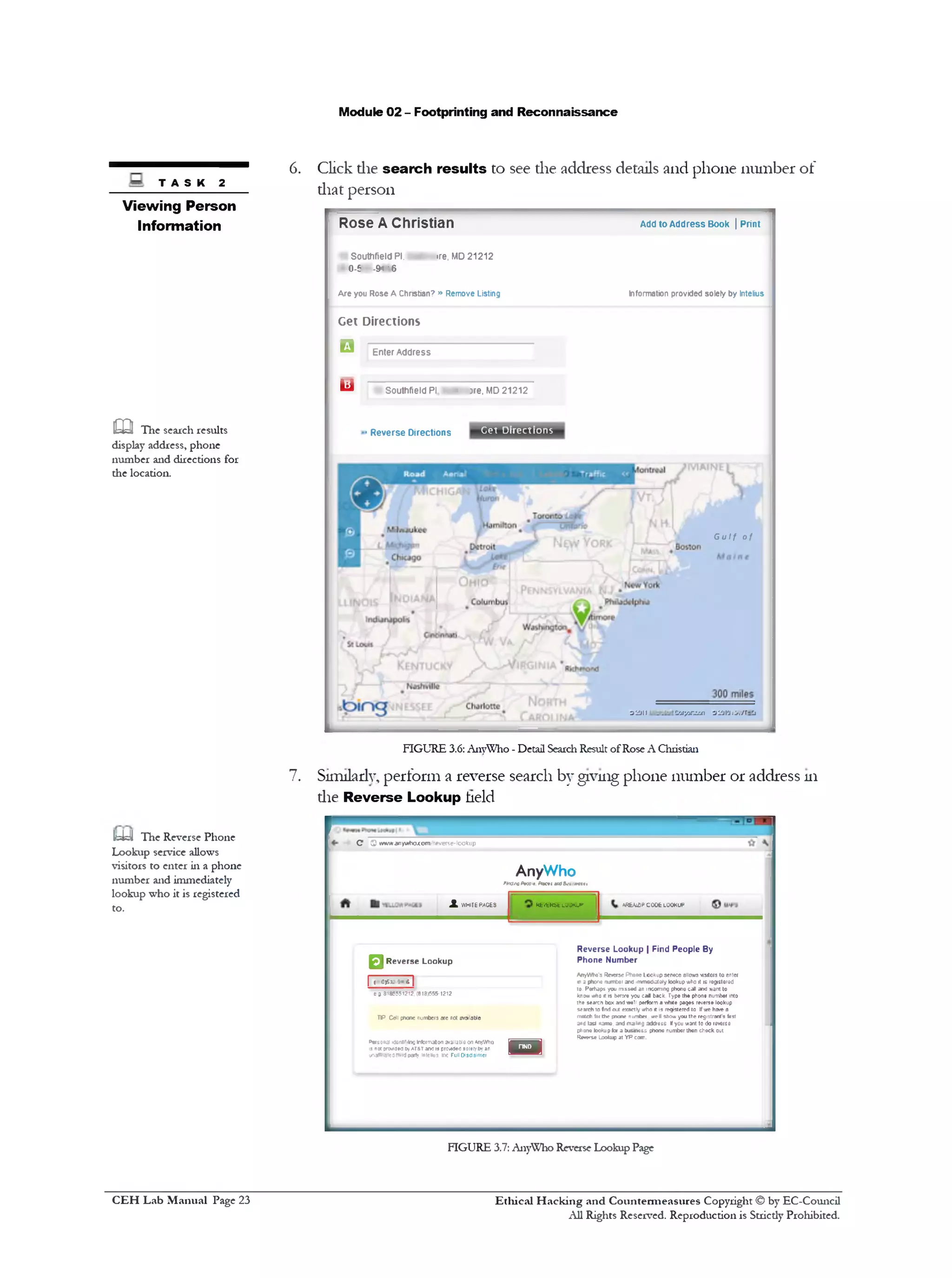
6. Click die search results to see the address details and phone number of
that person
Add to Address Book | Print
Information provided solely by Intelius
Rose A Christian
Southfield PI, !re, MD21212
0-f -SH' 6
A re you Rose A Christian? » Remove Listing
Get Directions
□ Enter Address
Southfield PI. 3 • ‫־‬re. MD21212‫ש‬
Cet Directions>Reverse Directions
Gulf of
O ' J J t t Z 'j r / j n d u i -j 'jj l‫׳‬j !>.‫׳‬/ r ‫־‬ Cj
t a s k 2
Viewing Person
Information
m The search results
display address, phone
number and directions for
the location.
FIGURE 3.6: AnyWho - Detail SearchResult ofRose A Christian
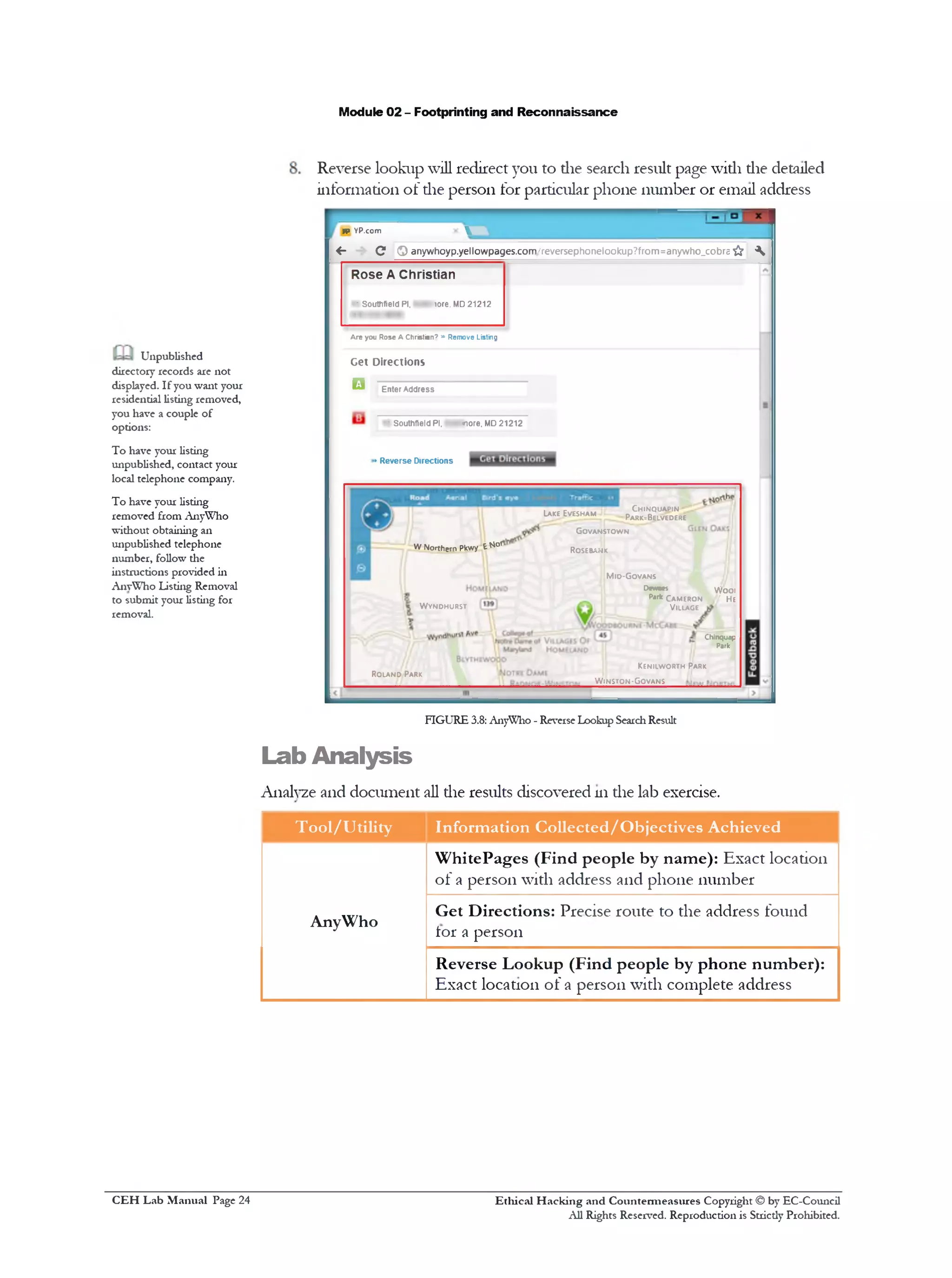
7. Sinulady, perform a reverse search by giving phone number or address 111
die Reverse Lookup held
C 0 ww/w.anyvrtx>.com‫׳‬•everse-lookup
AnyWho
f*a3ta0Arcc-f. Pitert m35v■*‫>»«»׳‬
A«bWJPC006 LOOKUP•Kfc«‫׳‬fcRStLOOKUPJLkVHIfEPACES
R everse L ookup | Find People By
Phone N um ber
AnyWho's ReversePhoneLooKupsewce allowsvisitors to enter
* ‫ימא*ן‬‫ג‬‫י‬ »number and immediatelylookupwhoit is registered
to. Perhaps you mssed anincoming phonecall andwant to
knowwhox is bewe you call back. Typethe phonenumber into
the searchboxandwell performawhite pages reverselookup
search‫פז‬fn i out exactlywho it is registeredto Ifwe ha>‫־‬ea
matchfarth* pnone number well showyoutheregistrant'sfirst
andlast name, andmaimg address Ifyou want to doreverse
phonelookupfor a business phone number then checkout
Rwrse Lookup at YP.com.
n
□ R everse Lookup
| <0>sx»«r|
e» 8185551212.(818)655-1212
HP Cetl phone numbers are not ewailable
Personal ‫״‬J6nnr.incinformationavailableonAnyWho
is n« pwaeo byAT&Tandisprovidedsolerfbyan
i^affiatedthirdparly intelius. Inc Full Disclaimer
IteUJ The Reverse Phone
Lookup service allows
visitors to enter in a phone
number and immediately
lookup who it is registered
to.
FIGURE 3.7: AnyWho Reverse Lookup Page
Ethical H acking and Countermeasures Copyright © by EC-Council
All Rights Reserved. Reproduction is Strictly Prohibited.
C EH Lab M anual Page 23
Module 02 - Footprinting and Reconnaissance
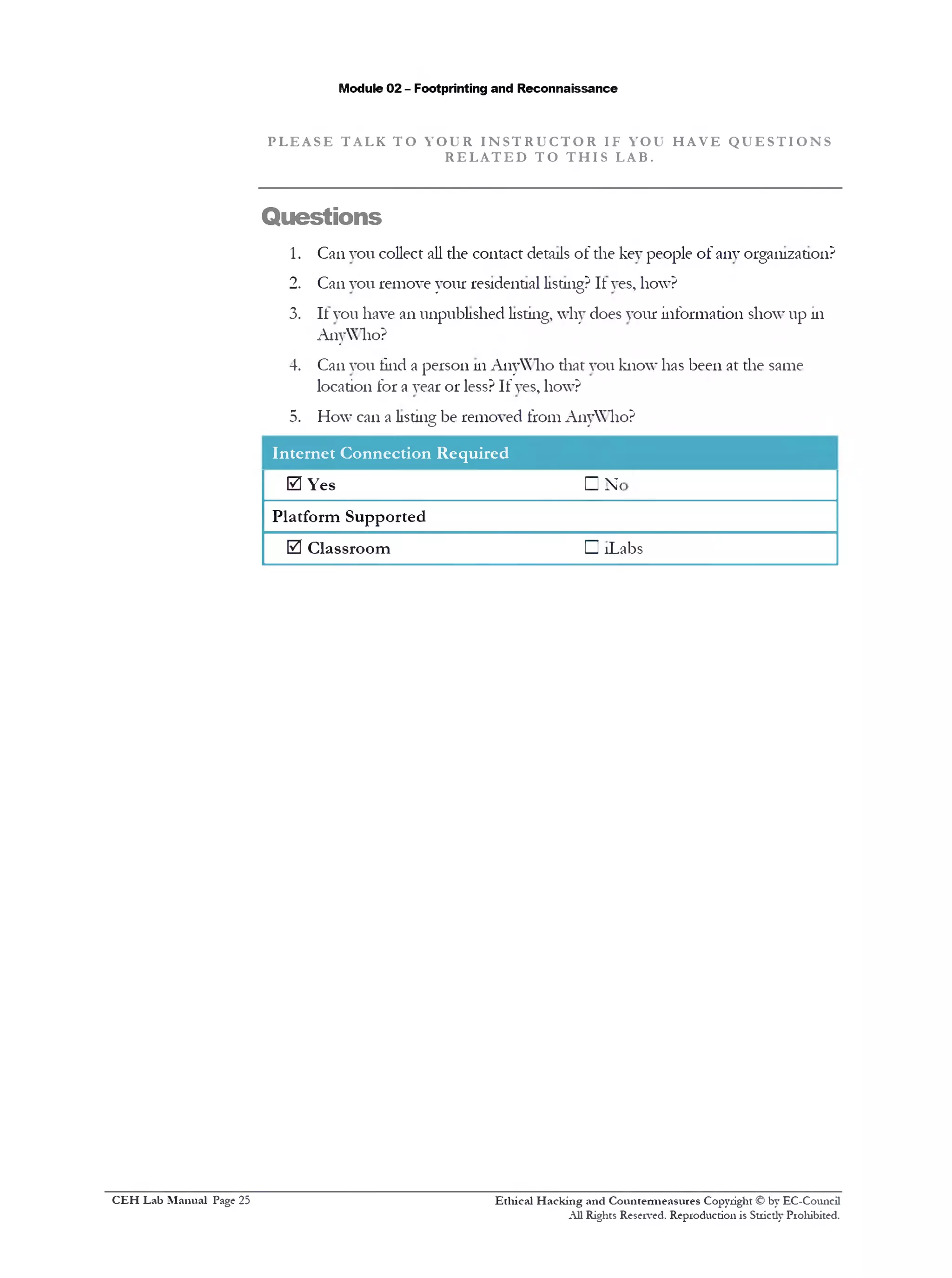
Reverse lookup will redirect you to die search result page widi die detailed
information of die person for particular phone number or email address
n> yp.com 
^ - C O anywhoyp.yellowpages.com/reversephonelookup?from=anywho_cobra & 
Rose A Christian
‫־‬ Southfield PI, - - lore. MD 21212
Are you Rose A Christian7 »» Remove Listing
Get Directions
□ Enter Address
■ Southfield PI. •— *K>re, MD 21212
• Reverse Directions
Ch in q u a p in
Par k ‫־‬ Belvedere
Lake Eves h a m
Go v a n s t o w n
WNorthern Pkwy t N°' Ro seban k
M id -G o v a n s
Dnwci
Pjrk Ca m e r o n
V illage
W o o i
'// He
W y n d h u r s t
Chlnqu4p
Pork
Ke n ilw o r t h Park
Ro l a n d Park
W in s t q n -Gq v a n s
FIGURE 3.8: AnyWho - Re*e1seLookup SearchResult
Lab Analysis
Analyze and document all the results discovered 111die lab exercise.
Tool/Utility Information Collected/Objectives Achieved
AnyWho
WhitePages (Find people by name): Exact location
of a person with address and phone number
Get Directions: Precise route to the address found
lor a person
Reverse Lookup (Find people by phone number):
Exact location of a person with complete address
Unpublished
directory records are not
displayed. If you want your
residential listing removed,
you have a couple of
options:
To have your listing
unpublished, contact your
local telephone company.
To have your listing
removed from AnyWho
without obtaining an
unpublished telephone
number, follow the
instructions provided in
AnyWho Listing Removal
to submit your listing for
removal.
Ethical H acking and Countermeasures Copyright © by EC-Council
All Rights Reserved. Reproduction is Strictly Prohibited.
C EH Lab M anual Page 24
Module 02 - Footprinting and Reconnaissance
P L E A S E T AL K T O Y O U R I N S T R U C T O R IF YOU H A V E Q U E S T I O N S
R E L A T E D T O T H I S LAB.
Questions
1. Can vou collect all the contact details of the key people of any organization?
2. Can you remove your residential listing? It yes, how?
3. It you have an unpublished listing, why does your information show up in
AnyWho?
4. Can you tind a person in AnyWho that you know has been at the same
location for a year or less? If yes, how?
5. How can a listing be removed from AnyWho?
Internet Connection Required
0 Yes
Platform Supported
0 Classroom
□ N<
□ !Labs
Ethical H acking and Countermeasures Copyright © by EC-Council
All Rights Reserved. Reproduction is Strictly Prohibited.
C EH Lab M anual Page 25
Module 02 - Footprinting and Reconnaissance
People Search Using the Spokeo
Online Tool
Spokeo is an onlinepeople search toolproviding real-time information aboutpeople.
This toolhelps nith onlinefootprintingandallowsyon to discoverdetails about
people.
Lab Scenario
For a penetration tester, it is always advisable to collect all possible information
about a client before beginning the test. 111 the previous lab, we learned about
collecting people information using the AnyWho online tool; similarly, there are
many tools available that can be used to gather information 011 people, employees,
and organizations to conduct a penetration test. 111tins lab, you will learn to use the
Spokeo online tool to collect confidential information of key persons m an
organization.
Lab Objectives
The objective ot tins lab is to demonstrate the footprinting teclnnques to collect
people information usmg people search services. Students need to perform a people
search usmg http://www.spokeo.com.
Lab Environment
111the lab, you need:
■ A web browser with an Internet coimection
■ Administrative privileges to run tools
■ Tins lab will work 111the CEH lab environment - 011Windows Server
2012. Windows 8 , Windows Server 2008, and Windows 7
Lab Duration
Time: 5 Minutes
I C O N KEY
(^7 Valuable
information
Test your
knowledge
—
Web exercise
m Workbook review
& Tools
demonstrated in
this lab are
available in
D:CEH-
ToolsCEHv8
Module 02
Footprinting and
Reconnaissance
Ethical H acking and Countermeasures Copyright © by EC-Council
All Rights Reserved. Reproduction is Stricdy Prohibited.
C EH Lab M anual Page 26
Module 02 - Footprinting and Reconnaissance
Overview of Spokeo
Spokeo aggregates vast quantities of public data and organizes die information into
easy-to-follow profiles. Information such as name, email address, phone number,
address, and user name can be easily found using tins tool.
_________ Lab Tasks
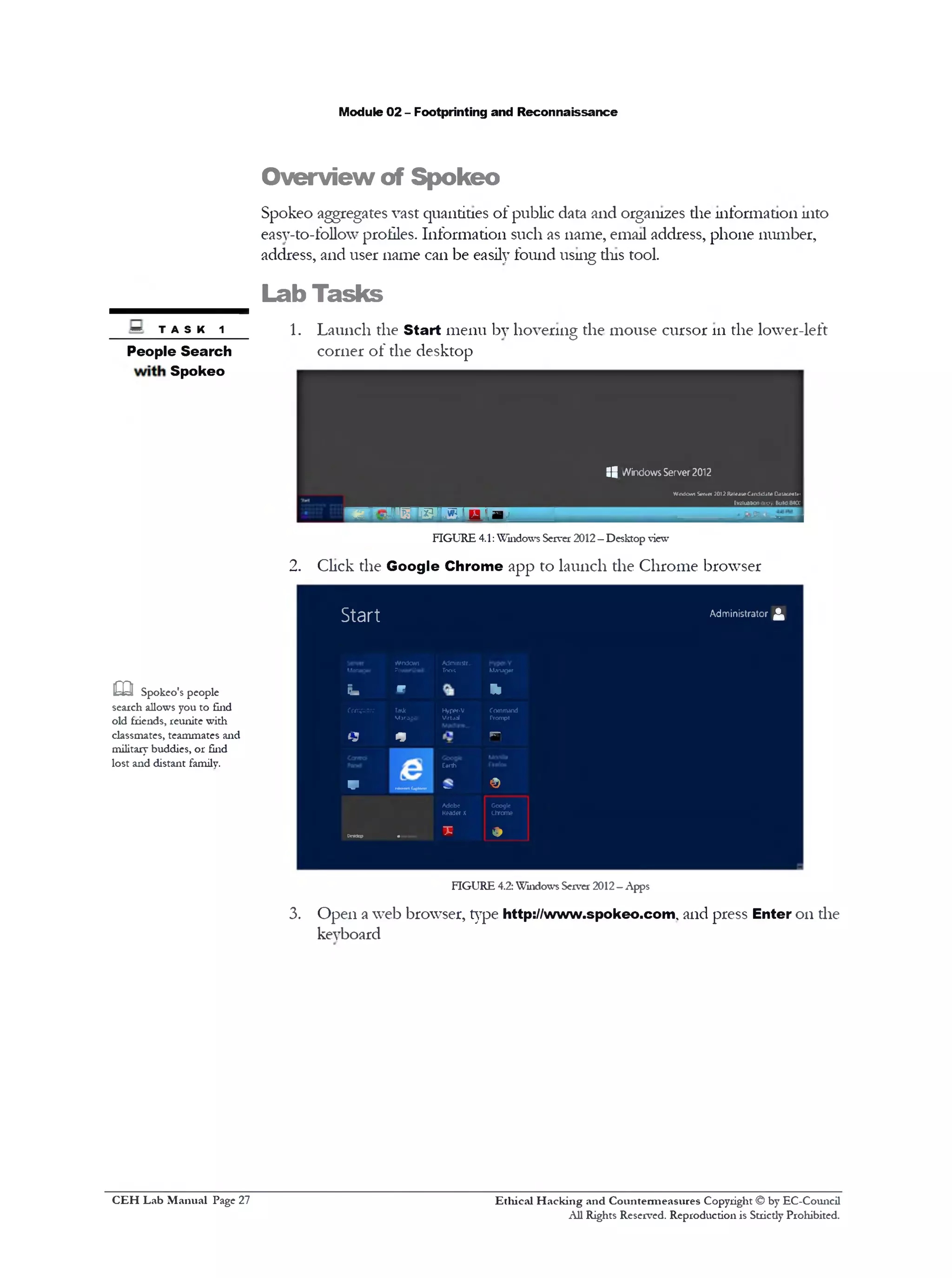
~ t a s k 1 1. Launch the Start menu by hovering the mouse cursor 111the lower-left
People Search corner of the desktop
Spokeo
:8 Windows Server 2012
WindowsServer 2012ReleaieCandidateCaiacealn
________________________________________________Evaluationcopy. BuW84a
w w i 1P "L W ' W 1 D H
FIGURE 4.1:Windows Server 2012—Desktop view
2. Click the Google Chrome app to launch the Chrome browser
S t a r t Administrator ^
Windows Admimstr...
Mwugor IWrttoll Tools Mannar
Fa *‫־‬ ‫י‬ ‫י‬
Computer Tad( Hyppf-V Command
Mjrooo1 Virtjal Prompt
Q * rn
Earth
V ^‫־־‬‫'״‬‘‫י‬1,‫™״‬ ©
Adobe Gcoglc
Readerx chrome
‫״‬“1
_____ T •
FIGURE 4.2: Windows Server 2012- Apps
3. Open a web browser, type http://www.spokeo.com, and press Enter 011die
keyboard
m Spokeo's people
search allows you to find
old friends, reunite with
classmates, teammates and
military buddies, or find
lost and distant family.
Ethical H acking and Countermeasures Copyright © by EC-Council
All Rights Reserved. Reproduction is Stricdy Prohibited.
C EH Lab M anual Page 27
Module 02 - Footprinting and Reconnaissance
4‫־‬ C 'iwiwvlwiecccrr
spckeo
N*me tm*1 Hno*• itvmna AMn>
[
Not your grandm a's phone book
Qi
FIGURE 4.3: Spokeo home page http:/Afwvp.spokeo.com
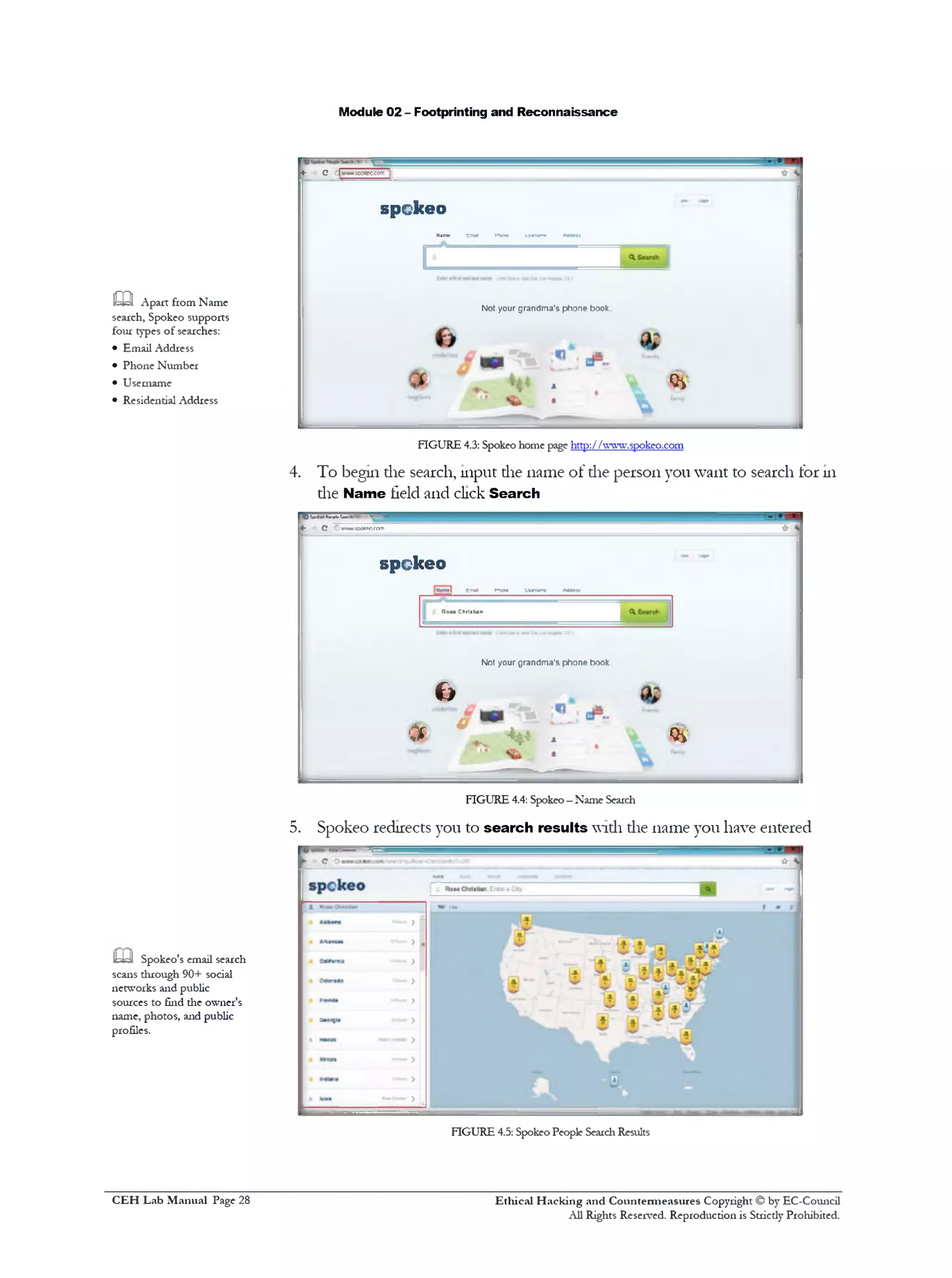
4. To begin die search, input die name of die person you want to search for 111
die Name field and click Search
m Apart from Name
search, Spokeo supports
four types of searches:
• Email Address
• Phone Number
• Username
• Residential Address
O M w »*<*■• "‫יי‬‫ד‬ ?**‫־.!*׳‬‫״‬
‫»־‬ G vwwuwk'OCC/n
spckeo
Emal Pnw* Uwrww M tn i
Rom Chriatan
N ot your g randm a's p h o ne book
c>
m• ‫״‬ v
FIGURE 4.4: Spokeo—Name Search
5. Spokeo redirects you to search results widi die name you have entered
m Spokeo's email search
scans through 90+ social
networks and public
sources to find die owner's
name, photos, and public
profiles.
FIGURE 4.5: Spokeo People SearchResults
Ethical H acking and Countermeasures Copyright © by EC-Council
All Rights Reserved. Reproduction is Stricdy Prohibited.
C EH Lab M anual Page 28
Module 02 - Footprinting and Reconnaissance
FIGURE 4.6: Spokeo People SearchResults
FIGURE 4.7: Spokeo People SearchResults
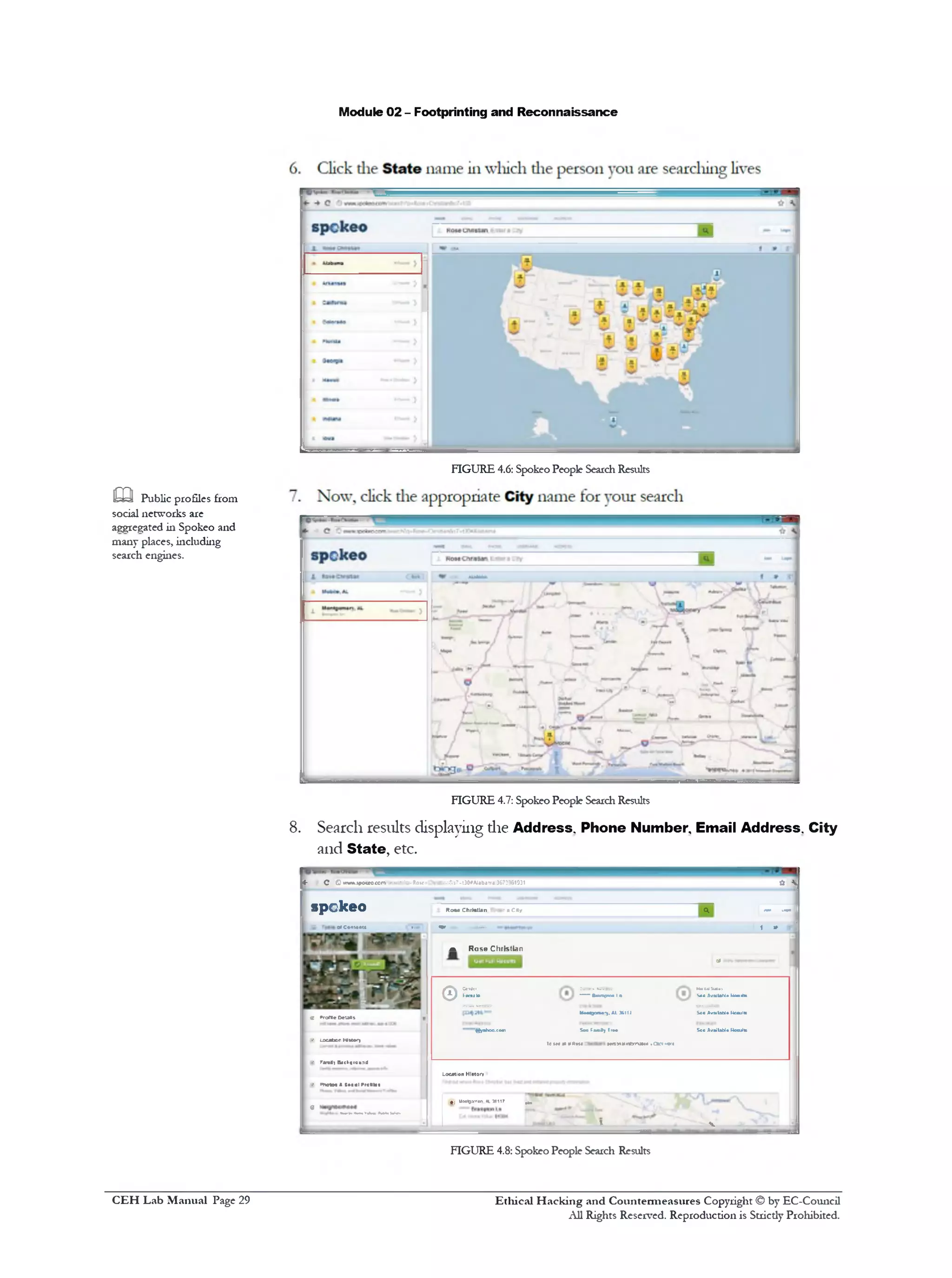
8. Search results displaying die Address. Phone Number Email Address. City
and State, etc.
<‫־‬ c C»TWA.»po«o<e*n**rcKc-Rove on&»7-t30#Alaba‫׳‬rfl;3&733G1931
* SJ
4 ------ 1spekeo RomChiMlanPntaraC*y
1is 0»C©‫יי‬*.•at* (M■, m m . 1 » sj
a Rose Christian
di 1
v*rora•Oeuas
‫־‬• LocationNttory
© S L
gyahoo.co‫״‬
ConWei MmkISuus
—Bunptc•Iit So*AvMlahl*UmiiM■
UM^orH-).A1J611J S«oAvailableKccultc
SeetaaSyIr•• SooAvailableKcculfc
Te(Ma*yfim ttnyttimnmtH••artnt‫׳‬e
1 •• Fara*1&*ch«rcu1‫־‬:J
LocationHistor.
1 •‫׳‬ onetM1JosjiPrefikf
I 0
;'^1UiMiovnan.*L16117 ^
i » v
FIGURE 4.8: Spokeo People Search Results
m Public profiles from
social networks are
aggregated in Spokeo and
many places, including
search engines.
Ethical H acking and Countermeasures Copyright © by EC-Council
All Rights Reserved. Reproduction is Strictly Prohibited.
C EH Lab M anual Page 29
Module 02 - Footprinting and Reconnaissance
,mi 9. Search results displaying die Location History
&=y All results will be
displayed once the search is
completed
FIGURE 4.9: Spokeo People Search Results
10. Spokeo search results display die Family Background, Family Economic
Health and Family Lifestyle
* C w J B d m w ^57&‫]:-׳־‬OAI0b<1rr»3C73>6
spckeo Ko»e Christian Writer aCity
wiHyBacfcpround |
1•raudrt In # rf‫«׳‬Nm• Mir•**•d
|FamilyEccroiricH«»>f>
• EfWWGanjMino’
FIGURE 4.10: Spokeo People Search Results
11. Spokeo search results display die Neighborhood tor the search done
IUk!! Online maps and
street view are used by over
300,000 websites, including
most online phone books
and real estate websites.
FIGURE 4.11:Spokeo People Search Results
spckeo
| Location Hittory
17*t30«‫׳‬Alatrtma:367;
spckeo
Ethical H acking and Countermeasures Copyright © by EC-Council
All Rights Reserved. Reproduction is Strictly Prohibited.
C EH Lab M anual Page 30
Module 02 - Footprinting and Reconnaissance
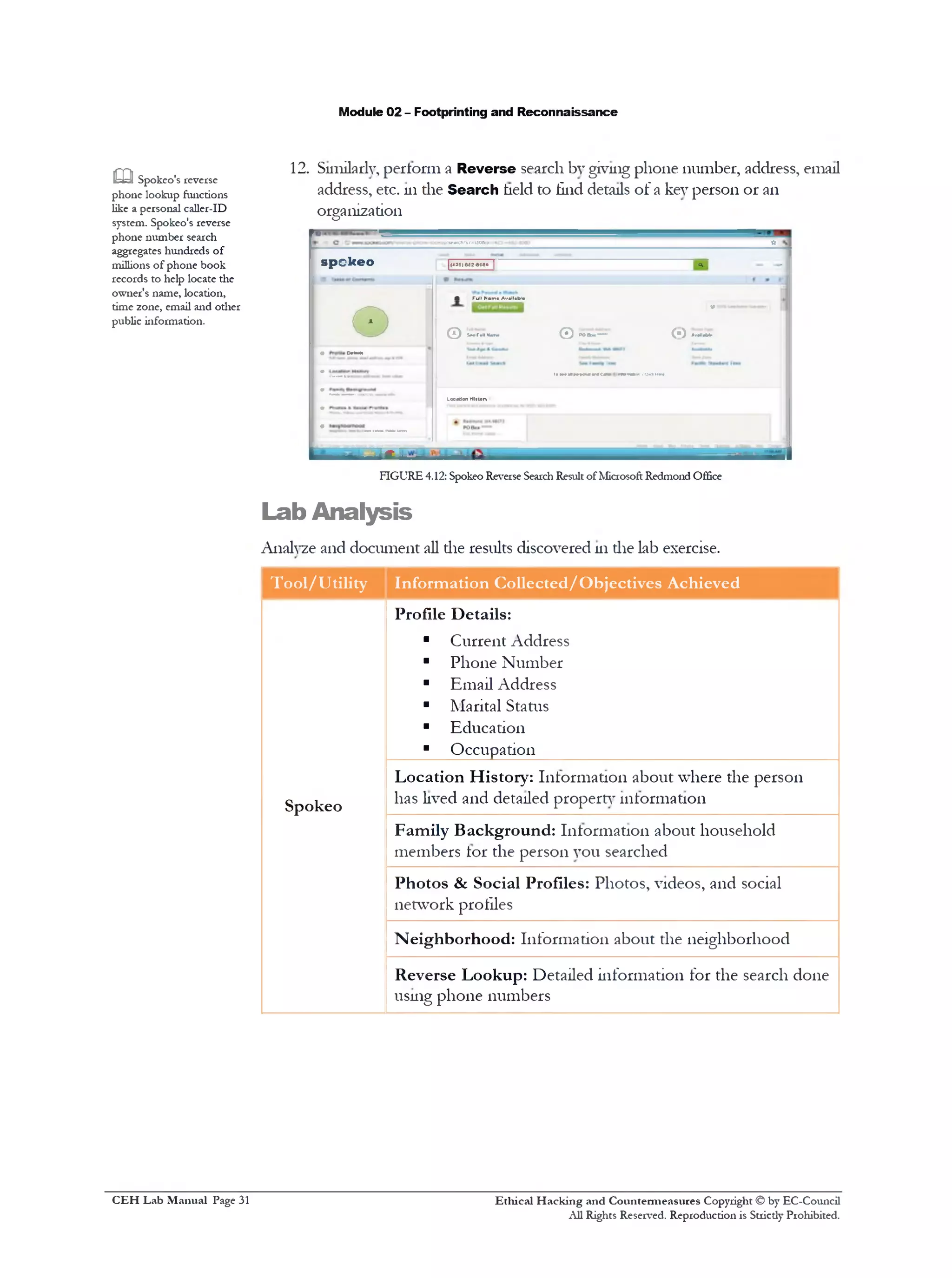
12. Similarly, perform a Reverse search by giving phone number, address, email
address, etc. 111die Search held to find details of a key person or an
organization
OOtejp,'S«*fCh>St=UO&P ■it
sp o k e o | ' [(•*25)002-6080| <*, -I
•
• TullNam• Av.ll.bl•
9 ‫>״‬•* n■■■■I 1
Q SnMlkm Q POBaa■*“*• (‫)י‬ AnM*»
V C*U>H
1>iwnmoxnwcmm r*»w«w.cmm—
-----"‫*־־"־‬*‫י־‬ LocutionHlttory
• ------ _
m Spokeo's reverse
phone lookup functions
like a personal caller-ID
system. Spokeo's reverse
phone number search
aggregates hundreds of
millions of phone book
records to help locate the
owner's name, location,
time zone, email and other
public information.
jr.!!__
FIGURE 4.12: Spokeo Reverse SearchResult of Microsoft Redmond Office
Lab Analysis
Analyze and document all the results discovered 111die lab exercise.
Tool/Utility Information Collected/Objectives Achieved
Profile Details:
■ Current Address
■ Phone Number
■ Email Address
■ Marital Status
■ Education
■ Occupation
Spokeo
Location History: Information about where the person
has lived and detailed property information
Family Background: Information about household
members tor the person you searched
Photos & Social Profiles: Photos, videos, and social
network profiles
Neighborhood: Information about the neighborhood
Reverse Lookup: Detailed information for the search done
using phone numbers
Ethical H acking and Countermeasures Copyright © by EC-Council
All Rights Reserved. Reproduction is Strictly Prohibited.
C EH Lab M anual Page 31
Module 02 - Footprinting and Reconnaissance
P L E A S E T AL K T O Y O U R I N S T R U C T O R IF YOU H A V E Q U E S T I O N S
R E L A T E D T O T H I S LAB.
Questions
1. How do you collect all the contact details of key people using Spokeo?
2. Is it possible to remove your residential listing? If yes, how?
3. How can you perform a reverse search using Spokeo?
4. List the kind of information that a reverse phone search and email search
will yield.
Internet Connection Required
0 Yes □ No
Platform Supported
0 Classroom □ !Labs
Ethical H acking and Countermeasures Copyright © by EC-Council
All Rights Reserved. Reproduction is Stricdy Prohibited.
C EH Lab M anual Page 32
Module 02 - Footprinting and Reconnaissance
Analyzing Domain and IP Address
Queries Using SmartWhois
SmartWhois is a network information utility thatallowsyon to look up most
available information on a hostname, IP address, ordomain.
Lab Scenario
111the previous kb, you learned to determine a person 01‫־‬an organization’s location
using the Spokeo online tool. Once a penetration tester has obtained the user’s
location, he or she can gather personal details and confidential information from the
user by posing as a neighbor, the cable guv, or through any means of social
engineering. 111tins lab, you will learn to use the SmartWhois tool to look up all ot
the available information about any IP address, hostname, 01‫־‬ domain and using
these information, penetration testers gam access to the network of the particular
organization for which they wish to perform a penetration test.
Lab Objectives
The objective of tins lab is to help students analyze domain and IP address quenes.
Tins lab helps you to get most available information 011a hostname, IP address,
and domain.
Lab Environment
111the lab you need:
■ A computer running any version of Windows with Internet access
■ Administrator privileges to run SmartWhois
■ The SmartWhois tool, available 111D:CEH-T0 0 lsCEHv8 Module 02
Footprinting and ReconnaissanceWHOIS Lookup ToolsSmartWhois
01‫־‬downloadable from http://www.tamos.com
■ If you decide to download the latest version, then screenshots shown
111the lab might differ
Ethical H acking and Countermeasures Copyright © by EC-Council
All Rights Reserved. Reproduction is Stricdy Prohibited.
Valuable
iiifonnation_____
Test your
knowledge
= Web exercise
Workbook review
& Tools
demonstrated in
this lab are
available in
D:CEH-
ToolsCEHv8
Module 02
Footprinting and
Reconnaissance
C EH Lab M anual Page 33
Module 02 - Footprinting and Reconnaissance
Lab Duration
Tune: 5 ]luiutes
Overview of SmartWhois
SmartWhois is network information utility diat allows you to look up most available
information 011 a hostname, IP address, or domain, including country, state or
province, city, name of the network provider, teclnncal support contact
information, and administrator.
SmartWhois helps you to search for information such as:
■ The owner ot the domain
■ The domain registration date and the owner’s contact information
■ The owner of die IP address block
Lab Tasks
Note: If you are working 111the lLabs environment, direcdy jump to step
number 13
1. Follow the wizard-driven installation steps and install SmartWhois.
2. To launch the Start menu, hover the mouse cursor 111the lower-left
corner of the desktop
FIGURE 5.1:Windows Server 2012—Desktop view
3. To launch SmartWhois, click SmartWhois 111apps
‫־‬.tamos.cof f i h t t p :/ / W W W .
m SmartWhois can be
configured to work from
behind a firewall by using
HTTP/HTTPS proxy
servers. Different SOCKS
versions are also supported.
m SmartWhois can save
obtained information to an
archive file. Users can load
this archive the next time
the program is launched
and add more information
to it. This feature allows
you to build and maintain
your own database of IP
addresses and host names.
Ethical H acking and Countermeasures Copyright © by EC-Council
All Rights Reserved. Reproduction is Strictly Prohibited.
C EH Lab M anual Page 34
Module 02 - Footprinting and Reconnaissance
<&rt Met MB GEO Mage
Coogc
Earn n_ ccnfigur,.
Compiler NctTrazc
5 r -m S
Uninstol Dcrroin Uninstall Visual IP HyperTra.
Name Pro or Repair Trace Updates
t «
R jr Server Path VisualKc...
?010
Reqister
HyperTra
Hyoerlra.
f id a A
SnurnMi Hdp FAQ Uninstall
UypwTia..
PingPlott•
Standard
*> ■? I? ‫הי‬ ‫ז‬ 4
Start
Microsoft
WcrG 2010
Ucrwoft
Office 2010
jptoad‫״‬
Proxy
Workbcn‫״‬
Snagit 10 Start
Google
harm *u
a • ‫י‬‫ל‬­
5
W11RAR
pith*?!*
!‫ס‬‫זו‬Snog
Editor
Adobe
Reader X
Google
Earth
S '
■S Bl T 5
jlDtal
VJatworir
Keqster
AV Picture
Vcwrr
AVPicture
Vicwor
RunClient
& H ‫•ייה‬ 5r •
M«g)Png MTTflort
).ONFM
Aeb DMA Coogle
Chromt
Uninstall
;< C. o ‫־•י‬
.4
FIGURE 5.2:Windows Server 2012—Apps
4. The SmartWhois main window appears
SmartWhois - Evaluation Versionro
File Query Edit View Settings Help
IP, host or domain: 9
There are no results to dtspl...
Ready
FIGURE 5.3: The SmartWhois main window
Type an IP address, hostname, or domain name 111the field tab. An
example of a domain name query is shown as follows, ‫־‬www.google.com.
V ] Query
D.
T IP, host or dom ain: 9 google.com
FIGURE 5.4: A SmartWhois domain search
6. Now, click the Query tab to find a drop-down list, and then click As
Domain to enter domain name 111the field.
TASK 1
Lookup IP
m If you need to query a
non-default whois server or
make a special query click
View Whois Console
from the menu or click the
Query button and select
Custom Query.
Ethical H acking and Countermeasures Copyright © by EC-Council
All Rights Reserved. Reproduction is Strictly Prohibited.
C EH Lab M anual Page 35
Module 02 - Footprinting and Reconnaissance
FIGURE 5.5: The SmartWhois —Selecting Query type
7. 111the left pane of the window, the result displays, and the right pane
displays die results of your query.
SmartWhois ‫־‬ Evaluation Version
File Query Edit View Settings Help
7] <> Query ■‫׳‬IP, host or domain: J google.com
9009le.c0m
n
Dns Admin
Google Inc.
Please contact contact-admingSgoogle.com 1600 Amphitheatre Parkway
Mountain View CA 94043
United States
dns-admin©google.com *1.6502530000 Fax: ♦1.6506188571
DNS Admin
‫ו‬ Google Inc.
1600 Amphitheatre Paricway
Mountain View CA 94043
United States
dns-admin@qooale.corn . 1.6506234000 Fax: . 1.6506188571
DNS Admin
I Google Inc.
2400 E. Bayshore Pkwy
Mountain View CA 94043
United States
dns-adm1ngi9009le.c0m ♦1.6503300100 Fax: ♦1.6506181499
ns4.google.com
1 ns3.google.com
FIGURE 5.6: The SmartWhois —Domain query result
8. Click the Clear icon 111the toolbar to clear die history.
SmartWhois ‫־‬ Evaluation Version
File Query Edit View Settings Help
JT ^ B>
FIGURE 5.7: A SmartWhois toolbar
9. To perform a sample host name query, type www.fflcebook.com.
m SmartWhois is
capable of caching query
results, which reduces the
time needed to query an
address; if the information
is in the cache file it is
immediately displayed and
no connections to the
whois servers are required..
m SmartWhois can
process lists of IP
addresses, hostnames, or
domain names saved as
plain text (ASCII) or
Unicode files. The valid
format for such batch files
is simple: Each line must
begin with an IP address,
hostname, or domain. If
you want to process
domain names, they must
be located in a separate file
from IP addresses and
hostnames.
— t
Host Name Query
Ethical H acking and Countermeasures Copyright © by EC-Council
All Rights Reserved. Reproduction is Strictly Prohibited.
C EH Lab M anual Page 36
Module 02 - Footprinting and Reconnaissance
10. Click the Query tab, and then select As IP/Hostname and enter a
hostname 111die field.
IP, host or domain: i facebook.com
FIGURE 5.8: A SmartWhois host name query
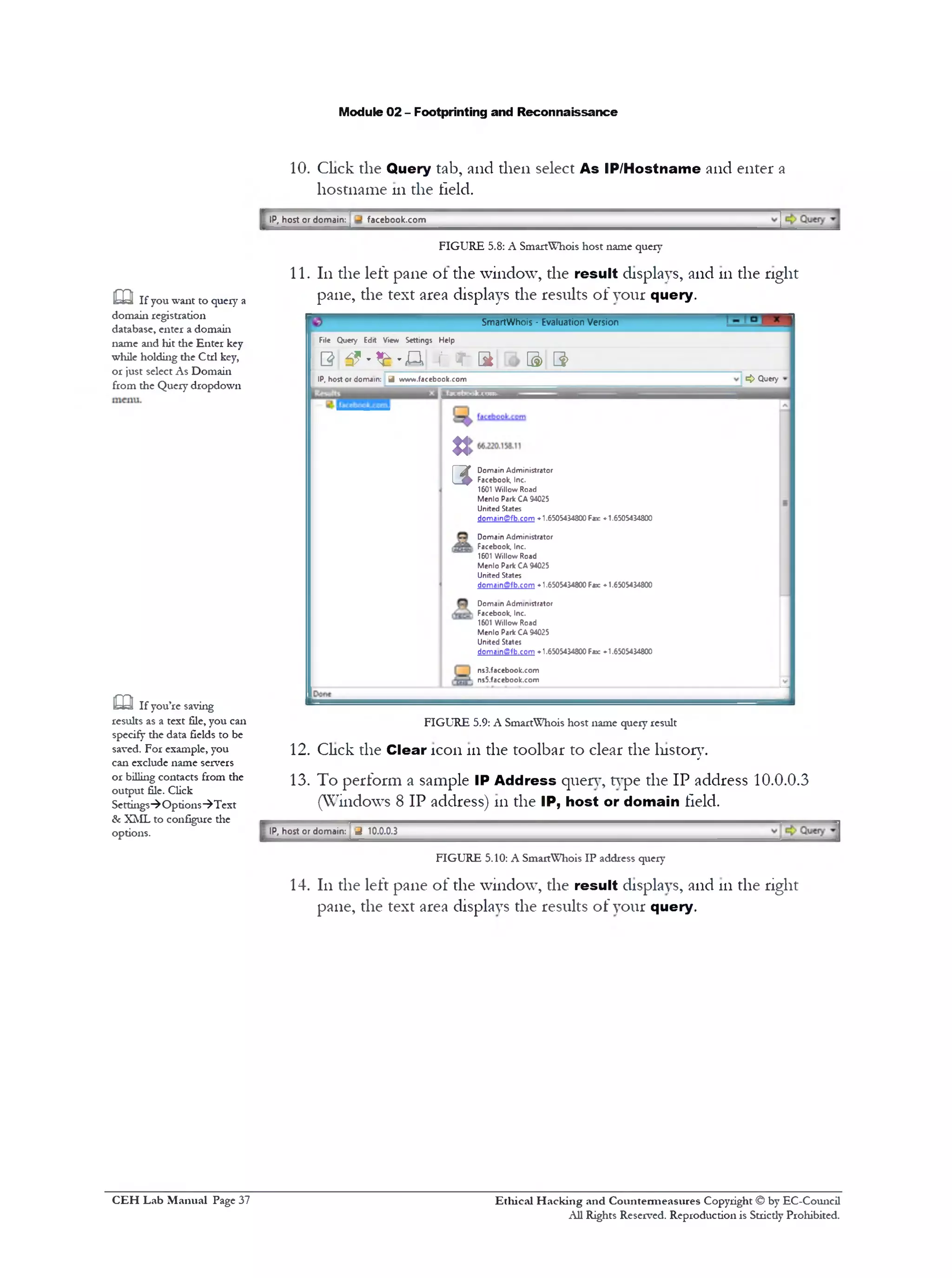
11. 111the left pane of the window, the result displays, and 111the right
pane, the text area displays the results of your query.
SmartWhois * Evaluation Version
File Query Edrt View Settings Help
0 3? ‫״‬*£‫״‬ A ■ t 'T S B> 3>
<> QueryIP, host or domain: J www.facebook.com
J
Domain Administrator
Facebook, Inc.
1601 Willow Road
Menlo Park CA 94025
United States
domainffifb.com -1.6505434800 Far «•1.6505434800
Domain Administrator
‫ו‬ Facebook, Inc.
1601 Willow Road
Menlo Park CA 94025
United States
domain(Bfb.com -1.6505434800 Fax: ♦ 1.6505434800
Domain Administrator
1 Facebook, Inc.
1601 Willow Road
Menlo Park CA 94025
United States
doma1nffifb.com ♦ 1.6505434800 Fax: «•1.6505434800
ns3.facebook.com
, ns5.facebook.com
U
3
FIGURE 5.9: A SmartWhois host name query result
12. Click the Clear icon 111the toolbar to clear the history.
13. To perform a sample IP Address query, type the IP address 10.0.0.3
(Windows 8 IP address) 111the IP, host or domain field.
IP, host or domain: ^ 10.0.0.3
FIGURE 5.10: A SmartWhois IP address query
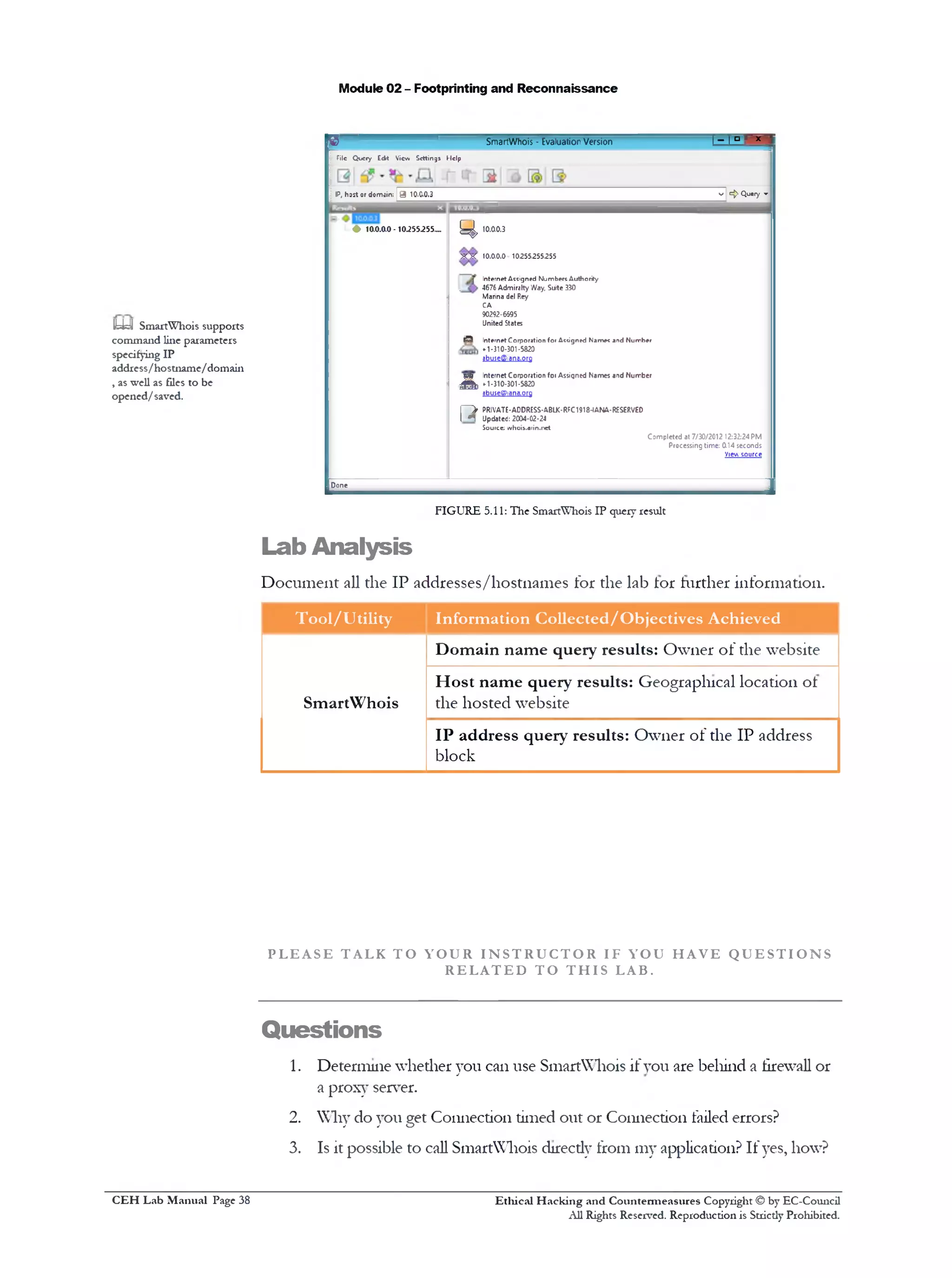
14. 111the left pane of the window, the result displays, and 111the right
pane, the text area displays the results of your query.
m If you want to query a
domain registration
database, enter a domain
name and hit the Enter key
while holding the Ctrl key,
or just select As Domain
from the Query dropdown
m If you’re saving
results as a text file, you can
specify the data fields to be
saved. For example, you
can exclude name servers
or billing contacts from the
output file. Click
Settings‫)־‬ Options‫^־‬Text
& XML to configure the
options.
Ethical H acking and Countermeasures Copyright © by EC-Council
All Rights Reserved. Reproduction is Strictly Prohibited.
C EH Lab M anual Page 37
Module 02 - Footprinting and Reconnaissance
^3 SmartWhois - EvaluationVersion ! ‫־־‬ I ‫ם‬ r x ‫י‬
Tile Query Edt View Settings Help
IP, hast or domain; | 9 10.0.0.3 v !={> Query »
L 0 10.0.0.0 -10.255.255.... ^ 10.0.0.3
X X 10.0.0.0 10255.255.255
I Internet Assigned Numbers Authority
. 4676 Admiralty Way. Suite 330
Marina del Rey
CA
90292-6595
United States
69 Internet Corporation for Assigned Names and Number
* 1-310-301 •5820
9buse©1ana,org
yjj; Internet Corporation foi Assigned Names aid Number
A »301-5820■0‫י‬ -‫ג‬‫ו‬
abuseO1ana.0rg
l‫־‬ ‫־‬ > PRIVATE-ADDRESS-ABLK-RFC1918-IANA-RESERVED
[ n Updated: 2004-02-24
Source: whois.arin.net
Completed at 7/30/2012 12:32:24PM
Processing time: 0.14 seconds
View source
Done
____________________________ J
FIGURE 5.11: The SmartWhois IP query result
Lab Analysis
Document all the IP addresses/hostnames for the lab lor further information.
Tool/Utility Information Collected/Objectives Achieved
SmartWhois
Domain name query results: Owner of the website
Host name query results: Geographical location of
the hosted website
IP address query results: Owner of the IP address
block
P L E A S E T AL K T O Y O U R I N S T R U C T O R IF YOU H A V E Q U E S T I O N S
R E L A T E D T O T H I S LAB.
Questions
1. Determine whether you can use SmartWhois if you are behind a firewall or
a proxy server.
2. Why do you get Connection timed out or Connection failed errors?
3. Is it possible to call SmartWhois direcdy from my application? If yes, how?
Ethical H acking and Countermeasures Copyright © by EC-Council
All Rights Reserved. Reproduction is Strictly Prohibited.
H=y1 SmartWhois supports
command line parameters
specifying IP
address/hostname/domain
, as well as files to be
opened/saved.
C EH Lab M anual Page 38
Module 02 - Footprinting and Reconnaissance
4. What are LOC records, and are they supported by SmartWhois?
5. When running a batch query, you get only a certain percentage of the
domains/IP addresses processed. Why are some of the records unavailable?
Internet Connection Required
□ Yes
Platform Supported
0 Classroom
□ No
0 !Labs
Ethical H acking and Countermeasures Copyright © by EC-Council
All Rights Reserved. Reproduction is Strictly Prohibited.
C EH Lab M anual Page 39
Module 02 - Footprinting and Reconnaissance
Lab
Network Route Trace Using Path
Analyzer Pro
PathAnalyserPro deliversadvancednetwork route tracingwithperformance tests,
DNS, whois, and netirork resolution to investigate netirork issues.
Lab Scenario
Using the information IP address, hostname, domain, etc. found 111the previous
lab, access can be gained to an organization’s network, which allows a penetration
tester to thoroughly learn about the organization’s network environment for
possible vulnerabilities. Taking all the information gathered into account,
penetration testers study the systems to tind die best routes of attack. The same
tasks can be performed by an attacker and the results possibly will prove to be very
fatal for an organization. 111 such cases, as a penetration tester you should be
competent to trace network route, determine network path, and troubleshoot
network issues. Here you will be guided to trace die network route using die tool
Path Analyzer Pro.
Lab Objectives
The objective of tins lab is to help students research email addresses,
network paths, and IP addresses. This lab helps to determine what ISP, router,
or servers are responsible for a network problem.
Lab Environment
111the lab you need:
■ Path Analyzer pro: Path Analyzer pro is located at D:CEH-ToolsCEHv8
Module 02 Footprinting and ReconnaissanceTraceroute ToolsPath
Analyzer Pro
■ You can also download the latest version of Path Analyzer Pro from
the link http://www.patha11alyzer.com/download.opp
■ If you decide to download the latest version, then screenshots shown
111the lab might differ
Ethical H acking and Countem ieasures Copyright © by EC-Council
All Rights Reserved. Reproduction is Strictly Prohibited.
Valuable
iiifonnation_____
Test your
knowledge
= Web exercise
Workbook review
H Tools
demonstrated in
this lab are
available in
D:CEH-
ToolsCEHv8
Module 02
Footprinting and
Reconnaissance
C EH Lab M anual Page 40
Module 02 - Footprinting and Reconnaissance
■ Install tins tool on Windows Server 2012
■ Double-click PAPro27.msi
■ Follow the wizard driven installation to install it
■ Administrator privileges to run Path Analyzer Pro
Lab Duration
Tune: 10 Minutes
Overview of Network Route Trace
Traceroute is a computer network tool tor measuring the route path and
transit tunes of packets across an Internet protocol (IP) network. The
traceroute tool is available on almost all Unix-like operating systems. Variants,
such as tracepath on modern Linux installations and tracert on Microsoft
Windows operating systems with similar functionality, are also available.
Lab Tasks
1. Follow‫־‬the wizard-driven installation steps to install Path Analyzer Pro
2. To launch the Start menu, hover the mouse cursor in the lower-left
corner of the desktop
FIGURE 6.1: Windows Server 2012—Desktop view
3. To launch Path Analyzer Pro, click Path Analyzer Pro 111apps
Start Administrator £
Server Wncawi Admimstr.. Mozilla Path
Mawsyer PuwHStiell Tooh Fkiefctt Aiktyiet
Pt02J
f— m < 0 *
Compute Task ttyp*f-V hyperV
Manager Manager Virtual
Machine
‫י‬ ‫י‬
&
Command Google
Prompt Chrome
o<‫פי‬
Google Adobe
fcarth Reader X
Traceroute is a
system administrators’
utility to trace the route IP
packets take from a source
system to some destination
system.
& Path Analyzer Pro
summarizes a given trace
within seconds by
generating a simple report
with all the important
information on the target—
we call this die Synopsis.
Ethical H acking and Countermeasures Copyright © by EC-Council
All Rights Reserved. Reproduction is Stricdy Prohibited.
C EH Lab M anual Page 41
Module 02 - Footprinting and Reconnaissance
FIGURE 6.2: Window's Server 2012—Apps
4. Click the Evaluate button 011Registration Form
5. The main window of Path Analyzer Pro appears as shown 111the
following screenshot
Path Analyzer Pro
ini &rs r
‫מ‬
File Vgm Hep
« 9 4New 0092 P‫־‬efcrercE£ Paae Setup Print Exoort ExportKM. Chedcfor Ibdstes Help
Port: 3 Smart 65535 C Trace |Onc-ttroeTrace
StandardOptions
'C‫‘׳‬ Report *fji Svnooab | ( 3 Charts [ Q Geo | yl loo | O Sfcfa
ASN Netivork Name %
Protoca)
<DICM5
I O TCP LJHiST-fwr*•/
O ucp
sourcePat
I □ RcnJw [65535 ^
Traces Mods
I (•) Defaiit
IC)FINP*oc*tt fW/
‫־‬ AcvancedProbeDetak
_cr‫־‬g‫׳‬J‫־‬ofpotkct
Smart 6^ T ]
Ufetim
1SCO nr*sec0ncs
Type-cf-Servce
(•) Urspcaficc
O MWnto-Dddv
M3x1munTTL
I”
Ir»tai Seqjerce Mmfce‫׳‬‫־‬
[*j Ran^on- | l -$
‫־‬acct^wl: ^ r■003la
FIGURE 6.3: The Path Analyzer Pro Main window
6. Select the ICMP protocol in the Standard Options section.
Standard Options
Protocol
NAT-friendly
© ICMP |
O TCP □
65535 -9-
0 UDP
Source Port
1 I Random
Tracing Mode
(•) Default
O Adaptive
O FIN Packets Only
7.
Trace Network
U J FIN Packets Only-
generates only TCP packets
with the FIN flag set in
order to solicit an RST or
TCP reset packet as a
response from the target.
This option may get
beyond a firewall at the
target, thus giving the user
more trace data, but it
could be misconstrued as a
malicious attack.
FIGURE 6.4: The Path Analyzer Pro Standard Options
Under Advanced Probe Details, check the Smart option 111the Length
of packet section and leave the rest of the options 111tins section at
their default settings.
Note: Firewall is required to be disabled for appropriate output
m Padi Analyzer Pro
summarize all the relevant
background information on
its target, be it an IP
address, a hostname, or an
email address.
Ethical H acking and Countermeasures Copyright © by EC-Council
All Rights Reserved. Reproduction is Stricdy Prohibited.
C EH Lab M anual Page 42
Module 02 - Footprinting and Reconnaissance
Advanced Probe Details
Length of packet
64Smart0
Lifetime
milliseconds300
Type-of-Service
(§) Unspecified
O Minimize-Delay
Maximum TTL
30
Initial Sequence Number
0 Random 1
FIGURE 6.5: The Path Analyzer Pro Advanced Probe Details window
8. 111the Advanced Tracing Details section, the options remain at their
default settings.
9. Check Stop on control m essages (ICMP) 111the Advance Tracing
Details section
J- Advanced Tracing Details
Work-ahead Limit
5 01 TTLs
Minimum Scatter
milliseconds20
10
Probes per TTL
Minimum:
Maximum:
V] Stop on control messages gCMP^
m Padi Analyzer Pro
benefits:
■ Research IP addresses,
email addresses, and
network paths
* Pinpoint and
troubleshoot network
availability and
performance issues
■ Determine what ISP,
router, or server is
responsible for a
network problem
■ Locate firewalls and
other filters that may be
impacting connections
■ Visually analyze a
network's path
characteristics
* Graph protocol latency,
jitter, and other factors
■ Trace actual applications
and ports, not just IP
hops
■ Generate, print, and
export a variety of
impressive reports
‫י‬ Perform continuous and
timed tests with real-
time reporting and
history
FIGURE 6.6: The Path Analyzer Pro Advanced Tracing Details window
10. To perform the trace after checking these options, select the target host,
for instance www.google.com. and check the Port: Smart as default
(65535).
0 Smart ]65535'Q' I Trace | |One-time TraceTarget: www.google.com
FIGURE 6.7: A Path Analyzer Pro Advance Tracing Details option
11. 111the drop-down menu, select the duration of time as Timed Trace
Trace ] [‫־‬TimedTracePort: 0 Smart 65535target: www.google.com
Note: Path Analyzer
Pro is not designed to be
used as an attack tool.
FIGURE 6.8: A Path Analy2er Pro Advance Tracing Details option
12. Enter the Type time of trace 111the previously mentioned format as
HH: MM: SS.
Ethical H acking and Countermeasures Copyright © by EC-Council
All Rights Reserved. Reproduction is Strictly Prohibited.
C EH Lab M anual Page 43
Module 02 - Footprinting and Reconnaissance
£3 Type time of trace!_ !_ [ x
Time of trace (hh:mm:ss)
0 - 0 - 3
<>
Q
<>
Accept Cancel
FIGURE 6.9: The Path Analyzer Pro Type time of trace option
13. Xlule Path Analyzer Pro performs this trace, the Trace tab changes
automatically to Stop.
Timed TraceStopPort: 3 Smart 180Target: vvww.google.com
FIGURE 6.10: A Path Analyzer Pro Target Option
14. To see the trace results, click the Report tab to display a linear chart
depicting the number of hops between you and the target.
| Titred ‫־‬TraceTarget‫׳‬ vmw.googe con•
O Report 5 ‫־‬ Svnoow 3 Charts v j Geo Loc (3 Stats
|Hop IP Adciesj Hoitnome ASN Network Ncme % Lo» Vln Latency Latency Avg Latency Max Latency StdDev 1
No icplv pocket* received from TTLs 1through 2
n 1 » 1.17 r» .n«t 13209 0.0c 3.96 257.78 63179 165.07
4 1 29 1 5.29.static■ 4755 0.00 4.30 lllllllllllllllllllllll127924 77613 227.13
No reply pocketsreceivedfrom TTL 5
6 1 98.static- ‫י‬ v... 4755 0.0c 1663 lllllllllllllllll 251.84 567.27 176.7S
7 1.52 .52 151&9 GOOGLE 0.00 2517 llllllllllllllllll 260.64 62290 81.77‫־‬
8 2 .95 1.95 15169 GCOGLE 0.00 2582 lllllllllllllllllll 276.13 660.49 208.93
9 ‫נ‬1145; ).145 15169 GOOGLE 0.00 2607 !lllllllllllllllllll 275.12 66022 203.45
10 7■ M i 176 rr!c 2100.net 15169 GOOGLE 0.00 25M lllllllllllllllllllll 309.08 71425 219.73
FIGURE 6.11: A Path Analyzer Pro Target option
15. Click the Synopsis tab, which displays a one-page summary of your
trace results.
Trace lined TraceTaroet: I www.gxgfe.:cm
Report | Sy-Kpnc |‫־‬E Cherts j ^ Geo | [gj log | 1>‫י‬ Stota
F orw ard DNS (A re co rd s) 74.125■236.176
W cvcisc DNS (P T R -icc o td ) *r/vw.l.google.o
A lte rn a te N am e w.vw.gocg o co.
REGISTRIES
The orgamzaton name cn fi e at the registrar for this IP is G oogle Inc. and the organization associated *ith the originating autonomous system is G oogle Inc.
INTERCEPT
The best point cf lav/u intercept is within the facilities of Google Inc..
SB TASK 2
Trace Reports
H=yj The Advanced Probe
Details settings determine
how probes are generated
to perform the trace. These
include the Length of
packet, Lifetime, Type of
Service, Maximum TTL,
and Initial Sequence
Number.
m Length of packet:
This option allows you to
set the length of the packet
for a trace. The minimum
size of a packet, as a
general rule, is
approximately 64 bytes,
depending on the protocol
used. The maximum size of
a packet depends on die
physical network but is
generally 1500 bytes for a
regular Ethernet network
or 9000 bytes using Gigabit
Ethernet networking with
jumbo frames.
FIGURE 6.12: A Pad! Analyzer Pro Target option
Ethical H acking and Countermeasures Copyright © by EC-Council
All Rights Reserved. Reproduction is Strictly Prohibited.
C EH Lab M anual Page 44
Module 02 - Footprinting and Reconnaissance
16. Click the Charts tab to view the results of your trace.
Port: @ Smait [80 ‫־‬Race | |Timed‫ח־‬aceTarget: I mvw.goo^c.a:
Repat 1 3 ■ Synopsis | ^ Chars | U Geo | [g] Log | 51 Stats [
;
.
^0‫כ‬
: sa
600
‫כ‬ B -S 500
S
400
E 300%
zoo
100
0
Anomaly
FIGURE 6.13: The Path Analyzer Pro Chart Window
17. Click Geo, which displays an imaginary world map format ol your
trace.
FIGURE 6.14: The Path Analyzer Pro chart window
m T A S K 3
View Charts
m Padi Analyzer Pro
uses Smart as the default
Length of packet. When
the Smart option is
checked, die software
automatically selects die
minimum size of packets
based on the protocol
selected under Standard
Options.
— T A S K 4
View Imaginary
Map
Ethical H acking and Countermeasures Copyright © by EC-Council
All Rights Reserved. Reproduction is Stricdy Prohibited.
C EH Lab M anual Page 45
Module 02 - Footprinting and Reconnaissance
18. Now, click the Stats tab, which features the Vital Statistics of your
current trace.
Taiact; *•av».google,:on ----------------------------- q ‫־‬ &ort: f✓ Smart 30 ' | Tracc iTimsdTrocc
C' 1 SjTooss £3 charts I O Geo - « |2 ‫ל‬ Slats
Source Target Protocol Distance Avg Latency TraceBegan TraceEnded Filters
10.0.D2 (echO: WN-MSSRCK4K41J 74.125256.176 ICMP 10 30908 30-1111-12 11:55:11 UTC 50-JuH2 11:55-21 UTC 2
10.0.02 (ethO: WNMSSELCK4K41 74.125236.176 ICMP 10 323.98 30 Jul 12 11:55:01 UTC 30-Jul-12 11:55:11 UTC 2
10.0.D2 (cthO: W N MSSELCK4K41 74.125236.176 ICMP 10 353.61 30-Jul 12 11:5451 UTC 30 Jul-12 11:55.01 UTC 2
‫־‬C.0.D2 (tr.hC‫:׳‬V/ N-MS5ELCK4K41 74.125236.176 ICMP 10 37941 3C-Jul-1211:54941 UTC 30-Jul-12 11:54:51 UTC 2
10.0.02 (ethO! WN-MSSfLCK4(41 74.125256.176 ICMP 10 39016 30-Jul-12 11:54:52UTC 50-Jul-12 11:5441 UTC 2
1C.0.D2 (cthO: WN MSSELCK4K41 74.125236.176 ICMP 10 404.82 5422UTC:‫ז‬12130Jul 30 Jul 12 11:54:32UTC 2
10.0.32 (cthC‫׳‬‫־‬. W N MSSELCK4K41 74.125236.176 ICMP 10 417^4 30 Jul 12 11:54:12UTC 30 Jul 12 11:5422 UTC 2
1C.002 (e‫׳‬.hC•:W N-MS5CLCK4K41 74.125236.176 ICMP 10 435.14 3C-JuM211:54a2UTC 30-JuM2 11:54:12UTC 2
10.0.02 («h0- WN-MSSflC K4K41; 74.125256.176 ICMP 10 42423 ;c-Jul-12 11:5*52 UTC 50-JuU2 11:54<2‫ג‬UTC 2
1C.0.D2 (cthO: W N MSSELCK4K41 74.125236.176 ICMP 10 421.11 30-Jul 12 11:53543UTC 30 Jul 12 11:53:52UTC 2
1C.0.D2 (ethO. WN-MSSELCK4K41 74.125236.176 ICMP 10 465.05 3UTC‫ג‬53:‫ן‬121-3C*Jul 30-JuM2 11:5343 UTC 2
10.002 (e‫׳‬.hC‫.׳‬ W N MSSELCK4K41 74.125236.176 ICMP 10 437.93 30‫־‬JuM211:5324UTC 30-JuH2 11:5333 UTC 2
10.0.02(*h0• WN-MSSHt K4K4I; 74.125256.176 ICMP 10 44992 JC-lul-12 11:55:14UTC tO-Jul-12 11:55-24UTC 2
10.002 (cthC‫:׳‬W N MSSUCK4K41 74.125236.176 ICMP 10 446.94 30-Jul-1211153104UTC 30 Jul 12 11:53:14 UTC 2
1C.0.D2 (cthO. WNMSSCLCK4K41 74.125236.176 ICMP 10 443.51 30‫־‬Jul‫־‬l2 11:52:54UTC 30-Jul-1211;5304 UTC 2
1C.0.D2 (e‫׳‬h0: W N-MSSELCMK41 6‫ל‬236.174.125 ICMP 10 497.68 30‫־‬Jul*12 11:52345UTC 30-JuM2 11:5254 UTC 2
10.0.02 («h0- WN-MSSHl K4K4I; 74.125256.176 ICMP 10 5833 SC-Jul-12 11:52:35UTC 50-Jul-12 11:5245 UTC 2
1C.002 (cshC‫:׳‬ WN MSSELCMK-11 74.125236.176 ICMP 10 681.78 30 Jul 12 11:5225UTC 30 Jul 12 11:52:35UTC 2
10.0.D2 (ehO. WM-MSSELCK4K41 74.125236.176 ICMP 10 649.31 30‫־‬JuH211:52:16UTC 30-Jul-12 11:5225 UTC 2
Source Target Protocol Distance Avg Latency Trace Segan Trace Ended Filters
10.0.02 (ethO: W N-MSSELCK4K41 74.125256.176 ICMP 10 46.5771 30-Jul-1211:5216 UTC 50-Jul-1211:55-21 UTC 2
FIGURE 6.15: The Path Analyze! Pro Statistics window
19. Now Export the report by clicking Export on the toolbar.
File View Help
9 ® f t f t
New Close Preferences Paae Setup Print Export Export KML Check for Updates Help j
FIGURE 6.16: The Path Analyzer Pro Save Report As window
20. Bv default, the report will be saved at D:Program Files (x86)Path
Analyzer Pro 2.7. However, you may change it to your preferred
location.
‫־‬m
z |
® I
Save Statistics As
v C Search Path A n aly zer Pro 2.7« Program File... ►Path Analyzer Pro 2.7
1= -
Date modified Type
No items match your search.
Organize Newfolder
Downloads
Recent places
Libraries
H Documents
J* Music
E Pictures
5 Videos
1% Computer
Local Disk (C:)
la Local Disk (D:) ~ <
Sample ReportFile name:
Saveastype: CSVFiles (csv)
Hide Folders
T A S K 5
Vital Statistics
m Maximum 1'lL: The
maximum Time to Live
(TTL) is the maximum
number of hops to probe
in an attempt to reach the
target. The default number
of hops is set to 30. The
Maximum TTL that can be
used is 255.
Save File
m The Initial Sequence
Number is set as a counting
mechanism within the
packet between the source
and the target. It is set to
Random as the default, but
you can choose another
starting number by
unchecking the Random
button and filling in
another number. Please
Note: Tire Initial Sequence
Number applies only to
TCP connections.
FIGURE 6.17: The Path Analyzer Pro Save Report As window
Ethical H acking and Countermeasures Copyright © by EC-Council
All Rights Reserved. Reproduction is Strictly Prohibited.
C EH Lab M anual Page 46
Lab Analysis
Module 02 - Footprinting and Reconnaissance
Document the IP addresses that are traced for the lab for further information.
Tool/Utility Information Collected/Objectives Achieved
Path Analyzer Pro
Report:
■ Number of hops
■ IP address
■ Hostname
‫י‬ ASN
■ Network name
■ Latency
Synopsis: Displays summary of valuable
information 011 DNS, Routing, Registries, Intercept
Charts: Trace results 111 the form of chart
Geo: Geographical view of the path traced
Stats: Statistics of the trace
P L E A S E T AL K T O Y O U R I N S T R U C T O R IF Y OU H A V E Q U E S T I O N S
R E L A T E D T O T H I S LAB.
Questions
1. What is die standard deviation measurement, and why is it important?
2. If your trace fails on the first or second hop, what could be the problem?
3. Depending on your TCP tracing options, why can't you get beyond my local
network?
Internet Connection Required
0 Yes □ No
Platform Supported
0 Classroom □ !Labs
Ethical H acking and Countermeasures Copyright © by EC-Council
All Rights Reserved. Reproduction is Stricdy Prohibited.
C EH Lab M anual Page 47
Module 02 - Footprinting and Reconnaissance
Tracing an Email Using the
eMailTrackerPro Tool
eMailTrackerPro isa toolthatanalyses emailheaders to disclose the originalsender’s
location.
Lab Scenario
111 the previous kb, you gathered information such as number of hops between a
host and client, IP address, etc. As you know, data packets often have to go
dirough routers or firewalls, and a hop occurs each time packets are passed to the
next router. The number of hops determines the distance between the source and
destination host. An attacker will analyze the hops for die firewall and determine die
protection layers to hack into an organization or a client. Attackers will definitely try
to hide dieir tme identity and location while intruding into an organization or a
client by gaining illegal access to other users’computers to accomplish their tasks. If
an attacker uses emails as a means of attack, it is very essential for a penetration
tester to be familiar widi email headers and dieir related details to be able to track
and prevent such attacks with an organization. 111 tins lab, you will learn to trace
email using the eMailTrackerPRo tool.
Lab Objectives
The objective of tins lab is to demonstrate email tracing using eMailTrackerPro.
Students will learn how to:
■ Trace an email to its tme geographical source
■ Collect Network (ISP) and domain Whois information for any email traced
Lab Environment
111the lab, you need the eMailTrackerPro tool.
■ eMailTrackerPro is located at D:CEH-ToolsCEHv8Module02
Footprinting and ReconnaissanceEmail Tracking
ToolseMailTrackerPro
Ethical H acking and Countermeasures Copyright © by EC-Council
All Rights Reserved. Reproduction is Strictly Prohibited.
Valuable
infonnatioti_____
s Test your
knowledge
*d Web exercise
m Workbook review
& Tools
demonstrated in
this lab are
available in
D:CEH-
ToolsCEHv8
Module 02
Footprinting and
Reconnaissance
C EH Lab M anual Page 48
Module 02 - Footprinting and Reconnaissance
■ You can also download the latest version of eMailTrackerPro from the
link http: / /www.ema11trackerpro.com/download.html
■ If vou decide to download the latest version, then screenshots shown
hi the lab might differ
■ Follow the wizard-driven installation steps and install the tool
■ Tins tool installs Java runtime as a part ot the installation
■ Run tins tool 111Windows Server 2012
■ Administrative privileges are required to mil tins tool
■ This lab requires a valid email account !Hotmail, Gmail, Yahoo, etc.).
W”e suggest you sign up with any of these services to obtain a new email
account for tins lab
■ Please do not use your real email accounts and passwords 111these
exercise
Lab Duration
Tune: 10 Minutes
Overview of eMailTrackerPro
Email tracking is a method to monitor or spy on email delivered to the
intended recipient:
■ When an email message was received and read
■ If destructive email is sent
■ The GPS location and map of the recipient
■ The time spent reading the email
■ Whether or not the recipient visited any Links sent 111the email
■ PDFs and other types of attachments
■ If messages are set to expire after a specified time
Lab Tasks
1. Launch the Start menu by hovering the mouse cursor 111the lower-left
corner of the desktop
Ethical H acking and Countermeasures Copyright © by EC-Council
All Rights Reserved. Reproduction is Stricdy Prohibited.
.__ eMailTrackerPro
helps identify die true
source of emails to help
track suspects, verify the
sender of a message, trace
and report email abusers.
•S . T A S K 1
Trace an Email
C EH Lab M anual Page 49
Module 02 - Footprinting and Reconnaissance
Windows Server 2012
WindowsServe!2012 Relea»CarvlKJaieOatacente!
Evaluationcopy.BuildMOO
■.aajjs JJL. Liiu ,E m
FIGURE 7.1:Windows Server 2012—Desktop view
2. On the Start menu, click eMailTrackerPro to launch the application
eMailTrackerPro
FIGURE 7.2: Windows Server 2012—Apps
3. Click OK if the Edition Selection pop-up window appears
4. Now you are ready to start tracing email headers with eMailTrackerPro
5. Click the Trace an email option to start the trace
m eMailTrackerPro
Advanced Edition includes
an online mail checker
which allows you to view
all your emails on the
server before delivery to
your computer.
Ethical H acking and Countermeasures Copyright © by EC-Council
All Rights Reserved. Reproduction is Strictly Prohibited.
C EH Lab M anual Page 50
Module 02 - Footprinting and Reconnaissance
| ‫־‬ , ° - x ■eMailTrackerPro v9.0h Advanced Edition Tria' day 8 o f 15
Start here My Inbox My I race Reports
eMailTrackerPro< License information
Help & Links
View 0Mai!TrackorP10 manual
eMailTrackerf '10 tulcrals
Ftequenlly asked questions
Hnw 10 tiar.w an mnail
Huai In ihurk yiiui inlmK
How to sotup mail accounts
How to sotup ruloc foi ama!Is
How to import aettinqs
I want to:
"ra:e an em al
Log*<l p network responsible for an email address
View my mtxjx
View previous traces
vO.Qh(buiH 3375)Copyrgh:(dflVfcjafyvare, Inc. 1996-2011
HI Gostaijv. to Irbcx *•‫ומר‬ eNeirTadyrPio slera
yol arecr 8cf s I5da/tnsl. Ta apply a licence cl.ck here or for purchase information c h c y ^ e
FIGURE 7.3:The eMaHTiackeiProMainwindow
6. Clickmg Trace an email will direct you to the eMailTrackerPro by
Visualware window
7. Select Trace an email I have received. Now, copy the email header
from the email you wish to trace and paste it in Email headers field
under Enter Details and click Trace
----------- 1*I
CQDfjgure I Help I About I
Visualware eMailTrackerPro Trial (day 8 of 15)
■ eMailTrackerPro by Visualware
•: Trace an email Ihave received
A received email message often contains information that can locate the computer where the message was
composed, the company name and sender's ISP (rrv&e.info).
O Look up network responsible for an email address
An email address lookup will find information about the network responsible for mai sent from that address. It will not
get any information about the sender of mail from an address but can stfl produce useful information.
Enter Details
To proceed, paste the email headers in the box below (hfiw I.tjnd.th£.h£9£i£r$.?)
Note: If you are using Microsoft Outlook, you can trace an emarf message drectly from Outlook by using the
eMadTrackerPro shortcut on the toolbar.
Email headers______________________________________________________________
Return-Path: <rinimatthews0gmail.com>
Received: from WINMSSELCK4K41 ([202.53.11.130]) by rnx.google.com with
id wi63ml5681298pbc.35.2012.07.25.21.14.41 (version-TLSvl/SSLv3
cipher=OTHER); Wed, 25 Jul 2012 21:14:42 -0700 (PDT)
M e s s a g e -ID : < 5 0 1 0 c 4 3 2 . 86f1 4 4 0 a . 3 9 b c . 3 3 1 c@mx. g o o g l e . com >
Dace: Wed, 25 Jul 2012 21:14:42 -0700 (PDT)
From: Microsoft Outlook <rinimatthews@gmail.com>
m This tool also
uncovers common SPAM
tactics.
y=J The filter system in
eMailTrackerPro allows
you to create custom filters
to match your incoming
mail.
FIGURE 7.4: The eMailTrackerPro by Visualware Window
Ethical H acking and Countermeasures Copyright © by EC-Council
All Rights Reserved. Reproduction is Stricdy Prohibited.
C EH Lab M anual Page 51
Module 02 - Footprinting and Reconnaissance
Note: 111Outlook, find the email header by following these steps:
■ Double-click the email to open it in a new window
■ Click the small arrow 111the lower-right corner of the Tags toolbar
box to open M essage Options information box
‫י‬ Under Internet headers, you will lind the Email header, as
displayed 111the screenshot
‫־‬ - ‫־‬ ' ‫׳‬ ‫״‬ ‫י‬ ‫י‬-----------------------------------------------------
‫<״«׳‬*« a ‫״‬ ‫י‬“‫י‬‫צ‬ ‫".ב‬ '
k- * ‫״‬‫״־‬ r *‫י‬‫״‬•‫•־-׳‬ *..
U«t.
(WttolKi (Vtnni AIM
vrd‫׳‬1«1*•!r <h*n««1<t‫י»ם‬
FIGURE 7.5: Finding Email Header in Oudook 2010
8. Clicking the Trace button will direct you to the Trace report window
9. The email location is traced in a GUI world map. The location and IP
addresses may van7. You can also view the summary by selecting Email
Summary section 011 the right side of the window
10. The Table section right below the Map shows the entire Hop 111the
route with the IP and suspected locations for each hop
11. IP address might be different than the one shown 111the screenshot
T A S K 2
Finding Email
Header
m The abuse report
option from the My Trace
Reports window
automatically launches a
browser window with the
abuse report included.
eMailTrackerPro v9.0h Advanced Edition Trial day 8 o f 15*7‫׳‬
[File Options Help
k m :
To: .......——- gruriil.roni
Date: Wed. 25Jul 2012 06:36:30 ■0700(PDT)
Subject: Getting started on Google*
Location: [America)
Misdirected: no
AI>us4»Reporting: To automatically generate an email
abuse report clickhere
From IP: 209.85.216.199
System Information:
■ There isno SMTPserver running on this system
(the port Kclosed).
■ There isno HTTP server running on this system
(the port isclosed).
• There isno HTTPSserver running on this system
(the port isclosed).
• There isno FTPserver running on this system
(the port isclosed).
Network Whois
Domain Whois
Email Header
Ihetrsce sccnplecc; the information found isdisplayed on the nght | T‫׳‬ viwiRejwit
5 115113.166.96 115.113 165.9B.static- 1
3 209 85 251.35 {Am&rjcd}
ID 66.2*9 94 92 {Am&rjcdj
11 &*.233175.1 lAmor/Cdj
13 64.233174.178 {Amer/co)
14 72.U 23982 lAmencQj
15 72.U 239 65 lAmer/cej
TOOQCOCT TC
1 You are cr cay 6 ora 15 aey t rial. To apply a licence Qick here or ter purchase intorrraticr CKkherc
IE3 Each email message
includes an Internet header
with valuable information,
eMailTrackerPro analy2es
the message header and
reports the IP address of
the computer where the
message originated, its
estimated location, the
individual or organization
the IP address is registered
to, the network provider,
and additional information
as available
FIGURE 7.6: eMailTrackerPro—Email Trace Report
C EH Lab M anual Page 52 Ethical H acking and Countermeasures Copyright © by EC-Council
All Rights Reserved. Reproduction is Stricdy Prohibited.
Module 02 - Footprinting and Reconnaissance
12. You can view the complete trace report on My Trace Reports tab
r ‫׳‬* eMailTrackerProv9.0h Advanced Edttio‫״‬ . Tflal day 8 o f 15 1 ~ ‫ז‬ D T *
Fie Options Help
Slditheiw Wy Inbox jllyT racc R«pmtejsub|»c<: Guidries
Previous Traces
& a & ©IITMI Delete
Subject Fiom IP
5619!@<yahoo.com
yahoo.com@
56yahoocom» *@‫ג‬
g@yahoo.com
MeeiingjQjy ahoo.com
?263Zendio Trial Acc0urcu0t0mcr00rv1c&^zcnd10.c0m
:®qmoil com‫־‬?
g@yahoo.com■‫י‬•Mwiinq
•9?120:1l«/1^ifHf^|1l11'» gangly‫־‬Q1»lt 11j mt^itvil □n lnurt*|1ly
:A.>‫־‬inoreply■daaaifctabpiu3 gnngift r‫־‬n j started on‫•ז*׳‬!
Map
y
• Trace intormation
bub>c1: ^ettivj antic ‫־‬r !00■)*+
N6di‫׳‬ecte± 110
Frcrc ‫ץכ‬0‫׳‬0‫<ז‬ dii.ttett*;plj:.5:cqfc.ccn
Seniif TP 20985 216.199
Abjs: >c<kess CScnoFojtc)
Ucdtia‫:־‬ Kcun:ar ‫,**♦ז‬ cdfcr1‫־‬a, USfi
e Click here cr far purchaseinformation C_kYou are cn day Scf a 15 day :r.a.To apply a
FIGURE 7.7: The eMailTrackerPro - My Trace Reports tab
Lab Analysis
Document all the live emails discovered during the lab with all additional
information.
Tool/Utility Information Collected/Objectives Achieved
Map: Location of traced email 111GUI map
Table: Hop 111the route with IP
Email Summary: Summary of the traced email
■ From & To email address
■ Date
eMailTrackerPro ■ Subject
■ Location
Trace Information:
■ Subject
■ Sender IP
■ Location
T A S K 3
Trace Reports
CO□ Tracking an email is
useful for identifying the
company and network
providing service for the
address.
emaiTTrackerProcan.‫ם‬
detect abnormalities in the
email header andwarn you
diat die emailmay be spam
Ethical H acking and Countermeasures Copyright © by EC-Council
All Rights Reserved. Reproduction is Stricdy Prohibited.
C EH Lab M anual Page 53
Module 02 - Footprinting and Reconnaissance
P L E A S E T AL K T O Y O U R I N S T R U C T O R IF YOU H A V E Q U E S T I O N S
R E L A T E D T O T H I S LAB.
Questions
1. What is die difference between tracing an email address and tracing an email
message?
2. What are email Internet headers?
3. What does “unknown” mean in the route table ot die idendhcation report?
4. Does eMailTrackerPro work with email messages that have been
forwarded?
5. Evaluate wliedier an email message can be traced regardless ofwhen it was
sent.
Internet Connection Required
0 Yes
Platform Supported
0 Classroom
□ No
□ !Labs
Ethical H acking and Countermeasures Copyright © by EC-Council
All Rights Reserved. Reproduction is Stricdy Prohibited.
C EH Lab M anual Page 54
Module 02 - Footprinting and Reconnaissance
Collecting Information about a
Target Website Using Firebug
Firebugintegratesnith F1'refox,providing a lotof developmenttoolsallon'ingjon to
edit, debug, andmonitorCSS, HTML, andJavaScriptlive in any n‫׳‬ebpage.
Lab Scenario
As you all know, email is one of the important tools that has been created.
Unfortunately, attackers have misused emails to send spam to communicate 111
secret and lude themselves behind the spam emails, while attempting to
undermine business dealings. 111 such instances, it becomes necessary for
penetration testers to trace an email to find the source of email especially
where a crime has been committed using email. You have already learned in the
previous lab how to find the location by tracing an email using eMailTrackerPro
to provide such information as city, state, country, etc. from where the email
was acftiallv sent.
The majoritv of penetration testers use the Mozilla Firefox as a web browser tor
their pen test activities. In tins lab, you will learn to use Firebug for a web
application penetration test and gather complete information. Firebug can
prove to be a useful debugging tool that can help you track rogue JavaScript
code on servers.
Lab Objectives
The objective of dus lab is to help sftidents learn editing, debugging, and monitoring
CSS, HTML, and JavaScript 111any websites.
Lab Environment
111the lab, you need:
■ A web browser with an Internet connection
■ Administrative privileges to run tools
■ Tins lab will work 111the CEH lab environment - on Windows Server
2012, Windows 8, Windows Server 2008, and Windows 7
Ethical H acking and Countermeasures Copyright © by EC-Council
All Rights Reserved. Reproduction is Stricdy Prohibited.
/ Valuable
information_____
Test your
knowledge
sA Web exercise
m Workbook review
H Tools
demonstrated in
this lab are
available in
D:CEH-
ToolsCEHv8
Module 02
Footprinting and
Reconnaissance
C EH Lab M anual Page 55
Module 02 - Footprinting and Reconnaissance
Lab Duration
Tune: 10 Minutes
Overview of Firebug
Firebug is an add-on tool for Mozilla Firefox. Running Firebug displays information
such as directory structure, internal URLs, cookies, session IDs, etc.
Lab Tasks
1. To launch the Start menu, hover the mouse cursor in the lower-left
corner of the desktop
Firebug includes a lot
of features such as
debugging, HTML
inspecting, profiling and
etc. which are very useful
for web development.
FIGURE 8.1:Windows Server 2012—Desktop view
2. Oil the Start menu, click Mozilla Firefox to launch the browser
Start
Seroei Wndows Admirvstr.. Hyper-V
Administrator ^
Mauger poyversheii TOOK Manager
On r 4 ‫י‬ ‫ו‬
Task Hyper-V Command
Manager
*
Virtual
Machine..
Prompt
Central
S
Google Google
Pane• fcarth Chrome
w
j •
‫־‬—
11K
1Mu/illa
hretox
FIGURE 8.2: Windows Server 2012—Apps
3. Type the URL https://getfirebug.com 111the Firefox browser and click
Install Firebug
m Firebug features:
• Javascript debugging
• Javascript
CommandLine
• Monitor die Javascrit
Performance and
XmlHttpRequest
• Logging
• Tracing
• Inspect HTML and
Edit HTML
• Edit CSS
Ethical H acking and Countermeasures Copyright © by EC-Council
All Rights Reserved. Reproduction is Stricdy Prohibited.
C EH Lab M anual Page 56
Module 02 - Footprinting and Reconnaissance
T *‫י‬°‫!־־‬
fi ft c*
** f rebog
^ | •9 ‫־‬etfreCuq conr~|
What is Firebug? Documentation Community
introCiKtionanaFeatures FAQand •v:« Dtscibswt foru*s anc
Install Firebug
Other Versions Firebuc Lite Exi
Introduction to Firebug
Hi-bug pyropntomaloglit
Rob Campbell glv*‫׳‬t * quick
Introduction to Fit•bug.
v/vtch now -
More kfM W M lI ‘
:tpi.Firebug
J tai^u r wW eb D evelopm ent Evolved.
The most popular and powerful web development tool
*P 11ftp*.I HTML and modify style and layout In real-tlm•
*0 Use *be most advanced JavaScript debugger available for any browser
V Accurately analyze network usage and performance
^ Extend Firebug and add feature* to make rirebug even more powerful
♦ ‫*׳‬ Get the information you need to got it done with Firebug.
More Features -
‫י‬
< A
^ TASK 1
Installing Firebug
FIGURE 8.3: Windows Server 2012- Apps
4. Clicking Install Firebug will redirect to the Download Firebug page
Click the Download link to install Firebug
>‫ו‬!_!□:■ m m m ‫־‬
I Dotvnloadfitet
^ A 1H gelfitebug coir ov»nlo«d*/ - - e | ■*1 c‫״‬ * . P f t c-
Download Firebug
Firebug for Firefox
$ Firebug 1.10 for Firefox 14: Recommended
Compatlblq with: FI1©fox 13-16
iDowniiartl Release Notes. New I eatures
Finebug 1.9.2
Compatiblewith: Firefox6-13
Qpwrfoad. Retease notes
Firebug 1.8.4
Compatible with: Fliefox 5-9
Download, Release notes
Firebug 1.7.3
Compatible with: Firefox 3.6, 4, 5
y j Firebug
inspects HTML and
modify style and layout in
real-time
FIGURE 8.4: Windows Server 2012—Apps
5. On the Add-Ons page, click the button Add to Firefox to initiate the
Add-On installation
L±J
P | ft D »‫׳‬‫־‬ -‫־‬ C [■£§» Google
F‫׳‬trb ‫׳‬g; A;ld-omfoi FirHoi
^ A ‫״‬-‫יו‬ •lu f *; •>v o 1 us! h1lpv>/addoro.mo2illd.o1g/tw‫־‬US/firffox/rtddo‫׳‬vWbug'
R«9itcr or Loc in I Othor Applications *
search for add ons
FADD-ONS
LXILMSJONS I PtKSONAS I IHLMLS I COLLLCTIONS M0RL-.
Welcome to Firefox Add-ons. Choose from thousands of extra features and styles to make Firefox your own
★★★★★
1,381 user reviews
3,002,506 users
Q Add to collection
< Share this Add on
# * Extensions » Firebug
Firebug 1.10.1
by Joe Hewitt, Jan Odvarko, robcee, HrcbugWorfcLngGroup
Firebug Integrates with Firefox to put a wealth of development tools at your fingertips
while you browse. You can edit, debug, and monitor CSS. HTML, and JavaScript live in
any web page...
m Firebug adds several
configuration options to
Firefox. Some of these
options can be changed
through die UI, others can
be manipulated only via
aboutxonfig.
FIGURE 8.5: Windows Server 2012—Apps
Ethical H acking and Countermeasures Copyright © by EC-Council
All Rights Reserved. Reproduction is Stricdy Prohibited.
C EH Lab M anual Page 57
Module 02 - Footprinting and Reconnaissance
6. Click the Install Now button 111the Software Installation window
Software Installation
Install add-ons only from authors whom you trust.
Malicious software can damage your computer or violate your privacy.
You have asked to install the following item:
Firebug (Author not verified)
‫׳׳‬ https://addons.mozilla.org/firefox/downloads/latest/184B/addon-1843-latest.xpi7src:
CancelInstall Now
m paneTTabMinWidth
describes minimal width in
pixels of the Panel tabs
inside die Panel Bar when
diere is not enough
horizontal space.
FIGURE 8.6: Windows Server 2012—Apps
7. Once the Firebug Add-On is installed, it will appear as a grey colored
bug 011 the Navigation Toolbar as highlighted in the following
screenshot
Firebug:: Add-ons for Firefox
f t M oziiia C orpo ratio n (US) http5://addon5.mozilla.o________C t ^ G oogle_________f i ‫־‬f t ‫־‬ D
[s
1 1
FIGURE 8.7:Windows Server 2012—Apps
8. Click the Firebug icon to view the Firebug pane.
9. Click the Enable link to view the detailed information for Console
panel. Perform the same for the Script, Net, and Cookies panels
m showFirstRunPage
specifies whether to show
the first run page.
m The console panel
offers aJavaScript
command line, lists all
kinds of messages and
offers a profiler for
JavaScript commands.
Ethical H acking and Countermeasures Copyright © by EC-Council
All Rights Reserved. Reproduction is Strictly Prohibited.
C EH Lab M anual Page 58
Module 02 - Footprinting and Reconnaissance
10. Enabling the Console panel displays all die requests by the page. The
one highlighted 111the screenshot is the Headers tab
11. 111this lab, we have demonstrated http://www.microsoft.com
12. The Headers tab displays the Response Headers and Request Headers
by die website
|9U*‫״יי‬‫י‬
C$1 ‫-־‬ r‫־‬xr^» P * D- * ‫־‬
Welcome to Microsoft
P<o<AjC« 3cwrJoa41 Sccunty Support Bjy
^‫ן‬‫ששש‬.‫״‬
• *» [m m r» |mm im vnpi UtiM Mot laotM-t fi UUf
M * |*I|Cnori Mn«)1 nfc Debugnf» Cootaei
FIGURE 8.9:Windows Server 2012—Apps
13. Similarly, the rest of the tabs 111the Console panel like Params.
Response. HTML, and Cookies hold important information about the
website
14. The HTML panel displays information such as source code, internal
URLs of the website, etc.
PHD’ *
Welcome to Microsoft
P-04uct£ Downloads Secisity Suppcrt Buy
< ‫־‬ |Mmu -|(S.*..*«DOMNrl
• US, •it*a»LLu.-t
nUMUtUittt
FIGURE 8.10: Windows Server 2012—Apps
15. The Net panel shows the Request start and Request phases start and
elapsed time relative to the Request start by hovering the mouse
cursor on the Timeline graph for a request
m The CSS panel
manipulates CSS rules. It
offers options for adding,
editing and removing CSS
styles of die different files
of a page containing CSS. It
also offers an editing mode,
in which you can edit the
content of the CSS files
directly via a text area..
m The HTML panel
displays die generated
HTML/XML of die
currendy opened page. It
differs from die normal
source code view, because
it also displays all
manipulations on the
DOM tree. On the right
side it shows the CSS styles
defined for die currendy
selected tag, die computed
styles for it, layout
information and die DOM
variables assigned to it in
different tabs.
Ethical H acking and Countermeasures Copyright © by EC-Council
All Rights Reserved. Reproduction is Stricdy Prohibited.
C EH Lab M anual Page 59
Module 02 - Footprinting and Reconnaissance
Net Panel's purpose is
to monitor HTTP traffic
initiated by a web page and
present all collected and
computed information to
die user. Its content is
composed of a list of
entries where each entry
represents one
request/response round
trip made by die page..
FIGURE 8.11: Windows Server 2012—Apps
16. Expand a request in the Net panel to get detailed information on
Params, Headers, Response, Cached, and Cookies. The screenshot that
follows shows die Cache information
^ ^ ;»T1 c i l - ;•ojw fi'■ ft D * -
Welcome to Microsoft
‫•,׳‬odwtj fcwnbads Security Support
1 ------------ ^
M ■
‫■י‬..1.1v‫י‬•:r.!‫ו•־‬••.
• Ut »C»
• Ut 4u«PMu4>t 11.A1UN :0> nxcWtnMM•
IfWm Kfifw■• |<««M Coats••
1‫־‬1tuam iM i ^am ₪ m ₪ ₪ ₪ ₪ ^₪ ₪ ₪ ₪ ₪ ₪ ₪ ₪ ₪ m m ₪ ₪ a₪ ₪ ₪ ₪ m ^^M*!‫יי‬
trJ z z “ 1r0‫״י™״‬an*CM0 •‫י‬‫״״׳‬1‫׳‬ “ •r1~
4 u m w luciJSK'i-MiMo. <jnae*0IU«n
1 1 O l VUCU.1n1.MMX.il M .‫.מ.■*־־״.־׳‬
Script panel debugs
JavaScript code. Therefore
die script panel integrates a
powerful debugging tool
based on features like
different kinds of
breakpoints, step-by-step
execution of scripts, a
display for the variable
stack, watch expressions
and more..
FIGURE 8.12: Windows Server 2012—Apps
17. Expand a request in the Cookies panel to get information 011a cookie
Value, Raw data, ]SON, etc.
Wclcomc to Microsoft
(*‫־‬•duct• OewwoMi S*cu1‫׳‬ty Seaport Buy
ft• Coobn* Fto‫־‬ Cti*jk U.icttccciic-.)‫־‬
Export cookies for
diis site - exports all
cookies of die current
website as text file.
Therefore die Save as
dialog is opened allowing
you to select die path and
choose a name for the
exported file.
FIGURE 8.13: Windows Server 2012—Apps
Ethical H acking and Countermeasures Copyright © by EC-Council
All Rights Reserved. Reproduction is Stricdy Prohibited.
C EH Lab M anual Page 60
Module 02 - Footprinting and Reconnaissance
Note: You can find information related to the CSS, Script, and DOM panel 011
the respective tabs.
Lab Analysis
Collect information such as internal URLs, cookie details, directory structure,
session IDs. etc. for different websites using Firebug.
Tool/Utility Information Collected/Objectives Achieved
Server on which the website is hosted:
Microsoft —IIS/7.5
Development Framework: ASP.NET
Firebug
HTML Source Code using JavaScript, )Query,
Ajax
Other Website Information:
■ Internal URLs
■ Cookie details
■ Directory structure
■ Session IDs
P L E A S E T AL K T O Y O U R I N S T R U C T O R IF Y OU H A V E Q U E S T I O N S
R E L A T E D T O T H I S LAB.
Questions
1. Determine the Firebug error message that indicates a problem.
2. After editing pages within Firebug, how can you output all the changes
that you have made to a site's CSS?
3. 111the Firebug DOM panel, what do the different colors of the variables
mean?
4. What does the different color line indicate 111the Timeline request 111the
Net panel?
Internet Connection Required
0 Yes □ No
Platform Supported
0 Classroom D iLabs
Ethical H acking and Countermeasures Copyright © by EC-Council
All Rights Reserved. Reproduction is Strictly Prohibited.
C EH Lab M anual Page 61
Module 02 - Footprinting and Reconnaissance
Mirroring Websites Using the
HTTrack Web Site CopierTool
HTTrnck WebSite Copieris an Offline hronserutility thatallon‫׳‬sjo// to donnload
a World Wide Web site through the Internettojour localdirectory.
Lab Scenario
Website servers set cookies to help authenticate the user it the user logs 111to a
secure area of the website. Login information is stored 111 a cookie so the user
can enter and leave the website without having to re-enter the same
authentication information over and over.
You have learned 111 the previous lab to extract information from a web
application using Firebug. As cookies are transmitted back and forth between a
browser and website, if an attacker or unauthorized person gets 111between the
data transmission, the sensitive cookie information can be intercepted. A11
attacker can also use Firebug to see what JavaScript was downloaded and
evaluated. Attackers can modify a request before it’s sent to the server using
Tamper data. It they discover any SQL or cookie vulnerabilities, attackers can
perform a SQL injection attack and can tamper with cookie details of a request
before it’s sent to the server. Attackers can use such vulnerabilities to trick
browsers into sending sensitive information over insecure channels. The
attackers then siphon off the sensitive data for unauthorized access purposes.
Therefore, as a penetration tester, you should have an updated antivirus
protection program to attain Internet security.
111 tins lab, you will learn to mirror a website using the HTTrack Web Site
Copier Tool and as a penetration tester y o u can prevent D-DoS attack.
Lab Objectives
The objective of tins lab is to help students learn how to mirror websites.
Lab Environment
To carry out the lab, you need:
Ethical H acking and Countermeasures Copyright © by EC-Council
All Rights Reserved. Reproduction is Strictly Prohibited.
/ Valuable
information_____
Test your
knowledge
sA Web exercise
m Workbook review
C EH Lab M anual Page 62
Module 02 - Footprinting and Reconnaissance
■ Web Data Extractor located at D:CEH-ToolsCEHv8 Module 02
Footprinting and ReconnaissanceW ebsite Mirroring ToolsHTTrack
Website Copier
■ You can also download the latest version of HTTrack Web Site Copier
from the link http://www.httrack.com/page/2/ en/111dex.html
■ If you decide to download the latest version, then screenshots shown
111the lab might differ
■ Follow the Wizard driven installation process
■ Tins lab will work 111the CEH lab environment - on Windows Server
2012. Windows 8, Window Server 2008‫י‬ and Windows 7
■ To run tliis tool Administrative privileges are required
Lab Duration
Time: 10 Minutes
Overview of Web Site Mirroring
Web mirroring allows you to download a website to a local director}7, building
recursively all directories. HTML, images, flash, videos, and other tiles from die
server to your computer.
Lab Tasks
1. To launch the Start menu, hover the mouse cursor in the lower-left
corner of the desktop
| | Windows Server2012
WintioM Soivm2012fkleaieCandidateDaUcrrlt1
_________________ E/dualicncopy.Buid840!
T O ‫ד‬5‫ז‬ W ■
FIGURE 9.1: Windows Server 2012—Desktop view
2. 111the Start metro apps, click WinHTTrack to launch the applicadon
WinHTTrack
Ethical H acking and Countermeasures Copyright © by EC-Council
All Rights Reserved. Reproduction is Stricdy Prohibited.
& Tools
demonstrated in
this lab are
available in
D:CEH-
ToolsCEHv8
Module 02
Footprinting and
Reconnaissance
WinHTTrack arranges
the original site's relative
link-structure.
WinHTTrack works as
a command-line program
or dirough a shell for bodi
private (capture) and
professional (on-line web
mirror) use.
C EH Lab M anual Page 63
Module 02 - Footprinting and Reconnaissance
Start
Windows Admnistr.‫״‬ Mozila Path copyng
A d m in is tra to r ^
UirvvjM
r L
PowiefShe!
W
Tools
& ©
Pro2.7
i d a
C crpuw Task Jjpor.V Hyp«‫־‬V hntor/m rwrlmp
* 1 1
Virtual
Machine...
4 a C l
V
e
Command
*‫ף‬
Googb
Chrcnie
• a a
(**Up ■—
Coojfc
tanti
Adobe
Kcafler X
T
WirHflr..
webs«e
1:T
FIGURE 9.2: Windows Server 2012—Apps
3. 111the WinHTTrack main window, click Next to create a New Project
i B IW inHTTrack W eb site Copier ‫־‬ [N e w Project 1]
File Preferences Mirror Log V/indow Help
rack website copiei
Welcome to WinHTTrack Website Copier!
Please click on the NEXT button to
< 3ack | Neit ? |
a Local Disk <D:>
^ £ DVD RW Drive <E:*
E , . New Volume <F:>
FIGURE 9.3: HTTrack Website Copier Main Window
4. Enter the project name 111the Project name held. Select the Base path
to store the copied files. Click Next
Mirroring a
Website
£7 Quickly updates
downloaded sites and
resumes interrupted
downloads (due to
connection break, crash,
etc.)
Ethical H acking and Countermeasures Copyright © by EC-Council
All Rights Reserved. Reproduction is Strictly Prohibited.
C EH Lab M anual Page 64
Module 02 - Footprinting and Reconnaissance
H WinHTTrack W ebsite Copier • [New Project 1] ‫י‬‫׳‬1=1 - 1 ‫ו‬
File Preferences Mirror _og Window Help
1+ J Local Disk < 0
'‫י‬‫־‬
13 l j L0C3I Disk <D:> Newproject name. | ]eg Project
DVD Cnve <£:>
1 Si c i N*‫*״‬ Yoiume <^;> Projectcategory ||
-hfo
Newproject
Base path; t:NVWebSles I ..|
<£ock | Not > | Ccnccl | Help |
KJUM
FIGURE 9.4: HTTrack Website Copier selecting a New Project
5. Enter www.certifiedhacker.com under Web Addresses: (URL) and
then click the Set options button
WinHTTrack W ebsite Copier ‫־‬ [Test Projectwhtt]
-
File £reterences ‫״‬:‫־‬ V1ndov Help
|Dowrioadweb54e(5)
MrTcrirg Mode
Enteraddresses)in URLbox
W«b Addr*«t#«: (URL)
‫א‬cortfiodhackor.comI
FWcrerccs ord r
3
B i j . local Disk <C>
B L CEH-Took
, Intel
[fj | NfyWebSitcs |
j ^ Jfi Piogrjrr fil«c
i S i. Pfoqwrr hies xto)
j Ul€,J
Si i . Windows
L .Q NTUSERDAT
B , , Local D<lr <D‫>־‬
DVD RW Dn/e <E:>
₪ New '/olume <F:>
FIGURE 9.5: HTTrack Website Copier Select a project a name to organize your download
6. Clicking the Set options button will launch the WinHTTrack window
7. Click the Scan Rules tab and select the check boxes for the tile types as
shown in the following screenshot and click OK
&) Wizard to specify which
links must be loaded
(accept/refuse: link, all
domain, all directory)
S Timeout and minimum
transfer rate manager to
abandon slowest sites
^ Downloading a site can
ovedoad it, if you have a
fast pipe, or if you capture
too many simultaneous cgi
(dynamically generated
pages)
Ethical H acking and Countermeasures Copyright © by EC-Council
All Rights Reserved. Reproduction is Stricdy Prohibited.
C EH Lab M anual Page 65
Module 02 - Footprinting and Reconnaissance
*WinHTTrackH
MIMEtypes | Browser ID | Log, Index. Cache ] Experts Only
Proxy | Scan Rules | ] Limits | Row Control | Links | Build | Spider
Use wildcards to exclude or include URLs or links.
You can put several scan strings on the same line.
Use spaces as separators.
Example: +*zip -www.“.com -www.* edu/cgi-bin/*. cgi
Tip: To have ALL GIF files included, use something like +www.someweb.com/’1.gif.
(+*gif I -“ gif will include/exclude ALL GIFs from ALL sites)
HelpCancelOK
m File names with original
structure kept or splitted
mode Cone html folder, and
one image folder), dos 8-3
filenames option and user-
defined structure
FIGURE 9.6: HTTrack Website Copier Select a project a name to organize your download
Then, click Next
WinHTTrdck W ebsite Copier ‫־‬ (Test Project.whtt]
File Preferences Mrror ‫״‬cq Window Help
Downloadwebste(s)
‫־‬Mirroring Mode -
Enter address(es)in URLbox
V/ob Addresses: (URL)
a‫׳‬certr'iedtacker.c
Preferences and mirroroptions:
J
a - j ^ Local Dsk <C:>
0 ^ CEH-Tooli
I 1 dell
B inetpub
j £).. ^ Intel
I ^ ) - ii MyV/d)Sites
j £} Program. Files
j Program files (x86)
I i l - ± Uscr
₪- j. Windows
j L Q NTUStRDAT
£] u Local Disk <D‫־‬>
51 ^ DVD RWDrive <E:>
S i - New Volume <F:>
S3 HTML parsing and tag
analysis, including
javascript code/embedded
HTML code
FIGURE 9.7: HTTrack Website Copier Select a project a name to organize your download
9. By default, the radio button will be selected for Please adjust
connection parameters if necessary, then press FINISH to launch
the mirroring operation
10. Click Finish to start mirroring the website
Q Prosy support to
maximize speed, with
optional authentication
Ethical H acking and Countermeasures Copyright © by EC-Council
All Rights Reserved. Reproduction is Strictly Prohibited.
C EH Lab M anual Page 66
Module 02 - Footprinting and Reconnaissance
WinHTTrack W ebsite Copier - [Test Projeciwhtt]
File Preferences Mirror .og Window Help
Remcteconncct‫־‬
‫פ‬
Connect to thisprovider
| Donot use remote access connection
V Disconnectwhen fnished
V Shutdown PCwhen fnished
Onhdd
Tron3lcrschcdulod lor (hh/
r r r
C Save *tilings only do not l»jne+ download n
Local Disk «J>
j ||j CEH Tool:
j |j)-J t dell
: Si j, netpub
j Si !. Intel
l Si j. MyWebStes
₪ Program Files
j Program Fles (x8&)
0■ j. J503
i ra >. Windows
L..Q NTUSERKAT
S x a i Local Dklc <[>>
DVD RWCrive <E;>
3 New Vo umc <R>
FIGURE 9.8: HTTrack Website Copier Type or drop and drag one or several Web addresses
11. Site mirroring progress will be displayed as 111the following screenshot
x ‫ז‬Site m irroring in progress [2 /14 ( ■ * 3 2 7 9 4 ,(13‫־‬S bytes] ‫־‬ [Test Project.w htt]H
File preference: Miiro‫־׳‬ Log Window Help
Informatbn
Bytessaved 320.26K1B Urks scanned: 2/14(♦13)
Tim©: 2rrin22j -loe wrtten: 14
Transferrate: OB/S(1.19KB/S) Hes updated 0
Adiv# connections 1 ‫״‬ ‫״‬“
0
W {Actions:)
scanning www.certffeflhackerconv)s 1■ SKIP 1
1 SKIP 1
1------------- SKIP 1
I SKIP 1
1 -KIP I
1 SKIP 1
1 SKIP 1
1 SKIP 1
1 SKIP 1
1 SKIP 1
1 SKIP 1
1 SKIP 1
1 SKIP 1
Help |
J Lsz
P■^ Local Disk <C>
: ₪ X CEH-Tods
j B -J j del
‫ש‬ J. ■netpub
j 0^ lntel
| 0 M MyWcbSitcs
I (5)■~J1 Program Files
Q ‫|׳‬ Progrom Files (»86)
I ra i . Users
j 0 1 Windows
~ j j NTUSFR.DAT
y - g Local Diik<0:>
DVD RWDrK* <E:>
B r j Nevr Volume <F:>
FIGURE 9.9: HTTrack Website Copier displaying site mirroring progress
12. WinHTTrack shows the message Mirroring operation com plete once
the site mirroring is completed. Click Browse Mirrored Website
CDThe tool lias integrated
DNS cache and native
https and ipv6 support
CD HTTrack can also
update an existing mirrored
site and resume interrupted
downloads. HTTrack is
fully configurable by
options and by filters
CDFilter by file type, link
location, structure depth,
file size, site size, accepted
or refused sites or filename
(with advanced wild cards)..
Ethical H acking and Countermeasures Copyright © by EC-Council
All Rights Reserved. Reproduction is Strictly Prohibited.
C EH Lab M anual Page 67
Module 02 - Footprinting and Reconnaissance
Site mirroring finished! • [Test Pfoject.whtt]
File Preferences Mirror .og Window Help
Mrroring operation ccmplctc
Clfck Exit to quit 1/VnHTTrac*.
See Ogf!fe(s) t necessayto ensurethat ever/thrg isOK.
T>1anks for usingWinHTTrack1
Brcwoo Mrrcrod Wobaitc
MUM
3 Local Disk <C>
E CEH-Tools
Intel
; M (MyWebSiles |
0 I Program Files
j 0 Program Fles (x8&)
I J t Usen
i g| j. •Vndow;
1 Q NTUSBUJAT
| - a Local Disk <[>.>
^ DVD RWCrive <h>
[ij ‫״‬ Nev/Voumc <F:>
FIGURE 9.10: HTTrack Website Copier displaying site mirroring progress
13. Clicking the Browse Mirrored W ebsite button will launch the mirrored
website for www.cert1fiedhacker.com. The URL indicates that the site is
located at the local machine
Note: If the web page does not open for some reasons, navigate to the
director}‫־‬where you have mirrored the website and open index.html with
any web browser
Help and how-toDowbdcfe
hMnwtEjplxe‫־‬
Downloads and support
Aslr questions
fecolereal
w<» ‫׳‬!■tiv•‫יויי‬Mracen91<eduw^«n<the
Mxrovofl(imnuMli
CutMlMMiyKiHdla)( ^ ) (WttMUir
b!r«an
Securityand updates
(S) “‫“**־‬ r f j ChKl1ctda MMtKurH,
FIGURE 9.11: HTTrack Website Copier Mirrored Website Image
14. A few websites are very large and will take a long time to mirror the
complete site
15. If you wish to stop the mirroring process prematurely, click Cancel in
the Site mirroring progress window
16. The site will work like a live hosted w ebsite.
Q Optional log file with
error-log and comments-
log.
C] Use bandwiddi limits,
connection limits, size
limits and time limits
C□ Do not download too
large websites: use filters;
try not to download during
working hours
Ethical H acking and Countermeasures Copyright © by EC-Council
All Rights Reserved. Reproduction is Stricdy Prohibited.
C EH Lab M anual Page 68
Lab Analysis
Module 02 - Footprinting and Reconnaissance
Document the mirrored website directories, getting HTML, images, and other tiles.
Tool/Utility Information Collected/Objectives Achieved
HTTrack Web
Site Copier
■ Offline copy of the website
www.certifiedhacker.com is created
P L E A S E T A L K T O Y O U R I N S T R U C T O R IF Y O U H A V E Q U E S T I O N S
R E L A T E D T O T H I S LAB.
Questions
5. How do you retrieve the files that are outside the domain while
mirroring a website?
6. How do you download ftp tiles/sites?
7. Can HTTrack perform form-based authentication?
8. Can HTTrack execute HP-UX or ISO 9660 compatible files?
9. How do you grab an email address 111web pages?
Internet Connection Required
□ Yes 0 No
Platform Supported
0 Classroom 0 !Labs
Ethical H acking and Countermeasures Copyright © by EC-Council
All Rights Reserved. Reproduction is Strictly Prohibited.
C EH Lab M anual Page 69
Module 02 - Footprinting and Reconnaissance
Extracting a Company’s Data Using
Web Data Extractor
Web Data Extractor'is usedto extracttargetedcompanj(s) contactdetails ordata
such as emails;fax,phone through webfor responsible b'2b communication.
Lab Scenario
Attackers continuously look tor the easiest method to collect information.
There are many tools available with which attackers can extract a company’s
database. Once they have access to the database, they can gather employees’
email addresses and phone numbers, the company’s internal URLs, etc. With
the information gathered, they can send spam emails to the employees to till
their mailboxes, hack into the company’s website, and modify the internal
URLs. They may also install malicious viruses to make the database inoperable.
As an expert penetration tester, you should be able to dunk from an attacker’s
perspective and try all possible ways to gather information 011 organizations.
You should be able to collect all the confidential information of an
organization and implement security features to prevent company data leakage.
111 tins lab, you will learn to use Web Data Extractor to extract a company’s
data.
Lab Objectives
The objective ot tins lab is to demonstrate how to extract a company’s data using
Web Data Extractor. Smdents will learn how to:
■ Extract Meta Tag, Email, Phone/Fax from the web pages
Ethical H acking and Countermeasures Copyright © by EC-Comicil
All Rights Reserved. Reproduction is Stricdy Prohibited.
/ Valuable
information_____
Test your
knowledge0
sA Web exercise
m Workbook review
C EH Lab M anual Page 70
Module 02 - Footprinting and Reconnaissance
Lab Environment
To earn’out the lab you need:
■ Web Data Extractor located at D:CEH-ToolsCEHv8 Module 02
Footprinting and ReconnaissanceAdditional Footprinting ToolsWeb
Data Extractor
■ You can also download the latest version ol Web Data Extractor from
the link http://www.webextractor.com/download.htm
■ If you decide to download the latest version, then screenshots shown
111the lab might differ
■ This lab will work in the CEH lab environment - 011 Windows Server
2012, Windows 8‫י‬ Windows Server 2008, and Windows 7
Lab Duration
Time: 10 Minutes
Overview of Web Data Extracting
Web data extraction is a type of information retrieval diat can extract automatically
unstructured or semi-stmctured web data sources 111a structured manner.
Lab Tasks
1. To launch the Start menu, hover the mouse cursor in the lower-left
corner of the desktop
FIGURE 10.1: Windows 8—Desktop view
2. 111the Start menu, click Web Data Extractor to launch the application
Web Data Extractor
Ethical H acking and Countermeasures Copyright © by EC-Council
All Rights Reserved. Reproduction is Strictly Prohibited.
&7 Tools
demonstrated in
this lab are
available in
D:CEH-
ToolsCEHv8
Module 02
Footprinting and
Reconnaissance
m WDE send queries to
search engines to get
matching website URLs
WDE will query 18+
popular search engines,
extract all matching URLs
from search results, remove
duplicate URLs and finally
visits those websites and
extract data from there
~ TASK 1
Extracting a
Website
C EH Lab M anual Page 71
Module 02 - Footprinting and Reconnaissance
Start AdminA
s ■ Q m
Microsoft
Office
Picture...
B
Microsoft
OneNote
2010
a D
*rofte M n SktDnte
Microsoft
Outlook
2010
a
Microsoft
PowerPoint
2010
a
Mozilb
Firefox
<9
1*oiigm
‫ם‬ ‫נ‬
VOcw
Microsoft
Excel 2010
a
Microsoft
Publisher
?010
a <3>
* ‫י‬ ‫י‬ ‫׳‬*
* 181 ii8i
Microsoft
Office ?010
Unguag..
Microsoft
Woid ?010
a a
B
Mil (iidNli nllilol) •me9am*
10
Mcrosoft
Organizer
R
Mkrotoft
Office ?010
Upload...
•
Snagit 10
&
AWittl h*■
Antivirus
<
%/}. r !
M
XbaxUVfGa‫״‬w
Certificate
10‫ז‬VBA_.
P
Web Data
Extractor
Sragit 10
Editor
61
Adobe
Reader 9
>-
Adobe
ExtendSc
FIGURE 10.2: Windows 8—Apps
3. Web Data Extractor’s main window appears. Click New to start a new
session
—Web Data Extractor 8.3
File View Help
Cur speed 0 00 kbps
Avg speed 0 00 kbpsStofi I
t?
Start
£
Qpen
m
New
L^ess,on Meta tags Emails Phones Faxes Merged list Urls Inactive sites
URL processed 0Sites processed 0 /0 . Time: 0 msec
Traffic received 0bytes
m WDE - Phone,
Fax Harvester
module is
designed to
spider the web for
fresh Tel, FAX
numbers targeted
to the group that
you want to
market your
product or
services to
& It has various limiters
of scanning range - url
filter, page text filter,
domain filter - using which
you can extract only the
links or data you actually
need from web pages,
instead of extracting all the
links present there, as a
result, you create your own
custom and targeted data
base of urls/links collection
FIGURE 10.3: The Web Data Extractor main window
Clicking New opens the Session settings window.
Type a URL rwww.cert1hedhacker.com) 111die Starting URL held. Select
die check boxes for all the options as shown 111die screenshot and click OKH Web Data Extractor
automatically get lists of
meta-tags, e-mails, phone
and fax numbers, etc. and
store them in different
formats for future use
Ethical H acking and Countermeasures Copyright © by EC-Council
All Rights Reserved. Reproduction is Strictly Prohibited.
C EH Lab M anual Page 72
Module 02 - Footprinting and Reconnaissance
Session settings
Source Offsitelnks Filter URL Filter: Text Filter: Data Parser Correction
Seatch engines Site / Directory / Groups URL li
Starting URL http:/Avww. certifiedhacker.com
Spidef in
(•;R etrieval depth 0 J g ] (0 ]s ta y « * h ‫״‬ fulU R L
http:/ / www.certifiedhacker.com
O Process exact amount of pages
Save data
Extracted data w i be automatically saved in the selected lolder using CSV format. You can save data in
the different format manually using Save button on the corresponding extracted data page
Folder C:UsersWJminDocumentsWebExtractorDatacert1fiedhacker com
£3 Fixed "Stay with full
ud" and "Follow offsite
links" options which failed
for some sites before
® E x trac t Meta tags @ Extract emails
0 Extract site body @ Extract phones
M Extract URL as base URL
vl @ Extract faxes
FIGURE 10.4: Web Data Extractor die Session setting window
6. Click Start to initiate the data extraction
Web Data Extractor 8.3
8 V £ m 1
Jobs 0 / [5 Cw. speed 0 00kbps 1
New Edit Qpen Start stofi 1 Avg speed 0 00 kbps 1
URL processed 0
Traffle received 0 bytes
Sites processed 0 / 0 Tine: 0 msec
FIGURE 10.5: Web Data Extractor initiating the data extraction windows
7. Web Data Extractor will start collecting the information (emails,
phones, faxes, etc.). Once the data extraction process is completed, an
Information dialog box appears. Click OK
& It supports
operation through
proxy-server and
works very fast,
as it is able of
loading several
pages
simultaneously,
and requires very
few resources.
Powerful, highly
targeted email
spider harvester
Ethical H acking and Countermeasures Copyright © by EC-Council
All Rights Reserved. Reproduction is Stricdy Prohibited.
C EH Lab M anual Page 73
Module 02 - Footprinting and Reconnaissance
T=mn‫־‬ trWeb Data Extractor 8.3
Jobs |0 | / [ i r j Cur. speed 0.00kbp:
A‫״‬g. ®peed 0.00 kbp*Otert Ctofj
9' £Cdit Open
Session Meta tags (64) Emails (6) Fhones(29) Faxes (27) Merged list Urls(638) Inactive sites
URL proressed 74Site processed: 1 /1 . Time: 2:57 min
Traffic received 626.09 Kb
‫־‬m 
Web Data Extractor has finished toe session.
You can check extracted data using the correspondent pages.
FIGURE 10.6: Web Data Extractor Data Extraction windows
The extracted information can be viewed by clicking the tabs
Web Data Extractor 8.3
m 0 ‫יין‬® Jobs 0 / 5 Cu speec 0 00kbps I
New E<* Qpen Start Stop Avg speed 0 00kbps I
Meta lags Emais Phones Faxes Merged list Urls Inactive sites
Sites processed 0 / 01 Time: 0 msec
Traffic received 0 bytes
FIGURE 10.7: Web Data Extractor Data Extraction windows
Select the Meta tags tab to view the URL, Tide, Keywords,
Description, Host, Domain, and Page size information
Web Data Extractor 8.3
File View Help
Cur. ipeed 0.C0 Japs
Avg. speed 0.C0 lops
Jobs 0 ]/ 5
‫ס‬‫״־‬■
p
Stop
©
Start
E
Op‫־‬rE «
u
New
Doma Page 5iz Page l<
com ‫ו‬8‫ו‬ ‫ש‬ 1/12/2
com 10147 1/12/2
com 9594 1/12/2
com 5828 1/12/2
com 9355 1/12/2
com 8397 1/12/2
com 7S09 1/12/2
com 1271 1/12/2
9E35 2/21‫/ר‬
com 8E82 1/12/2
com 1C804 1/12/2
com 13274 1/12/2
com 11584 1/12/2
com 12451 1/12/2
16239 1/12/2
com 12143 1/12/2
com 1489 1/12/2
com 5227 1/12/2
com 1E259 1/12/2
com 8£93 1/12/2
com 2S63 1/12/2
[ Sesson | Mcto 4&‫)־‬ | Ennafc (6] Phores (23) Faxes(27| Merged 1st U1I5(638) Inactive sites
B
URL Title Keyword* Descnpticn Host
h‫־‬tp://ce‫־‬t#1e*>a:ke1c01r»/Hec1pes/1;h1cken_Cuffy.ht1Your corrpany • HeciDesdetail borne keywads t A shat descrotion of you hNp://certf1edh<c
h'tp //ceW1eJk»-ke1co*1/R«;i|jes/dppe_1;dket1t11l ,1‘our coirpary • Redyes detail Some keywads 4 Asfw l (fesciption of you hup.//ceitfiedhi c
h’tp//e*tifi*dh*:k*tco*fv/R*cip*«/Chick*n_with_b• Your eonrpary • R*cip*cd*Uil Son‫•!־‬ k«ywadc tkA short d4ccrotio1‫׳‬ of you http7/eert?iedhl c
h‫־‬tp://cettf1edha:ke1co«v‫׳‬Recces/contact-u$.html Your coirpany • Contact j$ Some kevwads 4‫־‬A shat description of vou http://cerlifiodh< c
h‫־‬tp://cetf!ejha:ke1co«r»/Recif:e$/honey_cake.hlml Your corrpany • Recipesdetail Some keywads 4‫־‬A shat descrption of you http://certfiedh« c
h‫־‬tp://ce tf1e:Jha:ke1com/RecifesAebob.Hml Your corrpany • Recipes detail Some keywads 4‫־‬A shot descrbtion of you http://certified^ c
h!tpV/ceti1edhdd^e1coevTWcve«A>eru.html Your corrpary •Menu Some keywads 4 A slot description of you http7/certfiedh< c
lvtp://ce*ifiedhoske1co«/Fl5ciee«/1ecipes.hlml Your corrpany Recipe! Some kcywadi 4‫־‬A short description of you http://eertifi©dh< c
htfp7/c*‫־‬tifi*:§»:4ce1 eo«v/Redpe*/Chirese_Pepper_Your corrpary • Recipesdetail ?om» keyv*1‫־‬ds4‫־‬Ashcrl d*«eription ofyou hHp//eerlifiedh; c
h1tp://ce‫־‬tf1eJha^.e1co«v‫׳‬Recices/!ancoori chcken Your corrpany • Recipes detail Some kevwads 4‫־‬A shat descrbtion of vou h»p://certifiedh< c
lrtp7/ce-tifiedha:ketcotv‫׳‬R2cipe$/‫׳‬ecipe$-detail.htrn Your corrpany • Recipesdetail Some keywads 4‫־‬A shot descrption of you http://certifiedh< c
h1tp://cetifiedha:ke1co«v‫׳‬Socid Media.'abcut-us.htm Unite• Together s Better(creat keyword;. 01phi*Abner descriptior of this :http://certifiedhi 1
h1tp://ce‫־‬U1ejha^etco«v‫׳‬R5c1f:es/1neru-categDfy.ht Your corrpany • Menu category Some keywads 4‫־‬A shat descrotion of you http://certifiedh< 1
h!tp://cetifiejha*e1cor1/R5cipes/ecipes-:ategory.l Your coirpany ■Recipes categ! Some keywads 4‫־‬A shat descrbtion of you http://certfiedh< 1
h,tp:/‫׳׳‬cetifiedho;keteom/Socid Mcdio/somple blog.I Unite Together e Better(creatkeyword*,ofpho-Abod description of •his 1http://certifiedhi c
hitp7/ce‫־‬hfie:t»rket com/Socid Media/samplecorte Unite- Together tsBuffer (creatkeyword;, or phca-A brier descriptior of Ihis http‫־‬//certifiedhi c
hto://cetifiedhackeicon/S pciel Media.’sample loain. http://certifiedhi 1
htp://cetifiedhackeicom/Tjrbc Mcx/iepngix.htc http://certfiedh< 1
h‫־‬tp://cetifiedha^etcom/S xicl Media.’sample-portfc Unite • Together s Better (creat keyword;, or phra:A brier descriptior of !his 1http://certfiedh< 1
http://cet*1edha:ke1com/Under the trees/blog.html Under the Trees http://certifiedh< 1
frtp://cetifiedhacketcom/ll-njg the trees/contact,htUnder the Trees h»p://:ertriedh< c
FIGURE 10.8: Web Data Extractor Extracted emails windows
10. Select Emails tab to view the Email, Name, URL, Title, Host,
Keywords density, etc. information related to emails
& Meta Tag Extractor
module is designed to
extract URL, meta tag (tide,
description, keyword) from
web-pages, search results,
open web directories, list of
urls from local file
EQ if you want
WDE to stay
within first page,
just select
"Process First
Page Only". A
setting of ”0" will
process and look
for data in whole
w ebsite. A
setting of "1" will
process index or
home page with
associated files
under root dir
only.
Ethical H acking and Countermeasures Copyright © by EC-Council
All Rights Reserved. Reproduction is Stricdy Prohibited.
C EH Lab M anual Page 74
Module 02 - Footprinting and Reconnaissance
Web Data Extractor 8.3
‫י‬ £ 5 H ! e 1
Jobs 0 / 5 Cur speed 0 CMkfapt 1
N5V» Edt 0p5n Stait Stofi | Avg. tpscd 0.0Ckbps 1
Session Meta 095(64) | Enaih (6) | ?hones |29) Fckcs(27) Mergod 1st Urls (G33) Inactivesrei
Keywordsdensity KeyvcrcsURL Tfcle Host
httpJ/ceitifiedhackdr.conv'Social MedUnite Topethe* isB3ttef (creat3c http:<7cettifiedhackef.c
1rro«1ntrospre.s‫״‬eo nfo httD:/l/ce!t1fiedh3cker.ccrrv‫׳‬c0Dcrate‫־‬l( FttD://ce‫־‬t1f‫־‬edh3ck5r.com 0
5ale5@Tt!o:p*ew=fc sdes http://ceitifiedb3cker.com‫'׳‬corpo1ate‫־‬k http./1/ceitifiedhackcr.com 0
supDcrt@nt‫־‬otpre vueb SLppOft http:.J/ce1tifiedh3eker eom/corpcrcte-k http•/Vce!tifiedh3ekercom 0
aalia@dis3r.con aalia http:/Vcettifiedh3cker.conv‫׳‬P-folio/ccn P■Folio http://cetifedhacker.com 0
Htp:7‫׳‬cetifodh3ck0r.ccontact http:,1/ceitifiedkGckor.conv'Rocipoj/i©You co‫־‬r»pa‫>׳‬y 3ecpos
E-nail Narre
concact0 jrite rmaj^anocxafrunitv. contact
cortact@!>cnapDtt.ccxn
FIGURE 10.9: Web Data Extractor Extracted Phone details window
11. Select the Phones tab to view the information related to phone like
Phone number, Source, Tag, etc.
‫ח^דד‬Web Data Extractor 83
m 0 % 9 1
Jobs 0 / 5 Cut. speed 0.00kbps 1
New g * Open Start St0Q | Avg speed 0.00kbos 1
j Session Metatags (64) Emails(6) | Phenes (29)"| Faxes (27) Merged list Urls (6381 Inactive sites
Keywords de Key /HostTitle‫׳‬dace
http://certifiedhacker.com/Online Bookr>o/a> Onlne 300kina: Siterru http://certifiedhackef.c1
http://certifiedhacker.com/Online B:>o*ung/b‫־‬c Onlne Booking. Brows http://certifiedhackef.c1
http://certifiedhacker.com/Online Booking/c* Onine Booking: Check http://certifiedhackef.c1
http7/certifiedhackef rom/'Dnlinft Bsoking/ea Onine Booking Conta http7/eertifiedhaek« c!
http://certifiedhacker.com/Online Bookrig/c:* Onine Booking: Conta http://certifiedhackef.c1
http://certifiedhacker.com/Online Booking/ca Onine Booking: Conta http://certifiedhackef.c1
http://certifiedhacker.com/Online Bookirtg/fac Onine Booking: FAQ http://certifiedhackef.c1
http://certifiedhacker.com/Online Booking/pal Onine 300king: Sitem< http://certif1edhackef.c1
http://certifiedhacker.com/Online Booking/se< Onine 300king: Searc http://certifiedhackef.c1
http^/cortifiodhackor.convOnline B»oking/sei Onine Booking: Searc ht‫׳‬p://certifiedhackef.ci
http://certifiedhacker.com/Online Booking/se< Onine 300king: Searc http://certifiedhackef.c1
http://certifiedhacker.com/Online Booking/ten Online Booking: Typoc http://certifedhackef.c1
http://ccrtificdhackcr.com/Onlinc B:>oking/hol Onine Dooking: Hotel http://ccrtifiedh0cka.ci
http://certifiedhacker.com/P-folio/contaclhtn P-Foio http://certiliedhackef.c!
SPhone
http://certifiedhacker.com/Real Estates/page: Professional Real Esta ht‘p://certifiedhackef.ci
http://certifiedhacker.com/Real Estales/pags: Professional Red Esta http:/
http://certifiedhacker.com/Real Estates/page: Professional Real Esta http:
//cerlifiedhackef.ci
//certifiedhackef.ci
//certifedhackef.c!
//certifiedhackef.ci
://certifiedhackef.ci
httn/Zrprti^HhArkwr,
1•830-123-936563 call
1•8D0 123-936563 call
1•830 123-936563 call
♦1?3-456-5$863?
1-830-123-936563 call
800-123-988563
1-8D0-123-936563 call
1-830-123-936563 call
100-1492
150 19912
1-830-123-936563 call
1 9X123 936563 call
+90 123 45 87 Phone
(665)256-8972
(665) 256-8572
1800123986563
1800123986563
1800123986563
1?345659863?
1800123986563
800123986563
1800123986563
123986563‫ש‬18
1001492
15019912
123986563‫ש‬18
1800123986563
1800123986563
901234567
6662588972
6662588972
http://certifiedhacker.com/Real Estdes/pag* Professional Real Esta http
http://certifiedhacker.com/Real Estates/peg* Professional Real Esta http
http://certifiedhacker.Com/'Social Media/sarrp Unite - Togetheris Bet http
http://certifiedhacker.com/Under the treesTbc Undef lie Tfees http
http://cert1f1edhacker.com/Under the trees/bc Undef tie I fees http
•?Air I Irvfef l^x»Tithttrv//(‫־‬••*rtifiArlhArka
(660)256-8572
(660) 256-8272
1-830-123-936563 call
102009
132009
77 xnq
6662588972
6662568972
123986563‫ש‬18
102009
132003
‫ל‬‫ל‬‫ל‬‫ח‬‫מז‬
FIGURE 10.10: Web Data Extractor Extracted Phone details window
12. Similarly, check for the information under Faxes, Merged list, Urls
(638), Inactive sites tabs
13. To save the session, go to File and click Save session
m WDE send
queries to search
engines to get
matching website
URLs. Next it
visits those
matching
websites for data
extraction. How
many deep it
spiders in the
matching
websites depends
on "Depth" setting
of "External Site"
tab
Ethical H acking and Countermeasures Copyright © by EC-Council
All Rights Reserved. Reproduction is Strictly Prohibited.
C EH Lab M anual Page 75
Module 02 - Footprinting and Reconnaissance
Web Data Extractor 8.3
--------File| View Help
Jobs 0 J / 5 Cur. speed
Avg. speed
s (29) Faxes (27) Merged list Urls (638 Inactive sites
URL procesced 74
Traffic received 626.09 Kb
Edit session
Open session
S«vc session ctti-s |
Delete sesson
Delete All sessions
Start session
Stop session
Stop Queu ng sites
b it
FIGURE 10.11: Web Data Extractor Extracted Phone details window
14. Specify the session name in the Save session dialog box and click OK
'1^ 1®' a ‫׳‬Web Data Extractor 8.3
1« £ 1 Jobs [0 | / Cur. speed 0.0Dkbps 1
$ta»t Sloe | Avg speed 003kbps 1
[File View Hdp
m 0 p
New £dit Qpen
Ses$k>r Meta tegs (64) Emails (6) Phones (29) Faxes (27) Merged list Urls (638) Inactive sites
S*o piococcod 1 f 1. Time 4:12 min URL pcocesied 74
Tralfic receded 626.09 Kb
‫־‬‫^ו‬‫נ‬‫־‬Save session
Please specify session name:
FIGURE 10.12: Web Data Extractor Extracted Phone details window
15. By default, the session will be saved at
D:UsersadminDocumentsWebExtractorData
Sfe Save extracted
links directly to
disk file, so there
is no limit in
number of link
extraction per
session. It
supports
operation through
proxy-server and
works very fast,
as it is able of
loading several
pages
simultaneously,
and requires very
few resources
Ethical H acking and Countermeasures Copyright © by EC-Council
All Rights Reserved. Reproduction is Stricdy Prohibited.
C EH Lab M anual Page 76
Module 02 - Footprinting and Reconnaissance
Lab Analysis
Document all die Meta Tags, Emails, and Phone/Fax.
Tool/Utility Information Collected/Objectives Achieved
Web Data
Extractor
Meta tags Information: URL, Title, Keywords,
Description, Host. Domain, Page size, etc.
Email Information: Email Address, Name, URL.
Title, Host, Keywords density‫,״‬ etc.
Phone Information: Phone numbers, Source,
Tag, etc.
P L E A S E T AL K T O Y O U R I N S T R U C T O R IF Y OU H A V E Q U E S T I O N S
R E L A T E D T O T H I S LAB.
Questions
1. What does Web Data Extractor do?
2. How would you resume an interrupted session 111Web Data Extractor?
3. Can you collect all the contact details of an organization?
Internet Connection Required
□ Yes 0 No
Platform Supported
0 Classroom 0 iLabs
Ethical H acking and Countermeasures Copyright © by EC-Comicil
All Rights Reserved. Reproduction is Stricdy Prohibited.
C EH Lab M anual Page 77
Module 02 - Footprinting and Reconnaissance
Identifying Vulnerabilities and
Information Disclosures in Search
Engines using Search Diggity
Search Diggity is theprimary attack toolof the Google Hacking Diggity Project It
is an MS Windons GUI application thatserves as afront-end to the latestversions
of Diggity tools: GoogleDiggity, BingDiggity, Bing L/nkFromDomainDiggity,
CodeSearchDiggity, Dl^PDiggity, FlashDiggity, MainareDiggity, Po/tScanDiggity,
SHOD.4NDiggity, BingBina/yMalnareSearch, andNotlnMyBackYardDiggity.
Lab Scenario
An easy way to find vulnerabilities 111 websites and applications is to Google
them, which is a simple method adopted bv attackers. Using a Google code
search, hackers can identify crucial vulnerabilities 111 application code stnngs,
providing the entry point they need to break through application security.
As an expert ethical hacker, you should use the same method to identity all
the vulnerabilities and patch them before an attacker identities them to exploit
vulnerabilities.
Lab Objectives
The objective of tins lab is to demonstrate how to identity vulnerabilities and
information disclosures 111search engines using Search Diggity. Students will learn
how to:
■ Extract Meta Tag, Email, Phone/Fax from the web pages
Lab Environment
To carry out the lab, you need:
■ Search Diggitvis located at D:CEH-ToolsCEHv8 Module 02
Footprinting and ReconnaissanceGoogle Hacking
ToolsSearchDiggity
Ethical H acking and Countenneasures Copyright © by EC-Council
All Rights Reserved. Reproduction is Strictly Prohibited.
/ Valuable
mformation_____
Test your
knowledge
*4 Web exercise
m Workbook review
H Tools
demonstrated in
this lab are
available in
D:CEH-
ToolsCEHv8
Module 02
Footprinting and
Reconnaissance
C EH Lab M anual Page 78
Module 02 - Footprinting and Reconnaissance
■ You can also download die latest version of Search Diggity from the
link http: / /www.stachliu.com/resources / tools / google-hacking-diggitv-
project/attack-tools
■ If you decide to download the latest version, then screenshots shown
111the lab might differ
■ Tins lab will work 111the CEH lab environment - 011Windows Server
2012, Windows 8, Windows Server 2008, and Windows 7
Lab Duration
Time: 10 Minutes
Overview of Search Diggity
Search Diggity has a predefined query database diat nuis against the website to scan
die related queries.
Lab Tasks
1. To launch the Start menu, hover the mouse cursor 111the lower-lelt
corner of the desktop
GoogleDiggity is the
primary Google hacking
tool, utilizing the Google
JSON/ATOM Custom
Search API to identify
vulnerabilities and
information disclosures via
Google searching.
FIGURE 11.1: Windows Server 2012—Desktop view
2. 111the Start menu, to launch Search Diggity click the Search Diggity
Start
Myp«‫־‬V 1 V«(hOt
Administrator ^
MMMger tools f/onaqef
a % m o
Hyper V Command
*
Vliiijol
Machine..
‫?״‬ F"
Control
g
Google Adobe
Panel Chrome Reader X
• T
Mozilla
©
Internet
Informal).
Services..
‫י‬
Launch Search
Diggity
FIGURE 11.2: Windows Server 2012—Start menu
Ethical H acking and Countermeasures Copyright © by EC-Council
All Rights Reserved. Reproduction is Stricdy Prohibited.
C EH Lab M anual Page 79
Module 02 - Footprinting and Reconnaissance
3. The Search Diggity main window appears with Google Diggity as the
default
‫ה‬
Aggress** Cautious »*n>a
Googte Custom sparer‫־‬ID: Croat•
Catoqory SuOcstoqory Soarch String Pago Tid•
Queries
r ‫ח‬ FS06
t □ (.►O*
I [ J G*>BR*b0rn
I □ SharePwrt OO^gtty
> U sio e
> I ISLOONCW
> f 1OLPOwty Initial
* Nonsw* saarctxs
& t ] FtashDggty ln©ai
Download Progrss: Id« 0‫*.׳‬n F.j ceGoogle Status: Ready
FIGURE 11.3: SearchDimity—Mainwindow
4. Select Sites/Domains/IP Ranges and type the domain name 111the
domain lield. Click Add
Ootonj Mrto
CodeSearch Brng llnkfromDomnin DLP Flash Mnlwor# PortS«ar Mot'nMyBnckynrri BingMnlwnr# SKorinn
|‫יוד‬crosoft.com I j l T . T l l
I ___(
Clca■
Hide
Category Subcategory Search Stnng Page Ttie
Selected Result
S«rpl« Ackencwj
Clients
‫׳נ‬ n FSDB
t>QGH06
> □ GHDBRebom
? p SharePDtit Diggty
> 12 SLD3
> □ sldbnew
> r DLPDigg.ty Intia!
> Flash MorrS'AF Searches
t> F FiashDiggty Intial
Download Proqrvvs: Id •<*Gooqk* Sldtuv: RttJy
FIGURE 11.4: Search Dimity- SelectingSites/Domains/IP Ranges
ss-. Queries —Select
Google dorks (search
queries) you wish to use in
scan by checking
appropriate boxes.
£ 0 Download_Button —
Select (highlight) one or
more results in the results
pain, dien click this button
to download die search
result files locally to your
computer. By default,
downloads to
D :D ig g ity D o w n lo a
d s .
Ethical H acking and Countermeasures Copyright © by EC-Council
All Rights Reserved. Reproduction is Stricdy Prohibited.
C EH Lab M anual Page 80
Module 02 - Footprinting and Reconnaissance
5. The added domain name will be listed in the box below the Domain
held
^ 5 Search Diggiiy | - I ‫ם‬ x
File Codons Helo
J r ~^eSeard1 Bing LinkFromDomain DLP Flash MaHware PcriSczn Noti‫־־‬MYBackyard B.ncMnlv/are Shodan
Smule Advanced | SUN | Settings
Le. exanfie.ccrn <or> 128.192.100.1
Query Appender
*
*
‫־״־־‬Pro
---------------- 1 microsoft.com [Remove]
m s m
| B b 9 I
Queries dear
Hide
> 1!! F5PB
t‫׳‬ E: CHD6
> C GHDeReborr
t‫׳‬ (v sfiarcPon: oqgkv
> (!‫י‬ aoa
* ‫ם‬‫־‬ SI06NEW
> IT OtPDlQqltY Iftlldl
> C Rash HanSMlF S«ardws
- (T RashOigpty inrtial
^ C SVVFFlndng Gener!c
• □ SWF Targeted 5eorches j
Subcategory Search String Page Title URL
selected Result
*
Dotviihjad Progress: tzk! C?‫־‬ n Fo.d‫־‬rGoogle Status:
oodons HdO
CodeScarfr Bing LirkfrornDomam DLP Flash Malware PortScan HotiftMyflxIcyard SingMalwnre Shodan
Settings
< .Q 1 fc fll1 <»> 126.192.100.1
1 . Catical
Proxies 1 1
microsort.com [Kcmove]
lEOalOownloac] 1
dear
Hide
Category Subcategory search stnng psge Title URL
Selected Result
■'1‫י״‬,
□F‫־‬D6
□ GHD6
O GHDBRebom
□ SharePoinl t>ggiy
□ SLOB
O SLDBNEW
□ DIPDigjjty Tnrtiol
□ Fiasf nodswf s«arch«s
[ FiasfrDtggity Initial____
117 SWF Prdng Gencric]
> n SWFTargeted Searches
Download Progress: :de holJt'booqle status:
‫ט‬ Import Button —
Import a text file list of
domains/IP ranges to
scan. Each query will be
run against Google with
s i t e : yourdom ainna
m e. com appended to it.
FIGURE 11.5: SearchDiggity—Domain added
6. Now, select a Query trom left pane you wish to run against the website
that you have added 111the list and click Scan
Note: 111 this lab, we have selected the query SWF Finding Generic. Similarly,
you can select other queries to run against the added website
"5 Seaich Diogity ' ‫ם‬‫י‬‫־־‬ x
SB. T A S K 2
Run Query against
a website
m When scanning is
kicked off, the selected
query is run against the
complete website.
FIGURE 11.6: SeaichDiggity—Selectingqueryand Scanning
Ethical H acking and Countermeasures Copyright © by EC-Council
All Rights Reserved. Reproduction is Strictly Prohibited.
C EH Lab M anual Page 81
Module 02 - Footprinting and Reconnaissance
x -
7. The following screenshot shows the scanning process
^ Search Dignity
PortScan ftotinM/Backyard BingMalware ShodanLinkFromDomain
> 128.192.100.1
Cancel
Proxies
rrecrosoft.com [Rer ove]
Download
|_________ |
Hide
Ceai
5 nr313 AcS‫׳‬arced
Cntegory Subcntegory Search String Page T*e URL *
F1a«fcD1gg1ty ]ml SWF Finding G< exfcswt ste :mu Finland rrcNrg Mtp://Vr/vw.rniCTOsoft.com/europe/home.swf
FlastiDiggity ]ml SWF Finding G< ext:swf ste:m1< Start the Tour 1 http://v/v/7v.m1cr0xtt.com/napp01nt/flosh/Mapl'o1r1t
MastiPiqqity inn swf Finding G< oxt:swf s1tc:m1< cic* h«rc - mic ‫•־׳‬ttp'.‫׳‬vwiV.microMft.com/loarninq/olcarrinq/DcmosI Z
S«totted Result
Not using Custom Swat1J1ID
Request Delay Interval: [0m5 120000ms].
Not using proxies
Simple Scan Started. [8/7/2012 6:53:23 pm!
Found 70 results) for query: ext:sv.1 s1te:m!crosoft.c0fn .
□F5D6
□ GHDB
□ GHOBRetoorr
‫ח‬ stiaroPom: Digqty
5106 ‫ט‬
□ SLD6ICW
□ OiPOigglty Irttlai
□ Tosh honSWF Searches
□HashoiggtYtotal
(✓ SWF Finding G»rwr<
■ □ SWF Targettd Search
Download Progress: t i t ' -r» Fo ck-rGoogle Status: Scanning..
FIGURE 11.7: SearchDiggity—Scanningillprogress
All the URLs that contain the SWF extensions will be listed and the
output will show the query results
m Results Pane - As
scan runs, results found will
begin populating in this
window pane.
m Simple —Simple
search text box will allow
you to run one simple
query at a time, instead of
using the Queries checkbox
dictionaries.
caOutput —General
output describing the
progress of the scan and
parameters used..
FIGURE 11.8: SearchDiggity-Outputwindow
Lab Analysis
Collect die different error messages to determine die vulnerabilities and note die
information disclosed about the website.
Tool/Utility Information Collected/Objectives Achieved
Search Diggity Many error messages found relating to vulnerabilities
Ethical H acking and Countermeasures Copyright © by EC-Council
All Rights Reserved. Reproduction is Strictly Prohibited.
C EH Lab M anual Page 82
Module 02 - Footprinting and Reconnaissance
P L E A S E T AL K T O Y O U R I N S T R U C T O R IF YOU H A V E Q U E S T I O N S
R E L A T E D T O T H I S LAB.
Questions
Is it possible to export the output result for Google Diggity? If yes,
how?
Internet Connection Required
0 Yes
Platform Supported
0 Classroom
□ No
□ !Labs
Ethical H acking and Countermeasures Copyright © by EC-Council
All Rights Reserved. Reproduction is Strictly Prohibited.
C EH Lab M anual Page 83

Ceh v8 labs module 02 footprinting and reconnaissance

  • 1.
    CEH Lab Manual Footprintingand Reconnaissance Module 02
  • 2.
    Module 02 -Footprinting and Reconnaissance Footprirvting a Target Network Footprintingrefers to uncoveringandcollectingas much information aspossible regardinga targetnetnork Lab Scenario Penetration testing is much more than just running exploits against vulnerable systems like we learned about 111the previous module. 111 fact, a penetration test begins before penetration testers have even made contact with the victim’s systems. Rather than blindly throwing out exploits and praying that one of them returns a shell, a penetration tester meticulously studies the environment for potential weaknesses and their mitigating factors. By the time a penetration tester runs an exploit, he or she is nearly certain that it will be successful. Since failed exploits can 111 some cases cause a crash or even damage to a victim system, or at the very least make the victim un-exploitable 111 the tumre, penetration testers won't get the best results, or deliver the most thorough report to then‫־‬clients, if they blindly turn an automated exploit machine on the victim network with no preparation. Lab Objectives The objective of the lab is to extract information concerning the target organization that includes, but is not limited to: ■ IP address range associated with the target ■ Purpose of organization and why does it exists ■ How big is the organization? What class is its assigned IP Block? ■ Does the organization freely provide information on the type of operating systems employed and network topology 111use? ■ Type of firewall implemented, either hardware or software or combination of both ■ Does the organization allow wireless devices to connect to wired networks? ■ Type of remote access used, either SSH or T N ■ Is help sought on IT positions that give information on network services provided by the organization? Ethical H acking and Countem ieasures Copyright © by EC-Council All Rights Reserved. Reproduction is Stricdy Prohibited. Valuable mfonnation_____ Test your knowledge sA Web exercise m Workbook review C EH Lab M anual Page 2
  • 3.
    Module 02 -Footprinting and Reconnaissance ■ IdentitV organization’s users who can disclose their personal information that can be used for social engineering and assume such possible usernames Lab Environment Tins lab requires: ■ Windows Server 2012 as host machine ■ A web browser with an Internet connection ■ Administrative privileges to 11111tools Lab Duration Time: 50 ]Minutes Overview of Footprinting Before a penetration test even begins, penetration testers spend time with their clients working out the scope, mles, and goals ot the test. The penetration testers may break 111using any means necessary, from information found 111the dumpster, to web application security holes, to posing as the cable guy. After pre-engagement activities, penetration testers begin gathering information about their targets. Often all the information learned from a client is the list of IP addresses and/or web domains that are 111 scope. Penetration testers then learn as much about the client and their systems as possible, from searching for employees on social networking sites to scanning die perimeter for live systems and open ports. Taking all the information gathered into account, penetration testers sftidv the systems to find the best routes of attack. Tins is similar to what an attacker would do or what an invading army would do when trying to breach the perimeter. Then penetration testers move into vulnerabilitv analysis, die first phase where they are actively engaging the target. Some might say some port scanning does complete connections. However, as cybercrime rates nse, large companies, government organizations, and other popular sites are scanned quite frequendy. During vulnerability analysis, a penetration tester begins actively probing the victim systems for vulnerabilities and additional information. Only once a penetration tester has a hill view of the target does exploitation begin. Tins is where all of the information that has been meticulously gathered comes into play, allowing you to be nearly 100% sure that an exploit will succeed. Once a system has been successfully compromised, the penetration test is over, right? Actually, that's not nght at all. Post exploitation is arguably the most important part of a penetration test. Once you have breached the perimeter there is whole new set of information to gather. You may have access to additional systems that are not available trom the perimeter. The penetration test would be useless to a client without reporting. You should take good notes during the other phases, because during reporting you have to tie evervdiing you found together 111 a way Ethical H acking and Countem ieasures Copyright © by EC-Council All Rights Reserved. Reproduction is Stricdy Prohibited. & Tools demonstrated in this lab are available in D:CEH- ToolsCEHv8 Module 02 Footprinting and Reconnaissance C EH Lab M anual Page 3
  • 4.
    Module 02 -Footprinting and Reconnaissance everyone from the IT department who will be remediating the vulnerabilities to the business executives who will be approving die budget can understand. Lab Tasks Pick an organization diat you feel is worthy of vour attention. Tins could be an educational institution, a commercial company. 01 perhaps a nonprofit charity. Recommended labs to assist you 111footprinting; ■ Basic Network Troubleshooting Using the ping utility and nslookup Tool ■ People Search Using Anywho and Spokeo Online Tool ■ Analyzing Domain and IP Address Queries Using SmartWhois ■ Network Route Trace Using Path Analyzer Pro ■ Tracing Emails Using eMailTrackerPro Tool ■ Collecting Information About a target’s Website Using Firebug ■ Mirroring Website Using HTTrack Web Site Copier Tool ■ Extracting Company’s Data Using Web Data Extractor ■ Identifying Vulnerabilities and Information Disclosures 111Search Engines using Search Diggity Lab Analysis Analyze and document the results related to die lab exercise. Give your opinion 011 your target’s security posture and exposure through public and free information. P L E A S E T AL K T O Y O U R I N S T R U C T O R IF Y O U H A V E Q U E S T I O N S R E L A T E D T O T H I S LAB. Ethical H acking and Countermeasures Copyright © by EC-Council All Rights Reserved. Reproduction is Stricdy Prohibited. m TASK 1 Overview C EH Lab M anual Page 4
  • 5.
    Module 02 -Footprinting and Reconnaissance Lab 1 Footprinting a Target Network Using the Ping Utility Pingis a computernetwork administrati0)1utility usedto testthe reachability of a hostonan Internetprotocol(IP) network andto measurethe ronnd-trip timefor messagessentfrom the originatinghostto a destination computer. Lab Scenario As a professional penetration tester, you will need to check for the reachability of a computer 111 a network. Ping is one of the utilities that will allow you to gather important information like IP address, maximum Packet Fame size, etc. about the network computer to aid 111successful penetration test. Lab Objectives Tins lab provides insight into the ping command and shows how to gather information using the ping command. The lab teaches how to: ■ Use ping ■ Emulate the tracert (traceroute) command with ping ■ Find maximum frame size for the network ■ Identity ICMP type and code for echo request and echo reply packets Lab Environment To carry out this lab you need: ■ Administrative privileges to run tools ■ TCP/IP settings correctly configured and an accessible DNS server ■ Tins lab will work 111the CEH lab environment - on Windows Server 2012. Windows 8 , Windows Server 2008. and Windows 7 Ethical H acking and Countermeasures Copyright © by EC-Council All Rights Reserved. Reproduction is Stricdy Prohibited. ICON KEY [£Z7 Valuable information Test your knowledge______ * Web exercise Workbook review & Tools demonstrated in this lab are available in D:CEH- ToolsCEHv8 Module 02 Footprinting and Reconnaissance C EH Lab M anual Page 5
  • 6.
    Module 02 -Footprinting and Reconnaissance Lab Duration Tune: 10 Minutes Overview of Ping The ping command sends Internet Control Message Protocol (ICMP) echo request packets to the target host and waits tor an ICMP response. During tins request- response process, ping measures the time from transmission to reception, known as die round-trip time, and records any loss of packets. Lab Tasks 1. Find the IP address lor http:/ Avww.certihedhacker.com 2. To launch Start menu, hover the mouse cursor in the lower-left corner of the desktop FIGURE 1.1:Windows Server 2012—Desktop view 3. Click Command Prompt app to open the command prompt window FIGURE 1.2:Windows Server 2012—Apps Type ping www.certifiedhacker.com 111the command prompt, and press Enter to find out its IP address The displayed response should be similar to the one shown 111the following screenshot b. & PING stands for Packet Internet Groper. Ping command Syntax: ping [-q] [-v] [-R] [-c Count] [-iWait] [-s PacketSize] Host. Locate IP Address For die command, ping -c count, specify die number of echo requests to send. Ethical H acking and Countermeasures Copyright © by EC-Council All Rights Reserved. Reproduction is Strictly Prohibited. C EH Lab M anual Page 6
  • 7.
    Module 02 -Footprinting and Reconnaissance '*'‫ם‬‫י‬‫־‬!Administrator: C:Windowssystem32cmd.exe m The piiig command, “ping —i wait,” means wait time, that is the number of seconds to wait between each ping. C : ) p i n g u u u . c e r t i f ie d l1a c k er .co m P in g in g w w w . c e r t i f ie d h a c k e r .c o m [ 2 0 2 . 7 5 . 5 4 . 1 0 1 1 w it 11 32 b y t e s o f d a t a : R eq uest tim e d o u t . R eply from 2 0 2 . ? 5 . 5 4 . 1 0 1 : b y t e s =32 tim e=267m s TTL=113 R eply from 2 0 2 . 7 5 . 5 4 . 1 0 1 : b y t e s = 3 2 tim e=288m s TTL=113 R eply from 2 0 2 . 7 5 . 5 4 . 1 0 1 : b y t e s = 3 2 tim e=525m s TTL=113 P ing s t a t i s t i c s f o r 2 0 2 . 7 5 . 5 4 . 1 0 1 : P a c k e t s : S en t = 4 , R e c e iv e d = 3 , L o st = 1 <25z l o s s ) , Approxim ate round t r i p t im e s in m i l l i —s e c o n d s : Minimum = 267m s, Maximum = 525m s, Overage = 360ms C :> FIGURE 1.3:The ping command to extract die IP address for www.certifiedhacker.com You receive the IP address of www.certifledhacker.com that is 202.75.54.101 You also get information 011 Ping Statistics, such as packets sent, packets received, packets lost, and Approximate round-trip time Now, find out the maximum frame size 011 the network. 111the command prompt, type ping www.certifiedhacker.com - f - l 1500 6. ‫׳‬*Administrator: C:Windowssystem32cmd.exe 15001‫־‬p in g w w u .c e r t i f i e d l1a ck er.co m - f: < !Pinging w w w .c e r tifie d h a c k e r .c o m [ 2 0 2 .7 5 .5 4 .1 0 1 1 w ith 1500 b y t e s o f d a ta : Packet n eeds t o be fragm en ted but UP s e t . Packet n eeds t o be fragm en ted but DF s e t . P acket n eeds t o be fragm en ted but DF s e t . Packet n eeds t o be fragm en ted but DF s e t . P in g s t a t i s t i c s f o r 2 0 2 . 7 5 . 5 4 . 1 0 1 : P a c k e t s : S en t = 4 , R eceiv ed = 0 , Lost = 4 <100* l o s s ) . FIGURE 1.4: The ping command forwww.certifiedhacker-comwith—f —11500 options 9. The display Packet needs to be fragmented but DF set means that the frame is too large to be on the network and needs to be fragmented. Since we used -f switch with the ping command, the packet was not sent, and the ping command returned this error 10. Type ping www.certifiedhacker.com -f - l 1300 Finding Maximum Frame Size m Request time out is displayed because either the machine is down or it implements a packet filter/firewall. ! - ! = ■ X ' Administrator: C:Windowssystem32cmd.exe m 111 the ping command, option —f means don’t fragment. Ic:>jping w w w .c e r t if ie d h a c k e r .c o m - f - 1 1300 P i n g in g w w w .c e r t if ie d h a c k e r .c o m [ 2 0 2 . 7 5 . 5 4 . 1 0 1 1 w ith 1300 b y t e s o f d a ta : Reply from 2 0 2 .7 5 . 5 4 . 1 0 1 : b y te s = 1 3 0 0 time=392ms TTL=114 Reply from 2 0 2 .7 5 . 5 4 . 1 0 1 : b y te s = 1 3 0 0 time=362ms TTL=114 Reply from 2 0 2 .7 5 . 5 4 . 1 0 1 : b y te s = 1 3 0 0 time=285ms TTL=114 Reply from 2 0 2 .7 5 . 5 4 . 1 0 1 : b y te s = 1 3 0 0 time=331ms TTL=114 Ping s t a t i s t i c s f o r 2 0 2 . 7 5 . 5 4 . 1 0 1 : P a c k e t s : S en t = 4 , R ec e iv e d = 4 , L o st = 0 <0X l o s s ) , Approximate round t r i p tim e s in m i l l i —s e c o n d s : Minimum = 285ms, Maximum = 392m s, Average = 342ms C :> FIGURE 1.5: The ping command forwww.certifiedhacker.comwith—f —11300 options Ethical H acking and Countermeasures Copyright © by EC-Council All Rights Reserved. Reproduction is Strictly Prohibited. C EH Lab M anual Page 7
  • 8.
    Module 02 -Footprinting and Reconnaissance 11. You can see that the maximum packet size is less than 1500 bytes and more than 1300 bytes 12. Now, try different values until you find the maximum frame size. For instance, ping www.certifiedhacker.com -f - l 1473 replies with Packet needs to be fragmented but DF set and ping www.certifiedhacker.com -f- l 1472 replies with a successful ping. It indicates that 1472 bytes is the maximum frame size on tins machine network Note: The maximum frame size will differ depending upon on the network In die ping command, “Ping —q,” means quiet output, only summary lines at startup and completion. Administrator: C:Windowssystem32cmd.exe I ‫־־‬ I ‫ם‬ x 1 C :S )p in g w o w .cert i f ied h a ck er .co m - f 1473 1‫־‬ Pinccinc» w w w .c e r t if ied h a ck er .co m [ 2 0 2 . 7 5 . 5 4 . 1 0 1 1 w itli 1473 b y t e s o f d a ta : Packet n eeds t o be fra gm en ted but DF s e t . Packet n eed s t o be fra gm en ted but DF s e t . Packet n eed s t o be fragm en ted but DF s e t . Packet n eeds t o be fragm en ted but DF s e t . P in g s t a t i s t i c s f o r 2 0 2 . 7 5 . 5 4 . 1 0 1 : P a c k e t s : S en t = 4 , R ec e iv e d = 0 , L o st = 4 <100/ l o s s ) . FIGURE 1.6: The ping command forwww.certifiedhacker.comwith—f—11473 options 1- 1=' » 'Administrator: C:Windowssystem32cmd.exe C :>'ping w w w .c e r t if ie d h a c k e r .c o m - f - 1 1472 [Pinging w w w .c e r t if ie d h a c k e r .c o m [ 2 0 2 . 7 5 . 5 4 . 1 0 1 ] w ith 1472 b y t e s o f d a ta : R eply from 2 0 2 . 7 5 . 5 4 . 1 0 1 : b y tes= 1 4 7 2 time=359ms TTL=114 R eply from 2 0 2 . 7 5 . 5 4 . 1 0 1 : b y t e s =1472 time=320ms TTL=114 R eply from 2 0 2 . 7 5 . 5 4 . 1 0 1 : b y tes= 1 4 7 2 time=282ms TTL=114 R eply from 2 0 2 . 7 5 . 5 4 . 1 0 1 : b y tes= 1 4 7 2 time=317ms TTL=114 Ping s t a t i s t i c s f o r 2 0 2 . 7 5 . 5 4 . 1 0 1 : P a c k e t s : S en t = 4 , R ec e iv e d = 4 , Lost = 0 <0X l o s s ) , Approximate round t r i p tim e s in m i l l i - s e c o n d s : Minimum = 282ms, Maximum = 359ms, Overage = 319ms FIGURE 1.7: Hie ping command forwww.certifiedhacker.comwith—f—11472 options 13. Now, find out what happens when TTL (Time to Live) expires. Ever}1 frame 011 the network has TTL defined. If TTL reaches 0, the router discards the packet. This mechanism prevents the loss of packets 14. 111the command prompt, type ping www.certifiedhacker.com -i 3. The displayed response should be similar to the one shown 111the following figure, but with a different IP address c a The router discards packets when TTL reaches 0(Zero) value. ! The ping command, “Ping —R,” means record route. It turns on route recording for the Echo Request packets, and displays die route buffer on returned packets (ignored by many routers). Ethical H acking and Countermeasures Copyright © by EC-Council All Rights Reserved. Reproduction is Strictly Prohibited. C EH Lab M anual Page 8
  • 9.
    Module 02 -Footprinting and Reconnaissance ej Administrator: C:Windowssystem32cmd.exe C :> p in g u u w .c e r t if i e d h a c k e r .c o m - i 3 Pinsrincf 1 7 u u .c e r tifie d h a c k e r .c o m [2 0 2 .7 5 . 5 4 . 1 0 1 ] u i t h 32 b y t e s 1o f d a ta : p R eply from 1 8 3 . 8 2 . 1 4 . 1 7 : TTL e x p ir e d in R eply from 1 8 3 . 8 2 . 1 4 . 1 7 : TTL e x p ir e d in R eply from 1 8 3 . 8 2 . 1 4 . 1 7 : TTL e x p ir e d in Reply from 1 8 3 . 8 2 . 1 4 . 1 7 : TTL e x p ir e d in t r a n s i t . t r a n s i t . t r a n s i t . t r a n s i t . ■Ping s t a t i s t i c s f o r 2 0 2 . 7 5 . 5 4 . 1 0 1 : P a c k e t s : Sent = 4 , R eceiv ed = 4 , L ost = 0 <0X l o s s ) . lc:> | < | 111 ‫רדו‬<1j FIGURE 1.8: The ping command forvvvwcfrrifiedhacker.comwith -i 3 options 15. Reply from 183.82.14.17: TTL expired in transit means that the router (183.82.14.17, students will have some other IP address) discarded the frame, because its TTL has expired (reached 0) 16. The Emulate tracert (traceroute) command, using ping - manually, found the route from your PC to ww~w.cert111edhacker.com 17. The results you receive are different from those 111tins lab. Your results may also be different from those of the person sitting next to you 18. 111the command prompt, type ping www.certifiedhacker.com -i 1 -n 1. (Use -11 1 in order to produce only one answer, instead of receiving four answers on Windows or pinging forever on Linux.) The displayed response should be similar to the one shown in the following figure T A S K 3 Emulate Tracert Administrator: C:Windowssystem32cmd.exe caIn the ping command, the -i option represents time to live TTL. C : > p i n g w w w . c e r t i f ie d h a c k e r .c o m —i 1 —n 1 P i n g i n g w w w . c e r t i f i e d h a c k e r . c o m [ 2 0 2 . 7 5 . 5 4 . 1 0 1 ] w i t h 32 b y t e s o f da R e q u e st t im e d o u t . P in g s t a t i s t i c s f o r 2 0 2 . 7 5 . 5 4 . 1 0 1 : P a c k e t s : S e n t = 1 , R e c e i v e d = 0 , L o s t = 1 <100x 1 0 s s > ‫״‬ C : > FIGURE 1.9: The ping command for ™ ‫׳!י‬ crrrifiedl1acker.comwith—i 1—n 1options 19. 111the command prompt, type ping www.certifiedhacker.com -i 2 -n 1. The only difference between the previous pmg command and tliis one is -i 2 . The displayed response should be similar to the one shown 111the following figure Ethical H acking and Countermeasures Copyright © by EC-Council All Rights Reserved. Reproduction is Strictly Prohibited. C EH Lab M anual Page 9
  • 10.
    Module 02 -Footprinting and Reconnaissance Administrator: C:Windowssystem32cmd.exe m 111 the ping command, -t means to ping the specified host until stopped. C : ) p i n g w w w . c e r t i f i e d h a c k e r . c o m —i 2 —n 1 P i n g i n g w w w . c e r t i f i e d h a c k e r . c o m [ 2 0 2 . 7 5 . 5 4 . 1 0 1 ] w i t h 32 b y t e s o f da R e q u e st t im e d o u t . P in g s t a t i s t i c s f o r 2 0 2 . 7 5 . 5 4 . 1 0 1 : P a c k e t s : S e n t = 1 , R e c e i v e d = 0 , L o s t = 1 <100X l o s s ) , C : > FIGURE 1.10:The ping command forwww.certifiedl1acke1.co1n with -i 2- 111options 20.111the command prompt, type ping www.certifiedhacker.com -i 3 -n 1. Use -n 1 111order to produce only one answer (instead of four on Windows or pinging forever on Linux). The displayed response should be similar to the one shown 111the following figure sIn the ping command, the -v option means verbose output, which lists individual ICMP packets, as well as echo responses. C : ) p i n g w w w . c e r t i f i e d h a c k e r . c o n - i 3 - n 1 P i n g i n g w w w . c e r t i f i e d h a c k e r . c o m [ 2 0 2 . 7 5 . 5 4 . 1 0 1 ] w i t h 32 b y t e s o f da R e p ly fro m 1 8 3 . 8 2 . 1 4 . 1 7 : TTL e x p i r e d in t r a n s i t . P in g s t a t i s t i c s f o r 2 0 2 . 7 5 . 5 4 . 1 0 1 : P a c k e t s : S e n t = 1 , R e c e i v e d = 1 , L o s t = 0 <0X l o s s ) , C :> FIGURE 1.11: Hie ping command forwww.cerdfiedl1acker.comwith—i 3—n 1options 21.111the command prompt, type ping www.certifiedhacker.com -i 4 -n 1 . Use -n 1 111order to produce only one answer (instead of four on Windows or pinging forever on Linux). The displayed response should be similar to the one shown 111the following figure H » l >‫־‬ 'Administrator: C:Windowssystem32cmd.exeG5J D : > p in g w w w . c e r t i f i e d h a c k e r . c o m - i 4 - n 1 P i n g i n g w w w . c e r t i f i e d h a c k e r . c o m [ 2 0 2 . 7 5 . 5 4 . 1 0 1 ] w i t h 32 b y t e s o f da R ep ly from 1 2 1 . 2 4 0 . 2 5 2 . 1 : TTL e x p i r e d in t r a n s i t . P ing s t a t i s t i c s f o r 2 0 2 . 7 5 . 5 4 . 1 0 1 : P a c k e t s : S e n t = 1 , R e c e i v e d = 1 , L o s t = 0 <0X l o s s ) . FIGURE 1.12: Hie ping command forwT.vw.certifiedhacker.comwith—i 4—n 1options £Q In the ping command, 22. We have received the answer from the same IP address in two different the —1s12e option means to .. ..__. . . send the buffer size. steps. Tins one identifies the packet filter; some packet filters do not decrement TTL and are therefore invisible Ethical H acking and Countermeasures Copyright © by EC-Council All Rights Reserved. Reproduction is Strictly Prohibited. C EH Lab M anual Page 10
  • 11.
    Module 02 -Footprinting and Reconnaissance 23. Repeat the above step until you reach the IP address for www.certifiedhacker.com (111this case, 202.75.54.101) E M 'Administrator: C:Windowssystem32cmd.exe m 111 the ping command, the -w option represents the timeout in milliseconds to wait for each reply. C : ) p i n g w w w . c e r t i f ie d h a c k e r .c o m - i 10 -n 1 P i n g i n g w w w .c e r t if ie d h a c k e r .c o m [ 2 0 2 . 7 5 . 5 4 . 1 0 1 ] w it h 32 b y t e s o f d a t a : R eply from 1 2 0 . 2 9 . 2 1 6 . 2 1 : TTL e x p i r e d in t r a n s i t . P ing s t a t i s t i c s f o r 2 0 2 . 7 5 . 5 4 . 1 0 1 : P a c k e t s : S en t = 1 , R e c e iv e d = 1 , L o st = 0 <0x l o s s ) , C :> FIGURE 1.13:The ping command forwww.certifiedhacker.comwith—i 10—n 1options 24. Here the successful ping to reach www.certifiedhacker.com is 15 hops. The output will be similar to the trace route results Administrator: C:Windowssystem32cmd.exe : > p 1ng w w w .ce rt1f 1ed h a ck er.c o m - 1 12 -n 1 i n g in g w w w .c e r t if ie d h a c k e r .c o m [ 2 0 2 . 7 5 . 5 4 . 1 0 1 1 w ith 32 b y t e s o f d a ta e q u e s t tim e d o u t . in g s t a t i s t i c s f o r 2 0 2 . 7 5 . 5 4 . 1 0 1 : P a c k e t s : S en t = 1 , R e c e iv e d = 0 , L o st = 1 ( 100X l o s s ) , : S ) p i n g w w w .c e r t if ie d h a c k e r .c o m - i 13 -n 1 i n g in g v 4 w w .c e r tifie d h a c k e r .c o m [ 2 0 2 . 7 5 . 5 4 . 1 0 1 1 w it h 32 b y t e s o f d a ta e p l y from 1 . 9 . 2 4 4 . 2 6 : TTL e x p ir e d in t r a n s i t . in g s t a t i s t i c s f o r 2 0 2 . 7 5 . 5 4 . 1 0 1 : P a c k e t s : S en t = 1 , R e c e iv e d = 1 , L o st = 0 <0x l o s s ) , : S ) p i n g w w w .c e r t if ie d h a c k e r .c o m —i 14 —n 1 i n g in g Hww.nRrtif1Rrthacker.com [ 2 0 2 . 7 5 . 5 4 . 1 0 1 1 w it h 32 b y t e s o f d a ta e p l y from 2 0 2 . 7 5 . 5 2 . 1 : TTL e x p ir e d in t r a n s i t . i n g s t a t i s t i c s f o r 2 0 2 . 7 5 . 5 4 . 1 0 1 : P a c k e t s : S en t = 1 , R e c e iv e d = 1 , L o st = 0 <0X l o s s ) , : > p i n g w w w .c e r t if ie d h a c k e r .c o m - i 15 -n 1 i n g i n g w w w .c e r t if ie d h a c k e r .c o m [ 2 0 2 . 7 5 . 5 4 . 1 0 1 1 w ith 32 b y t e s o f d ata e p l y from 2 0 2 . 7 5 . 5 4 . 1 0 1 : b y te s = 3 2 time=267ms TTL=114 in g s t a t i s t i c s f o r 2 0 2 . 7 5 . 5 4 . 1 0 1 : P a c k e t s : S en t = 1 , R e c e iv e d = 1 , L o st = 0 <0X l o s s ) , p pro xim a te round t r i p t im e s in m i l l i - s e c o n d s : Minimum = 267m s, Maximum = 267m s, Overage = 267ms m Traceroute sends a sequence of Internet Control Message Protocol (ICMP) echo request packets addressed to a destination host. FIGURE 1.14: Hie ping command forwww.ce1tifiedl1acker.comwith—i 15—111options 25. Now, make a note of all die IP addresses from which you receive the reply during the ping to emulate tracert Lab Analysis Document all die IP addresses, reply request IP addresses, and their TJL'Ls. Ethical H acking and Countermeasures Copyright © by EC-Council All Rights Reserved. Reproduction is Strictly Prohibited. C EH Lab M anual Page 11
  • 12.
    Module 02 -Footprinting and Reconnaissance Tool/Utility Information Collected/Objectives Achieved Ping IP Address: 202.75.54.101 Packet Statistics: ■ Packets Sent —4 ■ Packets Received —3 ■ Packets Lost —1 ■ Approximate Round Trip Time —360ms Maximum Frame Size: 1472 TTL Response: 15 hops P L E A S E T AL K T O Y O U R I N S T R U C T O R I F Y O U H A V E Q U E S T I O N S R E L A T E D T O T H I S LAB. Questions 1. How does tracert (trace route) find the route that the trace packets are (probably) using? 2. Is there any other answer ping could give us (except those few we saw before)? 3. We saw before: ‫י‬ Request timed out ‫י‬ Packet needs to be fragmented but DF set ‫י‬ Reply from XXX.XXX.XXX.XX: TI L expired 111transit What ICMP type and code are used for the ICMP Echo request? 4. Why does traceroute give different results on different networks (and sometimes on the same network)? Internet Connection Required 0 Yes □ No Platform Supported 0 Classroom D iLabs Ethical H acking and Countermeasures Copyright © by EC-Council All Rights Reserved. Reproduction is Stricdy Prohibited. C EH Lab M anual Page 12
  • 13.
    Module 02 -Footprinting and Reconnaissance Footprinting a Target Network Using the nslookup Tool nslookup is a network administration command-line toolavailablefor many computeroperatingsystemsfor queryingthe Domain Name System (DNS) to obtain the domain name, the IP addressmapping, orany otherspecificDNS record. Lab Scenario 111 the previous lab, we gathered information such as IP address. Ping Statistics. Maximum Frame Size, and TTL Response using the ping utility. Using the IP address found, an attacker can perform further hacks like port scanning, Netbios, etc. and can also tlnd country or region 111which the IP is located and domain name associated with the IP address. 111 the next step of reconnaissance, you need to find the DNS records. Suppose 111a network there are two domain name systems (DNS) servers named A and B, hosting the same Active Directory-Integrated zone. Using the nslookup tool an attacker can obtain the IP address of the domain name allowing him or her to find the specific IP address of the person he or she is hoping to attack. Though it is difficult to restrict other users to query with DNS server by using nslookup command because tins program will basically simulate the process that how other programs do the DNS name resolution, being a penetration tester you should be able to prevent such attacks by going to the zone’s properties, on the Zone Transfer tab, and selecting the option not to allow zone transfers. Tins will prevent an attacker from using the nslookup command to get a list of your zone’s records, nslookup can provide you with a wealth of DNS server diagnostic information. Lab Objectives The objective of tins lab is to help students learn how to use the nslookup command. This lab will teach you how to: ■ Execute the nslookup command Ethical H acking and Countermeasures Copyright © by EC-Council All Rights Reserved. Reproduction is Stricdy Prohibited. [£Z7 Valuable information Test your knowledge______ * Web exercise !322 Workbook review C EH Lab M anual Page 13
  • 14.
    Module 02 -Footprinting and Reconnaissance ■ Find the IP address of a machine ■ Change the server you want the response from ■ Elicit an authoritative answer from the DNS server ■ Find name servers for a domain ■ Find Cname (Canonical Name) for a domain ■ Find mail servers tor a domain ■ Identify various DNS resource records Lab Environment To carry out the lab, you need: ■ Administrative privileges to run tools ■ TCP/IP settings correctly configured and an accessible DNSserver ■ Tins lab will work 111the CEH lab environment - 011Windows Server 2012. Windows 8 , Windows Server 2008‫י‬ and Windows 7 ■ It the nslookup command doesn’t work, restart the command window, and type nslookup tor the interactive mode. Lab Duration Time: 5 Minutes Overview of nslookup nslookup means name server lookup. To execute quenes, nslookup uses die operating system’s local Domain Name System (DNS) resolver library, nslookup operates in interactive 01‫־‬ non-interactive mode. When used interactively by invoking it without arguments 01‫־‬when die first argument is -(minus sign) and die second argument is host name 01‫־‬ IP address, the user issues parameter configurations 01‫־‬requests when presented with the nslookup prompt (>). When 110 arguments are given, then the command queries to default server. The - (minus sign) invokes subcommands which are specified 011 command line and should precede nslookup commands. In non-interactive mode. i.e. when first argument is name 01‫־‬internet address of the host being searched, parameters and the query are specified as command line arguments 111the invocation of the program. The non- interactive mode searches the information for specified host using default name server. With nslookup you will eidier receive a non-audiontative or authoritative answer. You receive a non-authoritative answer because, by default, nslookup asks your nameserver to recurse 111order to resolve your query and because your nameserver is not an authority for the name you are asking it about. You can get an authoritative answer by querying the authoritative nameserver for die domain you are interested Ethical H acking and Countem ieasures Copyright © by EC-Council All Rights Reserved. Reproduction is Stricdy Prohibited. & Tools demonstrated in this lab are available in D:CEH- ToolsCEHv8 Module 02 Footprinting and Reconnaissance C EH Lab M anual Page 14
  • 15.
    Module 02 -Footprinting and Reconnaissance Lab Tasks 1. Launch Start menu by hovering the mouse cursor 111the lower-left corner of the desktop i j WindowsServer2012 fttndcMsSewe*2012ReleMQnxtditeOaiMtm• !valuationcopyfold IP P R P G S * 5 ; ‫י‬ ‫יט‬ ‫ן‬ ‫ל‬ ‫ל‬ ‫ן‬ FIGURE 2.1:Windows Server 2012—Desktop view 2. Click the Command Prompt app to open the command prompt window FIGURE 2.2:Windows Server 2012—Apps 3. 111the command prompt, type nslookup, and press Enter 4. Now, type help and press Enter. The displayed response should be similar to die one shown 111the following figure S TASK1 Extract Information ,__ The general command syntax is nslookup [-option] [name | -] [server]. Ethical H acking and Countermeasures Copyright © by EC-Council All Rights Reserved. Reproduction is Stricdy Prohibited. C EH Lab M anual Page 15
  • 16.
    Module 02 -Footprinting and Reconnaissance ss Administrator: C:Windowssystem32cmd.exe - nslookup C : ) n s l o o k u p SD e f a u l t S e r v e r : n s l . b e a m n e t . in A d d r e s s : 2 0 2 . 5 3 . 8 . 8 > h e l p Commands: ( i d e n t i f i e r s a r e shown in u p p e r c a s e , LJ means o p t i o n a l ) NAME - p r i n t i n f o a b o u t t h e h o s t/ d o m a i n NAME u s i n g d e f a u l t s e r v e r NAME1 NAME2 - a s a b o v e , b u t u s e NAME2 a s s e r v e r h e l p o r ? ‫־‬ p r i n t i n f o on common commands s e t OPTION - s e t an o p t i o n a l l - p r i n t o p t i o n s * c u r r e n t s e r v e r an d h o s t [n o ]d e b u g - p r i n t d e b u g g in g i n f o r m a t i o n [ n o ld 2 ‫־‬ p r i n t e x h a u s t i v e d e b u g g in g i n f o r m a t i o n [ n o I d e f name - a p p e n d domain name t o e a c h q u e ry [ n o ! r e c u r s e - a s k f o r r e c u r s i v e a n s w e r t o q u e r y [ n o ! s e a r c h - u s e domain s e a r c h l i s t [no Ivc - a lw a y s u se a v i r t u a l c i r c u i t domain =NAME - s e t d e f a u l t domain name t o NAME s r c h l i s t = N 1 [ / N 2 / . . . / N 6 1 - s e t domain t o N1 an d s e a r c h l i s t t o N1,N2, e t c . r o o t =NAME - s e t r o o t s e r v e r t o NAME re tr y = X - s e t num ber o f r e t r i e s t o X t imeout=X - s e t i n i t i a l t i m e - o u t i n t e r v a l t o X s e c o n d s ty p e =X - s e t q u e r y t y p e ( e x . A,AAAA,A*AAAA,ANY,CNAME,MX,NS,PTR, SOA,SRU) q u e r y t y p e =X - same a s ty p e c l a s s ‫־‬ X — s e t q u e r y c l a s s <ex. IN ( I n t e r n e t ) , ANY) [n o ]m sx f r - u s e MS f a s t zone t r a n s f e r i x f r v e r= X - c u r r e n t v e r s i o n t o u s e in IXFR t r a n s f e r r e q u e s t s e r v e r NAME - s e t d e f a u l t s e r v e r t o NAME, u s i n g c u r r e n t d e f a u l t s e r v e r l s e r w e r NAME - s e t d e f a u l t s e r v e r t o NAME, u s i n g i n i t i a l s e r v e r r o o t - s e t c u r r e n t d e f a u l t s e r v e r t o t h e r o o t I s [ o p t ] DOMAIN [> FILE] - l i s t a d d r e s s e s in DOMAIN ( o p t i o n a l : o u t p u t t o FILE) - a ‫־‬ l i s t c a n o n i c a l names an d a l i a s e s - d — l i s t a l l r e c o r d s - t TYPE - l i s t r e c o r d s o f t h e g iv e n RFC r e c o r d t y p e ( e x . A,CNAME,MX,NS, PTR e t c . > view FILE - s o r t an ' I s ' o u t p u t f i l e an d v iew i t w i t h pg e x i t > - e x i t t h e pro g ram FIGURE 2.3: The nslookup commandwith help option 5. 111the nslookup interactive mode, type “set type=a” and press Enter 6. Now, type www.certifiedhacker.com and press Enter. The displayed response should be similar to die one shown 111die following figure Note: The DNS server Address (202.53.8.8) will be different from die one shown 111 die screenshot FIGURE 2.4: hi nslookup command, set type=a option 7. You get Authoritative or Non-authoritative answer. The answer vanes, but 111diis lab, it is Non-authoritative answer 8. 111nslookup interactive mode, type set type=cname and press Enter 9. Now, type certifiedhacker.com and press Enter Note: The DNS server address (8 .8 .8 .8) will be different dian die one 111screenshot 10. The displayed response should be similar to die one shown as follows: > set type=cname .S' Typing "help" or "?" at the command prompt generates a list of available commands. Use Elicit Authoritative Ethical H acking and Countermeasures Copyright © by EC-Council All Rights Reserved. Reproduction is Strictly Prohibited. C EH Lab M anual Page 16
  • 17.
    Module 02 -Footprinting and Reconnaissance > certifiedhacker.com Server: google-public-dns-a.google.com Address: 8.8.8.8 r ­ ‫ם‬ x Administrator: C:Windowssystem32cmd.exe ‫־‬ ns... ‫נ‬ : > n s lo o k u p ) e f a u l t S e r v e r : g o o g le - p u b lic - d n s - a .g o o g le .c o n Id d r e s s : 8 . 8 . 8 . 8 > s e t typ e= cn am e > c e r t i t ie d h a c k e r.c o m J e r u e r : g o o g le - p u b lic ‫־‬ d n s‫־‬ a . g o o g le .c o n Id d r e s s : 8 . 8 . 8 . 8 : e r t i f ie d h a c k e r .c o n p r im a r y nane s e r u e r = n s 0 .n o y e a r ly fe e s .c o m r e s p o n s ib le m a il a d d r = a d m in .n o y e a r ly fe e s .c o m s e r i a l = 35 r e f r e s h = 9 0 0 (1 5 m ins> r e t r y = 6 0 0 ( 1 0 m in s ) e x p ir e = 8 6 4 0 0 (1 d a y ) d e f a u l t TTL = 3 6 0 0 (1 h o u r> III FIGURE 2.5:111iislookup command, settype=cname option 11. 111nslookiip interactive mode, type server 64.147.99.90 (or any other IP address you receive in the previous step) and press Enter. 12. Now, type set type=a and press Enter. 13. Type www.certifiedhacker.com and press Enter. The displayed response should be similar to the one shown 111die following tigure. [SB Administrator: C:Windowssystem32cmd.exe - ns.‫״‬ L^. FIGURE 2.6:111nslookiip command, set type=a option 14. It you receive a request timed out message, as shown in the previous tigure, dien your firewall is preventing you trom sending DNS queries outside your LAN. Q T A S K 3 Find Cname 111 nslookiip command, root option means to set the current default server to the root. Ethical H acking and Countermeasures Copyright © by EC-Council All Rights Reserved. Reproduction is Strictly Prohibited. C EH Lab M anual Page 17
  • 18.
    Module 02 -Footprinting and Reconnaissance 15. 111nslookup interactive mode, type set type=mx and press Enter. 16. Now, type certifiedhacker.com and press Enter. The displayed response should be similar to the one shown 111die following figure. ‫׳‬-' To make queiytype of NS a default option for your nslookup commands, place one of the following statements in the user_id.NSLOOKUP.ENV data set: set querytype=ns or querytype=ns. FIGURE 2.7: In nslookup command, settype=mx option Lab Analysis Document all die IP addresses, DNS server names, and odier DNS information. Tool/Utility Information Collected/Objectives Achieved nslookup DNS Server Name: 202.53.8.8 Non-Authoritative Answer: 202.75.54.101 CNAME (Canonical Name of an alias) ■ Alias: cert1fiedhacker.com ■ Canonical name: google-publ1c-d11s-a.google.com MX (Mail Exchanger): 111a11.cert1fiedl1acker.com P L E A S E T AL K T O Y O U R I N S T R U C T O R IF Y OU H A V E Q U E S T I O N S R E L A T E D T O T H I S LAB. Questions 1. Analyze and determine each of the following DNS resource records: ■ SOA Ethical H acking and Countermeasures Copyright © by EC-Council All Rights Reserved. Reproduction is Strictly Prohibited. C EH Lab M anual Page 18
  • 19.
    Module 02 -Footprinting and Reconnaissance ■ NS ■ A ■ PTR ■ CNAME ■ MX ■ SRY 2. Evaluate the difference between an authoritative and non-audioritative answer. 3. Determine when you will receive request time out in nslookup. Internet Connection Required 0 Yes □ No Platform Supported 0 Classroom □ !Labs Ethical H acking and Countermeasures Copyright © by EC-Council All Rights Reserved. Reproduction is Stricdy Prohibited. C EH Lab M anual Page 19
  • 20.
    Module 02 -Footprinting and Reconnaissance People Search Using the AnyWho Online Tool A_nyWho is an online whitepagespeople searchdirectoryforquickly lookingup individualphone numbers. Lab Scenario You have already learned that the first stage in penetration testing is to gather as much information as possible. 111the previous lab, you were able to find information related to DNS records using the nslookup tool. If an attacker discovers a flaw 111a DNS server, he or she will exploit the flaw to perform a cache poisoning attack, making die server cache the incorrect entries locally and serve them to other users that make the same request. As a penetration tester, you must always be cautious and take preventive measures against attacks targeted at a name server by securely configuring name servers to reduce the attacker's ability to cormpt a zone hie with the amplification record. To begin a penetration test it is also important to gather information about a user location to intrude into the user’s organization successfully. 111tins particular lab, we will learn how to locate a client or user location using die AnyWho online tool. Lab Objectives The objective of tins lab is to demonstrate the footprinting technique to collect confidential information on an organization, such as then: key personnel and then‫־‬ contact details, usnig people search services. Students need to perform people search and phone number lookup usnig http: / /www.a11ywho.com. Lab Environment 111the lab, you need: ■ A web browser with an Internet comiection ■ Admnnstrative privileges to run tools ■ Tins lab will work 111the CEH lab environment - on Windows Server 2012. Windows 8 , Windows Server 2008. and Windows 7 Ethical H acking and Countem ieasures Copyright © by EC-Comicil All Rights Reserved. Reproduction is Stricdy Prohibited. Valuable mfonnation_____ Test your knowledge *d Web exercise m Workbook review H Tools demonstrated in this lab are available in D:CEH- ToolsCEHv8 Module 02 Footprinting and Reconnaissance C EH Lab M anual Page 20
  • 21.
    Module 02 -Footprinting and Reconnaissance Lab Duration Tune: 5 ]luiutes Overview of AnyWho AnyWho is a part ot the ATTi family ot brands, which mostly tocuses 011 local searches tor products and services. The site lists information from the White Pages (Find a Person/Reverse Lookup) and the Yellow Pages (Find a Business). Lab Tasks 1. Launch Start menu by hovering the mouse cursor 011 the lower-left corner of the desktop ■8 Windows Server 2012 Window*Server ■KIWI Window*Serve! 2012 Rele<aeCandidate fviluatioftcopy ftuitd FIGURE 3.1: Windows Server 2012—Desktop view 2. Click the Google Chrome app to launch the Chrome browser 01‫־‬launch any other browser FIGURE 3.2: Windows Server 2012—Apps 3. Li die browser, type http://www.anywho.com. and press Enter 011the keyboard m AnyWho allow you to search for local businesses by name to quickly find their Yellow Pages listings with basic details and maps, plus any additional time and money-saving features, such as coupons, video profiles or online reservations. TASK 1 People Search with AnyWho Ethical H acking and Countermeasures Copyright © by EC-Council All Rights Reserved. Reproduction is Stricdy Prohibited. C EH Lab M anual Page 21
  • 22.
    Module 02 -Footprinting and Reconnaissance ua AnyWho is part of the ATTi family of brands, which focuses on local search products and services. 4. Input die name of die person you want to search for in die Find a Person section and click Find c a Include both the first and last name when searching the AnyWho White Pages. 5. AnyWho redirects you to search results with die name you have entered. The number of results might van‫־‬ m Yellow Pages listings (searches by category or name) are obtained from YP.COM and are updated on a regular basis. Find a Person b y Name . Byname ..ByAddiets ■>ByPhon• Nufntwr Rose Chnstian City or 7IP Cofle ■ 1 5 0 1 11'tin*1c« ocvUtJIiy Welue.com Oteettmer 1 10 Listings Poundfor RoseChnstian Tind mote inloim allon ftom Intollus Rose A Christian »a m toAccrees 899( ” Mace &onvng Drocncrs M ore inform ation fo r Rose A Christian ‫•י‬ Email anfl Otner Phone Lookup ‫יי‬ Get Detailed Background information •‫״‬ Get Pucnc Records ‫״‬ view Property &Area Information ‫״‬ View Social NetworkProfile Rose B Christian •M M I Cmm+0* OM W O O M if » AddtoAddress B99k » Maps &Drivhg Dkecllor.s M ore inform ation fo r Rose B Christian » Email ano other Phone Lookup *>Getoetaiso Backflround information * Gel Public Records * view Praocitv &Area Information ‫•י‬ view Social NetworkProfile M ore Inform ation fo r Rose C Christian ‫יי‬ Email 300 otner Phone lookup “ Get D ttilac BackQiound Information » G•! Pjtl'C RtCOIdS *‫״‬ Wew Property &A/ea Information ** view Social NetworkProfile M ore inform ation to r R o •• E Christian Rose C Christian mmmm‫י״‬MM •W •*% 9t t t » A40(o /.M im B99k ‫״‬>Maps 4 DrivhgDictions Rose E Christian FIGURE 3.5: AnyWho People Search Results it™WhitePage?| People Fin: ^ <‫־‬ C © www.anywho.com AnyWho FtnoirvPcopfeFaecestnoBjsnesscs f t B s YELLOWPACES X WHITEPAGES O REVERSELOOKUP I AREA/ZIPCODELOOKUP © UAPS White Pages | Find People By Name Tind People in Our White Pages Directory Are you starching for an old friend? Trying to verify an address? Oi maybe you see an unfamiliar phone number in your records? AnyWho provides a free online while pages directory where you can find people by their name, address or you can do a reverse lookjp by phone number The AnyWho While Pages is updated weekly with phone numbers of irdr/duals from across the nation For best results, include both the first and last name when searching the AnyWho White Pages and. ifyou have it. the ZIP Code ^ Find a P erso n Rose | Christian City or ZIP 1State [vl By Mama By Address I By Phone Number Personal identifyinginformation available onAnAVho is n:t cio•*JeJbyAT&Tand isprovidedsolely by an uraflated find parly. Intelm3.Inc Full Disclaimer FIGURE 3.4: AnyWho—Name Search AnyWho 4‫־‬ *♦ C (ww»anyA»o;orj 9 Kt.fcHSELOOKUP White Pages | Find People By Name FadPcoote ■aOu write Fages Directory V»ywi ukM ) farsn1MfnuxffTryngro*»rfyw ad*«s»? 01■wAxyx!s» 1‫י׳‬ irtfmfcarc#10r*iwmbjr11yju‫׳‬rccods? AnrtthocrtrtCet a»*♦aW*e«txe3e«e4drector/ <rt1«reyoi carlad metobvtte*rumt jdoeti wyouc4nto1 ‫אז־‬*yrno wm«Pa^»t II unaan*<w4Kiy<mt pr* mrtm%0»n(M*dt tonKirntr*? ranon ro‫׳‬ t«5 ncw*»tootreits‫־‬trc as: rum♦trtn *arcrwtj ir Find a Person cerorap ®*!•E] Bf Nimm> I ByAWVm I ByPh4n«Min*■•• Vlh«lati tar* t coniron rclud•Iht till Ira!rv• Mitti•‫׳‬mdd• ratalat :*v'liaU10rurrwrcoo 1•(g rMyJmi•<‫ו«ו«י»*ןץ‬»•If«• !»•<<»ro‫י‬ FIGURE 3.3: AnyWho - Home Page http://www.anywho.com Ethical H acking and Countermeasures Copyright © by EC-Council All Rights Reserved. Reproduction is Strictly Prohibited. C EH Lab M anual Page 22
  • 23.
    Module 02 -Footprinting and Reconnaissance 6. Click die search results to see the address details and phone number of that person Add to Address Book | Print Information provided solely by Intelius Rose A Christian Southfield PI, !re, MD21212 0-f -SH' 6 A re you Rose A Christian? » Remove Listing Get Directions □ Enter Address Southfield PI. 3 • ‫־‬re. MD21212‫ש‬ Cet Directions>Reverse Directions Gulf of O ' J J t t Z 'j r / j n d u i -j 'jj l‫׳‬j !>.‫׳‬/ r ‫־‬ Cj t a s k 2 Viewing Person Information m The search results display address, phone number and directions for the location. FIGURE 3.6: AnyWho - Detail SearchResult ofRose A Christian 7. Sinulady, perform a reverse search by giving phone number or address 111 die Reverse Lookup held C 0 ww/w.anyvrtx>.com‫׳‬•everse-lookup AnyWho f*a3ta0Arcc-f. Pitert m35v■*‫>»«»׳‬ A«bWJPC006 LOOKUP•Kfc«‫׳‬fcRStLOOKUPJLkVHIfEPACES R everse L ookup | Find People By Phone N um ber AnyWho's ReversePhoneLooKupsewce allowsvisitors to enter * ‫ימא*ן‬‫ג‬‫י‬ »number and immediatelylookupwhoit is registered to. Perhaps you mssed anincoming phonecall andwant to knowwhox is bewe you call back. Typethe phonenumber into the searchboxandwell performawhite pages reverselookup search‫פז‬fn i out exactlywho it is registeredto Ifwe ha>‫־‬ea matchfarth* pnone number well showyoutheregistrant'sfirst andlast name, andmaimg address Ifyou want to doreverse phonelookupfor a business phone number then checkout Rwrse Lookup at YP.com. n □ R everse Lookup | <0>sx»«r| e» 8185551212.(818)655-1212 HP Cetl phone numbers are not ewailable Personal ‫״‬J6nnr.incinformationavailableonAnyWho is n« pwaeo byAT&Tandisprovidedsolerfbyan i^affiatedthirdparly intelius. Inc Full Disclaimer IteUJ The Reverse Phone Lookup service allows visitors to enter in a phone number and immediately lookup who it is registered to. FIGURE 3.7: AnyWho Reverse Lookup Page Ethical H acking and Countermeasures Copyright © by EC-Council All Rights Reserved. Reproduction is Strictly Prohibited. C EH Lab M anual Page 23
  • 24.
    Module 02 -Footprinting and Reconnaissance Reverse lookup will redirect you to die search result page widi die detailed information of die person for particular phone number or email address n> yp.com ^ - C O anywhoyp.yellowpages.com/reversephonelookup?from=anywho_cobra & Rose A Christian ‫־‬ Southfield PI, - - lore. MD 21212 Are you Rose A Christian7 »» Remove Listing Get Directions □ Enter Address ■ Southfield PI. •— *K>re, MD 21212 • Reverse Directions Ch in q u a p in Par k ‫־‬ Belvedere Lake Eves h a m Go v a n s t o w n WNorthern Pkwy t N°' Ro seban k M id -G o v a n s Dnwci Pjrk Ca m e r o n V illage W o o i '// He W y n d h u r s t Chlnqu4p Pork Ke n ilw o r t h Park Ro l a n d Park W in s t q n -Gq v a n s FIGURE 3.8: AnyWho - Re*e1seLookup SearchResult Lab Analysis Analyze and document all the results discovered 111die lab exercise. Tool/Utility Information Collected/Objectives Achieved AnyWho WhitePages (Find people by name): Exact location of a person with address and phone number Get Directions: Precise route to the address found lor a person Reverse Lookup (Find people by phone number): Exact location of a person with complete address Unpublished directory records are not displayed. If you want your residential listing removed, you have a couple of options: To have your listing unpublished, contact your local telephone company. To have your listing removed from AnyWho without obtaining an unpublished telephone number, follow the instructions provided in AnyWho Listing Removal to submit your listing for removal. Ethical H acking and Countermeasures Copyright © by EC-Council All Rights Reserved. Reproduction is Strictly Prohibited. C EH Lab M anual Page 24
  • 25.
    Module 02 -Footprinting and Reconnaissance P L E A S E T AL K T O Y O U R I N S T R U C T O R IF YOU H A V E Q U E S T I O N S R E L A T E D T O T H I S LAB. Questions 1. Can vou collect all the contact details of the key people of any organization? 2. Can you remove your residential listing? It yes, how? 3. It you have an unpublished listing, why does your information show up in AnyWho? 4. Can you tind a person in AnyWho that you know has been at the same location for a year or less? If yes, how? 5. How can a listing be removed from AnyWho? Internet Connection Required 0 Yes Platform Supported 0 Classroom □ N< □ !Labs Ethical H acking and Countermeasures Copyright © by EC-Council All Rights Reserved. Reproduction is Strictly Prohibited. C EH Lab M anual Page 25
  • 26.
    Module 02 -Footprinting and Reconnaissance People Search Using the Spokeo Online Tool Spokeo is an onlinepeople search toolproviding real-time information aboutpeople. This toolhelps nith onlinefootprintingandallowsyon to discoverdetails about people. Lab Scenario For a penetration tester, it is always advisable to collect all possible information about a client before beginning the test. 111 the previous lab, we learned about collecting people information using the AnyWho online tool; similarly, there are many tools available that can be used to gather information 011 people, employees, and organizations to conduct a penetration test. 111tins lab, you will learn to use the Spokeo online tool to collect confidential information of key persons m an organization. Lab Objectives The objective ot tins lab is to demonstrate the footprinting teclnnques to collect people information usmg people search services. Students need to perform a people search usmg http://www.spokeo.com. Lab Environment 111the lab, you need: ■ A web browser with an Internet coimection ■ Administrative privileges to run tools ■ Tins lab will work 111the CEH lab environment - 011Windows Server 2012. Windows 8 , Windows Server 2008, and Windows 7 Lab Duration Time: 5 Minutes I C O N KEY (^7 Valuable information Test your knowledge — Web exercise m Workbook review & Tools demonstrated in this lab are available in D:CEH- ToolsCEHv8 Module 02 Footprinting and Reconnaissance Ethical H acking and Countermeasures Copyright © by EC-Council All Rights Reserved. Reproduction is Stricdy Prohibited. C EH Lab M anual Page 26
  • 27.
    Module 02 -Footprinting and Reconnaissance Overview of Spokeo Spokeo aggregates vast quantities of public data and organizes die information into easy-to-follow profiles. Information such as name, email address, phone number, address, and user name can be easily found using tins tool. _________ Lab Tasks ~ t a s k 1 1. Launch the Start menu by hovering the mouse cursor 111the lower-left People Search corner of the desktop Spokeo :8 Windows Server 2012 WindowsServer 2012ReleaieCandidateCaiacealn ________________________________________________Evaluationcopy. BuW84a w w i 1P "L W ' W 1 D H FIGURE 4.1:Windows Server 2012—Desktop view 2. Click the Google Chrome app to launch the Chrome browser S t a r t Administrator ^ Windows Admimstr... Mwugor IWrttoll Tools Mannar Fa *‫־‬ ‫י‬ ‫י‬ Computer Tad( Hyppf-V Command Mjrooo1 Virtjal Prompt Q * rn Earth V ^‫־־‬‫'״‬‘‫י‬1,‫™״‬ © Adobe Gcoglc Readerx chrome ‫״‬“1 _____ T • FIGURE 4.2: Windows Server 2012- Apps 3. Open a web browser, type http://www.spokeo.com, and press Enter 011die keyboard m Spokeo's people search allows you to find old friends, reunite with classmates, teammates and military buddies, or find lost and distant family. Ethical H acking and Countermeasures Copyright © by EC-Council All Rights Reserved. Reproduction is Stricdy Prohibited. C EH Lab M anual Page 27
  • 28.
    Module 02 -Footprinting and Reconnaissance 4‫־‬ C 'iwiwvlwiecccrr spckeo N*me tm*1 Hno*• itvmna AMn> [ Not your grandm a's phone book Qi FIGURE 4.3: Spokeo home page http:/Afwvp.spokeo.com 4. To begin die search, input die name of die person you want to search for 111 die Name field and click Search m Apart from Name search, Spokeo supports four types of searches: • Email Address • Phone Number • Username • Residential Address O M w »*<*■• "‫יי‬‫ד‬ ?**‫־.!*׳‬‫״‬ ‫»־‬ G vwwuwk'OCC/n spckeo Emal Pnw* Uwrww M tn i Rom Chriatan N ot your g randm a's p h o ne book c> m• ‫״‬ v FIGURE 4.4: Spokeo—Name Search 5. Spokeo redirects you to search results widi die name you have entered m Spokeo's email search scans through 90+ social networks and public sources to find die owner's name, photos, and public profiles. FIGURE 4.5: Spokeo People SearchResults Ethical H acking and Countermeasures Copyright © by EC-Council All Rights Reserved. Reproduction is Stricdy Prohibited. C EH Lab M anual Page 28
  • 29.
    Module 02 -Footprinting and Reconnaissance FIGURE 4.6: Spokeo People SearchResults FIGURE 4.7: Spokeo People SearchResults 8. Search results displaying die Address. Phone Number Email Address. City and State, etc. <‫־‬ c C»TWA.»po«o<e*n**rcKc-Rove on&»7-t30#Alaba‫׳‬rfl;3&733G1931 * SJ 4 ------ 1spekeo RomChiMlanPntaraC*y 1is 0»C©‫יי‬*.•at* (M■, m m . 1 » sj a Rose Christian di 1 v*rora•Oeuas ‫־‬• LocationNttory © S L gyahoo.co‫״‬ ConWei MmkISuus —Bunptc•Iit So*AvMlahl*UmiiM■ UM^orH-).A1J611J S«oAvailableKccultc SeetaaSyIr•• SooAvailableKcculfc Te(Ma*yfim ttnyttimnmtH••artnt‫׳‬e 1 •• Fara*1&*ch«rcu1‫־‬:J LocationHistor. 1 •‫׳‬ onetM1JosjiPrefikf I 0 ;'^1UiMiovnan.*L16117 ^ i » v FIGURE 4.8: Spokeo People Search Results m Public profiles from social networks are aggregated in Spokeo and many places, including search engines. Ethical H acking and Countermeasures Copyright © by EC-Council All Rights Reserved. Reproduction is Strictly Prohibited. C EH Lab M anual Page 29
  • 30.
    Module 02 -Footprinting and Reconnaissance ,mi 9. Search results displaying die Location History &=y All results will be displayed once the search is completed FIGURE 4.9: Spokeo People Search Results 10. Spokeo search results display die Family Background, Family Economic Health and Family Lifestyle * C w J B d m w ^57&‫]:-׳־‬OAI0b<1rr»3C73>6 spckeo Ko»e Christian Writer aCity wiHyBacfcpround | 1•raudrt In # rf‫«׳‬Nm• Mir•**•d |FamilyEccroiricH«»>f> • EfWWGanjMino’ FIGURE 4.10: Spokeo People Search Results 11. Spokeo search results display die Neighborhood tor the search done IUk!! Online maps and street view are used by over 300,000 websites, including most online phone books and real estate websites. FIGURE 4.11:Spokeo People Search Results spckeo | Location Hittory 17*t30«‫׳‬Alatrtma:367; spckeo Ethical H acking and Countermeasures Copyright © by EC-Council All Rights Reserved. Reproduction is Strictly Prohibited. C EH Lab M anual Page 30
  • 31.
    Module 02 -Footprinting and Reconnaissance 12. Similarly, perform a Reverse search by giving phone number, address, email address, etc. 111die Search held to find details of a key person or an organization OOtejp,'S«*fCh>St=UO&P ■it sp o k e o | ' [(•*25)002-6080| <*, -I • • TullNam• Av.ll.bl• 9 ‫>״‬•* n■■■■I 1 Q SnMlkm Q POBaa■*“*• (‫)י‬ AnM*» V C*U>H 1>iwnmoxnwcmm r*»w«w.cmm— -----"‫*־־"־‬*‫י־‬ LocutionHlttory • ------ _ m Spokeo's reverse phone lookup functions like a personal caller-ID system. Spokeo's reverse phone number search aggregates hundreds of millions of phone book records to help locate the owner's name, location, time zone, email and other public information. jr.!!__ FIGURE 4.12: Spokeo Reverse SearchResult of Microsoft Redmond Office Lab Analysis Analyze and document all the results discovered 111die lab exercise. Tool/Utility Information Collected/Objectives Achieved Profile Details: ■ Current Address ■ Phone Number ■ Email Address ■ Marital Status ■ Education ■ Occupation Spokeo Location History: Information about where the person has lived and detailed property information Family Background: Information about household members tor the person you searched Photos & Social Profiles: Photos, videos, and social network profiles Neighborhood: Information about the neighborhood Reverse Lookup: Detailed information for the search done using phone numbers Ethical H acking and Countermeasures Copyright © by EC-Council All Rights Reserved. Reproduction is Strictly Prohibited. C EH Lab M anual Page 31
  • 32.
    Module 02 -Footprinting and Reconnaissance P L E A S E T AL K T O Y O U R I N S T R U C T O R IF YOU H A V E Q U E S T I O N S R E L A T E D T O T H I S LAB. Questions 1. How do you collect all the contact details of key people using Spokeo? 2. Is it possible to remove your residential listing? If yes, how? 3. How can you perform a reverse search using Spokeo? 4. List the kind of information that a reverse phone search and email search will yield. Internet Connection Required 0 Yes □ No Platform Supported 0 Classroom □ !Labs Ethical H acking and Countermeasures Copyright © by EC-Council All Rights Reserved. Reproduction is Stricdy Prohibited. C EH Lab M anual Page 32
  • 33.
    Module 02 -Footprinting and Reconnaissance Analyzing Domain and IP Address Queries Using SmartWhois SmartWhois is a network information utility thatallowsyon to look up most available information on a hostname, IP address, ordomain. Lab Scenario 111the previous kb, you learned to determine a person 01‫־‬an organization’s location using the Spokeo online tool. Once a penetration tester has obtained the user’s location, he or she can gather personal details and confidential information from the user by posing as a neighbor, the cable guv, or through any means of social engineering. 111tins lab, you will learn to use the SmartWhois tool to look up all ot the available information about any IP address, hostname, 01‫־‬ domain and using these information, penetration testers gam access to the network of the particular organization for which they wish to perform a penetration test. Lab Objectives The objective of tins lab is to help students analyze domain and IP address quenes. Tins lab helps you to get most available information 011a hostname, IP address, and domain. Lab Environment 111the lab you need: ■ A computer running any version of Windows with Internet access ■ Administrator privileges to run SmartWhois ■ The SmartWhois tool, available 111D:CEH-T0 0 lsCEHv8 Module 02 Footprinting and ReconnaissanceWHOIS Lookup ToolsSmartWhois 01‫־‬downloadable from http://www.tamos.com ■ If you decide to download the latest version, then screenshots shown 111the lab might differ Ethical H acking and Countermeasures Copyright © by EC-Council All Rights Reserved. Reproduction is Stricdy Prohibited. Valuable iiifonnation_____ Test your knowledge = Web exercise Workbook review & Tools demonstrated in this lab are available in D:CEH- ToolsCEHv8 Module 02 Footprinting and Reconnaissance C EH Lab M anual Page 33
  • 34.
    Module 02 -Footprinting and Reconnaissance Lab Duration Tune: 5 ]luiutes Overview of SmartWhois SmartWhois is network information utility diat allows you to look up most available information 011 a hostname, IP address, or domain, including country, state or province, city, name of the network provider, teclnncal support contact information, and administrator. SmartWhois helps you to search for information such as: ■ The owner ot the domain ■ The domain registration date and the owner’s contact information ■ The owner of die IP address block Lab Tasks Note: If you are working 111the lLabs environment, direcdy jump to step number 13 1. Follow the wizard-driven installation steps and install SmartWhois. 2. To launch the Start menu, hover the mouse cursor 111the lower-left corner of the desktop FIGURE 5.1:Windows Server 2012—Desktop view 3. To launch SmartWhois, click SmartWhois 111apps ‫־‬.tamos.cof f i h t t p :/ / W W W . m SmartWhois can be configured to work from behind a firewall by using HTTP/HTTPS proxy servers. Different SOCKS versions are also supported. m SmartWhois can save obtained information to an archive file. Users can load this archive the next time the program is launched and add more information to it. This feature allows you to build and maintain your own database of IP addresses and host names. Ethical H acking and Countermeasures Copyright © by EC-Council All Rights Reserved. Reproduction is Strictly Prohibited. C EH Lab M anual Page 34
  • 35.
    Module 02 -Footprinting and Reconnaissance <&rt Met MB GEO Mage Coogc Earn n_ ccnfigur,. Compiler NctTrazc 5 r -m S Uninstol Dcrroin Uninstall Visual IP HyperTra. Name Pro or Repair Trace Updates t « R jr Server Path VisualKc... ?010 Reqister HyperTra Hyoerlra. f id a A SnurnMi Hdp FAQ Uninstall UypwTia.. PingPlott• Standard *> ■? I? ‫הי‬ ‫ז‬ 4 Start Microsoft WcrG 2010 Ucrwoft Office 2010 jptoad‫״‬ Proxy Workbcn‫״‬ Snagit 10 Start Google harm *u a • ‫י‬‫ל‬­ 5 W11RAR pith*?!* !‫ס‬‫זו‬Snog Editor Adobe Reader X Google Earth S ' ■S Bl T 5 jlDtal VJatworir Keqster AV Picture Vcwrr AVPicture Vicwor RunClient & H ‫•ייה‬ 5r • M«g)Png MTTflort ).ONFM Aeb DMA Coogle Chromt Uninstall ;< C. o ‫־•י‬ .4 FIGURE 5.2:Windows Server 2012—Apps 4. The SmartWhois main window appears SmartWhois - Evaluation Versionro File Query Edit View Settings Help IP, host or domain: 9 There are no results to dtspl... Ready FIGURE 5.3: The SmartWhois main window Type an IP address, hostname, or domain name 111the field tab. An example of a domain name query is shown as follows, ‫־‬www.google.com. V ] Query D. T IP, host or dom ain: 9 google.com FIGURE 5.4: A SmartWhois domain search 6. Now, click the Query tab to find a drop-down list, and then click As Domain to enter domain name 111the field. TASK 1 Lookup IP m If you need to query a non-default whois server or make a special query click View Whois Console from the menu or click the Query button and select Custom Query. Ethical H acking and Countermeasures Copyright © by EC-Council All Rights Reserved. Reproduction is Strictly Prohibited. C EH Lab M anual Page 35
  • 36.
    Module 02 -Footprinting and Reconnaissance FIGURE 5.5: The SmartWhois —Selecting Query type 7. 111the left pane of the window, the result displays, and the right pane displays die results of your query. SmartWhois ‫־‬ Evaluation Version File Query Edit View Settings Help 7] <> Query ■‫׳‬IP, host or domain: J google.com 9009le.c0m n Dns Admin Google Inc. Please contact contact-admingSgoogle.com 1600 Amphitheatre Parkway Mountain View CA 94043 United States dns-admin©google.com *1.6502530000 Fax: ♦1.6506188571 DNS Admin ‫ו‬ Google Inc. 1600 Amphitheatre Paricway Mountain View CA 94043 United States dns-admin@qooale.corn . 1.6506234000 Fax: . 1.6506188571 DNS Admin I Google Inc. 2400 E. Bayshore Pkwy Mountain View CA 94043 United States dns-adm1ngi9009le.c0m ♦1.6503300100 Fax: ♦1.6506181499 ns4.google.com 1 ns3.google.com FIGURE 5.6: The SmartWhois —Domain query result 8. Click the Clear icon 111the toolbar to clear die history. SmartWhois ‫־‬ Evaluation Version File Query Edit View Settings Help JT ^ B> FIGURE 5.7: A SmartWhois toolbar 9. To perform a sample host name query, type www.fflcebook.com. m SmartWhois is capable of caching query results, which reduces the time needed to query an address; if the information is in the cache file it is immediately displayed and no connections to the whois servers are required.. m SmartWhois can process lists of IP addresses, hostnames, or domain names saved as plain text (ASCII) or Unicode files. The valid format for such batch files is simple: Each line must begin with an IP address, hostname, or domain. If you want to process domain names, they must be located in a separate file from IP addresses and hostnames. — t Host Name Query Ethical H acking and Countermeasures Copyright © by EC-Council All Rights Reserved. Reproduction is Strictly Prohibited. C EH Lab M anual Page 36
  • 37.
    Module 02 -Footprinting and Reconnaissance 10. Click the Query tab, and then select As IP/Hostname and enter a hostname 111die field. IP, host or domain: i facebook.com FIGURE 5.8: A SmartWhois host name query 11. 111the left pane of the window, the result displays, and 111the right pane, the text area displays the results of your query. SmartWhois * Evaluation Version File Query Edrt View Settings Help 0 3? ‫״‬*£‫״‬ A ■ t 'T S B> 3> <> QueryIP, host or domain: J www.facebook.com J Domain Administrator Facebook, Inc. 1601 Willow Road Menlo Park CA 94025 United States domainffifb.com -1.6505434800 Far «•1.6505434800 Domain Administrator ‫ו‬ Facebook, Inc. 1601 Willow Road Menlo Park CA 94025 United States domain(Bfb.com -1.6505434800 Fax: ♦ 1.6505434800 Domain Administrator 1 Facebook, Inc. 1601 Willow Road Menlo Park CA 94025 United States doma1nffifb.com ♦ 1.6505434800 Fax: «•1.6505434800 ns3.facebook.com , ns5.facebook.com U 3 FIGURE 5.9: A SmartWhois host name query result 12. Click the Clear icon 111the toolbar to clear the history. 13. To perform a sample IP Address query, type the IP address 10.0.0.3 (Windows 8 IP address) 111the IP, host or domain field. IP, host or domain: ^ 10.0.0.3 FIGURE 5.10: A SmartWhois IP address query 14. 111the left pane of the window, the result displays, and 111the right pane, the text area displays the results of your query. m If you want to query a domain registration database, enter a domain name and hit the Enter key while holding the Ctrl key, or just select As Domain from the Query dropdown m If you’re saving results as a text file, you can specify the data fields to be saved. For example, you can exclude name servers or billing contacts from the output file. Click Settings‫)־‬ Options‫^־‬Text & XML to configure the options. Ethical H acking and Countermeasures Copyright © by EC-Council All Rights Reserved. Reproduction is Strictly Prohibited. C EH Lab M anual Page 37
  • 38.
    Module 02 -Footprinting and Reconnaissance ^3 SmartWhois - EvaluationVersion ! ‫־־‬ I ‫ם‬ r x ‫י‬ Tile Query Edt View Settings Help IP, hast or domain; | 9 10.0.0.3 v !={> Query » L 0 10.0.0.0 -10.255.255.... ^ 10.0.0.3 X X 10.0.0.0 10255.255.255 I Internet Assigned Numbers Authority . 4676 Admiralty Way. Suite 330 Marina del Rey CA 90292-6595 United States 69 Internet Corporation for Assigned Names and Number * 1-310-301 •5820 9buse©1ana,org yjj; Internet Corporation foi Assigned Names aid Number A »301-5820■0‫י‬ -‫ג‬‫ו‬ abuseO1ana.0rg l‫־‬ ‫־‬ > PRIVATE-ADDRESS-ABLK-RFC1918-IANA-RESERVED [ n Updated: 2004-02-24 Source: whois.arin.net Completed at 7/30/2012 12:32:24PM Processing time: 0.14 seconds View source Done ____________________________ J FIGURE 5.11: The SmartWhois IP query result Lab Analysis Document all the IP addresses/hostnames for the lab lor further information. Tool/Utility Information Collected/Objectives Achieved SmartWhois Domain name query results: Owner of the website Host name query results: Geographical location of the hosted website IP address query results: Owner of the IP address block P L E A S E T AL K T O Y O U R I N S T R U C T O R IF YOU H A V E Q U E S T I O N S R E L A T E D T O T H I S LAB. Questions 1. Determine whether you can use SmartWhois if you are behind a firewall or a proxy server. 2. Why do you get Connection timed out or Connection failed errors? 3. Is it possible to call SmartWhois direcdy from my application? If yes, how? Ethical H acking and Countermeasures Copyright © by EC-Council All Rights Reserved. Reproduction is Strictly Prohibited. H=y1 SmartWhois supports command line parameters specifying IP address/hostname/domain , as well as files to be opened/saved. C EH Lab M anual Page 38
  • 39.
    Module 02 -Footprinting and Reconnaissance 4. What are LOC records, and are they supported by SmartWhois? 5. When running a batch query, you get only a certain percentage of the domains/IP addresses processed. Why are some of the records unavailable? Internet Connection Required □ Yes Platform Supported 0 Classroom □ No 0 !Labs Ethical H acking and Countermeasures Copyright © by EC-Council All Rights Reserved. Reproduction is Strictly Prohibited. C EH Lab M anual Page 39
  • 40.
    Module 02 -Footprinting and Reconnaissance Lab Network Route Trace Using Path Analyzer Pro PathAnalyserPro deliversadvancednetwork route tracingwithperformance tests, DNS, whois, and netirork resolution to investigate netirork issues. Lab Scenario Using the information IP address, hostname, domain, etc. found 111the previous lab, access can be gained to an organization’s network, which allows a penetration tester to thoroughly learn about the organization’s network environment for possible vulnerabilities. Taking all the information gathered into account, penetration testers study the systems to tind die best routes of attack. The same tasks can be performed by an attacker and the results possibly will prove to be very fatal for an organization. 111 such cases, as a penetration tester you should be competent to trace network route, determine network path, and troubleshoot network issues. Here you will be guided to trace die network route using die tool Path Analyzer Pro. Lab Objectives The objective of tins lab is to help students research email addresses, network paths, and IP addresses. This lab helps to determine what ISP, router, or servers are responsible for a network problem. Lab Environment 111the lab you need: ■ Path Analyzer pro: Path Analyzer pro is located at D:CEH-ToolsCEHv8 Module 02 Footprinting and ReconnaissanceTraceroute ToolsPath Analyzer Pro ■ You can also download the latest version of Path Analyzer Pro from the link http://www.patha11alyzer.com/download.opp ■ If you decide to download the latest version, then screenshots shown 111the lab might differ Ethical H acking and Countem ieasures Copyright © by EC-Council All Rights Reserved. Reproduction is Strictly Prohibited. Valuable iiifonnation_____ Test your knowledge = Web exercise Workbook review H Tools demonstrated in this lab are available in D:CEH- ToolsCEHv8 Module 02 Footprinting and Reconnaissance C EH Lab M anual Page 40
  • 41.
    Module 02 -Footprinting and Reconnaissance ■ Install tins tool on Windows Server 2012 ■ Double-click PAPro27.msi ■ Follow the wizard driven installation to install it ■ Administrator privileges to run Path Analyzer Pro Lab Duration Tune: 10 Minutes Overview of Network Route Trace Traceroute is a computer network tool tor measuring the route path and transit tunes of packets across an Internet protocol (IP) network. The traceroute tool is available on almost all Unix-like operating systems. Variants, such as tracepath on modern Linux installations and tracert on Microsoft Windows operating systems with similar functionality, are also available. Lab Tasks 1. Follow‫־‬the wizard-driven installation steps to install Path Analyzer Pro 2. To launch the Start menu, hover the mouse cursor in the lower-left corner of the desktop FIGURE 6.1: Windows Server 2012—Desktop view 3. To launch Path Analyzer Pro, click Path Analyzer Pro 111apps Start Administrator £ Server Wncawi Admimstr.. Mozilla Path Mawsyer PuwHStiell Tooh Fkiefctt Aiktyiet Pt02J f— m < 0 * Compute Task ttyp*f-V hyperV Manager Manager Virtual Machine ‫י‬ ‫י‬ & Command Google Prompt Chrome o<‫פי‬ Google Adobe fcarth Reader X Traceroute is a system administrators’ utility to trace the route IP packets take from a source system to some destination system. & Path Analyzer Pro summarizes a given trace within seconds by generating a simple report with all the important information on the target— we call this die Synopsis. Ethical H acking and Countermeasures Copyright © by EC-Council All Rights Reserved. Reproduction is Stricdy Prohibited. C EH Lab M anual Page 41
  • 42.
    Module 02 -Footprinting and Reconnaissance FIGURE 6.2: Window's Server 2012—Apps 4. Click the Evaluate button 011Registration Form 5. The main window of Path Analyzer Pro appears as shown 111the following screenshot Path Analyzer Pro ini &rs r ‫מ‬ File Vgm Hep « 9 4New 0092 P‫־‬efcrercE£ Paae Setup Print Exoort ExportKM. Chedcfor Ibdstes Help Port: 3 Smart 65535 C Trace |Onc-ttroeTrace StandardOptions 'C‫‘׳‬ Report *fji Svnooab | ( 3 Charts [ Q Geo | yl loo | O Sfcfa ASN Netivork Name % Protoca) <DICM5 I O TCP LJHiST-fwr*•/ O ucp sourcePat I □ RcnJw [65535 ^ Traces Mods I (•) Defaiit IC)FINP*oc*tt fW/ ‫־‬ AcvancedProbeDetak _cr‫־‬g‫׳‬J‫־‬ofpotkct Smart 6^ T ] Ufetim 1SCO nr*sec0ncs Type-cf-Servce (•) Urspcaficc O MWnto-Dddv M3x1munTTL I” Ir»tai Seqjerce Mmfce‫׳‬‫־‬ [*j Ran^on- | l -$ ‫־‬acct^wl: ^ r■003la FIGURE 6.3: The Path Analyzer Pro Main window 6. Select the ICMP protocol in the Standard Options section. Standard Options Protocol NAT-friendly © ICMP | O TCP □ 65535 -9- 0 UDP Source Port 1 I Random Tracing Mode (•) Default O Adaptive O FIN Packets Only 7. Trace Network U J FIN Packets Only- generates only TCP packets with the FIN flag set in order to solicit an RST or TCP reset packet as a response from the target. This option may get beyond a firewall at the target, thus giving the user more trace data, but it could be misconstrued as a malicious attack. FIGURE 6.4: The Path Analyzer Pro Standard Options Under Advanced Probe Details, check the Smart option 111the Length of packet section and leave the rest of the options 111tins section at their default settings. Note: Firewall is required to be disabled for appropriate output m Padi Analyzer Pro summarize all the relevant background information on its target, be it an IP address, a hostname, or an email address. Ethical H acking and Countermeasures Copyright © by EC-Council All Rights Reserved. Reproduction is Stricdy Prohibited. C EH Lab M anual Page 42
  • 43.
    Module 02 -Footprinting and Reconnaissance Advanced Probe Details Length of packet 64Smart0 Lifetime milliseconds300 Type-of-Service (§) Unspecified O Minimize-Delay Maximum TTL 30 Initial Sequence Number 0 Random 1 FIGURE 6.5: The Path Analyzer Pro Advanced Probe Details window 8. 111the Advanced Tracing Details section, the options remain at their default settings. 9. Check Stop on control m essages (ICMP) 111the Advance Tracing Details section J- Advanced Tracing Details Work-ahead Limit 5 01 TTLs Minimum Scatter milliseconds20 10 Probes per TTL Minimum: Maximum: V] Stop on control messages gCMP^ m Padi Analyzer Pro benefits: ■ Research IP addresses, email addresses, and network paths * Pinpoint and troubleshoot network availability and performance issues ■ Determine what ISP, router, or server is responsible for a network problem ■ Locate firewalls and other filters that may be impacting connections ■ Visually analyze a network's path characteristics * Graph protocol latency, jitter, and other factors ■ Trace actual applications and ports, not just IP hops ■ Generate, print, and export a variety of impressive reports ‫י‬ Perform continuous and timed tests with real- time reporting and history FIGURE 6.6: The Path Analyzer Pro Advanced Tracing Details window 10. To perform the trace after checking these options, select the target host, for instance www.google.com. and check the Port: Smart as default (65535). 0 Smart ]65535'Q' I Trace | |One-time TraceTarget: www.google.com FIGURE 6.7: A Path Analyzer Pro Advance Tracing Details option 11. 111the drop-down menu, select the duration of time as Timed Trace Trace ] [‫־‬TimedTracePort: 0 Smart 65535target: www.google.com Note: Path Analyzer Pro is not designed to be used as an attack tool. FIGURE 6.8: A Path Analy2er Pro Advance Tracing Details option 12. Enter the Type time of trace 111the previously mentioned format as HH: MM: SS. Ethical H acking and Countermeasures Copyright © by EC-Council All Rights Reserved. Reproduction is Strictly Prohibited. C EH Lab M anual Page 43
  • 44.
    Module 02 -Footprinting and Reconnaissance £3 Type time of trace!_ !_ [ x Time of trace (hh:mm:ss) 0 - 0 - 3 <> Q <> Accept Cancel FIGURE 6.9: The Path Analyzer Pro Type time of trace option 13. Xlule Path Analyzer Pro performs this trace, the Trace tab changes automatically to Stop. Timed TraceStopPort: 3 Smart 180Target: vvww.google.com FIGURE 6.10: A Path Analyzer Pro Target Option 14. To see the trace results, click the Report tab to display a linear chart depicting the number of hops between you and the target. | Titred ‫־‬TraceTarget‫׳‬ vmw.googe con• O Report 5 ‫־‬ Svnoow 3 Charts v j Geo Loc (3 Stats |Hop IP Adciesj Hoitnome ASN Network Ncme % Lo» Vln Latency Latency Avg Latency Max Latency StdDev 1 No icplv pocket* received from TTLs 1through 2 n 1 » 1.17 r» .n«t 13209 0.0c 3.96 257.78 63179 165.07 4 1 29 1 5.29.static■ 4755 0.00 4.30 lllllllllllllllllllllll127924 77613 227.13 No reply pocketsreceivedfrom TTL 5 6 1 98.static- ‫י‬ v... 4755 0.0c 1663 lllllllllllllllll 251.84 567.27 176.7S 7 1.52 .52 151&9 GOOGLE 0.00 2517 llllllllllllllllll 260.64 62290 81.77‫־‬ 8 2 .95 1.95 15169 GCOGLE 0.00 2582 lllllllllllllllllll 276.13 660.49 208.93 9 ‫נ‬1145; ).145 15169 GOOGLE 0.00 2607 !lllllllllllllllllll 275.12 66022 203.45 10 7■ M i 176 rr!c 2100.net 15169 GOOGLE 0.00 25M lllllllllllllllllllll 309.08 71425 219.73 FIGURE 6.11: A Path Analyzer Pro Target option 15. Click the Synopsis tab, which displays a one-page summary of your trace results. Trace lined TraceTaroet: I www.gxgfe.:cm Report | Sy-Kpnc |‫־‬E Cherts j ^ Geo | [gj log | 1>‫י‬ Stota F orw ard DNS (A re co rd s) 74.125■236.176 W cvcisc DNS (P T R -icc o td ) *r/vw.l.google.o A lte rn a te N am e w.vw.gocg o co. REGISTRIES The orgamzaton name cn fi e at the registrar for this IP is G oogle Inc. and the organization associated *ith the originating autonomous system is G oogle Inc. INTERCEPT The best point cf lav/u intercept is within the facilities of Google Inc.. SB TASK 2 Trace Reports H=yj The Advanced Probe Details settings determine how probes are generated to perform the trace. These include the Length of packet, Lifetime, Type of Service, Maximum TTL, and Initial Sequence Number. m Length of packet: This option allows you to set the length of the packet for a trace. The minimum size of a packet, as a general rule, is approximately 64 bytes, depending on the protocol used. The maximum size of a packet depends on die physical network but is generally 1500 bytes for a regular Ethernet network or 9000 bytes using Gigabit Ethernet networking with jumbo frames. FIGURE 6.12: A Pad! Analyzer Pro Target option Ethical H acking and Countermeasures Copyright © by EC-Council All Rights Reserved. Reproduction is Strictly Prohibited. C EH Lab M anual Page 44
  • 45.
    Module 02 -Footprinting and Reconnaissance 16. Click the Charts tab to view the results of your trace. Port: @ Smait [80 ‫־‬Race | |Timed‫ח־‬aceTarget: I mvw.goo^c.a: Repat 1 3 ■ Synopsis | ^ Chars | U Geo | [g] Log | 51 Stats [ ; . ^0‫כ‬ : sa 600 ‫כ‬ B -S 500 S 400 E 300% zoo 100 0 Anomaly FIGURE 6.13: The Path Analyzer Pro Chart Window 17. Click Geo, which displays an imaginary world map format ol your trace. FIGURE 6.14: The Path Analyzer Pro chart window m T A S K 3 View Charts m Padi Analyzer Pro uses Smart as the default Length of packet. When the Smart option is checked, die software automatically selects die minimum size of packets based on the protocol selected under Standard Options. — T A S K 4 View Imaginary Map Ethical H acking and Countermeasures Copyright © by EC-Council All Rights Reserved. Reproduction is Stricdy Prohibited. C EH Lab M anual Page 45
  • 46.
    Module 02 -Footprinting and Reconnaissance 18. Now, click the Stats tab, which features the Vital Statistics of your current trace. Taiact; *•av».google,:on ----------------------------- q ‫־‬ &ort: f✓ Smart 30 ' | Tracc iTimsdTrocc C' 1 SjTooss £3 charts I O Geo - « |2 ‫ל‬ Slats Source Target Protocol Distance Avg Latency TraceBegan TraceEnded Filters 10.0.D2 (echO: WN-MSSRCK4K41J 74.125256.176 ICMP 10 30908 30-1111-12 11:55:11 UTC 50-JuH2 11:55-21 UTC 2 10.0.02 (ethO: WNMSSELCK4K41 74.125236.176 ICMP 10 323.98 30 Jul 12 11:55:01 UTC 30-Jul-12 11:55:11 UTC 2 10.0.D2 (cthO: W N MSSELCK4K41 74.125236.176 ICMP 10 353.61 30-Jul 12 11:5451 UTC 30 Jul-12 11:55.01 UTC 2 ‫־‬C.0.D2 (tr.hC‫:׳‬V/ N-MS5ELCK4K41 74.125236.176 ICMP 10 37941 3C-Jul-1211:54941 UTC 30-Jul-12 11:54:51 UTC 2 10.0.02 (ethO! WN-MSSfLCK4(41 74.125256.176 ICMP 10 39016 30-Jul-12 11:54:52UTC 50-Jul-12 11:5441 UTC 2 1C.0.D2 (cthO: WN MSSELCK4K41 74.125236.176 ICMP 10 404.82 5422UTC:‫ז‬12130Jul 30 Jul 12 11:54:32UTC 2 10.0.32 (cthC‫׳‬‫־‬. W N MSSELCK4K41 74.125236.176 ICMP 10 417^4 30 Jul 12 11:54:12UTC 30 Jul 12 11:5422 UTC 2 1C.002 (e‫׳‬.hC•:W N-MS5CLCK4K41 74.125236.176 ICMP 10 435.14 3C-JuM211:54a2UTC 30-JuM2 11:54:12UTC 2 10.0.02 («h0- WN-MSSflC K4K41; 74.125256.176 ICMP 10 42423 ;c-Jul-12 11:5*52 UTC 50-JuU2 11:54<2‫ג‬UTC 2 1C.0.D2 (cthO: W N MSSELCK4K41 74.125236.176 ICMP 10 421.11 30-Jul 12 11:53543UTC 30 Jul 12 11:53:52UTC 2 1C.0.D2 (ethO. WN-MSSELCK4K41 74.125236.176 ICMP 10 465.05 3UTC‫ג‬53:‫ן‬121-3C*Jul 30-JuM2 11:5343 UTC 2 10.002 (e‫׳‬.hC‫.׳‬ W N MSSELCK4K41 74.125236.176 ICMP 10 437.93 30‫־‬JuM211:5324UTC 30-JuH2 11:5333 UTC 2 10.0.02(*h0• WN-MSSHt K4K4I; 74.125256.176 ICMP 10 44992 JC-lul-12 11:55:14UTC tO-Jul-12 11:55-24UTC 2 10.002 (cthC‫:׳‬W N MSSUCK4K41 74.125236.176 ICMP 10 446.94 30-Jul-1211153104UTC 30 Jul 12 11:53:14 UTC 2 1C.0.D2 (cthO. WNMSSCLCK4K41 74.125236.176 ICMP 10 443.51 30‫־‬Jul‫־‬l2 11:52:54UTC 30-Jul-1211;5304 UTC 2 1C.0.D2 (e‫׳‬h0: W N-MSSELCMK41 6‫ל‬236.174.125 ICMP 10 497.68 30‫־‬Jul*12 11:52345UTC 30-JuM2 11:5254 UTC 2 10.0.02 («h0- WN-MSSHl K4K4I; 74.125256.176 ICMP 10 5833 SC-Jul-12 11:52:35UTC 50-Jul-12 11:5245 UTC 2 1C.002 (cshC‫:׳‬ WN MSSELCMK-11 74.125236.176 ICMP 10 681.78 30 Jul 12 11:5225UTC 30 Jul 12 11:52:35UTC 2 10.0.D2 (ehO. WM-MSSELCK4K41 74.125236.176 ICMP 10 649.31 30‫־‬JuH211:52:16UTC 30-Jul-12 11:5225 UTC 2 Source Target Protocol Distance Avg Latency Trace Segan Trace Ended Filters 10.0.02 (ethO: W N-MSSELCK4K41 74.125256.176 ICMP 10 46.5771 30-Jul-1211:5216 UTC 50-Jul-1211:55-21 UTC 2 FIGURE 6.15: The Path Analyze! Pro Statistics window 19. Now Export the report by clicking Export on the toolbar. File View Help 9 ® f t f t New Close Preferences Paae Setup Print Export Export KML Check for Updates Help j FIGURE 6.16: The Path Analyzer Pro Save Report As window 20. Bv default, the report will be saved at D:Program Files (x86)Path Analyzer Pro 2.7. However, you may change it to your preferred location. ‫־‬m z | ® I Save Statistics As v C Search Path A n aly zer Pro 2.7« Program File... ►Path Analyzer Pro 2.7 1= - Date modified Type No items match your search. Organize Newfolder Downloads Recent places Libraries H Documents J* Music E Pictures 5 Videos 1% Computer Local Disk (C:) la Local Disk (D:) ~ < Sample ReportFile name: Saveastype: CSVFiles (csv) Hide Folders T A S K 5 Vital Statistics m Maximum 1'lL: The maximum Time to Live (TTL) is the maximum number of hops to probe in an attempt to reach the target. The default number of hops is set to 30. The Maximum TTL that can be used is 255. Save File m The Initial Sequence Number is set as a counting mechanism within the packet between the source and the target. It is set to Random as the default, but you can choose another starting number by unchecking the Random button and filling in another number. Please Note: Tire Initial Sequence Number applies only to TCP connections. FIGURE 6.17: The Path Analyzer Pro Save Report As window Ethical H acking and Countermeasures Copyright © by EC-Council All Rights Reserved. Reproduction is Strictly Prohibited. C EH Lab M anual Page 46
  • 47.
    Lab Analysis Module 02- Footprinting and Reconnaissance Document the IP addresses that are traced for the lab for further information. Tool/Utility Information Collected/Objectives Achieved Path Analyzer Pro Report: ■ Number of hops ■ IP address ■ Hostname ‫י‬ ASN ■ Network name ■ Latency Synopsis: Displays summary of valuable information 011 DNS, Routing, Registries, Intercept Charts: Trace results 111 the form of chart Geo: Geographical view of the path traced Stats: Statistics of the trace P L E A S E T AL K T O Y O U R I N S T R U C T O R IF Y OU H A V E Q U E S T I O N S R E L A T E D T O T H I S LAB. Questions 1. What is die standard deviation measurement, and why is it important? 2. If your trace fails on the first or second hop, what could be the problem? 3. Depending on your TCP tracing options, why can't you get beyond my local network? Internet Connection Required 0 Yes □ No Platform Supported 0 Classroom □ !Labs Ethical H acking and Countermeasures Copyright © by EC-Council All Rights Reserved. Reproduction is Stricdy Prohibited. C EH Lab M anual Page 47
  • 48.
    Module 02 -Footprinting and Reconnaissance Tracing an Email Using the eMailTrackerPro Tool eMailTrackerPro isa toolthatanalyses emailheaders to disclose the originalsender’s location. Lab Scenario 111 the previous kb, you gathered information such as number of hops between a host and client, IP address, etc. As you know, data packets often have to go dirough routers or firewalls, and a hop occurs each time packets are passed to the next router. The number of hops determines the distance between the source and destination host. An attacker will analyze the hops for die firewall and determine die protection layers to hack into an organization or a client. Attackers will definitely try to hide dieir tme identity and location while intruding into an organization or a client by gaining illegal access to other users’computers to accomplish their tasks. If an attacker uses emails as a means of attack, it is very essential for a penetration tester to be familiar widi email headers and dieir related details to be able to track and prevent such attacks with an organization. 111 tins lab, you will learn to trace email using the eMailTrackerPRo tool. Lab Objectives The objective of tins lab is to demonstrate email tracing using eMailTrackerPro. Students will learn how to: ■ Trace an email to its tme geographical source ■ Collect Network (ISP) and domain Whois information for any email traced Lab Environment 111the lab, you need the eMailTrackerPro tool. ■ eMailTrackerPro is located at D:CEH-ToolsCEHv8Module02 Footprinting and ReconnaissanceEmail Tracking ToolseMailTrackerPro Ethical H acking and Countermeasures Copyright © by EC-Council All Rights Reserved. Reproduction is Strictly Prohibited. Valuable infonnatioti_____ s Test your knowledge *d Web exercise m Workbook review & Tools demonstrated in this lab are available in D:CEH- ToolsCEHv8 Module 02 Footprinting and Reconnaissance C EH Lab M anual Page 48
  • 49.
    Module 02 -Footprinting and Reconnaissance ■ You can also download the latest version of eMailTrackerPro from the link http: / /www.ema11trackerpro.com/download.html ■ If vou decide to download the latest version, then screenshots shown hi the lab might differ ■ Follow the wizard-driven installation steps and install the tool ■ Tins tool installs Java runtime as a part ot the installation ■ Run tins tool 111Windows Server 2012 ■ Administrative privileges are required to mil tins tool ■ This lab requires a valid email account !Hotmail, Gmail, Yahoo, etc.). W”e suggest you sign up with any of these services to obtain a new email account for tins lab ■ Please do not use your real email accounts and passwords 111these exercise Lab Duration Tune: 10 Minutes Overview of eMailTrackerPro Email tracking is a method to monitor or spy on email delivered to the intended recipient: ■ When an email message was received and read ■ If destructive email is sent ■ The GPS location and map of the recipient ■ The time spent reading the email ■ Whether or not the recipient visited any Links sent 111the email ■ PDFs and other types of attachments ■ If messages are set to expire after a specified time Lab Tasks 1. Launch the Start menu by hovering the mouse cursor 111the lower-left corner of the desktop Ethical H acking and Countermeasures Copyright © by EC-Council All Rights Reserved. Reproduction is Stricdy Prohibited. .__ eMailTrackerPro helps identify die true source of emails to help track suspects, verify the sender of a message, trace and report email abusers. •S . T A S K 1 Trace an Email C EH Lab M anual Page 49
  • 50.
    Module 02 -Footprinting and Reconnaissance Windows Server 2012 WindowsServe!2012 Relea»CarvlKJaieOatacente! Evaluationcopy.BuildMOO ■.aajjs JJL. Liiu ,E m FIGURE 7.1:Windows Server 2012—Desktop view 2. On the Start menu, click eMailTrackerPro to launch the application eMailTrackerPro FIGURE 7.2: Windows Server 2012—Apps 3. Click OK if the Edition Selection pop-up window appears 4. Now you are ready to start tracing email headers with eMailTrackerPro 5. Click the Trace an email option to start the trace m eMailTrackerPro Advanced Edition includes an online mail checker which allows you to view all your emails on the server before delivery to your computer. Ethical H acking and Countermeasures Copyright © by EC-Council All Rights Reserved. Reproduction is Strictly Prohibited. C EH Lab M anual Page 50
  • 51.
    Module 02 -Footprinting and Reconnaissance | ‫־‬ , ° - x ■eMailTrackerPro v9.0h Advanced Edition Tria' day 8 o f 15 Start here My Inbox My I race Reports eMailTrackerPro< License information Help & Links View 0Mai!TrackorP10 manual eMailTrackerf '10 tulcrals Ftequenlly asked questions Hnw 10 tiar.w an mnail Huai In ihurk yiiui inlmK How to sotup mail accounts How to sotup ruloc foi ama!Is How to import aettinqs I want to: "ra:e an em al Log*<l p network responsible for an email address View my mtxjx View previous traces vO.Qh(buiH 3375)Copyrgh:(dflVfcjafyvare, Inc. 1996-2011 HI Gostaijv. to Irbcx *•‫ומר‬ eNeirTadyrPio slera yol arecr 8cf s I5da/tnsl. Ta apply a licence cl.ck here or for purchase information c h c y ^ e FIGURE 7.3:The eMaHTiackeiProMainwindow 6. Clickmg Trace an email will direct you to the eMailTrackerPro by Visualware window 7. Select Trace an email I have received. Now, copy the email header from the email you wish to trace and paste it in Email headers field under Enter Details and click Trace ----------- 1*I CQDfjgure I Help I About I Visualware eMailTrackerPro Trial (day 8 of 15) ■ eMailTrackerPro by Visualware •: Trace an email Ihave received A received email message often contains information that can locate the computer where the message was composed, the company name and sender's ISP (rrv&e.info). O Look up network responsible for an email address An email address lookup will find information about the network responsible for mai sent from that address. It will not get any information about the sender of mail from an address but can stfl produce useful information. Enter Details To proceed, paste the email headers in the box below (hfiw I.tjnd.th£.h£9£i£r$.?) Note: If you are using Microsoft Outlook, you can trace an emarf message drectly from Outlook by using the eMadTrackerPro shortcut on the toolbar. Email headers______________________________________________________________ Return-Path: <rinimatthews0gmail.com> Received: from WINMSSELCK4K41 ([202.53.11.130]) by rnx.google.com with id wi63ml5681298pbc.35.2012.07.25.21.14.41 (version-TLSvl/SSLv3 cipher=OTHER); Wed, 25 Jul 2012 21:14:42 -0700 (PDT) M e s s a g e -ID : < 5 0 1 0 c 4 3 2 . 86f1 4 4 0 a . 3 9 b c . 3 3 1 c@mx. g o o g l e . com > Dace: Wed, 25 Jul 2012 21:14:42 -0700 (PDT) From: Microsoft Outlook <rinimatthews@gmail.com> m This tool also uncovers common SPAM tactics. y=J The filter system in eMailTrackerPro allows you to create custom filters to match your incoming mail. FIGURE 7.4: The eMailTrackerPro by Visualware Window Ethical H acking and Countermeasures Copyright © by EC-Council All Rights Reserved. Reproduction is Stricdy Prohibited. C EH Lab M anual Page 51
  • 52.
    Module 02 -Footprinting and Reconnaissance Note: 111Outlook, find the email header by following these steps: ■ Double-click the email to open it in a new window ■ Click the small arrow 111the lower-right corner of the Tags toolbar box to open M essage Options information box ‫י‬ Under Internet headers, you will lind the Email header, as displayed 111the screenshot ‫־‬ - ‫־‬ ' ‫׳‬ ‫״‬ ‫י‬ ‫י‬----------------------------------------------------- ‫<״«׳‬*« a ‫״‬ ‫י‬“‫י‬‫צ‬ ‫".ב‬ ' k- * ‫״‬‫״־‬ r *‫י‬‫״‬•‫•־-׳‬ *.. U«t. (WttolKi (Vtnni AIM vrd‫׳‬1«1*•!r <h*n««1<t‫י»ם‬ FIGURE 7.5: Finding Email Header in Oudook 2010 8. Clicking the Trace button will direct you to the Trace report window 9. The email location is traced in a GUI world map. The location and IP addresses may van7. You can also view the summary by selecting Email Summary section 011 the right side of the window 10. The Table section right below the Map shows the entire Hop 111the route with the IP and suspected locations for each hop 11. IP address might be different than the one shown 111the screenshot T A S K 2 Finding Email Header m The abuse report option from the My Trace Reports window automatically launches a browser window with the abuse report included. eMailTrackerPro v9.0h Advanced Edition Trial day 8 o f 15*7‫׳‬ [File Options Help k m : To: .......——- gruriil.roni Date: Wed. 25Jul 2012 06:36:30 ■0700(PDT) Subject: Getting started on Google* Location: [America) Misdirected: no AI>us4»Reporting: To automatically generate an email abuse report clickhere From IP: 209.85.216.199 System Information: ■ There isno SMTPserver running on this system (the port Kclosed). ■ There isno HTTP server running on this system (the port isclosed). • There isno HTTPSserver running on this system (the port isclosed). • There isno FTPserver running on this system (the port isclosed). Network Whois Domain Whois Email Header Ihetrsce sccnplecc; the information found isdisplayed on the nght | T‫׳‬ viwiRejwit 5 115113.166.96 115.113 165.9B.static- 1 3 209 85 251.35 {Am&rjcd} ID 66.2*9 94 92 {Am&rjcdj 11 &*.233175.1 lAmor/Cdj 13 64.233174.178 {Amer/co) 14 72.U 23982 lAmencQj 15 72.U 239 65 lAmer/cej TOOQCOCT TC 1 You are cr cay 6 ora 15 aey t rial. To apply a licence Qick here or ter purchase intorrraticr CKkherc IE3 Each email message includes an Internet header with valuable information, eMailTrackerPro analy2es the message header and reports the IP address of the computer where the message originated, its estimated location, the individual or organization the IP address is registered to, the network provider, and additional information as available FIGURE 7.6: eMailTrackerPro—Email Trace Report C EH Lab M anual Page 52 Ethical H acking and Countermeasures Copyright © by EC-Council All Rights Reserved. Reproduction is Stricdy Prohibited.
  • 53.
    Module 02 -Footprinting and Reconnaissance 12. You can view the complete trace report on My Trace Reports tab r ‫׳‬* eMailTrackerProv9.0h Advanced Edttio‫״‬ . Tflal day 8 o f 15 1 ~ ‫ז‬ D T * Fie Options Help Slditheiw Wy Inbox jllyT racc R«pmtejsub|»c<: Guidries Previous Traces & a & ©IITMI Delete Subject Fiom IP 5619!@<yahoo.com yahoo.com@ 56yahoocom» *@‫ג‬ g@yahoo.com MeeiingjQjy ahoo.com ?263Zendio Trial Acc0urcu0t0mcr00rv1c&^zcnd10.c0m :®qmoil com‫־‬? g@yahoo.com■‫י‬•Mwiinq •9?120:1l«/1^ifHf^|1l11'» gangly‫־‬Q1»lt 11j mt^itvil □n lnurt*|1ly :A.>‫־‬inoreply■daaaifctabpiu3 gnngift r‫־‬n j started on‫•ז*׳‬! Map y • Trace intormation bub>c1: ^ettivj antic ‫־‬r !00■)*+ N6di‫׳‬ecte± 110 Frcrc ‫ץכ‬0‫׳‬0‫<ז‬ dii.ttett*;plj:.5:cqfc.ccn Seniif TP 20985 216.199 Abjs: >c<kess CScnoFojtc) Ucdtia‫:־‬ Kcun:ar ‫,**♦ז‬ cdfcr1‫־‬a, USfi e Click here cr far purchaseinformation C_kYou are cn day Scf a 15 day :r.a.To apply a FIGURE 7.7: The eMailTrackerPro - My Trace Reports tab Lab Analysis Document all the live emails discovered during the lab with all additional information. Tool/Utility Information Collected/Objectives Achieved Map: Location of traced email 111GUI map Table: Hop 111the route with IP Email Summary: Summary of the traced email ■ From & To email address ■ Date eMailTrackerPro ■ Subject ■ Location Trace Information: ■ Subject ■ Sender IP ■ Location T A S K 3 Trace Reports CO□ Tracking an email is useful for identifying the company and network providing service for the address. emaiTTrackerProcan.‫ם‬ detect abnormalities in the email header andwarn you diat die emailmay be spam Ethical H acking and Countermeasures Copyright © by EC-Council All Rights Reserved. Reproduction is Stricdy Prohibited. C EH Lab M anual Page 53
  • 54.
    Module 02 -Footprinting and Reconnaissance P L E A S E T AL K T O Y O U R I N S T R U C T O R IF YOU H A V E Q U E S T I O N S R E L A T E D T O T H I S LAB. Questions 1. What is die difference between tracing an email address and tracing an email message? 2. What are email Internet headers? 3. What does “unknown” mean in the route table ot die idendhcation report? 4. Does eMailTrackerPro work with email messages that have been forwarded? 5. Evaluate wliedier an email message can be traced regardless ofwhen it was sent. Internet Connection Required 0 Yes Platform Supported 0 Classroom □ No □ !Labs Ethical H acking and Countermeasures Copyright © by EC-Council All Rights Reserved. Reproduction is Stricdy Prohibited. C EH Lab M anual Page 54
  • 55.
    Module 02 -Footprinting and Reconnaissance Collecting Information about a Target Website Using Firebug Firebugintegratesnith F1'refox,providing a lotof developmenttoolsallon'ingjon to edit, debug, andmonitorCSS, HTML, andJavaScriptlive in any n‫׳‬ebpage. Lab Scenario As you all know, email is one of the important tools that has been created. Unfortunately, attackers have misused emails to send spam to communicate 111 secret and lude themselves behind the spam emails, while attempting to undermine business dealings. 111 such instances, it becomes necessary for penetration testers to trace an email to find the source of email especially where a crime has been committed using email. You have already learned in the previous lab how to find the location by tracing an email using eMailTrackerPro to provide such information as city, state, country, etc. from where the email was acftiallv sent. The majoritv of penetration testers use the Mozilla Firefox as a web browser tor their pen test activities. In tins lab, you will learn to use Firebug for a web application penetration test and gather complete information. Firebug can prove to be a useful debugging tool that can help you track rogue JavaScript code on servers. Lab Objectives The objective of dus lab is to help sftidents learn editing, debugging, and monitoring CSS, HTML, and JavaScript 111any websites. Lab Environment 111the lab, you need: ■ A web browser with an Internet connection ■ Administrative privileges to run tools ■ Tins lab will work 111the CEH lab environment - on Windows Server 2012, Windows 8, Windows Server 2008, and Windows 7 Ethical H acking and Countermeasures Copyright © by EC-Council All Rights Reserved. Reproduction is Stricdy Prohibited. / Valuable information_____ Test your knowledge sA Web exercise m Workbook review H Tools demonstrated in this lab are available in D:CEH- ToolsCEHv8 Module 02 Footprinting and Reconnaissance C EH Lab M anual Page 55
  • 56.
    Module 02 -Footprinting and Reconnaissance Lab Duration Tune: 10 Minutes Overview of Firebug Firebug is an add-on tool for Mozilla Firefox. Running Firebug displays information such as directory structure, internal URLs, cookies, session IDs, etc. Lab Tasks 1. To launch the Start menu, hover the mouse cursor in the lower-left corner of the desktop Firebug includes a lot of features such as debugging, HTML inspecting, profiling and etc. which are very useful for web development. FIGURE 8.1:Windows Server 2012—Desktop view 2. Oil the Start menu, click Mozilla Firefox to launch the browser Start Seroei Wndows Admirvstr.. Hyper-V Administrator ^ Mauger poyversheii TOOK Manager On r 4 ‫י‬ ‫ו‬ Task Hyper-V Command Manager * Virtual Machine.. Prompt Central S Google Google Pane• fcarth Chrome w j • ‫־‬— 11K 1Mu/illa hretox FIGURE 8.2: Windows Server 2012—Apps 3. Type the URL https://getfirebug.com 111the Firefox browser and click Install Firebug m Firebug features: • Javascript debugging • Javascript CommandLine • Monitor die Javascrit Performance and XmlHttpRequest • Logging • Tracing • Inspect HTML and Edit HTML • Edit CSS Ethical H acking and Countermeasures Copyright © by EC-Council All Rights Reserved. Reproduction is Stricdy Prohibited. C EH Lab M anual Page 56
  • 57.
    Module 02 -Footprinting and Reconnaissance T *‫י‬°‫!־־‬ fi ft c* ** f rebog ^ | •9 ‫־‬etfreCuq conr~| What is Firebug? Documentation Community introCiKtionanaFeatures FAQand •v:« Dtscibswt foru*s anc Install Firebug Other Versions Firebuc Lite Exi Introduction to Firebug Hi-bug pyropntomaloglit Rob Campbell glv*‫׳‬t * quick Introduction to Fit•bug. v/vtch now - More kfM W M lI ‘ :tpi.Firebug J tai^u r wW eb D evelopm ent Evolved. The most popular and powerful web development tool *P 11ftp*.I HTML and modify style and layout In real-tlm• *0 Use *be most advanced JavaScript debugger available for any browser V Accurately analyze network usage and performance ^ Extend Firebug and add feature* to make rirebug even more powerful ♦ ‫*׳‬ Get the information you need to got it done with Firebug. More Features - ‫י‬ < A ^ TASK 1 Installing Firebug FIGURE 8.3: Windows Server 2012- Apps 4. Clicking Install Firebug will redirect to the Download Firebug page Click the Download link to install Firebug >‫ו‬!_!□:■ m m m ‫־‬ I Dotvnloadfitet ^ A 1H gelfitebug coir ov»nlo«d*/ - - e | ■*1 c‫״‬ * . P f t c- Download Firebug Firebug for Firefox $ Firebug 1.10 for Firefox 14: Recommended Compatlblq with: FI1©fox 13-16 iDowniiartl Release Notes. New I eatures Finebug 1.9.2 Compatiblewith: Firefox6-13 Qpwrfoad. Retease notes Firebug 1.8.4 Compatible with: Fliefox 5-9 Download, Release notes Firebug 1.7.3 Compatible with: Firefox 3.6, 4, 5 y j Firebug inspects HTML and modify style and layout in real-time FIGURE 8.4: Windows Server 2012—Apps 5. On the Add-Ons page, click the button Add to Firefox to initiate the Add-On installation L±J P | ft D »‫׳‬‫־‬ -‫־‬ C [■£§» Google F‫׳‬trb ‫׳‬g; A;ld-omfoi FirHoi ^ A ‫״‬-‫יו‬ •lu f *; •>v o 1 us! h1lpv>/addoro.mo2illd.o1g/tw‫־‬US/firffox/rtddo‫׳‬vWbug' R«9itcr or Loc in I Othor Applications * search for add ons FADD-ONS LXILMSJONS I PtKSONAS I IHLMLS I COLLLCTIONS M0RL-. Welcome to Firefox Add-ons. Choose from thousands of extra features and styles to make Firefox your own ★★★★★ 1,381 user reviews 3,002,506 users Q Add to collection < Share this Add on # * Extensions » Firebug Firebug 1.10.1 by Joe Hewitt, Jan Odvarko, robcee, HrcbugWorfcLngGroup Firebug Integrates with Firefox to put a wealth of development tools at your fingertips while you browse. You can edit, debug, and monitor CSS. HTML, and JavaScript live in any web page... m Firebug adds several configuration options to Firefox. Some of these options can be changed through die UI, others can be manipulated only via aboutxonfig. FIGURE 8.5: Windows Server 2012—Apps Ethical H acking and Countermeasures Copyright © by EC-Council All Rights Reserved. Reproduction is Stricdy Prohibited. C EH Lab M anual Page 57
  • 58.
    Module 02 -Footprinting and Reconnaissance 6. Click the Install Now button 111the Software Installation window Software Installation Install add-ons only from authors whom you trust. Malicious software can damage your computer or violate your privacy. You have asked to install the following item: Firebug (Author not verified) ‫׳׳‬ https://addons.mozilla.org/firefox/downloads/latest/184B/addon-1843-latest.xpi7src: CancelInstall Now m paneTTabMinWidth describes minimal width in pixels of the Panel tabs inside die Panel Bar when diere is not enough horizontal space. FIGURE 8.6: Windows Server 2012—Apps 7. Once the Firebug Add-On is installed, it will appear as a grey colored bug 011 the Navigation Toolbar as highlighted in the following screenshot Firebug:: Add-ons for Firefox f t M oziiia C orpo ratio n (US) http5://addon5.mozilla.o________C t ^ G oogle_________f i ‫־‬f t ‫־‬ D [s 1 1 FIGURE 8.7:Windows Server 2012—Apps 8. Click the Firebug icon to view the Firebug pane. 9. Click the Enable link to view the detailed information for Console panel. Perform the same for the Script, Net, and Cookies panels m showFirstRunPage specifies whether to show the first run page. m The console panel offers aJavaScript command line, lists all kinds of messages and offers a profiler for JavaScript commands. Ethical H acking and Countermeasures Copyright © by EC-Council All Rights Reserved. Reproduction is Strictly Prohibited. C EH Lab M anual Page 58
  • 59.
    Module 02 -Footprinting and Reconnaissance 10. Enabling the Console panel displays all die requests by the page. The one highlighted 111the screenshot is the Headers tab 11. 111this lab, we have demonstrated http://www.microsoft.com 12. The Headers tab displays the Response Headers and Request Headers by die website |9U*‫״יי‬‫י‬ C$1 ‫-־‬ r‫־‬xr^» P * D- * ‫־‬ Welcome to Microsoft P<o<AjC« 3cwrJoa41 Sccunty Support Bjy ^‫ן‬‫ששש‬.‫״‬ • *» [m m r» |mm im vnpi UtiM Mot laotM-t fi UUf M * |*I|Cnori Mn«)1 nfc Debugnf» Cootaei FIGURE 8.9:Windows Server 2012—Apps 13. Similarly, the rest of the tabs 111the Console panel like Params. Response. HTML, and Cookies hold important information about the website 14. The HTML panel displays information such as source code, internal URLs of the website, etc. PHD’ * Welcome to Microsoft P-04uct£ Downloads Secisity Suppcrt Buy < ‫־‬ |Mmu -|(S.*..*«DOMNrl • US, •it*a»LLu.-t nUMUtUittt FIGURE 8.10: Windows Server 2012—Apps 15. The Net panel shows the Request start and Request phases start and elapsed time relative to the Request start by hovering the mouse cursor on the Timeline graph for a request m The CSS panel manipulates CSS rules. It offers options for adding, editing and removing CSS styles of die different files of a page containing CSS. It also offers an editing mode, in which you can edit the content of the CSS files directly via a text area.. m The HTML panel displays die generated HTML/XML of die currendy opened page. It differs from die normal source code view, because it also displays all manipulations on the DOM tree. On the right side it shows the CSS styles defined for die currendy selected tag, die computed styles for it, layout information and die DOM variables assigned to it in different tabs. Ethical H acking and Countermeasures Copyright © by EC-Council All Rights Reserved. Reproduction is Stricdy Prohibited. C EH Lab M anual Page 59
  • 60.
    Module 02 -Footprinting and Reconnaissance Net Panel's purpose is to monitor HTTP traffic initiated by a web page and present all collected and computed information to die user. Its content is composed of a list of entries where each entry represents one request/response round trip made by die page.. FIGURE 8.11: Windows Server 2012—Apps 16. Expand a request in the Net panel to get detailed information on Params, Headers, Response, Cached, and Cookies. The screenshot that follows shows die Cache information ^ ^ ;»T1 c i l - ;•ojw fi'■ ft D * - Welcome to Microsoft ‫•,׳‬odwtj fcwnbads Security Support 1 ------------ ^ M ■ ‫■י‬..1.1v‫י‬•:r.!‫ו•־‬••. • Ut »C» • Ut 4u«PMu4>t 11.A1UN :0> nxcWtnMM• IfWm Kfifw■• |<««M Coats•• 1‫־‬1tuam iM i ^am ₪ m ₪ ₪ ₪ ₪ ^₪ ₪ ₪ ₪ ₪ ₪ ₪ ₪ ₪ m m ₪ ₪ a₪ ₪ ₪ ₪ m ^^M*!‫יי‬ trJ z z “ 1r0‫״י™״‬an*CM0 •‫י‬‫״״׳‬1‫׳‬ “ •r1~ 4 u m w luciJSK'i-MiMo. <jnae*0IU«n 1 1 O l VUCU.1n1.MMX.il M .‫.מ.■*־־״.־׳‬ Script panel debugs JavaScript code. Therefore die script panel integrates a powerful debugging tool based on features like different kinds of breakpoints, step-by-step execution of scripts, a display for the variable stack, watch expressions and more.. FIGURE 8.12: Windows Server 2012—Apps 17. Expand a request in the Cookies panel to get information 011a cookie Value, Raw data, ]SON, etc. Wclcomc to Microsoft (*‫־‬•duct• OewwoMi S*cu1‫׳‬ty Seaport Buy ft• Coobn* Fto‫־‬ Cti*jk U.icttccciic-.)‫־‬ Export cookies for diis site - exports all cookies of die current website as text file. Therefore die Save as dialog is opened allowing you to select die path and choose a name for the exported file. FIGURE 8.13: Windows Server 2012—Apps Ethical H acking and Countermeasures Copyright © by EC-Council All Rights Reserved. Reproduction is Stricdy Prohibited. C EH Lab M anual Page 60
  • 61.
    Module 02 -Footprinting and Reconnaissance Note: You can find information related to the CSS, Script, and DOM panel 011 the respective tabs. Lab Analysis Collect information such as internal URLs, cookie details, directory structure, session IDs. etc. for different websites using Firebug. Tool/Utility Information Collected/Objectives Achieved Server on which the website is hosted: Microsoft —IIS/7.5 Development Framework: ASP.NET Firebug HTML Source Code using JavaScript, )Query, Ajax Other Website Information: ■ Internal URLs ■ Cookie details ■ Directory structure ■ Session IDs P L E A S E T AL K T O Y O U R I N S T R U C T O R IF Y OU H A V E Q U E S T I O N S R E L A T E D T O T H I S LAB. Questions 1. Determine the Firebug error message that indicates a problem. 2. After editing pages within Firebug, how can you output all the changes that you have made to a site's CSS? 3. 111the Firebug DOM panel, what do the different colors of the variables mean? 4. What does the different color line indicate 111the Timeline request 111the Net panel? Internet Connection Required 0 Yes □ No Platform Supported 0 Classroom D iLabs Ethical H acking and Countermeasures Copyright © by EC-Council All Rights Reserved. Reproduction is Strictly Prohibited. C EH Lab M anual Page 61
  • 62.
    Module 02 -Footprinting and Reconnaissance Mirroring Websites Using the HTTrack Web Site CopierTool HTTrnck WebSite Copieris an Offline hronserutility thatallon‫׳‬sjo// to donnload a World Wide Web site through the Internettojour localdirectory. Lab Scenario Website servers set cookies to help authenticate the user it the user logs 111to a secure area of the website. Login information is stored 111 a cookie so the user can enter and leave the website without having to re-enter the same authentication information over and over. You have learned 111 the previous lab to extract information from a web application using Firebug. As cookies are transmitted back and forth between a browser and website, if an attacker or unauthorized person gets 111between the data transmission, the sensitive cookie information can be intercepted. A11 attacker can also use Firebug to see what JavaScript was downloaded and evaluated. Attackers can modify a request before it’s sent to the server using Tamper data. It they discover any SQL or cookie vulnerabilities, attackers can perform a SQL injection attack and can tamper with cookie details of a request before it’s sent to the server. Attackers can use such vulnerabilities to trick browsers into sending sensitive information over insecure channels. The attackers then siphon off the sensitive data for unauthorized access purposes. Therefore, as a penetration tester, you should have an updated antivirus protection program to attain Internet security. 111 tins lab, you will learn to mirror a website using the HTTrack Web Site Copier Tool and as a penetration tester y o u can prevent D-DoS attack. Lab Objectives The objective of tins lab is to help students learn how to mirror websites. Lab Environment To carry out the lab, you need: Ethical H acking and Countermeasures Copyright © by EC-Council All Rights Reserved. Reproduction is Strictly Prohibited. / Valuable information_____ Test your knowledge sA Web exercise m Workbook review C EH Lab M anual Page 62
  • 63.
    Module 02 -Footprinting and Reconnaissance ■ Web Data Extractor located at D:CEH-ToolsCEHv8 Module 02 Footprinting and ReconnaissanceW ebsite Mirroring ToolsHTTrack Website Copier ■ You can also download the latest version of HTTrack Web Site Copier from the link http://www.httrack.com/page/2/ en/111dex.html ■ If you decide to download the latest version, then screenshots shown 111the lab might differ ■ Follow the Wizard driven installation process ■ Tins lab will work 111the CEH lab environment - on Windows Server 2012. Windows 8, Window Server 2008‫י‬ and Windows 7 ■ To run tliis tool Administrative privileges are required Lab Duration Time: 10 Minutes Overview of Web Site Mirroring Web mirroring allows you to download a website to a local director}7, building recursively all directories. HTML, images, flash, videos, and other tiles from die server to your computer. Lab Tasks 1. To launch the Start menu, hover the mouse cursor in the lower-left corner of the desktop | | Windows Server2012 WintioM Soivm2012fkleaieCandidateDaUcrrlt1 _________________ E/dualicncopy.Buid840! T O ‫ד‬5‫ז‬ W ■ FIGURE 9.1: Windows Server 2012—Desktop view 2. 111the Start metro apps, click WinHTTrack to launch the applicadon WinHTTrack Ethical H acking and Countermeasures Copyright © by EC-Council All Rights Reserved. Reproduction is Stricdy Prohibited. & Tools demonstrated in this lab are available in D:CEH- ToolsCEHv8 Module 02 Footprinting and Reconnaissance WinHTTrack arranges the original site's relative link-structure. WinHTTrack works as a command-line program or dirough a shell for bodi private (capture) and professional (on-line web mirror) use. C EH Lab M anual Page 63
  • 64.
    Module 02 -Footprinting and Reconnaissance Start Windows Admnistr.‫״‬ Mozila Path copyng A d m in is tra to r ^ UirvvjM r L PowiefShe! W Tools & © Pro2.7 i d a C crpuw Task Jjpor.V Hyp«‫־‬V hntor/m rwrlmp * 1 1 Virtual Machine... 4 a C l V e Command *‫ף‬ Googb Chrcnie • a a (**Up ■— Coojfc tanti Adobe Kcafler X T WirHflr.. webs«e 1:T FIGURE 9.2: Windows Server 2012—Apps 3. 111the WinHTTrack main window, click Next to create a New Project i B IW inHTTrack W eb site Copier ‫־‬ [N e w Project 1] File Preferences Mirror Log V/indow Help rack website copiei Welcome to WinHTTrack Website Copier! Please click on the NEXT button to < 3ack | Neit ? | a Local Disk <D:> ^ £ DVD RW Drive <E:* E , . New Volume <F:> FIGURE 9.3: HTTrack Website Copier Main Window 4. Enter the project name 111the Project name held. Select the Base path to store the copied files. Click Next Mirroring a Website £7 Quickly updates downloaded sites and resumes interrupted downloads (due to connection break, crash, etc.) Ethical H acking and Countermeasures Copyright © by EC-Council All Rights Reserved. Reproduction is Strictly Prohibited. C EH Lab M anual Page 64
  • 65.
    Module 02 -Footprinting and Reconnaissance H WinHTTrack W ebsite Copier • [New Project 1] ‫י‬‫׳‬1=1 - 1 ‫ו‬ File Preferences Mirror _og Window Help 1+ J Local Disk < 0 '‫י‬‫־‬ 13 l j L0C3I Disk <D:> Newproject name. | ]eg Project DVD Cnve <£:> 1 Si c i N*‫*״‬ Yoiume <^;> Projectcategory || -hfo Newproject Base path; t:NVWebSles I ..| <£ock | Not > | Ccnccl | Help | KJUM FIGURE 9.4: HTTrack Website Copier selecting a New Project 5. Enter www.certifiedhacker.com under Web Addresses: (URL) and then click the Set options button WinHTTrack W ebsite Copier ‫־‬ [Test Projectwhtt] - File £reterences ‫״‬:‫־‬ V1ndov Help |Dowrioadweb54e(5) MrTcrirg Mode Enteraddresses)in URLbox W«b Addr*«t#«: (URL) ‫א‬cortfiodhackor.comI FWcrerccs ord r 3 B i j . local Disk <C> B L CEH-Took , Intel [fj | NfyWebSitcs | j ^ Jfi Piogrjrr fil«c i S i. Pfoqwrr hies xto) j Ul€,J Si i . Windows L .Q NTUSERDAT B , , Local D<lr <D‫>־‬ DVD RW Dn/e <E:> ₪ New '/olume <F:> FIGURE 9.5: HTTrack Website Copier Select a project a name to organize your download 6. Clicking the Set options button will launch the WinHTTrack window 7. Click the Scan Rules tab and select the check boxes for the tile types as shown in the following screenshot and click OK &) Wizard to specify which links must be loaded (accept/refuse: link, all domain, all directory) S Timeout and minimum transfer rate manager to abandon slowest sites ^ Downloading a site can ovedoad it, if you have a fast pipe, or if you capture too many simultaneous cgi (dynamically generated pages) Ethical H acking and Countermeasures Copyright © by EC-Council All Rights Reserved. Reproduction is Stricdy Prohibited. C EH Lab M anual Page 65
  • 66.
    Module 02 -Footprinting and Reconnaissance *WinHTTrackH MIMEtypes | Browser ID | Log, Index. Cache ] Experts Only Proxy | Scan Rules | ] Limits | Row Control | Links | Build | Spider Use wildcards to exclude or include URLs or links. You can put several scan strings on the same line. Use spaces as separators. Example: +*zip -www.“.com -www.* edu/cgi-bin/*. cgi Tip: To have ALL GIF files included, use something like +www.someweb.com/’1.gif. (+*gif I -“ gif will include/exclude ALL GIFs from ALL sites) HelpCancelOK m File names with original structure kept or splitted mode Cone html folder, and one image folder), dos 8-3 filenames option and user- defined structure FIGURE 9.6: HTTrack Website Copier Select a project a name to organize your download Then, click Next WinHTTrdck W ebsite Copier ‫־‬ (Test Project.whtt] File Preferences Mrror ‫״‬cq Window Help Downloadwebste(s) ‫־‬Mirroring Mode - Enter address(es)in URLbox V/ob Addresses: (URL) a‫׳‬certr'iedtacker.c Preferences and mirroroptions: J a - j ^ Local Dsk <C:> 0 ^ CEH-Tooli I 1 dell B inetpub j £).. ^ Intel I ^ ) - ii MyV/d)Sites j £} Program. Files j Program files (x86) I i l - ± Uscr ₪- j. Windows j L Q NTUStRDAT £] u Local Disk <D‫־‬> 51 ^ DVD RWDrive <E:> S i - New Volume <F:> S3 HTML parsing and tag analysis, including javascript code/embedded HTML code FIGURE 9.7: HTTrack Website Copier Select a project a name to organize your download 9. By default, the radio button will be selected for Please adjust connection parameters if necessary, then press FINISH to launch the mirroring operation 10. Click Finish to start mirroring the website Q Prosy support to maximize speed, with optional authentication Ethical H acking and Countermeasures Copyright © by EC-Council All Rights Reserved. Reproduction is Strictly Prohibited. C EH Lab M anual Page 66
  • 67.
    Module 02 -Footprinting and Reconnaissance WinHTTrack W ebsite Copier - [Test Projeciwhtt] File Preferences Mirror .og Window Help Remcteconncct‫־‬ ‫פ‬ Connect to thisprovider | Donot use remote access connection V Disconnectwhen fnished V Shutdown PCwhen fnished Onhdd Tron3lcrschcdulod lor (hh/ r r r C Save *tilings only do not l»jne+ download n Local Disk «J> j ||j CEH Tool: j |j)-J t dell : Si j, netpub j Si !. Intel l Si j. MyWebStes ₪ Program Files j Program Fles (x8&) 0■ j. J503 i ra >. Windows L..Q NTUSERKAT S x a i Local Dklc <[>> DVD RWCrive <E;> 3 New Vo umc <R> FIGURE 9.8: HTTrack Website Copier Type or drop and drag one or several Web addresses 11. Site mirroring progress will be displayed as 111the following screenshot x ‫ז‬Site m irroring in progress [2 /14 ( ■ * 3 2 7 9 4 ,(13‫־‬S bytes] ‫־‬ [Test Project.w htt]H File preference: Miiro‫־׳‬ Log Window Help Informatbn Bytessaved 320.26K1B Urks scanned: 2/14(♦13) Tim©: 2rrin22j -loe wrtten: 14 Transferrate: OB/S(1.19KB/S) Hes updated 0 Adiv# connections 1 ‫״‬ ‫״‬“ 0 W {Actions:) scanning www.certffeflhackerconv)s 1■ SKIP 1 1 SKIP 1 1------------- SKIP 1 I SKIP 1 1 -KIP I 1 SKIP 1 1 SKIP 1 1 SKIP 1 1 SKIP 1 1 SKIP 1 1 SKIP 1 1 SKIP 1 1 SKIP 1 Help | J Lsz P■^ Local Disk <C> : ₪ X CEH-Tods j B -J j del ‫ש‬ J. ■netpub j 0^ lntel | 0 M MyWcbSitcs I (5)■~J1 Program Files Q ‫|׳‬ Progrom Files (»86) I ra i . Users j 0 1 Windows ~ j j NTUSFR.DAT y - g Local Diik<0:> DVD RWDrK* <E:> B r j Nevr Volume <F:> FIGURE 9.9: HTTrack Website Copier displaying site mirroring progress 12. WinHTTrack shows the message Mirroring operation com plete once the site mirroring is completed. Click Browse Mirrored Website CDThe tool lias integrated DNS cache and native https and ipv6 support CD HTTrack can also update an existing mirrored site and resume interrupted downloads. HTTrack is fully configurable by options and by filters CDFilter by file type, link location, structure depth, file size, site size, accepted or refused sites or filename (with advanced wild cards).. Ethical H acking and Countermeasures Copyright © by EC-Council All Rights Reserved. Reproduction is Strictly Prohibited. C EH Lab M anual Page 67
  • 68.
    Module 02 -Footprinting and Reconnaissance Site mirroring finished! • [Test Pfoject.whtt] File Preferences Mirror .og Window Help Mrroring operation ccmplctc Clfck Exit to quit 1/VnHTTrac*. See Ogf!fe(s) t necessayto ensurethat ever/thrg isOK. T>1anks for usingWinHTTrack1 Brcwoo Mrrcrod Wobaitc MUM 3 Local Disk <C> E CEH-Tools Intel ; M (MyWebSiles | 0 I Program Files j 0 Program Fles (x8&) I J t Usen i g| j. •Vndow; 1 Q NTUSBUJAT | - a Local Disk <[>.> ^ DVD RWCrive <h> [ij ‫״‬ Nev/Voumc <F:> FIGURE 9.10: HTTrack Website Copier displaying site mirroring progress 13. Clicking the Browse Mirrored W ebsite button will launch the mirrored website for www.cert1fiedhacker.com. The URL indicates that the site is located at the local machine Note: If the web page does not open for some reasons, navigate to the director}‫־‬where you have mirrored the website and open index.html with any web browser Help and how-toDowbdcfe hMnwtEjplxe‫־‬ Downloads and support Aslr questions fecolereal w<» ‫׳‬!■tiv•‫יויי‬Mracen91<eduw^«n<the Mxrovofl(imnuMli CutMlMMiyKiHdla)( ^ ) (WttMUir b!r«an Securityand updates (S) “‫“**־‬ r f j ChKl1ctda MMtKurH, FIGURE 9.11: HTTrack Website Copier Mirrored Website Image 14. A few websites are very large and will take a long time to mirror the complete site 15. If you wish to stop the mirroring process prematurely, click Cancel in the Site mirroring progress window 16. The site will work like a live hosted w ebsite. Q Optional log file with error-log and comments- log. C] Use bandwiddi limits, connection limits, size limits and time limits C□ Do not download too large websites: use filters; try not to download during working hours Ethical H acking and Countermeasures Copyright © by EC-Council All Rights Reserved. Reproduction is Stricdy Prohibited. C EH Lab M anual Page 68
  • 69.
    Lab Analysis Module 02- Footprinting and Reconnaissance Document the mirrored website directories, getting HTML, images, and other tiles. Tool/Utility Information Collected/Objectives Achieved HTTrack Web Site Copier ■ Offline copy of the website www.certifiedhacker.com is created P L E A S E T A L K T O Y O U R I N S T R U C T O R IF Y O U H A V E Q U E S T I O N S R E L A T E D T O T H I S LAB. Questions 5. How do you retrieve the files that are outside the domain while mirroring a website? 6. How do you download ftp tiles/sites? 7. Can HTTrack perform form-based authentication? 8. Can HTTrack execute HP-UX or ISO 9660 compatible files? 9. How do you grab an email address 111web pages? Internet Connection Required □ Yes 0 No Platform Supported 0 Classroom 0 !Labs Ethical H acking and Countermeasures Copyright © by EC-Council All Rights Reserved. Reproduction is Strictly Prohibited. C EH Lab M anual Page 69
  • 70.
    Module 02 -Footprinting and Reconnaissance Extracting a Company’s Data Using Web Data Extractor Web Data Extractor'is usedto extracttargetedcompanj(s) contactdetails ordata such as emails;fax,phone through webfor responsible b'2b communication. Lab Scenario Attackers continuously look tor the easiest method to collect information. There are many tools available with which attackers can extract a company’s database. Once they have access to the database, they can gather employees’ email addresses and phone numbers, the company’s internal URLs, etc. With the information gathered, they can send spam emails to the employees to till their mailboxes, hack into the company’s website, and modify the internal URLs. They may also install malicious viruses to make the database inoperable. As an expert penetration tester, you should be able to dunk from an attacker’s perspective and try all possible ways to gather information 011 organizations. You should be able to collect all the confidential information of an organization and implement security features to prevent company data leakage. 111 tins lab, you will learn to use Web Data Extractor to extract a company’s data. Lab Objectives The objective ot tins lab is to demonstrate how to extract a company’s data using Web Data Extractor. Smdents will learn how to: ■ Extract Meta Tag, Email, Phone/Fax from the web pages Ethical H acking and Countermeasures Copyright © by EC-Comicil All Rights Reserved. Reproduction is Stricdy Prohibited. / Valuable information_____ Test your knowledge0 sA Web exercise m Workbook review C EH Lab M anual Page 70
  • 71.
    Module 02 -Footprinting and Reconnaissance Lab Environment To earn’out the lab you need: ■ Web Data Extractor located at D:CEH-ToolsCEHv8 Module 02 Footprinting and ReconnaissanceAdditional Footprinting ToolsWeb Data Extractor ■ You can also download the latest version ol Web Data Extractor from the link http://www.webextractor.com/download.htm ■ If you decide to download the latest version, then screenshots shown 111the lab might differ ■ This lab will work in the CEH lab environment - 011 Windows Server 2012, Windows 8‫י‬ Windows Server 2008, and Windows 7 Lab Duration Time: 10 Minutes Overview of Web Data Extracting Web data extraction is a type of information retrieval diat can extract automatically unstructured or semi-stmctured web data sources 111a structured manner. Lab Tasks 1. To launch the Start menu, hover the mouse cursor in the lower-left corner of the desktop FIGURE 10.1: Windows 8—Desktop view 2. 111the Start menu, click Web Data Extractor to launch the application Web Data Extractor Ethical H acking and Countermeasures Copyright © by EC-Council All Rights Reserved. Reproduction is Strictly Prohibited. &7 Tools demonstrated in this lab are available in D:CEH- ToolsCEHv8 Module 02 Footprinting and Reconnaissance m WDE send queries to search engines to get matching website URLs WDE will query 18+ popular search engines, extract all matching URLs from search results, remove duplicate URLs and finally visits those websites and extract data from there ~ TASK 1 Extracting a Website C EH Lab M anual Page 71
  • 72.
    Module 02 -Footprinting and Reconnaissance Start AdminA s ■ Q m Microsoft Office Picture... B Microsoft OneNote 2010 a D *rofte M n SktDnte Microsoft Outlook 2010 a Microsoft PowerPoint 2010 a Mozilb Firefox <9 1*oiigm ‫ם‬ ‫נ‬ VOcw Microsoft Excel 2010 a Microsoft Publisher ?010 a <3> * ‫י‬ ‫י‬ ‫׳‬* * 181 ii8i Microsoft Office ?010 Unguag.. Microsoft Woid ?010 a a B Mil (iidNli nllilol) •me9am* 10 Mcrosoft Organizer R Mkrotoft Office ?010 Upload... • Snagit 10 & AWittl h*■ Antivirus < %/}. r ! M XbaxUVfGa‫״‬w Certificate 10‫ז‬VBA_. P Web Data Extractor Sragit 10 Editor 61 Adobe Reader 9 >- Adobe ExtendSc FIGURE 10.2: Windows 8—Apps 3. Web Data Extractor’s main window appears. Click New to start a new session —Web Data Extractor 8.3 File View Help Cur speed 0 00 kbps Avg speed 0 00 kbpsStofi I t? Start £ Qpen m New L^ess,on Meta tags Emails Phones Faxes Merged list Urls Inactive sites URL processed 0Sites processed 0 /0 . Time: 0 msec Traffic received 0bytes m WDE - Phone, Fax Harvester module is designed to spider the web for fresh Tel, FAX numbers targeted to the group that you want to market your product or services to & It has various limiters of scanning range - url filter, page text filter, domain filter - using which you can extract only the links or data you actually need from web pages, instead of extracting all the links present there, as a result, you create your own custom and targeted data base of urls/links collection FIGURE 10.3: The Web Data Extractor main window Clicking New opens the Session settings window. Type a URL rwww.cert1hedhacker.com) 111die Starting URL held. Select die check boxes for all the options as shown 111die screenshot and click OKH Web Data Extractor automatically get lists of meta-tags, e-mails, phone and fax numbers, etc. and store them in different formats for future use Ethical H acking and Countermeasures Copyright © by EC-Council All Rights Reserved. Reproduction is Strictly Prohibited. C EH Lab M anual Page 72
  • 73.
    Module 02 -Footprinting and Reconnaissance Session settings Source Offsitelnks Filter URL Filter: Text Filter: Data Parser Correction Seatch engines Site / Directory / Groups URL li Starting URL http:/Avww. certifiedhacker.com Spidef in (•;R etrieval depth 0 J g ] (0 ]s ta y « * h ‫״‬ fulU R L http:/ / www.certifiedhacker.com O Process exact amount of pages Save data Extracted data w i be automatically saved in the selected lolder using CSV format. You can save data in the different format manually using Save button on the corresponding extracted data page Folder C:UsersWJminDocumentsWebExtractorDatacert1fiedhacker com £3 Fixed "Stay with full ud" and "Follow offsite links" options which failed for some sites before ® E x trac t Meta tags @ Extract emails 0 Extract site body @ Extract phones M Extract URL as base URL vl @ Extract faxes FIGURE 10.4: Web Data Extractor die Session setting window 6. Click Start to initiate the data extraction Web Data Extractor 8.3 8 V £ m 1 Jobs 0 / [5 Cw. speed 0 00kbps 1 New Edit Qpen Start stofi 1 Avg speed 0 00 kbps 1 URL processed 0 Traffle received 0 bytes Sites processed 0 / 0 Tine: 0 msec FIGURE 10.5: Web Data Extractor initiating the data extraction windows 7. Web Data Extractor will start collecting the information (emails, phones, faxes, etc.). Once the data extraction process is completed, an Information dialog box appears. Click OK & It supports operation through proxy-server and works very fast, as it is able of loading several pages simultaneously, and requires very few resources. Powerful, highly targeted email spider harvester Ethical H acking and Countermeasures Copyright © by EC-Council All Rights Reserved. Reproduction is Stricdy Prohibited. C EH Lab M anual Page 73
  • 74.
    Module 02 -Footprinting and Reconnaissance T=mn‫־‬ trWeb Data Extractor 8.3 Jobs |0 | / [ i r j Cur. speed 0.00kbp: A‫״‬g. ®peed 0.00 kbp*Otert Ctofj 9' £Cdit Open Session Meta tags (64) Emails (6) Fhones(29) Faxes (27) Merged list Urls(638) Inactive sites URL proressed 74Site processed: 1 /1 . Time: 2:57 min Traffic received 626.09 Kb ‫־‬m Web Data Extractor has finished toe session. You can check extracted data using the correspondent pages. FIGURE 10.6: Web Data Extractor Data Extraction windows The extracted information can be viewed by clicking the tabs Web Data Extractor 8.3 m 0 ‫יין‬® Jobs 0 / 5 Cu speec 0 00kbps I New E<* Qpen Start Stop Avg speed 0 00kbps I Meta lags Emais Phones Faxes Merged list Urls Inactive sites Sites processed 0 / 01 Time: 0 msec Traffic received 0 bytes FIGURE 10.7: Web Data Extractor Data Extraction windows Select the Meta tags tab to view the URL, Tide, Keywords, Description, Host, Domain, and Page size information Web Data Extractor 8.3 File View Help Cur. ipeed 0.C0 Japs Avg. speed 0.C0 lops Jobs 0 ]/ 5 ‫ס‬‫״־‬■ p Stop © Start E Op‫־‬rE « u New Doma Page 5iz Page l< com ‫ו‬8‫ו‬ ‫ש‬ 1/12/2 com 10147 1/12/2 com 9594 1/12/2 com 5828 1/12/2 com 9355 1/12/2 com 8397 1/12/2 com 7S09 1/12/2 com 1271 1/12/2 9E35 2/21‫/ר‬ com 8E82 1/12/2 com 1C804 1/12/2 com 13274 1/12/2 com 11584 1/12/2 com 12451 1/12/2 16239 1/12/2 com 12143 1/12/2 com 1489 1/12/2 com 5227 1/12/2 com 1E259 1/12/2 com 8£93 1/12/2 com 2S63 1/12/2 [ Sesson | Mcto 4&‫)־‬ | Ennafc (6] Phores (23) Faxes(27| Merged 1st U1I5(638) Inactive sites B URL Title Keyword* Descnpticn Host h‫־‬tp://ce‫־‬t#1e*>a:ke1c01r»/Hec1pes/1;h1cken_Cuffy.ht1Your corrpany • HeciDesdetail borne keywads t A shat descrotion of you hNp://certf1edh<c h'tp //ceW1eJk»-ke1co*1/R«;i|jes/dppe_1;dket1t11l ,1‘our coirpary • Redyes detail Some keywads 4 Asfw l (fesciption of you hup.//ceitfiedhi c h’tp//e*tifi*dh*:k*tco*fv/R*cip*«/Chick*n_with_b• Your eonrpary • R*cip*cd*Uil Son‫•!־‬ k«ywadc tkA short d4ccrotio1‫׳‬ of you http7/eert?iedhl c h‫־‬tp://cettf1edha:ke1co«v‫׳‬Recces/contact-u$.html Your coirpany • Contact j$ Some kevwads 4‫־‬A shat description of vou http://cerlifiodh< c h‫־‬tp://cetf!ejha:ke1co«r»/Recif:e$/honey_cake.hlml Your corrpany • Recipesdetail Some keywads 4‫־‬A shat descrption of you http://certfiedh« c h‫־‬tp://ce tf1e:Jha:ke1com/RecifesAebob.Hml Your corrpany • Recipes detail Some keywads 4‫־‬A shot descrbtion of you http://certified^ c h!tpV/ceti1edhdd^e1coevTWcve«A>eru.html Your corrpary •Menu Some keywads 4 A slot description of you http7/certfiedh< c lvtp://ce*ifiedhoske1co«/Fl5ciee«/1ecipes.hlml Your corrpany Recipe! Some kcywadi 4‫־‬A short description of you http://eertifi©dh< c htfp7/c*‫־‬tifi*:§»:4ce1 eo«v/Redpe*/Chirese_Pepper_Your corrpary • Recipesdetail ?om» keyv*1‫־‬ds4‫־‬Ashcrl d*«eription ofyou hHp//eerlifiedh; c h1tp://ce‫־‬tf1eJha^.e1co«v‫׳‬Recices/!ancoori chcken Your corrpany • Recipes detail Some kevwads 4‫־‬A shat descrbtion of vou h»p://certifiedh< c lrtp7/ce-tifiedha:ketcotv‫׳‬R2cipe$/‫׳‬ecipe$-detail.htrn Your corrpany • Recipesdetail Some keywads 4‫־‬A shot descrption of you http://certifiedh< c h1tp://cetifiedha:ke1co«v‫׳‬Socid Media.'abcut-us.htm Unite• Together s Better(creat keyword;. 01phi*Abner descriptior of this :http://certifiedhi 1 h1tp://ce‫־‬U1ejha^etco«v‫׳‬R5c1f:es/1neru-categDfy.ht Your corrpany • Menu category Some keywads 4‫־‬A shat descrotion of you http://certifiedh< 1 h!tp://cetifiejha*e1cor1/R5cipes/ecipes-:ategory.l Your coirpany ■Recipes categ! Some keywads 4‫־‬A shat descrbtion of you http://certfiedh< 1 h,tp:/‫׳׳‬cetifiedho;keteom/Socid Mcdio/somple blog.I Unite Together e Better(creatkeyword*,ofpho-Abod description of •his 1http://certifiedhi c hitp7/ce‫־‬hfie:t»rket com/Socid Media/samplecorte Unite- Together tsBuffer (creatkeyword;, or phca-A brier descriptior of Ihis http‫־‬//certifiedhi c hto://cetifiedhackeicon/S pciel Media.’sample loain. http://certifiedhi 1 htp://cetifiedhackeicom/Tjrbc Mcx/iepngix.htc http://certfiedh< 1 h‫־‬tp://cetifiedha^etcom/S xicl Media.’sample-portfc Unite • Together s Better (creat keyword;, or phra:A brier descriptior of !his 1http://certfiedh< 1 http://cet*1edha:ke1com/Under the trees/blog.html Under the Trees http://certifiedh< 1 frtp://cetifiedhacketcom/ll-njg the trees/contact,htUnder the Trees h»p://:ertriedh< c FIGURE 10.8: Web Data Extractor Extracted emails windows 10. Select Emails tab to view the Email, Name, URL, Title, Host, Keywords density, etc. information related to emails & Meta Tag Extractor module is designed to extract URL, meta tag (tide, description, keyword) from web-pages, search results, open web directories, list of urls from local file EQ if you want WDE to stay within first page, just select "Process First Page Only". A setting of ”0" will process and look for data in whole w ebsite. A setting of "1" will process index or home page with associated files under root dir only. Ethical H acking and Countermeasures Copyright © by EC-Council All Rights Reserved. Reproduction is Stricdy Prohibited. C EH Lab M anual Page 74
  • 75.
    Module 02 -Footprinting and Reconnaissance Web Data Extractor 8.3 ‫י‬ £ 5 H ! e 1 Jobs 0 / 5 Cur speed 0 CMkfapt 1 N5V» Edt 0p5n Stait Stofi | Avg. tpscd 0.0Ckbps 1 Session Meta 095(64) | Enaih (6) | ?hones |29) Fckcs(27) Mergod 1st Urls (G33) Inactivesrei Keywordsdensity KeyvcrcsURL Tfcle Host httpJ/ceitifiedhackdr.conv'Social MedUnite Topethe* isB3ttef (creat3c http:<7cettifiedhackef.c 1rro«1ntrospre.s‫״‬eo nfo httD:/l/ce!t1fiedh3cker.ccrrv‫׳‬c0Dcrate‫־‬l( FttD://ce‫־‬t1f‫־‬edh3ck5r.com 0 5ale5@Tt!o:p*ew=fc sdes http://ceitifiedb3cker.com‫'׳‬corpo1ate‫־‬k http./1/ceitifiedhackcr.com 0 supDcrt@nt‫־‬otpre vueb SLppOft http:.J/ce1tifiedh3eker eom/corpcrcte-k http•/Vce!tifiedh3ekercom 0 aalia@dis3r.con aalia http:/Vcettifiedh3cker.conv‫׳‬P-folio/ccn P■Folio http://cetifedhacker.com 0 Htp:7‫׳‬cetifodh3ck0r.ccontact http:,1/ceitifiedkGckor.conv'Rocipoj/i©You co‫־‬r»pa‫>׳‬y 3ecpos E-nail Narre concact0 jrite rmaj^anocxafrunitv. contact cortact@!>cnapDtt.ccxn FIGURE 10.9: Web Data Extractor Extracted Phone details window 11. Select the Phones tab to view the information related to phone like Phone number, Source, Tag, etc. ‫ח^דד‬Web Data Extractor 83 m 0 % 9 1 Jobs 0 / 5 Cut. speed 0.00kbps 1 New g * Open Start St0Q | Avg speed 0.00kbos 1 j Session Metatags (64) Emails(6) | Phenes (29)"| Faxes (27) Merged list Urls (6381 Inactive sites Keywords de Key /HostTitle‫׳‬dace http://certifiedhacker.com/Online Bookr>o/a> Onlne 300kina: Siterru http://certifiedhackef.c1 http://certifiedhacker.com/Online B:>o*ung/b‫־‬c Onlne Booking. Brows http://certifiedhackef.c1 http://certifiedhacker.com/Online Booking/c* Onine Booking: Check http://certifiedhackef.c1 http7/certifiedhackef rom/'Dnlinft Bsoking/ea Onine Booking Conta http7/eertifiedhaek« c! http://certifiedhacker.com/Online Bookrig/c:* Onine Booking: Conta http://certifiedhackef.c1 http://certifiedhacker.com/Online Booking/ca Onine Booking: Conta http://certifiedhackef.c1 http://certifiedhacker.com/Online Bookirtg/fac Onine Booking: FAQ http://certifiedhackef.c1 http://certifiedhacker.com/Online Booking/pal Onine 300king: Sitem< http://certif1edhackef.c1 http://certifiedhacker.com/Online Booking/se< Onine 300king: Searc http://certifiedhackef.c1 http^/cortifiodhackor.convOnline B»oking/sei Onine Booking: Searc ht‫׳‬p://certifiedhackef.ci http://certifiedhacker.com/Online Booking/se< Onine 300king: Searc http://certifiedhackef.c1 http://certifiedhacker.com/Online Booking/ten Online Booking: Typoc http://certifedhackef.c1 http://ccrtificdhackcr.com/Onlinc B:>oking/hol Onine Dooking: Hotel http://ccrtifiedh0cka.ci http://certifiedhacker.com/P-folio/contaclhtn P-Foio http://certiliedhackef.c! SPhone http://certifiedhacker.com/Real Estates/page: Professional Real Esta ht‘p://certifiedhackef.ci http://certifiedhacker.com/Real Estales/pags: Professional Red Esta http:/ http://certifiedhacker.com/Real Estates/page: Professional Real Esta http: //cerlifiedhackef.ci //certifiedhackef.ci //certifedhackef.c! //certifiedhackef.ci //certifiedhackef.ci //certifiedhackef.ci ://certifiedhackef.ci httn/Zrprti^HhArkwr, 1•830-123-936563 call 1•8D0 123-936563 call 1•830 123-936563 call ♦1?3-456-5$863? 1-830-123-936563 call 800-123-988563 1-8D0-123-936563 call 1-830-123-936563 call 100-1492 150 19912 1-830-123-936563 call 1-830-123-936563 call 1 9X123 936563 call +90 123 45 87 Phone (665)256-8972 (665) 256-8572 1800123986563 1800123986563 1800123986563 1?345659863? 1800123986563 800123986563 1800123986563 123986563‫ש‬18 1001492 15019912 123986563‫ש‬18 1800123986563 1800123986563 901234567 6662588972 6662588972 http://certifiedhacker.com/Real Estdes/pag* Professional Real Esta http http://certifiedhacker.com/Real Estates/peg* Professional Real Esta http http://certifiedhacker.Com/'Social Media/sarrp Unite - Togetheris Bet http http://certifiedhacker.com/Under the treesTbc Undef lie Tfees http http://cert1f1edhacker.com/Under the trees/bc Undef tie I fees http •?Air I Irvfef l^x»Tithttrv//(‫־‬••*rtifiArlhArka (660)256-8572 (660) 256-8272 1-830-123-936563 call 102009 132009 77 xnq 6662588972 6662568972 123986563‫ש‬18 102009 132003 ‫ל‬‫ל‬‫ל‬‫ח‬‫מז‬ FIGURE 10.10: Web Data Extractor Extracted Phone details window 12. Similarly, check for the information under Faxes, Merged list, Urls (638), Inactive sites tabs 13. To save the session, go to File and click Save session m WDE send queries to search engines to get matching website URLs. Next it visits those matching websites for data extraction. How many deep it spiders in the matching websites depends on "Depth" setting of "External Site" tab Ethical H acking and Countermeasures Copyright © by EC-Council All Rights Reserved. Reproduction is Strictly Prohibited. C EH Lab M anual Page 75
  • 76.
    Module 02 -Footprinting and Reconnaissance Web Data Extractor 8.3 --------File| View Help Jobs 0 J / 5 Cur. speed Avg. speed s (29) Faxes (27) Merged list Urls (638 Inactive sites URL procesced 74 Traffic received 626.09 Kb Edit session Open session S«vc session ctti-s | Delete sesson Delete All sessions Start session Stop session Stop Queu ng sites b it FIGURE 10.11: Web Data Extractor Extracted Phone details window 14. Specify the session name in the Save session dialog box and click OK '1^ 1®' a ‫׳‬Web Data Extractor 8.3 1« £ 1 Jobs [0 | / Cur. speed 0.0Dkbps 1 $ta»t Sloe | Avg speed 003kbps 1 [File View Hdp m 0 p New £dit Qpen Ses$k>r Meta tegs (64) Emails (6) Phones (29) Faxes (27) Merged list Urls (638) Inactive sites S*o piococcod 1 f 1. Time 4:12 min URL pcocesied 74 Tralfic receded 626.09 Kb ‫־‬‫^ו‬‫נ‬‫־‬Save session Please specify session name: FIGURE 10.12: Web Data Extractor Extracted Phone details window 15. By default, the session will be saved at D:UsersadminDocumentsWebExtractorData Sfe Save extracted links directly to disk file, so there is no limit in number of link extraction per session. It supports operation through proxy-server and works very fast, as it is able of loading several pages simultaneously, and requires very few resources Ethical H acking and Countermeasures Copyright © by EC-Council All Rights Reserved. Reproduction is Stricdy Prohibited. C EH Lab M anual Page 76
  • 77.
    Module 02 -Footprinting and Reconnaissance Lab Analysis Document all die Meta Tags, Emails, and Phone/Fax. Tool/Utility Information Collected/Objectives Achieved Web Data Extractor Meta tags Information: URL, Title, Keywords, Description, Host. Domain, Page size, etc. Email Information: Email Address, Name, URL. Title, Host, Keywords density‫,״‬ etc. Phone Information: Phone numbers, Source, Tag, etc. P L E A S E T AL K T O Y O U R I N S T R U C T O R IF Y OU H A V E Q U E S T I O N S R E L A T E D T O T H I S LAB. Questions 1. What does Web Data Extractor do? 2. How would you resume an interrupted session 111Web Data Extractor? 3. Can you collect all the contact details of an organization? Internet Connection Required □ Yes 0 No Platform Supported 0 Classroom 0 iLabs Ethical H acking and Countermeasures Copyright © by EC-Comicil All Rights Reserved. Reproduction is Stricdy Prohibited. C EH Lab M anual Page 77
  • 78.
    Module 02 -Footprinting and Reconnaissance Identifying Vulnerabilities and Information Disclosures in Search Engines using Search Diggity Search Diggity is theprimary attack toolof the Google Hacking Diggity Project It is an MS Windons GUI application thatserves as afront-end to the latestversions of Diggity tools: GoogleDiggity, BingDiggity, Bing L/nkFromDomainDiggity, CodeSearchDiggity, Dl^PDiggity, FlashDiggity, MainareDiggity, Po/tScanDiggity, SHOD.4NDiggity, BingBina/yMalnareSearch, andNotlnMyBackYardDiggity. Lab Scenario An easy way to find vulnerabilities 111 websites and applications is to Google them, which is a simple method adopted bv attackers. Using a Google code search, hackers can identify crucial vulnerabilities 111 application code stnngs, providing the entry point they need to break through application security. As an expert ethical hacker, you should use the same method to identity all the vulnerabilities and patch them before an attacker identities them to exploit vulnerabilities. Lab Objectives The objective of tins lab is to demonstrate how to identity vulnerabilities and information disclosures 111search engines using Search Diggity. Students will learn how to: ■ Extract Meta Tag, Email, Phone/Fax from the web pages Lab Environment To carry out the lab, you need: ■ Search Diggitvis located at D:CEH-ToolsCEHv8 Module 02 Footprinting and ReconnaissanceGoogle Hacking ToolsSearchDiggity Ethical H acking and Countenneasures Copyright © by EC-Council All Rights Reserved. Reproduction is Strictly Prohibited. / Valuable mformation_____ Test your knowledge *4 Web exercise m Workbook review H Tools demonstrated in this lab are available in D:CEH- ToolsCEHv8 Module 02 Footprinting and Reconnaissance C EH Lab M anual Page 78
  • 79.
    Module 02 -Footprinting and Reconnaissance ■ You can also download die latest version of Search Diggity from the link http: / /www.stachliu.com/resources / tools / google-hacking-diggitv- project/attack-tools ■ If you decide to download the latest version, then screenshots shown 111the lab might differ ■ Tins lab will work 111the CEH lab environment - 011Windows Server 2012, Windows 8, Windows Server 2008, and Windows 7 Lab Duration Time: 10 Minutes Overview of Search Diggity Search Diggity has a predefined query database diat nuis against the website to scan die related queries. Lab Tasks 1. To launch the Start menu, hover the mouse cursor 111the lower-lelt corner of the desktop GoogleDiggity is the primary Google hacking tool, utilizing the Google JSON/ATOM Custom Search API to identify vulnerabilities and information disclosures via Google searching. FIGURE 11.1: Windows Server 2012—Desktop view 2. 111the Start menu, to launch Search Diggity click the Search Diggity Start Myp«‫־‬V 1 V«(hOt Administrator ^ MMMger tools f/onaqef a % m o Hyper V Command * Vliiijol Machine.. ‫?״‬ F" Control g Google Adobe Panel Chrome Reader X • T Mozilla © Internet Informal). Services.. ‫י‬ Launch Search Diggity FIGURE 11.2: Windows Server 2012—Start menu Ethical H acking and Countermeasures Copyright © by EC-Council All Rights Reserved. Reproduction is Stricdy Prohibited. C EH Lab M anual Page 79
  • 80.
    Module 02 -Footprinting and Reconnaissance 3. The Search Diggity main window appears with Google Diggity as the default ‫ה‬ Aggress** Cautious »*n>a Googte Custom sparer‫־‬ID: Croat• Catoqory SuOcstoqory Soarch String Pago Tid• Queries r ‫ח‬ FS06 t □ (.►O* I [ J G*>BR*b0rn I □ SharePwrt OO^gtty > U sio e > I ISLOONCW > f 1OLPOwty Initial * Nonsw* saarctxs & t ] FtashDggty ln©ai Download Progrss: Id« 0‫*.׳‬n F.j ceGoogle Status: Ready FIGURE 11.3: SearchDimity—Mainwindow 4. Select Sites/Domains/IP Ranges and type the domain name 111the domain lield. Click Add Ootonj Mrto CodeSearch Brng llnkfromDomnin DLP Flash Mnlwor# PortS«ar Mot'nMyBnckynrri BingMnlwnr# SKorinn |‫יוד‬crosoft.com I j l T . T l l I ___( Clca■ Hide Category Subcategory Search Stnng Page Ttie Selected Result S«rpl« Ackencwj Clients ‫׳נ‬ n FSDB t>QGH06 > □ GHDBRebom ? p SharePDtit Diggty > 12 SLD3 > □ sldbnew > r DLPDigg.ty Intia! > Flash MorrS'AF Searches t> F FiashDiggty Intial Download Proqrvvs: Id •<*Gooqk* Sldtuv: RttJy FIGURE 11.4: Search Dimity- SelectingSites/Domains/IP Ranges ss-. Queries —Select Google dorks (search queries) you wish to use in scan by checking appropriate boxes. £ 0 Download_Button — Select (highlight) one or more results in the results pain, dien click this button to download die search result files locally to your computer. By default, downloads to D :D ig g ity D o w n lo a d s . Ethical H acking and Countermeasures Copyright © by EC-Council All Rights Reserved. Reproduction is Stricdy Prohibited. C EH Lab M anual Page 80
  • 81.
    Module 02 -Footprinting and Reconnaissance 5. The added domain name will be listed in the box below the Domain held ^ 5 Search Diggiiy | - I ‫ם‬ x File Codons Helo J r ~^eSeard1 Bing LinkFromDomain DLP Flash MaHware PcriSczn Noti‫־־‬MYBackyard B.ncMnlv/are Shodan Smule Advanced | SUN | Settings Le. exanfie.ccrn <or> 128.192.100.1 Query Appender * * ‫־״־־‬Pro ---------------- 1 microsoft.com [Remove] m s m | B b 9 I Queries dear Hide > 1!! F5PB t‫׳‬ E: CHD6 > C GHDeReborr t‫׳‬ (v sfiarcPon: oqgkv > (!‫י‬ aoa * ‫ם‬‫־‬ SI06NEW > IT OtPDlQqltY Iftlldl > C Rash HanSMlF S«ardws - (T RashOigpty inrtial ^ C SVVFFlndng Gener!c • □ SWF Targeted 5eorches j Subcategory Search String Page Title URL selected Result * Dotviihjad Progress: tzk! C?‫־‬ n Fo.d‫־‬rGoogle Status: oodons HdO CodeScarfr Bing LirkfrornDomam DLP Flash Malware PortScan HotiftMyflxIcyard SingMalwnre Shodan Settings < .Q 1 fc fll1 <»> 126.192.100.1 1 . Catical Proxies 1 1 microsort.com [Kcmove] lEOalOownloac] 1 dear Hide Category Subcategory search stnng psge Title URL Selected Result ■'1‫י״‬, □F‫־‬D6 □ GHD6 O GHDBRebom □ SharePoinl t>ggiy □ SLOB O SLDBNEW □ DIPDigjjty Tnrtiol □ Fiasf nodswf s«arch«s [ FiasfrDtggity Initial____ 117 SWF Prdng Gencric] > n SWFTargeted Searches Download Progress: :de holJt'booqle status: ‫ט‬ Import Button — Import a text file list of domains/IP ranges to scan. Each query will be run against Google with s i t e : yourdom ainna m e. com appended to it. FIGURE 11.5: SearchDiggity—Domain added 6. Now, select a Query trom left pane you wish to run against the website that you have added 111the list and click Scan Note: 111 this lab, we have selected the query SWF Finding Generic. Similarly, you can select other queries to run against the added website "5 Seaich Diogity ' ‫ם‬‫י‬‫־־‬ x SB. T A S K 2 Run Query against a website m When scanning is kicked off, the selected query is run against the complete website. FIGURE 11.6: SeaichDiggity—Selectingqueryand Scanning Ethical H acking and Countermeasures Copyright © by EC-Council All Rights Reserved. Reproduction is Strictly Prohibited. C EH Lab M anual Page 81
  • 82.
    Module 02 -Footprinting and Reconnaissance x - 7. The following screenshot shows the scanning process ^ Search Dignity PortScan ftotinM/Backyard BingMalware ShodanLinkFromDomain > 128.192.100.1 Cancel Proxies rrecrosoft.com [Rer ove] Download |_________ | Hide Ceai 5 nr313 AcS‫׳‬arced Cntegory Subcntegory Search String Page T*e URL * F1a«fcD1gg1ty ]ml SWF Finding G< exfcswt ste :mu Finland rrcNrg Mtp://Vr/vw.rniCTOsoft.com/europe/home.swf FlastiDiggity ]ml SWF Finding G< ext:swf ste:m1< Start the Tour 1 http://v/v/7v.m1cr0xtt.com/napp01nt/flosh/Mapl'o1r1t MastiPiqqity inn swf Finding G< oxt:swf s1tc:m1< cic* h«rc - mic ‫•־׳‬ttp'.‫׳‬vwiV.microMft.com/loarninq/olcarrinq/DcmosI Z S«totted Result Not using Custom Swat1J1ID Request Delay Interval: [0m5 120000ms]. Not using proxies Simple Scan Started. [8/7/2012 6:53:23 pm! Found 70 results) for query: ext:sv.1 s1te:m!crosoft.c0fn . □F5D6 □ GHDB □ GHOBRetoorr ‫ח‬ stiaroPom: Digqty 5106 ‫ט‬ □ SLD6ICW □ OiPOigglty Irttlai □ Tosh honSWF Searches □HashoiggtYtotal (✓ SWF Finding G»rwr< ■ □ SWF Targettd Search Download Progress: t i t ' -r» Fo ck-rGoogle Status: Scanning.. FIGURE 11.7: SearchDiggity—Scanningillprogress All the URLs that contain the SWF extensions will be listed and the output will show the query results m Results Pane - As scan runs, results found will begin populating in this window pane. m Simple —Simple search text box will allow you to run one simple query at a time, instead of using the Queries checkbox dictionaries. caOutput —General output describing the progress of the scan and parameters used.. FIGURE 11.8: SearchDiggity-Outputwindow Lab Analysis Collect die different error messages to determine die vulnerabilities and note die information disclosed about the website. Tool/Utility Information Collected/Objectives Achieved Search Diggity Many error messages found relating to vulnerabilities Ethical H acking and Countermeasures Copyright © by EC-Council All Rights Reserved. Reproduction is Strictly Prohibited. C EH Lab M anual Page 82
  • 83.
    Module 02 -Footprinting and Reconnaissance P L E A S E T AL K T O Y O U R I N S T R U C T O R IF YOU H A V E Q U E S T I O N S R E L A T E D T O T H I S LAB. Questions Is it possible to export the output result for Google Diggity? If yes, how? Internet Connection Required 0 Yes Platform Supported 0 Classroom □ No □ !Labs Ethical H acking and Countermeasures Copyright © by EC-Council All Rights Reserved. Reproduction is Strictly Prohibited. C EH Lab M anual Page 83