IP ADDRESS ASSIGNMENT
IP Address is Logical Address It is a Network Layer address (Layer 3) Two Versions of IP: IP version 4 is a 32 bit address IP version 6 is a 128 bit address IP Address
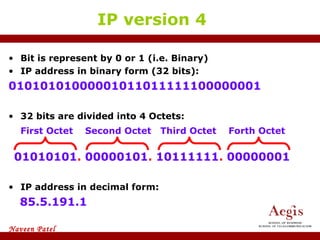
Bit is represent by 0 or 1 (i.e. Binary) IP address in binary form (32 bits): 01010101000001011011111100000001 32 bits are divided into 4 Octets: 01010101 .  00000101 .  10111111 .  00000001 IP address in decimal form: 85.5.191.1 IP version 4 First Octet  Second Octet  Third Octet  Forth Octet
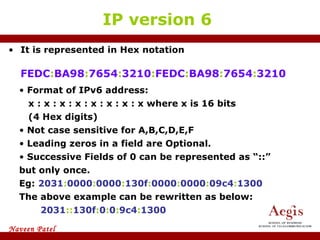
It is represented in Hex notation FEDC : BA98 : 7654 : 3210 : FEDC : BA98 : 7654 : 3210 IP version 6 Format of IPv6 address: x : x : x : x : x : x : x : x where x is 16 bits  (4 Hex digits) Not case sensitive for A,B,C,D,E,F Leading zeros in a field are Optional. Successive Fields of 0 can be represented as “::” but only once. Eg:  2031 : 0000 : 0000 : 130f : 0000 : 0000 : 09c4 : 1300 The above example can be rewritten as below: 2031 :: 130f : 0 : 0 : 9c4 : 1300
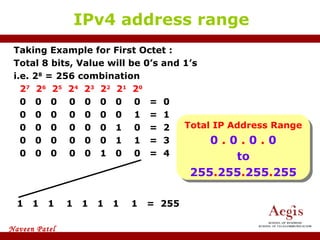
Taking Example for First Octet :  Total 8 bits, Value will be 0’s and 1’s  i.e. 2 8  = 256 combination 2 7   2 6   2 5   2 4   2 3   2 2   2 1   2 0 0  0  0  0  0  0  0  0  =  0 0  0  0  0  0  0  0  1  =  1 0  0  0  0  0  0  1  0  =  2 0  0  0  0  0  0  1  1  =  3 0  0  0  0  0  1  0  0  =  4 IPv4 address range 1  1  1  1  1  1  1  1  =  255 Total IP Address Range 0  .  0  .  0  .  0 to 255 . 255 . 255 . 255
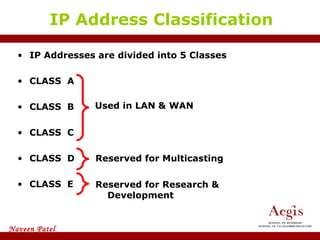
IP Addresses are divided into 5 Classes CLASS  A CLASS  B CLASS  C CLASS  D CLASS  E IP Address Classification Used in LAN & WAN Reserved for Multicasting Reserved for Research & Development
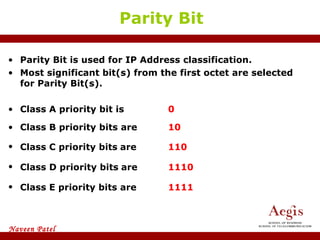
Parity Bit Parity Bit is used for IP Address classification.  Most significant bit(s) from the first octet are selected for Parity Bit(s). Class A priority bit is 0 Class B priority bits are 10 Class C priority bits   are  110 Class D priority bits   are   1110 Class E priority bits are   1111
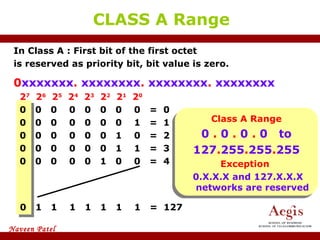
In Class A : First bit of the first octet  is reserved as priority bit, bit value is zero. 0 xxxxxxx .  xxxxxxxx .  xxxxxxxx .  xxxxxxxx 2 7   2 6   2 5   2 4   2 3   2 2   2 1   2 0 0  0  0  0  0  0  0  0  =  0 0  0  0  0  0  0  0  1  =  1 0  0  0  0  0  0  1  0  =  2 0  0  0  0  0  0  1  1  =  3 0  0  0  0  0  1  0  0  =  4 CLASS A Range 0  1  1  1  1  1  1  1  =  127 Class A Range 0  .  0  .  0  .  0  to 127 . 255 . 255 . 255 Exception  0.X.X.X and 127.X.X.X networks are reserved
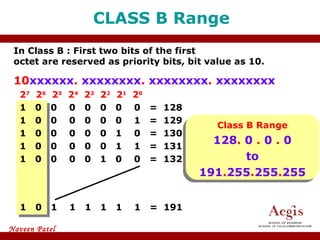
In Class B : First two bits of the first  octet are reserved as priority bits, bit value as 10. 10 xxxxxx .  xxxxxxxx .  xxxxxxxx .  xxxxxxxx 2 7   2 6   2 5   2 4   2 3   2 2   2 1   2 0 1  0  0  0  0  0  0  0  =  128 1  0  0  0  0  0  0  1  =  129 1  0  0  0  0  0  1  0  =  130 1  0  0  0  0  0  1  1  =  131 1  0  0  0  0  1  0  0  =  132 CLASS B Range 1  0  1  1  1  1  1  1  =  191 Class B Range 128 .  0  .  0  .  0 to 191 . 255 . 255 . 255
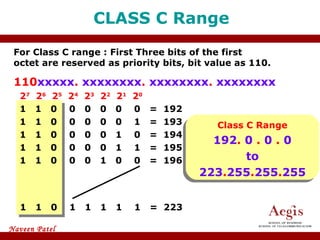
For Class C range : First Three bits of the first  octet are reserved as priority bits, bit value as 110. 110 xxxxx .  xxxxxxxx .  xxxxxxxx .  xxxxxxxx 2 7   2 6   2 5   2 4   2 3   2 2   2 1   2 0 1  1  0  0  0  0  0  0  =  192 1  1  0  0  0  0  0  1  =  193 1  1  0  0  0  0  1  0  =  194 1  1  0  0  0  0  1  1  =  195 1  1  0  0  0  1  0  0  =  196 CLASS C Range 1  1  0  1  1  1  1  1  =  223 Class C Range 192 .  0  .  0  .  0 to 223 . 255 . 255 . 255
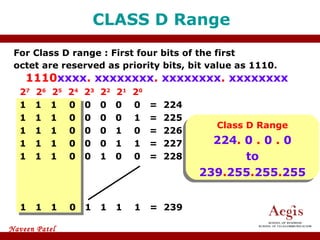
For Class D range : First four bits of the first  octet are reserved as priority bits, bit value as 1110.   1110 xxxx .  xxxxxxxx .  xxxxxxxx .  xxxxxxxx 2 7   2 6   2 5   2 4   2 3   2 2   2 1   2 0 1  1  1  0  0  0  0  0  =  224 1  1  1  0  0  0  0  1  =  225 1  1  1  0  0  0  1  0  =  226 1  1  1  0  0  0  1  1  =  227 1  1  1  0  0  1  0  0  =  228 CLASS D Range 1  1  1  0  1  1  1  1  =  239 Class D Range 224 .  0  .  0  .  0 to 239 . 255 . 255 . 255
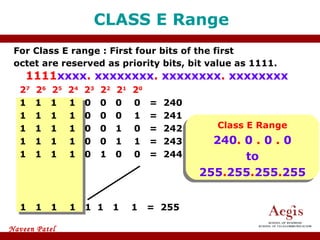
For Class E range : First four bits of the first  octet are reserved as priority bits, bit value as 1111.   1111 xxxx .  xxxxxxxx .  xxxxxxxx .  xxxxxxxx 2 7   2 6   2 5   2 4   2 3   2 2   2 1   2 0 1  1  1  1  0  0  0  0  =  240 1  1  1  1  0  0  0  1  =  241 1  1  1  1  0  0  1  0  =  242 1  1  1  1  0  0  1  1  =  243 1  1  1  1  0  1  0  0  =  244 CLASS E Range 1  1  1  1  1  1  1  1  =  255 Class E Range 240 .  0  .  0  .  0 to 255 . 255 . 255 . 255
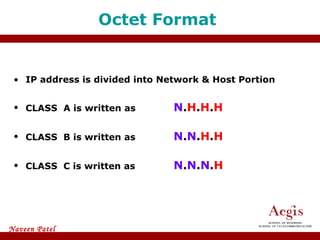
IP address is divided into Network & Host Portion CLASS  A is written as   N . H . H . H CLASS  B is written as  N . N . H . H CLASS  C is written as  N . N . N . H Octet Format
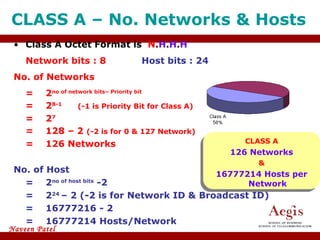
CLASS A – No. Networks & Hosts  Class A Octet Format is  N . H . H . H Network bits : 8 Host bits : 24 No. of Networks =  2 no of network bits– Priority bit  = 2 8-1 (-1 is Priority Bit for Class A) = 2 7 = 128 – 2  (-2 is for 0 & 127 Network) = 126 Networks No. of Host =  2 no of host bits  -2 = 2 24  – 2 (-2 is for Network ID & Broadcast ID) = 16777216 - 2 = 16777214 Hosts/Network CLASS A 126 Networks & 16777214 Hosts per Network
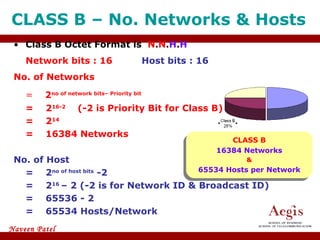
CLASS B – No. Networks & Hosts  Class B Octet Format is  N . N . H . H Network bits : 16 Host bits : 16 No. of Networks =   2 no of network bits– Priority bit = 2 16-2 (-2 is Priority Bit for Class B) = 2 14 = 16384 Networks No. of Host =  2 no of host bits  -2   = 2 16  – 2 (-2 is for Network ID & Broadcast ID) = 65536 - 2 = 65534 Hosts/Network CLASS B 16384 Networks & 65534 Hosts per Network
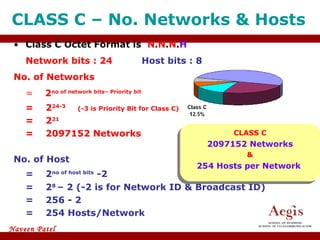
CLASS C – No. Networks & Hosts  Class C Octet Format is  N . N . N . H Network bits : 24 Host bits : 8 No. of Networks =   2 no of network bits– Priority bit = 2 24-3 (-3 is Priority Bit for Class C) = 2 21 = 2097152 Networks No. of Host = 2 no of host bits  -2   = 2 8  – 2 (-2 is for Network ID & Broadcast ID) = 256 - 2 = 254 Hosts/Network CLASS C 2097152 Networks & 254 Hosts per Network
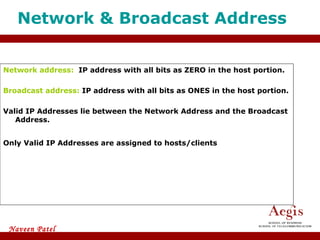
Network address:  IP address with all bits as ZERO in the host portion. Broadcast address:  IP address with all bits as ONES in the host portion.  Valid IP Addresses lie between the Network Address and the Broadcast Address.  Only Valid IP Addresses are assigned to hosts/clients Network & Broadcast Address
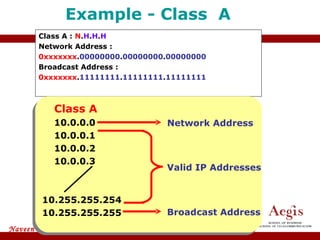
Class A :  N . H . H . H Network Address : 0xxxxxxx . 00000000 . 00000000 . 00000000 Broadcast Address : 0xxxxxxx . 11111111 . 11111111 . 11111111 Example - Class  A Class A   10.0.0.0 10.0.0.1 10.0.0.2 10.0.0.3 10.255.255.254 10.255.255.255 Broadcast Address Network Address Valid IP Addresses
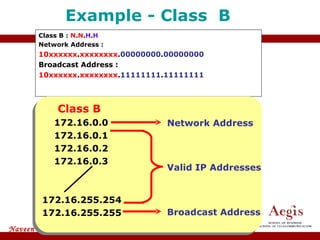
Class B :  N . N . H . H Network Address : 10xxxxxx . xxxxxxxx . 00000000 . 00000000 Broadcast Address : 10xxxxxx . xxxxxxxx . 11111111 . 11111111 Example - Class  B   Class B   172.16.0.0 172.16.0.1 172.16.0.2 172.16.0.3 172.16.255.254 172.16.255.255 Broadcast Address Network Address Valid IP Addresses
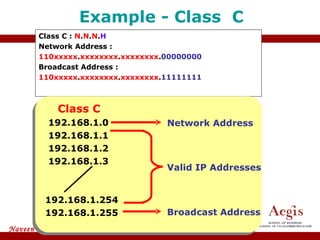
Class C :  N . N . N . H Network Address : 110xxxxx . xxxxxxxx . xxxxxxxx . 00000000 Broadcast Address : 110xxxxx . xxxxxxxx . xxxxxxxx . 11111111 Example - Class  C   Class C   192.168.1.0 192.168.1.1 192.168.1.2 192.168.1.3 192.168.1.254 192.168.1.255 Broadcast Address Network Address Valid IP Addresses
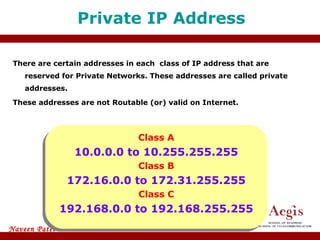
There are certain addresses in each  class of IP address that are reserved for Private Networks. These addresses are called private addresses. These addresses are not Routable (or) valid on Internet. Private IP Address Class A 10.0.0.0 to 10.255.255.255 Class B 172.16.0.0 to 172.31.255.255 Class C 192.168.0.0 to 192.168.255.255
Subnet Mask Subnet Mask differentiates Network portion and Host Portion Represented with all 1’s in the network portion and with all 0’s in the host portion.
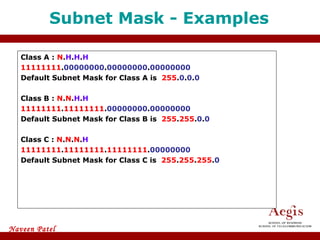
Class A :  N . H . H . H 11111111 . 00000000 . 00000000 . 00000000 Default Subnet Mask for Class A is  255 . 0 . 0 . 0 Class B :  N . N . H . H 11111111 . 11111111 . 00000000 . 00000000 Default Subnet Mask for Class B is  255 . 255 . 0 . 0 Class C :  N . N . N . H 11111111 . 11111111 . 11111111 . 00000000 Default Subnet Mask for Class C is  255 . 255 . 255 . 0 Subnet Mask - Examples
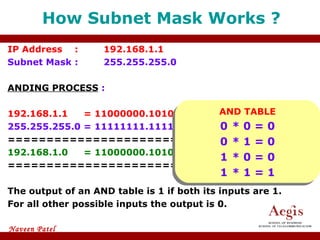
How Subnet Mask Works ? IP Address  : 192.168.1.1 Subnet Mask  : 255.255.255.0 ANDING PROCESS  : 192.168.1.1   = 11000000.10101000.00000001.00000001 255.255.255.0 = 11111111.11111111.11111111.00000000 ======================================= 192.168.1.0   = 11000000.10101000.00000001.00000000 ======================================= The output of an AND table is 1 if both its inputs are 1.  For all other possible inputs the output is 0. AND TABLE 0 * 0 = 0 0 * 1 = 0 1 * 0 = 0 1 * 1 = 1
Creating Multiple independent Networks from a Single Network. Converting Host bits into Network Bits  i.e. Converting 0’s into 1’s Subnetting can be performed in two ways. FLSM (Fixed Length Subnet Mask) VLSM (Variable Length subnet mask) Subnetting can be done based on requirement . Requirement of Networks ? Requirement of Hosts ? Subnetting
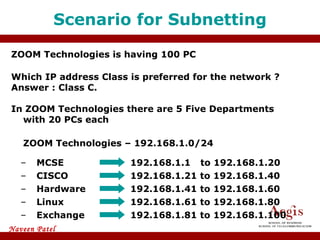
ZOOM Technologies is having 100 PC Which IP address Class is preferred for the network ? Answer : Class C. In ZOOM Technologies there are 5 Five Departments with 20 PCs each ZOOM Technologies – 192.168.1.0/24 Scenario for Subnetting MCSE 192.168.1.1   to 192.168.1.20 192.168.1.21 to 192.168.1.40 CISCO Hardware 192.168.1.41 to 192.168.1.60 Linux 192.168.1.61 to 192.168.1.80 Exchange 192.168.1.81 to 192.168.1.100
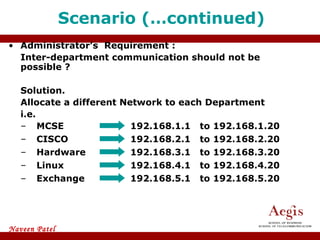
Administrator’s  Requirement : Inter-department communication should not be possible ?  Solution. Allocate a different Network to each Department i.e. Scenario (…continued) MCSE 192.168.1.1  to 192.168.1.20 192.168.2.1  to 192.168.2.20 CISCO Hardware 192.168.3.1  to 192.168.3.20 Linux 192.168.4.1  to 192.168.4.20 Exchange 192.168.5.1  to 192.168.5.20
Main Aim of Subnetting Problem with the previous Scenario is :- Broadcast is done for 254 IPs rather than for 20 IPs. Wastage of IP addresses (Approximately 1000)
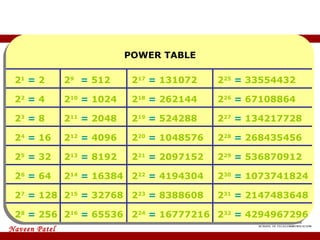
Power table POWER TABLE 2 1   =  2 2 2   =  4 2 3   =  8 2 4   =  16 2 5   =  32 2 6   =  64 2 7   =  128 2 8   =  256 2 9  =  512 2 10   =  1024 2 11   =  2048 2 12   =  4096 2 13   =  8192 2 14   =  16384 2 15   =  32768 2 16   =  65536 2 17   =  131072 2 18   =  262144 2 19   =  524288 2 20   =  1048576 2 21   =  2097152 2 22   =  4194304 2 23   =  8388608 2 24   =   16777216 2 25   =  33554432 2 26   =  67108864 2 27   =  134217728 2 28   =  268435456 2 29   =  536870912 2 30   =  1073741824 2 31   =  2147483648 2 32   =   4294967296
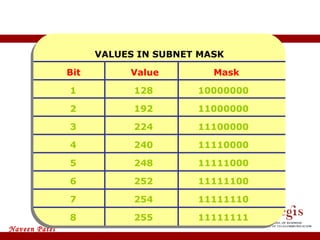
Some Important Values VALUES IN SUBNET MASK   Bit   Value  Mask 1 128 10000000 2 192 11000000 3 224 11100000 4 240 11110000 5 248 11111000 6 252 11111100 7 254 11111110 8 255 11111111
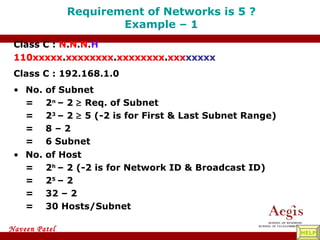
Requirement of Networks is 5 ? Example – 1 No. of Host = 2 h  – 2 (-2 is for Network ID & Broadcast ID) = 2 5  – 2 = 32 – 2 = 30 Hosts/Subnet Class C :  N . N . N . H 110xxxxx . xxxxxxxx . xxxxxxxx . xxxxxxxx Class C : 192.168.1.0 No. of Subnet = 2 n  – 2    Req. of Subnet = 2 3  – 2    5 (-2 is for First & Last Subnet Range) = 8 – 2  = 6 Subnet 110xxxxx . xxxxxxxx . xxxxxxxx . xxx xxxxx HELP
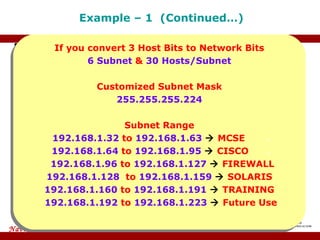
x Example – 1  (Continued…) Range of Networks Network ID Broadcast ID 192.168.1.0 Customized Subnet Mask = 11111111 . 11111111 . 11111111 . 111 00000 128 64 32 32 192.168.1.32 192.168.1.64 192.168.1.96 192.168.1.128 192.168.1.160 192.168.1.192 192.168.1.224 192.168.1.31 192.168.1.63 192.168.1.95 192.168.1.127 192.168.1.159 192.168.1.191 192.168.1.223 192.168.1.255 x If you convert 3 Host Bits to Network Bits 6 Subnet  &  30 Hosts/Subnet Customized Subnet Mask 255.255.255.224 Subnet Range 192.168.1.32  to  192.168.1.63     MCSE  . 192.168.1.64  to  192.168.1.95     CISCO  . 192.168.1.96  to  192.168.1.127     FIREWALL 192.168.1.128  to  192.168.1.159     SOLARIS 192.168.1.160  to  192.168.1.191     TRAINING 192.168.1.192  to  192.168.1.223     Future Use 255. 255. 255. Valid Subnets 224
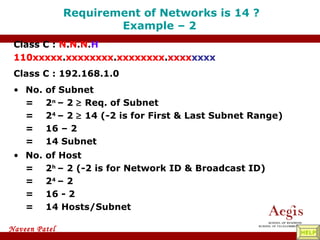
Requirement of Networks is 14 ? Example – 2  No. of Host = 2 h  – 2 (-2 is for Network ID & Broadcast ID) = 2 4  – 2  = 16 - 2 = 14 Hosts/Subnet Class C :  N . N . N . H 110xxxxx . xxxxxxxx . xxxxxxxx . xxxxxxxx Class C : 192.168.1.0 No. of Subnet = 2 n  – 2    Req. of Subnet = 2 4  – 2    14 (-2 is for First & Last Subnet Range) = 16 – 2  = 14 Subnet 110xxxxx . xxxxxxxx . xxxxxxxx . xxxx xxxx HELP
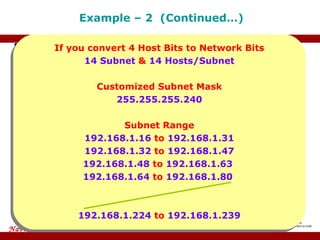
x Example – 2  (Continued…) Range of Networks Network ID Broadcast ID 192.168.1.0 Customized Subnet Mask = 11111111 . 11111111 . 11111111 . 1111 0000 128 64 32 x 16 16 192.168.1.224 – 192.168.1.239 192.168.1.240 –  192.168.1.255 – 192.168.1.15 192.168.1.16 – 192.168.1.31 192.168.1.32  – 192.168.1.47 192.168.1.48 – 192.168.1.63 255. 255. 255. Valid Subnets 240 If you convert 4 Host Bits to Network Bits 14 Subnet  &  14 Hosts/Subnet Customized Subnet Mask 255.255.255.240 Subnet Range 192.168.1.16  to  192.168.1.31  192.168.1.32  to  192.168.1.47 192.168.1.48  to  192.168.1.63  192.168.1.64  to  192.168.1.80  192.168.1.224  to  192.168.1.239
THE END

ACIT Mumbai - CCNA Training Coourse- IP ADDRESS ASSIGNMENT

  • 1.
  • 2.
    IP Address isLogical Address It is a Network Layer address (Layer 3) Two Versions of IP: IP version 4 is a 32 bit address IP version 6 is a 128 bit address IP Address
  • 3.
    Bit is representby 0 or 1 (i.e. Binary) IP address in binary form (32 bits): 01010101000001011011111100000001 32 bits are divided into 4 Octets: 01010101 . 00000101 . 10111111 . 00000001 IP address in decimal form: 85.5.191.1 IP version 4 First Octet Second Octet Third Octet Forth Octet
  • 4.
    It is representedin Hex notation FEDC : BA98 : 7654 : 3210 : FEDC : BA98 : 7654 : 3210 IP version 6 Format of IPv6 address: x : x : x : x : x : x : x : x where x is 16 bits (4 Hex digits) Not case sensitive for A,B,C,D,E,F Leading zeros in a field are Optional. Successive Fields of 0 can be represented as “::” but only once. Eg: 2031 : 0000 : 0000 : 130f : 0000 : 0000 : 09c4 : 1300 The above example can be rewritten as below: 2031 :: 130f : 0 : 0 : 9c4 : 1300
  • 5.
    Taking Example forFirst Octet : Total 8 bits, Value will be 0’s and 1’s i.e. 2 8 = 256 combination 2 7 2 6 2 5 2 4 2 3 2 2 2 1 2 0 0 0 0 0 0 0 0 0 = 0 0 0 0 0 0 0 0 1 = 1 0 0 0 0 0 0 1 0 = 2 0 0 0 0 0 0 1 1 = 3 0 0 0 0 0 1 0 0 = 4 IPv4 address range 1 1 1 1 1 1 1 1 = 255 Total IP Address Range 0 . 0 . 0 . 0 to 255 . 255 . 255 . 255
  • 6.
    IP Addresses aredivided into 5 Classes CLASS A CLASS B CLASS C CLASS D CLASS E IP Address Classification Used in LAN & WAN Reserved for Multicasting Reserved for Research & Development
  • 7.
    Parity Bit ParityBit is used for IP Address classification. Most significant bit(s) from the first octet are selected for Parity Bit(s). Class A priority bit is 0 Class B priority bits are 10 Class C priority bits are 110 Class D priority bits are 1110 Class E priority bits are 1111
  • 8.
    In Class A: First bit of the first octet is reserved as priority bit, bit value is zero. 0 xxxxxxx . xxxxxxxx . xxxxxxxx . xxxxxxxx 2 7 2 6 2 5 2 4 2 3 2 2 2 1 2 0 0 0 0 0 0 0 0 0 = 0 0 0 0 0 0 0 0 1 = 1 0 0 0 0 0 0 1 0 = 2 0 0 0 0 0 0 1 1 = 3 0 0 0 0 0 1 0 0 = 4 CLASS A Range 0 1 1 1 1 1 1 1 = 127 Class A Range 0 . 0 . 0 . 0 to 127 . 255 . 255 . 255 Exception 0.X.X.X and 127.X.X.X networks are reserved
  • 9.
    In Class B: First two bits of the first octet are reserved as priority bits, bit value as 10. 10 xxxxxx . xxxxxxxx . xxxxxxxx . xxxxxxxx 2 7 2 6 2 5 2 4 2 3 2 2 2 1 2 0 1 0 0 0 0 0 0 0 = 128 1 0 0 0 0 0 0 1 = 129 1 0 0 0 0 0 1 0 = 130 1 0 0 0 0 0 1 1 = 131 1 0 0 0 0 1 0 0 = 132 CLASS B Range 1 0 1 1 1 1 1 1 = 191 Class B Range 128 . 0 . 0 . 0 to 191 . 255 . 255 . 255
  • 10.
    For Class Crange : First Three bits of the first octet are reserved as priority bits, bit value as 110. 110 xxxxx . xxxxxxxx . xxxxxxxx . xxxxxxxx 2 7 2 6 2 5 2 4 2 3 2 2 2 1 2 0 1 1 0 0 0 0 0 0 = 192 1 1 0 0 0 0 0 1 = 193 1 1 0 0 0 0 1 0 = 194 1 1 0 0 0 0 1 1 = 195 1 1 0 0 0 1 0 0 = 196 CLASS C Range 1 1 0 1 1 1 1 1 = 223 Class C Range 192 . 0 . 0 . 0 to 223 . 255 . 255 . 255
  • 11.
    For Class Drange : First four bits of the first octet are reserved as priority bits, bit value as 1110. 1110 xxxx . xxxxxxxx . xxxxxxxx . xxxxxxxx 2 7 2 6 2 5 2 4 2 3 2 2 2 1 2 0 1 1 1 0 0 0 0 0 = 224 1 1 1 0 0 0 0 1 = 225 1 1 1 0 0 0 1 0 = 226 1 1 1 0 0 0 1 1 = 227 1 1 1 0 0 1 0 0 = 228 CLASS D Range 1 1 1 0 1 1 1 1 = 239 Class D Range 224 . 0 . 0 . 0 to 239 . 255 . 255 . 255
  • 12.
    For Class Erange : First four bits of the first octet are reserved as priority bits, bit value as 1111. 1111 xxxx . xxxxxxxx . xxxxxxxx . xxxxxxxx 2 7 2 6 2 5 2 4 2 3 2 2 2 1 2 0 1 1 1 1 0 0 0 0 = 240 1 1 1 1 0 0 0 1 = 241 1 1 1 1 0 0 1 0 = 242 1 1 1 1 0 0 1 1 = 243 1 1 1 1 0 1 0 0 = 244 CLASS E Range 1 1 1 1 1 1 1 1 = 255 Class E Range 240 . 0 . 0 . 0 to 255 . 255 . 255 . 255
  • 13.
    IP address isdivided into Network & Host Portion CLASS A is written as N . H . H . H CLASS B is written as N . N . H . H CLASS C is written as N . N . N . H Octet Format
  • 14.
    CLASS A –No. Networks & Hosts Class A Octet Format is N . H . H . H Network bits : 8 Host bits : 24 No. of Networks = 2 no of network bits– Priority bit = 2 8-1 (-1 is Priority Bit for Class A) = 2 7 = 128 – 2 (-2 is for 0 & 127 Network) = 126 Networks No. of Host = 2 no of host bits -2 = 2 24 – 2 (-2 is for Network ID & Broadcast ID) = 16777216 - 2 = 16777214 Hosts/Network CLASS A 126 Networks & 16777214 Hosts per Network
  • 15.
    CLASS B –No. Networks & Hosts Class B Octet Format is N . N . H . H Network bits : 16 Host bits : 16 No. of Networks = 2 no of network bits– Priority bit = 2 16-2 (-2 is Priority Bit for Class B) = 2 14 = 16384 Networks No. of Host = 2 no of host bits -2 = 2 16 – 2 (-2 is for Network ID & Broadcast ID) = 65536 - 2 = 65534 Hosts/Network CLASS B 16384 Networks & 65534 Hosts per Network
  • 16.
    CLASS C –No. Networks & Hosts Class C Octet Format is N . N . N . H Network bits : 24 Host bits : 8 No. of Networks = 2 no of network bits– Priority bit = 2 24-3 (-3 is Priority Bit for Class C) = 2 21 = 2097152 Networks No. of Host = 2 no of host bits -2 = 2 8 – 2 (-2 is for Network ID & Broadcast ID) = 256 - 2 = 254 Hosts/Network CLASS C 2097152 Networks & 254 Hosts per Network
  • 17.
    Network address: IP address with all bits as ZERO in the host portion. Broadcast address: IP address with all bits as ONES in the host portion. Valid IP Addresses lie between the Network Address and the Broadcast Address. Only Valid IP Addresses are assigned to hosts/clients Network & Broadcast Address
  • 18.
    Class A : N . H . H . H Network Address : 0xxxxxxx . 00000000 . 00000000 . 00000000 Broadcast Address : 0xxxxxxx . 11111111 . 11111111 . 11111111 Example - Class A Class A 10.0.0.0 10.0.0.1 10.0.0.2 10.0.0.3 10.255.255.254 10.255.255.255 Broadcast Address Network Address Valid IP Addresses
  • 19.
    Class B : N . N . H . H Network Address : 10xxxxxx . xxxxxxxx . 00000000 . 00000000 Broadcast Address : 10xxxxxx . xxxxxxxx . 11111111 . 11111111 Example - Class B Class B 172.16.0.0 172.16.0.1 172.16.0.2 172.16.0.3 172.16.255.254 172.16.255.255 Broadcast Address Network Address Valid IP Addresses
  • 20.
    Class C : N . N . N . H Network Address : 110xxxxx . xxxxxxxx . xxxxxxxx . 00000000 Broadcast Address : 110xxxxx . xxxxxxxx . xxxxxxxx . 11111111 Example - Class C Class C 192.168.1.0 192.168.1.1 192.168.1.2 192.168.1.3 192.168.1.254 192.168.1.255 Broadcast Address Network Address Valid IP Addresses
  • 21.
    There are certainaddresses in each class of IP address that are reserved for Private Networks. These addresses are called private addresses. These addresses are not Routable (or) valid on Internet. Private IP Address Class A 10.0.0.0 to 10.255.255.255 Class B 172.16.0.0 to 172.31.255.255 Class C 192.168.0.0 to 192.168.255.255
  • 22.
    Subnet Mask SubnetMask differentiates Network portion and Host Portion Represented with all 1’s in the network portion and with all 0’s in the host portion.
  • 23.
    Class A : N . H . H . H 11111111 . 00000000 . 00000000 . 00000000 Default Subnet Mask for Class A is 255 . 0 . 0 . 0 Class B : N . N . H . H 11111111 . 11111111 . 00000000 . 00000000 Default Subnet Mask for Class B is 255 . 255 . 0 . 0 Class C : N . N . N . H 11111111 . 11111111 . 11111111 . 00000000 Default Subnet Mask for Class C is 255 . 255 . 255 . 0 Subnet Mask - Examples
  • 24.
    How Subnet MaskWorks ? IP Address : 192.168.1.1 Subnet Mask : 255.255.255.0 ANDING PROCESS : 192.168.1.1 = 11000000.10101000.00000001.00000001 255.255.255.0 = 11111111.11111111.11111111.00000000 ======================================= 192.168.1.0 = 11000000.10101000.00000001.00000000 ======================================= The output of an AND table is 1 if both its inputs are 1. For all other possible inputs the output is 0. AND TABLE 0 * 0 = 0 0 * 1 = 0 1 * 0 = 0 1 * 1 = 1
  • 25.
    Creating Multiple independentNetworks from a Single Network. Converting Host bits into Network Bits i.e. Converting 0’s into 1’s Subnetting can be performed in two ways. FLSM (Fixed Length Subnet Mask) VLSM (Variable Length subnet mask) Subnetting can be done based on requirement . Requirement of Networks ? Requirement of Hosts ? Subnetting
  • 26.
    ZOOM Technologies ishaving 100 PC Which IP address Class is preferred for the network ? Answer : Class C. In ZOOM Technologies there are 5 Five Departments with 20 PCs each ZOOM Technologies – 192.168.1.0/24 Scenario for Subnetting MCSE 192.168.1.1 to 192.168.1.20 192.168.1.21 to 192.168.1.40 CISCO Hardware 192.168.1.41 to 192.168.1.60 Linux 192.168.1.61 to 192.168.1.80 Exchange 192.168.1.81 to 192.168.1.100
  • 27.
    Administrator’s Requirement: Inter-department communication should not be possible ? Solution. Allocate a different Network to each Department i.e. Scenario (…continued) MCSE 192.168.1.1 to 192.168.1.20 192.168.2.1 to 192.168.2.20 CISCO Hardware 192.168.3.1 to 192.168.3.20 Linux 192.168.4.1 to 192.168.4.20 Exchange 192.168.5.1 to 192.168.5.20
  • 28.
    Main Aim ofSubnetting Problem with the previous Scenario is :- Broadcast is done for 254 IPs rather than for 20 IPs. Wastage of IP addresses (Approximately 1000)
  • 29.
    Power table POWERTABLE 2 1 = 2 2 2 = 4 2 3 = 8 2 4 = 16 2 5 = 32 2 6 = 64 2 7 = 128 2 8 = 256 2 9 = 512 2 10 = 1024 2 11 = 2048 2 12 = 4096 2 13 = 8192 2 14 = 16384 2 15 = 32768 2 16 = 65536 2 17 = 131072 2 18 = 262144 2 19 = 524288 2 20 = 1048576 2 21 = 2097152 2 22 = 4194304 2 23 = 8388608 2 24 = 16777216 2 25 = 33554432 2 26 = 67108864 2 27 = 134217728 2 28 = 268435456 2 29 = 536870912 2 30 = 1073741824 2 31 = 2147483648 2 32 = 4294967296
  • 30.
    Some Important ValuesVALUES IN SUBNET MASK Bit Value Mask 1 128 10000000 2 192 11000000 3 224 11100000 4 240 11110000 5 248 11111000 6 252 11111100 7 254 11111110 8 255 11111111
  • 31.
    Requirement of Networksis 5 ? Example – 1 No. of Host = 2 h – 2 (-2 is for Network ID & Broadcast ID) = 2 5 – 2 = 32 – 2 = 30 Hosts/Subnet Class C : N . N . N . H 110xxxxx . xxxxxxxx . xxxxxxxx . xxxxxxxx Class C : 192.168.1.0 No. of Subnet = 2 n – 2  Req. of Subnet = 2 3 – 2  5 (-2 is for First & Last Subnet Range) = 8 – 2 = 6 Subnet 110xxxxx . xxxxxxxx . xxxxxxxx . xxx xxxxx HELP
  • 32.
    x Example –1 (Continued…) Range of Networks Network ID Broadcast ID 192.168.1.0 Customized Subnet Mask = 11111111 . 11111111 . 11111111 . 111 00000 128 64 32 32 192.168.1.32 192.168.1.64 192.168.1.96 192.168.1.128 192.168.1.160 192.168.1.192 192.168.1.224 192.168.1.31 192.168.1.63 192.168.1.95 192.168.1.127 192.168.1.159 192.168.1.191 192.168.1.223 192.168.1.255 x If you convert 3 Host Bits to Network Bits 6 Subnet & 30 Hosts/Subnet Customized Subnet Mask 255.255.255.224 Subnet Range 192.168.1.32 to 192.168.1.63  MCSE . 192.168.1.64 to 192.168.1.95  CISCO . 192.168.1.96 to 192.168.1.127  FIREWALL 192.168.1.128 to 192.168.1.159  SOLARIS 192.168.1.160 to 192.168.1.191  TRAINING 192.168.1.192 to 192.168.1.223  Future Use 255. 255. 255. Valid Subnets 224
  • 33.
    Requirement of Networksis 14 ? Example – 2 No. of Host = 2 h – 2 (-2 is for Network ID & Broadcast ID) = 2 4 – 2 = 16 - 2 = 14 Hosts/Subnet Class C : N . N . N . H 110xxxxx . xxxxxxxx . xxxxxxxx . xxxxxxxx Class C : 192.168.1.0 No. of Subnet = 2 n – 2  Req. of Subnet = 2 4 – 2  14 (-2 is for First & Last Subnet Range) = 16 – 2 = 14 Subnet 110xxxxx . xxxxxxxx . xxxxxxxx . xxxx xxxx HELP
  • 34.
    x Example –2 (Continued…) Range of Networks Network ID Broadcast ID 192.168.1.0 Customized Subnet Mask = 11111111 . 11111111 . 11111111 . 1111 0000 128 64 32 x 16 16 192.168.1.224 – 192.168.1.239 192.168.1.240 – 192.168.1.255 – 192.168.1.15 192.168.1.16 – 192.168.1.31 192.168.1.32 – 192.168.1.47 192.168.1.48 – 192.168.1.63 255. 255. 255. Valid Subnets 240 If you convert 4 Host Bits to Network Bits 14 Subnet & 14 Hosts/Subnet Customized Subnet Mask 255.255.255.240 Subnet Range 192.168.1.16 to 192.168.1.31 192.168.1.32 to 192.168.1.47 192.168.1.48 to 192.168.1.63 192.168.1.64 to 192.168.1.80 192.168.1.224 to 192.168.1.239
  • 35.