
CASE TOOLS
AUTOMATIC DEVELOPMENT OF THE SOFTWARE
Supriya Arora
Sushant Sinha
WHAT IS CASE TOOLS
• CASE stands for “Computer Aided Software
Engineering”
• It is the domain of tools used to design and
implement applications
• As computer technology is being used for
automatic business and industrial application,
it is being used for automatic the development
of the software
REASON FOR USING CASE TOOLS
Quick installation
Time saving by reducing coding and testing time
Enrich graphical techniques and data flow
Optimum use of available information
Enhanced analysis and design development
Create and manipulate documentation
Transfer of information between tools efficiently
The speed during the system development increased
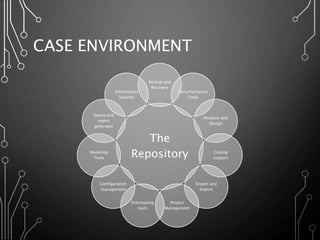
CASE ENVIRONMENT
The
Repository
Backup and
Recovery
Documentation
Tools
Analysis and
Design
Coding
support
Export and
Import
Project
Management
Prototyping
tools
Configuration
management
Modeling
Tools
Query and
report
generator
Information
Security
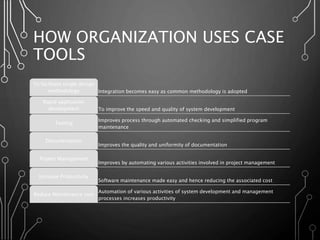
HOW ORGANIZATION USES CASE
TOOLS
Integration becomes easy as common methodology is adopted
To facilitate single design
methodology
To improve the speed and quality of system development
Rapid application
development
Improves process through automated checking and simplified program
maintenance
Testing
Improves the quality and uniformity of documentation
Documentation
Improves by automating various activities involved in project management
Project Management
Software maintenance made easy and hence reducing the associated cost
Increase Productivity
Automation of various activities of system development and management
processes increases productivity
Reduce Maintenance cost
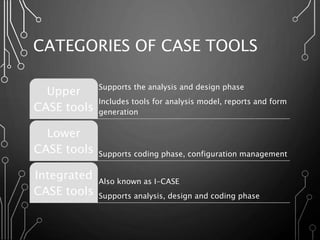
CATEGORIES OF CASE TOOLS
Supports the analysis and design phase
Includes tools for analysis model, reports and form
generation
Upper
CASE tools
Supports coding phase, configuration management
Lower
CASE tools
Also known as I-CASE
Supports analysis, design and coding phase
Integrated
CASE tools
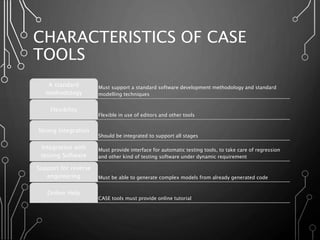
CHARACTERISTICS OF CASE
TOOLS
Must support a standard software development methodology and standard
modelling techniques
A standard
methodology
Flexible in use of editors and other tools
Flexibility
Should be integrated to support all stages
Strong Integration
Must provide interface for automatic testing tools, to take care of regression
and other kind of testing software under dynamic requirement
Integration with
testing Software
Must be able to generate complex models from already generated code
Support for reverse
engineering
CASE tools must provide online tutorial
Online Help
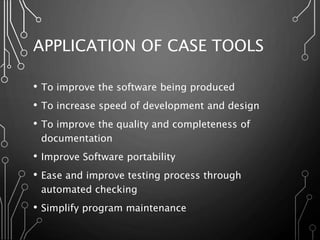
APPLICATION OF CASE TOOLS
• To improve the software being produced
• To increase speed of development and design
• To improve the quality and completeness of
documentation
• Improve Software portability
• Ease and improve testing process through
automated checking
• Simplify program maintenance
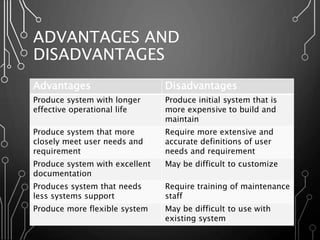
ADVANTAGES AND
DISADVANTAGES
Advantages Disadvantages
Produce system with longer
effective operational life
Produce initial system that is
more expensive to build and
maintain
Produce system that more
closely meet user needs and
requirement
Require more extensive and
accurate definitions of user
needs and requirement
Produce system with excellent
documentation
May be difficult to customize
Produces system that needs
less systems support
Require training of maintenance
staff
Produce more flexible system May be difficult to use with
existing system
Case tools

Case tools

  • 1.
    CASE TOOLS AUTOMATIC DEVELOPMENTOF THE SOFTWARE Supriya Arora Sushant Sinha
  • 2.
    WHAT IS CASETOOLS • CASE stands for “Computer Aided Software Engineering” • It is the domain of tools used to design and implement applications • As computer technology is being used for automatic business and industrial application, it is being used for automatic the development of the software
  • 3.
    REASON FOR USINGCASE TOOLS Quick installation Time saving by reducing coding and testing time Enrich graphical techniques and data flow Optimum use of available information Enhanced analysis and design development Create and manipulate documentation Transfer of information between tools efficiently The speed during the system development increased
  • 4.
    CASE ENVIRONMENT The Repository Backup and Recovery Documentation Tools Analysisand Design Coding support Export and Import Project Management Prototyping tools Configuration management Modeling Tools Query and report generator Information Security
  • 5.
    HOW ORGANIZATION USESCASE TOOLS Integration becomes easy as common methodology is adopted To facilitate single design methodology To improve the speed and quality of system development Rapid application development Improves process through automated checking and simplified program maintenance Testing Improves the quality and uniformity of documentation Documentation Improves by automating various activities involved in project management Project Management Software maintenance made easy and hence reducing the associated cost Increase Productivity Automation of various activities of system development and management processes increases productivity Reduce Maintenance cost
  • 6.
    CATEGORIES OF CASETOOLS Supports the analysis and design phase Includes tools for analysis model, reports and form generation Upper CASE tools Supports coding phase, configuration management Lower CASE tools Also known as I-CASE Supports analysis, design and coding phase Integrated CASE tools
  • 7.
    CHARACTERISTICS OF CASE TOOLS Mustsupport a standard software development methodology and standard modelling techniques A standard methodology Flexible in use of editors and other tools Flexibility Should be integrated to support all stages Strong Integration Must provide interface for automatic testing tools, to take care of regression and other kind of testing software under dynamic requirement Integration with testing Software Must be able to generate complex models from already generated code Support for reverse engineering CASE tools must provide online tutorial Online Help
  • 8.
    APPLICATION OF CASETOOLS • To improve the software being produced • To increase speed of development and design • To improve the quality and completeness of documentation • Improve Software portability • Ease and improve testing process through automated checking • Simplify program maintenance
  • 9.
    ADVANTAGES AND DISADVANTAGES Advantages Disadvantages Producesystem with longer effective operational life Produce initial system that is more expensive to build and maintain Produce system that more closely meet user needs and requirement Require more extensive and accurate definitions of user needs and requirement Produce system with excellent documentation May be difficult to customize Produces system that needs less systems support Require training of maintenance staff Produce more flexible system May be difficult to use with existing system