Case Study of Programmer
       Nightmares
  Shannon’s Edition 20120624
What is the talk about
• Inspired by Mark Russinovich’s Presentation
  – Case of the Unexplained
  – http://technet.microsoft.com/en-
    us/sysinternals/bb963887
• Here are my cases
  – Mainly fixing programming problem
  – Mostly C++, some interop & cross-platform.
  – Most are from my bad memory.
  – Sorry about the boring slides.
Steps to Debug a problem
1.   There is no step 1
2.   See Step 1
3.   ???
4.   Profit
General Guidelines
•   Reproducible test case.
•   Learn the tools.
•   Make a Wild A** Guess (WAG) on source
•   Persistent
    – Grind through it.
• Ask someone else to handle it. (NOT ME)
Case: WOMM
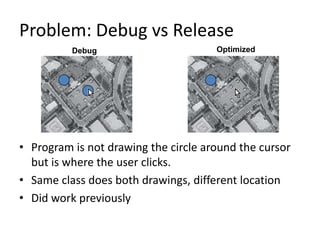
Problem: Debug vs Release
          Debug                       Optimized


• Program is not drawing the circle around the cursor
  but is where the user clicks.
• Same class does both drawings, different location
• Did work previously
Causes Optimization Problems
1. Undefined Behaviors
  1. Uninitialized Memory
  2. Overflows/underflows
2. Thread problems.
3. Code or Data is wrong.
….
999.Complier Bug (not likely, see #1)
1000.Hardware/OS/driver bug.
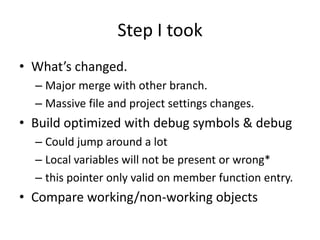
Step I took
• What’s changed.
  – Major merge with other branch.
  – Massive file and project settings changes.
• Build optimized with debug symbols & debug
  – Could jump around a lot
  – Local variables will not be present or wrong*
  – this pointer only valid on member function entry.
• Compare working/non-working objects
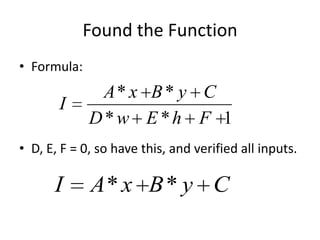
Found the Function
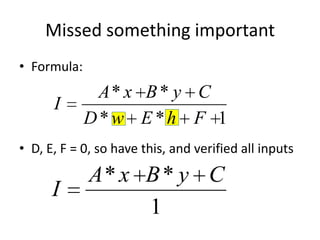
• Formula:
              A* x B * y C
       I
             D*w E *h F 1
• D, E, F = 0, so have this, and verified all inputs.

      I      A* x B * y C
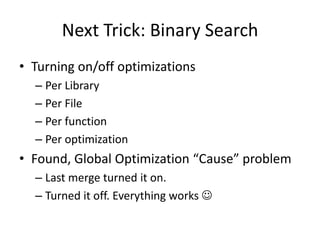
Next Trick: Binary Search
• Turning on/off optimizations
  – Per Library
  – Per File
  – Per function
  – Per optimization
• Found, Global Optimization “Cause” problem
  – Last merge turned it on.
  – Turned it off. Everything works 
Extremely Important Rule
• Unless you understand why the problem is
  fixed, its not fixed. The problem is likely still
  there just hidden better.
Missed something important
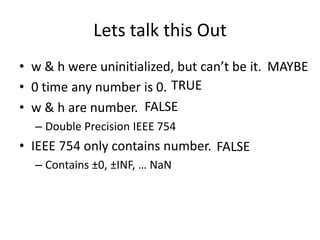
• Formula:
              A* x B * y C
      I
             D*w E *h F 1
• D, E, F = 0, so have this, and verified all inputs

             A* x B * y C
      I
                  1
Lets talk this Out
• w & h were uninitialized, but can’t be it. MAYBE
• 0 time any number is 0. TRUE
• w & h are number. FALSE
  – Double Precision IEEE 754
• IEEE 754 only contains number. FALSE
  – Contains ±0, ±INF, … NaN
NaN is weird.
• Any operation with NaN results in NaN
  – *, +, -, /, sin, etc
• Most comparisons with NaN are false.
  – <, <=, >, ==, etc, so NaN == NaN is false
• Not equals is always true.
  – NaN != NaN is true.
• Multiple types
  – QNaN, SNaN
Case Close
• Should have trusted 1st guess.
• Gave up too soon with a quick wrong fix.
Case: Works Everywhere Else
Problem
• 6-8 high priority bugs from FAT.
• All bugs had the same pattern.
  – Only occurred on Window 2000 box.
  – Display wrong converted values.
  – Works on XP, and 2003.
• It a cross-platform assign to Me.
Steps I took
• Start Debug Build of Integration Branch.
• Get the release, and try to reproduce bug.
  – Grabbed it from the build NFS share.
  – Didn’t “fail”
• Try the test box.
  – It “fails”, but can’t debug.
  – Copy it to dev box
  – It fails on my box.
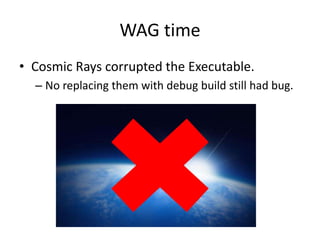
WAG time
• Cosmic Rays corrupted the Executable.
  – No replacing them with debug build still had bug.
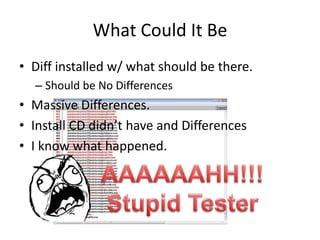
What Could It Be
• Diff installed w/ what should be there.
  – Should be No Differences
• Massive Differences.
• Install CD didn’t have and Differences
• I know what happened.
Here is What Happened
• Tester skipped using the Install Win2K CD.
  – Didn’t want to walk to other end of hall.
• TAR-ed up NFS install shared.
• FTP it over.
• Used WinZip to untar file.
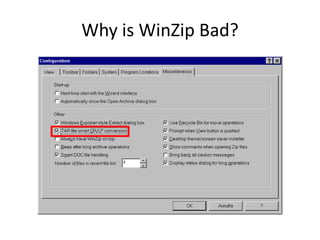
Why is WinZip Bad?
Case Closed
• The “table.dat” file was converted to windows
  newlines.
  – Doesn’t work properly like that.
• All Test Follow Proper Procedures.
• Don’t take Short Cuts.
  – Especially During FAT.
Case: Psychic Debugging
Problem: Phone Call
1. Got a phone call
2. Developer describe the problem and steps
   taken to track down the problem.
3. Answer with the root cause and how to fix.

Now its time for the interactive part of this talk.
Pretend you me, ….
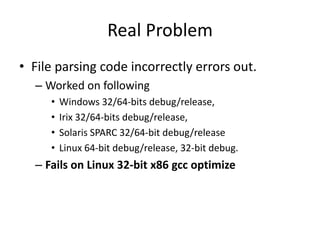
Real Problem
• File parsing code incorrectly errors out.
  – Worked on following
     •   Windows 32/64-bits debug/release,
     •   Irix 32/64-bits debug/release,
     •   Solaris SPARC 32/64-bit debug/release
     •   Linux 64-bit debug/release, 32-bit debug.
  – Fails on Linux 32-bit x86 gcc optimize
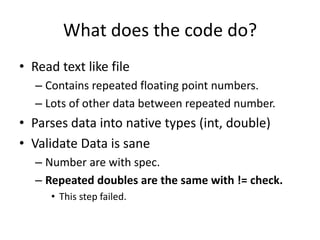
What does the code do?
• Read text like file
   – Contains repeated floating point numbers.
   – Lots of other data between repeated number.
• Parses data into native types (int, double)
• Validate Data is sane
   – Number are with spec.
   – Repeated doubles are the same with != check.
      • This step failed.
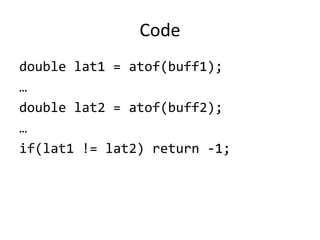
Code
double lat1 = atof(buff1);
…
double lat2 = atof(buff2);
…
if(lat1 != lat2) return -1;
I’m 95% certain of problem
Write down your answer now.
   More info from the developer
Additional QA with develop
• Did they check input file is valid? YES
• How did the developer track down it down?
  – Printf debugging number same, but check failed.
• Did adding/moving additional printf make
  the problem go away? YES
  – This confirmed that I guessed right 
Your Turn
• Failed 32-bit x86 optimized linux
• Deal with C++ native double types
  – uses != to compare them.
• Adding some printfs made problem go away.

Who know what happened.
Additional Slide If No One Knows
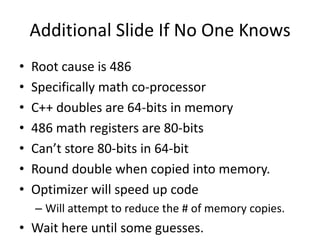
•   Root cause is 486
•   Specifically math co-processor
•   C++ doubles are 64-bits in memory
•   486 math registers are 80-bits
•   Can’t store 80-bits in 64-bit
•   Round double when copied into memory.
•   Optimizer will speed up code
    – Will attempt to reduce the # of memory copies.
• Wait here until some guesses.
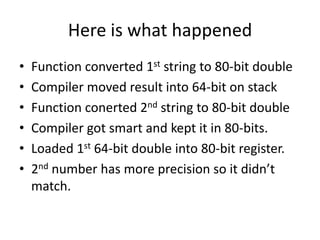
Here is what happened
•   Function converted 1st string to 80-bit double
•   Compiler moved result into 64-bit on stack
•   Function conerted 2nd string to 80-bit double
•   Compiler got smart and kept it in 80-bits.
•   Loaded 1st 64-bit double into 80-bit register.
•   2nd number has more precision so it didn’t
    match.
Optimized ASM Code
call atof ; buff1 in eax
fstor [sp+20], ST(0)
…
…
call atof ; buff2 in eax
fload ST(1), [sp+20]
fcmp ST(0), ST(1) ; compare 80 w/ 64-bits
jmpe +8 ; skip over next line if ==
ret ; error
Case Close
• Changed to use strcmp instead.
• Never directly compare double without a
  tolerance.
• Round errors will cause mathematically
  impossible to happen.
• Stupid 80-bits.
Case: Shoot Self in Foot
Problem: Crash with no reasons
• New developed code
• Crashed on Solaris while calling constructor
• No “obvious” problem with code
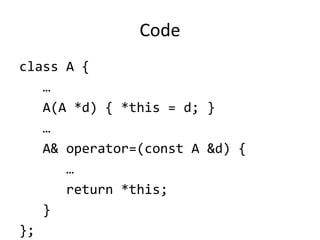
Code
class A {
   …
   A(A *d) { *this = d; }
   …
   A& operator=(const A &d) {
      …
      return *this;
   }
};
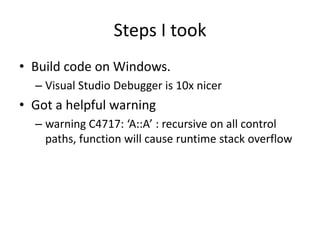
Steps I took
• Build code on Windows.
  – Visual Studio Debugger is 10x nicer
• Got a helpful warning
  – warning C4717: ‘A::A’ : recursive on all control
    paths, function will cause runtime stack overflow
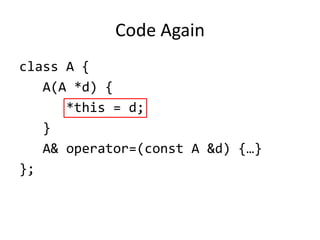
Code Again
class A {
   A(A *d) {
      *this = d;
   }
   A& operator=(const A &d) {…}
};
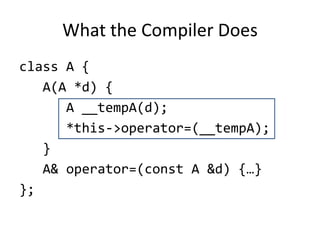
What the Compiler Does
class A {
   A(A *d) {
      A __tempA(d);
      *this->operator=(__tempA);
   }
   A& operator=(const A &d) {…}
};
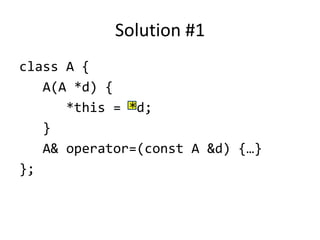
Solution #1
class A {
   A(A *d) {
      *this = *d;
   }
   A& operator=(const A &d) {…}
};
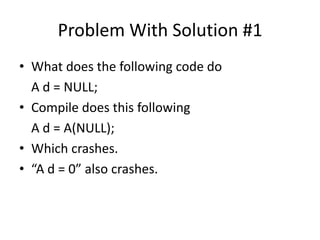
Problem With Solution #1
• What does the following code do
  A d = NULL;
• Compile does this following
  A d = A(NULL);
• Which crashes.
• “A d = 0” also crashes.
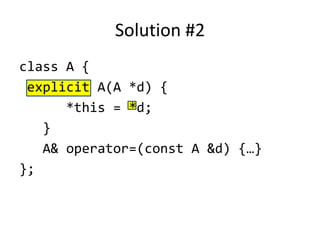
Solution #2
class A {
 explicit A(A *d) {
      *this = *d;
   }
   A& operator=(const A &d) {…}
};
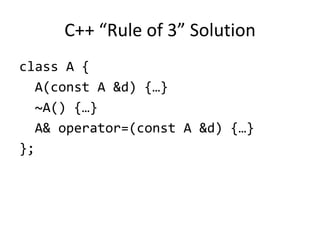
C++ “Rule of 3” Solution
class A {
  A(const A &d) {…}
  ~A() {…}
  A& operator=(const A &d) {…}
};
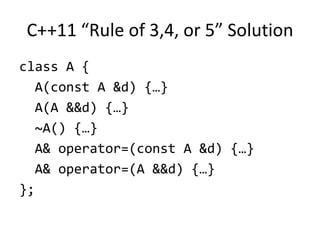
C++11 “Rule of 3,4, or 5” Solution
class A {
  A(const A &d) {…}
  A(A &&d) {…}
  ~A() {…}
  A& operator=(const A &d) {…}
  A& operator=(A &&d) {…}
};
Case Close
• Pay Attention to compiler warnings.
  – This particular warning appear in 3 other places.
• Use Compiler that give better warnings.
  – CLANG/LLVM has the best error/warnings.
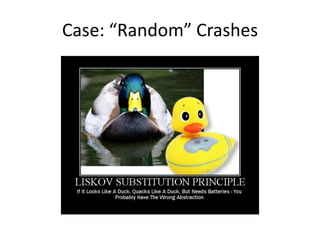
Case: “Random” Crashes
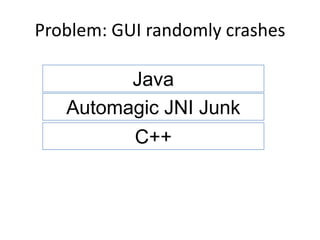
Problem: GUI randomly crashes

         Java
   Automagic JNI Junk
         C++
Steps I took
• Build Debug
  – debug runtimes make it crash faster due to checks
• Use 2 Debugger Visual Studio & JBuilder
• 4 hours of persistent.
Track it down, but no clue
• Java had valid pointer to C++ object.
• Pressed button, & pointer no longer valid
• Trick time.
Data Breakpoint.
• x86 has 4 hardware data breakpoints
  – Program runs at full speed.
  – 1 is reserved by OS
• Must take following form. (Old Info)
  – Memory address, length(must be 4).
  – 0x12345678,4
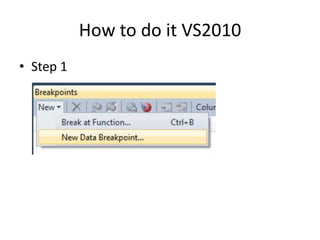
How to do it VS2010
• Step 1
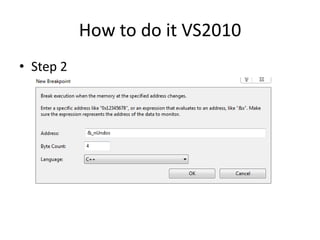
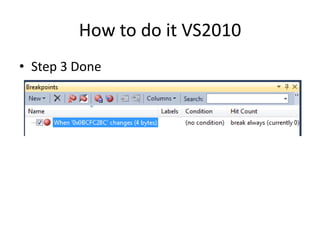
How to do it VS2010
• Step 2
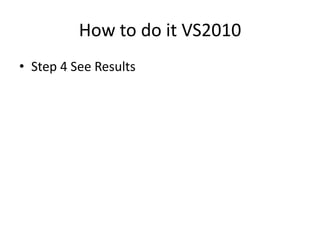
How to do it VS2010
• Step 3 Done
How to do it VS2010
• Step 4 See Results
BAM Data Changed
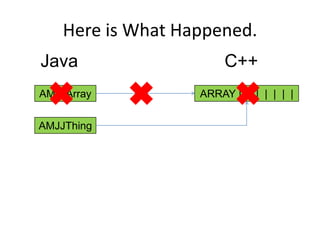
• Java GC
  – > finalizer
  – > Automagic JNI junk
  – > delete object
• Why, leaky abstraction.
Here is What Happened.
Java                   C++
AMJJArray          ARRAY | | | | | | |

AMJJThing
Case Close
• Data Breakpoints Rule.
• All Abstraction Leak
  – Know how before proceeding.
That’s all for Now

Questions, Comment, etc.

Case Study of the Unexplained

  • 2.
    Case Study ofProgrammer Nightmares Shannon’s Edition 20120624
  • 3.
    What is thetalk about • Inspired by Mark Russinovich’s Presentation – Case of the Unexplained – http://technet.microsoft.com/en- us/sysinternals/bb963887 • Here are my cases – Mainly fixing programming problem – Mostly C++, some interop & cross-platform. – Most are from my bad memory. – Sorry about the boring slides.
  • 4.
    Steps to Debuga problem 1. There is no step 1 2. See Step 1 3. ??? 4. Profit
  • 5.
    General Guidelines • Reproducible test case. • Learn the tools. • Make a Wild A** Guess (WAG) on source • Persistent – Grind through it. • Ask someone else to handle it. (NOT ME)
  • 6.
  • 7.
    Problem: Debug vsRelease Debug Optimized • Program is not drawing the circle around the cursor but is where the user clicks. • Same class does both drawings, different location • Did work previously
  • 8.
    Causes Optimization Problems 1.Undefined Behaviors 1. Uninitialized Memory 2. Overflows/underflows 2. Thread problems. 3. Code or Data is wrong. …. 999.Complier Bug (not likely, see #1) 1000.Hardware/OS/driver bug.
  • 9.
    Step I took •What’s changed. – Major merge with other branch. – Massive file and project settings changes. • Build optimized with debug symbols & debug – Could jump around a lot – Local variables will not be present or wrong* – this pointer only valid on member function entry. • Compare working/non-working objects
  • 10.
    Found the Function •Formula: A* x B * y C I D*w E *h F 1 • D, E, F = 0, so have this, and verified all inputs. I A* x B * y C
  • 11.
    Next Trick: BinarySearch • Turning on/off optimizations – Per Library – Per File – Per function – Per optimization • Found, Global Optimization “Cause” problem – Last merge turned it on. – Turned it off. Everything works 
  • 12.
    Extremely Important Rule •Unless you understand why the problem is fixed, its not fixed. The problem is likely still there just hidden better.
  • 13.
    Missed something important •Formula: A* x B * y C I D*w E *h F 1 • D, E, F = 0, so have this, and verified all inputs A* x B * y C I 1
  • 14.
    Lets talk thisOut • w & h were uninitialized, but can’t be it. MAYBE • 0 time any number is 0. TRUE • w & h are number. FALSE – Double Precision IEEE 754 • IEEE 754 only contains number. FALSE – Contains ±0, ±INF, … NaN
  • 15.
    NaN is weird. •Any operation with NaN results in NaN – *, +, -, /, sin, etc • Most comparisons with NaN are false. – <, <=, >, ==, etc, so NaN == NaN is false • Not equals is always true. – NaN != NaN is true. • Multiple types – QNaN, SNaN
  • 16.
    Case Close • Shouldhave trusted 1st guess. • Gave up too soon with a quick wrong fix.
  • 17.
  • 18.
    Problem • 6-8 highpriority bugs from FAT. • All bugs had the same pattern. – Only occurred on Window 2000 box. – Display wrong converted values. – Works on XP, and 2003. • It a cross-platform assign to Me.
  • 19.
    Steps I took •Start Debug Build of Integration Branch. • Get the release, and try to reproduce bug. – Grabbed it from the build NFS share. – Didn’t “fail” • Try the test box. – It “fails”, but can’t debug. – Copy it to dev box – It fails on my box.
  • 20.
    WAG time • CosmicRays corrupted the Executable. – No replacing them with debug build still had bug.
  • 21.
    What Could ItBe • Diff installed w/ what should be there. – Should be No Differences • Massive Differences. • Install CD didn’t have and Differences • I know what happened.
  • 22.
    Here is WhatHappened • Tester skipped using the Install Win2K CD. – Didn’t want to walk to other end of hall. • TAR-ed up NFS install shared. • FTP it over. • Used WinZip to untar file.
  • 23.
  • 24.
    Case Closed • The“table.dat” file was converted to windows newlines. – Doesn’t work properly like that. • All Test Follow Proper Procedures. • Don’t take Short Cuts. – Especially During FAT.
  • 25.
  • 26.
    Problem: Phone Call 1.Got a phone call 2. Developer describe the problem and steps taken to track down the problem. 3. Answer with the root cause and how to fix. Now its time for the interactive part of this talk. Pretend you me, ….
  • 27.
    Real Problem • Fileparsing code incorrectly errors out. – Worked on following • Windows 32/64-bits debug/release, • Irix 32/64-bits debug/release, • Solaris SPARC 32/64-bit debug/release • Linux 64-bit debug/release, 32-bit debug. – Fails on Linux 32-bit x86 gcc optimize
  • 28.
    What does thecode do? • Read text like file – Contains repeated floating point numbers. – Lots of other data between repeated number. • Parses data into native types (int, double) • Validate Data is sane – Number are with spec. – Repeated doubles are the same with != check. • This step failed.
  • 29.
    Code double lat1 =atof(buff1); … double lat2 = atof(buff2); … if(lat1 != lat2) return -1;
  • 30.
    I’m 95% certainof problem Write down your answer now. More info from the developer
  • 31.
    Additional QA withdevelop • Did they check input file is valid? YES • How did the developer track down it down? – Printf debugging number same, but check failed. • Did adding/moving additional printf make the problem go away? YES – This confirmed that I guessed right 
  • 32.
    Your Turn • Failed32-bit x86 optimized linux • Deal with C++ native double types – uses != to compare them. • Adding some printfs made problem go away. Who know what happened.
  • 33.
    Additional Slide IfNo One Knows • Root cause is 486 • Specifically math co-processor • C++ doubles are 64-bits in memory • 486 math registers are 80-bits • Can’t store 80-bits in 64-bit • Round double when copied into memory. • Optimizer will speed up code – Will attempt to reduce the # of memory copies. • Wait here until some guesses.
  • 34.
    Here is whathappened • Function converted 1st string to 80-bit double • Compiler moved result into 64-bit on stack • Function conerted 2nd string to 80-bit double • Compiler got smart and kept it in 80-bits. • Loaded 1st 64-bit double into 80-bit register. • 2nd number has more precision so it didn’t match.
  • 35.
    Optimized ASM Code callatof ; buff1 in eax fstor [sp+20], ST(0) … … call atof ; buff2 in eax fload ST(1), [sp+20] fcmp ST(0), ST(1) ; compare 80 w/ 64-bits jmpe +8 ; skip over next line if == ret ; error
  • 36.
    Case Close • Changedto use strcmp instead. • Never directly compare double without a tolerance. • Round errors will cause mathematically impossible to happen. • Stupid 80-bits.
  • 37.
  • 38.
    Problem: Crash withno reasons • New developed code • Crashed on Solaris while calling constructor • No “obvious” problem with code
  • 39.
    Code class A { … A(A *d) { *this = d; } … A& operator=(const A &d) { … return *this; } };
  • 40.
    Steps I took •Build code on Windows. – Visual Studio Debugger is 10x nicer • Got a helpful warning – warning C4717: ‘A::A’ : recursive on all control paths, function will cause runtime stack overflow
  • 41.
    Code Again class A{ A(A *d) { *this = d; } A& operator=(const A &d) {…} };
  • 42.
    What the CompilerDoes class A { A(A *d) { A __tempA(d); *this->operator=(__tempA); } A& operator=(const A &d) {…} };
  • 43.
    Solution #1 class A{ A(A *d) { *this = *d; } A& operator=(const A &d) {…} };
  • 44.
    Problem With Solution#1 • What does the following code do A d = NULL; • Compile does this following A d = A(NULL); • Which crashes. • “A d = 0” also crashes.
  • 45.
    Solution #2 class A{ explicit A(A *d) { *this = *d; } A& operator=(const A &d) {…} };
  • 46.
    C++ “Rule of3” Solution class A { A(const A &d) {…} ~A() {…} A& operator=(const A &d) {…} };
  • 47.
    C++11 “Rule of3,4, or 5” Solution class A { A(const A &d) {…} A(A &&d) {…} ~A() {…} A& operator=(const A &d) {…} A& operator=(A &&d) {…} };
  • 48.
    Case Close • PayAttention to compiler warnings. – This particular warning appear in 3 other places. • Use Compiler that give better warnings. – CLANG/LLVM has the best error/warnings.
  • 49.
  • 50.
    Problem: GUI randomlycrashes Java Automagic JNI Junk C++
  • 51.
    Steps I took •Build Debug – debug runtimes make it crash faster due to checks • Use 2 Debugger Visual Studio & JBuilder • 4 hours of persistent.
  • 52.
    Track it down,but no clue • Java had valid pointer to C++ object. • Pressed button, & pointer no longer valid • Trick time.
  • 53.
    Data Breakpoint. • x86has 4 hardware data breakpoints – Program runs at full speed. – 1 is reserved by OS • Must take following form. (Old Info) – Memory address, length(must be 4). – 0x12345678,4
  • 54.
    How to doit VS2010 • Step 1
  • 55.
    How to doit VS2010 • Step 2
  • 56.
    How to doit VS2010 • Step 3 Done
  • 57.
    How to doit VS2010 • Step 4 See Results
  • 58.
    BAM Data Changed •Java GC – > finalizer – > Automagic JNI junk – > delete object • Why, leaky abstraction.
  • 59.
    Here is WhatHappened. Java C++ AMJJArray ARRAY | | | | | | | AMJJThing
  • 60.
    Case Close • DataBreakpoints Rule. • All Abstraction Leak – Know how before proceeding.
  • 61.
    That’s all forNow Questions, Comment, etc.

Editor's Notes

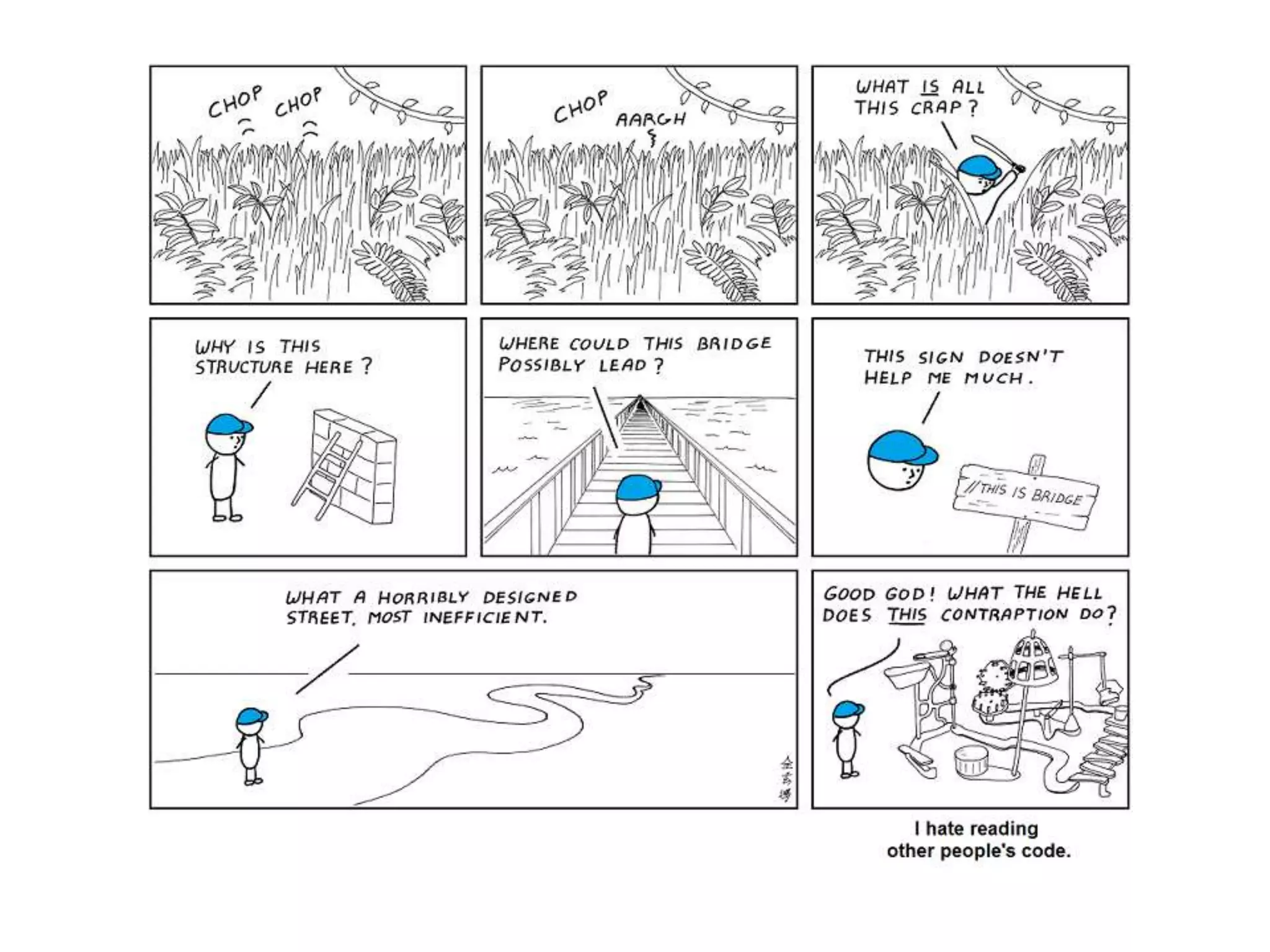
  • #2 Cuz if I didn&apos;t write it, the code obviously sucks.http://abstrusegoose.com/432
  • #16 Floating processor flags.
  • #21 “work” Couldn’t redo the bug.
  • #23 There were also bigger.Confronted tester and they admitted to the crime
  • #24 Winzip why are you so bad with tars.
  • #25 Horrible default. Why smart? Does it look at file? No. Does it have a white list? No. Even though there are far more binary file types then text types it surely must not be using a black list? It uses a black list. AAAAAAAHHH stupid stupidstupid.
  • #26 No matter how far they have to walk, or how much extra work.
  • #38 Best guess on assembly
  • #39 PHP DOS attach was caused buy using 64-bit string conversion algorithm with 80-bit chip. Java also fell.
  • #41 C/C++ make it easy to do, unless practicing modern C++.
  • #43 Raise hands who actually know the problem
  • #45 There is the line. Look at the type of d, it’s a pointer not a value. Here is what the compiler does.
  • #46 Now you can see that the what the problem really.
  • #47 Bad solution, and is C with classes style &amp; not C++
  • #48 Missing a *
  • #49 Tell c++ don’t use constructor to do implicit conversion. Still C++ style but will get rid
  • #50 C++03 rule of three if there is any complex or pointer data.
  • #51 These are the move constructor and assignment operator. That’s another talk.
  • #52 CLANG uses a spell check algorithm when it finds an unknown symbol
  • #55 Automagic JNI Junk is a dead tool for generating JNI.
  • #56 Fills memory on allocation, deletion, and add guard on end.Involved steps in the GUI for crash. Had to track down the pointer use.
  • #61 Breakpoint automatically disabled when re-running program.
  • #62 Breakpoint automatically disabled when re-running program.