Renas R. Rekany Object-Oriented-Programming
1
Programming Language with
C_Sharp
Object-Oriented-Programming
Renas R. Rekany
Renas R. Rekany Object-Oriented-Programming
2
Beginning C# programming fundamentals
1- Name Spaces:
The namespace keyword is used to declare a scope that contains a set of related
objects. You can use a namespace to organize code elements and to create globally
unique types.
2- Conversion:
You can convert a string to a number by using methods in the Convert class. Such a
conversion can be useful when obtaining numerical input from a command line
argument, for example. The following table lists some of the methods that you can
use.
2.1 Convert Class
Numeric Type Method
decimal ToDecimal(String)
float ToSingle(String)
double ToDouble(String)
short ToInt16(String)
int ToInt32(String)
long ToInt64(String)
Renas R. Rekany Object-Oriented-Programming
3
ushort ToUInt16(String)
uint ToUInt32(String)
ulong ToUInt64(String)
Structure Conversion Method
Decimal static decimal Parse(string str)
Double static double Parse(string str)
Single static float Parse(string str)
Int64 static long Parse(string str)
Int32 static int Parse(string str)
Int16 static short Parse(string str)
UInt64 static ulong Parse(string str)
UInt32 static uint Parse(string str)
UInt16 static ushort Parse(string str)
Byte static byte Parse(string str)
bool static bool Parse(string str)
SByte static sbyte Parse(string str)
Renas R. Rekany Object-Oriented-Programming
4
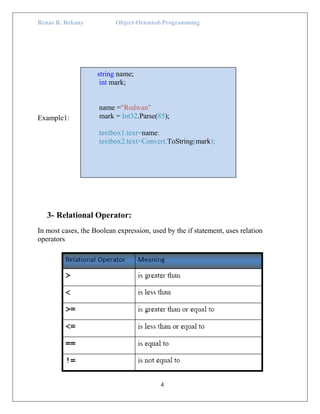
Example1:
3- Relational Operator:
In most cases, the Boolean expression, used by the if statement, uses relation
operators
string name;
int mark;
name ="Redwan"
mark = Int32.Parse(85);
textbox1.text=name;
textbox2.text=Convert.ToString(mark);
Renas R. Rekany Object-Oriented-Programming
5
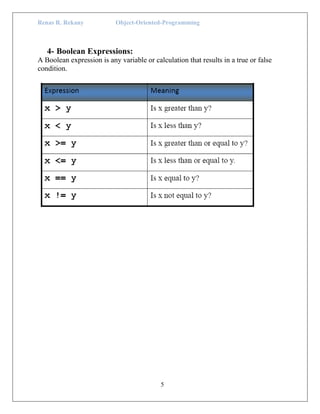
4- Boolean Expressions:
A Boolean expression is any variable or calculation that results in a true or false
condition.
Renas R. Rekany Object-Oriented-Programming
6
5- Condition control structure
Thus far, within a given function, instructions have been executed sequentially, in
the same order as written. Of course that is often appropriate! On the other hands if
you are planning out instructions, you can get to a place where you say, “Hm, that
depends....”, and a choice must be made. The simplest choices are two-way: do one
thing is a condition is true, and another (possibly nothing) if the condition is not true.
5.1The if Statement
The if statement decides whether a section of code executes or not. The if statement
uses a Boolean to decide whether the next statement or block of statements executes.
The general C# if syntax is:
if (expression )
{Statement(s) for if-true}
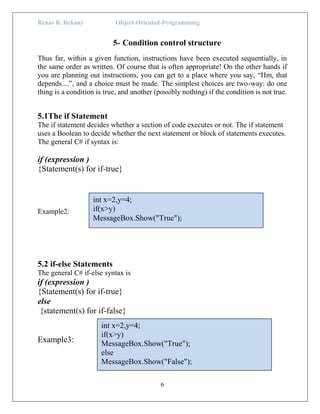
Example2:
5.2 if-else Statements
The general C# if-else syntax is
if (expression )
{Statement(s) for if-true}
else
{statement(s) for if-false}
Example3:
int x=2,y=4;
if(x>y)
MessageBox.Show("True");
int x=2,y=4;
if(x>y)
MessageBox.Show("True");
else
MessageBox.Show("False");
Renas R. Rekany Object-Oriented-Programming
7
5.3 if-else-if Statements
if (expression_1)
{
statement;
statement;
etc.
}
else if (expression_2)
{
statement;
statement;
etc.
}
else
{
statement;
statement;
etc
Example4:
using System;
using System.Collections.Generic;
using System.ComponentModel;
using System.Data;
using System.Drawing;
using System.Linq;
using System.Text;
using System.Windows.Forms;
namespace WindowsFormsApplication1
{
public partial class Form1 : Form
{
public Form1()
{
InitializeComponent();
}
private void button1_Click(object sender, EventArgs e)
{
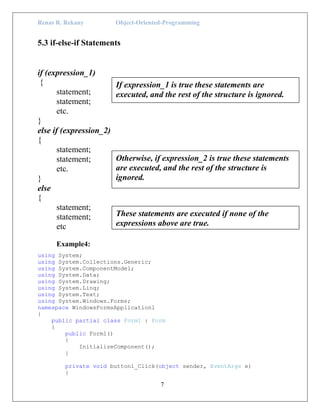
Otherwise, if expression_2 is true these statements
are executed, and the rest of the structure is
ignored.
Insert as many else if clauses as necessary.
These statements are executed if none of the
expressions above are true.
If expression_1 is true these statements are
executed, and the rest of the structure is ignored.
Renas R. Rekany Object-Oriented-Programming
8
int a, b, c;
a = Convert.ToInt32(textBox2.Text);
b = Convert.ToInt32(textBox3.Text);
if (Convert.ToInt32(textBox1.Text) == 1)
{
c = a + b;
textBox4.Text = Convert.ToString(c);
}
else if (Convert.ToInt32(textBox1.Text)==2)
{
c=a-b;
textBox4.Text=Convert.ToString(c);
}
else if (Convert.ToInt32(textBox1.Text) == 3)
{
c = a * b;
textBox4.Text = Convert.ToString(c);
}
else if (Convert.ToInt32(textBox1.Text) == 4)
{
c = a / b;
textBox4.Text = Convert.ToString(c);
}
}
}
}
Example5 (Switch- Condition):
switch (value)
{
case value 1:
Console.WriteLine(1);
break;
case value 2:
Console.WriteLine(5);
break;
}
using System;
using System.Collections.Generic;
using System.ComponentModel;
using System.Data;
using System.Drawing;
using System.Linq;
using System.Text;
using System.Windows.Forms;
namespace WindowsFormsApplication1
Renas R. Rekany Object-Oriented-Programming
9
{
public partial class Form1 : Form
{
public Form1()
{
InitializeComponent();
}
private void button1_Click(object sender, EventArgs e)
{
int a, b, c;
a = Convert.ToInt32(textBox2.Text);
b = Convert.ToInt32(textBox3.Text);
switch (Convert.ToInt32(textBox1.Text))
{
case 1:
c = a + b;
textBox4.Text = Convert.ToString(c);
break;
case 2:
c = a - b;
textBox4.Text = Convert.ToString(c);
break;
case 3:
c = a * b;
textBox4.Text = Convert.ToString(c);
break;
case 4:
c = a / b;
textBox4.Text = Convert.ToString(c);
break;
}
}
}
}
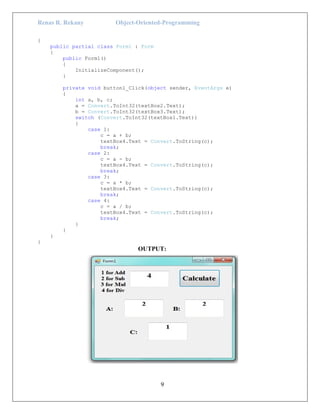
OUTPUT:

C# p5

  • 1.
    Renas R. RekanyObject-Oriented-Programming 1 Programming Language with C_Sharp Object-Oriented-Programming Renas R. Rekany
  • 2.
    Renas R. RekanyObject-Oriented-Programming 2 Beginning C# programming fundamentals 1- Name Spaces: The namespace keyword is used to declare a scope that contains a set of related objects. You can use a namespace to organize code elements and to create globally unique types. 2- Conversion: You can convert a string to a number by using methods in the Convert class. Such a conversion can be useful when obtaining numerical input from a command line argument, for example. The following table lists some of the methods that you can use. 2.1 Convert Class Numeric Type Method decimal ToDecimal(String) float ToSingle(String) double ToDouble(String) short ToInt16(String) int ToInt32(String) long ToInt64(String)
  • 3.
    Renas R. RekanyObject-Oriented-Programming 3 ushort ToUInt16(String) uint ToUInt32(String) ulong ToUInt64(String) Structure Conversion Method Decimal static decimal Parse(string str) Double static double Parse(string str) Single static float Parse(string str) Int64 static long Parse(string str) Int32 static int Parse(string str) Int16 static short Parse(string str) UInt64 static ulong Parse(string str) UInt32 static uint Parse(string str) UInt16 static ushort Parse(string str) Byte static byte Parse(string str) bool static bool Parse(string str) SByte static sbyte Parse(string str)
  • 4.
    Renas R. RekanyObject-Oriented-Programming 4 Example1: 3- Relational Operator: In most cases, the Boolean expression, used by the if statement, uses relation operators string name; int mark; name ="Redwan" mark = Int32.Parse(85); textbox1.text=name; textbox2.text=Convert.ToString(mark);
  • 5.
    Renas R. RekanyObject-Oriented-Programming 5 4- Boolean Expressions: A Boolean expression is any variable or calculation that results in a true or false condition.
  • 6.
    Renas R. RekanyObject-Oriented-Programming 6 5- Condition control structure Thus far, within a given function, instructions have been executed sequentially, in the same order as written. Of course that is often appropriate! On the other hands if you are planning out instructions, you can get to a place where you say, “Hm, that depends....”, and a choice must be made. The simplest choices are two-way: do one thing is a condition is true, and another (possibly nothing) if the condition is not true. 5.1The if Statement The if statement decides whether a section of code executes or not. The if statement uses a Boolean to decide whether the next statement or block of statements executes. The general C# if syntax is: if (expression ) {Statement(s) for if-true} Example2: 5.2 if-else Statements The general C# if-else syntax is if (expression ) {Statement(s) for if-true} else {statement(s) for if-false} Example3: int x=2,y=4; if(x>y) MessageBox.Show("True"); int x=2,y=4; if(x>y) MessageBox.Show("True"); else MessageBox.Show("False");
  • 7.
    Renas R. RekanyObject-Oriented-Programming 7 5.3 if-else-if Statements if (expression_1) { statement; statement; etc. } else if (expression_2) { statement; statement; etc. } else { statement; statement; etc Example4: using System; using System.Collections.Generic; using System.ComponentModel; using System.Data; using System.Drawing; using System.Linq; using System.Text; using System.Windows.Forms; namespace WindowsFormsApplication1 { public partial class Form1 : Form { public Form1() { InitializeComponent(); } private void button1_Click(object sender, EventArgs e) { Otherwise, if expression_2 is true these statements are executed, and the rest of the structure is ignored. Insert as many else if clauses as necessary. These statements are executed if none of the expressions above are true. If expression_1 is true these statements are executed, and the rest of the structure is ignored.
  • 8.
    Renas R. RekanyObject-Oriented-Programming 8 int a, b, c; a = Convert.ToInt32(textBox2.Text); b = Convert.ToInt32(textBox3.Text); if (Convert.ToInt32(textBox1.Text) == 1) { c = a + b; textBox4.Text = Convert.ToString(c); } else if (Convert.ToInt32(textBox1.Text)==2) { c=a-b; textBox4.Text=Convert.ToString(c); } else if (Convert.ToInt32(textBox1.Text) == 3) { c = a * b; textBox4.Text = Convert.ToString(c); } else if (Convert.ToInt32(textBox1.Text) == 4) { c = a / b; textBox4.Text = Convert.ToString(c); } } } } Example5 (Switch- Condition): switch (value) { case value 1: Console.WriteLine(1); break; case value 2: Console.WriteLine(5); break; } using System; using System.Collections.Generic; using System.ComponentModel; using System.Data; using System.Drawing; using System.Linq; using System.Text; using System.Windows.Forms; namespace WindowsFormsApplication1
  • 9.
    Renas R. RekanyObject-Oriented-Programming 9 { public partial class Form1 : Form { public Form1() { InitializeComponent(); } private void button1_Click(object sender, EventArgs e) { int a, b, c; a = Convert.ToInt32(textBox2.Text); b = Convert.ToInt32(textBox3.Text); switch (Convert.ToInt32(textBox1.Text)) { case 1: c = a + b; textBox4.Text = Convert.ToString(c); break; case 2: c = a - b; textBox4.Text = Convert.ToString(c); break; case 3: c = a * b; textBox4.Text = Convert.ToString(c); break; case 4: c = a / b; textBox4.Text = Convert.ToString(c); break; } } } } OUTPUT: