Computer Programming
University Of Salahaddin
Engineering College
Electrical Engineering
2009-2010
What we learn
We will begin the study of the language starting with the
fundamentals of the language and simple programs; and as we explore
more of the language, we will write increasingly larger programs.
By the end of this year, every student:
• will learn about all the essential programming concepts
• will demonstrate a good familiarity with C++ syntax
• will be able to write reasonably complex procedural programs
What We Will Learn
The following topics will be covered in this course:
• Flow charts and algorithms
• Variables and assignment
• Input, output (I/O), formatting output
• Basic data types
• A simple C++ program
• Arithmetic operators
• Flow of control and loops
• Program style
• Procedures and functions
• Local and global variables, constants
• File I/O
• Structures and arrays
• Numerical analysis
Problem Solving
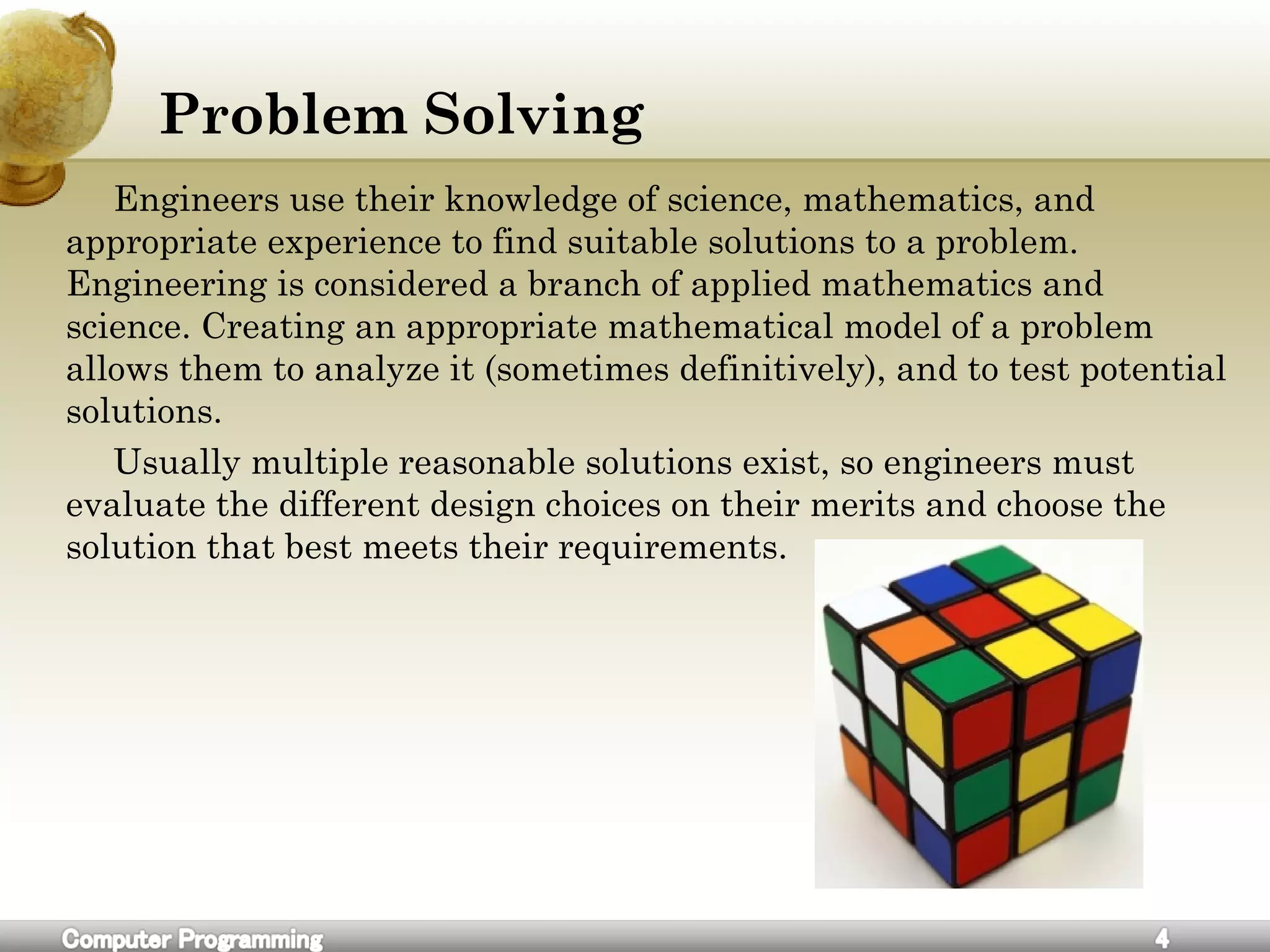
Engineers use their knowledge of science, mathematics, and
appropriate experience to find suitable solutions to a problem.
Engineering is considered a branch of applied mathematics and
science. Creating an appropriate mathematical model of a problem
allows them to analyze it (sometimes definitively), and to test potential
solutions.
Usually multiple reasonable solutions exist, so engineers must
evaluate the different design choices on their merits and choose the
solution that best meets their requirements.
How To Solve Problems
1.Define the problem and see if there is a better way to redefine it.
2.Find the way how human solves it.
3.Write down human’s solution
4.Break down this solution to its original steps and do not forget
simplest thoughts.
5. match every human activity with computer’s tool.
6.If some activity don’t exist directly in computer find alternatives.
7.Group these tiny computer actions into logically related functions.
8.Combine these functions in a complete solution.
9.Solution Implementation and Verification
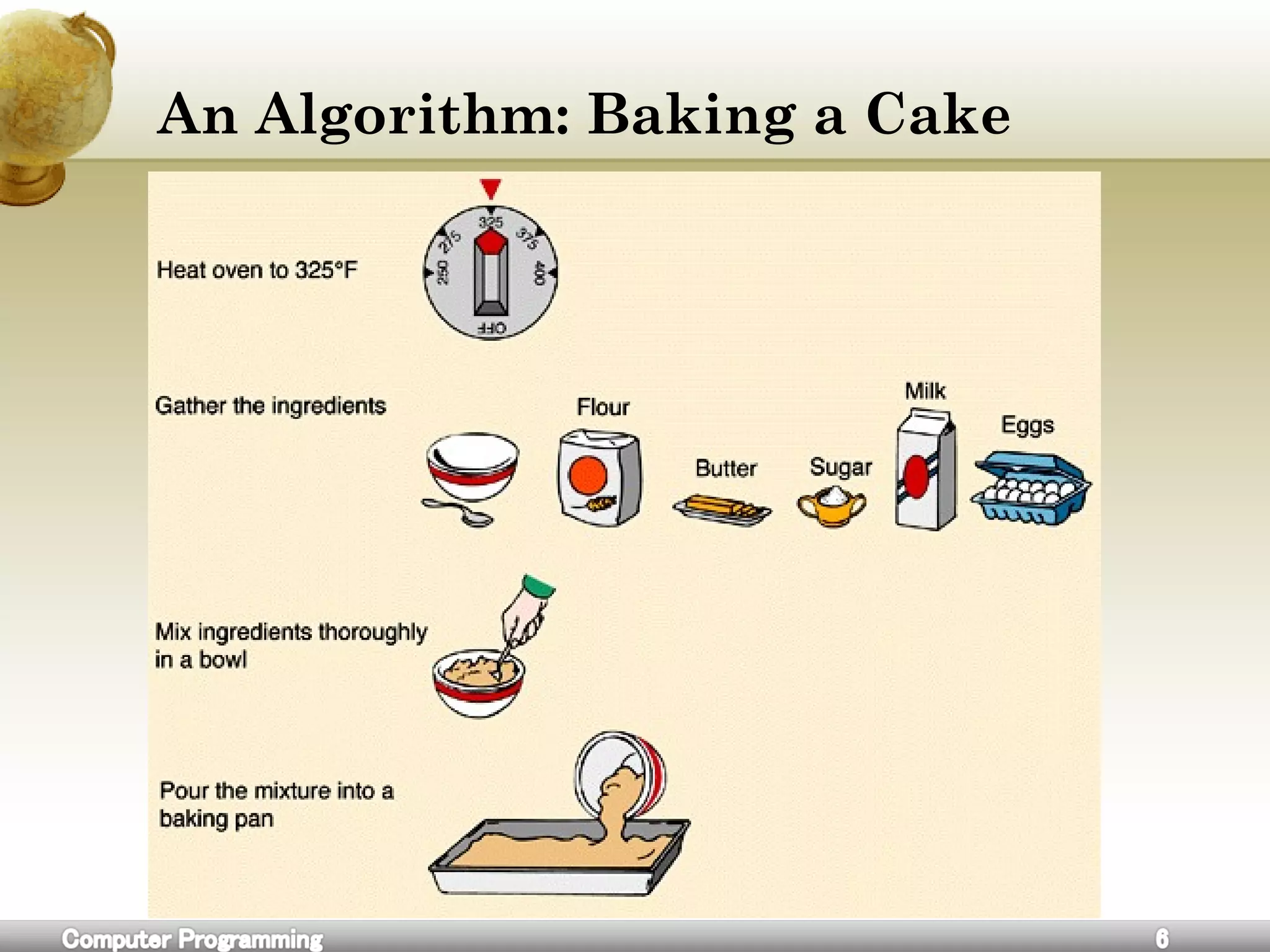
An Algorithm: Baking a Cake
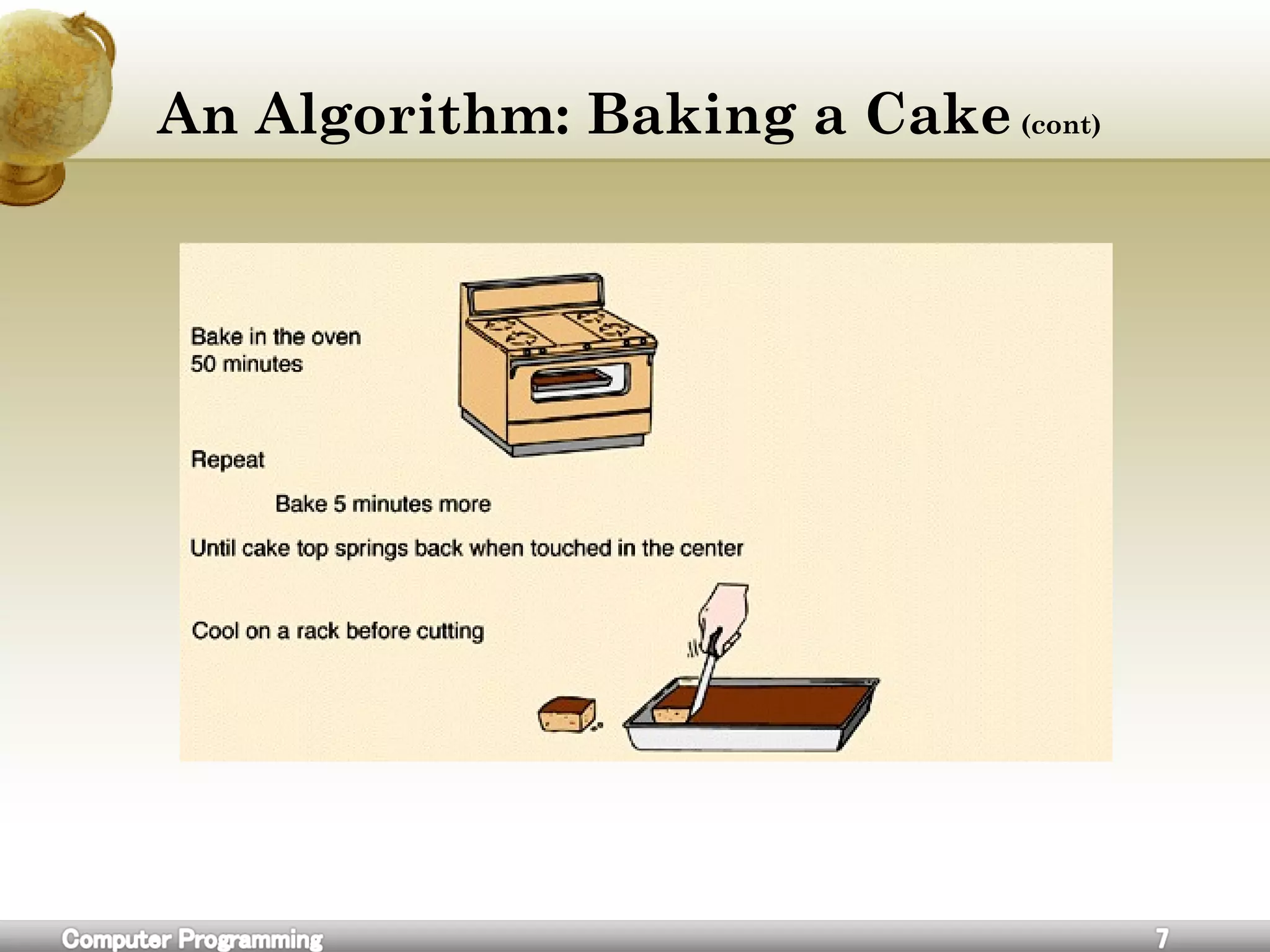
An Algorithm: Baking a Cake (cont)
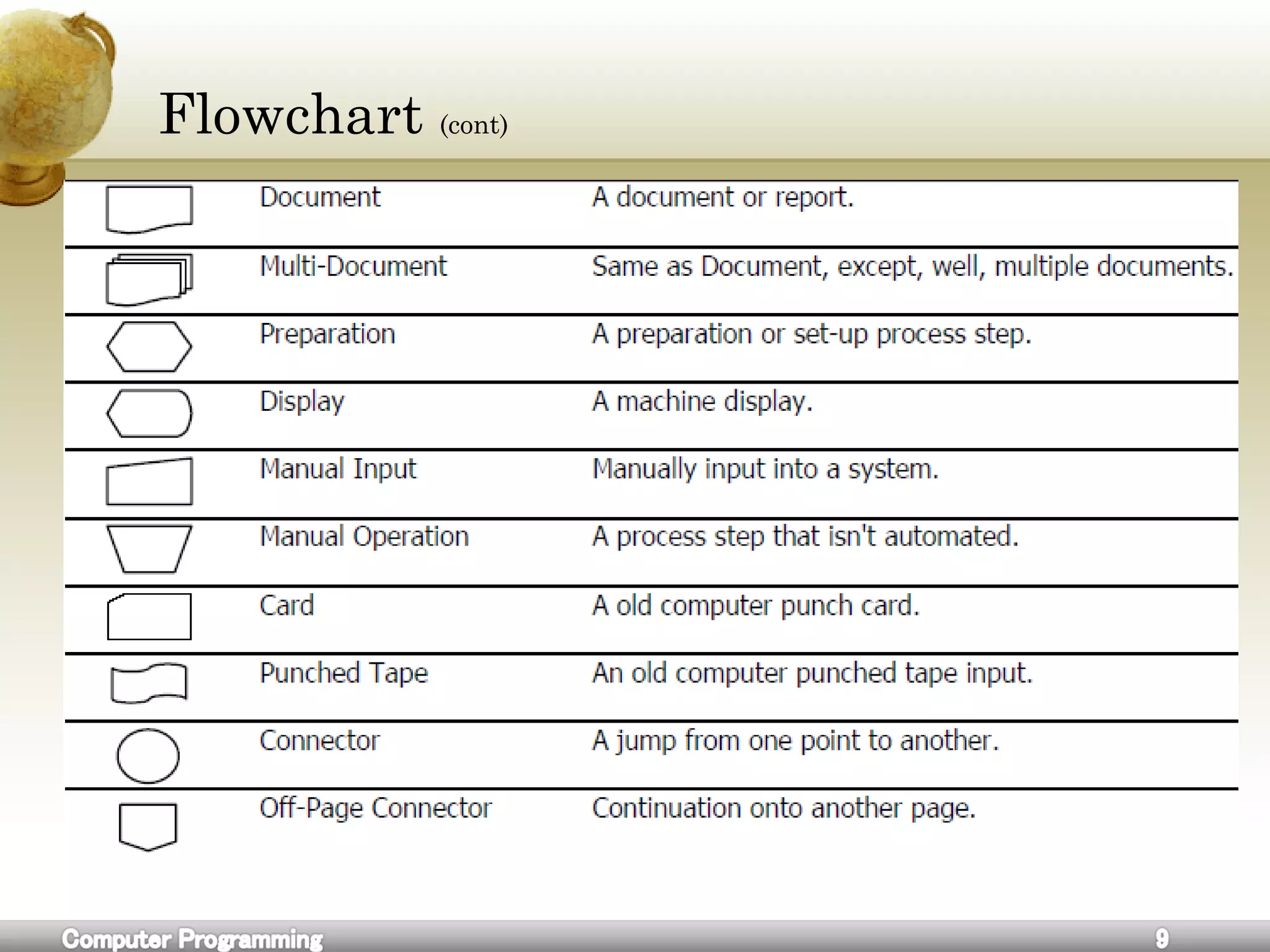
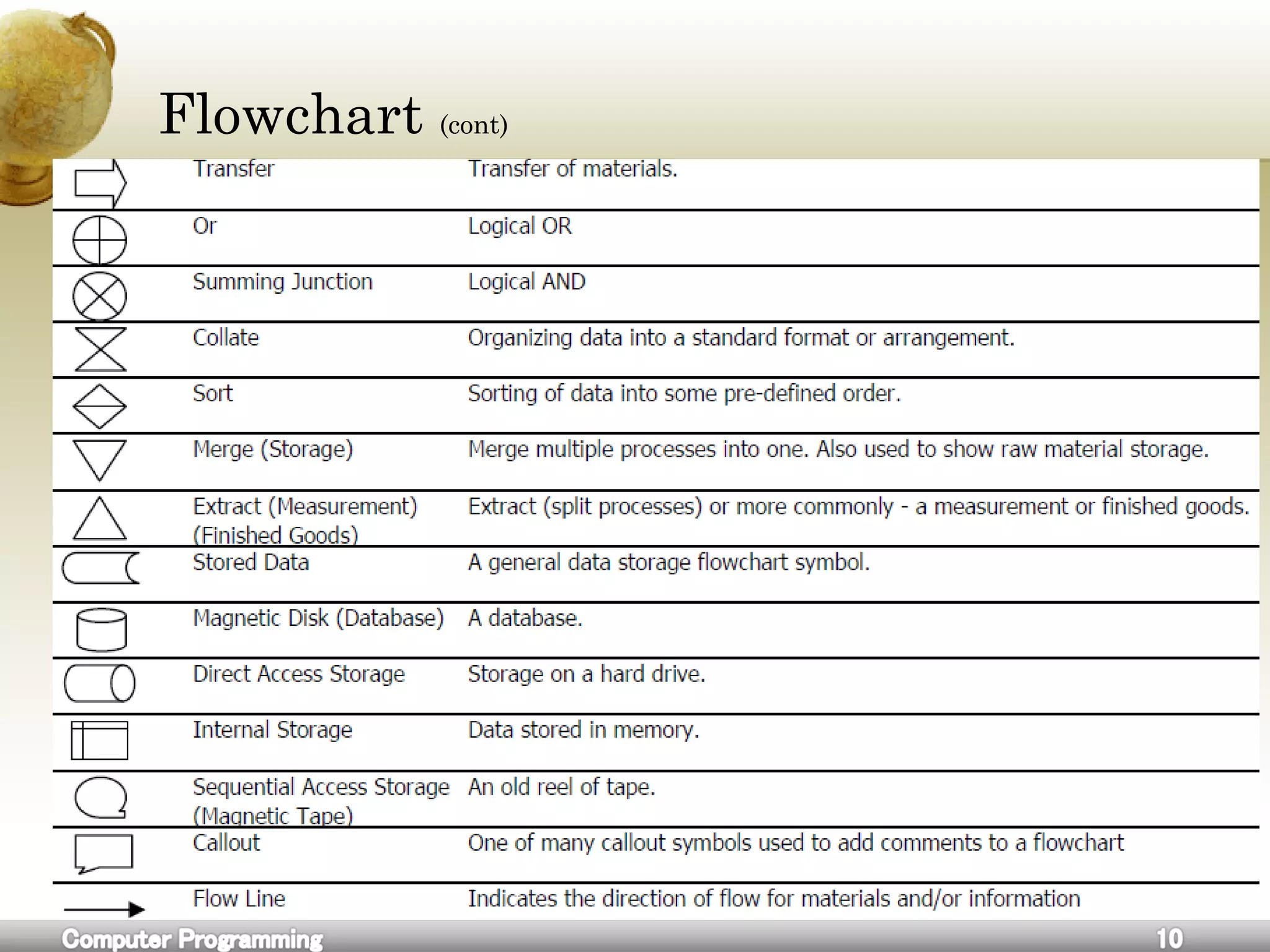
Flowchart
A flowchart is a common type of diagram, that represents an
algorithm or process, showing the steps as boxes of various kinds, and
their order by connecting these with arrows.
Flowcharts are used in analyzing, designing, documenting or
managing a process or program in various fields.[1]
Flowchart (cont)
Flowchart (cont)
Flowchart (cont)
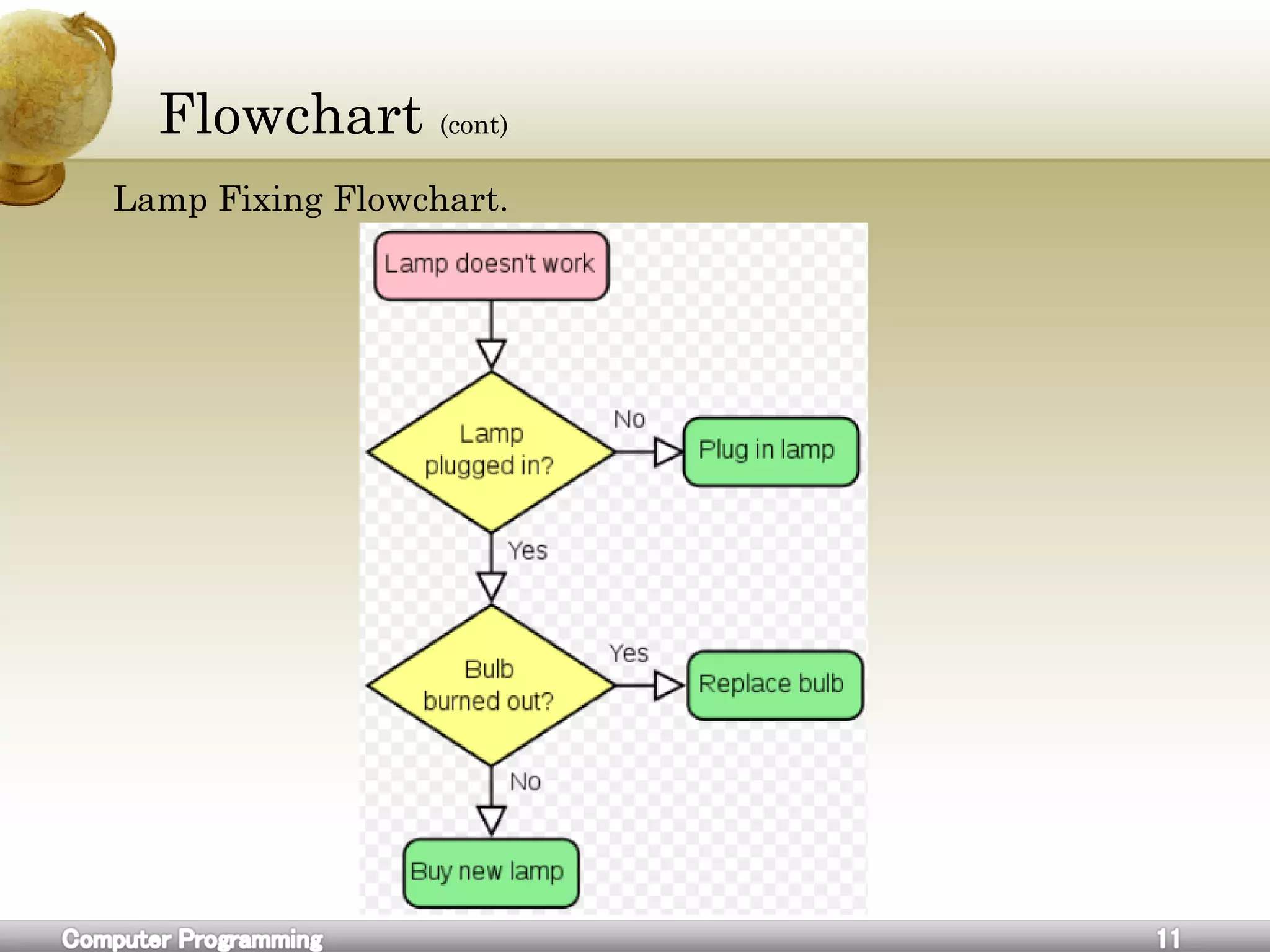
Lamp Fixing Flowchart.
Flowchart (cont)
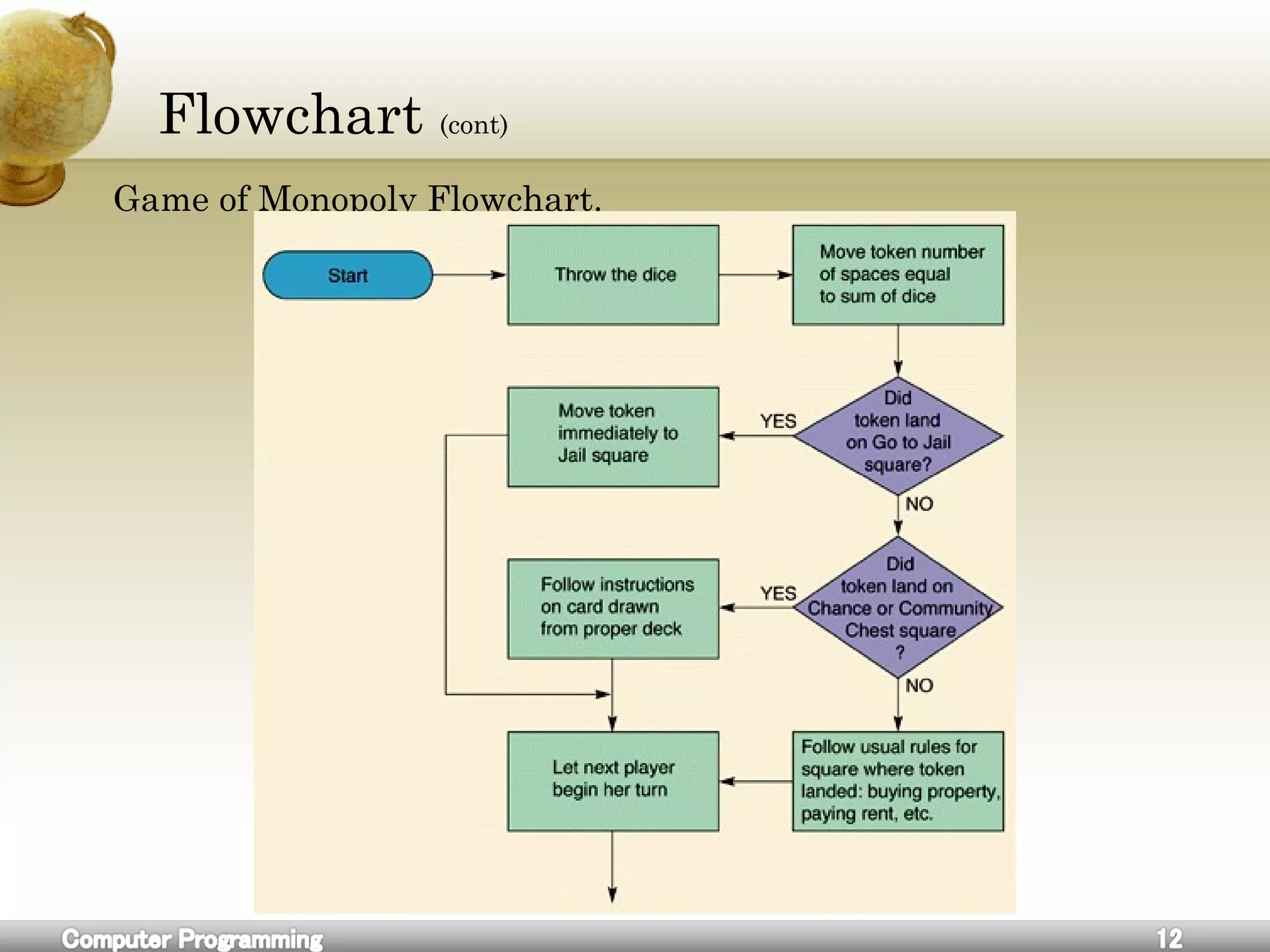
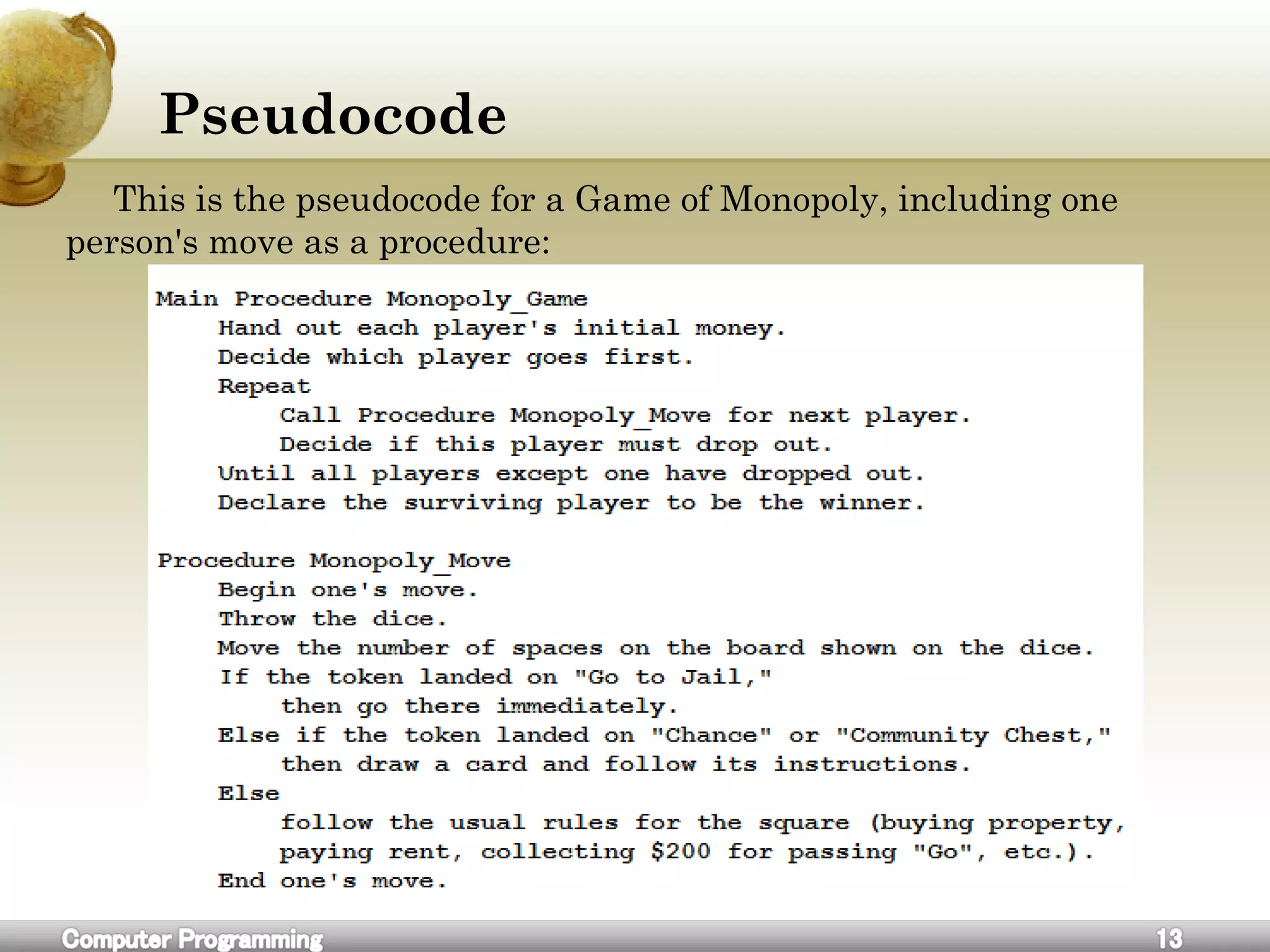
Game of Monopoly Flowchart.
Pseudocode
This is the pseudocode for a Game of Monopoly, including one
person's move as a procedure:
Exercise
1.Find a solution for this equation x^2 + x – 9 = 18. using
pseudocode and flowchart.
2.How can you replace a broken door.
3.Write a pseudocode that illustrate kids going to the school steps.
4.Draw a flowchart for buying a house.
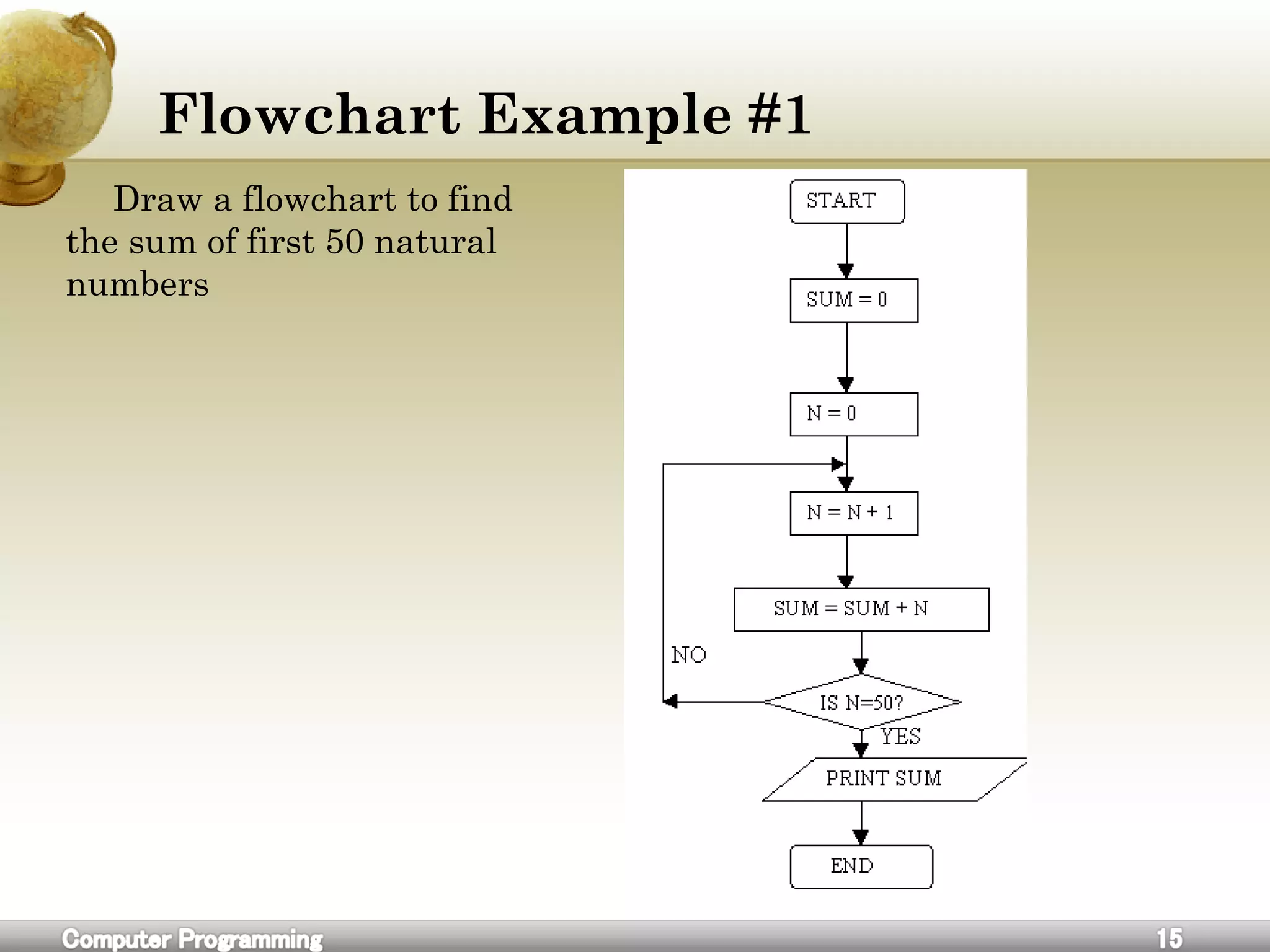
Flowchart Example #1
Draw a flowchart to find
the sum of first 50 natural
numbers
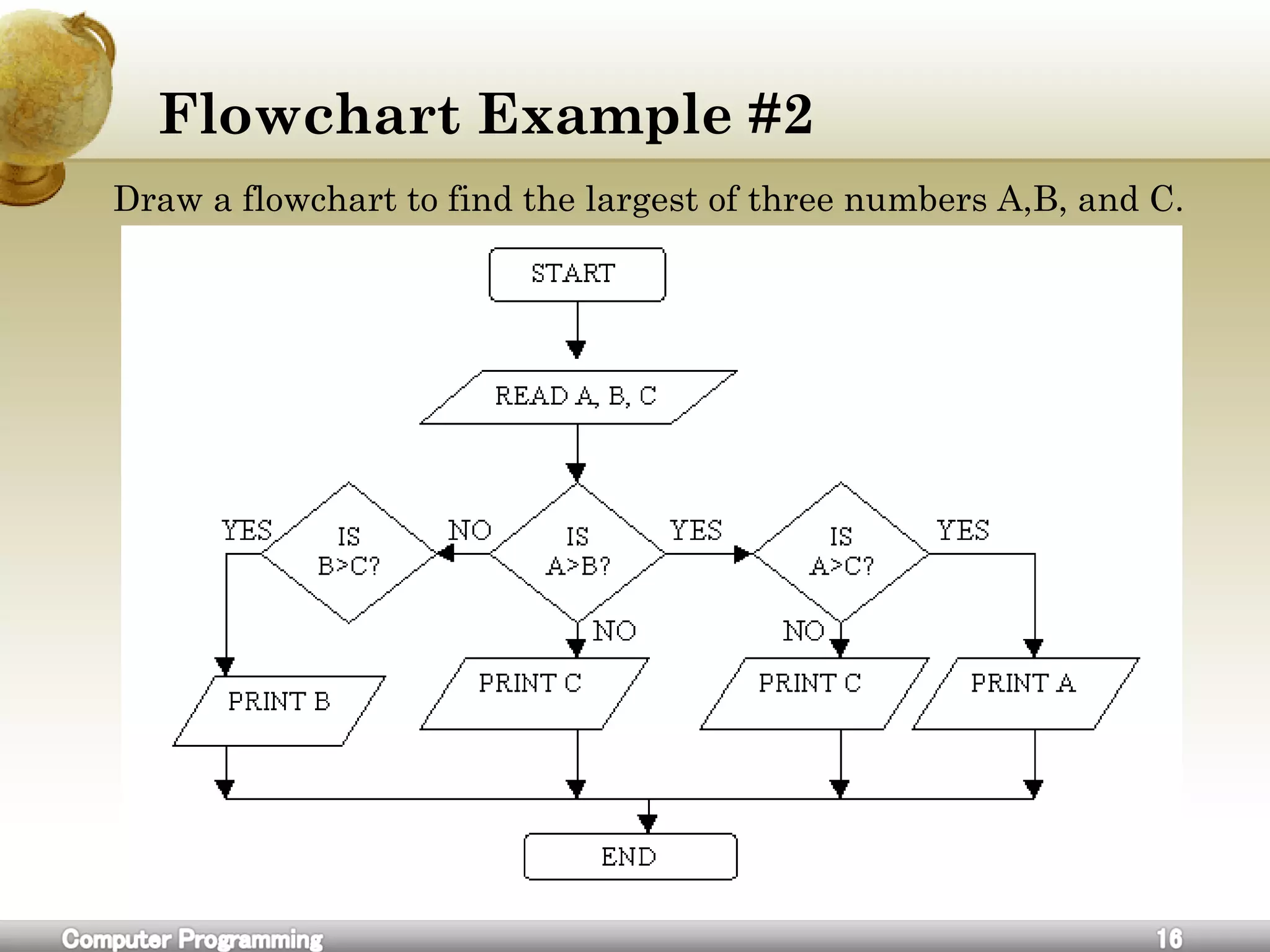
Flowchart Example #2
Draw a flowchart to find the largest of three numbers A,B, and C.
Flowchart Example #2
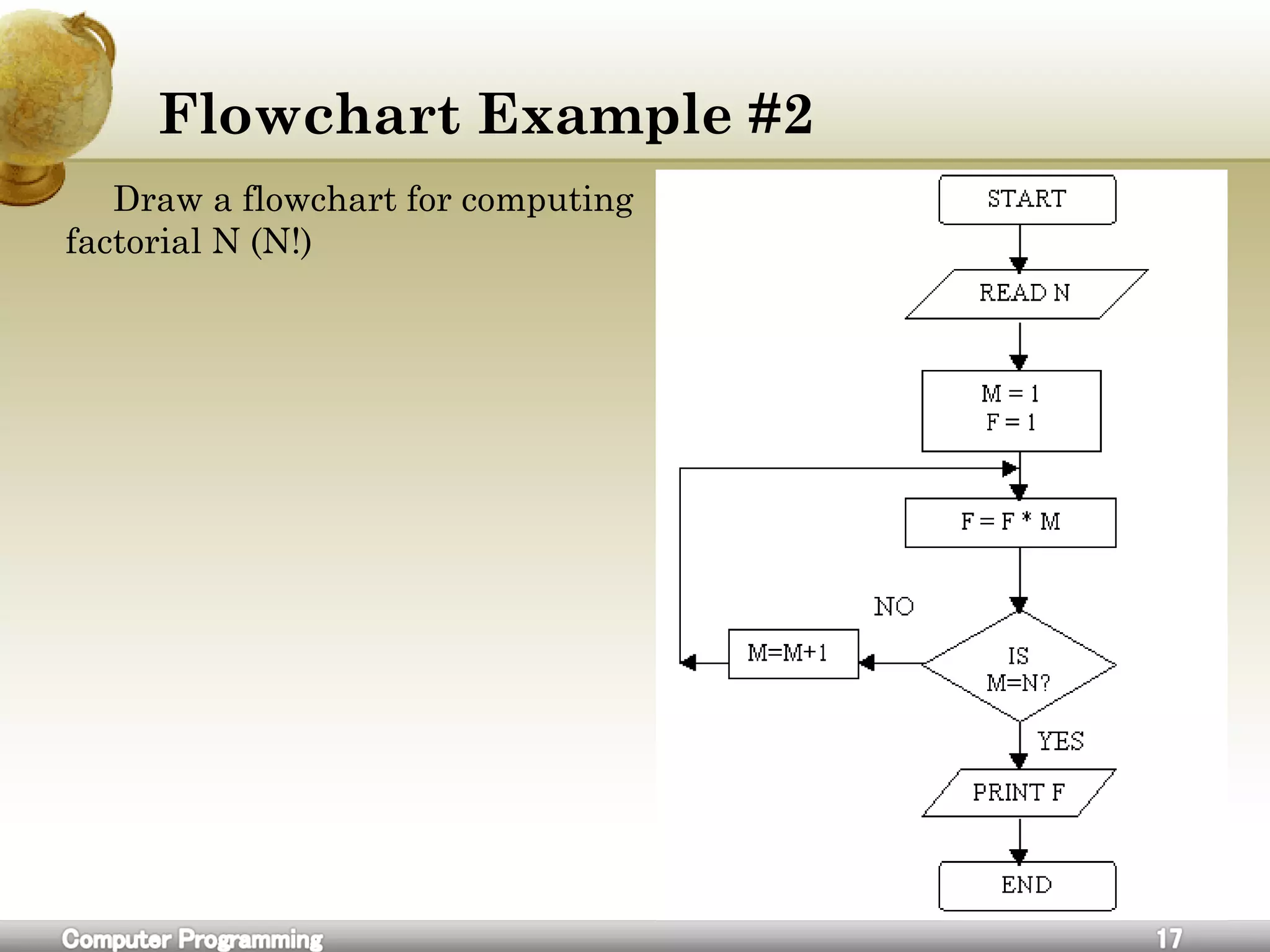
Draw a flowchart for computing
factorial N (N!)
Exercise
1.Draw a flowchart to read a number N and print all its divisors.
2.Draw a flowchart for computing the sum of the digits of any
number
3.Draw a flowchart to find the sum of given N numbers.
4.Draw a flowchart to compute the sum of squares of integers from 1 to 50
5.Draw a flowchart to arrange the given data in an ascending order.
Variables
A C++ variable is a placeholder used for storing data. The type of
data may be numerical, string, character and any other type that the
language uses it.
The data in a variable is called its value and it can be changed or
deleted. in order to uniquely identify and keep track of a variable, we
need to give each variable a name; this is called declaring a variable. it
is a good idea to use meaningful names for variables. For example:
int books;// this is variable declaration
It’s common to initialize variables upon declaration. if a variable is
used in a program without being initialized, the results will be
unpredictable. Variable initialization can be performed either during
declaration using assignment statements as in:
int books = 0; // this is variable declaration and
initialization
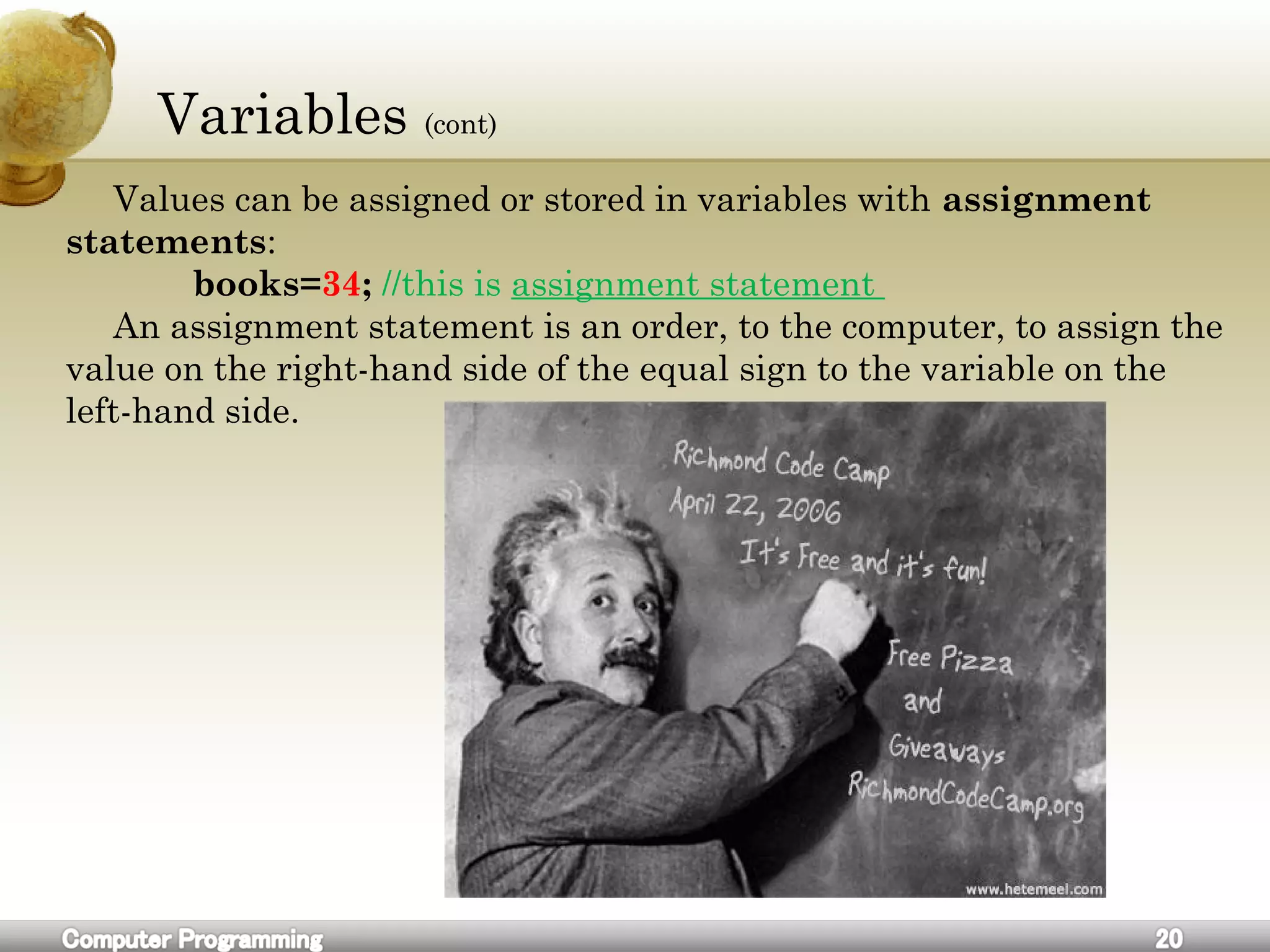
Variables (cont)
Values can be assigned or stored in variables with assignment
statements:
books=34; //this is assignment statement
An assignment statement is an order, to the computer, to assign the
value on the right-hand side of the equal sign to the variable on the
left-hand side.
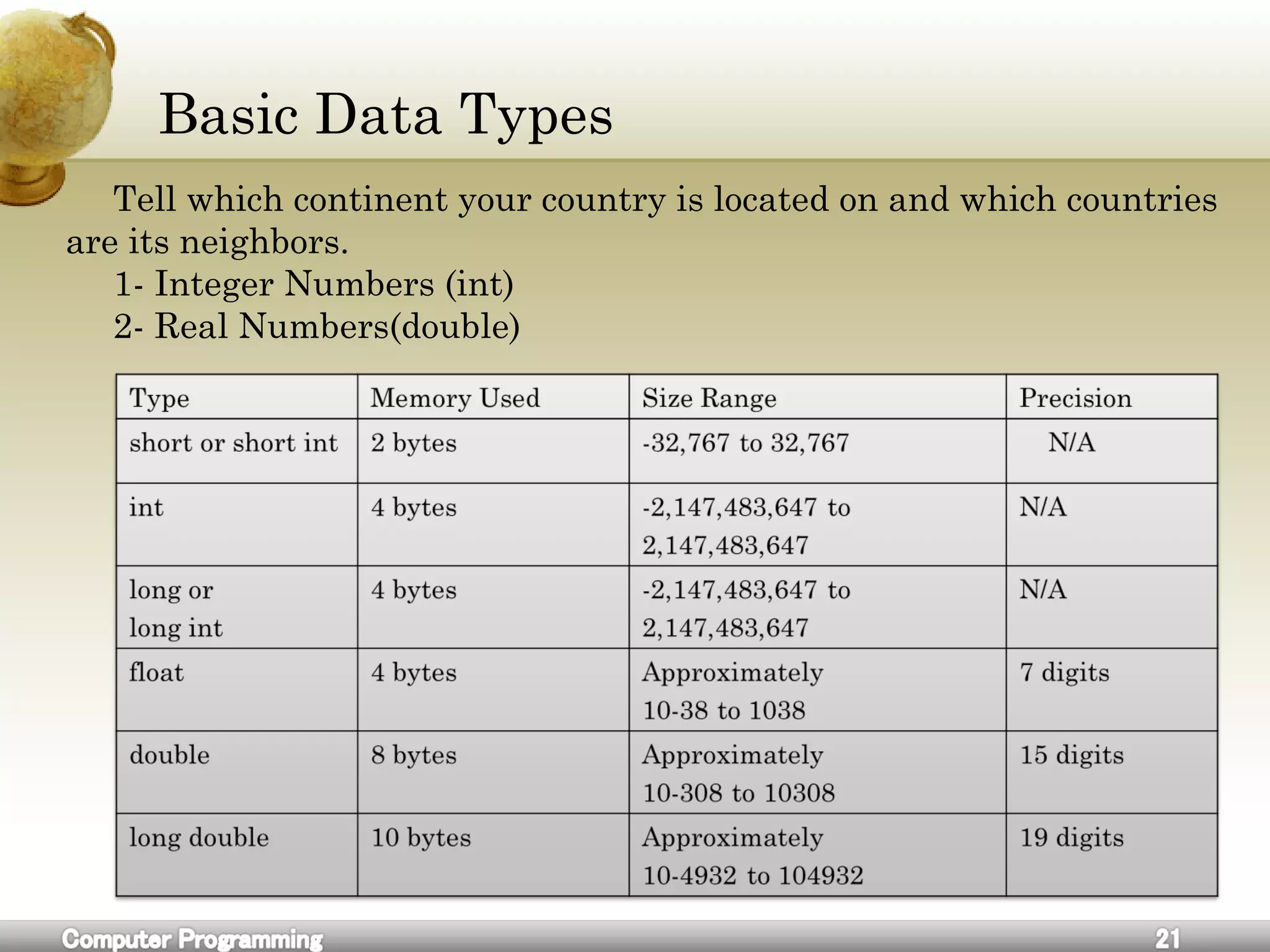
Basic Data Types
Tell which continent your country is located on and which countries
are its neighbors.
1- Integer Numbers (int)
2- Real Numbers(double)
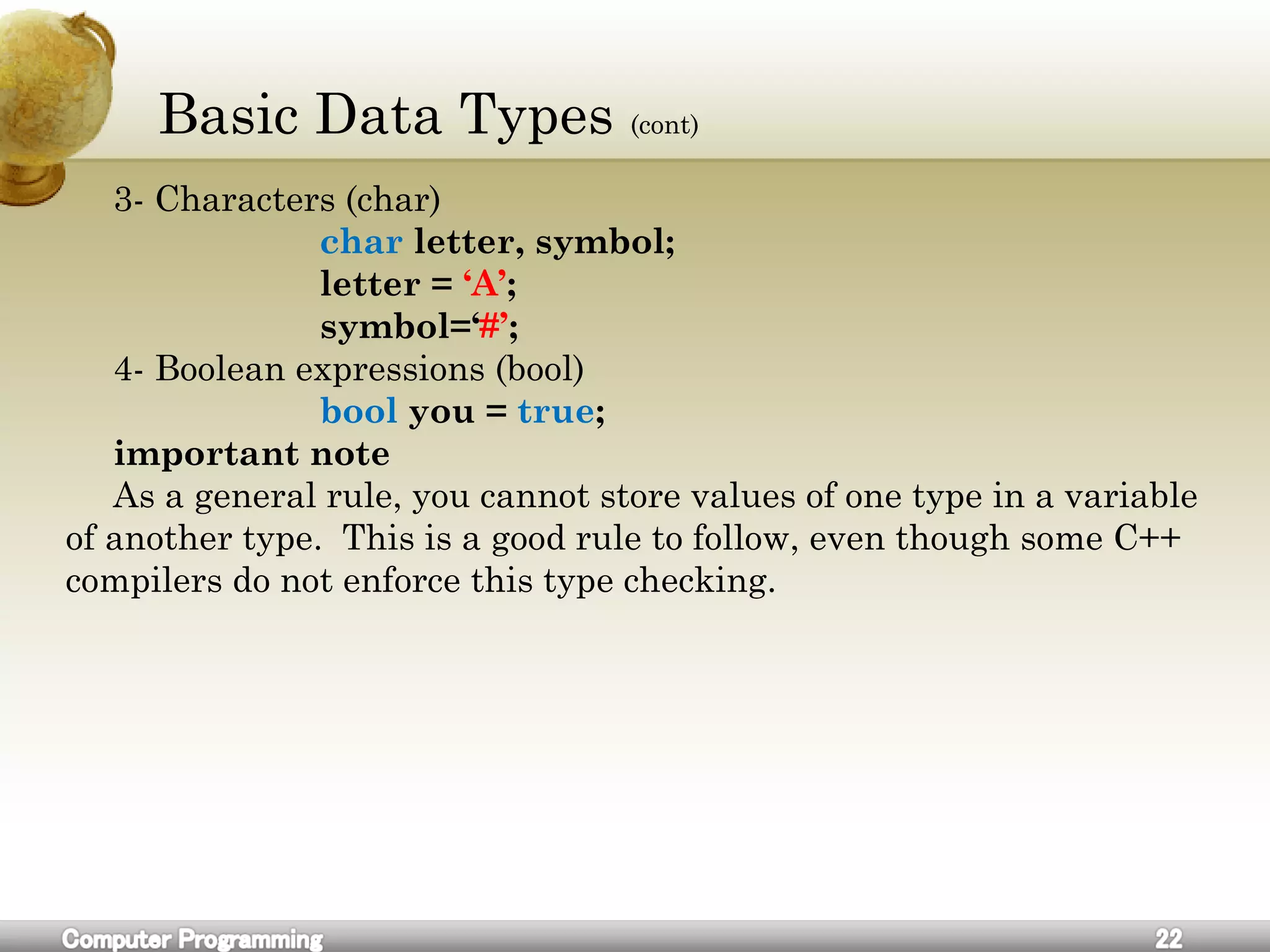
Basic Data Types (cont)
3- Characters (char)
char letter, symbol;
letter = ‘A’;
symbol=‘#’;
4- Boolean expressions (bool)
bool you = true;
important note
As a general rule, you cannot store values of one type in a variable
of another type. This is a good rule to follow, even though some C++
compilers do not enforce this type checking.
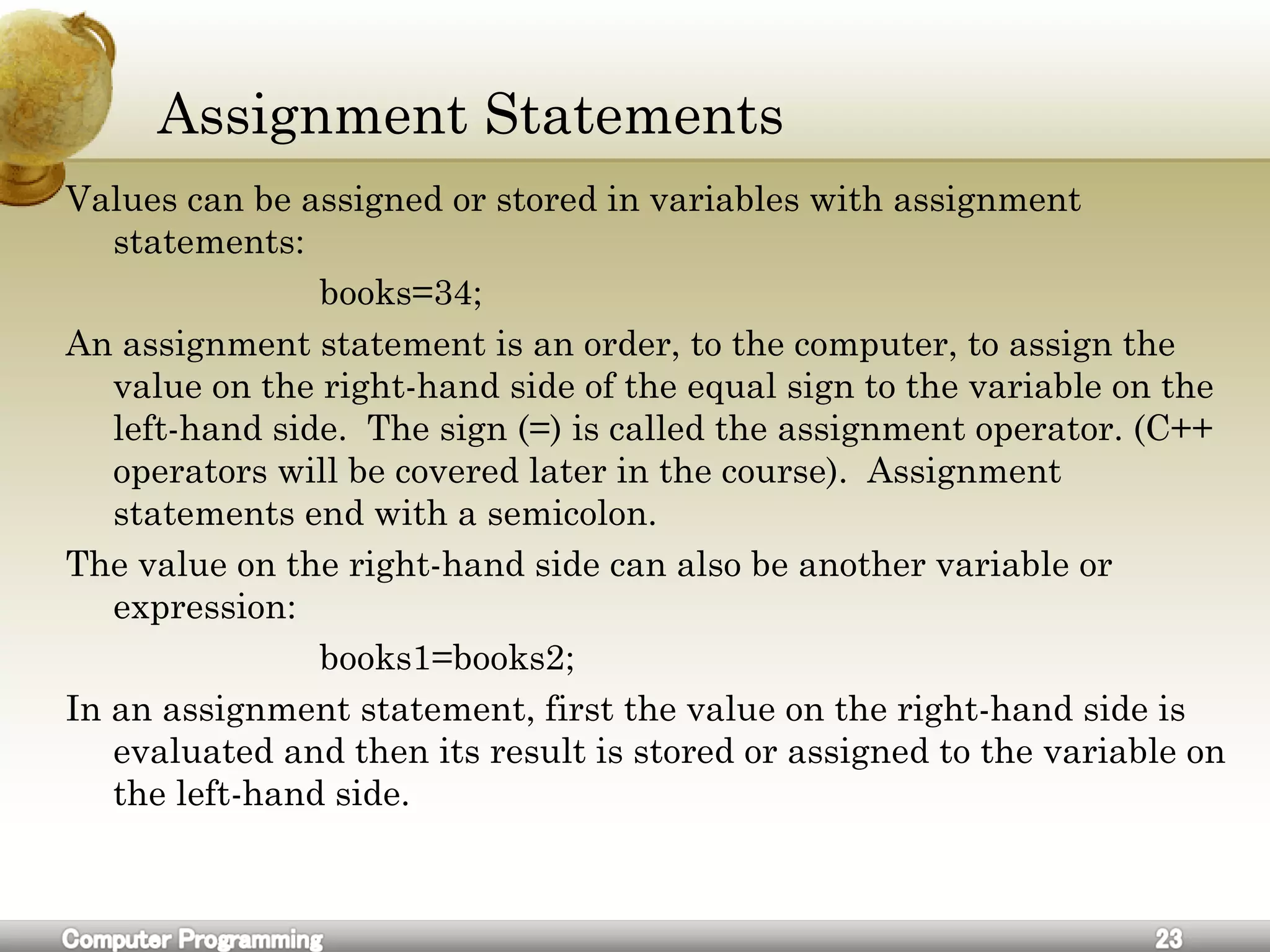
Assignment Statements
Values can be assigned or stored in variables with assignment
statements:
books=34;
An assignment statement is an order, to the computer, to assign the
value on the right-hand side of the equal sign to the variable on the
left-hand side. The sign (=) is called the assignment operator. (C++
operators will be covered later in the course). Assignment
statements end with a semicolon.
The value on the right-hand side can also be another variable or
expression:
books1=books2;
In an assignment statement, first the value on the right-hand side is
evaluated and then its result is stored or assigned to the variable on
the left-hand side.
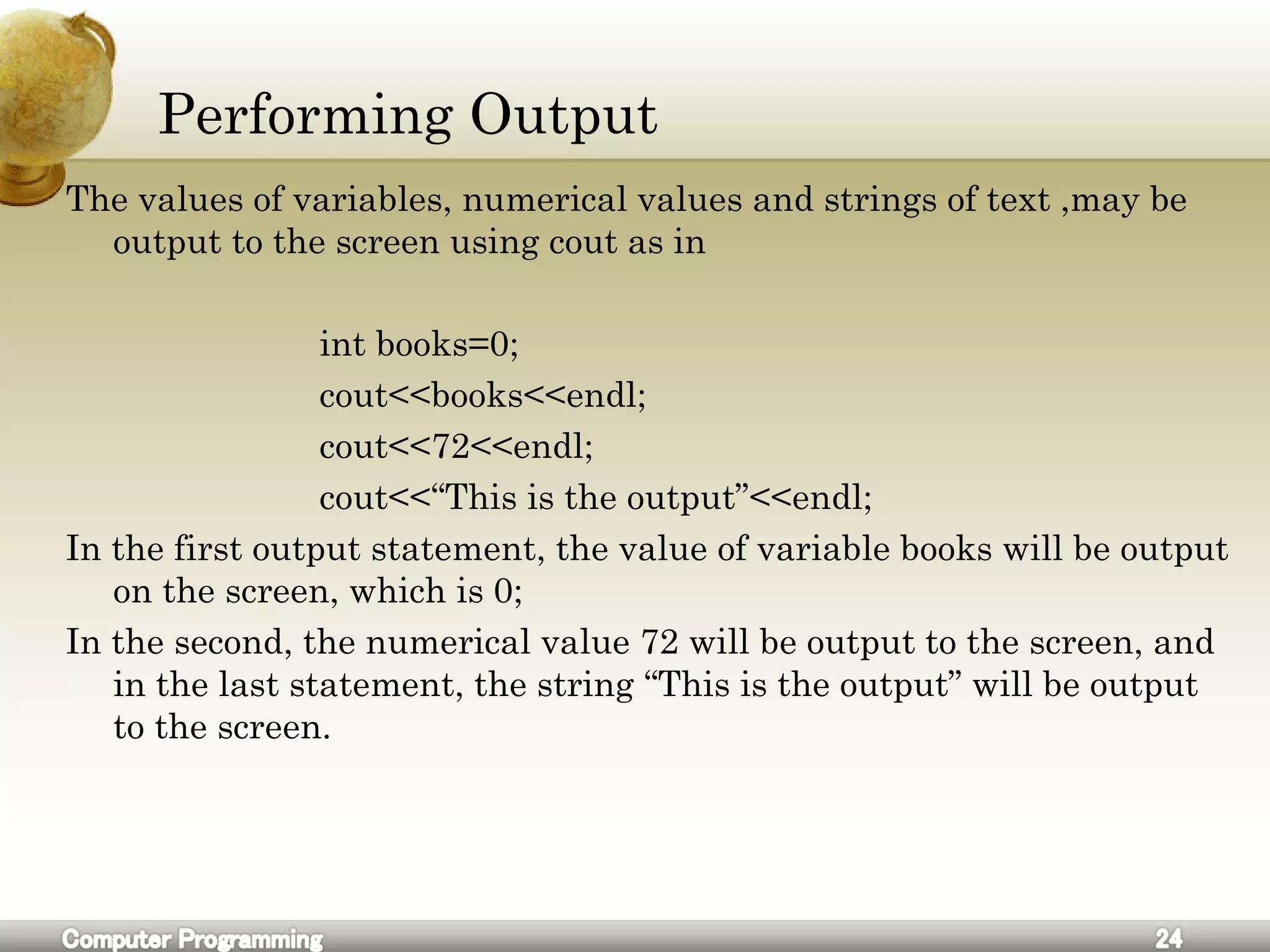
Performing Output
The values of variables, numerical values and strings of text ,may be
output to the screen using cout as in
int books=0;
cout<<books<<endl;
cout<<72<<endl;
cout<<“This is the output”<<endl;
In the first output statement, the value of variable books will be output
on the screen, which is 0;
In the second, the numerical value 72 will be output to the screen, and
in the last statement, the string “This is the output” will be output
to the screen.
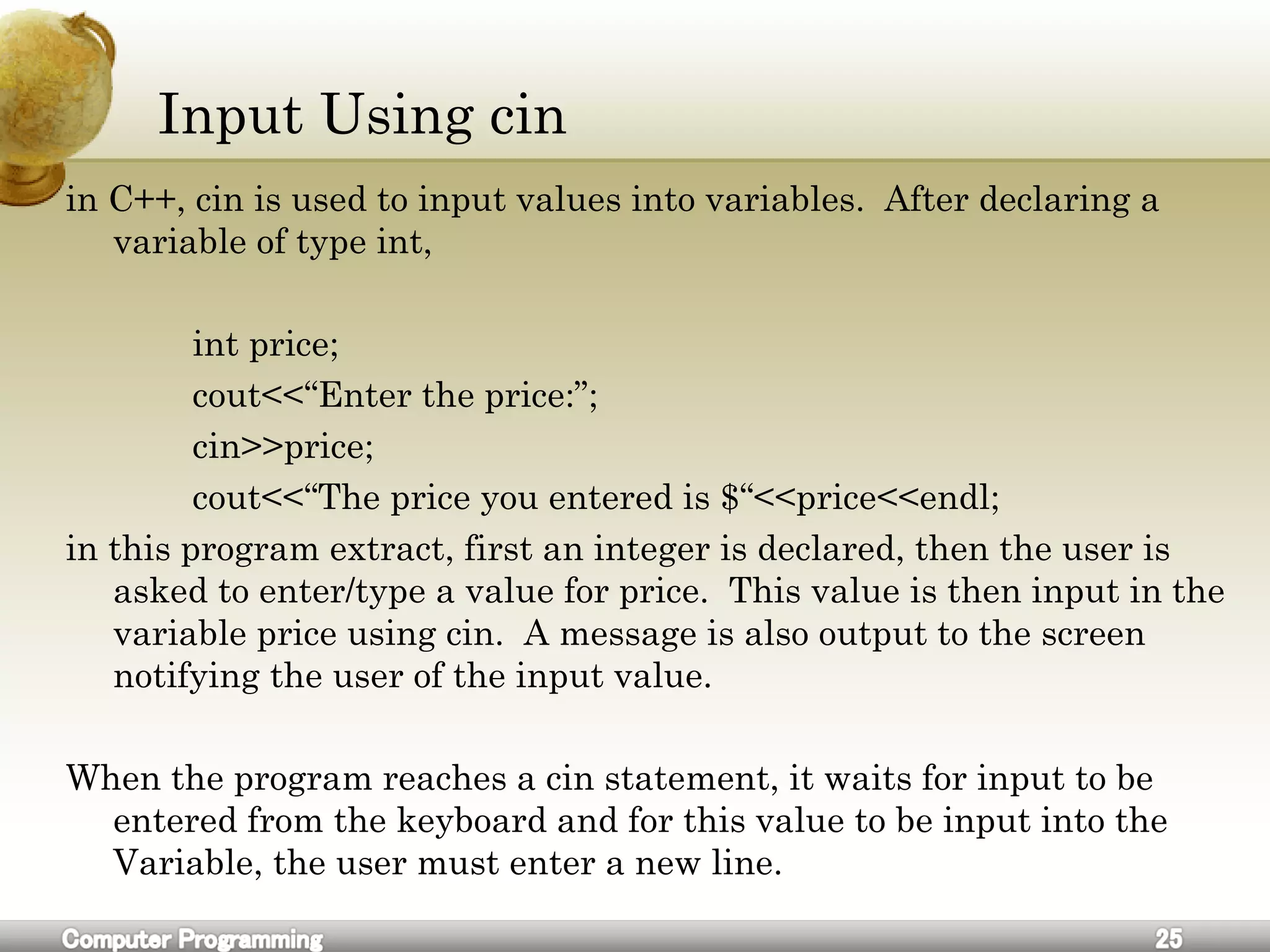
Input Using cin
in C++, cin is used to input values into variables. After declaring a
variable of type int,
int price;
cout<<“Enter the price:”;
cin>>price;
cout<<“The price you entered is $“<<price<<endl;
in this program extract, first an integer is declared, then the user is
asked to enter/type a value for price. This value is then input in the
variable price using cin. A message is also output to the screen
notifying the user of the input value.
When the program reaches a cin statement, it waits for input to be
entered from the keyboard and for this value to be input into the
Variable, the user must enter a new line.
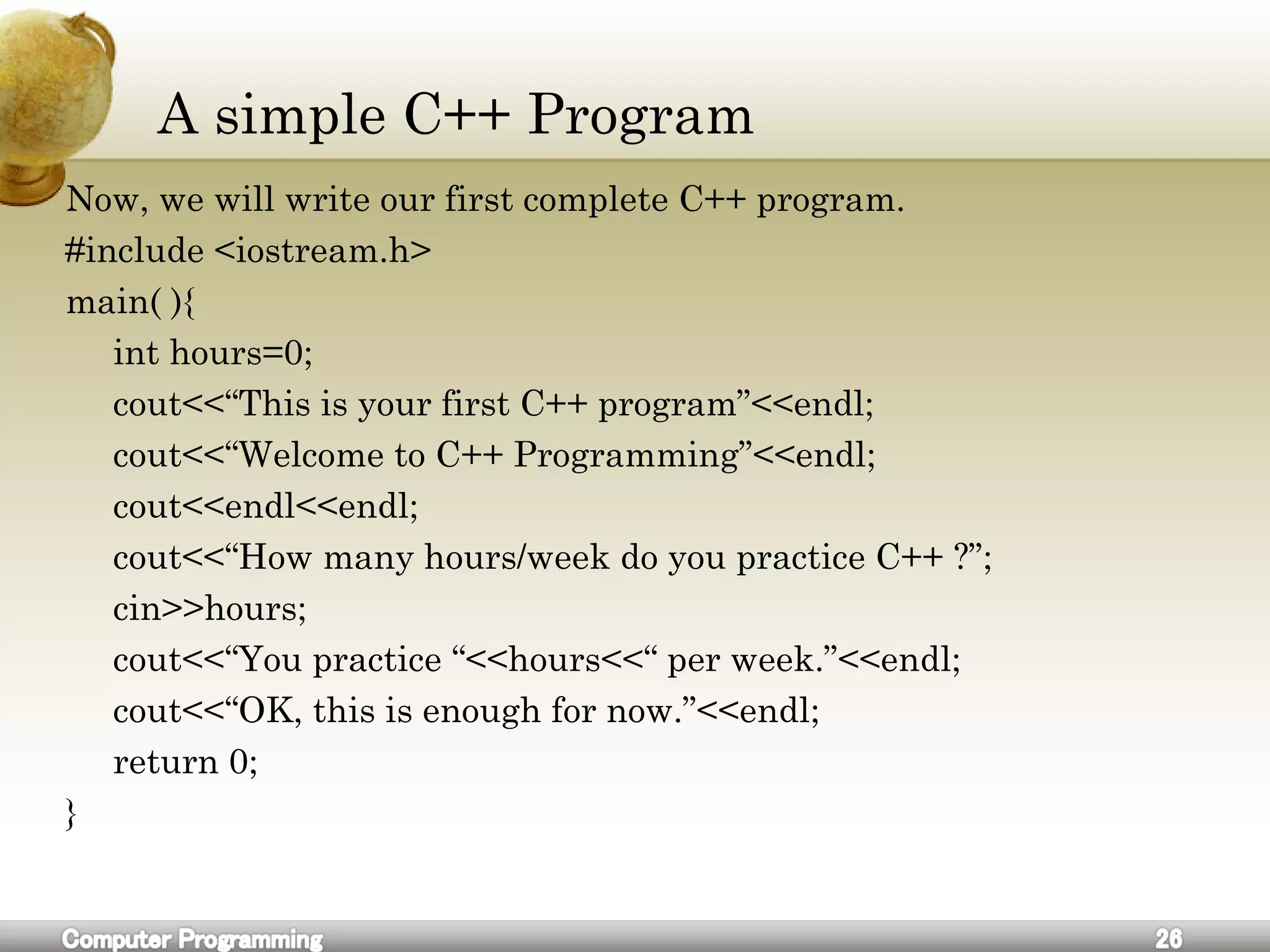
A simple C++ Program
Now, we will write our first complete C++ program.
#include <iostream.h>
main( ){
int hours=0;
cout<<“This is your first C++ program”<<endl;
cout<<“Welcome to C++ Programming”<<endl;
cout<<endl<<endl;
cout<<“How many hours/week do you practice C++ ?”;
cin>>hours;
cout<<“You practice “<<hours<<“ per week.”<<endl;
cout<<“OK, this is enough for now.”<<endl;
return 0;
}

C++ for beginners

  • 1.
    Computer Programming University OfSalahaddin Engineering College Electrical Engineering 2009-2010
  • 2.
    What we learn Wewill begin the study of the language starting with the fundamentals of the language and simple programs; and as we explore more of the language, we will write increasingly larger programs. By the end of this year, every student: • will learn about all the essential programming concepts • will demonstrate a good familiarity with C++ syntax • will be able to write reasonably complex procedural programs
  • 3.
    What We WillLearn The following topics will be covered in this course: • Flow charts and algorithms • Variables and assignment • Input, output (I/O), formatting output • Basic data types • A simple C++ program • Arithmetic operators • Flow of control and loops • Program style • Procedures and functions • Local and global variables, constants • File I/O • Structures and arrays • Numerical analysis
  • 4.
    Problem Solving Engineers usetheir knowledge of science, mathematics, and appropriate experience to find suitable solutions to a problem. Engineering is considered a branch of applied mathematics and science. Creating an appropriate mathematical model of a problem allows them to analyze it (sometimes definitively), and to test potential solutions. Usually multiple reasonable solutions exist, so engineers must evaluate the different design choices on their merits and choose the solution that best meets their requirements.
  • 5.
    How To SolveProblems 1.Define the problem and see if there is a better way to redefine it. 2.Find the way how human solves it. 3.Write down human’s solution 4.Break down this solution to its original steps and do not forget simplest thoughts. 5. match every human activity with computer’s tool. 6.If some activity don’t exist directly in computer find alternatives. 7.Group these tiny computer actions into logically related functions. 8.Combine these functions in a complete solution. 9.Solution Implementation and Verification
  • 6.
  • 7.
    An Algorithm: Bakinga Cake (cont)
  • 8.
    Flowchart A flowchart isa common type of diagram, that represents an algorithm or process, showing the steps as boxes of various kinds, and their order by connecting these with arrows. Flowcharts are used in analyzing, designing, documenting or managing a process or program in various fields.[1]
  • 9.
  • 10.
  • 11.
  • 12.
    Flowchart (cont) Game ofMonopoly Flowchart.
  • 13.
    Pseudocode This is thepseudocode for a Game of Monopoly, including one person's move as a procedure:
  • 14.
    Exercise 1.Find a solutionfor this equation x^2 + x – 9 = 18. using pseudocode and flowchart. 2.How can you replace a broken door. 3.Write a pseudocode that illustrate kids going to the school steps. 4.Draw a flowchart for buying a house.
  • 15.
    Flowchart Example #1 Drawa flowchart to find the sum of first 50 natural numbers
  • 16.
    Flowchart Example #2 Drawa flowchart to find the largest of three numbers A,B, and C.
  • 17.
    Flowchart Example #2 Drawa flowchart for computing factorial N (N!)
  • 18.
    Exercise 1.Draw a flowchartto read a number N and print all its divisors. 2.Draw a flowchart for computing the sum of the digits of any number 3.Draw a flowchart to find the sum of given N numbers. 4.Draw a flowchart to compute the sum of squares of integers from 1 to 50 5.Draw a flowchart to arrange the given data in an ascending order.
  • 19.
    Variables A C++ variableis a placeholder used for storing data. The type of data may be numerical, string, character and any other type that the language uses it. The data in a variable is called its value and it can be changed or deleted. in order to uniquely identify and keep track of a variable, we need to give each variable a name; this is called declaring a variable. it is a good idea to use meaningful names for variables. For example: int books;// this is variable declaration It’s common to initialize variables upon declaration. if a variable is used in a program without being initialized, the results will be unpredictable. Variable initialization can be performed either during declaration using assignment statements as in: int books = 0; // this is variable declaration and initialization
  • 20.
    Variables (cont) Values canbe assigned or stored in variables with assignment statements: books=34; //this is assignment statement An assignment statement is an order, to the computer, to assign the value on the right-hand side of the equal sign to the variable on the left-hand side.
  • 21.
    Basic Data Types Tellwhich continent your country is located on and which countries are its neighbors. 1- Integer Numbers (int) 2- Real Numbers(double)
  • 22.
    Basic Data Types(cont) 3- Characters (char) char letter, symbol; letter = ‘A’; symbol=‘#’; 4- Boolean expressions (bool) bool you = true; important note As a general rule, you cannot store values of one type in a variable of another type. This is a good rule to follow, even though some C++ compilers do not enforce this type checking.
  • 23.
    Assignment Statements Values canbe assigned or stored in variables with assignment statements: books=34; An assignment statement is an order, to the computer, to assign the value on the right-hand side of the equal sign to the variable on the left-hand side. The sign (=) is called the assignment operator. (C++ operators will be covered later in the course). Assignment statements end with a semicolon. The value on the right-hand side can also be another variable or expression: books1=books2; In an assignment statement, first the value on the right-hand side is evaluated and then its result is stored or assigned to the variable on the left-hand side.
  • 24.
    Performing Output The valuesof variables, numerical values and strings of text ,may be output to the screen using cout as in int books=0; cout<<books<<endl; cout<<72<<endl; cout<<“This is the output”<<endl; In the first output statement, the value of variable books will be output on the screen, which is 0; In the second, the numerical value 72 will be output to the screen, and in the last statement, the string “This is the output” will be output to the screen.
  • 25.
    Input Using cin inC++, cin is used to input values into variables. After declaring a variable of type int, int price; cout<<“Enter the price:”; cin>>price; cout<<“The price you entered is $“<<price<<endl; in this program extract, first an integer is declared, then the user is asked to enter/type a value for price. This value is then input in the variable price using cin. A message is also output to the screen notifying the user of the input value. When the program reaches a cin statement, it waits for input to be entered from the keyboard and for this value to be input into the Variable, the user must enter a new line.
  • 26.
    A simple C++Program Now, we will write our first complete C++ program. #include <iostream.h> main( ){ int hours=0; cout<<“This is your first C++ program”<<endl; cout<<“Welcome to C++ Programming”<<endl; cout<<endl<<endl; cout<<“How many hours/week do you practice C++ ?”; cin>>hours; cout<<“You practice “<<hours<<“ per week.”<<endl; cout<<“OK, this is enough for now.”<<endl; return 0; }

Editor's Notes

  • #3 Insert a map of your country.
  • #4 Insert a map of your country.
  • #5 Insert a map of your country.
  • #6 Insert a map of your country.
  • #7 Insert a map of your country.
  • #8 Insert a map of your country.
  • #9 Insert a map of your country.
  • #10 Insert a map of your country.
  • #11 Insert a map of your country.
  • #12 Insert a map of your country.
  • #13 Insert a map of your country.
  • #14 Insert a map of your country.
  • #15 Insert a map of your country.
  • #16 Insert a map of your country.
  • #17 Insert a map of your country.
  • #18 Insert a map of your country.
  • #19 Insert a map of your country.
  • #20 Insert a map of your country.
  • #21 Insert a map of your country.
  • #22 Insert a map of your country.
  • #23 Insert a map of your country.
  • #24 Insert a map of your country.
  • #25 Insert a map of your country.
  • #26 Insert a map of your country.
  • #27 Insert a map of your country.